1
Chapter 6: Engineering MODE
6.1 USING Engineering mode
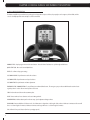
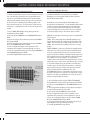
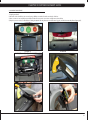
1. To enter Engineering Mode, hold the ELEVATION DOWN AND SPEED DOWN keys
for three seconds until Manager Mode appears on the middle LED display.
2. Press any UP arrow key and Engineering Mode will appear on the display.
3. Press ENTER once Engineering Mode is displayed.
4. To scroll between programs in the Engineering Mode, press any UP or DOWN
keys.
5. Press ENTER to modify the program settings once displayed.
6. Press any UP or DOWN key to change value.
7. Once program setting is correct, press ENTER to save.
8. Press the EMERGENCY STOP to exit Engineering Mode.
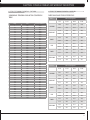
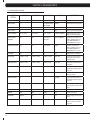
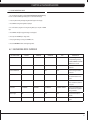
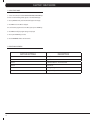
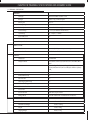
6.2 Engineering Mode OVerview
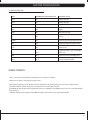
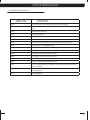
Custom Setting
Default
Minimum
Maximum
Unit
Description
Disable Errors
ON
ON
OFF
N/A
Resets error log.
Accomplished by pressing
ELEVATION DOWN and SPEED
DOWN for 3-5 seconds.
Elevation Minimum
28
20
239
N/A
Controls the low elevation
parameter.
Elevation Maxiimum
230
20
239
N/A
Controls the high elevation
parameter.
Auto Calibration
N/A
N/A
N/A
N/a
This function is to calibrate
the treadmill elevation and
speed.
Speed Units
Mile
Mile
Kilometer
distance
Measurement unit used for
calorie calculations, distance,
and speed.
Pause Time
30 seconds
5 seconds
10 minutes
second / minute
Controls the maximum time
the treadmill can be paused
during a workout.
Machine Type
N/A
N/A
N/A
N/a
Sets the machine ID, not
editable.
RPM Parameter
2055
100
3000
N/A
Checks and adjusts the low
speed.
15