1
User
Instructions
GB - User Instructions
GB
Your programmable room thermostat
The TP7000 allows you to programme up to 6 different time
and temperature settings for each day of the week, providing
complete flexibility. It provides several energy saving features
and features several useful user overrides, including a 99
day holiday mode.
Preset Programmes
Your TP7000 comes ready programmed with a set of operating
times and temperatures which often suit most people.
Weekdays (Mon-Fri)
Weekend (Sat-Sun)
Event
Time
Temp °C
Event
Time
Temp °C
1
06:30
20
1
07:30
20
2
08:30
15
2
09:30
20
3
11:30
20
3
11:30
20
4
13:30
15
4
13:30
20
5
16:30
21
5
16:30
21
6
22:30
15
6
22:30
15
If you want, you can change any of these settings by following
the instructions on pages 9-10. First follow the steps on page 8
to set your display preferences and the correct time and date.
Before you start
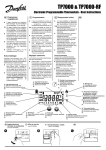
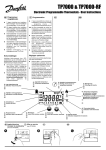
Open the flap on the front of your
programmer. Using a non-metallic
object, press the recessed RESET
button, until you hear a click and the
display goes blank.
RESET
7