1
2-PORT AND 4-PORT AUDIO/VIDEO SPLITTERS
3. Installation
3.1 Basic Installation
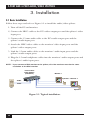
Follow these steps and refer to Figure 3-1 to install the audio/video splitter.
1. Turn off the PC and monitor.
2. Connect the HD15 cable to the PC’s video output port and the splitter’s video
input port.
3. Connect the 3.5-mm audio cable to the PC’s audio output port and the
splitter’s audio input port.
4. Attach the HD15 video cables to the monitors’ video input ports and the
splitter’s video output ports.
5. Link the 3.5-mm audio cables to the monitors’ audio input ports and the
splitter’s audio output ports.
6. Plug the 3.5-mm headphone cables into the monitors’ audio output ports and
the splitter’s audio input ports.
NOTE: If you connect a DDC monitor to the splitter, all of the monitors must be the same
resolution as the DDC monitor.
4-Port Audio/
Video Splitter
(AC650A-4)
Monitor 1
Speakers Monitor 2
Audio
Video
PC
Speakers
Figure 3-1. Typical installation.
10