1
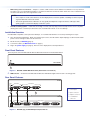
DDC routing to the local monitor — Output 1 is used as a DDC reference and is labeled “Local Monitor” for easy reference.
The video source uses the bidirectonal DDC to communicate with the local monitor, which allows the source to determine the
resolution and refresh rate of the signal that it sends.
•
NOTES:
• Since output 1 is used as the reference, all other display devices must be capable of handling resolutions equal to
or greater than that of the local monitor.
• The actual signal transmission distance can vary greatly and depends on signal resolution, cable type, cable
quality, graphics card, and the display used in the system.
Versatile mounting options — Both units are 1U high, 3 inches (7.62 cm) deep, and 1/2 rack (8.7 inches or 22.1 cm) wide,
allowing them to be conveniently mounted in a rack, mounted under a desk, or set on a tabletop.
•
Installation Overview
Both distribution amplifiers can be placed on tabletops, or mounted under furniture or in racks by following these steps:
1. Turn off all electrical equipment. Make sure that the input sources, the DA and the output display(s) are all turned off and all
power sources and signal cables are disconnected.
2. Mount the unit (see Mounting page 5).
3. Connect the cables (see DVI Connections on page 3).
4. Plug in the power supply (see page 3), then turn on the display devices and input devices.
Front Panel Features
The front panels of the DVI DA2 and DVI DA4 are identical and shown in the illustration below
DVI DA SERIES
DVI DISTRIBUTION AMPLIFIER
1
Figure 2. DVI DA2 and DVI DA4 Front Panel (both models are identical)
a
LED indicator — On both the DVI DA2 and DVI DA4, the LED indicator lights when the unit is receiving power.
Rear Panel Features
DVI DA2
POWER
12V
0.4A MAX
DVI-D INPUT
DVI-D OUTPUT
1
2
LOCAL MONITOR
1
2
4
3
DVI DA4
POWER
12V
0.4A MAX
DVI-D INPUT
DVI-D OUTPUTS
1
2
3
LOCAL MONITOR
Figure 3. DVI DA2 (top) and DVI DA4 (bottom) Rear Panels
2
4
a Power input
b Input connector
c Output connector
d Local Monitor
connector