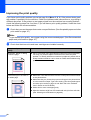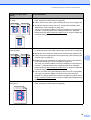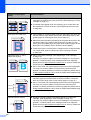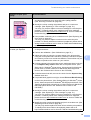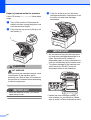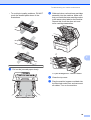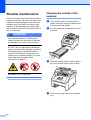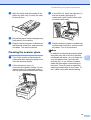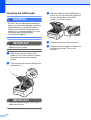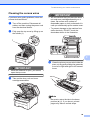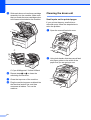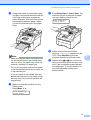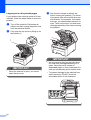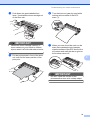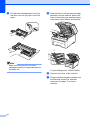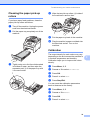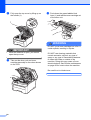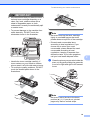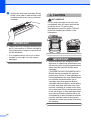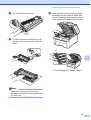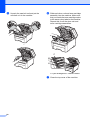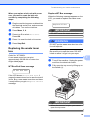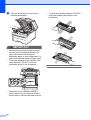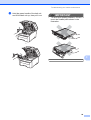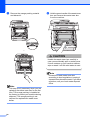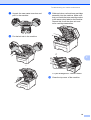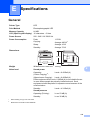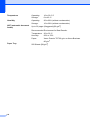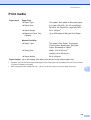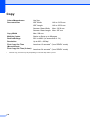
1
USER’S GUIDE DCP-9010CN Version 0 UK/IRE If you need to call Customer Service Please complete the following information for future reference: Model Number: DCP-9010CN Serial Number: 1 Date of Purchase: Place of Purchase: 1 The serial number is on the back of the unit. Retain this User’s Guide with your sales receipt as a permanent record of your purchase, in the event of theft, fire or warranty service. Register your product on-line at http://www.brother.com/registration/ By registering your product with Brother, you will be recorded as the original owner of the product. Your registration with Brother: may serve as confirmation of the purchase date of your product should you lose your receipt; and may support an insurance claim by you in the event of product loss covered by insurance. © 2009 Brother Industries, Ltd. Compilation and Publication Notice Under the supervision of Brother Industries Ltd., this manual has been compiled and published, covering the latest product descriptions and specifications. The contents of this manual and the specifications of this product are subject to change without notice. Brother reserves the right to make changes without notice in the specifications and materials contained herein and shall not be responsible for any damages (including consequential) caused by reliance on the materials presented, including but not limited to typographical and other errors relating to the publication. i Table of Contents Section I 1 General General information 2 Using the documentation .......................................................................................2 Symbols and conventions used in the documentation ....................................2 Accessing the Software User’s Guide and Network User’s Guide ........................3 Viewing documentation ...................................................................................3 Accessing Brother Support (For Windows®) .........................................................5 Control panel overview ..........................................................................................6 Data LED indications .......................................................................................8 2 Loading paper and documents 9 Loading paper and print media ..............................................................................9 Loading paper in the standard paper tray........................................................9 Loading paper in the manual feed slot ..........................................................11 Unprintable area ............................................................................................15 Acceptable paper and other print media..............................................................16 Recommended paper and print media ..........................................................16 Type and size of paper ..................................................................................16 Handling and using special paper .................................................................18 Loading documents .............................................................................................21 Using the automatic document feeder (ADF) ................................................21 Using the scanner glass ................................................................................22 3 General Setup 23 Paper settings......................................................................................................23 Paper Type ....................................................................................................23 Paper Size .....................................................................................................23 Volume settings ...................................................................................................23 Beeper volume ..............................................................................................23 Ecology features ..................................................................................................24 Toner Save ....................................................................................................24 Sleep Time ....................................................................................................24 LCD Contrast .......................................................................................................24 ii Section II Copy 4 Making copies 26 How to copy .........................................................................................................26 Copy mode ....................................................................................................26 Making a single copy ..................................................................................... 26 Making multiple copies ..................................................................................26 Stop copying..................................................................................................26 Copy options (temporary settings).......................................................................27 Enlarging or reducing the image copied ........................................................27 Using the Options key ...................................................................................28 Improving copy quality...................................................................................29 Sorting copies using the ADF ........................................................................29 Adjusting Contrast, Colour and Brightness....................................................30 Making N in 1 copies (page layout) ...............................................................31 Out of memory message ..................................................................................... 32 Section III Software 5 Software and Network features 34 How to read the HTML User’s Guide...................................................................34 Windows® ......................................................................................................34 Macintosh ......................................................................................................34 Section IV Appendixes A Safety and legal 36 Choosing a location .............................................................................................36 To use the machine safely...................................................................................37 Important safety instructions..........................................................................37 Libtiff Copyright and License ...............................................................................39 Trademarks.......................................................................................................... 40 B Options 41 Memory board......................................................................................................41 Installing extra memory .................................................................................41 iii C Troubleshooting and routine maintenance 43 Troubleshooting ...................................................................................................43 If you are having difficulty with your machine ................................................43 Improving the print quality .............................................................................48 Error and maintenance messages.......................................................................55 Document jams..............................................................................................60 Paper jams ....................................................................................................61 Routine maintenance...........................................................................................66 Cleaning the outside of the machine .............................................................66 Cleaning the scanner glass ...........................................................................67 Cleaning the LED heads................................................................................68 Cleaning the corona wires .............................................................................69 Cleaning the drum unit ..................................................................................70 Cleaning the paper pick-up rollers .................................................................75 Calibration .....................................................................................................75 Auto Registration ...........................................................................................76 Manual Registration.......................................................................................76 Replacing the consumable items.........................................................................77 Replacing a Toner cartridge ..........................................................................79 Drum units .....................................................................................................84 Replacing the belt unit ...................................................................................89 Replacing the waste toner box ......................................................................93 Replacing periodic maintenance parts.................................................................98 Machine Information ............................................................................................98 Checking the Serial Number..........................................................................98 Checking the Page Counters.........................................................................98 User Settings List ..........................................................................................98 Network Configuration List ............................................................................99 Checking the remaining life of parts ..............................................................99 Reset functions ..............................................................................................99 How to reset the machine ............................................................................100 Packing and shipping the machine ....................................................................100 D Menu and features 105 On-screen programming....................................................................................105 Menu table ...................................................................................................105 Memory storage...........................................................................................105 Menu keys .........................................................................................................105 How to access the menu mode ...................................................................106 Menu table .........................................................................................................107 Entering text.......................................................................................................112 iv E Specifications 113 General ..............................................................................................................113 Print media.........................................................................................................115 Copy ..................................................................................................................116 Scan ..................................................................................................................117 Print ...................................................................................................................118 Interfaces ...........................................................................................................119 Computer requirements .....................................................................................120 Consumable items .............................................................................................121 Ethernet wired network ......................................................................................122 F Glossary 124 G Index 125 v vi Section I General General information Loading paper and documents General Setup I 2 9 23 1 General information Using the documentation WARNING 1 Warnings tell you what to do to prevent possible personal injury. Thank you for buying a Brother machine! Reading the documentation will help you make the most of your machine. Symbols and conventions used in the documentation The following symbols and conventions are used throughout the documentation. Bold Italics Courier New 2 Bold style identifies keys on the machine control panel or computer screen. Italicized style emphasizes an important point or refers you to a related topic. Courier New font identifies the messages shown on the LCD of the machine. CAUTION 1 Cautions specify procedures you must follow or avoid to prevent possible minor injuries. IMPORTANT IMPORTANT describes procedures you must follow or avoid to prevent possible machine problems or damage to other objects. Electrical Hazard icons alert you to a possible electrical shock. Hot Surface icons warn you not to touch machine parts that are hot. Notes tell you how you should respond to a situation that may arise or give tips about how the current operation works with other features. 1 General information Accessing the Software User’s Guide and Network User’s Guide c 1 This User’s Guide does not contain all the information about the machine such as how to use the advanced features of Printer, Scanner, and Network. When you are ready to learn detailed information about these operations, read the Software User’s Guide and Network User’s Guide. Viewing documentation Viewing documentation (Windows®) To view the documentation, from the Start menu, point to Brother, DCP-XXXX (where XXXX is your model name) from the program group, and then click User’s Guides in HTML format. If you have not installed the software, you can find the documentation by following the instructions below: a b Turn on your PC. Insert the Brother CD-ROM labelled Windows® into your CD-ROM drive. If the language selection screen appears, click your language. If the model name screen appears, click your model name. The CD-ROM main menu will appear. If this window does not appear, use Windows® Explorer to find and run the start.exe program from the root directory of the Brother CD-ROM. 1 1 d e Click Documentation. Click the documentation you want to read: HTML documents (3 manuals): User’s Guide for stand-alone operations, Software User’s Guide and Network User’s Guide in HTML format. This format is recommended for viewing on your computer. PDF documents (4 manuals): User’s Guide for stand-alone operations, Software User’s Guide, Network User’s Guide and Quick Setup Guide. This format is recommended for printing the manuals. Click to go to the Brother Solutions Center, where you can view or download the PDF documents. (Internet access and PDF Reader software are required.) 3 1 Chapter 1 How to find scanning instructions 1 There are several ways you can scan documents. You can find the instructions as follows: Software User’s Guide: 1 Viewing documentation (Macintosh) a Turn on your Macintosh. Insert the Brother CD-ROM labelled Macintosh into your CD-ROM drive. b The following window will appear. c d e Double-click the Documentation icon. Scanning a document using the TWAIN driver in Chapter 2 Scanning a document using the WIA driver (Windows® XP/Windows Vista®) in Chapter 2 Using ControlCenter3 in Chapter 3 Network Scanning in Chapter 12 ScanSoft™ PaperPort™ 11SE with OCR How-to-Guides: 1 The complete ScanSoft™ PaperPort™ 11SE with OCR How-to-Guides can be viewed from the Help selection in the ScanSoft™ PaperPort™ 11SE application. How to find Network setup instructions Your machine can be connected to a wired network. You can find basic setup instructions in the Quick Setup Guide. For more information about network setup please see the Network User's Guide. 1 f Double-click your language folder. Double-click top.html to view the User’s Guide, Software User’s Guide and Network User’s Guide in HTML format. Click the documentation you want to read. User’s Guide Software User’s Guide Network User’s Guide Note The documents are also available in PDF format (4 manuals): User’s Guide for stand-alone operations, Software User’s Guide, Network User’s Guide and Quick Setup Guide. The PDF format is recommended for printing the manuals. Double-click Brother Solutions Center icon to go to the Brother Solutions Center, where you can view or download the PDF documents. (Internet access and PDF Reader software are required.) 4 1 General information How to find scanning instructions 1 There are several ways you can scan documents. You can find the instructions as follows: Software User’s Guide: 1 Scanning in Chapter 8 Using ControlCenter2 in Chapter 9 1 1 You can find all the contacts you will need, such as Web support (Brother Solutions Center) and on the Brother CD-ROM. Click Brother Support on the main menu. The following screen will appear: Network Scanning in Chapter 12 Presto! PageManager User’s Guide: Accessing Brother Support (For Windows®) 1 The complete Presto! PageManager User’s Guide can be viewed from the Help selection in the Presto! PageManager application. How to find Network setup instructions Your machine can be connected to a wired network. You can find basic setup instructions in the Quick Setup Guide. For more information about network setup please see the Network User's Guide. 1 To access our website (http://www.brother.com/), click Brother Home Page. For the latest news and product support information (http://solutions.brother.com/), click Brother Solutions Center. To visit our website for original Brother Supplies (http://www.brother.com/original/), click Supplies Information. To return to the main page, click Back or if you have finished, click Exit. 5 Chapter 1 Control panel overview 1 1 2 3 4 Stack Copies:01 100% nnonn Auto 10 1 Copy and Print keys: Copy keys: Options You can quickly and easily choose temporary settings for copying. Enlarge/Reduce Reduces or enlarges copies. Quality Lets you change the quality for the next copy. Print keys: Secure You can print data saved in the memory when you enter your four-digit password. (For details about using the Secure key, see the Software User’s Guide on the CD-ROM.) Job Cancel Cancels a programmed print job and clears it from the machine’s memory. To cancel multiple print jobs, hold down this key until the LCD shows Job Cancel (All). 6 9 2 Data LED The LED will flash depending on the machine status. 3 Error LED Blinks in orange when the LCD displays an error or an important status message. 4 LCD Displays messages to help you set up and use your machine. General information 4 5 6 1 7 es:01 Auto 8 5 Clear/Back Deletes entered data or lets you cancel the current setting. OK Lets you store your settings in the machine. Selection keys: d or c Press to scroll backwards or forwards through menu selections. a or b Press to scroll through the menus and options. 6 Numeric keys Use these keys to enter text. 7 Stop/Exit Stops an operation or exits from a menu. 8 Start: Colour Lets you start making copies in full colour. Mono Lets you start making copies in black and white. 9 Scan Scan Puts the machine in Scan mode. (For details about scanning, see the Software User’s Guide on the CD-ROM.) 10 Menu Lets you access the Menu to program your settings in this machine. 7 Chapter 1 Data LED indications 1 The Data LED (light emitting diode) will flash depending on the machine’s status. LED Machine Status Description Ready Mode The machine is ready to print, in sleep mode, there is no print data, or the power switch is off. Receiving Data The machine is either receiving data from the computer, processing data in memory, or printing data. Data Remaining in Memory Print data remains in the machine memory. Green (blinking) Green 8 2 Loading paper and documents Loading paper and print media b 2 The machine can feed paper from the standard paper tray. 2 While pressing the green paper-guide release lever (1), slide the paper guides to fit the paper size you are loading in the tray. Make sure that the guides are firmly in the slots. When you put paper into the paper tray, note the following: If your application software supports paper size selection on the print menu, you can select it through the software. If your application software does not support it, you can set the paper size in the printer driver or by using the control panel buttons. Loading paper in the standard paper tray 1 2 Note Printing on plain paper, thin paper or recycled paper from the paper tray a Pull the paper tray completely out of the machine. 2 For Legal and Folio size paper, press the release button (1) in the bottom of the paper tray and then pull out the back of the paper tray. (Legal or Folio size paper is not available in some regions.) 1 9 2 Chapter 2 c Fan the stack of paper well to avoid paper jams and misfeeds. d Put paper in the tray, and make sure that the paper is below the maximum paper mark (1). The side to be printed on must be face down. 1 IMPORTANT Make sure the paper guides touch the sides of the paper so it will feed correctly. If you do not do this, it may cause damage to your machine. e 10 Put the paper tray firmly back in the machine. Make sure that it is completely inserted into the machine. f Lift up the support flap (1) to prevent paper from sliding off the face-down output tray or remove each page as soon as it comes out of the machine. 1 Loading paper and documents Loading paper in the manual feed slot b Open the manual feed slot cover. 2 You can load envelopes and special print media one at a time into this slot. Use the manual feed slot to print or copy on labels, envelopes or thicker paper. Printing on plain paper, recycled paper or bond paper from the manual feed slot Before loading, press the corners and sides of the envelopes to make them as flat as possible. Note 2 2 c Using both hands, slide the manual feed slot paper guides to the width of the paper that you are going to use. The machine automatically turns on the Manual Feed mode when you put paper in the manual feed slot. a Lift up the support flap (1) to prevent paper from sliding off the face-down output tray or remove each page as soon as it comes out of the machine. 1 11 Chapter 2 d Using both hands, put one piece of paper in the manual feed slot with the print side face up until the front edge of the paper touches the paper feed roller. Wait until the machine automatically feeds the paper. When you feel the machine pull in the paper, let go. Printing on thick paper, labels, envelopes or small paper 2 When the back output tray is pulled down, the machine has a straight paper path from the manual feed slot through to the back of the machine. Use this paper feed and output method when you want to print on thick paper, labels, envelopes or paper that is smaller than 105 × 148 mm (or A6 size). Note • Remove each printed sheet or envelope immediately to prevent a paper jam. • The machine automatically turns on the Manual Feed mode when you put paper in the manual feed slot. 12 a Open the back cover (back output tray). b <For printing envelopes only> Pull down the two grey levers, one on the left-hand side and one on the right-hand side, toward you as shown in the illustration below. Loading paper and documents c d Open the manual feed slot cover. e Using both hands, put one sheet of paper or one envelope in the manual feed slot until the front edge of the paper or envelope touches the paper feed roller. When you feel the machine pull in the paper, let go. Using both hands, slide the manual feed slot paper guides to the width of the paper that you are going to use. 13 2 Chapter 2 Note • Put the paper into the manual feed slot with the side to be printed face up. • You can still use the machine while the scanner is up. To close the scanner, push it down with both hands. • Make sure that the paper or print media (see Acceptable paper and other print media on page 16) is straight and in the correct position on the manual feed slot. If it is not, the paper may not be fed correctly, resulting in a skewed printout or a paper jam. • Do not put more than one sheet of paper in the manual feed slot at any one time, as it may cause a jam. • Pull the paper out completely when you retry putting the paper into the manual feed slot. • If you put paper or other print media in the manual feed slot before the machine is in the Ready mode, an error may occur and the machine will stop printing. • To easily remove a small printout from the output tray, lift up the scanner by using both hands as shown in the illustration. 14 • When the top cover is open, you cannot open the scanner. Loading paper and documents Unprintable area 2 Unprintable area for copies 2 The figures below show unprintable areas. 2 Usage 2 2 Document Size Top (1) Bottom (1) Right (2) Letter 4 mm 4 mm A4 4 mm 3 mm 1 Copy Left (2) 1 Note This unprintable area shown above is for a single copy or a 1 in 1 copy using A4 size paper. The area that cannot be printed on will vary by paper size. Unprintable area when printing from a computer 2 When using the printer driver the printable area is smaller than the paper size, as shown below. Portrait Landscape 2 2 2 1 2 1 1 1 Windows® printer driver and Macintosh printer driver BRScript Driver for Windows® and Macintosh 1 4.23 mm 2 4.23 mm Note The area that cannot be printed on may vary depending on the paper size and the printer driver you are using. The unprintable area shown above is for A4 size paper. 15 Chapter 2 Acceptable paper and other print media Type and size of paper 2 Print quality may vary according to the type of paper you are using. For best results, follow the instructions below: Use paper made for plain paper copying. Use paper that is 75 to 90 g/m2. DO NOT put different types of paper in the paper tray at the same time because it may cause paper jams or misfeeds. Use long grain paper with a neutral Ph value, and a moisture content of approx. 5%. Paper Type Item Plain paper Xerox Premier TCF 80 g/m2 Xerox Business 80 g/m2 Recycled Paper Xerox Recycled Supreme 80 g/m2 Labels Avery laser label L7163 Envelope Antalis River series (DL) 16 Since the standard paper tray is a universal type, you can use any of the paper sizes (one paper type and size at a time) listed in the table in Paper capacity of the paper trays on page 17. The standard paper tray can hold up to 250 sheets of A4/Letter, Legal or Folio size paper (80 g/m2). Paper can be loaded up to the maximum paper mark on the sliding paper width guide. 2 The manual feed slot can hold a sheet with a size of 76.2 to 220 mm wide and 116 to 406.4 mm long. You can use the manual feed slot if you are using special paper, envelopes or labels. Avoid touching the printed surface of the paper immediately after printing. To get the best print quality, we suggest using the following paper. 2 Manual feed slot For correct printing, you must choose the same paper size from your software application as the paper in the tray. Recommended paper and print media The machine loads paper from the installed standard paper tray or manual feed slot. Standard paper tray You can use the following types of print media: thin paper, plain paper, thick paper, bond paper, recycled paper, labels or envelopes. 2 The name for the paper trays in the printer driver in this Guide are as follows: 2 Tray and slot Name Standard paper tray Tray Manual feed slot Manual Feed 2 Loading paper and documents Paper capacity of the paper trays Paper Tray 2 Paper size Paper types No. of sheets A4, Letter, Legal, Executive, A5, A5 (Long Edge), A6, B5 (ISO), B6 Plain paper, Thin paper and Recycled paper up to 250 [80 g/m2] 2 (ISO) and Folio 1. Manual feed slot (Manual Feed) 1 Width: 76.2 to 220 mm Plain paper, Thin paper, Thick paper, Thicker Length: 116 to 406.4 mm paper, Bond paper, Recycled paper, Envelopes and Labels. 1 sheet [80 g/m2] 1 Envelope Folio size is 215.9 mm x 330.2 mm. Recommended paper specifications 2 The following paper specifications are suitable for this machine. Basis weight 75-90 g/m2 Thickness 80-110 µm Roughness Higher than 20 sec. Stiffness 90-150 cm3/100 Grain direction Long grain Volume resistivity 10e9-10e11 ohm Surface resistivity 10e9-10e12 ohm-cm Filler CaCO3 (Neutral) Ash content Below 23 wt% Brightness Higher than 80% Opacity Higher than 85% 17 Chapter 2 Handling and using special paper The machine is designed to work well with most types of xerographic and bond paper. However, some paper variables may have an effect on print quality or handling reliability. Always test samples of paper before purchasing to ensure desirable performance. Store paper in its original packaging and keep it sealed. Keep the paper flat and away from moisture, direct sunlight and heat. Types of paper to avoid IMPORTANT 2 Some types of paper may not perform well or may cause damage to your machine. DO NOT use paper: • that is highly textured • that is extremely smooth or shiny • that is curled or warped 1 Some important guidelines when selecting paper are: DO NOT use inkjet paper because it may cause a paper jam or damage your machine. 1 Preprinted paper must use ink that can withstand the temperature of the machine’s fusing process (200 degrees centigrade). • that is coated or has a chemical finish If you use bond paper, paper having a rough surface or paper that is wrinkled or creased, the paper may exhibit degraded performance. 1 2 mm or greater curl may cause jams to occur. • that is damaged, creased or folded • that exceeds the recommended weight specification in this guide • with tabs and staples • with letterheads using low temperature dyes or thermography • that is multipart or carbonless • that is designed for inkjet printing If you use any of the types of paper listed they may damage your machine. This damage is not covered under any Brother warranty or service agreement. 18 2 Loading paper and documents Envelopes 2 Most envelopes will be suitable for your machine. However, some envelopes may have feed and print-quality problems because of the way they have been made. A suitable envelope should have edges with straight, well-creased folds and the leading edge should not be thicker than two sheets of paper. The envelope should lie flat and not be of baggy or flimsy construction. You should buy quality envelopes from a supplier who understands that you will be using the envelopes in a laser machine. Envelopes can only be fed from the Manual feed slot. We recommend that you print a test envelope to make sure the print results are what you want before you print or purchase a large quantity of envelopes. Check the following: Types of envelopes to avoid 2 IMPORTANT DO NOT use envelopes: • that are damaged, curled, wrinkled or an unusual shape • that are extremely shiny or textured • with clasps, staples, snaps or tie strings • with self-adhesive closures • that are of a baggy construction • that are not sharply creased • that are embossed (have raised writing on them) • that were previously printed by a laser/LED machine • that are pre-printed on the inside Envelopes should have a lengthwise sealing flap. The sealing flaps should be folded crisply and correctly (irregularly cut or folded envelopes may cause paper jams). Envelopes should consist of two layers of paper in the area circled in the figure below. • that cannot be arranged neatly when stacked • that are made of paper that weighs more than the paper weight specifications for the machine • with edges that are not straight or consistently square • with windows, holes, cut-outs or perforations • with glue on surface as shown in figure below 1 1 1 Feeding direction Envelope joints that are sealed by the manufacturer should be secure. We recommend that you do not print within 15 mm of the edges of envelopes. • with double flaps as shown in figure below 19 2 Chapter 2 • with sealing flaps that have not been folded at purchase • with sealing flaps as shown below • with each side folded as shown below If you use any of the types of envelopes listed above, they may damage your machine. This damage may not be covered under any Brother warranty or service agreement. Occasionally you may experience paper feed problems caused by the thickness, size and flap shape of the envelopes you are using. Labels 2 The machine will print on most types of labels designed for use with a laser machine. Labels should have an adhesive that is acrylic-based since this material is more stable at the high temperatures in the fuser unit. Adhesives should not come in contact with any part of the machine, because the label stock may stick to the drum unit or rollers and cause jams and print quality problems. No adhesive should be exposed between the labels. Labels should be arranged so that they cover the entire length and width of the sheet. Using labels with spaces may result in labels peeling off and causing serious jams or print problems. All labels used in this machine must be able to withstand a temperature of 200 degrees centigrade for a period of 0.1 seconds. Label sheets should not exceed the paper weight specifications described in this User’s Guide. Labels exceeding this specification may not feed or print correctly and may cause damage to your machine. Labels must be fed from the manual feed slot only. Types of labels to avoid Do not use labels that are damaged, curled, wrinkled or an unusual shape. IMPORTANT DO NOT feed part used label sheets. The exposed carrier sheet will damage your machine. 20 2 Loading paper and documents Loading documents Using the automatic document feeder (ADF) a 2 Unfold the ADF document output support flap (1) and the ADF support flap (2). 2 2 2 The ADF can hold up to 35 pages and feeds each sheet individually. Use standard 80 g/m2 paper and always fan the pages before putting them in the ADF. Recommended environment Temperature: 20 to 30 °C Humidity: 50% - 70% 1 2 b c Fan the pages well. d Adjust the paper guides (1) to fit the width of your document. 2 Paper: Xerox Premier 80 g/m or Xerox Business 80 g/m2 IMPORTANT • DO NOT leave thick documents on the scanner glass. If you do this, the ADF may jam. • DO NOT use paper that is curled, wrinkled, folded, ripped, stapled, paperclipped, pasted or taped. • DO NOT use cardboard, newspaper or fabric. Place your document face up, top edge first in the ADF until the LCD display message changes and you feel it touch the feed rollers. 1 • To avoid damaging your machine while using the ADF, DO NOT pull on the document while it is feeding. Note To scan documents that are not suitable for the ADF, see Using the scanner glass on page 22. Make sure documents with correction fluid or written with ink are completely dry. 21 Chapter 2 Using the scanner glass You can use the scanner glass to copy or scan pages of a book one page at a time. Documents can be up to 215.9 mm wide and 297 mm long. Note To use the scanner glass, the ADF must be empty. a b 22 Lift the document cover. Using the document guidelines on the left and top, place the document face down in the upper left corner of the scanner glass. 2 c Close the document cover. IMPORTANT If the document is a book or is thick do not slam the cover or press on it. 3 General Setup Paper settings Paper Type 3 3 Set up the machine for the type of paper you are using. This will give you the best print quality. a b c Volume settings 3 Beeper volume 3 When the beeper is on, the machine will beep when you press a key or make a mistake. You can choose a range of volume levels, from High to Off. Press Menu, 1, 1, 1. Press a or b to choose Thin, Plain, Thick, Thicker or Recycled Paper. Press OK. Press Stop/Exit. Paper Size 3 a b Press Menu, 1, 2. c Press Stop/Exit. Press a or b to choose Off, Low, Med or High. Press OK. 3 You can use ten sizes of paper for printing copies: A4, Letter, Legal, Executive, A5, A5 L, A6, B5, B6 and Folio. When you change the size of paper in the tray, you will also need to change the setting for paper size at the same time so your machine can fit the document. a b c Press Menu, 1, 1, 2. Press a or b to choose A4, Letter, Legal, Executive, A5, A5 L, A6, B5, B6 or Folio. Press OK. Press Stop/Exit. 23 3 Chapter 3 Ecology features Toner Save 3 3 LCD Contrast You can change the contrast to make the LCD look lighter or darker. You can save toner using this feature. When you set Toner Save to On, prints appear lighter. The default setting is Off. a b Press Menu, 1, 4. a b c Press Stop/Exit. c Press Menu, 1, 3, 1. Press a or b to choose On or Off. Press OK. Press Stop/Exit. Note We do not recommend Toner Save for printing Photo or Greyscale images. Sleep Time The Sleep Time setting can reduce power consumption by turning off the fuser while the machine is idle. You can choose how long the machine must be idle before it goes into sleep mode. When the machine receives computer data or makes a copy, the timer will be reset. The default setting is 005 minutes. While the machine is in sleep mode the LCD will display Sleep. When printing or copying in sleep mode, there will be a short delay while the fuser warms up. a b Press Menu, 1, 3, 2. c Press Stop/Exit. 24 Enter the length of time the machine is idle before entering sleep mode. Press OK. 3 Press a to make the LCD darker. Or, press b to make the LCD lighter. Press OK. 3 Section II Copy Making copies II 26 4 Making copies How to copy Copy mode 4 4 4 Making multiple copies a b Load your document. c Press Mono Start or Colour Start. 4 Use the numeric keys to enter the number of copies (up to 99). Note 1 Stack/Sort 2 Copy ratio and Copy layout 3 Contrast 4 Quality 5 Number of copies Making a single copy a Load your document in the ADF or on the scanner glass. b Press Mono Start or Colour Start. 26 • To sort your copies, see Sorting copies using the ADF on page 29. 4 • If the LCD shows "Please Wait" and the machine stops copying while you are making multiple copies, please wait for 30 to 40 seconds until the machine finishes the colour registrations and cleaning process of the belt unit. Stop copying To stop copying, press Stop/Exit. 4 Making copies Copy options (temporary settings) To enlarge or reduce the next copy follow the instructions below: 4 When you want to quickly change the copy settings temporarily for the next copy, use the temporary Copy keys. You can use different combinations. a b Load your document. c d Press Enlarge/Reduce. Press OK. Press a or b to choose Custom(25-400%). 4 Press OK. You can choose the following enlargement or reduction ratios: Press Use the numeric keys to enter an enlargement or reduction ratio from 25% to 400%. (For example, press 5 3 to enter 53%.) 100%* 97% LTRiA4 Press OK. 94% A4iLTR 91% Full Page 85% LTRiEXE 83% LGLiA4 78% LGLiLTR 70% A4iA5 Do one of the following: Press a or b to choose the enlargement or reduction ratio you want. The machine returns to its default settings one minute after copying. Enlarging or reducing the image copied Use the numeric keys to enter the number of copies (up to 99). e Press Mono Start or Colour Start. Note Page Layout Options 2 in 1(P), 2 in 1(L), 4 in 1(P) or 4 in 1(L) are not available with Enlarge/Reduce. 50% Custom(25-400%) 200% 141% A5iA4 104% EXEiLTR * The factory setting is shown in Bold with an asterisk. Custom(25-400%) allows you to enter a ratio from 25% to 400%. 27 4 Chapter 4 Using the Options key 4 Use the Options key to quickly set the following copy settings temporarily for the next copy. Press Menu selections Options Press a or b, then press OK Press a or b, then press OK Stack/Sort Stack* (appears when the document is in the ADF) Sort Brightness b -onnnn+ a Page 29 30 b -nonnn+ a b -nnonn+ a* b -nnnon+ a b -nnnno+ a Contrast b -onnnn+ a 30 b -nonnn+ a b -nnonn+ a* b -nnnon+ a b -nnnno+ a Page Layout Off(1 in 1)* 2 in 1 (P) 2 in 1 (L) 4 in 1 (P) 4 in 1 (L) The factory settings are shown in Bold with an asterisk. 28 31 Making copies Improving copy quality 4 You can choose from a range of quality settings. The default setting is Auto. Auto Auto is the recommended mode for ordinary printouts. Suitable for documents that contain both text and photographs. Photo Suitable for copying photographs. Sorting copies using the ADF You can sort multiple copies. Pages will be stacked in the order 1 2 3, 1 2 3, 1 2 3, and so on. a b Load your document in the ADF. c Press Options. Press a or b to choose Stack/Sort. Press OK. d Press a or b to choose Stack or Sort. Press OK. e Press Mono Start or Colour Start. Text Suitable for documents containing only text. To temporarily change the quality setting, follow the steps below: a b Load your document. c d Press Quality. e Press Mono Start or Colour Start. 4 Use the numeric keys to enter the number of copies (up to 99). Use the numeric keys to enter the number of copies (up to 99). Press a or b to choose Auto, Photo or Text. Press OK. To change the default setting, follow the steps below: a b c Press Menu, 2, 1. Press a or b to choose the copy quality. Press OK. Press Stop/Exit. 29 4 Chapter 4 Adjusting Contrast, Colour and Brightness Contrast Adjust the contrast to help an image look sharper and more vivid. To temporarily change the contrast setting, follow the steps below: a b Load your document. c Press Options. Press a or b to choose Contrast. Press OK. d Press a or b to increase or decrease the contrast. Press OK. e Press Mono Start or Colour Start. c 4 4 To temporarily change the copy brightness setting, follow the steps below: a b Load your document. c Press Options. Press a or b to choose Brightness. Press OK. d Press a to make a lighter copy or press b to make a darker copy. Press OK. e Press Mono Start or Colour Start. Press Stop/Exit. Use the numeric keys to enter the number of copies (up to 99). To change the default setting follow the steps below: a b Press Menu, 2, 2. c Press Stop/Exit. Press Menu, 2, 3. Press a or b to increase or decrease the contrast. Press OK. Press a to make a lighter copy or press b to make a darker copy. Press OK. Colour saturation You can change the default setting for colour saturation. To change the default setting follow the steps below: 30 4 Adjust the copy brightness to make copies darker or lighter. Use the numeric keys to enter the number of copies (up to 99). To change the default setting follow the steps below: a b Brightness a b Press Menu, 2, 4. c Press a or b to increase or decrease the colour saturation. Press OK. d Return to step b to choose the next colour. Or press Stop/Exit. Press a or b to choose 1.Red, 2.Green, or 3.Blue. Press OK. 4 Making copies Making N in 1 copies (page layout) h After all the pages have been scanned, press 2 in step f to finish. 4 You can reduce the amount of paper used when copying by using the N in 1 copy feature. This allows you to copy two or four pages onto one page, which lets you save paper. If you are copying from the ADF: 4 Insert your document face up in the direction shown below: 2 in 1 (P) IMPORTANT • Please make sure the paper size is set to A4, Letter, Legal or Folio. 4 2 in 1 (L) • (P) means Portrait and (L) means Landscape. • You cannot use the Enlarge/Reduce setting with the N in 1 feature. a b Load your document. c Press Options. Press a or b to choose Page Layout. Press OK. d e f Use the numeric keys to enter the number of copies (up to 99). Press a or b to choose 2 in 1 (P), 2 in 1 (L), 4 in 1 (P), 4 in 1 (L) or Off(1 in 1). Press OK. 4 in 1 (P) 4 in 1 (L) If you are copying from the scanner glass: 4 Insert your document face down in the direction shown below: 2 in 1 (P) Press Mono Start or Colour Start to scan the page. If you placed the document in the ADF, the machine scans the pages and starts printing. If you are using the scanner glass, go to step f. 2 in 1 (L) After the machine scans the page, press 1 to scan the next page. 4 in 1 (P) Next Page? 1.Yes 2.No g Put the next page on the scanner glass. Press OK. Repeat steps f and g for each page of the layout. 4 in 1 (L) 31 Chapter 4 Out of memory message If the memory becomes full while you are making copies, the LCD message will guide you through the next step. If you get an Out of Memory message while scanning a subsequent page, you will have the option to press Mono Start or Colour Start to copy the pages scanned so far, or to press Stop/Exit to cancel the operation. To gain extra memory: Add optional memory. (See Memory board on page 41.) 32 4 Section III Software Software and Network features III 34 5 Software and Network features The User’s Guide on the CD-ROM includes the Software User’s Guide and Network User’s Guide for features available when connected to a computer (for example, printing and scanning). These guides have easy to use links that, when clicked, will take you directly to a particular section. b Click on the manual you want (SOFTWARE USER’S GUIDE or NETWORK USER’S GUIDE) from the Top Menu. c Click the heading you would like to view from the list at the left of the window. 5 You can find information on these features: Printing Scanning ControlCenter3 (Windows®) ControlCenter2 (Macintosh) Network Printing Network Scanning Note See Accessing the Software User’s Guide and Network User’s Guide on page 3. How to read the HTML User’s Guide Macintosh 5 This is a quick reference for using the HTML User’s Guide. Windows® Note If you have not installed the software, see Viewing documentation (Windows®) on page 3. a 34 From the Start menu, point to Brother, DCP-9010CN from the programs group, then click User’s Guides in HTML format. 5 a Make sure your Macintosh is turned on. Insert the Brother CD-ROM into your CD-ROM drive. b c Double-click the Documentation icon. d Click on the manual you want (SOFTWARE USER’S GUIDE or NETWORK USER’S GUIDE) in the top menu, and then click the heading you would like to read from the list at the left of the window. Double-click your language folder, and then double-click top.html. 5 Section IV Appendixes Safety and legal Options Troubleshooting and routine maintenance Menu and features Specifications Glossary IV 36 41 43 105 113 124 A Safety and legal Choosing a location Put your machine on a flat, level, stable surface that is free of vibration and shocks, such as a desk. Put the machine near a standard grounded electrical socket. Choose a location where the temperature remains between 10 °C and 32.5 °C and the humidity is between 20% to 80% (without condensation). WARNING DO NOT expose the machine to direct sunlight, excessive heat, open flames, salty or corrosive gasses, moisture or dust. DO NOT place the machine near heaters, air conditioners, refrigerators, water or chemicals. CAUTION Avoid placing your machine in a high-traffic area. Avoid placing your machine on a carpet. DO NOT connect your machine to electrical sockets controlled by wall switches or automatic timers, or to the same circuit as large appliances that might disrupt the power supply. Disruption of power can delete information from the machine’s memory. Make sure cables leading to the machine do not constitute a trip hazard. 36 A A Safety and legal To use the machine safely A Important safety instructions A 1 Read all of these instructions. 2 Save them for later reference. 3 Follow all warnings and instructions marked on the product. 4 Unplug this product from the wall socket before cleaning inside of the machine. DO NOT use liquid or aerosol cleaners. Use a dry, lint-free soft cloth for cleaning. 5 DO NOT place this product on an unstable cart, stand, or table. The product may fall, causing serious damage to the product. 6 Slots and openings in the casing at the back or bottom are provided for ventilation. To ensure reliable operation of the product and to protect it from overheating, these openings must not be blocked or covered. The openings should never be blocked by placing the product on a bed, sofa, rug, or other similar surface. This product should never be placed near or over a radiator or heater. This product should never be placed in a built-in installation unless adequate ventilation is provided. 7 This product should be connected to an AC power source within the range indicated on the rating label. DO NOT connect it to a DC power source or inverter. If you are not sure, contact a qualified electrician. 8 This product is equipped with a 3-wire grounded plug. This plug will only fit into a grounded power outlet. This is a safety feature. If you are unable to insert the plug into the outlet, call your electrician to replace your obsolete outlet. DO NOT defeat the purpose of the grounded plug. 9 Use only the power cord supplied with this machine. 10 DO NOT allow anything to rest on the power cord. DO NOT place this product where people can walk on the cord. 11 Use the product in a well-ventilated area. 12 The power cord, including extensions, should be no longer than 5 metres. DO NOT share the same power circuit with other high powered appliances, such as an air conditioner, copier, shredder, and so on. If you cannot avoid using the machine with these appliances, we recommend that you use a voltage transformer or a high-frequency noise filter. Use a voltage regulator if the power source is not stable. 13 DO NOT place anything in front of the machine that will block printed pages. DO NOT place anything in the path of printed pages. 14 Wait until pages have exited the machine before picking them up. 37 A 15 Unplug this product from the power socket and refer all servicing to Brother Authorized Service Personnel under the following conditions: When the power cord is damaged or frayed. If liquid has been spilled into the product. If the product has been exposed to rain or water. If the product does not operate normally when the operating instructions are followed. Adjust only those controls that are covered by the operating instructions. Incorrect adjustment of other controls may result in damage and will often require extensive work by a qualified technician to restore the product to normal operation. If the product has been dropped or the casing has been damaged. If the product exhibits a distinct change in performance, indicating a need for service. 16 To protect your product against power surges, we recommend the use of a power protection device (Surge Protector). 17 To reduce the risk of fire, electric shock and injury to people, note the following: DO NOT use this product near appliances that use water, a swimming pool or in a wet basement. DO NOT use the machine during an electrical storm (there is the remote possibility of an electrical shock). DO NOT use this product in the vicinity of a gas leak. 38 Safety and legal Libtiff Copyright and License A Use and Copyright Copyright© 1988-1997 Sam Leffler Copyright© 1991-1997 Silicon Graphics, Inc. Permission to use, copy, modify, distribute, and sell this software and its documentation for any purpose is hereby granted without fee, provided that (i) the above copyright notices and this permission notice appear in all copies of the software and related documentation, and (ii) the names of Sam Leffler and Silicon Graphics may not be used in any advertising or publicity relating to the software without the specific, prior written permission of Sam Leffler and Silicon Graphics. THE SOFTWARE IS PROVIDED "AS-IS" AND WITHOUT WARRANTY OF ANY KIND, EXPRESS, IMPLIED OR OTHERWISE, INCLUDING WITHOUT LIMITATION, ANY WARRANTY OF MERCHANTABILITY OR FITNESS FOR A PARTICULAR PURPOSE. IN NO EVENT SHALL SAM LEFFLER OR SILICON GRAPHICS BE LIABLE FOR ANY SPECIAL, INCIDENTAL, INDIRECT OR CONSEQUENTIAL DAMAGES OF ANY KIND, OR ANY DAMAGES WHATSOEVER RESULTING FROM LOSS OF USE, DATA OR PROFITS, WHETHER OR NOT ADVISED OF THE POSSIBILITY OF DAMAGE, AND ON ANY THEORY OF LIABILITY, ARISING OUT OF OR IN CONNECTION WITH THE USE OR PERFORMANCE OF THIS SOFTWARE. 39 A Trademarks The Brother logo is a registered trademark of Brother Industries, Ltd. Brother is a registered trademark of Brother Industries, Ltd. Multi-Function Link is a registered trademark of Brother International Corporation. Adobe, Flash, Illustrator, PageMaker, Photoshop, PostScript and PostScript 3 are either registered trademarks or trademarks of Adobe Systems Incorporated in the United States and/or other countries. Microsoft, Windows, Windows Server and Internet Explorer are registered trademarks of Microsoft Corporation in the United States and/or other countries. Windows Vista is either a registered trademark or a trademark of Microsoft Corporation in the United States and other countries. Apple, Macintosh, Safari and TrueType are trademarks of Apple Inc., registered in the United States and other countries. Intel, and Pentium are trademarks of Intel Corporation in the U.S. and other countries. AMD is a trademark of Advanced Micro Devices, Inc. PowerPC is a registered trademark of IBM in the United States and/or other countries. Epson is a registered trademark and FX-80 and FX-850 are trademarks of Seiko Epson Corporation. IBM and Proprinter are either registered trademarks or trademarks of International Business Machines Corporation in the United States and/or other countries. Nuance, the Nuance logo, PaperPort and ScanSoft are trademarks or registered trademarks of Nuance Communications, Inc. or its affiliates in the United States and/or other countries. All other trademarks are the property of their respective owners. 40 A B Options Memory board This machine has 64 MB of standard memory and one slot for optional memory expansion. You can expand the memory up to 576 MB by installing dual in-line memory modules (SO-DIMMs). When you add the optional memory, it increases the performance for both copier and printer operations. In general, the machine uses industry-standard SO-DIMM with the following specifications: Type: 144 pin and 64 bit output CAS latency: 2 B B Installing extra memory a b B Turn off the machine’s power switch. Disconnect the interface cable from the machine, and then unplug the power cord from the electrical socket. Note Be sure to turn off the machine’s power switch before you install or remove the SO-DIMM. c Remove the plastic (1) and then metal (2) SO-DIMM covers. Clock frequency: 100 MHz or more B 2 Capacity: 64, 128, 256 or 512 MB Height: 31.75 mm Dram Type: SDRAM 2 Bank 1 You can find more information about memory modules on this website: http://www.buffalo-technology.com/ Note • There might be some SO-DIMMs that will not work with the machine. • For more information, contact your Brother dealer. d Unpack the SO-DIMM and hold it by its edges. IMPORTANT To prevent damage to the machine from static electricity, DO NOT touch the memory chips or the board surface. 41 e Hold the SO-DIMM by the edges and align the notches in the SO-DIMM with the protrusions in the slot. Insert the SO-DIMM diagonally (1), then tilt it toward the interface board until it clicks into place (2). 1 f 2 Put the metal (2) and then the plastic (1) SO-DIMM covers back on. 2 1 g Plug the machine’s power cord back into the electrical socket first, and then connect the interface cable. h Turn on the machine’s power switch. Note To make sure that you have installed the SO-DIMM correctly, you can print the user settings page that shows the current memory size. (See User Settings List on page 98.) 42 C Troubleshooting and routine maintenance C Troubleshooting C If you think there is a problem with your machine, check the chart below and follow the troubleshooting tips. Most problems can be easily resolved by yourself. If you need additional help, the Brother Solutions Center offers the latest FAQs and troubleshooting tips. Visit us at http://solutions.brother.com/. If you are having difficulty with your machine C Check the chart below and follow the troubleshooting tips. Copy difficulties Difficulties Suggestions Vertical black line appears in copies. Black vertical lines on copies are typically caused by dirt or correction fluid on the glass strip, or one or more corona wires are dirty. (See Cleaning the scanner glass on page 67 and Cleaning the corona wires on page 69.) Copies are blank. Make sure you are loading the document correctly. (See Using the automatic document feeder (ADF) on page 21 or Using the scanner glass on page 22.) C Printing difficulties Difficulties No printout. Suggestions Check that the machine is plugged in and the power switch is turned on. Check that the toner cartridge and drum unit are installed correctly. (See Replacing the drum units on page 86.) Check the interface cable connection on both the machine and your computer. (See the Quick Setup Guide.) Check that the correct printer driver has been installed and chosen. Check to see if the LCD is showing an error message. (See Error and maintenance messages on page 55.) ® Check the machine is online: (Windows Vista ) Click the Start button, Control Panel, Hardware and Sound, and then Printers. Right-click Brother DCP-9010CN Printer. Make sure that Use Printer Offline is unchecked. (Windows® XP and Windows Server® 2003) Click the Start button and choose Printers and Faxes. Right-click Brother DCP-9010CN ® Printer. Make sure that Use Printer Offline is unchecked. (Windows 2000) Click the Start button and choose Settings and then Printers. Right-click Brother DCP-9010CN Printer. Make sure that Use Printer Offline is unchecked. The machine prints unexpectedly or it prints garbage. Pull out the paper tray and wait until the machine stops printing. Then turn off the machine and disconnect from the power for several minutes. Check the settings in your application to make sure it is set up to work with your machine. 43 Printing difficulties (continued) Difficulties Suggestions The machine prints the first couple of pages correctly, then some pages have text missing. Check the settings in your application to make sure that it is set up to work with your machine. The headers or footers appear when the document displays on the screen but they do not show up when it is printed. There is an unprintable area on the top and bottom of the page. Adjust the top and bottom margins in your document to allow for this. (See Unprintable area on page 15.) The machine is not printing or has stopped printing. Press Job Cancel. Your computer is not recognising the machine’s input buffer’s full signal. Make sure that you connected the interface cable correctly. (See the Quick Setup Guide.) As the machine cancels the job and clears it from the memory it may produce an incomplete printout. Scanning difficulties Difficulties Suggestions TWAIN errors appear while scanning. Make sure that the Brother TWAIN driver is chosen as the primary source. In PaperPort™ 11SE, click File, Scan or Get Photo and choose the Brother TWAIN driver. OCR does not work. Try increasing the scanning resolution. Network scanning does not work. See Network difficulties on page 46. Software difficulties Difficulties Suggestions Cannot install software or print. Run the Repair MFL-Pro Suite program on the CD-ROM. This program will repair and reinstall the software. Cannot perform ‘2 in 1’ or ‘4 in 1’ printing. Check that the paper size setting in the application and in the printer driver are the same. The machine does not print from Try to reduce the print resolution. (See Advanced tab in the Software User’s Guide on the CD-ROM.) Adobe® Illustrator®. 44 Troubleshooting and routine maintenance Paper handling difficulties Difficulties Suggestions The machine does not load paper. If there is no paper, load a new stack of paper into the paper tray. The LCD shows No Paper or a Paper Jam message. If there is paper in the paper tray, make sure it is straight. If the paper is curled, you should straighten it. Sometimes it is helpful to remove the paper, turn the stack over and put it back into the paper tray. Reduce the amount of paper in the paper tray, and then try again. Make sure that manual feed mode is not chosen in the printer driver. Clean the paper pick-up roller. See Cleaning the paper pick-up rollers on page 75. If the LCD shows the Paper Jam message and you still have a problem, see Paper jams on page 61. The machine does not feed paper from the manual feed slot. Make sure that Manual is chosen in the printer driver. Make sure the paper or print media is loaded correctly in the manual feed slot. See Loading paper in the manual feed slot on page 11. How do I print on envelopes? You can load envelopes from the manual feed slot. Your application must be set up to print the envelope size you are using. This is usually done in the Page Setup or Document Setup menu of your application. (See your application’s manual for more information.) What paper can I use? You can use thin paper, plain paper, thick paper, bond paper, recycled paper, envelopes and labels that are made for laser machines. (For details, see Acceptable paper and other print media on page 16.) There is a paper jam. Clear the jammed paper. (See Paper jams on page 61.) C Print quality difficulties Difficulties Printed pages are curled. Suggestions Low quality thin or thick paper or not printing on the recommended side of the paper could cause this problem. Try turning over the stack of paper in the paper tray. Make sure that you choose the Paper Type that suits the print media type you are using. (See Acceptable paper and other print media on page 16.) Printed pages are smeared. Printouts are too light. The Paper Type setting may be incorrect for the type of print media you are using, or the print media may be too thick or have a rough surface. (See Acceptable paper and other print media on page 16 and Basic tab in the Software User’s Guide on the CD-ROM.) If this problem occurs when making copies, set Toner Save mode to Off in the machine menu settings. (See Toner Save on page 24.) Set Toner Save mode to Off in the Advanced tab in the printer driver. (See Advanced tab in the Software User’s Guide on the CD-ROM.) In the Basic tab of the printer driver, click the Settings button and check the Enhance Black Printing check box. 45 Network difficulties Difficulties Suggestions Cannot print over a wired Network. If you are having Network problems see the Network User’s Guide on the CD-ROM for more information. Make sure your machine is powered on and is on-line and in the Ready mode. Print the Network Configuration list to see your current Network settings. (See Network Configuration List on page 99.) Reconnect the LAN cable to the hub to verify that the cable and network connections are good. If possible, try connecting the machine to a different port on your hub using a different cable. If the connections are good, the lower LED of the back panel of the machine will be green. The network scanning feature does not work. The network printing feature does not work. (Windows®) The firewall setting on your PC may be rejecting the necessary network connection. Follow the instructions below to configure Windows® Firewall. If you are using other personal firewall software, see the User’s Guide for your software or contact the software manufacturer. (Windows® XP SP2) a Click the Start button, Control Panel, Network and Internet Connections and then Windows Firewall. Make sure that Windows Firewall on the General tab is set to On. b c d Click the Advanced tab and Settings... Click the Add button. To add port 54925 for network scanning, enter the information below: 1. In Description of service: Enter any description, for example “Brother Scanner”. 2. In Name or IP address (for example 192.168.0.12) of the computer hosting this service on your network: Enter “Localhost”. 3. In External Port number for this service: Enter “54925”. 4. In Internal Port number for this service: Enter “54925”. 5. Make sure UDP is chosen. 6. Click OK. e f If you still have trouble with your network connection, click the Add button. To add port 137 for network scanning and network printing, enter the information below: 1. In Description of service: Enter any description, for example “Brother network scanning”. 2. In Name or IP address (for example 192.168.0.12) of the computer hosting this service on your network: Enter “Localhost”. 3. In External Port number for this service: Enter “137”. 4. In Internal Port number for this service: Enter “137”. 5. Make sure UDP is chosen. 6. Click OK. g Make sure that the new setting is added and is checked, and then click OK. 46 Troubleshooting and routine maintenance Network difficulties (continued) Difficulties Suggestions The network scanning feature does not work. (Windows Vista®) The network printing feature does not work. (continued) a Click the Start button, Control Panel, Network and Internet, Windows Firewall and click Change settings. b When the User Account Control screen appears, do the following. Users who have administrator rights: Click Continue. For users who do not have administrator rights: Enter the administrator password and click OK. c d e f Make sure that Windows Firewall on the General tab is set to On. Click the Exceptions tab. Click the Add port... button. To add port 54925 for network scanning, enter the information below: 1. In Name: Enter any description. (for example “Brother Scanner”) 2. In Port number: Enter “54925”. 3. Make sure UDP is chosen. Then click OK. g C Make sure that the new setting is added and is checked, and then click OK. h If you still have trouble with your network connection such as network scanning or printing, check File and Printer Sharing box in the Exceptions tab and then click OK. Your computer cannot find your machine. (Windows®) The firewall setting on your PC may be rejecting the necessary network connection. (For details, see the instructions above.) (Macintosh) Re-select your machine in the Device Selector application located in Macintosh HD/Library/Printers/Brother/Utilities/DeviceSelector or from the Model pop-up menu of ControlCenter2. Other Difficulties Suggestions The machine will not turn on. Adverse conditions on the power connection (such as lightning or a power surge) may have triggered the machine’s internal safety mechanisms. Turn the machine off and unplug the power cord. Wait for ten minutes, then plug in the power cord and turn the machine on. If the problem is not solved, turn off the machine. Plug the power cord into a different known working outlet and turn on the machine. 47 Improving the print quality If you have a print quality problem, print a test page first (Menu, 3, 2, 3). If the printout looks good, the problem is probably not the machine. Check the interface cable connections or try printing a different document. If the printout or test page printed from the machine has a quality problem, check the following steps first. And then, if you still have a print quality problem, check the chart below and follow the recommendation. a Check that you use the paper that meets our specifications. (See Acceptable paper and other print media on page 16.) Note To get the best print quality, we suggest using the recommended paper. (See Recommended paper and print media on page 16.) b Check that the drum units and toner cartridges are installed correctly. Examples of poor print quality White lines, bands or ribbing across the page ABCDEFGHIJKLMNOPQRSTUVWXYZ. 0123456789. abcdefghijklmnopqrstuvwxyz. ABCDEFGHIJKLMNOPQRSTUVWXYZ. 0123456789. abcdefghijklmnopqrstuvwxyz. ABCDEFGHIJKLMNOPQRSTUVWXYZ. 0123456789. abcdefghijklmnopqrstuvwxyz. ABCDEFGHIJKLMNOPQRSTUVWXYZ. 0123456789. abcdefghijklmnopqrstuvwxyz. Colours are light or unclear on the whole page ABCDEFGHIJKLMNOPQRSTUVWXYZ. 0123456789. abcdefghijklmnopqrstuvwxyz. ABCDEFGHIJKLMNOPQRSTUVWXYZ. 0123456789. abcdefghijklmnopqrstuvwxyz. ABCDEFGHIJKLMNOPQRSTUVWXYZ. 0123456789. abcdefghijklmnopqrstuvwxyz. ABCDEFGHIJKLMNOPQRSTUVWXYZ. 0123456789. abcdefghijklmnopqrstuvwxyz. Recommendation Put in a new drum unit. (See Replacing the drum units on page 86.) You may only need to replace one drum unit to solve the print problem. To identify which drum needs to be replaced, please visit us at http://solutions.brother.com/ to view our FAQs and troubleshooting tips. Make sure Toner Save mode is off in the control panel of the machine or the printer driver. Make sure that you choose the proper media type in the printer driver or in the machine's Paper Type menu setting. (See Acceptable paper and other print media on page 16 and Basic tab in the Software User's Guide on the CD-ROM.) Shake all four toner cartridges gently. Wipe the windows of all four LED heads with a dry lint free soft cloth. (See Cleaning the LED heads on page 68.) 48 C Troubleshooting and routine maintenance Examples of poor print quality White streaks or bands down the page Recommendation Wipe the windows of all four LED heads with a dry lint free soft cloth. (See Cleaning the LED heads on page 68.) Clean all four drum units. (See Cleaning the drum unit on page 70.) ABCDEFGHIJKLMNOPQRSTUVWXYZ. 0123456789. abcdefghijklmnopqrstuvwxyz. ABCDEFGHIJKLMNOPQRSTUVWXYZ. 0123456789. abcdefghijklmnopqrstuvwxyz. ABCDEFGHIJKLMNOPQRSTUVWXYZ. 0123456789. abcdefghijklmnopqrstuvwxyz. ABCDEFGHIJKLMNOPQRSTUVWXYZ. 0123456789. abcdefghijklmnopqrstuvwxyz. ABCDEFGHIJKLMNOPQRSTUVWXYZ. 0123456789. abcdefghijklmnopqrstuvwxyz. ABCDEFGHIJKLMNOPQRSTUVWXYZ. 0123456789. abcdefghijklmnopqrstuvwxyz. ABCDEFGHIJKLMNOPQRSTUVWXYZ. 0123456789. abcdefghijklmnopqrstuvwxyz. ABCDEFGHIJKLMNOPQRSTUVWXYZ. 0123456789. abcdefghijklmnopqrstuvwxyz. Identify the missing colour and put in a new toner cartridge. (See Replacing a Toner cartridge on page 79.) You may only need to replace one toner cartridge to solve the print problem. To identify which toner cartridge needs to be replaced, please visit us at http://solutions.brother.com/ to view our FAQs and troubleshooting tips. ABCDEFGHIJKLMNOPQRSTUVWXYZ. 0123456789. abcdefghijklmnopqrstuvwxyz. ABCDEFGHIJKLMNOPQRSTUVWXYZ. 0123456789. abcdefghijklmnopqrstuvwxyz. ABCDEFGHIJKLMNOPQRSTUVWXYZ. 0123456789. abcdefghijklmnopqrstuvwxyz. ABCDEFGHIJKLMNOPQRSTUVWXYZ. 0123456789. abcdefghijklmnopqrstuvwxyz. Coloured streaks or bands down the page Clean all four corona wires (one for each colour) inside the drum unit by sliding the green tab. (See Cleaning the corona wires on page 69.) Make sure the corona wire cleaners are at their home positions (a). ABCDEFGHIJKLMNOPQRSTUVWXYZ. 0123456789. abcdefghijklmnopqrstuvwxyz. ABCDEFGHIJKLMNOPQRSTUVWXYZ. 0123456789. abcdefghijklmnopqrstuvwxyz. ABCDEFGHIJKLMNOPQRSTUVWXYZ. 0123456789. abcdefghijklmnopqrstuvwxyz. ABCDEFGHIJKLMNOPQRSTUVWXYZ. 0123456789. abcdefghijklmnopqrstuvwxyz. ABCDEFGHIJKLMNOPQRSTUVWXYZ. 0123456789. abcdefghijklmnopqrstuvwxyz. ABCDEFGHIJKLMNOPQRSTUVWXYZ. 0123456789. abcdefghijklmnopqrstuvwxyz. ABCDEFGHIJKLMNOPQRSTUVWXYZ. 0123456789. abcdefghijklmnopqrstuvwxyz. ABCDEFGHIJKLMNOPQRSTUVWXYZ. 0123456789. abcdefghijklmnopqrstuvwxyz. Clean the scanner glass and scanner glass strip. (See Cleaning the scanner glass on page 67.) Replace the toner cartridge that matches the colour of the streak or band. (See Replacing a Toner cartridge on page 79.) You may only need to replace one toner cartridge to solve the print problem. To identify which toner cartridge needs to be replaced, please visit us at http://solutions.brother.com/ to view our FAQs and troubleshooting tips. Put in a new drum unit. (See Replacing the drum units on page 86.) You may only need to replace one drum unit to solve the print problem. To identify which drum needs to be replaced, please visit us at http://solutions.brother.com/ to view our FAQs and troubleshooting tips. Vertical streaks in a light background Wipe the windows of all four LED heads with a dry lint free soft cloth. (See Cleaning the LED heads on page 68.) ABCDEFGHIJKLMNOPQRSTUVWXYZ. 0123456789. abcdefghijklmnopqrstuvwxyz. ABCDEFGHIJKLMNOPQRSTUVWXYZ. 0123456789. abcdefghijklmnopqrstuvwxyz. ABCDEFGHIJKLMNOPQRSTUVWXYZ. 0123456789. abcdefghijklmnopqrstuvwxyz. ABCDEFGHIJKLMNOPQRSTUVWXYZ. 0123456789. abcdefghijklmnopqrstuvwxyz. 49 C Examples of poor print quality Coloured lines across the page ABCDEFGHIJKLMNOPQRSTUVWXYZ. 0123456789. abcdefghijklmnopqrstuvwxyz. ABCDEFGHIJKLMNOPQRSTUVWXYZ. 0123456789. abcdefghijklmnopqrstuvwxyz. ABCDEFGHIJKLMNOPQRSTUVWXYZ. 0123456789. abcdefghijklmnopqrstuvwxyz. ABCDEFGHIJKLMNOPQRSTUVWXYZ. 0123456789. abcdefghijklmnopqrstuvwxyz. ABCDEFGHIJKLMNOPQRSTUVWXYZ. 0123456789. abcdefghijklmnopqrstuvwxyz. ABCDEFGHIJKLMNOPQRSTUVWXYZ. 0123456789. abcdefghijklmnopqrstuvwxyz. ABCDEFGHIJKLMNOPQRSTUVWXYZ. 0123456789. abcdefghijklmnopqrstuvwxyz. ABCDEFGHIJKLMNOPQRSTUVWXYZ. 0123456789. abcdefghijklmnopqrstuvwxyz. Recommendation If coloured lines appear at 30 mm intervals, replace the toner cartridge that matches the colour of the line. (See Replacing a Toner cartridge on page 79.) If coloured lines appear at 94 mm intervals, put in a new drum unit that matches the colour of the line. (See Replacing the drum units on page 86.) White spots or hollow print ABCDEFGHIJKLMNOPQRSTUVWXYZ. 0123456789. abcdefghijklmnopqrstuvwxyz. ABCDEFGHIJKLMNOPQRSTUVWXYZ. 0123456789. abcdefghijklmnopqrstuvwxyz. ABCDEFGHIJKLMNOPQRSTUVWXYZ. 0123456789. abcdefghijklmnopqrstuvwxyz. ABCDEFGHIJKLMNOPQRSTUVWXYZ. 0123456789. abcdefghijklmnopqrstuvwxyz. If the problem is not solved after printing a few pages, the drum unit may be stained. Clean all four drum units. (See Small spots on the printed pages in Cleaning the drum unit on page 70.) Make sure that the media type settings in the printer driver and in the machine's Paper Type menu matches the type of paper you are using. (See Acceptable paper and other print media on page 16 and Basic tab in the Software User's Guide on the CD-ROM.) Check the machine’s environment. Conditions such as high humidity can cause white spots or hollow print. (See Choosing a location on page 36.) Completely blank or some colours are missing ABCDEFGHIJKLMNOPQRSTUVWXYZ. 0123456789. abcdefghijklmnopqrstuvwxyz. ABCDEFGHIJKLMNOPQRSTUVWXYZ. 0123456789. abcdefghijklmnopqrstuvwxyz. ABCDEFGHIJKLMNOPQRSTUVWXYZ. 0123456789. abcdefghijklmnopqrstuvwxyz. ABCDEFGHIJKLMNOPQRSTUVWXYZ. 0123456789. abcdefghijklmnopqrstuvwxyz. ABCDEFGHIJKLMNOPQRSTUVWXYZ. 0123456789. abcdefghijklmnopqrstuvwxyz. ABCDEFGHIJKLMNOPQRSTUVWXYZ. 0123456789. abcdefghijklmnopqrstuvwxyz. ABCDEFGHIJKLMNOPQRSTUVWXYZ. 0123456789. abcdefghijklmnopqrstuvwxyz. ABCDEFGHIJKLMNOPQRSTUVWXYZ. 0123456789. abcdefghijklmnopqrstuvwxyz. Put in a new toner cartridge. (See Replacing a Toner cartridge on page 79.) You may only need to replace one toner cartridge to solve the print problem. To identify which toner cartridge needs to be replaced, please visit us at http://solutions.brother.com/ to view our FAQs and troubleshooting tips. Put in a new drum unit. (See Replacing the drum units on page 86.) You may only need to replace one drum unit to solve the print problem. To identify which drum needs to be replaced, please visit us at http://solutions.brother.com/ to view our FAQs and troubleshooting tips. Coloured spots at 94 mm ABCDEFGHIJKLMNOPQRSTUVWXYZ. 0123456789. abcdefghijklmnopqrstuvwxyz. ABCDEFGHIJKLMNOPQRSTUVWXYZ. 0123456789. abcdefghijklmnopqrstuvwxyz. ABCDEFGHIJKLMNOPQRSTUVWXYZ. 0123456789. abcdefghijklmnopqrstuvwxyz. ABCDEFGHIJKLMNOPQRSTUVWXYZ. 0123456789. abcdefghijklmnopqrstuvwxyz. 94 mm 94 mm Coloured spots at 30 mm ABCDEFGHIJKLMNOPQRSTUVWXYZ. 0123456789. abcdefghijklmnopqrstuvwxyz. ABCDEFGHIJKLMNOPQRSTUVWXYZ. 0123456789. abcdefghijklmnopqrstuvwxyz. ABCDEFGHIJKLMNOPQRSTUVWXYZ. 0123456789. abcdefghijklmnopqrstuvwxyz. ABCDEFGHIJKLMNOPQRSTUVWXYZ. 0123456789. abcdefghijklmnopqrstuvwxyz. 30 mm 30 mm 50 If the problem is not solved after printing a few pages, the drum unit may have glue from a label stuck on the drum surface. Clean the drum unit. (See Large spots on the printed pages on page 72.) Put in a new drum unit. (See Replacing the drum units on page 86.) You may only need to replace one drum unit to solve the print problem. To identify which drum needs to be replaced, please visit us at http://solutions.brother.com/ to view our FAQs and troubleshooting tips. Identify the colour causing the problem and put in a new toner cartridge. (See Replacing a Toner cartridge on page 79.) You may only need to replace one toner cartridge to solve the print problem. To identify which toner cartridge needs to be replaced, please visit us at http://solutions.brother.com/ to view our FAQs and troubleshooting tips. Troubleshooting and routine maintenance Examples of poor print quality Toner scatter or toner stain ABCDEFGHIJKLMNOPQRSTUVWXYZ. 0123456789. abcdefghijklmnopqrstuvwxyz. ABCDEFGHIJKLMNOPQRSTUVWXYZ. 0123456789. abcdefghijklmnopqrstuvwxyz. ABCDEFGHIJKLMNOPQRSTUVWXYZ. 0123456789. abcdefghijklmnopqrstuvwxyz. ABCDEFGHIJKLMNOPQRSTUVWXYZ. 0123456789. abcdefghijklmnopqrstuvwxyz. Recommendation Check the machine’s environment. Conditions such as high humidity and high temperatures may cause this print quality problem. (See Choosing a location on page 36.) Identify the colour causing the problem and put in a new toner cartridge. (See Replacing a Toner cartridge on page 79.) You may only need to replace one toner cartridge to solve the print problem. To identify which toner cartridge needs to be replaced, please visit us at http://solutions.brother.com/ to view our FAQs and troubleshooting tips. If the problem continues, put in a new drum unit. (See Replacing the drum units on page 86.) You may only need to replace one drum unit to solve the print problem. To identify which drum needs to be replaced, please visit us at http://solutions.brother.com/ to view our FAQs and troubleshooting tips. The colour of your printouts is not what you expected Make sure Toner Save mode is off in the control panel of the machine or the printer driver. Perform the calibration. (See Calibration on page 75.) Adjust the colour by using the custom setting in the driver and by using the control panel of the machine. Colours the machine can print and colours you see on a monitor are different. The machine may not be able to reproduce the colours on your monitor. If colours appear in the printed grey areas, make sure there is a check in the Improve Grey Colour check box of the printer driver. (See Basic tab for Windows® printer driver, Advanced tab for Macintosh printer driver or Printer Features for Macintosh BR-Script printer driver in the Software User's Guide on the CD-ROM.) If shaded areas look dull, remove the check from the Improve Grey Colour check box. If a printed black graphic is too light, choose Enhance Black Printing mode in the printer driver. (See Settings Dialog for Windows® printer driver, Advanced options for Windows® BR-Script printer driver, Print Settings for Macintosh printer driver or Printer Features for Macintosh BR-Script printer driver in the Software User's Guide on the CD-ROM.) Identify the colour causing the problem and put in a new toner cartridge. (See Replacing a Toner cartridge on page 79.) You may only need to replace one toner cartridge to solve the print problem. To identify which toner cartridge needs to be replaced, please visit us at http://solutions.brother.com/ to view our FAQs and troubleshooting tips. Identify the colour causing the problem and put in a new drum unit. (See Replacing the drum units on page 86.) You may only need to replace one drum unit to solve the print problem. To identify which drum needs to be replaced, please visit us at http://solutions.brother.com/ to view our FAQs and troubleshooting tips. 51 C Examples of poor print quality Recommendation All one colour Identify the colour causing the problem and put in a new drum unit. (See Replacing the drum units on page 86.) You may only need to replace one drum unit to solve the print problem. To identify which drum needs to be replaced, please visit us at http://solutions.brother.com/ to view our FAQs and troubleshooting tips. Colour misregistration Make sure that the machine is on a solid level surface. ABCDEFGHIJKLMNOPQRSTUVWXYZ. 0123456789. abcdefghijklmnopqrstuvwxyz. ABCDEFGHIJKLMNOPQRSTUVWXYZ. 0123456789. abcdefghijklmnopqrstuvwxyz. ABCDEFGHIJKLMNOPQRSTUVWXYZ. 0123456789. abcdefghijklmnopqrstuvwxyz. ABCDEFGHIJKLMNOPQRSTUVWXYZ. 0123456789. abcdefghijklmnopqrstuvwxyz. ABCDEFGHIJKLMNOPQRSTUVWXYZ. 0123456789. abcdefghijklmnopqrstuvwxyz. ABCDEFGHIJKLMNOPQRSTUVWXYZ. 0123456789. abcdefghijklmnopqrstuvwxyz. ABCDEFGHIJKLMNOPQRSTUVWXYZ. 0123456789. abcdefghijklmnopqrstuvwxyz. ABCDEFGHIJKLMNOPQRSTUVWXYZ. 0123456789. abcdefghijklmnopqrstuvwxyz. Perform the auto colour registration using the control panel (see Auto Registration on page 76) or perform the manual colour registration using the control panel (see Manual Registration on page 76). Identify the colour causing the problem and put in a new drum unit. (See Replacing the drum units on page 86.) You may only need to replace one drum unit to solve the print problem. To identify which drum needs to be replaced, please visit us at http://solutions.brother.com/ to view our FAQs and troubleshooting tips. Put in a new belt unit. (See Replacing the belt unit on page 89.) Uneven density appears periodically across the page ABCDEFGHIJKLMNOPQRSTUVWXYZ. 0123456789. abcdefghijklmnopqrstuvwxyz. ABCDEFGHIJKLMNOPQRSTUVWXYZ. 0123456789. abcdefghijklmnopqrstuvwxyz. ABCDEFGHIJKLMNOPQRSTUVWXYZ. 0123456789. abcdefghijklmnopqrstuvwxyz. ABCDEFGHIJKLMNOPQRSTUVWXYZ. 0123456789. abcdefghijklmnopqrstuvwxyz. Perform the calibration. (See Calibration on page 75.) Adjust the contrast or brightness when you are in copy mode. (See Adjusting Contrast, Colour and Brightness on page 30.) Identify the colour that is uneven and put in a new toner cartridge for that colour. (See Replacing a Toner cartridge on page 79.) You may only need to replace one toner cartridge to solve the print problem. To identify which toner cartridge needs to be replaced, please visit us at http://solutions.brother.com/ to view our FAQs and troubleshooting tips. Identify the colour that is uneven and put in a new drum unit. (See Replacing the drum units on page 86.) You may only need to replace one drum unit to solve the print problem. To identify which drum needs to be replaced, please visit us at http://solutions.brother.com/ to view our FAQs and troubleshooting tips. Thin lines do not print Make sure Toner Save mode is off in the control panel of the machine or the printer driver. Change the print resolution. If you use Windows® printer driver, choose Improve Pattern Printing or Improve Thin Line in Settings of Basic tab. (See Settings Dialog in the Software User's Guide on the CD-ROM.) 52 Troubleshooting and routine maintenance Examples of poor print quality Wrinkle Recommendation Change to the recommended type of paper. Make sure that the back cover is closed correctly. ABCDEFGHIJKLMNOPQRSTUVWXYZ. 0123456789. abcdefghijklmnopqrstuvwxyz. ABCDEFGHIJKLMNOPQRSTUVWXYZ. 0123456789. abcdefghijklmnopqrstuvwxyz. ABCDEFGHIJKLMNOPQRSTUVWXYZ. 0123456789. abcdefghijklmnopqrstuvwxyz. ABCDEFGHIJKLMNOPQRSTUVWXYZ. 0123456789. abcdefghijklmnopqrstuvwxyz. Make sure that two grey levers inside the back cover are in the up position. Make sure that the media type settings in the printer driver and in the machine’s Paper Type menu matches the type of paper you are using. (See Acceptable paper and other print media on page 16 and Basic tab in the Software User's Guide on the CD-ROM.) Offset image ABCDEFGHIJKLMNOPQRSTUVWXYZ. 0123456789. abcdefghijklmnopqrstuvwxyz. ABCDEFGHIJKLMNOPQRSTUVWXYZ. 0123456789. abcdefghijklmnopqrstuvwxyz. ABCDEFGHIJKLMNOPQRSTUVWXYZ. 0123456789. abcdefghijklmnopqrstuvwxyz. ABCDEFGHIJKLMNOPQRSTUVWXYZ. 0123456789. abcdefghijklmnopqrstuvwxyz. Make sure that the media type settings in the printer driver and in the machine's Paper Type menu matches the type of paper you are using. (See Acceptable paper and other print media on page 16 and Basic tab in the Software User's Guide on the CD-ROM.) Make sure that two grey levers inside the back cover are in the up position. ABCDEFGHIJKLMNOPQRSTUVWXYZ. 0123456789. abcdefghijklmnopqrstuvwxyz. ABCDEFGHIJKLMNOPQRSTUVWXYZ. 0123456789. abcdefghijklmnopqrstuvwxyz. ABCDEFGHIJKLMNOPQRSTUVWXYZ. 0123456789. abcdefghijklmnopqrstuvwxyz. ABCDEFGHIJKLMNOPQRSTUVWXYZ. 0123456789. abcdefghijklmnopqrstuvwxyz. Check the machine’s environment. Conditions such as dry and low temperatures may cause this print quality problem. (See Choosing a location on page 36.) Identify the colour causing the problem and put in a new drum unit. (See Replacing the drum units on page 86.) You may only need to replace one drum unit to solve the print problem. To identify which drum needs to be replaced, please visit us at http://solutions.brother.com/ to view our FAQs and troubleshooting tips. Poor fixing ABCDEFGHIJKLMNOPQRSTUVWXYZ. 0123456789. abcdefghijklmnopqrstuvwxyz. ABCDEFGHIJKLMNOPQRSTUVWXYZ. 0123456789. abcdefghijklmnopqrstuvwxyz. ABCDEFGHIJKLMNOPQRSTUVWXYZ. 0123456789. abcdefghijklmnopqrstuvwxyz. ABCDEFGHIJKLMNOPQRSTUVWXYZ. 0123456789. abcdefghijklmnopqrstuvwxyz. Make sure that the media type settings in the printer driver and in the machine's Paper Type menu matches the type of paper you are using. (See Acceptable paper and other print media on page 16 and Basic tab in the Software User's Guide on the CD-ROM.) Make sure that two grey levers inside the back cover are in the up position. Choose Improve Toner Fixing mode in the printer driver. (See Other Print Options (For Windows® printer driver), Advanced options (For Windows® BR-Script printer driver), Print Settings (For Macintosh printer driver) or Printer Features (For Macintosh BR-Script printer driver) in the Software User's Guide on the CD-ROM.) If this selection does not provide enough improvement, select Thicker paper in Media Type settings. 53 C Examples of poor print quality Curled or wavy Recommendation Choose Reduce Paper Curl mode in the printer driver when you do not use our recommended paper. (See Other Print Options (For Windows® printer driver), Advanced options (For Windows® BR-Script printer driver), Print Settings (For Macintosh printer driver) or Printer Features (For Macintosh BR-Script printer driver) in the Software User's Guide on the CD-ROM.) If you do not use the machine often, the paper may have been in the paper tray too long. Turn over the stack of paper in the paper tray. Also, fan the paper stack and then rotate the paper 180° in the paper tray. Store the paper where it will not be exposed to avoid high temperatures and high humidity. Uneven density or faded ABCDEFGHIJKLMNOPQRSTUVWXYZ. 0123456789. abcdefghijklmnopqrstuvwxyz. ABCDEFGHIJKLMNOPQRSTUVWXYZ. 0123456789. abcdefghijklmnopqrstuvwxyz. ABCDEFGHIJKLMNOPQRSTUVWXYZ. 0123456789. abcdefghijklmnopqrstuvwxyz. ABCDEFGHIJKLMNOPQRSTUVWXYZ. 0123456789. abcdefghijklmnopqrstuvwxyz. ABCDEFGHIJKLMNOPQRSTUVWXYZ. 0123456789. abcdefghijklmnopqrstuvwxyz. ABCDEFGHIJKLMNOPQRSTUVWXYZ. 0123456789. abcdefghijklmnopqrstuvwxyz. ABCDEFGHIJKLMNOPQRSTUVWXYZ. 0123456789. abcdefghijklmnopqrstuvwxyz. ABCDEFGHIJKLMNOPQRSTUVWXYZ. 0123456789. abcdefghijklmnopqrstuvwxyz. Make sure that the envelope levers are pulled down when you are printing envelopes. EFGHIJKLMN ABCDEFG Envelope creases 54 Fully open the top cover and then close it again. Troubleshooting and routine maintenance Error and maintenance messages C As with any sophisticated office product, errors may occur and consumable items may need to be replaced. If this happens, your machine identifies the error or required routine maintenance and shows the appropriate message. The most common error and maintenance messages are shown below. You can clear most errors and perform routine maintenance messages by yourself. If you need more help, the Brother Solutions Center offers the latest FAQs and troubleshooting tips: Visit us at http://solutions.brother.com/. Error Message Cause Action Belt End Soon The belt unit is near the end of its life. Buy a new belt unit before you get a Replace Belt message. Calibrate Calibration failed. Press Mono Start or Colour Start and try it again. Turn off the machine. Wait a few seconds, then turn it on again. Identify the colour causing the problem and put in a new drum unit. (See Replacing the drum units on page 86.) To identify the colour of the drum unit, visit us at http://solutions.brother.com/ to view our FAQs and troubleshooting tips. Put in a new belt unit. (See Replacing the belt unit on page 89.) Put in a waste toner box. (See Replacing the waste toner box on page 93.) If the problem continues, call your dealer or Brother Customer Service. Cartridge Error Put the Black (K) Toner Cartridge back in. 1 1 The colour of the problem toner cartridge is shown in the message. The toner cartridge is not installed correctly. Take out the drum unit and toner cartridge assembly for the toner colour that is indicated on the LCD. Remove the toner cartridge and then re-install it in the drum. Put the drum unit and toner cartridge assembly back into the machine again. 55 C Error Message Cause Action Cooling Down The temperature of the drum unit or toner cartridge is too hot. The machine will pause its current print job and go into cooling down mode. During the cooling down mode, you will hear the cooling fan running while the LCD shows Cooling Down, and Wait for a while. Make sure that you can hear the fan in the machine spinning and that the exhaust outlet is not blocked by something. The ADF cover is not closed completely. Close the ADF cover of the machine, then press Stop/Exit. The top cover is not closed completely. Close the top cover of the machine. Wait for a while Cover is Open Cover is Open The fuser cover is not closed completely or paper was jammed in the back of the machine when you turned on the power. If the fan is spinning, remove any obstacles that surround the exhaust outlet, and then leave the machine turned on but do not use it for several minutes. If the fan is not spinning, disconnect the machine from the power for several minutes, then reconnect it. Close the fuser cover of the machine. Make sure paper is not jammed inside the back of the machine, and then close the fuser cover and press Mono Start or Colour Start. DIMM Error The DIMM is not installed Turn off the machine. Re-install the DIMM correctly. Or the DIMM is broken. correctly. Wait a few seconds, and then turn it on again. If this error message appears again, replace the DIMM with a new one. (See Installing extra memory on page 41.) Document Jam The document was not inserted or fed correctly, or the document scanned from the ADF was too long. See Document jams on page 60 or Using the automatic document feeder (ADF) on page 21. Drum Error The corona wire on the drum unit needs to be cleaned. Clean the corona wire on the drum unit. (See Cleaning the corona wires on page 69.) It is time to replace the drum units. Replace the drum unit with a new one for the colour that is indicated on the LCD. (See Replacing the drum units on page 86.) Drum End Soon(X) 1 The drum unit for the colour indicated on the LCD is near the end of its life. Buy new drum unit for the colour indicated on the LCD before you get a Replace Drum(X) 1 message. Drums End Soon The drum units are near the end of their life. Fuser Error The temperature of fuser unit Turn the power switch off, wait a few does not rise at a specified seconds, and then turn it on again. Leave the temperature within specified time. machine for 15 minutes with the power on. The fuser unit is too hot. 56 Buy new drum units before you get a Replace Drums message. Troubleshooting and routine maintenance Error Message Cause Action Init Unable XX The machine has a mechanical problem. Do one of the following: Disconnect the machine from the power for several minutes, then reconnect it. If the problem continues, call your Brother dealer. Jam Inside The paper is jammed inside the machine. (See Paper jams on page 61.) Jam Rear The paper is jammed in the back of the machine. (See Paper jams on page 61.) Jam Tray The paper is jammed in the paper tray of the machine. (See Paper jams on page 61.) No Belt Unit The belt unit is not installed correctly. Re-install the belt unit. (See Replacing the belt unit on page 89.) No Paper The machine is out of paper or paper is not correctly loaded in the paper tray. Do one of the following: Refill the paper in the paper tray and press Mono Start or Colour Start or put the paper in the manual feed slot. Remove the paper and load it again. Then press Mono Start or Colour Start. If the problem is not solved, the paper pick-up roller may be stained. Clean the paper pickup roller. (See Cleaning the paper pick-up rollers on page 75.) No Toner The toner cartridge or the drum unit and toner cartridge assembly is not installed correctly. Re-install the toner cartridge or the drum unit that is indicated on the LCD. No Waste Toner The waste toner box is not installed correctly. Re-install the waste toner box. (See Replacing the waste toner box on page 93.) Out of Memory The machine’s memory is full. Copy operation in progress Do one of the following: Press Mono Start or Colour Start to copy the scanned pages. Press Stop/Exit and wait until the other operations in progress finish, and then try again. Clear the data from the memory. (See Out of memory message on page 32.) Print operation in process Reduce print resolution. (See Advanced tab in the Software User’s Guide on the CD-ROM.) 57 C Error Message Cause Action Print Unable XX The machine has a mechanical problem. Do one of the following: Disconnect the machine from the power for several minutes, then reconnect it. If the problem continues, call your Brother dealer. Print Unable 1A One of the issues that can cause this error is that condensation may form inside the machine after a room temperature change. Turn the power switch off and fully open the top cover. Leave the machine off and open for 30 minutes to remove any condensation from inside the machine, then close the top cover and turn the machine on again. If this does not clear the error, call your dealer or a Brother Customer Service. Registration Registration failed. Press Mono Start or Colour Start and try again. Do one of the following: Turn off the machine’s power switch. Wait a few seconds, then turn it on again. Try Manual Registration, Menu, 3, 7. (See Manual Registration on page 76.) Put in a new belt unit. (See Replacing the belt unit on page 89.) If the problem continues, call your Brother dealer. Replace Belt It is time to replace the belt unit. Replace the belt unit. (See Replacing the belt unit on page 89.) Replace Drums It is time to replace the drum units. Replace the drum units. The drum unit counter was not reset when a new drum was installed. Reset the drum unit counter. Replace Drum(X) 1 It is time to replace the drum unit for the indicated colour. (See Replacing the drum units on page 86.) (See Resetting the drum counter on page 89.) Replace the drum unit for the colour indicated on the LCD. (See Replacing the drum units on page 86.) Replace Fuser It is time to replace the fuser unit. Call your Brother dealer to replace the fuser unit. Replace PF Kit It is time to replace the paper feeding kit. Call your Brother dealer to replace the PF Kit. Replace Toner The toner cartridge is at the end of its life. Replace the toner cartridge for the colour indicated on the LCD. (See Replacing a Toner cartridge on page 79.) Replace WT Box It is time to replace the waste toner box. Replace the waste toner box. (See Replacing the waste toner box on page 93.) 58 Troubleshooting and routine maintenance Error Message Cause Action Scan Unable XX The machine has a mechanical problem. Do one of the following: Disconnect the machine from the power for several minutes, then reconnect it. If the problem continues, call your Brother dealer. 1 Short paper The paper size detected is shorter than the paper size defined in the print job and the paper size being used requires the back cover to be open. Open the back cover (back output tray) and remove any printed pages. Leave the back cover open and press Mono Start or Colour Start. Size mismatch The paper in the tray is not the correct size. Load the correct size of paper in the tray and set the “Paper Size” (Menu, 1, 1, 2 (See Paper Size on page 23)). Small paper The paper size defined in the printer driver requires the back cover to be open. Open the back cover (back output tray) and press Mono Start or Colour Start. (See Printing on thick paper, labels, envelopes or small paper on page 12.) Toner Low The toner cartridge is near the end of its life. Buy a new toner cartridge for the colour that is indicated on the LCD before you get a Replace Toner message. WT Box End Soon The waste toner box is almost full. Buy a new waste toner box before you get a Replace WT Box message. (X) shows the toner cartridge or drum unit colour that is near the end of its life. (K)=Black, (Y)=Yellow, (M)=Magenta, (C)=Cyan. 59 C Document jams C If the document is jammed, follow the steps below. IMPORTANT After removing a jammed document, check that no paper scraps are left in the machine that could cause another jam. Document is jammed in the top of the ADF unit a Take out any paper from the ADF that is not jammed. b c Open the ADF cover. Document is jammed under the document cover a Take out any paper from the ADF that is not jammed. b c Lift the document cover. d e Close the document cover. Pull the jammed document out to the right. C Pull the jammed document out to the left. Press Stop/Exit. Document is jammed at the output tray d e 60 C Close the ADF cover. a Take out any paper from the ADF that is not jammed. b Pull the jammed document out to the right. c Press Stop/Exit. Press Stop/Exit. C Troubleshooting and routine maintenance Paper jams To clear paper jams, please follow the steps in this section. IMPORTANT C Paper is jammed in the Paper Tray C If the LCD shows Jam Tray, follow these steps: a Pull the paper tray completely out of the machine. b Use both hands to slowly pull out the jammed paper. Please confirm that you have installed all toner cartridges and drum units in the machine. Failure to install these items or incorrect installation may cause a paper jam in your Brother machine. Note If the error message remains, open and close the top cover and fuser cover firmly to reset the machine. Note The LCD names for the paper trays are as follows: C • Standard paper tray: Tray • Manual Feed Slot: Manual Feed IMPORTANT If the paper cannot easily be removed in this direction, stop and follow the instructions for Paper is jammed inside the machine on page 64. Note Pulling out the jammed paper downwards allows you to remove the paper easier. 61 c Make sure the paper is below the maximum paper mark (b) of the paper tray. While pressing the green paperguide release lever, slide the paper guides to fit the paper size. Make sure that the guides are firmly in the slots. (See Loading paper in the standard paper tray on page 9.) d Put the paper tray firmly back in the machine. e Press Mono Start or Colour Start to resume printing. Paper is jammed at the output paper tray When the paper is jammed at the output paper tray, follow these steps: a Open the scanner using both hands. Note When the top cover is open, you cannot open the scanner. 62 b Press down the green lever and remove the paper. c Push the scanner down with both hands to close it. C Troubleshooting and routine maintenance Paper is jammed at the back of the machine d Using both hands, gently pull the jammed paper out of the fuser unit. e Close the fuser cover (1). C If the LCD shows Jam Rear, a paper jam has occurred behind the face-up output tray. Follow these steps: a Turn off the machine. Disconnect all cables, and then unplug the power cord from the electrical socket. Leave the machine turned off for 10 minutes to cool down. b Open the back cover. 1 CAUTION HOT SURFACE After you have just used the machine, some internal parts of the machine will be extremely hot. Wait at least 10 minutes for the machine to cool down before attempting to clear the paper jam. c f g C Fully close the back cover. Plug the machine's power cord back into the electrical socket first, and reconnect all cables. Turn on the machine's power switch. Push down and pull the green tabs at the left and right hand sides toward you and fold down the fuser cover (1). 1 63 Paper is jammed inside the machine If the LCD shows Jam Inside, follow these steps: a Turn off the machine. Disconnect all cables, and then unplug the power cord from the electrical socket. b Fully open the top cover by lifting up on the handle (1). C c Take out all the drum unit and toner cartridge assemblies. Repeat this for all the drum unit and toner cartridge assemblies. 1 IMPORTANT • We recommend that you place the drum unit and toner cartridge assemblies on a clean, flat surface with a sheet of disposable paper or cloth underneath it in case you accidentally spill or scatter toner. CAUTION • To prevent damage to the machine from static electricity, DO NOT touch the electrodes shown in the illustration. HOT SURFACE After you have just used the machine, some internal parts of the machine will be extremely hot. Wait at least 10 minutes for the machine to cool down before attempting to clear the paper jam. IMPORTANT When the scanner is open, you cannot open the top cover. 64 • Handle the toner cartridge carefully. If toner scatters on your hands or clothes, wipe or wash it off with cold water at once. Troubleshooting and routine maintenance • To avoid print quality problems, DO NOT touch the shaded parts shown in the illustrations. e Slide each drum unit and toner cartridge assembly into the machine. Make sure that you match the toner cartridge colour to the same colour label on the machine. Repeat this for all the drum unit and toner cartridge assemblies. C C M Y K d Pull out the jammed paper slowly. C-Cyan M-Magenta Y-Yellow K-Black f g Close the top cover. Plug the machine’s power cord back into the electrical socket first, and reconnect all cables. Turn on the machine. 65 Routine maintenance Clean the outside and inside of the machine regularly with a dry, lint-free cloth. When you replace the toner cartridge or the drum unit, make sure that you clean the inside of the machine. If printed pages are stained with toner, clean the inside of the machine with a dry, lint-free cloth. C Cleaning the outside of the machine a Turn off the machine. Disconnect all cables, and then unplug the power cord from the electrical socket. b Pull the paper tray completely out of the machine. c Wipe the outside of the machine with a dry, lint-free soft cloth to remove dust. d Remove any paper that is in the paper tray. WARNING Use neutral detergents. Cleaning with volatile liquids such as thinner or benzine will damage the surface of the machine. DO NOT use any flammable substances, spray or organic solvent/liquids containing alcohol/ammonia to clean the inside or outside of the machine. Doing this may cause a fire or electrical shock. (For more information see Important safety instructions on page 37.) Be careful not to inhale toner. 66 C Troubleshooting and routine maintenance e c Wipe the inside and the outside of the paper tray with a dry, lint-free soft cloth to remove dust. In the ADF unit, clean the white bar (1) and the scanner glass strip (2) underneath it with a soft lint-free cloth moistened with water. 1 2 f Re-load the paper and put the paper tray firmly back in the machine. g Plug the machine’s power cord back into the electrical socket first, and reconnect all cables. Turn on the machine. Cleaning the scanner glass d Plug the machine’s power cord back into the electrical socket first, and reconnect all cables. Turn on the machine. Note C a Turn off the machine. Disconnect all cables and then unplug the power cord from the electrical socket. b Lift the document cover (1). Clean the white plastic surface (2) and scanner glass (3) underneath it with a soft lint-free cloth moistened with water. In addition to cleaning the scanner glass and glass strip with a soft lint-free cloth moistened with water, run your finger tip over the glass to see if you can feel anything on it. If you feel dirt or debris, clean the glass again concentrating on that area. You may need to repeat the cleaning process three or four times. To test, make a copy after each cleaning. 1 2 3 67 C Cleaning the LED heads C c WARNING Wipe the windows of the LED heads (1) with a dry, lint-free cloth. Be careful not to touch the windows of the LED heads (1) with your fingers. DO NOT use any flammable substances, spray or organic solvent/liquids containing alcohol/ammonia to clean the inside or outside of the machine. Doing this may cause a fire or electrical shock. For more information see Important safety instructions on page 37. 1 IMPORTANT DO NOT touch the windows of the LED heads with your fingers. a Before you clean the inside of the machine, turn off the machine. Unplug the power cord from the electrical socket. b Fully open the top cover by lifting up on the handle (1). 1 IMPORTANT When the scanner is open, you cannot open the top cover. 68 d e 1 Close the top cover of the machine. Plug the machine’s power cord back into the electrical socket. Turn on the machine. Troubleshooting and routine maintenance Cleaning the corona wires If you have print quality problems, clean the corona wires as follows: a b Turn off the machine. Disconnect all cables, and then unplug the power cord from the electrical socket. Fully open the top cover by lifting up on the handle (1). IMPORTANT C • We recommend that you place the drum unit and toner cartridge assembly on a clean, flat surface with a sheet of disposable paper or cloth underneath it in case you accidentally spill or scatter toner. • To prevent damage to the machine from static electricity, DO NOT touch the electrodes shown in the illustration. 1 C d IMPORTANT When the scanner is open, you cannot open the top cover. c Clean the primary corona wire inside the drum unit by gently sliding the green tab from left to right and right to left several times. Take out the drum unit and toner cartridge assemblies. 1 Note Be sure to return the tab to the home position (a) (1). If you do not, printed pages may have a vertical stripe. 69 e Slide each drum unit and toner cartridge assembly into the machine. Make sure that you match the toner cartridge colour to the same colour label on the machine. Cleaning the drum unit Small spots on the printed pages If your printout has any small white or coloured spots, follow the steps below to solve the problem. a Open the manual feed slot cover. b Using both hands, slide the manual feed slot paper guides to the width of the paper that you are going to use. C M Y K C-Cyan M-Magenta Y-Yellow K-Black f Repeat steps c to e to clean the remaining corona wires. g h Close the top cover of the machine. 70 Plug the machine’s power cord back into the electrical socket first, and then reconnect all cables. Turn on the machine. C C Troubleshooting and routine maintenance c Using both hands, put one blank sheet of paper in the manual feed slot until the front edge of the paper touches the paper feed roller. Wait until the machine automatically feeds the paper. When you feel the machine pull in the paper, let go. e Drum Cleaning Please Wait f Note • Make sure that the paper is straight and in the correct position on the manual feed slot. If it is not, the paper may not be fed correctly, resulting in a paper jam. • Do not put more than one piece of paper in the manual feed slot at any one time, as it may cause a jam. Press Mono Start or Colour Start. The machine will pull in the piece of paper and start cleaning the drum unit. g When the machine has finished cleaning, Completed appears on the LCD. Press Stop/Exit so that the machine returns to the Ready mode. Repeat steps c to f two more times using a new blank sheet of paper each time. Upon completion please discard the used paper. If the print problem is not resolved please contact your Brother dealer. • If you put paper in the manual feed slot before the machine is in the Ready mode, an error may occur and the machine will stop printing. d Make sure that the machine is in the Ready mode. Press Menu, 3, 8. Drum Cleaning Press Start 71 C Large spots on the printed pages If your printout has coloured spots at 94 mm intervals, follow the steps below to solve the problem. a Turn off the machine. Disconnect all cables, and then unplug the power cord from the electrical socket. b Fully open the top cover by lifting up on the handle (1). C c See the print sample to identify the colour causing the problem. The colour of the spots is the colour of the drum you should clean. For example, if the spots are cyan, you should clean the drum for cyan. Take out the drum unit and toner cartridge assembly of the colour causing the problem. 1 IMPORTANT IMPORTANT When the scanner is open, you cannot open the top cover. 72 • We recommend that you place the drum unit and toner cartridge assembly on a clean, flat surface with a sheet of disposable paper or cloth underneath it in case you accidentally spill or scatter toner. • To prevent damage to the machine from static electricity, DO NOT touch the electrodes shown in the illustration. Troubleshooting and routine maintenance d Push down the green-labelled lock lever (1) and take the toner cartridge out of the drum unit. f Turn the drum unit gear by hand while looking at the surface of the OPC drum (1). 1 1 IMPORTANT Handle the toner cartridge carefully. If toner scatters on your hands or clothes, wipe or wash it off with cold water at once. e g When you have found the mark on the drum that matches the print sample, wipe the surface of the OPC drum with a dry cotton swab until the dust or glue on the surface comes off. Put the print sample in front of the drum unit, and find the exact position of the poor print. C IMPORTANT DO NOT clean the surface of the photosensitive drum with a sharp object. 73 h Put the toner cartridge back firmly into the drum unit until you hear it lock into place. i Slide each drum unit and toner cartridge assembly into the machine. Make sure that you match the toner cartridge colour to the same colour label on the machine. h C M Y K Note Make sure that you put in the toner cartridge correctly or it may separate from the drum unit. C-Cyan M-Magenta Y-Yellow K-Black j k 74 Close the top cover of the machine. Plug the machine’s power cord back into the electrical socket first, and then reconnect all cables. Turn on the machine. Troubleshooting and routine maintenance Cleaning the paper pick-up rollers d Wipe the two pick-up rollers (1) inside of the machine to remove dust. C If you have paper feed problems, clean the paper pick-up rollers as follows: a Turn off the machine. Unplug the power cord from the electrical socket. b Pull the paper tray completely out of the machine. 1 e f Put the paper tray back in the machine. Plug the machine’s power cord back into the electrical socket. Turn on the machine. Calibration c C The output density for each colour may vary depending on the environment the machine is in such as temperature and humidity. Calibration helps you to improve the colour density. Tightly wring out a lint-free cloth soaked in lukewarm water, and then wipe the separator pad (1) of the paper tray with it to remove dust. 1 a b c d e Press Menu, 3, 5. Press a or b to select Calibrate. Press OK. Press 1 to select Yes. Press Stop/Exit. You can reset the calibration parameters back to those set at the factory. a b c d Press Menu, 3, 5. Press a or b to Reset. Press OK. Press 1 to select Yes. 75 C e Press Stop/Exit. Manual Registration Note If colour still appears incorrectly after autoregistration, you will need to perform manual registration. • If an error message is displayed, press Stop/Exit and try again. For more information, see Error and maintenance messages on page 55. a b • If you print using Windows® printer driver, you need to perform the calibration from the Windows® printer driver. See Advanced tab in the Software User's Guide on the CD-ROM. • If you print using the Macintosh printer driver, you need to perform the calibration using the status monitor. See Status Monitor in the Software User's Guide on the CD-ROM. When the Status Monitor is open, choose Control / Color Calibration from the menu bar. Auto Registration Registration If solid areas of colour or images have cyan, magenta or yellow fringes, you can use the auto-registration feature to correct the problem. a b Press Menu, 3, 6, 1. c Press Stop/Exit. To start, press 1. To exit, press 2. Frequency You can set the machine to carry out auto registration regularly, and also how often it occurs. a b Press Menu, 3, 6, 2. c Press Stop/Exit. 76 Press a or b to choose Low, Medium, High or Off. Press OK. C Press Mono Start or Colour Start to start printing the colour registration chart. c When the machine has finished printing the registration sheet, press 2 (Set Registration) to correct the colour manually. d Starting at 1 (Magenta) on the chart, check which coloured bar has the most uniform print density and enter its number into the machine using the a and b keys. Press OK. Repeat for 2 (Cyan), 3 (Yellow), 4, 5, 6 to 9. e Press Stop/Exit. C C Press Menu, 3, 7, 1. C Troubleshooting and routine maintenance Replacing the consumable items C The following messages appear on the LCD in the Ready mode. These messages provide advanced warnings to replace the consumable items before they reach the end of their life. To avoid any inconvenience, you may want to buy spare consumable items before the machine stops printing. LCD messages Consumable item to replace Approximate life How to replace Model name Toner Low Toner cartridge <Black> See page 79. Prepare New X Toner Cartridge. X = Cyan, Magenta, Yellow, Black 2,200 pages 1 2 TN-230BK, TN-230C, TN-230M, TN-230Y <Cyan, Magenta, Yellow> 1,400 pages 1 2 Drums End Soon 4 Drum units 15,000 pages 1 3 4 See page 85. DR-230CL 5 Drum End Soon(X) 1 Drum unit 15,000 pages 1 3 4 See page 85. DR-230CL-BK 6, DR-230CL-CMY 7 X = C, M, Y, K C = Cyan M = Magenta Y = Yellow K = Black Belt End Soon Belt unit WT Box End Soon Waste toner box C 50,000 pages 1 See page 89. BU-200CL 50,000 pages 1 See page 93. WT-200CL 1 A4 or Letter size single-sided pages. 2 Approx. cartridge yield is declared in accordance with ISO/IEC 19798. 3 1 page per job. 4 Drum life is approximate and may vary by type of use. 5 Contains 4pc. Drum Set. 6 Contains 1pc. Black Drum Unit. 7 Contains 1pc. Colour Drum Unit. You will need to replace certain parts and clean the machine regularly. 77 LCD messages Consumable item to replace Approximate life How to replace Model name Replace Toner Toner cartridge <Black> See page 79. TN-230BK, TN-230C, TN-230M, TN-230Y 15,000 pages 1 3 4 See page 86. DR-230CL 5 15,000 pages 1 3 4 See page 86. DR-230CL-BK 6, 2,200 pages 1 2 <Cyan, Magenta, Yellow> 1,400 pages 1 2 Replace Drums 4 Drum units Replace Drum(X) 1 Drum unit DR-230CL-CMY 7 X = C, M, Y, K C = Cyan M = Magenta Y = Yellow K = Black Drum Error 8 Drum unit 15,000 pages 1 3 4 See page 86. Replace Belt Belt unit 50,000 pages 1 See page 89. BU-200CL Replace WT Box Waste toner box 50,000 pages 1 See page 93. WT-200CL Replace Fuser Fuser unit 50,000 pages 1 Call your dealer or Brother Customer Service for a replacement fuser unit. Replace PF Kit Paper feeding kit 50,000 pages 1 Call your dealer or Brother Customer Service for a replacement paper feeding kit. 1 A4 or Letter size single-sided pages. 2 Approx. cartridge yield is declared in accordance with ISO/IEC 19798. 3 1 page per job. 4 Drum life is approximate and may vary by type of use. 5 Contains 4pc. Drum Set. 6 Contains 1pc. Black Drum Unit. 7 Contains 1pc. Colour Drum Unit. 8 The Drum Error message has two cases: If the scroll message shows Replace the Drum Unit. you will need to replace the drum unit. If the scroll message shows Slide the Green tab on Drum Unit. you do not need to replace the drum unit, you just need to clean the corona wires. (See Cleaning the corona wires on page 69.) 78 Troubleshooting and routine maintenance Note • Discard used consumable items according to local regulations. If you choose not to return your used consumable, please discard the used consumable according to local regulations, keeping it separate from domestic waste. If you have questions, call your local waste disposal office. • We recommend placing used consumable items on a piece of paper to prevent accidentally spilling or scattering the material inside. • If you use paper that is not a direct equivalent for the recommended paper, the life of consumable items and machine parts may be reduced. • The projected life of the toner cartridges is based on ISO/IEC 19798. Frequency of replacement will vary depending on the complexity of printed pages, percentage of coverage and type of media used. Replacing a Toner cartridge The Standard toner cartridges can print approximately 2,200 pages (black) or approximately 1,400 pages (yellow, magenta, cyan) 1. Actual page count will vary depending on your average type of document. The machine is supplied with a Starter cartridge that will need to be replaced after approximately 1,000 pages 1. When a toner cartridge is running low, the LCD shows Toner Low. 1 Approx. cartridge yield is declared in accordance with ISO/IEC 19798. Note • It is a good idea to keep a new toner cartridge ready for use when you see the Toner Low warning. • To ensure high quality printing, we recommend that use only Genuine Brother Brand toner cartridges. When you want to buy toner cartridges, please call your Brother dealer. • We recommend that you clean the machine when you replace the toner cartridge. See Routine maintenance on page 66. C Toner Low message C Toner Low Prepare... If the LCD shows Toner Low Prepare New X Toner Cartridge., the machine has nearly run out of toner. Buy a new toner cartridge and have it ready before you get a Replace Toner message. The LCD shows the toner colour that is near the end of its life (Black, Yellow, Magenta or Cyan). Replace Toner message C C When the following message appears on the LCD, you need to replace the toner cartridge: Replace Toner The scrolling message on the LCD indicates which colour you need to replace. a Turn off the machine. Unplug the power cord from the electrical socket. • If you change the print density setting for lighter or darker printing, the amount of toner used will change. • Wait to unpack the toner cartridge until immediately before you put it into the machine. 79 b Fully open the top cover by lifting up on the handle (1). d Push down the green-labelled lock lever (1) and take the toner cartridge out of the drum unit. 1 1 WARNING IMPORTANT When the scanner is open, you cannot open the top cover. c Take out the drum unit and toner cartridge assembly for the colour shown on the LCD. DO NOT put a toner cartridge into a fire. It could explode, resulting in injuries. DO NOT use cleaning materials that contain ammonia, alcohol, any type of spray or any type of flammable substance to clean the inside or outside of the machine. Doing this may cause a fire or electrical shock. See Routine maintenance on page 66 for how to clean the machine. Be careful not to inhale toner. 80 Troubleshooting and routine maintenance IMPORTANT • We recommend that you place the drum unit and toner cartridge assembly on a clean, flat, level, stable surface with a sheet of disposable paper or cloth underneath it in case you accidentally spill or scatter toner. • To prevent damage to the machine from static electricity, DO NOT touch the electrodes shown in the illustration. Note • Be sure to seal up the toner cartridge tightly in a suitable bag so that toner powder does not spill out of the cartridge. • Discard used consumable items according to local regulations. If you choose not to return your used consumable, please discard the used consumable according to local regulations, keeping it separate from domestic waste. If you have questions, call your local waste disposal office. • Handle the toner cartridge carefully. If toner scatters on your hands or clothes, wipe or wash it off with cold water at once. • To avoid print quality problems, DO NOT touch the shaded parts shown in the illustrations. e C Clean the primary corona wire inside the drum unit by gently sliding the green tab from left to right and right to left several times. 1 Note Be sure to return the tab to the home position (a) (1). If you do not, printed pages may have a vertical stripe. 81 f Unpack the new toner cartridge. Gently shake it from side to side several times to distribute the toner evenly inside the cartridge. CAUTION HOT SURFACE Put the toner cartridge in the drum unit immediately after you have removed the protective cover. To prevent any degradation to the print quality, DO NOT touch the shaded parts shown in the illustrations. IMPORTANT • Unpack the toner cartridge just before you put it in the machine. If a toner cartridge is left unpacked for a long time, the toner life will be shortened. • If an unpacked drum unit is put in direct sunlight or room light, the unit may be damaged. IMPORTANT Brother machines are designed to work with toner of a particular specification and will work to a level of optimum performance when used with genuine Brother toner cartridges (TN-230BK/TN-230C/TN-230M/TN-230Y). Brother cannot guarantee this optimum performance if toner or toner cartridges of other specifications are used. Brother does not therefore recommend the use of cartridges other than genuine Brother cartridges with this machine, or the refilling of empty cartridges with toner from other sources. If damage is caused to the drum unit or other part of this machine as a result of the use of toner or toner cartridges other than genuine Brother products due to the incompatibility or lack of suitability of those products with this machine, any repairs required as a result may not be covered by the warranty. 82 Troubleshooting and routine maintenance g Pull off the protective cover. h Put the new toner cartridge firmly into the drum unit until you hear it lock into place. i Slide the drum unit and toner cartridge assembly into the machine. Make sure that you match the toner cartridge colour to the same colour label on the machine. C M Y K C h C-Cyan M-Magenta Y-Yellow K-Black Note Make sure that you put in the toner cartridge correctly or it may separate from the drum unit. 83 j k Close the top cover of the machine. Plug the machine’s power cord back into the electrical socket first, and reconnect all cables. Turn on the machine. Note DO NOT turn off the machine or open the top cover until the LCD returns to the Ready mode. IMPORTANT While removing the drum unit, handle it carefully because it may contain toner. If toner scatters on your hands or clothes, wipe or wash it off with cold water at once. 84 Drum units A new drum set (model no. DR-230CL) can print approximately 15,000 A4 or Letter size single-sided pages. The DR-230CL drum set contains 4 drum units 1 Black (DR-230CL-BK) and 3 Colour (DR-230CL-CMY). As the drums rotate in unison during the various stages of operation (even if you are only printing in one colour) and because damage to a single drum unit is not likely, you will need to replace all of the drums at once. We have no control over the many factors that determine the actual drum life, therefore we cannot guarantee a minimum number of pages that will be printed by your drum. The printer should be used only in a clean, dust-free environment with adequate ventilation. Drum wear and tear occurs due to use and rotation of the drum and interaction with paper, toner and other materials in the paper path. When a drum reaches the factory-established rotation limit corresponding to the rated page yield, the product LCD display will advise you to replace the applicable drum(s). The product will continue to function, however, print quality may not be optimal. C Troubleshooting and routine maintenance Drum End Soon messages Drums End Soon C Replace Drums messages When the following message appears on the LCD, you need to replace the drum kit: If the LCD shows Drums End Soon, it means the drum kit is near the end of its life. Buy a new drum kit (DR-230CL) and have it ready before you get a Replace Drums message. To replace the drum units, see Replacing the drum units on page 86. Replace Drums Drum Error <Scrolling message> IMPORTANT For best performance, use only Genuine Brother drum units and Genuine Brother toner units. Printing with a third-party drum unit or toner unit may reduce not only the print quality but also the quality and life of the printer itself. Warranty coverage may not apply to problems caused by the use of a third-party drum unit or toner unit. Note Drum End Soon(X) If only a specified drum is near the end of its life, the LCD shows the Drum End Soon(X) message. (X) indicates the drum unit colour that is near the end of its life. ((K) =Black, (Y)=Yellow, (M)=Magenta, (C)=Cyan.) Call your Brother dealer to buy a new drum unit DR-230CL-BK (for Black) or a DR-230CL-CMY (for either Y, M, C colours) and have it ready before you get a Replace Drums message. During the normal lifespan of a drum kit the Drum End Soon(X) message will not appear. The message will only refer to a specific drum if a single unit has been replaced previously due to damage or error. C Replace the Drum Unit. Black/ Cyan/ Magenta/ Yellow. Refer to the User’s Guide. 1 1 Only the colour you need to replace will be shown The Drum Error message has two cases: If the scrolling message shows Replace the Drum Unit., you will need to replace the drum unit. If the scrolling message shows Slide the Green tab on Drum Unit., you do not need to replace the drum unit, you just need to clean the corona wires. (See Cleaning the corona wires on page 69.) IMPORTANT For best performance, use only Genuine Brother drum units and Genuine Brother toner units. Printing with a third-party drum unit or toner unit may reduce not only the print quality but also the quality and life of the printer itself. Warranty coverage may not apply to problems caused by the use of a third-party drum unit or toner unit. 85 C IMPORTANT Note If only the specified drum needs to be replaced, the LCD shows the Replace Drum(X) message. (X) indicates the drum unit colour that you need to replace. ((K)=Black, (Y)=Yellow, (M)=Magenta, (C)=Cyan.) During the normal lifespan of a drum kit the Replace Drum(X) message will not appear. The message will only refer to a specific drum if a single unit has been replaced previously due to damage or error. Replacing the drum units When the scanner is open, you cannot open the top cover. c Take out the drum unit and toner cartridge assembly for the colour shown on the LCD. d Push down the green-labelled lock lever (1) and take the toner cartridge out of the drum unit. C IMPORTANT • While removing the drum unit, handle it carefully because it may contain toner. If toner scatters on your hands or clothes, wipe or wash it off with cold water at once. • Every time you replace the drum unit, clean the inside of the machine. (See Routine maintenance on page 66.) a Turn off the machine. Unplug the power cord from the electrical socket. b Fully open the top cover by lifting up on the handle (1). 1 86 1 Troubleshooting and routine maintenance WARNING DO NOT put a toner cartridge into a fire. It could explode, resulting in injuries. • To avoid print quality problems, DO NOT touch the shaded parts shown in the illustrations. DO NOT use cleaning materials that contain ammonia, alcohol, any type of spray, or any type of flammable substance to clean the outside or inside of the machine. Doing this may cause a fire or electrical shock. See Routine maintenance on page 66 for how to clean the machine. Be careful not to inhale toner. IMPORTANT • We recommend that you place the drum unit and toner cartridge assembly on a clean, flat surface with a sheet of disposable paper or cloth underneath it in case you accidentally spill or scatter toner. C • To prevent damage to the machine from static electricity, DO NOT touch the electrodes shown in the illustration. Note • Be sure to seal up the toner cartridge tightly in a suitable bag so that toner powder does not spill out of the cartridge. • Handle the toner cartridge carefully. If toner scatters on your hands or clothes, wipe or wash it off with cold water at once. • Discard used consumable items according to local regulations. If you choose not to return your used consumable, please discard the used consumable according to local regulations, keeping it separate from domestic waste. If you have questions, call your local waste disposal office. 87 e Unpack the new drum unit and remove the protective cover. g Slide the drum unit and toner cartridge assembly into the machine. Make sure that you match the toner cartridge colour to the same colour label on the machine. IMPORTANT Unpack the drum unit just before you put it in the machine. Exposure to direct sunlight or room light may damage the drum unit. f Put the toner cartridge firmly into the new drum unit until you hear it lock into place. C M Y K C-Cyan M-Magenta Y-Yellow K-Black h h IMPORTANT Make sure that you put in the toner cartridge correctly or it may separate from the drum unit. 88 Close the top cover of the machine. Troubleshooting and routine maintenance Resetting the drum counter C When you replace a drum unit with a new one, you need to reset the drum counter by completing the following steps: a b c d e Replace Belt message C When the following message appears on the LCD, you need to replace the belt unit: Replace Belt Plug the machine’s power cord back into the electrical socket first, and reconnect all cables. Turn on the machine. IMPORTANT • DO NOT touch the surface of the belt unit. If you touch it, it could degrade print quality. Press Menu, 5, 6. Press a or b to choose the colour of the drum you replaced. Press OK. • Damage caused by incorrect handling of the belt unit may void your warranty. Press 1 to reset the drum unit counter. Press Stop/Exit. Replacing the belt unit C Order No. BU-200CL Turn off the machine. Unplug the power cord from the electrical socket. b Fully open the top cover by lifting up on the handle (1). C A new belt unit can print approximately 50,000 A4 or Letter size single-sided pages. Belt End Soon message a 1 C Belt End Soon If the LCD shows Belt End Soon, it means the belt unit is near the end of its life. Buy a new belt unit and have it ready before you get a Replace Belt message. IMPORTANT When the scanner is open, you cannot open the top cover. 89 c Take out all the drum unit and toner cartridge assemblies. IMPORTANT • We recommend that you place the drum unit and toner cartridge assembly on a clean, flat surface with a sheet of disposable paper or cloth underneath it in case you accidentally spill or scatter toner. • To prevent damage to the machine from static electricity, DO NOT touch the electrodes shown in the illustration. • Handle the toner cartridge carefully. If toner scatters on your hands or clothes, wipe or wash it off with cold water at once. 90 • To avoid print quality problems, DO NOT touch the shaded parts shown in the illustrations. Troubleshooting and routine maintenance d Hold the green handle of the belt unit and lift the belt unit up, then pull it out. IMPORTANT To avoid print quality problems, DO NOT touch the shaded parts shown in the illustration. h C 91 e Unpack the new belt unit and put the new belt unit in the machine. f Slide each drum unit and toner cartridge assembly into the machine. Make sure that you match the toner cartridge colour to the same colour label on the machine. Repeat this for all the drum unit and toner cartridge assemblies. h C M Y K C-Cyan M-Magenta Y-Yellow K-Black g 92 Close the top cover of the machine. Troubleshooting and routine maintenance When you replace a belt unit with a new one, you need to reset the belt unit counter by completing the following steps: a Plug the machine’s power cord back into the electrical socket first, and reconnect all cables. Turn on the machine. b c Press Menu, 5, 6. d e Replace WT Box message C When the following message appears on the LCD, you need to replace the waste toner box: Replace WT Box IMPORTANT DO NOT reuse the waste toner box. Press a or b to select Belt Unit. Press OK. Press 1 to reset the belt unit counter. WARNING Press Stop/Exit. Replacing the waste toner box DO NOT put the waste toner box into a fire. It could explode. C Order No. WT-200CL Be careful not to spill the toner. DO NOT inhale or allow it to get into your eyes. C A new waste toner box can print approximately 50,000 A4 or Letter size single-sided pages. WT Box End Soon message C C a Turn off the machine. Unplug the power cord from the electrical socket. b Fully open the top cover by lifting up on the handle (1). WT Box End Soon If the LCD shows WT Box End Soon, it means the waste toner box is near the end of its life. Buy a new waste toner box and have it ready before you get a Replace WT Box message. 1 IMPORTANT When the scanner is open, you cannot open the top cover. 93 c Take out all the drum unit and toner cartridge assemblies. IMPORTANT • We recommend that you place the drum unit and toner cartridge assembly on a clean, flat surface with a sheet of disposable paper or cloth underneath it in case you accidentally spill or scatter toner. • To prevent damage to the machine from static electricity, DO NOT touch the electrodes shown in the illustration. • Handle the toner cartridge carefully. If toner scatters on your hands or clothes, wipe or wash it off with cold water at once. 94 • To avoid print quality problems, DO NOT touch the shaded parts shown in the illustrations. Troubleshooting and routine maintenance d Hold the green handle of the belt unit and lift the belt unit up, then pull it out. IMPORTANT To avoid print quality problems, DO NOT touch the shaded parts shown in the illustration. h C 95 e Remove the orange packing material and discard it. f Hold the green handle of the waste toner box and remove the waste toner box from the machine. h CAUTION Handle the waste toner box carefully in case you accidentally spill or scatter toner. If toner scatters on your hands or clothes, wipe or wash it off with cold water at once. Note Discard the used waste toner box according to local regulations, keeping it separate from domestic waste. If you have questions, call your local waste disposal office. Note This step is only necessary when you are replacing the waste toner box for the first time. The orange packing is installed at the factory to protect your machine during shipment. The orange packing is not required for replacement waste toner boxes. 96 Troubleshooting and routine maintenance g Unpack the new waste toner box and put it in the machine. h Put the belt unit in the machine. i Slide each drum unit and toner cartridge assembly into the machine. Make sure that you match the toner cartridge colour to the same colour label on the machine. Repeat this for all the drum unit and toner cartridge assemblies. C h C M Y K C-Cyan M-Magenta Y-Yellow K-Black j Close the top cover of the machine. 97 Replacing periodic maintenance parts The periodic maintenance parts will need to be replaced regularly to maintain the print quality. The parts listed below will have to be replaced after printing approximately 50,000 pages 1. Please call your Brother dealer when the following messages appear on the LCD. 1 A4 or Letter size single-sided pages. LCD message Description Replace PF Kit Replace the paper feeding kit for the paper tray. Replace Fuser Replace the fuser unit. Machine Information C Checking the Serial Number C You can see the machine’s Serial Number on the LCD. a b Press Menu, 5, 1. Press Stop/Exit. Checking the Page Counters C You can see the machine’s Page Counters for copies, printed pages, reports and lists or a summary total. a b Press Menu, 5, 2. c Press Stop/Exit. Press a or b to see Total, List, Copy or Print. User Settings List You can print a list of the settings you programmed. a Press Menu, 5, 3. Machine Info. 3.User Settings b c 98 C Press Mono Start or Colour Start. Press Stop/Exit. C Troubleshooting and routine maintenance Network Configuration List C The Network Configuration List is a report listing the current network configuration including the network print server settings. 1 Network You can reset the print server back to its default factory settings such as the password and IP address information. Node name: Node name appears in the Network Configuration List. The default node name is “BRNXXXXXXXXXXXX”. 2 All Settings You can reset all the machine settings back to the settings that were set at the factory. Press Menu, 5, 4. Brother strongly recommends you perform this operation when you dispose of the machine. Machine Info. 4.Network Config b Press Mono Start or Colour Start. Checking the remaining life of parts C The following reset functions are available: Note a Reset functions Note C Unplug the interface cable before you choose Network or All Settings. You can see the machine’s parts life on the LCD. a C Press Menu, 5, 5. Machine Info. 5.Parts Life b Press a or b to choose 1.Drum, 2.Belt Unit, 3.PF Kit or 4.Fuser. Press OK. c Press Stop/Exit. 99 How to reset the machine a Press Menu, 1, 6. General Setup 6.Reset b Press a or b to choose the reset function you want to use. Press OK. c Do one of the following; C Packing and shipping the machine When you transport the machine, use the packing materials that came with your machine. If you do not pack the machine correctly, you could void your warranty. CAUTION When shipping the machine, each drum unit / toner cartridge assembly and the waste toner box must be removed from the machine and put in a plastic bag. Failure to remove these items and put them in plastic bags before shipping may cause severe damage to the machine and may void the warranty. To reset the settings, press 1 and go to step d. To exit without making changes, press 2 and go to step e. d You will be asked to reboot the machine. Do one of the following; To reboot the machine press 1. The machine will begin the reset. To exit without rebooting the machine, press 2. Go to step e. e Make sure that you have the following parts for repacking: 1 Press Stop/Exit. Note You can also reset the Network settings by pressing Menu, 4, 0. 2 3 100 1 Plastic bags - to be supplied by you, the user; one for the waste toner box, and one each for the four drum and toner cartridge assemblies 2 Protective covers that were attached to the original drum and toner cartridge assemblies 3 Packing material for locking the belt unit C Troubleshooting and routine maintenance WARNING This machine is heavy and weighs approximately 22.7 kg. To prevent injuries use at least two people to lift the machine. Be careful not to pinch your fingers when you put the machine back down. CAUTION DO NOT touch the shaded parts shown in the illustrations. IMPORTANT Make sure that the machine has fully cooled down by leaving it disconnected from the power for at least 30 minutes before packing. a b Turn off the machine. c Fully open the top cover and take out all the drum unit and toner cartridge assemblies. Unplug all the cables and AC power cord from the machine. C d Attach the protective cover to each of the drum unit and toner cartridge assemblies. e Put each assembly into a plastic bag and completely seal each bag. 101 f Remove the belt unit by holding the green handle and lifting the belt unit up and out of the machine. h Reinstall the belt unit back in the machine. h h g 102 Remove the waste toner box from the machine, and then put it in a plastic bag and seal the bag completely. i Reinstall the original packing material into the machine. Troubleshooting and routine maintenance j Close the top cover. k Put the waste toner box and one drum unit and toner cartridges assembly in the Styrofoam piece. l m Put the machine and the Styrofoam pieces into the carton. Match the front side of the machine to the “FRONT” mark on the Styrofoam pieces. Put the Styrofoam pieces for the drum unit and toner cartridge assemblies on the top of the machine. n Put the power cord, and the three remaining drum unit and toner cartridge assemblies into the Styrofoam pieces as shown in the illustration. Using two people, place the machine into the plastic bag. 103 C o Put the four carton trays on the top. p Close the carton and tape it shut. 104 D Menu and features On-screen programming D Menu keys D D Your machine has been designed to be easy to use. The LCD provides on-screen programming using the menu keys. We have created step by step on-screen instructions to help you program your machine. Simply follow the steps as they guide you through the menu selections and programming options. Menu table Access the menu. D Go to the next menu level. You can program your machine by using the Menu table on page 107. These pages list the menu selections and options. Accept an option. Exit the menu by pressing repeatedly. Press Menu followed by the menu numbers to program your machine. Go back to the previous menu level. For example, to set Beeper volume to Low: a b c Scroll through the current menu level. Press Menu, 1, 2. Press a or b to choose Low. Press OK. Memory storage Your menu settings are stored permanently, and in the event of a power failure will not be lost. Temporary settings (for example, Contrast) will be lost. Go back to the previous menu level or forward to the next menu level. D Exit the menu or stop the current operation. 105 D How to access the menu mode a b Press Menu. Choose an option. Press 1 for General Setup menu. Press 2 for Copy menu. Press 3 for Printer menu. Press 4 for Network menu. Press 5 for Machine Info. menu. You can also scroll through each menu level by pressing a or b for the direction you want. c Press OK when the option you want appears on the LCD. The LCD will then show the next menu level. d Press a or b to scroll to your next menu selection. e Press OK. When you have finished setting an option, the LCD will show Accepted. f Press Stop/Exit to exit Menu mode. 106 D Menu and features Menu table D The factory settings are shown in Bold with an asterisk. Choose & OK Choose & OK to accept to exit Main Menu Submenu Menu Selections Options Descriptions 1.General Setup 1.Paper 1.Paper Type Thin Sets the type of paper in the paper tray. 23 Sets the size of the paper in the paper tray. 23 Plain* Page Thick Thicker Recycled Paper 2.Paper Size A4* Letter Legal Executive D A5 A5 L A6 B5 B6 Folio 2.Beeper — Off Low Adjusts the volume level of the beeper. 23 Increases the page yield of the toner cartridge. 24 Conserves power. 24 Adjusts the contrast of the LCD. 24 Med* High 3.Ecology 1.Toner Save On Off* 2.Sleep Time Range varies depending on model. 005Min* 4.LCD Contrast — b -nnnno+ a b -nnnon+ a b -nnonn+ a* b -nonnn+ a b -onnnn+ a 107 Main Menu Submenu Menu Selections Options Descriptions Page 1.General Setup 5.Document Scan 1.Glass ScanSize A4* Adjusts the scan area of the scanner glass to the size of the document. See Software User’s Guide on the CD-ROM. (Continued) Letter 6.Reset 1.Network 1.Reset 2.Exit 2.All Settings 1.Reset 2.Exit 2.Copy Restores all network settings to factory default. 99 Restores all the machine settings to factory default. 99 0.Local Language — (Choose your language.) Allows you to change the LCD language for your country. See Quick Setup Guide. 1.Quality — Text You can choose the Copy resolution for your type of document. 29 Adjust the brightness for copies. 30 Adjusts the contrast for copies. 30 Photo Auto* 2.Brightness — b -nnnno+ a b -nnnon+ a b -nnonn+ a* b -nonnn+ a b -onnnn+ a 3.Contrast — b -nnnno+ a b -nnnon+ a b -nnonn+ a* b -nonnn+ a b -onnnn+ a 108 You can change to the higher Copy resolution when you make a text copy with 100% ratio using the scanner glass. Menu and features Main Menu Submenu Menu Selections Options Descriptions 2.Copy 4.Color Adjust 1.Red b -nnnno+ a Adjusts the red colour for copies. (Continued) b -nnnon+ a Page 30 b -nnonn+ a* b -nonnn+ a b -onnnn+ a 2.Green b -nnnno+ a b -nnnon+ a Adjusts the green colour for copies. b -nnonn+ a* b -nonnn+ a b -onnnn+ a 3.Blue b -nnnno+ a b -nnnon+ a Adjusts the blue colour for copies. b -nnonn+ a* b -nonnn+ a b -onnnn+ a 3.Printer 1.Emulation — Auto* HP LaserJet Chooses the emulation mode. BR-Script 3 2.Print Options 1.Internal Font 1.HP LaserJet 2.BR-Script 3 3.Output Color 2.Configuration — Prints a list of the machine’s printer settings. 3.Test Print — Prints a test page. — Auto* Chooses colour or black & white printed documents. If you choose Auto, the machine selects a suitable option for the document (colour or B&W). Color B&W 4.Reset Printer — 1.Reset 2.Exit 5.Calibration — Calibrate Reset 6.Auto Regist. Prints a list of the machine’s internal fonts. 1.Registration 1.Start 2.Exit 2.Frequency Low Medium* See Software User’s Guide on the CD-ROM. Restores the printer settings to the original factory default settings. Adjusts the colour density or returns the colour calibration to the factory settings. 75 Adjust the print position of each colour automatically. 76 Set the interval time you want to carry out the auto registration. High Off 109 D Main Menu Submenu Menu Selections Options Descriptions 3.Printer 7.Manual Regist. 1.Print Chart — Print the chart to manually check the registration of the colours. 2.Set Regist. 1 Magenta Sets the correction value on the chart you printed from Print Chart. (Continued) 2 Cyan Page 76 3 Yellow 4 Magenta 5 Cyan 6 Yellow 7 Magenta 8 Cyan 9 Yellow 4.Network 8.Drum Cleaning — — Carry out cleaning the drum unit to improve the print quality problem. 1.TCP/IP 1.Boot Method Auto* Chooses the BOOT method that best suits your needs. Static RARP BOOTP DHCP 2.IP Address [000-255]. [000-255]. [000-255]. [000-255] Enter the IP address. 3.Subnet Mask [000-255]. [000-255]. [000-255]. [000-255] Enter the Subnet mask. 4.Gateway [000-255]. [000-255]. [000-255]. [000-255] Enter the Gateway address. 5.Node Name BRNXXXXXXXXXXXX Enter the Node name. 6.WINS Config Auto* Chooses the WINS configuration mode. Static 7.WINS Server Primary [000-255]. [000-255]. [000-255]. [000-255] Secondary [000-255]. [000-255]. [000-255]. [000-255] 110 Specifies the IP address of the primary or secondary WINS server. 70 See Network User’s Guide on the CD-ROM. Menu and features Main Menu Submenu Menu Selections Options Descriptions Page 4.Network 1.TCP/IP 8.DNS Server Primary (Continued) (Continued) Specifies the IP address of the primary or secondary DNS server. See Network User’s Guide on the CD-ROM. [000-255]. [000-255]. [000-255]. [000-255] Secondary [000-255]. [000-255]. [000-255]. [000-255] 9.APIPA On* Off 0.IPv6 On Off* 2.Ethernet — Auto* 100B-FD Automatically allocates the IP address from the linklocal address range. Enable or Disable the IPv6 protocol. If you want to use the IPv6 protocol, visit http://solutions.brother. com/ for more information. Chooses the Ethernet link mode. 100B-HD 10B-FD 10B-HD 1.Reset — 2.Exit — 1.Serial No. — — You can check the serial number of your machine. 98 2.Page Counter — Total You can check the number of total pages the machine has printed during its life. 98 0.Network Reset 5.Machine Info. List Restore all network settings to factory default. Copy Print 3.User Settings — — Lists your settings. 98 4.Network Config — — Lists your Network settings. 99 5.Parts Life 1.Drum 1.Black(K) You can check the percentage of a machine part’s life that remains available. 99 2.Cyan(C) 3.Magenta(M) 4.Yellow(Y) 2.Belt Unit — 3.PF Kit — 4.Fuser — 111 D Entering text D When setting certain menu selections, you will need to type text characters. The numeric keys have letters printed on them. Press the appropriate numeric key the number of times shown in this reference table to access the character you want. Press Key one time two times three times four times five times six times seven times eight times nine times 1 1 1 1 1 1 1 1 1 1 2 a b c A B C 2 a b 3 d e f D E F 3 d e 4 g h i G H I 4 g h 5 j k l J K L 5 j k 6 m n o M N O 6 m n 7 p q r s P Q R S 7 8 t u v T U V 8 t u 9 w x y z W X Y Z 9 0 0 0 0 0 0 0 0 0 0 # _ _ _ _ _ _ _ _ _ l – – – – – – – – – Inserting spaces To enter a space in a number, press c once between numbers. To enter a space in a name, press c twice between characters. Making corrections If you entered a letter incorrectly and want to change it, press d to move the cursor to the incorrect character, and then press Clear/Back. Repeating letters To enter a character on the same key as the previous character, press c to move the cursor right before pressing the key again. 112 E Specifications E General E Printer Type LED Print Method Electrophotographic LED Memory Capacity 64 MB LCD (liquid crystal display) 16 characters × 2 lines Power Source 220 - 240 V AC 50/60 Hz Power Consumption Peak: 1176 W Copying: Average 480 W 1 Sleep: Average 10 W Standby: Average 75 W Dimensions 401 mm 428 mm 491 mm Weight Without Drum/Toner Unit: 19.9 kg Noise level Sound power Operating (Colour Copying) 2: LWAd = 6.42 Bell (A) (Monochrome Copying): LWAd = 6.46 Bell (A) E Office equipment with LWAd > 6.30 Bell (A) is not suitable for use in room where people do primarily intellectual work. Such equipment should be placed in separate rooms because of the noise emission. Standby: LWAd = 4.31 Bell (A) Sound pressure Operating (Printing): LPAm 53 dB (A) Standby: LPAm 30 dB (A) 1 When making a copy from one sheet 2 Measured in accordance with ISO9296 113 Temperature Humidity ADF (automatic document feeder) Operating: 10 to 32.5 °C Storage: 0 to 40 °C Operating: 20 to 80% (without condensation) Storage: 10 to 90% (without condensation) Up to 35 pages (Staggered) [80 g/m2] Recommended Environment for Best Results: Temperature: 20 to 30 °C Paper Tray 114 Humidity: 50% to 70% Paper: Xerox Premier TCF 80 g/m2 or Xerox Business 80 g/m2 250 Sheets [80 g/m2] Specifications Print media Paper Input E Paper Tray Paper Type: Thin paper, Plain paper or Recycled paper Paper Size: A4, Letter, B5 (ISO), A5, A5 (Long Edge), B6 (ISO), A6, Executive, Legal and Folio Paper Weight: 60 to 105 g/m2 Maximum Paper Tray Capacity: Up to 250 sheets of 80 g/m2 Plain Paper Manual Feed Slot Paper Type: Thin paper, Plain Paper, Thick paper, Thicker paper, Bond paper, Recycled Paper, Envelopes or Labels 1 Paper Size: Width: 76.2 to 220 mm 2 Length:116 to 406.4 mm 2 Paper Weight: 60 to 163 g/m2 Paper Output Up to 100 sheets (face down print delivery to the output paper tray) 1 For labels, we recommend removing printed pages from the output paper tray immediately after they exit the machine to avoid the possibility of smudging. 2 When using paper that is smaller than 105 × 148 mm (or A6 size) open the back cover (back output tray). E 115 Copy E Colour/Monochrome Yes/Yes Document Size ADF Width: 148 to 215.9 mm ADF Length: 148 to 355.6 mm Scanner Glass Width: Max. 215.9 mm Scanner Glass Length: Max. 297 mm 1 Copy Width Max. 208 mm Multiple Copies Stacks or Sorts up to 99 pages Reduce/Enlarge 25% to 400% (in increments of 1%) Resolution Up to 600 × 600 dpi First Copy Out Time (Monochrome) Less than 19 seconds 1 (from READY mode) First Copy Out Time (Colour) Less than 24 seconds 1 (from READY mode) The first copy out time may vary depending on scanner lamp warm up time. 116 Specifications Scan E Colour/Monochrome Yes/Yes TWAIN Compliant Yes (Windows® 2000 Professional/Windows® XP/ Windows® XP Professional x64 Edition/Windows Vista®) Mac OS X 10.3.9 or greater 1 WIA Compliant Yes (Windows® XP/Windows Vista®) Colour Depth 24 bit colour Resolution Up to 19200 × 19200 dpi (interpolated) 2 Up to 1200 × 2400 dpi (optical) 2 (From Scanner Glass) Up to 1200 × 600 dpi (optical) 2 (From ADF) Document Size ADF Width: 148.0 to 215.9 mm ADF Length: 148.0 to 355.6 mm Scanner Glass Width: Max. 215.9 mm Scanner Glass Length: Max. 297 mm Scanning Width Max. 210 mm Greyscale 256 levels 1 For the latest driver updates for the Mac OS X you are using, visit us at http://solutions.brother.com/. 2 Maximum 1200 × 1200 dpi scanning with the WIA driver in Windows® XP/Windows Vista® (resolution up to 19200 × 19200 dpi can be chosen by using the scanner utility) E 117 Print E Emulations PCL6, BR-Script3 (PostScript®3™) Printer Driver Host-Based Driver for Windows® 2000 Professional/ Windows® XP/Windows® XP Professional x64 Edition/ Windows Vista®/Windows Server® 2003 1/ Windows Server® 2003 x64 Edition 1/Windows Server® 2008 1 BR-Script3 (PPD file) for Windows® 2000 Professional/ Windows® XP/Windows® XP Professional x64 Edition/ Windows Vista®/Windows Server® 2003 1/Windows Server® 2008 1 Macintosh Printer Driver for Mac OS X 10.3.9 or greater 2 BR-Script3 (PPD file) for Mac OS X 10.3.9 or greater 2 Resolution 600 dpi × 600 dpi, 2400 dpi (600 × 2400) Print Speed (Monochrome) Up to 16 pages/minute (A4 size) 3 Print Speed (Colour) Up to 16 pages/minute (A4 size) 3 First Print Out Time (Monochrome) Less than 15 seconds (from the READY mode and standard tray) First Print Out Time (Colour) Less than 16 seconds (from the READY mode and standard tray) First Copy Out Time (Monochrome) Less than 19 seconds (from the READY mode and standard tray) First Copy Out Time (Colour) Less than 24 seconds (from the READY mode and standard tray) 1 Print only via network. 2 For the latest driver updates for the Mac OS X you are using, visit us at http://solutions.brother.com/. 3 The print speed may change depending on the type of document you print. 118 Specifications Interfaces E USB Use a USB 2.0 interface cable that is no longer than 2 m. 1 2 LAN 3 Use an Ethernet UTP cable category 5 or greater. 1 Your machine has a Hi-Speed USB 2.0 interface. The machine can also be connected to a computer that has a USB 1.1 interface. 2 Third party USB ports are not supported. 3 See Ethernet wired network on page 122 and the Network User's Guide on the CD-ROM for detailed network specifications. E 119 Computer requirements E Minimum System Requirements and Supported PC Software Functions Computer Platform & Operating System Version Processor Minimum Speed Windows® Operating Windows® 2000 Intel® Pentium® II or equivalent System 1 Professional 4 Minimum Recommended Hard Disk Space RAM RAM to install 64 MB 256 MB For Drivers Supported Supported PC PC Software Interface 3 For Applications Functions 150 MB 310 MB Printing, USB, Scanning 10/100 Base Tx (Ethernet) Windows® XP Home 2 4 Windows® XP Professional 2 4 128 MB Windows® XP 64-bit (Intel®64 or Professional AMD64) x64 Edition 2 supported CPU 256 MB 512 MB Windows Intel® Pentium® 4 or equivalent 64-bit (Intel®64 or AMD64) supported CPU 512 MB 1 GB 500 MB 500 MB Intel® Pentium® III or equivalent 256 MB 512 MB 50 MB N/A Printing 512 MB 2 GB 80 MB 400 MB Printing, USB, Scanning 10/100 Base Tx (Ethernet) Vista ®2 Windows Server® 2003 (print only via network) 10/100 Base Tx (Ethernet) Windows 64-bit (Intel®64 or Server® 2003 AMD64) x64 Edition supported CPU (print only via network) Windows Intel® Pentium® 4 or Server® 2008 equivalent 64-bit (print only via (Intel®64 or AMD64) network) supported CPU Macintosh Mac OS X Operating 10.3.9 System 10.4.3 PowerPC G4/G5, PowerPC G3 350MHz 128 MB 256 MB Mac OS X 10.4.4 or greater 5 PowerPC G4/G5, Intel® Core™ Processor 512 MB 1 GB 1 Internet Explorer® 5.5 or greater. 2 For WIA, 1200 x 1200 resolution. Brother Scanner Utility enables to enhance up to 19200 x 19200 dpi. 3 Third party USB ports are not supported. 4 PaperPort™ 11SE supports Microsoft® SP4 or higher for Windows® 2000 and SP2 or higher for Windows® XP. 5 For the latest driver updates for the Mac OS X you are using, visit us at http://solutions.brother.com/. 120 Specifications Consumable items Toner Cartridge Life Starter Toner Cartridge: E Approx. 1,000 pages (A4) 1 Standard Toner Cartridge: TN-230BK (Black): Approx. 2,200 pages (A4) 1 TN-230C (Cyan): Approx. 1,400 pages (A4) 1 TN-230M (Magenta): Approx. 1,400 pages (A4) 1 TN-230Y (Yellow): Approx. 1,400 pages (A4) 1 Drum Unit DR-230CL 2 DR-230CL-BK 3 DR-230CL-CMY 4 Approx. 15,000 pages (A4) 5 Belt Unit BU-200CL Approx. 50,000 pages (A4) Waste Toner Box WT-200CL Approx. 50,000 pages 1 Approx. cartridge yield is declared in accordance with ISO/IEC 19798. 2 Contains 4 pc. Drum Set 3 Contains 1 pc. Black Drum Unit 4 Contains 1 pc. Colour Drum Unit 5 Drum yield is approximate, and may vary by type of use. E 121 Ethernet wired network Network board model name NC-6700h LAN You can connect your machine to a network for Network Printing, Network Scanning. 1 Support for Windows® 2000 Professional, Windows® XP, Windows® XP Professional x64 Edition, Windows Vista®, Windows Server® 2003 1, Windows Server® 2003 x64 Edition 1, Windows Server® 2008 1 Mac OS X 10.3.9 or greater 2 3 Protocols Network type 122 IPv4: ARP, RARP, BOOTP, DHCP, APIPA (Auto IP), WINS/NetBIOS name resolution, DNS Resolver, mDNS, LLMNR responder, LPR/LPD, Custom Raw Port/Port9100, IPP/IPPS, FTP Client and Server, TELNET Server, HTTP/HTTPS Server, SSL/TLS, TFTP Client and Server, SMTP Client, APOP, POP before SMTP, SMTP-AUTH, SNMPv1/v2c/v3, ICMP, LLTD responder, Web Services Print, CIFS Client, SNTP IPv6: (Turned off as default) NDP, RA, DNS resolver, mDNS, LLMNR responder, LPR/LPD, Custom Raw Port/Port9100, IPP/IPPS, FTP Client and Server, TELNET Server, HTTP/HTTPS server, SSL/TLS, TFTP Client and Server, SMTP Client, APOP, POP before SMTP, SMTP-AUTH, SNMPv1/v2c/v3, ICMPv6, LLTD responder, Web Services Print, CIFS Client, SNTP Ethernet 10/100 BASE-TX Auto Negotiation (Wired LAN) E Specifications Management utilities 4 BRAdmin Light for Windows® 2000 Professional, Windows® XP, Windows® XP Professional x64 Edition, Windows Vista®, Windows Server® 2003, Windows Server® 2003 x64 Edition, Windows Server® 2008 and Mac OS X 10.3.9 or greater 3 BRAdmin Professional for Windows® 2000 Professional, Windows® XP, Windows® XP Professional x64 Edition, Windows Vista®, Windows Server® 2003, Windows Server® 2003 x64 Edition and Windows Server® 2008 Web BRAdmin for Windows® 2000 Professional, Windows® XP, Windows® XP Professional x64 Edition, Windows Vista®, Windows Server® 2003, Windows Server® 2003 x64 Edition and Windows Server® 2008 Client computers with a web browser supporting Java. 1 Print only via network. 2 Mac OS X 10.3.9 or greater (mDNS) 3 For the latest driver updates for the Mac OS X you are using, visit us at http://solutions.brother.com/. 4 BRAdmin Professional and Web BRAdmin are available as a download from http://solutions.brother.com/. E 123 F Glossary F This is a comprehensive list of features and terms that appear in Brother manuals. Availability of these features depends on the model you purchased. ADF (automatic document feeder) The document can be placed in the ADF and scanned one page at a time automatically. Temporary settings You can choose certain options for each copy without changing the default settings. Beeper Volume Volume setting for the beep when you press a key or make an error. User Settings List A printed report that shows the current settings of the machine. Cancel Job Cancels a programmed print job and clears the machine’s memory. Contrast Setting to compensate for dark or light documents, by making copies of dark documents lighter and light documents darker. Greyscale The shades of grey available for copying photographs. LCD (liquid crystal display) The display screen on the machine that shows interactive messages during On-Screen Programming. Menu mode Programming mode for changing your machine’s settings. OCR (optical character recognition) The bundled ScanSoft™ PaperPort™ 11SE with OCR or Presto! PageManager software application converts an image of text to text you can edit. Resolution The number of vertical and horizontal lines per inch. Scanning The process of sending an electronic image of a paper document into your computer. 124 G Index A D ADF (automatic document feeder) using .....................................................21 Apple Macintosh See Software User’s Guide on the CD-ROM. Document how to load ..................................... 21, 22 jam ....................................................... 60 Drum unit checking (remaining life) ...................... 99 cleaning .......................................... 69, 70 B Belt unit replacing ...............................................89 C Cleaning corona wires .........................................69 drum unit ...............................................70 LED head ..............................................68 scanner .................................................67 Consumable items ............................ 77, 78 Control panel overview ..............................6 ControlCenter2 (for Macintosh) See Software User’s Guide on the CD-ROM. ControlCenter3 (for Windows®) See Software User’s Guide on the CD-ROM. Copy contrast .......................................... 26, 30 copy mode ............................................26 Enlarge/Reduce key .............................27 keys ................................................. 6, 27 multiple .................................................26 N in 1 (page layout) ..............................31 Options key ...........................................28 out of memory .......................................32 quality ...................................................29 single ....................................................26 sort (ADF only) ......................................29 temporary settings ................................27 using ADF .............................................29 using scanner glass ..............................31 Corona wires ............................................69 E Enlarge/Reduce key ................................ 27 Envelopes ............................. 12, 16, 17, 19 Labels ................................................... 12 Error messages on LCD .......................... 55 Init Unable XX ...................................... 57 No Paper .............................................. 57 Out of Memory ..................................... 57 Print Unable XX .................................... 58 Scan Unable XX ................................... 59 F Folio ................................................... 17, 23 G Greyscale .............................................. 117 H HELP LCD messages ................................... 105 Menu Table ................................ 105, 107 using menu keys ................................ 105 J Jams document ............................................. 60 paper .................................................... 61 L Labels .............................11, 12, 16, 17, 20 LCD (liquid crystal display) ................ 6, 105 contrast ................................................ 24 125 G M P Machine information checking remaining life of parts ............99 page counts ..........................................98 status LED ..............................................8 Macintosh See Software User’s Guide on the CD-ROM. Maintenance, routine ...............................66 checking the remaining life of parts ......99 replacing belt unit ..............................................89 drum units ..........................................84 toner cartridge ....................................79 waste toner box ..................................93 Memory adding DIMM (option) ...........................41 installing .............................................41 storage ................................................105 Menu Table ................................... 105, 107 using menu keys .................................105 Mode, entering copy ......................................................26 scan ........................................................7 Packing and shipping the machine ........ 100 Page layout (N in 1) ................................. 31 Paper ...............................................16, 115 how to load ............................................. 9 in manual feed slot ............................ 11 in paper tray ........................................ 9 jam ........................................................ 61 recommended ................................ 16, 17 size ................................................. 16, 23 size of document ........................116, 117 tray capacity ......................................... 17 type ................................................. 16, 23 PaperPort™ 11SE with OCR See Software User’s Guide on the CD-ROM and Help in the PaperPort™ 11SE application to access How-to-Guides. Power failure ......................................... 105 Print difficulties .............................................. 43 drivers ................................................. 118 paper jams ............................................ 61 quality ............................................. 45, 48 resolution ............................................ 118 specifications ...................................... 118 Printing See Software User’s Guide on the CD-ROM. Programming your machine .................. 105 N N in 1 (page layout) ..................................31 Network printing See Network User’s Guide on the CD-ROM. scanning See Software User’s Guide on the CD-ROM. O Out of Memory message ................... 32, 57 126 Q Quality copying ........................................... 28, 29 printing ............................................ 45, 48 R V Reducing copies ...................................................27 Replacing belt unit .................................................89 drum units .............................................84 toner cartridge .......................................79 waste toner box ....................................93 Resolution copy ....................................................116 print .....................................................118 scan ....................................................117 Volume, setting beeper .................................................. 23 W Waste toner box replacing ............................................... 93 Windows® See Software User’s Guide on the CD-ROM. S Safety instructions ....................................37 Scanner glass using .....................................................22 Scanning See Software User’s Guide on the CD-ROM. Secure key .................................................6 Serial number how to find............... See inside front cover Shipping the machine ............................100 Sleep time ................................................24 Sort ..........................................................29 Status LED .................................................8 T Temporary copy settings ..........................27 Text, entering .........................................112 Toner Save ..............................................24 Troubleshooting .......................................43 document jam .......................................60 error messages on LCD ........................55 if you are having difficulty copy quality ........................................43 network ..............................................46 paper handling ...................................45 print quality ................................. 45, 48 printing ...............................................43 scanning ............................................44 software .............................................44 maintenance messages on LCD ...........55 paper jam ..............................................61 G 127 The machine is approved for use in the country of purchase only, local Brother companies or their dealers will only support machines purchased in their own countries.