1
MT0501.OM O/M
8/13/02
10:35 AM
Page 7
RADIO OPERATION
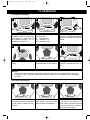
TO LISTEN TO THE RADIO
1
2
3
2
Make sure the EXT/BATT/
CHARGE switch is set properly
(see page 5). Slide the TV/
OFF/RADIO switch to the RADIO
position to turn the radio on.
Slide the BAND switch to select
the AM or FM band.
4
5
Rotate the unit for best AM reception, or adjust the TV/FM Antenna
for best FM reception.
Slide the TV/OFF/RADIO switch
to the OFF position to turn the
radio off.
7
1
Tune a desired AM or FM station
by turning the TUNING control ❶
and adjust the VOLUME control ❷
as desired.