1
Installing and Removing the CF Card
The captured image will be recorded onto the CF card (optional).
Although the thickness is different, a Type I or Type II CF card can be
inserted into the camera. The camera is also compatible with Microdrive
and CF cards with 2 GB or higher capacity.
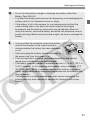
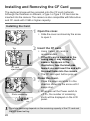
Installing the Card
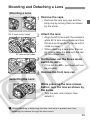
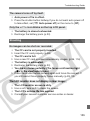
1
Top
CF card
eject button
Open the cover.
¡ Slide the cover as shown by the arrow
to open it.
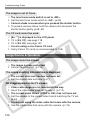
the CF card.
2 Insert
¡ Using Canon CF cards is
recommended.
¡ If the CF card is inserted in the
wrong way, it may damage the
camera. As shown in the
illustration, face the label side
toward you and insert the end with
the small holes into the camera.
s The CF card eject button pops up.
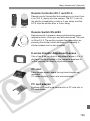
the cover.
3 Close
¡ Close the cover and slide it in the
direction shown by the arrow until it
snaps shut.
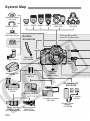
Shots remaining
¡ When you set the Power switch to
<1>, the number of remaining
shots will be displayed on the LCD
panel.
The shots remaining depends on the remaining capacity of the CF card and
the ISO speed setting.
26