1
BP200 Manual
9/26/01
3:21 PM
Page 3
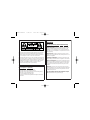
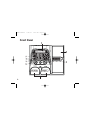
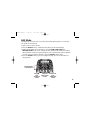
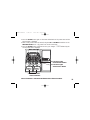
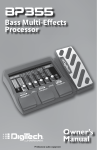
1. FOOT SWITCHES - Navigate through all 80 presets. When pressed together, they bypass
the current preset. When pressed together and held,Tuner mode is entered.
2. AMP TYPE, GAIN, MASTER LEVEL Knobs - Adjusts the effect parameters in Edit Mode
and adjust Amp Type, Gain, and Master Level in Performance Mode, and select Pattern,Tempo,
and Rhythm Level in Rhythm mode.
3. SELECT button - Enters and exits Edit Mode. Successive presses will navigate through all
the effect rows.
4. RHYTHM button - Turns on and off the Rhythm Trainer function.
5. EFFECTS MATRIX - Lists all effect parameters available for editing. The LEDs next to
each effect will light when the effect is on in a preset. The LEDs also serve as a reference
when using the BP200’s Tuner.
6. DISPLAY - Provides information for all the BP200’s different functions.
7. EXPRESSION PEDAL - Controls the BP200's parameters in real time.
8. STORE button - Stores or copies presets to User preset locations.
3