1
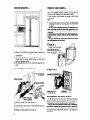
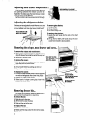
Removing and adjusting the freezer shelves...
LIFT THE RIGHT SIDE
THEN SLIDE OUT
To remove the shelf:
1. Lifi right side of shelf off supports.
I
2. Slide shelf out of shelf support
3. Replace in reverse order.
holes.
To adjust the shelf:
1. Remove shelf.
2. Remove
3. Replace
4. Replace
supports
supports
shelf.
by sliding upwards.
on desired level.
NOTE: The cup shaped supports go in the back
of the freezer.
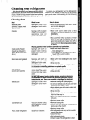
Changing the light bulb...
To change refrigerator light:
1. Reach behind the control console
PW
@
to find bulb.
2. Remove
3. Replace
bulb.
with a 40-watttubular
To change
freezer light or light above crisper:
R
‘:rIL
1: ;lI;;;;zlight
2. Pull bottom
shield.
of shield forward
appliance
bulb.
until it snaps free.
4. Replace with a 40-watt tubular appliance
bulb.
5. Press light shield straight on until it snaps into
place.
GRASP LIGHT SHIELD
PULL BOTTOM FORWARD
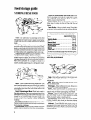
Automatic ice maker...
There are a few things
about your ice maker:
l
you will want
l
to know
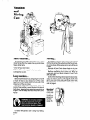
The ON/OFF lever is a wire signal arm.
Down...for making ice automatically.
Up...to shut off the ice maker.
l
l
l
ICE MAKER ON UNTIL IT IS CONNECTED TO THE WATER SUPPLY.
DO NOT TURN
l
l
LOWER
SIGNAL
ARM TO
START IT
RAISE
SIGNAL
ARM TO
STOP ICE
l
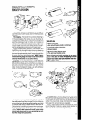
The dial or lever on the side of the ice maker
changes the size of the cubes.
Shake the bin occasionally
to keep cubes separated, and to obtain increased storage capacity.
It is normal for ice crescents to be attached
by a
corner. They will break apart easily.
You will hear water running when ice maker is
working. You’ll hear ice fall into the bin. Don’t let
these sounds bother you.
The ice maker will not operate until the freezer
is cold enough
to make ice. This can take
overnight.
Because of new plumbing
connections,
the first
ice may be discolored
or off-flavored.
Discard
the first few batches of ice.
If ice is not being made fast enough and more
ice is needed, turn the Refrigerator
Control toward a higher number. Wait a day and, if necessary, turn the Freezer Control toward C.
7
continued
on next page