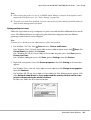
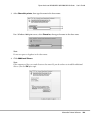
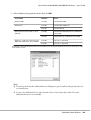
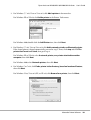
1
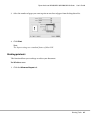
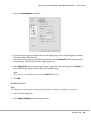
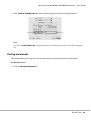
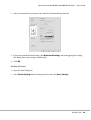
User’s Guide
NPD4346-00 EN
Epson AcuLaser M2300/M2310/M2400/M2410 Series
User’s Guide
Contents
Copyright and Trademarks
Operating System Versions
Safety Instructions
Warnings, Cautions, and Notes. . . . . . . . . . . . . . . . . . . . . . . . . . . . . . . . . . . . . . . . . . . . . . . . . . . . . . . . . . . 11
Important Safety Instructions. . . . . . . . . . . . . . . . . . . . . . . . . . . . . . . . . . . . . . . . . . . . . . . . . . . . . . . . . . . . 11
Setting up the printer. . . . . . . . . . . . . . . . . . . . . . . . . . . . . . . . . . . . . . . . . . . . . . . . . . . . . . . . . . . . . . . 11
Finding the place for the printer. . . . . . . . . . . . . . . . . . . . . . . . . . . . . . . . . . . . . . . . . . . . . . . . . . . . . . 13
Using the printer. . . . . . . . . . . . . . . . . . . . . . . . . . . . . . . . . . . . . . . . . . . . . . . . . . . . . . . . . . . . . . . . . . . 14
Handling consumable products and maintenance parts. . . . . . . . . . . . . . . . . . . . . . . . . . . . . . . . . . . 15
Safety Information. . . . . . . . . . . . . . . . . . . . . . . . . . . . . . . . . . . . . . . . . . . . . . . . . . . . . . . . . . . . . . . . . . . . . 17
Laser safety labels. . . . . . . . . . . . . . . . . . . . . . . . . . . . . . . . . . . . . . . . . . . . . . . . . . . . . . . . . . . . . . . . . . 17
Internal laser radiation. . . . . . . . . . . . . . . . . . . . . . . . . . . . . . . . . . . . . . . . . . . . . . . . . . . . . . . . . . . . . . 17
Ozone safety. . . . . . . . . . . . . . . . . . . . . . . . . . . . . . . . . . . . . . . . . . . . . . . . . . . . . . . . . . . . . . . . . . . . . . 17
Chapter 1 Getting to Know Your Printer
Where to Find Information. . . . . . . . . . . . . . . . . . . . . . . . . . . . . . . . . . . . . . . . . . . . . . . . . . . . . . . . . . . . . . 19
Printer Parts. . . . . . . . . . . . . . . . . . . . . . . . . . . . . . . . . . . . . . . . . . . . . . . . . . . . . . . . . . . . . . . . . . . . . . . . . . . 20
Front view. . . . . . . . . . . . . . . . . . . . . . . . . . . . . . . . . . . . . . . . . . . . . . . . . . . . . . . . . . . . . . . . . . . . . . . . 20
Rear view. . . . . . . . . . . . . . . . . . . . . . . . . . . . . . . . . . . . . . . . . . . . . . . . . . . . . . . . . . . . . . . . . . . . . . . . . 20
Inside the printer. . . . . . . . . . . . . . . . . . . . . . . . . . . . . . . . . . . . . . . . . . . . . . . . . . . . . . . . . . . . . . . . . . 22
Control panel. . . . . . . . . . . . . . . . . . . . . . . . . . . . . . . . . . . . . . . . . . . . . . . . . . . . . . . . . . . . . . . . . . . . . . 23
Options. . . . . . . . . . . . . . . . . . . . . . . . . . . . . . . . . . . . . . . . . . . . . . . . . . . . . . . . . . . . . . . . . . . . . . . . . . . . . . . 24
Consumable Products. . . . . . . . . . . . . . . . . . . . . . . . . . . . . . . . . . . . . . . . . . . . . . . . . . . . . . . . . . . . . . . . . . . 24
Maintenance Parts. . . . . . . . . . . . . . . . . . . . . . . . . . . . . . . . . . . . . . . . . . . . . . . . . . . . . . . . . . . . . . . . . . . . . . 25
Chapter 2 Printing Tasks
Loading Paper into Your Printer. . . . . . . . . . . . . . . . . . . . . . . . . . . . . . . . . . . . . . . . . . . . . . . . . . . . . . . . . . 26
MP tray. . . . . . . . . . . . . . . . . . . . . . . . . . . . . . . . . . . . . . . . . . . . . . . . . . . . . . . . . . . . . . . . . . . . . . . . . . 26
Contents
2
Epson AcuLaser M2300/M2310/M2400/M2410 Series
User’s Guide
Lower Paper Cassette Unit. . . . . . . . . . . . . . . . . . . . . . . . . . . . . . . . . . . . . . . . . . . . . . . . . . . . . . . . . . . 30
Selecting and Using Print Media. . . . . . . . . . . . . . . . . . . . . . . . . . . . . . . . . . . . . . . . . . . . . . . . . . . . . . . . . . 33
Labels. . . . . . . . . . . . . . . . . . . . . . . . . . . . . . . . . . . . . . . . . . . . . . . . . . . . . . . . . . . . . . . . . . . . . . . . . . . . 33
Envelopes. . . . . . . . . . . . . . . . . . . . . . . . . . . . . . . . . . . . . . . . . . . . . . . . . . . . . . . . . . . . . . . . . . . . . . . . . 34
Thick paper. . . . . . . . . . . . . . . . . . . . . . . . . . . . . . . . . . . . . . . . . . . . . . . . . . . . . . . . . . . . . . . . . . . . . . . 34
Semi-thick paper. . . . . . . . . . . . . . . . . . . . . . . . . . . . . . . . . . . . . . . . . . . . . . . . . . . . . . . . . . . . . . . . . . . 35
Transparencies. . . . . . . . . . . . . . . . . . . . . . . . . . . . . . . . . . . . . . . . . . . . . . . . . . . . . . . . . . . . . . . . . . . . 35
Custom paper size. . . . . . . . . . . . . . . . . . . . . . . . . . . . . . . . . . . . . . . . . . . . . . . . . . . . . . . . . . . . . . . . . . 36
Cancelling a Print Job. . . . . . . . . . . . . . . . . . . . . . . . . . . . . . . . . . . . . . . . . . . . . . . . . . . . . . . . . . . . . . . . . . . 37
From the printer. . . . . . . . . . . . . . . . . . . . . . . . . . . . . . . . . . . . . . . . . . . . . . . . . . . . . . . . . . . . . . . . . . . 37
From the computer. . . . . . . . . . . . . . . . . . . . . . . . . . . . . . . . . . . . . . . . . . . . . . . . . . . . . . . . . . . . . . . . . 37
Setting the Print Quality. . . . . . . . . . . . . . . . . . . . . . . . . . . . . . . . . . . . . . . . . . . . . . . . . . . . . . . . . . . . . . . . . 37
Using the Automatic setting. . . . . . . . . . . . . . . . . . . . . . . . . . . . . . . . . . . . . . . . . . . . . . . . . . . . . . . . . 38
Using the Advanced setting. . . . . . . . . . . . . . . . . . . . . . . . . . . . . . . . . . . . . . . . . . . . . . . . . . . . . . . . . . 39
Customizing print settings. . . . . . . . . . . . . . . . . . . . . . . . . . . . . . . . . . . . . . . . . . . . . . . . . . . . . . . . . . . 41
Toner Save mode. . . . . . . . . . . . . . . . . . . . . . . . . . . . . . . . . . . . . . . . . . . . . . . . . . . . . . . . . . . . . . . . . . 43
Setting the Advanced Layout. . . . . . . . . . . . . . . . . . . . . . . . . . . . . . . . . . . . . . . . . . . . . . . . . . . . . . . . . . . . . 44
Duplex printing. . . . . . . . . . . . . . . . . . . . . . . . . . . . . . . . . . . . . . . . . . . . . . . . . . . . . . . . . . . . . . . . . . . . 44
Modifying the print layout. . . . . . . . . . . . . . . . . . . . . . . . . . . . . . . . . . . . . . . . . . . . . . . . . . . . . . . . . . . 45
Resizing printouts. . . . . . . . . . . . . . . . . . . . . . . . . . . . . . . . . . . . . . . . . . . . . . . . . . . . . . . . . . . . . . . . . . 47
Printing watermarks. . . . . . . . . . . . . . . . . . . . . . . . . . . . . . . . . . . . . . . . . . . . . . . . . . . . . . . . . . . . . . . . 49
Printing headers and footers. . . . . . . . . . . . . . . . . . . . . . . . . . . . . . . . . . . . . . . . . . . . . . . . . . . . . . . . . 53
Printing with an overlay. . . . . . . . . . . . . . . . . . . . . . . . . . . . . . . . . . . . . . . . . . . . . . . . . . . . . . . . . . . . . 55
Printing Web Pages to Fit Your Paper Size. . . . . . . . . . . . . . . . . . . . . . . . . . . . . . . . . . . . . . . . . . . . . . . . . . 58
Chapter 3 Installing Options
Optional Paper Cassette Unit. . . . . . . . . . . . . . . . . . . . . . . . . . . . . . . . . . . . . . . . . . . . . . . . . . . . . . . . . . . . . 59
Handling precautions. . . . . . . . . . . . . . . . . . . . . . . . . . . . . . . . . . . . . . . . . . . . . . . . . . . . . . . . . . . . . . . 59
Installing the optional paper cassette unit. . . . . . . . . . . . . . . . . . . . . . . . . . . . . . . . . . . . . . . . . . . . . . 59
Removing the optional paper cassette unit. . . . . . . . . . . . . . . . . . . . . . . . . . . . . . . . . . . . . . . . . . . . . . 63
Memory Module. . . . . . . . . . . . . . . . . . . . . . . . . . . . . . . . . . . . . . . . . . . . . . . . . . . . . . . . . . . . . . . . . . . . . . . 63
Installing a memory module. . . . . . . . . . . . . . . . . . . . . . . . . . . . . . . . . . . . . . . . . . . . . . . . . . . . . . . . . 63
Removing a memory module. . . . . . . . . . . . . . . . . . . . . . . . . . . . . . . . . . . . . . . . . . . . . . . . . . . . . . . . . 67
Chapter 4 Replacing Consumable Products/Maintenance Parts
Precautions During Replacement. . . . . . . . . . . . . . . . . . . . . . . . . . . . . . . . . . . . . . . . . . . . . . . . . . . . . . . . . 68
Contents
3
Epson AcuLaser M2300/M2310/M2400/M2410 Series
User’s Guide
Replacement Messages. . . . . . . . . . . . . . . . . . . . . . . . . . . . . . . . . . . . . . . . . . . . . . . . . . . . . . . . . . . . . . . . . . 68
Chapter 5 Cleaning and Transporting the Printer
Cleaning the Printer. . . . . . . . . . . . . . . . . . . . . . . . . . . . . . . . . . . . . . . . . . . . . . . . . . . . . . . . . . . . . . . . . . . . 71
Cleaning the pickup roller. . . . . . . . . . . . . . . . . . . . . . . . . . . . . . . . . . . . . . . . . . . . . . . . . . . . . . . . . . . 71
Cleaning inside the printer. . . . . . . . . . . . . . . . . . . . . . . . . . . . . . . . . . . . . . . . . . . . . . . . . . . . . . . . . . . 73
Transporting the Printer. . . . . . . . . . . . . . . . . . . . . . . . . . . . . . . . . . . . . . . . . . . . . . . . . . . . . . . . . . . . . . . . . 77
For long distances. . . . . . . . . . . . . . . . . . . . . . . . . . . . . . . . . . . . . . . . . . . . . . . . . . . . . . . . . . . . . . . . . . 77
For short distances. . . . . . . . . . . . . . . . . . . . . . . . . . . . . . . . . . . . . . . . . . . . . . . . . . . . . . . . . . . . . . . . . 78
Chapter 6 Troubleshooting
Clearing Jammed Paper. . . . . . . . . . . . . . . . . . . . . . . . . . . . . . . . . . . . . . . . . . . . . . . . . . . . . . . . . . . . . . . . . 79
Precautions for clearing jammed paper. . . . . . . . . . . . . . . . . . . . . . . . . . . . . . . . . . . . . . . . . . . . . . . . 79
Paper Jam around the standard lower paper cassette. . . . . . . . . . . . . . . . . . . . . . . . . . . . . . . . . . . . . 80
Paper Jam around the 250-sheet Paper Cassette Unit. . . . . . . . . . . . . . . . . . . . . . . . . . . . . . . . . . . . . 80
Paper Jam in the 250-sheet Paper Cassette Unit. . . . . . . . . . . . . . . . . . . . . . . . . . . . . . . . . . . . . . . . . 81
Paper Jam inside the printer. . . . . . . . . . . . . . . . . . . . . . . . . . . . . . . . . . . . . . . . . . . . . . . . . . . . . . . . . 82
Paper Jam around the MP tray. . . . . . . . . . . . . . . . . . . . . . . . . . . . . . . . . . . . . . . . . . . . . . . . . . . . . . . 86
Paper Jam around the rear cover. . . . . . . . . . . . . . . . . . . . . . . . . . . . . . . . . . . . . . . . . . . . . . . . . . . . . . 91
Paper Jam around the DM tray. . . . . . . . . . . . . . . . . . . . . . . . . . . . . . . . . . . . . . . . . . . . . . . . . . . . . . . 92
Printing a Status Sheet. . . . . . . . . . . . . . . . . . . . . . . . . . . . . . . . . . . . . . . . . . . . . . . . . . . . . . . . . . . . . . . . . . 93
Operational Problems. . . . . . . . . . . . . . . . . . . . . . . . . . . . . . . . . . . . . . . . . . . . . . . . . . . . . . . . . . . . . . . . . . . 94
The Ready light does not turn on. . . . . . . . . . . . . . . . . . . . . . . . . . . . . . . . . . . . . . . . . . . . . . . . . . . . . 94
The printer does not print (Ready light off). . . . . . . . . . . . . . . . . . . . . . . . . . . . . . . . . . . . . . . . . . . . . 94
The Ready light is on but nothing prints. . . . . . . . . . . . . . . . . . . . . . . . . . . . . . . . . . . . . . . . . . . . . . . 94
The optional product is not available. . . . . . . . . . . . . . . . . . . . . . . . . . . . . . . . . . . . . . . . . . . . . . . . . . 95
The remaining service life of the toner cartridge is not updated (For Windows users only). . . . . . 95
Printout Problems. . . . . . . . . . . . . . . . . . . . . . . . . . . . . . . . . . . . . . . . . . . . . . . . . . . . . . . . . . . . . . . . . . . . . . 95
The font cannot be printed. . . . . . . . . . . . . . . . . . . . . . . . . . . . . . . . . . . . . . . . . . . . . . . . . . . . . . . . . . 95
Printout is garbled. . . . . . . . . . . . . . . . . . . . . . . . . . . . . . . . . . . . . . . . . . . . . . . . . . . . . . . . . . . . . . . . . 96
The printout position is not correct. . . . . . . . . . . . . . . . . . . . . . . . . . . . . . . . . . . . . . . . . . . . . . . . . . . 96
Graphics do not print correctly. . . . . . . . . . . . . . . . . . . . . . . . . . . . . . . . . . . . . . . . . . . . . . . . . . . . . . . 96
Print Quality Problems. . . . . . . . . . . . . . . . . . . . . . . . . . . . . . . . . . . . . . . . . . . . . . . . . . . . . . . . . . . . . . . . . . 97
The background is dark or dirty. . . . . . . . . . . . . . . . . . . . . . . . . . . . . . . . . . . . . . . . . . . . . . . . . . . . . . 97
White dots appear in the printout. . . . . . . . . . . . . . . . . . . . . . . . . . . . . . . . . . . . . . . . . . . . . . . . . . . . . 97
Print quality or tone is uneven. . . . . . . . . . . . . . . . . . . . . . . . . . . . . . . . . . . . . . . . . . . . . . . . . . . . . . . . 97
Contents
4
Epson AcuLaser M2300/M2310/M2400/M2410 Series
User’s Guide
A vertical line appears on the printout. . . . . . . . . . . . . . . . . . . . . . . . . . . . . . . . . . . . . . . . . . . . . . . . . 98
Toner smudges. . . . . . . . . . . . . . . . . . . . . . . . . . . . . . . . . . . . . . . . . . . . . . . . . . . . . . . . . . . . . . . . . . . . 98
Areas are missing in the printed image. . . . . . . . . . . . . . . . . . . . . . . . . . . . . . . . . . . . . . . . . . . . . . . . . 98
Completely blank pages are output. . . . . . . . . . . . . . . . . . . . . . . . . . . . . . . . . . . . . . . . . . . . . . . . . . . . 98
Printouts are extremely curled. . . . . . . . . . . . . . . . . . . . . . . . . . . . . . . . . . . . . . . . . . . . . . . . . . . . . . . . 99
The printed image is light or faint. . . . . . . . . . . . . . . . . . . . . . . . . . . . . . . . . . . . . . . . . . . . . . . . . . . . . 99
The non-printed side of the page is dirty. . . . . . . . . . . . . . . . . . . . . . . . . . . . . . . . . . . . . . . . . . . . . . 100
Print quality decreased. . . . . . . . . . . . . . . . . . . . . . . . . . . . . . . . . . . . . . . . . . . . . . . . . . . . . . . . . . . . . 100
Memory Problems. . . . . . . . . . . . . . . . . . . . . . . . . . . . . . . . . . . . . . . . . . . . . . . . . . . . . . . . . . . . . . . . . . . . . 100
Insufficient memory for current task. . . . . . . . . . . . . . . . . . . . . . . . . . . . . . . . . . . . . . . . . . . . . . . . . 100
Insufficient memory to print all copies. . . . . . . . . . . . . . . . . . . . . . . . . . . . . . . . . . . . . . . . . . . . . . . . 101
Paper Handling Problems. . . . . . . . . . . . . . . . . . . . . . . . . . . . . . . . . . . . . . . . . . . . . . . . . . . . . . . . . . . . . . 101
Paper does not feed properly. . . . . . . . . . . . . . . . . . . . . . . . . . . . . . . . . . . . . . . . . . . . . . . . . . . . . . . . 101
Problems Using Options. . . . . . . . . . . . . . . . . . . . . . . . . . . . . . . . . . . . . . . . . . . . . . . . . . . . . . . . . . . . . . . 102
Feed jam when using the optional paper cassette. . . . . . . . . . . . . . . . . . . . . . . . . . . . . . . . . . . . . . . 102
An installed option cannot be used. . . . . . . . . . . . . . . . . . . . . . . . . . . . . . . . . . . . . . . . . . . . . . . . . . . 102
Correcting USB Problems. . . . . . . . . . . . . . . . . . . . . . . . . . . . . . . . . . . . . . . . . . . . . . . . . . . . . . . . . . . . . . 103
USB connections. . . . . . . . . . . . . . . . . . . . . . . . . . . . . . . . . . . . . . . . . . . . . . . . . . . . . . . . . . . . . . . . . . 103
Windows operating system. . . . . . . . . . . . . . . . . . . . . . . . . . . . . . . . . . . . . . . . . . . . . . . . . . . . . . . . . 103
Printer software installation. . . . . . . . . . . . . . . . . . . . . . . . . . . . . . . . . . . . . . . . . . . . . . . . . . . . . . . . . 103
Network Connection Problems (only for the DN model). . . . . . . . . . . . . . . . . . . . . . . . . . . . . . . . . . . . . 104
Cannot install software or drivers. . . . . . . . . . . . . . . . . . . . . . . . . . . . . . . . . . . . . . . . . . . . . . . . . . . . 104
Cannot access the shared printer. . . . . . . . . . . . . . . . . . . . . . . . . . . . . . . . . . . . . . . . . . . . . . . . . . . . . 104
Status and Error Lights. . . . . . . . . . . . . . . . . . . . . . . . . . . . . . . . . . . . . . . . . . . . . . . . . . . . . . . . . . . . . . . . . 105
Canceling Printing. . . . . . . . . . . . . . . . . . . . . . . . . . . . . . . . . . . . . . . . . . . . . . . . . . . . . . . . . . . . . . . . . . . . 112
Printing in the PostScript 3 Mode Problems (Epson AcuLaser M2400/M2410 series only). . . . . . . . . 113
The printer does not print. . . . . . . . . . . . . . . . . . . . . . . . . . . . . . . . . . . . . . . . . . . . . . . . . . . . . . . . . . 113
The printer or its driver does not appear in utilities in the printer configuration (Macintosh
only). . . . . . . . . . . . . . . . . . . . . . . . . . . . . . . . . . . . . . . . . . . . . . . . . . . . . . . . . . . . . . . . . . . . . . . . . . 113
The font on the printout is different from that on the screen. . . . . . . . . . . . . . . . . . . . . . . . . . . . . . 113
The edges of texts and/or images are not smooth. . . . . . . . . . . . . . . . . . . . . . . . . . . . . . . . . . . . . . . 114
The printer does not print normally via the USB interface. . . . . . . . . . . . . . . . . . . . . . . . . . . . . . . . 114
The printer does not print normally via the network interface (only for the DN model). . . . . . . 114
An undefined error occurs (Macintosh only). . . . . . . . . . . . . . . . . . . . . . . . . . . . . . . . . . . . . . . . . . 115
Chapter 7 About the Printer Software
Using the Printer Software for Windows. . . . . . . . . . . . . . . . . . . . . . . . . . . . . . . . . . . . . . . . . . . . . . . . . . 116
Using the printer driver. . . . . . . . . . . . . . . . . . . . . . . . . . . . . . . . . . . . . . . . . . . . . . . . . . . . . . . . . . . . 116
Contents
5
Epson AcuLaser M2300/M2310/M2400/M2410 Series
User’s Guide
Using EPSON Status Monitor. . . . . . . . . . . . . . . . . . . . . . . . . . . . . . . . . . . . . . . . . . . . . . . . . . . . . . . 118
Uninstalling the printer software. . . . . . . . . . . . . . . . . . . . . . . . . . . . . . . . . . . . . . . . . . . . . . . . . . . . 126
Sharing the printer on a network. . . . . . . . . . . . . . . . . . . . . . . . . . . . . . . . . . . . . . . . . . . . . . . . . . . . 126
Using the Printer Software for Macintosh. . . . . . . . . . . . . . . . . . . . . . . . . . . . . . . . . . . . . . . . . . . . . . . . . 135
Using the printer driver. . . . . . . . . . . . . . . . . . . . . . . . . . . . . . . . . . . . . . . . . . . . . . . . . . . . . . . . . . . . 135
Using EPSON Status Monitor. . . . . . . . . . . . . . . . . . . . . . . . . . . . . . . . . . . . . . . . . . . . . . . . . . . . . . . 137
Uninstalling the printer software. . . . . . . . . . . . . . . . . . . . . . . . . . . . . . . . . . . . . . . . . . . . . . . . . . . . 142
Using the PostScript Printer Driver (Epson AcuLaser M2400/M2410 series only). . . . . . . . . . . . . . . . 143
System requirements. . . . . . . . . . . . . . . . . . . . . . . . . . . . . . . . . . . . . . . . . . . . . . . . . . . . . . . . . . . . . . 143
Using the PostScript printer driver with Windows. . . . . . . . . . . . . . . . . . . . . . . . . . . . . . . . . . . . . . 144
Using the PostScript printer driver with Macintosh. . . . . . . . . . . . . . . . . . . . . . . . . . . . . . . . . . . . . 147
Using the PCL6 printer driver. . . . . . . . . . . . . . . . . . . . . . . . . . . . . . . . . . . . . . . . . . . . . . . . . . . . . . . . . . . 150
Appendix A Technical Specifications
Paper. . . . . . . . . . . . . . . . . . . . . . . . . . . . . . . . . . . . . . . . . . . . . . . . . . . . . . . . . . . . . . . . . . . . . . . . . . . . . . . . 151
Available paper types. . . . . . . . . . . . . . . . . . . . . . . . . . . . . . . . . . . . . . . . . . . . . . . . . . . . . . . . . . . . . . 151
Paper that should not be used. . . . . . . . . . . . . . . . . . . . . . . . . . . . . . . . . . . . . . . . . . . . . . . . . . . . . . . 151
Printable area. . . . . . . . . . . . . . . . . . . . . . . . . . . . . . . . . . . . . . . . . . . . . . . . . . . . . . . . . . . . . . . . . . . . 152
Printer. . . . . . . . . . . . . . . . . . . . . . . . . . . . . . . . . . . . . . . . . . . . . . . . . . . . . . . . . . . . . . . . . . . . . . . . . . . . . . 153
General. . . . . . . . . . . . . . . . . . . . . . . . . . . . . . . . . . . . . . . . . . . . . . . . . . . . . . . . . . . . . . . . . . . . . . . . . . 153
Environmental. . . . . . . . . . . . . . . . . . . . . . . . . . . . . . . . . . . . . . . . . . . . . . . . . . . . . . . . . . . . . . . . . . . 154
Mechanical. . . . . . . . . . . . . . . . . . . . . . . . . . . . . . . . . . . . . . . . . . . . . . . . . . . . . . . . . . . . . . . . . . . . . . 154
Electrical. . . . . . . . . . . . . . . . . . . . . . . . . . . . . . . . . . . . . . . . . . . . . . . . . . . . . . . . . . . . . . . . . . . . . . . . 154
Standard and approvals. . . . . . . . . . . . . . . . . . . . . . . . . . . . . . . . . . . . . . . . . . . . . . . . . . . . . . . . . . . . 155
Interfaces. . . . . . . . . . . . . . . . . . . . . . . . . . . . . . . . . . . . . . . . . . . . . . . . . . . . . . . . . . . . . . . . . . . . . . . . . . . . 155
USB interface. . . . . . . . . . . . . . . . . . . . . . . . . . . . . . . . . . . . . . . . . . . . . . . . . . . . . . . . . . . . . . . . . . . . . 155
Ethernet interface. . . . . . . . . . . . . . . . . . . . . . . . . . . . . . . . . . . . . . . . . . . . . . . . . . . . . . . . . . . . . . . . . 156
Options. . . . . . . . . . . . . . . . . . . . . . . . . . . . . . . . . . . . . . . . . . . . . . . . . . . . . . . . . . . . . . . . . . . . . . . . . . . . . . 156
Optional paper cassette unit. . . . . . . . . . . . . . . . . . . . . . . . . . . . . . . . . . . . . . . . . . . . . . . . . . . . . . . . 156
Memory modules. . . . . . . . . . . . . . . . . . . . . . . . . . . . . . . . . . . . . . . . . . . . . . . . . . . . . . . . . . . . . . . . . 156
Consumable Products. . . . . . . . . . . . . . . . . . . . . . . . . . . . . . . . . . . . . . . . . . . . . . . . . . . . . . . . . . . . . . . . . . 157
Toner cartridge/Return toner cartridge. . . . . . . . . . . . . . . . . . . . . . . . . . . . . . . . . . . . . . . . . . . . . . . 157
Maintenance Parts. . . . . . . . . . . . . . . . . . . . . . . . . . . . . . . . . . . . . . . . . . . . . . . . . . . . . . . . . . . . . . . . . . . . . 157
Maintenance unit. . . . . . . . . . . . . . . . . . . . . . . . . . . . . . . . . . . . . . . . . . . . . . . . . . . . . . . . . . . . . . . . . 157
Contents
6
Epson AcuLaser M2300/M2310/M2400/M2410 Series
User’s Guide
Appendix B Where To Get Help
Contacting Epson Support. . . . . . . . . . . . . . . . . . . . . . . . . . . . . . . . . . . . . . . . . . . . . . . . . . . . . . . . . . . . . . 158
Before Contacting Epson. . . . . . . . . . . . . . . . . . . . . . . . . . . . . . . . . . . . . . . . . . . . . . . . . . . . . . . . . . . 158
Help for Users in Europe. . . . . . . . . . . . . . . . . . . . . . . . . . . . . . . . . . . . . . . . . . . . . . . . . . . . . . . . . . . 158
Help for Users in Singapore. . . . . . . . . . . . . . . . . . . . . . . . . . . . . . . . . . . . . . . . . . . . . . . . . . . . . . . . . 158
Help for Users in Thailand. . . . . . . . . . . . . . . . . . . . . . . . . . . . . . . . . . . . . . . . . . . . . . . . . . . . . . . . . . 159
Help for Users in Vietnam. . . . . . . . . . . . . . . . . . . . . . . . . . . . . . . . . . . . . . . . . . . . . . . . . . . . . . . . . . 159
Help for Users in Indonesia. . . . . . . . . . . . . . . . . . . . . . . . . . . . . . . . . . . . . . . . . . . . . . . . . . . . . . . . . 160
Help for Users in Hong Kong. . . . . . . . . . . . . . . . . . . . . . . . . . . . . . . . . . . . . . . . . . . . . . . . . . . . . . . 161
Help for Users in Malaysia. . . . . . . . . . . . . . . . . . . . . . . . . . . . . . . . . . . . . . . . . . . . . . . . . . . . . . . . . . 162
Help for Users in India. . . . . . . . . . . . . . . . . . . . . . . . . . . . . . . . . . . . . . . . . . . . . . . . . . . . . . . . . . . . . 163
Help for Users in the Philippines. . . . . . . . . . . . . . . . . . . . . . . . . . . . . . . . . . . . . . . . . . . . . . . . . . . . 164
Index
Contents
7
Epson AcuLaser M2300/M2310/M2400/M2410 Series
User’s Guide
Copyright and Trademarks
No part of this publication may be reproduced, stored in a retrieval system, or transmitted in any form or by any means,
mechanical, photocopying, recording, or otherwise, without the prior written permission of Seiko Epson Corporation. No
patent liability is assumed with respect to the use of the information contained herein. Neither is any liability assumed for
damages resulting from the use of the information contained herein.
Neither Seiko Epson Corporation nor its affiliates shall be liable to the purchaser of this product or third parties for damages,
losses, costs, or expenses incurred by purchaser or third parties as a result of: accident, misuse, or abuse of this product or
unauthorized modifications, repairs, or alterations to this product, or (excluding the U.S.) failure to strictly comply with Seiko
Epson Corporation’s operating and maintenance instructions.
Seiko Epson Corporation and its affiliates shall not be liable against any damages or problems arising from the use of any options
or any consumable products other than those designated as Original Epson Products or Epson Approved Products by Seiko
Epson Corporation.
Features Zoran Corporation Integrated Print System (IPS) for print language emulation.
A part of the ICC Profile contained within this product was created by Gretag Macbeth ProfileMaker. Gretag Macbeth is the
registered trademark of Gretag Macbeth Holding AG Logo. ProfileMaker is the trademark of LOGO GmbH.
IBM and PS/2 are registered trademarks of International Business Machines Corporation.
®
®
®
Microsoft , Windows , and Windows Vista are registered trademarks of Microsoft Corporation.
®
®
®
®
®
®
Apple , Macintosh , Mac , Mac OS , AppleTalk , Bonjour are registered trademarks of Apple, Inc.
EPSON and EPSON ESC/P are registered trademarks and EPSON AcuLaser and EPSON ESC/P 2 are trademarks of Seiko Epson
Corporation.
Bitstream is a registered trademark of Bitstream Inc. registered in the United States Patent and Trademark Office and may be
registered in certain jurisdictions.
Monotype is a trademark of Monotype Imaging, Inc. registered in the United States Patent and Trademark Office and may be
registered in certain jurisdictions.
Swiss is a trademark of Bitstream Inc. registered in the United States Patent and Trademark Office and may be registered in
certain jurisdictions.
ITC Symbol is a trademark of International Typeface Corporation and may be registered in some jurisdictions.
Helvetica and Times are trademarks of Heidelberger Druckmaschinen AG which may be registered in certain jurisdictions.
Adobe SansMM and Adobe SerifMM are registered trademarks of Adobe Systems Incorporated.
HP and HP LaserJet are registered trademarks of the Hewlett-Packard Company.
Copyright and Trademarks
8
Epson AcuLaser M2300/M2310/M2400/M2410 Series
User’s Guide
PCL is the registered trademark of Hewlett-Packard Company.
Adobe, the Adobe logo and PostScript3 are trademarks of Adobe Systems Incorporated, which may be registered in certain
jurisdictions.
General Notice: Other product names used herein are for identification purposes only and may be trademarks of their respective
owners. Epson disclaims any and all rights in those marks.
Copyright © 2010 Seiko Epson Corporation. All rights reserved.
Copyright and Trademarks
9
Epson AcuLaser M2300/M2310/M2400/M2410 Series
User’s Guide
Operating System Versions
In this manual, the following abbreviations are used.
Windows refers to Windows 7, 7 x64, Vista, Vista x64, XP, XP x64, 2000, Server 2008, Server 2008 x64, Server 2008 R2,
Server 2003, and Server 2003 x64.
❏
Windows 7 refers to Windows 7 Ultimate Edition, Windows 7 Home Premium Edition, Windows 7 Home Basic
Edition, and Windows 7 Professional Edition.
❏
Windows 7 x64 refers to Windows 7 Ultimate x64 Edition, Windows 7 Home Premium x64 Edition, Windows 7
Home Basic x64 Edition, and Windows 7 Professional x64 Edition.
❏
Windows Vista refers to Windows Vista Ultimate Edition, Windows Vista Home Premium Edition, Windows Vista
Home Basic Edition, Windows Vista Enterprise Edition and Windows Vista Business Edition.
❏
Windows Vista x64 refers to Windows Vista Ultimate x64 Edition, Windows Vista Home Premium x64 Edition,
Windows Vista Home Basic x64 Edition, Windows Vista Enterprise x64 Edition and Windows Vista Business x64
Edition.
❏
Windows XP refers to Windows XP Home Edition and Windows XP Professional.
❏
Windows XP x64 refers to Windows XP Professional x64 Edition.
❏
Windows 2000 refers to Windows 2000 Professional.
❏
Windows Server 2008 refers to Windows Server 2008 Standard Edition and Windows Server 2008 Enterprise
Edition.
❏
Windows Server 2008 x64 refers to Windows Server 2008 x64 Standard Edition, Windows Server 2008 x64
Enterprise Edition, Windows Server 2008 R2 Standard Edition, and Windows Server 2008 R2 Enterprise Edition.
❏
Windows Server 2003 refers to Windows Server 2003 Standard Edition and Windows Server 2003 Enterprise
Edition.
❏
Windows Server 2003 x64 refers to Windows Server 2003 x64 Standard Edition and Windows Server 2003 x64
Enterprise Edition.
Macintosh refers to Mac OS X.
❏
Mac OS X refers to Mac OS X 10.4.11 or later.
Operating System Versions
10
Epson AcuLaser M2300/M2310/M2400/M2410 Series
User’s Guide
Safety Instructions
Warnings, Cautions, and Notes
w
Warnings
must be followed carefully to avoid bodily injury.
c
Cautions
must be observed to avoid damage to your equipment.
Notes
contain important information and useful tips on the operation of your printer.
Important Safety Instructions
Setting up the printer
❏ Be sure to lift the printer by the correct positions as shown below.
❏ If you are unable to insert the AC plug into the electrical outlet, contact an electrician.
❏ Be sure the AC power cord meets the relevant local safety standards. Use only the power cord that
comes with this printer. Use of the another cord may result in fire or electric shock. This printer’s
power cord is for use with this printer only. Use with other equipment may result in fire or electric
shock.
❏ If damage occurs to the plug, replace the cord set or consult a qualified electrician. If there are fuses
in the plug, make sure you replace them with fuses of the correct size and rating.
Safety Instructions
11
Epson AcuLaser M2300/M2310/M2400/M2410 Series
User’s Guide
❏ Use a grounded outlet that matches the printer’s power plug. Do not use an adapter plug.
❏ Avoid using an electrical outlet that is controlled by wall switches or automatic timers. Accidental
disruption of power can erase valuable information in your computer’s and printer’s memory.
❏ Make sure that there is no dust on the socket.
❏ Be sure to insert the plug completely into the electrical outlet.
❏ Do not handle the plug with wet hands.
❏ Unplug this printer from the wall outlet and refer servicing to a qualified service representative
under the following conditions:
A
When the power cord or plug is damaged or frayed.
B
If liquid has been spilled into it.
C
If it has been exposed to rain or water.
D
If it does not operate normally when the operating instructions are followed. Adjust only those controls that
are covered by the operating instructions since improper adjustment of other controls may result in damage
and will often require extensive work by a qualified technician to restore the printer to normal operation.
E
If it has been dropped or the cabinet has been damaged.
F
If it exhibits a distinct change in performance, indicating a need for service.
❏ Avoid sharing outlets with other appliances.
❏ Connect all equipment to properly grounded power outlets. Avoid using outlets on the same
circuit as photocopiers or air control systems that regularly switch on and off.
❏ Connect your printer to an electrical outlet that meets the power requirements of this printer.
Your printer’s power requirements are indicated on a label attached to the printer. If you are not
sure of the power supply specifications in your area, contact your local power company or consult
your dealer.
❏ If you use an extension cord, make sure that the total of the ampere ratings on the products
plugged into the extension cord does not exceed the extension cord ampere rating.
❏ When connecting this printer to a computer or other device with a cable, ensure the correct
orientation of the connectors. Each connector has only one correct orientation. Inserting a
connector in the wrong orientation may damage both devices connected by the cable.
Safety Instructions
12
Epson AcuLaser M2300/M2310/M2400/M2410 Series
User’s Guide
Finding the place for the printer
When relocating the printer, always choose a location that has adequate space for easy operation and
maintenance. Use the following illustration as a guide for the amount of space required around the
printer to ensure smooth operation.
a
20 cm
b
20 cm
c
30 cm
d
50 cm
e
30 cm
To install and use any of the following options, you will need the indicated amount of additional
space.
A 250-Sheet Paper Cassette Unit adds 10 cm (3.9 in.) to the bottom of the printer.
In addition to space considerations, always heed the following precautions when finding a place to
locate the printer:
❏ Place the printer near an electrical outlet where you can easily plug in and unplug the power cord.
Safety Instructions
13
Epson AcuLaser M2300/M2310/M2400/M2410 Series
User’s Guide
❏ Do not put your printer where the cord will be stepped on.
❏ Do not use printer in a damp environment.
❏ Avoid locations that are subject to direct sunlight, excessive heat, moisture, oil vapor, or dust.
❏ Do not place the printer on an unstable surface.
❏ Slots and openings in the cabinet and the back or bottom are provided for ventilation. Do not
block or cover them. Do not put the printer on a bed, sofa, rug, or other similar surface or in a
built-in installation unless proper ventilation is provided.
❏ Keep the entire computer and printer system away from potential sources of interference, such as
loudspeakers or the base units of cordless telephones.
❏ Leave adequate room around the printer to allow for sufficient ventilation.
Using the printer
❏ Be careful not to touch the fuser, which is marked CAUTION, or the surrounding areas. If the
printer has been in use, the fuser and the surrounding areas may be very hot. If you must touch one
of these areas, turn off the printer and wait 30 minutes to allow the heat to subside before doing
so.
a. CAUTION
b. Do not insert your hand deep into the fuser unit.
Safety Instructions
14
Epson AcuLaser M2300/M2310/M2400/M2410 Series
User’s Guide
❏ Do not insert your hand deep into the fuser unit as some components are sharp and may cause
injury.
❏ Never push objects of any kind through cabinet slots as they may touch dangerous voltage points
or short out parts that could result in a risk of fire or electric shock.
❏ Do not sit or lean on the printer. Do not put heavy objects on the printer.
❏ Do not use any kind of combustible gases in or around the printer.
❏ Never force the printer’s components into place. Although the printer is designed to be sturdy,
rough handling can damage it.
❏ Do not leave jammed paper inside the printer. This can cause the printer to overheat.
❏ Never spill liquid of any kind on the printer.
❏ Adjust only those controls that are covered by the operating instructions. Improper adjustment of
other controls may result in damage and may require repair by a qualified service representative.
❏ Do not turn off the printer:
- After turning on the printer, wait until the Ready light is on.
- While the Data light is on or flashing.
- While printing.
❏ Avoid touching the components inside the printer unless instructed to do so in this guide.
❏ Follow all warnings and instructions marked on the printer.
❏ Except as specifically explained in the printer’s documentation, do not attempt to service this
printer yourself.
❏ Periodically disconnect the plug from the electrical outlet and clean the blades.
❏ Do not disconnect the plug while the printer is on.
❏ If the printer will not be used for a long time, disconnect the plug from the electrical outlet.
❏ Unplug this printer from the wall outlet before cleaning.
❏ Use a well-wrung cloth for cleaning and do not use liquid or aerosol cleaners.
Handling consumable products and maintenance parts
❏ Do not burn used consumable products or maintenance parts because they might explode and
injure someone. Dispose of them according to local regulations.
Safety Instructions
15
Epson AcuLaser M2300/M2310/M2400/M2410 Series
User’s Guide
❏ Be sure to keep consumable products and maintenance parts out of the reach of children.
❏ When handling a toner cartridge, always place it on a clean, smooth surface.
❏ Do not attempt to modify a toner cartridge or take it apart.
❏ Do not touch the toner. Always keep toner away from your eyes. If toner gets on your skin or
clothes, wash it off with soap and water immediately.
❏ If toner is spilled, use a broom and dustpan or a damp cloth with soap and water to clean it up.
Because the fine particles can cause a fire or explosion if they come into contact with a spark, do not
use a vacuum cleaner.
❏ Wait at least one hour before using a toner cartridge after moving it from a cool to a warm
environment to prevent damage from condensation.
❏ To get the best print quality, do not store the toner cartridge, developer unit, or photoconductor
unit in an area subject to direct sunlight, dust, salty air, or corrosive gases (such as ammonia).
Avoid locations subject to extreme or rapid changes in temperature or humidity.
❏ When removing the photoconductor unit, do not expose it to sunlight at all and avoid exposing it
to room light for more than five minutes. The photoconductor unit contains a light-sensitive
drum. Exposure to light can damage the drum, causing dark or light areas to appear on the printed
page and reducing the service life of the drum. If you need to keep the photoconductor unit out of
the printer for long periods, cover it with an opaque cloth.
❏ Be careful not to scratch the surface of the drum. When you remove the photoconductor unit from
the printer, always place it on a clean, smooth surface. Avoid touching the drum, since oil from
your skin can permanently damage its surface and affect print quality.
Safety Instructions
16
Epson AcuLaser M2300/M2310/M2400/M2410 Series
User’s Guide
Safety Information
Laser safety labels
w
Warning:
The performance of procedures and adjustments other than those specified in the printer’s
documentation may result in hazardous radiation exposure. Your printer is a Class 1 laser
product as defined in the IEC60825 specifications. A label similar to the one shown below is
attached to the back of printers in countries where required.
Internal laser radiation
There is a Class III b Laser Diode Assembly that has an invisible laser beam inside the printer head unit.
The printer head unit is NOT A SERVICE ITEM, therefore, the printer head unit should not be
opened under any circumstances. An additional laser warning label is affixed to the inside of the
printer.
Ozone safety
Ozone emission
Ozone gas is generated by laser printers as a by-product of the printing process. Ozone is produced
only when the printer is printing.
Safety Instructions
17
Epson AcuLaser M2300/M2310/M2400/M2410 Series
User’s Guide
Ozone exposure limit
The Epson laser printer generates less than 3 mg/h of continuous printing.
Minimize the risk
To minimize the risk of exposure to ozone, you should avoid the following conditions:
❏ Use of multiple laser printers in a confined area
❏ Operation in conditions of extremely low humidity
❏ Poor room ventilation
❏ Long, continuous printing together with any of the above
Printer location
The printer should be located so that the exhaust gases and heat generated are:
❏ Not blown directly into the user’s face
❏ Vented directly out of the building whenever possible
Safety Instructions
18
Epson AcuLaser M2300/M2310/M2400/M2410 Series
User’s Guide
Chapter 1
Getting to Know Your Printer
Where to Find Information
Setup Guide
Provides you with information on assembling the printer and installing the printer software.
User’s Guide (this manual)
Provides you with detailed information on the printer’s functions, optional products, maintenance,
troubleshooting, and technical specifications.
Network Guide (only for the DN model)
Provides network administrators with information on both the printer driver and network settings.
Font Guide
Provides you with information on fonts used on the printer.
Online Help for printer software
Click Help for detailed information and instructions on the printer software that controls your
printer. Online help is automatically installed when you install the printer software.
Getting to Know Your Printer
19
Epson AcuLaser M2300/M2310/M2400/M2410 Series
User’s Guide
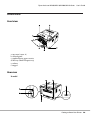
Printer Parts
Front view
a. top cover (cover A)
b. control panel
c. standard lower paper cassette
d. MP tray (Multi-Purpose tray)
e. subtray
f. stopper
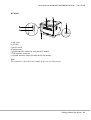
Rear view
D model
Getting to Know Your Printer
20
Epson AcuLaser M2300/M2310/M2400/M2410 Series
User’s Guide
DN model
a. rear cover
b. AC inlet
c. power switch
d. option cover
e. parallel interface connector (only for the D model)
f. USB interface connector
g. network interface connector (only for the DN model)
Note:
This manual uses D model as an example of the rear view illustrations.
Getting to Know Your Printer
21
Epson AcuLaser M2300/M2310/M2400/M2410 Series
User’s Guide
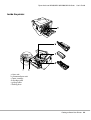
Inside the printer
a. fuser unit
b. photoconductor unit
c. toner cartridge
d. developer unit
e. pickup roller
f. locking lever
Getting to Know Your Printer
22
Epson AcuLaser M2300/M2310/M2400/M2410 Series
User’s Guide
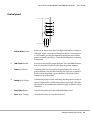
Control panel
a.
Information button
Prints status sheets when the Error light is off and no warning is
indicated. Prints a status sheet when pressed once. If your printer
is a DN model, pressing this button for more than two seconds
prints a network status sheet. Clears the warning when a warning
is indicated.
b.
Job Cancel button
Press once to cancel the current print job. Press and hold for more
than two seconds to delete all jobs from the printer memory.
c.
Data light (Green)
On when print data is stored in the print buffer (the section of
printer memory reserved for receiving data) but not yet printed.
Flashes when the printer is processing data. Off when no data
remains in the print buffer.
d.
Ready light (Green)
On when the printer is ready, indicating that the printer is ready to
receive and print data. Off when the printer is not ready. This light
also comes on in combination with other lights to indicate error
situations.
e.
Start/Stop button
Switches the printer between ready and offline status.
f.
Error light (Orange)
On or flashes when an error has occurred.
Getting to Know Your Printer
23
Epson AcuLaser M2300/M2310/M2400/M2410 Series
User’s Guide
g.
Paper light (Orange)
Turns on or flashes, and when in combination with the Error
light, usually indicates a paper-related problem. On usually
indicates a paper jam, while flashing usually indicates a
paper-related error or warning, such as when the paper source is
empty.
h.
Toner light (Orange)
On when the printer’s toner cartridge has run out of toner. Flashes
to indicate that toner is running low. If this light is flashing, have a
new toner cartridge ready.
i.
Memory light (Orange)
Usually turns on or flashes in combination with other lights to
indicate a memory-related error or warning.
Options
You can add to your printer’s capabilities by installing any of the following options.
❏ 250-Sheet Paper Cassette Unit
This unit increases paper feeding capacity up to 250 sheets of paper. You can add an optional paper
cassette unit (Epson AcuLaser M2300/M2310 series) or two optional paper cassette units (Epson
AcuLaser M2400/M2410 series) to the printer.
❏ Memory Module
This option expands the printer’s memory by allowing you to print complex and
graphics-intensive documents. The printer’s RAM capacity can be increased up to 288 MB
(320 MB for the DN models) by adding one additional 64, 128 or 256 MB 90 pin SDRAM DIMM.
Note:
Make sure that the DIMM you purchase is compatible with Epson products. For details, contact the
store where you purchased this printer or an Epson qualified service representative.
Consumable Products
The life of the following consumable products is monitored by the printer. The printer lets you know
when replacements are needed.
Getting to Know Your Printer
24
Epson AcuLaser M2300/M2310/M2400/M2410 Series
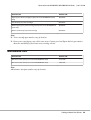
Product name
Product code
High Capacity Toner Cartridge (For Epson AcuLaser M2400/M2410 series
only)
0582/0586
Standard Capacity Toner Cartridge
0583/0587
Return High Capacity Toner Cartridge (For Epson AcuLaser M2400/M2410
series only)
0584/0588
Return Standard Capacity Toner Cartridge
0585/0589
User’s Guide
Note:
❏ Toner cartridge part numbers vary by location.
❏ Return toner cartridges are not sold in some areas. Contact your local Epson dealer/representative
about the availability of the Return toner cartridge scheme.
Maintenance Parts
Product name
Product code
Maintenance Unit (For Epson AcuLaser M2300/M2310 series)
1199/1200
Maintenance Unit (For Epson AcuLaser M2400/M2410 series)
1206/1207
Note:
Maintenance unit part numbers vary by location.
Getting to Know Your Printer
25
Epson AcuLaser M2300/M2310/M2400/M2410 Series
User’s Guide
Chapter 2
Printing Tasks
Loading Paper into Your Printer
This section describes how to load paper. If you use special media such as transparencies or envelopes,
see also “Selecting and Using Print Media” on page 33. For specifications or details about the paper
types and sizes, see “Paper” on page 151.
Note:
After you load papers, make sure to set the paper size/paper type in the Printer Settings dialog in the
printer driver. Otherwise, paper may not feed properly.
MP tray
The MP tray (Multi-purpose tray) is the paper source that is available for various types of paper, such
as labels, envelopes, thick paper, and transparencies.
Note:
To load envelopes, see “Envelopes” on page 34.
1. Open the MP tray, then pull the subtray out.
Printing Tasks
26
Epson AcuLaser M2300/M2310/M2400/M2410 Series
User’s Guide
2. Slide the paper guides outward to accommodate the paper you are loading.
3. Load a stack of the desired paper on the center of the paper tray with the printable surface facing
up. Then adjust the paper guide to the size of the paper.
Note:
❏ Make sure to load the paper as far as it will go inside the MP tray.
Printing Tasks
27
Epson AcuLaser M2300/M2310/M2400/M2410 Series
User’s Guide
❏ Make sure that you do not load paper beyond the limit tab.
a. limit tab
4. Raise the stopper.
Note:
❏ When you use the paper that is longer than A4 size, do not raise the stopper. To prevent printouts
from being stacked and pushed out of the output tray, every time the printer ejects a couple of the
printouts, remove them from the tray.
❏ Make sure that the locking lever for the pickup roller of the MP tray is in the locked position (up).
For the location of the locking lever and pickup roller, see “Inside the printer” on page 22.
If the locking lever is in the unlocked position (down), the pickup roller may have come off. In that
case, reinstall the pickup roller. For details, see “Installing the pickup roller” on page 28.
Installing the pickup roller
If the pickup roller has come off, reinstall it as follows.
Printing Tasks
28
Epson AcuLaser M2300/M2310/M2400/M2410 Series
User’s Guide
Note:
Do not remove the pickup roller without a qualified service representative.
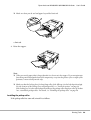
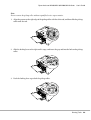
1. Align the groove on the right edge of the pickup roller with the white rod, and then slide the pickup
roller onto the rod.
2. Slide the locking lever to the right until it stops, and insert the gray rod into the hole on the pickup
roller.
3. Push the locking lever up to lock the pickup roller.
Printing Tasks
29
Epson AcuLaser M2300/M2310/M2400/M2410 Series
User’s Guide
Lower Paper Cassette Unit
This cassette gives you a second paper source in addition to the MP tray.
1. Pull the paper cassette out from the unit.
2. Pinch the tab and slide the paper guides to the size of paper.
Note:
❏ For the standard lower paper cassette, when the size of the paper being loaded is bigger than A4,
push the release lever and extend the paper cassette to accommodate the paper.
Printing Tasks
30
Epson AcuLaser M2300/M2310/M2400/M2410 Series
User’s Guide
❏ For the optional paper cassette, when the size of the paper being loaded is bigger than A4, detach
the green stopper and attach it to the paper guide.
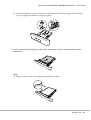
3. Load a stack of the desired paper on the center of the paper cassette with the printable surface
facing down.
Note:
❏ Make sure that you do not load paper beyond the limit mark.
Printing Tasks
31
Epson AcuLaser M2300/M2310/M2400/M2410 Series
User’s Guide
a. limit mark
❏ Load letterheads with the printable side facing down and with the letterhead portion at the top.
4. Insert the loaded paper cassette back into the unit.
5. Raise the stopper.
Note:
When you use the paper that is longer than A4 size, do not raise the stopper. To prevent printouts
from being stacked and pushed out of the output tray, every time the printer ejects a couple of the
printouts, remove them from the tray.
Printing Tasks
32
Epson AcuLaser M2300/M2310/M2400/M2410 Series
User’s Guide
Selecting and Using Print Media
You can use special media, such as labels, envelopes, thick paper, and transparencies.
Note:
❏ Since the quality of any particular brand or type of media may be changed by the manufacturer at
any time, Epson cannot guarantee the quality of any type of media. Always test samples of media
stock before purchasing large quantities or printing large jobs.
❏ Plain paper, such as A4, A5, B5, LT, LGL, GLG, EXE, and F4, is available for any paper source. Note
that A6 and HLT size plain paper can also be loaded in the MP tray or standard lower paper cassette.
Labels
Available labels:
❏ Labels designed for laser printers or plain-paper copiers
❏ Labels that completely cover the backing sheet, with no gaps between the individual labels
Available paper source:
❏ MP tray
Printer driver settings:
Paper Size:
A4, LT
Paper Source:
MP Tray
Paper Type:
Labels
Note:
❏ Depending on the quality of labels, the printing environment, or the printing procedure, labels might
be wrinkled. Make a trial print run before you print on a lot of labels.
❏ Duplex printing is not available for labels.
❏ Press a sheet of paper on top of each sheet of labels. If the paper sticks, do not use those labels in your
printer.
Printing Tasks
33
Epson AcuLaser M2300/M2310/M2400/M2410 Series
User’s Guide
Envelopes
Available envelopes:
❏ Envelopes that have no glue or no tape
c
Cautions
Do not use any window envelope other than the ones designed for laser printers. The plastic on
most window envelopes will melt.
Available paper source:
❏ MP tray
Printer driver settings:
Paper Size:
MON, C10, DL, C5, C6, IB5
Paper Source:
MP Tray
Note:
❏ Set the envelope with the printable surface facing up.
❏ Depending on the quality of envelopes, the printing environment, or the printing procedure,
envelopes might be wrinkled. Make a trial print run before you print on a lot of envelopes.
❏ Duplex printing is not available for envelopes.
Thick paper
Available paper source:
Printing Tasks
34
Epson AcuLaser M2300/M2310/M2400/M2410 Series
User’s Guide
❏ MP tray
Printer driver settings:
Paper Size:
A4, A5, B5, LT, EXE
Paper Source:
MP Tray
Paper Type:
Thick (121 to 220 g/m2 paper)
Semi-thick paper
Available paper source:
❏ MP tray
❏ Standard lower paper cassette
❏ Optional paper cassette
Printer driver settings:
Paper Size:
A4, A5, B5, LT, EXE
Paper Source:
Auto Selection
Paper Type:
Semi-Thick (91 to 120 g/m2 paper)
Transparencies
Available paper source:
❏ MP tray
Printer driver settings:
Paper Size:
A4, LT
Paper Source:
MP Tray
Printing Tasks
35
Epson AcuLaser M2300/M2310/M2400/M2410 Series
Paper Type:
User’s Guide
Transparency
Custom paper size
Available paper size:
❏ 70.0 × 148.0 mm to 215.9 × 356.0 mm
Available paper source:
❏ MP tray
Printer driver settings:
Paper Size:
User Defined Size
Paper Source:
MP Tray
Paper Type:
Normal, Semi-Thick, or Thick
Note:
Depending on the quality of the non-standard size paper, the printing environment, or the printing
procedure, the paper might skew. Make a trial print run before you print on a lot of non-standard size
paper.
Note:
❏ For Windows, access the printer driver, then select User Defined Size from the Paper Size list on the
Basic Settings tab. In the User defined Paper Size dialog box, adjust the Paper Width, Paper Length,
and Unit settings to match your custom paper. Then click OK and your custom paper size will be
saved.
❏ The saved paper sizes can only be used with the printer driver you saved them to. Even if multiple
printer names are set for a printer driver, the settings can be available only for the printer name in
which you saved the settings.
❏ When sharing the printer on a network, you cannot create User defined size at the client.
Printing Tasks
36
Epson AcuLaser M2300/M2310/M2400/M2410 Series
User’s Guide
❏ For Mac OS X, follow the steps bellow to save your custom paper size.
1. Open the Page Setup dialog box.
2. Select Manage Custom Sizes from the Paper Size drop-down list.
3. Click .
4. Double-click Untitled and enter the setting's name.
5. Specify the paper size and click OK.
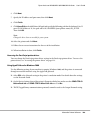
Cancelling a Print Job
From the printer
Press the + Cancel Job button on the printer’s control panel.
From the computer
For Windows users
Double-click your printer’s icon on the taskbar. Select the job in the list, then click Cancel from the
Document menu.
For Mac OS X users
Open Print & Fax (for Mac OS X 10.5 or later) or Print Setup Utility (for Mac OS X 10.4) and
double-click your printer from the print queue. Then, select Delete from the jobs menu.
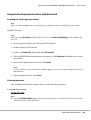
Setting the Print Quality
You can change the print quality of printouts through settings in the printer driver.
Printing Tasks
37
Epson AcuLaser M2300/M2310/M2400/M2410 Series
User’s Guide
In the Automatic setting, you can select a print mode according to your printing purpose. The printer
driver makes optimal settings depending on the print mode you have selected. In the Advanced
setting, you have more setting options.
Note:
The printer driver’s online help provides details on printer driver settings.
Note for Macintosh users:
❏ For Mac OS X 10.4, Maximum cannot be selected from the Automatic settings. Select Advanced
settings to select Maximum.
❏ The procedure below uses Mac OS X 10.4 as an example.
Using the Automatic setting
For Windows users
1. Click the Basic Settings tab.
2. Select Automatic, then choose desired printing quality.
3. Click OK.
For Mac OS X users
Printing Tasks
38
Epson AcuLaser M2300/M2310/M2400/M2410 Series
User’s Guide
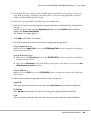
1. Open the Print dialog box.
2. Select Printer Settings from the drop-down list, and select Basic Settings.
3. Select Automatic, then choose the resolution from the drop-down list.
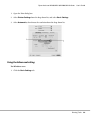
Using the Advanced setting
For Windows users
1. Click the Basic Settings tab.
Printing Tasks
39
Epson AcuLaser M2300/M2310/M2400/M2410 Series
User’s Guide
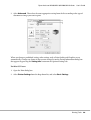
2. Select Advanced. Then select the most appropriate setting from the list according to the type of
document or image you want to print.
When you choose a predefined setting, other settings such as Print Quality and Graphics are set
automatically. Changes are shown in the current settings list on the Setting Information dialog box
that appears by pressing the Setting Info. button on the Optional Settings tab.
For Mac OS X users
1. Open the Print dialog box.
2. Select Printer Settings from the drop-down list, and select Basic Settings.
Printing Tasks
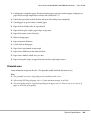
40
Epson AcuLaser M2300/M2310/M2400/M2410 Series
User’s Guide
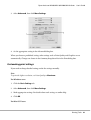
3. Select Advanced, then click More Settings.
4. Set the appropriate setting in the Advanced dialog box.
When you choose a predefined setting, other settings such as Print Quality and Graphics are set
automatically. Changes are shown in the Summary drop-down list in the Print dialog box.
Customizing print settings
If you need to change detailed settings, make the settings manually.
Note:
To print the highest resolution, set Print Quality to Maximum.
For Windows users
1. Click the Basic Settings tab.
2. Select Advanced, then click More Settings.
3. Make appropriate settings. For details about each setting, see online help.
4. Click OK.
For Mac OS X users
Printing Tasks
41
Epson AcuLaser M2300/M2310/M2400/M2410 Series
User’s Guide
1. Open the Print dialog box.
2. Select Printer Settings from the drop-down list, and select Basic Settings.
3. Select Advanced, then click More Settings.
4. Make appropriate settings. For details about each setting, click the
button.
5. Click OK.
Saving your settings
You can save your custom settings.
Note:
❏ You cannot use a predefined setting name for your custom settings.
❏ The saved custom settings can only be used with the printer driver you saved them to. Even if multiple
printer names are set for a printer driver, the settings can be available only for the printer name in
which you saved the settings.
❏ You cannot delete predefined settings.
For Windows users
Note:
When sharing the printer on a network, the Save Settings is grayed out and you cannot create a custom
setting at the client.
1. Click the Basic Settings tab.
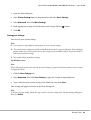
2. Select Advanced, then click Save Settings to open the Custom Settings dialog box.
3. Type a name for your custom settings in the Name box, then click Save.
Your settings will appear in the list on the Basic Settings tab.
Note:
To delete a custom setting, follow the step 1 and 2, select the setting in the Custom Settings dialog box,
then click Delete.
Printing Tasks
42
Epson AcuLaser M2300/M2310/M2400/M2410 Series
User’s Guide
You can create new settings in the More Settings dialog box. When you create new settings, Custom
Settings is displayed in the list on the Basic Settings tab. In this case, the original setting is not
overwritten. To save the new settings, save them under a new name.
For Mac OS X users
1. Open the Print dialog box.
2. Click Save or Save As in the Presets.
3. Type a name for your custom settings in the Name box, then click OK.
Your settings will appear in the Presets drop-down list.
Note:
❏ To delete a custom setting, select the setting, then select Delete in the Presets drop-down list.
❏ The Custom Setting option is a standard feature of Mac OS X.
Toner Save mode
To reduce the amount of toner used in printing documents, you can print rough drafts using the Toner
Save mode.
For Windows users
1. Click the Basic Settings tab.
2. Select Advanced, then click More Settings to open the More Settings dialog box.
3. Select the Toner Save check box, then click OK.
For Mac OS X users
1. Open the Print dialog box.
2. Select Printer Settings from the drop-down list, and select Basic Settings.
3. Select Advanced, then click More Settings.
4. Select the Toner Save check box, then click OK.
Printing Tasks
43
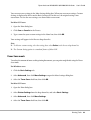
Epson AcuLaser M2300/M2310/M2400/M2410 Series
User’s Guide
Setting the Advanced Layout
Note for Macintosh users:
The procedure below uses Mac OS X 10.4 as an example.
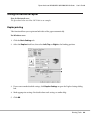
Duplex printing
This function allows you to print on both sides of the paper automatically.
For Windows users
1. Click the Basic Settings tab.
2. Select the Duplex check box, then select Left, Top, or Right as the binding position.
3. If you want to make detailed settings, click Duplex Settings to open the Duplex Settings dialog
box.
4. Make appropriate settings. For details about each setting, see online help.
5. Click OK.
Printing Tasks
44
Epson AcuLaser M2300/M2310/M2400/M2410 Series
User’s Guide
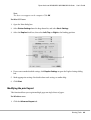
Note:
The alert screen appears on the computer. Click OK.
For Mac OS X users
1. Open the Print dialog box.
2. Select Printer Settings from the drop-down list, and select Basic Settings.
3. Select the Duplex check box, then select Left, Top, or Right as the binding position.
4. If you want to make detailed settings, click Duplex Settings to open the Duplex Settings dialog
box.
5. Make appropriate settings. For details about each setting, see online help.
6. Click Print.
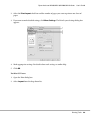
Modifying the print layout
This function allows you to print multiple pages on single sheets of paper.
For Windows users
1. Click the Advanced Layout tab.
Printing Tasks
45
Epson AcuLaser M2300/M2310/M2400/M2410 Series
User’s Guide
2. Select the Print Layout check box and the number of pages you want to print on one sheet of
paper.
3. If you want to make detailed settings, click More Settings. The Print Layout Settings dialog box
appears.
4. Make appropriate settings. For details about each setting, see online help.
5. Click OK.
For Mac OS X users
1. Open the Print dialog box.
2. Select Layout from the drop-down list.
Printing Tasks
46
Epson AcuLaser M2300/M2310/M2400/M2410 Series
User’s Guide
3. Select the number of pages you want to print on one sheet of paper from the drop-down list.
4. Click Print.
Note:
The Layout settings are a standard feature of Mac OS X.
Resizing printouts
This function allows you to enlarge or reduce your document.
For Windows users
1. Click the Advanced Layout tab.
Printing Tasks
47
Epson AcuLaser M2300/M2310/M2400/M2410 Series
User’s Guide
2. Select the Zoom Options check box.
3. If you want to resize pages automatically to fit the output paper, select the desired paper size from
the Output Paper drop-down list.
If you want to resize pages to a specified magnification, select the Zoom To check box, then specify
the percentage. You can also select the output paper size.
4. Select Upper Left (to print reduced page image at upper left corner of the paper) or Center (to
print reduced page image with centering) for Location setting.
Note:
This setting is not available when you select Zoom To check box.
5. Click OK.
For Mac OS X users
Note:
The enlarging or reducing rate is automatically specified according to the paper size you select.
1. Open the Print dialog box.
2. Select Paper Handling from the drop-down list.
Printing Tasks
48
Epson AcuLaser M2300/M2310/M2400/M2410 Series
User’s Guide
3. Select Scale to fit paper size and select the desired paper size from the drop-down list.
Note:
If you select Scale down only, your documents are not enlarged even if you select the large paper
size.
Printing watermarks
This function allows you to print a text-based or image-based watermark on your document.
For Windows users
1. Click the Advanced Layout tab.
Printing Tasks
49
Epson AcuLaser M2300/M2310/M2400/M2410 Series
User’s Guide
2. Select a watermark that you want to use from the Watermark drop-down list.
3. If you want to make detailed settings, click Watermark Settings, and make appropriate settings.
For details about each setting, see online help.
4. Click OK.
For Mac OS X users
1. Open the Print dialog box.
2. Select Printer Settings from the drop-down list, and select Basic Settings.
Printing Tasks
50
Epson AcuLaser M2300/M2310/M2400/M2410 Series
User’s Guide
3. Click Stamp Function.
4. Select the Watermark check box, then click Watermark Settings.
5. Select a watermark from the Watermark drop-down list.
6. Make appropriate settings. For details about each setting, see online help.
7. Click OK.
Making a new watermark
For Windows users
1. Click the Advanced Layout tab.
2. Click New/Delete.
3. Select Text or BMP and type a name for the new watermark in the Name box.
4. If you select Text, type the watermark text in the Text box. If you select BMP, click Browse, select
the BMP file you want to use, then click Open.
5. Type the watermark name in the Name box.
6. Click Save. Your watermark will appear in the List box.
Printing Tasks
51
Epson AcuLaser M2300/M2310/M2400/M2410 Series
User’s Guide
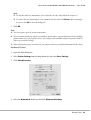
Note:
❏ To edit the saved text watermark, select it from the List box, then follow the step 4 to 6.
❏ To remove the saved watermark, select it from the List box, then click Delete. After removing it,
be sure to click OK to close the dialog box.
7. Click OK.
Note:
❏ You can register up to 10 custom watermarks.
❏ The saved watermarks can only be used with the printer driver you saved them to. Even if multiple
printer names are set for a printer driver, the settings can be available only for the printer name in
which you saved the settings.
❏ When sharing the printer on a network, you cannot create an user defined watermark at the client.
For Mac OS X users
1. Open the Print dialog box.
2. Select Printer Settings from the drop-down list, and select Basic Settings.
3. Click Stamp Function.
4. Select the Watermark check box, then click Watermark Settings.
Printing Tasks
52
Epson AcuLaser M2300/M2310/M2400/M2410 Series
User’s Guide
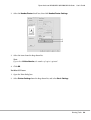
5. Click New/Delete.
6. Click Add Text or Add Image on the Custom Settings dialog box.
7. If you select Add Text, type the watermark text, select the Font and Style, then click OK on the
Edit Text dialog box. If you select Add Image, select an image file (PDF, PNG, or JPG), then click
Open.
Note:
To type the watermark text, open the text input dialog box by clicking the text box. Type the text, then
click OK.
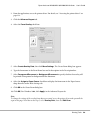
8. Type the file name in the Watermark box, then click Save.
Note:
❏ To edit the saved text watermark, select it from the Mark List box, then click Edit Text. After
editing, be sure to click Save.
❏ To remove the saved watermark, select it from the Mark List box, then click Mark Delete. After
removing it, be sure to click Save.
9. Select a custom watermark that has been saved from the Watermark drop-down list on the
Watermark Settings dialog box, and then click OK.
Note:
You can register up to 32 custom watermarks.
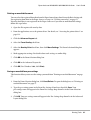
Printing headers and footers
This function allows you to print user name, computer name, date, time, or collate number, at the top
or bottom of each page in a document.
For Windows users
1. Click the Advanced Layout tab.
Printing Tasks
53
Epson AcuLaser M2300/M2310/M2400/M2410 Series
User’s Guide
2. Select the Header/Footer check box, then click Header/Footer Settings.
3. Select the items from the drop-down list.
Note:
If you select Collate Number, the number of copies is printed.
4. Click OK.
For Mac OS X users
1. Open the Print dialog box.
2. Select Printer Settings from the drop-down list, and select Basic Settings.
Printing Tasks
54
Epson AcuLaser M2300/M2310/M2400/M2410 Series
User’s Guide
3. Click Stamp Function.
4. Select the Header/Footer check box, then click Header/Footer Settings.
5. Select the items from the drop-down list.
Note:
If you select Collate Number, the number of copies is printed.
6. Click OK.
Printing with an overlay
This function allows you to print a standard form or letterhead onto the original document.
Note:
❏ This function is for Windows only.
❏ The overlay function is available only when High Quality (Printer) is selected for the Printing Mode
in the Extended Settings dialog box from the Optional Settings tab.
Creating an overlay
1. Open the file that you want to create an overlay.
Printing Tasks
55
Epson AcuLaser M2300/M2310/M2400/M2410 Series
User’s Guide
2. From the application, access the printer driver. For details, see “Accessing the printer driver” on
page 116.
3. Click the Advanced Layout tab.
4. Select the Form Overlay check box.
5. Select Create Overlay Data, then click More Settings. The Create Form dialog box appears.
6. Type the form name in the Form Name box and its description in the Description box.
7. Select Foreground Document or Background Document to specify whether the overlay will
be printed as foreground or background of the document.
8. Select the Assign to Paper Source check box to display the form name in the Paper Source
drop-down list on the Basic Settings tab.
9. Click OK in the Create Form dialog box.
10. Click OK (For Windows 2000, click Apply) in the Advanced Layout tab.
Note:
To change the settings of the overlay form data you created, access the printer driver and repeat all the
steps in this page. Note that on the step 5, select Overlay Print, then click Edit Form.
Printing Tasks
56
Epson AcuLaser M2300/M2310/M2400/M2410 Series
User’s Guide
Printing an overlaid document
You can select the registered form data from the Paper Source drop-down list on the Basic Settings tab.
For registering form data in the Paper Source, see step 8 in “Creating an overlay” on page 55.
If overlay form data is not registered in the Paper Source or if you want to make detailed settings,
follow the steps below.
1. Open the file to print with overlay data.
2. From the application, access the printer driver. For details, see “Accessing the printer driver” on
page 116.
3. Click the Advanced Layout tab.
4. Select the Form Overlay check box.
5. Select the Overlay Print check box, then click More Settings. The Form Selection dialog box
appears.
6. Make appropriate settings. For details about each setting, see online help.
7. Click OK in the Form Selection dialog box.
8. Click OK in the Advanced Layout tab.
9. Click OK (For Windows 2000, click Print).
Saving an overlaid form pre-settings
This function allows you to save the settings you made from “Printing an overlaid document” on page
57.
1. From the Form Selection dialog box, click Save/Delete. To open the dialog box, see “Printing an
overlaid document” on page 57.
2. Type the pre-settings name in the Form Pre-Settings Name box, then click Save. Your
pre-settings name will appear in the Form Pre-Settings drop-down list in the Form Selection
dialog box.
3. Click OK. Your pre-settings name will appear in the Pre-Settings drop-down list in the Advanced
Layout dialog box.
Printing Tasks
57
Epson AcuLaser M2300/M2310/M2400/M2410 Series
User’s Guide
Note:
❏ To delete an overlaid form pre-setting, follow the step 1, select the pre-settings name you want to
delete from Form Pre-Settings drop-down list, click Delete. then click OK.
❏ You can save up to 20 pre-settings.
Printing Web Pages to Fit Your Paper Size
This function allows you to make Web pages fit to your paper size when printing. Install EPSON
Web-To-Page from the printer Software Disc.
Note:
This software is for Windows only.
After you install EPSON Web-To-Page, the menu bar is displayed on the Microsoft Internet Explorer
Toolbar. If it does not appear, select Toolbars from the View menu of Internet Explorer, and then
select EPSON Web-To-Page.
Printing Tasks
58
Epson AcuLaser M2300/M2310/M2400/M2410 Series
User’s Guide
Chapter 3
Installing Options
Optional Paper Cassette Unit
For details about the paper types and sizes that you can use with the optional paper cassette unit, see
“Lower Paper Cassette Unit” on page 30. For specifications, see “Optional paper cassette unit” on page
156.
Note:
You can add an optional paper cassette unit (Epson AcuLaser M2300/M2310 series) or two optional
paper cassette units (Epson AcuLaser M2400/M2410 series) to the printer.
Handling precautions
Always pay attention to the following handling precautions before installing the option:
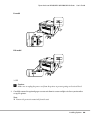
Be sure to lift the printer from the positions shown below.
w
Warning:
To lift the printer safely, you must hold it in the positions shown above. If carried incorrectly, the
printer may be dropped and damaged or cause an injury.
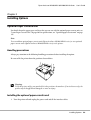
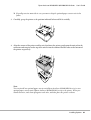
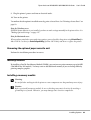
Installing the optional paper cassette unit
1. Turn the printer off and unplug the power cord and all the interface cables.
Installing Options
59
Epson AcuLaser M2300/M2310/M2400/M2410 Series
User’s Guide
D model
DN model
* OFF
c
Caution:
Make sure to unplug the power cord from the printer to prevent getting an electrical shock.
2. Carefully remove the optional paper cassette unit from its carton and place it where you intend to
set up the printer.
Note:
❏ Remove the protective materials from the unit.
Installing Options
60
Epson AcuLaser M2300/M2310/M2400/M2410 Series
User’s Guide
❏ Keep all protective materials in case you want to ship the optional paper cassette unit in the
future.
3. Carefully, grasp the printer at the position indicated below and lift it carefully.
4. Align the corners of the printer and the unit, then lower the printer gently onto the unit so that the
connector and two pins on the top of the unit fit into the terminal and the holes on the bottom of
the printer respectively.
Note:
You can install one optional paper cassette unit (Epson AcuLaser M2300/M2310 series) or two
optional paper cassette units (Epson AcuLaser M2400/M2410 series) to the printer. When you
install two units, stack them up against each other, and then place the printer on them.
Installing Options
61
Epson AcuLaser M2300/M2310/M2400/M2410 Series
User’s Guide
5. Pull the paper cassette out from the unit.
6. Turn the lever to the position as shown below to lock the optional paper cassette unit.
7. Insert the paper cassette back into the unit.
8. Reconnect all the interface cables and the power cord.
Installing Options
62
Epson AcuLaser M2300/M2310/M2400/M2410 Series
User’s Guide
9. Plug the printer’s power cord into an electrical outlet.
10. Turn on the printer.
To confirm that the option is installed correctly, print a Status Sheet. See “Printing a Status Sheet” on
page 93.
Note for Windows users:
If EPSON Status Monitor is not installed, you have to make settings manually in the printer driver. See
“Making Optional Settings” on page 117.
Note for Macintosh users:
When you have attached or removed printer options, you need to delete the printer using Print & Fax (for
Mac OS X 10.5 or later) or Print Setup Utility (for Mac OS X 10.4), and then re-register the printer.
Removing the optional paper cassette unit
Perform the installation procedure in reverse.
Memory Module
By installing a Dual In-line Memory Module (DIMM), you can increase printer memory up to 288 MB
(320 MB for the DN models). You may want to add additional memory if you are having difficulty
printing complex graphics.
Installing a memory module
w
Warning:
Be careful when working inside the printer as some components are sharp and may cause injury.
c
Caution:
Before you install a memory module, be sure to discharge any static electricity by touching a
grounded piece of metal. Otherwise, you may damage static-sensitive components.
Installing Options
63
Epson AcuLaser M2300/M2310/M2400/M2410 Series
User’s Guide
1. Turn the printer off and unplug the power cord.
* OFF
c
Caution:
Make sure to unplug the power cord from the printer to prevent getting an electrical shock.
2. Remove the screw on the option cover on the back of the printer using the screw driver.
Installing Options
64
Epson AcuLaser M2300/M2310/M2400/M2410 Series
User’s Guide
3. Remove the option cover.
4. Identify the memory slot. The position is shown below.
a. memory slot
5. Push a white stopper until it stops.
Installing Options
65
Epson AcuLaser M2300/M2310/M2400/M2410 Series
User’s Guide
6. Insert the memory module into the memory slot until it stops.
7. Slide the white stopper back toward you to lock the memory module.
c ❏Caution:
Do not apply too much force.
❏ Be sure to insert the memory facing the correct way.
❏ Do not remove any modules from the circuit board. Otherwise, the printer will not work.
8. Reattach the option cover.
9. Tighten the screw on the option cover using the screw driver.
10. Reconnect all the interface cables and the power cord.
11. Plug the printer’s power cord into an electrical outlet.
12. Turn on the printer.
To confirm that the option is installed correctly, print a Status Sheet. See “Printing a Status Sheet” on
page 93.
Installing Options
66
Epson AcuLaser M2300/M2310/M2400/M2410 Series
User’s Guide
Note for Windows users:
If EPSON Status Monitor is not installed, you have to make settings manually in the printer driver. See
“Making Optional Settings” on page 117.
Note for Macintosh users:
When you have attached or removed printer options, you need to delete the printer using Print & Fax (for
Mac OS X 10.5 or later) or Print Setup Utility (for Mac OS X 10.4), and then re-register the printer.
Removing a memory module
w
Warning:
Be careful when working inside the printer as some components are sharp and may cause injury.
c
Caution:
Before you remove a memory module, be sure to discharge any static electricity by touching a
grounded piece of metal. Otherwise, you may damage static-sensitive components.
Perform the installation procedure in reverse.
Installing Options
67
Epson AcuLaser M2300/M2310/M2400/M2410 Series
User’s Guide
Chapter 4
Replacing Consumable Products/Maintenance Parts
Precautions During Replacement
Always observe the following handling precautions when replacing consumable products or
maintenance parts:
For details about replacement, see the instructions that come with the consumable products or
maintenance parts.
w
Warning:
❏ Be careful not to touch the fuser, which is marked CAUTION, or the surrounding areas. If the
printer has been in use, the fuser and surrounding areas may be very hot.
❏ Do not dispose of used consumable products or maintenance parts in fire, as they may explode
and cause injury. Dispose of them according to local regulations.
❏ Provide enough space for the replacement procedure. You will have to open some parts (such as
the printer cover) of the printer when you are replacing consumable products or maintenance
parts.
❏ Do not install the consumable products or maintenance parts that reach end of service life into the
printer.
For details about the handling precautions, see “Handling consumable products and maintenance
parts” on page 15.
Replacement Messages
If a consumable product or maintenance part reaches the end of its service life, the printer displays the
following lights on the panel or the window of EPSON Status Monitor. When this happens, replace the
depleted consumable product or maintenance part.
Note that the toner cartridge supplied with your printer is partly used during the initial setup,
therefore the cartridge prints fewer pages compared to subsequent toner cartridges.
Replacing Consumable Products/Maintenance Parts
68
Epson AcuLaser M2300/M2310/M2400/M2410 Series
Light pattern
User’s Guide
Description
Replace Toner
Explanation:
The toner cartridge has reached the end of its service life and need to be replaced.
When the Error light turns on, you cannot continue printing. Replace the toner cartridge with a
new one. See “Replacing Consumable Products/Maintenance Parts” on page 68 for instructions.
Replace Maintenance Unit
Explanation:
The maintenance unit has reached the end of its service life and need to be replaced.
When the Error light turns on, you cannot continue printing. Replace the maintenance unit with
a new one. See “Replacing Consumable Products/Maintenance Parts” on page 68 for
instructions.
Note:
Error Lights appear for one replacement product at a time. After replacing a replacement product, check
the lights on the panel for other replacement products.
❏ The toner cartridge is not an independent unit that you install directly into the printer. The
cartridge needs to be inserted into the developer unit’s casing and then installed into the printer.
w
Warning:
❏ Do not touch the toner. Always keep toner away from your eyes. If toner gets on your skin or
clothes, wash it off with soap and water immediately.
❏ Keep consumable products and maintenance parts out of the reach of children.
❏ Do not dispose of used consumable products or maintenance parts in fire, as they may explode
and cause injury. Dispose of them according to local regulations.
❏ If toner is spilled, use a broom and dustpan or a damp cloth with soap and water to clean it up.
Because the fine particles can cause a fire or explosion if they come into contact with a spark, do
not use a vacuum cleaner.
❏ Be careful not to touch the fuser, which is marked CAUTION, or surrounding areas. If the
printer has been in use, the fuser and the surrounding areas may be very hot. If you must touch
one of these areas, wait 30 minutes to allow the heat subside before doing so.
Replacing Consumable Products/Maintenance Parts
69
Epson AcuLaser M2300/M2310/M2400/M2410 Series
c
User’s Guide
Caution:
❏ You must completely open the printer cover when replacing the toner cartridge; otherwise, you
may damage the printer.
❏ Never touch the developing roller that is exposed after removing the protective cover;
otherwise, print quality may decline.
❏ When you replace the toner cartridge, wipe paper dust and marks from the metal roller inside
the printer with a dry and soft cloth as shown below.
* metal roller
Replacing Consumable Products/Maintenance Parts
70
Epson AcuLaser M2300/M2310/M2400/M2410 Series
User’s Guide
Chapter 5
Cleaning and Transporting the Printer
Cleaning the Printer
The printer needs only minimal cleaning. If the printer’s outer case is dirty or dusty, turn off the
printer and clean it with a soft, clean cloth moistened with a mild detergent.
c
Caution:
Never use alcohol or paint thinner to clean the printer cover. These chemicals can damage the
components and the case. Be careful not to get water onto the printer mechanism or any electrical
components.
Cleaning the pickup roller
1. Turn off the printer.
* OFF
Cleaning and Transporting the Printer
71
Epson AcuLaser M2300/M2310/M2400/M2410 Series
User’s Guide
2. Pull the paper cassette unit out and remove the papers.
3. Gently wipe the rubber parts of the pickup roller inside the printer with a well-wrung wet cloth.
4. Load the papers back on the paper cassette unit and reinstall the cassette.
Cleaning and Transporting the Printer
72
Epson AcuLaser M2300/M2310/M2400/M2410 Series
User’s Guide
Cleaning inside the printer
1. Open the top cover and MP tray.
2. Remove the developer unit containing the toner cartridge.
3. Put your finger into the hole of the outer green knob on each side of the photoconductor unit.
Then, pull the photoconductor unit towards you.
Cleaning and Transporting the Printer
73
Epson AcuLaser M2300/M2310/M2400/M2410 Series
w
User’s Guide
Warning:
Be careful not to touch the fuser, which is marked CAUTION, or the surrounding areas. If the
printer has been in use, the fuser and the surrounding areas may be very hot. If you must touch
one of these areas, wait 30 minutes to allow the heat to subside before doing so.
Caution:
Never touch the developing roller that is exposed after removing the protecting cover;
otherwise, print quality may decline.
c❏
❏ Do not expose the photoconductor unit to room light any longer than necessary.
❏ Never touch the photoconductor unit’s light-sensitive drum; otherwise, print quality may
decline.
Cleaning and Transporting the Printer
74
Epson AcuLaser M2300/M2310/M2400/M2410 Series
User’s Guide
4. Wipe paper dust and marks from the metal roller inside the printer with a dry and soft cloth as
shown below.
* metal roller
5. Move the green cleaning lever of the photoconductor wire back and forth slowly several times
from one end to the other.
Note:
❏ If the protective tape is stuck on the photoconductor unit, remove the tape before moving the
cleaning lever.
❏ After cleaning, make sure to return the green cleaning lever to the original position until it locks.
Cleaning and Transporting the Printer
75
Epson AcuLaser M2300/M2310/M2400/M2410 Series
User’s Guide
6. Insert the photoconductor unit slowly all the way in.
7. Insert the developer unit containing the toner cartridge slowly all the way in.
Note:
Make sure that the locking lever for the pickup roller of the MP tray is in the locked position (up). For
the location of the locking lever and pickup roller, see “Inside the printer” on page 22.
If the locking lever is in the unlocked position (down), the pickup roller may have come off. In that
case, reinstall the pickup roller. For details, see “Installing the pickup roller” on page 28.
Cleaning and Transporting the Printer
76
Epson AcuLaser M2300/M2310/M2400/M2410 Series
User’s Guide
8. Close the top cover and MP tray.
Transporting the Printer
For long distances
Before you move the printer, prepare the location where you are going to place it.
See the following sections.
❏ “Setting up the printer” on page 11
❏ “Finding the place for the printer” on page 13
Repacking the printer
If you need to transport your printer for long distances, carefully repack it using the original box and
packing materials.
1. Turn off the printer and remove the following items:
❏ Power cord
❏ Interface cables
❏ Loaded paper
❏ Toner cartridge
❏ Developer unit
❏ Installed options
Cleaning and Transporting the Printer
77
Epson AcuLaser M2300/M2310/M2400/M2410 Series
c
User’s Guide
Caution:
Do not remove the photoconductor unit. If you carry the printer without the photoconductor
unit installed, the printer may be damaged.
2. Attach the protective materials onto the printer, then repack the printer in its original box.
c
Caution:
When moving the printer, always keep it horizontal.
For short distances
Before you move the printer, prepare the location where you are going to place it.
See the following sections.
❏ “Setting up the printer” on page 11
❏ “Finding the place for the printer” on page 13
1. Turn off the printer and remove the following items:
❏ Power cord
❏ Interface cables
❏ Loaded Paper
❏ Installed options
2. Be sure to lift the printer by the correct positions as shown below.
c
Caution:
When moving the printer, always keep it horizontal.
Cleaning and Transporting the Printer
78
Epson AcuLaser M2300/M2310/M2400/M2410 Series
User’s Guide
Chapter 6
Troubleshooting
Clearing Jammed Paper
If paper becomes jammed in the printer, the EPSON Status Monitor provides alert messages.
Precautions for clearing jammed paper
Be sure to observe the following points when you clear jammed paper.
❏ Do not remove jammed paper by force. Torn paper can be difficult to remove and might cause
other paper jams. Pull it gently in order to avoid tearing.
❏ Always try to remove jammed paper with both hands to avoid tearing it. Jammed paper should be
removed in the direction in which paper feeds.
❏ If jammed paper is torn and remains in the printer, or if paper is jammed in a place not mentioned
in this section, contact your dealer.
❏ Make sure that the paper type that is loaded is the same as the Paper Type setting in the printer
driver.
❏ Do not expose the photoconductor unit to sunlight at all.
w
Warning:
❏ Be careful not to touch the fuser, which is marked CAUTION, or the surrounding areas. If the
printer has been in use, the fuser and the surrounding areas may be very hot.
❏ Do not insert your hand deep into the fuser unit as some components are sharp and may cause
injury.
Troubleshooting
79
Epson AcuLaser M2300/M2310/M2400/M2410 Series
User’s Guide
Paper Jam around the standard lower paper cassette
1. Remove the standard paper cassette, gently pull any sheets of paper out, and reinstall the paper
cassette.
Paper Jam around the 250-sheet Paper Cassette Unit
1. Remove the optional paper cassette, gently pull any sheets of paper out, and reinstall the paper
cassette.
Troubleshooting
80
Epson AcuLaser M2300/M2310/M2400/M2410 Series
User’s Guide
2. Remove the standard paper cassette, gently pull any sheets of paper out, and reinstall the paper
cassette.
Paper Jam in the 250-sheet Paper Cassette Unit
1. Remove the optional paper cassettes from the bottom one, then gently pull any sheets of paper
out.
Troubleshooting
81
Epson AcuLaser M2300/M2310/M2400/M2410 Series
User’s Guide
2. Reinstall the paper cassettes.
Paper Jam inside the printer
1. Open the top cover and MP tray.
2. Remove the developer unit containing the toner cartridge.
Troubleshooting
82
Epson AcuLaser M2300/M2310/M2400/M2410 Series
User’s Guide
3. Put your finger into the hole of the outer green knob on each side of the photoconductor unit.
Then, pull the photoconductor unit towards you.
w
Warning:
Be careful not to touch the fuser, which is marked CAUTION, or the surrounding areas. If the
printer has been in use, the fuser and the surrounding areas may be very hot. If you must touch
one of these areas, wait 30 minutes to allow the heat to subside before doing so.
Troubleshooting
83
Epson AcuLaser M2300/M2310/M2400/M2410 Series
User’s Guide
Caution:
Never touch the developing roller that is exposed after removing the protecting cover;
otherwise, print quality may decline.
c❏
❏ Do not expose the photoconductor unit to room light any longer than necessary.
❏ Never touch the photoconductor unit’s light-sensitive drum; otherwise, print quality may
decline.
4. Gently pull any sheets of paper out straight towards you.
Troubleshooting
84
Epson AcuLaser M2300/M2310/M2400/M2410 Series
User’s Guide
5. Insert the photoconductor unit slowly all the way in.
6. Insert the developer unit containing the toner cartridge slowly all the way in.
Note:
❏ If you cannot insert the developer unit all the way in, remove and insert the photoconductor unit,
then insert the developer unit again.
❏ Make sure that the locking lever for the pickup roller of the MP tray is in the locked position (up).
For the location of the locking lever and pickup roller, see “Inside the printer” on page 22.
If the locking lever is in the unlocked position (down), the pickup roller may have come off. In that
case, reinstall the pickup roller. For details, see “Installing the pickup roller” on page 28.
Troubleshooting
85
Epson AcuLaser M2300/M2310/M2400/M2410 Series
User’s Guide
7. Close the top cover and MP tray.
Paper Jam around the MP tray
1. Remove the paper on the subtray, then bring the subtray back into the MP tray.
c
Caution:
Even if you see any jammed paper when you perform this step, do not pull it out. Otherwise, the
printer may be damaged.
Troubleshooting
86
Epson AcuLaser M2300/M2310/M2400/M2410 Series
User’s Guide
2. Open the top cover.
3. Remove the developer unit containing the toner cartridge.
4. Put your finger into the hole of the outer green knob on each side of the photoconductor unit.
Then, pull the photoconductor unit towards you.
Troubleshooting
87
Epson AcuLaser M2300/M2310/M2400/M2410 Series
w
User’s Guide
Warning:
Be careful not to touch the fuser, which is marked CAUTION, or the surrounding areas. If the
printer has been in use, the fuser and the surrounding areas may be very hot. If you must touch
one of these areas, wait 30 minutes to allow the heat to subside before doing so.
Caution:
Never touch the developing roller that is exposed after removing the protecting cover;
otherwise, print quality may decline.
c❏
❏ Do not expose the photoconductor unit to room light any longer than necessary.
❏ Never touch the photoconductor unit's light-sensitive drum; otherwise, print quality may
decline.
Troubleshooting
88
Epson AcuLaser M2300/M2310/M2400/M2410 Series
User’s Guide
5. Gently pull any sheets of paper out straight towards you.
Note:
If the paper is stuck in the clear window, open the window to remove the jammed paper.
6. Insert the photoconductor unit slowly all the way in.
Troubleshooting
89
Epson AcuLaser M2300/M2310/M2400/M2410 Series
User’s Guide
7. Insert the developer unit containing the toner cartridge slowly all the way in.
Note:
If you cannot insert the developer unit all the way in, remove and insert the photoconductor unit,
then insert the developer unit again.
8. Close the top cover and load the paper back on the MP tray.
Note:
❏ Make sure that the locking lever for the pickup roller of the MP tray is in the locked position (up).
For the location of the locking lever and pickup roller, see “Inside the printer” on page 22.
If the locking lever is in the unlocked position (down), the pickup roller may have come off. In that
case, reinstall the pickup roller. For details, see “Installing the pickup roller” on page 28.
❏ For details about loading papers, see “ MP tray” on page 26.
Troubleshooting
90
Epson AcuLaser M2300/M2310/M2400/M2410 Series
User’s Guide
Paper Jam around the rear cover
1. Open the rear cover.
2. Pull the green labeled lever down and gently pull any sheets of paper out.
3. Close the rear cover.
Troubleshooting
91
Epson AcuLaser M2300/M2310/M2400/M2410 Series
User’s Guide
4. Open and close the top cover.
Paper Jam around the DM tray
1. Remove the standard paper cassette.
2. From the rear view, push the DM tray and gently pull any sheets of paper out.
Note:
Do not touch any metal part except the green lever on the DM tray.
Troubleshooting
92
Epson AcuLaser M2300/M2310/M2400/M2410 Series
User’s Guide
3. From the front view, push the DM tray and gently pull any sheets of paper out.
4. Reinstall the paper cassette.
5. Open and close the top cover.
Printing a Status Sheet
To confirm the current status of the printer, and that the options are installed correctly, print a status
sheet using the printer’s control panel or the printer driver.
To print a status sheet from the printer’s control panel, see “Control panel” on page 23.
To print a status sheet from the printer driver, for Windows, see “Printing a status sheet” on page 117,
for Macintosh, see “Printing a status sheet” on page 136.
Troubleshooting
93
Epson AcuLaser M2300/M2310/M2400/M2410 Series
User’s Guide
Operational Problems
The Ready light does not turn on
Cause
What to do
The power cord may not be properly plugged into
the electrical outlet.
Turn off the printer, check the power cord connections between the
printer and the electrical outlet, then turn the printer back on.
The electrical outlet may be controlled by an outside
switch or an automatic timer.
Make sure that the switch is turned on or plug another electrical
device into the outlet to check whether the outlet is operating
properly.
The printer does not print (Ready light off)
Cause
What to do
The printer is offline.
Press the Start/Stop button once to switch the printer to ready
status.
Some error may have occurred.
Check if an error light is on or flashing. See “Status and Error
Lights” on page 105.
The Ready light is on but nothing prints
Cause
What to do
Your computer may not be properly connected to the
printer.
Perform the procedure illustrated in the Setup Guide.
The interface cable may not be plugged in securely.
Check both ends of the interface cable between the printer and
the computer.
You may not be using the correct interface cable.
If you are using the USB interface, use a cable that is compatible
with Hi-Speed USB.
Your application software is not properly set up for your
printer.
Make sure that the printer is selected in your application software.
Your computer system’s memory is too small to handle
the volume of data in your document.
Try reducing the image resolution of your document in the
application software, or install more memory in your computer if
you can.
Troubleshooting
94
Epson AcuLaser M2300/M2310/M2400/M2410 Series
User’s Guide
The optional product is not available
Cause
What to do
The printer does not recognize the optional product.
Print a status sheet to see if the printer recognizes the optional
product. If not, reinstall the optional product.
For Windows users, EPSON Status Monitor is not
installed.
For Macintosh users, you do not re-register the printer.
For Windows users:
You have to install EPSON Status Monitor, or make settings
manually in the printer driver. See “Making Optional Settings” on
page 117.
For Macintosh users:
When you have attached or removed options from the printer,
you need to start EPSON Status Monitor, or delete and re-register
the printer.
To delete the printer, use Print & Fax (for Mac OS X 10.5 or later) or
Printer Setup Utility (for Mac OS X 10.4).
The remaining service life of the toner cartridge is not updated (For Windows
users only)
Cause
What to do
The interval between updating information for the
consumables is too long.
Press the Get Information Now button on the Consumables Info
Settings dialog box. You can also change the interval for updating
information about the consumables on the Consumables Info
Settings dialog box.
Printout Problems
The font cannot be printed
Cause
What to do
For Windows users, you may use the printer fonts
substituted for specified TrueType fonts.
In the printer driver, choose the Print TrueType fonts as bitmap
check box in the Extended Settings dialog box.
The selected font is not supported by your printer.
Make sure that you have installed the correct font. See the Font
Guide for more information.
Troubleshooting
95
Epson AcuLaser M2300/M2310/M2400/M2410 Series
User’s Guide
Printout is garbled
Cause
What to do
The interface cable may not be plugged in securely.
Make sure that both ends of the interface cable are plugged in
securely.
You may not be using the correct interface cable.
If you are using the USB interface, use a cable that is compatible
with Hi-Speed USB.
Note:
If a status sheet does not print correctly, your printer may be damaged. Contact your dealer or a qualified
service representative.
The printout position is not correct
Cause
What to do
The page length and margins may be set incorrectly in
your application.
Make sure that you are using the correct page length and margin
settings in your application.
The Paper Size setting may be incorrect.
Make sure that the correct paper size is selected in the printer
driver settings.
MP Tray Paper Size setting may be incorrect.
Make sure that you have selected MP Tray in the Paper Source
drop-down list and specified the correct paper size in the printer
driver settings.
Graphics do not print correctly
Cause
What to do
The printer emulation setting in your application may be
incorrect.
Make sure that your application is set for the printer emulation
you are using. For example, if you are using the ESC/Page mode,
make sure that your application is set to use an ESC/Page printer.
You may need more memory.
Graphics require large amounts of memory. Install an appropriate
memory module. See “Memory Module” on page 63.
Troubleshooting
96
Epson AcuLaser M2300/M2310/M2400/M2410 Series
User’s Guide
Print Quality Problems
The background is dark or dirty
Cause
What to do
You may not be using the correct type of paper for your
printer.
If the surface of your paper is too rough, printed characters may
appear distorted or broken. Smooth, high-quality copier paper is
recommended for best results. See “Available paper types” on
page 151 for information on choosing paper.
The paper path inside the printer may be dusty.
Clean internal printer components by printing three pages with
only one character per page.
The Density setting may be too dark.
In the printer driver, click Optional Settings in Extended Settings,
then lighten the Density setting.
White dots appear in the printout
Cause
What to do
The paper path inside the printer may be dusty.
Clean internal printer components by printing three pages with
only one character per page.
Print quality or tone is uneven
Cause
What to do
Your paper may be moist or damp.
Do not store paper in a humid or damp environment.
The toner cartridge may be near the end of its service
life.
If the message in EPSON Status Monitor indicates that the toner
cartridge is near the end of its service life, replace it. See
“Replacement Messages” on page 68.
For Windows users, you can also check the remaining service lives
of the toner cartridge by looking at the Basic Settings tab in the
printer driver.
Troubleshooting
97
Epson AcuLaser M2300/M2310/M2400/M2410 Series
User’s Guide
A vertical line appears on the printout
Cause
What to do
Either the metal roller or photoconductor wire inside the
printer is dirty.
Clean the metal roller and photoconductor wire inside the printer.
For details, see “Cleaning inside the printer” on page 73.
Toner smudges
Cause
What to do
Your paper may be moist or damp.
Do not store your paper in a humid or damp environment.
You may not be using the correct type of paper for your
printer.
Smooth, high-quality copier paper is recommended for best
results. See “Available paper types” on page 151 for information
on choosing paper.
The paper path inside the printer may be dusty.
Clean internal printer components by printing three pages with
only one character per page.
Areas are missing in the printed image
Cause
What to do
Your paper may be moist or damp.
This printer is sensitive to moisture absorbed by the paper. The
higher the moisture content in the paper, the lighter the printout.
Do not store paper in a humid or damp environment.
You may not be using the correct type of paper for your
printer.
If the surface of your paper is too rough, printed characters may
appear distorted or broken. Smooth, high-quality copier paper is
recommended for best results. See “Available paper types” on
page 151 for information on choosing paper.
Completely blank pages are output
Cause
What to do
The printer may have loaded more than one sheet at a
time.
Remove the paper stack and fan it. Tap it on a flat surface to even
the edges, then reload the paper.
The problem may be with your application or interface
cable.
Print out a status sheet. See “Printing a Status Sheet” on page 93. If
a blank page is ejected, the problem may be with the printer. Turn
off the printer and contact your dealer.
Troubleshooting
98
Epson AcuLaser M2300/M2310/M2400/M2410 Series
User’s Guide
Cause
What to do
The Paper Size setting may be incorrect.
Make sure that the correct paper size is selected in the printer
driver settings.
MP Tray Paper Size setting may be incorrect.
Make sure that you have selected MP Tray in the Paper Source
drop-down list and specified the correct paper size in the printer
driver settings.
The cartridge seal may not be pulled out of the toner
cartridge.
Make sure that the cartridge seal has been pulled out completely.
For details, see the instructions that come with the product.
The toner cartridge may be near the end of its service
life.
If the message in EPSON Status Monitor indicates that the toner
cartridge is near the end of its service life, replace it. See
“Replacement Messages” on page 68.
For Windows users, you can also check the remaining service life
of the toner cartridge by looking at the Basic Settings tab in the
printer driver.
Toner was not filled after the maintenance unit was
replaced.
Fill the toner. For details, see the instructions that come with the
maintenance unit.
Printouts are extremely curled
Cause
What to do
The printouts are curled because of heat and pressure of
the fuser unit.
Turn the paper over or load a different type of paper.
The printed image is light or faint
Cause
What to do
Your paper may be moist or damp.
Do not store your paper in a humid or damp environment.
The Toner Save mode may be on.
Turn off the Toner Save mode using the printer driver. To modify
the Toner Save mode using the printer driver, select Advanced in
Basic Settings, and click the More Settings. Deselect the Toner
Save check box in the More Settings dialog box for Windows users
or in the Advanced dialog for Mac users.
Troubleshooting
99
Epson AcuLaser M2300/M2310/M2400/M2410 Series
User’s Guide
Cause
What to do
The toner cartridge may be near the end of its service
life.
If the message in EPSON Status Monitor indicates that the toner
cartridge is near the end of its service life, replace it. See
“Replacement Messages” on page 68.
For Windows users, you can also check the remaining service life
of the toner cartridge by looking at the Basic Settings tab in the
printer driver.
The non-printed side of the page is dirty
Cause
What to do
Toner may have spilled onto the paper feed path.
Clean internal printer components by printing three pages with
only one character per page.
Printing was made right after clearing the paper jam.
Make a few one-sided printouts.
Print quality decreased
Cause
What to do
The printer cannot print in the required quality level
because of insufficient memory, and the printer lowers
the quality automatically so that the printer can continue
printing.
Check to see if the printout is acceptable. If not, add more memory
for a permanent solution or lower print quality temporarily in the
printer driver.
Memory Problems
Insufficient memory for current task
Cause
What to do
The printer has insufficient memory for current task.
Add more memory for a permanent solution or lower print quality
temporarily in the printer driver.
Troubleshooting
100
Epson AcuLaser M2300/M2310/M2400/M2410 Series
User’s Guide
Insufficient memory to print all copies
Cause
What to do
The printer does not have sufficient memory to collate
print jobs.
Only one set of copies will be printed. Reduce the contents of print
jobs, or add more memory. For information on installing more
memory, see “Memory Module” on page 63.
Paper Handling Problems
Paper does not feed properly
Cause
What to do
The paper guides are not set correctly.
Make sure that the paper guides in all the paper cassettes and the
MP tray are set to the correct paper size positions.
The paper source setting may not be correct.
Make sure that you have selected the correct paper source in your
application.
There may be no paper in the paper source.
Load paper into the selected paper source.
The size of loaded paper differs from the selected paper
size in the printer driver.
Make sure that the correct paper size is selected in the printer
driver settings.
The size/type of loaded paper is not selected in the
Printer Settings dialog box.
In the Printer Settings dialog box in the printer driver, set the size/
type of loaded paper properly.
Too many sheets may be loaded in the MP tray or paper
cassettes.
Make sure that you have not tried to load too many sheets of
paper. For the maximum paper capacity for each paper source,
see “General” on page 153.
If paper does not feed from the optional paper cassette
unit, the unit may not be installed properly.
For instructions on installing the unit, see “Optional Paper
Cassette Unit” on page 59.
When you make duplex printing from the MP tray, the
standard paper cassette is not installed.
Install the standard paper cassette.
When the optional paper cassette is installed, the
cassettes located above the one to feed paper from are
not installed.
Set all the paper cassettes above the one to feed paper from.
The pickup roller is dirty.
Clean up the pickup roller. For instructions, see “ Cleaning the
pickup roller” on page 71.
Troubleshooting
101
Epson AcuLaser M2300/M2310/M2400/M2410 Series
User’s Guide
Cause
What to do
The optional paper cassette may not be installed
properly.
See “Optional Paper Cassette Unit” on page 59 for instructions on
installing an optional paper cassette unit.
If the MP tray is being used, the MP tray’s pickup roller
may have come off.
Check if the locking lever is in the unlocked position (down). For
the location of the locking lever and pickup roller, see “Inside the
printer” on page 22.
If the locking lever is in the unlocked position (down), the pickup
roller may have come off. In that case, reinstall the pickup roller.
For details, see “Installing the pickup roller” on page 28.
Problems Using Options
To confirm your options are installed correctly, print a status sheet. See “Printing a Status Sheet” on
page 93 for details.
Feed jam when using the optional paper cassette
Cause
What to do
The paper is jammed at the optional paper cassette.
See “Clearing Jammed Paper” on page 79 to clear jammed paper.
An installed option cannot be used
Cause
What to do
The installed option is not defined in the printer driver.
For Windows users:
You have to make settings manually in the printer driver. See
“Making Optional Settings” on page 117.
For Macintosh users:
When you have attached or removed options from the printer,
you need to start EPSON Status Monitor, or delete and re-register
the printer.
To delete the printer, use Print & Fax (for Mac OS X 10.5 or later) or
Printer Setup Utility (for Mac OS X 10.4).
Troubleshooting
102
Epson AcuLaser M2300/M2310/M2400/M2410 Series
User’s Guide
Correcting USB Problems
If you are having difficulty using printer with a USB connection, see if your problem is listed below,
and take any recommended actions.
USB connections
USB cables or connections can sometimes be the source of USB problems.
For best results, you should connect the printer directly to the computer’s USB port. If you must use
multiple USB hubs, we recommend that you connect the printer to the first-tier hub.
Windows operating system
Your computer must have one of the operating systems supported by this printer pre-installed, or be a
model upgraded from Windows 2000, XP, Vista, Server 2003, or Server 2008 to an operating system
supported by this printer. You must not be able to install or run the USB printer driver on a computer
that does not meet these specifications or that is not equipped with a built-in USB port.
For details about your computer, contact your dealer.
Printer software installation
Incorrect or incomplete software installation can lead to USB problems. Take note of the following
and perform the recommended checks to ensure proper installation.
Checking printer software installation
When using Windows, you must follow the steps in the Setup Guide packed with the printer to install
the printer software. Otherwise, Microsoft’s Universal driver may be installed instead. To check if the
Universal driver has been installed, follow the steps below.
1. Open the Printers folder, then right-click the icon of your printer.
2. Click Printing Preferences on the shortcut menu that appears, then right-click anywhere in the
driver.
Troubleshooting
103
Epson AcuLaser M2300/M2310/M2400/M2410 Series
User’s Guide
If About is displayed in the shortcut menu that appears, click it. If a message box with the words
“Unidrv Printer Driver” appears, you must reinstall the printer software as described in the Setup
Guide. If About is not displayed, the printer software has been installed correctly.
Note:
❏ For Windows 2000, if the Digital Signature Not Found dialog box appears during the installation
process, click Yes. If you click No, you will have to install the printer software again.
❏ For Windows Vista, Vista x64, XP, XP x64, Server 2003, or Server 2003 x64, if the Software
Installation dialog box appears during the installation process, click Continue Anyway. If you click
STOP Installation, you will have to install the printer software again.
❏ For Windows 7, 7 x64, Server 2008, or Server 2008 x64, if the Windows Security dialog box appears
during the installation process, click Install this driver software anyway. If you click Don’t install
this driver software, you will have to install the printer software again.
Network Connection Problems (only for the DN model)
Cannot install software or drivers
Cause
What to do
You are not accessing the operating system with the
administrative privilege.
Access the operating system with the administrative privilege.
Cannot access the shared printer
Cause
What to do
Inappropriate texts are used for the Share name of the
shared printer.
Do not use spaces or hyphens for the Share name.
An additional driver cannot be installed on the client
computer, although the print server’s OS and the client
OS are different.
Install the printer drivers from the Software Disc.
Your network system causes this problem.
Ask the administrator of the network for assistance.
Note:
For the additional driver to be installed, please see the table below.
Troubleshooting
104
Epson AcuLaser M2300/M2310/M2400/M2410 Series
Server OS
Client OS
Additional Driver
Windows 2000
Windows XP or 2000 clients
Intel Windows 2000
Windows XP*
Windows XP or 2000 clients
Intel Windows 2000 or XP
Windows XP x64 clients
x64 Windows XP
Windows XP or 2000 clients
x86 Windows 2000, Windows XP and
Windows Server 2003
Windows XP x64 clients
x64 Windows XP and Windows Server
2003
Windows 7, Vista, XP, or 2000 clients
x86 Type 3 - User Mode
Windows 7 x64, Vista x64 or XP x64
clients
x64 Type 3 - User Mode
Windows XP x64, Server 2003, or
Server 2003 x64*
Windows 7, Vista, Vista x64, Server
2008, Server 2008 x64, or Server 2008
R2
*
User’s Guide
The additional driver for Windows XP x64 and Server 2003 x64 can be used on Windows XP Service Pack 2, Windows 2003
Service Pack 1, or later.
Status and Error Lights
You can check the printer status from combinations and patterns of the error lights on the control
panel. For information on the location of the lights, see “Control panel” on page 23.
Note:
You can check the printer status and error easily on the computer by using EPSON Status Monitor. For
details about EPSON Status Monitor, for Windows see “Using EPSON Status Monitor” on page 118, for
Macintosh see “Using EPSON Status Monitor” on page 137.
The status of the lights are illustrated below.
light on
blink rapidly (every 0.3 seconds)
blink slowly (every 0.6 seconds)
blink very slowly (turn on for 0.6 seconds, off for 2.4 seconds)
Light off
Troubleshooting
105
Epson AcuLaser M2300/M2310/M2400/M2410 Series
User’s Guide
Note:
How the lights change depends on an error type. Ignore this mark.
Reset
Explanation:
The printer’s current interface has been reset and the buffer has been cleared. However, other
interfaces are still active and retain their settings and data.
Form Feed
Explanation:
The printer is ejecting paper due to a user request. This warning appears when pressing the Start/Stop
button once to make the printer offline, then holding down the Start/Stop button for more than 2
seconds in order not to receive form feed command.
Status Sheet
Explanation:
The printer is printing the status sheet.
Wait until the printing is finished.
Writing ROM
Explanation:
The ROM module in the slot is being written.
Wait until the light is off.
Sleep Mode
Explanation:
The printer is currently in the power-save mode.
This mode is canceled when the printer receives print data.
Warming Up
Explanation:
The printer is warming up the fuser to be ready to print.
Troubleshooting
106
Epson AcuLaser M2300/M2310/M2400/M2410 Series
User’s Guide
Ready
Explanation:
The printer is ready to receive data and print.
Offline
Explanation:
The printer is not ready to print.
Press the Start/Stop button.
Cover Open
Explanation:
The cover on the printer is open.
Close the cover.
Print Data Error
Explanation:
The print data is deleted because it is incorrect.
Make sure the appropriate printer driver are used.
Insufficient Memory to Print All Copies
Explanation:
Printing by the specified number of copies is no longer possible due to insufficient memory (RAM).
Print only one copy at a time.
Print Quality Decreased (due to insufficient memory)
Explanation:
There is insufficient memory to print the page at the specified print quality.
The printer automatically lowers the print quality so that it can continue printing. If the quality of the
printout is not acceptable, simplify the page by limiting the number of graphics or reducing the
number and size of fonts.
You may need to increase the amount of printer memory so that you can get the desired print quality for
your document. For more information on adding memory, see “Memory Module” on page 63.
Troubleshooting
107
Epson AcuLaser M2300/M2310/M2400/M2410 Series
User’s Guide
Insufficient Memory for Current Task
Explanation:
The printer has insufficient memory to complete the current print job.
Press the Information button on the control panel to clear the warning. To cancel the print job, use your
computer to delete it from the print queue.
To prevent this problem from recurring, add more memory to your printer as described in “Memory
modules” on page 156, or reduce the resolution of the image to be printed.
Self Test
Explanation:
The printer is currently performing a self test and initialization.
Installed Toner Cartridge is Not a Genuine Epson Product
Explanation:
The installed toner cartridge is not a genuine Epson product.
Installing a genuine toner cartridge is recommended. Using a non-genuine toner cartridge may affect
print quality. Epson shall not be liable for any damages or problems arising from the use of consumable
products not manufactured or approved by Epson.
Install a genuine Epson product. See “Replacement Messages” on page 68 for instructions on replacing
the toner cartridge.
Toner cartridge near end of service life
Explanation:
The toner cartridge is near the end of its service life.
Prepare a new toner cartridge.
Worn Maintenance Unit/Replace Maintenance Unit (warning)
Explanation:
The maintenance unit is near the end of its service life.
Prepare a new maintenance unit.
The maintenance unit is near the end of its service life but you continue printing by pressing the Start/
Stop button.
Replace the maintenance unit with a new one. See “Replacing Consumable Products/Maintenance
Parts” on page 68 for instructions. See also the instructions that come with the maintenance unit.
RAM check
Explanation:
The printer is checking the RAM.
Troubleshooting
108
Epson AcuLaser M2300/M2310/M2400/M2410 Series
User’s Guide
Check Paper Type
Explanation:
The paper loaded in the printer does not match the paper type setting in the printer driver.
Load the correct type of paper into the printer. To clear the warning, press the Information button on
the control panel.
ROM check
Explanation:
The printer is checking the ROM.
Cancel Print Job
Explanation:
The printer is canceling the current print job.
Wait until the cancellation is finished.
Cancel Print Job (by host)
Explanation:
The print job is canceled at the printer driver.
Wait until the cancellation is finished.
Insufficient Memory for Current Task
Explanation:
The printer has insufficient memory to execute the current task.
Press the Start/Stop button on the control panel to resume printing, or press the + Cancel Job button
to cancel the print job.
Insufficient Memory for Duplex Printing
Explanation:
There is not enough memory for duplex printing.
The printer prints only on the front and ejects the paper. Press the Start/Stop button to print on the
back of the next sheet, or press the + Cancel Job button to cancel the print job. Printing resumes
automatically after a certain period of time.
Page contains too much data to process
Explanation:
The required time to process the print data exceeded the print engine speed because the current page
is too complex.
Replace the loaded paper with the correct size paper and press the Start/Stop button to resume
printing, or press the + Cancel Job button to cancel the print job.
Troubleshooting
109
Epson AcuLaser M2300/M2310/M2400/M2410 Series
User’s Guide
Write Error ROM
Explanation:
This warning indicates an internal error in the printer.
Reset the printer. If this error persists, consult your dealer.
Installed Toner Cartridge is Not a Genuine Epson Product
Explanation:
The installed toner cartridge is not a genuine Epson product.
Installing a genuine toner cartridge is recommended. Using a non-genuine toner cartridge may affect
print quality. Epson shall not be liable for any damages or problems arising from the use of consumable
products not manufactured or approved by Epson.
Install a genuine Epson product. See “Replacement Messages” on page 68 for instructions on replacing
the toner cartridge. To continue printing, press Start/Stop button.
No Toner Cartridge/Developer Unit Installed
Explanation:
Either the toner cartridge/developer unit is not installed or is installed incorrectly.
Check to see if the toner cartridge and the developer unit are installed properly and follow the
instructions under “Replacement Messages” on page 68 to install or uninstall them.
Toner Cartridge Identification Error
Explanation:
Either the toner cartridge is installed incorrectly or a different manufacturer’s cartridge is installed.
Reset the toner cartridge or replace it to a new one. See “Replacement Messages” on page 68 for
instructions.
Toner Cartridge Memory Error
Explanation:
A memory read/write error has occurred.
Reset the toner cartridge or replace it to a new one. See “Replacement Messages” on page 68 for
instructions. If this does not resolve the problem, turn the power off and then on again.
Replace Toner
Explanation:
The toner cartridge has reached the end of its service life and need to be replaced.
When the Error light turns on, you cannot continue printing. Replace the toner cartridge with a new
one. See “Replacing Consumable Products/Maintenance Parts” on page 68 for instructions.
Troubleshooting
110
Epson AcuLaser M2300/M2310/M2400/M2410 Series
User’s Guide
Replace Maintenance Unit (error)
Explanation:
The maintenance unit has reached the end of its service life and need to be replaced.
Replace the maintenance unit with a new one. See “Replacing Consumable Products/Maintenance
Parts” on page 68 for instructions. See also the instructions that come with the maintenance unit.
Replace Maintenance Unit (error)
Explanation:
The maintenance unit has reached the end of its service life and need to be replaced.
Replace the maintenance unit with a new one. See “Replacing Consumable Products/Maintenance
Parts” on page 68 for instructions. See also the instructions that come with the maintenance unit.
You can continue printing by pressing the Start/Stop button but Epson cannot guarantee the quality
of the printout.
Check Paper Size
Explanation:
The paper loaded in the specified paper source does not match the required paper size.
Replace the loaded paper with the correct size paper and press the Start/Stop button to resume
printing, or press the + Cancel Job button to cancel the print job.
Manual Feed
Explanation:
Indicates that the Manual Feed setting is selected in the printer driver.
Make sure that the desired paper is displayed in the printer driver and loaded in the manual feed slot on
the MP tray. You have to press the Start/Stop button once when you want to print in manual feed
mode.
If you want to print from the MP tray or the optional 250-sheet Paper Cassette Unit after printing in the
manual mode, be sure to clear the Manual Feed setting in the printer driver settings.
Note:
Before printing in the manual feed mode, take out the paper from other paper sources.
Duplex Printing Error
Explanation:
The printer has encountered problems during duplex printing. They may be caused by incorrect
settings for the paper source you are using.
Make sure you are using an appropriate type and size of paper for the duplex printing.
Paper Cassette Not Installed
Explanation:
The paper cassette is not installed, or not installed properly.
Install the paper cassette correctly.
Troubleshooting
111
Epson AcuLaser M2300/M2310/M2400/M2410 Series
User’s Guide
Paper Out
Explanation:
There is no paper in the specified paper source.
Load paper of the size into the paper source.
Paper Jam
Explanation:
A paper jam occurs.
Clear the paper jam. See “Clearing Jammed Paper” on page 79 for instructions.
Reset All
Explanation:
All printer settings have been reset to the default configuration, or to the last settings that were saved.
Service Required (engine error)
Explanation:
A print engine error has been detected.
Turn off the printer. Wait at least 5 seconds, then turn it back on. If the lights come on again, turn off the
printer, unplug the power cord, and contact a qualified service representative.
Cancel All Print Jobs
Explanation:
The printer is canceling all print jobs in the printer memory, including jobs the printer is currently
receiving or printing.
Wait until the cancellation is finished.
Service Required (controller error)
Explanation:
A controller error has been detected.
Turn off the printer. Wait at least 5 seconds, then turn it back on. If all the lights come on again, turn off
the printer, unplug the power cord, and contact a qualified service representative.
Canceling Printing
Press the + Cancel Job button on the printer‘s control panel.
To cancel a print job before it is sent from your computer, see “Cancelling a Print Job” on page 37.
Troubleshooting
112
Epson AcuLaser M2300/M2310/M2400/M2410 Series
User’s Guide
Printing in the PostScript 3 Mode Problems (Epson AcuLaser M2400/
M2410 series only)
The problems listed in this section are those that you may encounter when printing with the PostScript
driver. All procedural instructions refer to the PostScript printer driver.
The printer does not print
Cause
What to do
An incorrect printer driver is selected.
Make sure that the PostScript printer driver that you are using to
print is selected.
The printer or its driver does not appear in utilities in the printer configuration
(Macintosh only)
Cause
What to do
The printer name has been changed.
Ask the network administrator for details, then select the
appropriate printer name.
The AppleTalk zone setting is incorrect (for Mac OS X 10.5
or below).
Open the Print & Fax (for Mac OS X 10.5) or Printer Setup Utility
(Mac OS X 10.4), then select the AppleTalk zone that the printer is
connected to.
The font on the printout is different from that on the screen
Cause
What to do
The PostScript screen fonts are not installed.
The PostScript screen fonts must be installed on the computer
that you are using. Otherwise, the font that you select is
substituted by some other font for display on the screen.
For Windows users only
Specify the appropriate substitution fonts using the Font
Substitution Table.
The appropriate substitution fonts are not correctly
specified on the Device Settings sheet of the printer’s
Properties dialog box.
Troubleshooting
113
Epson AcuLaser M2300/M2310/M2400/M2410 Series
User’s Guide
The edges of texts and/or images are not smooth
Cause
What to do
The Print Quality is set to Fast.
Change the Print Quality setting to Fine or Maximum.
The printer does not have sufficient memory.
Increase the printer memory.
The printer does not print normally via the USB interface
Cause
What to do
For Windows users only
The printer cannot print binary data when it is connected to the
computer via the USB interface. Make sure that the Data Format
setting, which is accessed by clicking Advanced on the PostScript
sheet of the printer’s Properties, is set to ASCII or TBCP.
The Data Format setting in the printer’s Properties is not
set to ASCII or TBCP.
If your computer is running Windows Vista, Vista x64, XP, XP x64,
click the Device Settings tab in the printer’s Properties, then click
the Output Protocol setting and select ASCII or TBCP.
For Macintosh users only
The print setting in the application is set to Binary
encoding.
The printer cannot print binary data when it is connected to the
computer via the USB interface. Make sure that the print setting in
the application is set to ASCII encoding.
The printer does not print normally via the network interface (only for the DN
model)
Cause
What to do
For Windows users only
If the file is created in an application that allows you to change the
data format or encoding, such as Photoshop, make sure that the
setting in the application matches that in the printer driver.
The Data Format setting is different from the data format
setting specified in the application.
For Windows users only
The computer is connected to the network using
AppleTalk in a Windows 2000 environment, and the
Send CTRL+D Before Each Job or Send CTRL+D After
Each Job setting on the Device Settings sheet of the
printer’s Properties dialog box is set to Yes.
Make sure that both the Send CTRL+D Before Each Job and
Send CTRL+D After Each Job settings are set to No.
Troubleshooting
114
Epson AcuLaser M2300/M2310/M2400/M2410 Series
User’s Guide
Cause
What to do
For Windows users only
Click Advanced on the PostScript sheet of the printer’s Properties,
then change the Data Format setting from ASCII data (default) to
TBCP (Tagged binary communications protocol).
The print data is too large.
When the Binary setting is set to On, TBCP is not available. Use the
Binary protocol. For details about setting, see the Network Guide.
For Windows users only
Printing cannot be performed using the network
interface.
Click Advanced on the PostScript sheet of the printer’s Properties,
then change the setting from ASCII data (default) to TBCP (Tagged
binary communications protocol).
When the Binary setting is set to On, TBCP is not available. Use the
Binary protocol. For details about setting, see the Network Guide.
An undefined error occurs (Macintosh only)
Cause
What to do
The version of the Mac OS that you are using is
unsupported.
This printer’s driver can only be used on Macintosh computers
running Mac OS X version 10.4.11 or later.
Troubleshooting
115
Epson AcuLaser M2300/M2310/M2400/M2410 Series
User’s Guide
Chapter 7
About the Printer Software
Using the Printer Software for Windows
Using the printer driver
The printer driver is the software that allows you to adjust printer settings to get the best results.
Note:
The printer driver’s online help provides details on printer driver settings.
Note for Windows Vista users:
Do not press the power button or put your computer to standby or hibernate mode manually during
printing.
Accessing the printer driver
You can access the printer driver directly from any application programs, and from your Windows
operating system.
The printer settings made from any Windows applications override the setting made from the
operating system.
From the application
Click Print, Print Setup, or Page Setup from the File menu. As necessary, click Setup, Options,
Properties, or a combination of these buttons.
Windows 7 users
Click the start button, select Devices and Printers. Then right-click the printer and select Printing
preferences.
Windows Vista, Server 2008 users
Click
Start, click Control Panel, then double-click Printers. Right-click your printer’s icon,
then click Printing Preferences.
About the Printer Software
116
Epson AcuLaser M2300/M2310/M2400/M2410 Series
User’s Guide
Windows XP, Server 2003 users
Click Start, click Printers and Faxes. Right-click your printer’s icon, then click Printing
Preferences.
Windows 2000 users
Click Start, point to Settings, then click Printers. Right-click your printer’s icon, then click Printing
Preferences.
Printing a status sheet
To confirm the current status of the printer, print a status sheet from the printer driver.
Note:
Print the status sheet on A4 size paper (Portrait.)
1. Access the printer driver.
2. Click the Optional Settings tab and then click Status Sheet.
Making Extended Settings
You can make various settings in the Extended Settings dialog box. To open the dialog box, click
Extended Settings on the Optional Settings tab.
Making Optional Settings
You can update the installed option information manually if you have installed options to your
printer.
1. Access the printer driver.
2. Click the Optional Settings tab, then select Update the Printer Option Info Manually.
3. Click Settings. The Optional Settings dialog box appears.
4. Make settings for each installed option, then click OK.
Displaying consumable product information
The remaining service life of the consumable products is displayed on the Basic Settings tab.
About the Printer Software
117
Epson AcuLaser M2300/M2310/M2400/M2410 Series
User’s Guide
Note:
❏ This function is available only when EPSON Status Monitor is installed.
❏ This information might be different from the information displayed in EPSON Status Monitor. Use
EPSON Status Monitor to get more detailed information about consumable products.
❏ If the genuine consumable products are not used, the level indicator and the alert icon showing the
remaining service life are not displayed.
Ordering consumable products and maintenance parts
Click the Order Online button on the Basic Settings tab. See “Order Online” on page 125 for details.
Note:
This function is available only when EPSON Status Monitor is installed.
Using EPSON Status Monitor
EPSON Status Monitor is a utility program that monitors your printer and gives you information
about its current status.
Installing EPSON Status Monitor
1. Make sure that the printer is off and that Windows is running on your computer.
2. Insert the Software Disc in the CD-ROM drive.
Note:
If the Epson Install Navi screen does not appear automatically, click
Start, then click Computer
(for Windows 7, Vista or Server 2008) or click the My Computer icon on the desktop (for Windows
XP, 2000 or Server 2003). Right-click the CD-ROM icon, click Open in the menu that appears, then
double-click Epsetup.exe.
About the Printer Software
118
Epson AcuLaser M2300/M2310/M2400/M2410 Series
User’s Guide
3. Click Software List.
Note:
❏ See the Network Guide for information on installing EPSON Status Monitor on a network.
❏ If you want to use the printer via the print server, you have to install EPSON Status Monitor from
the Software Disc with administrator privileges in each client.
4. Select Epson Status Monitor and then click the Next button.
5. Read the license agreement statement, then click Accept.
6. When the installation is complete, click Cancel.
Accessing EPSON Status Monitor
Click the EPSON Status Monitor tray icon on the taskbar, then select the printer name and menu you
want to access.
About the Printer Software
119
Epson AcuLaser M2300/M2310/M2400/M2410 Series
User’s Guide
Note:
❏ You can also access EPSON Status Monitor by clicking the Simple Status button on the Optional
Settings tab on the printer driver.
❏ The Order Online dialog box also appears by clicking the Order Online button on the Basic Settings
tab in the printer driver.
*
About
You can obtain information about EPSON Status Monitor such as product versions or
interface versions.
Simple Status
You can check printer status, errors, and warnings.
Detailed Status*
You can monitor detailed printer status. When a problem occurs, the most probable
solution is displayed. See “Detailed Status” on page 120.
Replacement Parts
Information*
You can obtain information on paper sources and replacement parts. See “Replacement
Parts Information” on page 121.
Job Information*
You can check print job information. See “Job Information” on page 122.
Notice Settings
You can make specific monitoring settings. See “Notice Settings” on page 124.
Order Online
You can order consumable products and maintenance parts online. See “Order Online”
on page 125.
Tray Icon Settings
You can set the information to display when the Tray icon is double-clicked while there
are no jobs sent from the computer.
You can also access any of the menus by clicking the appropriate tab on each information window.
Note for Windows XP users:
EPSON Status Monitor is not available when printing from a Remote Desktop connection.
Detailed Status
About the Printer Software
120
Epson AcuLaser M2300/M2310/M2400/M2410 Series
User’s Guide
Replacement Parts Information
Note:
To change the two windows above, click
or
.
a.
Paper:
Displays the paper size, the paper type and the approximate amount of paper remaining in
the paper source.
b.
Toner:
Indicates the remaining service life of the toner cartridge. The toner icon flashes when the
toner cartridge has some error or has neared the end of its service life.
c.
Maintenance
Unit:
Indicates the remaining service life of the maintenance unit. The service icon flashes when
the maintenance unit has some error or has neared the end of its service life.
d.
Order Online
button:
Clicking this button enables you to order consumable products and maintenance parts
online. See “Order Online” on page 125 for details.
About the Printer Software
121
Epson AcuLaser M2300/M2310/M2400/M2410 Series
User’s Guide
Note:
The remaining service lives of the replacement parts are displayed only if genuine Epson parts are used.
Job Information
a.
Job Name:
Displays the user’s print job names. Other user’s print jobs are displayed as --------.
b.
Status:
Waiting:
Indicates the print job is waiting to be printed.
Spooling:
Indicates the print job is being spooled on your computer.
Deleting:
Indicates the print job is being deleted.
Printing:
Indicates the print job is printed currently.
Completed:
Indicates the print job have finished.
Canceled:
Indicates the print job have been canceled.
c.
User:
Displays the user name.
d.
Computer:
Displays the name of the computer that sent the print job.
e.
Cancel Job
button:
Cancels the selected print job.
f.
Refresh button:
Refreshes the information on this menu.
g.
Display Settings
button:
Displays the Display Settings dialog box to select items and the order they are displayed on
the Job Information screen and to select the type of jobs to be displayed.
About the Printer Software
122
Epson AcuLaser M2300/M2310/M2400/M2410 Series
User’s Guide
Note for Windows XP users:
Shared Windows XP LPR connections and shared Windows XP Standard TCP/IP connections with
Windows clients do not support the Job Management function.
The Job Information tab is available when the following connections are used:
Server and Client Environments:
❏ When using the shared Windows 2000, Server 2008, Server 2008 x64, Server 2003, or Server 2003
x64 LPR connection with Windows Vista, Vista x64, XP, XP x64, or 2000 clients.
❏ When using the shared Windows Vista, Vista x64, 2000, Server 2008, Server 2008 x64, Server 2003,
or Server 2003 x64 Standard TCP/IP connection with Windows Vista, Vista x64, XP, XP x64, or
2000.
❏ When using the shared Windows Vista, Vista x64, 2000, Server 2008, Server 2008 x64, Server 2003,
or Server 2003 x64 EpsonNet Print TCP/IP connection with Windows Vista, Vista x64, XP, XP
x64, or 2000 clients.
Client only Environments:
❏ When using the LPR connection (in Windows 7, Vista, Vista x64, XP, XP x64, or 2000).
❏ When using the Standard TCP/IP connection (in Windows 7, Vista, Vista x64, XP, XP x64, or
2000).
❏ When using the EpsonNet Print TCP/IP connection (in Windows 7, Vista, Vista x64, XP, XP x64,
or 2000).
Note:
You cannot use this function in the following situations:
❏ When using an optional Ethernet interface card that does not support the job management function.
❏ Note that if the user account used to log on to a client is different from the user account used to
connect to the server, the job management function is not available.
About the Printer Software
123
Epson AcuLaser M2300/M2310/M2400/M2410 Series
User’s Guide
Notice Settings
a.
Monitor the Printing Status check
box:
When this check box is selected, EPSON Status Monitor monitors the printer
status during a print job is processed.
b.
More Settings button:
Opens the More Settings dialog box to set how to display the tray icon.
c.
Pop-up Notice:
Sets the notification to be displayed.
d.
Allow monitoring of shared
printers check box:
When this check box is selected, a shared printer can be monitored by other
computers.
If you connect the printer via a server with Windows Point & Print and the
server and the client are both Windows XP or later, it communicates with the
OS communication function. Therefore you can monitor the printer without
selecting this check box.
e
More Settings button:
Opens the More Settings dialog box to set how to communicate with the
shared printer.
f.
Display the Order Online window
automatically check box:
When this check box is selected, the Order Online window appears
automatically when a replacement part becomes low or reaches end of
service life.
g.
Display once a day when a
replacement part is low check
box:
When this radio button is selected, the Order Online window appears
automatically once a day when you start printing or display the status by
accessing EPSON Status Monitor.
h.
Display only when a replacement
part first becomes low check box:
When this radio box is selected, the Order Online window appears
automatically only when a replacement part first becomes low.
i.
More Settings button:
Opens the More Settings dialog box in which you can set the URL for placing
an order appears.
About the Printer Software
124
Epson AcuLaser M2300/M2310/M2400/M2410 Series
j.
Monitor Settings button:
User’s Guide
Opens the Monitor Settings dialog box to set the monitoring interval.
Note for Windows 7 or Vista users:
When Allow monitoring of shared printers check box is selected, the User Account Control dialog box
will appear. Then click Continue to make the settings.
Note:
When sharing the printer, be sure to set EPSON Status Monitor so that the shared printer can be
monitored on the print server.
Order Online
a.
Text box:
Displays the replacement parts and codes.
b.
Order Now/Find Dealer button:
Connects to the URL where you can place an order and find the dealer
nearest you.
If you do not want a confirmation message, select the Do not display the
confirmation message before connecting check box in the More
Settings dialog box. The More Settings dialog box appears by clicking the
More Settings button in the Notice Settings dialog box.
c.
Replacement Parts button:
Displays the replacement parts information.
d.
Do not display this window
automatically until a replacement
part becomes low or reaches the end
of its service life check box:
When this check box is selected, the Order Online window appears
automatically only when a replacement part first becomes low or reaches
end of service life.
About the Printer Software
125
Epson AcuLaser M2300/M2310/M2400/M2410 Series
User’s Guide
Uninstalling the printer software
To uninstall the printer software, close all applications first, and then uninstall the printer software
from the following menu on the Control Panel.
❏ Program and Features (for Windows 7, Vista, Server 2008)
❏ Change or Remove Programs (for Windows XP or Server 2003)
❏ Change or Remove icon (for Windows 2000)
Select the printer software that you want to uninstall, and then click the item below.
❏ Uninstall/Change (for Windows 7, Vista, Server 2008)
❏ Change/Remove (for Windows XP, 2000, Server 2003)
Note:
You can uninstall EPSON Network Utility by selecting EPSON Status Monitor from the menu. If you
monitor more than one printer on the network using EPSON Status Monitor, and if you uninstall
EPSON Network Utility, you cannot display any printer status from EPSON Status Monitor.
Sharing the printer on a network
This section describes how to share the printer on a standard Windows network.
The computers on a network can share a printer that is directly connected to one of them. The
computer that is directly connected to the printer is the print server, and the other computers are the
clients which need permission to share the printer with the print server. The clients share the printer
via the print server.
The following operating systems can be used as print server and client operating systems:
Print Server OS
Client OS
32 bit OS
Windows 7, Vista, XP, 2000, Server 2008, Server 2003
64 bit OS
Windows 7 x64, Vista x64, XP x64, Server 2008 x64, Server 2003
32 bit OS
Windows 7, Vista, XP, 2000
64 bit OS
Windows 7 x64, Vista x64, XP x64
About the Printer Software
126
Epson AcuLaser M2300/M2310/M2400/M2410 Series
User’s Guide
Note:
❏ When sharing the printer, be sure to set EPSON Status Monitor so that the shared printer can be
monitored on the print server. See “Notice Settings” on page 124.
❏ The print server and clients should be set on the same network system, and they should be under the
same network management beforehand.
Setting up the print server
Follow the steps below to set up a computer as a print server and install the additional drivers on the
server. The additional drivers are required to print from client computers that have different
operating systems from the server computer.
Note:
You must access Windows as the Administrators of the local machine.
1. For Windows 7 or 7 x64, click Start and select Devices and Printers.
For a Windows Vista, Vista x64, Server 2008, or Server 2008 x64 print server, click Start, click
Control Panel, then double-click Printers.
For a Windows XP, XP x64, Server 2003, or Server 2003 x64 print server, click Start, point to
Printers and Faxes.
For a Windows 2000 print server, click Start, point to Settings, then click Printers.
2. Right-click your printer’s icon, click Printer properties, then click Sharing in the menu that
appears.
For Windows Vista, Vista x64, Server 2008, or Server 2008 x64, click Change sharing options,
then click Continue.
For Windows XP, XP x64, Server 2003, or Server 2003 x64, if the following menu appears, click
either Network Setup Wizard or If you understand the security risks but want to share
printers without running the wizard, click here.
In either case, follow the on-screen instructions.
About the Printer Software
127
Epson AcuLaser M2300/M2310/M2400/M2410 Series
User’s Guide
3. Select Share this printer, then type the name in the share name.
For a Windows 2000 print server, select Shared as, then type the name in the share name.
Note:
Do not use spaces or hyphens in the share name.
4. Click Additional Drivers.
Note:
If the computers of the server and clients use the same OS, you do not have to install the additional
drivers. Just click OK after step3.
About the Printer Software
128
Epson AcuLaser M2300/M2310/M2400/M2410 Series
User’s Guide
5. Select Windows being used for clients, then click OK.
Server Name
Client OS
Driver
Windows 2000
32 bit OS
Intel Windows 2000
Windows XP*
32 bit OS
Intel Windows 2000 or XP
64 bit OS
x64 Windows XP
32 bit OS
x86 Windows 2000, Windows XP and Windows
Server 2003
64 bit OS
x64 Windows XP and Windows Server 2003
32 bit OS
x86 Type 3 - User Mode
64 bit OS
x64 Type 3 - User Mode
Windows XP x64, Server 2003, or Server
2003 x64*
Windows 7, 7 x64, Vista, Vista x64, Server
2008, Server 2008 x64, or Server 2008 R2
*
The additional driver for Windows XP x64 and Server 2003 x64 can be used on Windows XP Service Pack2, Windows 2003
Service Pack1, or later.
Note:
❏ The drivers checked in the Additional Drivers dialog box are pre-installed so that you do not need
to reinstall them.
❏ Do not select additional drivers other than the drivers listed in the above table. The other
additional drivers are not available.
About the Printer Software
129
Epson AcuLaser M2300/M2310/M2400/M2410 Series
User’s Guide
Setting up a client
This section describes how to set up a client computer by accessing the shared printer on a network.
Note:
❏ To share the printer on a Windows network, you need to set the print server. For details, see “Setting
up the print server” on page 127.
❏ This section describes how to access the shared printer on a standard network system using the server
(Microsoft workgroup). If you cannot access the shared printer due to the network system, ask the
administrator of the network for assistance.
❏ This section describes how to install the printer driver by accessing the shared printer from the
Printers folder.
❏ When you want to use EPSON Status Monitor at a client, you have to install EPSON Status Monitor
from the Software Disc with administrator privileges in each client.
❏ If you want to monitor a shared printer with several users on a client computer, select the Allow
monitoring of shared printers check box in EPSON Status Monitor.
Installing the printer driver using an additional driver
Follow the instructions below to install the printer driver on a client computer using an additional
driver installed on the print server.
You can install the printer driver for the shared printer, if you have Power Users or more powerful
access rights even if you are not the Administrator.
For Windows Vista or Vista x64, even if you are not an administrator or power user, you can install the
printer driver by clicking Continue when the prompt to continue the installation appears.
Note:
The illustrations in this section show Windows XP screens. They may be different from the screens for
your operating system.
1. For Windows 7 or 7 x64 clients, click
Start, then select Device and Printers.
For Windows Vista or Vista x64 clients, click
Printers.
Start, click Control Panel, then double-click
For Windows XP or XP x64 clients, click Start, point to Printers and Faxes.
For Windows 2000 clients, click Start, point to Settings, and click Printers.
About the Printer Software
130
Epson AcuLaser M2300/M2310/M2400/M2410 Series
User’s Guide
2. For Windows 7, 7 x64, Vista or Vista x64, click Add a printer in the menu bar.
For Windows XP or XP x64, click Add a printer in the Printer Tasks menu.
For Windows 2000, double-click the Add Printer icon, then click Next.
3. For Windows 7, 7 x64, Vista or Vista x64, click Add a network, wireless or Bluetooth printer.
If the shared printer is found automatically, proceed to step 5. If not, click stop and click The
printer that I want isn’t listed, then go to step 4.
For Windows XP or XP x64, select A network printer, or a printer attached to another
computer, then click Next.
For Windows 2000, select Network printer, then click Next.
4. For Windows 7 or 7 x64, click Find a printer in the directory, based on location of feature,
then click Next.
For Windows Vista, Vista x64, XP, or XP x64, click Browse for a printer, then click Next.
About the Printer Software
131
Epson AcuLaser M2300/M2310/M2400/M2410 Series
User’s Guide
For Windows 2000, type the name of the shared printer, or click Next.
Note:
❏ You can also type “\\(the name of the computer that is locally connected to the shared
printer)\(the shared printer’s name)” in network path or queue name.
❏ You do not necessarily need to type the name of the shared printer.
5. For Windows 7 or 7 x64, search for the computer or server that is connected the shared printer in
the Find Printers. When the dialog box to enter user name and password appears, enter the
information about the print server, select name of the shared printer, then click OK. When Add
Printer dialog box appears, click Next.
For Windows Vista or Vista x64, click the icon of the computer or server that is connected to the
shared printer. When the dialog box to enter user name and password appears, enter the
information about the print server, select the name of the shared printer, then click Next. When
Add Printer dialog box appears, click Next.
About the Printer Software
132
Epson AcuLaser M2300/M2310/M2400/M2410 Series
User’s Guide
For Windows XP, XP x64 and 2000, click the icon of the computer or server that is connected to the
shared printer. When the dialog box to enter user name and password appears, enter the
information about the print server, click the name of the shared printer, then click Next.
Note:
❏ The name of the shared printer may be changed by the computer or server that is connected to the
shared printer. To make sure of the name of the shared printer, ask the administrator of the
network.
❏ If the printer driver is installed in the client beforehand, you need to select either the new printer
driver or the current printer driver. When the prompt to select the printer driver appears, select
the printer driver according to the message.
❏ If the additional driver for the corresponding Windows is installed in the print server, go to the
next step.
6. Select whether to use the printer as the default printer or not, then click Next.
About the Printer Software
133
Epson AcuLaser M2300/M2310/M2400/M2410 Series
User’s Guide
7. Make sure of the settings, then click Finish.
Installing the printer driver from the Software Disc
Follow the instructions below to install the printer driver from the Software Disc that comes with your
printer.
The on-screen displays on the following pages may differ depending on the version of Windows OS.
Note:
❏ When installing in Windows XP, XP x64, or 2000 clients, you must access Windows XP, XP x64, or
2000 as the Administrator.
❏ For Windows 7, 7 x64, Vista, or Vista x64, even if you are not an administrator or power user, you
can install the printer driver by clicking Continue when the prompt to continue the installation
appears.
❏ If the additional drivers are installed or the computers of the server and clients use the same OS, you
do not have to install the printer drivers from the Software Disc.
1. Access the shared printer and a prompt may appear. Click OK, then follow the on-screen
instructions to install the printer driver from the Software Disc.
About the Printer Software
134
Epson AcuLaser M2300/M2310/M2400/M2410 Series
User’s Guide
2. Insert the Software Disc, type the appropriate drive and folder names in which the printer driver
for clients is located, then click OK.
When installing drivers, “Digital Signature is not found.” may appear. Click Continue Anyway
(for Windows 7, 7 x64, Vista, Vista x64, XP, XP x64, Server 2003, or Server 2003 x64) or Yes (for
Windows 2000), and continue installing.
The folder name differs depending on the OS being used.
Client’s OS
Folder Name
Windows 7, Vista, XP or 2000
\<Language>\WINX86
Windows 7 x64, Vista x64 or XP x64
\<Language>\WINX64
3. Select the name of the printer, click OK, then follow the on-screen instructions.
Using the Printer Software for Macintosh
Using the printer driver
The printer driver is the software that allows you to adjust printer settings to get the best results.
Note:
The printer driver’s online help provides details on printer driver settings.
Accessing the printer driver
You can access the printer driver directly from any application programs, and from your operating
system.
About the Printer Software
135
Epson AcuLaser M2300/M2310/M2400/M2410 Series
User’s Guide
From an operating system
Register your printer in Print & Fax (for Mac OS X 10.5 or later) or Printer Setup Utility (for Mac OS
X 10.4), click Print on the File menu of any application, then select your printer.
From an application
❏ To set the paper size, select Page Setup or Print from the File menu on any application.
❏ To open the Printer Settings, select Print from the File menu on any application.
Printing a status sheet
To confirm the current status of the printer, print a status sheet from the printer driver.
1. Click the EPSONRemotePanel icon from Dock.
2. Select your printer in the EPSONRemoteControlPanel dialog box.
3. Click Status Sheet.
Note for Mac OS X 10.4 users:
To access EPSONRemoteControlPanel from Dock for the first time after installing the printer driver, you
need to open the print dialog box first.
Changing the Printer Settings
You can change the printer settings, such as paper source, paper type, and print quality.
Open the Print dialog box and select Printer Settings from the drop-down list, then select the Basic
Settings button (for Mac OS X 10.5 or later) or Basic Settings tab (for Mac OS X 10.4).
Making Extended Settings
You can make various settings such as Skip Blank Page.
Open the Print dialog box and select Printer Settings from the drop-down list, then select the
Extended Settings button (for Mac OS X 10.5 or later) or Extended Settings tab (for Mac OS X
10.4).
About the Printer Software
136
Epson AcuLaser M2300/M2310/M2400/M2410 Series
User’s Guide
Using EPSON Status Monitor
EPSON Status Monitor is a utility program that monitors your printer and gives you information
about its current status.
Accessing EPSON Status Monitor
For Mac OS X 10.5 or later users
1. Open System Preferences, and then double-click the Print & Fax icon.
2. Select your printer from the Printers list and click Open Print Queue.
3. Click the Utility icon.
For Mac OS X 10.6, click the Utility tab, and click Open Printer Utility button.
For Mac OS X 10.4 users
Note:
After installing the EPSON Status Monitor and before doing the procedure below, you need to open the
Print dialog box so the EPSON Status Monitor can display the current status of the printer.
1. Open the Applications folder on your hard disk drive, then open the Utilities folder.
2. Double-click the Printer Setup Utility icon.
3. Double-click your printer from the Name list.
About the Printer Software
137
Epson AcuLaser M2300/M2310/M2400/M2410 Series
User’s Guide
4. Click the Utility icon.
Note:
You can also access EPSON Status Monitor by clicking the EPSON Status Monitor icon in the Dock.
*
Simple Status
You can check the type of errors and a possible solution. This window appears when an error
or warning occurs, and closes automatically once the problem is cleared.
Detailed Status*
You can monitor detailed printer status. When a problem occurs, the most probable solution
is displayed. See “Detailed Status” on page 138.
Replacement Parts
Information*
You can obtain information on paper sources and replacement parts. See “Replacement Parts
Information” on page 139.
Job Information*
You can check print job information. See “Job Information ” on page 140.
Notice Settings
You can make specific monitoring settings. Access EPSON Status Monitor and select Notice
Settings from the file menu. See “Notice Settings” on page 141.
You can also access any of the menus by clicking the appropriate tab on each information window.
Detailed Status
About the Printer Software
138
Epson AcuLaser M2300/M2310/M2400/M2410 Series
User’s Guide
Replacement Parts Information
a.
Paper:
Displays the paper size, the paper type and the approximate amount of paper remaining in
the paper source.
b.
Toner:
Indicates the remaining service life of the toner cartridges. The toner icon flashes when the
toner cartridge has some error or has neared the end of its service life.
c.
Maintenance
Unit:
Indicates the remaining service life of the maintenance unit. The maintenance unit icon
flashes when the maintenance unit has some error or has neared the end of its service life.
d.
Order Online
button:
Clicking this button enables you to order consumables online. See “Order Online” on page
125 for details.
Note:
The remaining service life of the toner cartridge is displayed only if the genuine Epson toner cartridge is
used.
About the Printer Software
139
Epson AcuLaser M2300/M2310/M2400/M2410 Series
User’s Guide
Job Information
a.
Job Name:
Displays the user’s print job names. Other user’s print jobs are displayed as --------.
b.
Status:
Waiting:
Indicates the print job is waiting to be printed.
Spooling:
Indicates the print job is being spooled on your computer.
Deleting:
Indicates the print job is being deleted.
Printing:
Indicates the print job is printed currently.
Completed:
Indicates the print job has been finished.
Canceled:
Indicates the print job has been cancelled.
Held:
Job is on hold.
c.
User:
Displays the user name.
d.
Computer:
Displays the name of the computer that sent the print job.
e.
Cancel Job
button:
Cancels the selected print job. You can only cancel the jobs you send.
f.
Refresh button:
Refreshes the information on this menu.
g.
Display Settings
button:
Displays the Display Settings dialog box to select items to be displayed.
About the Printer Software
140
Epson AcuLaser M2300/M2310/M2400/M2410 Series
User’s Guide
Notice Settings
a.
Printer
drop-down list:
Select your printer from the drop-down list.
b.
Monitor the
printing status
check box:
When this check box is selected, EPSON Status Monitor monitors the printer status during a
print job is processed.
c
Pop-up Notice:
Sets the notification to be displayed.
d.
Display the Order
Online window
automatically
check box:
When this check box is selected, the Order Online window appears automatically when a
consumable becomes low or reaches end of service life.
e.
Display once a
day when a
consumable is
low check box:
When this radio button is selected, the Order Online window appears automatically once a
day when you start printing or display the status by accessing EPSON Status Monitor.
f.
Display only
when a
replacement part
first becomes low
check box:
When this radio box is selected, the Order Online window appears automatically only when
a replacement part first becomes low.
About the Printer Software
141
Epson AcuLaser M2300/M2310/M2400/M2410 Series
g.
Monitor Settings
button:
Opens the Monitor Settings dialog box to set the monitoring interval.
h.
Save button:
Saves new changes and closes the dialog box.
User’s Guide
Uninstalling the printer software
For Mac OS X users
1. Quit all applications on the computer.
2. Insert the Epson printer Software Disc in your Macintosh.
3. Double-click the Printer folder.
4. Double-click the Driver folder.
5. Double-click your printer’s icon.
Note:
If the Authorization dialog box appears, enter the Password or phrase, then click OK.
6. When the software license agreement screen appears, read the statement, click Continue, then
click Agree.
7. Select Uninstall from the menu at the upper left, then click Uninstall.
8. Follow the on-screen instructions.
About the Printer Software
142
Epson AcuLaser M2300/M2310/M2400/M2410 Series
User’s Guide
Using the PostScript Printer Driver (Epson AcuLaser M2400/M2410 series
only)
System requirements
Printer hardware requirements
Recommended
Memory
Standard + 64 MB (for duplex printing of image data at Fine)
Note:
Add more memory modules into your printer if the amount of memory currently installed does not meet
your printing needs.
Computer system requirements
Windows
Recommended
OS
Windows 7, 7 x64, Vista, Vista x64, XP, XP x64, 2000, Server 2008, Server 2008 x64, Server 2003, or
Server 2003 x64
Remarks
No restrictions for these systems
Mac OS X
Recommended
OS Version
Mac OS X 10.4.11 or later
Computer
Power Mac G3, G4, G5, iMac, eMac, PowerBook G3, G4, or iBook
Note:
To use binary data, Epson recommends that you use AppleTalk for the printer’s network connection. If
you use a protocol other than AppleTalk for the network connection, you need to set Binary to On in the
PS3 Menu on the control panel. For details about the settings, see the Network Guide. If you use the
printer with a local connection, you cannot use binary data.
About the Printer Software
143
Epson AcuLaser M2300/M2310/M2400/M2410 Series
User’s Guide
Using the PostScript printer driver with Windows
To print in the PostScript mode, you will have to install the printer driver. See the appropriate sections
below for installation instructions according to the interface that you are using to print.
Installing the PostScript printer driver for the USB interface or the parallel interface
c
Caution:
Never use EPSON Status Monitor and PostScript 3 driver at the same time when the printer is
connected via a USB port. It may damage the system.
Note:
❏ Installing the printer software for Windows may require administrator privileges. If you have
problems, ask your administrator for more information.
❏ Turn off all virus protection programs before installing the printer software.
1. Make sure that the printer is turned off. Insert the printer Software Disc into your CD-ROM
drive.
2. If the printer is connected to a USB interface, connect your computer to the printer with a USB
cable, then turn on the printer. If the printer is connected to a parallel interface, go to step 3.
Note for Windows Vista users:
Without the Windows driver or the Adobe PS driver, the display shows “Found New Hardware.” In
this case, click Ask me again later.
3. For Windows 7, click the start button, select Devices and Printers, and click the Add a printer
button.
For Windows Vista, Vista x64, XP, XP x64, Server 2008, or Server 2008 x64, click Start, point to
Printer and Faxes, and click Add a printer in the Printer Tasks menu.
For Windows 2000, Server 2003, or Server 2003 x64, click Start, point to Settings, and click
Printers. Then double-click the Add Printer icon.
4. The Add Printer Wizard appears. Then click Next.
5. Select Local printer, then click Next.
Note:
Do not select the Automatically detect and install my Plug and Play printer check box.
About the Printer Software
144
Epson AcuLaser M2300/M2310/M2400/M2410 Series
User’s Guide
6. If the printer is connected to a USB interface, select USB, then click Next, or if the printer is
connected to a parallel interface, select LPT1, then click Next.
7. Click Have Disk and specify the following path for the Software Disc. If your CD-ROM drive is D:,
the path will be D:\ADOBEPS\(your printer name)\PS_SETUP. Then click OK.
Note:
Change the drive letter as needed for your system.
8. Select the printer, then click Next.
9. Follow the on-screen instructions for the rest of the installation.
10. When installation is done, click Finish.
Installing the PostScript printer driver for the network interface
Note:
❏ Set the network settings before installing the printer driver. Refer to the Network Guide that comes
with your printer for details.
❏ Turn off all virus protection programs before installing the printer software.
1. Make sure that the printer is turned on. Insert the printer Software Disc into your CD-ROM
drive.
2. For Windows 7, click the start button, select Devices and Printers, and click the Add a printer
button.
For Windows Vista, Vista x64, XP, XP x64, Server 2008, or Server 2008 x64, click Start, point to
Printer and Faxes, and click Add a printer in the Printer Tasks menu.
For Windows 2000, Server 2003, or Server 2003 x64, click Start, point to Settings, and click
Printers. Then double-click the Add Printer icon.
3. The Add Printer Wizard appears. Then click Next.
4. Select Local printer, then click Next.
Note:
Do not select the Automatically detect and install my Plug and Play printer check box.
5. Select the Create a new port check box and select Standard TCP/IP Port from the drop-down
list. Click Next.
About the Printer Software
145
Epson AcuLaser M2300/M2310/M2400/M2410 Series
User’s Guide
6. Click Next.
7. Specify the IP address and port name, then click Next.
8. Click Finish.
9. Click Have Disk in the Add Printer Wizard and specify the following path for the Software Disc. If
your CD-ROM drive is D:, the path will be D:\ADOBEPS\(your printer name)\PS_SETUP.
Then click OK.
Note:
Change the drive letter as needed for your system.
10. Select the printer and click Next.
11. Follow the on-screen instructions for the rest of the installation.
12. When installation is done, click Finish.
Accessing the PostScript printer driver
You can change the PostScript printer driver settings in the PostScript printer driver. To access the
printer driver, see “Accessing the printer driver” on page 116.
Using AppleTalk under Windows 2000
Use the following settings if your machine is running Windows 2000, and the printer is connected
through an network interface using the AppleTalk protocol:
❏ Select PS3 as the Network setting in the printer’s emulation mode. For details about the settings,
see the Network Guide.
❏ On the Device Settings sheet of the printer’s Properties dialog box, make sure that SEND CTRL-D
Before Each Job and SEND CTRL-D After Each Job are set to No.
❏ TBCP (Tagged binary communications protocol) cannot be used as the Output Protocol setting.
About the Printer Software
146
Epson AcuLaser M2300/M2310/M2400/M2410 Series
User’s Guide
Using the PostScript printer driver with Macintosh
Installing the PostScript printer driver
Note:
Make sure that no applications are running on your Macintosh before installing the printer driver.
For Mac OS X users
Note:
Make sure that Print & Fax (for Mac OS X 10.5 or later) or Printer Setup Utility (for Mac OS X 10.4) is
not open.
1. Insert the printer Software Disc into your CD-ROM drive.
2. Double-click the CD-ROM icon.
3. Double-click Adobe PS, then double-click PS Installer.
4. The Install EPSON PostScript Software screen appears, click Continue, then follow the on-screen
instructions.
5. Easy Install is displayed on the screen. Click Install.
Note:
For Mac OS X 10.4, if the Authenticate window appears, enter the user name and password for an
administrator.
6. When installation is done, click Close.
Selecting the printer
After installing the PostScript 3 printer driver, you need to select the printer.
In a network environment
For Mac OS X users
Note:
❏ Although EPSON FireWire appears in the interface pop-up list, you cannot use FireWire for printer
connection in the PostScript 3 mode.
About the Printer Software
147
Epson AcuLaser M2300/M2310/M2400/M2410 Series
User’s Guide
❏ You need to make the settings for your installed options manually when the printer is connected
using USB, IP printing, or Bonjour. When the printer is connected using AppleTalk, the printer
software automatically makes the settings.
❏ Make sure to specify ASCII as the data format in the application.
1. For Mac OS X 10.5 or later users, open the System Preferences, and then double-click the Print &
Fax icon.
For Mac OS X 10.4 users, open the Applications folder, open the Utilities folder, and then
double-click Printer Setup Utility.
The Printer List window appears.
2. Click Add in the Printer List window.
3. Select the protocol or the interface that you are using from the pop-up list.
Note for AppleTalk users:
Make sure to select AppleTalk. Do not select EPSON AppleTalk, because it cannot be used with the
PostScript 3 printer driver.
Note for IP Printing users:
❏ Make sure to select IP Printing. Do not select EPSON TCP/IP, because it cannot be used with the
PostScript 3 printer driver.
❏ After selecting IP Printing, enter the IP address for the printer, then make sure to select the Use
default queue on server check box.
Note for USB users:
Make sure to select USB. Do not select EPSON USB, because it cannot be used with the PostScript 3
printer driver.
4. Follow the instructions as appropriate below to select your printer.
AppleTalk
Select your printer from the Name List, then select Auto Select from the Printer Model List.
IP Printing
Select Epson from the Name List, then select your printer from the Printer Model List.
USB
Select your printer from the Name List, then select your printer from the Printer Model List.
About the Printer Software
148
Epson AcuLaser M2300/M2310/M2400/M2410 Series
User’s Guide
Note for Mac OS X 10.4 users:
If ESC/Page driver is not installed, your printer model is automatically selected in the Printer Model
List when you select your printer from the Name List while the printer is on.
Bonjour
Select your printer, the printer name is followed by (PostScript), from the Name List. Your
printer model is automatically selected in the Printer Model List.
Note for Bonjour users:
If your printer model is not automatically selected in the Printer Model list, you need to reinstall the
PostScript printer driver. See “Installing the PostScript printer driver” on page 147.
5. Click Add.
Note for IP Printing users, USB or Bonjour users:
Select your printer from the Printer list, then select Show Info from the Printers menu. The Printer
Info dialog box appears. Select Installable Options from the pop-up list, then make the necessary
settings.
6. Confirm that your printer’s name is added to the Printer List. Then quit Print & Fax (for Mac OS X
10.5 or later) or Printer Setup Utility (for Mac OS X 10.4).
Accessing the PostScript printer driver
You can change the PostScript printer driver settings in the PostScript printer driver.
Changing the printer setup settings
You can change or update the printer setup settings according to the options installed in your printer.
For Mac OS X users
1. Access the printer driver. The Printer List window appears.
2. Select the printer from the list.
3. Select Show Info from the Printers menu. The Printer Info dialog box appears.
4. Make necessary changes to the settings, then close the dialog box.
5. Quit Print & Fax (for Mac OS X 10.5 or later) or Printer Setup Utility (for Mac OS X 10.4).
About the Printer Software
149
Epson AcuLaser M2300/M2310/M2400/M2410 Series
User’s Guide
Using the PCL6 printer driver
To print in the PCL mode, you will have to install the printer driver. Consult the customer support in
your region regarding how to get the printer driver and system requirements such as the versions of
supported operating systems.
About the Printer Software
150
Epson AcuLaser M2300/M2310/M2400/M2410 Series
User’s Guide
Appendix A
Technical Specifications
Paper
Since the quality of any particular brand or type of paper may be changed by the manufacturer at any
time, Epson cannot guarantee the quality of any type of paper. Always test samples of paper stock
before purchasing large quantities or printing large jobs.
Available paper types
*
Paper type
Description
Plain paper
Weight: 60 to 90 g/m2 (Recycled paper is acceptable.*)
Semi-thick Paper
Weight: 91 to 120 g/m2 (Recycled paper is acceptable.*)
Transparency
Transparencies for black-and-white laser printers or copiers.
Envelopes
No paste and no tape. No plastic window. (unless specifically designed for
laser printers.)
Labels
The backing sheet should be covered completely, with no gaps between
labels.
Thick paper
Weight: 121 to 220 g/m2
Use recycled paper only under normal temperature and humidity conditions. Poor quality paper may reduce print quality,
or cause paper jams and other problems.
Paper that should not be used
You cannot use the following paper in this printer. It may cause printer damage, paper jams, and poor
print quality:
❏ Media meant for color laser printers, other black-and-white laser printers, color copiers,
black-and-white copiers, or ink jet printers
❏ Previously printed paper by any color laser printers, other black-and-white laser printers, color
copiers, black-and-white copiers, ink jet printers, or thermal transfer printers
Technical Specifications
151
Epson AcuLaser M2300/M2310/M2400/M2410 Series
User’s Guide
❏ Carbon paper, carbonless paper, thermal-sensitive paper, pressure-sensitive paper, acid paper, or
paper that uses high-temperature-sensitive ink (around 225 ˚C)
❏ Labels that peel easily or labels that do not cover the backing sheet completely
❏ Coated paper or special surface-colored paper
❏ Paper that has binder holes or is perforated
❏ Paper that has glue, staples, paper clips, or tape on it
❏ Paper that attracts static electricity
❏ Moist or damp paper
❏ Paper of uneven thickness
❏ Overly thick or thin paper
❏ Paper that is too smooth or too rough
❏ Paper that is different on the front and back
❏ Paper that is folded, curled, wavy, or torn
❏ Paper of irregular shape, or paper that does not have right angle corners
Printable area
4-mm minimum margin on all sides. (The printable width should be 202 mm or less.)
Note:
❏ The printable area varies, depending on the emulation mode in use.
❏ When using ESC/Page language, there is 5-mm minimum margin on all sides.
❏ The print quality may be irregular depending on the paper you use. Print on one or two sheets of
paper to check the print quality.
Technical Specifications
152
Epson AcuLaser M2300/M2310/M2400/M2410 Series
User’s Guide
Printer
General
Printing method:
Laser beam scanning and dry electrophotographic process
Resolution:
600 × 600 dpi, 1200 × 1200 dpi
Continuous printing speed*1:
Epson AcuLaser M2300/M2310 series
Up to 30 pages per minute at 600 dpi on A4 size paper
Up to 15 pages per minute at 1200 dpi on A4 size paper
Epson AcuLaser M2400/M2410 series
Up to 35 pages per minute at 600 dpi on A4 size paper
Up to 17.5 pages per minute at 1200 dpi on A4 size paper
Paper feed:
Automatic or manual feed
Paper feed alignment:
Center alignment for all sizes
Input paper supply:
MP tray:
Up to 50 sheets of plain paper (60~90 g/m2)
Up to 5 sheets of semi-thick/thick paper (91~220 g/m2)
Up to 5 sheets of envelopes/transparencies/labels
Standard lower paper cassette:
Up to 28 mm of plain paper (60~120 g/m2)
(Up to 250 sheets of plain paper (80 g/m2))
Paper output:
For all paper types and size
Paper output capacity:
Up to 250 sheets of plain paper (80 g/m2)/200 sheets of plain paper for
duplex printing (80 g/m2)
Duplex:
Paper Type:
Paper Size:
Plain paper,
Semi-thick paper
A4, Letter (LT)
Printer language:
ECP/Page printer language
ESC/P 2 24-pin printer emulation (ESC/P 2 mode)
ESC/P 9-pin printer emulation (FX mode)
IBM Proprinter emulation (I239X mode)
Adobe PostScript3 (PS3 mode)*2
PCL6/PCL5 emulation (PCL mode)
Adobe PDF 1.3 (PDF 1.3 mode)*2
Technical Specifications
153
Epson AcuLaser M2300/M2310/M2400/M2410 Series
User’s Guide
Resident fonts:
84 scalable fonts, and 7 bitmap fonts for ESC/Page
95 scalable fonts, and 5 bitmap PCL5
80 scalable fonts, and 1 bitmap for PCL6
17 scalable fonts for PostScript3*2
RAM:
32 MB, expandable up to 288 MB (64MB, expandable up to 320 MB for
the DN model)
*1 Printing speed varies by paper source or other conditions.
*2 Epson AcuLaser M2400/M2410 series only
Environmental
Temperature:
Humidity:
Altitude:
*
In use:*
10 to 32.5 ˚C (50 to 90.5 ˚F)
Not in use:
0 to 35 ˚C (32 to 95 ˚F)
In use:*
15 to 80 % RH
Not in use:
15 to 80 % RH
2500 meters (8200 feet) maximum
The recommended environment is 15 to 28 ˚C (59 to 82 ˚F) and 20 to 70 % RH.
Mechanical
Dimensions
Weight
Height:
255 mm (10.0 in.)
Width:
378 mm (14.9 in.)
Depth:
390 mm (15.4 in.)
Approx. 11.5 kg (about 25.4 lb)
(Excluding consumables and options)
Electrical
Epson AcuLaser M2300
Epson AcuLaser M2400
Epson AcuLaser M2310
Epson AcuLaser M2410
Rated voltage
220 V - 240 V
220 V - 240 V
Rated frequency
50/60 Hz
50/60 Hz
Technical Specifications
154
Epson AcuLaser M2300/M2310/M2400/M2410 Series
Epson AcuLaser M2300
Epson AcuLaser M2400
Epson AcuLaser M2310
Epson AcuLaser M2410
4.2 A
4.2 A
Average
491 W
505W
MAX
830 W
840 W
During ready mode
9W
9W
During sleep mode*
3 W or below
4 W or below
Rated current
Power consumption
*
User’s Guide
During
printing
Values represent power consumption while all operations are completely suspended. Power consumption varies
depending on errors and operating conditions.
Standard and approvals
European model:
Low Voltage Directive 2006/95/EC
EMC Directive 2004/108/EC
EN 60950-1
EN 55022 Class B
EN 55024
EN 61000-3-2
EN 61000-3-3
Interfaces
USB interface
Hi-Speed USB - Compatible with the USB 2.0 Specification
Note:
❏ Your computer must support Hi-Speed USB or USB in order to use Hi-Speed USB or USB as the
interface to connect your computer to the printer.
❏ Since Hi-Speed USB is fully compatible with USB, USB can be used as an interface.
Technical Specifications
155
Epson AcuLaser M2300/M2310/M2400/M2410 Series
User’s Guide
Ethernet interface
You can use an IEEE 802.3 100BASE-TX/10 BASE-T straight-through shielded, twisted-pair interface
cable with an RJ45 connector.
Note:
Ethernet Interface may not be available depending on the printer model.
Options
Optional paper cassette unit
Product code:
C12C802641
Paper size:
A4, A5, B5, Letter (LT), Legal (LGL), Executive (EXE), Government Legal (GLG), F4
Paper weight:
60 to 120 g/m2 (16 to 32 lb)
Paper feed:
One paper cassette mounted
Automatic feed delivery system
Cassette capacity up to 250 sheets
Paper types:
Plain paper
Power supply:
DC 24V / 0.7 A and DC 3.3 V / 0.34 A supplied by the printer
Dimensions and weight:
Height:
100 mm (3.9 in.)
Width:
375 mm (14.8 in.)
Depth:
390 to 447 mm (15.4 to 17.6 in.)
Weight:
3.5 kg (7.7 lb) including cassette
Note:
This product conforms to CE marking requirements in accordance with EC Directive 2004/108/EC.
Memory modules
Make sure that DIMM you purchase is compatible with Epson products. For details, contact the store
where you purchased this printer or the Epson sales company.
Technical Specifications
156
Epson AcuLaser M2300/M2310/M2400/M2410 Series
Memory size:
User’s Guide
64 MB, 128 MB, or 256 MB
Consumable Products
Toner cartridge/Return toner cartridge
Product code/Model:
High Capacity Toner Cartridge
0582/0586*1*3*4
Standard Capacity Toner Cartridge
0583/0587*1*3
Return High Capacity Toner Cartridge*2
0584/0588*1*3*4
Return Standard Capacity Toner Cartridge*2
0585/0589*1*3
Storage temperature:
0 to 35˚C (32 to 95˚F)
Storage humidity:
15 to 85% RH
*1 This product conforms to CE marking requirements in accordance with EMC Directive 2004/108/EC.
*2 Return toner cartridge is not sold in some areas. Contact your local Epson dealer/representative about the availability of
the Return toner cartridge scheme.
*3 Toner cartridge/Return toner cartridge part numbers vary by location.
*4 High capacity toner cartridges are available only for Epson AcuLaser M2400/M2410 series.
Maintenance Parts
Maintenance unit
Product code/Model:
Epson AcuLaser M2300/M2310 series
1199/1200*1*2
Epson AcuLaser M2400/M2410 series
1206/1207*1*2
Storage temperature:
0 to 35˚C (32 to 95˚F)
Storage humidity:
15 to 85% RH
*1 This product conforms to CE marking requirements in accordance with EMC Directive 2004/108/EC.
*2 Maintenance unit part numbers vary by location.
Technical Specifications
157
Epson AcuLaser M2300/M2310/M2400/M2410 Series
User’s Guide
Appendix B
Where To Get Help
Contacting Epson Support
Before Contacting Epson
If your Epson product is not operating properly and you cannot solve the problem using the
troubleshooting information in your product documentation, contact Epson support services for
assistance. If Epson support for your area is not listed below, contact the dealer where you purchased
your product.
Epson support will be able to help you much more quickly if you give them the following information:
❏ Product serial number
(The serial number label is usually on the back of the product.)
❏ Product model
❏ Product software version
(Click About, Version Info, or similar button in the product software.)
❏ Brand and model of your computer
❏ Your computer operating system name and version
❏ Names and versions of the software applications you normally use with your product
Help for Users in Europe
Check your Pan-European Warranty Document for information on how to contact Epson support.
Help for Users in Singapore
Sources of information, support, and services available from Epson Singapore are:
Where To Get Help
158
Epson AcuLaser M2300/M2310/M2400/M2410 Series
User’s Guide
World Wide Web (http://www.epson.com.sg)
Information on product specifications, drivers for download, Frequently Asked Questions (FAQ),
Sales Enquiries, and Technical Support via e-mail are available.
Epson HelpDesk (Phone: (65) 6586 3111)
Our HelpDesk team can help you with the following over the phone:
❏ Sales enquiries and product information
❏ Product usage questions or problems
❏ Enquiries on repair service and warranty
Help for Users in Thailand
Contacts for information, support, and services are:
World Wide Web (http://www.epson.co.th)
Information on product specifications, drivers for download, Frequently Asked Questions (FAQ),
and e-mail are available.
Epson Hotline (Phone: (66)2685-9899)
Our Hotline team can help you with the following over the phone:
❏ Sales enquiries and product information
❏ Product usage questions or problems
❏ Enquiries on repair service and warranty
Help for Users in Vietnam
Contacts for information, support, and services are:
Epson Hotline (Phone):
84-8-823-9239
Where To Get Help
159
Epson AcuLaser M2300/M2310/M2400/M2410 Series
Service Center:
User’s Guide
80 Truong Dinh Street, District 1, Hochiminh City
Vietnam
Help for Users in Indonesia
Contacts for information, support, and services are:
World Wide Web (http://www.epson.co.id)
❏ Information on product specifications, drivers for download
❏ Frequently Asked Questions (FAQ), Sales Enquiries, questions through e-mail
Epson Hotline
❏ Sales enquiries and product information
❏ Technical support
Phone
(62) 21-572 4350
Fax
(62) 21-572 4357
Epson Service Center
Jakarta
Mangga Dua Mall 3rd floor No 3A/B
Jl. Arteri Mangga Dua,
Jakarta
Phone/Fax: (62) 21-62301104
Bandung
Lippo Center 8th floor
Jl. Gatot Subroto No.2
Bandung
Phone/Fax: (62) 22-7303766
Where To Get Help
160
Epson AcuLaser M2300/M2310/M2400/M2410 Series
Surabaya
User’s Guide
Hitech Mall lt IIB No. 12
Jl. Kusuma Bangsa 116 – 118
Surabaya
Phone: (62) 31-5355035
Fax: (62)31-5477837
Yogyakarta
Hotel Natour Garuda
Jl. Malioboro No. 60
Yogyakarta
Phone: (62) 274-565478
Medan
Wisma HSBC 4th floor
Jl. Diponegoro No. 11
Medan
Phone/Fax: (62) 61-4516173
Makassar
MTC Karebosi Lt. Ill Kav. P7-8
JI. Ahmad Yani No.49
Makassar
Phone: (62)411-350147/411-350148
Help for Users in Hong Kong
To obtain technical support as well as other after-sales services, users are welcome to contact Epson
Hong Kong Limited.
Internet Home Page
Epson Hong Kong has established a local home page in both Chinese and English on the Internet to
provide users with the following information:
❏ Product information
❏ Answers to Frequently Asked Questions (FAQs)
❏ Latest versions of Epson product drivers
Users can access our World Wide Web home page at:
Where To Get Help
161
Epson AcuLaser M2300/M2310/M2400/M2410 Series
User’s Guide
http://www.epson.com.hk
Technical Support Hotline
You can also contact our technical staff at the following telephone and fax numbers:
Phone:
(852) 2827-8911
Fax:
(852) 2827-4383
Help for Users in Malaysia
Contacts for information, support, and services are:
World Wide Web (http://www.epson.com.my)
❏ Information on product specifications, drivers for download
❏ Frequently Asked Questions (FAQ), Sales Enquiries, questions through e-mail
Epson Trading (M) Sdn. Bhd.
Head Office.
Phone:
603-56288288
Fax:
603-56288388/399
Epson Helpdesk
❏ Sales enquiries and product information (Infoline)
Phone:
603-56288222
❏ Enquiries on repair services & warranty, product usage and technical support (Techline)
Phone:
603-56288333
Where To Get Help
162
Epson AcuLaser M2300/M2310/M2400/M2410 Series
User’s Guide
Help for Users in India
Contacts for information, support, and services are:
World Wide Web (http://www.epson.co.in)
Information on product specifications, drivers for download, and products enquiry are available.
Epson India Head Office - Bangalore
Phone:
080-30515000
Fax:
30515005
Epson India Regional Offices:
Location
Telephone number
Fax number
Mumbai
022-28261515 /16/17
022-28257287
Delhi
011-30615000
011-30615005
Chennai
044-30277500
044-30277575
Kolkata
033-22831589 / 90
033-22831591
Hyderabad
040-66331738/ 39
040-66328633
Cochin
0484-2357950
0484-2357950
Coimbatore
0422-2380002
NA
Pune
020-30286000 /30286001/30286002
020-30286000
Ahmedabad
079-26407176 / 77
079-26407347
Helpline
For Service, Product info or to order a cartridge - 18004250011 (9AM - 9PM) - This is a Toll-free
number.
For Service (CDMA & Mobile Users) - 3900 1600 (9AM - 6PM) Prefix local STD code
Where To Get Help
163
Epson AcuLaser M2300/M2310/M2400/M2410 Series
User’s Guide
Help for Users in the Philippines
To obtain technical support as well as other after sales services, users are welcome to contact the Epson
Philippines Corporation at the telephone and fax numbers and e-mail address below:
Trunk Line:
(63-2) 706 2609
Fax:
(63-2) 706 2665
Helpdesk Direct Line:
(63-2) 706 2625
E-mail:
[email protected]
World Wide Web (http://www.epson.com.ph)
Information on product specifications, drivers for download, Frequently Asked Questions (FAQ),
and E-mail Enquiries are available.
Toll-Free No. 1800-1069-EPSON(37766)
Our Hotline team can help you with the following over the phone:
❏ Sales enquiries and product information
❏ Product usage questions or problems
❏ Enquiries on repair service and warranty
Where To Get Help
164
Epson AcuLaser M2300/M2310/M2400/M2410 Series
User’s Guide
Index
Setup Guide......................................................................19
User’s Guide.....................................................................19
A
Available paper..................................................................151
C
Canceling printing............................................................112
Consumable products
replacing............................................................................68
Consumables
specification (toner cartridge)......................................157
Contacting Epson..............................................................158
Control panel
overview............................................................................23
D
Duplex printing...................................................................44
E
EPSON Status Monitor
Accessing EPSON Status Monitor (Macintosh)........137
Accessing EPSON Status Monitor (Windows).........119
Installing EPSON Status Monitor (Windows)..........118
Job Information (Macintosh).......................................140
Job Information (Windows)........................................122
Notice Settings (Macintosh).........................................141
Notice Settings (Windows)..........................................124
Order Online..................................................................125
Replacement Parts information (Macintosh)............139
Replacement Parts Information (Windows)..............121
Status (Macintosh).........................................................138
Status (Windows)..........................................................120
Ethernet..............................................................................156
G
Guides
Font Guide........................................................................19
Network Guide.................................................................19
Online Help......................................................................19
H
Headers and footers
how to use.........................................................................53
Help
Epson...............................................................................158
I
Installing options
installing a memory module...........................................63
installing the paper cassette unit....................................59
memory module...............................................................63
paper cassette unit............................................................59
removing a memory module..........................................67
removing the paper cassette unit...................................63
Installing the postScript printer driver (Macintosh)....147
Installing the PostScript printer driver for the network
interface (Windows)...............................................145
Installing the PostScript printer driver for the USB
interface (Windows)...............................................144
Interfaces
ethernet...........................................................................156
USB..................................................................................155
M
Maintenance
printer................................................................................71
printer (inside of the printer).........................................73
printer (pickup roller).....................................................71
Maintenance Parts
specification (maintenance unit).................................157
Maintenance parts
replacing............................................................................68
Maintenance unit
Specifications..................................................................157
Memory module
how to install....................................................................63
Index
165
Epson AcuLaser M2300/M2310/M2400/M2410 Series
how to remove..................................................................67
specifications..................................................................156
MP tray
Supported paper...............................................................26
O
Optional paper cassette unit
how to install....................................................................59
how to remove..................................................................63
specifications..................................................................156
Options
specifications (memory module).................................156
specifications (optional paper cassette unit)..............156
Overlay
how to create (Windows)................................................55
how to print (Windows).................................................57
how to use (Windows)....................................................55
P
Paper
available paper................................................................151
printable area..................................................................152
Special media....................................................................33
unavailable paper...........................................................151
Paper jams
how to clear.......................................................................79
Paper source
MP tray..............................................................................26
PostScript printer driver
Accessing the PostScript printer driver (Macintosh)
...................................................................................149
Accessing the PostScript printer driver (Windows)
...................................................................................146
hardware requirements.................................................143
Installing the PostScript printer driver for Mac OS X
users..........................................................................147
Selecting a printer in a network environment for
Mac OS X users.......................................................147
PostScript printer driver settings
Using AppleTalk under Windows 2000.....................146
Precautions
Replacing consumable products....................................68
Print layout
User’s Guide
Modifying the print layout (Windows)........................45
Printer
cleaning.............................................................................71
cleaning (inside of the printer)......................................73
cleaning (pickup roller)...................................................71
consumable products......................................................24
electrical..........................................................................154
environmental................................................................154
general.............................................................................153
maintenance parts............................................................25
mechanical......................................................................154
optional products.............................................................24
parts (front view).............................................................20
parts (inside).....................................................................22
parts (rear view)...............................................................20
standard and approvals.................................................155
transporting......................................................................13
transporting (long distance)...........................................77
transporting (short distance).........................................78
Printer driver
Accessing the printer driver (Macintosh)..................135
Accessing the printer driver (Windows)....................116
Uninstalling the Printer Software (Macintosh).........142
Uninstalling the Printer software (Windows)...........126
Printer driver settings
Creating an overlay (Windows).....................................55
Making a new watermark (Windows)..........................51
Making Extended settings (Macintosh)......................136
Making Extended settings (Windows).......................117
Making Optional settings (Windows)........................117
print layout.......................................................................45
Printing with an overlay (Windows).............................57
Using a watermark (Windows)......................................49
Using an overlay (Windows)..........................................55
Using headers and footers..............................................53
Printer software (Macintosh)
about................................................................................135
Printer software (Windows)
About...............................................................................116
Problems
contacting Epson...........................................................158
solving.............................................................................158
Index
166
Epson AcuLaser M2300/M2310/M2400/M2410 Series
R
User’s Guide
how to use.........................................................................49
Relocating the printer.........................................................13
Replacement Messages.......................................................68
S
Service.................................................................................158
Sharing the printer
Installing the printer driver from the Software Disc
(Windows)...............................................................134
Setting up clients (Windows).......................................130
Using an additional driver (Windows).......................127
Special media
Printing on........................................................................33
Status sheet
how to print......................................................................93
T
Toner
Toner Save mode.............................................................43
Toner cartridge
Specifications..................................................................157
Toner Save mode.................................................................43
Transporting the printer (long distance).........................77
Transporting the printer (short distance)........................78
Troubleshooting...................................................79, 93 , 112
memory problems..........................................................100
operational problems......................................................94
options.............................................................................102
paper handling problems..............................................101
PostScript 3 mode..........................................................113
print quality problems.....................................................97
USB problems.................................................................103
U
Unavailable paper..............................................................151
USB......................................................................................155
W
Watermark
how to make.....................................................................51
Index
167