1
FastLane-USB manual/Win Page 1 Friday, April 15, 2005 12:32 PM
FastLane-USB manual/Win Page 2 Friday, April 15, 2005 12:32 PM
Mark of the Unicorn License Agreement and Limited Warranty on
Software
TO PERSONS WHO PURCHASE OR USE THIS PRODUCT: carefully read all the terms and conditions of
this agreement before using this software package. Using this software package indicates your acceptance
of the terms and conditions of this license agreement.
Mark of the Unicorn, Inc. (“MOTU”) owns both this program and its documentation. Both the program and the
documentation are protected under applicable copyright laws. Your right to use the program and the
documentation are limited to the terms and conditions described herein.
License
YOU MAY: (a) use the enclosed program on a single computer; (b) physically transfer the program from one
computer to another provided that the program is used on only one computer at a time and that you remove
any copies of the program from the computer from which the program is being transferred; (c) make copies
of the program solely for backup purposes. You must reproduce and include the copyright notice on a label
on any backup copy.
YOU MAY NOT: (a) distribute copies of the program or the documentation to others; (b) rent, lease or grant
sublicenses or other rights to the program; (c) provide use of the program in a computer service business,
network, time-sharing, multiple CPU or multiple user arrangement without the prior written consent of MOTU;
(d) translate or otherwise alter the program or related documentation without the prior written consent of
MOTU.
Term
Your license to use the program and documentation will automatically terminate if you fail to comply with the
terms of this Agreement. If this license is terminated you agree to destroy all copies of the program and
documentation.
Limited Warranty
MOTU warrants to the original licensee that the disk(s) on which the program is recorded be free from defects
in materials and workmanship under normal use for a period of ninety (90) days from the date of purchase as
evidenced by a copy of your receipt. If failure of the disk has resulted from accident, abuse or misapplication
of the product, then MOTU shall have no responsibility to replace the disk(s) under this Limited Warranty.
THIS LIMITED WARRANTY AND RIGHT OF REPLACEMENT IS IN LIEU OF, AND YOU HEREBY WAIVE,
ANY AND ALL OTHER WARRANTIES, BOTH EXPRESS AND IMPLIED, INCLUDING BUT NOT LIMITED
TO WARRANTIES OF MERCHANTABILITY AND FITNESS FOR A PARTICULAR PURPOSE. THE
LIABILITY OF MOTU PURSUANT TO THIS LIMITED WARRANTY SHALL BE LIMITED TO THE
REPLACEMENT OF THE DEFECTIVE DISK(S), AND IN NO EVENT SHALL MOTU BE LIABLE FOR
INCIDENTAL OR CONSEQUENTIAL DAMAGES, INCLUDING BUT NOT LIMITED TO LOSS OF USE,
LOSS OF PROFITS, LOSS OF DATA OR DATA BEING RENDERED INACCURATE, OR LOSSES
SUSTAINED BY THIRD PARTIES EVEN IF MOTU HAS BEEN ADVISED OF THE POSSIBILITY OF SUCH
DAMAGES. THIS WARRANTY GIVES YOU SPECIFIC LEGAL RIGHTS WHICH MAY VARY FROM STATE
TO STATE. SOME STATES DO NOT ALLOW THE LIMITATION OR EXCLUSION OF LIABILITY FOR
CONSEQUENTIAL DAMAGES, SO THE ABOVE LIMITATION MAY NOT APPLY TO YOU.
Limited Warranty on Hardware
Mark of the Unicorn, Inc. and S&S Research (“MOTU/S&S”) warrant this equipment against defects in
materials and workmanship for a period of NINETY (90) DAYS from the date of original retail purchase. This
warranty applies only to hardware products; MOTU software is licensed and warranted pursuant to separate
written statements.
If you discover a defect, first write or call Mark of the Unicorn at (617) 576-2760 to obtain a Return
Merchandise Authorization Number. No service will be performed on any product returned without prior
authorization. MOTU will, at its option, repair or replace the product at no charge to you, provided you return
it during the warranty period, with transportation charges prepaid, to Mark of the Unicorn, Inc., 1280
Massachusetts Avenue, MA 02138. You must use the product’s original packing material for in shipment, and
insure the shipment for the value of the product. Please include your name, address, telephone number, a
description of the problem, and the original, dated bill of sale with the returned unit and print the Return
Merchandise Authorization Number on the outside of the box below the shipping address.
This warranty does not apply if the equipment has been damaged by accident, abuse, misuse, or misapplication; has been modified without the written permission of MOTU, or if the product serial number has been
removed or defaced.
ALL IMPLIED WARRANTIES, INCLUDING IMPLIED WARRANTIES OF MERCHANTABILITY AND
FITNESS FOR A PARTICULAR PURPOSE, ARE LIMITED IN DURATION TO NINETY (90) DAYS FROM
THE DATE OF THE ORIGINAL RETAIL PURCHASE OF THIS PRODUCT.
THE WARRANTY AND REMEDIES SET FORTH ABOVE ARE EXCLUSIVE AND IN LIEU OF ALL
OTHERS, ORAL OR WRITTEN, EXPRESS OR IMPLIED. No MOTU/S&S dealer, agent, or employee is
authorized to make any modification, extension, or addition to this warranty.
MOTU/S&S ARE NOT RESPONSIBLE FOR SPECIAL, INCIDENTAL, OR CONSEQUENTIAL DAMAGES
RESULTING FROM ANY BREACH OF WARRANTY, OR UNDER ANY LEGAL THEORY, INCLUDING
LOST PROFITS, DOWNTIME, GOODWILL, DAMAGE OR REPLACEMENT OF EQUIPMENT AND
PROPERTY AND COST OF RECOVERING REPROGRAMMING, OR REPRODUCING ANY PROGRAM
OR DATA STORED IN OR USED WITH MOTU/S&S PRODUCTS.
Some states do not allow the exclusion or limitation of implied warranties or liability for incidental or
consequential damages, so the above limitation or exclusion may not apply to you. This warranty gives you
specific legal rights, and you may have other rights which vary from state to state.
FastLane, MOTU and Mark of the Unicorn are trademarks of Mark of the Unicorn, Inc.
All other trademarks are property of their respective holders.
In order to be eligible to obtain updates of the program, you must complete and return the attached Mark of
the Unicorn Purchaser Registration Card to MOTU.
This equipment has been type tested and found to comply with the limits for a class B digital
device, pursuant to Part 15 of the FCC Rules. These limits are designed to provide reasonable
protection against harmful interference in a residential installation. This equipment generates,
uses, and can radiate radio frequency energy and, if not installed and used in accordance with
the instruction manual, may cause harmful interference to radio communications. However,
there is no guarantee that interference will not occur in a particular installation. If this
equipment does cause interference to radio or television equipment reception, which can be
determined by turning the equipment off and on, the user is encouraged to try to correct the
interference by any combination of the following measures:
General
• Relocate or reorient the receiving antenna
Update Policy
This License Agreement shall be governed by the laws of the Commonwealth of Massachusetts and shall
inure to the benefit of MOTU, its successors, administrators, heirs and assigns.
Copyright Notice
Copyright © 2005, 2004, 2003, 2002, 2001, 2000, 1999 by Mark of the Unicorn, Inc. All rights reserved. No
part of this publication may be reproduced, transmitted, transcribed, stored in a retrieval system, or translated
into any human or computer language, in any form or by any means whatsoever, without express written
permission of Mark of the Unicorn, Inc., 1280 Massachusetts Avenue, Cambridge, MA, 02138, U.S.A.
• Increase the separation between the equipment and the receiver
• Plug the equipment into an outlet on a circuit different from that to which the receiver is
connected
If necessary, you can consult a dealer or experienced radio/television technician for additional
assistance.
PLEASE NOTE: only equipment certified to comply with Class B (computer input/output
devices, terminals, printers, etc.) should be attached to this equipment, and it must have
shielded interface cables in order to comply with the Class B FCC limits on RF
emissions.
WARNING: changes or modifications to this unit not expressly approved by
the party responsible for compliance could void the user's authority to
operate the equipment.
FastLane-USB manual/Win Page 3 Friday, April 15, 2005 12:32 PM
Packing List and System Requirements
THANK YOU FOR CHOOSING MOTU
Thank you for purchasing FastLane. Please read
the important information in this booklet before
using it.
PLEASE REGISTER TODAY
Please send in the registration card included with
your FastLane interface. As a registered user, you
will be eligible to receive on-line technical support
email and announcements about product
enhancements as soon as they become available.
Only registered users receive these special update
notices, so please, complete and mail this
registration card! Thank you for taking the time to
register your new Mark of the Unicorn product!
PACKING LIST
FastLane is shipped with the items listed below. If
any are not present, please immediately contact
your dealer or Mark of the Unicorn.
■
FastLane-USB Interface
■
USB cable
■
CD with software drivers
■
This manual
■
Product registration card
MIDI CABLES NOT INCLUDED
To connect MIDI devices to FastLane-USB, you
need MIDI cables, purchased separately.
COMPUTER REQUIREMENTS
Your MOTU MIDI interface will run with any
USB-equipped PC compatible running
Windows 98SE, Windows Me, Windows 2000 or
Windows XP.
MIDI SOFTWARE COMPATIBILITY
Your MOTU MIDI interface will run with any
MIDI-compatible software under Windows 98SE,
Windows Me, Windows 2000 or Windows XP.
GETTING STARTED
Follow the directions in this booklet to successfully
install and begin using FastLane-USB.
FAMILIARITY WITH WINDOWS
This manual assumes that your are familiar with
using a Windows computer. If not, please review
your Windows User’s Guide before proceeding.
VISIT OUR WEB SITE FOR SOFTWARE UPDATES
Driver updates are posted on our web site as soon
as they become available, so check our web site for
the latest drivers: www.motu.com.
3
PACKING LIST AND SYSTEM REQUIREMENTS
FastLane-USB manual/Win Page 4 Friday, April 15, 2005 12:32 PM
4
PACKING LIST AND SYSTEM REQUIREMENTS
FastLane-USB manual/Win Page 5 Friday, April 15, 2005 12:32 PM
Installing FastLane-USB
CONNECTING A USB COMPUTER
Using the USB cable included with your MOTU
MIDI interface, put the Type A plug into a Type A
USB jack on the computer, a USB hub, or any other
USB device connected to the computer that has an
available Type A USB jack. The USB cable allows
the computer to communicate with all MIDI
devices connected to your MOTU MIDI interface.
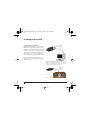
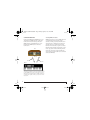
The flat,“Type A” USB plug
connects to the computer.
If you have several FastLane-USB (or other
MOTU) interfaces, see “Connecting multiple USB
interfaces” on page 8.
Figure-1: You can plug the Type A connector into a Type A jack
directly on the computer itself, a USB keyboard connected to the
computer, or any other USB device already connected to the
computer that has an available Type A USB jack.
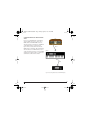
The square,“Type B”
USB plug connects to
the MIDI interface.
Figure-2: The square Type B plug goes into FastLane.
5
INSTALLING FASTLANE-USB
FastLane-USB manual/Win Page 6 Friday, April 15, 2005 12:32 PM
CONNECTING MIDI GEAR
Connect each MIDI device’s MIDI IN jack to one
of FastLane’s two MIDI OUT jacks as shown by
Connection 1 below. Conversely, connect the
MIDI OUT jack on the MIDI device to one of
FastLane’s two MIDI IN jacks as shown by
Connection 2.
FastLane
MIDI
OUT
One-way MIDI connections
MIDI devices that do not receive MIDI data, such
as a dedicated keyboard controller, guitar
controller, or drum pad, only need Connection 2
shown in Figure-3. Similarly, devices that never
send data, such as a sound module, only need
Connection 1. However, if you plan to use editor/
librarian software with the sound module, or if you
need to get system exclusive bulk dumps from it,
make both connections. In general, make both
connections for any device that needs to both send
and receive MIDI data.
MIDI
IN
MIDI cables
Connection 1
Connection 2
MIDI Device
MIDI
IN
MIDI
OUT
Figure-3: Connecting a MIDI device to FastLane-USB. If you are
connecting a sound module or other device that does not need
to transmit MIDI data, you only need to make Connection 1
shown above. Conversely, if the device is a MIDI controller such
as a drum pad or guitar controller, you only need to make
Connection 2.
6
INSTALLING FASTLANE-USB
FastLane-USB manual/Win Page 7 Friday, April 15, 2005 12:32 PM
CONNECTING ADDITIONAL GEAR WITH MIDI
THRUS
If you use up both MIDI OUTs on the FastLane,
and you still have more gear to connect, run a
MIDI cable from the MIDI THRU of a device
already connected to the interface to the MIDI IN
on the additional device as shown below in
Figure-4. The two devices then share the same
MIDI OUT port on FastLane. This means that they
share the same set of 16 MIDI channels, so try to
do this with devices that receive on only one MIDI
channel (such as effects modules) so their receive
channels don’t conflict with one another.
FastLane
MIDI
OUT
MIDI cable
MIDI Device
MIDI IN
MIDI
THRU
MIDI cable
MIDI IN
Additional device
Figure-4: Connecting additional devices with MIDI THRU ports.
7
INSTALLING FASTLANE-USB
FastLane-USB manual/Win Page 8 Friday, April 15, 2005 12:32 PM
CONNECTING MULTIPLE USB INTERFACES
The USB (Universal Serial Bus) specification allows
you to connect multiple MOTU interfaces to a
single computer. You can mix and match any
combination of MOTU USB interfaces to suit your
needs.
The USB (Universal Serial Bus) specification allows
many USB devices — theoretically up to 127 — to
be connected to a single computer. However, many
USB devices, including all MOTU USB interfaces,
reserve USB bandwidth, so the theoretical and
practical limits for MOTU interfaces are
considerably fewer. In theory, the maximum
number of MOTU USB interfaces you can connect
to one computer is around 25 interfaces.
Practically speaking, regardless of how slow or fast
your USB-equipped computer is, you should be
able to connect upwards of 10 or more MOTU USB
MIDI interfaces and still enjoy just as much
performance from each one as if it were the only
one connected. Just don’t try to run your USB
scanner or digital camera while playing back and
recording MIDI!
it, usually between 4 and 7 ports, to which you
connect multiple USB MIDI interfaces as shown
below in Figure-5. Connect them to the hub in the
standard fashion, as if you were connecting them
directly to the computer. If needed, you can
connect multiple hubs to each other to get enough
USB ports for your multiple MOTU USB
interfaces.
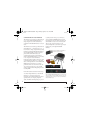
The flat,“Type A” USB plug on the USB cable from each
MOTU interface connects to the USB hub.
Standard USB Hub
USB
cables
For further details about USB, visit www.usb.org.
To connect multiple FastLanes (or other MOTU
interfaces) to a computer, you’ll need an
inexpensive device called a USB Hub (purchased
separately from your computer peripherals
dealer). A USB Hub has multiple Type A ports on
Figure-5: An inexpensive, standard USB hub allows you to
connect multiple MOTU USB MIDI interfaces. You can even mix
and match different models of MOTU interfaces, using the
combination that best suites your needs for synchronization,
number of MIDI ports, etc.
8
INSTALLING FASTLANE-USB
FastLane-USB manual/Win Page 9 Friday, April 15, 2005 12:32 PM
Installing the MOTU USB Windows Driver
To install the MOTU USB MIDI driver:
1 If the FastLane-USB is currently connected to
the computer, unplug it.
2 Turn on your computer.
3 If you have previously installed MOTU USB
MIDI drivers, use the Windows Add/Remove
Programs control panel to remove the old MOTU
USB MIDI drivers before proceeding.
4 If the Windows Add Hardware Wizard appears
during startup, do not proceed and exit from the
Wizard.
Instead of installing the FastLane-USB drivers
manually via the Wizard, you will run the
FastLane-USB software installer.
5 Insert the MOTU USB software installer CD in
the computer’s CD drive (if you haven’t already).
6 If the MOTU USB software installer program
does not automatically begin running, doubleclick SETUP.EXE on the installer CD to launch it.
7 Follow the directions the installer gives you.
9
INSTALLING THE MOTU USB WINDOWS DRIVER
FastLane-USB manual/Win Page 10 Friday, April 15, 2005 12:32 PM
10
INSTALLING THE MOTU USB WINDOWS DRIVER
FastLane-USB manual/Win Page 11 Friday, April 15, 2005 12:32 PM
Using MOTU USB MIDI ports
MIDI PORTS
Once you have installed the MOTU FastLane-USB
MIDI driver, you’ll notice that two MIDI inputs
and outputs are available to your MIDI programs.
The port names appear as shown in Figure-6.
you relaunch them, the interface should now be
available to them again. If this is still not the case,
shut down the computer, check the USB cable
connections to the interface, make sure that its
THRU button is NOT pushed in (disengaged), and
power up the computer again.
TECHNICAL SUPPORT
Registered users who are unable, with their dealer’s
help, to solve problems they encounter with the
their MOTU interface may contact our technical
support department in one of the following ways:
Tech support phone (9 am to 6 pm EST):
(617) 576-3066
■
Figure-6: MOTU FastLane-USB ports in Cakewalk SONAR™.
TROUBLESHOOTING
My MOTU USB interface ports don’t show up in
my Windows MIDI software, no matter what I do.
Have you unplugged the USB cable and then
plugged it back in lately? Under certain circumstances, doing so will cause the interface’s drivers
to lose communication with the hardware. If this is
happening to you, make sure the USB cable is
plugged in (both to the computer and the interface,
of course). Then, quit all MIDI applications. When
■
Tech support fax: (617) 354-3068
■
Tech support email: [email protected]
■
On-line tech support database: www.motu.com
We are happy to provide customer support to our
registered users. If you haven’t already done so,
please take a moment to complete the registration
card in the front of the manual and send it in to us.
When we receive your card, you’ll be placed on our
mailing list for free software updates and other
information.
11
USING MOTU USB MIDI PORTS
FastLane-USB manual/Win Page 12 Friday, April 15, 2005 12:32 PM
REPLACING DISKS
If your MOTU USB software CD becomes
damaged or lost, our Customer Support
Department will be glad to replace it. Or you can
download the latest version of the drivers and
consoles from www.motu.com.
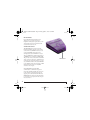
THE MIDI THRU BUTTON
The MIDI THRU button on the front of the
FastLane-USB, when pushed in, creates a direct
connection from each MIDI IN connector to its
corresponding MIDI OUT connector. For
example, data received on MIDI IN A is routed
directly to MIDI OUT A. Similarly, data received
on MIDI IN B is routed directly to MIDI OUT B.
This provides a direct connection from the MIDI
device connected to the input to a different device
connected to the output. For example, you could
use your MIDI controller connected to MIDI IN A
to play a MIDI sound module connected to MIDI
OUT A, without the need to run any MIDI
software on the computer.
MIDI THRU button
When MIDI THRU is engaged, MIDI
communication to and from the computer is
temporarily disabled. The USB cable connection
to the computer is still required, however, as it
supplies power to the FastLane-USB. Therefore,
MIDI THRU mode still requires the USB cable to
be connected to the computer, and the computer
must be turned on.
12
USING MOTU USB MIDI PORTS