1
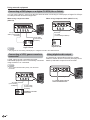
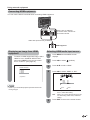
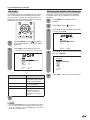
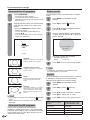
OPERATION MANUAL
MODE D’EMPLOI
MANUAL DE OPERACIÓN
FRANÇAIS
ENGLISH
LIQUID CRYSTAL TELEVISION
TÉLÉVISEUR ACL
TELEVISOR CON PANTALLA
DE CRISTAL LÍQUIDO
ESPAÑOL
LC-26SH10U
LC-32SH10U
ENGLISH
LC-26SH10U
LC-32SH10U
LIQUID CRYSTAL TELEVISION
ENGLISH
OPERATION MANUAL
• The illustrations and on-screen displays in this operation
manual are for explanation purposes and may vary
slightly from the actual operations.
• Menu items that are not selectable are grayed out.
• The examples used throughout this manual are based on
the LC-32SH10U model.
IMPORTANT:
To aid reporting in case of loss or theft, please record the
TV’s model and serial numbers in the space provided. The
numbers are located at the rear of the TV.
Model No.:
Serial No.:
IMPORTANT INFORMATION
WARNING: TO REDUCE THE RISK OF FIRE OR ELECTRIC SHOCK, DO
NOT EXPOSE THIS PRODUCT TO RAIN OR MOISTURE.
CAUTION
RISK OF ELECTRIC SHOCK
DO NOT OPEN
CAUTION: TO REDUCE THE RISK OF ELECTRIC SHOCK,
DO NOT REMOVE COVER (OR BACK).
NO USER-SERVICEABLE PARTS INSIDE.
REFER SERVICING TO QUALIFIED SERVICE
PERSONNEL.
The lightning flash with arrow-head
symbol, within an equilateral triangle,
is intended to alert the user to the
presence of uninsulated “dangerous
voltage” within the product’s
enclosure that may be of sufficient
magnitude to constitute a risk of
electric shock to persons.
The exclamation point within a
triangle is intended to alert the user
to the presence of important
operating and maintenance
(servicing) instructions in the
literature accompanying the product.
1
IMPORTANT INFORMATION
CAUTION: TO PREVENT ELECTRIC SHOCK, MATCH WIDE BLADE OF PLUG TO
WIDE SLOT, FULLY INSERT.
CAUTION:
DO NOT PLACE THIS PRODUCT ON AN UNSTABLE CART, STAND, TRIPOD, BRACKET, OR TABLE.
THE PRODUCT MAY FALL CAUSING SERIOUS PERSONAL INJURY AND SERIOUS DAMAGE TO
THE PRODUCT. USE ONLY WITH A CART, STAND, TRIPOD, BRACKET, OR TABLE RECOMMENDED
BY THE MANUFACTURER OR SOLD WITH THE PRODUCT. FOLLOW THE MANUFACTURER’S
INSTRUCTIONS WHEN INSTALLING THE PRODUCT AND USE MOUNTING ACCESSORIES
RECOMMENDED BY THE MANUFACTURER. A PRODUCT AND CART COMBINATION SHOULD BE
MOVED WITH CARE. QUICK STOPS, EXCESSIVE FORCE, AND UNEVEN SURFACES MAY CAUSE
THE PRODUCT AND CART COMBINATION TO OVERTURN.
WARNING: FCC Regulations state that any unauthorized changes or modifications to this equipment not expressly
approved by the manufacturer could void the user’s authority to operate this equipment.
CAUTION:
This product satisfies FCC regulations when shielded cables and connectors are used to connect the unit to other
equipment. To prevent electromagnetic interference with electric appliances such as radios and televisions, use shielded
cables and connectors for connections.
“Note to CATV system installer: This reminder is provided to call the CATV system installer’s attention to Article 820-40 of the National
Electrical Code that provides guidelines for proper grounding and, in particular, specifies that the cable ground shall be connected to
the grounding system of the building, as close to the point of cable entry as practical.”
This product utilizes tin-lead solder, and fluorescent lamp containing a small amount of mercury. Disposal of these materials may be
regulated due to environmental considerations. For disposal or recycling information, please contact your local authorities or the
Electronic Industries Alliance: www.eia.org
Trademarks
• Manufactured under license from Dolby Laboratories. “Dolby” and the double-D symbol are trademarks of Dolby
Laboratories.
• “HDMI, the HDMI logo and High-Definition Multimedia Interface are trademarks or registered trademarks of HDMI
Licensing LLC.”
• WOW, SRS and
symbol are trademarks of SRS Labs, Inc.
WOW technology is incorporated under license from SRS Labs, Inc.
2
DEAR SHARP CUSTOMER
Thank you for your purchase of the Sharp Liquid Crystal Television. To ensure safety and many years
of trouble-free operation of your product, please read the Important Safety Instructions carefully before
using this product.
IMPORTANT SAFETY INSTRUCTIONS
Electricity is used to perform many useful functions, but it can also cause personal injuries and property damage if improperly
handled. This product has been engineered and manufactured with the highest priority on safety. However, improper use can
result in electric shock and/or fire. In order to prevent potential danger, please observe the following instructions when
installing, operating and cleaning the product. To ensure your safety and prolong the service life of your Liquid Crystal
Television, please read the following precautions carefully before using the product.
1)
2)
3)
4)
5)
6)
7)
8)
Read these instructions.
Keep these instructions.
Heed all warnings.
Follow all instructions.
Do not use this apparatus near water.
Clean only with dry cloth.
Do not block any ventilation openings. Install in accordance with the manufacturer’s instructions.
Do not install near any heat sources such as radiators, heat registers, stoves, or other apparatus (including
amplifiers) that produce heat.
9) Do not defeat the safety purpose of the polarized or grounding-type plug. A polarized plug has two blades with
one wider than the other. A grounding type plug has two blades and a third grounding prong. The wide blade or
the third prong are provided for your safety. If the provided plug does not fit into your outlet, consult an electrician
for replacement of the obsolete outlet.
10) Protect the power cord from being walked on or pinched particularly at plugs, convenience receptacles, and the
point where they exit from the apparatus.
11) Only use attachments/accessories specified by the manufacturer.
12) Use only with the cart, stand, tripod, bracket, or table specified by the manufacturer, or sold with the
apparatus. When a cart is used, use caution when moving the cart/apparatus combination to avoid
injury from tip-over.
13) Unplug this apparatus during lightning storms or when unused for long periods of time.
14) Refer all servicing to qualified service personnel. Servicing is required when the apparatus has been damaged in
any way, such as power-supply cord or plug is damaged, liquid has been spilled or objects have fallen into the
apparatus, the apparatus has been exposed to rain or moisture, does not operate normally, or has been dropped.
Additional Safety Information
15) Power Sources—This product should be operated only from the type of power source indicated on the marking
label. If you are not sure of the type of power supply to your home, consult your product dealer or local power
company. For products intended to operate from battery power, or other sources, refer to the operating
instructions.
16) Overloading—Do not overload wall outlets, extension cords, or integral convenience receptacles as this can
result in a risk of fire or electric shock.
17) Object and Liquid Entry—Never push objects of any kind into this product through openings as they may touch
dangerous voltage points or short-out parts that could result in a fire or electric shock. Never spill liquid of any
kind on the product.
18) Damage Requiring Service—Unplug this product from the wall outlet and refer servicing to qualified service
personnel under the following conditions:
a) When the AC cord or plug is damaged,
b) If liquid has been spilled, or objects have fallen into the product,
c) If the product has been exposed to rain or water,
d) If the product does not operate normally by following the operating instructions.
Adjust only those controls that are covered by the operating instructions as an improper adjustment of other
controls may result in damage and will often require extensive work by a qualified technician to restore the
product to its normal operation,
e) If the product has been dropped or damaged in any way, and
f) When the product exhibits a distinct change in performance - this indicates a need for service.
19) Replacement Parts—When replacement parts are required, be sure the service technician has used replacement
parts specified by the manufacturer or have the same characteristics as the original part. Unauthorized
substitutions may result in fire, electric shock, or other hazards.
20) Safety Check—Upon completion of any service or repairs to this product, ask the service technician to perform
safety checks to determine that the product is in proper operating condition.
21) Wall or ceiling mounting—When mounting the product on a wall or ceiling, be sure to install the product according
to the method recommended by the manufacturer.
3
IMPORTANT SAFETY INSTRUCTIONS
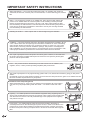
• Water and Moisture — Do not use this product near water - for example, near a bath tub,
wash bowl, kitchen sink, or laundry tub; in a wet basement; or near a swimming pool; and the
like.
• Stand — Do not place the product on an unstable cart, stand, tripod or table. Placing the
product on an unstable base can cause the product to fall, resulting in serious personal
injuries as well as damage to the product. Use only a cart, stand, tripod, bracket or table
recommended by the manufacturer or sold with the product. When mounting the product on
a wall, be sure to follow the manufacturer’s instructions. Use only the mounting hardware
recommended by the manufacturer.
• Selecting the location — Select a place with no direct sunlight and good ventilation.
• Ventilation — The vents and other openings in the cabinet are designed for ventilation. Do not
cover or block these vents and openings since insufficient ventilation can cause overheating
and/or shorten the life of the product. Do not place the product on a bed, sofa, rug or other
similar surface, since they can block ventilation openings. This product is not designed for
built-in installation; do not place the product in an enclosed place such as a bookcase or rack,
unless proper ventilation is provided or the manufacturer’s instructions are followed.
• The Liquid Crystal panel used in this product is made of glass. Therefore, it can break when
the product is dropped or applied with impact. Be careful not to be injured by broken glass
pieces in case the panel breaks.
• Heat — The product should be situated away from heat sources such as radiators, heat
registers, stoves, or other products (including amplifiers) that produce heat.
• The Liquid Crystal panel is a very high technology product with 3,147,264 thin film transistors, giving you fine picture
details.
Occasionally, a few non-active pixels may appear on the screen as a fixed point of blue, green or red. Please note that
this does not affect the performance of your product.
Precautions when transporting the TV
• When transporting the TV, never carry it by holding onto the speaker. Be sure to always
carry the TV by two people holding it with two hands — one hand on each side of the
TV.
• Lightning — For added protection for this television equipment during a lightning storm, or
when it is left unattended and unused for long periods of time, unplug it from the wall outlet
and disconnect the antenna. This will prevent damage to the equipment due to lightning
and power-line surges.
• Power Lines — An outside antenna system should not be located in the vicinity of
overhead power lines or other electric light or power circuits, or where it can fall into such
power lines or circuits. When installing an outside antenna system, extreme care should
be taken to keep from touching such power lines or circuits as contact with them might be
fatal.
4
IMPORTANT SAFETY INSTRUCTIONS
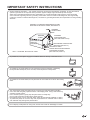
• Outdoor Antenna Grounding — If an outside antenna is connected to the television equipment, be sure the antenna
system is grounded so as to provide some protection against voltage surges and built-up static charges.
Article 810 of the National Electrical Code, ANSI/NFPA 70, provides information with regard to proper grounding
of the mast and supporting structure, grounding of the lead-in wire to an antenna discharge unit, size of grounding
conductors, location of antenna-discharge unit, connection to grounding electrodes, and requirements for the grounding
electrode.
EXAMPLE OF ANTENNA GROUNDING AS PER
NATIONAL ELECTRICAL CODE, ANSI/NFPA 70
ANTENNA
LEAD IN WIRE
GROUND
CLAMP
ELECTRIC
SERVICE
EQUIPMENT
NEC — NATIONAL ELECTRICAL CODE
ANTENNA
DISCHARGE UNIT
(NEC SECTION 810-20)
GROUNDING CONDUCTORS
(NEC SECTION 810-21)
GROUND CLAMPS
POWER SERVICE GROUNDING
ELECTRODE SYSTEM
(NEC ART 250, PART H)
• To prevent fire, never place any type of candle or flames on the top or near the TV set.
• To prevent fire or shock hazard, do not expose this product to dripping or splashing.
No objects filled with liquids, such as vases, should be placed on the product.
• To prevent fire or shock hazard, do not place the AC cord under the TV set or other heavy
items.
• Turn off the main power and unplug the AC cord from the wall outlet before handling.
• Use a soft cloth and gently wipe the surface of the display panel. Using a hard cloth may
scratch the panel surface.
• Use a soft damp cloth to gently wipe the panel when it is really dirty.
(It may scratch the panel surface when wiped strongly.)
• If the panel is dusty, use an anti-static brush, which is commercially available, to clean it.
• To protect the panel, do not use a dirty cloth, liquid cleaners or chemical cloth to clean it,
such materials may damage the panel surface.
• Do not display a still picture for a long time, as this could cause an afterimage to remain.
5
Supplied accessories
Make sure the following accessories are provided with the product.
Remote control unit (X1)
“AA” size battery (X2)
AC cord (X1)
Page 8
Page 8
Page 7
Operation manual (X1)
Stand unit (X1)
LIQUID CRYSTAL TELEVISION
TÉLÉVISEUR ACL
TELEVISOR CON PANTALLA
DE CRISTAL LÍQUIDO
ESPAÑOL
LC-26SH10U
LC-32SH10U
FRANÇAIS
ENGLISH
Cable Clamp (X1)
OPERATION MANUAL
MODE D’EMPLOI
MANUAL DE OPERACIÓN
Page 6
Page 7
NOTE
• Always use the AC cord supplied with the TV.
QUICK REFERENCE
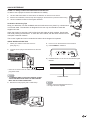
Attaching the stand
• Before attaching (or detaching) stand, unplug the AC cord from the AC input terminal.
• Before performing work spread cushioning over the base area to lay the TV on. This will prevent it from being damaged.
CAUTION
•
•
•
•
1.
Attach the stand in the correct direction.
The “REAR” label should be visible from the back of the TV.
Incorrect installation of the stand may result in the TV falling over.
Be sure to follow the instructions.
Confirm the 8 screws supplied with the TV.
This
side
faces
the
rear.
7290000172
SH
Short screws (X4)
(used in step 2)
Long screws (X4)
(used in step 3)
This side faces the rear.
3.
1 Insert the stand into the opening on the bottom of the
TV.
2 Insert and tighten the 4 long screws into the 4 holes on
the rear of the TV.
2.
Attach the two parts of the stand unit to each other using
the 4 short screws and the hex key (supplied with the
product) as shown.
hex key
2
Short screw
Soft cushion
NOTE
hex key
• To detach the stand, perform the steps in reverse order.
6
1
Long screw
QUICK REFERENCE
STOP! To safely remove the television from the box
It’s best to use 2 people to remove the television for stability.
1.
2.
3.
Use the cardboard holders on either side of the television to remove it from the box.
Remove the cardboard; however, keep the wrapping on the television to protect it while moving.
Lift onto installation location as the diagram illustrates.
Ventilation & Cleaning Tips
Keep your television in a well ventilated area and make sure not to place it by a heat source
or use near water. The television is designed for AC use only and should be used with
supplied AC cord.
Clean the screen by spraying a soft lint free cloth with water to lightly moisten. Gently wipe
and avoid pressing on the screen. To clean the outer cabinet, use the same method. Do not
use liquid or aerosol cleaners.
The screen is glass and can be scratched or broken when dropped or impacted.
QUICK INSTALLATION TIPS
4. How to turn on the television for the first time.
A) Press POWER on television.
1.
Attach your antenna to the back of the TV.
(See page 13.)
2.
Connect the AC plug for the television into the wall
outlet.
POWER
B) POWER indicator on the front of the television lights
GREEN.
AC outlet
• Place the TV close to the AC outlet, and keep the power
plug within reach.
NOTE
• TO PREVENT RISK OF ELECTRIC SHOCK, DO NOT
TOUCH UN-INSULATED PARTS OF ANY CABLES
WITH THE AC CORD CONNECTED.
3.
Bundle the cords properly with a cable clamp.
POWER indicator
NOTE
• Speaker cannot be detached from the TV.
• TV angle cannot be adjusted.
7
QUICK REFERENCE
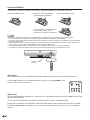
If the remote control fails to operate TV functions, replace the batteries in the remote control unit.
1 Open the battery cover.
2 Insert two “AA” size batteries
(supplied with the product).
3 Close the battery cover.
• Place the batteries with their terminals
corresponding to the (+) and (–)
indications in the battery compartment.
NOTE
Improper use of batteries can result in chemical leakage or explosion. Be sure to follow the instructions below.
• Do not mix batteries of different types. Different types of batteries have different characteristics.
• Do not mix old and new batteries. Mixing old and new batteries can shorten the life of new batteries or cause chemical
leakage in old batteries.
• Remove batteries as soon as they are worn out. Chemicals that leak from batteries that come in contact with skin can
cause a rash. If you find any chemical leakage, wipe thoroughly with a cloth.
• The batteries supplied with this product may have a shorter life expectancy due to storage conditions.
• If you will not be using the remote control unit for an extended period of time, remove batteries from it.
16’4”(5 m)
Remote control
sensor
30°
30°
IMPORTANT:
The POWER indicator on the television should light GREEN indicating you have power to the television.
If the POWER indicator on the television still does not light up, press POWER on the
remote control to turn the power on.
IMPORTANT:
IF THE UNIT DOES NOT POWER ON - UNPLUG THE TELEVISION FROM THE OUTLET AND REPEAT THE
INSTALLATION STEPS.
IF YOU STILL ENCOUNTER NO POWER, PLEASE CONTACT US AT 1-800-BE-SHARP.
Please refer to the BASIC ADJUSTMENT SETTINGS SECTION and basic Initial setup functions and USING
EXTERNAL EQUIPMENT SECTION for other device connections (DVD, VCR, AUDIO, etc) in your operation
manual.
8
Contents
IMPORTANT INFORMATION ................................... 1
Trademarks .............................................................. 2
DEAR SHARP CUSTOMER ..................................... 3
IMPORTANT SAFETY INSTRUCTIONS .................. 3
Supplied accessories .............................................. 6
QUICK REFERENCE ................................................ 6
Attaching the stand.............................................. 6
Contents ................................................................... 9
Part names ............................................................. 10
TV (Front) .......................................................... 10
TV (Rear)........................................................... 11
Remote control unit ........................................... 12
Preparation............................................................. 13
Using the remote control unit ............................ 13
Cautions regarding remote control unit ......... 13
Antennas ........................................................... 13
Watching TV ........................................................... 14
Preparation ........................................................ 14
Turning on the power ........................................ 14
Turning off the power ........................................ 14
Initial setup ........................................................ 14
Simple button operations for
changing channels ......................................... 16
Simple button operations for
changing volume/sound ................................. 17
Display the channel information ........................ 17
Setting MTS/SAP stereo mode ......................... 18
Setting WOWTM surround sound........................ 18
Basic adjustment settings .................................... 19
Menu operation buttons..................................... 19
Menu items ........................................................ 19
Favorite channel setting .................................... 20
Labeling channels ............................................. 20
Picture adjustments ........................................... 21
Color temperature ............................................. 21
Cinema mode .................................................... 21
Back lighting ...................................................... 21
Sound adjustment ............................................. 22
Digital audio output............................................ 22
Using external equipment..................................... 23
Displaying an external equipment image .......... 23
Connecting a DVD player or a digital TV STB
(Air or Cable) ................................................... 24
Connecting a VCR, game console
or camcorder ................................................... 24
Using digital audio output .................................. 24
Connecting HDMI equipment ............................ 25
Displaying an image from HDMI equipment ...... 25
Selecting HDMI audio input source ................... 25
Useful adjustment settings................................... 26
Reset ................................................................. 26
Input label .......................................................... 26
AV mode............................................................ 27
Selecting the digital audio language.................. 27
View mode for 4:3 programs ............................. 28
View mode for HD programs ............................. 28
Picture scroll ...................................................... 28
Aspect ............................................................... 28
Audio output select ............................................ 29
Sleep timer ........................................................ 29
Closed captions and digital closed captions...... 30
Caption setup .................................................... 31
Password setting for parental control ................ 32
Parental control (V-CHIP).................................. 33
TV Parental Guidelines (TV Guidelines) ........... 34
Voluntary movie rating system (MPAA)............. 34
Canadian rating systems ................................... 35
Canadian English ratings .................................. 36
Canadian French ratings ................................... 36
How to temporarily release
the V-CHIP block ............................................. 36
Reactivating the temporarily released
V-CHIP block ................................................... 36
Other viewing options ........................................... 37
Freezing images ................................................ 37
Signal meter ...................................................... 37
Appendix ................................................................ 38
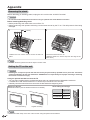
Removing the stand .......................................... 38
Setting the TV on the wall ................................. 38
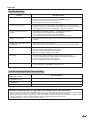
Troubleshooting................................................. 39
Troubleshooting-Digital broadcasting ................ 39
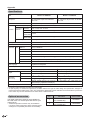
Specifications .................................................... 40
Optional accessories ......................................... 40
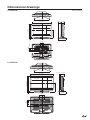
Dimensional drawings ......................................... 41
9
Part names
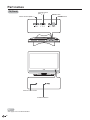
TV (Front)
Channel buttons
(CH / )
Volume buttons (VOL–/+)
POWER button
Remote control sensor
POWER indicator*
NOTE
*See page 14 for TV status indicator.
10
INPUT button
Part names
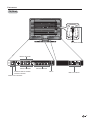
TV (Rear)
AC INPUT terminal
INPUT2 terminals
INPUT1 terminals
COAXIAL DIGITAL AUDIO
OUTPUT Terminal
INPUT3 terminals
ANT in
INPUT4 terminals
AUDIO OUT Terminals
11
Part names
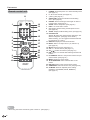
Remote control unit
1
2
3
11
4
5
1
2
3
12
13
14
6
7
8
9
10
15
4
16
5
17
6
18
7
19
20
8
9
10
21
22
11
12
13
14
15
16
17
18
19
20
21
22
POWER: Switch the power on or enters standby mode.
(See page 14.)
0 – 9: Set the channel. (See page 16.)
• (DOT): (See page 16.)
SURROUND: Display the WOW surround setting
menu. (See page 18.)
FREEZE: Set the still image. Press again to return to
normal screen. (See page 37.)
SLEEP: Set the sleep timer. (See page 29.)
EXIT: Turn off the menu screen.
CC: Display captions during closed-caption source.
(See page 30.)
AUDIO: Display the MTS setting menu. (See page 18.)
FAVORITE CH
A, B, C, D: Select four preset favorite channels in four
different categories. (See page 20 for details.)
While watching, you can toggle the selected channels
by pressing A, B, C and D.
DISPLAY: Display the channel information.
INPUT: Select a TV input source. (TV, INPUT1~4)
(See page 23.)
MUTE: Mute the sound. (See page 17.)
VOL +/–: Set the volume. (See page 17.)
CH / : Select the channel. (See page 16.)
ENT: Jumps to a channel after selecting with the 0–9
buttons.
FLASHBACK: Return to the previous channel or input
external mode. (See page 16.)
MENU: Display the menu screen.
/ / / /ENTER: Select a desired item on the
screen.
RETURN: Return to the previous menu screen.
VIEW MODE: Select the screen size. (See page 28.)
AV MODE: Select an adjusted picture setting.
(SPORTS, STANDARD, MOVIE, MEMORY.)
(See page 27.)
NOTE
• When using the remote control unit, point it at the TV. (See page 8.)
12
Preparation
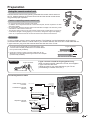
Using the remote control unit
Use the remote control unit by pointing it towards the remote control sensor on
the TV. Objects between the remote control unit and the remote control sensor
may prevent proper operation.
Cautions regarding remote control unit
• Do not expose the remote control unit to shock.
In addition, do not expose the remote control unit to liquids, and do not place in an area
with high humidity.
• Do not install or place the remote control unit under direct sunlight. The heat may cause
deformation of the remote control unit.
• The remote control unit may not work properly if the remote control sensor on the TV is
under direct sunlight or strong lighting. In such cases, change the angle of the lighting
or the TV, or operate the remote control unit closer to the remote control sensor.
Antennas
To enjoy a clearer picture, use an outdoor antenna. The following is a brief explanation of the types of
connections that are used for a coaxial cable. If your outdoor antenna uses a 75-ohm coaxial cable with an
F-type connector, plug it into the antenna terminal at the rear of the TV set.
F-type connector
1. A 75-ohm system is generally a round cable with F-type
connector that can easily be attached to a terminal without
tools (Commercially available).
75-ohm coaxial cable (round)
2. A 300-ohm system is a flat “twin-lead” cable that can be
attached to a 75-ohm terminal through a 300/75-ohm adapter
(Commercially available).
300-ohm twin-lead cable (flat)
NOTICE
F-type connector should be finger-tightened only.
When connecting the RF cable to the TV set, do not tighten
F-type connector with tools.
If tools are used, it may cause damage to your TV set.
(The breaking of internal circuit, etc.)
F-type connector
75-ohm coaxial cable
Connecting Antenna Cable
Cable without a CATV
converter
Home Antenna
terminal (75-ohm)
Cable TV lead-In
Combination VHF/UHF
antenna
or 75-ohm coaxial cable (round)
300-ohm twin-lead (flat)
Separate VHF/UHF
antenna
Coaxial cable
(commercially
available)
300/75-ohm adapter
(commercially available)
VHF
UHF
ANTENNA ANTENNA
300-ohm
twin-lead
300-ohm twin-lead
Combiner
(commercially
available)
IN OUT
or
75-ohm coaxial cable
13
Watching TV
Simple operations for watching a TV program
POWER
Preparation
Perform the following steps before you press POWER
on the remote control unit.
1. Insert the batteries into the remote control unit.
(See page 8.)
2. Connect the antenna cable to the TV. (See page
13.)
3. Plug in the AC cord to the AC outlet. (See page 7.)
Turning on the power
Press POWER on the TV, or POWER on the remote
control.
• POWER indicator (Green): The TV is on. (“PLEASE
WAIT” will appear for a few seconds on the screen.)
NOTE
POWER indicator
TV status indicator (POWER)
ON
Lighting (Green)
OFF/Standby
Lighting (Red)
• The LANGUAGE setup menu will appear automatically
when MENU is pressed on for the first time. (See below.)
Turning off the power
Press POWER on the TV, or POWER on the remote
control.
• The TV enters standby mode and the image on the
screen disappears.
• The POWER indicator on the TV changes to Red.
NOTE
POWER (On/Standby)
• If you are not going to use this TV for a long period of
time, be sure to remove the AC cord from the power
outlet.
• Weak electric power is still consumed even when
POWER is turned off.
• If a station being viewed stops broadcasting, the TV will
automatically shut itself off after 15 minutes.
Initial setup
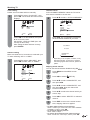
Language setting
When you press MENU for the first time, the
LANGUAGE setup menu will appear
automatically.
Select from among 3 languages: English, French and
Spanish.
1
Press / to select the desired language
from the list.
SETUP
LANGUAGE
ENGLISH
ENGLISH/FRANÇAIS/ESPAÑOL
CLOCK SET
AIR/CABLE
CABLE
AUTO CH MEMORY
ADD/DELETE
:SELECT
14
:ADJUST
Watching TV
Clock setting
Please set correct date and time manually.
2
Press / to select “CLOCK SET”, then
press / . The CLOCK SET menu screen
displays.
Channel search
AUTO CHANNEL MEMORY makes the TV look for
all channels viewable in the set area.
4
Press
/
SETUP
CLOCK SET
MONTH
DAY
YEAR
TIME
:SELECT
to select “AUTO CH MEMORY”
LANGUAGE
1
1 (SUN)
2006
12:00AM
ENGLISH
CLOCK SET
AIR/CABLE
CABLE
AUTO CH MEMORY
ADD/DELETE
:ADJUST
EXIT:END
:SELECT
:ADJUST
Press / . The TV will begin memorizing
all the channels available in your area.
Press / to set the MONTH, then press
to move to the next.
Set the DAY, YEAR and TIME (hour and
minute) as above step.
After setting the date and time correctly,
press ENTER.
AUTO CH MEMORY
EXIT:CANCEL
Antenna setting
Make sure what kind of connection is made with your
TV when selecting “AIR” or “CABLE”.
3
Press
press
PROGRAMMING NOW
PLEASE WAIT
• Depending on the reception condition, it may
take approximately 10 minutes to complete
memorizing digital cable channels, please be
patient.
/ to select “AIR/CABLE”, then
/ to select “AIR” or “CABLE”.
Skipping stored channel
You can set channel selection disabled using CH
SETUP
LANGUAGE
ENGLISH
CLOCK SET
AIR/CABLE
AIR/CABLE
AUTO CH MEMORY
ADD/DELETE
:SELECT
/
1
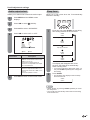
Press MENU and the MENU screen
displays.
2
Press
3
Press / to select “ADD/DELETE”, and
then press / .
4
Press / to select “ADD/DELETE”, and
then press / . Now, the channel list
becomes selectable.
5
Press / to select the channel which you
want to skip.
6
Press /
channel.
7
Press EXIT to return to the normal screen.
Now, skipping channel is applied.
/
to select
.
(SETUP).
:ADJUST
to select “DELETE” for selected
• To add a digital channel you are watching:
Select a channel you want to add. Then select “ADDING
CHANNEL” in step 4, press / .
• To release the skipping channel:
Select “ADD” in step 6.
• To remove all the channels from channel memory:
Select “CLEAR ALL” after step 3, and the press / .
15
Watching TV
Simple button operations for
changing channels
You can change channels in several ways.
Method 1
Using CH
TV.
/
on the remote control unit or on the
Method 2
1 Press FLASHBACK to switch to the previously
tuned channel.
2 Press FLASHBACK again to switch back to the
currently tuned channel.
NOTE
• FLASHBACK will not work if no channel has been
changed after the TV is turned on.
Method 3
Using remote control buttons 0-9, • (DOT) to select
channels for VHF/UHF/CATV/DIGITAL.
To select a 1 or 2-digit channel number
(e. g., Channel 5):
Press 5 ENT
NOTE
• When selecting a 1-digit channel number, it is not
necessary to press 0 before the number.
• When you enter 0-9 only, channel selection will be made
if there is no operation within a few seconds.
To select a 3-digit channel number
(e. g., Channel 115):
Press 1 1 5 ENT
To select a 4-digit channel number
(e. g., Channel 22.1):
Press 2 2
•
•
•
•
16
• (DOT)
1 ENT
NOTE
When you enter 0–9 only, channel selection will be made
if there is no operation within a few seconds.
If you push “0” by itself, nothing will happen.
Complete the above steps within a few seconds.
When you enter 0–9 and • (DOT), channel selection will
be made if there is no operation within a few seconds.
Watching TV
Simple button operations for
changing volume/sound
Display the channel information
Changing the volume
You can change the volume on the TV or on the
remote control unit.
Press DISPLAY to display the current channel (or
input source) information on the screen.
When the TV receives a digital signal, press once, the
digital information will appear.
•
•
•
•
•
Broadcast program name
Station name
•
Audio language
•
V-CHIP RATING
•
Closed Caption mark •
Remaining time
Program name
HD or SD mark
V-Chip mark
Using VOL +/–
SUN Jan 01 12:00 PM
• To increase the volume, press VOL+.
• To decrease the volume, press VOL–.
51-3
CITYHD
Moon Star
Remaining Time 0:20 TV-Y7
English
HD
CC
No Program Information is available.
VOLUME
25
NOTE
• VOL+/– on the TV operates the same as VOL+/– on the
remote control unit.
Using MUTE on the remote control unit
Mutes the current sound output.
Press DISPLAY again, the analog information will appear.
• Clock
• Channel number or VIDEO mode selected
• Channel label (if preset)
• Stereo or SAP (second audio program) audio status
• Content rating
• View mode
STEREO
SAP
T V- P G
L V
SLEEP TIMER 2h00m
TV
ABCD
CABLE
SIDE BAR
CLOCK
1
Press MUTE.
12:00AM SUN
7
Press DISPLAY again to clear the display.
• “MUTE” will be displayed on the screen, and
the sound is silenced.
MUTE
NOTE
• Analog channel status will display on the screen for
approx. 4 seconds. Digital channel status will display for
approx. 10 seconds.
NOTE
• Mute can be canceled if you press VOL+/– or MUTE.
17
Watching TV
Setting MTS/SAP stereo mode
Setting WOWTM surround sound
The TV has a feature that allows reception of sound
other than the main audio for the program. This
feature is called Multi-channel Television Sound
(MTS). The TV with MTS can receive mono sound,
stereo sound and Secondary Audio Programs (SAP).
The SAP feature allows a TV station to broadcast
other information, which could be audio in another
language or something completely different like
weather information.
You can enjoy Hi-Fi stereo sound or SAP
broadcasts where available.
• Stereo broadcasts
View programs like live sporting events, shows and
concerts in dynamic stereo sound.
• SAP broadcasts
Receive TV broadcasts in either MAIN or SAP sound.
MAIN sound: The normal program soundtrack (either in
mono or stereo).
SAP sound: Listen to a second language, supplementary
commentary or other information. (SAP is mono sound.)
If stereo sound is difficult to hear.
• Obtain a clearer sound by manually switching to
fixed mono-sound mode.
NOTE
• MTS only operates while in TV mode.
• When the TV receives a stereo or SAP broadcast, the
word “STEREO” or “SAP” displays on-screen every
time you turn the TV on, change the channel, or press
DISPLAY.
SRS WOW is a special combination of SRS Labs
audio technologies that creates a thrilling surround
sound experience with deep, rich bass from stereo
sound sources. Your TV’s audio will sound fuller,
richer, and wider. SRS WOW consists of three
features; SRS 3D, FOCUS, and TruBass.
1
Select STEREO mode (see “Setting MTS/
SAP stereo mode” on this page).
2
Press SURROUND and the
(AUDIO)
menu screen displays. "WOW SRS 3D" will
be highlighted.
3
Press / to select the desired WOW
feature you want to adjust.
AUDIO
WOW SRS 3D
FOCUS
TruBass
HDMI
:SELECT
Changing MTS
Press AUDIO and the
(AUDIO) menu
screen displays. “MTS” will be highlighted.
2
Press AUDIO again or / to select “STR
(STEREO)”, “SAP” or “MONO”.
:SELECT
3
18
4
After your desired setting, press EXIT to
return to the normal screen.
NOTE
AUDIO
MTS
BASS
TREBLE
BALANCE
SPEAKERS
:ADJUST
SRS 3D: Press / to turn on or off the
surround sound effect.
FOCUS: Press / to turn on or off the vocal
emphasis effect.
TruBass: Press / to select the bass
expansion effect high, low or off.
You can change MTS as shown below to match the
television broadcast signal.
1
ON/OFF
OFF
OFF
HDMI
STR/SAP/MONO
25
25
0
ON
:ADJUST
Press EXIT to return to the normal screen.
• You can enter to the same menu screen from
(AUDIO) menu.
Basic adjustment settings
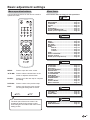
Menu operation buttons
Use the following buttons on the remote control to
operate the menu.
Menu items
List of menu items to help you with operations
PICTURE
AV MODE ....................................................Page 27
BRIGHTNESS .............................................Page 21
CONTRAST .................................................Page 21
COLOR ........................................................Page 21
TINT .............................................................Page 21
SHARPNESS ..............................................Page 21
COLOR TEMPERATURE ...........................Page 21
RESET (Picture adjustments) ...................Page 26
AUDIO
MTS .............................................................Page 18
BASS ...........................................................Page 22
TREBLE .......................................................Page 22
BALANCE ...................................................Page 22
SPEAKERS .................................................Page 29
WOW
SRS 3D ...............................................Page 18
FOCUS ................................................Page 18
TruBass ..............................................Page 18
HDMI ...........................................................Page 25
AUDIO LANGUAGE ...................................Page 27
DIGITAL OUTPUT ......................................Page 22
RESET (Sound adjustments) ....................Page 26
SETUP
MENU:
Press to open the menu screen.
/ / / : Press to select a desired item on the
screen or adjust a selected item.
ENTER:
Press to go to the next step or complete
the setting.
RETURN:
Press to return to the previous step.
EXIT:
Press to exit from the menu screen.
All changed settings will be saved.
:SELECT
ENTER:SET
:ADJUST
E X I T:E N D
LANGUAGE .................................................Page 14
CLOCK SET .................................................Page 15
AIR/CABLE .................................................Page 15
AUTO CH MEMORY ...................................Page 15
ADD/DELETE...............................................Page 15
CLOSED CAPTION .....................................Page 30
CC ADVANCED ...........................................Page 31
VIEW MODE ................................................Page 28
PICTURE SCROLL .....................................Page 28
CINEMA MODE ...........................................Page 21
ASPECT .......................................................Page 28
SIGNAL METER ..........................................Page 37
BACK LIGHTING .........................................Page 21
OPTION
FAVORITE CH .............................................Page 20
CH LABEL ...................................................Page 20
VIDEO LABEL .............................................Page 26
LOCKS
The lower part of the menu screen is an
operational guide for the remote control.
It will change in accordance with each menu
setting screen.
V-CHIP SET .................................................Page 34
NEW PASSWORD .......................................Page 32
19
Basic adjustment settings
Favorite channel setting
Labeling channels
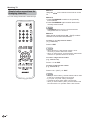
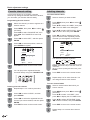
This function allows you to program 4 favorite
channels. By setting the favorite channels in advance,
you can select your favorite channels easily.
To create channel labels
1
Select a channel you want to label.
2
Press MENU, then press / to select
(OPTION).
Press / to select “CH LABEL”, then press
/ . The CH LABEL menu will appear.
3
Press / to select “SET/CLEAR”. Press
/ to select “SET” then press ENTER.
4
Press / to enter a character in the first
space. Press the button repeatedly until the
character you want appears on the screen.
Programming favorite channel
1
Select the channel you want to register as a
favorite channel.
2
Press MENU, then press / to select
(OPTION).
Press / to select “FAVORITE CH”, then
press / . The FAVORITE CH menu will
appear.
3
Press /
ENTER.
to select “SET”, and then press
4
Press / to select the position, and then
press ENTER to register.
CH LABEL
:CH
12
SET
LABEL
FAVORITE CH
:CH
RETURN
12
:SELECT
SET
A
B
12
C
─
: SELECT
A–––
:ADJUST
ENTER: SET
D
─
The characters rotation as follows:
─
-
ENTER: SET
5
Press EXIT to return to the normal screen.
6
You can jump to the registered favorite
channels directly using four FAVORITE CH.
0 ... 9
A ... Z
+
SPACE
If the character which you desire appears, press
ENTER. Repeat this step to enter the rest of the
characters.
When you finish inputting the label name, press
ENTER.
5
Press EXIT to return to the normal screen.
6
Repeat steps 1-5 for other channels. You
can assign a label to each channel.
To erase channel labels
Deleting a favorite channel
20
1
Select a channel with a label which you
want to remove.
2
Press MENU, then press / to select
(OPTION).
Press / to select “CH LABEL”, then
press / to display the CH LABEL menu.
1
Repeat steps 1 to 2 in above procedure.
2
Press / to select “CLEAR”, and then
press ENTER.
3
Press / to select the registered favorite
channel you want to release, and then press
ENTER.
3
Press / to select “SET/CLEAR”. Press
/ to select “CLEAR”, then press ENTER.
4
Press EXIT to return to the normal screen.
4
Press EXIT to return to the normal screen.
5
Repeat steps 1-4 to erase other channel
labels.
Basic adjustment settings
Color temperature
Picture adjustments
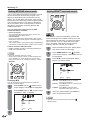
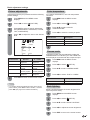
Adjusts the picture to your preference with the following
picture settings.
For a better white balance, use color temperature
correction.
1
Press MENU and the MENU screen
displays.
1
Press MENU and the MENU screen
displays.
2
Press
2
Press
3
Press / to select a specific adjustment
item (BRIGHTNESS, CONTRAST, COLOR,
TINT, SHARPNESS).
3
Press / to select “COLOR
TEMPARATURE”.
4
Press
4
Press
level.
/
/
to select
(PICTURE).
to adjust the item to the desired
PICTURE
AV MODE
STANDARD
BRIGHTNESS
CONTRAST
COLOR
TINT
SHARPNESS
25
40
25
0
25
:SELECT
Selected item
BRIGHTNESS
CONTRAST
COLOR
TINT
SHARPNESS
5
For less
brightness
For less contrast
For less color
intensity
Skin tones
become purplish
For less
sharpness
/
to select
(PICTURE).
to select the mode you prefer.
Selected item
Description
COOL
MEDIUM
WARM
White with Blueish tone
Neutral
White with Reddish tone
5
Press EXIT to return to the normal screen.
Cinema mode
:ADJUST
button
/
A smoother motion may be obtained by setting the
CINEMA MODE to FILM when you view a DVD from
the DVD player connected with the component input.
button
For more
brightness
For more contrast
For more color
intensity
Skin tones
become greenish
For more
sharpness
1
Press MENU and the MENU screen
displays.
2
Press
/
to select
3
Press
/
to select “CINEMA MODE”.
4
Press
/
to select “FILM” or “VIDEO”.
(SETUP).
Press EXIT to return to the normal screen.
NOTE
• For resetting all Picture adjustment items to the factory
preset values, press / to select “RESET”, and then
press / (see page 26 for further information).
Selected item
Description
FILM
VIDEO
Film content viewing mode
Video content viewing mode
Back lighting
BACK LIGHTING adjusts the screen brightness for
improved picture clarity.
1
Press MENU and the MENU screen
displays.
2
Press
/
to select
3
Press
/
to select “BACK LIGHTING”.
4
Press
/
to adjust the screen brightness.
5
Press EXIT to return to the normal screen.
(SETUP).
21
Basic adjustment settings
Sound adjustment
Digital audio output
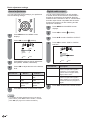
You can adjust the sound quality to your preference
with the following settings.
1
2
You can output digital audio to an AV amplifier
or similar device whose DIGITAL AUDIO INPUT
terminal is connected to the COAXIAL DIGITAL
AUDIO OUTPUT terminal on the TV. Please select
an audio output format compatible with the audio
format of the program you are watching and the
equipment connected.
1
Press MENU and the MENU screen
displays.
2
Press
/
to select
3
Press
/
to select “DIGITAL OUTPUT”.
4
Press / to select “PCM” or “DOLBY
DIGITAL”.
Press MENU and the MENU screen
displays.
Press
/
(AUDIO).
(AUDIO).
to select
AUDIO
MTS
BASS
TREBLE
BALANCE
SPEAKERS
:SELECT
STEREO
25
25
0
ON
AUDIO
AUDIO LANGUAGE
DIGITAL OUTPUT
PCM
PCM/DOLBY DIGITAL
RESET
:ADJUST
3
Press / to select a specific adjustment
item (BASS, TREBLE, BALANCE).
4
Press
level.
Selected item
/
to adjust the item to the desired
button
BASS
For weaker bass
TREBLE
For weaker
treble
Decrease audio
from the right
speaker
BALANCE
5
Selected item
For stronger
bass
For stronger
treble
Decrease audio
from the left
speaker
Press EXIT to return to the normal screen.
NOTE
:ADJUST
Description
PCM
The coaxial digital audio output
terminal outputs audio signal in
PCM form. If your digital audio
system does not support Dolby
Digital, select “PCM”.
DOLBY DIGITAL
The coaxial digital audio output
terminal outputs audio signal in
Dolby Digital form. It reproduces
sound from surround program of
digital.
button
• For resetting all Audio adjustment items to the factory
preset values, press / to select “RESET”, and then
press / (see page 26 for further information).
22
:SELECT
5
Press EXIT to return to the normal screen.
Using external equipment
You can connect many types of external equipment to your TV like a DVD player, VCR, Digital TV tuner, HDMI
equipment, game console or camcorder. To view external source images, select the input source from INPUT
on the remote control unit or on the TV.
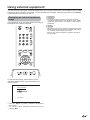
Displaying an external equipment
image
This explanation is for the setting when connecting a
DVD player to the INPUT3 terminal.
CAUTION
• To protect equipment, always turn off the TV before
connecting a DVD player, VCR, Digital TV tuner, HDMI
equipment, game console, camcorder or other external
equipment.
NOTE
• See pages 24 and 25 for external equipment connection.
• Please read the relevant operation manual (DVD player,
etc.) carefully before making connections.
• Refer to your external equipment operation manual for
the signal type.
To watch a DVD image, select “INPUT3” from
“SOURCE SELECTION” menu using 0-4 on the
remote control.
SOURCE SELECTION
0.
1.
2.
3.
4.
TV
INPUT1
INPUT2
INPUT3
INPUT4
[0-4] : SELECT
• Each time INPUT is pressed, “SOURCE SELECTION”
item toggles.
• You can also select “SOURCE SELECTION” item by
pressing / .
23
Using external equipment
Connecting a DVD player or a digital TV STB (Air or Cable)
You can use the INPUT1, INPUT2 or INPUT3 terminals when connecting to a DVD player, a Digital TV STB (Air
or Cable) and other audiovisual equipment.
When using component cable.
(INPUT3)
When using composite cable. (INPUT1 or 2)
Component video
cable (commercially
available)
AV cable
(commercially available)
Audio cable
(commercially
available)
NOTE
DVD player/
Digital TV STB
DVD player/
Digital TV STB
• See page 25 for connecting a DVD player or a Digital TV STB to the HDMI terminal.
Connecting a VCR, game console or
camcorder
A VCR, game console, camcorder and other
audiovisual equipment can be conveniently connected
using the INPUT1 or 2 terminals.
Using digital audio output
It is possible to output audio through the COXIAL
DIGITAL AUDIO OUTPUT terminal. (See page 22 for
details.) PCM audio outputs from the terminal.
NOTE
• The S-video terminal takes priority over the video
terminals.
Coaxial digital cable
AV cable
(commercially
available)
To coaxial digital input of
external audio devices
S-video cable
(commercially
available)
VCR/Game console/
Camcorder
24
Using external equipment
Connecting HDMI equipment
You can use the INPUT4 terminal when connecting HDMI equipment.
When using an HDMI-DVI
conversion cable, use INPUT4
and AUDIO terminal.
HDMI cable (Commercially available)
HDMI equipment
Displaying an image from HDMI
equipment
1
To watch an HDMI equipment image, select
“INPUT4” from “SOURCE SELECTION”
menu using INPUT on the remote control
unit or on the TV. (See page 23.)
SOURCE SELECTION
0.
1.
2.
3.
4.
TV
INPUT1
INPUT2
INPUT3
INPUT4
Selecting HDMI audio input source
1
Press MENU and the MENU screen
displays.
2
Press
/
to select
3
Press
/
to select “HDMI”.
4
Press
/
to select “HDMI” or “DVI”.
[0-4]:SELECT
(AUDIO).
AUDIO
WOW SRS 3D
FOCUS
TruBass
HDMI
OFF
OFF
OFF
HDMI/DVI
:SELECT
:ADJUST
NOTE
• Refer to your external equipment operation manual for
the signal type.
HDMI: When you connect the HDMI device to
the TV, select this setting.
DVI: When you connect the DVI device to the
TV with analog audio cords, select this
setting.
5
Press EXIT to return to the normal screen.
25
Useful adjustment settings
Reset
Input label
If complex adjustments are made and the settings
cannot be restored to normal, you can reset the
settings to the factory preset values.
Let you set the input terminal displayed when using
the “SOURCE SELECTION” menu or channel display.
Resetting picture adjustments
Each picture adjustments return to the following
factory settings:
AV MODE ..................................................... STANDARD
BRIGHTNESS / COLOR / SHARPNESS ..... center (25)
CONTRAST .................................................. (40)
TINT.............................................................. center (0)
COLOR TEMPERATURE............................. MEDIUM
1
Press MENU and the MENU screen
displays.
1
Press MENU and the MENU screen
displays.
2
Press
/
2
Press
3
Press
press
/ to select “RESET”, and then
/ .
3
Press / to select “VIDEO LABEL”, and
then press / .
4
The VIDEO LABEL menu screen displays.
Press / to select the specific input
source which you want to change.
5
Press / to select the new label for the
selected input source.
to select
(PICTURE).
PICTURE
COLOR
TEMPERATURE
MEDIUM
RESET
4
/
The TV screen return to the normal screen,
and “RESET” will be displayed a few
seconds.
Each audio adjustments return to the following factory
settings:
1
2
3
BALANCE ...... center (0)
Press MENU and the MENU screen
displays.
Press
Press
press
/
to select
–
(AUDIO).
/ to select “RESET”, and then
/ .
6
AUDIO
AUDIO LANGUAGE
DIGITAL OUTPUT
(OPTION).
VIDEO LABEL
1.
2.
3.
4.
Resetting audio adjustments
BASS ..................center (25)
TREBLE..............center (25)
to select
INPUT1
INPUT2
INPUT3
INPUT4
- /VCR/DVD/DTV
SAT/CBL
-
:SELECT
:ADJUST
Uses the default label name
VCR
Video cassette recorder
DVD
DVD video
DTV
Digital TV set-top box
SAT
Satellite box
CBL
Cable box
HD
HDMI equipment
Press EXIT to return to the normal screen.
PCM
RESET
NOTE
• You cannot change label for “TV” input.
4
The TV screen return to the normal screen,
and “RESET” will be displayed a few
seconds.
NOTE
26
• The channel setup settings will not be changed.
• The language settings will not be changed.
• The password number setting will not be changed.
Useful adjustment settings
AV mode
Selecting the digital audio language
AV mode gives you four viewing options to choose
from to best match the surrounding environment
of the TV, which can vary due to factors like room
brightness, type of program watched or the type of
image input from external equipment.
When two or more audio languages are included
in a digital signal, you can select one of the audio
languages.
1
Press MENU and the MENU screen
displays.
2
Press
3
Press / to select “AUDIO LANGUAGE”,
and then press / .
/
to select
(AUDIO).
AUDIO
1
Press AV MODE and the
(PICTURE)
menu screen displays. “AV MODE” will be
highlighted.
2
Press
/
AUDIO LANGUAGE
DIGITAL OUTPUT
:SELECT
to select the desired mode.
:ADJUST
• The mode can be chosen from the list below.
4
PICTURE
:SELECT
Selected item
SPORTS
STANDARD
0.
1.
2.
3.
4.
5.
6.
7.
:ADJUST
Description
Press / to select your desired language,
then press ENTER.
AUDIO LANGUAGE
AV MODE
STANDARD
SPORTS/STANDARD/MOVIE/MEMORY
BRIGHTNESS
25
CONTRAST
40
COLOR
25
TINT
0
SHARPNESS
25
ENGLISH 1
ENGLISH 2
FRENCH
SPANISH
NO INFO
NO INFO
NO INFO
NO INFO
[0-7]:SELECT
ENTER:SET
5
Press EXIT to return to the normal screen.
For a clear-cut image
emphasizing high contrast,
useful for sports viewing
For a highly defined image
in a normal lighting
MOVIE
For a movie
MEMORY
Allows the user to
customize settings as
desired. You can set
the mode for each input
source.
3
PCM
RESET
Press EXIT to return to the normal screen.
NOTE
• Each time AV MODE is pressed, AV MODE item toggles.
• You can select a different AV MODE item for each input
mode. (For example, select STANDARD for TV input and
SPORTS for VIDEO input.)
27
Useful adjustment settings
View mode for 4:3 programs
1
2
Picture scroll
Press VIEW MODE.
• The View mode menu displays.
• The menu lists the view mode options
selectable for the type of video signal currently
being received.
For adjusting a picture's vertical position in ZOOM
mode.
1
Press MENU and the MENU screen
displays.
Press 0-3 to select each view mode directly
while the View mode menu is still on the
screen.
2
Press
• Each time VIEW MODE is pressed, VIEW
MODE item toggles.
• You can also select VIEW MODE item by
pressing / .
• You can sequentially select a view mode that
has its own aspect ratio.
3
Press / to select “PICTURE SCROLL”,
and then press / .
4
SCROLL ADJUSTMENT screen displays.
To raise the picture, press . To lower the
picture, press .
/
to select
(SETUP).
VIEW MODE
0.
1.
2.
3.
SIDE BAR
S.STRETCH
ZOOM
STRETCH
SCROLL ADJUSTMENT
+10
: ADJUST
[0-3]:SELECT
The scroll amounts are as follows:
• 480i/480p signal source:
ZOOM:
–10 to +20
SIDE BAR:
Suitable for viewing conventional 4:3
programs in their normal format.
5
S.STRETCH (Smart stretch):
Suitable for stretching 4:3 programs
to fill the screen.
Press EXIT to return to the normal screen.
NOTE
• In SIDE BAR, S.STRETCH and STRETCH mode,
PICTURE SCROLL will not work.
Aspect
ZOOM:
Suitable for viewing wide-screen
2.35:1 anamorphic DVDs in full
screen.
STRETCH:
This mode is useful for 1.78:1 DVDs.
When viewing 1.85:1 DVDs, stretch
mode will still show very thin black
bands at the top and bottom of the
screen.
When the ASPECT is set to ON and the TV recieves
a 480i signal, the picture size is automatically
selected (as described in the following table).
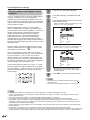
1
Press MENU and the MENU screen
displays.
2
Press
/
3
Press
press
/ to select “ASPECT”, and then
/ to select “ON” or “OFF”.
4
Press EXIT to return to the normal screen.
to select
(SETUP).
NOTE
• You can enter to the same menu screen from
(SETUP)
menu.
• When this function is not available, “NOT AVAILABLE”
will display.
View mode for HD programs
Stretch mode is available for HD programs.
Suitable for viewing wide-screen 1.78:1 aspect-ratio
programs. When viewing 1.85:1 programs, the stretch
mode will still show very thin black bands at the top
and bottom of the screen.
28
Aspect ratio of signal
source
Automatic aspect size
(when ASPECT is ON)
4:3 Normal
SIDE BAR
16:9 Full
STRETCH
4:3 Letter box
ZOOM
Not defined
User-set mode
Useful adjustment settings
Audio output select
Sleep timer
Allows you to select what controls the audio output.
1
Press MENU and the MENU screen
displays.
2
Press
/
to select
3
Press
/
to select “SPEAKERS”.
4
Press
Allows you to set a time when the TV automatically
switches to standby.
(AUDIO).
1
/
to select “ON” or “OFF”.
Each time you press SLEEP, the remaining
time setting switches as shown below.
SLEEP
0h00m
(Sleep timer off)
AUDIO
MTS
BASS
TREBLE
BALANCE
SPEAKERS
SLEEP
0h10m
STEREO
25
25
0
ON/OFF
step up by 10 minutes
:SELECT
:ADJUST
SLEEP
1h50m
Selected item
ON
OFF
Description
SLEEP
2h00m
• Sound via speaker is adjusted with
VOL +/– on the remote control unit or
VOL –/+ on the TV.
• Sound via the AUDIO OUTPUT
terminal is not adjustable and outputs
at a consistent level.
This display will disappear after a few
seconds, the sleep timer automatically
starts counting down.
• If you want to adjust the sleep timer again, you
• Sound via the AUDIO OUTPUT
terminal is adjusted with VOL +/– on
the remote control unit or VOL –/+ on
the TV.
• Sound via speaker is muted.
can press SLEEP repeatedly then change the
time setting.
2
5
Press EXIT to return to the normal screen.
Press SLEEP.
• The remaining time displays when the sleep
timer has been set.
SLEEP
0h07m
NOTE
• Select “0h00m” by pressing SLEEP repeatedly to cancel
the sleep timer.
• The TV will enter the standby mode when the remaining
time reaches zero.
29
Useful adjustment settings
Closed captions and digital closed
captions
Your TV is equipped with an internal Closed Caption
decoder. It allows you to view conversations,
narration and sound effects as subtitles on your TV.
Closed Captions are available on some TV programs
and on some VHS home video tapes at the discretion
of the program provider.
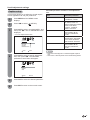
1
Tune the TV to the desired program.
2
Press CC to display “CLOSED CAPTION”
menu.
3
Press CC repeatedly to select your desired
Closed Caption mode.
• When an Analog signal is received, you can
choose C1, C2, T1, T2 and OFF.
Digital Closed Caption service is a new caption
service available only on digital TV programs (also
at the discretion of the service provider). It is a more
flexible system than the original Closed Caption
system, because it allows a variety of caption
sizes and font styles. When the Digital Closed
Caption service is in use, it will be indicated by
the appearance of a 3-letter abbreviation that also
indicates the language of the Digital Closed Captions:
ENG (English), SPA (Spanish), FRA (French) or other
language codes.
SETUP
CLOSED CAPTION OFF
C1/C2/T1/T2/OFF
CC ADVANCED
VIEW MODE
PICTURE SCROLL
:SELECT
:ADJUST
• When a Digital signal is received, you can
choose from CS1, CS2, CS3, CS4, CS5, CS6,
C1, C2, C3, C4, T1, T2, T3, T4 and OFF.
Not all programs and VHS videotapes offer closed
captions. Please look for the “ ” symbol to ensure
that captions will be shown.
In the Closed Caption system, there can be more
than one caption service provided. Each is identified
by its own number. The “C1” and “C2” services
display subtitles of TV programs superimposed over
the program’s picture. Generally, Closed Captions in
English are transmitted on C1 and Closed Captions in
other languages are transmitted on C2.
SETUP
CLOSED CAPTION OFF
CS1/CS2/CS3/CS4/CS5/CS6
C1/C2/C3/C4/T1/T2/T3/T4/OFF
CC ADVANCED
VIEW MODE
PICTURE SCROLL
In the Closed Caption system, the “Text1” or “Text2”
services display text that is unrelated to the program
being viewed (e.g., weather or news). These services
are also superimposed over the program currently
being viewed.
:SELECT
:ADJUST
• Depending on the broadcast signal, some
Analog Captions will function with a Digital
broadcast signal.
4
Press EXIT to return to the normal screen.
NOTE
• You can enter to CLOSED CAPTION menu from
(SETUP) menu.
• To turn the Closed Caption feature off, select “OFF”.
NOTE
• If the program or video you selected is not closed-captioned, no captions will display on-screen.
• If text is not available in your viewing area, a black rectangle may appear on-screen. If this happens, set the Closed
Caption feature to “OFF“.
• When selecting Closed Captions, the captioning will be delayed approx. 10 seconds.
• If no caption signal is received, no captions will appear, but the television will remain in the Caption Mode.
• Misspellings or unusual characters may occasionally appear during Closed Captioning. This is normal with Closed
Captioning, especially with live programs. This is because during live programs, captions are also entered live. These
transmissions do not allow time for editing.
• When Captions are being displayed, on-screen displays, such as volume and mute may be seen but may interfere with
Closed Captions.
• Some Cable TV systems and copy protection systems may interfere with the Closed Captioned signal.
• If using an indoor antenna or if TV reception is very poor, the Closed Caption Decoder may not appear or may appear with
strange characters or misspelled words. In this case, adjust the antenna for better reception or use an outdoor antenna.
30
Useful adjustment settings
Selectable parameters available in each adjustment
item.
Caption setup
This function allows you to adjust the closed caption
screen appearance to suit your preference.
1
Press MENU and the MENU screen
displays.
2
Press
/
to select
3
Press / to select “CC ADVANCED”, and
then press / . The CC ADVANCED menu
displayed.
Item
Selectable parameter
TEXT SIZE:
AUTO, SMALL,
STANDARD, LARGE
TEXT TYPE:
AUTO, DEFAULT, MONO
W. SERIF, PROP. W.
SERIF, MONO W/O SERIF,
PROP. W/O SERIF,
CASUAL, CURSIVE,
SMALL CAPITALS
TEXT COLOR:
AUTO, BLACK, WHITE,
RED, GREEN, BLUE,
YELLOW, MAGENTA,
CYAN
TEXT EDGE:
AUTO, NONE, RAISED,
DEPRESSED, UNIFORM,
LEFT DROP SHADOW,
RIGHT DROP SHADOW
BACKGROUND COLOR:
AUTO, BLACK, WHITE,
RED, GREEN, BLUE,
YELLOW, MAGENTA,
CYAN
(SETUP).
• You can adjust 5 items here.
CC ADVANCED
TEXT SIZE
TEXT TYPE
TEXT COLOR
TEXT EDGE
BACKGROUND COLOR
:SELECT
4
:ADJUST
Press / to select a specific adjustment
item, then press / . The selectable
parameter of each items will appear.
NOTE
• This feature is designed to customize Digital Captions
only.
• The “AUTO” value depends on the broadcasting station.
TEXT SIZE
AUTO
SMALL
STANDARD
LARGE
:SELECT
/
ENTER:SET
5
Press
to select the desired parameter.
6
Press EXIT to return to the normal screen.
31
Useful adjustment settings
Password setting for parental
control
Allows you to use a password to protect certain
settings from being accidentally changed.
IMPORTANT:
Three conditions must be met to enable the V-Chip
1 Password is registered.
2 V-CHIP settings have been made.
3 “V-CHIP” is set to “ON”.
Changing the password
Allows you to change your current password.
1
Repeat steps 1 to 3 in setting a password.
2
Input the 4-digit password by using 0–9,
then press ENTER.
3
Press /
then press
• The password entering menu displays.
to select “NEW PASSWORD”,
/ .
Setting a password
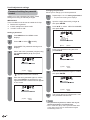
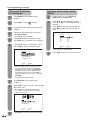
1
Press MENU and the MENU screen
displays.
2
Press
3
Press / . The password entering menu
displays.
4
/
to select
LOCKS
V-CHIP
OFF
V-CHIP SET
V-CHIP SET (DTV)
NEW PASSWORD
(LOCKS).
Select and enter a password (4 digits) using
the number buttons (0–9), then press
ENTER.
:SELECT
4
:ADJUST
Enter a new password using 0–9, then
press ENTER.
LOCKS
NEW PASSWORD
----
LOCKS
NEW PASSWORD
----
[0-9]:SELECT
[0-9]:SELECT
“
5
ENTER:SET
EXIT:END
5
” appears instead of the number.
Enter the same password again to confirm,
then press ENTER, the password is now
registered and the LOCKS menu will appear
on the screen.
Enter the same password again to confirm,
then press ENTER.
LOCKS
CONFIRM PASSWORD
LOCKS
[0-9]:SELECT
CONFIRM PASSWORD
6
[0-9]:SELECT
ENTER:SET
EXIT:END
ENTER:SET
EXIT:END
The screen returns to LOCKS menu. Your
new password has been set.
ENTER:SET
EXIT:END
NOTE
• As a precautionary measure, make a note of your
password and keep it in a familiar place.
• The “V-CHIP SET (DTV)” will only be selectable when
a new rating system can be downloaded via digital
broadcasting in the U.S.
32
Useful adjustment settings
Parental control (V-CHIP)
V-CHIP is an electronic filtering device built into your TV. This tool gives parents a great degree of control over
broadcasts accessed by their children. It allows parents to select programs judged suitable for child viewing
while blocking ones judged not suitable. It does so automatically once you activate the V-CHIP feature in your
TV.
V-CHIP SET menu will not be selectable from the menu if you do not first configure your password.
(See page 32 for password setting for parental control.)
• The U.S. has two rating systems for viewing content: movie ratings and TV Parental Guidelines.
• The TV Parental Guidelines work in conjunction with the V-CHIP to help parents screen out inappropriate
television shows from their children.
• Movie ratings are used for original movies rated by the Motion Picture Association of America (MPAA) as
watched on cable TV and not edited for television. The V-CHIP can also be set to block MPAA-rated movies.
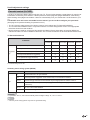
TV Parental Guidelines
Content
TV RATING
ADULT
FANTASY
SEXUAL
VIOLENCE VIOLENCE SITUATIONS LANGUAGE
SEXUAL
DIALOG
TV-Y (All children)
TV-Y7 (Directed to older children)
Suggested
age
X
TV-G (General audience)
TV-PG (Parental Guidance suggested)
X
X
X
X
TV-14 (Parents strongly cautioned)
X
X
X
X
TV-MA (Mature audience only)
X
X
X
X: Content rating can be set.
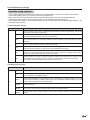
Voluntary movie rating system (MPAA)
MOVIE RATING
Description
G
General audiences. All ages admitted.
PG
Parental guidance suggested. Some material may not be suitable for children.
PG-13
Parents strongly cautioned. Some material may be inappropriate for children under 13.
R
Restricted. Under 17 requires accompanying parent or adult guardian (age varies in some
jurisdictions).
NC-17
No one 17 and under admitted.
X
X is an older rating that is unified with NC-17 but may be encoded in the data of older movies.
Age
EXAMPLE
• If you select “PG-13”, this will automatically block the higher ratings “R”, “NC-17” and “X”.
NOTE
• Voluntary movie rating system only uses an age-based rating.
33
Useful adjustment settings
TV Parental Guidelines
(TV Guidelines)
Voluntary movie rating system
(MPAA)
1
Press MENU and the MENU screen
displays.
1
Repeat steps 1 to 5 in TV Parental
Guidelines (TV Guidelines).
2
Press
2
Press / to select “MOVIE RATING”.
Then press / . The RATING SET menu
displays.
3
Press / . The password entering menu
displays.
4
Input the 4-digit password by using 0–9,
then press ENTER.
The LOCKS menu displays.
/
to select
(LOCKS).
Press / to select desired setting, then
press / to select the settings “ON” or
“OFF”.
RATING SET
5
Press
press
/ to select “V-CHIP SET”, then
/ . The V-CHIP SET menu displays.
6
Press
press
/ to select “TV RATING”. Then
/ to select the desired rating.
G
PG
PG-13
R
NC-17
X
:SELECT
:
:
:
:
:
:
ON/OFF
OFF
OFF
OFF
OFF
OFF
:ADJUST
• See page 33 for setting details.
V-CHIP SET
3
TV RATING
OFF
OFF/TV-Y/TV-Y7/TV-G
TV-PG/TV-14/TV-MA
MOVIE RATING
CAN ENG RATING OFF
CAN FRE RATING OFF
:SELECT
:ADJUST
• When you select TV-Y7, TV-PG, TV-14 or
TV-MA, “DISPLAY TO SET CONTENTS”
will appear on the screen. Press DISPLAY
to explain the rating. Press / to select
the desired rating you want. Press / to
select the setting “ON” or “OFF”. Then press
RETURN.
• See page 33 for setting details.
7
Press RETURN. The LOCKS menu
displays.
8
Press / to select “V-CHIP”, then press
to select “ON”.
Your setting are now set into memory.
• If “V-CHIP” is not set to “ON”, the V-CHIP
setting will not work.
LOCKS
V-CHIP
ON/OFF
V-CHIP SET
V-CHIP SET (DTV)
NEW PASSWORD
:SELECT
9
34
:ADJUST
Press EXIT to return to the normal screen.
/
Press EXIT to return to the normal screen.
Useful adjustment settings
Canadian rating systems
• The TV rating systems in Canada are based on the Canadian Radio-Television and Telecommunications
Commission (CRTC) policy on violence in television programming.
• While violence is the most important content element to be rated, the structure developed takes into
consideration other program content like language, nudity, sexuality and mature themes.
• When setting the V-CHIP on the Canadian system you can choose either the Canadian English ratings or the
Canadian French ratings.
Canadian English ratings
Rating
Description
E
Exempt: Includes news, sports, documentaries and other information programming; talk shows,
music videos, and variety programming.
C
Children: Intended for younger children under the age of 8 years. Pays careful attention to themes
that could threaten their sense of security and well-being.
C8+
Children over 8 years old: Contains no portrayal of violence as the preferred, acceptable, or only
way to resolve conflict; nor encourage children to imitate dangerous acts which they may see on
the screen.
G
General: Considered acceptable for all age groups. Appropriate viewing for the entire family,
contains very little violence, physical, verbal or emotional.
PG
Parental Guidance: Intended for a general audience, but may not be suitable for younger children
(under the age of 8) because it could contain controversial themes or issues.
14+
Over 14 Years: Could contain themes where violence is one of the dominant elements of the
storyline, but it must be integral to the development of plot or character. Language usage could be
profane and nudity present within the context of the theme.
18+
Adults: Intended for viewers 18 years and older and might contain depictions of violence, which
while related to the development of plot, character or themes, are intended for adult viewing.
Could contain graphic language and portrayals of sex and nudity.
Age
Canadian French ratings
Rating
Description
E
Exempt programming.
G
General: All ages and children, contains minimal direct violence, but may be integrated into the
plot in a humorous or unrealistic manner.
8ans+
General but inadvisable for young children: May be viewed by a wide public audience, but could
contain scenes disturbing to children under 8 who cannot distinguish between imaginary and real
situations. Recommended for viewing with parent.
13ans+
Over 13 years: Could contain scenes of frequent violent scenes and therefore recommended for
viewing with parent.
16ans+
Over 16 years: Could contain frequent violent scenes and intense violence.
18ans+
Over 18 years: Only for adult viewing. Could contain frequent violent scenes and extreme
violence.
Age
35
Useful adjustment settings
Canadian English ratings
Canadian French ratings
1
Press MENU and the MENU screen
displays.
1
Repeat steps 1 to 5 in Canadian English
ratings.
2
Press
2
Press / to select “CAN FRE RATING”.
Then press / to select the desired rating.
3
Press / . The password entering menu
displays.
/
to select
(LOCKS).
V-CHIP SET
TV RATING
4
5
Input the 4-digit password by using 0–9,
then press ENTER.
The LOCKS menu displays.
Press
press
OFF
MOVIE RATING
CAN ENG RATING OFF
CAN FRE RATING OFF
OFF/E/G/8ans+/13ans+
16ans+/18ans+
/ to select “V-CHIP SET”, then
/ . The V-CHIP SET menu displays.
:SELECT
:ADJUST
• See page 35 for setting details.
6
Press / to select “CAN ENG RATING”.
Then press / to select the desired rating.
3
Press EXIT to return to the normal screen.
V-CHIP SET
TV RATING
OFF
How to temporarily release the
V-CHIP block
MOVIE RATING
CAN ENG RATING OFF
OFF/E/C/C8+/G/PG/14+/18+
CAN FRE RATING OFF
:SELECT
The V-CHIP block is working and censors
a broadcast, “THIS PROGRAM HAS BEEN
BLOCKED!” displays.
:ADJUST
1
Press MUTE while the V-CHIP is working
and then the password entering menu
displays.
2
Enter your 4-digit password with 0–9.
At this time V-CHIP block temporarily
releases.
• See page 35 for setting details.
7
Press RETURN. The LOCKS menu
displays.
8
Press / to select “V-CHIP”, then press
to select “ON”.
Your setting are now set into memory.
/
• If “V-CHIP” is not set to “ON”, the V-CHIP setting
will not work.
LOCKS
V-CHIP
ON/OFF
V-CHIP SET
V-CHIP SET (DTV)
NEW PASSWORD
Reactivating the temporarily
released V-CHIP block
You can reactivate the temporarily released V-CHIP
block as shown below.
Method 1:
Change to the other channel.
Method 2:
Switch off the TV power.
NOTE
:SELECT
9
36
:ADJUST
Press EXIT to return to the normal screen.
• Performing any of the two above will activate the V-CHIP
block.
Other viewing options
Freezing images
Allows you to capture and freeze an image from a
moving image that you are watching.
Signal meter
In order to receive digital air broadcasts, you need a
digital broadcast antenna. You can confirm the antenna
configuration through the “SIGNAL METER” menu.
If necessary, adjust the direction of the antenna to
obtain the maximum signal strength.
Signal strength
1
2
1
Press MENU and the MENU screen
displays.
2
Press
/
to select
3
Press
/
to select “SIGNAL METER”.
4
Press
/ .
(SETUP).
Press FREEZE.
• A moving image is captured.
Press FREEZE again to cancel the
function.
NOTE
• When this function is not available, “NOT AVAILABLE”
will display.
• The still image automatically goes out after 30 minutes.
• If you are using the freeze function and a broadcast
activates the V-CHIP block, the freeze function will be
cancelled and a V-CHIP block message will appear.
• The strength of the digital signal is displayed.
The signal information is based on the current
channel.
SIGNAL METER
CHANNEL (DIGITAL)
23.002
40
5
Press EXIT to return to the normal screen.
37
Appendix
Removing the stand
Before detaching (or attaching) stand, unplug the AC cord from the AC INPUT terminal.
CAUTION
• Do not remove the stand from the TV unless using an optional wall mount bracket to mount it.
Before attaching/detaching stand
• Before performing work make sure to turn off the TV.
• Before performing work spread cushioning over the base area to lay the TV on. This will prevent it from being
damaged.
hex key
1
2
Soft cushion
Unfasten the four screws used to secure the stand in
place.
Detach the stand from the TV.
(Hold the stand so it will not drop from the edge of the
base area.)
NOTE
• To attach the stand, perform the above steps in reverse order.
Setting the TV on the wall
CAUTION
• Installing the TV requires special skill that should only be performed by qualified service personnel. Customers
should not attempt to do the work themselves. SHARP bears no responsibility for improper mounting or mounting
that results in accident or injury.
Using an optional bracket to mount the TV
• You can ask a qualified service professional about using an optional bracket (AN-26AG1 bracket for
LC-26SH10U or AN-37AG2 bracket for LC-32SH10U) to mount the TV to the wall.
• Carefully read the instructions that come with the bracket before beginning work.
Hanging on the wall
Wall mount bracket. (See the bracket instructions for details.)
About setting the TV angle
Angle of TV
Vertical mounting
LC-26SH10U
Up to 20°
LC-32SH10U
Up to 10°
Angular mounting
NOTE
• Detach the cable clamp on the rear of the TV when using the optional mount bracket.
38
Appendix
Troubleshooting
Problem
Possible Solution
• No power
• Check if you pressed POWER on the remote control unit. (See page 14.) If the
indicator on the TV does not light up, press POWER on the TV.
• Is the AC cord disconnected? (See page 7.)
• Has the power been turned on? (See page 14.)
• Unit cannot be operated.
• External influences such as lightning, static electricity, may cause improper
operation. In this case, operate the unit after first turning on the power of the TV
or unplugging the AC cord and replugging it in after 1 or 2 minutes.
• Remote control unit does not
operate.
•
•
•
•
• Picture is cut off screen.
• Are screen mode adjustments such as view mode choose made correctly? (See
page 28.)
• Strange color, light color, or color
misalignment
• Adjust the picture tone. (See page 21.)
• Is the room too bright? The picture may look dark in a room that is too bright.
• Power is suddenly turned off.
• Is the sleep timer set? (See page 29.)
• Check the power control settings. (See page 14.)
• The unit’s internal temperature has increased.
Remove any objects blocking vent or clean.
• No picture
•
•
•
•
• No sound
• Is the volume too low? (See page 17.)
• Is “OFF” selected in “SPEAKERS”? (See page 29.)
Are batteries inserted with polarity (+, –) aligned? (See page 8.)
Are batteries worn out? (Replace with new batteries.)
Are you using it under strong or fluorescent lighting?
Is a fluorescent light illuminated near the remote control sensor?
Is connection to other components correct? (See pages 24 to 25.)
Is correct input signal source selected after connection? (See page 23.)
Is the correct input selected? (See page 23.)
Is picture adjustment correct? (See page 21.)
Troubleshooting-Digital broadcasting
The example of an error message
Possible Solution
displayed on a screen
• DIGITAL CHANNEL SIGNAL
• Check the antenna cable. Check that the antenna is correctly setup.
STRENGTH IS LOW
• DIGITAL CHANNEL IS
• It is subscription channel. Contact the service provider.
SCRAMBLED
• AUDIO ONLY
• The channel has audio contents only.
Cautions regarding use in high and low temperature environments
• When the unit is used in a low temperature space (e.g. room, office), the picture may leave trails or appear slightly
delayed. This is not a malfunction, and the unit will recover when the temperature returns to normal.
• Do not leave the unit in a hot or cold location. Also, do not leave the unit in a location exposed to direct sunlight or near
a heater, as this may cause the cabinet to deform and the Liquid Crystal panel to malfunction.
Storage temperature: – 4°F to +140°F (– 20°C to +60°C)
39
Appendix
Specifications
Item
Model: LC-26SH10U
Model: LC-32SH10U
LCD panel
26” Advanced Super View & BLACK
TFT LCD
Number of dots
3,147,264 dots (1366 x 768 x 3 dots)
TV
Function
32” Advanced Super View & BLACK
TFT LCD
TV-standard (CCIR)
American TV Standard ATSC/NTSC System
Receiving VHF/UHF
Channel
CATV
VHF 2-13ch, UHF 14-69ch
1-125ch (non-scrambled channel only.)
Digital Terrestrial
2-69ch
Broadcast (8VSB)
Digital Cable*
1-125ch (non-scrambled channel only.)
(64/256 QAM)
Audio multiplex
BTSC System
Backlight
60,000 hours (at Backlight Standard position)
Audio out
10W x 2
Terminals Rear INPUT 1
AV in, S-VIDEO in
INPUT 2
AV in, S-VIDEO in
INPUT 3
COMPONENT in, Audio in
INPUT 4
HDMI in with HDCP, Audio in
ANT/CABLE
75 Ω Unbalance, F Type x 1 for Analog (VHF/UHF/CATV) and Digital (AIR/CABLE)
DIGITAL AUDIO OUTPUT Coaxial Digital audio output x 1 (PCM/Dolby Digital)
OUTPUT
Audio out
OSD language
English/French/Spanish
Power Requirement
AC 120 V, 60 Hz
Power Consumption
145 W (Standby 1W)
170 W (Standby 1W)
w/o stand
24.7 lbs./11.2 kg
33.1 lbs./15.0 kg
with stand
28.5 lbs./12.9 kg
37.8 lbs./17.1 kg
w/o stand
2615/16 x 1959/64 x 431/32 inch
3221/64 x 2315/64 x 53/32 inch
with stand
2615/16 x 221/4 x 119/64 inch
3221/64 x 259/16 x 119/64 inch
Weight
Dimension
(W x H x D)
Accessories
Operating temperature
Remote control unit (x1), AC cord (x1), “AA” size battery (x2), Cable clamp (x1),
Stand unit (x1), Operation manual (x1)
+32°F to +104°F (0°C to +40°C)
* Emergency alert messages via Cable are unreceivable.
• As part of policy of continuous improvement, SHARP reserves the right to make design and specification changes for
product improvement without prior notice. The performance specification figures indicated are nominal values of production
units. There may be some deviations from these values in individual units.
Optional accessories
The listed optional accessories are available for
the LCD colour TV. Please purchase them at your
nearest shop.
• Additional optional accessories may be available in
near future. When purchasing, please read the newest
catalogue for compatibility and check the availability.
40
No.
1
2
Part name
Wall mount bracket
(for LC-26SH10U)
Wall mount bracket
(for LC-32SH10U)
Part number
AN-26AG1
AN-37AG2
Dimensional drawings
Unit: inch/(mm)
LC-26SH10U
2145/64 (551)
35/16 (84) 431/32 (126)
2615/16 (684)
221/64 (59)
1353/64 (351)
221/4 (565)
1959/64 (506)
125/8 (320.6)
2223/64 (567.9)
119/64 (283)
361/64 (100)
223/64 (60)
361/64 (100)
LC-32SH10U
2145/64 (551)
315/64 (82) 53/32 (129)
3221/64 (821)
159/16 (395)
1535/64 (394.6)
119/64 (283)
77/8 (200)
77/8 (200)
433/64 (115)
221/64 (59)
259/16 (649)
2315/64 (590)
279/16 (700)
41
CLEARING THE PASSWORD
If you forget the password, clear the password using the following procedure.
1
Press and hold both VOL – on the TV and press 0 on the remote control simultaneously for a few
seconds until
(LOCKS) menu appears on the screen.
2
Now the old password was cleared. You can set the new password.
The password is
.
NOTE
• As a precautionary measure, make a note of your password above, cut it from this manual, and keep it in a safe place.
42
Calling for Service
For location of the nearest Sharp Authorized Service, or to obtain product literature, accessories, supplies, or
customer assistance, please call 1-800-BE-SHARP.
LIMITED WARRANTY
CONSUMER LIMITED
LIMITED WARRANTY
WARRANTY
SHARP ELECTRONICS
ELECTRONICS CORPORATION
CORPORATIONwarrants
warrantstotothe
thefirst
firstconsumer
consumer purchaser
purchaser that
that this
this Sharp
Sharp brand
brand product
product (the
“Product”),
when shipped
shipped in
in its
its original
original container,
container, will
will be
be free from defective workmanship
workmanship and
and materials,
materials, and agrees that
“Product”), when
it will, at its option, either repair the defect or replace the defective Product or part thereof with a new or remanufactured
equivalent at no charge to the
the purchaser
purchaser for
for parts
parts or
or labor
laborfor
forthe
theperiod(s)
period(s)set
setforth
forthbelow.
below.
This warranty
warranty does
doesnot
notapply
applytoto
any
appearance
items
of the
Product
northe
toadditional
the additional
excluded
setbelow
forth
any
appearance
items
of the
Product
nor to
excluded
item(s)item(s)
set forth
below
nor Product
to any Product
the exterior
which
been damaged
or defaced,
been subjected
tovoltage
improper
nor to any
the exterior
of whichofhas
beenhas
damaged
or defaced,
which haswhich
been has
subjected
to improper
or
voltage
or other
misuse,service
abnormal
service ororhandling,
or been
whichaltered
has been
altered or
design or construction.
other misuse,
abnormal
or handling,
which has
or modified
in modified
design orinconstruction.
In order
order to
toenforce
enforcethe
therights
rights
under
limited
warranty,
the purchaser
should
the set
steps
setbelow
forthand
below
and
under
thisthis
limited
warranty,
the purchaser
should
followfollow
the steps
forth
provide
provide
of purchase
to the servicer.
proof of proof
purchase
to the servicer.
The limited warranty
warranty described
describedherein
hereinisisininaddition
addition
whatever
implied
warranties
may
be granted
to purchasers
by
to to
whatever
implied
warranties
may
be granted
to purchasers
by law.
law.
ALL IMPLIED
WARRANTIES
INCLUDING
THE WARRANTIES
OF MERCHANTABILITY
FITNESS
USE
ALL IMPLIED
WARRANTIES
INCLUDING
THE WARRANTIES
OF MERCHANTABILITY
AND AND
FITNESS
FOR FOR
USE ARE
ARE
LIMITED
TO PERIOD(S)
THE PERIOD(S)
FROM
THE DATE
OF PURCHASE
SET FORTH
BELOW.
notlimitaallow
LIMITED
TO THE
FROM
THE DATE
OF PURCHASE
SET FORTH
BELOW.
SomeSome
statesstates
do notdo
allow
limitations
onlong
howan
long
an implied
warranty
lasts,
the above
limitation
may
not to
apply
tions on how
implied
warranty
lasts, so
theso
above
limitation
may not
apply
you.to you.
Neither the sales personnel of the seller nor any
any other
other person is authorized to make any warranties other than those
described
herein, or
ortotoextend
extendthe
the
duration
of any
warranties
beyond
the time
period
described
on behalf
of
described herein,
duration
of any
warranties
beyond
the time
period
described
hereinherein
on behalf
of Sharp.
Sharp.
The warranties described herein shall be the sole and exclusive warranties granted by Sharp and shall be the sole and
The
warranties
described
be the sole
and exclusive
warranties
grantedand
by Sharp
shallofbe
thedescribed
sole and
exclusive
remedy
availableherein
to theshall
purchaser.
Correction
of defects,
in the manner
for theand
period
time
exclusive
remedy
available
to thefulfillment
purchaser.
defects,
in the manner
and for
the purchaser
period of time
herein, shall
constitute
complete
of Correction
all liabilitiesofand
responsibilities
of Sharp
to the
with described
respect to
herein,
shall constitute
of all liabilities
and responsibilities
to the
purchaser strict
with respect
to
the Product,
and shall complete
constitute fulfillment
full satisfaction
of all claims,
whether basedofonSharp
contract,
negligence,
liability or
the
Product,
shall shall
constitute
of allway
claims,
whetherfor
based
on contract,
negligence,
liability
or
otherwise.
In and
no event
Sharpfull
be satisfaction
liable, or in any
responsible,
any damages
or defects
in thestrict
Product
which
otherwise.
In no
event shall
Sharp be repairs
liable, or
in any way
anyan
damages
or defects
in Nor
the Product
which
were caused
by repairs
or attempted
performed
byresponsible,
anyone otherforthan
authorized
servicer.
shall Sharp
be
were
byway
repairs
or attempted
repairs
performed
by anyone other
than an
servicer.Some
Nor shall
Sharp
be
liable caused
or in any
responsible
for any
incidental
or consequential
economic
or authorized
property damage.
states
do not
liable
or inexclusion
any way of
responsible
forconsequential
any incidentaldamages,
or consequential
economic
or property
damage.
allow the
incidental or
so the above
exclusion
may not
apply toSome
you. states do not
allow the exclusion of incidental or consequential damages, so the above exclusion may not apply to you.
THIS WARRANTY GIVES YOU SPECIFIC LEGAL RIGHTS. YOU MAY ALSO HAVE OTHER RIGHTS WHICH VARY
THIS
GIVES YOU SPECIFIC LEGAL RIGHTS. YOU MAY ALSO HAVE OTHER RIGHTS WHICH VARY FROM
FROMWARRANTY
STATE TO STATE.
STATE TO STATE.
Model Specific Section
Your Product Model Number & Description:
LC-26SH10U • LC-32SH10U LCD Color Television
(Be sure to have this information available when you need
service for your Product.)
Warranty Period for this Product:
One (1) year parts and ninety (90) days labor from the date of
purchase.
Additional Item(s) Excluded from
Warranty Coverage (if any):
Non-rechargeable batteries.
Where to Obtain Service:
From a Sharp Authorized Servicer located in the United
States. To find the location of the nearest Sharp Authorized
Servicer, call Sharp toll free at 1-800-BE-SHARP.
What to do to Obtain Service:
Ship prepaid or carry in your Product to a Sharp Authorized
Servicer. Be sure to have Proof of Purchase available. If you
ship the Product, be sure it is insured and packaged securely.
Please use two persons to carry the Product, transport it in its
original packaging, and ensure that the Product is covered to
avoid scratches and damage.
TO OBTAIN PRODUCT INFORMATION, CALL 1-800-BE-SHARP OR VISIT www.sharpusa.com
SHARP ELECTRONICS CORPORATION
Sharp Plaza, Mahwah, New Jersey 07430-2135
SHARP CORPORATION
43
44
SHARP ELECTRONICS CORPORATION
Sharp Plaza, Mahwah, New Jersey 07430-2135
SHARP CORPORATION
Printed in Thailand
Imprimé en Thaïlande
Impreso en Tailandia
9JDJ3Y00431B
06P04-TH-NO