1
Directory
Add a directory entry
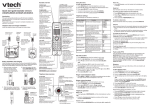
Use the following steps to store an entry in the directory.
Answering sys
>Directory
1. Enter the number when the handset is not in use and press
MENU/SELECT. The screen displays EDIT NUMBER.
-ORa. Press MENU/SELECT when the handset is not in use.
b. Press or to highlight >Directory, then press
MENU/SELECT.
c. Press or to highlight >Add contact, then press
MENU/SELECT. The screen displays ENTER NUMBER.
Review
>Add contact
ENTER NUMBER
800-595-9511_
2. Use the dialing keys to enter or modify the number.
• Press MUTE/DELETE to backspace and delete a digit.
• Press and hold MUTE/DELETE to delete all digits.
• Press
or
ENTER NAME
Mike Smith_
to move the cursor to the left or right.
• Press and hold REDIAL/PAUSE to insert a dialing pause (a p appears).
-ORCopy a number from the redial list by pressing REDIAL/PAUSE and then press
or , or REDIAL/PAUSE repeatedly to choose a number. Press MENU/SELECT to
copy the number.
3. Press MENU/SELECT to move to the name. The screen displays ENTER NAME.
4. Use the dialing keys to enter the name. Additional key presses show other
characters of that particular key. Press the key repeatedly until the desired
character appears. The first character and the character after a space are
automatically capitalized.
• Press 0 to add a space.
• Press MUTE/DELETE to backspace and delete a character.
• Press and hold MUTE/DELETE to delete all characters.
• Press
or
to move the cursor to the left or right.
5. Press MENU/SELECT to confirm. The screen displays Saved and you hear a
confirmation tone.
33