1
Xsan
Administrator’s Guide for Xsan 1.4
K Apple Computer, Inc.
© 2006 Apple Computer, Inc. All rights reserved.
Intel and Intel Core are trademarks of Intel Corp. in the
U.S. and other countries.
Under the copyright laws, this manual may not be
copied, in whole or in part, without the written consent
of Apple.
PowerPC and the PowerPC logo are trademarks of
International Business Machines Corporation, under
license therefrom.
The Apple logo is a trademark of Apple Computer, Inc.,
registered in the U.S. and other countries. Use of the
“keyboard” Apple logo (Option-Shift-K) for commercial
purposes without the prior written consent of Apple
may constitute trademark infringement and unfair
competition in violation of federal and state laws.
Other company and product names mentioned herein
are trademarks of their respective companies. Mention
of third-party products is for informational purposes
only and constitutes neither an endorsement nor a
recommendation. Apple assumes no responsibility with
regard to the performance or use of these products.
Every effort has been made to ensure that the
information in this manual is accurate. Apple is not
responsible for printing or clerical errors.
The product described in this manual incorporates
copyright protection technology that is protected by
method claims of certain U.S. patents and other
intellectual property rights owned by Macrovision
Corporation and other rights owners. Use of this
copyright protection technology must be authorized by
Macrovision Corporation and is intended for home and
other limited viewing uses only unless otherwise
authorized by Macrovision Corporation. Reverse
engineering or disassembly is prohibited.
Apple
1 Infinite Loop
Cupertino, CA 95014-2084
408-996-1010
www.apple.com
Apple, the Apple logo, Final Cut Pro, Mac, Macintosh, the
Mac logo, Mac OS, Panther, Xsan, and Xserve are
trademarks of Apple Computer, Inc., registered in the
U.S. and other countries.
Finder and Tiger are trademarks of Apple Computer, Inc.
ADIC and StorNext are registered trademarks of
Advanced Digital Information Corporation.
Apparatus Claims of U.S. Patent Nos. 4,631,603, 4,577,216,
4,819,098 and 4,907,093 licensed for limited viewing
uses only.
Simultaneously published in the United States and
Canada.
034-3767-A/07-21-06
Contents
11 About This Book
12 What’s New in Xsan 1.4
12
14
14
15
Version Compatibility
Upgrading from an Earlier Version of Xsan
For More Information
Notation Conventions
17
17
19
21
21
22
23
24
25
26
28
28
Chapter 1: Overview of Xsan
What Is Xsan?
Xsan Storage Area Networks
Shared SAN Volumes
Controllers and Clients
SAN Connections
How Xsan Storage Is Organized
LUNs
Storage Pools
Volumes
Folders with Affinities
How Xsan Utilizes Available Storage
3
28 Metadata and Journal Data
29 Striping at a Higher Level
30 Security
30 Expanding Storage
31 Xsan Capacities
33
33
34
34
35
36
37
38
39
41
50
51
51
52
52
52
52
53
4
Chapter 2: Setting Up a Storage Area Network
Hardware and Software Requirements
Supported Computers
Supported Storage Devices
Fibre Channel Fabric
Ethernet TCP/IP Network
Directory Services
Outgoing Mail Service
Planning Your SAN
Planning Considerations and Guidelines
Connecting Computers and Storage Devices
Preparing LUNs
Using the Xsan Admin Application
Installing Just the Xsan Admin Application
Connecting Through a Firewall
Xsan Admin Preferences
Getting Help
Using the Command Line
Contents
53
54
74
75
75
SAN and Volume Setup Summary
Setting Up an Xsan Volume on a Storage Area Network
Renaming a SAN
Removing a SAN
Setting Up Additional SANs
77
78
79
79
80
82
84
86
87
89
90
91
92
92
94
95
96
97
Chapter 3: Managing SAN Storage
Adding Storage
Restoring the Previous Volume Configuration After Changes
About Rearranging Fibre Channel Connections
Adding LUNs to a Storage Pool
Adding a Storage Pool to a Volume
Adding a Volume to a SAN
Assigning a Storage Pool Affinity to a Folder
Assigning an Affinity to a Folder Within a Folder
Removing an Affinity
Changing Storage Pool Settings
Renaming a Storage Pool
Choosing the Types of Files Stored on a Storage Pool
Setting Storage Pool Stripe Breadth
Setting the Selection Method for Multiple Connections
Changing Volume Settings
Renaming a Volume
Setting the Block Allocation Size
Contents
5
99 Setting the Volume Allocation Strategy
100
Enabling or Disabling Access Control Lists
101 Choosing the Windows ID Mapping Method
101 Checking Volume Fragmentation
102 Defragmenting a Volume
103 Checking the Integrity of a Volume
104 Repairing a Volume
105
106
107
108
109
109
110
110
110
111
111
112
114
115
117
119
6
Chapter 4: Managing Clients and Users
Adding a Client
Adding a Client to a StorNext SAN
Mounting a Volume on a Client
Controlling Client and User Access
Controlling Access to Folders on Volumes
Setting Up Access Control Lists
Unmounting a Volume on a Client
Restricting a Client to Read-Only Access
Removing a Client from a SAN
Removing Xsan Software from a Computer
Mapping Windows User and Group IDs
Setting User and Group Quotas
About Xsan Quotas
Checking User Quota Use
Helping Clients Check Their Own Quotas
Contents
120 Creating Local Home Folders for Network Accounts
121
122
123
124
Chapter 5: Managing Metadata Controllers
Adding a Controller
Setting Controller Failover Priority
Switching to a Standby Controller
125
127
128
129
130
Finding Out Which Controller Is Hosting a Volume
Listing the Volumes Hosted by a Controller
Changing a Controller’s IP Address
Upgrading Controller Software
Monitoring Controller Status
131
132
133
134
135
136
136
136
137
138
139
139
Chapter 6: Monitoring SAN Status
Locking Xsan Admin Views for Secure Monitoring
Checking Overall SAN Status
Checking Overall Volume Status
Checking Free Space on a Volume
Checking Free Space on a Storage Pool
Checking Quota Use
Viewing a Controller’s CPU and Network Utilization
Viewing File System CPU and Memory Utilization
Setting Up Status Notifications
Checking the Status of File System Processes
Viewing Xsan Logs
Contents
7
140 Checking Volume Clients
141 Checking for Fibre Channel Connection Failures
141 Checking the State of Xserve RAID Systems
143 Chapter 7: Solving SAN Problems
143 A Dialog on a Client Reports That a LUN Is Unreadable
143
144
144
144
145
145
146
147
147
148
148
149
149
149
149
150
150
151
8
You’re Unable to Connect to a Computer Using Xsan Admin
You’re Unable to Install the Xsan Software
Some Computers Aren’t Listed in Xsan Admin
You’re Unable to Mount a Volume on a Client
Xserve RAID LUNs Aren’t Accessible over Fibre Channel
You’re Unable to Restart a Volume After Adding LUNs or Storage Pools
Some LUNs Aren’t Listed in Xsan Admin
Some LUNs Are Listed Twice in Xsan Admin
Files and Folders Created by Mac OS 9 Computers Show the Wrong Creation Date
Problems Using Command-Line Tools
A LUN Doesn’t Have as Much Space as Expected
You’re Unable to Rename an Xsan Volume in the Finder
Fibre Channel Performance Is Poorer Than Expected
A Client User Sees Error Code –1425
File Copy Doesn’t Finish
A Client is Unable to Use a Volume After a Fibre Channel Interruption
SAN Performance Declines Periodically and Predictably
You’re Unable to Add a Storage Pool
Contents
152 You’re Unable to Add LUNs to a Storage Pool
153 The Capacity of a Larger LUN is Listed as 2 Terabytes
155 Appendix A: Combining Xsan and StorNext Clients and Controllers
155 Terminology
156 Compatible Software Versions
156 Licensing
157 Adding Macintosh Clients to a StorNext SAN
159 Using Xsan Controllers with StorNext Clients
161
161
162
162
163
164
164
168
171
172
173
174
175
176
Appendix B: Using the Command Line
Using the Shell Commands
Sending Commands to Remote Computers
Viewing the Man Pages
Notation Conventions
The Commands
Viewing or Changing Volume and Storage Pool Settings (cvadmin)
Copying Files or Folders (cvcp)
Checking or Repairing a Volume (cvfsck)
Labeling, Listing, and Unlabeling LUNs (cvlabel)
Creating a Folder with an Affinity (cvmkdir)
Creating and Preallocating a File (cvmkfile)
Initializing a Volume (cvmkfs)
Applying Volume Configuration Changes (cvupdatefs)
Contents
9
176
Starting a Volume Controller (fsm)
177
Starting a Port Mapper Process (fsmpm)
177
Defragmenting a File, Folder, or Volume (snfsdefrag)
179
Mounting an Xsan Volume
180
Unmounting an Xsan Volume
181
Viewing Logs
181 The Configuration Files
181
Examples
183 Glossary
187 Index
10
Contents
Preface
About This Book
Use this guide to learn how to set up and manage Xsan
volumes on a storage area network.
This guide shows how to use Xsan to combine Xserve RAID arrays and slices into large,
easy-to-expand volumes of storage that clients use like local disks but are actually
shared over a high-speed Fibre Channel fabric.
Chapter 1 provides an overview of Xsan and how you can use it to organize RAID arrays
into shared volumes of storage.
Chapter 2 includes hardware and software requirements, SAN planning guidelines, and
basic steps for setting up an Xsan volume.
Chapter 3 contains instructions for expanding storage, creating folders with affinities,
changing volume and storage pool settings, and checking, defragmenting, and
repairing SAN volumes.
Chapter 4 shows how to add client computers to a SAN, mount volumes on clients,
control client and user access to SAN files, and control user space using quotas.
Chapter 5 contains information about managing volume metadata controllers.
Chapter 6 includes instructions for monitoring and automatically reporting the
condition of a SAN.
11
Chapter 7 lists solutions to common problems you might encounter.
Appendix A contains information to help you combine Xsan controllers or clients with
ADIC StorNext controllers or clients on the same SAN.
Appendix B describes command-line utilities and configuration files you can use to
manage an Xsan SAN using Terminal.
What’s New in Xsan 1.4
Xsan 1.4 offers these new features and capabilities:
 You can use access control lists (ACLs) to manage user access to Xsan volumes.
 Xsan runs on Intel-based Macintosh computers.
Version Compatibility
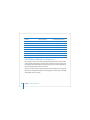
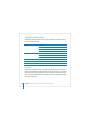
The following table shows which versions of Xsan and StorNext controllers and clients
can be used on the same SAN.
Important: If you set up a LUN that is larger than 2 terabytes (TB), be aware that older
clients (those running Xsan on Mac OS X 10.3 Panther or Xsan 1.2 or earlier on
Mac OS X 10.4 Tiger) cannot read these large LUNs. A dialog appears on these older
clients that says the LUN is unreadable. Be sure to click Ignore to dismiss this dialog.
Do not click Format, or information on the corresponding Xsan volume will be lost.
If you use LUNs greater than 2 TB, you should upgrade all SAN clients to Xsan 1.3 or
later on Mac OS X or Mac OS X Server v10.4.
12
Preface About This Book
Controller
Client
Compatible
Xsan 1.4
Xsan 1.4
Yes
Xsan 1.3 (Mac OS X v10.4)
Yes
Xsan 1.3 (Mac OS X v10.4)
Xsan 1.3 (Mac OS X v10.3)
Yes, for LUNs < 2 TB
Xsan 1.2 or earlier
No
StorNext 2.8
No
StorNext FX 1.3 or 1.4
Yes
StorNext 2.6 or 2.7
Yes
StorNext 2.5 or earlier
No
Xsan 1.4
No
Xsan 1.3 (Mac OS X v10.4)
Yes
Xsan 1.3 (Mac OS X v10.3)
Yes
StorNext FX 1.3 or 1.4
Yes
StorNext 2.6 or 2.7
Yes
StorNext 2.5 or earlier
No
StorNext 2.8
Xsan 1.4 or 1.3
Yes
StorNext 2.7
Xsan 1.4 or 1.3
Yes
StorNext 2.6 or earlier
Xsan 1.4 or 1.3
No
Preface About This Book
13
Upgrading from an Earlier Version of Xsan
For more information about migrating your SAN storage to Xsan 1.4 from an earlier
version of Xsan, including tips for upgrading with the least impact on existing storage,
see the Xsan Migration Guide at www.apple.com/server/documentation/.
For More Information
For more information about Xsan, consult these resources:
Read Me documents—important updates and special information. Look for them on the
Xsan installation disc.
Xsan website (www.apple.com/xsan/)—gateway to extensive product and technology
information.
Xsan Support website (www.apple.com/support/xsan/)—access to articles about Xsan
from Apple’s support organization.
Apple customer training (train.apple.com/)—instructor-led and self-paced courses for
honing your Xsan administration skills.
Apple discussion groups (discussions.info.apple.com/)—a way to share questions,
knowledge, and advice with other Xsan administrators.
Apple mailing list directory (www.lists.apple.com/)—subscribe to mailing lists so you can
communicate with other Xsan administrators using email.
14
Preface About This Book
Notation Conventions
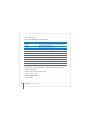
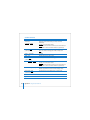
The following conventions are used in this book wherever shell commands or other
command-line items are described.
Notation
Indicates
fixed-width font
A command or other terminal text
$
A shell prompt
[text_in_brackets]
An optional parameter
(one|other)
Alternative parameters (type one or the other)
underlined
A parameter you must replace with a value
[...]
A parameter that may be repeated
<angle_brackets>
A displayed value that depends on your SAN configuration
Preface About This Book
15
1
Overview of Xsan
1
This chapter gives you an overview of Xsan and storage area
networks.
Read this chapter for an overview of Xsan and how you can use it to set up a storage
area network (SAN) to provide fast, shared storage.
What Is Xsan?
Xsan is a storage area network file system and a management application (Xsan
Admin) that you can use to provide users or applications on client computers with
shared high-speed access to expandable storage.
17
Mac OS X
San Volume
Xsan lets you
combine RAID arrays
into volumes clients
use like local disks.
Storage
pools
RAID
arrays (LUNs)
18
Chapter 1 Overview of Xsan
File data moves
over Fibre Channel
Xsan Storage Area Networks
A storage area network is a way of connecting computers to storage devices that gives
users very fast access to files and gives administrators the ability to expand storage
capacity as needed without interrupting users.
An Xsan SAN consists of:
 Volumes of shared storage, stored on Xserve RAID systems, available to clients as
mounted volumes that they can use like local disks
 At least one computer acting as a metadata controller that coordinates access to the
shared volumes
 Client computers that access storage in accordance with established permissions and
quotas
 Underlying Fibre Channel and Ethernet networks
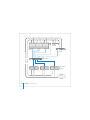
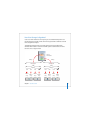
The following illustration shows the physical components of a typical Xsan SAN.
Chapter 1 Overview of Xsan
19
Metadata
controller
Ethernet - TCP/IP (Private)
Ethernet - TCP/IP (Public)
Clients
Standby
controller
Fibre
Channel switch
Xserve RAID
storage
Intranet/
Internet
20
Chapter 1 Overview of Xsan
Shared SAN Volumes
Users and applications see shared SAN storage as local volumes. Xsan volumes are
logical disks made up of groups of RAID arrays. The elements you combine to create an
Xsan volume are described under “How Xsan Storage Is Organized” on page 23.
Controllers and Clients
When you add a computer to an Xsan SAN, you specify whether it will play the role of
client, controller, or both.
Controllers
When you set up an Xsan SAN, you assign at least one computer to act as the
controller. The controller manages the SAN volume metadata, maintains a file system
journal, and controls concurrent access to files. Metadata includes such information as
where files are actually stored and what portions of available storage are allocated to
new files.
For high availability, you should add more than one controller to a SAN, as shown in
the illustration on page 20. If the primary controller fails, the standby controller takes
over. Though not recommended for best performance, controllers can also act as
clients, so you can use a standby controller as a working client while the primary
controller is operational.
Clients
The computers that users or applications use to access SAN volumes are called clients.
Clients communicate with controllers over the Ethernet network but use Fibre Channel
to send and retrieve file data to and from the RAID systems that provide storage for the
volumes.
Chapter 1 Overview of Xsan
21
SAN Connections
Xsan uses independent networks to connect storage devices, metadata controllers, and
client computers: a Fibre Channel network and one or two Ethernet networks.
User Data Over Fibre Channel
User data is transferred over high-speed Fibre Channel connections. Controllers also
use a Fibre Channel connection to move metadata to and from the volume.
Metadata Over Ethernet
To eliminate unnecessary traffic on the Fibre Channel connections, controllers and
clients use an Ethernet network to exchange file system metadata. (When a controller
reads or writes metadata on a volume, it uses Fibre Channel.) The Xsan Admin
application also uses the Ethernet connection to let you manage the SAN.
To prevent Internet or intranet traffic from interfering with metadata communications,
you should set up separate Ethernet networks as shown in the illustration on page 20.
Fibre Channel Multipathing
Xsan can take advantage of multiple Fibre Channel connections between clients and
storage. Xsan can alternate between connections for each read and write, or assign
each LUN in a volume to one of the connections when the volume is mounted.
22
Chapter 1 Overview of Xsan
How Xsan Storage Is Organized
Users use an Xsan volume the same way they use a local disk. What they don’t see is
that the SAN volume actually consists of numerous physical disks combined on several
levels using RAID techniques.
The following illustration shows an example of how disk space provided by the
individual drive modules in several Xserve RAID systems is combined into a volume
that users see as a large local disk.
Faster
Shared
SAN volume
Safer
Affinity
Affinity
Storage pool
Storage pool
(Striping)
(Striping)
LUN
LUN
LUN
LUN
LUN
LUN
LUN
LUN
RAID 0
array
RAID 0
array
RAID 0
array
RAID 0
array
RAID 5
array
RAID 5
array
RAID 5
array
RAID 5
array
Chapter 1 Overview of Xsan
23
The following paragraphs describe these storage elements and how you organize them
to create shared Xsan volumes.
LUNs
The smallest storage element you work with in Xsan is a logical storage device called a
LUN (a SCSI logical unit number). In most storage area networks a LUN represents a
group of drives such as a RAID array or a JBOD (just a bunch of disks) device. In Xsan,
LUNs are Xserve RAID arrays or slices.
You create a LUN when you use the RAID Admin application to create an Xserve RAID
array. The controller hardware and software in the Xserve RAID system combine
individual drive modules into an array based on the RAID scheme you choose. Each
array appears on the network as a separate LUN. If you slice an array, each slice appears
as a LUN.
One of your first tasks when you set up a SAN volume is to prepare LUNs. If the two
RAID 5 arrays on a new Xserve RAID are not right for your application, you can use
RAID Admin to create arrays based on other RAID schemes. For help choosing schemes
for your LUNs, see “Choosing RAID Schemes for LUNs” on page 44.
The illustration on page 23 shows four Xserve RAID systems that each host two arrays.
Half of the arrays use a RAID 0 scheme (striping only) for speed while the others use
RAID 5 (distributed parity) to ensure against data loss. Xsan sees the arrays as LUNs that
can be combined to create a volume.
After your Xserve RAID LUNs are set up, you label and initialize them for use with the
Xsan file system using Xsan Admin.
24
Chapter 1 Overview of Xsan
Storage Pools
LUNs are combined to form storage pools. A storage pool in a small volume might
consist of a single RAID array, but storage pools in many volumes consist of multiple
arrays.
Xsan distributes file data in parallel across the LUNs in a storage pool using a RAID 0
(striping) scheme. So, you can improve a client’s access speed by distributing available
storage over several LUNs in a storage pool.
You can set up storage pools that have different performance or recoverability
characteristics and assign folders to them using affinities. Users can then select where
to store files based on their need for speed or safety. See “Folders with Affinities” on
page 28.
The illustration on page 23 shows eight LUNs combined into two storage pools, one
pool consisting of RAID 0 (fast, but not recoverable) arrays and the other made up of
RAID 5 (not as fast, but recoverable) arrays. Xsan stripes data across the four LUNs in
each storage pool.
You use Xsan Admin to add available LUNs to specific storage pools.
Chapter 1 Overview of Xsan
25
Volumes
Storage pools are combined to create the volumes that users see. From the user’s
perspective, the SAN volume looks and behaves just like a large local disk, except that:
 The size of the volume can grow as you add underlying arrays or storage pools
 Other users on the SAN can access files on the volume at the same time
In the illustration on page 23, two storage pools are combined to create a single shared
volume.
You create volumes and mount them on client computers using the Xsan Admin
application.
26
Chapter 1 Overview of Xsan
The following screen image shows how LUNs, storage pools, and volumes appear as
you organize them in Xsan Admin. This example shows a SAN named “Editing SAN”
with a single shared volume named “SanVol.” Storage for the volume is provided by
two storage pools, “Meta” and “Data,” the first based on a single LUN and the second on
two. Each of the LUNs is a 3-disk RAID 5 array on an Xserve RAID using 115 GB drive
modules.
SAN
Volume
LUN
Storage pool
Chapter 1 Overview of Xsan
27
Folders with Affinities
To control which storage pool is used to store specific files (for example, to provide
different levels of service for different users or applications), you can associate a folder
on an Xsan volume with one of the storage pools that make up the volume.
If, for example, you set up storage pools with different balances of performance and
data redundancy, users can choose between faster and safer storage by putting files in
the appropriate folder.
In the illustration on page 23, a predefined folder has an affinity for the faster storage
pool that is based on RAID 0 arrays. Any file that a user copies into this folder is
automatically stored on the faster arrays. A second folder is associated with the more
secure RAID 5 storage.
How Xsan Utilizes Available Storage
Xsan stores both user files and file system data on SAN volumes, and stripes data
across the LUNs in a volume for better performance.
Metadata and Journal Data
Xsan records information about the files in an Xsan volume using metadata files and
file system journals. File system metadata includes information such as which specific
parts of which disks are used to store a particular file and whether the file is being
accessed. The journal data includes a record of file system transactions that can help
ensure the integrity of files in the event of a failure.
28
Chapter 1 Overview of Xsan
These files are managed by the Xsan metadata controller, but are stored on SAN
volumes, not on the controller itself. By default, metadata and journal data are stored
on the first storage pool you add to a volume. You can use Xsan Admin to choose
where these files are stored when you add storage pools to a new volume.
Striping at a Higher Level
When you write a file to a RAID array using RAID 0 (striping), the file is broken into
segments that are spread across the individual disk drives in the array. This improves
performance by writing pieces of the file in parallel (instead of one piece at a time) to
the individual disks in the array. Xsan applies this same technique at a second, higher
level in the storage hierarchy. Within each storage pool in a volume, Xsan stripes file
data across the individual LUNs that make up the storage pool. Once again,
performance is improved because data is written in parallel.
You can tune SAN performance by adjusting the amount of data written to each LUN in
a storage pool (the “stripe breadth”) to suit a critical application.
Chapter 1 Overview of Xsan
29
Security
As the SAN administrator, you can control access to shared volumes in several ways.
First, users cannot browse or mount SAN volumes. Only a SAN administrator can
specify which volumes are mounted on which client computers. One way you can
control access to data is to mount a volume only on appropriate client computers.
To prevent users from modifying data on a volume, you can mount the volume with
read-only access.
You can control user access to folders on a volume by setting up access control lists
(ACLs) in Workgroup Manager or by specifying owner, group, and general access
permissions in the Finder.
You can also set up zones in the underlying Fibre Channel network to segregate users
and volumes.
Expanding Storage
There are two ways you can add free space to an Xsan volume:
 Add Xserve RAID systems (new LUNs) to existing storage pools
 Add entire new storage pools to volumes
Both methods require you to unmount and remount the volume on clients.
You can also add new volumes to a SAN at any time.
For information about expanding Xsan storage, see “Adding Storage” on page 78.
30
Chapter 1 Overview of Xsan
Xsan Capacities
The following table lists limits and capacities for Xsan volumes.
Parameter
Maximum
Number of computers on a SAN (controllers and clients)
64
Number of storage pools in a volume
512
Number of LUNs in a storage pool
32
Number of LUNs in a volume
512
Number of files in a volume
4,294,967,296
LUN size
Limited only by the size of the
RAID array
Volume size
Limited only by the number
and size of LUNs
File size
Approximately 263 bytes
Volume name length
70 characters
File or folder name length
251 characters
SAN name length
255 characters
Storage pool name length
255 characters
LUN name (label or disk name)
242 characters
Chapter 1 Overview of Xsan
31
2
Setting Up a Storage Area Network
2
This chapter lists requirements, suggests planning tips, and
gives instructions for setting up an Xsan SAN.
This chapter contains:
 Xsan hardware and software requirements (page 33)
 Planning guidelines (page 39)
 SAN setup instructions (page 53)
Hardware and Software Requirements
Your SAN environment needs to satisfy requirements in these areas:
 Supported computers
 Supported storage devices
 Fibre Channel fabric, adapters, and switches
 Ethernet network
 Directory services (optional)
 Outgoing mail service (optional)
33
Supported Computers
You can use Xsan 1.4 on computers that meet these minimum requirements:
Systems
 Macintosh computers with an Intel or PowerPC G5 processor
Memory
 Clients should have a minimum of 256 MB of RAM.
 Controllers should have a minimum of 512 MB of RAM. For optimum performance,
add an additional 512 MB of RAM for each SAN volume hosted by the controller.
Supported Operating Systems
You can install Xsan 1.4 only on computers running
 Mac OS X or Mac OS X Server v10.4.7 or later
To join an Xsan 1.4 SAN, Windows, AIX, IRIX, Linux, and Solaris clients must be running
ADIC’s StorNext File System version 2.6 or 2.7. For complete compatibility information,
see “Version Compatibility” on page 12.
Supported Storage Devices
Although you can use any standard LUN storage device, this guide assumes you are
using Xserve RAID systems for your storage devices.
Important: Be sure to install the latest firmware update on your Xserve RAID systems
before you use them with Xsan.
For the best performance, use Xserve RAID systems that have:
 A full set of 14 Apple Drive Modules
 512 MB of cache in each controller (1 GB total)
34
Chapter 2 Setting Up a Storage Area Network
Fibre Channel Fabric
Unlike file system metadata, which controllers and clients exchange over Ethernet,
actual file content in an Xsan SAN is transferred over Fibre Channel connections (as is
metadata that controllers access on a volume). To set up the connections, you need:
 Apple Fibre Channel PCI, PCI-X, or PCI-E cards for each client and controller computer
 One or more supported Fibre Channel switches
 Fibre Channel cables connecting computers and storage devices to the switches to
form a Fibre Channel fabric
Fibre Channel PCI Cards
Install Apple Fibre Channel PCI, PCI-X, or PCI-E cards in all Macintosh computers that
will connect to the SAN.
Fibre Channel Switches
The following Fibre Channel switches have been tested with Xsan, Xserve RAID
systems, and the Apple Fibre Channel PCI, PCI-X, and PCI-E cards:
 Brocade Silkworm 3200, 3800, 3900, and 12000 series
 QLogic SANbox 2–8, SANbox 2–16, SANbox 2–64, SANbox 1400, and SANbox 5200
 Emulex SAN Switch 355, 375, and 9200
 Cisco MDS 9000 family
For the latest additions to this list of qualified switches, see the Xsan webpages at
www.apple.com/xsan/.
Chapter 2 Setting Up a Storage Area Network
35
Fabric Configuration
You must connect the computers, storage devices, and switches in your Fibre Channel
network to form a Fibre Channel “fabric.” In a fabric, Fibre Channel cables connect node
ports (F or N_Port). See the documentation that came with your Fibre Channel
switches for more information.
Note: If you are using a Vixel 355 switch, you must connect Xserve RAID systems to an
FL (arbitrated loop) port on the switch.
You cannot use Fibre Channel Arbitrated Loop (FL ports) with an Xsan SAN, with the
exception noted above for Vixel 355 switches.
Ethernet TCP/IP Network
Computers on the SAN must also be connected to an Ethernet network. Xsan uses this
network instead of the Fibre Channel network to transfer file system metadata,
reserving the Fibre Channel connections for actual file contents.
If the computers on your SAN need to communicate with directory servers, a corporate
or campus intranet, or the Internet, you should connect each SAN client and controller
to two separate Ethernet networks: one private subnet for the SAN and a separate
connection for directory, intranet, or Internet traffic. This is important if you plan to use
the SAN for high-performance applications such as video editing.
36
Chapter 2 Setting Up a Storage Area Network
IP Addresses and Domain Names
Assign fixed, non-routed IP addresses to all clients, controllers, and storage devices
connected to the SAN Ethernet network. Don’t use DHCP to assign addresses to SAN
devices. You can use the following ranges of IP addresses on your private (non-routed)
subnet:
Private address range
Associated subnet mask
10.0.0.0 – 10.255.255.255
255.0.0.0
Comments
10/8
172.16.0.0 – 172.31.255.255
255.240.0.0
172.16/12
192.168.0.0 – 192.168.255.255
255.255.0.0
192.168/16
Directory Services
If you plan to use user and group privileges to control access to files and folders on the
SAN, you can simplify management by setting up or joining a user and group directory.
Although not required, a central directory lets you manage users and groups on one
computer instead of having to visit all SAN clients and controllers.
If you already have a directory service, you can use the Directory Access application on
each controller and client to access the directory for user and group information.
If you don’t use a central directory service, you need to set up users and groups on
each SAN computer.
Important: If you create users and groups on each SAN computer, be sure that 1) each
user or group has a numeric user ID (UID) or group ID (GID) that is unique throughout
the SAN and 2) each user or group defined on more than one computer has the same
UID or GID on each computer.
Chapter 2 Setting Up a Storage Area Network
37
If you don’t have access to a directory service, you can use the directory services in
Mac OS X Server to set up an LDAP directory of SAN users and groups.
Note: If you do create your user accounts in a centralized directory, be aware that
some applications running on SAN client computers, such as Final Cut Pro, for example,
work better when users have local home folders. For help setting up local home folders
for users with network accounts, see “Creating Local Home Folders for Network
Accounts” on page 120.
Outgoing Mail Service
Xsan can send SAN status notifications via email on your local subnet or corporate
network without using a separate mail server. However, to send notifications outside
your local network, you need an SMTP server to act as a mail gateway. If you don’t have
access to an outgoing mail server, you can use the mail service in Mac OS X Server to
set one up.
38
Chapter 2 Setting Up a Storage Area Network
Planning Your SAN
It’s easy to add storage to an existing Xsan SAN, but reorganizing a SAN after you set it
up is not so simple. So, it’s important to plan the layout and organization of your SAN
and its storage before you set it up.
An Xsan SAN is composed of:
 Storage devices (usually Xserve RAID systems)
 LUNs (logical unit numbers, usually RAID arrays)
 Storage pools (groups of LUNs)
 Volumes (groups of storage pools visible to users)
 Clients (computers that use volumes)
 Controllers (computers that manage volume metadata)
 Underlying Fibre Channel and Ethernet networks
Before you use Xsan Admin to set up a SAN, decide how you want to organize these
components. Take the time to create a drawing or a table that organizes available
hardware into RAID arrays, storage pools, volumes, client computers, and controllers in
a way that meets both your users’ needs and your needs as the SAN administrator.
Then, consider the following questions.
Chapter 2 Setting Up a Storage Area Network
39
Preliminary Planning Questions
 How much storage do you need?
 How do you want to present available storage to users?
 What storage organization makes the most sense for user workflow?
 What levels of performance do your users require?
 How important is constant availability?
 What are your requirements for security?
Your answers to the above questions will help you decide the following:
 What RAID schemes should you use for your RAID arrays?
 How many SAN volumes do you need?
 How should individual volumes be organized?
 Which LUNs go in each storage pool?
 Which storage pools make up each volume?
 Which clients, users, and groups should have access to each volume?
 Which computers will act as controllers?
 Do you need standby controllers?
 Do you want to use controllers as clients also?
 Where do you want to store file system metadata and journal data?
 What allocation strategy should you use?
Review the considerations and guidelines on the following pages for help translating
your answers into a suitable SAN design.
40
Chapter 2 Setting Up a Storage Area Network
Planning Considerations and Guidelines
The following paragraphs might help you make some of your SAN design decisions.
How Much Storage?
Because it’s easy to add storage to an Xsan SAN, you only need to decide on an
adequate starting point. You can then add storage for user data as needed.
You can’t expand a storage pool that is used to store volume metadata and journal
data. For information about estimating your metadata and journal data storage
requirements, see “Estimating Metadata and Journal Data Storage Needs” on page 50.
Note that the number of Xserve RAID systems you use affects not only available space
but also SAN performance. See “Performance Considerations,” below.
How Should Users See Available Storage?
If you want the users working on a particular project to see a volume dedicated to their
work, create a separate volume for each project. If it’s acceptable for a user to see a
folder for his or her work on a volume with other peoples’ folders, you can create a
single volume and organize it into project folders.
Workflow Considerations
How much file sharing is required by your users’ workflow? If, for example, different
users or groups work on the same files, either simultaneously or in sequence, it makes
sense to store those files on a single volume to avoid having to maintain or hand off
copies. Xsan uses file locking to manage shared access to a single copy of the files.
Chapter 2 Setting Up a Storage Area Network
41
Performance Considerations
If your SAN supports an application (such as high resolution video capture and
playback) that requires the fastest possible sustained data transfers, design your SAN
with these performance considerations in mind:
 Set up the LUNs (RAID arrays) using a RAID scheme that offers high performance. See
“Choosing RAID Schemes for LUNs” on page 44.
 Group your fastest LUNs in storage pools reserved for the application. Reserve slower
devices for a volume dedicated to less demanding or supporting applications.
 To increase parallelism, spread LUNs across different Xserve RAID controllers. For
example, instead of creating a single 4-disk LUN on one side of an Xserve RAID, create
two 2-disk LUNs, one on each side, and add these LUNs to a storage pool. Xsan then
stripes data across the two LUNs and benefits from simultaneous transfers through
two controllers.
 To increase parallelism in a relatively small storage pool (the size of one or a few drive
modules), create a slice of similar size across all the drives on a controller instead of
creating the storage pool from just one or two drive modules.
 Spread file transfers across as many drives and RAID controllers as possible.
Try creating slices across the drives in RAID systems, and then combine these slices
into a storage pool.
 To increase throughput, connect both ports on client Fibre Channel cards to the
fabric and set the multipathing method for the storage pool to Rotate.
 Store file system metadata and journal data on a separate storage pool from user
data, and make sure the metadata LUNs are not on the same RAID controller as any
user data LUNs.
42
Chapter 2 Setting Up a Storage Area Network
 Use a router to isolate the Ethernet network used by the SAN from a company
intranet or the Internet, or better, use a second Ethernet network (including a second
Ethernet card in each SAN computer) for the SAN.
 If your SAN uses directory services, mail services, or other services on a separate
server, use a second, separate Ethernet network to connect SAN computers to that
server.
 As a rule of thumb, consider that a single Xserve RAID controller, after file system
overhead, can transfer roughly 80 MB of user data per second (160 MB per Xserve
RAID system). If your SAN must support an application running on multiple clients
that requires specific throughput on each client, you can use this number to estimate
the number of Xserve RAID systems necessary to support the aggregate transfer rate.
Availability Considerations
If high availability is important for your data, set up at least one standby controller in
addition to your primary controller. Also, consider setting up dual Fibre Channel
connections between each client, controller, and storage device using redundant Fibre
Channel switches.
Important: Losing a metadata controller without a standby can result in the loss of all
data on a volume. A standby controller is recommended.
Also, if you have a standby controller, you can upgrade the Xsan software without
interrupting the SAN. For more information, see “Upgrading Controller Software” on
page 129.
Chapter 2 Setting Up a Storage Area Network
43
Security Considerations
If your SAN will support projects that need to be completely secure and isolated from
each other, you can create separate volumes for each project to eliminate any
possibility of the wrong client or user accessing files stored on a volume.
As the SAN administrator, you control which client computers can use a volume. Clients
can’t browse for or mount SAN volumes on their own. You use Xsan Admin to specify
which clients a volume is mounted on.
You can also set up access control lists (ACLs) in Workgroup Manager or assign user
and group permissions to folders using standard file access permissions in the Finder.
Choosing RAID Schemes for LUNs
Much of the reliability and recoverability of data on a SAN is not provided by Xsan itself
but by the RAID arrays you combine to create your storage pools and volumes. Before
you set up a SAN, you use the RAID Admin application to prepare LUNs based on
specific RAID schemes.
Important: If a LUN belonging to an Xsan volume fails and can’t be recovered, all data
on the volume is lost. It is strongly recommended that you use only redundant LUNs
(LUNs based on RAID schemes other than RAID 0) to create your Xsan volumes.
LUNs configured as RAID 0 arrays (striping only) or LUNs based on single drives are
difficult or impossible to recover if they fail. Unprotected LUNs such as these should
only be used for volumes that contain scratch files or other data that you can afford
to lose.
Xserve RAID systems ship already configured as recoverable RAID 5 arrays.
44
Chapter 2 Setting Up a Storage Area Network
Xserve RAID supports all popular RAID levels. Each RAID scheme offers a different
balance of performance, data protection, and storage efficiency, as summarized in the
following table.
RAID level
Storage
efficiency
Read
performance
Write
performance
Data
redundancy
RAID 0
Highest
Very High
Highest
No
RAID 1
Low
High
Medium
Yes
RAID 3
High to very high
Medium
Medium
Yes
RAID 5
High to very high
High
High
Yes
RAID 0+1
Low
High
High
Yes
RAID 10, 30, and 50 schemes assume the use of AppleRAID software striping and aren’t
appropriate for use with Xsan, which performs its own striping. For more help choosing
RAID schemes for your arrays, see the Xserve RAID User’s Guide or the Xserve RAID
Technology Overview (at www.apple.com/server/documentation/).
Deciding on the Number of Volumes
A volume is the largest unit of shared storage on the SAN. If your users need shared
access to files, you should store those files on the same volume. This makes it
unnecessary for them to pass copies of the files among themselves.
On the other hand, if security is critical, one way to control client access is to create
separate volumes and mount only the authorized volume on each client.
Chapter 2 Setting Up a Storage Area Network
45
For a more typical balance of security and shared access, a flexible compromise is to
create a single volume and use folder access privileges or access control lists in
Mac OS X Server’s Workgroup Manager to control access.
Deciding How to Organize a Volume
You can help users organize data on a volume or restrict users to specific areas of the
volume by creating predefined folders. You can control access to these folders by
assigning access permissions using Xsan Admin.
You can assign folders to specific storage pools using affinities. You can, for example,
create a folder for data that requires fast access and assign that folder to your fastest
storage pool.
Assigning LUNs to Storage Pools
You should set up a storage pool using LUNs that have similar capacity and
performance characteristics.
To provide high performance, Xsan uses the RAID 0 scheme to stripe data across the
LUNs in a storage pool. This requires that the LUNs in the pool be the same size. If you
set up a storage pool using LUNs of different sizes, Xsan uses available space on each
LUN equal to the capacity of the smallest LUN. If the LUNs vary in size, this can result in
wasted capacity. For example, if you assign 240 GB and 360 GB RAID arrays to a storage
pool, 120 GB of the larger array will not be used. By combining LUNs with similar
capacities, you avoid wasting available storage.
If you want to set up a storage pool for use by a high performance application, assign
similarly high speed LUNs. Assign slower LUNs to a storage pool where you keep data
that doesn’t have critical performance requirements.
46
Chapter 2 Setting Up a Storage Area Network
Creating storage pools from LUNs that are hosted on different drive modules and
different RAID controllers increases performance by increasing the parallelism of data
transfers. For example, a storage pool consisting of two LUNs, each a single drive
module on the left side of an Xserve RAID, will not be as fast as a similarly sized storage
pool made up of two LUNs that are single slices across all seven drives, one slice on
each controller. In the first case, all transfers go through a single RAID controller to just
two drives; in the second case the same transfer is spread across two RAID controllers
and fourteen drives.
Assigning Storage Pools to Volumes
After you decide how to combine available LUNs into storage pools, assign the storage
pools to the volumes you want to create.
For best performance, create a separate storage pool just for file system metadata and
journal data.
Deciding Which Clients to Mount a Volume On
If you create multiple volumes, decide which volumes should be mounted on which
clients.
Choosing Controllers
You must choose at least one computer to be the SAN controller, the computer that is
responsible for managing file system metadata.
Note: File system metadata and journal data are stored on the SAN volume, not on the
controller itself. For more information, see “Choosing Where to Store Metadata and
Journal Data” on page 49.
Chapter 2 Setting Up a Storage Area Network
47
If you have a small number of clients or if performance is not critical you can use a
single computer as both controller and client. You can even set up a SAN consisting of
a single storage device and a single computer that acts as both controller and client (to
provide network attached storage, for example).
If high availability is important, you should use at least two controllers, one as the
primary controller and one as a standby. You can specify additional controllers as
needed, and set their failover priorities to determine the order in which they are tried if
the primary controller stops responding.
If performance is critical, don’t run other server services on the metadata controller and
don’t use the controller itself to reshare a SAN volume using AFP or NFS.
Choosing Standby Controllers
To be sure that SAN volumes are always available, set up at least one standby controller
that can take over if your primary metadata controller fails. A standby controller also
makes it possible for you to upgrade software on the controllers without interrupting
user access to SAN volumes.
48
Chapter 2 Setting Up a Storage Area Network
Combining Clients and Controllers
The same computer can function as both a metadata controller and a client. It’s
possible, for example, to set up a SAN consisting of a single Xserve RAID and one
computer that acts as both controller and client. Any computer you specify as a
controller can also act as a client.
If, for example, you don’t have a computer to dedicate as a standby controller, you can
assign a computer that is normally used as a client to take over controller duties if the
primary controller fails.
To keep clients and controllers separate, you can set up client-only computers for your
users.
Choosing Where to Store Metadata and Journal Data
The metadata and journal data that describe a volume are not stored on the volume’s
metadata controller but on the volume itself. By default, they are stored on the first
storage pool in the volume. If the volume consists of more than one storage pool,
you can choose which storage pool is used to store metadata and journal data.
In most cases, storing metadata and journal data on the same storage pool as user
data results in adequate performance. However, for the best possible performance,
store metadata and journal data on a separate storage pool within the volume and
make sure that the LUNs used are connected to a different RAID controller than the
LUNs that make up user data storage pools.
Chapter 2 Setting Up a Storage Area Network
49
Estimating Metadata and Journal Data Storage Needs
To estimate the amount of space required for Xsan volume metadata, assume that
10 million files on a volume require approximately 10 gigabytes of metadata on the
volume’s metadata storage pool.
Choosing an Allocation Strategy
The allocation strategy you choose for a volume determines the order in which its
storage pools are filled with data. You can choose round robin, fill, or balance.
If you choose round robin, Xsan writes new data in turn to each storage pool in
the volume.
If you choose fill, Xsan writes all new data to the first storage pool in the volume until
that storage pool is full, and then moves to the next storage pool. This is a good choice
if you want to keep a particular storage pool unused as long as possible.
If you choose balance, Xsan writes new data to the storage pool with the most
free space.
Connecting Computers and Storage Devices
Before you set up your Xsan SAN, connect client computers, controller computers, and
storage devices to the SAN’s Fibre Channel and Ethernet networks. Make sure your
networks meet the requirements summarized under “Fibre Channel Fabric” on page 35
and “Ethernet TCP/IP Network” on page 36.
50
Chapter 2 Setting Up a Storage Area Network
Preparing LUNs
Xserve RAID systems usually come preconfigured with two RAID 5 arrays, one on
each side (on each controller). So, out of the box, each Xserve RAID provides two LUNs.
If this suits your needs, no other preparation is needed.
If you want to set up some other combination of RAID arrays or slices, you need to do
so using the RAID Admin application before you can add the resulting LUNs to your
SAN’s storage pools. For help using RAID Admin, see Using RAID Admin 1.2 and Disk
Utility (available at www.apple.com/server/documentation/). For information about
choosing a RAID scheme, see “Choosing RAID Schemes for LUNs” on page 44.
Note: You don’t need to use Disk Utility to format arrays or slices for use with Xsan.
The LUNs are labeled and initialized when you add them to a storage pool using Xsan
Admin. After they are labeled, the LUNs can’t be modified using Disk Utility.
Be sure to create arrays of similar size if you plan to combine them into the same
storage pool. For more information, see “Assigning LUNs to Storage Pools” on page 46.
Using the Xsan Admin Application
You use the Xsan Admin application to set up and manage SANs. You can use Xsan
Admin to manage a SAN from any computer that has access to the SAN’s TCP/IP
subnet.
Xsan Admin is installed in /Applications/Server/.
Chapter 2 Setting Up a Storage Area Network
51
Installing Just the Xsan Admin Application
Xsan Admin is included when you install the Xsan software on SAN controller and
client computers. You can also install just Xsan Admin on any other computer you want
to use to manage the SAN. For help, see page 55.
Connecting Through a Firewall
If there is a firewall between the SAN and the computer you’re using to run Xsan
Admin, you need to open port 311 in the firewall so Xsan Admin can communicate with
the SAN computers.
Xsan Admin Preferences
Open Xsan Admin and choose Xsan Admin > Preferences to adjust these settings:
 The use of SSL or digital signatures to secure communications
 Listing computers by IP address instead of using DNS to display names
 Smoothing of SAN utilization graphs
 Connection alerts
 SAN status refresh interval
 The amount of log information displayed
Getting Help
Xsan Admin includes onscreen help. Choose Help > Xsan Admin Help, or click the help
button in any dialog or pane where it appears.
52
Chapter 2 Setting Up a Storage Area Network
Using the Command Line
If necessary, you can perform many Xsan setup and management tasks from a shell
command prompt. For more information, see Appendix B.
SAN and Volume Setup Summary
You’ll perform the following tasks to set up your first Xsan storage area network. Details
for each task are on the indicated pages.
1 Set up the Fibre Channel network (page 54)
2 Set up the Ethernet network (page 54)
3 Set up SAN users and groups (page 54)
4 Set up LUNs (page 55)
5 Install Xsan software on SAN computers (page 55)
6 Log in to the SAN (page 57)
7 Choose a controller and add clients (page 58)
8 Label and initialize available LUNs (page 61)
9 Create volumes (page 63)
10 Add storage pools to volumes (page 65)
11 Add LUNs to storage pools (page 67)
12 (Optional) Set up status notifications (page 68)
13 (Optional) Assign folders to storage pools (page 69)
14 (Optional) Set user and group quotas (page 71)
15 Start the volumes and mount them on clients (page 73)
Chapter 2 Setting Up a Storage Area Network
53
Setting Up an Xsan Volume on a Storage Area Network
Step 1: Set Up the Fibre Channel Network
m Connect controller computers, client computers, and Xserve RAID storage systems to a
Fibre Channel network. Be sure to configure the switch and make the connections so
that you create a Fibre Channel fabric.
For more information, see the guidelines and requirements under “Fibre Channel
Fabric” on page 35.
Step 2: Set Up the Ethernet Network
m Connect controller computers, client computers, and Xserve RAID systems to a private
TCP/IP subnet, or to the same subnet of an intranet.
Follow the guidelines summarized under “Ethernet TCP/IP Network” on page 36.
Step 3: Set Up SAN Users and Groups
m If you already have a centralized directory of users and groups, use the Directory
Access application on each SAN computer to choose that directory for authentication.
If you don’t have a central directory, you can set one up using Workgroup Manager and
the Open Directory service in Mac OS X Server. Otherwise, you need to recreate the
same set of users and groups on each SAN computer.
Important: If you create users and groups individually on each SAN computer, be
sure that each user or group name is assigned the same numeric user ID (UID) or group
ID (GID) on all SAN computers. One way to do this is to create an identical list of users
and groups in the same order on each computer following a fresh install of the
operating system.
54
Chapter 2 Setting Up a Storage Area Network
Step 4: Set Up LUNs
m New Xserve RAID systems are usually preconfigured as two RAID 5 arrays that are ready
to use as LUNs.To set up some other configuration of LUNs, use the RAID Admin
application to create RAID arrays or slices on your Xserve RAID systems. For help
choosing other RAID schemes, see “Choosing RAID Schemes for LUNs” on page 44.
Important: If you set up a LUN that is larger than 2 terabytes (TB), be aware that older
clients (those running Xsan on Mac OS X 10.3 Panther or Xsan 1.2 or earlier on
Mac OS X 10.4 Tiger) cannot read these large LUNs. A dialog appears on these older
clients that says the LUN is unreadable. Be sure to click Ignore to dismiss this dialog.
Do not click Format, or information on the corresponding Xsan volume will be lost. If
you use LUNs greater than 2 TB, you should upgrade all SAN clients to Xsan 1.3 or later
on Mac OS X or Mac OS X Server v10.4.
Step 5: Install Xsan Software on Clients and Controllers
Take the Xsan installation disc to each controller and client computer connected to the
SAN and install the Xsan software.
To install the Xsan file system and Xsan Admin application:
m Insert the disc and double-click the Xsan installer icon.
To install just the Xsan file system without Xsan Admin:
m Click Customize on the final installer window and deselect Xsan Admin.
To install just the Xsan Admin application:
m On the Xsan installation disc, open the Admin Tools folder, and double-click
XsanAdmin.pkg.
Chapter 2 Setting Up a Storage Area Network
55
To install Xsan on a computer that has no keyboard or monitor:
1 Log in to a computer that does have a keyboard and monitor, and then insert the
Xsan disc.
2 Open the Terminal application (in /Applications/Utilities/).
3 In Terminal, copy the Xsan installer package to the remote computer:
$ scp -r /Volumes/Xsan/Install_xsan.mpkg user@remotehost:/tmp/
where user is an administrator user on the remote computer and remotehost is the IP
address or DNS name of the computer you want to install on.
4 Log in to the remote computer:
$ ssh user@remotehost
where user and remotehost are the same as in the previous step.
5 Run the installer on the headless computer:
$ sudo installer -pkg /tmp/Install_Xsan.mpkg -target /
Or, if you want to watch the progress of installation, add the -verbose parameter:
$ sudo installer -verbose -pkg /tmp/Install_Xsan.mpkg -target /
56
Chapter 2 Setting Up a Storage Area Network
Step 6: Open Xsan Admin and Log In to the SAN
1 Open Xsan Admin on any computer connected to the SAN.
Xsan Admin is in /Applications/Server/.
You can open Xsan Admin on any computer attached to the SAN, or on any remote
computer that can reach the SAN’s TCP/IP subnet.
2 When the login dialog appears, use an administrator account to log in to a SAN
computer that will be used as a controller.
3 Click Setup.
Chapter 2 Setting Up a Storage Area Network
57
4 In the Computers pane, type a name for the SAN and click Save.
The SAN name you type appears in the SAN Components list instead of the controller
name or address. To list the controller instead, deselect “Use SAN name in list” in Xsan
Admin Preferences.
Step 7: Set Up Controllers and Clients
All computers on the local network that have Xsan installed are listed in the Computers
pane. In this step you choose at least one computer to act as metadata controller and
set up the others as clients.
58
Chapter 2 Setting Up a Storage Area Network
1 In the Computers pane, select a computer in the list.
If the computer you’re looking for is not listed, make sure the Xsan software is installed
on it, that it is connected to the SAN’s Ethernet subnet, and that it is turned on and not
set to sleep.
2 If the Authenticate button appears, click it and type an administrator user name and
password for the computer you are adding to the SAN.
3 Click Edit.
4 Choose whether the computer will function as a controller or a client.
You must choose at least one computer to act as controller for the SAN. Choose from
the Role pop-up menu:
Client: The computer functions as a client only.
Controller: The computer acts as a controller and is also available for use as a client.
There is no controller-only choice. All controllers are also ready to function as clients.
To prevent a controller from being used as a client, restrict user logins on or physical
access to the computer.
5 If the computer is a controller, choose its failover priority.
Choose High for the primary controller or the only controller in the SAN. Choose
Medium or Low for standby controllers.
6 If this computer is a controller, choose the network interface it will use for metadata
communications with other clients and controllers from the “Access the SAN via” popup menu.
7 Type an Xsan software serial number.
Chapter 2 Setting Up a Storage Area Network
59
You can find the serial number for a single copy of Xsan on the Xsan installation
disc sleeve. If you’re using individual licenses for each copy of Xsan, make sure each
serial number in the SAN is unique, and leave the “Registered to” and Organization
fields blank.
If you purchased a site-licensed serial number, you can find it on the documentation
you received when you purchased the license.
8 If you’re using a site-licensed serial number, type the registered license holder and
organization in the “Registered to” and Organization fields. Be sure to type these
exactly as they were provided when you purchased the license.
9 Click OK, and then repeat these steps for other computers in the list.
10 When you’re through, click Save.
60
Chapter 2 Setting Up a Storage Area Network
Step 8: Label and Initialize LUNs
Next, label and initialize the available LUNs for use with the Xsan file system. Each LUN
represents one of the RAID arrays or slices you set up using RAID Admin.
1 In Xsan Admin, click LUNs in the Setup pane.
Responding storage devices are listed by name and size. You should see one LUN for
each RAID array or slice you created on Xserve RAID systems attached to the SAN’s
Fibre Channel network.
If some newly created LUNs are not listed, click Refresh or wait a moment for them to
appear. If they still don’t appear, quit Xsan Admin, restart the computer, and try again.
Chapter 2 Setting Up a Storage Area Network
61
If existing LUNs are not listed, particularly if they are LUNs you have used before as part
of an old Xsan volume, try removing the old label from the LUN. For instructions, see
“Some LUNs Aren’t Listed in Xsan Admin” on page 146.
2 Select a LUN and click Edit. (You can also just double-click the LUN in the list.)
3 Type a label for the LUN.
4 If the LUN is larger than 2 terabytes (TB) and will be part of a volume mounted only on
clients running Xsan 1.3 or 1.4 on Mac OS X v10.4 Tiger, you can select the option “Allow
LUN to exceed 2 TB capacity.”
5 Click OK
6 Repeat for each unlabeled LUN.
7 Click Save to initialize the LUNs.
Now you can organize the LUNs into storage pools and volumes.
62
Chapter 2 Setting Up a Storage Area Network
Step 9: Create Volumes
Next, you’ll create the volumes your users will see.
New Volume
button
1 In Xsan Admin, click Storage in the Setup pane.
2 Click the New Volume button (next to the empty list).
3 Type a name for the volume.
Use only uppercase letters (A–Z), lowercase letters (a–z), numbers (0–9), and
underscores ( _ ). Don’t include spaces or hyphens. The maximum length is 70
characters.
Chapter 2 Setting Up a Storage Area Network
63
4 Don’t adjust the block allocation size unless you have specific performance tuning
needs.
For more information, see “Choosing Block Allocation Size for a Volume” on page 98.
5 Choose an allocation strategy. This determines the order in which data is written to the
storage pools that make up the volume. You can choose:
 Round Robin: New data is written to the next available storage pool in the volume.
 Fill: Data is stored on the first storage pool until it is full, and then on the next
storage pool.
 Balance: New data is written to the storage pool that has the most free space.
6 If you have Windows clients, choose an ID mapping method.
Note: To use ID mapping, Windows clients must be running StorNext 2.7. Xsan
controllers and clients must be running Xsan 1.3 or later.
 Generate IDs from GUID: Windows clients dynamically generate UIDs and GIDs
based on GUID information in an Active Directory domain.
 Use IDs from LDAP (RFC 2307): Windows clients get UID and GID values from the
uidNumber and gidNumber attributes in Active Directory records.
For more information, see “Mapping Windows User and Group IDs” on page 112.
7 Click OK.
Repeat these steps if you want to create additional volumes.
Now you’re ready to add storage pools to each volume.
64
Chapter 2 Setting Up a Storage Area Network
Step 10: Add Storage Pools to the Volumes
New Storage
Pool button
1 Select a volume in the list and click the New Storage Pool button (next to the list).
2 In the storage pool dialog, provide the following information.
 Storage Pool Name: Type a name for the storage pool. If the OK button is disabled
after you type a name, the name is reserved. For a list of reserved names, see “You’re
Unable to Add a Storage Pool” on page 151.
Chapter 2 Setting Up a Storage Area Network
65
 Use for: Choose the type of data to store in the storage pool. Journal data is used by
the controller to ensure the integrity of files in the volume. Metadata is file system
information used by the controller. Journal data and metadata are always stored at
least on the first storage pool in a volume. If this is not the first storage pool in the
volume, you can choose “User data only.” To allow only files saved in a folder that has
an affinity for this storage pool, enable “Only data with affinity.”
 Stripe Breadth: Unless you have calculated a different value for performance tuning,
leave this set to the default (256 blocks). Otherwise, change this number to the
amount of data written, in turn, to each LUN in the storage pool. For optimum
performance with Xserve RAID systems, the stripe breadth multiplied by the block
allocation size (which you set for the volume) should equal 1 MB (1,048,576 bytes).
For more information, see “Choosing Stripe Breadth for a Storage Pool” on page 93.
 Multipath Method: If you have two Fibre Channel connections between each client
computer and Xserve RAID system, choose how Xsan uses the connections. Choose
Rotate to have Xsan alternate between the connections for maximum throughput.
Choose Static to have Xsan assign each LUN in the storage pool alternately to one of
the connections when the volume is mounted.
3 Click OK to return to the list.
4 Repeat for each storage pool you need.
66
Chapter 2 Setting Up a Storage Area Network
Step 11: Add LUNs to Storage Pools
The final step in preparing storage for the SAN is assigning LUNs to the storage pools
in your SAN volumes:
Click to open a
drawer of unused
LUNs.
1 Select a storage pool in the Storage pane and click Available LUNs.
A drawer opens with a list of all the LUNs you initialized on page 61.
2 Drag LUNs from the drawer to the storage pool.
If a new LUN is larger than the LUNs already in the storage pool, the usable size is
shown next to the LUN in the list.
3 Click Save.
Chapter 2 Setting Up a Storage Area Network
67
Step 12: (Optional) Set Up SAN Status Notifications
Xsan can notify you by email or pager when the condition of the SAN changes. If you
don’t want to set up notifications now, you can do it later.
Click to add a
new address.
1 In the Notification pane, click the Add button (+) next to the list to add a contact.
2 Type an email address or the address of a pager text-messaging account, and press
Return.
3 If the entry is for a pager, select the checkbox in the Page column.
4 Choose the conditions that cause a notification to be sent (next to “Notify if”).
68
Chapter 2 Setting Up a Storage Area Network
5 If the notification is to be sent to a computer that is not on the local SAN subnet, click
SMTP Info and enter a sender name and the mail server address for the SMTP server
that will relay the email.
6 To verify that notifications are set up correctly, click Send Test Notification.
Step 13: (Optional) Assign Folders to Storage Pools
If you want to force specific files to be stored in a specific storage pool of a volume,
create a folder with an affinity for that storage pool. Then, files that users put in the
folder are stored only on that storage pool.
Click to add a
new folder.
Chapter 2 Setting Up a Storage Area Network
69
1 In Xsan Admin, select a volume in the SAN Components list and click Start Volume.
2 With the volume still selected, click Clients.
3 Select the controller you’re connected to and click Mount Read & Write.
4 Click Affinities.
5 If the folder doesn’t already exist, click the Add (+) button next to the list.
6 In the dialog that appears, type a name for the folder, choose the storage pool where
the folder (and all files placed in it) will be stored, and click OK.
If the storage pool you want to use is not listed in the Storage Pool Affinity pop-up
menu, it might not be set to allow user data. To check, select the SAN in the SAN
Components list, click Setup, and click Storage. Then select the storage pool, click the
Edit button, and check which data types are enabled next to Use For.
7 Select the new folder and set permissions (below the list).
To change the owner or group, click the Add (+) button and drag a user or group from
the drawer that appears.
8 Click Save.
70
Chapter 2 Setting Up a Storage Area Network
Step 14: (Optional) Set User and Group Quotas
You can set up quotas to control how much space on each SAN volume is used by
each user or group.
Click to add a
new quota.
1 If the volume you want to set the quota for is not already started, select it in the SAN
Components list and click Start Volume.
2 With the volume still selected, click Quotas.
Chapter 2 Setting Up a Storage Area Network
71
3 Click the Add (+) button, and then drag a user or group from the drawer to the
quotas list.
If you don’t see the SAN users in the drawer, open Directory Access (in /Applications/
Utilities/) and make sure you’re using the correct directory for user authentication.
4 Select the user or group in the quotas list and adjust their quota settings in the lower
half of the window.
 Soft Quota: The user’s recommended working maximum. The user can exceed this
limit as needed, but only for the length of time specified following “Quota locked
after.”
 Hard Quota: The absolute maximum amount of storage the user’s data can occupy.
 “Quota locked after __”: The length of time the user can exceed his or her soft
quota before it automatically becomes a hard quota.
5 Click Save.
72
Chapter 2 Setting Up a Storage Area Network
Step 15: Start the Volumes and Mount Them on Clients
To make a volume available to a user or application on a client computer, you must use
Xsan Admin to start the volume and mount it on the client. Users logged in to client
computers can’t browse for or mount SAN volumes themselves.
1 In Xsan Admin, select each new volume in the SAN Components list and click Start
Volume.
If you already set up affinities or quotas on the volume, the volume is already started.
2 With the volume still selected, click Clients.
3 Select a client computer.
Chapter 2 Setting Up a Storage Area Network
73
4 To allow the client to modify files on the volume, click Mount Read & Write.
To prevent the client from modifying the volume, click Mount Read Only.
Shift-click computers to mount on more than one at a time.
An icon for the mounted volume appears in the Finder on each client computer.
If you’re unable to mount volumes on a client, check your Fibre Channel switch
configuration to be sure that the SAN’s clients, controllers, and storage devices are in
the same Fibre Channel zone. If you still have trouble, try shutting down all clients and
controllers, restarting the controller first and then the clients, and mounting again.
Renaming a SAN
SANs are listed by name in the SAN Components list in Xsan Admin. By default, a SAN
is named for the controller you connect to when you set up the SAN. You can change
this name using Xsan Admin.
To change the name of a SAN:
1 Open Xsan Admin (in /Applications/Server/).
2 Select the SAN in the SAN Components list.
If the SAN is not listed under SAN Components, click Connect and log in to the SAN’s
controller.
3 Click Setup, and then click Computers.
4 Type a name in the SAN Name field and click Save.
5 If the new name does not appear in the SAN Components list, choose Xsan Admin >
Preferences and select “Use SAN name in list.”
74
Chapter 2 Setting Up a Storage Area Network
Removing a SAN
Follow these steps to take a SAN out of service and remove it from Xsan Admin.
To remove a SAN:
1 Open Xsan Admin (in /Applications/Server/).
2 Unmount the SAN’s volumes from client computers.
Select each of the SAN’s volumes in the SAN Components list, click Clients, select each
client that has the volume mounted, and click Unmount.
3 Stop the SAN’s volumes.
Select each of the SAN’s volumes in the SAN Components list and click Stop Volume.
4 Select the SAN in the SAN Components list and click Remove SAN.
Setting Up Additional SANs
You can use Xsan Admin to set up and manage more than one SAN. To add a new SAN,
connect computers and storage devices to Fibre Channel and Ethernet networks,
identify computers that will act as controllers or clients, organize available storage by
combining Xserve RAID arrays and slices (LUNs) into storage pools and storage pools
into volumes, and mount the resulting volumes on client computers.
If you are setting up a SAN for the first time, see the planning guidelines and more
detailed instructions earlier in this chapter.
To add a SAN:
m Open Xsan Admin, click Add SAN, and log in to a computer you will use as a controller
for the new SAN. Then set up the SAN as described under “SAN and Volume Setup
Summary” on page 53.
Chapter 2 Setting Up a Storage Area Network
75
3
Managing SAN Storage
3
This chapter shows how to expand, modify, check, and repair
SAN storage.
This chapter shows how to:
 Add storage to a SAN (page 78)
 Add LUNs to storage pools (page 80)
 Add storage pools to volumes (page 82)
 Add a volume (page 84)
 Create a folder with an affinity for a particular storage pool (page 86)
 Assign an affinity to a folder within a folder (page 87)
 Remove an affinity (page 89)
 Change storage pool settings (page 90)
 Rename a storage pool (page 91)
 Choose the types of files to store on a storage pool (page 92)
 Set the storage pool stripe breadth (page 92)
 Set the method for choosing a connection (page 94)
 Change volume settings (page 95)
 Rename a volume (page 96)
77
 Set the block allocation size (page 97)
 Set the storage allocation strategy (page 99)
 Enable or disable access control lists (page 100)
 Set the Windows ID mapping method (page 101)
 Check volume fragmentation (page 101)
 Defragment a volume (page 102)
 Check a volume (page 103)
 Repair a volume (page 104)
Adding Storage
There are several ways you can add storage to a SAN:
 Add RAID arrays (LUNs) to existing storage pools
 Add storage pools to existing volumes
 Add new volumes
The first option, adding LUNs to a storage pool, increases available storage and can
improve the performance of the SAN because it increases the number of RAID
controllers and data paths between clients and storage. You’ll need to stop the volume
and unmount it from clients before you add LUNs to any of its storage pools.
Note: You can’t add LUNs to an existing storage pool that is being used to store journal
data or metadata.
The second option, adding a storage pool to a volume, also increases available storage,
and also requires you to stop the volume and unmount it from clients.
78
Chapter 3 Managing SAN Storage
The third option creates a new volume that must be explicitly mounted on client
computers. Clients must then choose to save new files and folders on the new volume,
or copy existing items there, so this option is more likely to disrupt user workflow.
Restoring the Previous Volume Configuration After Changes
If you have trouble with a volume after expanding it, you can restore its previous
configuration so it can be used until you solve the problem. See “You’re Unable to
Restart a Volume After Adding LUNs or Storage Pools” on page 145.
About Rearranging Fibre Channel Connections
If, while expanding or reconfiguring your SAN, you break a Fibre Channel connection
between an Xsan client and a mounted volume for more than one minute, the volume
is unmounted from the client in a way that can cause problems with applications
running on the client and make the volume difficult to remount. To avoid this,
unmount the volume before you disconnect the client.
Important: If you need to disconnect a Fibre Channel cable for more than a minute,
you should first unmount all Xsan volumes from all controllers and clients on the SAN,
and then either shut down all computers connected to the SAN or disconnect all of
their Fibre Channel cables.
Chapter 3 Managing SAN Storage
79
Adding LUNs to a Storage Pool
You can increase the capacity of a SAN volume by adding LUNs (RAID arrays or array
slices) to a storage pool that belongs to the volume.
Choosing Compatible LUNs
Add LUNs that are similar in performance and capacity to the LUNs already in the
storage pool. Mixing LUNs of different sizes or speeds in the same storage pool wastes
capacity and can degrade performance. If you’re adding a LUN to an existing storage
pool, the LUN must be at least as large as the other LUNs in the pool.
Note: A storage pool can’t contain more than 32 LUNs, the total number of LUNs in a
volume can’t be greater than 512, and you can’t add LUNs to a storage pool that
contains journal data or metadata.
To add a LUN to a storage pool:
1 Connect the new LUN to the SAN’s Fibre Channel and Ethernet networks.
2 Use RAID Admin to create the RAID array or slice. For help, see Using RAID Admin 1.2
and Disk Utility (available at www.apple.com/server/documentation/) or look in the
RAID Admin onscreen help.
Note: Don’t use Disk Utility to format the new array. You’ll use Xsan Admin to format
the array for Xsan in step 6.
3 Open Xsan Admin, select the volume in the SAN Components list, click Clients, and
unmount the volume from all clients and controllers.
4 Stop the volume.
80
Chapter 3 Managing SAN Storage
Important: If you forget to unmount the volume (in step 3) before you stop it, be sure
to click Disconnect in the “server no longer available” alert that appears on SAN
computers.
5 Select the SAN in the SAN Components list, click Setup, and then click LUNs.
6 Select the new array or slice in the list of available LUNs and click Edit.
7 In the dialog that appears, type a label for the LUN.
The label can’t contain spaces. Only SAN administrators, not users, will see this label.
8 Click OK, and click Save.
9 Click Storage, and then click Available LUNs.
10 Drag the new LUN to make it the last LUN in the storage pool and click Save.
If you’re adding the LUN to an existing storage pool, it must be at least as large as the
other LUNs in the pool. If the storage pool is new and you’re adding LUNs of different
sizes, the usable size is shown next to the LUN in the list.
11 Start the volume.
12 Select the volume in the SAN Components list, click Clients, and remount the volume
on each client that had it mounted.
Note: To have an existing file redistributed across all of the LUNs in the storage pool
(including the LUN you just added), you must make a new copy of the file. If you are
adding LUNs to speed up access to a file, be sure to duplicate the file so a new copy is
distributed across all available LUNs.
Chapter 3 Managing SAN Storage
81
From the Command Line
You can also add LUNs to a storage pool by modifying the associated volume
configuration file and using the cvlabel command in Terminal. For more information,
see the cvfs_config and cvlabel man pages or “The Configuration Files” on
page 181 and “Labeling, Listing, and Unlabeling LUNs (cvlabel)” on page 172.
Adding a Storage Pool to a Volume
You can add free space to a SAN volume by adding a storage pool to the volume.
Note: A volume can’t contain more than 512 storage pools.
To add a storage pool:
1 Prepare the LUNs you’ll use to create the storage pool.
2 Open Xsan Admin, select the volume in the SAN Components list, click Clients, and
unmount the volume from all clients and controllers.
3 Stop the volume.
Important: If you forget to unmount the volume (in step 2) before you stop it, be sure
to click Disconnect in the “server no longer available” alert that appears on SAN
computers.
4 Select the SAN in the SAN Components list, click Setup, and then click Storage.
5 Select the volume you’re expanding, and then click the Add Storage Pool button (next
to the list).
6 In the dialog that appears, specify:
 Storage Pool Name: Type a name for the storage pool. If the OK button is disabled
when you finish typing the name, the name is reserved; try another. For a list of
reserved names, see Chapter 7.
82
Chapter 3 Managing SAN Storage
 Use for: Choose the types of data that can be stored on the storage pool.
 Stripe Breadth: Specify how much data is written to or read from each LUN in the
storage pool before moving to the next LUN. This value can affect performance.
If you’re not sure what value to use, use the default (256 blocks) or see “Choosing
Stripe Breadth for a Storage Pool” on page 93.
 Multipath Method: Choose Rotate to have Xsan alternate between the connections
for maximum throughput. Choose Static to have Xsan assign each LUN in the storage
pool alternately to one of the connections when the volume is mounted.
7 Click OK.
8 Click Available LUNs, drag LUNs to the storage pool, and click Save.
9 Start the volume.
10 Select the volume in the SAN Components list, click Clients, and remount the volume
on each client that had it mounted.
From the Command Line
You can also add a storage pool by modifying the associated volume configuration file
in Terminal. For more information, see the cvfs_config man page or “The
Configuration Files” on page 181.
Chapter 3 Managing SAN Storage
83
Adding a Volume to a SAN
A single Xsan SAN can provide multiple shared volumes.
1 Open Xsan Admin and select the SAN in the SAN Components list.
2 Click Setup, and then click Storage.
3 Click the Add Volume button next to the list.
4 In the dialog that appears, provide the following information and then click OK.
 Volume Name: Type a name for the volume. Use only uppercase letters (A–Z),
lowercase letters (a–z), numbers (0–9), or underscores ( _ ). Don’t include spaces or
hyphens. The maximum length is 70 characters.
 Block Allocation Size: If you’re not sure what value to use, use the default (4 KB) or
see “Choosing Block Allocation Size for a Volume” on page 98.
 Allocation Strategy: Choose how storage for files is allocated among the storage
pools that belong to the volume. If you choose Round Robin, each new request for
space is assigned to the next available storage pool in turn. If you choose Fill, all
space is allocated on the first storage pool until it is full, then on the second storage
pool, and so on. If you choose Balance, space is allocated on the storage pool that
has the most free space.
 Access Control Lists: Leave this enabled if you want to use access control lists in
Workgroup Manager to control access to the volume and its contents.
 Windows ID Mapping: If you will have Windows clients on your SAN, choose how
they map user and group information to the Xsan-compatible user IDs and group IDs
they need in order to access this volume. For more information, see “Mapping
Windows User and Group IDs” on page 112.
84
Chapter 3 Managing SAN Storage
5 Select the new volume and click the Add Storage Pool button. In the dialog that
appears, provide the following information, and then click OK.
 Storage Pool Name: Type a name for the storage pool. If the OK button is disabled
when you finish typing the name, the name is reserved; try another. For a list of
reserved names, see Chapter 7.
 Use for: Choose the types of data that can be stored on the storage pool.
 Stripe Breadth: Specify how much data is written to or read from each LUN in the
storage pool before moving to the next LUN. This value can affect performance.
If you’re not sure what value to use, use the default (256 blocks) or see “Choosing
Stripe Breadth for a Storage Pool” on page 93.
 Multipath Method: Choose Rotate to have Xsan alternate between the connections
for maximum throughput. Choose Static to have Xsan assign each LUN in the storage
pool alternately to one of the connections when the volume is mounted.
Repeat to add other storage pools.
6 Click Available LUNs, drag LUNs to the storage pool.
7 Click Save.
From the Command Line
You can also add a volume by setting up a configuration file. For more information, see
the cvfs_config man page or “The Configuration Files” on page 181.
Chapter 3 Managing SAN Storage
85
Assigning a Storage Pool Affinity to a Folder
You can set up an affinity between a folder and a storage pool so that files saved in the
folder are stored only on the specified storage pool.
When you set up storage pools, you group devices with similar performance, capacity,
and data protection schemes. Depending on the devices and the protection schemes
you choose for them, you might end up with some storage pools that are larger, faster,
or better protected than others. Using affinities, you can make sure that an application
or task that needs speed or extra protection stores its files on a suitable storage pool.
Using Xsan Admin, you can assign an affinity to an existing top-level folder or create a
new top-level folder with an affinity. To assign an affinity to a folder within another
folder, you must use a command in Terminal; see “Assigning an Affinity to a Folder
Within a Folder” on page 87.
To assign a storage pool affinity to a folder:
1 Open Xsan Admin and select the volume that contains the storage pool.
2 If the volume is not started and mounted on the controller, start and mount it.
To start the volume, select it and click Start Volume. To mount the volume, select it,
click Clients, select the controller, and click Mount Read & Write.
3 With the volume still selected, click Affinities.
4 If the folder doesn’t already exist, click the Add button (+) next to the folder list and
type a name for the folder.
If the folder already exists, select it and click the Edit button.
86
Chapter 3 Managing SAN Storage
5 Choose the storage pool (where the folder’s contents will be stored) from the Storage
Pool Affinity pop-up menu in the dialog that appears.
If the storage pool you want to use is not listed in the Storage Pool Affinity pop-up
menu, it might not be set to allow user data. To check, select the SAN in the SAN
Components list on the left, click Setup, and click Storage. Then select the storage pool,
click the Edit button, and check which data types are enabled next to Use For.
6 Click OK, and then click Save.
From the Command Line
You can also assign an affinity to a folder using the cvmkdir command in Terminal.
For more information, see the cvmkdir man page or “Assigning an Affinity to a Folder
Within a Folder” on page 87.
Assigning an Affinity to a Folder Within a Folder
You can use Xsan Admin to assign an affinity to a folder at the top, or root, level of a
volume, but to assign an affinity to a folder that is inside another folder you need to
use the cvmkdir command-line tool.
To assign a storage pool affinity to a folder within a folder:
1 Open Terminal (in /Applications/Utilities/).
2 If you are not working at a SAN controller, use SSH to log in to the controller remotely:
$ ssh user@computer
where user is an administrator user on the controller computer and computer is the
controller’s name or IP address.
Chapter 3 Managing SAN Storage
87
3 In Terminal, type
$ sudo cvmkdir -k affinity path
where affinity is the affinity name of a storage pool in the volume and path is the
full path to the folder on the volume. If the name of the storage pool is 8 characters or
less, you can use the storage pool name for the affinity name. If the storage pool name
is longer than 8 characters, you must use the affinity name instead of the storage pool
name.
To see a storage pool’s affinity name, use the cat command in Terminal or use a text
editor such as TextEdit to look at the configuration file for the volume on the controller:
/Library/Filesystems/Xsan/config/<volume>.cfg
The affinity name for the storage pool is listed in this file next to the Affinity keyword in
the block of parameters for the storage pool (called a “stripe group” in the
configuration file). Look in the section of the file that defines stripe groups.
For example, to assign an affinity for the storage pool “pool1” to folder “gina audio”
which is inside the folder “projects” on the volume “audio,” you would type
$ sudo cvmkdir -k pool1 /Volumes/audio/projects/gina\ audio
88
Chapter 3 Managing SAN Storage
Removing an Affinity
The way you remove an affinity depends on whether the affected folder is at the top
level of the volume or inside another folder.
To remove a storage pool affinity from a folder:
1 If the folder is at the top level of the volume (not within another folder), open Xsan
Admin, select the volume, click Affinities, double-click the folder and choose Any
Storage Pool from the Storage Pool Affinity pop-up menu.
If the folder is inside another folder on the volume, continue with the next step.
2 Open Terminal (in /Applications/Utilities/).
3 If you are not working at a SAN controller, use SSH to log in to the controller remotely:
$ ssh user@computer
where user is an administrator user on the controller computer and computer is the
controller’s name or IP address.
4 In Terminal, type
$ sudo cvmkdir -k ““ path
where path is the full path to the folder on the volume.
Chapter 3 Managing SAN Storage
89
Changing Storage Pool Settings
The best way to set up a SAN is to plan its organization carefully before you set it up,
including settings for the storage pools that make up its volumes. You can change
some storage pool settings on an existing SAN, but other changes require the
associated volume to be reinitialized.
Edit button
To view or change storage pool settings:
m Select the SAN in the SAN Components list, click Setup, and click Storage. Then select a
storage pool and click the Edit button (or double-click a storage pool).
See the following pages for information about changing specific storage pool settings.
90
Chapter 3 Managing SAN Storage
Renaming a Storage Pool
You can rename a storage pool, but doing so erases all data on the storage pool and
the volume it belongs to.
Warning: When you rename a storage pool, all data on the storage pool and the
volume to which it belongs is lost.
To rename a storage pool:
1 Unmount the associated volume from all clients.
In Xsan Admin, select the volume, click Clients, select clients in the list, and click
Unmount.
2 Stop the associated volume.
With the volume still selected, click Stop Volume.
3 Rename the storage pool.
Select the SAN, click Setup, click Storage, and double-click the storage pool in the list.
Type the new name and click OK.
4 Click Save.
From the Command Line
You can also rename a storage pool by modifying the associated volume configuration
file in Terminal. For more information, see the cvfs_config man page or “The
Configuration Files” on page 181.
Chapter 3 Managing SAN Storage
91
Choosing the Types of Files Stored on a Storage Pool
You can limit the files that are stored on a particular storage pool to volume journal
data and metadata, user data, user data with an affinity for that storage pool, or a
combination of these.
Warning: When you change the data type of a storage pool, all data on the storage
pool and the volume to which it belongs is lost.
Journal data and metadata are always stored on the first storage pool in a volume.
To choose the data types for a storage pool:
1 In Xsan Admin, select the SAN the storage pool belongs to, click Setup, and click
Storage.
2 Double-click the storage pool in the list.
3 Next to “Use for,” choose the data types to store on the storage pool.
4 Click OK, and then click Save.
Setting Storage Pool Stripe Breadth
The default stripe breadth value (256 file system blocks) is adequate for storage pools
in most SAN volumes. However, you can adjust this value along with the file system
block allocation size to tune SAN performance for special applications. For help
choosing a stripe breadth, see “Choosing Stripe Breadth for a Storage Pool,” below.
Warning: When you change a storage pool’s stripe breadth, all data on the storage
pool and the volume to which it belongs is lost.
92
Chapter 3 Managing SAN Storage
To set the stripe breadth:
1 In Xsan Admin, select the SAN that the storage pool belongs to, click Setup, and click
Storage.
2 Double-click the storage pool in the list.
3 Next to Stripe Breadth, type the new value.
4 Click OK, and then click Save.
Choosing Stripe Breadth for a Storage Pool
Xsan uses the storage pool stripe breadth and volume block allocation size together to
decide how to write data to a volume. For most SANs, the default values for storage
pool stripe breadth and volume block allocation size result in good performance.
However, in some cases you might be able to improve read and write performance by
adjusting these values to suit a specific application.
The stripe breadth of a storage pool is the number of file allocation blocks that are
written to a LUN in the pool before moving to the next LUN. To choose an efficient
stripe breadth, you need to consider two other factors:
 The most efficient data transfer size of the LUN storage device (1 MB for the
combination of Mac OS X or Mac OS X Server and Xserve RAID systems)
 The size of the data blocks written and read by the critical application that uses the
volume (as reflected in the block allocation size for the volume)
Knowing these values, choose a stripe breadth using this formula:
stripe breadth (in blocks) = transfer size (in bytes) / block allocation size (in bytes)
Chapter 3 Managing SAN Storage
93
For Xserve RAID systems, which have an optimal transfer size of 1 MB, this becomes:
stripe breadth = 1048576 / block allocation size
If, for example, you are using an application such as Final Cut Pro to move large
amounts of video data, choose the largest block allocation size (512KB) and use the
equation to find the stripe breadth of 2 blocks. Then, Xsan writes 1 MB of data (two
512KB blocks), in turn, to each LUN in your video storage pool.
Setting the Selection Method for Multiple Connections
If there is more than one Fibre Channel connection to the LUNs in a storage pool, you
can choose whether Xsan alternates between connections for each write or statically
assigns each LUN in the volume to a connection at volume mount time. This is called
the “multipath method.”
To change the multipath method:
1 In Xsan Admin, select the SAN that the storage pool belongs to, click Setup, and click
Storage.
2 Double-click the storage pool in the list.
3 Choose a value from the Multipath Method pop-up menu.
 Static: Xsan assigns each LUN in a storage pool to one of the connections when the
volume is mounted.
 Rotate: Xsan switches to a different connection each time it writes data to the
storage pool. This can improve performance.
4 Click OK, and then click Save.
94
Chapter 3 Managing SAN Storage
From the Command Line
You can also set the multipath method using the cvadmin multipath command in
Terminal. For more information, see the cvadmin man page or “Viewing or Changing
Volume and Storage Pool Settings (cvadmin)” on page 164.
Changing Volume Settings
You can change some settings for an existing volume, but other changes require the
volume to be re-initialized (you’ll see a warning for these cases).
Edit button
Chapter 3 Managing SAN Storage
95
To view or change volume settings:
m Select the SAN in the SAN Components list, click Setup, and click Storage. Then select a
volume and click the Edit button (or double-click a volume).
See the following pages for information about changing specific volume settings.
Renaming a Volume
You must use Xsan Admin to change the name users see when the volume is mounted
on their computers. You can’t rename Xsan volumes using the Finder.
Warning: Renaming a volume causes all data on the volume to be lost.
To rename a volume:
1 Unmount the volume from clients.
In Xsan Admin, select the volume and click Clients. Then select clients and click
Unmount.
2 Stop the volume.
In Xsan Admin, select the volume and click Stop Volume.
3 Rename the volume.
In Xsan Admin, select the SAN that the volume belongs to, click Setup, and click
Storage. Then double-click the volume, type a new name in the Volume Name field,
click OK, and click Save.
Use only uppercase letters (A–Z), lowercase letters (a–z), numbers (0–9), or underscores
( _ ). Don’t include spaces or hyphens. The maximum length is 70 characters.
4 Start the volume.
Select the volume in the SAN Components list and click Start Volume.
96
Chapter 3 Managing SAN Storage
5 Mount the volume on clients.
Select the volume and click Clients. Select clients and click Mount.
Setting the Block Allocation Size
The default file system block allocation size (4 KB) is adequate for most volumes.
However, you can adjust this value along with the stripe breadth of the volume’s
storage pools to tune performance for special applications. For help choosing a block
allocation size, see “Choosing Block Allocation Size for a Volume,” below.
Warning: When you change a volume’s block allocation size, all data on the volume
is lost.
To set the block allocation size:
1 In Xsan Admin, select the volume in the SAN Components list, click Clients, and
unmount the volume from all clients and controllers.
2 Click Stop Volume.
Important: If you forget to unmount the volume (in step 1) before you stop it, be sure
to click Disconnect in the “server no longer available” alert that appears on any
computer that has the volume mounted.
3 Select the SAN, click Setup, and then click Storage.
4 Double-click the volume in the list.
5 Use the up and down arrows to choose a new value for Block Allocation Size.
6 Click OK, and then click Save.
Chapter 3 Managing SAN Storage
97
Choosing Block Allocation Size for a Volume
Xsan uses the volume block allocation size and storage pool stripe breadth together to
decide how to write data to a volume. For most SANs, the default values for volume
block allocation size and storage pool stripe breadth result in good performance.
However, in some cases you might be able to improve read and write performance by
adjusting these values to suit a specific application.
If the critical application that uses the volume reads and writes small blocks of data,
you might improve performance by choosing a correspondingly small allocation block
size. If, for example, the application reads and writes 16 KB blocks of data, you can try
adjusting the block allocation size to 16 KB. Then calculate the best corresponding
stripe breadth for the volume’s storage pools using this formula:
stripe breadth (blocks) = transfer size (bytes) / block allocation size (bytes)
For Xserve RAID systems, which have an optimal transfer size of 1 MB when used in
conjunction with Mac OS X or Mac OS X Server, this becomes:
stripe breadth = 1048576 / block allocation size
For the block allocation size of 16 KB in the example, solving the equation (1048576/
16384) gives a stripe breadth of 64.
98
Chapter 3 Managing SAN Storage
Setting the Volume Allocation Strategy
You can set the allocation strategy for a volume to determine the order in which data is
written to the volume’s storage pools.
To set the allocation strategy:
1 In Xsan Admin, select the volume in the SAN Components list, click Clients, and
unmount the volume from all clients and controllers.
2 Click Stop Volume.
Important: If you forget to unmount the volume (in step 1) before you stop it, be sure
to click Disconnect in the “server no longer available” alert that appears on any
computer that has the volume mounted.
3 Select the SAN that the volume belongs to, click Setup, and click Storage.
4 Double-click the volume in the list.
5 Choose a value from the Allocation Strategy pop-up menu.
 Round Robin: New data is written to the next available storage pool in the volume.
 Fill: All data is stored on the first storage pool until it is full, then on the next storage
pool, and so on.
 Balance: New data is written to the storage pool that has the most free space.
6 Click OK, and then click Save.
Chapter 3 Managing SAN Storage
99
Enabling or Disabling Access Control Lists
You can use Xsan Admin to specify whether the Xsan file system uses access control
lists (ACLs) on a volume.
To use ACLs, your SAN controller must be running Xsan 1.4. Only Xsan 1.4 clients and
Windows StorNext clients recognize ACLs. (ACLs on Xsan volumes are ignored by UNIX
clients as well as clients running Xsan 1.3 or earlier.) If you have a mix of Windows
clients and Xsan clients, they must all be bound to the same directory domain, whether
provided by Open Directory configured as a Primary Domain Controller (PDC), by
Windows Active Directory, or by Windows NT PDC.
Note: If you enable ACLs but your SAN includes clients that don’t support them, don’t
use those clients to change ownership information or inconsistencies might result.
To enable or disable ACLs:
1 In Xsan Admin, select the volume in the SAN Components list, click Clients, and
unmount the volume from all clients and controllers.
2 Click Stop Volume.
Important: If you forget to unmount the volume (in step 1) before you stop it, be sure
to click Disconnect in the “server no longer available” alert that appears on any
computer that has the volume mounted.
3 Select the SAN that the volume belongs to, click Setup, and click Storage.
4 Double-click the volume in the list.
5 Set or clear the checkbox next to Access Control Lists and click OK.
100
Chapter 3 Managing SAN Storage
Choosing the Windows ID Mapping Method
Use the Windows ID Mapping setting to specify how Windows clients map user and
group information to Xsan-compatible user IDs (UIDs) and group IDs (GIDs), which they
need in order to access Xsan volumes.
For more information, see “Mapping Windows User and Group IDs” on page 112.
Checking Volume Fragmentation
When you create a file, Xsan breaks the file into pieces and distributes these pieces
efficiently over the LUNs that make up one of the volume’s storage pools. Over time, as
the file is modified, its pieces can become scattered in less efficient arrangements. You
can use the cvfsck utility to check on the state of file fragmentation on your volumes.
To check volume fragmentation:
1 Open Terminal (in /Applications/Utilities/).
2 If you are not working at the SAN controller computer, use SSH to log in to the
controller remotely:
$ ssh user@computer
where user is an administrator user on the controller computer and computer is the
controller’s name or IP address.
3 Run the cvfsck command-line utility (in /Library/Filesystems/Xsan/bin/) with the -f
option:
$ sudo cvfsck -f volume
For more information, see the cvfsck man page.
Chapter 3 Managing SAN Storage
101
Defragmenting a Volume
Defragmenting a file reassembles its pieces into the most efficient arrangement. You
can use the snfsdefrag command to defragment a single file, a folder (directory of
files), or an entire volume.
To defragment a file, folder, or volume:
1 Open Terminal (in /Applications/Utilities/).
2 If you are not working at the SAN controller computer, use SSH to log in to the
controller remotely:
$ ssh user@computer
where user is an administrator user on the controller computer and computer is the
controller’s name or IP address.
3 Run the snfsdefrag command (in /Library/Filesystems/Xsan/bin/).
To defragment one or more individual files:
$ sudo snfsdefrag filename [filename ... ]
To defragment an entire folder:
$ sudo snfsdefrag -r folder
To defragment an entire volume, set folder to the root directory of the volume.
For more information see the snfsdefrag man page or “Defragmenting a File, Folder,
or Volume (snfsdefrag)” on page 177.
102
Chapter 3 Managing SAN Storage
Checking the Integrity of a Volume
If SAN users are having trouble accessing files, you can use the cvfsck command to
check the integrity of a volume, its metadata, and files.
To check a volume:
1 Open Terminal (in /Applications/Utilities/).
2 If you are not working at the SAN controller computer, use SSH to log in to the
controller remotely:
$ ssh user@computer
where user is an administrator user on the controller computer and computer is the
controller’s name or IP address.
3 Run the cvfsck command-line utility (in /Library/Filesystems/Xsan/bin/) to check the
volume without making repairs:
$ sudo cvfsck -vn volume
where volume is the name of an Xsan volume. You’ll see a warning that the journal is
active; this is normal.
For more information about this command, see the cvfsck man page.
Chapter 3 Managing SAN Storage
103
Repairing a Volume
If the cvfsck utility reveals problems with a volume, you can use the same command
to repair the volume.
To repair a volume:
1 Stop the volume.
Open Xsan Admin, select the volume, and click Stop Volume.
2 Open Terminal (in /Applications/Utilities/).
If you are not working at the SAN controller computer, use SSH to log in to the
controller remotely:
$ ssh user@computer
where user is an administrator user on the controller computer and computer is the
controller’s name or IP address.
3 Run the cvfsck command-line utility (in /Library/Filesystems/Xsan/bin/) to replay the
journal:
$ sudo cvfsck -j volume
4 Check the volume to see if additional repairs are required:
$ sudo cvfsck -vn volume
5 If the report generated in the previous step lists additional problems, type the
following command to perform a full check and repair of the volume:
$ sudo cvfsck -v volume
For more information about this command, see the cvfsck man page.
104
Chapter 3 Managing SAN Storage
4
Managing Clients and Users
4
This chapter shows how to add, control, and remove client
computers and their users.
Xsan clients are computers that have access to a SAN. This chapter show you how to:
 Add a client (page 106)
 Mount a volume on a client (page 108)
 Control client and user access
 Control access to folders (page 109)
 Set up access control lists (page 110)
 Unmount a volume from a client (page 110)
 Restrict a client to read-only access (page 110)
 Remove a client from a SAN, or Xsan software from a client (page 111)
 Map Windows user and group IDs (page 112)
 Set and check volume quotas
 Set user and group quotas (page 114)
 Check user quota use (page 117)
 Help clients check their quota use (page 119)
 Create local home folders for network accounts (page 120)
105
Adding a Client
Before a computer can access a SAN volume, you need to set up that computer as a
SAN client.
To add a client computer to a SAN:
1 If you haven’t already, connect the client computer to the SAN’s Fibre Channel and
Ethernet networks and install the Xsan software.
2 Open Xsan Admin, select the SAN in the SAN Components list, and click Setup.
3 Click Computers, select the new computer in the list, and click Edit.
106
Chapter 4 Managing Clients and Users
4 Choose Client from the Role pop-up menu.
You can choose Controller if you want the computer to be used as a client but want it
also to be available as a standby controller for the SAN.
5 Type an Xsan software serial number.
You can find the serial number for a single copy of Xsan on the Xsan installation disc
sleeve. If you have purchased a site-licensed serial number, look on the paperwork you
received when you purchased the license.
6 If you’re using a site-licensed serial number, type the registered license holder and
organization in the “Registered to” and Organization fields.
7 Click OK, and then click Save.
Now you can mount Xsan volumes on the client.
Adding a Client to a StorNext SAN
If you already have an ADIC StorNext File System set up, you can add Macintosh Xsan
clients to it. For more information, see Appendix A.
Chapter 4 Managing Clients and Users
107
Mounting a Volume on a Client
A user who is logged in to a client computer can’t mount a SAN volume. You or
another SAN administrator must use Xsan Admin to mount the volume on the client
computer.
To mount an Xsan volume on a client:
1 Open Xsan Admin, select the volume in the SAN Components list, and click Clients.
2 Select the client computer in the list.
3 To allow the client to modify files on the volume, click Mount Read & Write.
To prevent the client from modifying the volume, click Mount Read Only.
You only need to mount an Xsan volume on a client once. The volume remains
mounted until you unmount it or until the user on the client unmounts it, even if the
user logs out or the client computer is restarted. If a user unmounts the volume, it is
remounted automatically when he or she restarts the computer.
From the Command Line
You can also mount a volume on a client using the mount command in Terminal. For
more information, see the mount man page or “Mounting an Xsan Volume” on
page 179.
108
Chapter 4 Managing Clients and Users
Controlling Client and User Access
You can control access to information on SAN volumes at several levels:
 You can restrict user access to folders on a volume by specifying owner, group, and
general access permissions using the Finder (folder level).
 You can restrict user access to folders on a volume or the entire volume using access
control lists in Mac OS X Server’s Workgroup Manager (folder/volume level).
 You can unmount a SAN volume from selected client computers (volume level).
 You can restrict a client computer to read-only access to a volume (volume level).
 You can remove a client from a SAN (SAN level).
Controlling Access to Folders on Volumes
To restrict user access to specific folders on a SAN volume, assign access permissions to
the folder.
To assign folder access permissions:
1 Make sure the volume is started and mounted on the controller.
To start a volume, select it and click Start Volume. To mount it, select the volume, click
Clients, select the controller, and click Mount Read & Write.
2 In Xsan Admin, select the volume that contains the folder, and click Affinities.
Volumes are listed in the SAN Components list under the SAN to which they belong.
3 Select the folder in the list and specify permissions at the bottom of the window.
4 Click Save.
Chapter 4 Managing Clients and Users
109
Setting Up Access Control Lists
You can use Mac OS X Server’s Workgroup Manager to control access to SAN volumes
and folders on those volumes using access control lists (ACLs).
To set up the access control list for a volume or folder:
m Make sure ACLs are enabled on the volume. For help, see “Enabling or Disabling Access
Control Lists” on page 100. Then open Workgroup Manager and click Sharing. Select
the SAN volume or folder, click Access, and drag user or group names to the access
control list. For more information, see the Workgroup Manager onscreen help.
Unmounting a Volume on a Client
To prevent a client from accessing a volume, you can unmount the volume from the
client. Clients can’t mount SAN volumes themselves; only an administrator can mount a
SAN volume on a client.
To unmount a volume:
1 Open Xsan Admin, select the volume, and click Clients.
2 Select the client computer in the list and click Unmount.
Restricting a Client to Read-Only Access
To prevent a user logged in to a client computer from modifying data on a SAN
volume, you can mount the volume on the client with read-only permissions.
To grant read-only volume access:
1 Open Xsan Admin, select the volume, and click Clients.
2 Select the client computer.
3 If the volume is already mounted on the client, click Unmount.
110
Chapter 4 Managing Clients and Users
4 Click Mount Read Only.
Removing a Client from a SAN
You can remove a client computer from a SAN to prevent it from accessing SAN
volumes.
To remove a client from a SAN:
m Physically disconnect the client computer from the SAN’s Ethernet and Fibre Channel
networks or remove the Xsan software from the client.
Removing Xsan Software from a Computer
If you’re no longer using a computer on a SAN, you can remove the Xsan software from
the computer.
To uninstall the Xsan software:
1 Unmount any volumes mounted on the computer.
Open Xsan Admin, select the volume, and click Clients. Then select the client computer
and click Unmount.
2 Insert the Xsan installation disc and double-click Uninstall_Xsan.pkg.
After the software is removed, you can reuse the software and associated serial
number on another computer.
Chapter 4 Managing Clients and Users
111
Mapping Windows User and Group IDs
You can use the Windows ID Mapping setting for a volume to specify how Windows
clients map user and group information to Xsan-compatible user IDs (UIDs) and group
IDs (GIDs), which they need in order to access Xsan volumes.
Note: To use ID mapping, Windows clients must be running StorNext 2.7. Xsan
controllers and clients must be running Xsan 1.3 or later.
Windows clients can use either of these methods to provide UIDs and GIDs:
 Generate IDs from GUID: Windows clients dynamically generate UIDs and GIDs
based on Globally Unique Identifier (GUID) information in an Active Directory
domain. This is the method you should choose if, for example, Macintosh computers
on the SAN are bound to Active Directory and the Directory Access Active Directory
plug-in is set to automatically generate IDs.
 Use IDs from LDAP (RFC 2307): Windows clients get UID and GID values from the
uidNumber and gidNumber attributes in Active Directory records. Choose this
method if, for example, Macintosh computers on the SAN are bound to Active
Directory and the Directory Access Active Directory plug-in is set to map IDs to
uidNumber and gidNumber.
Important: To avoid ID conflicts, be sure all computers on the SAN use the same Active
Directory domain and the same method of ID mapping.
112
Chapter 4 Managing Clients and Users
To select the Windows ID mapping method:
1 In Xsan Admin, select the volume in the SAN Components list, click Clients, and
unmount the volume from all clients and controllers.
2 Click Stop Volume.
Important: If you forget to unmount the volume (in step 1) before you stop it, be sure
to click Disconnect in the “server no longer available” alert that appears on any
computer that has the volume mounted.
3 Select the SAN, click Setup, and click Storage.
4 Double-click the volume in the list.
5 Choose a mapping method from the Windows ID Mapping pop-up menu.
If you choose “Use IDs from LDAP (RFC 2307)” you can change the ID numbers used
when a directory record doesn’t include a uidNumber or gidNumber attribute.
6 Click OK, and then click Save.
7 Select the volume in the SAN Components list and click Start Volume.
8 Click Clients, and remount the volume on each client that had it mounted.
Chapter 4 Managing Clients and Users
113
Setting User and Group Quotas
You can set quotas to manage the amount of storage available to a user or group.
To set storage quotas for users and groups:
1 If the volume is not already started, start it.
Open Xsan Admin, select the volume, and click Start Volume.
2 In Xsan Admin, select the volume and click Quotas.
3 If the user or group is not in the list, click the Add (+) button next to the list and drag
users or groups from the drawer to the list.
114
Chapter 4 Managing Clients and Users
If the user or group doesn’t appear in the drawer, open Directory Access and make sure
the computer is using the correct directory for authentication.
4 Select the user or group in the list and type their hard quota, soft quota, and grace
period in the fields below the list.
5 Click Save to enforce the specified quotas or Revert to restore the last saved values.
From the Command Line
You can also set user quotas using the cvadmin quotas set command in Terminal.
For more information, see the cvadmin man page or “Viewing or Changing Volume
and Storage Pool Settings (cvadmin)” on page 164.
About Xsan Quotas
Xsan enforces two disk space quotas for each user or group you choose to restrict: a
soft quota and a hard quota. You can set these in combination to establish clear limits
on the amount of storage a user or group can use while still allowing temporary access
to extra space for unexpected storage needs. You specify quotas individually for each
volume on a SAN. A user for whom no quotas are specified can use all available space
on a volume.
Soft Quota
The soft quota is the maximum space a user or group is expected to occupy on a
regular basis. It is “soft” because it can be exceeded by an amount up to the hard quota
for a grace period that you specify.
Chapter 4 Managing Clients and Users
115
Hard Quota
The hard quota is an absolute limit on the space a user or group can occupy. Users are
prevented from using more space than specified by their hard quotas. A user who tries
to exceed the hard quota sees a message containing the error code -1425.
Grace Period
A user or group can exceed the soft quota without penalty as long as each returns
below the soft quota within the grace period you specify.
Soft Quotas Change to Hard Quotas
If a user or group exceeds the soft quota for a time longer than the grace period, the
soft quota is changed to a hard quota, and the user or group will not be able to save
additional data on the volume until each deletes old files and returns below the soft
quota.
Example
Suppose you assign Aldo a soft quota of 75 GB, a hard quota of 100 GB, and a grace
period of 48 hours. Aldo’s files can occupy up to 75 GB of space at any time, for as long
as he needs them. If Aldo is surprised by additional or unusually large files, he can still
copy them to the volume, up to a total of 100 GB. He then has 48 hours to remove files
and return below the 75 GB soft limit. If he is still using more than 75 GB after 48 hours,
Xsan resets his hard quota to 75 GB and he is forced to reduce his storage use. Aldo is
unable to copy or save additional files to the volume until he deletes enough to return
below the 75 GB quota.
116
Chapter 4 Managing Clients and Users
Define SAN Users Consistently for Accurate Quotas
To be sure that Xsan user quota information is accurate, make sure user names and IDs
are consistent on all computers on the SAN. For more information, see “Set Up SAN
Users and Groups” on page 54.
Checking User Quota Use
You can use Xsan Admin to check file system quotas to see how much of their
allotment users and groups are using.
Hard quota
Soft quota
Chapter 4 Managing Clients and Users
117
To view quota utilization:
m Open Xsan Admin, select a volume in the SAN Components list, and click Quotas.
To be sure you’re seeing the latest information, click Refresh at the top of the window.
Xsan Admin lists the following information for each user or group:
 Quota: The soft and hard quotas. For example, “75 – 100 MB” indicates a soft quota
of 75 MB and a hard quota of 100 MB.
 Used: The amount of space the user’s files are occupying.
 Quota Status: Green indicates that the user or group is below the soft quota. Yellow
indicates usage exceeding the soft quota but for a time within the grace period. Red
indicates that usage now exceeds the hard limit because the soft quota was
exceeded beyond the grace period, after which the soft quota was changed to a hard
quota.
You can set up Xsan to notify you by email or pager when a user or group exceeds a
specific percentage of the quota. See “Setting Up Status Notifications” on page 138.
For more information about quotas and how to set them, see “Setting User and Group
Quotas” on page 114.
From the Command Line
You can also check user quotas using the cvadmin quotas get command in Terminal.
For more information, see the cvadmin man page or “Viewing or Changing Volume
and Storage Pool Settings (cvadmin)” on page 164.
118
Chapter 4 Managing Clients and Users
Helping Clients Check Their Own Quotas
SAN users who work at client computers but don’t have access to Xsan Admin can use
the Xsan User Quotas application to check their personal space quotas.
To check your quota from a client computer:
m Open the Xsan User Quotas application (in /Applications/Server/).
Note: The Xsan User Quotas application is installed only on computers running
Mac OS X or Mac OS X Server version 10.4 or later. You can’t use the application on
earlier versions of Mac OS.
Chapter 4 Managing Clients and Users
119
Creating Local Home Folders for Network Accounts
Creating SAN user accounts in a centralized directory simplifies the job of managing
user accounts for computers attached to the SAN. However, some applications, such as
Final Cut Pro, work best when a user has a local home folder on the computer he or
she is using.
To create a local home folder for a network user account:
1 Open Workgroup Manager on the server that is acting as your Open Directory master.
2 Click the Users tab, select the user, and click Home.
3 Click the Add (+) button below the list.
4 Type “/Users/<shortname>” in the Home field, replacing <shortname> with the user’s
short name and leaving off the quotes.
5 Click OK, and then click Save.
The user’s home folder is created on the client computer the first time he or she logs in.
120
Chapter 4 Managing Clients and Users
5
Managing Metadata Controllers
5
This chapter shows how to add, switch, monitor, and upgrade
Xsan metadata controllers.
Every SAN volume you set up is managed by a metadata controller. To be sure that the
volume is available to clients even if the active controller becomes unresponsive, you
can set up standby controllers, one of which will assume control of the volume if the
primary controller fails.
This chapter shows you how to:
 Add a controller (page 122)
 Set controller failover priority (page 123)
 Switch to a standby controller (page 124)
 Find out which controller is hosting a volume (page 125)
 List the volumes hosted by a controller (page 127)
 Change a controller’s IP address (page 128)
 Upgrade controller software (page 129)
121
Adding a Controller
You can add one or more standby controllers to a SAN so that volumes are still
available if the primary controller fails.
Any computer set to act as a controller can also function as a client. So, if you don’t
want to dedicate a computer to act solely as a standby controller, you can use an
existing client.
To add a controller:
1 If you haven’t already, connect the new controller computer to the SAN’s Fibre Channel
and Ethernet networks and install the Xsan software.
122
Chapter 5 Managing Metadata Controllers
2 In Xsan Admin, select the SAN in the SAN Components list and click Setup.
3 Select the new controller in the computer list and click Edit.
4 Choose Controller from the Role pop-up menu.
5 Choose a failover priority and click OK.
6 Choose the Ethernet interface the controller will use to communicate with other
devices on the SAN.
7 Type an Xsan software serial number.
You can find the serial number for a single copy of Xsan on the Xsan installation disc
sleeve. If you have purchased a site-licensed serial number, look on the paperwork you
received when you purchased the license.
8 If you’re using a site-licensed serial number, type the registered license holder and
organization in the “Registered to” and Organization fields. Be sure to type these
exactly as they were provided when you purchased the license.
9 Click OK.
Setting Controller Failover Priority
When the primary controller for a volume fails, Xsan uses the failover priorities of the
available standby controllers to decide which one to switch to.
To set a controller’s failover priority:
1 Open Xsan Admin, select the SAN in the SAN Components list, click Setup, and then
click Computers.
2 Select the controller in the computer list and click Edit.
3 Choose a failover priority and click OK.
Chapter 5 Managing Metadata Controllers
123
Switching to a Standby Controller
You can force an active metadata controller to turn over control of a volume to a
standby controller using the cvadmin command or by stopping the file system
manager process for the volume.
To switch a volume to a standby controller:
1 Open Terminal (in /Applications/Utilities/) on any controller or client connected to the
SAN.
2 In Terminal, type:
$ sudo cvadmin -e ”fail volume“
where volume is the name of an Xsan volume.
To see a list of volumes hosted by a controller, open Terminal on the controller and
type:
$ sudo cvadmin -e select
To see which controller is hosting a volume, open Xsan Admin, select the volume, and
click Overview.
124
Chapter 5 Managing Metadata Controllers
Finding Out Which Controller Is Hosting a Volume
Control of a particular volume can move from one controller to another as a result of
controller failover. You can use Xsan Admin to find out which controller is currently
hosting a particular volume.
The controller that
is hosting the
selected volume
Chapter 5 Managing Metadata Controllers
125
To view a volume’s controller:
m Open Xsan Admin, select the volume in the SAN Components list, and click Overview.
From the Command Line
You can also find out which controller is hosting a volume using the cvadmin
command in Terminal. Open Terminal on the controller and type:
$ sudo cvadmin -e select
For more information, see the cvadmin man page or “Viewing or Changing Volume
and Storage Pool Settings (cvadmin)” on page 164.
126
Chapter 5 Managing Metadata Controllers
Listing the Volumes Hosted by a Controller
You can use Xsan Admin or the cvadmin command to find out which SAN volumes are
being hosted by a particular controller.
A list of controllers on
the selected SAN and
the volumes they are
hosting
To list hosted volumes:
m Open Xsan Admin, select a SAN in the SAN Components list, and click Overview.
From the Command Line
You can also find out which volumes are hosted by a controller using the cvadmin
select command in Terminal. For more information, see the cvadmin man page or
“Viewing or Changing Volume and Storage Pool Settings (cvadmin)” on page 164.
Chapter 5 Managing Metadata Controllers
127
Changing a Controller’s IP Address
Follow these instructions if you need to change the IP address of an Xsan controller.
Warning: To avoid losing all data on the volumes hosted by the controller, you must
have a standby controller available.
To change a controller’s IP address:
1 Make sure your standby controller is ready.
To check the status of the standby controller, open Xsan Admin, select the SAN, click
Setup, and look in the Computers pane to make sure there is a green status indicator
next to the standby controller.
2 In the Xsan Admin Computers pane, double-click the controller that you are giving a
new address and change its role to Client.
3 Change the computer’s IP address.
If the computer is running Mac OS X, change its IP address in the Network pane of
System Preferences.
If the computer is running Mac OS X Server, use the changeip command-line tool to
change its address. For more information, see the Mac OS X Server Command-Line
Administration guide at www.apple.com/server/documentation/.
4 Restart the computer.
128
Chapter 5 Managing Metadata Controllers
5 In Xsan Admin, change the role of the computer from Client back to Controller.
If you want to switch control of the volumes back to the controller with the new IP
address (they’re currently hosted by the standby controller), stop and restart them.
You can also force the switch from the command line by typing:
$ sudo cvadmin -e ”fail volume“
where volume is the name of an Xsan volume.
Upgrading Controller Software
If your configuration includes a standby controller, you can upgrade the Xsan software
without interrupting the SAN. Xsan controller software is always compatible with the
preceding version of the client software (controllers can be one version ahead of
clients). So, you can upgrade your controllers first and your client computers will
continue to work until it is convenient to upgrade them to the same version.
Important: The following instructions work only if you are upgrading from the most
recent previous version of Xsan (for example, from Xsan 1.3 to Xsan 1.4). If you’re
skipping a version by upgrading from Xsan 1.1 or 1.2 to Xsan 1.4, the failover method of
avoiding SAN interruption won’t work, and you’ll need to unmount and stop Xsan
volumes before upgrading.
For more information about migrating your SAN controllers, clients, and storage to
Xsan 1.4 from an earlier version of Xsan, including tips for upgrading with minimum
impact on existing storage, see the Xsan Migration Guide at www.apple.com/server/
documentation/.
Chapter 5 Managing Metadata Controllers
129
To upgrade controller software without interruption:
1 Switch all volumes to a standby controller.
Go to the primary controller, open Terminal, and type:
$ sudo cvadmin -e ”fail volume“
where volume is the name of an Xsan volume.
To see a list of volumes hosted by the controller, type:
$ sudo cvadmin -e select
To see which controller is hosting a volume, open Xsan Admin, select the volume, and
click Overview.
2 When all volumes are being hosted by the standby controller, upgrade the software on
the primary controller.
3 When you are finished upgrading the primary controller, use the methods in step 1 to
switch control of active volumes back to the primary controller.
Now you can upgrade the standby controller.
Monitoring Controller Status
For information about checking or reporting the status of a controller, see these topics:
 “Viewing a Controller’s CPU and Network Utilization” on page 136
 “Setting Up Status Notifications” on page 138
 “Checking the Status of File System Processes” on page 139
 “Viewing Xsan Logs” on page 139
130
Chapter 5 Managing Metadata Controllers
6
Monitoring SAN Status
6
This chapter shows how to check the condition of a SAN and
its components.
This chapter shows you how to:
 Monitor a SAN securely by locking Xsan Admin views (page 132)
 Check overall status
 Of the SAN (page 133) or a volume (page 134)
 Check free space
 On a volume (page 135)
 On a storage pool (page 136)
 View overall controller CPU and network utilization graphs (page 136)
 View file system process CPU and memory utilization graphs (page 137)
 Set up status notifications (page 138)
 Check status of file system processes (page 139)
 View logs (page 139)
 Check volume clients (page 140)
 Check for Fibre Channel failures (page 141)
 Check the state of Xserve RAID systems (page 141)
131
Locking Xsan Admin Views for Secure Monitoring
You can use the Lock View command to allow SAN monitoring without the risk of
accidental or malicious configuration changes. For example, you might want to
monitor a SAN from an unsecured computer or allow specific people to monitor a SAN
without letting them change its configuration.
To lock views:
m Open Xsan Admin and choose View > Lock View.
While views are locked, you can monitor the SAN as usual but all buttons and controls
that you use to change the SAN configuration are disabled.
To unlock views:
m Choose View > Unlock View and type your user password.
132
Chapter 6 Monitoring SAN Status
Checking Overall SAN Status
Xsan Admin can show you an overview of SAN status.
To get a quick look at the status of a SAN:
m Open Xsan Admin, select a SAN, and click Overview. To check the controller process for
a particular volume, select the volume and click Overview.
Chapter 6 Monitoring SAN Status
133
Checking Overall Volume Status
Xsan Admin can show you an overview of the status of a particular volume.
To get a quick look at the status of a volume:
m Open Xsan Admin, select a volume, and click Overview.
134
Chapter 6 Monitoring SAN Status
Checking Free Space on a Volume
There are several ways to see how much space is available on a SAN volume.
To see how much free space is available on a volume:
m If you’re using a computer on which the volume is mounted, select the volume in a
Finder window and look at the size information at the bottom of the window (in
column or list view) or choose File > Get Info.
m If you’re using a computer on which the volume is not mounted or a computer that
isn’t part of the SAN, open Xsan Admin, connect to a SAN controller, select the volume
in the SAN Components list, and click Overview.
Note: When reporting the size of a volume, Xsan Admin doesn’t include space on
storage pools that are set to contain only journal data and metadata. Only space on
storage pools where users can store data (that is, storage pools set to be used for “Any
data” or “User data only”) is counted. For example, if you create a volume consisting of
four 120-gigabyte (GB) storage pools, one of which is designated for journal and
metadata only, Xsan Admin reports the size of the volume as 360 GB, not 480 GB.
From the Command Line
You can also check volume free space using the cvadmin stat command. For more
information, see the cvadmin man page or “Viewing or Changing Volume and Storage
Pool Settings (cvadmin)” on page 164.
Chapter 6 Monitoring SAN Status
135
Checking Free Space on a Storage Pool
In addition to checking free space on a volume, you can check free space on the
individual storage pools that make up the volume.
To see how much free space is available on a storage pool:
1 Open Xsan Admin and connect to a SAN controller.
2 Select the volume in the SAN Components list, click Overview, and look in the Storage
Pools list at the bottom of the window.
From the Command Line
You can also check storage pool free space using the cvadmin show command. For
more information, see the cvadmin man page or “Viewing or Changing Volume and
Storage Pool Settings (cvadmin)” on page 164.
Checking Quota Use
See “Checking User Quota Use” on page 117.
Viewing a Controller’s CPU and Network Utilization
You can use Xsan Admin to view graphs of up to 7 days of overall CPU, IP network, and
Fibre Channel network utilization data for a controller.
To view utilization graphs:
1 Open Xsan Admin and connect to the controller.
2 Select the SAN in the SAN Components list and click Graphs.
136
Chapter 6 Monitoring SAN Status
3 Choose the type of data you want to graph from the Show pop-up menu and choose a
computer from the On pop-up menu. Use the slider at the bottom of the window to
adjust the time period displayed in the graph.
To turn off mathematical smoothing of the graphs and see only data points, choose
Xsan Admin > Preferences and disable “Smooth graphs under 12 hours.”
Viewing File System CPU and Memory Utilization
You can use Xsan Admin to view graphs of the CPU and memory used by the file
system (fsm) process controlling a particular volume on a controller.
To view a volume’s process resource utilization:
1 Open Xsan Admin and connect to the controller.
2 Select the volume in the SAN Components list and click Graphs.
3 Choose the type of data you want to graph from the Show pop-up menu and choose a
computer from the On pop-up menu. Use the slider at the bottom of the window to
adjust the time period displayed in the graph.
To turn off the mathematical smoothing of the graphs and see measured data points
only, choose Xsan Admin > Preferences and disable “Smooth graphs under 12 hours.”
From the Command Line
You can also check the file system process current CPU and memory utilization by
using the top command in Terminal to check the process named fsm.
Chapter 6 Monitoring SAN Status
137
Setting Up Status Notifications
Xsan can send an email or dial a pager to notify you or other administrators when:
 A controller switches to its backup
 A Fibre Channel connection fails
 Free space on a volume falls below a specific percentage
 A user or group exceeds the designated soft quota
 A serial number is about to expire
To send email notifications outside the local network, the controller needs access to an
SMTP server.
To have Xsan send status notifications:
1 Open Xsan Admin, select a SAN in the SAN Components list, click Setup, and click
Notifications.
2 Click the Add (+) button to add an email address or pager number to the list of
contacts.
3 Double-click the new entry in the list, type an email address or the address of a pager
text-messaging account, and press Return.
4 If the entry is for a pager, select the checkbox in the Page column.
5 Choose the conditions that cause a notification to be sent (next to “Notify if”).
6 Click SMTP Info to enter a sender name and the mail server address.
7 Click Save.
8 To test, select an address and click Send Test Notification.
138
Chapter 6 Monitoring SAN Status
Checking the Status of File System Processes
You can use Xsan Admin to see if Xsan file system processes are running.
To see if Xsan processes are running:
m To check the main controller process, open Xsan Admin, select a SAN, and click
Overview. To check the controller process for a particular volume, select the volume
and click Overview.
From the Command Line
You can also check to see if the file system processes are running using the cvadmin
command in Terminal. For more information, see the cvadmin man page or “Viewing
or Changing Volume and Storage Pool Settings (cvadmin)” on page 164.
Viewing Xsan Logs
You can use Xsan Admin to view diagnostic and informational messages that Xsan has
written to a computer’s system and console logs.
To view the system logs:
m Open Xsan Admin, select a SAN in the SAN Components list, and click Logs. Use the
Show pop-up menu to change logs and the On pop-up menu to switch to another
computer. To find entries containing specific text, type the text in the Filter field and
press Return.
To view volume logs:
m Open Xsan Admin, select a volume in the SAN Components list, and click Logs.
Chapter 6 Monitoring SAN Status
139
From the Command Line
To see the log for a particular volume from the command line, look at the log file:
/Library/Filesystems/Xsan/data/<volume>/log/cvlog
where <volume> is the name of the volume.
Checking Volume Clients
You can use Xsan Admin to see a summary of how many clients are using a volume or
a complete list of those clients.
To see the clients that are using a volume:
m Open Xsan Admin, select the volume in the SAN Components list, and click Clients.
To see how many clients have a volume mounted:
m Open Xsan Admin, select the volume in the SAN Components list, and click Overview.
From the Command Line
You can also use the cvadmin who command in Terminal to see a list of volume clients.
For more information, see the cvadmin man page or “Viewing or Changing Volume
and Storage Pool Settings (cvadmin)” on page 164.
140
Chapter 6 Monitoring SAN Status
Checking for Fibre Channel Connection Failures
Fibre Channel connection failures or errors are recorded in the system log.
To view the system log:
m Open Xsan Admin, select a SAN in the SAN Components list, and click Logs. Choose
System Log from the Show pop-up menu and the computer you’re interested in from
the On pop-up menu.
Checking the State of Xserve RAID Systems
You can use the RAID Admin application to check the condition of Xserve RAID systems
and the arrays, slices, and LUNs they are providing as storage for an Xsan volume.
To see the condition of Xserve RAID systems and LUNs:
m Open RAID Admin (in /Applications/Server/).
Chapter 6 Monitoring SAN Status
141
7
Solving SAN Problems
7
This chapter provides solutions to common problems you
might encounter while working with a SAN.
Look here for solutions to common problems you might encounter while setting up,
managing, or using an Xsan SAN.
A Dialog on a Client Reports That a LUN Is Unreadable
Xsan volumes can now include LUNs larger than 2 terabytes (TB). However, older
clients (those running Xsan on Mac OS X 10.3 Panther or Xsan 1.2 or earlier on
Mac OS X 10.4 Tiger) cannot read these large LUNs. A dialog appears on these older
clients that says the LUN is unreadable. Be sure to click Ignore to dismiss this dialog.
Do not click Format, or information on the corresponding Xsan volume will be lost.
If you use LUNs greater than 2 TB, you should upgrade your clients to Xsan 1.3 or later
on Mac OS X or Mac OS X Server v10.4.
You’re Unable to Connect to a Computer Using Xsan Admin
If there is a firewall between the administrator computer and the SAN computer, make
sure TCP port 311 is open.
143
You’re Unable to Install the Xsan Software
If the installer says you can’t install the Xsan 1.4 software on a particular computer,
make sure the computer has Mac OS X or Mac OS X Server version 10.4.7 or later
installed.
Some Computers Aren’t Listed in Xsan Admin
If a computer you want to add to the SAN as a controller or client is not listed in Xsan
Admin, make sure:
 You have installed the Xsan software on the computer.
 The computer is powered on.
 The computer is not sleeping and is not set to sleep (in the Energy Saver pane of
System Preferences).
 The computer is on the same TCP/IP subnets as the other SAN components. (If you
are using both a private and a public Ethernet network, all SAN components must be
connected to both.)
You’re Unable to Mount a Volume on a Client
 Try restarting the client computer, and then try again.
 Check that all Fibre Channel cables are plugged in.
 If the volume contains LUNs that are larger than 2 terabytes (TB), make sure the client
is running Xsan 1.3 or later.
 Make sure there are no other volumes mounted on the client that have the same
name as the Xsan volume.
144
Chapter 7 Solving SAN Problems
Xserve RAID LUNs Aren’t Accessible over Fibre Channel
 If you are using a Vixel 355 Fibre Channel switch, connect the Xserve RAID systems to
an FL (arbitrated loop) port on the switch.
 Try restarting the computer that doesn’t see the LUNs.
 Check the configuration of the Fibre Channel switch to be sure the SAN components
are in the same Fibre Channel zone.
You’re Unable to Restart a Volume After Adding LUNs or
Storage Pools
If you can’t restart a volume after you add LUNs or storage pools, you can follow these
steps to return the volume to its previous state.
To restore the previous volume configuration:
1 Quit Xsan Admin.
2 Delete the file /Library/Filesystems/Xsan/config/<volume>.cfg from each of the
volume’s controllers.
3 On each controller, rename the volume’s previous configuration file:
/Library/Filesystems/Xsan/config/<volume>.cfg.backup
to:
/Library/Filesystems/Xsan/config/<volume>.cfg
4 Open Xsan Admin and restart the volume.
Chapter 7 Solving SAN Problems
145
Some LUNs Aren’t Listed in Xsan Admin
If you reuse an array that was previously labeled for use in another Xsan storage pool,
you might need to remove the old label before Xsan Admin will recognize the LUN as
available. This can also happen if you slice a LUN you used previously, in which case
you might need to relabel the first slice, which still has the old label.
To see if a LUN is mounted using an old label, open Terminal and type:
$ sudo cvlabel -l -s
This will show the old label. In the following sample output, the label is sanvol1:
/dev/rdisk4/ [APPLE Xserve RAID 1.23] CVFS “sanvol1” ...
If the disk is unlabeled, the file system and label are listed as “unknown,” as shown in
the following sample output:
/dev/rdisk4/ [APPLE Xserve RAID 1.23] unknown ...
If the disk is labeled, you need to remove the existing label.
To remove the old label:
m In Terminal, type:
$ sudo cvlabel -u label
where label is the old label (sanvol1 in the example above).
After you unlabel the LUN, it should appear in the LUNs pane in Xsan Admin. If it still
does not appear, quit Xsan Admin and restart the server.
146
Chapter 7 Solving SAN Problems
Some LUNs Are Listed Twice in Xsan Admin
If you are using mismatched versions of Xserve RAID firmware and the RAID Admin
application, you might see duplicate LUNs listed in the LUNs pane in Xsan Admin.
To remove the duplicates:
m Open RAID Admin, select the Xserve RAID system that is hosting the LUNs, and choose
System > Repair LUN Map.
If you don’t see the Repair LUN Map command, upgrade to the latest version of RAID
Admin (available at www.apple.com/support/).
To avoid this problem in the future, always use the latest version of RAID Admin and
use it to install the latest firmware on your Xserve RAID systems.
Files and Folders Created by Mac OS 9 Computers Show the
Wrong Creation Date
A computer running Mac OS 9 can store files or folders on an Xsan volume that is
reshared using the AFP service of Mac OS X Server. However, the creation date
reported for those items by the Finder’s Get Info command on the Mac OS 9 computer
is always Feb 4, 2040. A computer running Max OS X reports a blank creation date for
the same files and folders. In both cases, the correct creation date is displayed in the
Modified field.
Chapter 7 Solving SAN Problems
147
Problems Using Command-Line Tools
 If you get the response “command not found” when you try to use an Xsan
command-line tool, add /Library/Filesystems/Xsan/bin/ to your search path or switch
to this folder before you type the command. For example, to use the cvadmin tool:
$ cd /Library/Filesystems/Xsan/bin
$ sudo ./cvversions
 If you get the response “Cannot list FSS - reason -Bad file descriptor” when you run
the cvadmin tool, make sure you are using the tool as the root user. Either log in as
the root user or use the sudo command to run the tool. For example:
$ sudo cvadmin
 If you get the response “No manual entry for...” when you try to view the man
page for an Xsan command-line tool, you need to add the Xsan man pages folder
/Library/Filesystems/Xsan/man to your man search path. One way to do this is to add
the following line to the file /usr/share/misc/man.conf (Mac OS X or Mac OS X v10.4.)
or the file /etc/manpath.config (Mac OS X or Mac OS X v10.3.):
MANPATH /Library/Filesystems/Xsan/man
A LUN Doesn’t Have as Much Space as Expected
To make striping across LUNs possible, Xsan automatically adjusts LUN sizes to make all
LUNs in a storage pool the same size as the smallest LUN in the pool. Xsan doesn’t use
the extra space on larger LUNs when you mix LUNs of different sizes in the same
storage pool.
148
Chapter 7 Solving SAN Problems
You’re Unable to Rename an Xsan Volume in the Finder
Xsan doesn’t allow a mounted Xsan volume to be renamed using the Finder. If you try,
you get a message saying the name you’ve typed can’t be used, even if the name you
type is an acceptable Xsan volume name. To rename an Xsan volume, you must use
Xsan Admin to reinitialize the volume. For instructions, see “Renaming a Volume” on
page 96.
Fibre Channel Performance Is Poorer Than Expected
Mismatched optical transceivers (GBICs) can cause Fibre Channel communication errors
and degrade SAN performance. To ensure good performance, use identical transceivers
(same manufacturer and model number) on both ends of your Fibre Channel cables.
A Client User Sees Error Code –1425
The user is trying to occupy more space than allowed by his or her hard quota.
File Copy Doesn’t Finish
If the Ethernet connection to a metadata controller is lost, Finder file copies in progress
on clients might not finish even though the volume fails over successfully to a standby
controller.
To allow the copy to finish:
m Reconnect the disconnected controller to the SAN’s Ethernet network.
Chapter 7 Solving SAN Problems
149
A Client is Unable to Use a Volume After a Fibre Channel
Interruption
If a client loses its Fibre Channel connection to the SAN (because a cable is unplugged,
for example), the client might not recognize LUNs in an Xsan volume after the
connection is restored. If this happens, restart the client to remount the volume.
If problems persist, restart all SAN devices. Begin with Xserve RAID systems, continue
with SAN controllers, and finally restart all clients.
To check if a computer is seeing Xsan volume LUNs:
m Open Disk Utility on the computer and look for the LUNs in the list of disks and
volumes.
From the Command Line
You can also check for accessible LUNs using the cvlabel -l command or the
diskutil list command in Terminal.
SAN Performance Declines Periodically and Predictably
If clients experience simultaneous SAN performance problems (dropped video frames,
for example), system activity might be using resources. In particular, if all clients
experience dropped frames at around 4:30 a.m. local time on Saturdays, the problem is
probably due to the weekly system maintenance scripts. One script in particular, which
rebuilds the locate database, can have a noticeable impact on file system performance.
To disable the scripts:
m Disable the script that runs “locate.updatedb” in /etc/weekly, or disable all the weekly
scripts by commenting out the “periodic weekly” command in /etc/crontab.
150
Chapter 7 Solving SAN Problems
You’re Unable to Add a Storage Pool
There are some reserved names you can’t use to name a storage pool. If you type one
of these names, the OK button in the storage pool sheet is disabled.
Reserved storage pool names
Affinity
InodeExpandInc
AllocationStrategy
InodeExpandMax
Rtios
RtiosReserve
AttrTokenSize
InodeExpandMin
Rtmb
Brls
IoHangLimitSecs
RtmbReserve
BrlTime
Journal
RtTokenTimeout
BufferCacheSize
JournalIcBufNum
Sectors
BufferPoolSize
JournalIcBufSize
SectorSize
BWMFields
JournalSize
Static
DataMigration
Log
StaticInodes
DataMigrationThreadPoolSize
MaxConnections
Status
Debug
MaxLogs
Sticky
DeviceName
MaxLogSize
StripeBreadth
DirCacheSize
MaxMBPerClientReserve
StripeClusters
DirFDCacheSize
Mbufs
StripeGroup
DirWarp
MbufSize
ThreadPoolSize
Disabled
MetaData
Type
Disk
MirrorGroup
UnixFabricationOnWindows
Chapter 7 Solving SAN Problems
151
Reserved storage pool names
DiskType
MirrorReadMethod
UnixNobodyUidOnWindows
Enabled
MultiPathMethod
UnixNobodyGidOnWindows
Exclusive
No
UnixFileCreationMode . . .
ForcePerfectFit
Node
UnixDirectoryCreation . . .
ForceStripeAlignment
OpHangLimitSecs
WindowSecurity
FSBlockSize
Quotas
Write
GlobalSuperUser
Read
Yes
InodeCacheSize
Regular
InodeDeleteMax
Rotate
You’re Unable to Add LUNs to a Storage Pool
You can’t add a new LUN to an existing storage pool unless the LUN is at least as large
as the common LUN size for the pool. (The common LUN size is the same as the size of
the smallest LUN you added when you created the pool.) You can add a larger LUN, but
space beyond the common LUN size is not used.
Also, you can’t add a LUN to an existing storage pool if the storage pool is used to store
journal data or metadata. This applies to any storage pool set to be used for “Journaling
and metadata only” or “Any data.”
152
Chapter 7 Solving SAN Problems
To check the common LUN size for a storage pool:
m In Xsan Admin, select the SAN or controller from the SAN Components list and click
Setup. Click Storage, and then click the disclosure triangle next to the storage pool to
see the sizes of the LUNs it contains.
To check the size of the LUN you want to add:
m In Xsan Admin, select the SAN or controller from the SAN Components list, click Setup,
and then click Available LUNs.
To check the data types a storage pool is used for:
m In Xsan Admin, select the SAN or controller from the SAN Components list and click
Setup. Then click Storage, double-click the storage pool in the list, and look next to
“Use for” in the storage pool settings sheet.
The Capacity of a Larger LUN is Listed as 2 Terabytes
If a LUN that does not yet belong to a storage pool is listed in Xsan Admin with a
capacity of 2 TB even though you know it is larger, make sure you have set Xsan to
allow the LUN to exceed 2 TB. If the size is still shown as 2 TB (which can happen if you
used the LUN with an earlier version of Xsan), try relabeling the LUN.
To prepare a LUN with a capacity greater than 2 TB:
1 In Xsan Admin, select the SAN in the SAN Components list and click Setup.
2 Click LUNs, select the LUN in the list, and click Edit.
3 Select the option “Allow LUN to exceed 2 TB capacity.”
Chapter 7 Solving SAN Problems
153
4 If the capacity shown remains 2 TB or less, delete the current label (in the Label field),
click OK, and click Save. Then select the unlabeled LUN, click Edit to reopen it, and
select “Allow LUN to exceed 2 TB capacity.” The capacity shown should now match the
actual size of the LUN.
5 Type a label and click Save.
154
Chapter 7 Solving SAN Problems
Combining Xsan and StorNext
Clients and Controllers
A
Appendix
A
This appendix shows how to add Macintosh clients to an
existing StorNext File System SAN or connect Windows, Solaris,
AIX, Irix, or Linux clients to an Xsan SAN.
Xsan is fully compatible with ADIC’s StorNext File System, so you can add Macintosh
clients to an existing StorNext SAN or set up Xserve and Xserve RAID systems to act as
controllers and storage for Windows, Solaris, UNIX, AIX, Irix, or Linux clients that are
running StorNext software.
Terminology
Note the following differences in terminology between StorNext and Xsan:
StorNext term
Equivalent Xsan term
file system
volume
file system server (FSS)
controller (or metadata controller)
stripe group
storage pool
155
Compatible Software Versions
The following table shows which versions of Xsan and StorNext controllers and clients
can be used on the same SAN.
Controller
Client
Compatible
Xsan 1.4
StorNext 2.8
No
Xsan 1.3 (Mac OS X v10.4)
StorNext FX 1.3 or 1.4
Yes
StorNext 2.6 or 2.7
Yes
StorNext 2.5 or earlier
No
StorNext FX 1.3 or 1.4
Yes
StorNext 2.6 or 2.7
Yes
StorNext 2.5 or earlier
No
StorNext 2.8
Xsan 1.4 or 1.3
Yes
StorNext 2.7
Xsan 1.4 or 1.3
Yes
StorNext 2.6 or earlier
Xsan 1.4 or 1.3
No
Licensing
You license a Macintosh Xsan client or controller using the single-copy serial number
printed on the installation disc sleeve that comes in the Xsan package or a site-licensed
serial number you purchase separately. Licenses for StorNext are purchased from ADIC
when you buy the StorNext software. Xsan clients do not use or count against StorNext
File System client licenses.
156
Appendix A Combining Xsan and StorNext Clients and Controllers
Adding Macintosh Clients to a StorNext SAN
If you already have a StorNext File System SAN, you can add a Macintosh client using
Xsan.
To add a Macintosh Xsan client to a StorNext SAN:
1 Connect the Macintosh computer to the SAN’s Ethernet and Fibre Channel networks.
2 Install the Xsan software on the Macintosh computer.
3 License the Xsan software on the Macintosh client.
Open Xsan Admin on the client (in /Applications/Server/) and connect to the local
computer. Then select the SAN in the SAN Components list, click Setup, and click
Computers. Double-click the client in the list (in the center of the window), enter the
serial number, and click Save.
The serial number is on a sticker on the Xsan installation disc sleeve.
4 Go to an existing StorNext client on the SAN and print a copy of its fsnameservers file.
On SGI IRIX, Sun Solaris, IBM AIX, and Linux StorNext clients, you can find the file in
/usr/cvfs/config/.
On Windows clients, you can find the file in \%cvfsroot%\config\, where %cvfsroot% is
the folder in which you installed the StorNext software.
5 Back on the Macintosh client, use a text editor such as vi to create a copy of the
fsnameservers file that you printed in step 4. Save it in:
/Library/Filesystems/Xsan/config/
Note: To avoid problems caused by different systems using different end-of-line
characters, don’t copy the fsnameservers file to the Macintosh client. Instead, use a text
editor on the Macintosh to recreate the file.
Appendix A Combining Xsan and StorNext Clients and Controllers
157
6 Delete or move the following files from /Library/Filesystems/Xsan/config/:
automount.plist
saninfo.plist
notifications.plist
.auth_secret
Note: If you decide to move this computer to an Xsan SAN with Macintosh controllers,
you need to restore these files to their original location (or reinstall Xsan) before adding
the computer to the Xsan SAN.
7 Force the Xsan software on the Macintosh to read the new fsnameservers file.
Either restart the Macintosh computer or open Terminal and type this command:
$ sudo kill -HUP 'cat /var/run/fsmpm.pid'
8 Mount the file system.
If the file system doesn’t mount automatically, type this command in Terminal:
$ sudo mount -t acfs fsname mountpoint
where fsname is the name of the file system and mountpoint is the location where the
file system appears on the Macintosh client (/Volumes/SanVol, for example).
You can create a mount point by typing
$ mkdir /Volumes/mountpoint
158
Appendix A Combining Xsan and StorNext Clients and Controllers
Using Xsan Controllers with StorNext Clients
You can use ADIC’s StorNext software to access an Xsan SAN from a Windows, UNIX,
AIX, Irix, or Linux computer.
1 Connect the non-Macintosh client to the SAN’s Fibre Channel and Ethernet networks.
2 Install the StorNext File System software on the non-Macintosh client following the
instructions that ADIC provides in the StorNext package.
3 Duplicate the Macintosh Xsan controller’s shared secret file on the non-Macintosh
client.
The shared secret file is named .auth_secret. On a Macintosh Xsan controller, it is stored
in the folder /Library/Filesystems/Xsan/config/.
Copy the file (using the same name) to the non-Macintosh client. On SGI IRIX, Sun
Solaris, IBM AIX, and Linux StorNext clients, put the file in /usr/cvfs/config/. On
Windows clients, put the file in \%cvfsroot%\config\, where %cvfsroot% is the folder
where you installed StorNext.
Important: This file contains sensitive information. Secure the file for read/write access
by the root user or Windows administrator only.
4 Place a StorNext license file for your non-Macintosh clients on the Macintosh Xsan
controller.
On the Xsan controller, put the file (named license.dat) in the folder:
/Library/Filesystems/Xsan/config/
Contact ADIC to obtain a license file for your non-Macintosh clients.
Appendix A Combining Xsan and StorNext Clients and Controllers
159
Using the Command Line
B
Appendix
B
This appendix describes Xsan shell commands and
configuration files you can use to work with a SAN from the
command line.
You can use the shell commands and configuration files described here to access, set
up, and manage Xsan SANs, LUNs, storage pools, and volumes from the command line.
Using the Shell Commands
The Xsan command-line utilities are located in /Library/Filesystems/Xsan/bin/, which is
part of the default shell search path.
Most of the commands require superuser privileges.
If you have trouble using a command, try typing the full path, for example:
$ sudo /Library/Filesystems/Xsan/bin/cvversions
or change to the folder before typing the command:
$ cd /Library/Filesystems/Xsan/bin
$ sudo ./cvversions
161
Sending Commands to Remote Computers
To use commands on a remote computer, first use SSH to log in to the other computer:
$ ssh user@computer
where user is a user account on the remote computer and computer is its IP address
or DNS name.
Viewing the Man Pages
UNIX-style man pages describing each of the commands are available in /Library/
Filesystems/Xsan/man/.
If you get the response “No manual entry for . . .” when you try to view a man page,
add the Xsan man pages folder /Library/Filesystems/Xsan/man to your man search
path. If you’re running Mac OS X or Mac OS X Server version 10.3, you can add the
following line to the file /etc/manpath.config on your computer:
OPTIONAL_MANPATH /Library/Filesystems/Xsan/man
If you’re running Mac OS X or Mac OS X Server version 10.4, you can add the following
line to the file /usr/share/misc/man.conf:
MANPATH /Library/Filesystems/Xsan/man
162
Appendix B Using the Command Line
Notation Conventions
The following conventions are used throughout the command descriptions.
Notation
Indicates
fixed-width font
A command or other terminal text
$
A shell prompt
[text_in_brackets]
An optional parameter
(one|other)
Alternative parameters (type one or the other)
underlined
A parameter you must replace with a value
[...]
A parameter that may be repeated
<angle_brackets>
A displayed value that depends on your SAN configuration
Appendix B Using the Command Line
163
The Commands
Xsan includes the following command-line tools:
Command
Description
cvadmin
View or change volume and storage pool settings (page 164)
cvcp
Copy files or folders (page 168)
cvfsck
Check or repair a volume (page 171)
cvlabel
View, label, and initialize LUNs (page 172)
cvmkdir
Create a folder with an affinity (page 173)
cvmkfile
Create and preallocate a file (page 174)
cvmkfs
Initialize a volume (page 175)
cvupdatefs
Apply volume setup changes (page 176)
fsm
Start a volume controller process (page 176)
fsmpm
Start a port mapper process (page 177)
snfsdefrag
Defragment a volume (page 177)
Viewing or Changing Volume and Storage Pool Settings (cvadmin)
You can use the cvadmin tool to perform a variety of information and setup tasks
related to Xsan volumes.
For help, see the cvadmin man page or type
$ sudo cvadmin -e help
To enter interactive mode:
$ sudo cvadmin
164
Appendix B Using the Command Line
To execute commands from a file:
$ sudo cvadmin [-H host] [-F volume] -f cmdfile
To execute a single command and return to the shell prompt:
$ sudo cvadmin [-H host] [-F volume] [”]-e command [cmdparam...“]
Parameter
Description
-H host
The metadata controller that is hosting the volume. If not
provided, the local computer is assumed.
host – the IP address or DNS name of a metadata controller
other than the one on which you are logged in.
-F volume
The volume to be the active (“selected”) volume in cvadmin.
volume – the name of an Xsan volume
-f cmdfile
Read commands from the specified file.
cmdfile – the name of a text file containing cvadmin
commands
-e command
Execute the specified command and return to the shell prompt.
Otherwise, cvadmin continues to run in interactive mode with
the prompt Xsanadmin>. If you include parameters
(cmdparam) with the command, enclose the command and its
parameters in a pair of quotes. Available commands are listed
under “cvadmin Commands,” below.
cmdparam
Values required by the command.
Commands available in the cvadmin tool are listed in the following table.
Appendix B Using the Command Line
165
cvadmin Commands
cvadmin command
Description
activate
Choose the “active” volume that you want to work with
interactively.
volume – the name of the volume
index – the numeric ID of the volume (to see a list of these, use
the cvadmin select command without any parameters)
[volume|index]
[read|write]
Prevent read or write access to a storage pool.
pool – the name of a storage pool in the currently active
volume.
disks [refresh]
List LUNs.
down pool
Disallow all access to a storage pool.
enable pool
Allow read or write access to a storage pool.
disable pool
[read|write]
166
fail (volume|index)
Cause a volume to fail over to a standby controller.
volume – the name of the volume
index – the numeric ID of the volume (to see a list of these, use
the cvadmin select command without any parameters)
filelocks [yes|no]
Enable or disable file and record locks. Use the command
without any parameter to see the current setting for locks.
multipath pool
(rotate|static)
Specify how Xsan uses multiple paths to a storage pool.
paths
List available LUNs.
quit
Exit from cvadmin.
Appendix B Using the Command Line
cvadmin command
Description
quotas [yes|no]
Enable or disable quotas for the active (selected) volume. Use
the command without any parameters to see the current setting
for quotas.
quotas get
(user|group) name
Display current quota information for a user or group.
name – the name of the user or group
quotas set
(user|group) name
hard soft grace
Set quotas for user or group name.
name – the name of the user or group
hard – hard quota (bytes)
soft – soft quota (bytes)
grace – grace period (minutes)
quotacheck
Recalculate quota information for the active volume.
repquota
Generate the following quota report files in /Library/Filesystems/
Xsan/data/<vol>:
quota_report.txt – text file
quota_report.csv – comma-delimited file
quota_regen.in – cvadmin commands that will set up identical
quotas on another controller. You can use cvadmin -f to
execute the commands.
repof
Create a report of open files on the active volume in the file /
Library/Filesystems/Xsan/data/<volume>/open_file_report.txt.
select [volume]
Choose the “active” volume that you want to work with. The
name of the currently active volume appears following the
command prompt in interactive mode, for
example: Xsanadmin (Vol1) >.
To see a list of running volumes, leave off the volume parameter.
volume – the name of an Xsan volume
Appendix B Using the Command Line
167
cvadmin command
Description
show [pool] [long]
List storage pool information for the active volume.
start volume [on]
[controller]
Start the volume based on the information in its configuration
file (/Library/Filesystems/Xsan/config/volume.cfg).
controller – The address of the controller to start the
volume’s FSM process on.
stat
Display information about the active volume.
stop volume
Stop the active volume and its FSM process.
up pool
Allow access to the specified storage pool.
who
Display client information for the active volume.
Copying Files or Folders (cvcp)
You can use the cvcp command to perform high-speed file copies to or from an Xsan
volume. You can use this command to:
 Copy files or folders
 Copy tar-formatted data to a folder
 Copy a file or folder to a tar-formatted data stream
$ cvcp [options] source destination
168
Parameter
Description
options
See “cvcp Command Options,” below.
source
The file or folder (directory) to be copied.
destination
Where the copy is created.
Appendix B Using the Command Line
cvcp Command Options
Option
Description
-A
Turn off preallocation.
-b buffers
Set the number of I/O buffers to use.
buffers – the number of buffers to use for the copy
-k size
Set the copy buffer size.
size – the buffer size (bytes)
-l
Copy the targets of symbolic links, not the links.
-n
Do not apply command to subfolders.
-p prefix
Only copy files with names that start with the specified prefix.
prefix – characters to match with the beginning of the file
name
-s
Allocate on storage pool block boundaries.
-t
Specify the number of copy threads.
-v
Report all information about file copied.
-x
Retain original file permissions in the copy.
-y
Retain ownership and group information in the copy. This works
only if the root user is performing the copy.
-z
Retain original modification times in the copy.
Appendix B Using the Command Line
169
Examples
Copy the file friday to /datasets/data1/july/:
$ cvcp friday /datasets/data1/july
Copy the folder /data1/ and all subfolders to /datasets/data1/, retaining all permissions
and ownerships and displaying files as they are copied:
$ cvcp -vxy data1 /datasets/data1
Perform a similar copy as above, but only copy files with names that begin “jul”:
$ cvcp -vxy -p jul data1 /datasets/data1/july
Copy the folder /datasets/ to a tar file named /transfers/data.tar:
$ cvcp . - > /transfers/data
170
Appendix B Using the Command Line
Checking or Repairing a Volume (cvfsck)
You can use the cvfsck command to check or repair an Xsan volume.
$ cvfsck [options] volume
Parameter
Description
options
See “cvfsck Command Options,” below.
volume
The name of the volume to check or repair.
cvfsck Command Options
Option
Description
-d
Display extra debugging information.
-e
Display file extents statistics.
-f
Report fragmentation.
-g
Print journal recovery log.
-j
Perform journal recovery.
-J
Display raw journal data.
-K
Reset journal.
Warning: Resetting the journal might introduce metadata
inconsistencies. Don’t use unless absolutely necessary.
-l
Record problems in the system log.
-n
Check volume in read-only mode.
-r
Relocate files before changing volume configuration.
-v
Display all available information.
-x
Report statistics in comma-separated form for use in a
spreadsheet.
Appendix B Using the Command Line
171
Labeling, Listing, and Unlabeling LUNs (cvlabel)
You can use the cvlabel command to initialize LUNs so they can be added to storage
pools. For additional details, see the cvlabel man page.
To list available LUNs:
$ cvlabel -l [-s] [-v]
To list current LUN and label information you can paste into a label file:
$ cvlabel -c
To label a LUN:
$ cvlabel [-v] [-f] [labelfile]
To remove the existing label from a LUN:
$ cvlabel -u lun
172
Parameter
Description
-l
List available LUNs.
-s
Display device serial numbers.
-v
Show progress display.
-c
Create a label template file.
-f
Relabels LUNs that are already labeled.
labelfile
An optional file containing information for each label. You can
use the -c option to create this file, or use this file as a template:
/Library/Filesystems/Xsan/examples/cvlabels.example
lun
The LUN identified by disk name, for example /dev/disk4.
-u
Unlabel the specified LUN.
Appendix B Using the Command Line
Creating a Folder with an Affinity (cvmkdir)
You can use the cvmkdir command to create a folder (directory) with an affinity for a
particular storage pool in an Xsan volume.
$ cvmkdir [-k affinity] folder
Parameter
Description
-k
Optional parameter for specifying the name of the storage pool
to be associated with the folder. If you omit this parameter, Xsan
creates a folder without an affinity.
affinity
The name of a storage pool’s affinity key. In Xsan, this is the
same as the name of the storage pool. You can use the
cvadmin show long command to see a storage pool’s
affinity key.
folder
The name of the folder.
Appendix B Using the Command Line
173
Creating and Preallocating a File (cvmkfile)
You can use the cvmkfile command to allocate space for a file on an Xsan volume.
$ cvmkfile [-k affinity] [-p] [-s] [-w] [-z] size(k|m|g) filename
174
Parameter
Description
-k affinity
Allocate space for the file on the storage pool with the specified
affinity key.
affinity – the affinity key (in Xsan, the affinity key is the
same as the name of the storage pool)
You can use the cvadmin show long command to see a
storage pool’s affinity key.
-p
Force future extensions of the file to be aligned on block
boundaries.
-s
Force the file allocation to align with block boundaries.
-w
Set file size as indicated by size.
-z
Set the contents of the file to zeros.
size(k|m|g)
A number specifying the amount of space to allocate to the file.
size – a number
k – kilobytes
m – megabytes
g – gigabytes
filename
The name of the file to allocate.
Appendix B Using the Command Line
Example
Allocate 2 GB of space for the file “data1” on the storage pool “datasets”:
$ cvmkfile -k datasets 2g data1
Initializing a Volume (cvmkfs)
You can use the cvmkfs command to initialize an Xsan volume based
on the information in the corresponding configuration file for the volume
(in /Library/Filesystems/Xsan/config/<vol>.cfg).
Warning: Initializing a volume destroys all existing data on the volume.
$ cvmkfs [-G] [-F] [volume]
Parameter
Description
-G
Don’t display “Press return to continue” prompts.
-F
Don’t display warning and verification prompts. Use this
parameter with caution.
volume
The name of the volume to initialize. This name matches the
name of a configuration (.cfg) file in /Library/Filesystems/Xsan/
config/.
Appendix B Using the Command Line
175
Applying Volume Configuration Changes (cvupdatefs)
You can use the cvupdatefs command to apply configuration file changes to a
volume after you modify the volume’s configuration files.
$ cvupdatefs [-f] volume [configdir]
Parameter
Description
-f
Update without prompting for confirmation or advising of errors
in the configuration file.
volume
The volume to update. If you don’t specify a volume, available
volumes are listed for you to choose from.
configdir
Location of the volume’s configuration (.cfg) file if it is not in the
default location (/Library/Filesystems/Xsan/config/).
Starting a Volume Controller (fsm)
You can use the fsm command to start a file system manager process on a controller.
The fsm process manages the volume’s name space, file allocations, and metadata.
$ fsm [volume] [controller]
176
Parameter
Description
volume
The volume that the process will manage.
controller
The computer on which the process is started, and which
therefore becomes the volume’s metadata controller.
Appendix B Using the Command Line
Starting a Port Mapper Process (fsmpm)
You can use the fsmpm command to start a file system port mapper process on a client
or controller.
$ fsmpm
For more information, see the fsmpm man page.
Defragmenting a File, Folder, or Volume (snfsdefrag)
You can use the snfsdefrag command to defragment a file by reallocating its data in
a single extent. This can improve read and write performance for a file by increasing
disk efficiency and reducing file metadata management overhead.
To defragment a file or folder:
$ snfsdefrag [-D] [-d] [-q] [-s] [-v] [-G group] [-K affinity]
[-k affinity] [-m count] [-r] target
To report file extents without defragmenting:
$ snfsdefrag -e [-G group] [-K affinity] [-r] target [target] [...]
To display an extent count without defragmenting:
$ snfsdefrag -c [-G group] [-K affinity] [-r] target [target] [...]
To prune a file (remove allocated extents beyond the end of file):
$ snfsdefrag -p [-D] [-v] [-q] [-G group] [-K affinity] [-m count]
[-r] target [target] [...]
To list files that are candidates for defragmentation:
$ snfsdefrag -l [-D] [-v] [-G group] [-K affinity] [-m count] [-r]
target [target] [...]
Appendix B Using the Command Line
177
178
Parameter
Description
-c
Display an extent count but don’t defragment target.
-D
Display debugging messages.
-d
Operate on files with other than the current depth.
-e
Report extents without defragmenting.
-K affinity
Only operate on files with the specified storage pool affinity.
affinity – the affinity key (in Xsan, the affinity key is the
same as the name of the storage pool)
You can use the cvadmin show long command to see a
storage pool’s affinity key.
-k affinity
Allocate new extents on the storage pool with this affinity.
-l
List files that might benefit from defragmentation.
-m count
Only operate on files with more than count extents.
-p
Prune instead of defragment.
-q
Suppress messages.
-r [target]
Operate recursively to defragment all files in all folders within
the specified target folder.
-s
Allocate new extents on block boundaries.
-v
Display all available information and status during
defragmentation.
Appendix B Using the Command Line
Examples
Count the extents in the file “datafile”:
$ snfsdefrag -c datafile
List the extents:
$ snfsdefrag -e datafile
Defragment the file “datafile”:
$ snfsdefrag datafile
Defragment the file “datafile” only if it has more than two extents:
$ snfsdefrag -m 2 datafile
Defragment every file in the folder /datafolder/ (or any folder within /datafolder/) that
has more than one extent:
$ snfsdefrag -r datafolder
Recover unused preallocated disk space assigned to every file in folder /datafolder/:
$ snfsdefrag -rp datafolder
Mounting an Xsan Volume
You can use the mount command to mount an Xsan volume on a computer.
1 Either go to the computer and open Terminal, or use SSH to log in to the computer
remotely:
$ ssh user@computer
where user is a user account on the remote computer and computer is its IP address
or DNS name.
Appendix B Using the Command Line
179
2 Create the mount point where the file system will be mounted:
$ mkdir mountpoint
where mountpoint is the directory where the file system is mounted (usually in /
Volumes/; for example /Volumes/SanVol).
3 Mount the volume:
$ sudo mount -t acfs volume mountpoint
where volume is the name of the volume and mountpoint is the mount point you
created in step 2. For example:
$ sudo mount -t acfs SanVol /Volumes/SanVol
Unmounting an Xsan Volume
You can use the umount command to unmount an Xsan volume on a computer.
1 Either go to the computer and open Terminal, or use SSH to log in to the computer
remotely:
$ ssh user@computer
where user is a user account on the remote computer and computer is its IP address
or DNS name.
2 Unmount the volume:
$ sudo umount mountpoint
where mountpoint is the directory where the mount point is mounted (usually /
Volumes/<vol>). For example:
$ sudo umount /Volumes/SanVol
180
Appendix B Using the Command Line
Viewing Logs
The system log to which Xsan writes information about SANs is in /var/log/system.log
Volume logs are in /Library/Filesystems/Xsan/data/<volume>/log/cvlog, where
<volume> is the name of the specific volume.
The Configuration Files
Xsan stores its configuration information in the following files:
File
Contents
/Library/Filesystems/Xsan/config/<vol>.cfg
Volume settings
/Library/Filesystems/Xsan/config/fsmlist
Volume auto-start list
/Library/Filesystems/Xsan/config/fsnameservers
Controller list
Examples
You can find sample configuration files in Library/Filesystems/Xsan/examples/.
Appendix B Using the Command Line
181
Glossary
Glossary
affinity A relationship between a folder on an Xsan volume and one of the storage
pools that provide storage for the volume. The affinity guarantees that files placed in
the folder are stored only on the associated storage pool. Storage pools can differ in
capacity and performance, and affinities can be used to assure that data such as video,
which requires high transfer speed, is stored on the fastest storage devices.
allocation strategy In Xsan, the order in which data is written to the storage pools that
make up a volume. Applicable only if there’s more than one storage pool in a volume,
and only if the pools are of the same class. Can be fill, round robin, or balance.
balance An Xsan storage pool allocation strategy. Before allocating space on a volume
consisting of more than one storage pool, Xsan checks available storage on all pools,
then uses the one with the most free space.
block allocation size An Xsan volume property. The smallest number of bytes that can
be reserved on, written to, or read from an Xsan volume.
client A computer (or a user of the computer) that requests data or services from
another computer, or server.
183
controller In an Xsan storage area network, short for metadata controller.
See metadata controller. In RAID systems, controller refers to hardware that manages
the reading and writing of data. By segmenting and writing or reading data on
multiple drives simultaneously, the RAID controller achieves fast and highly efficient
storage and access.
failover In Xsan, the automatic process by which a standby metadata controller
becomes the active metadata controller if the primary controller fails.
failover priority On a SAN with more than one controller, specifies which standby
controller to try first during failover.
file system A scheme for storing data on storage devices that allows applications to
read and write files without having to deal with lower-level details.
file system server See FSS.
fill An Xsan storage pool allocation strategy. In a volume consisting of more than one
storage pool, Xsan fills up the first pool before writing to the next.
format (verb) In general, to prepare a disk for use by a particular file system.
FSS File System Server. The StorNext File System term for the computer that manages
metadata in a storage area network (SAN). In Xsan, this is called a metadata controller.
initialize In general, to prepare a disk for use by a particular file system. In Xsan, to
prepare a RAID array for use in a storage pool.
label (noun) In Xsan, an identifying name for a LUN. You assign a label to the LUN
while setting up an Xsan storage pool.
184
Glossary
label (verb) Used by some sources (such as ADIC) to refer to the process of preparing a
logical disk for use with a file system. In Xsan, however, use initialize to refer to
preparing a disk for use in a storage pool.
logical disk A storage device that appears to a user as a single disk for storing files,
even though it might actually consist of more than one physical disk drive. An Xsan
volume, for example, is a logical disk that behaves like a single disk even though it
consists of multiple storage pools that are, in turn, made up of multiple LUNs, each of
which contains multiple physical disks.
LUN Logical unit number. A SCSI identifier for a logical storage device. In Xsan,
an unformatted logical storage device such as an Xserve RAID array or slice.
metadata Information about a file system and the files it stores (for example, which
disk blocks a file occupies or which blocks are available for use). In Xsan, metadata is
managed by a metadata controller and exchanged over an Ethernet connection, while
actual file data is transferred over a Fibre Channel connection.
metadata controller The computer that manages metadata in an Xsan storage area
network.
mount (verb) In general, to make a remote directory or volume available for access on
a local system. In Xsan, to cause an Xsan volume to appear on a client’s desktop, just
like a local disk.
multipath method An Xsan storage pool property. Specifies how Xsan uses multiple
Fibre Channel paths between clients and storage. Can be set to static, which assigns
each LUN in a storage pool alternately to one of the connections when the volume is
mounted; or rotate, which alternates between the connections for higher performance.
Glossary
185
RAID array A group of physical disks organized and protected by a RAID scheme and
presented by RAID hardware or software as a single logical disk. In Xsan, RAID arrays
appear as LUNs, which are combined to form storage pools.
round robin An Xsan storage pool allocation strategy. In a volume consisting of more
than one storage pool, Xsan allocates space for successive writes to each available pool
in turn.
SAN Storage area network. In general, a network whose primary purpose is the
transfer of data between computer systems and storage elements and among storage
elements. In Xsan, a SAN is a combination or one or more controllers, storage volumes,
and storage clients.
storage pool A group of logical disks that share common characteristics, such as
throughput or latency, across which user data is striped. In Xsan, storage pools are
combined into volumes. ADIC’s StorNext File System calls this a stripe group.
stripe breadth An Xsan storage pool property. The number of bytes of data, expressed
as a number of file system blocks, that Xsan writes to a LUN in a storage pool before
moving to the next LUN in the pool.
stripe group The StorNext File System term for an Xsan storage pool.
volume A mountable allocation of storage that behaves, from the client’s perspective,
like a local hard disk, hard disk partition, or network volume. In Xsan, a volume consists
of one or more storage pools. See also logical disk.
186
Glossary
“command not found”
message 148
“No manual entry for...”
message 148
A
access
permissions for folders 109
read-only volumes 110
unmounting a volume 110
access control list. See ACLs
ACLs
enabling and disabling 100
setting up 110
adding clients
to StorNext SAN 157
to Xsan SAN 106
adding storage 30, 78
affinity
assigning to folder 69, 86
described 28
for folder within folder 87
removing 89
allocation strategy 64
setting for volume 99
availability considerations 43
Index
Index
B
balance
volume allocation
strategy 64, 99
block allocation size
choosing for a volume 98
setting 64, 97
C
Client role 59
clients
adding 106
adding to StorNext file
system 157
checking quotas from 119
defined 21
limit per SAN 31
removing from SAN 111
StorNext 159
using a volume 140
commands. See shell
commands
compatibility
with other versions of
Xsan 12
with StorNext software 156
configuration files 181
Controller role 59
controllers
adding 122
changing IP address 128
limit per SAN 31
listing hosted volumes 127
overview 21
upgrading software 129
cvadmin command 164
switching to standby
controller 124
cvcp command 168
cvfsck command 171
checking volumes 101, 103
repairing volumes 104
cvlabel command 172
removing old LUN label 146
cvmkdir command 173
assigning affinity 88
cvmkfile command 174
cvmkfs command 175
cvupdatefs command 176
187
D
email notifications 138
error -1425 149
Ethernet
guidelines 36
expanding storage 30, 78
volume allocation
strategy 64, 99
firewall, and Xsan Admin 52
fragmentation 101
free space
checking quota use 117
checking storage pool 136
checking volume 135
fsm command 176
fsmpm command 177
fsnameservers file 157
FSS. See controllers
F
G
failover 123
forcing 124
failover priority 123
Fibre Channel
configuration
requirements 35
monitoring connection
failures 141
supported switches 35
files
limit per volume 31
maximum size 31
name length limit 31
file systems. See volumes
file system server. See
controllers
fill
GID (group ID)
assigning 54
grace period (quota) 116
graphs
controller overall CPU
use 136
controller overall IP network
use 136
file system CPU use 137
file system memory use 137
smoothing 52
group ID. See GID
groups
assigning GIDs 54
defragmenting volumes 102
directory services 37
DNS
using with Xsan Admin 52
E
188
Index
H
hard quota
checking 117
defined 116
setting 72, 114
home folders
creating local 38, 120
I
installing Xsan software 55
IP addresses
changing for controller 128
for clients and
controllers 37
J
journal
choosing location 49
described 28
L
labels
for LUNs 62
removing old 146
logical unit number. See LUNs
logs
controlling number of
messages 52
viewing 139
LUNs (logical unit numbers)
actual size vs. used size 80,
148
adding to existing storage
pool 80
description 24
limit per storage pool 31
limit per volume 31
maximum size 31
name length limit 31
overview 21
preparing 51
removing old label 146
size adjusted
downward 148
N
R
naming limits 31
New Storage Pool button 65
New Volume button 63
notation
conventions for
commands 163
notifications
mail service required 38
setting up 68, 138
RAID schemes for LUNs 44
read-only volumes 110
refresh interval, Xsan Admin 52
repairing a volume 104
role, choosing 59, 107
rotate multipath method 94
round robin
volume allocation
strategy 64, 99
mail service
for notifications 38
man pages
“No manual entry for...” 148
for shell commands 162
problems viewing 162
memory
requirements 34
used by file system 137
metadata
choosing location 49, 92
described 28
estimating space
requirement 50
mounting a volume 74, 108
from the command line 179
StorNext 158
multipath method 66
setting for storage pool 94
P
S
pager notifications 138
permissions
user access to folders 109
processes, checking status 139
SAN (storage area network)
adding 75
adding clients 106
adding storage 78
name length limit 31
removing 75
renaming 74
security considerations 30, 44
serial number 60, 107, 123
sending expiration
notifications 138
site-licensed 60, 123
shared secret file 159
shell commands
“command not found” 148
cvadmin 164
cvcp 168
cvfsck 171
cvlabel 172
M
Index
Q
quotas
checking from client 119
checking from command
line 118
checking usage in Xsan
Admin 117
described 115
example 116
grace period 72, 116
hard 72
setting 71, 114
soft 72
189
cvmkdir 173
cvmkfile 174
cvmkfs 175
cvupdatefs 176
fsm 176
fsmpm 177
installed location 161
listed in table 164
man pages 162
problems using 148
snfsdefrag 177
snfsdefrag command 177
defragmenting files 102
soft quota
checking 117
defined 115
setting 72, 114
SSL, and Xsan Admin 52
static multipath method 94
storage, expanding 78
storage area network. See SAN
storage pools
adding to existing
volume 82
checking free space 136
described 25
limit per volume 31
name length limit 31
renaming 91
reserved names 151
StorNext File System 155
190
Index
adding Xsan client 157
stripe breadth 66
and block allocation size 93
choosing a value 93
setting 92
stripe groups. See storage pools
striping, across LUNs 25, 29
T
troubleshooting
“command not found”
message 148
“No manual entry for...”
message 148
can’t access RAID
system 145
can’t connect to SAN 143
can’t install software 144
can’t mount volume 144
client unable to
reconnect 150
computers not listed 144
error -1425 149
LUN size adjusted
downward 148
LUNs listed twice 147
LUNs not listed 146
poor Fibre Channel
performance 149, 150
reserved storage pool
names 151
unable to rename
volume 149
wrong creation date in
Mac OS 9 147
U
UID (user ID)
assigning 54
unmounting a volume 110
from the command line 180
user ID. See UID
users, assigning UIDs 54
V
volume configuration file 181
volumes
adding to existing SAN 84
checking free space 135
checking integrity 103
configuration file 181
defragmenting 102
described 26
fragmentation 101
identifying controller 125
listed by controller 127
mounting from command
line 179
mounting on client 74, 108
mounting StorNext file
system 158
name length limit 31
renaming 96
repairing 104
show clients using 140
starting 73
trouble mounting 144
unmounting 110, 180
X
Xsan Admin application
and firewalls 52
Index
installing separately 52
overview 51
preferences 52
refresh interval 52
Xsan software
compatibility with StorNext
software 156
installing 55
removing (uninstalling) 111
serial number 60, 107, 123
upgrading controllers 129
version compatibility 12
Xsan User Quotas
application 119
Xserve RAID systems
checking state 141
191