1
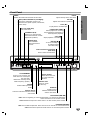
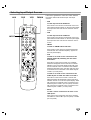
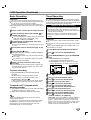
Front Panel
EJECT
Ejects the tape in the VCR deck.
POWER
Switches the DVD/VCR Receiver ON and OFF.
Disc Tray (DVD deck)
Insert a disc here.
INTRODUCTION
VOLUME
Adjusts sound level of speakers.
LINE2 (VIDEO IN/AUDIO IN (Left/Right))
Connect the audio/video output of an
external source (Audio system, TV/ Monitor,
another VCR).
PLAY (N)
To play back a recorded tape.
PAUSE/STEP (X/C)
Pause playback or recording
temporarily/press repeatedly for
frame-by-frame playback.
CH/PRESET (v/V)
Scans up or down through
memorized channels or radio
STOP (x)
frequencies (stations).
Stops playback or recording.
TUNING (v/V)
Scans available
radio frequencies in
the area.
REC/ITR (z)
To record normally or
to activate Instant
Timer Recording.
Video Cassette Compartment
(VCR deck)
Insert a video cassette here.
COPY/MEMORY
Press to copy a DVD in the
DVD deck to a VCR tape in
the VCR deck.
Memorizes currently tuned
Radio frequency (station).
FM/AM
Selects Radio operation
mode.
Remote Sensor
Point the DVD/VCR Receiver remote
control here.
Display window
Shows the current status of the DVD/VCR
Receiver.
OPEN/CLOSE
Opens or closes
the disc tray.
DVD/VCR
Toggles control
between the DVD deck
and the VCR deck.
BACKWARD (./m)
DVD: Goes to beginning of current chapter/track or to previous chapter/track.
Press and hold for a fast reverse search.
VCR: Rewinds the tape from STOP mode or for fast reverse picture search.
FORWARD (M/>)
DVD: Goes to NEXT chapter/track. Press and hold for two seconds for a fast forward search.
VCR: Advances the tape from STOP mode or for fast forward picture search.
7