1
APRS functions
Set-up for the Kenwood TH-D72A/E
with the AvMap Geosat 6 APRS
These instructions provide the essential information
necessary to configure your AvMap Geosat 6 APRS and
your Kenwood TH-D72A/E HT for basic APRS operation.
After you have achieved basic operation and have some
experience with the system, you will want to adjust
various parameters to more closely meet your particular
environment and operating requirements.
Note: These instructions assume you have basic operating knowledge
of both the AvMap Geosat 6 APRS and the Kenwood TH-D72A/E. They
also assume that both units are at factory default settings. If you
have problems getting the system to work, return both units to
factory default. Perform these instructions, and then reset any
other settings to your preference. Do not connect the two units
until the configuration of both units has been completed.
AvMap G6 APRS Setup
• Make sure the interface is set to 9600 (this is the
default).
• Make sure that contacts are displayed.
• Make sure that APRS Contact timeout is Off.
The Geosat 6 APRS is now set up and ready to
interface with the radio.
Kenwood TH-D72A/E Radio Setup
• Turn the TH-D72A/E ON.
• Press the F button.
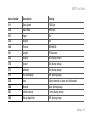
• Use the up/down/OK/Esc control to select and set
the following functions:
- F-1 – Int. GPS – Off
- F-7 – Voice Alert – Off
• Press Esc to exit the function menu.
• Use the A/B button to select the desired radio side
for APRS.
AvMap - 21