1
Motorola
iDEN
i833 Handset User’s Guide
Contents
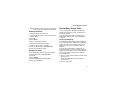
Getting Started........................................... 1
Battery ............................................................. 3
Activating your Mike Account........................... 6
Powering On and Off ....................................... 6
Finding Your Number....................................... 7
Handset Basics ................................................ 8
Locating Your SIM Card ................................ 12
SIM Card Security.......................................... 12
Accessories ................................................... 16
For More Information ..................................... 16
Mike’s Direct Connect Service ............... 17
One Touch PTT ............................................. 19
Call Alerts ...................................................... 19
Using the Call Alert Queue ............................ 20
One-to-Many Group Calls .............................. 21
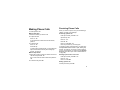
Making Phone Calls................................. 23
Receiving Phone Calls................................... 23
Call Icons ....................................................... 24
Entering the Number to Call .......................... 24
Missed Phone Calls ....................................... 26
Using Speakerphone .....................................27
Using Mute..................................................... 27
Making Emergency Phone Calls.................... 27
Recent Calls............................................. 28
Storing Recent Calls to Contacts ................... 28
Deleting Recent Calls .................................... 29
Contacts................................................... 30
Viewing Contacts ........................................... 31
Creating Entries .............................................32
Storing Numbers Quickly ............................... 33
Editing Entries ................................................ 34
Deleting Entries.............................................. 34
Checking Capacity .........................................34
Creating Pauses and Waits ........................... 34
International Numbers.................................... 35
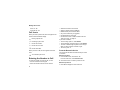
Advanced Calling Features .................... 36
Call Waiting.................................................... 36
Switching Between Calls................................ 36
Putting a Call on Hold .................................... 37
Call Forwarding .............................................. 37
Forwarding All Calls ....................................... 37
i
Turning Off Call Forwarding........................... 38
Forwarding Missed Calls ............................... 38
Calling 2 People............................................. 39
Creating Pauses and Waits While Dialing ..... 40
Making International Calls ............................. 40
Setting Flip Actions ........................................ 40
Call Timers..................................................... 41
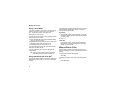
Entering Text............................................ 42
Using Alpha Mode ......................................... 42
Using Word Mode .......................................... 42
Special Function Keys ................................... 43
Using Numeric Mode ..................................... 44
Using Symbols Mode ..................................... 44
Messages ................................................. 45
Message Notifications.................................... 45
Voice Mail ...................................................... 45
Advanced Voice Mail with Fax ....................... 46
Text and Numeric Messages ......................... 47
Setting Up ...................................................... 47
Receiving Messages...................................... 48
Reading Messages From
ii
the Message Center....................................... 48
Creating and Sending Messages................... 48
Managing Memory .........................................51
Net Alerts ....................................................... 51
Mike’s Wireless Web Services ............... 52
Launching the Microbrowser..........................52
Navigating the Microbrowser ......................... 52
Accessing the Browser Menu ........................ 52
Ending the Microbrowser Session ................. 53
Using Your Handset as a Modem ..................53
Ring Tones............................................... 55
Setting Your Handset to Vibrate .................... 55
Assigning Ring Tones to Contacts ................. 56
Ring and Vibrate ............................................ 56
Viewing Ring Tone Assignments ................... 56
Managing Memory .........................................56
Deleting Custom Ring Tones ......................... 57
Datebook.................................................. 58
Viewing Datebook .......................................... 58
Creating Events .............................................59
Editing Events ................................................ 61
Deleting Events.............................................. 61
Receiving Reminders..................................... 62
Making Calls From Datebook ........................ 62
Customizing Datebook Setup ........................ 63
Java Applications .................................... 64
Installing Applications .................................... 64
Running Applications ..................................... 64
Suspending Applications ............................... 64
Resuming Applications .................................. 64
Ending Applications ....................................... 65
Deleting Applications ..................................... 65
Managing Memory ......................................... 65
Shortcuts on the Main Menu .......................... 66
Java Applications and GPS Enabled ............. 66
GPS Enabled ............................................ 69
IMPORTANT: Things to Keep in Mind ........... 69
Viewing Your Approximate Location .............. 70
Enhancing GPS Performance........................ 71
Setting Privacy Options ................................. 72
Using GPS with Map Software ...................... 73
Voice Records ......................................... 76
Creating Voice Records ................................. 76
Playing Voice Records................................... 76
Labeling Voice Records ................................. 76
Deleting Voice Records ................................. 77
Locking Voice Records .................................. 77
Managing Memory .........................................77
Memo........................................................ 78
Shortcuts ................................................. 79
Creating a Shortcut ........................................ 79
Using a Shortcut ............................................ 79
Editing a Shortcut........................................... 79
Deleting Shortcuts.......................................... 80
Customizing Your Handset .................... 81
Setting the Volume.........................................81
Setting Your Handset to Vibrate .................... 81
Using a Headset ............................................ 81
Using Settings ................................................ 82
Profiles ..................................................... 87
Viewing Profiles .............................................87
iii
Switching Profiles .......................................... 87
How Changing Settings Affects Profiles ........ 87
Temporary Profiles ........................................ 88
Creating Profiles ............................................ 89
Editing Profiles ............................................... 89
Deleting Profiles............................................. 89
Setting Call Filtering....................................... 90
Understanding Status Messages ........... 91
Safety and General Information ............. 94
RF Operational Characteristics...................... 94
Portable Radio Product Operation and EME
Exposure........................................................ 94
Electro Magnetic Interference/Compatibility .. 97
Medical Devices............................................. 98
Operational Warnings .................................... 99
Operational Cautions ..................................... 99
Accessory Safety Information ...................... 100
MOTOROLA LIMITED WARRANTY ........... 102
Patent and Trademark Information .............. 105
Index ....................................................... 107
iv
DECLARATION OF CONFORMITY
Per FCC CFR 47 Part 2 Section 2.1077(a)
Responsible Party Name: Motorola, Inc.
Address: 8000 West Sunrise Boulevard
Plantation, FL 33322 USA
Phone Number: 1 (800) 453-0920
Hereby declares that the product:
Product Name: i833
Model Number: H74XAH6RR4AN
Conforms to the following regulations:
FCC Part 15, subpart B, section 15.107(a),
15.107(d) and section 15.109(a)
Class B Digital Device
Note: This equipment has been tested and found
to comply with the limits for a Class B
digital device, pursuant to part 15 of the
FCC Rules. These limits are designed to
provide reasonable protection against
harmful interference in a residential
installation. This equipment generates,
uses and can radiate radio frequency
energy and, if not installed and used in
accordance with the instructions, may
cause harmful interference to radio
communications. However, there is no
guarantee that interference will not occur in
a particular installation.
If this equipment does cause harmful
interference to radio or television reception,
which can be determined by turning the
equipment off and on, the user is encouraged
to try to correct the interference by one or
more of the following measures:
• Reorient or relocate the receiving
antenna.
• Increase the separation between the
equipment and receiver.
• Connect the equipment into an outlet on a
circuit different from that to which the
receiver is connected.
• Consult the dealer or an experienced
radio/TV technician for help.
v
vi
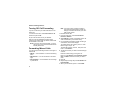
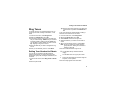
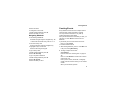
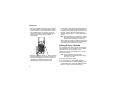
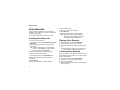
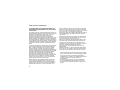
Getting Started
volume
controls
light sensor
Push-To-Talk
(PTT) button
audio jack
speaker
(in back)
microphone
accessory connector
1
Getting Started
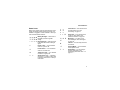
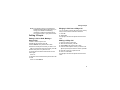
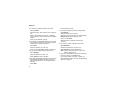
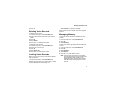
p
Power button.
Navigation key — press the arrows to scroll
through menus and lists.
2
O
OK Key — selects highlighted item; places
and answers calls.
m
Menu Key — accesses context-sensitive
menus.
A
Option Key — selects the option appearing
above it on the display.
s
Send Key — places phone calls.
e
End Key — ends phone calls; returns to
idle screen.
t
Speakerphone Key — acts like s when
the flip is closed; turns speakerphone on;
used with voice names and voice records.
.
Smart Key — acts like e when the flip is
closed; accesses recent calls; sends
incoming calls to voice mail.
To start using your i833 handset:
• Make sure your SIM card is in place.
• Charge the battery.
• Activate your service.
Battery
Battery
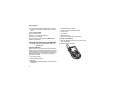
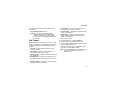
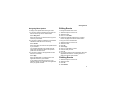
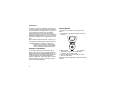
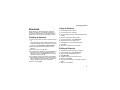
Inserting the Battery
Removing the Battery Door
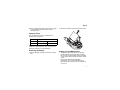
1 Remove the battery door.
2 Insert the battery into the battery area. Press the
battery down to secure it.
1 Make sure the handset is powered off.
2 Press the release button and pull the battery door
away from the handset.
button
3
Getting Started
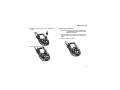
3 To replace the battery door, locate the tabs on the
battery door and the slots in the handset.
connector
cover
slots
tabs
3 Plug the other end of the charger into the
accessory connector.
4 Place the tabs on the battery door into the slots on
the handset.
Charging the Battery
Your handset comes with a battery charger.
1 Plug the charger into an electrical outlet.
2 Open the connector cover.
Tip: To remove the charger from the accessory
connector: Press the buttons on the sides of
the plug. Pull the plug straight out.
4
Battery
4 When charging the battery for the first time, charge
for 30 minutes longer than the time shown in
“Charging Times”.
2 Remove the battery by lifting it out from the side.
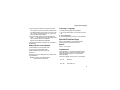
Charging Times
See your battery and charger to determine the
appropriate charging time.
Battery
Slim SC
Charger
Rapid
Mid-Rate
2 hours
3 hours
For best results, charge the batteries within the
temperature range of 50°F to 104°F (10°C to 40°C).
Prolonged charging is not recommended.
Removing the Battery
Battery Use and Maintenance
1 With the handset powered off, remove the battery
door.
• The Motorola Approved Lithium Ion chargers
provide optimum performance. Other chargers
may not fully charge the iDEN Lithium Ion battery
or may yield a reduced number of lifetime charge
cycles.
• Extreme temperatures degrade battery
performance. Do not store the battery where
temperatures exceed 140°F (60°C) or fall below
4°F (-20°C).
5
Getting Started
• Lithium Ion batteries have a self discharge rate
and without use, lose about 1% of their charge per
day.
• The battery capacity is degraded if the battery is
stored for long periods while fully charged. If long
term storage is required, store at half capacity.
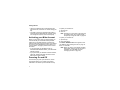
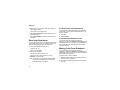
To power your handset on:
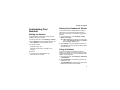
Activating your Mike Account
To power your handset off:
Before you can begin using your i833 handset, you
need to activate your Subscriber Identity Module
(SIM) card on The Mike Network. Your SIM card
holds the information required to enable your handset
to connect to The Mike Network. It also stores your
user information, language preference and contact
list entries.
1 Open the flip.
2 Press and hold p.
• If you purchased your handset through an
Authorized Mike Network Dealer, your SIM should
already be active.
• If you purchased your handset at another location,
follow the “Getting Activated” instructions in the
Mike Services User’s Guide.
Powering On and Off
The first time you power your handset on, screen
may appear asking you to update your browser
information. This means you must enable security.
6
1 Open the flip.
2 Press p.
Note: Pressing p for more than 5 seconds turns
on Airplane mode. See “Airplane Mode —
Temporarily Turning Off Calls” on page 82.
If the Enter SIM PIN Code screen appears, enter
your SIM PIN. See “Entering the PIN” on page 12.
Press A under Ok.
Note: When you receive your handset, the SIM
PIN is 0000. Change your PIN to prevent
fraudulent use of the SIM card (see
“Changing the PIN” on page 13).
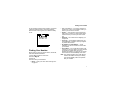
Finding Your Number
As your handset connects to the network, you will see
a welcome message and a connecting message.
When the idle screen appears, the handset is ready
to use.
TELUS
Finding Your Number
My Info lets you view your phone number, Private ID,
and other handset information:
1
2
3
4
Press m to access the main menu.
Scroll to My Info.
Press O.
Scroll to see your information:
• Name — Enter your name. See “Entering Text”
on page 42.
• Line 1 and Line 2 — your phone numbers for
phone lines 1 and 2. Each is filled in when you
receive your first call on that line.
• Private — Your Private ID is the number that
others use to contact you using Private calls. It
is filled in when you receive your first Private
call.
• Group ID — the number of the Talkgroup you
have joined
• Carrier IP — the IP address assigned to your
TELUS Mobility. It is filled in when you register
for packet data services.
• IP1 Address and IP2 Address — the IP
addresses you use to access the Internet with
your handset.
• Circuit Data — Your circuit data number is the
number you use if you want to use your handset
to transfer circuit data. See “Using Your
Handset as a Modem” on page 53. You receive
this number from TELUS Mobility Client Care.
Note: The context-sensitive menu under My Info
contains information that may be used by
your TELUS Mobility if there is a problem
with your handset.
7
Getting Started
Customizing Features
You can control many features of your handset,
including the size of the text on the display, the way
you access main menu items, and the volume of
incoming sound, rings, and other tones. See
“Customizing Your Handset” on page 81.
Tip: To see a one-line idle screen when your
handset closed is closed, press ..
Text Area
This area displays menus, messages, names, phone
numbers, and other information.
Display Options
Handset Basics
Any time your handset is powered on, the display
provides you with information and options.
Two display options appear at the bottom of most
screens. You select a display option by pressing the
option key below it.
The one-line external display shows a shortened
version of the full-sized display. To see more
information, open the flip.
Menus and Lists
status icons
TELUS
text area
menu icon
display options
The screen shown above is the idle screen. The idle
screen appears when your handset is on, but not
engaged in any activity.
8
Your handset’s features are arranged in menus,
submenus, and lists.
To access the items in a menu or list, scroll using the
navigation key at the top of your keypad. This key lets
you scroll up, down, left, or right. Holding down the
appropriate part of the navigation key speeds up
scrolling.
In this guide, this symbol > tells you to select a menu
or list item. For example, Settings > Security
means:
1 Scroll to Settings on the main menu.
2 Press O to see the Settings screen.
3 Scroll to Security.
Handset Basics
4 Press O to see the Security screen.
Main Menu
OK Key
All your handset’s features can be accessed through
the main menu. You can set the main menu to
appear as a list or as large icons (see “Large Dialing”
on page 92).
Pressing O:
•
•
•
•
Selects the highlighted menu item or list item
Sets options
Confirms actions
Places and answer calls
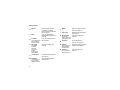
a Browser
Browse Mike’s Wireless
Web Services.
q Java Apps
Java applications on your
handset. See “Java
Applications” on page 64.
b Settings
Customize your handset.
See page 81.
m Ring Tones
Assign ring tones and turn
ringer off. See page 55.
c VoiceRecord
Record and play audio
messages. See page 76.
Menu Key
Many of the handset’s features have menu options
that will change depending on the currently
highlighted menu option. These context-sensitvie
meuns are available any time S appears. Press m to
access the menu.
Display/Info
Phone Calls
2-Way Radio
Personalize
Volume
Security
Advanced
Vibrate All
list of ring tones
Vibrate
Silent
9
Getting Started
j My Info
View personal handset
information, including
phone number and Private
ID. See page 7.
g Memo
Store a number to access
later. See page 78.
h Call Timers
l GPS
Handset usage information.
See page 41.
Find your approximate
geographical location. See
page 70.
i Recent Calls
d Contacts
View, store, edit contacts.
See page 30.
new contact form
list of contacts
Contacts menu
e Messages
Voice Mail
Fax Mail
Net Alert
Text Inbox
Drafts
Text Outbox
Quick Notes
Access messages. See
page 45.
Set call forwarding options.
See page 37.
o Datebook
Schedule appointments.
See page 58.
10
s Shortcuts
Create shortcuts to
screens. See page 79.
p Profiles
Groups of setting you apply
together. See page 87.
k Call Alert
Lists call alerts. See
page 19.
new profile form
list of profiles
Profiles menu
list of call alerts
Call Alerts menu
f Call Forward
new event form
list of events
Datebook menu
Lists recent calls. See
list of calls
page 28.
recent calls menu
Call Setup menu
Handset Basics
Status Icons
G J
H K
I L
Call Forward — Your handset is set
to forward calls. See “Call
Forwarding” on page 37.
u M Q
Ringer Off — Your handset is set
not to ring. See “Setting Your
Handset to Vibrate” on page 81.
w x T
y
Messages — You have one or
more messages. See “Messages”
on page 45.
to the antenna indicate a stronger
signal.
D
Internet — You are ready to browse
the internet.
A
Phone In Use — Your handset is
active on a phone call.
U
Airplane Mode — Your handset is
set to airplane mode.
B
Private In Use — Your handset is
active on a Private call.
Y Z
C
Talkgroup In Use — Your handset
is active on a group call.
Packet Data — You are ready to
transfer packet data or are
transferring packet data. See “” on
page 41.
Status icons appear at the top of the display. Some
appear at all times. Others appear only when your
handset is engaged in certain activities or when you
have activated certain features.
b b c d Battery Strength — More bars on
the battery indicate a greater
e f g d charge.
o p q r s Signal Strength — More bars next
1
2
Active Phone Line — 1 indicates
phone line 1 is ready to make calls;
2 indicates phone line 2 is ready to
make calls.
11
Getting Started
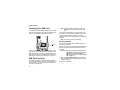
Locating Your SIM Card
Your SIM (Subscriber Identity Module) card is a small
piece of plastic located in the SIM card holder in the
back of your handset, underneath the battery.
Note: Except for making emergency calls, your
handset will not function without the SIM
card.
To prevent unauthorized use of your handset, your
SIM card can be protected by a PIN that you enter
each time the handset is powered on. You can
change the PIN or turn off the requirement that it be
entered.
Note: Your PIN is set to OFF by default.
Entering the PIN
SIM card
You may be required to enter a SIM PIN when you
first use your handset.
When you receive your handset, the SIM PIN is 0000.
Change your PIN to prevent fraudulent use of the
SIM card.
If your SIM card is not in the SIM card holder, it may
be in the box your handset came in, attached to the
SIM carrier. If this is the case, carefully detach your
SIM card from the surrounding plastic and insert it as
described in “Inserting Your SIM Card” on page 14.
SIM Card Security
Your SIM card stores all your Contacts information.
Since this information is stored on your SIM card, not
in your handset, you can remove the information by
removing your SIM card.
12
Important: If you enter your PIN incorrectly 5 times,
your SIM card is blocked. To unblock your
SIM card, you must contact TELUS
Mobility Client Care. See “Unblocking the
PIN” on page 13.
1 When the Enter SIM PIN Code screen appears,
enter your SIM PIN. An asterisk appears for each
character entered.
2 Press A under Ok.
SIM Card Security
Changing the PIN
1 From the main menu, select Settings > Security >
Change Password > SIM PIN.
2 At the Enter Old SIM PIN screen, enter the current
SIM PIN.
3 Press A under Ok.
4 At the Enter New SIM PIN screen, enter the new
4- to 8-digit SIM PIN.
5 Press A under Ok.
6 At the Re-enter New SIM PIN screen, re-enter the
new SIM PIN to confirm.
7 Press A under Ok.
Turning the PIN Requirement On and
Off
When the SIM PIN requirement is on, you are
prompted to enter your PIN each time you turn on
your handset.
Note: If a SIM PIN is required, your handset will
not function until the SIM PIN is entered,
except for making emergency calls.
When the PIN requirement is off, your handset can
be used without entering a PIN.
Important: When the SIM PIN requirement is off, the
personal data on your SIM card is not
protected. Anyone can use your handset
and access your personal data.
1 From the main menu, select Settings > Security >
SIM PIN.
2 Select On or Off.
3 Enter the current SIM PIN.
4 Press A under Ok.
Unblocking the PIN
If you enter your PIN incorrectly 5 times, your SIM
card is blocked. To unblock your SIM card, you must
contact your TELUS Mobility Client Care to get a PIN
Unblock Key (PUK).
Important: If you unsuccessfully enter the PUK code
10 times, your SIM card is permanently
blocked and must be replaced. If this
happens, all data is lost. You will get a
message to contact TELUS Mobility Client
Care. Except for making emergency calls,
your handset will not function with a
blocked SIM card.
To unblock the PIN:
1 Press * # m 1.
13
Getting Started
2 At your TELUS Mobility representative’s request,
provide the information needed to give you a PUK
code.
3 Select Unblock PIN.
4 Enter the PUK code.
5 Enter a new 4- to 8-digit SIM PIN.
6 Re-enter your SIM PIN.
•
•
•
•
•
•
If you entered the codes properly, SIM Unlocked
appears on the display.
Inserting Your SIM Card
Inserting and Removing Your SIM Card
Important: Do not touch the gold-colored areas of
your SIM card.
Switching SIM Cards
When you move your SIM card from one handset to
another, your Contacts information will not be erased
as the information is stored in the SIM. If you remove
your SIM card and use it with another handset, or use
another SIM card with your handset, the following
information is erased:
•
•
•
•
14
The recent calls list
Call forwarding settings
Net alerts
MOSMS drafts, outbox messages, and customized
quick notes
Information stored in Memo
3 most recent GPS Enabled locations
Voice records
Voice names
Datebook events
Options set using the Personalize menu
1 With your handset powered off, remove the back
cover and battery.
2 Open the SIM card holder.
SIM Card Security
3 Carefully slide your SIM card into the SIM card
holder.
Removing Your SIM Card
Important: To avoid loss or damage, do not remove
your SIM card from your handset unless
absolutely necessary.
1 With your handset powered off, remove the back
cover and battery. See “Removing the Battery” on
page 5.
2 Open the SIM card holder.
4 Close the SIM card holder.
15
Getting Started
3 Carefully slide your SIM card out of the SIM card
holder.
Note: Protect your SIM card as you would any
delicate object. Store it carefully.
Accessories
Your handset comes with a battery and a charger.
To order additional accessories, log on to our Web
site at www.telusmobility.com or contact your Mike
Dealer.
For More Information
If you have questions about your i833 handset,
contact your Mike Dealer or TELUS Mobility Client
Care.
4 Close the SIM card holder.
16
Mike’s Direct Connect
Service
There are two ways of communicating over Mike’s
Direct Connect service:
• one-to-one using a private call
• one-to-many in a group call
Both of these methods are very similar to two-way
radio, and at a fraction of the cost of traditional
cellular. Mike’s Direct Connect also offers the Call
Alert feature, which gives recipients a notice, similar
to a ringer, that you would like to speak to them.
Tip: To let someone know that you want to talk to
him or her on a Private call, send a call alert.
See “Call Alerts” on page 19.
Every Private ID number contains 3 parts — an area
ID, a fleet ID, and a member ID — with asterisks
between each of these parts. For example:
999*999*9999.
When you place a Private call, you must enter the
entire Private ID number including the asterisks.
When you store a Private ID number in Contacts,
include the asterisks with the entire Private ID
number in case you travel with your handset, or
another Private ID user, outside of your network.
One-to-One Private Calls
From the Keypad
Making Private Calls
To enter the Private ID you want to call, press the
numbers on the keypad.
1 If the flip is open, enter the Private ID you want to
call. -or-
If you make a mistake:
If the flip is closed, select the number as you would
when making a phone call.
2 Press and hold the PTT button on the side of your
handset. Begin talking after your handset emits a
chirping sound.
3 Release the PTT button to listen.
• To clear a digit, press A under Delete.
• To clear all digits, press and hold A under Delete.
• To insert or delete a digit anywhere in the string of
digits you have entered, scroll left or right.
• To cancel, press e.
17
Mike’s Direct Connect Service
From the Recent Calls List
The recent calls list stores the last 20 calls you made
or received.
With the Contacts type field highlighted, scroll left
or right to display the Contacts type for the number
you want to call.
To select a Private ID from the recent calls list as the
number you want to call:
If you are making a Private call, your handset places
the call to the Private ID stored in the Contacts entry,
even if the Private ID icon is not displayed.
1 From the idle screen, scroll down. -or-
Calling from a Contacts Entry
From the main menu, select Recent Calls.
2 Scroll to the name or Private ID number you want
to call.
From Contacts
If you have Private IDs stored in Contacts, you can
use these numbers to make calls. For information on
entering numbers into Contacts, see “Creating
Entries” on page 32.
Calling from the Contacts List
1 From the main menu, select Contacts.
2 Scroll to the name or Private ID number you want
to call.
3 Press A under View. -orIf View is not one of your options: Press m. Select
View.
4 Place the call now. -orScroll to view more numbers. When you place the
call, it is made to the number displayed.
1 From the main menu, select Contacts.
2 Scroll to the name or Private ID number you want
to call.
Tip: To find Contacts entries faster, use the keypad
to enter the first letter of the name.
Receiving Private Calls
3 Place the call now. -or-
1 Wait for the caller to finish speaking.
2 Press and hold the PTT button on the side of your
handset. Begin talking after your handset emits a
chirping sound.
18
When you receive a Private call, your handset emits
a chirping sound or vibrates.
To answer a Private call:
One Touch PTT
Release the PTT button to listen.
One Touch PTT
One Touch PTT sets your handset to call the most
recent Private ID on the recent calls list, or to a
Private ID you choose, every time you press the PTT
button. See “Setting One Touch PTT” below.
Enter the number using your keypad. -orPress A under Search. Select Contacts, Recent
Calls, or Memo. Enter the number from Contacts,
the recent calls list, or Memo, as you would when
making a call.
Tip: If you are entering a Talkgroup number, enter
# before the number.
Setting One Touch PTT
5 Press A under Ok.
One Touch PTT sets your handset to call the most
recent Private ID on the recent calls list, or to a
Private ID you choose, every time you press the PTT
button.
To turn off One Touch PTT:
To set your handset to call the most recent Private ID
on the recent calls list:
1 From the main menu, select Settings > 2-Way
Radio > One Touch PTT.
2 Scroll to Last Call.
3 Press A under Select.
To set your handset to call a Private ID you choose:
1 From the main menu, select Settings > 2-Way
Radio > One Touch PTT.
2 Scroll to Assign Number.
3 Press A under Change.
4 To enter the number you want your handset to call
every time you press the PTT button:
1 From the main menu, select Settings > 2-Way
Radio > One Touch PTT.
2 Scroll to Off.
3 Press A under Select.
Call Alerts
Sending a call alert lets the recipient know that you
want to talk to him or her on a Private call.
When you send a call alert, the recipient’s handset
emits a series of beeps and displays your name or
Private ID.
The recipient can:
• Answer — begin a Private call with the sender
• Queue — store the call alert to the call alert queue,
which is a list of call alerts
19
Mike’s Direct Connect Service
• Clear — dismiss and delete the call alert
Viewing Date and Time
Sending Call Alerts
To view the date and time a call alert was received:
1 Enter the Private ID you want to send to, as you
would when making a Private call.
2 Press A under Alert. Ready to Alert appears on
the display.
3 Press the PTT button until Alert Successful
appears on the display.
1
2
3
4
Receiving Call Alerts
After you queue a call alert, you can respond to it by
making a Private call to the sender or sending a call
alert to the sender. This call alert is then removed
from the queue.
When you receive a call alert, you must answer,
queue, or clear it. You cannot receive phone calls or
Private calls until you do.
To answer a call alert, press the PTT button to
make a Private call to the sender.
To queue a call alert, press A under Queue.
To clear a call alert, press A under Clear.
Using the Call Alert Queue
When you queue a call alert, it remains in the call
alert queue until you respond to it, or delete it.
Viewing Call Alerts
1 From the main menu, select Call Alert.
2 Scroll through the list.
20
From the main menu, select Call Alert.
Scroll to the call alert you want information on.
Press m.
Select View.
Responding to Call Alerts in the Queue
Making a Private Call to the Sender
1 From the main menu, select Call Alert.
2 Scroll to the call alert you want to respond to.
3 Press the PTT button to begin the call.
Sending a Call Alert to the Sender
1 From the main menu, select Call Alert.
2 Scroll to the call alert you want to respond to.
3 Press A under Alert. Ready to Alert appears on
the display.
4 Press and hold the PTT button until Alert
Successful appears on the display.
One-to-Many Group Calls
Note: Answering a call alert from the recent call list
does not remove it from the call alert queue.
Deleting Call Alerts
To delete a call alert from the queue:
1 From the call alert queue, scroll to the call alert you
want to delete.
2 Press m.
3 Select Delete.
4 Press A under Yes to confirm.
To delete all call alerts from the queue:
1 From the call alert queue, press m.
2 From the call alert menu, select Delete All.
3 Press A under Yes to confirm.
Sorting Call Alerts
To sort call alerts by the order they were received:
1
2
3
4
5
From the main menu, select Call Alert.
Press m.
Select Sort By.
Scroll to First on Top or Last on Top.
Press A under Select.
One-to-Many Group Calls
A group call is a type of dispatch call made to all
members of a Talkgroup at once. A Talkgroup is a
group of Private IDs.
To receive group calls made to a Talkgroup, you
must join the Talkgroup. See “Joining a Talkgroup”
on page 21.
Joining a Talkgroup
Your Mike sales representative creates Talkgroups
for you and assigns each Talkgroup to a Talkgroup
number. You can choose a name for each of your
Talkgroups when you create entries for them in
Contacts.
To receive group calls made to a Talkgroup, you
must join the Talkgroup. You can belong to only one
Talkgroup at a time. When you join a new Talkgroup,
you no longer belong to your previous Talkgroup.
To join a Talkgroup:
1 Press #. Then enter the Talkgroup number using
the keypad. -orChoose the Talkgroup name from Contacts or
recent calls list.
2 Press A under Join.
21
Mike’s Direct Connect Service
Making Group Calls
1 Press #. Then enter the Talkgroup number using
the keypad. -orChoose the Talkgroup name from Contacts or
recent calls list.
2 Proceed as if making a Private call.
Receiving Group Calls
To answer a group call:
Proceed as if answering a Private call. Only one
person at a time may speak on a group call.
Turning off Group Calls
To control whether you hear group calls to your
Talkgroup:
1 From the main menu, select Settings > 2-Way
Radio > Tkgrp Silent.
2 Press A under Change.
3 Scroll to On if you do not want to hear group calls
to your Talkgroup. -orScroll to Off if you want to hear group calls to your
Talkgroup.
4 Press A under Select.
22
Making Phone Calls
Receiving Phone Calls
To make a phone call:
When you receive a phone call, your handset rings,
vibrates, or lights up its backlight.
With the Flip Open
1 Enter the number you want to call.
2 To place the call:
Press s. -orIf you entered the number from the idle screen,
press O.
3 To end the call:
Press e. -orClose the flip.
To end a call by closing the flip, you must have the
Flip to End feature turned on (see “Setting Flip
Actions” on page 40.
With the Flip Closed
1 Select the number you want to call from the recent
calls list and press t. -orUse a voice name to select number and place the
call.
2 To end the call, press ..
Answering a phone call
If the flip is closed, press t. -orOpen the flip. -orPress s. -orPress O. -orPress A under Yes. -orPress any number key on the keypad.
To answer a call by opening the flip, you must have
the Flip to Ans feature turned on (see “Setting Flip
Actions” on page 40). To answer a call by pressing
any key on the keypad, you must have the Any Key
Ans feature turned on (see “Phone Calls Features”
on page 83).
Sending a phone call to voice mail
If the flip is closed, press .. -orPress e. -orPress A under No.
Ending a phone call
If the flip is closed, press ..
23
Making Phone Calls
Press e. -orClose the flip. -or-
Call Icons
When you make a phone call, call icons appear in the
text area of the handset’s display.
X Placing a phone call.
W Receiving a phone call.
Y Phone call is active.
Z Phone call is on hold.
U Phone call ended.
When you miss a call, this icon appears in the text
area:
V You missed a phone call.
Entering the Number to Call
•
•
•
•
•
•
Select the number from Contacts
Select a number stored in Datebook
Redial the last phone number called
Say a voice name into your handset
Use Speed Dial or Turbo Dial®
Use One Touch PTT to make a Private call. See
“One Touch PTT” on page 19.
If you make a mistake:
• To clear a digit, press A under Delete.
• To clear all digits, press and hold A under Delete.
• To insert or delete a digit anywhere in the string of
digits you have entered, scroll left or right.
• To cancel, press e.
From the Recent Calls List
The recent calls list stores the last 20 calls you made
or received.
With the Flip Open
1 From the idle screen, scroll down. -orFrom the main menu, select Recent Calls.
To enter the number you want to call, you can:
2 Scroll to the name or number you want to call.
• Use the numbers on the keypad
• Select the number from the recent calls list
With the Flip Closed
24
1 Press . to display the most recent call.
Entering the Number to Call
2 To view the rest of the recent calls list, press the
volume keys on the side of your handset.
3 You can call the number displayed by pressing t
on top of the handset.
From Contacts
If you have numbers stored in Contacts, you can use
these numbers to make calls. For information on
entering numbers into Contacts, see “Creating
Entries” on page 32.
1 From the main menu, select Contacts.
2 Scroll to the name or number you want to call.
Tip: To find Contacts entries faster, use the keypad
to enter the first letter of the name.
3 Place the call now. -orScroll left or right to display the Contacts type for
the number you want to call.
If you are making a Private call, your handset places
the call to the Private ID stored in the Contacts entry,
even if the Private icon is not displayed.
If you are making a phone call:
• Your handset places the call to the phone number
assigned to the Contacts type displayed.
If the Contacts type displayed is not a phone number,
your handset places the call to the phone number
stored in the Contacts entry.
• If the Contacts type displayed is not a phone
number and you have more than one phone
number stored in the Contacts entry, your handset
prompts you to select the phone number you want
to place the call to.
From Datebook
If you have numbers stored as part of events in
Datebook, you can use these numbers to make calls.
For information on storing events in Datebook, see
“Datebook” on page 58.
1 From the main menu, select Datebook.
2 Select the day of the event containing the number
you want to call.
3 Highlight or select the event containing the number
you want to call.
For details, see “Making Calls From Datebook” on
page 62.
Redialing the Last Number
Press and hold s to place a call to the last phone
number you called.
25
Making Phone Calls
Using a Voice Name
If you have created a voice name in Contacts for the
number you want to call, say the voice name into
your to enter the number. See page 31 for
information on voice names.
You can use a voice name to enter a handset number
with the flip open or closed.
1 Press and hold t until a prompt appears telling
you to say the voice name.
2 Speaking into the microphone, say the voice name
assigned to the number you want to call.
Your handset plays the name back to you.
Turbo Dial lets you place calls to the phone numbers
associated with Speed Dial numbers 1 through 9
without entering the number.
Speed Dial
1 From the idle screen, use the keypad to enter the
Speed Dial number assigned to the phone number
you want to call.
2 Press #.
Turbo Dial
From the idle screen, press and hold the Speed
Dial number (1 through 9) assigned to the phone
number you want to call.
If you are making a Private call, press and hold the
PTT button to place the call.
Missed Phone Calls
If you are making a phone call, the call is placed
automatically.
When the flip is closed, the one-line display shows
this icon V and the number of phone calls you have
missed.
Tip: To stop a phone call from being completed,
press . if the flip is closed or press e.
Using Speed Dial and Turbo Dial
®
Each phone number stored in Contacts is assigned a
Speed Dial number which you can use to enter that
number.
26
To dismiss the missed call message:
Press ..
To display the most recent call with incoming Caller
ID:
Press . again.
Using Speakerphone
You can now call the most recent call, or view the rest
of the recent call list. unknown numbers will not be
shown in the recent calls list. See page 24 for more
information.
Using Speakerphone
Turning on speakerphone makes incoming sound
come out of the phone’s speaker instead of the
earpiece. Speakerphone is available whenever you
are on an active phone call.
With the Flip Open
To turn speakerphone on or off:
Press A under Speaker. -orPress t.
With the Flip Closed
When you make a call with the flip closed,
speakerphone is always on.
Opening the flip turns speakerphone off.
To turn mute on:
Press A under Mute.
While mute is on, Unmute appears as a display
option.
To turn mute off:
Press A under Unmute.
Making Emergency Phone Calls
Your handset supports emergency calling.
Emergency phone calls can be made even when
your SIM card is blocked or not in your handset.
Dial 911 to be connected to an emergency response
center. If you are on an active call, you must end it
before calling 911.
Important: Emergency calls cannot be placed while
the keypad is locked.
Important: If you have not registered on the network,
emergency calls cannot be placed while
your SIM card is in your handset.
Using Mute
Muting calls lets you listen to incoming sound without
transmitting sound. Mute is available whenever you
are on an active call.
27
Recent Calls
Recent Calls
The recent calls list stores the numbers of the 20
most recent calls you have made and received.
If the number of a recent call is stored in Contacts,
the name associated with the number appears on the
recent calls list.
An icon appears beside the name or number
indicating the Contacts type of the number used in
the call. See “Contacts” on page 30.
For phone calls, an icon appears to the left of the
name or number giving more information about the
call:
X A call you made.
W A call you received.
V A missed call. Missed calls appear on the
recent calls list only if you have Caller ID.
Note: The recent calls list also stores call alerts
you have received. They appear as Private
calls. Call alerts remain in your recent calls
list until you delete them or until they reach
the end of the list.
28
Viewing Recent Calls
With the Flip Open
1 From the main menu, select Recent Calls.
2 Scroll through the list.
To get more information on a recent call:
From the recent calls list, select the call you want
information on.
This displays information such as the name
associated with the call, the number, the date, time,
and duration of the call.
With the Flip Closed
1 Press . to display the most recent call.
2 To view the rest the recent call list, press the
volume keys on the side of your handset.
3 Press . to dismiss the recent calls list.
Tip: Press t to call the number displayed.
Storing Recent Calls to
Contacts
1 From the recent calls list, scroll to the number you
want to store.
Deleting Recent Calls
2 Press A under Store. -orIf Store is not one of your options: Press m. Select
Store.
Tip: If Store is not on this menu, the number is
already stored in Contacts.
3 To store the number as a new entry, select [New
Contact]. -or-
3 Press O or press A under Yes to confirm.
To delete all calls:
1 From the recent calls list, press m.
2 Select Delete All.
3 Press O or press A under Yes to confirm.
To store the number to an existing entry, select the
entry.
4 With the Contacts type field highlighted, scroll left
or right to display the Contacts type you want to
assign the number. For information on Contacts
types, see page 30.
5 If you want to add more information to the entry,
follow the applicable instructions in “Creating
Entries” on page 32.
6 Press A under Done.
Deleting Recent Calls
To delete a call:
1 From the recent calls list, scroll to the call you want
to delete.
2 Press A under Delete. -orIf Delete is not one of your options: Press m.
Select Delete.
29
Contacts
Contacts
Each Contacts entry can store several numbers or
addresses. Depending on the type of Mike’s Smart
Card you use, you will be able to store different
numbers of contacts and contact information.
Information stored in Contacts is saved on your SIM
card. If you move your SIM card to another
SIM-based handset, you can access information
stored in Contacts from that handset.
A Contacts entry contains:
• A name — A name is required if you are storing
more than one number or address to the entry;
otherwise, it is optional. Typically, this is the name
of the person whose contact information is stored
in the entry.
• A ring tone — You can assign a ring tone to each
entry. This is the sound your handset makes when
you receive handset calls or call alerts from any of
the numbers stored in the entry.
• A Contacts type — Each number or address stored
must be assigned a Contacts type:
A
Mobile
phone number
B
Private
Private ID
C
Work1
phone number
D
Work2
phone number
E
Home
phone number
F
Email
email address
G
Fax
phone number
H
Pager
phone number
I
Talkgroup
Talkgroup number
J
IP
IP address
K
Other
phone number
• A number or address — Each Contacts entry must
contain a number or address. This may be any
type of phone number, Private ID, Talkgroup
number, email address, or IP address.
30
Viewing Contacts
Note: You can store numbers up to 64 digits long,
but every 20 digits must be separated by a
pause or wait. See “Creating Pauses and
Waits” on page 34.
• A Speed Dial number — When you store a phone
number, it is assigned a Speed Dial number. You
can accept the default Speed Dial number or
change it.
• A voice name — If you create a voice name for a
number, you can then dial that number by saying
the voice name into your handset. This icon P
appears to the left of the Contacts type icon if a
voice name is assigned.
Viewing Contacts
4 Scroll to view the other numbers and addresses
stored for the entry.
Tip: To view more entries, continue scrolling.
Searching for a Name
To search for a name in Contacts:
1 From the Contacts list, press m.
2 Select Search.
3 Enter the name you want to see. See “Entering
Text” on page 42.
4 Press O.
Your handset finds the name you entered or the
nearest match.
From the main menu, select Contacts. -or-
Showing Only Private IDs and
Talkgroups
If you are on a call: Press m. Select Contacts.
To set Contacts to show only entries that contain
Private IDs and Talkgroup entries:
To access Contacts:
To view entries:
1 From the Contacts list, scroll to the entry you want
to view.
2 If an entry has more than one number or address
stored, <> surrounds the Contacts type icon. Scroll
left or right to view the icon for each number stored
in the entry.
3 Press O to view the entry.
1 From the Contacts list, press m.
2 Select Filter.
3 Set this option to Show Prvt/Grp.
To set Contacts to show all entries:
1 From the Contacts list, press m.
2 Select Filter.
31
Contacts
3 Set this option to Show All.
Creating Entries
A number or address and a Contacts type are
required for all Contacts entries. Other information is
optional. You may enter the information in any order
by scrolling through the entry details.
After you have entered the number or address,
Contacts type, and any other information you want,
you can press A under Done to save the entry to
Contacts.
To cancel a Contacts entry at any time press, e to
return to the idle screen.
To create a Contacts entry:
1 To access the entry details screen:
Select Contacts > [New Contact]. -orFrom the Contacts list, press m. Select New.
2 If you want to assign a name to the entry:
Select Name.
Enter the name. See “Entering Text” on page 42.
When you are finished, press O.
Tip: Press A under Brwse to select a name
already in Contacts.
3 If you want to assign a ring tone to the name:
32
Select Ringer.
Select the ring to you want to assign.
4 To assign a Contacts type to the number or
address being stored:
Select the Contacts type field.
Select the Contacts type you want to assign.
5 To store a number or address:
Select the # field (or ID for an email address, or IP
for an IP address).
Enter the number or address. For phone numbers,
use the 10-digit format. For email addresses, see
“Entering Text” on page 42.
Tip: Press A under Brwse to select a number or
address from Contacts, the recent calls list, or
Memo.
When you are finished, press O.
6 If you want to assign more options to the number,
select [Options]. See “Assigning Options” on page
33.
7 If you want to add more numbers or addresses to
the entry:
Scroll past the information you already entered.
Storing Numbers Quickly
Enter the additional information for the entry using
step 2 through step 6. You must assign a name to
the entry, if you have not already.
8 Press A under Done.
Assigning Options
1 If you have not already, select [Options].
2 The default Speed Dial number assigned to a
phone number is displayed in the Speed # field.
This is always the next available Speed Dial
location.
If you want to assign the phone number to a
different Speed Dial location:
With the Speed # field highlighted, press O.
Press A under Delete to delete the current Speed
Dial number.
Enter the new Speed Dial number using the
keypad.
When you are finished, press O.
3 If you want to create a voice name for a phone
number, select Voice Name.
As directed by the screen prompts, say and repeat
the name you want to assign to the number. Speak
clearly into the microphone.
Storing Numbers Quickly
To store numbers to Contacts from the recent calls
list, see “Storing Recent Calls to Contacts” on page
28.
To store numbers to Contacts from Memo, see
“Memo” on page 78.
To store numbers to Contacts from the idle screen:
1 Use the keypad to enter the number you want to
store.
2 Press m.
3 Select Store Number.
4 To store the number as a new entry, select [New
Contact]. -orTo store the number to an existing entry, select the
entry.
5 With the Contacts type field highlighted, scroll left
or right to display the Contacts type you want to
assign the number.
6 If you want to add more information to the entry,
follow the applicable instructions in “Creating
Entries” on page 32.
7 Press A under Done.
4 When you are finished, press A under Back.
33
Contacts
Editing Entries
1 From the Contacts list, scroll to the entry you want
to edit.
2 Press A under Edit. -orIf Edit is not one of your options: Press m. Select
Edit.
The entry details screen displays.
3 Follow the applicable instructions in “Creating
Entries” on page 32 to edit the various fields.
Deleting Entries
Delete an Entry
1 From the Contacts list, scroll to the entry you want
to delete.
2 Press m.
3 To delete the entire entry, select Delete Contact.
4 Press O or press A under Yes to confirm.
Delete a Number or Address
1 From the Contacts list, scroll to the entry that
contains the number or address you want to
delete.
2 Scroll left or right to display the Contacts type for
the number you want to delete.
34
3 Press m.
4 Select Delete Number.
5 Press O or press A under Yes to confirm.
Checking Capacity
To see how many numbers are stored in Contacts:
1 From the Contacts list, press m.
2 Select Capacity.
Creating Pauses and Waits
When storing a number, you can program your
handset to pause or wait between digits while dialing.
A pause makes your handset pause for 3 seconds
before dialing further. A wait makes your handset
wait for your response before dialing further.
This feature is useful when using voice mail or other
automated handset systems that require you to dial a
phone number and then enter an access number.
To program a pause:
Press and hold * until the letter P appears. The
P represents a 3-second pause.
If you store 17035551235P1234, when you select
this number and make a call, your handset dials the
first 11 digits, pauses for 3 seconds, then dials the
last 4 digits.
International Numbers
If you want a pause longer than 3 seconds, press and
hold * more than once. Each P represents a
3-second pause.
For information about making international calls, see
“Making International Calls” on page 40.
To program a wait:
Press and hold * until the letter W appears. The
W means your handset waits before dialing further.
If you store 17035551235W1234, when you select
this number and make a call, your dials the first 11
digits and then waits. A message appears asking if
you want to send the rest of the digits. Press A
under Yes to dial the last 4 digits.
Tip: You can create pauses and waits while dialing
a number from the keypad. See “Creating
Pauses and Waits While Dialing” on page 40.
International Numbers
When storing a number that you plan to use for
international calls, use Plus Dialing:
1 Press and hold 0 for two seconds. A “0”
appears, then changes to a “+”.
Note: The network translates the “+” into the
appropriate international access code
needed to place the call.
2 Enter the country code, city code or area code,
and handset number.
35
Advanced Calling Features
Advanced Calling
Features
Call Waiting
Call Waiting lets you receive a second call while on
an active call. Call Waiting is always available, unless
you turn it off for a specific call.
If you are on a call and receive a second call, your
handset emits a tone and displays a message saying
you are receiving a second call.
To accept the second call and put the active call on
hold:
Press A under Yes.
To accept the second call and end the active call:
1 Press e.
Your handset rings with the second call.
2 Answer the second call.
To decline the second call:
Press A under No. If you subscribe to voice mail,
the call is forwarded to your voice mail box, unless
you set Call Forward for If Busy to a different
number.
36
Turn Off Call Waiting
To turn off Call Waiting during a call:
1 Press m.
2 Select In Call Setup > Call Waiting.
3 Set this option to Off.
Tip: To turn Call Waiting back on while still on the
call, set this option to On.
To turn off Call Waiting for the next call you make or
receive:
1 From the main menu, select Settings > Phone
Calls > Call Waiting.
2 Set this option to Off.
Call Waiting is turned back on when you end the call.
Switching Between Calls
Any time you have one call active and one call on
hold, to make the call on hold active and put the
active call on hold:
Press A under Switch. -orIf Switch is not one of your options. Press m.
Select Switch.
Putting a Call on Hold
Putting a Call on Hold
J Phone line 2 is active; calls to phone line 1 are
1 While on an active call, press m.
2 Select Hold.
K Phone line 2 is active; calls to phone line 2 are
If you want to make the call active again, press A
under Resume.
L Phone line 2 is active; calls to phone lines 1
Call Forwarding
Call forwarding sends calls to the phone numbers
you specify. You can forward all calls to one number
or forward missed calls to different numbers
depending on the reason you missed the call.
You can forward phone lines 1 and 2 independently.
being forwarded.
being forwarded.
and 2 are being forwarded.
To forward all calls:
1 From the main menu, select Call Forward >
Forward > All Calls.
If you specified a forwarding number for all calls
before, this number displays.
Forwarding All Calls
To forward calls to this number, press A under
Back. -or-
When you set your handset to forward all calls, an
icon appears in the top row of the display:
To delete this number, press O, then press and
hold A under Delete.
2 To enter the number you want to forward calls to:
G Phone line 1 is active; calls to phone line 1 are
being forwarded.
H Phone line 1 is active; calls to phone line 2 are
being forwarded.
I Phone line 1 is active; calls to phone lines 1
and 2 are being forwarded.
Enter the number using your keypad. -orPress A under Search. Select Contacts, Recent
Calls, or Memo. Select the number you want to
enter.
3 Press O.
All your calls are now forwarded to the number you
specified.
37
Advanced Calling Features
Turning Off Call Forwarding
If you do not want all your calls forwarded, turn the
feature off:
1 From the main menu, select Call Forward > To.
2 Set this option to Off.
All your calls are now sent to your handset.
Calls you miss are forwarded according to the
options set for missed calls. By default, missed calls
are forwarded to voice mail.
Note: To receive voice mail messages, you must
first set up a voice mail account with TELUS
Mobility Client Care.
Forwarding Missed Calls
You can specify a forwarding number for each type of
missed call:
• If Busy — Your handset is on a call or transferring
data.
• If No Answer — You do not answer on the first 4
rings.
• If Unreachable — Your handset is out of coverage
or powered off.
38
Note: If you want a type of missed call sent to
voice mail, the call forwarding number for
that type of missed call must be your voice
mail access number.
To forward missed calls:
1 From the main menu, select Call Forward >
Forward > Detailed.
2 Select If Busy to specify a forwarding number for
calls received when your handset is busy.
3 If you specified a forwarding number for this type
of call before, this number displays.
To forward calls to this number, press A under
Back and go to step 6. -orTo delete this number, press O , then press and
hold A under Delete.
4 To enter the number you want to forward this type
of call to:
Enter the number using your keypad. -orPress A under Search. Select Contacts, Recent
Calls, or Memo. Select the number you want to
enter.
5 Press O.
6 Repeat step 2 through step 5 for No Answer and
If Unreachable.
7 When you are finished, press A under Back.
Calling 2 People
Note: Your handset comes pre-programmed to
detailed forward to Mike’s Voice Mail. If you
change your detailed call forwarding,
remember to reset the forwarding back to
your access number or your phone number.
Calling 2 People
Putting a Call on Hold, Making a
Second Call
1
2
3
4
Place or receive a phone call.
While the call is active, press m.
Select 2nd Call. This puts the call on hold.
Enter the second phone number you want to call.
Tip: For quick ways to enter the number, press m.
5 Press O or press s to place the call.
To end the second call and make the call on hold
active again:
Press e.
Merging 2 Calls into a 3-Way Call
You can combine 2 phone calls into a 3-way call any
time you have a call on hold and a call active:
1 Press m.
2 Select Join.
All 3 people in the call can speak to and hear each
other.
Making a 3-Way Call
1
2
3
4
Place or receive a phone call.
While the call is active, press m.
Select 3 Way. This puts the call on hold.
Enter the second phone number you want to call.
Tip: For quick ways to enter the number, press m.
5 Press O or press s to place the call.
6 Press A under Join.
All 3 people in the call can speak to and hear each
other.
To make the call on hold active and put the active call
on hold:
Press A under Switch.
39
Advanced Calling Features
Creating Pauses and Waits
While Dialing
You can enter a pause or wait while dialing a number.
For more information on pauses and waits, see
“Creating Pauses and Waits” on page 34.
To create a pause while dialing a phone number:
1 From the keypad, enter the digits you want to
occur before the pause.
2 Press m.
3 Select Insert Pause.
4 Enter the digits you want to occur after the pause.
To create a wait while dialing a phone number:
Note: The network translates the “+” into the
appropriate international access code
needed to place the call.
2 Enter the country code, city code or area code,
and phone number.
Setting Flip Actions
For Answering Calls
To set your handset to answer calls when you open
the flip:
1 From the main menu, select Settings > Phone
Calls > Flip Activation > Flip to Ans.
2 Set this option to On.
1 From the keypad, enter the digits you want to
occur before the wait.
2 Press m.
3 Select Insert Wait.
4 Enter the digits you want to occur after the wait.
To set your handset not to answer calls when you
open the flip:
Making International Calls
To set your handset to end calls when you open the
flip:
Plus Dialing lets you place an international call to
most countries without entering the local international
access code.
1 From the main menu, select Settings > Phone
Calls > Flip Activation > Flip to End.
2 Set this option to On.
1 Press and hold 0 for two seconds. A “0”
appears, then changes to a “+”.
40
Set Flip to Ans to Off in step 2.
For Ending Calls
Call Timers
To set your handset not to answer calls when you
open the flip:
Set Flip to End to Off in step 2.
Note: If you are using your handset with a
headset, and you have the Flip to End
option set to On, closing your flip sends
incoming sound to the headset and does not
end the call.
Call Timers
Call timers measure the duration of your phone calls,
Private or group calls, and circuit data use, as well as
the number of Kilobytes sent and received by your
handset:
• Last Call — displays the duration of your most
recent phone call.
• Phone Reset — keeps a running total of your
phone call minutes, until you reset it.
• Phone Lifetime — displays the total minutes of all
your phone calls.
• Prvt/Grp Reset — keeps a running total of all of
your Private and group call minutes, until you reset
it.
• Prvt/Grp Lifetime — displays the total minutes of
all your Private and group calls.
• Circuit Reset — keeps a running total of all of
your circuit data use, until you reset it.
• Circuit Lifetime — displays the total minutes of all
of your circuit data use.
• Kbytes Reset — keeps a running total of the
number of Kilobytes sent and received by your
phone, until you reset it.
To view or reset a timer:
1 From the main menu, select Call Timers.
2 Select the feature you want to view or reset.
3 To view a feature without resetting: Press O when
you are finished viewing. -orTo reset a feature: Press A under Reset. Press
O or press A under Yes to confirm.
Note: The values displayed by Call Timers should
not be used for billing. Call timers are
estimates only.
41
Entering Text
Entering Text
You can enter text into your handset using the
traditional method of pressing a key several times for
each character, or by pressing a key once for each
letter while words likely to be the one you want are
chosen from a database. You can also enter symbols
and numbers into a text field.
Note: Entering text may work differently in the
browser
In screens that require you to enter text, you see the
following icons. These icons tell you which text input
mode you are using:
l Alpha — Press a key several times for each
character.
j Word — Press a key once for each letter while
words likely to be the one you want are chosen
from a database.
i Symbols — Enter punctuation and other
symbols.
k Numeric — Enter numbers.
When you access a screen that requires you to enter
text, you start in the mode last used.
To choose a text input mode:
1 At a screen that requires you to enter text, press
m.
2 Select the text input mode you want to use. A
checkmark appears next to the current mode.
Using Alpha Mode
• Press any key on the keypad to enter the letters,
numbers, and symbols on that key. For example,
to enter the letter Y, press 9 three times.
• Type a letter then scroll up to make that letter
uppercase, or type a letter then scroll down to
make that letter lowercase.
• See “Special Function Keys” on page 43 for more
information on adding spaces, capitalization, and
punctuation.
Using Word Mode
In Word mode, T9 Text Input analyzes the letters on
the keypad button you press and arranges them to
create words. As you type, T9 Text Input matches
your keystrokes to words in its database and displays
the most commonly used matching word. You can
add you own words to this database.
Entering a Word
1 Select Word as your text input mode.
42
Special Function Keys
2 Type a word by pressing one key for each letter.
To change the language of the database:
The displayed word may change as you type it. Do
not try to correct the word as you go. Type to the
end of the word before editing.
1 At a screen that requires you to enter text, press
m.
2 Select Languages.
3 Select the language you want for your database.
3 If the word that appears is not the desired word,
press 0 to change the word on the display to the
next most likely word in the database.
Repeat until the desired word appears.
If the desired word does not appear, you can add it to
the database.
Adding Words to the Database
1
2
3
4
Choosing a Language
For example, to type “test” press 8 3 7 8.
Select Alpha as your text input mode.
Type the word using Alpha mode.
Select Word as your text input mode.
Press #.
The word you typed in Alpha text entry mode is now
in the database.
Note: You cannot store alphanumeric
combinations, such as Y2K.
Special Function Keys
Some of the handset’s keys assume different
functions while in Alpha or Word mode.
Spaces
Press # for a space.
Capitalization
Press and hold # to make the next letter typed
uppercase (shift), to make all subsequent letters
typed uppercase (caps lock), or to go back to
lowercase letters.
These icons appear in the top row of your display:
mor X
Shift is on.
nor W
Caps lock is on.
43
Entering Text
When neither of these icons appear, letters typed are
lowercase. Scrolling up after typing a letter makes
that letter uppercase.
Note: Your handset automatically makes the first
letter of a sentence uppercase.
Punctuation
Press 1 or 0 to insert punctuation. Continue to
press the key to view the list of symbols available
through that key. Pause to select the symbol you
want.
Note: Additional punctuation symbols are available
in Symbols mode.
Using Numeric Mode
1 Select Numeric as your text input mode.
2 Press the number buttons on your keypad to enter
numbers.
Using Symbols Mode
1 Select Symbols as your text input mode.
A row of symbols appears along the bottom of the
handset’s display. Scroll right to view the complete
row.
2 Press O to select the highlighted symbol.
44
Message Notifications
Messages
If you are on a call when you receive a message,
your handset may sound a notification tone during
the call or after you end the call, depending on how
you set your notification options.
To access your voice mail messages, text and
numeric messages, Net alerts, and any other types of
messages you are able to receive, go to the message
center:
Setting Notification Options
1 From the idle screen, press A under Mesg. -or-
To control whether your handset sounds message
notification tones while you are on phone calls:
From the main menu, select Messages.
2 Scroll to the type of message you want to access.
3 Press A under the display option on the left.
The message center shows how many messages
you have of each type. You can listen to, read, or
delete these messages.
Message Notifications
When you receive a message, your handset notifies
you with text on the display and a notification tone or
vibration. You can access the message or dismiss
the notification.
If you dismiss the notification, the message is not
deleted. It can be accessed through the message
center.
If you are not on a phone call when you receive a
message, your handset sounds a notification tone
every 30 seconds until you access the message or
dismiss the alert.
1 From the main menu, select Settings > Phone
Calls > Notifications.
2 Choose the option you want:
• Receive All — Tones sound during calls for all
types of messages.
• Msg Mail Only — Tones sound during calls for
mail messages; tones for all other types of
messages are held until you end calls.
• Delay All — Tones for all types of messages are
held until you end calls.
3 Press A under Select.
Tip: To set notification option during a call: Press
m. Select In Call Setup > Notifications.
Voice Mail
Note: To receive voice mail messages, you must
first set up a voice mail account with TELUS
Mobility Client Care.
45
Messages
When you receive a voice mail message, New Voice
Mail Message appears on the display.
To call TELUS Mobility voice mail system and listen
to the message:
Press A under Call.
To dismiss the message notification:
If the flip is closed, press .. -orIf the flip is open, press O or press A under
Back.
This icon y appears on the display, reminding
you that you have a new message.
Sending Unanswered Calls to Voice
Mail
To send a phone call to voice mail instead of
answering it:
Press e. -orPress A under No.
If the caller leaves a message, this icon y
appears on the display, reminding you that you have
a new message.
46
Advanced Voice Mail with Fax
Mike's Advanced Voice Mail with Fax allows you to
receive faxes directly to your handset and store them
along with your voice messages until you're ready to
print. Follow the voice mail prompts to print the fax to
a fax machine. It ensures privacy, convenience and
eliminates the need for a separate fax line.
When you subscribe to Mike's Advanced Voice Mail
with Fax, you'll receive a fax number from your point
of feature activation. If you haven't received a fax
number, please contact the nearest TELUS Mobility
dealer or call TELUS Mobility client care.
Please see www.telusmobility.com for more details of
TELUS Mobility Voice Messaging services.
Fax Mail Indicator
Your i833 handset is equipped with a Fax Mail
indicator to notify you when you have received a fax
through Mike's Advanced Voice Mail with Fax.
When you receive a new fax, New FaxMail Message
appears on the display.
Your handset will alert you audibly until you press A
under Call or A under Exit.
Text and Numeric Messages
Text and Numeric Messages
Mobile originated text messaging (MOSMS) lets you
send and receive short text messages to and from
other Mike handsets. Messages you receive appear
on your handset’s display and in the text message
inbox.
If your handset is powered off when you receive a
message, your handset notifies you the next time you
power it on. If you are out of your coverage area, your
handset alerts you when you return to your coverage
area.
Tip: While reading a text and numeric message
that contains a phone number, you can press
s to call that number.
Setting Up
Before you begin using mobile originated text
messaging, you may need to set up your signature,
service center number, and expiration information:
1
2
3
4
5
From the main menu, select Messages.
Scroll to Text Inbox.
Press m.
Select Text Msg Setup.
With the Signature field highlighted, press A
under Change.
Enter your signature. It may be up to 11 characters
long. See “Entering Text” on page 42. When you
are finished, press O.
6 Select Srvc Cntr No.
Enter the phone number of your service center. If
you do not know this number, contact TELUS
Mobility Client Care.
When you are finished, press O.
7 With the Expire After field highlighted, press A
under Change.
This is the amount of time messages you send are
saved if they cannot be delivered. After this period,
they are discarded.
Scroll to select the number days you want your
messages to be saved.
When you are finished, press O.
8 Select Auto Clean Up. Set this option to On if you
want your handset to delete sent messages.
If you set Auto Clean Up to On, select Clean Up
After to set the number of days after which sent
messages are deleted or the number of messages
to be kept.
9 Press A under Done to save the information you
entered.
47
Messages
Receiving Messages
When you receive a message, your handset notifies
you as it would with any other type of message. See
“Message Notifications” on page 45.
To view the message:
Press A under Read.
To dismiss the message notification:
Press A under Exit.
Reading Messages From
the Message Center
1 From the main menu, select Messages > Text
Inbox.
2 Select the message you want to read. -orPress the number of the message you want to
read.
3 If the message fills more than one screen, scroll to
read it.
4 To save the message, press A under Ok. -orTo reply to the message, press A under Reply.
-or-
To see all other choices, including forwarding and
deleting the message, calling the sender, or
storing the sender’s number in Contacts, press m.
Your text inbox holds up to 20 messages. Each
message can be up to 160 letters long.
Creating and Sending
Messages
1 From the main menu, select Messages > Text
Inbox > [Create Msg]. -orSelect [Create Message] from Text Inbox, Text
Outbox, or Drafts. -orHighlight Quick Notes and press A under Create.
2 To address the message:
Use the keypad to enter the phone number of the
person you want to send the message to. -orPress A under Browse. Select Contacts,
Recent Calls, or Memo. Select the number you
want to enter.
When you are finished, press O.
3 Enter the text of the message. See “Entering Text”
on page 42. -orTo use a quick note: Press A under Browse.
Scroll to the quick note you want. For more
48
Creating and Sending Messages
information on quick notes, see “Using Quick
Notes” on page 49.
When you are finished, press O.
4 If you want to send the message, press O or press
A under Send. -orTo delete the message without sending it, press
A under Cancel. -orIf you want to request confirmation of delivery, save
the message as a draft, or set the sending method,
press m. Select the option you want.
Beginning Messages From the Recent
Calls List
1 From the recent calls list, scroll to the name you
want to send a message to.
2 If the entry has more than one phone number
stored, view the phone number you want to send
the message to.
3 Press m.
4 Select Compose SMS. The message is
automatically addressed to the phone number you
chose.
5 Follow step 3 through step 4 of “Creating and
Sending Messages” on page 48.
Beginning Messages From the Idle
Screen
1 Using the keypad, enter the number you want to
send a message to.
2 Press m.
3 Select Compose SMS. The message is
automatically addressed to the phone number you
chose.
4 Follow step 3 through step 4 of “Creating and
Sending Messages” on page 48.
Using Quick Notes
Quick notes are short, pre-written text messages that
you can create, edit, and send. You can store up to
20 quick notes. A quick note may be up to 30
characters long.
To create a quick note:
1 From the main menu, select Messages > Quick
Notes > [New Quick Note].
2 Press A under Create.
Enter text. See “Entering Text” on page 42. -orTo choose from pre-installed notes: Press A
under Browse. Scroll to the note you want. Press
A under Select.
3 Press A under Store.
49
Messages
Tip: For more options, including sending the quick
note, press m.
Using Drafts
When you save a message as a draft, it is saved in
the drafts folder. You must have a draft saved to have
a drafts folder.
To edit a draft:
1 From the main menu, select Messages > Drafts
Folder.
2 Select the draft you want to edit.
3 To edit the fields you want to change, follow step 2
through step 4 in “Creating and Sending
Messages” on page 48.
Using the Outbox
8
Send failed.
7
Re-sent.
R
Locked.
Resending Messages
To resend a message:
1 From the main menu, select Messages > Text
Outbox.
2 Scroll to the message you want to resend. -orPress the number of the message you want to
resend.
3 Press s. -orPress m. Select Resend.
Messages you have sent are stored in the outbox.
Deleting Sent Messages
These icons appear next to messages in the outbox:
To delete a sent message:
4
Sent and confirmed.
9
Send attempted.
0
Forwarded.
5
Received by addressee.
1 From the main menu, select Messages > Text
Outbox.
2 Scroll to the message you want to delete.
3 Press A under Delete.
4 Press A under Yes to confirm.
6
Not received by addressee.
50
Managing Memory
To delete all unlocked sent messages:
1 From the main menu, select Messages > Text
Outbox.
2 Press m.
3 Select Delete All.
4 Press A under Yes to confirm.
Locking and Unlocking Sent Messages
When you lock a message, it cannot be deleted until
you unlock it.
Locking or Unlocking a Message
1 From the main menu, select Messages > Text
Outbox.
2 Scroll to the message you want to lock or unlock.
3 Press m.
4 Select Lock or Unlock.
Managing Memory
Your text inbox, outbox, and drafts folder have a set
amount of memory available for storing messages.
The outbox and drafts folder share memory space.
Together they can hold 30 messages. If the outbox
and drafts folder memory is full, you cannot send
messages or save drafts until you delete some.
To view the amount of memory available in your text
inbox:
1 From the main menu, select Messages > Text
Inbox.
2 Press A under Memory.
To view the amount of memory available in your
outbox and drafts folder:
1 From the main menu, select Messages > Text
Outbox or Messages > Drafts.
2 Press A under Memory.
Net Alerts
When you receive a Net alert, a notification appears
on the display.
If you dismiss the notification, this icon w appears
on the display, reminding you that you have a new
message.
The text inbox holds 20 messages. If the text inbox is
full, you cannot receive messages until you delete
some.
51
Mike’s Wireless Web Services
Mike’s Wireless Web
Services
Your i833 handset is equipped with a microbrowser
that can be used to access Mike's Wireless Web
Services and other up-to-the-minute information. You
can view specially designed text versions of popular
Internet sites that provide news, sports, weather,
entertainment, stock quote sites and other useful
information.
To access the microbrowser:
From the idle screen, press m to access the main
menu. Scroll to Browser. Press A under Browse
to access the microbrowser.
Launching the Microbrowser
The first time you use the microbrowser, you will be
required to go through a security setup process that
takes approximately one to three minutes. Please
follow the on-screen prompts to complete the security
setup process. This setup process will only occur the
first time you use the service.
To launch the microbrowser:
1 From the idle screen, press m to access the main
menu.
2 Scroll to Browser. Press A under Select.
52
3 Once connected, the Homepage (or the last page
visited) will be displayed. To access the Home
menu page from any other menu in the
microbrowser, press e.
4 To view additional text while visiting a site, use the
navigation keys to scroll to read it.
Navigating the Microbrowser
When you use the microbrowser, some keys on your
handset operate differently than during a normal
phone call. These keys are explained below:
e
Home key — press to return to the default
Home page (the page first seen when you
launch the browser).
*
Asterisk/Back key — press to return to the
previous page viewed before the current
page.
0
0/Next key — press after using the back
key to return to the original page viewed.
Accessing the Browser Menu
1 Press and hold m to access the browser menu.
2 Scroll to select the desired option.
3 Press O to initiate the option.
Ending the Microbrowser Session
Below is the list of available options:
• Exit Browser — closes the browser and returns
you to the idle screen. Use this option when you
want to return to the page currently viewed at a
later time, without navigating through the entire
menu structure again.
• Reload — reloads the current Wireless Web page
viewed, refreshing the information with the most
current from the information provider.
• Home — returns you to your default Home page,
the first page you see when launching the
microbrowser.
• Bookmarks — allows you to access bookmarks
you have created using option.
• Mark Site — identifies sites you would like to visit
easily and quickly from your microbrowser.
• About Openwave — contains information about
the version of the Openwave browser loaded on
your handset.
• Advanced Options — helps troubleshoot any
service issues you may have with your browser.
Ending the Microbrowser
Session
At any point in the session, press and hold the e
to close the microbrowser.
Using Your Handset as a
Modem
To use your handset as a modem with a laptop,
handheld device, or desktop computer:
1 Open the flap covering the handset’s accessory
connector.
flap
53
Mike’s Wireless Web Services
2 With the handset’s display facing up, insert a data
cable’s connector into the accessory connector,
until you hear a click.
3 Insert the data plug into the COM port of the other
device.
When used as a modem, your handset has these
data transfer modes:
• Circuit data — used for sending and receiving
faxes and for transferring large files
• Packet data — used for small file transfers such as
email.
To use these services, you must install the iDEN
Wireless Data Services software (available
separately). For more information on setting up your
computer and your i833 handset for packet and
circuit data calls, contact TELUS Mobility Client Care.
54
4 Press A under Change
5 Scroll to the baud rate for your location.
Press A under Select.
Setting Your Handset to Vibrate
Ring Tones
To set the ring tone your handset makes when you
receive phone calls, message notifications, or call
alerts:
1 From the main menu, select Ring Tones.
2 Make sure Vibrate All is set to Off.
3 Scroll through the list of ring tones and select the
one you want to assign. Vibrate sets your handset
to vibrate instead of making a sound; Silent sets
your handset to neither vibrate nor make a sound.
Tip: Highlight a ring tone to hear it.
4 Select the features you want to assigned the ring
tone to.
5 When you are finished, press A under Done.
Setting Your Handset to Vibrate
You can set your handset to vibrate instead of
making a sound when you receive all phone calls,
Private calls, group calls, messages notifications, and
call alerts.
1 From the main menu, select Ring Tones > Vibrate
All.
2 Set this option to On.
Tip: Pressing the volume controls to turn down the
volume as far as possible sets Vibrate All to
On.
To set your handset to vibrate instead of making a
sound for some features but not others:
1
2
3
4
From the main menu, select Ring Tones.
Make sure Vibrate All is set to Off.
Select Vibrate from the list of ring tones.
Select the features you want to set to make no
sound.
5 When you are finished, press A under Done.
Note: To set ring options for Private calls and
group calls, see “Setting Your Handset to
Vibrate” on page 81.
These icons indicate how the ringer is set.
Q The handset always vibrates instead of
ringing.
M The handset does not ring for phone calls.
u Group calls and Private are heard through the
earpiece, not the speaker.
These icons may appear at the same time.
55
Ring Tones
Assigning Ring Tones to
Contacts
7 When you are finished, press A under Done.
You can set the ring tone your handset makes when
you receive phone calls or call alerts from someone
you have stored in Contacts.
Viewing Ring Tone
Assignments
1 From the main menu, select Ring Tones.
2 Make sure Vibrate All is set to Off.
3 Scroll through the list of ring tones and select the
one you want to assign.
4 Select Contact.
5 Select the Contacts entry you want to assign the
ring tone to.
1
2
3
4
5
6
Ring and Vibrate
Managing Memory
To set a your handset to ring and vibrate when you
receive phone calls or call alerts:
To view the amount of memory available for custom
ring tones:
1 From the main menu, select Ring Tones.
2 Make sure Vibrate All is set to Off.
3 Scroll through the list of ring tones and highlight
the one you want to assign.
4 Press m.
5 Select Assign w/Vibe.
6 Select the features you want to set to ring and
vibrate.
1
2
3
4
5
56
This icon S appears on the display.
From the main menu, select Ring Tones.
Make sure Vibrate All is set to Off.
Highlight any ring tone.
Press m.
Select Overview.
Scroll to view ring tones assigned to features and
Contact entries.
From the main menu, select Ring Tones.
Make sure Vibrate All is set to Off.
Highlight any ring tone.
Press m.
Select Memory Usage.
Deleting custom ring tones frees memory.
Deleting Custom Ring Tones
Note: Ring tones are stored in your handset using
the same memory used to store voice
records, Java applications, and wallpaper
images. Deleting voice records frees
memory space for ring tones.
Deleting Custom Ring Tones
To delete a custom ring tone:
1
2
3
4
5
6
From the main menu, select Ring Tones.
Make sure Vibrate All is set to Off.
Scroll to the ring tone you want to delete.
Press m.
Select Delete.
Press A under Yes to confirm.
57
Datebook
Datebook
Datebook stores up to 250 events. You can store
events over a 13 month period — 12 months after
and 1 month before the current date.
A Datebook event contains:
• A subject — A name you assign to the event. You
can also enter a phone number, Private ID, or
Talkgroup number here. After the event is stored,
you can call this number from Datebook or when
you get a reminder of this event.
• A location — The location of the event. You can
also enter a phone number, Private ID, or
Talkgroup number here. After the event is stored,
you can call this number from Datebook or when
you get a reminder of this event.
• A start time — The start time automatically
assigned to an event is the beginning of the day.
You can change the start time, or assign no start
time, before storing the event.
• A duration — the length of time the event lasts
• A date — The date automatically assigned to an
event is the date that was highlighted or selected
when you began creating the event. You can
change this date before storing the event.
• A repeat — An option to store the event as a
recurring event
58
• A reminder — If an event has a start time, you can
set Datebook to remind you that the event is going
to start.
• A ring tone for the reminder
• A profile that your phone is switched to while the
event is occurring
• A Java application that starts when the event
begins
Only the subject and date are required.
Viewing Datebook
To access Datebook:
From the main menu, select Datebook.
You can view Datebook by the day, by the week, or
by the month. You can also view the details of any
event.
In day view, brief information about each event for
that day appears.
In week view, events appear as markers
corresponding to their times.
In month view, days with events appear with a marker
in the corner.
To view an event:
1 Select the day the event occurs.
Creating Events
2 Select the event.
To change the current view:
1 While viewing Datebook, press m.
2 Select the view you want.
Navigating Datebook
To scroll through Datebook:
Scroll left and right using the navigation key. -orIn week view and month view, press * or #.
To see more in day view:
Scroll up and down using the navigation key.
To highlight a day in month view:
Enter the date using the keypad.
To go to today’s date:
1 While viewing Datebook, press m.
2 Select Go To Today.
To go to any date in Datebook:
1 While viewing Datebook, press m.
2 Select Go To Date.
3 Select the date you want.
Creating Events
Every Datebook event must have a subject and be
stored to a date. Other information is optional.
You may enter the information in any order by
scrolling through the event details.
After you have entered the information you want, you
can press A under Done to store the event to
Datebook.
If you decide you do not want to store the event:
Press A under Cancel.
To create a Datebook event:
1 While viewing datebook, press A under New. -orIn day view, select [New Event].
2 To assign a subject to the event:
Select Subject.
Enter the name. See “Entering Text” on page 42.
-orPress A under Browse to choose from common
event names. -orEnter a phone number, Private ID, or Talkgroup
number. After the event is stored, you can call this
number.
When you are finished, press O.
59
Datebook
3 If you want to assign a location to the event:
Select Location.
Enter the location. See “Entering Text” on page 42.
-or-
Select Repeat.
Enter a phone number, Private ID, or Talkgroup
number. After the event is stored, you can call this
number.
If the event occurs more than once a week: Select
Multiple Day. Select the days you want.
When you are finished, press O.
4 The start time automatically assigned to an event
is the beginning of the day. If you want to change
the start time or assign no start time:
Select the repeat cycle you want.
Press A under Done.
Select the date you want this event to stop
recurring.
8 If you want to create reminder for this event:
Select Start.
Select Reminder.
Enter the start time you want. -or-
Select the reminder time you want. -or-
Press A under No Time to assign no start time.
Select Custom to enter a reminder time.
5 If you want to assign a duration to the event:
Select Duration.
Select the duration you want. -orSelect Custom to enter a duration.
6 The date automatically assigned to an event is the
date that was highlighted or selected when you
began creating the event. To change the date of
the event:
Select Date.
60
Enter the date you want.
7 If you want to make the event a recurring event:
Note: If an event has no start time, you can not
create a reminder for it.
9 If you have entered all the information you want for
this event, press A under Done. -orIf you want to assign a ring tone, a profile, or a
Java application to the event, see “Assigning More
Options” on page 61.
Editing Events
Assigning More Options
Editing Events
To assign more options before storing an event:
To change the details of an event:
1 If you have created a reminder for the event and
want to set the ring tone for that reminder:
1
2
3
4
Select Ring Tone.
Select the ring tone you want from the ring tones
stored in your handset.
2 If you want to assign a profile that your handset is
switched to while the event is occurring:
Select Profile.
Select the profile you want from the profiles stored
in your handset.
Your handset switches to this profile when the
event starts and switches back to the previous
profile when the event ends.
3 If you want to assign a Java application to start
when the event starts:
Select the day the event occurs.
Select the event.
Press A under Edit.
Follow the applicable instructions in “Creating
Events” on page 59 to edit the various fields.
To copy an event to another date:
1
2
3
4
5
6
7
8
Select App.
Select the day the event occurs.
Select the event.
Press m.
Select Copy.
Press A under Yes to confirm.
Enter the date you want.
Press O.
If you want to change more information, follow the
applicable instructions in “Creating Events” on
page 59 to edit the various fields.
Select the application you want from the Java
applications stored in your handset.
Deleting Events
If you created a reminder for this event, your
handset prompts you to start the Java application
when you get the reminder.
1
2
3
4
Select the day the event occurs.
Select the event.
Press m.
Select Delete.
61
Datebook
5 If the event is not recurring, press O or press A
under Yes to confirm.
If the event is a recurring event:
Select This Event Only to delete only the event
selected in step 2.
Select Repeat Event to delete all occurrences of
the event.
Receiving Reminders
If you created a reminder for a Datebook event, when
the reminder time occurs, your handset notifies you
with text on the display and a reminder tone.
To view more details about the event:
Open the flip. -orPress A under View.
To dismiss the reminder:
If the flip is closed, press .. -orIf the flip is open, press O press A under
Dismiss, or close the flip.
Tip: You can set your handset to power on when
you receive a reminder. See “Customizing
Datebook Setup” on page 63.
62
For Events with Java Applications
If you assigned a Java application to start when the
event starts, you can start the application when you
get the reminder.
1 Press m.
2 Select Launch.
For Events with Numbers to Call
If you stored a phone number, Private ID, or
Talkgroup number in the Subject or Location field of
a Datebook event, you can call or send a call alert to
that number from the reminder for that event. See
step 3 on page 63.
Making Calls From Datebook
If you stored a phone number, Private ID, or
Talkgroup number in the Subject or Location field of
a Datebook event, you can call or send a call alert to
that number from Datebook.
To make a call or send a call alert:
1 Select the event containing the number you want
to call or send a call alert to.
2 Go to step 3 to place the call or send the call alert
now. -or-
Customizing Datebook Setup
If the day has more than one event containing
numbers to call, select the event containing the
number you want to call or send a call alert to.
3 To make a phone call:
Press s. -orPress m. Select Call # in Event.
To make a Private call or group call:
Press and hold the PTT button on the side of your
handset. -orIf you did not include a # before the Talkgroup you
want to call: Press m. Select Talkgroup.
To send a call alert:
• Daily Begin — sets the beginning of your day.
This is the earliest time of day displayed in week
view, if you have a 12-hour day view.
• Delete After — sets the amount of time Datebook
waits to delete an event after is occurs.
• Time Shift — lets you shift the times of all
Datebook events. This is useful if you are travelling
to a different time zone.
• Alert Timeout — sets the amount of time a tone
continues to sound when you receive a message
notification, call alert, or Datebook reminder.
• Clock — controls whether the time and date
appear on the idle screen; sets time and date
format; sets year.
Press m. Select Alert # in Event.
Customizing Datebook Setup
To access Datebook set up options:
1 From the main menu, select Datebook.
2 Press m.
3 Select Setup.
You can view or change these options:
• Start View — sets Datebook to start in day view,
week view, or month view when you access
Datebook.
63
Java Applications
Java Applications
To run an application that does not have a shortcut
on the main menu:
Your handset arrives with Java applications installed
and ready to run. You can download and install more
Java applications.
1 From the main menu, select Java Apps.
2 Select the application or suite of applications you
want to run.
3 If you have selected a suite of applications, select
the application you want to run.
Note: Using Java applications may cause your
handset to use up more battery power than
other uses of your handset.
Installing Applications
1 From the main menu, select Java Apps.
2 Select the application or suite of applications you
want to install.
3 Press O.
4 Press A under Done.
Running Applications
To run an application that has a shortcut on the main
menu:
1 From the main menu, select the application or
suite of applications you want to run.
2 If you have selected a suite of application, select
the application you want to run.
Suspending Applications
When you suspend an application, it does not stop
running. It goes to the background so that you can
run another application in the foreground.
To suspend an application:
Press e or close the flip.
To view your suspended applications:
From the Java menu, select Suspended Apps.
You can have up to 3 applications running at one
time — 1 running in the foreground and 2 in the
background.
Resuming Applications
You can resume a suspended application at any
time. This brings it to the foreground.
1 From the Java menu, select Suspended Apps.
64
Ending Applications
Ending Applications
5 Press O or press A under Yes to confirm.
6 When your handset has finished deleting the
application, press A under Done.
To end an application:
To delete all Java applications:
1 From the main menu, select Java Apps.
2 Scroll to the application you want to end.
3 Press A under End.
Tip: You can also end applications from the
Suspended Apps screen.
1
2
3
4
5
To end all applications:
Managing Memory
2 Select the application you want to resume.
1
2
3
4
5
6
From the main menu, select Java Apps.
Scroll to Suspended Apps.
Press m.
Select End All.
Press O or press A under Yes to confirm.
If you want to end all applications without letting
them exit, press A under EndNow.
Deleting Applications
To delete an application:
1
2
3
4
From the main menu, select Java Apps.
Select the application you want to delete.
Press m.
Select Deinstall.
From the main menu, select Java Apps.
Select the application you want to delete.
Press m.
Select Delete All.
Press O or press A under Yes to confirm.
To view the amount of memory available for Java
applications:
1 From the main menu, select Java Apps > Java
System.
2 Press A under Next.
3 To see more memory information, press A under
Next again.
Deleting Java applications frees memory.
Note: Java application data is stored in your
handset using the same memory used to
store voice records, ring tones, and
wallpaper images. Deleting some of these
other items frees memory space for Java
applications.
65
Java Applications
Shortcuts on the Main Menu
When you install an application, you can create a
shortcut to the application on the main menu.
To create a shortcut to an application that is already
installed:
1 From the main menu, select Settings >
Personalize > Menu Options > Add/Remove
Apps. -orFrom the main menu: Press m. Select Main Setup
> Add/Remove Apps.
2 Scroll to view the list of Java applications. Any
application that has a shortcut on the main menu
has a checkmark next to it.
3 Scroll to the application you want to remove the
shortcut for.
4 Press O.
5 Press A under Done.
Java Applications and GPS
Enabled
To remove a shortcut:
Some Java applications can make use of your
handset’s GPS feature to determine the approximate
geographical location of your handset. (See “GPS
Enabled” on page 69 for more information on the
GPS feature.) However, for privacy reasons, you may
not always want Java applications to access the
location of your handset. Your handset protects your
privacy by giving you the option to block all or some
Java applications from accessing the location of your
handset.
1 From the main menu, select Settings >
Personalize > Menu Options >Add/Remove
Apps. -or-
Setting Privacy for All Java
Applications
2 Scroll to view the list of Java applications. Any
application that has a shortcut on the main menu
has a checkmark next to it.
3 Scroll to the application you want to create a
shortcut for.
4 Press O.
5 Press A under Done.
From the main menu: Press m. Select Main Setup
> Add/Remove Apps.
66
These options control the privacy of all Java
applications on your handset:
Java Applications and GPS Enabled
• Restricted — No Java or similar software
applications may access the location of your
handset. However, location information may still be
available to the handset’s owner, fleet manager, or
account administrator.
• Unrestricted — All Java applications may access
the location of your handset, without notifying you.
• By Permission — When a Java application
attempts to access the location of your handset,
you are prompted to give permission. However,
location information may still be available to the
handset’s owner, fleet manager, or account
administrator.
See “Setting Privacy Options” on page 72 for
information on choosing these options.
Granting or Denying Permission
If you choose By Permission, you must grant or
deny each Java application access to the location of
your handset when the application requests access
for the first time. You may be required to grant or
deny subsequent requests from the same
application, depending on the privacy setting you
choose for the individual Java application (see
“Setting Privacy for Each Java Application” on page
68).
When a Java application requests access the
location of your handset, a screen appears informing
you.
To deny this request:
1 Press A under Deny. The application does not
access the location of your handset.
2 Select the denying option you want:
• Always — If the application requests access to
the location of your handset again, the request
is denied without notifying you.
• For this session — If the application requests
access to the location of your handset again
before you power off your handset, the request
is denied without notifying you.
• Only Once — If the application requests access
to the location of your handset again, you are
prompted to grant or deny permission.
To grant this request:
1 Press A under Grant. The application accesses
your handset’s location.
2 Select the granting option you want:
• Always — If the application requests access to
the location of your handset again, the request
is granted without notifying you.
67
Java Applications
• For this session — If the application requests
access to the location of your handset again
before you power off your handset, the request
is granted without notifying you.
• Only Once — If the application requests access
to the location of your handset again, you are
prompted to grant or deny permission.
Setting Privacy for Each Java
Application
After a given Java application requests access to the
location of your handset for the first time, you have
the opportunity to set GPS privacy option for that
Java application.
1 From the main menu, select Java Apps.
2 Select the application or suite of applications you
want to set the privacy option for.
If the application has requested access to the
location of your handset, m appears when you
highlight the application.
3 Press m.
4 Select Permissions.
5 Select the privacy option you want for this
application:
• Always — The application always has
permission to access the location of your
handset, without notifying you.
68
• Ask — When the application requests access to
the location of your handset, you are prompted
to grant or deny permission (see “Granting or
Denying Permission” on page 67).
• Never — When the application requests access
to the location of your handset, the request is
denied without notifying you.
IMPORTANT: Things to Keep in Mind
GPS Enabled
Your handset’s GPS Enabled feature uses
information from Global Positioning System (GPS)
satellites orbiting the Earth to determine the
approximate geographical location of your handset,
expressed as latitude and longitude. The availability
and accuracy of this location information (and the
amount of time that it takes to calculate it) will vary
depending on the environment in which you are using
the GPS feature. For example, GPS location fixes are
often difficult to obtain indoors, in covered locations,
between high buildings, or in other situations where
you have not established a clear broad view of the
sky. SEE: “IMPORTANT: Things to Keep in Mind”
on page 69.
You can also use the GPS feature to view your
approximate location. Location information appears
on the handset’s display.
Java applications loaded on your handset can also
request your location. If your handset is connected to
a laptop computer or similar device, software running
on that device can request your location. To protect
your privacy, you can control whether these requests
are granted.
IMPORTANT: Things to Keep in
Mind
If you are using the GPS feature of your handset
while driving, please give full attention to driving and
to the road.
Where adequate signals from multiple satellites
are not available (usually because your GPS
antenna cannot establish a view of a wide area of
open sky), the GPS feature of your handset WILL
NOT WORK. Such situations include but are not
limited to:
• In underground locations
• Inside of buildings, trains, or other covered
vehicles
• Under any other metal or concrete roof or
structure
• Between tall buildings or under dense
tree-cover
• Near a powerful radio or television tower
• When your GPS antenna is covered (for
example, by your hand or other object) or
facing the ground
• In temperature extremes outside the operating
limits of your handset
69
GPS Enabled
Walking or driving very slowly may also
substantially reduce GPS performance.
Even where location information can be
calculated in such situations, it may take much
longer to do so, and your location estimate may
not be as accurate.
Even where adequate signals from multiple
satellites are available, your GPS feature will only
provide an approximate location, often within 150
feet (45 meters) but sometimes much further from
your actual location. Advice on how to improve
GPS performance is provided in “Enhancing GPS
Performance” on page 71.
While the GPS feature of your handset can be a
valuable navigational aid, it does not replace the
need for careful navigating and good judgment.
Never rely solely on one device for navigation.
Remember that the accuracy of the location
information and the time needed to obtain it will vary
depending on circumstances, particularly the ability
to receive signals from adequate numbers of
satellites.
70
The satellites used by the GPS feature of your
handset are controlled by the U.S. government and
are subject to changes implemented in accordance
with the Department of Defense GPS user policy and
the Federal Radionavigation Plan. These changes
may affect the performance of the GPS feature of
your handset.
Viewing Your Approximate
Location
1 From the main menu, select GPS > Position.
2 Scroll to view the entire screen.
This displays the following information about the last
time your location was calculated:
• The time (as Greenwich Mean Time) and date that
the location was last calculated
• The approximate location, expressed as latitude
and longitude
• The estimated accuracy of the calculated location.
This estimate of accuracy is only a very rough
estimate and may vary substantially from the
actual accuracy of the approximate location
information reported.
• The number of satellites used to calculate the
location. In general, more satellites make for better
accuracy.
Enhancing GPS Performance
To calculate your location again:
Press A under Rfrsh.
It may take your handset several minutes to complete
the process of determining your location. During this
time, a message usually appears on your handset’s
display saying your handset is scanning for satellites.
For tips on getting the best location calculation, see
“Enhancing GPS Performance”.
The Position screen displays the updated
information.
To cancel a location calculation before it is
completed:
Press A under Cancel to return to the Position
screen. -orPress e to return to the idle screen.
Each time approximate location of your handset is
calculated, the latest location information is stored in
your handset and remains there even when your
handset is powered off. You will see this information
the next time you view the Position screen.
Enhancing GPS Performance
Sometimes the GPS feature of your handset may be
unable to complete a location calculation
successfully. If this happens when you are trying to
view your location on the handset’s display, you will
see a message indicating that your handset cannot
access satellites.
To improve accuracy and increase your chances of a
successful calculation, do the following while your
handset is determining your approximate location:
• Stay in the open. The GPS feature works best
where there is nothing between your handset and
a large amount of open sky. If possible, go outside,
away from tall buildings and foliage. While
performance in a building is improved by moving
closer to windows, glass with certain sun shielding
films may block satellite signals.
• Extend your handset’s antenna.
If you received a phone call or alert while attempting
to determine your location, the Position screen will
disappear, but your handset will continue attempting
to determine its location. If it is successful, the new
location information will be displayed the next time
you view the Position screen.
71
GPS Enabled
• Hold your handset to enhance reception. Signals
from GPS satellites are transmitted to your GPS
antenna, which is in your handset antenna. Hold
your handset away from your body, giving the
antenna clear access to satellite signals. Do not
cover the antenna area with your fingers or
anything else.
• In a car. When using the GPS Enabled feature in a
car, position your handset so that the GPS antenna
has good access to GPS signals through the car’s
windows. Typically, the GPS antenna has best
access to GPS signals in a car when placed near a
window.
Note: Although moving your handset at a walking
pace decreases GPS performance, moving
it at the speed of a moving car does not.
• Stay in network coverage. The network will provide
your handset with information that helps determine
your location more quickly and accurately.
Setting Privacy Options
Your handset’s GPS privacy options control whether
Java applications on your handset or other software
applications may view the location of your
handset.You may set your handset to one of these
GPS privacy options.
• Stand still. If possible, stand still until your handset
is finished determining your location. Moving your
handset at a walking pace while your handset is
calculating your approximate location may
substantially decrease GPS performance.
72
Note: Privacy options do not apply to the
transmission of location information during
emergency 911 calls.
To set your GPS privacy options:
1 From the main menu, select GPS > Privacy.
2 If your GPS PIN security feature is enabled, enter
your GPS PIN. (See “Setting the GPS PIN Security
Feature” on page 73 for more information.)
Using GPS with Map Software
3 Select the privacy option you want:
• Restricted — No Java or similar software
applications may view the location of your
handset. However, location information may still
be available to the handset’s owner, fleet
manager, or account administrator.
• Unrestricted — All applications may view the
location of your handset, without notifying you.
• By Permission — When an application
attempts to view the location of your handset,
you will be prompted to give permission.
However, location information may still be
available to the handset’s owner, fleet manager,
or account administrator.
Setting the GPS PIN Security Feature
To prevent your GPS privacy settings from being
altered without your knowledge, your GPS privacy
option can be protected by a PIN.
When you receive your handset, the GPS security
feature is turned off, so you do not have to enter a
GPS PIN to access your GPS privacy options. If you
turn this feature on, you will be required to enter a
GPS PIN to access your GPS privacy options.
To turn the GPS Enabled security feature on or off:
1 From the main menu, select Settings > Security >
GPS PIN.
2 Select On or Off.
3 Enter the current GPS PIN.
Note: When you receive your handset, your GPS
PIN is 0000.
4 Press A under Ok.
To change your GPS PIN:
1 From the main menu, select Settings > Security >
Change Password > GPS PIN.
2 Enter the current GPS PIN.
Note: When you receive your handset, your GPS
PIN is 0000.
3
4
5
6
7
Press A under Ok.
Enter the new 4- to 8-digit GPS PIN.
Press A under Ok.
Enter the new 4- to 8-digit GPS PIN to confirm.
Press A under Ok.
Using GPS with Map Software
You can use the GPS feature of your handset to
provide approximate location data to a laptop
computer or similar device that is running interactive
map software such as that made by DeLorme or
Microsoft. This way, if your handset has good access
to GPS signals, your approximate position on a map
can be made available as you travel in a vehicle.
73
GPS Enabled
To do this, connect your handset to your laptop (or
other device) with a data cable and set your handset
to transmit data (see “Getting Started” on page 74).
Your handset then provides your approximate
location to the device running the map software,
which displays your location on a map. Your handset
provides an updated location every second and the
map software displays your changing location on its
map.
Getting Started
To connect your handset to your laptop or other
device:
1 Open the flap covering the handset’s accessory
connector.
See “Enhancing GPS Performance” on page 71 for
more details on obtaining good location information.
Note: Because your handset is continuously
determining your location, using the GPS
feature of your handset with map software
uses the handset’s battery power quickly.
Software Compatibility
Your handset sends location information to your
laptop or other device using the standard National
Marine Electronics Association (NMEA) format. Your
handset supports output messages in NMEA-0183
format and supports the following NMEA-0183
sentences: GGA, GLL, GSA, GSV, RMC, and VTG.
The map software running on your laptop or other
device must support NMEA 3.0.
74
2 With the handset’s display facing up, insert the
data cable’s connector into the accessory
connector, until you hear a click.
3 Insert the data plug into the COM port of your
laptop or other device.
Make sure no other application is using the COM port
selected.
Using GPS with Map Software
Make sure the COM port settings of your laptop or
other device are set to the following:
•
•
•
•
•
Bits per second: 4800
Data bits: 8
Parity: None
Stop bits: 1
Flow control: Hardware
To set your handset to send location information to
your laptop or other device:
1 From the main menu, select GPS > Interface.
2 Set NMEA OUT to On.
Your handset is now sending location data to your
laptop or other device.
To stop your handset from sending location data to
your laptop or other device:
Set NMEA OUT to Off.
Each time you power your handset on, NMEA OUT is
automatically set to Off.
75
Voice Records
Voice Records
A voice record is a recording you make with your
handset and can play back. You can record notes to
yourself or phone calls.
Your handset can store up to 20 voice records.
Creating Voice Records
To record a phone call:
1 While on an active call, press m.
2 Select Record.
3 When you are finished recording, press O.
Note: Recording of phone calls is subject to
applicable laws regarding privacy and
recording of phone conversations.
To record a note to yourself:
Playing Voice Records
1 From the main menu, select VoiceRecord > [New
VoiceRec].
2 Say the message you want to record into the
microphone.
Tip: To stop recording before you are finished,
press A under Pause. To start recording
again, press A under Resume.
1 From the main menu, select VoiceRecord.
2 Select the voice record you want to play.
3 To stop the voice record while it is playing, press
O.
Tip: To fast forward, scroll right. To rewind, scroll
left. To pause or resume, press any key.
3 When you are finished recording, press O.
Labeling Voice Records
To add to the end of voice record:
When you create a voice record, it is labeled with the
time and date it was recorded. You can then rename
it with a custom label.
1
2
3
4
5
76
From the main menu, select VoiceRecord.
Select the voice record you want to add to.
Press m.
Select Add To.
When you are finished recording, press O.
1
2
3
4
From the main menu, select VoiceRecord.
Select the voice record you want to label.
Press A under Label.
Enter the label you want to assign. See “Entering
Text” on page 42.
Deleting Voice Records
5 Press O.
Deleting Voice Records
To delete a voice record:
1 From the main menu, select VoiceRecord.
2 Scroll to the unlocked voice record you want to
delete.
3 Press m.
4 Select Delete.
5 Press O or A under Yes to confirm.
To delete all voice records:
1
2
3
4
5
From the main menu, select VoiceRecord.
Scroll to any voice record.
Press m.
Select Delete All.
Press O or A under Yes to confirm.
Locking Voice Records
When you lock a voice record, it cannot be deleted
until you unlock it.
1 From the main menu, select VoiceRecord.
2 Select the voice record you want to lock or unlock.
3 Select Lock to lock the message. -or-
Select Unlock to unlock the message.
When a voice record is locked, this icon R appears
next to it.
Managing Memory
To view the amount of memory available for voice
records:
1 From the main menu, select VoiceRecord.
2 Press m.
3 Select Memory.
To free more memory by deleting all unlocked voice
records:
1
2
3
4
5
From the main menu, select VoiceRecord.
Press m.
Select Memory.
Select Delete.
Press O or A under Yes to confirm.
Note: Voice records are stored in your handset
using the same memory space used to store
Java application data, ring tones, and
wallpaper images. Deleting some of these
other items frees memory space for voice
records.
77
Memo
Memo
Memo lets you store a number, make a call to that
number, and save it to Contacts.
To create a memo:
1 From the main menu, select Memo.
2 Enter the number using your keypad.
3 Press O.
To view the memo later:
1 From the main menu, select Memo.
To delete the memo:
1 From the main menu, select Memo.
2 Press and hold A under Delete.
To edit the memo:
1 From the main menu, select Memo.
2 Enter the new number.
3 Press O.
To make a call to the memo number:
1 From the main menu, select Memo.
2 To make a Phone call, press s. -orTo make a Private call, press the PTT button
78
To store the memo number to Contacts:
1
2
3
4
From the main menu, select Memo.
Press m.
Select Store to Cntcs.
To store the number as a new entry, select [New
Contact]. -orTo store the number to an existing entry, select the
entry.
5 With the Contacts type field highlighted, scroll left
or right to display the Contacts type you want to
assign the number.
6 If you want to add more information to the entry,
follow the applicable instructions in “Creating
Entries” on page 32.
7 Press A under Done.
Creating a Shortcut
Shortcuts
Using a Shortcut
Shortcuts lets you access most menu options by
pressing a number on your keypad or saying the
voice name of the shortcut. You create the shortcut
and then use it to take you to that screen any time.
If you know the shortcut number:
1 From the idle screen, press m.
2 On your keypad, press the number assigned to the
shortcut.
Creating a Shortcut
If you do not know the shortcut number:
1 Go to the menu item you want to create a shortcut
for.
1 From the main menu, select Shortcuts.
2 Select the shortcut you want to use.
For example, if you want to create a shortcut to the
screen for creating a new Contacts entry: From the
main menu, select Contacts > [New Contact].
2 Press and hold m until a confirmation screen
appears.
3 Press O or press A under Yes.
4 A screen appears showing the number assigned to
the shortcut. If you want to change the number
assigned: Press A under Edit. Enter the number
you want to assign. Press O.
5 If you want to record a voice name for the shortcut:
Select Voice. As directed by the screen prompts,
say and repeat the name you want to assign to the
number. Speak clearly into the microphone.
6 Press A under Done.
If you assigned a voice name to the shortcut:
1 Press t.
2 Say the voice name into your handset.
Editing a Shortcut
To change the number assigned to a shortcut:
1
2
3
4
5
6
From the main menu, select Shortcuts.
With any shortcut highlighted, press m.
Select Reorder.
Highlight the shortcut you want to move.
Press A under Grab.
Scroll to the place where you want the shortcut to
appear.
7 Press A under Insert.
79
Shortcuts
8 Repeat step 4 through step 7 for all the items you
want to move.
9 Press A under Done.
To change the name or number assigned to a
shortcut:
1 From the main menu, select Shortcuts.
2 Highlight any shortcut.
3 Press A under Edit.
Deleting Shortcuts
To delete a shortcut:
1
2
3
4
5
From the main menu, select Shortcuts.
Scroll to the shortcut you want to delete.
Press m.
Select Delete.
Press O or press A under Yes to confirm.
To delete all shortcuts:
1
2
3
4
80
From the main menu, select Shortcuts.
With any shortcut highlighted, press m.
Select Delete All.
Press O or press A under Yes to confirm.
Setting the Volume
Customizing Your
Handset
Setting the Volume
To set the volume of the sound coming from the
handset’s earpiece or speaker:
1 From the main menu, select Settings > Volume.
2 Select Earpiece to set the earpiece volume. -orSelect Speaker to set the speaker volume.
3 To set the volume:
Scroll left or right. -orPress the volume keys on the side of your
handset.
4 Press O.
To set the volume of the handset’s ring:
Press the volume controls.
Setting Your Handset to Vibrate
To set your handset to vibrate instead of making a
sound when you receive Private calls and group
calls, even if you want your handset to ring for other
features:
1 From the main menu, select Settings > 2-Way
Radio > Alert Type.
Tip: If Alert Type does not appear: From the main
menu, select Ring Tones. Make sure Vibrate
All is set to Off. Repeat step 1.
2 Select Vibrate to set your handset to vibrate. -orSelect Silent to set your handset to neither vibrate
nor make a sound.
Using a Headset
If you use a headset or similar device with your
handset, you can set your handset to send incoming
sound to the headset only, or to the headset and the
speaker at the same time:
1 From the main menu, select Settings > Advanced
> Headset/Spkr.
2 Select HdsetOnly to send incoming sound to the
headset only. -orSelect Hdset&Spkr to send incoming sound to the
headset and ring tones to the speaker.
81
Customizing Your Handset
Note: If you are using your handset with a
headset, and you have the Flip to End
option set to On, closing your flip sends
incoming sound to the headset and does not
end the call. See “Setting Flip Actions” on
page 40.
Using a Remote PTT Button
If you are using a headset or other accessory with a
remote PTT button, you can use the remote PTT
button for phone calls and Private calls.
For phone calls, use the remote PTT button to
answer calls, switch between calls, and end calls.
Hold the remote PTT button for less than 2 seconds
to answer calls and switch between calls. Hold the
remote PTT button for more than 2 seconds to end
calls.
For Private calls, use the remote PTT button as you
would the PTT button on your handset.
Airplane Mode —Temporarily Turning
Off Calls
Sometimes you may want to have your handset on,
but turn off its ability to make and receive calls, such
as when you are on an airplane.To set your phone so
that it cannot make or receive phone calls, Private
calls, or group calls; or transfer data:
1 From the main menu, select Settings > Advanced
> Airplane Mode.
2 Set this option to On.This icon U appears.
Note: Pressing p for more than 5 seconds also
turns on Airplane mode.To restore your
phone’s ability to do all these things: Set this
option to Off.
Using Settings
Settings contains many submenus that let you
customize your handset.
For information on applying groups of settings to your
handset together, see “Profiles” on page 87.
Display/Info Features
The Display/Info menu controls how the keypad and
display appear:
• Wallpaper — changes the wallpaper that appears
on the idle screen.
82
Using Settings
• Palette — changes the color scheme of the
display.
• Text Size — sets size of text on the display.
• Home Icons — controls whether main menu icons
appear on the idle screen.
• Backlight — A backlight lights the display and
keypad when you make or receive a call, open or
close the flip, or press keys or buttons. Backlight
controls how long the backlight stays on; Sensor
sets the keypad backlight to light up only in low
light conditions.
• Clock — controls whether the time and date
appear on the idle screen; sets time and date
format; sets year.
• Menu View — controls whether the items on your
main menu and Java applications menu appear as
large icons or a list.
• Large Dialing — sets large digits to appear on the
idle screen when you enter a number.
• Contrast — sets the contrast of the
display.Language — sets the language that your
handset displays.
Phone Calls Features
• Set Line — sets phone line 1 or phone line 2 as
the active line for outgoing calls.
• Any Key Ans — If this feature is on, you can
answer calls by pressing any key on the keypad.
• Auto Redial — sets your handset to automatically
redial calls you make when the system is busy.
• Call Waiting — See “Call Waiting” on page 36.
• Auto Ans — sets your handset to automatically
answer an incoming call after a specified number
of rings. When this feature is on, the handset
answers by connecting you to the caller; it does
not send the call to voice mail, unless you are out
of coverage or on the line.
• Flip Activation — See “Setting Flip Actions” on
page 40.
• Minute Beep — causes a beep to sound every
minute of an active call.
• Call Duration — causes the duration of a call to
• Notifications — See “Setting Notification Options”
on page 45.
• Java App Control — If you have installed a Java
application that answers phone calls, this setting
lets you turn that application on.
The Phone Calls menu controls how your handset
handles phone calls:
83
Customizing Your Handset
2-Way Radio Features
The 2-Way Radio menu controls how your handset
handles Private calls and group calls:
• Tkgrp Silent — controls whether you hear group
calls to your Talkgroup. See “One-to-Many Group
Calls” on page 21.
• Tkgrp Area — lets you define your Talkgroup
area.
• One Touch PTT — control the action of the PTT
button from the idle screen. See “Setting One
Touch PTT” on page 19.
• Alert Type — controls how your handset notifies
you when you receive Private calls and group
calls.
• Down Key — sets the main menu item you access
when you scroll down from the idle screen.
• Left Key — sets the main menu item you access
when you scroll left from the idle screen.
• Right Key — sets the main menu item you access
when you scroll right from the idle screen.
• Center Key — sets the main menu item you
access when you press O from the idle screen.
• Left Sftkey — sets the main menu item you
access when you press the left option key from the
idle screen.
• Right Sftkey — sets the main menu item you
access when you press the right option key from
the idle screen.
Personalize Features
Power Up — sets the main menu item you see when
you power on your handset.
The Personalize menu makes main menu items
easier to access.
Volume Features
• Menu Options — Reorder Menu lets you change
the order of the items on the main menu by
grabbing and moving them; Add/Remove Apps
lets you create a shortcut to a Java application on
the main menu.
• Up Key — sets the main menu item you access
when you scroll up from the idle screen.
84
The Volume menu sets the volume of sounds your
handset makes:
• Line 1 — sets ringer volume for phone line 1.
• Line 2 — sets ringer volume for phone line 2.
• Messages — sets the volume of message
notifications and Datebook reminders.
• Earpiece — sets the volume of sound coming out
of the earpiece.
Using Settings
• Speaker — sets the volume of sound coming out
of the speaker.
• Keypad — sets the volume of sound associated
with pressing keys and buttons.
• Java Earpiece — sets the volume of sound
associated with Java applications coming out of
the earpiece.
• Java Speaker —sets the volume of sound
associated with Java applications coming out of
the speakers.
• Data — sets the volume of sounds that notify you
that you are receiving a circuit data call.
Security Features
The Security menu lets you turn security features on
and off and change passwords:
• Phone Lock — turns on a feature that locks your
handset: Lock Now takes effect immediately;
Auto Lock takes effect when your phone is
powered off and then on. An unlock code is
required to enable this feature, to unlock the
handset, and to set a new unlock code. Your
default unlock code is 0000. If you forget your
unlock code, contact your Mike dealer to reset it.
• Keypad Lock — locks the handset’s keypad,
either immediately or automatically after a set
period of inactivity. See “Accessories” on page 16
for more information on locking and unlocking the
keypad.
• SIM PIN — enables and disables your handset’s
SIM PIN security feature. See “Turning the PIN
Requirement On and Off” on page 13.
• GPS PIN — enables and disables your handset’s
GPS PIN security feature. See “Setting the GPS
PIN Security Feature” on page 73.
• Change Passwords — changes your handset
unlock code, security code, SIM PIN, and GPS
PIN.
Advanced Features
The Advanced menu contains advanced and
infrequently used Settings features.
• Alert Timeout — sets the amount of time a tone
continues to sound when you receive a message
notification, call alert, or Datebook reminder.
• Headset/Spker — See “Using a Headset” on page
81.
• Disco Lights — sets the circle around the earport
cup on the front of the flip to light up when a
musical ring tone sounds
85
Customizing Your Handset
• Connectivity — Network ID sets the handset’s
network IDs and their roaming options under the
direction of TELUS Mobility Client Care; Master
Reset lets TELUS Mobility reset your service in the
event of a security or provisioning problem.
• Reset Defaults — Reset Settings returns all
settings to their original defaults; Reset All returns
all settings to their original defaults and erases all
stored lists. Use only under the direction of your
TELUS Mobility Client Care.
• Return to Home — controls how long the recent
calls list displays after calls.
• Airplane Mode — prevents your handset from
making or receiving phone calls, Private calls, or
group calls, or transferring data.
• Phone Only — allows you to conserve battery life
by turning off dispatch and data modes.
• Baud Rate — sets the baud rate at which your
handset communicates with a laptop computer,
PC, or similar device.
86
Viewing Profiles
Profiles
Viewing Profiles
A profile is a group of settings saved together so that
you can apply them to your handset easily.
To view the profiles stored in your handset:
A profile contains these settings:
• Ring Tones — sets all options described in “Ring
Tones” on page 55, except assigning ring tones to
Contacts.
• Display/Info — sets Wallpaper, Color Palette,
Text Size, and Backlight options. See
“Display/Info Features” on page 82.
• Phone Calls — sets Set Line and Auto Ans
options. See “Phone Calls Features” on page 83.
• Volume — sets all options described in “Volume
Features” on page 84.
• Call Filter — controls which calls, call alerts, and
message notifications your handset responds to.
See “Setting Call Filtering” on page 90.
• Advanced — sets headset option. See “Using a
Headset” on page 81.
Your handset arrives with pre-set profiles. You can
also create your own profiles.
1 From the main menu, select Profiles.
2 Select the profile you want to view.
Tip: The profile that is currently in effect on your
handset has a checkmark next to it.
3 Press A under View.
4 Scroll to view settings.
Switching Profiles
To apply a profile to your handset:
1 Form the main menu, select Profiles.
2 Scroll to the profile you want to apply.
3 Press O.
The profile you selected is now in effect.
How Changing Settings Affects
Profiles
Many of the settings contained in profiles can be set
without switching or editing profiles — for example,
by selecting Settings or Ring Tones to set options,
or by setting the volume of the handset’s ring using
the volume controls.
87
Profiles
When you do this, your handset either:
• Updates the profile in effect to reflect these
changes, without notifying you -or• Creates a temporary profile that contains these
changes.
To set your handset to create a temporary profile that
contains changes you make to settings:
1
2
3
4
From the main menu, select Profiles.
Press m.
Select Setup > Temp Profile.
Set this option to On.
To set your handset to update the profile in effect to
reflect any changes you make to settings:
Set Temp Profile to Off in step 4.
Temporary Profiles
If your handset is set to create temporary profiles, a
temporary profile is created when you make changes
to settings without switching or editing profiles. See
“How Changing Settings Affects Profiles” on page 87.
A temporary profile is based on the profile in effect
when you made the changes, but reflects the
changed settings. Making more changes further
updates the temporary profile, for as long as it is in
effect.
88
A temporary profile stays in effect until you switch
profiles, power off your handset, or delete it (or the
profile it is based on) from the list of profiles.
If you do not store a temporary profile, it is deleted
when you switch profiles or power off your handset.
A temporary profile is automatically given the same
name as the profile it is based on, but with an asterisk
in front of it.
When you view a temporary profile’s settings, the
options that differ from the profile it is based on have
an asterisk in front of them.
Storing a Temporary Profile
To store a temporary profile as a new profile:
1
2
3
4
5
From the main menu, select Profiles.
Scroll to the temporary profile.
Press m.
Select Store As New.
Enter the name you want to give the profile. See
“Entering Text” on page 42.
When you are finished, press O.
To overwrite the profile that temporary profile is
based on:
1 From the main menu, select Profiles.
2 Scroll to the temporary profile.
Creating Profiles
3 Press m.
4 Select Store Changes.
Editing Profiles
The temporary profile is stored with the name of the
profile it is based on. The profile it is based on, as it
existed before you made changes to settings, is
gone.
1
2
3
4
Creating Profiles
Follow the applicable instructions in “Creating
Profiles” to edit the various fields
1 From the main menu, select Profiles.
2 Select New Profile. -or-
Deleting Profiles
Scroll to any profile. Press m. Select New.
3 Enter the name you want to give the profile. See
“Entering Text” on page 42.
When you are finished, press O.
4 If you want to base this profile on an existing
profile: Select Copy from. Select the profile you
want to base this profile on.
5 Press A under Create.
6 Scroll through the list of options and set their
values.
7 Press A under Done.
From the main menu, select Profiles.
Scroll to the profile you want to edit.
Press m.
Select Edit.
To delete a profile:
1 From the main menu, select Profiles.
2 Select the profile you want to delete.
Note: A temporary profile is automatically deleted
when the profile it is based on is deleted.
3 Press m.
4 Select Delete.
5 Press O or press A under Yes to confirm.
To delete all profiles:
1
2
3
4
From the main menu, select Profiles.
Press m.
Select Delete All.
Press O or press A under Yes to confirm.
89
Profiles
Setting Call Filtering
The call filtering setting in each profile lets you control
which calls, call alerts, and message notifications
your handset notifies you of, and which it ignores.
To set call filtering:
1 While setting options for a profile, select Call
Filter.
2 To set filtering options for phone calls, select
Phone.
• Off sets your handset to notify you of all phone
calls.
• All sets your handset to ignore all phone calls.
• All Contacts sets your handset to notify you
only of phone calls from numbers stored in
Contacts.
• Some Cntcs sets your handset to notify you
only of phone calls from numbers you select
from Contacts.
3 If you set the Phone option to Some Cntcs, select
up to 5 Contacts entries that contain phone
numbers you want to be notified of calls from.
When you are finished, press A under Done.
4 To set filtering options for Private calls and group
calls, select Prvt/Grp.
90
• Off sets your handset to notify you of all Private
calls and group calls.
• On sets your handset to ignore all Private calls
and group calls.
5 To set filtering options for call alerts, select Alerts.
• Off sets your handset to notify you of all call
alerts.
• On sets your handset to ignore all call alerts.
6 To set filtering options for message notifications,
select Notifications.
• Off sets your handset to notify you of all
messages.
• Voice Messages sets your handset not to
sound a tone or vibrate when you receive voice
messages.
• Text Messages sets your handset not to sound
a tone or vibrate when you receive text
messages.
• All sets your handset not to sound a tone or
vibrate when you receive any message.
Note: When you receive a type of message you
have set not to sound a tone or vibrate, the
messages notification screen appears as
usual.
7 Press A under Done.
Understanding Status
Messages
You may receive status messages under certain
conditions. The following table lists and describes the
status messages.
Note: When your flip is closed, the one-line display
screen shows a shortened version the status
message displayed in the full-size screen.
To see complete status messages, open the
flip.
Status
Messages
(one-line
display)
Status
Messages
(full-screen
display)
Status
Messages
(one-line
display)
Status
Messages
(full-screen
display)
Message Description
Failed
Please Try
Later
This service is temporarily
not available. Please try
again later.
Restricted
Service
Restricted
This service was restricted
by TELUS Mobility, or this
service was not
purchased.
Not Avail.
Service Not
Available
You are either out of
coverage or having
problems with
provisioning.
System
Busy
System Busy
The system is
experiencing heavy traffic.
Please try again later.
Failed
Service
Conflict
This service cannot be
enabled because an
incompatible service has
already been turned on.
Try Again
Please Try
Again
An error occurred. Please
try again.
Wrong PIN
You have entered an
incorrect PIN number.
Message Description
Number Not Number Not in
in Service
Service
The number that you
entered is not valid.
Not Avail.
User Not
Available
The handset that you
called is either busy, out of
coverage, or turned off.
Please try again later.
Not Avail.
User Not
Authorized
The person that you called
has not purchased this
service.
91
Understanding Status Messages
Status
Messages
(one-line
display)
Self Check
Self Check
Status
Messages
(full-screen
display)
Message Description
Status
Messages
(one-line
display)
Status
Messages
(full-screen
display)
Message Description
Please Enter
Special Code
You have inserted a SIM
card that will work with a
handset. Contact TELUS
Mobility Client Care if you
believe this is a valid SIM
card.
Insert SIM
Insert SIM
Your SIM card is not being
detected. Please check to
ensure that you have
inserted the SIM card
correctly into your
handset.
Self Check
Error + Number
Code
A fault was detected with
your handset. If this error
recurs, note the error code
and contact TELUS
Mobility Client Care.
Check SIM
Check SIM
Card
Please check your SIM
card to make sure it has
been inserted properly.
Self Check Fail An operational fault was
+ Number Code detected with your
handset. Note the numeric
code, turn your handset
off, and contact TELUS
Mobility Client Care.
PIN Blocked PIN Blocked
Call Your
Provider
92
The incorrect PIN was
entered three consecutive
times. You will be unable
to place or receive calls on
your phone. Contact
TELUS Mobility Client
Care to have them obtain
the PIN Unblocking Key
(PUK) code.
No message. Wrong PIN
You have entered an
incorrect PIN number.
Enter PIN
Enter SIM PIN
Please enter your 4- to 8digit SIM PIN code.
Unit Lock
Enter Unlock
Code
Auto Phone Lock is
activated. Enter you
unlock code.
Low Memory New Browser
Message
Memory Full!
Scanning for
Satellites
Warns of low memory for
Net Alerts.
Searching for GPS
satellites.
Status
Messages
(one-line
display)
Status
Messages
(full-screen
display)
Message Description
Unable to
Locate Sats
Could not find GPS
satellites.
Technical Error A problem occurred in
your handset’s GPS
circuitry. If this error
occurs, contact TELUS
Mobility Client Care.
93
Safety and General Information
Safety and General
Information
IMPORTANT INFORMATION ON SAFE AND
EFFICIENT OPERATION.
READ THIS INFORMATION BEFORE USING YOUR
INTEGRATED MULTI-SERVICE PORTABLE
RADIO.
RF Operational Characteristics
Your radio product contains a radio frequency
transmitter to convey the information you wish to
send as well as occasional automatic signals used to
sustain connection to the wireless network, and a
receiver which enables you to receive communication
and connection information from the network.
Portable Radio Product
Operation and EME Exposure
Your Motorola radio product is designed to comply
with the following national and international
standards and guidelines regarding exposure of
human beings to radio frequency electromagnetic
energy (EME):
94
• United States Federal Communications
Commission, Code of Federal Regulations; 47
CFR part 2 sub-part J.
• American National Standards Institute (ANSI) /
Institute of Electrical and Electronics Engineers
(IEEE). C95. 1-1992.
• Institute of Electrical and Electronics Engineers
(IEEE). C95. 1-1999 Edition.
• International Commission on Non-Ionizing
Radiation Protection (ICNIRP) 1998.
• Ministry of Health (Canada). Safety Code 6. Limits
of Human Exposure to Radiofrequency
Electromagnetic Fields in the Frequency Range
from 3 kHz to 300 GHz, 1999.
• Australian Communications Authority
Radiocommunications (Electromagnetic Radiation
- Human Exposure) Standard 2003.
• ANATEL, Brasil Regulatory Authority, Resolution
303 (July 2, 2002) "Regulation of the limitation of
exposure to electrical, magnetic, and
electromagnetic fields in the radio frequency range
between 9 kHz and 300 GHz." "Attachment to
Resolution 303 from July 2, 2002.
Portable Radio Product Operation and EME Exposure
To assure optimal radio product performance and
make sure human exposure to radio frequency
electromagnetic energy is within the guidelines
set forth in the above standards, always adhere
to the following procedures:
Phone Operation
When placing or receiving a phone call, hold your
radio product as you would a wireline telephone.
Speak directly into the microphone.
Two-way radio operation
Your radio product has been designed
and tested to comply with national and
international standards and guidelines
regarding human exposure to RF
electromagnetic energy, when operated in the
two-way mode (at the face, or at the abdomen when
using an audio accessory) at usage factors of up to
50% talk/50% listen.
Transmit no more than the rated duty factor of 50% of
the time. To transmit (talk), push the Push-To-Talk
(PTT) button. To receive calls, release the PTT
button. Transmitting 50% of the time or less, is
important because this radio generates measurable
RF energy only when transmitting (in terms of
measuring for standards compliance).
When using your radio product as a traditional
two-way radio, hold the radio product in a vertical
position with the microphone one to two inches
(2.5 to 5 cm) away from the lips.
Body-worn operation
To maintain compliance with FCC RF exposure
guidelines, if you wear a radio product on your body
when transmitting, always place the radio product in
a Motorola approved clip, holder, holster, case or
body harness for this product. Use of
non-Motorola-approved accessories may exceed
FCC RF exposure guidelines. If you do not use a
Motorola approved body-worn accessory and are
not using the radio product in the intended use
positions along side the head in the phone mode
or in front of the face in the two-way radio mode,
then ensure the antenna and the radio product
are kept the following minimum distances from
the body when transmitting
• Phone or Two-way radio mode: one inch (2.5
cm)
• Data operation using any data feature with or
without an accessory cable: one inch (2.5 cm)
95
Safety and General Information
ALL MODELS WITH FCC ID AZ489FT5828 MEET THE
GOVERNMENT’S REQUIREMENTS FOR EXPOSURE TO
RADIO WAVES.
Your wireless phone is a radio transmitter and receiver. It is
designed and manufactured not to exceed the emission limits
for exposure to radiofrequency (RF) energy set by the
Federal Communications Commission of the U.S.
Government. These limits are part of comprehensive
guidelines and establish permitted levels of RF energy for the
general population. The guidelines are based on standards
that were developed by independent scientific organizations
through periodic and thorough evaluation of scientific studies.
The standards include a substantial safety margin designed
to assure the safety of all persons, regardless of age and
health.
The exposure standard for wireless mobile phones employs
a unit of measurement known as the Specific Absorption
Rate, or SAR. The SAR limit set by the FCC is 1.6W/kg.1
Tests for SAR are conducted using standard operating
positions reviewed by the FCC with the phone transmitting at
its highest certified power level in all tested frequency bands.
Although the SAR is determined at the highest certified
power level, the actual SAR level of the phone while
operating can be well below the maximum value. This is
because the phone is designed to operate at multiple power
levels so as to use only the power required to reach the
network. In general, the closer you are to a wireless base
station antenna, the lower the power output.
Before a phone model is available for sale to the public, it
must be tested and certified to the FCC that is does not
exceed the limit established by the government-adopted
requirement for safe exposure. The tests are performed in
positions and locations (e.g., at the ear and worn on the
96
body) as required by the FCC for each model. The highest
SAR value for this model phone when tested for use at the
ear is 1.41 W/kg and when tested on the body, as described
in this user guide, is 1.45 W/kg during packet data
transmission. (Body-worn measurements differ among phone
models, depending upon available accessories and FCC
requirements.)2
While there may be differences between the SAR levels of
various phones and at various positions, they all meet the
government requirement for safe exposure.
The FCC has granted an Equipment Authorization for this
model phone with all reported SAR levels evaluated as in
compliance with the FCC RF exposure guidelines. SAR
information on this model phone is on file with the FCC and
can be found under the Display Grant section of
http://www.fcc.gov/oet/fccid after searching on FCC ID
AZ489FT5828.
Additional information on Specific Absorption Rates (SAR)
can be found on the Cellular Telecommunications Industry
Association (CTIA) web-site at http://www.wow-com.com.
In the United States and Canada, the SAR limit for mobile
phones used by the public is 1.6 watts/kg (W/kg) averaged
over one gram of tissue. The standard incorporates a
substantial margin of safety to give additional protection for
the public and to account for any variations in
measurements.
2 The SAR information reported to the FCC includes the
FCC-accepted Motorola testing protocol, assessment
procedure, and measurement uncertainty range for this
product.
1
Electro Magnetic Interference/Compatibility
Antenna Care
Use only the supplied or an approved
replacement antenna. Unauthorized antennas,
modifications, or attachments could damage the
radio product and may violate FCC regulations.
DO NOT hold the antenna when the radio product
is “IN USE”. Holding the antenna affects call quality
and may cause the radio product to operate at a
higher power level than needed.
Approved Accessories
For a list of approved Motorola accessories call
1-800-453-0920, or visit our website at
www.motorola.com/iden.
Electro Magnetic
Interference/Compatibility
Note: Nearly every electronic device is
susceptible to electromagnetic
interference (EMI) if inadequately
shielded, designed or otherwise
configured for electromagnetic
compatibility.
Facilities
To avoid electromagnetic interference and/or
compatibility conflicts, turn off your radio product in
any facility where posted notices instruct you to do
so. Hospitals or health care facilities may be using
equipment that is sensitive to external RF energy.
Aircraft
When instructed to do so, turn off your radio product
when on board an aircraft. Any use of a radio product
must be in accordance with applicable regulations
per airline crew instructions.
97
Safety and General Information
Medical Devices
Other Medical Devices
Pacemakers
If you use any other personal medical device, consult
the manufacturer of your device to determine if it is
adequately shielded from RF energy. Your physician
may be able to assist you in obtaining this
information.
The Advanced Medical Technology Association
(AdvaMed) recommends that a minimum separation
of 6 inches (15 cm) be maintained between a
handheld wireless radio product and a pacemaker.
These recommendations are consistent with those of
the U.S. Food and Drug Administration.
Persons with pacemakers should:
• ALWAYS keep the radio product more than 6
inches (15 cm) from their pacemaker when the
radio product is turned ON.
• Not carry the radio product in a breast pocket.
• Use the ear opposite the pacemaker to minimize
the potential for interference.
• Turn the radio product OFF immediately if you
have any reason to suspect that interference is
taking place.
Hearing Aids
Some digital wireless radio products may interfere
with some hearing aids. In the event of such
interference, you may want to consult your hearing
aid manufacturer to discuss alternatives.
98
Use While Driving
Check the laws and regulations on the use of radio
products in the area where you drive. Always obey
them.
When using the radio product while driving, please:
• Give full attention to driving and to the road.
• Use hands-free operation, if available.
• Pull off the road and park before making or
answering a call if driving conditions so require.
Operational Warnings
Operational Warnings
For Vehicles with an Air Bag
!
Do not place a portable radio product in the area over
the air bag or in the air bag deployment area. Air
bags inflate with great force. If a portable radio is
placed in the air bag deployment area and the air bag
inflates, the radio product may be propelled with
great force and cause serious injury to occupants of
the vehicle.
Potentially Explosive Atmospheres
Turn off your radio product prior to entering any area
with a potentially explosive atmosphere, unless it is a
radio product type especially qualified for use in such
areas as “Intrinsically Safe” (for example, Factory
Mutual, CSA, or UL approved). Do not remove,
install, or charge batteries in such areas. Sparks in a
potentially explosive atmosphere can cause an
explosion or fire resulting in bodily injury or even
death.
Note: The areas with potentially explosive
atmospheres referred to above include
fueling areas such as below decks on
boats, fuel or chemical transfer or
storage facilities, areas where the air
contains chemicals or particles, such as
grain, dust or metal powders, and any
other area where you would normally be
advised to turn off your vehicle engine.
Areas with potentially explosive
atmospheres are often but not always
posted.
Blasting Caps and Areas
To avoid possible interference with blasting
operations, turn off your radio product when you are
near electrical blasting caps, in a blasting area, or in
areas posted: “Turn off two-way radio”. Obey all signs
and instructions.
Operational Cautions
Batteries
!
All batteries can cause property damage and/or
bodily injury, such as burns if a conductive material
such as jewelry, keys, or beaded chains touches
exposed terminals. The conductive material may
complete an electrical circuit (short circuit) and
become quite hot. Exercise care in handling any
charged battery, particularly when placing it inside a
pocket, purse, or other container with metal objects.
To reduce the risk of injury, batteries should not be
exposed to fire, disassembled, or crushed.
99
Safety and General Information
Cleaning and Drying Considerations
Using a leather carry case may help protect the
surfaces and help prevent liquids (e.g., rain) from
entering into the interior of the radio product. This
product is not water proof, and exposing the unit to
liquids may result in permanent damage to the unit.
If your radio product interior gets wet, then do not try
to accelerate drying with the use of an oven or a dryer
as this will damage the radio product and void the
warranty. Instead, do the following:
1 Immediately power off the radio product.
2 Remove Battery and SIM card (if so equipped)
from radio product.
3 Shake excess liquid from radio product.
4 Place the radio product and battery in an area that
is at room temperature and has good air flow.
5 Let the radio product, battery, and SIM card dry for
72 hours before reconnecting the battery and/or
powering on the radio product.
If the radio product does not work after following the
steps listed above, contact your dealer for servicing
information.
100
Clean the external surfaces of the radio product with
a damp cloth, using a mild solution of dishwashing
detergent and water. Some household cleaners may
contain chemicals that could seriously damage the
radio product. Avoid the use of any petroleum-based
solvent cleaners. Also, avoid applying liquids directly
on the radio product.
Accessory Safety Information
Important: Save these accessory safety instructions.
• Before using any battery or battery charger, read
all the instructions for and cautionary markings on
(1) the battery, (2) the battery charger, which may
include a separate wall-mounted power supply or
transformer, and (3) the radio product using the
battery.
• Do not expose any battery charger to water, rain,
or snow as they are designed for indoor or
in-vehicle use only.
!
Warning: To reduce the risk of injury,
charge only the rechargeable batteries
described in “Battery” on page 3
through page 5. Other types of
batteries may burst, causing personal
injury and damage.
Accessory Safety Information
• To reduce the risk of damage to the cord or plug,
pull by the plug rather than the cord when you
disconnect the battery charger from the power
source outlet.
• Do not operate any battery charger with a
damaged cord or plug — replace them
immediately.
• Battery chargers may become warm during
operation, but not hot. If it becomes hot to the
touch, unplug it from the power outlet immediately
and discontinue its use.
• Use of a non-recommended attachment to a
battery charger may result in a risk of fire, electric
shock, or injury to persons.
• Make sure the battery charger power cord is
located so that it will not be stepped on, tripped
over, or subjected to damage or stress.
• An extension cord should not be used with any
battery charger unless absolutely necessary. Use
of an improper extension cord could result in a risk
of fire and electric shock. If an extension cord must
be used, make sure that:
• The pins on the plug of the extension cord are
the same number, size, and shape as those on
the plug of the charger.
• The extension cord is properly wired and in
good electrical condition.
•
•
•
•
•
•
• The cord size is 18AWG for lengths up to 100
feet and 16AWG for lengths up to 150 feet.
Do not operate any battery charger if it has
received a sharp blow, has been dropped, or has
been damaged in any way; take it to a qualified
service technician.
Do not disassemble a battery charger; take it to a
qualified service technician when service or repair
is required. Incorrect reassembly may result in a
risk of electric shock or fire.
Maximum ambient temperature around the power
supply or transformer of any battery charger
should not exceed 40°C (104°F).
The output power from the power supply or
transformer must not exceed the rating given on
the Desktop Dual-Pocket Charger.
The disconnection from the line voltage is made by
unplugging the power supply from the AC
receptacle.
To reduce risk of electric shock, unplug any battery
charger from the outlet before attempting any
maintenance or cleaning.
For optimum charging performance, turn off the radio
product while charging it in any battery charger.
101
MOTOROLA LIMITED
WARRANTY
Note: FOR IDEN SUBSCRIBER PRODUCTS,
ACCESSORIES AND SOFTWARE
PURCHASED IN THE UNITED STATES OR
CANADA
PRODUCTS COVERED
LENGTH OF
COVERAGE
Products as defined
above.
One (1) year from the
date of purchase by the
first consumer purchaser
of the product.
What Does this Warranty Cover?
Subject to the exclusions contained below, Motorola,
Inc. warrants its Motorola iDEN Digital Mobile and
Portable Handsets ("Products"), Motorola-branded or
certified accessories sold for use with these Products
("Accessories") and Motorola software contained on
CD-Roms or other tangible media and sold for use
with these Products ("Software") to be free from
defects in materials and workmanship under normal
consumer usage for the period(s) outlined below.
This limited warranty is a consumer's exclusive
remedy, and applies as follows to new Products,
Accessories and Software purchased by
consumers in the United States or Canada, which
are accompanied by this written warranty:
102
Accessories as defined One (1) year from the
above.
date of purchase by the
first consumer purchaser
of the product.
Products or
Accessories that are
Repaired or Replaced.
The balance of the
original warranty or for
ninety (90) days from
the date returned to the
consumer, whichever is
longer.
Software as defined
Ninety (90) days from
above. Applies only to
the date of purchase.
physical defects in the
media that embodies the
copy of the software (e.g.
CD-ROM, or floppy disk).
MOTOROLA LIMITED WARRANTY
What is not covered? (Exclusions)
Normal Wear and Tear. Periodic maintenance,
repair and replacement of parts due to normal wear
and tear are excluded from coverage.
Batteries. Only batteries whose fully charged
capacity falls below 80% of their rated capacity and
batteries that leak are covered by this limited
warranty.
Abuse & Misuse. Defects or damage that result
from: (a) improper operation, storage, misuse or
abuse, accident or neglect, such as physical damage
(cracks, scratches, etc.) to the surface of the product
resulting from misuse; (b) contact with liquid, water,
rain, extreme humidity or heavy perspiration, sand,
dirt or the like, extreme heat, or food; (c) use of the
Products or Accessories for commercial purposes or
subjecting the Product or Accessory to abnormal
usage or conditions; or (d) other acts which are not
the fault of Motorola, are excluded from coverage.
Use of Non-Motorola Products and Accessories.
Defects or damage that result from the use of
Non-Motorola branded or certified Products,
Accessories, Software or other peripheral equipment
are excluded from coverage.
Unauthorized Service or Modification. Defects or
damages resulting from service, testing, adjustment,
installation, maintenance, alteration, including without
limitation, software changes, or modification in any
way by someone other than Motorola, or its
authorized service centers, are excluded from
coverage.
Altered Products. Products or Accessories with (a)
serial numbers or date tags that have been removed,
altered or obliterated; (b) broken seals or that show
evidence of tampering; (c) mismatched board serial
numbers; or (d) nonconforming or non-Motorola
housings, antennas, or parts, are excluded from
coverage.
Communication Services. Defects, damages, or the
failure of Products, Accessories or Software due to
any communication service or signal you may
subscribe to or use with the Products, Accessories or
Software is excluded from coverage.
Software Embodied in Physical Media. No
warranty is made that the software will meet your
requirements or will work in combination with any
hardware or software applications provided by third
parties, that the operation of the software products
will be uninterrupted or error free, or that all defects in
the software products will be corrected.
103
Software NOT Embodied in Physical Media.
Software that is not embodied in physical media (e.g.
software that is downloaded from the internet), is
provided "as is" and without warranty.
Who is covered? This warranty extends only to the
first consumer purchaser, and is not transferable.
What will Motorola Do? Motorola, at its option, will
at no charge repair, replace or refund the purchase
price of any Products, Accessories or Software that
does not conform to this warranty. We may use
functionally equivalent
reconditioned/refurbished/pre-owned or new
Products, Accessories or parts. No data, software or
applications added to your Product, Accessory or
Software, including but not limited to personal
contacts, games and ringer tones, will be reinstalled.
To avoid losing such data, software and applications
please create a back up prior to requesting service.
How to Obtain Warranty Service or Other
Information? To obtain service or information,
please call:
Motorola iDEN Customer Services 1-800-453-0920
or 954-723-4910
TTY-877-483-2840
Or visit us online at
http://www.motorola.com/iden/support
104
You will receive instructions on how to ship the
Products, Accessories or Software, at your expense,
to a Motorola Authorized Repair Center. To obtain
service, you must include: (a) a copy of your receipt,
bill of sale or other comparable proof of purchase; (b)
a written description of the problem; (c) the name of
your service provider, if applicable; (d) the name and
location of the installation facility (if applicable) and,
most importantly; (e) your address and telephone
number.
What Other Limitations Are There? ANY IMPLIED
WARRANTIES, INCLUDING WITHOUT LIMITATION
THE IMPLIED WARRANTIES OF
MERCHANTABILITY AND FITNESS FOR A
PARTICULAR PURPOSE, SHALL BE LIMITED TO
THE DURATION OF THIS LIMITED WARRANTY,
OTHERWISE THE REPAIR, REPLACEMENT, OR
REFUND AS PROVIDED UNDER THIS EXPRESS
LIMITED WARRANTY IS THE EXCLUSIVE
REMEDY OF THE CONSUMER, AND IS
PROVIDED IN LIEU OF ALL OTHER
WARRANTIES, EXPRESS OF IMPLIED. IN NO
EVENT SHALL MOTOROLA BE LIABLE, WHETHER
IN CONTRACT OR TORT (INCLUDING
NEGLIGENCE) FOR DAMAGES IN EXCESS OF
THE PURCHASE PRICE OF THE PRODUCT,
ACCESSORY OR SOFTWARE, OR FOR ANY
INDIRECT, INCIDENTAL, SPECIAL OR
CONSEQUENTIAL DAMAGES OF ANY KIND, OR
LOSS OF REVENUE OR PROFITS, LOSS OF
Patent and Trademark Information
BUSINESS, LOSS OF INFORMATION OR DATA,
SOFTWARE OR APPLICATIONS OR OTHER
FINANCIAL LOSS ARISING OUT OF OR IN
CONNECTION WITH THE ABILITY OR INABILITY
TO USE THE PRODUCTS, ACCESSORIES OR
SOFTWARE TO THE FULL EXTENT THESE
DAMAGES MAY BE DISCLAIMED BY LAW.
Some states and jurisdictions do not allow the
limitation or exclusion of incidental or
consequential damages, or limitation on the
length of an implied warranty, so the above
limitations or exclusions may not apply to you.
This warranty gives you specific legal rights, and
you may also have other rights that vary from
state to state or from one jurisdiction to another.
Laws in the United States and other countries
preserve for Motorola certain exclusive rights for
copyrighted Motorola software such as the exclusive
rights to reproduce and distribute copies of the
Motorola software. Motorola software may only be
copied into, used in, and redistributed with, the
Products associated with such Motorola software. No
other use, including without limitation disassembly of
such Motorola software or exercise of the exclusive
rights reserved for Motorola, is permitted.
Patent and Trademark
Information
MOTOROLA, the Stylized M Logo and all other
trademarks indicated as such herein are trademarks
of Motorola, Inc. ® Reg. U.S. Pat. & Tm. Off. © 2005
Motorola, Inc. All rights reserved.
Mike, Mike’s Direct Connect, the Mike’s Direct
Connect logo, Mike Network, and The Mike Network
are trademarks used under license from Clearnet
Communications Inc.
www.telusmobility.com and TELUS Mobility are
trademarks used under licence from TELUS Mobility.
Microsoft and Microsoft Internet Explorer are
registered trademarks of Microsoft Corporation.
T9 is a trademark owned by Tegic Communications.
T9® Text Input Patent and Trademark Information
This product is covered by U.S. Pat. 5,818,437, U.S.
Pat. 5,953,541, U.S. Pat. 6,011,554 and other
patents pending.
All other product names or services mentioned in this
manual are the property of their respective trademark
owners.
105
Software Copyright Notice
The Motorola products described in this manual may
include copyrighted Motorola and third party software
stored in semiconductor memories or other media.
Laws in the United States and other countries
preserve for Motorola and third party software
providers certain exclusive rights for copyrighted
software, such as the exclusive rights to distribute or
reproduce the copyrighted software. Accordingly, any
copyrighted software contained in the Motorola
products may not be modified, reverse-engineered,
distributed, or reproduced in any manner to the
extent allowed by law. Furthermore, the purchase of
the Motorola products shall not be deemed to grant
either directly or by implication, estoppel, or
otherwise, any license under the copyrights, patents,
or patent applications of Motorola or any third party
software provider, except for the normal,
non-exclusive, royalty-free license to use that arises
by operation of law in the sale of a product.
106
Index
Numerics
2-way radio 84
see also Private calls, group
calls, and call alerts
3-way calling 39
A
Accessories 16
safety 100
Advanced Voice Mail with Fax
46
Alpha mode 42
B
Backlight 82, 83
Battery
care 5
charging 4, 5
door 3
inserting 3
safety 99
Baud rate 86
C
Call alerts 17
deleting 21
queue 20
receiving 20
responding 20
sending 20
sorting 21
viewing 20
call filtering 90
Call forwarding 37
all calls 37
missed calls 38
off 38
Call Timers 41
Call Waiting 36
off 36
Calls
3-way 39
answering automatically 83
answering with any key 83
emergency 27
entering number 24
from Contacts 18, 25
from Datebook 25
from memo 78
from Recent calls 18, 24
group, see Group calls
icons 24
international 40
on hold 37
Private calls 19, 84
receiving 18, 23
redialing 25, 83
remote PTT 82
Speed Dial 26
Turbo Dial 26
voice name 26
Circuit data 54
Clock 83
Contacts 18, 25, 30
capacity 34
creating entries 32
deleting 34
icons 30
International numbers 35
searching 31
showing all entries 31
107
Index
showing only Private IDs 31
SIM card 30
storing from idle screen 33
storing from Memo 33, 78
storing from recent calls 28,
33
type 28, 30
viewing 31
voice name 33
D
Datebook 25
Display
backlight 82, 83
contrast 83
options 8
screen 8
E
Email 30, 32, 54
Emergency calls 27
End key 2
F
Faxes
receiving 54
108
sending 54
Flip action 23, 40
G
GPS Enabled 69
best results 71
map software 73
privacy options 72
security 73
viewing location 70
GPS PIN 85
GPS, see GPS Enabled
Group calls 21, 84
making 22
off 22
receiving 22
H
Handset, see phone
Headset 81
I
Icons
calls 24
Contacts 30
mobile originated text
messaging 50
Recent calls 28
status 11
text entry 42
Idle screen 8
creating MOSMS messages
49
storing to Contacts 33
International numbers 40
calling 40
storing 35
J
Java applications
deleting 65
memory 65, 77
K
Keypad 2
locking 85
L
Language 83
Lists, see menus
M
Memo 78
calling from 78
creating 78
editing 78
storing to Contacts 33, 78
viewing 78
Memory
Java applications 65, 77
mobile originated text
messaging 51
ring tones 56
voice records 77
Menu key 2, 9
Menus 8
context-sensitive 2, 9
main menu 9
Message notifications 45, 52
setting options 45
Messages 52
see also mobile originated
text messaging
receiving 45, 52
text and numeric 47
Mobile originated text
messaging 47
creating messages 48
deleting 50, 51
drafts 50
icons 50
memory 51
outbox 50
quick notes 49
reading messages 48
receiving messages 48
sending messages 48
sent messages 50
setting up 47
Mute 27
N
Navigation key 2
Net alerts 51
Numeric mode 44
O
One-to-one calls 17
also see Private calls
P
Packet data 54
Passwords 85
Patent information 105
Pauses
dialing 40
storing 34
Phone 1
active line 83
flip action 23, 40
locking 85
modem 53
off 6
on 6
only 86
setting up 2
Profiles 87
call filtering 90
changing settings 87
creating 89
deleting 89
editing 89
switching 87
temporary 88
viewing 87
PTT
One Touch 19
One Touch, setting 19
109
Index
PUK code 13
R
Radio frequency 94
Recent calls 18, 24, 28
creating MOSMS messages
49
deleting 29
display time 86
icons 28
storing to Contacts 28, 33
viewing 28
Redialing 25, 83
Ring tones 30, 55
deleting 57
memory 56
off 55
setting 55
setting in Contacts 32, 56
vibrate 55
viewing assigned 56
S
Safety 94
accessory 100
battery 99
110
electromagnetic interference
97
medical devices 98
radio frequency 94
Security 85
Service provider 16
Settings 82
resetting 86
Shortcuts 79
creating 79
deleting 80
editing 79
using 79
SIM card 12, 14
Contacts 30
inserting 14
removing 15
SIM PIN 12, 85
changing 13
default 12
entering 12
requirement 13
unblocking 13
Speakerphone 27
Speed Dial 26, 31, 33
Status messages 91
Symbols mode 44
T
T9 Text Input, see text entry
Talkgroups 21, 84
Text display area 8, 24
Text entry 42
Alpha mode 42
database 42, 43
icons 42
mode 42
Numeric mode 44
Symbols mode 44
Word mode 42
Trademark information 105
Turbo Dial 26
V
Voice mail 45
receiving 46
sending calls to 23, 46
setting up 38, 45
Voice name 26, 31
creating 33
Voice records 76
creating 76
deleting 77
labelling 76
locking 77
memory 77
playing 76
Volume, setting 81, 84
W
Waits
dialing 40
storing 34
Wireless Web 52
Word mode 42
111