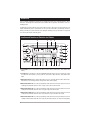
1
Auxiliary Input
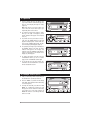
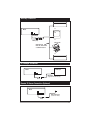
1. Press the “MODE” (13) button until the display
reads “AUX” which indicates that the auxiliary
unit is playing through the M9999 (Figure M).
2. All tonal features (Volume, Bass, Treble, Balance
and Fader) are active when the auxiliary source
is playing.
Figure M (Auxiliary Display)
Specialty Features
Reset Button:
If by chance the function of the front panel becomes
“Locked-Up” (front panel buttons don’t function at
all) or the display area become unreadable, use a
ballpoint pen to press the “Reset” button (Figure N).
Pressing the reset button clears all memory and
resets the display to it’s DEFAULT settings. All recall
buttons will lose their programming and the clock
will lose the set time. All these functions will have to
be reprogrammed.
☛
Figure N (Reset Button)
Mode Button:
The “MODE” button (13) is used to select between
the sound sources: Radio, CD, CD Changer or
Auxiliary Source (Figures O).
Example: If a CD has been inserted, repeated pressing of the “Mode” button will change the sound output from one source to another. The source that is
playing will be indicated in the display area.
☛
Figure O (Mode Button)
Clock Button:
When the unit is on, press the “Clock” (11) button
at any time to display the clock indefinitely
(Figure P). If you tune to another radio station, the
frequency will be displayed for 5 seconds, then
will switch back to the clock. Pressing the “Clock”
button a second time will display the radio frequency indefinitely. This procedure operates the
same in CD mode.
☛
Figure P (Clock Button)
7