1
Contents
Contents
This information is in the release notes:
•
“System Requirements” section on page 2
•
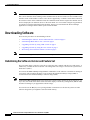
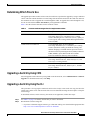
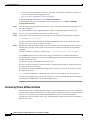
“Downloading Software” section on page 4
•
“Installation Notes” section on page 7
•
“New Features” section on page 13
•
“Limitations and Restrictions” section on page 15
•
“Important Notes” section on page 20
•
“Open Caveats” section on page 22
•
“Resolved Caveats” section on page 26
•
“Documentation Updates” section on page 30
•
“Related Documentation” section on page 30
•
“Obtaining Documentation” section on page 31
•
“Obtaining Technical Assistance” section on page 32
System Requirements
These are the system requirements for this software release:
•
“Hardware Supported” section on page 2
•
“Software Compatibility” section on page 3
Hardware Supported
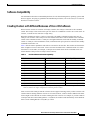
Table 1 lists the hardware supported by this software release.
Table 1
Supported Hardware
Switch
Catalyst 3750G-12S
Description
1
12 small form-factor pluggable (SFP) module slots
Catalyst 3750-24TS
24 10/100 Ethernet ports and 2 SFP module slots
Catalyst 3750G-24T
24 10/100/1000 Ethernet ports
Catalyst 3750G-24TS
24 10/100/1000 Ethernet ports and 4 SFP module slots
Catalyst 3750-48TS
48 10/100 Ethernet ports and 4 SFP module slots
SFP modules
1000BASE-T1, 1000BASE-SX, 1000BASE-LX and 1000BASE-ZX1
Redundant power system
Cisco RPS 300 redundant power system for the Catalyst 3750G-24TS,
3750G-24T, and 3750-48TS switch models (not supported on the
Catalyst 3750-24TS switch)
Cisco RPS 675 redundant power system for the entire Catalyst 3750
switch family
1. New hardware supported in this release
Release Notes for the Catalyst 3750 Switch Cisco IOS Release 12.1(14)EA1
2
OL-4215-01