1
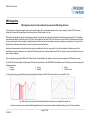
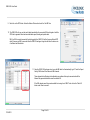
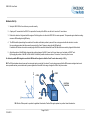
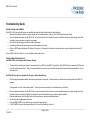
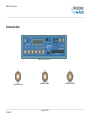
VBOX 3iSL User Guide VBOX 3iSL not responding - GPS Coldstart The GPS engine has locked up. Perform a GPS Engine Coldstart A GPS coldstart forces the GPS engine to reset its downloaded almanac of current satellite positions. This can be useful if a VBOX 3iSL is having trouble locking onto satellites, which typically occurs if a VBOX 3iSL has not been used for several weeks or if it was last used a long distance (over one thousand miles) away from the current location. After performing a GPS coldstart leave the VBOX 3iSL powered up in a static location where the antenna has an unobstructed view of the skies until the „GPS‟ LED becomes solid green. Once the VBOX 3iSL has downloaded the new almanac it will reacquire satellites in noisy situations (such as near trees, buildings and under bridges) much more quickly. It will also acquire satellite much more quickly on power-up. To perform a GPS coldstart on a VBOX 3iSL perform the following actions: Press and hold the „LOG‟ button on the front of the VBOX 3iSL for five seconds until a long beep is sounded. When the button is released the „GPS‟ LED will start to flash red showing that the Coldstart has been performed and the GPS engine is now not locked onto any satellites. After approximately 30-45 secs the „GPS‟ LED will start to flash green indicating that satellite lock has been achieved and indicating the number of satellites that it is locked onto. Page 44 of 53 11/04/2012