1
1.12 Connectors
This section describes and illustrates the internal connectors on the motherboard.
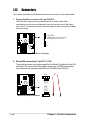
1. Floppy disk drive connector (34-1 pin FLOPPY)
This connector supports the provided floppy drive ribbon cable. After
connecting one end to the motherboard, connect the other end to the floppy
drive. (Pin 5 is removed to prevent incorrect insertion when using ribbon cables
with pin 5 plug).
FLOPPY
P4G800-V
NOTE: Orient the red markings on
the floppy ribbon cable to PIN 1
PIN 1
P4G800-V Floppy Disk Drive Connector
2. Serial ATA connectors (7-pin P31, P30)
These next generation connectors support the thin Serial ATA cables for Serial ATA
hard disks. The current Serial ATA interface allows up to 150 MB/s data transfer
rate, faster than the standard parallel ATA with 133 MB/s (Ultra ATA/133).
GND
RSATA_RXP2
RSATA_RXN2
GND
RSATA_TXN2
RSATA_TXP2
GND
P4G800-V
P31
GND
RSATA_RXN2
RSATA_RXP2
GND
RSATA_TXN2
RSATA_TXP2
GND
P30
P4G800-V SATA Connectors
1-18
Chapter 1: Product introduction