1
I.D. AL - FLASH MPX HD - Full HD video Player - User Manual
FLASH MPX HD
MANUAL
® Waves System
V 1.1 - 2011
I.D. AL - FLASH MPX HD - Full HD video Player - User Manual
Table of contents
A - Safety instructions
B - Product information
1 - Product presentation
2 - Functionnalities
3 - Installation
4 - Operating mode
4.1 - First use
4.2 - Play manually the audio/video files
4.3 - Sleep and waking mode
5 - Configuration
5.1 - RTC - Setup time and date
5.2 - Network - Setup Ethernet parameters
5.3 - Auto Play - Setup autoplay mode
5.4 - Slideshow Time
5.5 - Baudrate - Setup RS232 internal link
5.6 - Resolution - Set video resolution output
5.7 - FTP User
5.8 - Default parameters
6 - Automatic power on/off
7 - Ethernet link
8 - Operating mode and naming of files
9 - RS232 serial link protocol
Annexe A - Specifications
Annexe B - Functions
Annexe C : Type of memory storage
Annexe D : Infra red remote control
1
3
4
4
5
5
5
6
6
7
7
8
8
9
9
9
10
10
11
12
14
18
21
22
23
24
ID-AL products are exclusively manufactured by Waves System
LA VILLE EN BOIS - 44830 BOUAYE - FRANCE
Sales and information: +33 2 40 78 22 44
E-mail : [email protected] - Web site: http://www.id-al.com
Technical department : [email protected]
Technical support :
For a detailed list of the technical support options, we suggest you to visit our site
www.id-al.com.
Information in this manual is subject to change without notice and do not represent any commitment from
Waves System. The equipment described in this manual is supplied under condition of the terms of
license specifying the legal use conditions. This manual can’t be reproduced or used, in whole or in part,
in any form and by any mean, for other use than private, without the written permission from Waves
System.
ID-AL is a trademarks of Waves System.
® Waves System
V 1.1 - 2011
I.D. AL - FLASH MPX HD - Full HD video Player - User Manual
CAUTION! DO NOT EXPOSE TO HUMIDITY & DUST!
Unplug the power supply cable before any servicing
FOR YOUR SAFETY, PLEASE READ THE USER’S GUIDE CAREFULLY BEFORE OPERATING
YOUR PLAYER.
A. SAFETY INSTRUCTIONS
A.1 CE marking
The CE marking is found on the nameplate, at the rear side of the device. It certifies the conformance
of the device with the low voltage CE Directive, according to the EN 55022 standard, and the
Electromagnetic Compatibility Directive 61000-4-x.
A.2 Directives
• The requirements related to the electromagnetic compatibility and low voltages directive are met.
A.3 Overview
• The user manual is an integral part of the product. It must always be kept handy & close by. Proper
usage conforming to the product intended purpose involves strict compliance with the instructions
given in this manual.
In the event of return of the equipment, the user manual should be handed over to the new purchaser.
The staff should receive instructions concerning the proper usage of the device.
• Only usage of genuine parts ensures perfect safety for the user and correct operation of the
device. Moreover, only accessories mentioned in the technical documentation or explicitly approved
by the manufacturer must be used. In the event of usage of accessories or consumable products
from other brands, the manufacturer cannot stand guarantee for the correct and safe operation of
the device.
• Damages caused through usage of accessories or consumable products from other brands will not
entail right to any benefit under the terms of warranty.
• The manufacturer will be liable for the safety, reliability and functioning of the product as long as the
assembly, settings, modifications, extensions and repairs have been carried out by the manufacturer
or a company approved by the manufacturer and if the device is used in accordance with the instructions mentioned in this manual.
• The player complies with the technical safety standards in force at the date of print of this manual.
All rights reserved for the electrical diagrams, procedures, names and devices mentioned herein.
• Any reproduction of the technical documentation, even partially, without the written authorization
from Waves System is prohibited.
A.4 General Safety instructions
This device has been shipped out from our facilities in perfect working condition. In order to preserve
these conditions, for safety and to avoid any risk of accidental bodily injury, the user must
imperatively follow the safety instructions and read the ‘Caution!’ messages included in this manual.
This device, made by Waves System, has been designed in a way that practically eliminates any risk if
it is used in accordance to its intended purpose. Nevertheless, with a concern for safety, we would like
to draw your attention to the following instructions:
• When using the device, comply with all local rules and regulations in force. Any modification or
® Waves System
-1-
V 1.1 - 2011
I.D. AL - FLASH MPX HD - Full HD video Player - User Manual
conversion of the device automatically entails loss of the homologation. The operation of a modified
device is liable to a penalty. In the interest of occupational safety, the operator and the user are held
responsible for complying with the regulations.
• Keep the original packing for a possible product re-shipment. Also ensure to keep the packing material
out of children's reach. Only this original packing ensures optimal protection for the product during
transportation. If a product reshipment appears to be necessary during the guarantee period, Waves
System is not liable for any ensuing damages arising during the transportation and attributable to a
defective packing.
• This device is used to broadcast audio files. It should be used only by persons whose training or
knowledge ensures proper handling.
• Before every use, the operator must check that the device is in perfect working condition.
• This product must not be used in places where there is a potential explosion risk. Besides, it must
neither be used in an environment favouring combustion nor in a humid or excessively hot or cold
location.
A.5 Safety instructions against risks due to electric currents
• The device must be connected to a grounded AC power outlet or a European standard outlet installed
as per good professional practices.
• Before connecting the device, check that the power supply voltage and frequency match the
specifications indicated on the device.
• Before powering, check that the device and cables are not damaged. Damaged cables and connections
must immediately be replaced.
• Never allow the power cords to come in contact with other cables. Handle the power supply cable as
well as all other cables connected to the mains with extreme care.
• Always connect the plug-in connector in the end. Ensure that the On/Off switch is in 'Off' position
before connecting the device to the mains. The mains outlet must remain accessible after the installation.
• Check the device and its power supply cable from time to time. Disconnect the device from the mains
when it is no longer used or for the purpose of maintenance.
• Handle the power cord by using the plug-in connector only. Never remove the plug-in connector by
pulling the power cord.
• Electrical connection, repairs and maintenance must be carried out by qualified personnel.
• Do not switch on or switch off the device within a short span of time as this will reduce equipment life.
® Waves System
-2-
V 1.1 - 2011
I.D. AL - FLASH MPX HD - Full HD video Player - User Manual
A.6 - Terms of use:
• This product has been designed for indoors use only.
• If this device has been exposed to very high temperature fluctuations (e.g.: after transportation), do not
connect it immediately. The condensation formed inside the device could damage it. Allow the device to
attain ambient temperature before connecting it.
• Do not shake the device, avoid sudden movements during its installation or handling.
• When selecting the spot for installation of the player, ensure that it is not exposed to a high source of
heat, humidity or dust. There should not be any cables lying around as they might jeopardise your &
others safety.
B. PRODUCT INFORMATION
B.1 Correct usage
The player is used to broadcast audio/video files automatically.
Correct usage involves compliance with the instructions given in this manual as well as with the
requirements concerning installation.
B.2 Incorrect usage
Any other usage or usage beyond the scope of this application is considered as incorrect usage. The
manufacturer shall not be liable for the damages ensuing from it. The user shall bear full responsibility for
the risks incurred.
B.3 Delivery details
Flash MPX HD player
External power supply
Remote control
User's manual
B.4 Specifications
Audio/video Player model : Flash MPX HD
Nominal electrical values of the power supply connection
Voltage (V) 100 to 240
Frequency (Hz) 50-60
For details see Annex B
B.5 Installation
The device must be installed in a dust free area.
Do not install the device directly against a wall. To avoid overheating, the ventilation openings
must not be blocked. Take care to leave an empty space above the ventilation slits.
B.6 Electrical connection
Before activation, check whether the mains voltage matches with the voltage indicated on the rating
plate.
® Waves System
-3-
V 1.1 - 2011
I.D. AL - FLASH MPX HD - Full HD video Player - User Manual
1 - Product presentation
The Flash MPX HD is an Audio/Vidéo full HD player. The files are stored on an USB device, stick or hard
disk. This standalone player can read files automatically when switch on.
Using the trigger input, you can play the selected files.
With the RS485 link, you will send command to the player. (select folder, play, stop ...)
Flash MPX HD is used in digital signage market or integration projects for museums, exhibitions, retail,
theme parks & tourist attractions…
2 - Functionnalities
Autoplay: Flash MPX HD starts automatically on powering on. This feature can be disabled.
Update :
- Use the USB flash memory on your computer to update the files
Only for the internal hard drive (option) :
- USB link : You can update the hard disk with the USB connector placed in the front face.
Use this port to access the internal Hard Drive only. Use Mini USB to Std USB cable. Connect to PC’s USB
port and turn the player power on. PC will see the player and assign a letter hard drive. Use it to format
the hard drive (FAT or NTFS format) and to copy and delete files in the Hard Drive.
- Ethernet (LAN) link : You can update the hard drive with the Ethernet link.
Connect into the hub of the local area network using Cat5 cable. When using hard drive, the player will
appear on the network. You can copy, edit, delete files and reboot the player through the network.
Vidéo output* :
- HDMI output v1.3 (digital audio and video out) for a TVHD, a HD videoprojector, computer display with
HDMI or DVI input. This output is always on at all video setting.
Use HDMI cable to connect into the HDMI input of the LCD TV monitor. HDMI cable carries the digital Audio
and Video signal. For DVI input, use HDMI to DVI cable adapter.
- YPbPr component video out: This output is always on at all video setting.
Use triple mini jack to 3 RCA cable adapter that is included with the unit. A regular Ipod triple mini jack will
not work because the metal plug is too short. Audio for YPbPr is available on the A/V port. Use a standard
stereo mini jack to 2 RCA.
- A/V port, Composite and audio out: This output is always on at all video setting.
For composite video plus stereo audio use triple mini jack to 3 RCA cable adapter. The triple mini jack is
included with the unit. Composite video is on the RED RCA and the stereo audio is on the Green and Blue
RCA. A regular Ipod triple mini jack will not work because the metal plug is too sho rt. Output is composite
video and 2 RCA audio line out. While booting up, the output is at 576p. You need a monitor that can
automatically switch between PAL/ NTSC. If you are using NTSC monitor, you will not see anything during
booting up.
® Waves System
-4-
V 1.1 - 2011
I.D. AL - FLASH MPX HD - Full HD video Player - User Manual
SPDIF digital audio out:
Digital audio out using TOSLINK fiber optic cable. Connect this into digital audio processor unit using fiber
optic cable. The Flash MPX HD will pass through digital audio including AC3 stereo and Dolby 5.1.
Dry contact inputs: you can connect push buttons, presence, light and smoke detectors, heat sensors,
pressure probes… to the input to trigger the player if a specific event occurs. See the usage description
in this manual. Briefly make contact between one of the 3 inputs and the ground G. You can also combine
the 3 inputs to obtain up to 7 possibilities. It is recommended to use a diodes or external control electronics
or double contact push button
RS485 Serial link: The Flash MPX HD can be operated through a PLC, a computer or a remote control
using the serial link. The player receives information on its Rx input. A specific protocol is provided in this
manual.
If you use RS232 link, you can use a simple RS232->RS485 adaptator
Power supply unit: We recommend to use the PSU supplied with the player. If you want to power your
player from another power supply unit, it must be in 12V DC.
® Waves System
-5-
V 1.1 - 2011
I.D. AL - FLASH MPX HD - Full HD video Player - User Manual
3 - INSTALLATION
5
6
7
8
9
RS485
link
10
1 - On/Off switch
2 - USB device connector to update
internal HDD
3 - Infrared sensor for remote control.
4 - Internal HDD LED
5 - Power LED
4
3
11
12
2
13
1
6 - PSU connector
7 - S/PDIF output
8 - RS485 link
9 - RJ45 Ehernet link
10 - USB Host connector (USB flash
memory drive or USB external HDD)
11 - Audio/vidéo HDMI output
12 - YPbPr video output
13 - Composite and audio output
14 - Digital input
14
Audio
3 (up to 7)
input
12V PSU
Vidéo
USB
drive
Digital input :
- For 3 input, direct link (see picture at left)
- For 7 input, you need to combine the input
with few diodes (see picture at right)
® Waves System
-6-
V 1.1 - 2011
I.D. AL - FLASH MPX HD - Full HD video Player - User Manual
4 - First use
Before to use the Flash MPX HD, you need to make some adjustments like video resolution, network
parameters...
1 - Connect Flash MPX HD on a screen and insert a USB flash drive. Connect PSU and switch on. Power
LED is on and you can see a first welcome page during few seconds. The complete boot is about 30
seconds then another static page is displayed if no file are playing in autoplay mode.
2 - Using remote control, select «setup» and change the parameters you want.
Note : By default, Flash MPX HD is set to 720p. If your screen is not compatible, change the video output
in the setup menu.
In some case, you can’t see the image and you can’t go in the setup menu. You can use the «TV Mode»
key on the remote control to change resolution.
12V PSU
USB flash drivre
Vidéo
Wait page
First welcome page
® Waves System
-7-
V 1.1 - 2011
I.D. AL - FLASH MPX HD - Full HD video Player - User Manual
5 - QUICK START
How to play the first file ?
The Flash MPX HD plays from :
- USB 2.0 memory device such as USB drive, USB External hard drive, memory card reader etc.
- 2.5” SATA laptop/solid state hard drive from the built in 2.5” internal SATA socket.
To automatically play after powering up, the player needs these items in the drive :
1 - At least 1 folder and one file in this folder. File could be Video or Jpeg.
For Autoplay function, the folder name must be «000»
Example : E:\000\file.mpg
2 - The player will not play a file at root folder and the player show a wait page after powering up.
3 - Autoplay setting is ON. If autoplay is OFF, the player will be in manual mode.
Notes:
- The player shipped with autoplay setting On. After powering up, the player should automatically play.
After powering up, a welcome screen saver appears for few seconds and the player will automatically
play the video(s) in the «000» folder of the USB memory.
® Waves System
-8-
V 1.1 - 2011
I.D. AL - FLASH MPX HD - Full HD video Player - User Manual
6 - Play mode
The Flash MPX HD offer 2 play modes. Standard Mode and Fast mode.
With Standard mode, you can use easily the player without any programmation. When you trigger a folder
using an input, you can see a latence (0.5s up to 2s) before to display the first image.
With fast mode, you can start a video without latence but you need to prepare a special video file and a
config file.
6.1 - STANDARD MODE
6.1.1 - Operating mode and naming of files
The file names and folders define the playback mode. The files must be stored according to a specific
organisation described below.
- Organisation of the folders:
Only ONE folder level is allowed at the root. The folder names are made of 3 digits (000 to 127) followed
by optional parameters and a name of your choice.
Example :
001
003 [J002]
034 folder name
125 [SEQ] my folder
●
The first three digits represent the folder Number and thereby its main name.
Example :
000 : Folder N°000 - "Autoplay" folder which is automatically played when the device is powered-on
001 : Folder N° 001
034 : Folder N° 034
The folder number is used to define the playback sequence, it identifies the folder when a folder jump is
required and on triggering of an input. You can use any number between 000 & 127.
IMPORTANT: The 3 input contacts allow trigger of folders identified by these 3 digits, as per a binary
sequence from 001 to 007.
Input 1 : Folder 001
Input 2 : Folder 002
Input 3 : Folder 004
Input 1 + 2 : Folder 003
Input 1 + 3 : Folder 005
Input 2 + 3 : Folder 006
Input 1 + 2 + 3 : Folder 007
® Waves System
-9-
V 1.1 - 2011
I.D. AL - FLASH MPX HD - Full HD video Player - User Manual
The simultaneous use of several input contacts offers up to 7 different combinations. No. 001 to 007
corresponds to the 3 input contact combinations.
Special case: Folder 000 is the folder which will be played by default on powering on. On powering on,
presence of this folder is checked ; if it is present, the player plays files of this folder. If this folder is
missing, the player wait and display a wait screen.
6.1.2 - Optional parameters (standard mode)
To modify the behaviour of the player, you can add optional parameters to the folder name. These
parameters are boxed with the "[" "]"symbols. You can add several parameters to the folder name.
[Jxxx] - Jump to another folder after reading the current folder.
[RND] or [SEQ] - Specifies random or sequential playback mode for the current folder.
[Vxx] - Controls the volume level of the folder.
[NT] - Define the interruption mode (Interruption or no interruption)
Note: If no optional parameter has been indicated, the player reads in alphanumerical the
current folder in full and stops. Player can be interrupted.
●
[Jxxx] - Names the folder Number to JUMP to after reading the current folder.
By adding this parameter to the folder name after the folder Number, you define the behaviour of the
player after reading the current folder so that it starts reading another folder or loop in this folder.
Example:
001 [J000]: Jump to folder 000 (Autoplay folder) after reading folder 001
002 [J003]: Jump to folder 003 after reading folder 001
000 [J000]: Jump to folder 000 after reading 000 -> Loops in folder 000
Jxxx : xxx = 000 to 127
If this parameter is missing, after playing all files, player wait and display a wait screen.
●
[SEQ] or [RND] - Specifies Sequential or Random playback mode for the current folder.
Default is Random mode.
Example:
001 [SEQ]: SEQ for Sequential alphanumerical order
By choosing [SEQ] you select sequential mode. Sorting is done in alphanumerical order of file names
® Waves System
- 10 -
V 1.1 - 2011
I.D. AL - FLASH MPX HD - Full HD video Player - User Manual
Example:
001 [RND]: RND for Random order
By choosing [RND] you select Random mode. The files are not read again as long as all the files have not
been read at least once. This information is not stored during a folder jump.
Without this parameter, the default mode is the random mode SEQ.
●
[Vxx] - Sets the volume level of the folder
The name of the folder can include parameter to set the audio volume.
Example:
001 [V05] : Fix the volume to value 05
001 [V31] : Fix volume to maximum - Value 31
001 [V00] : Fix volume to minimum (mute) - Value 00
Fix the volume output when player start to read the folder
●
[NT] - This option defines the interruption mode of the current folder
If these options are registered in the folder name, the file cannot be interrupted and commands received
are ignored or executed.
Without this option, reading of the current folder/file can be interrupted at any time by an
external action. (input, RS485 ...)
Example:
001 [NT] - The folder is NOT interruptible.
In that case, an action on one of the input contacts or RS485 link is ignored and the reading of the current
file is not stopped. Caution! The action is not memorised and the triggering information is lost.
●
Specific behaviour :
- If an action refers to a folder which is absent, the command is ignored.
- If an empty folder (no file) is called but the folder name includes an option, this option will be executed.
If no option is indicated, the player goes to wait mode and display a wait screen.
® Waves System
- 11 -
V 1.1 - 2011
I.D. AL - FLASH MPX HD - Full HD video Player - User Manual
6.2 - FAST MODE
6.2.1 - Operating mode and naming of files
- In this mode, the player will play a video segment instantly when an input is triggered.
- The player will play only a single file in the root, it will not play multiple files.
- After powering up, the player will seamlessly loop line 000 (see line 000 explanation below).
If you have a number of files that you want t o play using the input, use your video editing software to
combine these files together to create a new single file. This single file is basically a compilation of many
files (video segments) where each video segment is represented by playtime in seconds. You can then
assign different input to play these differe nt video segments.
You can start a segment using external input 1 to 7, using RS485 protocol from 0 to 9 or using
remote control (0 to 9)
Example: Suppose you have 4 different files, one in loop mode and 3 with trigger input:
Garden.mpg - 100 seconds long (loop file)
Fruit.mpg - 40 seconds long (input 1)
Vegetable - 120 seconds long (input 2)
Flower.mpg - 60 seconds long (input 3)
Use your video software editing program to combine these 4 files and create a single file e.g. Myvideo.mpg.
Inside this file, you actually have 4 video segments: Garden, Fruit, Vegetable, Flower.mpg. Total playtime
of this Myvideo.mpg is 100+40+120+60= 320 seconds long.
Jardin.mpg
Fruits.mpg Vegetable.mpg
Flower.mpg
Total = 320 seconds
Note:
When creating the new single file video, end each segment of the video into the nearest full second by
adding black screens.
Example :
If the original Garden.mpg is only 99.3 seconds, end this Garden.mpg segment at 100 seconds by adding
0.7 seconds of black screens. This segment is 100 seconds and starts at 0 sec and ends at 100
seconds.
After powering up, the player will seamlessly loop this Garden.mpg.
- If the original Fruit.mpg is only 39.7 seconds, end this Fruit.mpg segment at 40 seconds by adding 0.3
seconds of black screens. This segment is 60 seconds and starts at 100 sec and ends at 160 seconds.
- Same for the other segments.
® Waves System
- 12 -
V 1.1 - 2011
I.D. AL - FLASH MPX HD - Full HD video Player - User Manual
And here is an example of the memory card in fast mode:
Example USB drive:
Myvideo.mpg
fastmode.txt
And here is the content of the fastmode.txt:
000=00,100
001=100,140
002=140,260
003=260,320
Explanation:
If fastmode.txt is present, player is in Fast Mode (important: lower case letters only)
000=00,100
000 is the main loop file. This line 000 will automatically loop after powering up. (-> Garden.mpg)
The player will automatically loop line 000 after powering up. It will loop between 0 secs and 100 secs.
Input 000 plays from 0 sec to 100 seconds, total playtime is 100 seconds.
001=100,140
If input 1 is triggered, player will instantly jump to 100 second and play to 140 second. At 140 secs, player
will return to loop line 000. Input 1 plays from 100 sec to 140 seconds, total playtime is 40 seconds.
002=140,260
If input 2 is triggered, player will instantly jump to 140 second and play to 260 second. At 260 second
player will return to loop line 000. Input 2 plays from 140 sec to 260 seconds, total playtime is 120
seconds.
003=260,320
If input 3 is triggered, player will instantly jump to 260 second and play to 320 second. At 320 second,
player will loop back line 000. Input 3 (combine 1 + 2) plays from 260 sec to 320 seconds, total playtime
is 60 seconds.
6.2.2 Optional parameters (Fast mode)
- If input does not have any code, the player will play this input from start to endtime and automatically
return to line 000.
- If the input has code X, then after playing from start to endtime it will pause and wait for another input.
It will not return to play line 000.
- If the input has code N, it will play with No Interruption. While playing it will ignore other input.
After playing from start to endtime, the player will automatically return to play line 000.
- If the input has code L it will LOOP this video segment from start to endtime.
® Waves System
- 13 -
V 1.1 - 2011
I.D. AL - FLASH MPX HD - Full HD video Player - User Manual
Another sample fastmode.txt in fast mode using input codes X,N and L:
000=00,100
001=100,300
002X=300,620
003N=620,820
004L=820,9000
Explanation:
000=00,100
The player will automatically loop line 000 after powering up. Playtime is 100 seconds.
001=100,300
If input 1 is triggered, player will instantly jump to position 100 second and start play. At position 300
second, player will return to loop line 000. Playtime is 200 seconds.
002X=300,620
If input 2 is triggered, player will instantly jump to 300 second, start play and then PAUSE at 620 second,
Player DOES not return to line 000, it will pause and wait for another input. While waiting it will show the
last frame (code X). Playtime is 320 seconds.
003N=620,820
If input 3 is triggered, player will instantly jump to 620 second and play to 820 second. While playing,
player will ignore other input (N is no interrupt). At 820 second, player will jump back to loop line 000.
Playtime is 200 seconds.
004L=820,9000
If input 4 is triggered, player will instantly jump to 820 and play to 9000 and then return to 820 to loop input
4. (L is loop). Playtime is 8180 seconds.
NOTE: Use IR remote control key to test the input. Press key 1 to test input 1 etc.
® Waves System
- 14 -
V 1.1 - 2011
I.D. AL - FLASH MPX HD - Full HD video Player - User Manual
7 - RS485 serial link protocol
The player can communicate with other devices. It receives commands on the Rx input.
The player complies with the RS485 norm.
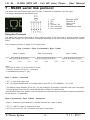
1 - +12V
2 - RX3 - RX+
4 - Ground / 0V
5 - Not connected
6 - Not connected
Baudrate: 9600
Data bits: 8
Parity: none
Stop bit:1
Handshaking: none
Reception Protocole
The player can receive commands to start reading a folder. If the same link is used to control several
players, each player will only execute commands addressed to its own number, allocated in the Option
menu.
The reception protocole is made of a 3 bytes frame.
Byte 1 (status) + Byte 2 (command) + Byte 3 (data)
Byte 1 (status)
Byte 2 (command)
Byte 3 (data)
Note :
- One byte is 8 bits : b7 b6 b5 b4 b3 b2 b1 b0
- A binary symbol for 8 bits is : xxxxxxxxb
- A Hexadecimal symbol is : xxh
Byte 1 : Status - 1xxxxxxxb
> b7 = 1: refer to a status byte
> b6 - b0: player identification to be addressed to from 001 to 127 (000001b - 1111111b)
- The default player address (ID) is 001. You can change it by sending a speciifc code (see next page).
- Several players may have the same identification number to create groups.
- Identification 000 is the "global" code, all players are concerned by the command (unique command for
all the players, «broadcast»).
Byte 2 (Command) + Byte 3 (Data) - 0xxxxxxxb
- Byte 2: command (command byte is always followed by a byte of data).
> b7 = 0 : refer to a byte of command or data
> b6, b5, b4, b3, b2, b1, b0 : command code sent to the player
® Waves System
- 15 -
V 1.1 - 2011
I.D. AL - FLASH MPX HD - Full HD video Player - User Manual
List of commands:
●
00000000b (00h) : not used
●
00000001b (01h) : Jump to a folder (standard mode) or a segment (fast mode) and Play
- Standard mode : Jump to a folder
With this command you can select and play 128 differents folder (000 to 127). When a jump command is
received, the player select the folder and play the first file. The optionnal paramaters in the name of the
folder are used. (SEQ or RND, Jump, volume ....)
Byte 3 = folder name:
00000000b (00h) : Folder = 000 (Autoplay folder)
00000001b (01h) : Folder = 001
01111111b (7Fh) : Folder = 127
Example of a frame to jump and play folder 001 :
Byte 1: 10000001b (81h) : status byte, player ID 001
Byte 2 : 00000001b (01h) : Jump command
Byte 3 : 00000001b (01h) : Jump and play folder 001
- Fast mode : Jump to a segment
The segment is defined in the fastmode.txt file.
With this command you can select and play 10 differents segments. When a jump command is received,
the player select the segment set in the fastmode.txt file.
Byte 3 = segment name :
00000000b (00h) : Segment 000 (Autoplay segment)
00000001b (01h) : Segment 001
00000010b (02h) : Segment 002
Example of a frame to jump and play segment 009 :
Byte 1: 10000001b (81h) : status byte, player ID 001
Byte 2 : 00000001b (01h) : Jump command
Byte 3 : 00001001b (09h) : Jump and play segment 9
●
00000010b (02h) : Transport bar command
The function is defined by the byte of data as follows:
- Standard mode :
Value of data for byte 3:
00000001b (01h) : Play file from the beginning
00000010b (02h) : Stop
00000011b (03h) : Next file from current folder
00000100b (04h) : Previous file from current folder
00000101b (05h) : Pause / Play the current file at current position
® Waves System
- 16 -
V 1.1 - 2011
I.D. AL - FLASH MPX HD - Full HD video Player - User Manual
Example to play the current folder:
Byte 1: 10000001b (81h) : status byte, player ID 001
Byte 2 : 00000010b (02h) : Transport bar command
Byte 3 : 00000001b (01h) : Play command
- Fast mode :
Value of data for byte 3:
00000001b (01h) : Play file from the beginning
00000010b (02h) : Stop
Example to play the current folder:
Byte 1: 10000001b (81h) : status byte, player ID 001
Byte 2 : 00000010b (02h) : Transport bar command
Byte 3 : 00000001b (01h) : Play command
●
00000011b (03h) : setting of volume
Value is defined by the following data byte:
Values of data for byte 3 included between 0 and 31
00000000b (00h) : Mute (0)
00100000b (1Fh) : Volume maximum (31)
Note : Any other value will be ignored
Example of a frame to fix the volume at 16 :
Byte 1: 10000001b (81h) : status byte, player number ID 001
Byte 2 : 00000011b (03h) : Setting of volume
Byte 3 : 00010000b (10h) : Volume at 16
●
01111111b (7F) : Setting the ID of the player
The ID is defined by the byte of data as follows:
Values of data for byte 3 included between 1 and 127
00000001b (01h) : ID = 001
01111111b (7Fh) : ID = 127
Note : Any other value will be ignored
Example to change the ID of the player from 001 to 002 :
Byte 1: 10000001b (81h) : status byte, player ID 001
Byte 2 : 01111111b (7Fh) : Setting the new ID of the player
Byte 3 : 00000010b (02h) : New ID of the player = 002
Note : If you don’t remember the ID of the player, use ID=000 in the status byte (broadcast) to change the
ID of the player.
® Waves System
- 17 -
V 1.1 - 2011
I.D. AL - FLASH MPX HD - Full HD video Player - User Manual
8 - Ethernet link
Via the Ethernet link, the Flash MPX HD communicates to update content via network. (Samba)
Caution! Network administration requires good computer skills.
In a local network installation, the player requires an IP address. This address is set in the Option menu
(see option menu chapter). The player is then recognised on the network.
Copy files from computer to Flash MPX HD through network:
To copy files from your computer directly into the player through the network, you need to install the
internal hard drive and format it using the player.
Use the HD format utility that is available from the main menu > System > HD format.
After finish formatting, restart the player. It will now appear on the windows network.
You can copy, delete and edit files into the player and restart the player.
You can also copy, delete and edit any file even while the player is playing the same file. The changes
you made will only take effect after you restart the player.
NOTE: Do not overwrite a file. To copy a file with the same name delete it first and then copy.
® Waves System
- 18 -
V 1.1 - 2011
I.D. AL - FLASH MPX HD - Full HD video Player - User Manual
9 - Configuration
You can change the parameters in the setup menu of the Flash MPX HD
Press «setup» key from the remote control.
Note : To navigate into the menu, use the arrow keys.
9.1 - Audio Menu:
To adjust audio parameters (analog and digital output).
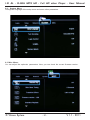
9.2 - Video Menu :
In this menu you can change brightness, contrast, video output ....
® Waves System
- 19 -
V 1.1 - 2011
I.D. AL - FLASH MPX HD - Full HD video Player - User Manual
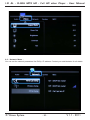
9.2 - Network Menu :
You can set the network parameters like DHCp, IP address. Contact your administrator for all details.
® Waves System
- 20 -
V 1.1 - 2011
I.D. AL - FLASH MPX HD - Full HD video Player - User Manual
9.2 - System Menu:
Change the language of the setup menu and some other parameters.
9.3 Misc Menu:
You can adjust few optionals parameters. Here, you can check the current firmware version.
® Waves System
- 21 -
V 1.1 - 2011
I.D. AL - FLASH MPX HD - Full HD video Player - User Manual
Annexe A - Specifications
• Power supply : 12V DC
• Comsuption : 800mA
• Size :
Width : 158mm - Height : 30mm
Depth without connector : 110mm
Weight : 320g
• Connectors :
- Audio/Vidéo :
1 x HDMI 1.3 out - type A (Digital Audio + Video)
1 x YPbPr Video out (Mini jack 3.5mm 4 points)
1 x Audio line out + composite video out (Mini jack 3.5mm 4 points)
- Network :
1 x Port LAN RJ45 - Ethernet 10/100 Mbit/s compatible DHCP and fix IP
- Infrared remote control
- External media :
1 x Host USB - type A - USB 1.1 and 2.0 compatible
- Internal media :
1 x 2,5’’ SATA Hard Disk
- Volume :
Using remote control : 00 to 32
- LED
Red : Power supply
Green : Internal HDD activity
® Waves System
- 22 -
V 1.1 - 2011
I.D. AL - FLASH MPX HD - Full HD video Player - User Manual
Annexe B - Functions
Video output :
• SD PAL/576p - 720x576 - 50i/25p (4:3 and 16:9)
• SD NTSC/480p - 720x480 - 60i/30p ips (4:3 and 16:9)
• HD 1280x720 - 24p/30p (720p)
• HD 1920x1080 - 60i/50i/24p/30p (1080i / 1080p)
Type of extentions :
• .avi .mpg .mpeg .mov .mp4
• .mp3 .wav .ogg .aac .mkv, jpeg, jpg, bmp, png, tif, gif
Files supported :
• AVI (Video For Windows / Avi, DivX)
• MOV (QuickTime File Format - AVC / H.264)
• MPEG-1/2
• MPEG-2 Program Stream (VOB)
• MPEG-2 Transport Stream (TS, TP, M2TS, VOB, MTS)
• MP4 (MPEG-4, Xvid)
• WAV (Audio for Windows)
• MP3 (MPEG Layer 3)
• AAC (Advanced Audio Coding / aac, mp4)
• MKV (Matroska)
• OGG (Vorbis / ogg)
• JPEG (Joint Photographic Expert Group / JPEG, JPG)
• BMP (Bitmap File)
• PNG (Portable Network Graphics)
• TIFF (Tagged Image File format)
• GIF (Grpahic InterChange Format)
Video CODEC :
• MPEG-1
• MPEG-2 SD/HD
• VC-1
• MPEG-4 ASP (DVIX / XVID)
• MPEG-4 AVC
• H.264
We recommand to not use bit rate over 25 Mbit/s.
Audio CODEC :
• MPEG layer 1 et 2
• MP3 (MPEG layer 3), 44.1/48KHz de 32kbit/s à 320kbit/s CBR/VBR
• AAC (Advanced Audio Coding)
• LPCM (Linear Pulse Code Modulation)
• AC3 (Stéréo, 5.1, 7.1 / DTS)
• OGG (Vorbis 32/44.1KHz de 48kbit/s à 192kbit/s CBR/VBR)
• FLAC (Free Lossless Audio Codec)
Subtitles :
SRT, SMI, SSA, SUB
® Waves System
- 23 -
V 1.1 - 2011
I.D. AL - FLASH MPX HD - Full HD video Player - User Manual
Annexe C : Memory Storage
Média :
• SD card : SD/SDHC - Use Class 4 for for HD files
• USB Flash memory (stick) compatible USB 1.1 and USB 2.0
• USB External Hard Drive compatible USB 2.0
• USB Card reader 100% compatible "Mass storage" USB 1.1 et USB 2.0 to use CF/MMC/MS Pro
• 2.5’’ SATA I / II Hard Disk (internal)
*** Only internal HDD are available on SAMBA server to use on the network.
Operating system :
FAT32, NTFS and EXT3 with long names and UTF8
Type
Files > 4Go
Windows
Mac OS
Linux
FAT32
NTFS
EXT3
No
Yes
Yes
Yes
Yes
No
Yes
Yes
No
Yes
Yes
Yes
® Waves System
- 24 -
V 1.1 - 2011
I.D. AL - FLASH MPX HD - Full HD video Player - User Manual
Annexe D - Remote control
Key
Function
Power
Title
INFO
Mute
1
2
3
4
5
6
7
8
9
0
Repeat
Time seek
TV mode
Home
Menu
Slow
Setup
Zoom
Vol +
Vol Up Arrow
Down Arrow
Left Arrow
Right Arrow
OK
Audio
Subtitle
Resume
Angle
Pause
Return
Stop
Rwd
Fwd
Prev
Next
ON/OFF
Not used
Not used
Mute
Input 1
Input 2
Input 3
Input 4
Input 5
Input 6
Input 7
Input 8
Input 9
Input 0
Not used
Not used
Video output
Not used
Not used
Slow 3/4x, 1/2x, 1/4x, 1/8x, 1/16x
Setup Menu
Not used
Volume +
Volume Up
Down
Left
Right
OK
Not used
Not used
Not used
Not used
Pause
Return
Stop
Rewind
Fast forward
Previous file
Next file
® Waves System
- 25 -
V 1.1 - 2011
I.D. AL - FLASH MPX HD - Full HD video Player - User Manual
http://www
.id-al.com
http://www.id-al.com
® Waves System
V 1.1 - 2011