1
Commissioning Manual
intelligent Touch Manager
Model
DCM601A51
MONITOR
LAN SW
FRONT BACK
SERVICE LAN
ON
SLAVE
OFF
MASTER
CPU ALIVE LAN LINK DⅢ MONITOR
DⅢ MASTER
BACKUP
RESET
Contents
System Overview.............................................................................4
1. About the iTM (intelligent Touch Manager).......................................................4
1-1 System Configuration.......................................................................................................... 4
2.Engineering.........................................................................................................5
2-1 Engineering Workflow.......................................................................................................... 5
2-2 Logging into Service Mode.................................................................................................. 7
Names and Functions.....................................................................9
3. Detailed Screen Description..............................................................................9
3-1 Setup Screen Structure....................................................................................................... 9
3-2 Service Settings Tab.......................................................................................................... 10
3-3 System Settings Tab.......................................................................................................... 12
Basic Functions.............................................................................13
4. Service Settings................................................................................................13
4-1 Mgmt. Point Data Regist.................................................................................................... 13
•• Registering a management point with the iTM unit........................................................ 14
•• Detailed Mgmt. Point Attributes screen and button descriptions.................................... 21
•• Registering management points using a CSV file.......................................................... 33
4-2 Other Setting..................................................................................................................... 38
4-3 DIII-NET Engineering........................................................................................................ 39
4-4 Time Zone......................................................................................................................... 41
4-5 Changeover Option............................................................................................................ 41
4-6 History Mgmt. (Delete)....................................................................................................... 43
4-7Pre-engineering................................................................................................................. 44
•• Displaying the main screen............................................................................................ 46
•• Scenario 1: Installation to new property......................................................................... 48
•• Scenario 2: Maintenance of existing property
(When carrying out pre-engineering using the current setting)................... 52
•• Scenario 3: Restore with existing property’s backup data.............................................. 54
•• Scenario 4: Implementation of new functions due to existing property’s upgrade......... 55
1
Commissioning Manual EM11A021
DCM601A51 intelligent Touch Manager
4-8Upgrade............................................................................................................................. 55
4-9Backup............................................................................................................................... 56
4-10Installation....................................................................................................................... 58
4-11 Contact Info..................................................................................................................... 60
4-12 Setting outdoor unit......................................................................................................... 62
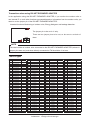
•• Precautions when using DIII-NET EXPANDER ADAPTER............................................ 63
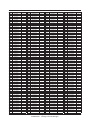
•• Table of types................................................................................................................. 63
4-13 Leakage Check............................................................................................................... 69
•• Preparations................................................................................................................... 70
•• Registering indoor units................................................................................................. 70
•• Running Leakage Check by Schedule Control.............................................................. 72
•• Copying a schedule program......................................................................................... 74
•• Starting Leakage Check by manual operation............................................................... 75
•• Stopping Leakage Check by manual operation............................................................. 76
•• Outputting the Leakage Check results to a CSV file...................................................... 77
•• Conflict with other controls............................................................................................. 79
•• Failure mode.................................................................................................................. 81
Optional Functions........................................................................84
5. Service Settings................................................................................................84
5-1Activation........................................................................................................................... 84
•• Acquiring the Activation key........................................................................................... 84
•• Entering the Activation key............................................................................................. 84
5-2 Dealer Option Setup.......................................................................................................... 86
Operating Optional Functions......................................................87
6. System Settings................................................................................................87
6-1Network............................................................................................................................. 87
6-2 Web Remote Management................................................................................................ 90
•• Connecting the PC and iTM........................................................................................... 91
•• Checking the Web browser and Flash Player versions.................................................. 92
•• Setting up the IP address (Windows XP Professional).................................................. 93
•• Setting up the IP address (Windows Vista Business).................................................... 97
•• Setting up the IP address (Windows 7 Professional)................................................... 101
•• Precautions when using Internet Explorer on Windows Vista and Windows 7............ 104
•• Network Connection Check......................................................................................... 105
Commissioning Manual EM11A021
DCM601A51 intelligent Touch Manager
2
•• Logging into Service Mode via Web Remote Management......................................... 108
iTM integrator Explanation........................................................109
7. iTM integrator..................................................................................................109
7-1 Basic Setup..................................................................................................................... 109
7-2 iTM integrator Service Settings....................................................................................... 114
•• Service Settings Tab (Menu List Screen)..................................................................... 115
•• Controller Access Setup.............................................................................................. 116
Appendix......................................................................................120
8. Useful Information..........................................................................................120
8-1Troubleshooting............................................................................................................... 120
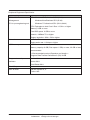
9. Hardware Specifications................................................................................122
9-1 iTM Hardware Specification............................................................................................. 122
3
Commissioning Manual EM11A021
DCM601A51 intelligent Touch Manager
System Overview
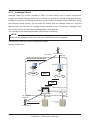
1. About the iTM (intelligent Touch Manager)
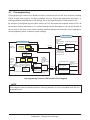
1-1 System Configuration
Web Remote Management
Web Remote Management possible from networkconnected PC
Simultaneous login of max. 4 managers and 16
users supported.
Intranet/Internet
Web Remote Management
ROUTER
Up to 64 groups
HUB/SWITCH/ROUTER/....
LAN port
D3net port
Up to 7
RS485
(Expansion adapter port)
iTM
iTM
plus adaptor
iTM
plus adaptor
iTM
plus adaptor
USB port
D3net
Di/Pi port
USB memory
Di/Pi port
Port 1: Emergency Stop signal input
Port 2~4: Power meter pulse input
Input signal (contact) such as
power outage signal
Port 1~4:
Commissioning Manual EM11A021
DCM601A51 intelligent Touch Manager
Emergency Stop signal input
Power meter pulse input
Input signal (contact) such as
power outage signal
4
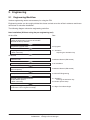
2. Engineering
2-1 Engineering Workflow
Various engineering works are necessary for using the iTM.
Engineering works can be roughly divided into those carried out at the office in advance and those
carried out on site after installation.
The following diagram shows the engineering workflow.
New installation (Without using the pre-engineering tool)
At the office
See:
Prepare various information.
Check the equipment to connect to DIII-NET.
Allocate the Group Address.
Acquire the upgrade data.
4-8 Upgrade
Acquiring the Activation key
* When necessary
5-1 Activation
Acquiring the Activation key
At the site
5
Install the iTM.
Installation Manual (EM11A016)
Install the upgrade data.
4-10 Installation
Make basic settings.
(Boot sequence)
Installation Manual (EM11A016)
Set up “Main” and “Sub”.
4-3 DIII-NET Engineering
Activate optional maker functions.
Enable dealer options.
* When necessary
5-1 Activation
Entering the Activation key
5-2 Dealer Option Setup
Register management points and Layout View.
(Load from CSV or register manually)
4-1 Mgmt. Point Data Regist
Commissioning Manual EM11A021
DCM601A51 intelligent Touch Manager
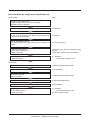
New installation (By using the pre-engineering tool)
At the office
See:
Prepare various information.
Check the equipment to connect to DIII-NET.
Allocate the Group Address.
Acquire the upgrade data.
4-8 Upgrade
Back up the iTM data.
*In the case of maintenance (When pre-engineering by
using the current settings)
4-9 Backup
Set up management points.
(Pre-engineering tool, spreadsheet such as Microsoft
Excel)
4-7 Pre-engineering
Create the Layout View.
(Layout View creation tool)
* When necessary
Commissioning Manual Supplementary
Volume
Layout View Creation Tool (EM11A024)
Acquiring the Activation key
* When necessary
5-1 Activation
Acquiring the Activation key
At the site
Install the iTM.
Installation Manual (EM11A016)
Install the upgrade data.
4-10 Installation
Make basic settings.
(Boot sequence)
Installation Manual (EM11A016)
Set up “Main” and “Sub”.
4-3 DIII-NET Engineering
Install pre-engineering data and Layout View data.
4-10 Installation
Activate optional maker functions.
Enable dealer options.
* When necessary
5-1 Activation
Entering the Activation key
5-2 Dealer Option Setup
Commissioning Manual EM11A021
DCM601A51 intelligent Touch Manager
6
2-2 Logging into Service Mode
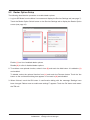
To run engineering, you must log into the Service (SE) Mode from the Menu List screen.
In the SE Mode, the Service Settings tab, which is normally hidden, is displayed on the Menu List.
Also, special buttons available only in SE Mode are displayed on the tabs.
The following describes how to log into the SE Mode.
1. Display the Menu List screen.
(3)
(1)
(2)
(4)
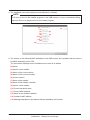
2. Touch the four corners of the screen in the indicated order. The Password Input dialog appears.
3. Enter the service password (daikin) and touch the OK button to log into the SE Mode.
7
Commissioning Manual EM11A021
DCM601A51 intelligent Touch Manager
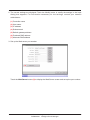
Furthermore, if the screen is locked, entering the service password instead of the administrator
password after carrying out the special operation indicated below, allows you to unlock the
screen and log into the SE Mode.
(3)
(1)
(2)
(4)
Commissioning Manual EM11A021
DCM601A51 intelligent Touch Manager
8
Names and Functions
3. Detailed Screen Description
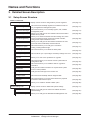
3-1 Setup Screen Structure
Basic Functions
Service Settings Tab
(See page 10.)
A/C Auto Regist
This function automatically registers air conditioners that are
not yet registered as management points
(See page 10.)
Mgmt. Point Data Regist
This function allows you to manually register, edit, or delete
management points
(See page 13.)
Other Setting
Allows you to configure the error detection level and enable or
disable the Dry mode
(See page 38.)
DIII-NET Engineering
Allows you to switch the master and slave settings and, when
used in conjunction with an upper level central controller,
configure the setpoint limitation function
(See page 39.)
Time Zone
Allows you to configure the time difference between the UTC
(Universal Time Coordinated) and the local time
(See page 41.)
Changeover Option
This function allows you to configure or cancel the
cooling / heating selection right
(See page 41.)
History Mgmt. (Delete)
This function allows you to delete the history data
(See page 43.)
Pre-engineering
This tool allows you to preconfigure necessary settings on the PC
(See page 44.)
Upgrade
Allows you to write a new system file for upgrade
(See page 55.)
Backup
This function allows you to read the current system file and
configuration data
(See page 56.)
Installation
This function allows you to install the data for upgrade or
restoration
(See page 58.)
Contact Info
Configure the contact information for inquires about system
errors or other problems
(See page 60.)
Setting outdoor unit
Configure the model type of the outdoor unit
(See page 62.)
Leakage Check
This function automatically detects refrigerant leak
(See page 69.)
Activation
This function allows you to enter the Activation key required
to activate a manufacturer option
(See page 84.)
Dealer Option Setup
Allows you to enable or disable a dealer option
(See page 86.)
System Settings Tab
9
Displays a list of functions configurable by service engineers
Displays a list of functions related with system settings
(See page 12.)
Network
Allows you to configure the network IP address and other
related settings
(See page 87.)
Web Remote Management
Allows you to configure the Web Remote Management user
(See page 90.)
Commissioning Manual EM11A021
DCM601A51 intelligent Touch Manager
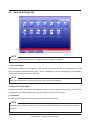
3-2 Service Settings Tab
(1)
(2)
(3)
(4)
(5)
(6)
(8)
(9)
(10)
(11)
(12)
(13)
(7)
NOTE
The button of an optional function is hidden unless the option is enabled.
(1) A/C Auto Regist
Automatically registers as management points those air conditioners that are connected to the iTM
but not registered as management point. The air conditioner icons to be displayed on the Standard
View screen are also set up automatically.
NOTE
Automatic registration is supported only for indoor units and Ventilator.
(2) Mgmt. Point Data Regist
Registers, modifies, and deletes management points to be operated/controlled using the iTM. The
management point data can also be input from/output to a file in CSV format.
(3) Activation
Enables optional maker functions based on entered Activation keys.
NOTE
Optional maker functions refer to the Power Proportional Distribution and Energy Navigator
functions.
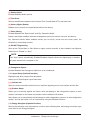
Commissioning Manual EM11A021
DCM601A51 intelligent Touch Manager
10
(4) Dealer Option
Enables/Disables dealer options.
(5) Time Zone
Sets up the difference between the Universal Time Coordinated (UTC) and local time.
(6) History Mgmt. (Delete)
Deletes history records of a specified period from the history.
(7) Other Setting
Enables/Disables the “Detect Level” and “Dry Operation Mode”.
Detect Level: When enabled, indicates management point error alarms via icons and history.
Dry Operation Mode: When enabled, allows you to set Dry mode from the touch panel, the
Schedule or Interlocking function.
(8) DIII-NET Engineering
Sets up the iTM as Main or Sub. When an upper central controller is also installed, sets Setpoint
Restriction to “Enable” or “Auto”.
NOTE
The “Auto” option automatically Enables/Disables Setpoint Restriction depending on whether
an upper central unit is installed or not.
(9) Changeover Option
Enables/Disables the Changeover Option for an air conditioner.
(10) Layout Setup (Optional function)
Displayed only when Layout View data exists.
Allows you to Enter/Output Layout View data.
(11) Contact Info
Sets up contact information (three lines) for inquiries regarding errors in the system and the like.
(12) Outdoor Setup
Allows you to manually register the indoor units that belong to the refrigeration system of each
outdoor unit based on the indoor and outdoor unit’s installation information.
Also, allows you to automatically check leakage for each refrigeration system in a multi-refrigeration
system. You can also make it run at a set time by using the Schedule function.
(13) Energy Navigator (Optional function)
Sets up the reference room temperature, month to start collecting data, and energy conversion type
to be used by the Energy Navigator.
11
Commissioning Manual EM11A021
DCM601A51 intelligent Touch Manager
3-3 System Settings Tab
(1)
(2)
(3)
(1) Network
Sets up the network IP addresses as well as the Web Servers.
(2) Web Access Users
Sets up Web users for Web Remote Management.
(3) Backup
Allows you to export the system file and setup data.
Commissioning Manual EM11A021
DCM601A51 intelligent Touch Manager
12
Basic Functions
4. Service Settings
4-1 Mgmt. Point Data Regist
Register, modify, and delete management points to be controlled using the iTM. Management points can be
registered in two ways: directly with the iTM unit, or by editing a CSV file on a PC and loading it to the iTM unit.
The figure below shows the flowchart of a management point registration.
Preparation
Operation (Control/Check)
When creating management
point data after installing iTM
When installing iTM after creating
management point data
Workflow
Install iTM and equipment
in the site
Control and monitor
equipment based on
the registered
management point data
Start up iTM and auto
recognize A/C
Output CSV file with
management point data
to register management
points other than A/C
Operation (Update)
Replace A/C and register
management points
using auto recognition
Replace or add A/C
and/or equipment,
and output CSV
file, and register
management point
data
Edit the CSV file and
create the management point data
Merge the created
management point data
in the CSV file with that
on the site’s iTM
Install iTM and
equipment in the site
Start up the iTM to be
installed in the site and output
a CSV file without any
registered management point
Edit the CSV file and
create the management
point data
Start up iTM and auto
recognize A/C
Scope of this chapter
Check that the management
point data registered in
advance has no errors
13
Install iTM and
equipment in the site
point data to an installed iTM
pre-engineering tool and loading the management
When creating management point data using
Enter the created
management point data in
the CSV file to the iTM to be
delivered to the site
Load the management
point data created using
the pre-engineering tool
to iTM
Start up iTM and auto
recognize A/C
Create management
point data using the
pre-engineering tool
See 4-7 Pre-engineering
Commissioning Manual EM11A021
DCM601A51 intelligent Touch Manager
The following describes the operating procedure.
Registering a management point with the iTM unit
1. Automatically recognizing air conditioners
Automatically recognize air conditioners. The iTM unit will search for any D3 units that can be
registered, but have not yet been registered with it.
Log into SE Mode from the Menu List screen and display the Service Settings tab (see page 7).
Touch the Mgmt. Pnt Data Regist button on the Service Settings tab to display the main Mgmt.
Point Data Register screen (see page 10).
(2)
(1)
(1) is the list of registered management points.
Touch the A/C Auto Register button (2) to display the Auto Search Result screen.
(3)
(4)
(3) is the search results list. The Detailed Type and Port/Address are displayed.
Commissioning Manual EM11A021
DCM601A51 intelligent Touch Manager
14
For management points whose Detailed Type is unknown, you can select the management point
and display the Management Point Types screen by touching the Detailed Type button (4).
(5)
Using the radio buttons (5), select the management point type. Touch the OK button to save and
return to the Auto Search Result screen for air conditioners.
(8)
(7)
(6)
Touching the Refresh button (6) updates the Search Result List (7) to its most recent status.
Selecting a management point to register and touching the Add button adds it to the Register
Candidate List (8). To register all management points listed in (7), touch the Add ALL button.
To delete a management point from the Register Candidate List (8), select it and touch the
Remove button. The management point moves to (7) and is deleted from the list of candidates
that can be registered. Touching the Rem. ALL button deletes all of the candidates that can be
registered.
15
Commissioning Manual EM11A021
DCM601A51 intelligent Touch Manager
Touch the OK button to register the management point (8) and return to the main Mgmt. Point
Data Register screen.
NOTE
The Add and Add ALL buttons are grayed out when the upper limit of registration has been
reached and thus no more management points can be registered.
2. Manually registering management points
Register one by one the management points that are not registered by automatic recognition.
(9)
Touch the Add button (9) to display the Management Point Types screen.
Commissioning Manual EM11A021
DCM601A51 intelligent Touch Manager
16
Select the management point type to register from Indoor, Outdoor, Ventilator, Di, and Pi.
To select another type, select the Others radio button and touch the Select button. The
Management Point Types screen for other types appears.
Select the management point type and touch the OK button to save and return to Management
Point Types screen.
Remark: External Ao or External Pi are not supported by this model.
When finished, touch the OK button to display the Mng. Point Attributes screen.
3. Setting up details for a management point
Set up details for a management point.
Tabs and items displayed on the Mng. Point Attributes screen vary depending on the selected
management point type. Set up by switching the displayed tabs as necessary.
For details of each tab, see page 21 onwards.
17
Commissioning Manual EM11A021
DCM601A51 intelligent Touch Manager
When finished with all the tabs, touch the OK button to save the settings and return to the main
Mgmt. Point Data Register screen.
4. Deleting/Editing/Copying a management point
(13)
(10)
(11)
(12)
Touching the Delete button (10) deletes the management point selected in the list.
Touching the Edit button (11) displays the Mng. Point Attributes screen for editing the
management point selected in the list. (See procedures 1 to 3)
Touching the Copy button (12) makes a copy of the management point selected in the list.
NOTE
Modify as necessary since the copy has exactly the same data. Registering as is will cause
duplicated address error and the like.
Commissioning Manual EM11A021
DCM601A51 intelligent Touch Manager
18
5. Checking the setting results
Touching the Check button (13) checks the content of the current settings data and displays the
check results on the Information check screen.
If an error is found, discards the edited content retained until then and restores the saved original data.
“No error” is displayed if no error is found. Touch the Close button to close the screen.
Check items list
Classification
Check item
Message
Duplicated
===== Mng. point name duplication
[Management point name] ([Management point ID]) <-> [Management point name] ([Management point ID])
management point
===== Mng. point name duplication
names
Excess of total number of
Mgmt. points exceeded (Other)
other management points
Excess of number of
Chiller Mgmt. Pnt
Common
chiller management points
Excess of number of
Outdoor Unit Mgmt. points exceeded
outdoor management points
Excess of total number
of Internal Pi
Internal Pi Mgmt. point exceeded
management points
===== D3 address duplication
Duplicated D3
[Management point name] ([Management point ID]) <-> [Management point name] ([Management point ID])
DIII
addresses
===== D3 address duplication
===== Di/Pi address duplication
Duplicated port
[Management point name] ([Management point ID]) <-> [Management point name] ([Management point ID])
Di, Pi
numbers
===== Di/Pi address duplication
Ai:[Management point name]([Management point ID]):
Ai reference
The reference Mng. point is inaccurate
Internal Ai
management point
Ai:[Management point name]([Management point ID]):
error
Analog type error [Invalid]
===== Internal Pi address duplication
Duplicated port
[Management point name] ([Management point ID]) <-> [Management point name] ([Management point ID])
Internal Pi
numbers
===== Internal Pi address duplication
===== Duplicate object IDs
BACnet
Duplicated object IDs [Management point name] ([Management point ID]) <-> [Management point name] ([Management point ID])
===== Duplicate object IDs
19
Commissioning Manual EM11A021
DCM601A51 intelligent Touch Manager
6. Restarting iTM
Restart iTM to reflect the settings.
(14)
When finished, touch the OK button (14). A settings data check is carried out and the
Information check screen displayed if errors are found. If no problems are found, the dialog
below appears.
Touching the Yes button after confirming restarts the iTM unit.
Commissioning Manual EM11A021
DCM601A51 intelligent Touch Manager
20
Detailed Mgmt. Point Attributes screen and button descriptions
The following describes the Mng. Point Attributes screen in detail.
Tabs and items displayed on the Mng. Point Attributes screen vary depending on the selected
management point type. Set up by switching the displayed tabs as necessary.
•• Common 1 Tab
Sets common items for a management point.
Displayed items vary depending on the management point type.
(15)
(16)
(18)
(19)
(20)
(15)
(17)
(16)
(18)
(19)
(20)
<External Di>
<Indoor, Ventilator, D3Chiller, D3Di, and D3Dio>
(15)
(15)
(16)
(18)
(19)
(20)
(16)
(18)
(19)
(20)
(17)
<External Dio>
(15)
(16)
(18)
(19)
(20)
(17)
<Di, Pi, External Ai>
(16)
(18)
(17)
(17)
(19)
(20)
<Outdoor>
21
(17)
<Internal Ai>
Commissioning Manual EM11A021
DCM601A51 intelligent Touch Manager
(15)
(16)
(17)
(18)
(19)
(20)
<Internal Pi>
(15) Port No. text field, Address combo box
Sets up the port number and address to which the management point belongs.
For the port number, touch the Modify button and enter it in the Numerical Input dialog that
appears.
For the address, select it using the combo box.
Duplicated addresses cannot be registered. All addresses must be different.
Commissioning Manual EM11A021
DCM601A51 intelligent Touch Manager
22
The range of values you can enter/set is as indicated in the table below.
Detailed
Type
View
Port number
Minimum/Maximum value
(Default value)
View
Non-differentiated
Address
Minimum/Maximum value
(Default value)
Di/Pi
1 to 8 (1)*
1 to 4 (2)*
D3Di
1 to 8 (1)
1-00 to 4-15 (1-00)
D3Dio
1 to 8 (1)
1-00 to 4-15 (1-00)
Indoor unit
1 to 8 (1)
1-00 to 4-15 (1-00)
Ventilator
1 to 8 (1)
1-00 to 4-15 (1-00)
D3Chiller
1 to 8 (1)
Outdoor unit
Internal Ai
Internal Pi
1 to 8 (1)
1 to 8 (1)
×
1-00 to 4-15 (1-00)
×
×
×
-
* The combination: Port number 1 and Address 1 is assigned exclusively
for the input of the iTM unit emergency stop signal and cannot be used.
(16) Detailed Type field
Displays the detailed management point type. However, you cannot modify it here.
(17) Mgmt. Pt. ID field
Displays the management point ID automatically allocated by the system. However, you cannot
modify it here.
(18) Name text field
Sets up the management point name.
Touch the Modify button and enter the name in the Name Input dialog that appears.
Specify a name for the management point using 1 to 12 characters, irrespective of single or
double byte.
(19) Detailed Info. text field
Set up information about the management point as necessary.
Touch the Modify button and enter the value in the Text Input dialog that appears.
The number of characters you can enter is 0 to 50, irrespective of single or double byte.
(20) Icon field
Sets up the icon for the management point.
Touch the Modify button and set the icon in the Icon Setup screen that appears.
23
Commissioning Manual EM11A021
DCM601A51 intelligent Touch Manager
•• Common 2 Tab
Sets up common items 2 for a management point.
Displayed items vary depending on the management point type.
(21)
(22)
(22)
<Indoor>
<Outdoor>
(21)
(22)
<D3Chiller, D3Dio, External Dio>
<Internal Pi>
(21) Prohibit Manual Operation check box
Select the check box when prohibiting manual operation from the iTM.
(22) Address/ACNSS address text field
Sets up the ACNSS address.
Touch the Modify button and enter the value in the Numerical Input dialog that appears.
Addresses can be specified in steps of 1 and within the following ranges of values.
Indoor unit: 1 to 128, Outdoor unit: 1 to 127, Internal Pi: 1 to 127
Commissioning Manual EM11A021
DCM601A51 intelligent Touch Manager
24
•• Monitoring Tab
Sets up the monitoring item.
Select either of the communication error monitoring levels: Monitor or Monitor + History by using
the radio button.
•• Ventilator Tab
Sets up the Ventilator.
(23)
(24)
(25)
(23) Ventilation Mode check box
Select the check box when setting up Fresh Up and/or Auto Air Volume.
(24) Fresh Up check box
Select the check box to enable Fresh Up.
(25) Auto Air Volume check box
Select the check box to enable Auto Air Volume.
25
Commissioning Manual EM11A021
DCM601A51 intelligent Touch Manager
•• Dio Tab
Sets up the Dio.
Displayed items vary depending on the management point type.
(26)
(26)
(28)
(27)
(29)
(30)
<External Di>
<Di>
(26)
(29)
(31)
(33)
(34)
(32)
(28)
(30)
<External Dio>
(26) Point Type radio button
Select the Di Point Type from A type and B type.
(27) Operation Mode radio button
Select the Di operation mode from Normal and Equipment error input.
(28) Error input masking time after start signal radio button
Select an Error Mask Time after operation input from 10 and 30 seconds.
Start up error occurs if the external Di or external Dio cannot start even after the time set up here
elapses from the moment the Start signal has been received.
(29) Monitor Input radio button
Select whether to carry out error detection when the external Di or external Dio is off from Enable
and Disable.
(30) Error input type radio button
Select the error input detection from A type and B type.
Commissioning Manual EM11A021
DCM601A51 intelligent Touch Manager
26
(31) Post-Priority radio button
Select whether to allow Start/Stop from the equipment from Enable and Disable.
(32) Error output holding radio button
Select whether to block the control signal when an error is detected from Enable and Disable.
(33) Start-Stop Error radio button
Select whether to carry out start/stop error detection from Enable and Disable.
(34) Output Contact A/B radio button
Select the type of output contact from A type and B type.
•• Pulse Tab
Sets up the pulse value.
Displayed items vary depending on the management point type.
(37)
(38)
(39)
(40)
(35)
(36)
(37)
(38)
<Pi>
<Internal Pi>
(35) Pulse Amount text field
Sets up the pulse value.
Touch the Modify button and enter the value in the Numerical Input dialog that appears.
You can enter a value in the –1 to 999999999 range, in increments of 1.
(36) Pulse Step text field
Sets up the pulse constant.
Touch the Modify button and enter the value in the Numerical Input dialog that appears.
You can enter a value in the 1 to 999999 range, in increments of 1.
(37) Unit Label text field
Sets up the unit.
Touch the Modify button and enter the value in the Text Input dialog that appears.
The number of characters you can enter is 0 to 8, irrespective of single or double byte.
27
Commissioning Manual EM11A021
DCM601A51 intelligent Touch Manager
(38) Power Ratio text field
Sets up the power ratio.
Touch the Modify button and enter the value in the Numerical Input dialog that appears.
You can enter a value in the 0.01 to 99999.99 range, in increments of 0.01.
For the Internal Pi, the power ratio is fixed to 0.1.
(39) Coeff a text field
Sets up the coefficient a.
Touch the Modify button and enter the value in the Numerical Input dialog that appears. You can
enter a value in the 0.000 to 1000.000 range, in increments of 0.001.
(40) Coeff b text field
Sets up the coefficient b.
Touch the Modify button and enter the value in the Numerical Input dialog that appears. You can
enter a value in the −10.000 to 10.000 range, in increments of 0.001.
Commissioning Manual EM11A021
DCM601A51 intelligent Touch Manager
28
•• Analog Tab
Sets up the analog value.
Displayed items vary depending on the management point type.
Analog 1
Analog 2
(41)
(45)
(46)
(42)
(47)
(43)
(44)
<External Ai>
Analog 1
<External Ai>
Analog 2
(48)
(41)
(42)
(43)
(44)
<Internal Ai>
<Internal Ai>
For the range of values that can be input for each type in the Numerical Input dialog see the table on page 31.
(41) Unit Label text field
Sets up the unit.
Touch the Modify button and enter the value in the Text Input dialog that appears.
The number of characters you can enter is 0 to 8, irrespective of single or double byte.
(42) Hysteresis text field
Sets up the hysteresis.
Touch the Modify button and enter the value in the Numerical Input dialog that appears.
(43) Lower Limit field
Sets up the lower limit and monitoring status for lower limit error monitoring.
For the lower limit, touch the Modify button and enter it in the Numerical Input dialog that
appears.
For the monitoring status, select from Disable, Monitoring, and Monitor + History from the combo box.
29
Commissioning Manual EM11A021
DCM601A51 intelligent Touch Manager
(44) Upper Limit field
Sets up the upper limit and monitoring status for upper limit error monitoring.
For the upper limit, touch the Modify button and enter it in the Numerical Input dialog that
appears.
For the monitoring status, select from Disable, Monitoring, and Monitor + History from the combo
box.
(45) Analog Type radio button
Select the analog value type from Temperature and Other.
(46) Unit Type radio button
Select the unit type of External Ai either “Thermistor” or “Other”. The unit type cannot be
configured when Other is selected in Analog Type (45).
Selecting Thermistor sets the Minimum value and Maximum value text fields (47) to –512.0 and
512.0 (or –890 and 954 in Fahrenheit), respectively, which cannot be changed.
(47) Minimum Value / Maximum Value text field
Sets up the physical quantities corresponding to the minimum and maximum analog value input
signals.
Touch the Modify button and enter the value in the Numerical Input dialog that appears.
(48) Reference settings field
Sets up the Target Point and Target analog value for the Internal Ai.
Touch the Ref.. button and select the Target Point and Target analog value to set from the Analog
Point Selection screen that appears (see page 32).
Commissioning Manual EM11A021
DCM601A51 intelligent Touch Manager
30
Acceptable range for each numeric value
Detailed
Type
Classification
Item
Hysteresis
Upper/
Lower
Lower
Limit
limit
monitoring
External Ai
Upper
BACnet Ai
limit
Analog
value
Internal Ai
Minimum
value
Maximum
value
Hysteresis
Upper/
Lower
Lower
Limit
limit
monitoring Upper
limit
Min.
of op
BACnet Ao
Analog
value
Max.
of op
Displayed
accuracy
For Celsius
For Fahrenheit
For analog value
Minimum/
Minimum/
Minimum/
Maximum value Increment Maximum value Increment Maximum value Increment
(Default value)
(Default value)
(Default value)
0.00 to
0.0 to 512.0
0 to 922
0.1
1
9999.99
0.01
(0.0)
(0)
(0.00)
−9999.99 to
−512.0 to 512.0
−890 to 954
0.1
1
9999.99
0.01
(0.0)
(32)
(0.00)
−9999.99 to
−512.0 to 512.0
−890 to 954
0.1
1
9999.99
0.01
(0.0)
(32)
(0.00)
−9999.99 to
−512.0 to 512.0
−890 to 954
0.1
1
9999.99
0.01
(0.0/−512.0)*3
(32/−890)*3
(0.00)
−9999.99 to
−512.0 to 512.0
−890 to 954
0.1
1
9999.99
0.01
(100.0/512.0)*3
(212/954)*3
(100.00)
0.0 to 512.0
0 to 922
0.1
1
(0.0)*2
(0)*2
−512.0 to 512.0
−890 to 954
0.1
1
(0.0)*2
(32)*2
−512.0 to 512.0
−890 to 954
0.1
1
(0.0)*2
(32)*2
−9999.99 to
−512.0 to 512.0
−890 to 954
0.1
1
9999.99
0.01*1
(0.0)
(32)
(0.00)*1
−9999.99 to
−512.0 to 512.0
−890 to 954
0.1
1
9999.99
0.01*1
(0.0)
(32)
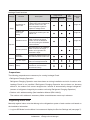
1
*
(0.00)
−1
0
−2 to 3
1
1
1
(−1)
(0)
(−1)
*1 Min of op. and Max of op. can be set up with the accuracy specified in Displayed accuracy.
If Displayed accuracy is modified when Min of op. and Max of op. are already set, their value are rounded to fit the
accuracy specified by the Displayed accuracy.
(When loading a CSV file, an input data error will occur if it contains any value finer than the specified accuracy.)
*2The default values displayed on GUI will change depending on whether Celsius or Fahrenheit is selected in System
Settings.
*3The former or latter value will be used depending on whether Unit Type is Other or Thermistor, respectively.
(When loading a CSV file with Thermistor selected, the default value will be used regardless of the input data.)
31
Commissioning Manual EM11A021
DCM601A51 intelligent Touch Manager
•• Analog Point Selection Screen
Sets up the reference for the Internal Ai. Touch the Ref.. button on the Analog2 tab to display the
Analog Point Selection screen.
(49)
(50)
(49) is the list of management points with analog value.
(50) is the list of analog values that applicable to the Internal Ai of the selected management
point.
Commissioning Manual EM11A021
DCM601A51 intelligent Touch Manager
32
Registering management points using a CSV file
1. Outputting a CSV file
The current settings data can be output to a CSV file for editing the management point data
using a computer software or the Pre-engineering tool. The CSV file can be edited using
“Microsoft Excel” and the like.
Log into SE Mode from the Menu List screen and display the Service Settings tab (see page 7).
Touch the Mgmt. Point Data Register button on the Service Settings tab to display the main
Mgmt. Point Data Register screen.
(51)
Connect a USB memory to the iTM unit and touch the Save button (51).
Touch the Yes button on the Confirm dialog that appears. Saving to the USB memory starts.
Saving is complete when a save completion dialog appears. Touch the Close button to return to
the main Mgmt. Point Data Register screen.
33
Commissioning Manual EM11A021
DCM601A51 intelligent Touch Manager
2. Loading a CSV file
Load the edited CSV file. The edited data does not overwrite everything, it only merges the
difference to the current settings data.
Log into SE Mode from the Menu List screen and display the Service Settings tab (see page 7).
Touch the Mgmt. Point Data Register button on the Service Settings tab to display the main
Mgmt. Point Data Register screen.
(52)
Connect the USB memory to the iTM unit and touch the Load button (52).
File names that can be loaded are limited to “ManagementPointData.csv”. If a file is named
differently, rename it in advance.
Touch the Yes button on the Confirm dialog that appears to start loading.
Commissioning Manual EM11A021
DCM601A51 intelligent Touch Manager
34
If the setting data has been loaded without any problem, the merge results appear.
The Display Merge Results screen consists of the tabs: Add, Modify, Modification Failed, and No
change.
After checking the list on each tab, touch the Close button to return to the main Mgmt. Point
Data Register screen.
35
Commissioning Manual EM11A021
DCM601A51 intelligent Touch Manager
Commissioning Manual EM11A021
DCM601A51 intelligent Touch Manager
External Di: 1 to 120
External Dio: ON Status Monitor address 1 to 120
Not specified: 0
Normal/Abnormal Monitor Input address 1 to 120
Not specified: 0
ON/OFF operation
Start/Stop address 1
Start/Stop address 2
Status Object Type*
Status Object Instance* 0 to 4194302, Not used: −1
0 to 4194302, Not used: −1
Normal/Abnormal
Monitor
BACnet Server Device Instance 0 to 4194302
0 to 1023, Not used: −1
ON Status Monitor
Operation Object Type*
Operation Object
Instance*
Error Object Type*
Error Object Instance*
Icon ID
ACNSS Address
STARTSTOPMON
NORMALABNORMALMON
STARTSTOP
STARTSTOPADDR1
STARTSTOPADDR2
SERVERINST
STATOBJTYPE
STATOBJINST
OPOBJTYPE
OPOBJINST
ERROBJTYPE
ERROBJINST
ICON
ANADDR
8
8
7
* Set to -1 when not used.
The item is regarded as not used if either the Object Type or Object Instance value is set to –1.
For information on the Object Type, refer to the applicable guideline (ISO16484-5).
Communication error monitoring level 1: Monitoring, 2: Monitor + History
Indoor unit (2 to 128, 1: Invalid)
100 to 999
0 to 4194302, Not used: −1
0 to 1023, Not used: −1
0 to 1023, Not used: −1
Always: Handled as invalid
Instant: OFF address 1 to 120
Always: 1 to 120
Instant: ON address 1 to 120
0: Always 1: Instant
7
D3Dio, D3Di, Indoor unit, Ventilator,
Chiller: 0 to 15
Lower level address
(unit)
ADDRESS2
9
8
7
10
9
8
7
Upper level address
(group)
ADDRESS1
6
6
D3: 1 to 4
External: 1 to 120
Internal Pi: 1 to 127
Outdoor unit: 1 to 127
Main unit: 1 to 4 (2 to 4 for Port 1)
Port number
PORTNO
6
6
D3, Internal Pi, Main unit: 1 to 8
External: 1 to 30
PROHIBITOP
5
5
0: Allowed, 1: Prohibited
Prohibit manual
operation
5
5
String (0 to 50 characters regardless of single or double byte)
String (1 to 12 characters regardless of single or double byte)
Detailed information
PI-D D3DI-D D3DIO-D
DETAILEDINFO
101 to 1000000
D3Dio
Name
DI-D
D3Di
PI-H D3DI-H D3DIO-H
Pi
Management point ID
—
DI-H
Di
NAME
Data type identification
—
—
Value
POINTID
Header type
identification
Description
—
Keyword
Monitoring COMMONLV
Output only when BACnet (optional) is enabled.
Common
Classification
11
10
9
8
7
6
5
IN-D
IN-H
7
6
5
OUT-D
OUT-H
Indoor Outdoor
unit
unit
5
4
3
10
9
8
7
6
5
HRV-D
INTERNAL
AI-D
2
HRV-H
Ventilator
INTERNAL
AI-H
Internal
Ai
10
9
8
7
6
5
CHIL-D
CHIL-H
Chiller
Management point type
BACnet BACnet BACnet BACnet
Di
Dio
Ai
Ao
7
6
5
11
10
9
8
7
6
5
14
13
12
11
10
9
8
7
6
5
9
8
7
6
5
10
9
8
7
6
5
INTERNAL BACNET BACNET BACNET BACNET
PI-D
DI-D
DIO-D
AI-D
AO-D
INTERNAL BACNET BACNET BACNET BACNET
PI-H
DI-H
DIO-H
AI-H
AO-H
Internal
Pi
•• Numeric values indicated in each item correspond to the column number in the CSV file (the first column is fixed and used for data type
identification). Blank items indicate there is no applicable data.
Output only when BACnet (optional) is enabled.
The following table shows the CSV format for management point data registration.
3. CSV file format
The format of the CSV file output from the iTM is as shown below. A CSV file output when no
management point data is registered can be used as a template for new implementations since
only the area used by the system and the header portion are output.
36
37
Commissioning Manual EM11A021
DCM601A51 intelligent Touch Manager
Ventilator
Ai/Ao
Pi
Di/Dio
Classification
0: Disable, 1: Enable
Start/Stop error
ABNORMAL INPUT
STARTSTOP FAILURE
Correction coefficient b −10.000 to 10.000
CFB
See page 31.
Hysteresis
MARGIN
Minimum operation value See page 31.
Maximum operation value See page 31.
Displayed accuracy (exponent of 10)
OPMINVAL
OPMAXVAL
OPUNIT
Fresh up
Terminal maximum value See page 31.
TERMMAXVAL
Automatic air volume
Terminal minimum value See page 31.
FRESHENUP
See page 31.
Maximum value
MAXVAL
TERMMINVAL
AUTOVOL
See page 31.
Minimum value
MINVAL
Ventilation mode
Lower limit monitoring level 0: Disable, 1: Monitoring, 2: Monitor + History
LLMMONLV
VMODE
Upper limit monitoring level 0: Disable, 1: Monitoring, 2: Monitor + History
ULMMONLV
0: Disabled, 1: Enabled
0: Disabled, 1: Enabled
0: Disabled, 1: Enabled
See page 31.
See page 31.
Upper limit
Lower limit
UPPERVAL
LOWERVAL
13
12
11
10
9
See page 31.
Analog type
ANALOGTYPE
0: Normal, 1: Temperature
8
TARGETTYPE
6
13
12
11
Ventilator Chiller
Management point type
Internal
Ai
7
Indoor Outdoor
unit
unit
1: Suction temperature, 2: Setpoint (Indoor unit)
Measured analog value 1: Water inlet temperature,
2: Water outlet temperature (Chiller)
D3Dio
Target management point Management point ID (indoor unit, chiller), −1: Not specified
D3Di
TARGETID
12
11
10
9
Pi
Unit string
10
9
Di
UNITSTR
String (0 to 8 characters regardless of single or double byte)
For Internal Ai:
••Set to “°C” or “°F” depending on the System Settings if any
reference management point exists.
••Set to “---” if no reference management point exists.
For other management points:
Set to “°C” or “°F” depending on the System Settings, except
when the Analog type is Temperature.
Correction coefficient a 0.000 to 1000.000
String (0 to 8 characters regardless of single or double byte)
0.01 to 99999.99
CFA
Power ratio
Unit string
PRATIO
1 to 999999
0 to 999999999, −1: Out of scope of merge
0: B type, 1: A type
UNITSTR
Pulse value
Pulse constant
PVAL
PCONST
OUTPUTSPECCONTACT Output contact
0: B type, 1: A type
Error input detection
MONITORIN
0: Disable, 1: Enable
Error Mask Time after operation input 0: 10 seconds, 1: 30 seconds
Monitor input
STARTFAIL
0: Disable, 1: Enable
0: Disable, 1: Enable
Post-Priority
Error output holding
LATEROPE
ABNORMALOP
0: B type, 1: A type
Point type
Value
0: Normal, 1: Equipment error input
Di Operation mode
CPTYPE
Description
DIMODE
Keyword
10
9
8
Internal
Pi
18
17
16
15
14
13
12
11
10
15
14
13
12
11
BACnet BACnet BACnet BACnet
Di
Dio
Ai
Ao
NOTE
•• Symbols (decimal point, digit group separator, etc) used in Windows may vary depending on
the locale. Be sure to check before editing a file.
•• Pi pulse value at the time of saving the CSV file is output with an invalid, out of the merge
scope value (−1). To enable pulse value merge, rewrite it to a valid range value.
•• Daikin recommends you to leave the management point ID in the CSV file in blank so that
they are automatically set up at loading.
4-2 Other Setting
Sets up whether to recognize the “Warning” from a management point as an error and indicate it
via icon and history. Also Enables/Disables the Dry operation mode.
1. Log into SE Mode from the Menu List screen and display the Service Settings tab (see page 7).
Touch the Other Setting button on the Service Settings tab to display the Centralized Monitoring
Setup screen (see page 10).
(1)
(2)
2. Enable/Disable using the To regard Warning as Error level radio button (1). The following table
shows the displayed content for each error type depending on the setting.
Error detection level
Not regard Warning as Error level Regard Warning as Error level
Err Type
Icon
History
Equipment error
Warning
Equipment error
Warning
×
×
Commissioning Manual EM11A021
DCM601A51 intelligent Touch Manager
[Legend]
: Error indication
×: No error indication
38
3. Enable/Disable dry operation mode in Dry Operation Mode (2). When enabled, allows you to
set Dry mode from the touch panel, or the Schedule or Interlocking function. Touch the OK
button to commit and close the screen.
4-3 DIII-NET Engineering
Sets up the iTM as “Main” or “Sub” when also installing an upper central controller. Sets Setpoint
Restriction to “Enable” or “Auto” when also installing an upper central controller (such as: Interface
for use in BACnet, Interface for use in LONWORKS).
1. Log into SE Mode from the Menu List screen and display the Service Settings tab (see page 7).
Touch the DIII-NET Engineering button on the Service Settings tab to display the DIII-NET
Engineering screen (see page 10).
(1)
(2)
(5)
(3)
(4)
2. Set “Main” or “Sub” using the Main/Sub controller Settings radio button (1). A restart is
necessary after switching the Main/Sub controller Settings.
NOTE
When “Sub” is selected, Setpoint Range Limit if another controller exists (2) is greyed out
and cannot be selected. The setting is “always disabled”.
3. If you have set “Main” in step 2, select “Enable” or “Auto” in Setpoint Range Limit if another
controller exists (2).
Enable: The Setpoint Restriction is enabled.
Auto:The Setpoint Restriction is disabled when an upper central unit is present. The Setpoint
Restriction is enabled when an upper central unit is not present.
39
Commissioning Manual EM11A021
DCM601A51 intelligent Touch Manager
4. (3) is a list of Connector Plugs for each iTM port. (4) is a list of central units recognized on the
port selected in (3), where its name is displayed along with its Main/Sub setting. Central units
that can be installed together are as follows.
NOTE
This iTM is not displayed in (4).
Displayed information
Applicable product
Interface for use in BACnet
DDS
Interface for use in LONWORKS
Main CRC-1
Sub CRC-1
Main On/Off-1
Sub On/Off-1
Main On/Off-2
Sub On/Off-2
Main On/Off-3
Sub On/Off-3
Main On/Off-4
Sub On/Off-4
Central Remote Controller iTM
iTM plus adaptor
ON/OFF Controller
ON/OFF Controller
ON/OFF Controller
ON/OFF Controller
(Hidden)
Service checker, LC
Unknown
Central units other than the above
5. Pressing the Refresh button (5) updates (3) and (4). Touching the OK button displays a
confirmation dialog. Touch the Yes button to commit. The screen closes and the system restarts.
NOTE
If you install or uninstall another controller, please review the configuration of the Setpoint
Range Limit.
Commissioning Manual EM11A021
DCM601A51 intelligent Touch Manager
40
4-4 Time Zone
Sets up the difference between the Universal Time Coordinated (UTC) and local time.
1. Log into SE Mode from the Menu List screen and display the Service Settings tab (see page 7).
Touch the Time Zone button on the Service Settings tab to display the Time Zone Setting screen
(see page 10).
(1)
2. Select the time zone in the Time Zone area (1). Touching the OK button displays a confirmation
dialog. Touch the Yes button to commit and close the screen.
4-5 Changeover Option
Enables/Disables the Changeover Option for an indoor unit.
1. Log into SE Mode from the Menu List screen and display the Service Settings tab (see page 7).
Touch the Changeover Option button on the Service Settings tab to display the Changeover
Option screen (see page 10).
(1)
(4)
41
(3)
Commissioning Manual EM11A021
DCM601A51 intelligent Touch Manager
(2)
2. (1) is an air conditioner list displaying all Group Addresses. When no management points are
registered, columns other than Group Addr. are displayed blank. The displayed contents are as indicated in the table below.
Column
Group Addr.
Name
OD-Unit Addr.
Changeover Option
Err Code
Connection
Type
Displayed information
Value range
Group address number
1:1-00 to 8:4-15
Displays the name of the
Characters permitted by Mgmt. Point Data
connected unit.
Register.
Refrigeration system number of
the connected unit.
“----” is displayed for units for
0 to 127/---which the refrigeration system
number could not be acquired.
Whether Changeover Option is
Able / N/A / Selectable / ---- *1
available or not for the connected unit.
Error code detected in the connected unit.
Possible Error Code values
Blank when there are no errors.
Unit connection status
Comm Err / N/A / Maintenance *2
Blank when normal.
Type of the connected unit.
Blank when type is not
Indoor / Ventilator / Chiller / Dio
registered.
*1 See the table below for the correspondence between the content displayed in the Changeover Option column and its meaning.
*2 Comm Err
N/A
: Group address of the connected unit with communication error.
: A group address not registered as a management point.
Maintenance : A group address of a connected unit under maintenance.
Availability for selection
Changeover
Option
Meaning
Release
button
Able
Unit with Changeover Option.
N/A
There is an indoor unit with Changeover Option within the same refrigeration system.
×
Selectable
There are no indoor units with Changeover Option within the same refrigeration system.
×
Connection is “N/A” or Type is other than “Indoor”.
×
---
Setup button
×
[Legend]
×
×
: Not greyed out ×: Greyed out
3. Select the indoor unit for which you want to set the Changeover Option from (1) and touch the
Settings button (2). The Changeover Option becomes “Able”. At that moment, the Changeover
Option for the other indoor units in the same refrigeration system becomes “N/A”.
4. Select the indoor unit for which you want to release the Changeover Option from (1) and touch
the Release button (3). The Changeover Option becomes “Selectable”. At that moment, the
Changeover Option for the other indoor units in the same refrigeration system also becomes
“Selectable”. Touching the Refresh button (4) updates the contents displayed in (1). Close the
screen using the Close button.
Commissioning Manual EM11A021
DCM601A51 intelligent Touch Manager
42
4-6 History Mgmt. (Delete)
Deletes history records.
1. Log into SE Mode from the Menu List screen and display the Service Settings tab (see page 7).
Touch the History Mgmt. button on the Service Settings tab to display the History Management
screen (see page 10).
(1)
(4)
(2)
(5)
(3)
(6)
2. Using the Remove history data radio button (1), select whether to delete All or a Period.
3. If you selected Period, set up the start date of the period to delete in (2) and the end date in (3).
To set up the start date, touch the Modify button (4) and enter the start date in the Time Input
dialog box that appears. Touch the OK button to commit the start date and close the dialog. The
start date is displayed in the From field (2). To set the end date, touch the Modify button (5) and
enter the end date in the Time Input dialog box that appears. Touch the OK button to commit the
end date and close the dialog. The end date is displayed in the To field (3).
4. Touching the Delete button (6) displays a confirmation dialog. Touch the Yes button to delete the
history for the specified period. Touch the Close button and close the screen.
NOTE
If you specified a period to delete, you can cancel deletion halfway but the history data
before cancelling will be deleted. Make sure before executing because the deleted data
cannot be recovered.
43
Commissioning Manual EM11A021
DCM601A51 intelligent Touch Manager
4-7 Pre-engineering
Pre-engineering is carried out to lessen the work to be carried out on site, such as when installing
iTM in a large new property, modifying settings due to a large-scale equipment renovation, or
making extensive modifications to the settings due to the implementation of new functions, etc.
By using the Pre-engineering tool (demo version for PC) described here together with the CSV file
input/output function described in 4-1 and the backup function described in 4-9, you will be able to
set up most of the items at the office including detailed settings and automatic control settings for
the management points, as well as system settings.
iTM unit function
Pre-engineering tool
• Property
folder group
USB memory
Property data
• Folder of
a property
• iTM system
• Settings
• Auto accumulated (1) Data export from iTM
data
• HW specific info
(1)-1
Backup
New
• Area settings
• Management
point information
• Layout settings
• HW specific info
(2) Property
data selection
New
or Property data
• Area settings
• Management
point information Layout
settings
• Data after • Layout settings
settings modification (3)-2
(3)-1
Data edit
Layout
View edit
• Data before
settings
modification
(3) Property data edit
(4)-1
Restore
data output
• Installer
program
• iTM system
• Settings
• Auto accumulated
data *1
• HW specific info
(4)-2
Layout
settings output
• Layout settings
• HW specific info
(4) Property data output
iTM
(1)-2
Layout settings
output
(5) Data load to iTM
(5)-1
Restore/Upgrade
• iTM system
• Settings
• Auto accumulated
data *2
(5)-2
Layout settings input
• Layout settings
USB memory
*2 No restore if there is no file in USB memory
*1 Whether to write automatically accumulated data to USB memory is selectable.
Pre-engineering Tool and iTM Unit Data Flow Diagram
NOTE
iTM integrator uses the backup data for restoring because it is not compatible with the Preengineering tool.
Commissioning Manual EM11A021
DCM601A51 intelligent Touch Manager
44
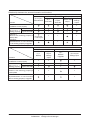
Relationship between the assumed scenario and functions
Function
(2) Property
data selection
Scenario
Scenario 1:
Installation to new property
Scenario 2:
Data edit
Maintenance of
Layout View edit
existing property
Scenario 3:
Restore with existing property’s
backup data
Pre-engineering tool
(3) Property data edit
(4) Property data output
(3)-2
Layout
(3)-1
Restore data
Layout
settings
Data edit
output
View edit
output
×
×
×
*Not applicable
to iTM integrator
×
Scenario 4:
Implementation of new functions
due to existing property’s upgrade
Function
Scenario
Scenario 1:
Installation to new property
Scenario 2:
Data edit
Maintenance of
Layout View edit
existing property
Scenario 3:
Restore with existing property’s
backup data
Scenario 4:
Implementation of new functions
due to existing property’s upgrade
45
×
×
×
×
×
iTM unit
(1) Export from iTM
(1)-2
(1)-1
Layout
Backup
settings
output
×
(5) Load to iTM
(5)-1
Restore/
Upgrade
×
×
×
×
×
×
×
(5)-2 Layout
settings input
×
×
×
×
Commissioning Manual EM11A021
DCM601A51 intelligent Touch Manager
Download the pre-engineering tool from the Distributor’s Page.
To use the pre-engineering tool, a separate PC is necessary. The requirements for the PC are as
indicated in the table below.
PC requirement for running the pre-engineering tool
Function
Requirement
PC to run the
pre-engineering tool
OS: Windows XP Professional SP3 (32 bit)
Windows VISTA Business SP2 (32 bit)
Windows 7 Professional SP1 (32 bit, 64bit)
CPU: Equivalent to Intel Core 2 Duo 1.2 GHz or
higher
Memory: 2 GB or more
Free HDD space: 10 GB or more
Network: 100Base-TX or higher
Display resolution: 1024 x 768 or higher
Network
100Base-TX
Real transfer rate: 115 kbps or higher
Supported security software McAfee 2011
Norton 2011
Virus Buster 2011
Flash Player
Version 11.1
Web browser
Internet Explorer 8, 9
Firefox 10.0
Displaying the main screen
1. Start up the pre-engineering tool on the PC.
Commissioning Manual EM11A021
DCM601A51 intelligent Touch Manager
46
(1)
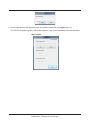
2. On the login screen that appears, enter the password and click the Login button (1).
The iTM Pre-engineering tool main screen appears if the correct password has been provided.
Main screen
47
Commissioning Manual EM11A021
DCM601A51 intelligent Touch Manager
Scenario 1: Installation to new property
Set up data for the new property in advance.
Main screen
(2)
1. Click the New button (2) to display the Create New Folder dialog.
Create New Folder dialog
(3)
(4)
(5)
2. Select the location to create the new property’s folder in (3). Clicking the Make New Folder button (4) creates a new folder directly under the folder selected
in (3). Clicking the OK button (5) sets up the folder selected in (3) as new folder. A dialog confirming
whether to delete the data in the folder appears. Click the Yes button to commit and return to the
iTM Pre-engineering tool main screen.
Commissioning Manual EM11A021
DCM601A51 intelligent Touch Manager
48
NOTE
Clicking the OK button on the confirmation dialog box deletes all folders and files within the
folder.
Main screen
(6)
3. Click the Edit Data button (6) to start up the iTM demo version for PC.
Screen of demo version for PC
(7)
The demo version for PC allows you to make similar settings as with the iTM unit. Make settings
as required. When finished, click the
49
button (7) and return to the Pre-engineering tool main screen.
Commissioning Manual EM11A021
DCM601A51 intelligent Touch Manager
NOTE
Input of Activation key (optional functions enable) is not accepted.
Main screen
(8)
4. Output the edited restore data in the property folder to a USB memory. Click the Export to USB button (8). The Output to USB dialog appears.
(10)
(9)
Select the drive in the Drive combo box (9). Select the content to output using the Output Data radio button (10). Click the OK button. A conformation dialog appears, indicating that you are about to delete the
data in the folder. If you click the Yes button to confirm the deletion, the output of data starts and
the screen closes.
NOTE
Check that the USB memory is ready for writing data. The output will fail if it is damaged, has
insufficient storage capacity, or is write-protected.
Commissioning Manual EM11A021
DCM601A51 intelligent Touch Manager
50
5. The set up restore data is saved to the USB. Insert the USB memory to iTM to restore. (For
details, see 4-10 Installation)
NOTE
“Layout Setup data only” is available when the Layout option is enabled and saves only the
Layout Setup data to the USB memory. For the method of entering the Layout Setup data to
the iTM unit, see the supplementary volume Layout View Creation Tool (EM11A024).
51
Commissioning Manual EM11A021
DCM601A51 intelligent Touch Manager
Scenario 2: Maintenance of existing property (When carrying out pre-engineering using the current setting)
When extensively modifying an existing property due to equipment renovation and the like, the
current settings for the existing property must be modified.
1. Back up the system file data as well as settings data, MAC addresses, etc. on the iTM unit to a
USB memory. (For details, see 4-9 Backup)
2. Copy data backed up in the USB memory (folder name: Backup_MAC address_year month day_
hour minute second) to a PC. Start up the Pre-engineering tool and display its main screen. (For
details, see page 46)
Main screen
(12)
(11)
(13)
3. Click the Open button (11) to display the Select Folder to Open dialog. Select the folder of the property to edit and click the OK button. NOTE
If the property data is created using an older version, a dialog that prompts upgrade appears.
Click the OK button.
The absolute path is displayed in (12) when a property data is selected.
Commissioning Manual EM11A021
DCM601A51 intelligent Touch Manager
52
4. Click the Edit Data button (13) to start up the iTM demo version for PC. The steps from editing using the demo version for PC to restore data output to USB and iTM
restore are the same as steps 3 to 5 of the procedure for Scenario 1: Installation to new property.
NOTE
The Layout Setup data backup and restore procedures are the same as when modifying the
Layout View of an existing property. For the method of editing the Layout Setup data, see the
supplementary volume Layout View Creation Tool (optional).
53
Commissioning Manual EM11A021
DCM601A51 intelligent Touch Manager
Scenario 3: Restore with existing property’s backup data
When iTM in an existing property is replaced due to malfunction and the like, the system is
recovered by restoring the backup data (folder name: Backup_MAC address_year month day_hour
minute second) to the new iTM.
•• iTM
Main screen
(14)
1. Click the Open button (14) to display the Select Folder to Open dialog. Select the folder of the
property for which you are creating the restore data and click the OK button to close the screen.
2. The restore data in the selected folder is output to a USB memory. The steps up to the output to USB and iTM restore are the same as steps 4 and 5 of the
procedure for Scenario 1: Installation to new property.
•• iTM integrator
1. Copy the data backed up with iTM integrator (folder name: iTM_integrator_Backup_MAC
address_year month day_hour minute second) to the USB memory connected to a PC.
2. Move all the data in the folder copied to the USB memory to directly below the USB memory.
3. Insert the USB memory prepared with PC to the iTM integrator to restore. (For details, see 4-10
Installation)
Commissioning Manual EM11A021
DCM601A51 intelligent Touch Manager
54
Scenario 4: Implementation of new functions due to existing property’s upgrade
When implementing new functions to an existing property, the upgraded Pre-engineering tool is
used to create the functions’ settings data.
1. Back up the system file data as well as settings data, MAC addresses, etc. on the iTM unit to a
USB memory. (For details, see 4-9 Backup)
2. Copy data backed up in the USB memory (folder name: Backup_MAC address_year month day_
hour minute second) to a PC. Start up the newly acquired upgraded Pre-engineering tool and
display its main screen. (For details, see page 46)
3. Edit the settings data using the upgraded Pre-engineering tool. The steps up to the output of the edited data to USB and iTM restore are the same as steps 4
and 5 of the procedure for Scenario 1: Installation to new property.
4-8 Upgrade
Upgrade includes system file installation for a new property or new function implementation to an
existing property. (When using the Pre-engineering tool, see 4-7 Pre-engineering)
NOTE
When installing a new iTM, be sure to install the updater program during the preparation.
Download procedure
1. From your PC, access the Network Solution page of the Distributor’s Page. Then, download and
save the updater program onto the USB memory.
2. Insert the USB memory with the updater program into iTM and install. For the installation
procedure, see 4-10 Installation.
55
Commissioning Manual EM11A021
DCM601A51 intelligent Touch Manager
4-9 Backup
When modifying settings data due to equipment renovation in an existing property or upgrade, the
iTM unit data must be backed up to a USB memory as history and settings data reference for
troubleshooting and the like.
Data to be backed up is as follows.
•• iTM system file
•• Settings data of each function
•• Automatically accumulated data such as Energy Navigator’s time tone, trend data, and history
data
•• MAC addresses
NOTE
All iTM functions run normally even during backup. However, operation from the iTM unit’s
screen is restricted during backup.
The following describes how to create a backup.
1. Display the System Settings tab of the Menu List screen (see page 12).
(1)
Commissioning Manual EM11A021
DCM601A51 intelligent Touch Manager
56
2. Insert a USB memory into iTM. Touching the Backup button (1) displays a backup start
confirmation dialog.
3. Touch the Yes button. A USB memory content deletion confirmation dialog appears.
4. Touching the Yes button displays a wait dialog and starts the backup. When backup is complete,
an information dialog appears. Touch the Close button to close the screen and remove the USB
memory.
NOTE
•• All the folders and files in the USB memory will be deleted when the backup begin.
•• One folder with the following name will be created in the USB memory when the backup
complete.
“Backup_XXXXXXXXXXXX_YYYYMMDD_HHMMSS”
(XXXXXXXXXXXX: MAC address of the iTM, YYYYMMDD_HHMMSS: Year, Month, Day,
Hour, Minute and Second of the backup execution time)
•• When backup fails because the USB memory is not inserted or due to an error, an error
dialog appears.
57
Commissioning Manual EM11A021
DCM601A51 intelligent Touch Manager
4-10
Installation
Data installation to the iTM unit includes installation of upgrade data and pre-engineered data (See
4-7 Pre-engineering). The installation procedure is the same in all cases.
The following describes the operating procedure.
1. Insert the USB memory with the target data into the iTM unit and turn on, or restart, the iTM unit
while pressing the MONITOR button provided on it. Keep the MONITOR button depressed until
the following screen appears and then release it. To restart, press the RESET// switch on the
front panel. (See the intelligent Touch Manager Installation Manual).
2. The calibration screen appears. Correct the touch panel calibration. To calibrate more accurately,
use a touch pen.
(1)
3. A cross (1) will appear 5 times on the screen. Touch the centre of each cross in order. You can
start the calibration again by touching a point far from the cross. The calibration is complete
when you touched the cross 5 times.
Commissioning Manual EM11A021
DCM601A51 intelligent Touch Manager
58
4. The installation tool screen appears once calibration is finished.
NOTE
If an error is found in the installer program on the USB memory, an error confirmation dialog
appears. Be sure to prepare the correct installer program.
(2)
(4)
(5)
(7)
(8)
(14)
(10)
(11)
(12)
(13)
(3)
(6)
(9)
5. The version of the data and MAC addresses in the USB memory are compared with the version
and MAC addresses on the iTM. The information displayed on the installation tool screen is as follows. (2) Name
(3) Version of the installer
(4) Name of the current version
(5) Name of the current controller
(6) Current version
(7) Name of the installer
(8) Name of the installer controller
(9) Version of the installer
(10) Current hardware name
(11) Current MAC address
(12) Name of the installer hardware
(13) Installer’s MAC address
(14) Message displayed in accordance with the installation tool’s status.
59
Commissioning Manual EM11A021
DCM601A51 intelligent Touch Manager
If there is no flaw in the information, touching the OK button on the installation tool screen starts
the installation. When installation is complete, an information dialog appears. Remove the USB
memory and touch the Close button to close the screen. The iTM automatically restarts and
checks the history and version information, and then installation will be completed.
NOTE
If the data version on the installer side is earlier than that on iTM, the OK button on the
installation tool screen is greyed out and cannot be clicked.
4-11
Contact Info
Sets up contact information for inquiries regarding the system.
1. Log into SE Mode from the Menu List screen and display the Service Settings tab (see page 7).
Touch the Contact Info button on the Service Settings tab to display the Contact Information
Setup screen (see page 10).
(1)
2. You can set up to 3 lines of contact information: Lines 1 to 3 (1). Touch the Modify button to
display the Text Input dialog. Enter necessary information such as dealer’s name, telephone
number, e-mail address, etc. You can enter up to 50 characters in each line, regardless of single
or double byte.
When finished setting up the contact information, touch the OK button to close the screen.
Commissioning Manual EM11A021
DCM601A51 intelligent Touch Manager
60
3. The registered contact information can be checked on the Contact tab of the Information screen
accessible from the Standard View screen. (See User’s Manual (EM11A015))
61
Commissioning Manual EM11A021
DCM601A51 intelligent Touch Manager
4-12
Setting outdoor unit
Set the type of the outdoor unit registered as a Mgmt. point.
1. Log into SE Mode from the Menu List screen and display the Service Settings tab (see page 7).
Touch the Outdoor Setup button on the Service Settings tab to display the Outdoor Setup screen
(see page 10).
(1)
2. Select the desired outdoor unit from the list and touch the (1) Type button.
When the input dialogue is displayed, input the type. The type depends on the model of the
outdoor unit. Check the type in the table on page 63 before setting.
CAUTION
If the specified type of outdoor unit is wrong, leakage check operation cannot be executed
correctly. Be careful when setting the type.
NOTE
When you use the outdoor unit as Internal Pi, check that the pulse amount is correct in the
detailed information screen.
Commissioning Manual EM11A021
DCM601A51 intelligent Touch Manager
62
Precautions when using DIII-NET EXPANDER ADAPTER
In the application using the DIII-NET EXPANDER ADAPTER, if you monitor the outdoor units or
use Internal Pi or such other functions processed based on information from the outdoor units, you
need to cut the jumper pin of the DIII-NET EXPANDER ADAPTER.
Intended functions: Monitoring of outdoor units, Energy Navigator and leakage detection.
The jumper pin to be cut is J1 only.
There are two jumper pins to be cut, so be sure to cut both of
them.
X1M
F1 F2
NOTE
The total number of outdoor units connected to the DIII-NET EXPANDER ADAPTER (whose J1
jumper pins were cut) and those directly connected to iTM should be 10 or less.
Table of types
No.
Model name
Type
No.
Model name
Type
No.
Model name
Type
No.
Model name
Type
1
RXYQ5MY1B
1
36
RXYQ32M7W1B
1
71
RX18MY1
1
106
RX30MTLE
1
2
RXYQ8MY1B
1
37
RXYQ34M7W1B
1
72
RX18MY1E
1
107
RX30MY1
1
3
RXYQ10MY1B
1
38
RXYQ36M7W1B
1
73
RX18MYL
1
108
RX30MY1E
1
4
RXYQ12MY1B
1
39
RXYQ38M7W1B
1
74
RX18MYLE
1
109
RX30MYL
1
5
RXYQ14MY1B
1
40
RXYQ40M7W1B
1
75
RX20MTL
1
110
RX30MYLE
1
6
RXYQ16MY1B
1
41
RXYQ42M7W1B
1
76
RX20MTLE
1
111
RX32MTL
1
7
RXYQ18MY1B
1
42
RXYQ44M7W1B
1
77
RX20MY1
1
112
RX32MTLE
1
8
RXYQ20MY1B
1
43
RXYQ46M7W1B
1
78
RX20MY1E
1
113
RX32MY1
1
9
RXYQ22MY1B
1
44
RXYQ48M7W1B
1
79
RX20MYL
1
114
RX32MY1E
1
10
RXYQ24MY1B
1
45
RX10MTL
1
80
RX20MYLE
1
115
RX32MYL
1
11
RXYQ26MY1B
1
46
RX10MTLE
1
81
RX22MTL
1
116
RX32MYLE
1
12
RXYQ28MY1B
1
47
RX10MY1
1
82
RX22MTLE
1
117
RX34MTL
1
13
RXYQ30MY1B
1
48
RX10MY1E
1
83
RX22MY1
1
118
RX34MTLE
1
14
RXYQ32MY1B
1
49
RX10MYL
1
84
RX22MY1E
1
119
RX34MY1
1
15
RXYQ34MY1B
1
50
RX10MYLE
1
85
RX22MYL
1
120
RX34MY1E
1
16
RXYQ36MY1B
1
51
RX12MTL
1
86
RX22MYLE
1
121
RX34MYL
1
17
RXYQ38MY1B
1
52
RX12MTLE
1
87
RX24MTL
1
122
RX34MYLE
1
18
RXYQ40MY1B
1
53
RX12MY1
1
88
RX24MTLE
1
123
RX36MTL
1
19
RXYQ42MY1B
1
54
RX12MY1E
1
89
RX24MY1
1
124
RX36MTLE
1
20
RXYQ44MY1B
1
55
RX12MYL
1
90
RX24MY1E
1
125
RX36MY1
1
21
RXYQ46MY1B
1
56
RX12MYLE
1
91
RX24MYL
1
126
RX36MY1E
1
22
RXYQ48MY1B
1
57
RX14MTL
1
92
RX24MYLE
1
127
RX36MYL
1
23
RXYQ5M7W1B
1
58
RX14MTLE
1
93
RX26MTL
1
128
RX36MYLE
1
24
RXYQ8M7W1B
1
59
RX14MY1
1
94
RX26MTLE
1
129
RX38MTL
1
25
RXYQ10M7W1B
1
60
RX14MY1E
1
95
RX26MY1
1
130
RX38MTLE
1
26
RXYQ12M7W1B
1
61
RX14MYL
1
96
RX26MY1E
1
131
RX38MY1
1
27
RXYQ14M7W1B
1
62
RX14MYLE
1
97
RX26MYL
1
132
RX38MY1E
1
28
RXYQ16M7W1B
1
63
RX16MTL
1
98
RX26MYLE
1
133
RX38MYL
1
29
RXYQ18M7W1B
1
64
RX16MTLE
1
99
RX28MTL
1
134
RX38MYLE
1
30
RXYQ20M7W1B
1
65
RX16MY1
1
100
RX28MTLE
1
135
RX40MTL
1
31
RXYQ22M7W1B
1
66
RX16MY1E
1
101
RX28MY1
1
136
RX40MTLE
1
32
RXYQ24M7W1B
1
67
RX16MYL
1
102
RX28MY1E
1
137
RX40MY1
1
33
RXYQ26M7W1B
1
68
RX16MYLE
1
103
RX28MYL
1
138
RX40MY1E
1
34
RXYQ28M7W1B
1
69
RX18MTL
1
104
RX28MYLE
1
139
RX40MYL
1
35
RXYQ30M7W1B
1
70
RX18MTLE
1
105
RX30MTL
1
140
RX40MYLE
1
63
Commissioning Manual EM11A021
DCM601A51 intelligent Touch Manager
No.
Model name
Type
No.
Model name
Type
No.
Model name
Type
No.
Model name
Type
141
RX42MTL
1
208
RXY20MTLE
1
275
RXY42MY1
1
342
RHXY32MY1
1
142
RX42MTLE
1
209
RXY20MY1
1
276
RXY42MY1E
1
343
RHXY34MY1
1
143
RX42MY1
1
210
RXY20MY1E
1
277
RXY42MYL
1
344
RHXY36MY1
1
144
RX42MY1E
1
211
RXY20MYL
1
278
RXY42MYLE
1
345
RHXY38MY1
1
145
RX42MYL
1
212
RXY20MYLE
1
279
RXY44MTL
1
346
RHXY40MY1
1
146
RX42MYLE
1
213
RXY22MTL
1
280
RXY44MTLE
1
347
RHXY42MY1
1
147
RX44MTL
1
214
RXY22MTLE
1
281
RXY44MY1
1
348
RHXY44MY1
1
148
RX44MTLE
1
215
RXY22MY1
1
282
RXY44MY1E
1
349
RHXY46MY1
1
149
RX44MY1
1
216
RXY22MY1E
1
283
RXY44MYL
1
350
RHXY48MY1
1
150
RX44MY1E
1
217
RXY22MYL
1
284
RXY44MYLE
1
351
RXYMQ4MV4A
1
151
RX44MYL
1
218
RXY22MYLE
1
285
RXY46MTL
1
352
RXYMQ5MV4A
1
152
RX44MYLE
1
219
RXY24MTL
1
286
RXY46MTLE
1
353
RXYMQ6MV4A
1
153
RX46MTL
1
220
RXY24MTLE
1
287
RXY46MY1
1
354
RXYMQ4M7V3B
1
154
RX46MTLE
1
221
RXY24MY1
1
288
RXY46MY1E
1
355
RXYMQ5M7V3B
1
155
RX46MY1
1
222
RXY24MY1E
1
289
RXY46MYL
1
356
RXYMQ6M7V3B
1
156
RX46MY1E
1
223
RXY24MYL
1
290
RXY46MYLE
1
357
RXYQ96MTJU
1
157
RX46MYL
1
224
RXY24MYLE
1
291
RXY48MTL
1
358
RHX8MAY1
1
158
RX46MYLE
1
225
RXY26MTL
1
292
RXY48MTLE
1
359
RHX12MAY1
1
159
RX48MTL
1
226
RXY26MTLE
1
293
RXY48MY1
1
360
RHX18MAY1
1
160
RX48MTLE
1
227
RXY26MY1
1
294
RXY48MY1E
1
361
REYQ96MTJU
1
161
RX48MY1
1
228
RXY26MY1E
1
295
RXY48MYL
1
362
RMX112CMV2C
1
162
RX48MY1E
1
229
RXY26MYL
1
296
RXY48MYLE
1
363
RMX140CMV2C
1
163
RX48MYL
1
230
RXY26MYLE
1
297
RXY5MTL
1
364
RMX160CMV2C
1
164
RX48MYLE
1
231
RXY28MTL
1
298
RXY5MTLE
1
365
RXM4MVM
1
165
RX5MTL
1
232
RXY28MTLE
1
299
RXY5MY1
1
366
RXM5MVM
1
166
RX5MTLE
1
233
RXY28MY1
1
300
RXY5MY1E
1
367
RXM6MVM
1
167
RX5MY1
1
234
RXY28MY1E
1
301
RXY5MYL
1
368
RXYM4MVM
1
168
RX5MY1E
1
235
RXY28MYL
1
302
RXY5MYLE
1
369
RXYM5MVM
1
169
RX5MYL
1
236
RXY28MYLE
1
303
RXY8MTL
1
370
RXYM6MVM
1
170
RX5MYLE
1
237
RXY30MTL
1
304
RXY8MTLE
1
371
RXYM4MVMT
1
171
RX8MTL
1
238
RXY30MTLE
1
305
RXY8MY1
1
372
RXYM5MVMT
1
172
RX8MTLE
1
239
RXY30MY1
1
306
RXY8MY1E
1
373
RXYM6MVMT
1
173
RX8MY1
1
240
RXY30MY1E
1
307
RXY8MYL
1
374
RXYSQ4M7V3B
1
174
RX8MY1E
1
241
RXY30MYL
1
308
RXY8MYLE
1
375
RXYSQ5M7V3B
1
175
RX8MYL
1
242
RXY30MYLE
1
309
REYQ8MY1B
1
376
RXYSQ6M7V3B
1
176
RX8MYLE
1
243
RXY32MTL
1
310
REYQ10MY1B
1
377
RWEYQ10MY1
1
177
RXY10MTL
1
244
RXY32MTLE
1
311
REYQ12MY1B
1
378
RWEYQ20MY1
1
178
RXY10MTLE
1
245
RXY32MY1
1
312
REYQ14MY1B
1
379
RWEYQ30MY1
1
179
RXY10MY1
1
246
RXY32MY1E
1
313
REYQ16MY1B
1
380
RXYQ5PY1
3
180
RXY10MY1E
1
247
RXY32MYL
1
314
REYQ18MY1B
1
381
RXYQ8PY1
3
181
RXY10MYL
1
248
RXY32MYLE
1
315
REYQ20MY1B
1
382
RXYQ10PY1
3
182
RXY10MYLE
1
249
RXY34MTL
1
316
REYQ22MY1B
1
383
RXYQ12PY1
3
183
RXY12MTL
1
250
RXY34MTLE
1
317
REYQ24MY1B
1
384
RXYQ14PY1
3
184
RXY12MTLE
1
251
RXY34MY1
1
318
REYQ26MY1B
1
385
RXYQ16PY1
3
185
RXY12MY1
1
252
RXY34MY1E
1
319
REYQ28MY1B
1
386
RXYQ18PY1
3
186
RXY12MY1E
1
253
RXY34MYL
1
320
REYQ30MY1B
1
387
RXYQ20PY1
3
187
RXY12MYL
1
254
RXY34MYLE
1
321
REYQ32MY1B
1
388
RXYQ22PY1
3
188
RXY12MYLE
1
255
RXY36MTL
1
322
REYQ34MY1B
1
389
RXYQ24PY1
3
189
RXY14MTL
1
256
RXY36MTLE
1
323
REYQ36MY1B
1
390
RXYQ26PY1
3
190
RXY14MTLE
1
257
RXY36MY1
1
324
REYQ38MY1B
1
391
RXYQ28PY1
3
191
RXY14MY1
1
258
RXY36MY1E
1
325
REYQ40MY1B
1
392
RXYQ30PY1
3
192
RXY14MY1E
1
259
RXY36MYL
1
326
REYQ42MY1B
1
393
RXYQ32PY1
3
193
RXY14MYL
1
260
RXY36MYLE
1
327
REYQ44MY1B
1
394
RXYQ34PY1
3
194
RXY14MYLE
1
261
RXY38MTL
1
328
REYQ46MY1B
1
395
RXYQ36PY1
3
195
RXY16MTL
1
262
RXY38MTLE
1
329
REYQ48MY1B
1
396
RXYQ38PY1
3
196
RXY16MTLE
1
263
RXY38MY1
1
330
RHXY8MY1
1
397
RXYQ40PY1
3
197
RXY16MY1
1
264
RXY38MY1E
1
331
RHXY10MY1
1
398
RXYQ42PY1
3
198
RXY16MY1E
1
265
RXY38MYL
1
332
RHXY12MY1
1
399
RXYQ44PY1
3
199
RXY16MYL
1
266
RXY38MYLE
1
333
RHXY14MY1
1
400
RXYQ46PY1
3
200
RXY16MYLE
1
267
RXY40MTL
1
334
RHXY16MY1
1
401
RXYQ48PY1
3
201
RXY18MTL
1
268
RXY40MTLE
1
335
RHXY18MY1
1
402
RXYQ50PY1
3
202
RXY18MTLE
1
269
RXY40MY1
1
336
RHXY20MY1
1
403
RXYQ52PY1
3
203
RXY18MY1
1
270
RXY40MY1E
1
337
RHXY22MY1
1
404
RXYQ54PY1
3
204
RXY18MY1E
1
271
RXY40MYL
1
338
RHXY24MY1
1
405
RXYQ8PY1C
3
205
RXY18MYL
1
272
RXY40MYLE
1
339
RHXY26MY1
1
406
RXYQ10PY1C
3
206
RXY18MYLE
1
273
RXY42MTL
1
340
RHXY28MY1
1
407
RXYQ12PY1C
3
207
RXY20MTL
1
274
RXY42MTLE
1
341
RHXY30MY1
1
408
RXYQ14PY1C
3
Commissioning Manual EM11A021
DCM601A51 intelligent Touch Manager
64
No.
Model name
Type
No.
Model name
Type
No.
Model name
Type
No.
Model name
Type
409
RXYQ16PY1C
3
476
RXYQ40M8W1B
1
543
RXYQ22M9W1B
1
610
RHXYQ24MAY1
1
410
RXYQ18PY1C
3
477
RXYQ42M8W1B
1
544
RXYQ24M9W1B
1
611
RHXYQ26MAY1
1
411
RXYQ20PY1C
3
478
RXYQ44M8W1B
1
545
RXYQ26M9W1B
1
612
RHXYQ28MAY1
1
412
RXYQ22PY1C
3
479
RXYQ46M8W1B
1
546
RXYQ28M9W1B
1
613
RHXYQ30MAY1
1
413
RXYQ24PY1C
3
480
RXYQ48M8W1B
1
547
RXYQ30M9W1B
1
614
RHXYQ32MAY1
1
414
RXYQ26PY1C
3
481
REYQ8M7W1B
1
548
RXYQ32M9W1B
1
615
RHXYQ34MAY1
1
415
RXYQ28PY1C
3
482
REYQ12M7W1B
1
549
RXYQ34M9W1B
1
616
RHXYQ36MAY1
1
416
RXYQ30PY1C
3
483
REYQ14M7W1B
1
550
RXYQ36M9W1B
1
617
RHXYQ38MAY1
1
417
RXYQ32PY1C
3
484
REYQ16M7W1B
1
551
RXYQ38M9W1B
1
618
RHXYQ40MAY1
1
418
RXYQ34PY1C
3
485
REYQ18M7W1B
1
552
RXYQ40M9W1B
1
619
RHXYQ42MAY1
1
419
RXYQ36PY1C
3
486
REYQ20M7W1B
1
553
RXYQ42M9W1B
1
620
RHXYQ44MAY1
1
420
RXYQ38PY1C
3
487
REYQ22M7W1B
1
554
RXYQ44M9W1B
1
621
RHXYQ46MAY1
1
421
RXYQ40PY1C
3
488
REYQ24M7W1B
1
555
RXYQ46M9W1B
1
622
RHXYQ48MAY1
1
422
RXYQ42PY1C
3
489
REYQ26M7W1B
1
556
RXYQ48M9W1B
1
623
RXYQ10P7W1B
3
423
RXYQ44PY1C
3
490
REYQ28M7W1B
1
557
RXYQ5PY16
3
624
RXYQ12P7W1B
3
424
RXYQ46PY1C
3
491
REYQ30M7W1B
1
558
RXYQ8PY16
3
625
RXYQ14P7W1B
3
425
RXYQ48PY1C
3
492
REYQ32M7W1B
1
559
RXYQ10PY16
3
626
RXYQ16P7W1B
3
426
RXYQ50PY1C
3
493
REYQ34M7W1B
1
560
RXYQ12PY16
3
627
RXYQ18P7W1B
3
427
RXYQ52PY1C
3
494
REYQ36M7W1B
1
561
RXYQ14PY16
3
628
RXYQ20P7W1B
3
428
RXYQ54PY1C
3
495
REYQ38M7W1B
1
562
RXYQ16PY16
3
629
RXYQ22P7W1B
3
429
RXYMQ4PVE
3
496
REYQ40M7W1B
1
563
RXYQ18PY16
3
630
RXYQ24P7W1B
3
430
RXYMQ5PVE
3
497
REYQ42M7W1B
1
564
RXYQ20PY16
3
631
RXYQ26P7W1B
3
431
RXYMQ6PVE
3
498
REYQ44M7W1B
1
565
RXYQ22PY16
3
632
RXYQ28P7W1B
3
432
RMXS112DV2C
3
499
REYQ46M7W1B
1
566
RXYQ24PY16
3
633
RXYQ30P7W1B
3
433
RMXS112DY1C
3
500
REYQ48M7W1B
1
567
RXYQ26PY16
3
634
RXYQ32P7W1B
3
434
RMXS140DV2C
3
501
RCXYQ16MAY1
1
568
RXYQ28PY16
3
635
RXYQ34P7W1B
3
435
RMXS140DY1C
3
502
RCXYQ18MAY1
1
569
RXYQ30PY16
3
636
RXYQ36P7W1B
3
436
RMXS160DV2C
3
503
RCXYQ20MAY1
1
570
RXYQ32PY16
3
637
RXYQ38P7W1B
3
437
RMXS160DY1C
3
504
RCXYQ22MAY1
1
571
RXYQ34PY16
3
638
RXYQ40P7W1B
3
438
LMXS4DMV2C
3
505
RCXYQ24MAY1
1
572
RXYQ36PY16
3
639
RXYQ42P7W1B
3
439
LMXS5DMV2C
3
506
RCXYQ26MAY1
1
573
RXYQ38PY16
3
640
RXYQ44P7W1B
3
440
LMXS6DMV2C
3
507
RCXYQ28MAY1
1
574
RXYQ40PY16
3
641
RXYQ46P7W1B
3
441
REYQ10M7W1B
1
508
RCXYQ30MAY1
1
575
RXYQ42PY16
3
642
RXYQ48P7W1B
3
442
RXYSQ4M
1
509
RCXYQ32MAY1
1
576
RXYQ44PY16
3
643
RXYQ50P7W1B
3
443
RXYSQ5M
1
510
RCXYQ34MAY1
1
577
RXYQ46PY16
3
644
RXYQ52P7W1B
3
444
RXYSQ6M
1
511
RCXYQ36MAY1
1
578
RXYQ48PY16
3
645
RXYQ54P7W1B
3
445
RXYQ5MAY1
1
512
RCXYQ38MAY1
1
579
RXYQ50PY16
3
646
RXYQ5M8W1B
1
446
RXYQ8MAY1
1
513
RCXYQ40MAY1
1
580
RXYQ52PY16
3
647
RXYQ5P7W1B
3
447
RXYQ10MAY1
1
514
RCXYQ42MAY1
1
581
RXYQ54PY16
3
648
RXYQ8P7W1B
3
448
RXYQ12MAY1
1
515
RCXYQ44MAY1
1
582
REMQ8PY1
3
649
RXYSQ4P7V3B
3
449
RXYQ14MAY1
1
516
RCXYQ46MAY1
1
583
REYQ8PY1B
3
650
RXYSQ5P7V3B
3
450
RXYQ16MAY1
1
517
RCXYQ48MAY1
1
584
REMQ10PY1
3
651
RXYSQ6P7V3B
3
451
RHXYQ8MAY1
1
518
RXQ8MAY19
1
585
REYQ10PY1B
3
652
REYQ8M8W1B
1
452
RHXYQ10MAY1
1
519
RXQ8MAY15
1
586
REMQ12PY1
3
653
REYQ12M8W1B
1
453
RHXYQ12MAY1
1
520
RXQ10MAY19
1
587
REYQ12PY1B
3
654
REYQ14M8W1B
1
454
RHXYQ14MAY1
1
521
RXQ10MAY15
1
588
REMQ14PY1
3
655
REYQ16M8W1B
1
455
RHXYQ16MAY1
1
522
RXQ12MAY19
1
589
REYQ14PY1B
3
656
REYQ18M8W1B
1
456
RCXYQ8MAY1
1
523
RXQ12MAY15
1
590
REMQ16PY1
3
657
REYQ20M8W1B
1
457
RCXYQ10MAY1
1
524
RXQ14MAY19
1
591
REYQ16PY1B
3
658
REYQ22M8W1B
1
458
RCXYQ12MAY1
1
525
RXQ14MAY15
1
592
RWEYQ8PY1
1
659
REYQ24M8W1B
1
459
RCXYQ14MAY1
1
526
RXQ16MAY19
1
593
RWEYQ10PY1
1
660
REYQ26M8W1B
1
460
RXYQ8M8W1B
1
527
RXQ16MAY15
1
594
RWEYQ16PY1
1
661
REYQ28M8W1B
1
461
RXYQ10M8W1B
1
528
RXQ18MAY19
1
595
RWEYQ18PY1
1
662
REYQ30M8W1B
1
462
RXYQ12M8W1B
1
529
RXQ18MAY15
1
596
RWEYQ20PY1
1
663
REYQ32M8W1B
1
463
RXYQ14M8W1B
1
530
RXYQ8MAY19
1
597
RWEYQ24PY1
1
664
REYQ34M8W1B
1
464
RXYQ16M8W1B
1
531
RXYQ10MAY19
1
598
RWEYQ26PY1
1
665
REYQ36M8W1B
1
465
RXYQ18M8W1B
1
532
RXYQ12MAY19
1
599
RWEYQ28PY1
1
666
REYQ38M8W1B
1
466
RXYQ20M8W1B
1
533
RXYQ14MAY19
1
600
RWEYQ30PY1
1
667
REYQ40M8W1B
1
467
RXYQ22M8W1B
1
534
RXYQ16MAY19
1
601
RXYN10AY1
3
668
REYQ42M8W1B
1
468
RXYQ24M8W1B
1
535
RXYQ5M9W1B
1
602
RHXYQ8PY1
3
669
REYQ44M8W1B
1
469
RXYQ26M8W1B
1
536
RXYQ8M9W1B
1
603
RHXYQ10PY1
3
670
REYQ46M8W1B
1
470
RXYQ28M8W1B
1
537
RXYQ10M9W1B
1
604
RHXYQ12PY1
3
671
REYQ48M8W1B
1
471
RXYQ30M8W1B
1
538
RXYQ12M9W1B
1
605
RHXYQ14PY1
3
672
RXYQ18MAY1
1
472
RXYQ32M8W1B
1
539
RXYQ14M9W1B
1
606
RHXYQ16PY1
3
673
RXYQ20MAY1
1
473
RXYQ34M8W1B
1
540
RXYQ16M9W1B
1
607
RHXYQ18MAY1
1
674
RXYQ22MAY1
1
474
RXYQ36M8W1B
1
541
RXYQ18M9W1B
1
608
RHXYQ20MAY1
1
675
RXYQ24MAY1
1
475
RXYQ38M8W1B
1
542
RXYQ20M9W1B
1
609
RHXYQ22MAY1
1
676
RXYQ26MAY1
1
65
Commissioning Manual EM11A021
DCM601A51 intelligent Touch Manager
No.
Model name
Type
No.
Model name
Type
No.
Model name
Type
No.
Model name
Type
677
RXYQ28MAY1
1
744
RHXY46PY1
3
811
RXQ42PY16
3
878
RXYQ26PAY19
3
678
RXYQ30MAY1
1
745
RHXY48PY1
3
812
RXQ44PY16
3
879
RXYQ28PAY19
3
679
RXYQ32MAY1
1
746
RHXY50PY1
3
813
RXQ46PY16
3
880
RXYQ30PAY19
3
680
RXYQ34MAY1
1
747
RHXY52PY1
3
814
RXQ48PY16
3
881
RXYQ32PAY19
3
681
RXYQ36MAY1
1
748
RHXY54PY1
3
815
RXQ50PY16
3
882
RXYQ34PAY19
3
682
RXYQ38MAY1
1
749
RXQ5M7W1B
1
816
RXQ52PY16
3
883
RXYQ36PAY19
3
683
RXYQ40MAY1
1
750
RXQ8M7W1B
1
817
RXQ54PY16
3
884
RXYQ38PAY19
3
684
RXYQ42MAY1
1
751
RXQ10M7W1B
1
818
RXQ5PAY1
3
885
RXYQ40PAY19
3
685
RXYQ44MAY1
1
752
RXQ8M8W1B
1
819
RXQ8PAY1
3
886
RXYQ42PAY19
3
686
RXYQ46MAY1
1
753
RXQ10M8W1B
1
820
RXQ10PAY1
3
887
RXYQ44PAY19
3
687
RXYQ48MAY1
1
754
RXYQ72MTJU
1
821
RXQ12PAY1
3
888
RXYQ46PAY19
3
688
RXYQ8MY1K
1
755
RXYQ144MTJU
1
822
RXQ14PAY1
3
889
RXYQ48PAY19
3
689
RXYQ10MY1K
1
756
RXYQ168MTJU
1
823
RXQ16PAY1
3
890
RXYQ50PAY19
3
690
RXQ5MAY1
1
757
RXYQ192MTJU
1
824
RXQ18PAY1
3
891
RXYQ52PAY19
3
691
RXQ8MAY1
1
758
REYQ72MTJU
1
825
RXQ20PAY1
3
892
RXYQ54PAY19
3
692
RXQ10MAY1
1
759
REYQ144MTJU
1
826
RXQ22PAY1
3
893
RXYQ5PAYL
3
693
RXQ12MAY1
1
760
REYQ168MTJU
1
827
RXQ24PAY1
3
894
RXYQ8PAYL
3
694
RXQ14MAY1
1
761
REYQ192MTJU
1
828
RXQ26PAY1
3
895
RXYQ10PAYL
3
695
RXQ16MAY1
1
762
RXQ5M9W1B
1
829
RXQ28PAY1
3
896
RXYQ12PAYL
3
696
RXQ18MAY1
1
763
RXQ8M9W1B
1
830
RXQ30PAY1
3
897
RXYQ14PAYL
3
697
RXQ20MAY1
1
764
RXQ10M9W1B
1
831
RXQ32PAY1
3
898
RXYQ16PAYL
3
698
RXQ22MAY1
1
765
RZP350MAY1
1
832
RXQ34PAY1
3
899
RXYQ18PAYL
3
699
RXQ24MAY1
1
766
RXMQ4PVE
3
833
RXQ36PAY1
3
900
RXYQ20PAYL
3
700
RXQ26MAY1
1
767
RXMQ5PVE
3
834
RXQ38PAY1
3
901
RXYQ22PAYL
3
701
RXQ28MAY1
1
768
RXMQ6PVE
3
835
RXQ40PAY1
3
902
RXYQ24PAYL
3
702
RXQ30MAY1
1
769
RXQ5PY1
3
836
RXQ42PAY1
3
903
RXYQ26PAYL
3
703
RXQ32MAY1
1
770
RXQ8PY1
3
837
RXQ44PAY1
3
904
RXYQ28PAYL
3
704
RXQ34MAY1
1
771
RXQ10PY1
3
838
RXQ46PAY1
3
905
RXYQ30PAYL
3
705
RXQ36MAY1
1
772
RXQ12PY1
3
839
RXQ48PAY1
3
906
RXYQ32PAYL
3
706
RXQ38MAY1
1
773
RXQ14PY1
3
840
RXQ50PAY1
3
907
RXYQ34PAYL
3
707
RXQ40MAY1
1
774
RXQ16PY1
3
841
RXQ52PAY1
3
908
RXYQ36PAYL
3
708
RXQ42MAY1
1
775
RXQ18PY1
3
842
RXQ54PAY1
3
909
RXYQ38PAYL
3
709
RXQ44MAY1
1
776
RXQ20PY1
3
843
RXYQ5PAY6
3
910
RXYQ40PAYL
3
710
RXQ46MAY1
1
777
RXQ22PY1
3
844
RXYQ8PAY6
3
911
RXYQ42PAYL
3
711
RXQ48MAY1
1
778
RXQ24PY1
3
845
RXYQ10PAY6
3
912
RXYQ44PAYL
3
712
RHXYQ18PY1
3
779
RXQ26PY1
3
846
RXYQ12PAY6
3
913
RXYQ46PAYL
3
713
RHXYQ20PY1
3
780
RXQ28PY1
3
847
RXYQ14PAY6
3
914
RXYQ48PAYL
3
714
RHXYQ22PY1
3
781
RXQ30PY1
3
848
RXYQ16PAY6
3
915
RXYQ50PAYL
3
715
RHXYQ24PY1
3
782
RXQ32PY1
3
849
RXYQ18PAY6
3
916
RXYQ52PAYL
3
716
RHXYQ26PY1
3
783
RXQ34PY1
3
850
RXYQ20PAY6
3
917
RXYQ54PAYL
3
717
RHXYQ28PY1
3
784
RXQ36PY1
3
851
RXYQ22PAY6
3
918
RXYQ5PRY6
3
718
RHXYQ30PY1
3
785
RXQ38PY1
3
852
RXYQ24PAY6
3
919
RXYQ8PRY6
3
719
RHXYQ32PY1
3
786
RXQ40PY1
3
853
RXYQ26PAY6
3
920
RXYQ10PRY6
3
720
RHXYQ34PY1
3
787
RXQ42PY1
3
854
RXYQ28PAY6
3
921
RXYQ12PRY6
3
721
RHXYQ36PY1
3
788
RXQ44PY1
3
855
RXYQ30PAY6
3
922
RXYQ14PRY6
3
722
RHXYQ38PY1
3
789
RXQ46PY1
3
856
RXYQ32PAY6
3
923
RXYQ16PRY6
3
723
RHXYQ40PY1
3
790
RXQ48PY1
3
857
RXYQ34PAY6
3
924
RXYQ18PRY6
3
724
RHXYQ42PY1
3
791
RXQ50PY1
3
858
RXYQ36PAY6
3
925
RXYQ20PRY6
3
725
RHXYQ44PY1
3
792
RXQ52PY1
3
859
RXYQ38PAY6
3
926
RXYQ22PRY6
3
726
RHXYQ46PY1
3
793
RXQ54PY1
3
860
RXYQ40PAY6
3
927
RXYQ24PRY6
3
727
RHXYQ48PY1
3
794
RXQ8PY16
3
861
RXYQ42PAY6
3
928
RXYQ26PRY6
3
728
RHXYQ50PY1
3
795
RXQ10PY16
3
862
RXYQ44PAY6
3
929
RXYQ28PRY6
3
729
RHXYQ52PY1
3
796
RXQ12PY16
3
863
RXYQ46PAY6
3
930
RXYQ30PRY6
3
730
RHXYQ54PY1
3
797
RXQ14PY16
3
864
RXYQ48PAY6
3
931
RXYQ32PRY6
3
731
RHXY20PY1
3
798
RXQ16PY16
3
865
RXYQ50PAY6
3
932
RXYQ34PRY6
3
732
RHXY22PY1
3
799
RXQ18PY16
3
866
RXYQ52PAY6
3
933
RXYQ36PRY6
3
733
RHXY24PY1
3
800
RXQ20PY16
3
867
RXYQ54PAY6
3
934
RXYQ38PRY6
3
734
RHXY26PY1
3
801
RXQ22PY16
3
868
RXYQ5PAY19
3
935
RXYQ40PRY6
3
735
RHXY28PY1
3
802
RXQ24PY16
3
869
RXYQ8PAY19
3
936
RXYQ42PRY6
3
736
RHXY30PY1
3
803
RXQ26PY16
3
870
RXYQ10PAY19
3
937
RXYQ44PRY6
3
737
RHXY32PY1
3
804
RXQ28PY16
3
871
RXYQ12PAY19
3
938
RXYQ46PRY6
3
738
RHXY34PY1
3
805
RXQ30PY16
3
872
RXYQ14PAY19
3
939
RXYQ48PRY6
3
739
RHXY36PY1
3
806
RXQ32PY16
3
873
RXYQ16PAY19
3
940
RXYQ50PRY6
3
740
RHXY38PY1
3
807
RXQ34PY16
3
874
RXYQ18PAY19
3
941
RXYQ52PRY6
3
741
RHXY40PY1
3
808
RXQ36PY16
3
875
RXYQ20PAY19
3
942
RXYQ54PRY6
3
742
RHXY42PY1
3
809
RXQ38PY16
3
876
RXYQ22PAY19
3
943
RXYQ16PHY1
3
743
RHXY44PY1
3
810
RXQ40PY16
3
877
RXYQ24PAY19
3
944
RXYQ18PHY1
3
Commissioning Manual EM11A021
DCM601A51 intelligent Touch Manager
66
No.
Model name
Type
No.
Model name
Type
No.
Model name
Type
No.
Model name
Type
945
RXYQ24PHY1
3
1012
RHXYQ20PAY1
3
1079
RXYHQ26P9W1B
3
1146
RXYQ120PYDN
3
946
RXYQ26PHY1
3
1013
RHXYQ22PAY1
3
1080
RXYHQ28P9W1B
3
1147
RXYQ72PATJ
3
947
RXYQ28PHY1
3
1014
RHXYQ24PAY1
3
1081
RXYHQ30P9W1B
3
1148
RXYQ96PATJ
3
948
RXYQ30PHY1
3
1015
RHXYQ26PAY1
3
1082
RXYHQ32P9W1B
3
1149
RXYQ108PATJ
3
949
RXYQ32PHY1
3
1016
RHXYQ28PAY1
3
1083
RXYHQ34P9W1B
3
1150
RXYQ72PAYD
3
950
RXYQ34PHY1
3
1017
RHXYQ30PAY1
3
1084
RXYHQ36P9W1B
3
1151
RXYQ96PAYD
3
951
RXYQ36PHY1
3
1018
RHXYQ32PAY1
3
1085
RXQ5P7W1B
3
1152
RXYQ108PAYD
3
952
RXYQ38PHY1
3
1019
RHXYQ34PAY1
3
1086
RXQ8P7W1B
3
1153
RXYQ120PTJUR
3
953
RXYQ40PHY1
3
1020
RHXYQ36PAY1
3
1087
RXQ10P7W1B
3
1154
RXYQ120PYDNR
3
954
RXYQ42PHY1
3
1021
RHXYQ38PAY1
3
1088
RXQ12P7W1B
3
1155
RXYQ144PTJU
3
955
RXYQ44PHY1
3
1022
RHXYQ40PAY1
3
1089
RXQ14P7W1B
3
1156
RXYQ168PTJU
3
956
RXYQ46PHY1
3
1023
RHXYQ42PAY1
3
1090
RXQ16P7W1B
3
1157
RXYQ192PTJU
3
957
RXYQ48PHY1
3
1024
RHXYQ44PAY1
3
1091
RXQ18P7W1B
3
1158
RXYQ216PTJU
3
958
RXYQ50PHY1
3
1025
RHXYQ46PAY1
3
1092
REYQ8PY1
3
1159
RXYQ240PTJU
3
959
RXY24PHY1
3
1026
RHXYQ48PAY1
3
1093
REYQ10PY1
3
1160
RXYQ144PYDN
3
960
RXY26PHY1
3
1027
RHXYQ50PAY1
3
1094
REYQ12PY1
3
1161
RXYQ168PYDN
3
961
RXY28PHY1
3
1028
RHXYQ52PAY1
3
1095
REYQ14PY1
3
1162
RXYQ192PYDN
3
962
RXY30PHY1
3
1029
RHXYQ54PAY1
3
1096
REYQ16PY1
3
1163
RXYQ216PYDN
3
963
RXY32PHY1
3
1030
RXYQ8P7Y1K
3
1097
REYQ18PY1
3
1164
RXYQ240PYDN
3
964
RXY34PHY1
3
1031
RXYQ10P7Y1K
3
1098
REYQ20PY1
3
1165
REYQ72PTJU
3
965
RXY36PHY1
3
1032
RXYQ12P7Y1K
3
1099
REYQ22PY1
3
1166
REYQ96PTJU
3
966
RXY38PHY1
3
1033
RXYQ16P7Y1K
3
1100
REYQ24PY1
3
1167
REYQ120PTJU
3
967
RXY40PHY1
3
1034
RXYQ18P7Y1K
3
1101
REYQ26PY1
3
1168
REYQ144PTJU
3
968
RXY42PHY1
3
1035
RXYQ20P7Y1K
3
1102
REYQ28PY1
3
1169
REYQ168PTJU
3
969
RXY44PHY1
3
1036
RXYQ22P7Y1K
3
1103
REYQ30PY1
3
1170
REYQ192PTJU
3
970
RXY46PHY1
3
1037
RXYQ24P7Y1K
3
1104
REYQ32PY1
3
1171
REYQ216PTJU
3
971
RXY48PHY1
3
1038
RXYQ26P7Y1K
3
1105
REYQ34PY1
3
1172
REYQ240PTJU
3
972
RXY50PHY1
3
1039
RXYQ28P7Y1K
3
1106
REYQ36PY1
3
1173
REYQ72PYDN
3
973
RXQ16PHY1
3
1040
RXYQ30P7Y1K
3
1107
REYQ38PY1
3
1174
REYQ96PYDN
3
974
RXQ18PHY1
3
1041
RXYQ32P7Y1K
3
1108
REYQ40PY1
3
1175
REYQ120PYDN
3
975
RXQ24PHY1
3
1042
RXYQ34P7Y1K
3
1109
REYQ42PY1
3
1176
REYQ144PYDN
3
976
RXQ26PHY1
3
1043
RXYQ36P7Y1K
3
1110
REYQ44PY1
3
1177
REYQ168PYDN
3
977
RXQ28PHY1
3
1044
RXYQ8P7YLK
3
1111
REYQ46PY1
3
1178
REYQ192PYDN
3
978
RXQ30PHY1
3
1045
RXYQ10P7YLK
3
1112
REYQ48PY1
3
1179
REYQ216PYDN
3
979
RXQ32PHY1
3
1046
RXYQ12P7YLK
3
1113
REYQ8P8Y1B
3
1180
REYQ240PYDN
3
980
RXQ34PHY1
3
1047
RXYQ16P7YLK
3
1114
REYQ10P8Y1B
3
1181
REYQ72PATJ
3
981
RXQ36PHY1
3
1048
RXYQ18P7YLK
3
1115
REYQ12P8Y1B
3
1182
REYQ96PATJ
3
982
RXQ38PHY1
3
1049
RXYQ20P7YLK
3
1116
REYQ14P8Y1B
3
1183
REYQ120PATJ
3
983
RXQ40PHY1
3
1050
RXYQ22P7YLK
3
1117
REYQ16P8Y1B
3
1184
REYQ144PATJ
3
984
RXQ42PHY1
3
1051
RXYQ24P7YLK
3
1118
REYQ18P8Y1B
3
1185
REYQ168PATJ
3
985
RXQ44PHY1
3
1052
RXYQ26P7YLK
3
1119
REYQ20P8Y1B
3
1186
REYQ192PATJ
3
986
RXQ46PHY1
3
1053
RXYQ28P7YLK
3
1120
REYQ22P8Y1B
3
1187
REYQ72PAYD
3
987
RXQ48PHY1
3
1054
RXYQ30P7YLK
3
1121
REYQ24P8Y1B
3
1188
REYQ96PAYD
3
988
RXQ50PHY1
3
1055
RXYQ32P7YLK
3
1122
REYQ26P8Y1B
3
1189
REYQ120PAYD
3
989
RXQ16PAHY1
3
1056
RXYQ34P7YLK
3
1123
REYQ28P8Y1B
3
1190
REYQ144PAYD
3
990
RXQ18PAHY1
3
1057
RXYQ36P7YLK
3
1124
REYQ30P8Y1B
3
1191
REYQ168PAYD
3
991
RXQ24PAHY1
3
1058
RXYMQ36PVJU
3
1125
REYQ32P8Y1B
3
1192
REYQ192PAYD
3
992
RXQ26PAHY1
3
1059
RXYMQ48PVJU
3
1126
REYQ34P8Y1B
3
1193
RXYQ144PAYD
3
993
RXQ28PAHY1
3
1060
RXYHQ12P8W1B
3
1127
REYQ36P8Y1B
3
1194
RXYQ144PATJ
3
994
RXQ30PAHY1
3
1061
RXYQ16P8W1B
3
1128
REYQ38P8Y1B
3
1195
RXYQ168PATJ
3
995
RXQ32PAHY1
3
1062
RXYHQ16P8W1B
3
1129
REYQ40P8Y1B
3
1196
RXYQ216PTJUR
3
996
RXQ34PAHY1
3
1063
RXYHQ18P8W1B
3
1130
REYQ42P8Y1B
3
1197
RXYQ240PTJUR
3
997
RXQ36PAHY1
3
1064
RXYHQ20P8W1B
3
1131
REYQ44P8Y1B
3
1198
RXYQ168PAYD
3
998
RXQ38PAHY1
3
1065
RXYHQ22P8W1B
3
1132
REYQ46P8Y1B
3
1199
RXYQ192PAYD
3
999
RXQ40PAHY1
3
1066
RXYHQ24P8W1B
3
1133
REYQ48P8Y1B
3
1200
RXYQ216PYDNR
3
1000
RXQ42PAHY1
3
1067
RXYHQ36P8W1B
3
1134
REYHQ20P8W1B
3
1201
RXYQ240PYDNR
3
1001
RXQ44PAHY1
3
1068
RXYHQ26P8W1B
3
1135
REYHQ22P8W1B
3
1202
REYQ216PYDNR
3
1002
RXQ46PAHY1
3
1069
RXYHQ28P8W1B
3
1136
REYHQ24P8W1B
3
1203
REYQ240PYDNR
3
1003
RXQ48PAHY1
3
1070
RXYHQ30P8W1B
3
1137
REYHQ16P9W1B
3
1204
REYQ216PTJUR
3
1004
RXQ50PAHY1
3
1071
RXYHQ32P8W1B
3
1138
REYHQ20P9W1B
3
1205
REYQ240PTJUR
3
1005
RHXYQ5PAY1
3
1072
RXYHQ34P8W1B
3
1139
REYHQ22P9W1B
3
1206
RXYQ192PATJ
3
1006
RHXYQ8PAY1
3
1073
RXYHQ12P9W1B
3
1140
REYHQ24P9W1B
3
1207
REYHQ16P8W1B
3
1007
RHXYQ10PAY1
3
1074
RXYHQ16P9W1B
3
1141
RXYQ72PTJU
3
1208
CMSQ200A7W1B
3
1008
RHXYQ12PAY1
3
1075
RXYHQ18P9W1B
3
1142
RXYQ72PYDN
3
1209
CMSQ250A7W1B
3
1009
RHXYQ14PAY1
3
1076
RXYHQ20P9W1B
3
1143
RXYQ96PTJU
3
1210
RWEYQ60MTJU
1
1010
RHXYQ16PAY1
3
1077
RXYHQ22P9W1B
3
1144
RXYQ96PYDN
3
1211
RWEYQ72MTJU
1
1011
RHXYQ18PAY1
3
1078
RXYHQ24P9W1B
3
1145
RXYQ120PTJU
3
1212
RWEYQ84MTJU
1
67
Commissioning Manual EM11A021
DCM601A51 intelligent Touch Manager
No.
Model name
Type
No.
Model name
Type
No.
Model name
Type
No.
Model name
Type
1213
RWEYQ144MTJU
1
1224
RXYMQ48MVJU
1
1235
RQYQ8PY1
1
1246
RQCEQ360P
3
1214
RWEYQ168MTJU
1
1225
RZQ18PVJU
3
1236
RQYQ10PY1
1
1247
RQCEQ460P
3
1215
RWEYQ216MTJU
1
1226
RZQ24PVJU
3
1237
RQYQ12PY1
1
1248
RQCEQ500P
3
1216
RWEYQ252MTJU
1
1227
RZQ30PVJU
3
1238
RQYQ14PY1
1
1249
RQCEQ540P
3
1217
RWEYQ84PTJU
1
1228
RQYQ140P
3
1239
RQYQ16PY1
1
1250
RQCEQ636P
3
1218
RWEYQ72PTJU
1
1229
RQYQ180P
3
1240
RQYP615A
1
1251
RQCEQ712P
3
1219
RWEYQ168PTJU
1
1230
RQCYQ280P
3
1241
RQYP680A
1
1252
RQCEQ744P
3
1220
RWEYQ144PTJU
1
1231
RQCYQ360P
3
1242
RQYP730A
1
1253
RQCEQ816P
3
1221
RWEYQ252PTJU
1
1232
RQCYQ460P
3
1243
RQYP785A
1
1254
RQCEQ848P
3
1222
RWEYQ216PTJU
1
1233
RQCYQ500P
3
1244
RQYP850A
1
1223
RXYMQ36MVJU
1
1234
RQCYQ540P
3
1245
RQCEQ280P
3
Commissioning Manual EM11A021
DCM601A51 intelligent Touch Manager
68
4-13
Leakage Check
Leakage Check is a function available in VRV III or later outdoor units. It checks refrigeration
systems for leakage. Leakage Check can be carried our centrally for multiple refrigeration systems
installed in a property by sending instructions from the iTM to the outdoor units via DIII-NET. Using
the Schedule Control function, you can make the outdoor units run Leakage Check at a specified
date and time. You can also run Leakage Check manually on site. Furthermore, Leakage Check
can also be run from the Web Remote Management. (See page 90)
The Leakage Check takes approximately 180 minutes to complete.
NOTE
Before starting leakage check, inform the user of NOTE described on page 80.
The following shows the system configuration diagram.
System Configuration
By schedule
Service person
Manually
Scope of this specification
Web Remote Management
Web Remote Management
Router
internet
intranet
HUB
LAN port
D3Plus adapter for iTM
iTM
• By schedule
• Manually
DIII-NET
Multi air conditioners for building
Multi air conditioners
for building
Refrigerant Charging Operation
Service person
69
Commissioning Manual EM11A021
DCM601A51 intelligent Touch Manager
DIII-NET
Leakage Check functions
Usage scene
Category
Function
Description
Registration of
Indoor Unit
(Page 70)
Outdoor unit
model type
setting
Configures the model type of the
outdoor unit.
(Page 62)
Schedule control
The instruction to run Leakage
Check is sent to the target
outdoor unit at the date and
time set up using the Schedule
Control function.
Operation
The instruction to run Leakage
Check is sent to the target
Manual operation
outdoor unit right after the
command is input.
History
Manual
Reference
page
Registers applicable indoor units
to place them under maintenance
when the outdoor unit in the
same refrigeration system is
subject to Leakage Check.
Setup
Monitoring
Schedule
As
Web
function
Leakage
calculation
Calculates the leakage based on the
data received from the outdoor units.
CSV file output
CSV file output enables monitoring of the
outdoor unit’s Leakage Check results.
History
Settings modifications, sent
instructions, and errors are
recorded as history.
–
–
(Page 72)
(Page 75)
(Page 77)
Preparations
The following preparations are necessary for running Leakage Check.
•• Refrigerant Charging Operation
Refrigerant Charging Operation must have been run during installation and trial of outdoor units.
Leakage Check is not possible if Refrigerant Charging Operation has not been run because
without it, the outdoor unit cannot recognize the “amount of automatically charged refrigerant”
(amount of refrigerant charged by the outdoor unit using Refrigerant Charging Operation).
•• Outdoor unit’s address setting (See Installation Manual (EM11A016))
The outdoor unit’s address is necessary. Make sure addresses are set up in advance.
Registering indoor units
Manually register indoor units that belong to the refrigeration system of each outdoor unit based on
the installation information.
1. Log into SE Mode from the Menu List screen and display the Service Settings tab (see page 7).
Commissioning Manual EM11A021
DCM601A51 intelligent Touch Manager
70
Touch the Outdoor Setup button on the Service Settings tab to display the Outdoor Setup screen
(see page 10).
(2)
(1)
2. (1) is a list of outdoor units registered in iTM. The Charge item displays the current Refrigerant
Charging Operation status for each outdoor unit. Completed: Refrigerant Charging Operation is complete
Uncompleted: Refrigerant Charging Operation is incomplete
Unknown: Refrigerant Charging Operation status is unknown due to communication error
The other items display the address and name of the outdoor units, as well as the number of
indoor units registered with the selected outdoor unit, and registered schedules.
3. Selecting an outdoor unit and touching the Register button (2) displays the Registration of
Indoor Unit screen.
(3)
71
(4)
Commissioning Manual EM11A021
DCM601A51 intelligent Touch Manager
4. (3) is the Registered Indoor Unit list. (4) is the Unregistered Indoor Unit list. Select the indoor unit you want to register and touch the
Add button to register. To unregister, select the indoor unit from (3) and touch the Remove button
to move it to (4). The indoor unit becomes unregistered. Touch the OK button to commit the indoor unit registration and close the screen.
Running Leakage Check by Schedule Control
Set up a schedule program to run Leakage Check.
(5)
(6)
1. Select an outdoor unit from the Outdoor Unit list (5) and touch the Schedule button (6) to
display the Schedule Setup screen.
(7)
(8)
(9)
(10)
Commissioning Manual EM11A021
DCM601A51 intelligent Touch Manager
72
2. The management point name of the target outdoor unit appears in the Name field (7). You may set up to four schedule programs per outdoor unit. Enable/disable the schedule program in (8). Set up the Leakage Check start date in (9). Touch the Modify button and enter the time in the
Time Input dialog that appears. The range of values you can specify is January 1, 2010 to
December 31, 2036. (10) displays the start time. Touch the Modify button and enter the time in the Time Input dialog
that appears. The range of values you can specify is “00:00 to 23:59 (AM12:00 to PM11:59 when
12-hour clock is used)”. Click the OK button to commit the program and close the screen.
NOTE
•• Date and time are displayed according to the locale settings.
•• For duplicated execution times, the program with the smaller number has precedence.
•• When the system time is adjusted for clock drift, the execution of a scheduled Leakage
Check changes as follows for an adjustment that stretches over the program execution
time, depending on the extent of the adjustment.
Condition
When time is advanced
When time is put back
Extent of adjustment
Operation when execution time falls within
the adjustment
Fine adjustment
(Up to +120 sec)
Executed immediately after the time is
modified
Significant adjustment
(+120 sec or more)
Not executed
Fine adjustment
(Up to −120 sec)
Not executed
Significant adjustment
(−120 sec or more)
Executed at the specified time (duplicated
execution)
•• On DST start date, a time gap results while on the end date, a duplicated period of time
results.
If a scheduled program’s execution time falls within these periods of time, it operates as
follows.
Set to the time gap on DST start date → Not executed (The specified time does not occur)
Set to the duplicated period of time on DST end date → Executed twice (The specified
time occurs twice)
73
Commissioning Manual EM11A021
DCM601A51 intelligent Touch Manager
Copying a schedule program
1. You may set the same program set up in the Schedule Setup screen to another outdoor unit.
(11)
Touch the Schedule Copy button (11) to display the Copy screen.
(12)
(13)
(14)
2. The name of the outdoor unit source of copy appears in the Copy from field (12). Display the name of the outdoor unit destination of copy in the Copy to list (13). The Available list (14) is a list of outdoor units that can be registered as copy destination.
Selecting an outdoor unit and touching the Add button, registers it in the Copy to list (13) To unregister as copy destination, select the indoor unit from (13) and touch the Remove button
to move it to (14). The indoor unit becomes unregistered. Touch the OK button to overwrite the schedule program and close the dialog.
Example: The above screens shows the operation when the schedule program set up for an
outdoor unit named “od 1” is copied to an outdoor unit named “od 2”.
Commissioning Manual EM11A021
DCM601A51 intelligent Touch Manager
74
Starting Leakage Check by manual operation
Start Leakage Check by manual operation.
(15)
(16)
1. Select the target outdoor unit from the Outdoor Unit list (15) and touch the Check Start button
(16). A confirmation dialog appears. Touching the Yes button starts a check to determine whether
the statuses of the target outdoor unit and indoor units registered in the refrigeration system of
the outdoor unit are suitable for starting Leakage Check. If they are in normal status, the
Leakage Check starts.
2. Statuses unsuitable for starting Leakage Check are as follows.
•• Target outdoor unit
Is under maintenance by System Settings. Is undergoing Leakage Check. Is experiencing communication error. Refrigerant Charging Operation is incomplete.
•• Indoor units registered in the same refrigeration system as the target outdoor unit
At least one is experiencing equipment error. At least one is under maintenance. At least one is in emergency stop.
75
Commissioning Manual EM11A021
DCM601A51 intelligent Touch Manager
NOTE
Executing a Leakage Check places the outdoor unit and indoor units registered in the same
refrigeration system under “Maintenance”. “Maintenance” is released upon Leakage Check
completion (If the iTM is stopped when the Leakage Check completes, “Maintenance” is
released at power recovery).
After staring Leakage Check, check that an appropriate indoor unit is “Under Maintenance”.
Also, upon completion of a Leakage Check run, check on the History screen if no
communication error has occurred with outdoor units and, if any error is found, run Leakage
Check again.
Stopping Leakage Check by manual operation
Stop Leakage Check by manual operation.
(17)
(18)
1. Select the target outdoor unit from the Outdoor Unit list (17) and touch the Check Stop button
(18). A confirmation dialog appears. Touching the Yes button starts to check the target outdoor
unit and indoor units registered in the refrigeration system. If they are normal, the Leakage
Check for the outdoor unit is stopped. If a communication error occurs with the target outdoor
unit, the Leakage Check cannot be stopped.
NOTE
When the Leakage Check stops, the “Maintenance” status placed on the outdoor unit and
indoor units registered in the same refrigeration system is released.
Commissioning Manual EM11A021
DCM601A51 intelligent Touch Manager
76
Outputting the Leakage Check results to a CSV file
Output the Leakage Check results to a CSV file.
(19)
(20)
1. Insert a USB memory into the iTM and touch the CSV Output button (20). A confirmation dialog
appears. Touching the Yes button outputs to the USB memory the Leakage Check results for all
outdoor units registered in the Outdoor Unit list (19) as a CSV file named LeakageCheck.csv. If
a file with the same name already exists, the Leakage Check results are saved by naming the
file LeakageCheck+sequential number (1 to 9). If there are no more sequential numbers that can
be used, an error dialog is displayed and the output to CSV file aborted.
NOTE
When operation is via Web connection, the CSV is output to the HDD of the PC connected
to the Web.
The CSV file format specification is as follows.
Up to 160 columns
Controller name
Date, Time
Version number
Title
2010/11/17 PM 2:00
Ver 1.00.00
Leakage Check
Result
Outdoor 1
Outdoor 80
Check Date
2010/11/10
AM2:00
x
2010/11/10
AM2:00
y
2010/5/10
AM1:00
a
2010/5/23
AM2:30
b
Leakage Amount
..
Commissioning Manual EM11A021
DCM601A51 intelligent Touch Manager
..
...
...
...
...
...
77
Outdoor 2
Leakage Amount
Check Date
Leakage Amount
2010/5/10
AM1:00
z
...
Check Date
...
Check Date/
Leakage Amount
intelligent Touch
Manager
NOTE
•• The calculated leakage amount is only a guide.
•• The check result may not be correct if the power is lost during leakage check.
CAUTION
•• Leakage check may fail depending on the room temperature. Moderate the room temperature by conducting the cooling or heating operation before
starting leakage check.
* Recommended temperature
Room temperature: 22°C – 30°C
Outdoor temperature: 5°C – 35°C
•• The indoor unit stops after a leakage check.
However, indoor units not connected to the remote control continue operating.
Furthermore, these indoor units may operate in a different mode from that before the leakage
check.
For this reason, set up a schedule to stop or start the indoor units in a specific operation
mode as required.
(Set up the schedule to stop/start the indoor units after 180 minutes from the start of the
leakage check since iTM leakage check ends after 180 minutes.)
Check with the building janitor for any inconvenience if indoor units are stopped after the
leakage check.
•• Always check the following in the history before checking the leakage check results.
Leakage check fails if an equipment error occurs during leakage check. Run leakage check
again after clearing the cause of the error.
Commissioning Manual EM11A021
DCM601A51 intelligent Touch Manager
78
Conflict with other controls
The following describes the operation when another control comes into conflict with the Leakage
Check.
: Enabled ×: Disabled
Target
management
point
Outdoor
unit
Communication
status
System
Indoor
unit
*
Leakage
Check
Other control
Communication
error
×
Central
Stop
Monitoring Start
operation
Equipment error
×
×
×
Communication
error
System
Settings modifications from the
Maintenance Setup screen is not
allowed during Leakage Check.
Central Monitoring operations are
not carried out during Leakage
Check since indoor units are under
maintenance.
×
Automatic Schedule Control
Control
Interlocking Control
Data
collection
Remarks
If the outdoor unit experiences
communication error within 180
minutes of starting Leakage
Check, “Leakage Check failure” is
recorded in the history.
×
Under
Maintenance
Emergency
Stop Control
Mgmt. point
status/Other
control
×
×
Automatic Control is disabled
during Leakage Check since
indoor units are under
maintenance.
Emergency Stop instructions are
sent also to indoor units under
Leakage Check.
×
Auto Changeover
×
Temperature
Limit
×
Sliding Temperature
×
HMO
×
Timer Extension
×
Setback
×
Automatic Control is disabled
during Leakage Check since
indoor units are under
maintenance.
Power Proportional
Distribution
Indoor units become under
maintenance during Leakage
Check (however, data can be
collected even under
maintenance)
Energy
Navigator
×
Indoor units become under
maintenance during Leakage
Check (data collection is not
performed during maintenance).
Under
Maintenance
×
Settings modifications from the
Maintenance Setup screen is not
allowed during Leakage Check.
*Refers to indoor units registered in the same refrigeration system as the target outdoor unit. In this table,
Enabled/Disabled applies if at least one indoor unit among those registered is in the relevant status.
79
Commissioning Manual EM11A021
DCM601A51 intelligent Touch Manager
NOTE
•• Inform the user that all units are forced to operate in the cooling mode during leakage check.
•• Caution the user not to change the time setting of iTM during leakage check.
•• Power consumed by the indoor unit during leakage check is also proportionally distributed.
•• Leakage check and power limit control (*) cannot be conducted at the same time.
(i) If power limit control is set to [Demand 3(Forced thermo OFF)], it will be conducted before
leakage control.
(ii) If power limit control is set to [Demand 1,Demand 2], leakage check will be conducted first.
*In power limit control, a command is sent to the outdoor unit via the outdoor unit external
control adapter (DTA104A * * ).
•• Leakage check and iTM energy saving control cannot be conducted at the same time. Leakage check will be conducted before energy saving control.
Commissioning Manual EM11A021
DCM601A51 intelligent Touch Manager
80
Failure mode
The following describes the failure modes of the Leakage Check.
Handling
Scene
Preparation
Failure mode
Forget to run
Refrigerant
Charging
Operation
Forgot the
outdoor unit
address
Preengineering
Schedule
setup
81
Impact to users
Cannot run Leakage
Check
Cannot conduct
Leakage Check
Cause
Cannot recognize the
amount of
automatically charged
refrigerant
A check command
cannot be sent
because the outdoor
unit address of the
command destination
is unknown
Notification method
Recovery method
When
How
When the
[Check Start]
button is
touched
•• An error message
indicating No Auto
Charge is displayed
•• No Auto Charge is
recorded in the
history
Touch the [Check
Start] button after
running Refrigerant
Charging Operation
At schedule
trigger
•• No Auto Charge is
recorded in the
history
Set up the schedule
again after running
Refrigerant Charging
Operation
When [Check
Start] is
pressed
•• The message of
communication
error is displayed
•• The history of
communication
errors is saved
Press [Check Start]
again after setting
the outdoor unit
address
At schedule
trigger
•• The history of
communication
errors is saved
Set the schedule
again after setting
the outdoor unit
address
Forget to
register
indoor units
•• Possibility of
malfunction since
Automatic Control
is not disabled
•• Incorrect Leakage
Check results
Indoor units in the
refrigeration system
are not placed under
maintenance
because refrigeration
system information
for the outdoor unit/
indoor units is
unknown
During
Leakage
Check
•• Indoor unit
management point’s
icon (the target
indoor unit’s icon do
not go on)
* Make the operating
procedure include a
step that checks
whether the target
indoor unit’s icon go
on after Leakage
Check is started
Touch the [Check
Stop] button and
stop the Leakage
Check. Register the
indoor units and
touch the [Check
Start] button again,
or set up the
schedule again
Indoor unit
registration
is incorrect
•• Possibility of
malfunction since
Automatic Control
is not disabled
•• Other than the
target indoor units
are placed under
maintenance and
Automatic Control
on them, disabled
•• Incorrect Leakage
Check results
Since the
refrigeration system
information for the
outdoor unit/indoor
units is incorrect, the
indoor units of the
target refrigeration
system are not
placed under
maintenance, or
other than the target
indoor units are
placed under
maintenance
During
Leakage
Check
•• Indoor unit
management points’
icon
* Make the operating
procedure include a
step that checks
whether the target
indoor unit’s icon go
on after Leakage
Check is started
Touch the [Check
Stop] button and
stop the Leakage
Check. Modify the
indoor unit
registration and
touch the [Check
Start] button again,
or set up the
schedule again
Set up an
overlapping
program
None
—
Only the program with the smallest number will be executed
Commissioning Manual EM11A021
DCM601A51 intelligent Touch Manager
Handling
Scene
Failure mode
Impact to users
Cause
Notification method
When
Leakage
Check
instruction
Manual
Check Start
failure
Leakage Check
cannot be run
•• Outdoor units are
under maintenance
•• Outdoor units are
communication error
•• Outdoor units are
auto charge not
completed
•• Indoor units are
equipment error
•• Indoor units are
under maintenance
•• Indoor units are in
emergency stop
Scheduled
Check Start
failure
Leakage Check
cannot be run
iTM judged that
it successfully
started
Leakage
Check, but
outdoor unit has
not started
Leakage Check
•• Output of incorrect
check results
•• Inability to cancel
“Under Maintenance”
status until 180
minutes have
elapsed
iTM judged that
it failed to start
Leakage
Check, but
outdoor unit has
started
Leakage Check
iTM judged that
it completed
Leakage
Check, but
outdoor unit has
not stopped
Leakage Check
How
Recovery method
When the
[Check Start]
button is
touched
•• Cause of failure is
displayed as an
error message
•• Cause of failure is
recorded in the
history
Touch the [Check
Start] button again
after recovering the
cause of failure
At schedule
trigger
•• Cause of failure is
recorded in the
history
Set up the schedule
again after
recovering the cause
of failure
The Check Start
instruction was sent
to an outdoor unit,
but the sending
attempt failed due to
a communication
error and then iTM
was turned OFF
before it judges that
the sending attempt
was failed
When an iTM
start time of
180 minutes
has elapsed
since the
start of
Leakage
Check
•• Maintenance status
is canceled and
Leakage Check
results are made
viewable
Touch the Check
Start button or set up
the schedule again
after recovery from
the cause of failure
•• Outdoor unit
remains in a
Leakage Check run,
cooling indoor air
unintendedly
•• Ability to re-send
Leakage Check
instruction to
outdoor units under
maintenance
The Check Start
instruction was sent
to an outdoor unit to
start a Leakage
Check run, but
communication with
the outdoor unit was
disconnected before
iTM receives a
response
•• When the
Check Start
instruction was
sent
•• When a
communication
error occurred
•• Leakage Check
Start failure is
recorded in the
history
•• Communication
failure is recorded
into the history
Solve the
communication error
and start a Leakage
Check run again
when an iTM start
time of 180 minutes
has elapsed
•• Outdoor unit
remains in a
Leakage Check run,
cooling indoor air
unintendedly
•• Ability to re-send
Leakage Check
instruction to
outdoor units under
maintenance
Communication was
disconnected when
Leakage Check was
stopped, but iTM has
not yet judged that it
is a communication
error
•• When the
Check Stop
instruction was
sent
•• When a
communication
error occurred
•• Leakage Check
Stop failure is
recorded in the
history
•• Communication
failure is recorded
into the history
Solve the
communication error
and start a Leakage
Check run again
when an iTM start
time of 180 minutes
has elapsed
Commissioning Manual EM11A021
DCM601A51 intelligent Touch Manager
82
Handling
Scene
During
Leakage
Check
Leakage
Check
results
acquisition
83
Failure mode
Impact to users
Cause
Indoor units are
under maintenance
Notification method
When
How
At emergency
stop signal
generation
•• The emergency stop
signal is sent and indoor
units emergency stopped
Recovery method
Emergency Stop
signal has been
received during
Leakage Check
Emergency stop cannot
stop indoor units
Time has been
modified during
Leakage Check
None
—
Judgment is possible because the results are viewable when
an iTM start time of 180 minutes has elapsed since the start
of Leakage Check even after a change in the scheduled time.
However, modifying the time during Leakage Check should
be avoided from the operation viewpoint
iTM stops during
Leakage Check due
to power outage
None
—
iTM and outdoor unit
stopped simultaneously
during Leakage Check
due to power outage
Leakage Check is
interrupted
When iTM starts up after power recovery, it judges the end
time from the Leakage Check start time and current time. If
the Leakage Check has not been completed, it is continued
and the results checked after completion
Error in the
communication
between iTM and
outdoor unit during
Leakage Check
None
Outdoor unit
experiences
power outage
during Leakage
Check
Leakage Check is
interrupted
Attempt to
release
Maintenance
status of the
target
management
point from
System Settings
during Leakage
Check
•• The outdoor unit/
indoor units
malfunction
because Automatic
Control is not
disabled
•• Leakage Check
instruction can be
sent again
Outdoor unit
experiences
communication
error after Leakage
Check end
None
—
There is no problem since the Leakage Check results are
already received
iTM stops after
Leakage Check
end due to
power outage
None
—
There is no problem since the Leakage Check results are
already received
The outdoor unit
interrupts Leakage
Check in case of
power outage
—
Touch the [Check Start]
button or set up the
schedule again after the
Emergency Stop is released
When a
communication
error occurred
•• Leakage Check
failure is recorded
in the history
•• Maintenance status
is released
Touch the [Check
Start] button again or
set up the schedule
again after
recovering the cause
of failure
The outdoor unit
interrupts Leakage
Check in case of
power outage
When an iTM
start time of
180 minutes
has elapsed
since the
start of
Leakage
Check
•• Maintenance status
is released and the
Leakage Check
results checked
Touch the [Check
Start] button again or
set up the schedule
again after
recovering the cause
of failure
Automatic Control are
not disabled
Whether Leakage
Check is been run or
not cannot be checked
When releasing
the Maintenance
status
•• Transition to the
Maintenance
screen is prevented
during Leakage
Check
—
Commissioning Manual EM11A021
DCM601A51 intelligent Touch Manager
Optional Functions
5. Service Settings
5-1 Activation
In addition to standard functions, iTM provides various optional functions suited to users’ needs.
There are two types of optional functions: optional maker functions sold by Daikin Industries, Ltd.
and dealer options sold by dealers. This chapter describes the procedure to activate optional maker functions.
Acquiring the Activation key
To activate an optional maker function, you must acquire the Activation key before making settings
on site.
Since Activation keys are available at the Daikin Distributor’s Page, you need a PC connected to
the Internet.
To obtain the key, the MAC address indicated on the iTM main unit and the software ID shown in
the license form supplied with the main unit will be requested. Check them in advance. Be sure to
have them handy.
1. Access to Daikin Distributor’s Page using the Web browser on your PC. http://global.daikin.com/distributor/index.html
Enter your user name and password to login and go to page that issues Activation keys.
2. Enter the MAC Address and Option Software ID. Make a note of the Activation key that is
displayed.
NOTE
iTM does not require the entry of the basic software ID.
Entering the Activation key
The following describes the procedure to enable the optional maker function on site based on the
Activation key acquired in advance.
1. Log into SE Mode from the Menu List screen and display the Service Settings tab (see page 7).
Touch the Activation button on the Service Settings tab to display the Activation Setup screen
(see page 10).
Commissioning Manual EM11A021
DCM601A51 intelligent Touch Manager
84
(1)
(2)
(3)
2. The MAC address of the iTM unit appears in MAC Address (1). (2) is a list of currently enabled optional maker functions.
3. To enable a new optional maker function, touch the Add button (3). Enter the Activation key for
the optional maker function using the text input keyboard that appears and touch the OK button.
If the key is correct, the function is added to the list (2).
4. Touch the OK button on the Activation Setup screen. A confirmation dialog with the message “Settings have been changed. Reboot now to enable
new settings?” appears. Touch the Yes button and restart the iTM unit.
85
Commissioning Manual EM11A021
DCM601A51 intelligent Touch Manager
5-2 Dealer Option Setup
The following describes the procedure to enable dealer options.
1. Log into SE Mode from the Menu List screen and display the Service Settings tab (see page 7).
Touch the Dealer Option Switch button on the Service Settings tab to display the Dealer Option
screen (see page 10).
(1)
(2)
Enable (1) is a list of enabled dealer options. Disable (2) is a list of disabled dealer options.
2. To enable a new optional function, select it from (2) and touch the Add button. It is added to (1)
and enabled. To disable, select the optional function from (1) and touch the Remove button. Touch the Yes
button on the confirmation dialog that appears. It is moved to (2) and disabled.
3. When finished, touch the OK button. A confirmation dialog with the message “Settings have
been changed. Reboot now to enable new settings?” appears. Touch the OK button and restart
the iTM unit.
Commissioning Manual EM11A021
DCM601A51 intelligent Touch Manager
86
Operating Optional Functions
6. System Settings
6-1 Network
iTM allows you to operate it remotely via the Internet, or receive notification via E-mail in the case
of an error. To use these functions, you must set up the network on the iTM unit.
The following describes how to set this up.
1. Touch the Network button on the System Settings tab of the Menu List screen to display the
Network screen (see page 12).
(1)
(2)
(3)
(4)
(5)
(6)
(7)
<Name Input dialog>
87
<IP Address Input dialog>
Commissioning Manual EM11A021
DCM601A51 intelligent Touch Manager
2. The current settings are displayed. Touch the Modify button to modify the settings in the Input
dialog that appears. For information necessary for the settings, consult your network
administrator.
(1) Controller name
(2) Host name
(3) IP address
(4) Subnet mask
(5) Default gateway address
(6) Preferred DNS address
(7) Alternate DNS address
3. Set up the Web server port number.
(8)
Touch the Web Server button (8) to display the Web Server screen and set up the port number.
Commissioning Manual EM11A021
DCM601A51 intelligent Touch Manager
88
(9)
(10)
Select (9) to use the default port 80.
Selecting (10) displays the port number 8080. Touching the Modify button allows you to modify
the settings in the Numerical Input dialog that appears.
Touch the OK button to save and close the screen.
4. When finished, touch the OK button. A confirmation dialog appears.
5. A restart confirmation message is displayed. Touch the Yes button to reflect the setting and
restart the iTM.
89
Commissioning Manual EM11A021
DCM601A51 intelligent Touch Manager
6-2 Web Remote Management
The iTM can be remotely operated via the Internet or local network.
Ethernet
(100Base-T or higher)
PC (Web browser)
iTM
PC (Web browser)
Internet
Firewall
For settings necessary on the iTM unit, see “6-1 Network”. This chapter describes the PC setup
procedure.
To use the Web Remote Management functions, you need to separately prepare a PC and software
such as a Web browser. The requirements for the PC are as indicated in the table below.
Function
Requirement
PC for Web Remote Management
OS:Windows XP Professional SP3 (32 bit)
Windows VISTA Business SP2 (32 bit)
Windows 7 Professional SP1 (32bit, 64bit)
CPU: Equivalent to Intel Core 2 Duo 1.2 GHz or
higher
Memory: 2 GB or more
Free HDD space: 10 GB or more
Network: 100Base-TX or higher
Display resolution: 1024 x 768 or higher
Network
100Base-TX
Real transfer rate: 115 kbps or higher
Supported security software
McAfee 2011
Norton 2011
Virus Buster 2011
Flash Player
Version 11.1
Web browser
Internet Explorer 8, 9
Firefox 10.0
Commissioning Manual EM11A021
DCM601A51 intelligent Touch Manager
90
Connecting the PC and iTM
Connect the PC and iTM unit into a network using an Ethernet cable.
Ethernet cables use for connecting networks come in two types: straight and cross. Connect the PC
and iTM unit by referring to the connection diagrams below.
Straight cable connection diagram
Cross cable connection diagram
When connecting the PC and iTM directly:
Use a 100Base-TX or higher Ethernet cross cable.
Ethernet (Cross cable)
iTM
PC
ETHERNET
100BASE-TX
When connecting the PC and iTM via a hub:
Use a 100Base-TX or higher Ethernet straight cable.
Ethernet
(Straight cable)
Hub
PC
91
iTM
Commissioning Manual EM11A021
DCM601A51 intelligent Touch Manager
ETHERNET
100BASE-TX
Checking the Web browser and Flash Player versions
1. Start up the Web browser (Internet Explorer) and select [About] from the [Help] menu.
NOTE
In the case of Firefox, you can check by selecting [Help] → [About Mozilla Firefox].
Check that the version is 8.0.xxxx.xxxxxxx or 9.0. xxxx.xxxxxxx. (The xxx portion may be any)
2. Enter the address of the site for checking the Flash Player version: http://www.adobe.com/
software/flash/about/
Commissioning Manual EM11A021
DCM601A51 intelligent Touch Manager
92
Check that the version is 11.1.xxx.xx. (The xxx portion can be any)
Operation cannot be guaranteed if both the Web browser and Flash Player are not of the
specified version. Be sure to use the version described in the table.
NOTE
Necessary software can be downloaded from Microsoft, Adobe, and other sites for free.
Setting up the IP address (Windows XP Professional)
1. Select [Start] → [Control Panel].
2. Click [Network and Internet Connections].
93
Commissioning Manual EM11A021
DCM601A51 intelligent Touch Manager
3. Click [Network Connections].
4. Double click [Local Area Connection].
Commissioning Manual EM11A021
DCM601A51 intelligent Touch Manager
94
5. Select [Properties].
6. Select [Internet Protocol (TCP/IP)] and click [Properties].
95
Commissioning Manual EM11A021
DCM601A51 intelligent Touch Manager
7. To connect to the iTM via the Internet, ask its IP address and subnet mask to your network
administrator and set them up. Set them up as follows when connecting to the iTM via local network. IP address: 192.168.0.2 Subnet mask: 255.255.255.0
NOTE
iTM settings at shipment are as follows.
Item
Settings at shipment
Host name
localhost
IP address
192. 168. 0. 1
Subnet mask
255. 255. 255. 0
Default gateway
0. 0. 0. 0
Preferred DNS
0. 0. 0. 0
Alternate DNS
0. 0. 0. 0
Web server port number
80
Controller name
intelligent Touch Manager
8. Check that the settings are correct and click [OK] to close the [Internet Protocol (TCP/IP)
Properties] and [Local Area Connection Properties] screens.
Click [Close] to close the [Local Area Connection Status] screen and finish setup.
Commissioning Manual EM11A021
DCM601A51 intelligent Touch Manager
96
Setting up the IP address (Windows Vista Business)
1. Select [Start] → [Control Panel].
2. Click [Network and Internet].
3. Click [Network and Sharing Center].
97
Commissioning Manual EM11A021
DCM601A51 intelligent Touch Manager
4. Click [Manage network connections].
5. Double click [Local Area Connection].
Commissioning Manual EM11A021
DCM601A51 intelligent Touch Manager
98
6. Click [Properties].
7. Select [Internet Protocol Version 4 (TCP/IPv4)] and click [Properties].
99
Commissioning Manual EM11A021
DCM601A51 intelligent Touch Manager
8. To connect to the iTM via the Internet, ask its IP address and subnet mask to your network
administrator and set them up. Set them up as follows when connecting to the iTM via local network. IP address: 192.168.0.2 Subnet mask: 255.255.255.0
NOTE
For iTM settings at the time of shipment, see page 96.
9. Check that the settings are correct and click [OK] to close the [Internet Protocol Version 4 (TCP/
IPv4) Properties] and [Local Area Connection Properties] screens.
Click [Close] to close the [Local Area Connection Status] screen and finish setup.
Commissioning Manual EM11A021
DCM601A51 intelligent Touch Manager
100
Setting up the IP address (Windows 7 Professional)
1. Select [Start] → [Control Panel].
2. Click [Network and Internet].
3. Click [Network and Sharing Center].
101
Commissioning Manual EM11A021
DCM601A51 intelligent Touch Manager
4. Double click [Local Area Connection].
5. Select [Properties].
Commissioning Manual EM11A021
DCM601A51 intelligent Touch Manager
102
6. Select [Internet Protocol Version 4 (TCP/IPv4)] and click [Properties].
7. To connect to the iTM via the Internet, ask its IP address and subnet mask to your network
administrator and set them up.
103
Commissioning Manual EM11A021
DCM601A51 intelligent Touch Manager
Set them up as follows when connecting to the iTM via local network. IP address: 192.168.0.2 Subnet mask: 255.255.255.0
NOTE
For iTM settings at the time of shipment, see page 96.
8. Check that the settings are correct and click [OK] to close the [Internet Protocol Version 4 (TCP/
IPv4) Properties] and [Local Area Connection Properties] screens.
Click [Close] to close the [Local Area Connection Status] screen and finish setup.
Precautions when using Internet Explorer on Windows Vista and Windows 7
In Windows Vista and Windows 7, some operations are restricted by the User Account Control
(UAC) regardless of the user type (administrator/regular user). For that reason, to use Internet
Explorer on Windows Vista or Windows 7, you must “turn off” the “Protected Mode” of the Internet
Explorer.
To “turn off” the “Protected Mode” of your Internet Explorer, follow the steps below.
NOTE
However, be warned that this method may expose the system to security vulnerabilities. Be
sure you have understood its risks before using.
(1) Select the tool.
(2) Open Internet Options.
(3) Deselect [Turn on Protected Mode].
(4) Click the OK button on the [Internet Options] window.
(5) Click the OK button on the [Warning] window.
Commissioning Manual EM11A021
DCM601A51 intelligent Touch Manager
104
(1)
(2)
(3)
(4)
(5)
Network Connection Check
Check whether the Ethernet connection between a PC and iTM is normal.
Carry out the following procedure from the PC.
<Windows XP>
105
<Windows VISTA, Windows 7>
Commissioning Manual EM11A021
DCM601A51 intelligent Touch Manager
1. From the Start menu of the PC, select “All Programs” → “Accessories” → “Command Prompt”.
Alternatively, select “Run” from the Start menu of the PC, enter “cmd” in Open and click the OK
button. (Windows XP)
Commissioning Manual EM11A021
DCM601A51 intelligent Touch Manager
106
2. The command prompt starts up. Type “ping” followed by one single byte space and then the iTM
IP address, and press the Enter key. (In this example, the IP address is 192.168.0.1)
107
Commissioning Manual EM11A021
DCM601A51 intelligent Touch Manager
3. If Lost=0(0% loss) is displayed, the Ethernet connection between the PC and the iTM unit is
normal. If Lost=4(100% loss) is displayed, then the PC could not recognize the iTM unit. Check the
settings.
NOTE
When a port number is set up in the network settings of the iTM unit, enter “:” followed by the
port number after the IP address.
(Example: If port number is 8080, enter 192.168.0.1:8080)
Logging into Service Mode via Web Remote Management
The Service Mode is also available when managing the iTM remotely using this function, in the
same way as from the unit, if you have accessed the Web Remote Management function as
manager.
The procedure to log into Service Mode is similar as that from the unit, by clicking the four corners
of the browser’s window and entering the password. For details, see “2-2 Logging into Service
Mode”.
Commissioning Manual EM11A021
DCM601A51 intelligent Touch Manager
108
iTM integrator Explanation
7. iTM integrator
7-1 Basic Setup
If you are sure that all connections have been made, proceed to the basic setup of the iTM
integrator. Here, “basic setup” means setting up the iTM integrator in preparation for controlling the
operation of your air conditioning system.
Turning on the power of the iTM integrator starts a setup program that lets you complete the basic
setup procedure. You can complete the basic setup procedure by following the instructions
displayed on the monitor display in steps.
The setting assignment made through this procedure may be changed at a later time.
The following sections appear in the order of the setup steps.
1. From your PC, access the Network Solution page of the Distributor’s Page. Then, download and
save the basic software onto the USB memory.
2. Publish the activation key of the basic software.
In the same way as in step 1, access the Network Solution page and then go to the Activation
key issue page.
109
Commissioning Manual EM11A021
DCM601A51 intelligent Touch Manager
Select Basic software and enter the MAC address, Software ID, and User information of the iTM
integrator you want to install.
Write down the activation key that appears on the screen.
3. Powering on data backup battery
To retain the settings even in the event of a power outage, the iTM integrator has a built-in
battery. Because this battery is disabled by default, the first thing you should do is to enable it.
Open the front slide cover and turn the screws to remove the
front slide cover. Set the BACKUP switch to “ON”.
< BACKUP switch >
4. Install the software. For the procedure, see 4-10 Installation.
Commissioning Manual EM11A021
DCM601A51 intelligent Touch Manager
110
5. Setting up display language
Set up the display language used throughout the iTM integrator setup screens.
<Language Settings screen>
1. Touch the desired language from those listed on the screen.
The radio button next to the language you touched is now selected.
2. Touch OK.
The Locale Settings screen appears.
NOTE
If the message “Turn ON Battery Backup switch” appears instead of the Locale Settings
screen, it means that you did not turn on the data backup battery. If so, refer to the step 3 on
the previous page to turn on the data backup battery. When done, touch the OK button
shown with the message on the screen. Then, the Locale setup screen appears.
111
Commissioning Manual EM11A021
DCM601A51 intelligent Touch Manager
6. Setting up locale
“Locale setup” allows to set up how you want to see items that are expressed in different ways
depending on the region, such as the data/time, temperature, and decimal point, on the display.
<Locale Settings screen>
1. [LOCALE] Select the desired options on the Locale Settings screen.
[Language] Select the display language.
[Date] Select the date display format.
[Time] Select the time display format (24-hour or 12-hour clock).
[Decimal point / CSV separate] Select the decimal point symbol and the delimiter for CSV
files.
[Icon Color] Select the icon color.
2. When setup is done, touch OK.
The Time Zone Settings screen appears.
Commissioning Manual EM11A021
DCM601A51 intelligent Touch Manager
112
7. Setting time zone
Set up the local standard time zone you want to use for the system clock.
<Time Zone Settings screen>
1. On the Time Zone Settings screen, select the time zone of your region from the Time Zone
combo box.
2. Touch OK.
The Time/DST Setup screen appears.
8. Setting current time and daylight saving time
Adjust the clock and set up the daylight saving time schedule.
<Time/DST Setup screen>
1. On the Time/DST Setup screen, set up the date/time and the daylight saving time schedule.
(Enable or disable the daylight saving time function. If enabled, select the start time and the
end time.)
2. Touch OK.
The A/C Auto Register screen appears.
113
Commissioning Manual EM11A021
DCM601A51 intelligent Touch Manager
7-2 iTM integrator Service Settings
Set up the iTM integrator unit.
iTM integrator
Web Remote Management
USB
port
USB memory
Power
(100 240V)
LAN port
Internet
Internet
Web Remote Management
Router
HUB
Individually working
as iTM*
100Base-TX compliant
iTM
iTM
iTM
iTM
iTM
5 units connected
Service settings described in this chapter are for the iTM integrator unit. Settings for iTM units are
to be made in the respective iTM, or from the iTM integrator Standard View screen by accessing
the respective iTM.
Commissioning Manual EM11A021
DCM601A51 intelligent Touch Manager
114
Service Settings Tab (Menu List Screen)
Displayed when you log into Service Mode from the iTM integrator Menu List screen.
The procedure to log into Service Mode is the same as that for the iTM. See “2-2 Logging into
Service Mode”.
(1)
(2)
(3)
(4)
(1) Time Zone
Sets the difference between the Universal Time Coordinated (UTC) on the iTM integrator and the
local time.
The setup method is the same as that for the iTM. See “4-4 Time Zone”.
(2) History Mgmt. (Delete)
Deletes history records of a specified period from the iTM integrator’s history.
The setup method is the same as that for the iTM. See “4-6 History Mgmt. (Delete)”.
(3) Controller Access
Sets up the connection between the iTM integrator and iTM.
See the next page for a description of the setup method.
(4) Contact Info
Sets up contact information (three lines) for inquiries regarding errors in the iTM integrator system
and the like.
The setup method is the same as that for the iTM. See “4-11 Contact Info”.
NOTE
All settings in this Service Settings tab are for the iTM integrator unit. Please note that they are
not for the iTM unit to be controlled using the iTM integrator.
115
Commissioning Manual EM11A021
DCM601A51 intelligent Touch Manager
Controller Access Setup
Set up the connection between the iTM to be controlled and the iTM integrator.
1. Display the Service Settings tab on the iTM integrator Menu List screen.
(1)
2. Touch the Controller Access button (1) to display the Controller Access Setting screen.
Commissioning Manual EM11A021
DCM601A51 intelligent Touch Manager
116
(2)
3. Touch the Add button (2) to display the Controller screen.
(3)
(4)
4. Touch the Modify button (3) and enter the iTM IP address in the IP Address Input dialog that
appears. Set up the iTM Web port number in (4). Select Default or User Setup using the radio button. If
you selected User Setup, then touch the Modify button to enter it in the Numerical Input dialog
that appears. The possible value range, value at shipment, and initial value at new registration for the IP
address and Web server port number are as follows.
117
Commissioning Manual EM11A021
DCM601A51 intelligent Touch Manager
Possible value range
Value at
shipment
Initial value at
new registration
“1 to 223(*)”.“0 to 255”.“0 to 255”.“0 to
255”
* Addresses starting with “127” cannot
be set up since they are for loopback.
—
192.168.0.1
—
Default: 80
Item
IP address set up
in controller
Default: 80
Web server port number
User Setting: 1024 to 65535, in set up in controller
increments of 1
5. When finished, touch the OK button to return to the Controller Access Setting screen.
(6)
(5)
(8)
(7)
The registered iTM’s IP address, Web server port number, connection status, and controller
name are listed in (5). You can register up to five iTM. The Delete button (6) allows you to delete the iTM selected in the list. The Order button (7) allows you to sort the list. The Update button (8) allows you to acquire connection statuses and controller names and
refresh the list (5).
NOTE
•• You must enable the “Web Remote Management” option of each iTM you want to register.
See “5-2 Dealer Option Setup” in this manual.
•• The controller name is the name set up in the network settings on the iTM unit. See “6-1
Network” in this manual.
•• The controller name is automatically acquired if the communication between iTM
integrator and iTM is working normally.
Commissioning Manual EM11A021
DCM601A51 intelligent Touch Manager
118
6. When finished, touch the OK button to close the screen. If there is an iTM whose connection status is “Disconnected”, the following Confirm dialog
appears.
To exit setup leaving the iTM disconnected, touch the Yes button. To return to the Controller screen,
touch the No button.
7. Open and close all the Layout Views of iTM.
119
Commissioning Manual EM11A021
DCM601A51 intelligent Touch Manager
Appendix
8. Useful Information
8-1 Troubleshooting
Troubleshooting table
Remote operation
DIII-NET
Problem
Checking method
Cannot remotely operate iTM from
the PC.
When iTM and PC are connected via
hub, check whether they are correctly
connected.
Cause
Measure
PC is not connected with iTM.
Connect the iTM and PC via hub
using LAN cables.
Cross cables are used as the LAN cable
for connecting the iTM and PC via hub.
Use straight cables as LAN cable for
connecting the iTM and PC via hub.
The hub is turned off.
Turn on the hub.
Check that iTM is turned on.
The iTM is turned off.
Turn on the iTM.
Check whether the network settings
on the PC are in conformity with the
settings described in this manual.
The network settings on the PC are
incorrect.
Modify the network settings on the
PC so that they are in conformity with
the settings described in this manual.
When iTM and PC are connected
directly, check whether they are
connected using the correct cable.
The LAN cable connecting the iTM
and PC is a straight cable.
Connect the iTM and PC using a
cross cable.
The procedure described in this
manual has not been followed.
Install again by following the
procedure in this manual.
Check whether the DIII-NET cable is
correctly connected to the iTM DIII-NET port.
The DIII-NET cable is not correctly
connected to the iTM DIII-NET port.
Connect the DIII-NET cable to the
correct iTM DIII-NET port.
Check whether the DIII-NET cable
between the iTM and outdoor unit is
correctly connected.
The DIII-NET cable between the iTM and
outdoor unit is not correctly connected.
Correctly connect the DIII-NET cable
to the iTM and outdoor unit.
Check whether the group address is
set up for the management points.
The group address is not set up for
the management points.
Set up the correct group address for
the management points.
Check whether the number of connected
indoor units is exceeding the maximum
number of indoor units that can be connected.
The total number of connected indoor
units exceeds 64 groups, 128 units.
The total number of connected indoor
units must not exceed 64 groups, 128
units.
Check whether the total wire length
is exceeding the guidelines.
The total wire length exceeds 2000m.
(For shielded cords, the total wire
length exceeds 1500m)
The total wire length must not exceed
2000m (1500m for shielded cords).
Check the status of the management
points against the wiring diagram.
Connection is done to the wrong DIIINET port.
Connect to the correct DIII-NET port.
Check the wire used.
The wire used in DIII-NET has 3 or
more cores.
Change to a wire with the designated
specification.
Check the actual wire status against
the wiring diagram.
The wiring on the DIII-NET is that of
a branch wire after branching.
Connect DIII-NET again so that wiring does not
become that of a branch wire after branching.
C h e ck w h e t h e r t h e n u m b e r o f
connected indoor units is exceeding
the maximum number of indoor units
that can be connected.
The total number of connected indoor
units exceeds 64 groups, 128 units.
The total number of connected indoor
units must not exceed 64 groups, 128
units.
Check whether the total wire length
is exceeding the guidelines.
The total wire length exceeds 2000m.
(For shielded cords, the total wire
length exceeds 1500m)
The total wire length must not exceed
2000m (1500m for shielded cords).
Check the connection status of
DIII-NET pin terminals.
DIII-NET pin terminals are not firmly
connected.
Connect DIII-NET pin terminals firmly.
Check the status of the terminal
board.
There are three or more wires
connected to one terminal.
Limit the number of wires to connect
to one terminal to two.
Check the installation status of other
units.
There is a source of noise around the
DIII-NET.
Separate DIII-NET from the source of
noise.
A “Duplicated parent centralized
control on DIII port” is output.
Check whether there is any other
central unit set up as parent.
There are multiple central units set
up as “parent”.
Disconnect all connectors for parent
centralized control from central units
other than the iTM. When an upper central unit is connected,
disconnect the connector for parent
centralized control from the iTM. (Change
the DIII MASTER switch to SLAVE)
A “DIII port transmission buffer
overflow” message is output.
Check the wire used.
The wire used in DIII-NET has 3 or
more cores.
Change to a wire with the designated
specification.
Check the actual wire status against
the wiring diagram.
The wiring on the DIII-NET is that of
a branch.
Connect DIII-NET again so that wiring
does not become that of a branch.
Check the connection status of
DIII-NET pin terminals.
DIII-NET pin terminals are not firmly
connected.
Connect DIII-NET pin terminals firmly.
Check the installation status of other
units.
There is a source of noise around the
DIII-NET.
Separate DIII-NET from the source of
noise.
All management points on the same
DIII-NET are experiencing
communication error.
Some of the management points are
experiencing communication error.
A management point experiences
communication error intermittently.
Commissioning Manual EM11A021
DCM601A51 intelligent Touch Manager
120
Air conditioner
control
PPD
Problem
Checking method
Air conditioners continue to work in cool mode
though the room temperature is lower than the
lower limit set up by the Temperature Limit function.
Check whether the subject indoor
units have Changeover Option.
The subject indoor units are
controlled by an upper unit with
Changeover Option.
Check the Temperature Limit settings.
Air conditioners continue to work in heat mode
though the room temperature is higher than the
upper limit set up by the Temperature Limit function.
Check whether the indoor units have
Changeover Option.
The subject indoor units are
controlled by an upper unit with
Changeover Option.
Check the Temperature Limit settings.
Indoor units working in automatic
mode switches to heat (cool) mode
spontaneously.
Check in the history whether the
Temperature Limit function is running.
The subject indoor units are controlled
by the Temperature Limit function.
Check the Temperature Limit settings.
Check in the history whether the Auto
Changeover function is running.
The subject indoor units are controlled
by the Auto Changeover function.
Check the Auto Changeover settings.
Check in the histor y whether
switching between cool and heat
modes is according to the Schedule
function.
Switching between cool and heat modes
is controlled by a schedule program.
Check the schedule program.
Check the history whether switching
between cool and heat modes is according
to the Interlocking Control function.
Switching between cool and heat modes
is controlled by an interlocking program.
Check the interlocking program.
Check the history whether switching between
cool and heat modes is carried out manually.
Switching between cool and heat
modes is carried out manually.
When iTM and PC are connected via
hub, check whether they are correctly
connected.
PC is not connected with iTM.
Connect the iTM and PC via hub
using LAN cables.
Cross cables are used as the LAN cables
connecting the iTM and hub, and PC and hub.
Use straight cables as LAN cable for
connecting the iTM and PC via hub.
Cannot connect iTM to PPD
engineering tool.
Measure
The hub is turned off.
Turn on the hub.
Check that iTM is turned on.
The iTM is turned off.
Turn on the iTM.
Check whether the network settings
on the PC are in conformity with the
settings described in this manual.
The network settings on the PC are
incorrect.
Modify the network settings on the
PC so that they are in conformity with
the settings described in this manual.
When iTM and PC are connected
directly, check whether they are
connected using the correct cable.
The LAN cable connecting the iTM
and PC is a straight cable.
Connect the iTM and PC using a
cross cable.
A Firewall is installed on the PC.
Disable or delete the Firewall on the PC. (Be
warned that disabling or deleting the firewall may
expose the system to security vulnerabilities)
The pulse port is not displayed on the
PPD setup tool.
Check whether the Pi management
point is registered in iTM.
Pi management point is not registered.
Register the Pi management point.
When trying to run a trial for the set
up model on the PPD engineering
tool, some of the indoor units are not
automatically recognized.
Check whether the management
points registered in iTM are
experiencing communication error.
Indoor units are experiencing
communication error.
Find and solve the cause of the
communication error in the indoor
units.
Check whether the subject indoor
units are included in the model
database.
The subject indoor units are not
included in the model database.
Check whether the engineering tool
is the latest. Check with System Support if they
are supported models. If they are supported models, ask their capacity
and actual state. If they are models that must
be set up manually, set them up manually.
The calculated power measurement
at the iTM is 1/10 of the detected
kWh.
Check whether the pulse rate is “10”
for the management point.
1 kWh/pulse is set up for pulse rate
for the management point instead of
the intended 10 kWh/pulse.
Re-set the pulse rate to 10 kWh/
pulse.
The calculated power measurement
at the iTM is 10 times the detected
kWh.
Check whether the pulse rate is “1”
for the management point.
10 kWh/pulse is set up for pulse rate
for the management point instead of
the intended 1 kWh/pulse.
Re-set the pulse rate to 1 kWh/pulse.
The pulse value does not increase
for the displayed management point.
Check the port number to which the
pulse signal wire is connected.
The pulse signal wire is not
connected to the correct Pi port.
Connect the pulse signal wire to the
correct Pi port.
Check whether the detected kWh is
increasing.
The detected kWh is not increasing.
Check whether the kWh meter is
correctly connected.
Check the history whether a power failure signal
has been input while iTM was being reset.
The pulse value has been partially
lost while iTM was being reset.
Give explanation to users.
Check the PPD engineering tool
settings.
PPD was set to not distribute the
consumed power while the air
conditioners are stopped.
Check the PPD specification. If there is any
problem, after consulting with the users,
modify settings to distribute the consumed
power while the air conditions are stopped.
Consumed power has been
distributed though operation time for
the subject indoor unit is “0”.
Check the PPD engineering tool
settings.
PPD was set to distribute the
consumed power also while the air
conditioners are stopped.
Check the PPD settings. If there is any
problem, after consulting with the users,
modify settings to not distribute the consumed
power while the air conditions are stopped.
Consumed power is “0” though the
subject indoor unit is operating.
Check the operation mode of the
indoor unit.
The operation mode was fan mode.
Check the PPD settings.
The thermostat was always OFF
though the air conditioner was
operating in cool or heat mode.
Check the PPD settings.
The total pulse value at the iTM does
not match the detected PPD value.
121
Cause
Commissioning Manual EM11A021
DCM601A51 intelligent Touch Manager
9. Hardware Specifications
9-1 iTM Hardware Specification
207mm
243mm
256.6mm
290mm
Power
AC100 - 240 V 50/60 Hz
Power consumption
23 W
Emergency stop input
Always “a” contact
Contact current approximately 10 mA
Size
290 × 243 × 50 (W × H × D)
Weight
2.4 kg
Time accuracy
Within −195.7 to 79.1 sec/month
Operating temperature range 0 - 40 °C
Operating humidity range
85 % or less
Commissioning Manual EM11A021
DCM601A51 intelligent Touch Manager
122
Peripheral Equipment Specification
Function
PC for Web Remote
Requirement
OS:Windows XP Professional SP3 (32 bit)
Management
Windows Vista Business SP2 (32 bit)
PC for pre-engineering tool
Windows 7 Professional SP1 (32 bit, 64bit)
CPU: Equivalent to Intel Core 2 Duo 1.2 GHz or higher
Memory: 2 GB or more
Free HDD space: 10 GB or more
Network: 100Base-TX or higher
Display resolution: 1024 x 768 or higher
Network
100Base-TX
Real transfer rate: 115 kbps or higher
USB memory
USB2.0
Memory capacity: 8 GB (Free space: 5 GB) or more, 32 GB or less
recommended.
==Recommended product (Operation confirmed)==
Kingston Data Traveler Generation 3 (G3) 32 GB
Supported security
McAfee 2011
software
Norton 2011
Virus Buster 2011
Flash Player
Version 11.1
Web browser
Internet Explorer 8, 9
Firefox 10.0
123
Commissioning Manual EM11A021
DCM601A51 intelligent Touch Manager
EM11A021 (1208) HT