1
Cobalt RaQ 3
TM
User Manual
©1999 Cobalt Networks, Inc. All rights reserved.
Part Number: 070-00184-03
Date: 06-2000
Cobalt Networks and Cobalt RaQ are trademarks of Cobalt Networks, Inc.
The RSA software and the RSA logo are trademarks of RSA Data Security Inc.
All other company, brand and product names may be registered trademarks or trademarks of their
respective companies and are hereby recognized.
This publication and the information herein is furnished AS IS, subject to change without notice, and
should not be construed as a commitment by Cobalt Networks, Inc. Furthermore, Cobalt Networks,
Inc., assumes no responsibility or liability for any errors or inaccuracies, makes no warranty of any
kind (express, implied or statutory) with respect to this publication, and expressly disclaims any and
all warranties of merchantability, fitness for particular purposes and noninfringement of third-party
right.
The majority of the software used within the Cobalt RaQ can be freely distributed under the terms of
the BSD copyright and the GNU Public License. However, some applications remain the property of
their owners, and require their permission to redistribute. For a complete listing of the software used
within the Cobalt RaQ, and the terms under which it can be distributed, refer to the Cobalt Web site at
http://www.cobalt.com/ .
The Cobalt RaQ 3 includes software developed by the Apache Group for use in the Apache HTTP
server project (http://www.apache.org/).
The Cobalt RaQ 3 also includes Majordomo, a package for managing Internet mailing lists. The
latest version of Majordomo can be obtained from ftp://ftp.greatcircle.com/pub/majordomo/ .
Sendmail is a trademark of Sendmail, Inc.
Cobalt Networks, Inc.
555 Ellis Street
Mountain View, CA 94043
www.cobalt.com
In the U.S.A.:
Phone
Fax
(888) 70-COBALT
(650) 623-2500
(650) 623-2501
Outside the U.S.A.:
Phone
Fax
(650) 623-2500
+1 (650) 623-2501
Important Safeguards
For your protection, please read all these instructions regarding your Cobalt RaQ 3 and retain for
future reference.
1. Read Instructions
Read and understand all the safety and operating instructions before operating the appliance.
2. Ventilation
The Cobalt RaQ 3’s vents (on the front) and the fan opening(s) (on the back panel) are provided for
ventilation and reliable operation of the product and to protect it from overheating. These openings
must not be blocked or covered. This product should not be placed in a built-in installation unless
proper ventilation is provided.
3. Lithium Battery
The lithium battery on the system board provides power for the real-time clock and CMOS RAM.
The battery has an estimated useful life expectancy of 5 to 10 years. If your system no longer keeps
accurate time and date settings, it may be time to change the battery. Contact Cobalt for service
information. There are no operator serviceable parts inside.
English
Warning: There is a danger of explosion if the battery is incorrectly
replaced or replaced with the wrong type of battery. Replace only with
the same or equivalent type recommended by the equipment
manufacturer. Dispose of used batteries according to manufacturer’s
instructions.
Français
Attention: Il y a danger d’explosion s’il y a remplacement incorrect de
la pile. Remplacer uniquement avec une pile du même type ou d’un
type équivalent recommandé par le fabricant. Mettre au rebut les piles
usagées conformément aux instructions du fabricant.
Deutsch
Achtung: Explosionsgefahr wenn die Battery in umgekehrter Polarität
eingesetzt wird. Nur mit einem gleichen oder ähnlichen, vom Hersteller
empfohlenen Typ, ersetzen. Verbrauchte Batterien müssen per den
Instructionen des Herstellers verwertet werden.
iii
4. Power Cord
English
!
Caution: The power-supply cord is used as the main disconnect
device. Ensure that the socket outlet is located or installed near the
equipment and is easily accessible.
Français
!
Attention: Le cordon d’alimentation sert d’interrupteur général. La
prise de courant doit être située or installée à proximité du matérial et
offrir un accès facile.
Deutsch
!
Achtung: Zur sicheren Trennung des Gerätes vom Netz ist der
Netzstecker zu ziehen. Vergewissern Sie sich, daß die Steckdose leicht
zugänglich ist.
5. Electrical Shock
To reduce the risk of electrical shock, do not disassemble this product. Take it to a qualified service
person when service or repair work is required. Opening or removing covers may expose you to
dangerous voltage or other risks. Incorrect reassembly can cause electric shock when this product is
subsequently used.
6. Operating the unit in an equipment rack
If you plan to install the Cobalt RaQ 3 in an equipment rack, take the following precautions:
(a) Ensure the ambient temperature around the Cobalt RaQ 3 (which may be higher than the room
temperature) is within the limits specified in Appendix B. See “Physical data” on page 141.
(b) Ensure there is sufficient air flow around the unit.
(c) Ensure electrical circuits are not overloaded; consider the nameplate ratings of all the connected
equipment and ensure you have overcurrent protection.
(d) Ensure the equipment is properly grounded, particularly any equipment connected to a power
strip.
(e) Do not place any objects on top of the Cobalt RaQ 3.
iv
7. Browsers
Both Netscape Navigator® and Microsoft® Internet Explorer have bugs that can cause intermittent,
unexplained failures. When using a Web browser to interact with your Cobalt RaQ 3, you may
occasionally experience a browser failure. Released product versions of the browsers are usually
more reliable than beta versions, and later versions typically work the most reliably. A browser
program failure, although annoying, does not adversely affect your Cobalt RaQ 3’s data. The Cobalt
RaQ 3 has been tested with both Netscape Navigator and Microsoft Internet Explorer, versions 4 or
higher.
Regulations and Information
This equipment has been tested and found to comply with the limits for a Class B digital device,
pursuant to Part 15 of the FCC Rules. These limits are designed to provide reasonable protection
against harmful interference in a residential installation. This equipment generates, uses and can
radiate radio frequency energy and, if not installed and used in accordance with the instructions, may
cause harmful interference to radio communications. However, there is no guarantee that interference
will not occur in a particular installation. If this equipment does cause harmful interference to radio or
television reception, which can be determined by turning the equipment off and on, the user is
encouraged to try to correct the interference by one or more of the following measures:
•
Re-orient or re-locate the receiving antenna.
•
Increase the separation between the equipment and receiver.
•
Connect the equipment into an outlet on a circuit different from that to which the receiver
is connected.
•
Consult the dealer or an experienced radio/TV technician for help.
In order to maintain compliance with FCC regulations, shielded cables must be used with this
equipment. Operation with non-approved equipment or unshielded cables is likely to result in
interference to radio and TV reception. The user is cautioned that changes and modifications made to
the equipment without the approval of manufacturer can void the user’s authority to operate this
equipment.
This equipment is in compliance with Underwriters Laboratories (UL) and is UL listed.
v
vi
Contents
Important Safeguards
1 Introduction
General
iii
1
2
Front view of the RaQ 3
Rear view of the RaQ 3
RaQ 3 requirements
3
4
5
Target audience for the RaQ 3
5
Cobalt Developer Network
5
Organization of the user manual
List of chapters and appendices
Icons used on the UI and in the manual
Customer Service and Technical Support
7
10
10
13
General Cobalt information
13
Cobalt Technical Support and Service
13
Further information
14
Before contacting Cobalt Networks Technical Support
15
To speed up your support call
15
Support tools feature
16
Cobalt logo badge
2 Setting up the RaQ 3
Phase 1: Making the connection
16
17
17
Installing the RaQ 3
17
Connecting to the network
19
Connecting the power cord
19
Powering on the RaQ 3
19
Configuring the RaQ 3 for the network
20
Using the LCD console to configure the network
20
Setting the configuration
21
vii
Contents
Phase 2: Setting up with the Web browser
Configuring the RaQ 3 with the Setup Wizard
23
Entering the network settings
24
Entering the administrator settings
25
Entering the service settings
26
Entering the time settings
27
Completing configuration with the Setup Wizard
Registering the RaQ 3 online
Registering online at a later time
Registering the RaQ 3
3 RaQ 3 Server Management
Approaches to RaQ 3 administration
Definition of a virtual site
Site management
27
27
29
30
31
33
34
35
Search and sort functions
36
Overview of virtual sites
38
Output bandwidth management
40
Setting defaults for a virtual site
41
Adding a virtual site
43
Adding a name-based virtual site
Removing a virtual site
RaQ 3 Administrator
Changing the RaQ 3 Administrator password
Resetting the RaQ 3 Administrator password
viii
22
44
44
45
46
46
Control panel
47
Services
47
Web server
48
Email server
48
Email relaying
51
File transfer protocol (FTP) server
52
Telnet server
53
Simple Network Management Protocol (SNMP) agent
53
Legato file backup
54
Arkeia file backup
54
Domain Name System (DNS) server
55
Network
56
Time
58
Contents
Maintenance
Backup
58
58
Manual backup
59
Scheduled backup
61
Backup file locations
62
Restore
63
Install software
66
Third-party software
67
Add-on storage support
68
Suspend a virtual site
69
Hard suspension
69
Reboot
70
Shutdown
70
Support tools
71
Site Usage
72
System Status
74
System components
Central processing unit (CPU)
75
75
Memory
75
Disk
75
Network
Services
75
76
Web server
76
Email
76
File transfer protocol (FTP)
76
Telnet
76
Simple Network Management Protocol (SNMP)
76
Domain Name System
76
Active Monitor
77
4 Site Management
79
User management
81
Setting defaults for a site user
81
Adding a site user
83
Search and sort functions
84
Removing a site user
86
ix
Contents
Entering user email settings and aliases
Mail Forwarding and Vacation Reply
86
Email aliases
86
Changing user settings
88
Modify settings for a site user
88
Modify email options for a site user
89
Remove a site user
89
Mailing list management
90
Adding a mailing list
91
Modifying a mailing list
92
Removing a mailing list
Site settings
93
93
Changing site settings
94
Suspend a virtual site
96
Soft suspension
96
Suspend a site user
96
FTP settings
97
SSL settings
98
Obtain an externally signed SSL certificate
100
Enable SSL on a virtual site
100
Generate a self-signed certificate
102
SSL certificate for the main site
105
Enable the administration server for SSL
105
Submit the information to an external
certification authority
106
Receive the response from the external
certification authority
106
Enter the information from the external
certification authority
106
Delete an SSL certificate
x
86
107
Site Usage
108
Backup
109
Manual backup
110
Scheduled backup
111
Backup file locations
113
Restore
114
Server management
115
Publishing Web pages
115
Contents
5 Using Services on a Site
Managing Your Personal Profile
117
117
Modify site user
118
Email
118
Forward email to
Vacation reply
119
120
Usage data
120
Backup
121
Restore
122
Using email on the RaQ 3
123
Developing Web pages
124
CGI scripts
Publishing Web pages using FTP
124
125
Publishing Web pages with FrontPage
126
Using telnet
127
6 New Features on the RaQ 3
129
Add-on storage support
129
Disaster recovery
129
Output bandwidth management
129
Search and sort
129
Virtual sites
130
Site users
130
Secure administration (SSL)
130
Site Usage
130
Support for uninterruptible power supply (UPS)
131
Support tools
131
Suspend a virtual site
132
Suspend a site user
132
xi
Contents
A Using the LCD Console
Changing network configuration
134
Configuring an uninterruptible power supply (UPS)
135
Rebooting
137
Powering down
138
B Product Specifications
Technical data for the RaQ 3
139
139
Hardware
139
Software
139
Features
139
System management
140
Partner solutions
141
Physical data
141
Regulatory approvals
141
Upgrading your RaQ 3
Opening the RaQ 3
Adding a memory module or PCI card
Printed circuit board
C Advanced Information
xii
133
142
142
143
144
145
Serial console port
145
Development tools
145
Configuration files
146
Directory structure
147
RaQ 3 home page
147
Virtual site home page
147
Site user home page
148
Common gateway interface (CGI) usage for users
148
Contents
D Domain Name System
Basic DNS
149
149
Enabling the DNS server feature
150
Configuring a primary DNS server
150
Specifying a reverse lookup (PTR) record
151
Specifying a mail server (MX) record
152
Specifying an alias (CNAME) record
152
Configuring a secondary DNS server
Advanced DNS
153
154
Network Mask Notation Conversion
154
Delegating a subdomain
155
Delegating a subnet
156
Configuring server settings
156
Start of Authority (SOA) configuration
157
Name server (NS)
158
Domain administrator email address
158
Refresh interval
158
Retry interval
158
Expire interval
158
Time-to-live period (TTL)
158
Quick Start Guide for Domain Name Service (DNS)
Brief history of the Domain Name System (DNS)
What is a DNS record?
159
164
165
Who manages your DNS records?
165
How does DNS work?
165
E Licenses
167
F Glossary
173
G Index
183
xiii
Contents
xiv
Chapter 1
Introduction
The Cobalt RaQTM 3 is a third-generation server appliance that provides
a dedicated web-hosting platform and offers new capabilities for
high-traffic, complex web sites and e-commerce applications.
The RaQ 3 server appliance offers a full suite of Internet services with
remote administration capabilities, pre-packaged in a single rack-unit
(1RU) industry-standard enclosure. The RaQ 3 is pre-configured with
Apache web server, Sendmail, File Transfer Protocol (FTP) server,
Domain Name System (DNS), the Linux operating system and
FrontPage Server extensions. The RaQ 3 further enhances the service
suite by offering bandwidth management, pre-packaged Secure Sockets
Layer (SSL), enhanced backup support and comprehensive site usage
reporting.
The RaQ 3 provides tight integration with partner products. The RaQ 3
also offers several hardware enhancements over its predecessor: a
Peripheral Component Interconnect (PCI) expansion slot (RaQ 3i
configuration only), support for an uninterruptible power supply (UPS),
a faster Small Computer System Interface (SCSI) (RaQ 3i configuration
only), a faster central processing unit (CPU) and room for extra RAM.
There are two sets of hardware configurations available: the RaQ 3i and
the RaQ 3:
•
The RaQ 3i has two 10/100 BaseT network connectors, one PCI
expansion slot and one SCSI connector.
•
The RaQ 3 has one 10/100 BaseT network connector, no PCI
expansion slot and no SCSI connector.
1
Chapter 1
The RaQ 3 provides a complete solution for virtual site hosting, Web
publishing, file transfer, email and third-party applications:
•
Access to a broad range of Web and file transfer protocol (FTP)
publishing capabilities. The RaQ 3 supports the common gateway
interface (CGI) using Perl scripting (or the language of your
choice) for creating interactive applications on the Web.
•
Support for multiple Internet or intranet sites. You can host one or
several distinct sites for separate clients or projects. The RaQ 3
provides comprehensive support for the three most popular Internet
services — Web, FTP and email.
•
Internal and external communication through email to individuals
and groups. In addition to standard individual email, the RaQ 3
email services include automatic response to messages when a user
is on vacation and automatic forwarding to another email address.
•
Flexible platform for the development of solutions, including the
development of third-party applications.
All of these services can be used within an extranet or an intranet
environment, or across the Internet.
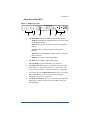
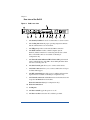
General
Figure 1 and Figure 2 show all the RaQ 3 controls, indicators and
connectors.
2
Introduction
Front view of the RaQ 3
Figure 1
RaQ 3 front view
S
E
1
1.
2
3
4
5
6
The Status Indicators signal Ethernet and hard drive activity:
Tx/Rx (Transmit/Receive) blinks when there is network traffic
on the primary interface.
Link indicates an active network connection on the primary
interface.
Col blinks when a collision is detected on the primary
interface.
100 M indicates that 100 BaseT ethernet is being used on the
primary interface.
Disk indicates activity on the hard disk drive.
2.
The Web indicator blinks to indicate Web activity.
3.
The Logo Badge glows when the RaQ 3 is powered on.
4.
The LCD screen displays messages and values entered. Use the
arrow buttons to toggle between choices or to enter values. (See
“Using the LCD console to configure the network” on page 20.)
5.
You can use the recessed Reset Password button if you forget the
RaQ 3 Administrator password. (See “Resetting the RaQ 3
Administrator password” on page 46.)
6.
The LCD arrow buttons allow you to enter network configuration
information, configure a UPS unit, reboot the RaQ 3 and power
down the RaQ 3.
3
Chapter 1
Rear view of the RaQ 3
Figure 2
RaQ 3 rear view
8
Tx/Rx
Link
Cobalt Networks and Cobalt RaQ are
trademarks of Cobalt Networks, Inc.
www.cobalt.com
P/N 550-00135-01
Tx/Rx
Link
1
100 - 240 VAC 50/60 Hz
1.4 A 60W max
2
3
4
5
6
7
9 10
11
12
1.
The Security lock hole is used to lock the unit to a secure location.
2.
The Cooling fans maintain proper operating temperature. Ensure
that the ventilation holes are not blocked.
3.
The USB port provides a Universal Serial Bus connection
4.
The SCSI connector enables a Small Computer System
Interface (SCSI) connection for connecting such devices as hard
drives. The SCSI connector is available on the RaQ 3i
configuration only.
5.
The Network status indicators/OK to Power Off signal network
activity and information. The OK to Power Off light flashes when
it is safe to turn the power off.
6.
The Serial console port allows you to connect serial devices.
7.
The Serial connector allows you to connect a UPS to the serial port
for Smart UPS support.
8.
The PCI expansion slot provides space for adding a PCI card; the
expansion slot is available on the RaQ 3i configuration only.
9.
The Network connectors enable Ethernet network connections and
accept the 10/100 BaseT network cables.
Network connection 2 (RaQ 3i configuration only)
10. Network connection 1
11. Cooling fan.
12. The Power switch toggles the power on or off.
13. The Power socket receives the AC cord that is provided.
4
13
Introduction
RaQ 3 requirements
To use the RaQ 3, you need:
•
A 10BaseT, 10/100BaseTX or 100BaseTX Transmission Control
Protocol/Internet Protocol (TCP/IP) -based local area
network (LAN).
•
A personal computer (attached to the network) that uses a Web
browser (Netscape Navigator or Microsoft Internet Explorer,
versions 4.0 or later). To manage the RaQ 3 from the user
interface (UI), your browser must have Java and Javascript enabled.
•
Network parameters, which you can obtain from your system or
network administrator; these include the RaQ 3’s assigned
IP address, the subnet mask of your network and a gateway/router
address (if communicating with other networks).
Target audience for the RaQ 3
The user manual is for RaQ 3 Administrators who use the RaQ 3 to
develop and host Web sites. RaQ 3 Administrators should be familiar
with Microsoft® WindowsTM, Macintosh® or other operating systems,
and Netscape Navigator®, Microsoft® Internet Explorer or other Web
browsers.
Cobalt Developer Network
Cobalt provides a wide range of resources, such as technical notes and
white papers, for developers of Linux applications for Cobalt platforms.
Premium resources are also available.
To register with the Cobalt Developer Network at no cost, visit the Web
site at http://developer.cobalt.com/ .
5
Chapter 1
A RaQ 3 can host multiple Internet or intranet sites, which can provide
Web content, email and FTP services. It can be used by three different
kinds of users:
•
The RaQ 3 Administrator is the person who controls and runs the
RaQ 3. This person sets up and maintains the RaQ 3, sets up virtual
sites, and sets access privileges and provides services for the Site
Administrators and site users. The RaQ 3 Administrator can also act
as the Site Administrator for any virtual site.
Note: Whereas industry uses the term “virtual host”, Cobalt
Networks uses the term “virtual site”. In Cobalt’s definition, a
virtual site consists of a Domain Name System (DNS) domain
with Web, FTP and email services. Each virtual site contains its
own list of site user accounts. Each site user account has its
own Web, email spool and any number of email aliases. The
fully qualified domain name of a virtual site is unique to that site,
while its IP address can be shared by many sites. For more
information, see “Definition of a virtual site” on page 34.
6
•
The Site Administrator manages a virtual site, located on the
RaQ 3, that can provide Web publishing, email and FTP services
for the users of the site. The Site Administrator sets up user
accounts and access privileges, maintains mailing lists, controls the
settings for the virtual site and its FTP service, has access to users’
email settings, can generate reports about the virtual site’s disk and
Web usage, and can back up and restore files residing on the site.
•
Site users can send and receive email through the site, upload and
download files using the FTP service provided by the site, publish
their own personal Web page on the site, and back up and restore
their home directories.
Introduction
Organization of the user manual
The user manual is organized according to the user interface (UI).
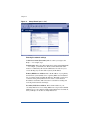
Chapter 3, “RaQ 3 Server Management‚” is based on the Server
Management screen with the brown border on the left side.
See Figure 3.
Chapter 4, “Site Management‚” is based on the Site Management
screen with the green border on the left side. See Figure 4.
Chapter 5, “Using Services on a Site‚” is based on the Personal Profile
screen with the blue border on the left side. See Figure 5.
Figure 3
Server Management screen
7
Chapter 1
Figure 4
8
Site Management screen
Introduction
Figure 5
Personal Profile screen
9
Chapter 1
List of chapters and appendices
The manual has the following chapters and appendices.
Chapter 1
“Introduction” on page 1 summarizes the
RaQ 3 functions.
Chapter 2
“Setting up the RaQ 3” on page 17 explains
RaQ 3 hardware setup and the network integration
information.
Chapter 3
“RaQ 3 Server Management” on page 31 discusses
RaQ 3 Management functions.
Chapter 4
“Site Management” on page 79 explains Site
Management functions for virtual sites.
Chapter 5
“Using Services on a Site” on page 117 shows how to
use the RaQ 3 services (email, Web publishing and
FTP) and how to manage your personal directory.
Chapter 6
“New Features on the RaQ 3” on page 129 explains
the new features on the RaQ 3 and where to fnd
further information in the manual.
Appendix A
“Using the LCD Console” on page 133 explains LCD
console functions.
Appendix B
“Product Specifications” on page 139 lists the RaQ 3
technical specifications.
Appendix C
“Advanced Information” on page 145 provides
information on development tools, configuration files,
and the directory structure of the RaQ 3 disk.
Appendix D
“Domain Name System” on page 149 gives an
in-depth explanation of the DNS service.
Appendix E
“Licenses” on page 167 lists licensing information.
Appendix F
“Glossary” on page 173 provides a glossary of terms
used in the RaQ 3 manual.
Icons used on the UI and in the manual
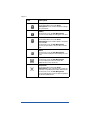
Table 1 describes the icons used on the browser-based User
Interface (UI) and in this manual. If you pass the mouse pointer over an
icon, a short help message appears.
10
Introduction
Table 1 Icons used in the manual and UI
Icon
Description
WebServer
Only in the Service Settings table of Control Panel
on the Management Screen. WebServer is
always on.
Simple Network Management Protocol
(SNMP)
Only in the Service Settings table of Control Panel
on the Management Screen.
Legato/Arkeia file backup
Only in the Service Settings table of Control Panel
on the Management Screen.
Domain Name System (DNS)
Only in the Service Settings table of Control Panel
on the Management Screen.
FrontPage Server extensions
In the Virtual Sites List on the Server
Management screen; indicates that FrontPage
server extensions are enabled on the virtual site.
Telnet
In the Virtual Sites List on the Server
Management screen; indicates that telnet is
enabled on the virtual site.
Bandwidth limit
In the Virtual Sites List on the Server
Management screen; indicates that a bandwidth
limit is enabled on the virtual site.
Secure POP3 (APOP)
In the Virtual Sites List on the Server
Management screen; indicates that
Secure POP3 is enabled on the virtual site.
Secure Sockets Layer (SSL)
In the Virtual Sites List on the Server
Management screen; indicates that SSL is
enabled on the virtual site.
Anonymous file transfer protocol (FTP)
In the Virtual Sites List on the Server
Management screen; indicates that Anonymous
FTP is enabled on the virtual site.
11
Chapter 1
Icon
Description
Modify
In the Virtual Sites List on the Server
Management screen; used to modify the settings
for a virtual site.
Modify
In the Users List on the Site Management
screen; used to modify the settings for a site user.
Delete
In the Virtual Sites List on the Server
Management screen; used to delete a virtual site
from a RaQ 3.
In the Users List on the Site Management
screen; used to delete a site user from a virtual
site.
Email
In the Users List on the Site Management
screen; used to modify the email settings for a site
user.
Site Administrator
In the Users List on the Site Management
screen; indicates that the user is the Site
Administrator for the virtual site.
Suspension
In the Virtual Sites List on the Server
Management screen; indicates that a virtual site
has been suspended by the RaQ 3 Administrator.
In the Users List on the Site Management
screen; indicates that a user has been suspended
by the Site Administrator.
12
Introduction
Customer Service and Technical Support
For Cobalt product information, visit the support section of the Cobalt
Web site at http://www.cobalt.com/support/. The site includes a
Knowledge Base that customers can query; a list of Frequently Asked
Questions (FAQs) that provide additional information is also available
through the Knowledge Base.
General Cobalt information
In the U.S.A., call (888) 70-COBALT or (888) 702-6225, or send email
to [email protected].
Outside the U.S.A., call +1 650 623-2500, or send email to
[email protected].
In Europe, the Middle East and Africa, call +31 71 565 7000, or send
email to [email protected].
In Japan, send email to [email protected].
Cobalt Technical Support and Service
In the U.S.A., call (888) 70-COBALT or (888) 702-6225, or send email
to [email protected].
Outside the U.S.A., call +1 650 623-2679, or send email to
[email protected].
In Europe, the Middle East and Africa, call +31 71 565 7070, or send
email to [email protected].
In Japan, send email to [email protected].
13
Chapter 1
Further information
Cobalt also offers other information resources.
Discussion Groups Cobalt has made available a number of discussion
groups through which users can share information.
To view the current list of Cobalt discussion groups, type the URL
http://www.cobalt.com/support/resources/usergroups.html . The names
of the discussion groups show up as hypertext links.
To subscribe to or unsubscribe from a discussion group, or to view
previous postings to a group, click on the group name. A new browser
window opens, displaying information about the discussion group.
New discussion groups are added periodically. The current groups
include:
•
an announcement list concerning Cobalt products
•
an information list for developers working on Cobalt products
•
a users list for sharing information between users of Cobalt
products
•
a security list for users to address network security issues on Cobalt
products
The Knowledge Base Cobalt offers access to its online database of
common installation and configuration problems and solutions. You can
access the site at http://www.cobalt.com/support/kb/ .
Online technical papers For customers looking for more in-depth
technical information, there are a number of technical papers available
on Cobalt Networks’ web site at http://www.cobalt.com/support/ . The
technical papers cover, among others, such topics as:
14
•
disaster recovery for a RaQ 3 system
•
hardware and software information gestalt that tells you about
hardware elements and software features.
•
Java support for Java Run-time Environment version 1.2 from Sun
Microsystems (ported to the x86 architecture by the Java-Linux
Porting Team at http://www.blackdown.org/)
Introduction
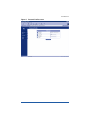
Education For those who desire a premium level of technical expertise
with Cobalt Networks products, we offer a number of training courses.
The intended audience includes end users, Cobalt resellers, system and
network administrators, systems engineers, product developers, support
technicians, consultants and trainers. You can access the site at
http://www.cobalt.com/support/education/index.html/ .
Solutions For customers looking for business-case information
concerning Cobalt products, there are also a number of white papers
available on Cobalt’s Web site at http://www.cobalt.com/solutions/ .
Developers If you are a software or hardware developer, look for
information at http://developer.cobalt.com/ .
Before contacting Cobalt Networks Technical
Support
First, make an effort to resolve the problem on your own. Take note of
all actions you perform and any error messages so that, if necessary, you
can describe them to a member of the Technical Support team.
Refer to the user manual and to the Web-based resources such as
Cobalt’s Knowledge Base, the online technical papers and the Solutions
page, as described above.
To speed up your support call
When contacting Cobalt Networks Technical Support, the more
information you can provide, the better. Before you call or email, have
the following information ready.
•
the serial number, located on the back panel, or the MAC address,
accessible through the user interface, of your RaQ 3
•
any additional software installed on your system
•
any peripherals connected to your system
•
a hard copy of any error messages you have received and the time
when they occurred
•
the process you were running or what changes you had made when
the error occurred, so that Technical Support can try to reproduce
the error
•
the steps you have taken to resolve the problem
15
Chapter 1
Support tools feature
The Support Tools feature is a Web page that assists Technical Support
in diagnosing problems on a RaQ 3 unit.
On the Server Diagnostics screen, the RaQ 3 Administrator can create
and download a data dump of the configuration files on the RaQ 3. This
data dump can then be emailed to [email protected]. A member
of the Technical Support team can evaluate the condition of your RaQ 3
before providing you with corrective action, either by telephone or
email.
If the RaQ 3 Administrator is familiar with Linux, he or she can look
through this file in an effort to determine the problem with the RaQ 3.
The file is a standard gzip file.
For more information on the Support Tools feature, see “Support tools”
on page 71.
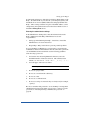
Cobalt logo badge
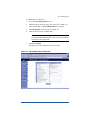
For more information on the RaQ 3 server, click on the
Cobalt Networks logo badge in the top left corner.
•
the amount of RAM
•
the size of the hard disk
•
the version of the Cobalt OS
•
Cobalt Networks trademark information
The table also contains four hypertext links:
16
•
About The Product displays the services available on the RaQ 3
server, links to Cobalt Networks Technical Support and a link to the
Solutions guide.
•
Cobalt Networks, Inc. web site takes you to the
URL http://www.cobalt.com.
•
Credits and Acknowledgements acknowledges the software used
on the RaQ 3.
•
Diagnostic Information contains a form used generate and
download a diagnostics file which can assist Cobalt Technical
Support in diagnosing problems with a RaQ 3 server.
Chapter 2
Setting up the RaQ 3
This chapter guides you through the process of connecting and
configuring the RaQ 3 for your network. A typical setup process takes
less than 15 minutes, after which you can begin setting up web sites and
using other RaQ 3 services.
If the RaQ 3 has been previously configured for a different network,
refer to “Changing network configuration” in Appendix A.
The setup process consists of two phases.
•
“Phase 1: Making the connection” covers the physical setup and
connection of the RaQ 3 to a power source and the network.
•
“Phase 2: Setting up with the Web browser” covers the network
integration process and allows the administrator to select services
and create users and groups, using any browser-enabled computer.
Phase 1: Making the connection
Installing the RaQ 3
The RaQ 3 can either be placed on a flat surface — for example, a desk,
shelf or table top — or it can be connected to a standard 19-inch
equipment rack.
!
Caution: If you operate the RaQ 3 in an equipment rack, see
the precautions described in “6. Operating the unit in an
equipment rack” on page iv.
17
Chapter 2
If you plan to use the RaQ 3 on a flat surface, attach the rubber feet to
the five indentations in the bottom of the case; see Figure 6.
Figure 6
Rubber feet for the RaQ 3
S
E
Rubber feet
If you plan to operate the RaQ 3 in an equipment rack, first connect the
mounting ears to the sides of the RaQ 3 (see Figure 7), near either the
front or the rear of the case. Attach the ears to the equipment rack.
Figure 7
Mounting ears for the RaQ 3
S
E
S
E
18
Setting up the RaQ 3
Connecting to the network
Connect one end of a Category 5 Ethernet cable to the
10/100 Base-T Network 1 connector on the RaQ 3; see Figure 8.
Connect the other end of the cable to an existing network socket.
Tx/Rx
Link
Cobalt Networks and Cobalt RaQ are
trademarks of Cobalt Networks, Inc.
www.cobalt.com
P/N 550-00135-01
Tx/Rx
Network connectors
Link
Figure 8
100 - 240 VAC 50/60 Hz
1.4 A 60W max
Network connection 2
(RaQ 3i configuration only)
Network connection 1
Connecting the power cord
Connect the power supply cord to the RaQ 3 and to an electrical outlet
(100-240 volts AC, 50/60 Hz, as listed in “Product Specifications” on
page 139).
Powering on the RaQ 3
Turn on the power by pressing the On/Off switch on the back of the
RaQ 3.
The hard disk spins up, the fan turns on, and the LCD screen lights up.
The Cobalt logo and the Cobalt Networks name scroll across the screen.
A number of status messages are displayed on the LCD screen as the
RaQ 3 completes its boot process.
!
Caution: It is important to follow the proper power-down
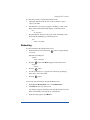
procedure before turning off the RaQ 3. Refer to “Powering
Down” in Appendix A.
19
Chapter 2
Configuring the RaQ 3 for the network
Now that you have made the network and power connections, you can
configure the network settings.
The RaQ 3 requires specific network information to function properly.
You must enter the necessary information using the LCD console on the
front panel.
Before you proceed, make sure you have the following information:
•
the IP address assigned to the RaQ 3
•
the subnet mask of your network
•
the gateway/router address (necessary only if communicating with
other networks)
Using the LCD console to configure the network
Figure 9 shows the LCD console for the RaQ 3.
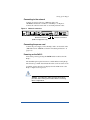
The LCD screen on the front of the RaQ 3 displays two lines of text.
The top line of the LCD presents instructions on data to enter; the
bottom line displays the data already entered. Use the arrow buttons to
the right of the LCD screen to enter the required network information
manually.
Appendix A, “Using the LCD Console” on page 133, provides more
information about the LCD console.
Figure 9
LCD console
S
E
LCD screen
20
LCD arrow buttons
Setting up the RaQ 3
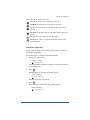
The arrow buttons function as follows:
The Left arrow button moves the cursor to the left.
The Right arrow button moves the cursor to the right.
The Up arrow button increases the digit located at the cursor
position.
The Down arrow button decreases the digit located at the cursor
position.
S
E
The S button (“select”) displays the next option.
The E button (“enter”) accepts the information entered or the
option displayed.
Setting the configuration
During setup, the LCD console is used to enter network configuration
information on the RaQ 3.
Follow these steps to configure the network manually:
1.
When you see the prompt
ENTER IP ADDR:
000.000.000.000
enter the IP address assigned to the RaQ 3 using the arrow buttons
on the LCD console.
2.
Press E .
If the IP address is valid, the next prompt appears:
ENTER NETMASK:
255.000.000.000
3.
Enter the netmask of your network.
4.
Press E .
If the netmask is valid, the following prompt appears:
ENTER GATEWAY:
000.000.000.000
21
Chapter 2
5.
Enter the IP address of the gateway for your network.
If your network does not have a gateway, do not enter a number —
leave the default value, “000.000.000.000.”
6.
Press E .
The LCD displays:
[S]AVE [C]ANCEL
7.
To save the configuration information, use the left and right arrow
buttons to select [S]ave, and then press E . You will see:
VERIFYING AND SAVING
Note: Selecting [C]ancel cancels the configuration and the
LCD screen displays ENTER IP ADDR: again. You must go
through the entry process again.
After verifying and saving, the RaQ 3 completes the boot process. The
LCD screen shows several messages before displaying the IP address
assigned to the RaQ 3.
Configuration is complete when the LCD screen displays the IP address
assigned to the RaQ 3, for example:
IP ADDRESS:
192.168.25.77
Phase 2: Setting up with the Web browser
The remainder of the setup process is performed through a Web browser
on any computer on your network. Use one of the standard browsers
available (for example, Netscape Navigator or Microsoft Internet
Explorer, versions 4.0 or later) to do this. Once the setup process is
complete, the RaQ 3 can be managed from any computer on the network
that has a browser.
To use a browser to set up the RaQ 3, follow these steps:
22
1.
Launch a standard Web browser on any computer connected to the
network.
2.
Enter the IP address of the RaQ 3 (shown on the LCD screen on the
front panel) into the URL field of your browser — for example:
3.
Press Return (or Enter) on your keyboard.
Setting up the RaQ 3
If the RaQ 3’s network settings were configured successfully, then the
Cobalt welcome screen appears; see Figure 10.
Click the Start button to begin using the Setup Wizard.
Figure 10
RaQ 3 Welcome screen
Configuring the RaQ 3 with the Setup Wizard
To configure the RaQ 3, enter information into the fields on the Setup
Wizard screen (see Figure 11). These fields are described in the
sections that follow.
Note: For help with a particular field in the Setup Wizard, move
the pointer over the Active Assist
icon adjacent to the field
and help text is displayed at the bottom of the screen.
23
Chapter 2
Figure 11
Setup Wizard (part 1 of 2)
Entering the network settings
Cobalt server name (host name). This is a name you assign to the
RaQ 3 — for example, raq1.
Domain name. This is the official name that is registered with InterNIC
— for example, yourdomain.com. The host name and domain name
must be coordinated by the network administrator in order for you to
access the RaQ 3 by its name and not just by its IP address.
Primary DNS Server Address. This is the IP address of your primary
domain name system (DNS) server. A primary DNS server maintains a
list of computer names and their IP addresses. The RaQ 3 needs access
to this list on the primary DNS server in order to convert between
IP addresses and names. This conversion is essential for sending and
receiving email external to the RaQ 3.
Secondary DNS Server Address. This is the IP address of your
secondary DNS server. A secondary DNS server can provide redundant
DNS service to your computers. If the primary DNS server is turned off,
then your RaQ 3 can use the secondary DNS server.
24
Setting up the RaQ 3
For informational purposes, this table also displays the IP address of the
RaQ 3, the subnet mask of your network, your configured gateway and
the Media Access Control (MAC) address that uniquely identifies this
RaQ 3. These settings, with the exception of the MAC address, can be
changed later (through the browser) from the Control Panel section of
the Server Management screen.
Entering the administrator settings
In the Administrator Settings table, enter the information about the
RaQ 3 Administrator. The RaQ 3 Administrator has several
responsibilities:
1.
Setting up and maintaining the RaQ 3, virtual sites, virtual Site
Administrators, site users and services
2.
Responding to RaQ 3 email alerts to prevent potential problems
To set up the RaQ 3 Administrator, you must enter a password in the
Administrator Password field and then enter the same value again in the
second Administrator Password field. Use the following guidelines
when choosing a password:
1.
Use between five and ten alphanumeric characters; ten is the
maximum number of characters allowed. The valid characters
include: a-z A-Z 0-9 % ! @ $ ^ & * - _ = + \ | . , / ? ; :
2.
Use both upper- and lower-case letters.
Note: A password is case-sensitive.
3.
Do not use a proper name.
4.
Do not use a word found in a dictionary.
5.
Do not use a date.
6.
Do not use a command word.
7.
Do not use a string of consecutive keys on a keyboard (for example,
“qwerty”).
Be sure to remember this password to access the RaQ 3’s management
administration features in the future. If you forget or want to reset the
password, see “Resetting the RaQ 3 Administrator password” on
page 46.
25
Chapter 2
Entering the service settings
You turn the RaQ 3 services on or off through the Service Settings table.
See Figure 12. The default settings for these services are suitable for
most users. These services include:
•
Email server (default is On)
•
File transfer protocol (FTP) server (default is On)
•
Telnet server (default is On)
•
Simple Network Management Protocol (SNMP) agent (default is
Off)
•
Domain Name System (DNS) server (default is Off)
Figure 12
26
Setup Wizard (Part 2 of 2))
Setting up the RaQ 3
After setup has been completed, the Services page in the Control Panel
has a “Parameters” column which enables further configuration. Refer
to “Control panel” on page 47 for additional information.
Entering the time settings
In the Time Settings table, select the time and date with the pull-down
menus. See Figure 12.
Select the correct time zone by clicking in the Region, Country and
Locale/Zone fields.
Completing configuration with the Setup Wizard
When you have entered the information in the Setup Wizard, click Save
Changes.
The RaQ 3 performs automatic checks on the information entered and
alerts you if an illegal value or a problem is encountered. If the
information is correct, the RaQ 3 enters the information in its
configuration files.
Registering the RaQ 3 online
The RaQ 3 displays an online product registration page; see Figure 13.
Note: If you are not connected to the Internet, you cannot
register online.
IMPORTANT: If you leave blank either the DNS or the Gateway
fields in the Setup Wizard, you cannot register the RaQ 3 online
because you will not be able to send email. In this case, if you
attempt to register the RaQ 3 online, you receive an error
message, stating that you cannot register online because you
did not fill in the DNS and Gateway fields.
27
Chapter 2
Figure 13
Online registration page
To register the RaQ 3 online:
1.
Enter your Full Name. This field must be filled in.
2.
As an option, you can enter your title, the company name, the
company address, the country and the phone number.
3.
Enter either a Fax number or Email address. One of these two
fields must be filled in. If you choose email, enter your complete
email address in the form [email protected] .
4.
Click Register through Email to submit the information.
If you do not want to register online, click Register Later to proceed to
the RaQ 3 default home page.
Once you have registered the RaQ 3 online, you cannot register again.
You receive an error window stating that the RaQ 3 has already been
registered.
28
Setting up the RaQ 3
Registering online at a later time
If you want to register online at a later time:
1.
Click the Cobalt logo in the top left corner of the screen. The
Server Configuration Information table appears.
2.
Click the About The Product link. The default home page for the
RaQ 3 appears.
3.
In the bottom right corner, click the link under Product
Registration. The Product Registration screen appears.
4.
Follow the steps in the previous procedure to register online.
The default home page for the RaQ 3 appears; see Figure 14 .
Figure 14
Default RaQ 3 home page
29
Chapter 2
The default RaQ 3 home page is stored internally under index.html in
the Linux directory /home/sites/home/web. This page appears when a
user goes to the URL http://<IP address>/.
When the RaQ 3 Administrator changes the index.html file to create a
new home page, the default RaQ 3 home page is replaced.
Registering the RaQ 3
If you did not register the RaQ 3 online, fill out the registration card
included in the packaging materials and return it to Cobalt
Networks, Inc. By doing so, you will receive notifications of system
and security upgrades and new product information.
If you did not register online throught the Setup Wizard and would like
to do so, see “Registering online at a later time” on page 29.
30
Chapter 3
RaQ 3 Server Management
This chapter describes the functions that the RaQ 3 Administrator
normally performs. The RaQ 3 Administrator accesses these functions
on the Server Management screen on the RaQ 3. The Server
Management screen has a brown strip on the left side.
The RaQ 3 Administrator can also perform site-related tasks and user
tasks described in Chapters 4 and 5. See “Site Management” on
page 79 and “Using Services on a Site” on page 117.
Table 2 briefly summarizes the three types of RaQ 3 users:
31
Chapter 3
Table 2 Levels of user
32
User
Description
RaQ 3 Admin
The RaQ 3 owner with the username “admin”
has full control of the RaQ 3 and is a member of
the main site (which uses the IP address shown
on the LCD screen of the RaQ 3). The RaQ 3
can have several Site Administrators, but only
one RaQ 3 Administrator.
Site Admin
The Site Administrator is designated by the
RaQ 3 Administrator. The Site Administrator is
a user who runs a virtual site located on the
RaQ 3; the virtual site can provide Web
publishing, email and FTP services for the users
of the site. The Site Administrator has control
only over this virtual site.
Site User
Site Users are added to a virtual site by the
RaQ 3 Administrator or a Site Administrator.
Site Users can send and receive email through
the virtual site, upload and download files using
the FTP service provided by the site, publish
their own personal Web page on the site, and
back up and restore their home directories. The
Site User has control only over the files located
in his or her home directory on the RaQ 3.
RaQ 3 Server Management
Approaches to RaQ 3 administration
The RaQ 3 Administrator can decide how many of the server functions
he or she wants to manage directly and how much to delegate.
•
Full control. If the RaQ 3 Administrator wants to control all the
functions on the RaQ 3, he or she can create virtual sites without
assigning any virtual Site Administrators. The RaQ 3 Administrator
is responsible for managing the main site and all the virtual sites.
(See “Definition of a virtual site” on page 34.)
•
Hybrid control. If the RaQ 3 Administrator wants to control some
of the RaQ 3 functions and delegate others, he or she can assign
some of the virtual sites to virtual Site Administrators (for the sites
that have a user capable of acting as a Site Administrator), and
retain control of other virtual sites. The RaQ 3 Administrator is
responsible for managing only the sites that do not have a Site
Administrator.
•
Distributed control. If the RaQ 3 Administrator wants to delegate
responsibility for all the virtual sites, he or she can create Site
Administrators for all the virtual sites. In this case, the RaQ 3
Administrator is responsible for managing only server settings and
virtual site services. The Site Administrators are responsible for
managing the virtual sites.
The RaQ 3 Administrator can manage the RaQ 3 using any standard
browser. Access the Server Management screen by typing either
http://<IP address> /admin/ or http://<host name> /admin/ into your
browser. These web pages are password-protected — you must enter
the RaQ 3 Administrator password.
When you access the RaQ 3 Administrator site for the RaQ 3, the
Server Management screen appears (see Figure 15). This screen is
used for the RaQ 3 management tasks that are performed only by the
RaQ 3 Administrator:
1.
Setting up and maintaining the RaQ 3.
2.
Creating virtual sites.
3.
Creating access privileges and providing services for the Site
Administrators and site users.
The RaQ 3 Administrator functions available on the Server
Management screen are described in the sections that follow.
33
Chapter 3
Definition of a virtual site
Whereas industry uses the term “virtual host”, Cobalt Networks uses the
term “virtual site”.
In Cobalt’s definition, a virtual site consists of a Domain Name System
(DNS) domain with Web, FTP and email services. Each virtual site
contains its own list of site user accounts. Each site user account has its
own Web, email spool and any number of email aliases. The fully
qualified domain name of a virtual site is unique to that site, while its
IP address can be shared by many sites.
With the advent of name-based virtual hosting, it is no longer necessary
to dedicate an IP address to a virtual site. Apache can now differentiate
among target virtual sites according to the name requested. Many
virtual sites on the RaQ 3 can share one IP. Not all services are
compatible with name-based virtual hosting. SSL encryption for Web
data and an anonymous FTP account can only be enabled on one
name-based virtual site per IP address hosted by the RaQ 3.
The IP address of the RaQ 3 can be shared by many virtual sites or it can
be unique to one virtual site.
The RaQ 3 has one main site (which cannot be deleted) and virtual sites.
The main site uses the IP address assigned to the RaQ 3 using the LCD
console.
On the Server Management screen, the main site is listed in the Virtual
Sites List table; the trashcan icon in the fourth column for the main site
is grayed-out (disabled), as this site cannot be deleted from the list of
virtual sites. The options and features available on a virtual site can also
be configured for the main site.
34
RaQ 3 Server Management
Site management
The RaQ 3 is designed to host multiple virtual sites. A virtual site is an
individual location on the Internet, such as www.abc.com or
www.xyz.com. Each virtual site can have a unique set of users who can
send and receive email, publish Web pages, or upload and download
files through FTP. A virtual site can also provide anonymous FTP
access.
Note: A virtual site can be name-based or IP-based. If there
are several name-based virtual sites on an IP address, only one
name-based virtual site can use anonymous FTP.
The number of virtual sites that you can configure on a RaQ 3 depends
on the size of the hard disk in the RaQ 3 and on the amount of disk
space allocated to each virtual site.
There is a limit of 250 IP-based virtual sites.
In the Site Management section of the Server Management screen, the
RaQ 3 Administrator can create and manage virtual sites hosted by the
RaQ 3. A table displays the virtual sites (if there are any) on the RaQ 3.
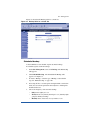
See Figure 15.
Figure 15
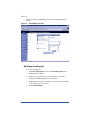
List of virtual sites in the Site Management section
35
Chapter 3
In the Site Management section, the Virtual Site List displays the virtual
sites by host name in ascending order.
The Virtual Site List has four columns which display information about
the site, and allow the RaQ 3 Administrator to manage or remove a site.
•
The first column displays the host name of the virtual site.
•
The second column displays the IP address of the virtual site.
•
The third column displays icons to indicate which services
(FrontPage Server extensions, Anonymous FTP, Secure POP3
[APOP], SSL or Bandwidth Limit) are enabled on a site, or to
indicate that a site is suspended.
•
The fourth column displays icons to manage a site or to remove a
site.
Note: The trashcan icon for the main site on the RaQ 3 is
grayed-out (disabled), as this site cannot be deleted from the
list of virtual sites.
For an explanation of the icons, see “Icons used on the UI and in the
manual” on page 10.
Search and sort functions
The Virtual Site List table offers a search function and a sort function.
See Figure 15. These functions are useful if you have a large number of
virtual sites on your RaQ 3 and you want to restrict the display to certain
virtual sites.
You can search the list of virtual sites according to the following
criteria:
•
by host name or IP address
•
whether the host name or IP address is equal to the search string, is
contained in the search string or is not contained in the search string
The screen regenerates and the results of the search are displayed in a
table with the same four columns. The heading of the table now states
“Search Results (<x> Virtual Sites found). To return to the full list of
virtual sites, click Site Management on the left.
Note: Suspended sites are listed in the search results.
36
RaQ 3 Server Management
You can sort the list of virtual sites according to the following criteria:
•
by host name, in ascending or descending order
•
by IP address, in ascending or descending order
Ascending order means from lowest value to the highest value (a–z or
1–9). Descending order means from highest value to the lowest value
(z–a or 9–1). By default, the Virtual Site List table is sorted by host
name in ascending order.
The screen regenerates and the results are displayed in a table with the
same four columns. In the heading of the column which has been
sorted, a blue arrow icon points up (ascending order) or down
(descending order). In the heading of the column which has not been
sorted, a double-ended arrow indicates that the order for the column is
random.
You can use the search and sort functions together to produce the
display that you need. For example, you can search the list for all
virtual sites with “test” in the host name, and sort the results of that
search by IP address in ascending order.
To search the list of virtual sites:
1.
In the first field of the Search Virtual Site List window, select “Host
Name” or “IP Address” from the pull-down menu.
2.
In the second field, select “is”, “contains” or “does not contain”
from the pull-down menu.
3.
In the third field, enter the string of characters for which you want
to search.
4.
Click Search. The screen regenerates and displays the results in a
table with the same four columns.
37
Chapter 3
To sort the list of virtual sites:
1.
To sort according to Host Name, click on the blue arrow icon in the
heading of the Host Name column. To sort according to
IP Address, click on the blue arrow icon in the heading of the
IP Address column.
2.
To sort in ascending (up arrow icon) or descending order (down
arrown icon), click on the blue arrow icon so that it points in the
correct direction.
3.
The screen regenerates and displays the results in a table with the
same four columns.
Overview of virtual sites
The RaQ 3 supports both name-based and IP-based virtual hosting.
The RaQ 3 Administrator sets up the virtual sites, as described in
“Adding a virtual site” on page 43. The following list of information is
helpful when creating a site.
•
IP Address To use the RaQ 3, the RaQ 3 Administrator requires an
IP address or range of IP addresses.
Note: The RaQ 3 supports name-based virtual sites allowing
many sites to share a single IP address. For example, the
RaQ 3 Administrator can create many virtual sites using the
same IP address (192.168.25.77) with a different host name for
each site (for example, both www.abc.com and www.xyz.com
can use 192.168.25.77 as their IP address).
•
Host name Each virtual site requires a host name (for example,
www or ftp). If the site is connected to the Internet, the RaQ 3
Administrator must know which IP address the host name uses.
•
Domain name Each virtual site also requires a domain name (for
example, abc.com or xyz.com). The RaQ 3 Administrator must also
register the domain name with InterNIC.
Note: The RaQ 3 can serve as the DNS server and provide the
host name.
•
38
Bandwidth Limit The RaQ 3 allows you to set an output
bandwidth limit for each IP address assigned to a RaQ 3. The
virtual site must have an IP address associated in order to specify a
bandwidth limit. This feature does not regulate input traffic. See
“Output bandwidth management” on page 40.
RaQ 3 Server Management
•
Accept Email for Domain The RaQ 3 Administrator can configure
the user email addresses to both the fully qualified virtual domain
name ([email protected]) and the domain name alone
([email protected]).
•
Web Access by Domain The RaQ 3 Administrator can configure
the web server to respond to both http://host.domain.com
and http://domain.com.
•
Maximum allowed disk space (MB) The RaQ 3 Administrator can
set the amount of disk space a site can use, and can change this
value at any time. The value is in Megabytes and must be a whole
number greater than zero.
•
Maximum Number of Users The RaQ 3 Administrator can limit
the number of users that a Site Administrator can create. The RaQ 3
Administrator can change this value at any time.
•
Enable Shell Accounts The users of the virtual site being created
can telnet to the RaQ 3 and run commands from a Linux shell. If
this feature is enabled, Site Administrators can grant shell access on
a user-by-user basis.
Note: Granting shell access can greatly compromise the
security of your RaQ 3.
•
Enable common gateway interface (CGI) scripts The RaQ 3
Administrator can enable this virtual site and all the site users to
have CGI-based dynamic Web content on the RaQ 3. CGI allows a
user to have a Web site run programs that dynamically generate
hypertext markup language (HTML) pages in response to specific
user inputs. CGI scripts can be created on a user’s desktop
computer and then transferred to the RaQ 3 with a file transfer
protocol (FTP) application (see “Publishing Web pages using FTP”
on page 125).
•
Enable SSL The RaQ 3 provides an optional secure sockets layer
(SSL) for web access. See “SSL settings” on page 98.
•
Enable Server Side Includes The RaQ 3 can correctly display
server-parsed Web pages (.shtml).
•
Enable FrontPage Server Extensions Users of this virtual site
can enable Microsoft FrontPageTM Server Extensions for their Web
page development. A root web for the site is automatically created
when FrontPage Extensions are enabled. Site Administrators can
create and delete user FrontPage webs individually.
39
Chapter 3
•
Enable Secure POP3 (APOP) The RaQ 3 administrator can
enable the Authentication Post Office Protocol (APOP) for a virtual
site. APOP is a challenge-response authentication scheme built on
top of the standard POP protocol. APOP is designed in a way that
protects your password when being sent across the network.
Note: If you enable APOP for a user, that user can check his or
her email only through an APOP client; a regular POP3 client
will not work unless APOP is disabled for that user.
•
Anonymous FTP Users without passwords can download and
upload files through FTP up to the specified disk-space limit. The
RaQ 3 Administrator can enable the anonymous FTP server for any
virtual site. The administrator can also limit the amount of data that
can be uploaded anonymously and the total number of anonymous
users who can access the virtual site simultaneously.
Note: A virtual site can be name-based or IP-based. If there
are several name-based virtual sites on an IP address, only one
name-based virtual site can use anonymous FTP.
Output bandwidth management
The RaQ 3 allows you to set an output bandwidth limit for each
IP address you assign to a RaQ 3. This feature is available when you
create a virtual site from the Server Management screen or when you
modify the settings of a virtual site. The virtual site must have an
IP address associated in order to specify a bandwidth limit.
The limit is specified in kilobits per second (Kb/s), and the RaQ 3
enforces a minimum bandwidth limit of 10 Kb/s.
The bandwidth limit applies to all outgoing Transmission Control
Protocol (TCP) traffic on a particular IP address. This includes Web,
FTP, POP and telnet traffic, as well any other TCP-based application.
If multiple users are accessing a bandwidth-limited IP address, the
system divides the bandwidth evenly among the users.
If multiple named-based virtual sites belong to one IP address, the
bandwidth assigned to the IP address is divided evenly among the total
number of users on those name-based virtual sites.
This feature does not regulate input traffic.
40
RaQ 3 Server Management
To enable the bandwidth management feature:
1.
In the Server Management screen, click Site Management on the
left.
2.
Click the wrench icon next to the virtual site on which you want to
enable the bandwidth management feature.
3.
Click Site Settings on the left.
4.
Click the checkbox next to Bandwidth Limit in the table.
5.
The value of the bandwidth limit is in Kb/s. The minimum
bandwidth limit is 10 Kb/s.
Enter the value of the bandwidth limit in the field.
6.
Click Save Changes.
Setting defaults for a virtual site
There are many advantages for setting defaults for the virtual sites. For
example, since multiple sites can now share an IP address, a default
IP address can be set for all new virtual sites added. Also, since it is
common for many sites to share a common domain name, it can be
desirable to set a default domain name for your virtual sites.
The same is true of all the options for a virtual site; it is best for you to
decide the needs of your typical virtual site before assigning these
values.
Site defaults and site settings can only be configured by the RaQ 3
Administrator. If the RaQ 3 Administrator enables either the FrontPage
Server Extensions service or the Shell Accounts service, the Site
Administrators can enable or disable FrontPage user webs, and enable
or disable individual (per-user) shell access.
41
Chapter 3
Figure 16 shows the screen for configuring the default settings of a
virtual site.
Figure 16
42
Default settings for a virtual site
RaQ 3 Server Management
To edit the default settings for a virtual site:
1.
On the Server Management screen, click Site Management.
2.
Click Set Virtual Site Defaults.
3.
Enter the information for the site.
See the descriptions in “Overview of virtual sites” on page 38.
4.
Click Save Changes.
Once you have configured the default settings, you can modify the
settings for each virtual site that you add.
Adding a virtual site
Figure 17 shows the screen for adding a virtual site.
Figure 17
Adding a virtual site
43
Chapter 3
To add a virtual site:
1.
On the Server Management screen, click Site Management.
2.
Click Add Virtual Site.
3.
Enter the information for the site (information from the site defaults
table is displayed here).
4.
Make changes to the information or complete the necessary
information.
5.
Verify the settings and click Confirm New Site.
Adding a name-based virtual site
If you are adding a name-based virtual site, you must have DNS records
for that site before you can access the site. For more information, see
“Definition of a virtual site” on page 34.
Note: You cannot preview a name-based virtual site before
making it available to the public Internet, because you first need
to create valid DNS records for that site.
If you administer your DNS records on the RaQ 3, refer to Appendix D,
“Domain Name System”, on page 149 for creating DNS records. If
your Internet service provider (ISP) administers your DNS records, ask
your ISP to create the DNS records for the new name-based virtual site.
Once the virtual site has been created, you can manage it by clicking the
modify icon for the site. See “Changing site settings” on page 94.
To assign a Site Administrator to the new virtual site, see “Adding a site
user” on page 83.
Removing a virtual site
To remove a virtual site:
44
1.
On the Server Management screen, click Site Management.
2.
In the Virtual Site List table, click the trashcan icon for the virtual
site you want to remove.
3.
In the confirmation dialog box that appears, click OK to delete all
the virtual site accounts, site users and contents.
4.
The screen refreshes and the virtual site is no longer listed.
RaQ 3 Server Management
Both the Site Administrator and the RaQ 3 Administrator can configure
the site user default settings. See “Setting defaults for a site user” on
page 81.
After creating a virtual site, you can add or remove users for that site,
and assign a Site Administrator. See “Adding a site user” on page 83.
For information on changing the settings for a particular virtual site, see
“Changing site settings” on page 94.
For information on removing a site user from a particular virtual site,
see “Removing a site user” on page 86.
RaQ 3 Administrator
!
Caution: Be sure to remember the password you enter here
— otherwise, you will need to reset it (See “Resetting the RaQ 3
Administrator password” on page 46).
In the Administrator section of the Server Management screen, you
enter information about the RaQ 3 Administrator — including user
name, password and, optionally, an email address where system alerts
for failed services are sent.
To enter the information for the RaQ 3 Administrator:
1.
On the Server Management screen, click Administrator on the
left. The Administrator Settings table appears.
2.
Enter the first name and last name of the administrator.
3.
Enter the password twice to ensure that you have entered it as
intended. For guidelines on choosing a password, see “Entering the
administrator settings” on page 25.
4.
As an option, enter an email address that will receive system alerts
for failed services.
5.
Click Save Changes.
45
Chapter 3
Changing the RaQ 3 Administrator password
To change the password for the RaQ 3 Administrator:
1.
On the Server Management screen, click Administrator on the
left. The Administrator Settings table appears.
2.
Enter the new password twice to ensure that you have entered it as
intended. For guidelines on choosing a password, see “Entering the
administrator settings” on page 25.
3.
Click Save Changes.
Resetting the RaQ 3 Administrator password
When the RaQ 3 Administrator password is cleared, the root account is
not accessible until a new administrator password has been assigned.
!
Caution: After you clear the password, enter a new one as
soon as possible to protect the security of the RaQ 3. At this
point, anyone on the network can assign the RaQ 3
Administrator password until you assign a new one.
If you forget the RaQ 3 Administrator password, you can clear it by
following these steps.
1.
Push and hold the end of a paper clip in the recessed Reset
Password button (located between the LCD screen and the LCD
arrow buttons, on the front of the RaQ 3). Hold the button in for
approximately 2 seconds.
The LCD screen displays
Resetting admin
password...
46
2.
Release the button.
3.
In your Web browser, enter the URL
http://<IP Address>/admin/ or http://<host name>/admin/ to access
the Server Management screen.
4.
If a prompt appears asking for a username or password, enter
“admin” as the username. DO NOT enter a password. Click OK.
RaQ 3 Server Management
5.
Click Administrator on the left. The Administrator Settings table
appears.
6.
Enter the password twice to ensure that you have entered it as
intended. For guidelines on choosing a password, see “Entering the
administrator settings” on page 25.
7.
Click Save Changes.
Control panel
You can configure the services, network and time settings through the
Control Panel section of the Server Management screen.
Note: For help with a particular field, move the mouse pointer
over the Active Assist
icon adjacent to the field. Help text
appears in a window at the bottom of the screen.
Services
Figure 18 shows the Service Settings table of the Services section.
Figure 18
Service Settings table
47
Chapter 3
To manage the settings for the RaQ 3 services:
1.
On the Server Management screen, click Control Panel on the
left. The Service Settings table appears.
2.
To turn on any of the services listed in the Service Settings table
(except Web server, which is always on), click the check box next to
that service. The services are described in the sections that follow.
3.
Click Save Changes.
Note: Chapter 5 provides instructions for site users on how to
use the RaQ 3 services.
Web server
This service is always on. It allows site users to access web content, as
described in Chapter 5.
Email server
The RaQ 3 supports email for each virtual site on the host. It also
supports email for entire domains (for example, www.mydomain.com).
By default, each registered user has an email account created on the
RaQ 3.
The RaQ 3 supports multiple client and server email protocols but does
not implement virtual email users. This means that for the entire RaQ 3,
each user must have a unique username, even if the users are on
different virtual sites. For more information, see “Email relaying” on
page 51.
SMTP server
The RaQ 3 can act as a Simple Mail Transfer Protocol (SMTP) server
for sending and receiving Internet email. The RaQ 3 Administrator can
configure several parameters that can affect the performance of the
SMTP server.
Users created on any virtual site can retrieve their email using the Post
Office Protocol 3 (POP3) or the Authentication Post Office Protocol
(APOP), in addition to the Internet Message Access Protocol 4
(IMAP4). Users can send mail using the Simple Mail Transfer Protocol
(SMTP).
48
RaQ 3 Server Management
For the RaQ 3 to receive email, the network or system administrator
must enter a mail server host name in your organization’s domain name
system (DNS) server. The IP address of the DNS server must be entered
in the network settings for the RaQ 3 or the SMTP protocol will not
work. For more information, see “Entering the network settings” on
page 24.
For more information on DNS, see “Domain Name System (DNS)
server” on page 55.
Figure 19 shows the Email Parameters table.
Figure 19
Email Parameters table
49
Chapter 3
To configure the email parameters:
1.
In the Service Settings table, click the Parameters link next to
Email Server. The Email Parameters table appears.
2.
Fill in the fields in the Email Parameters table. The following
paragraphs explain these fields.
3.
Click Save Changes in the Email Parameters table.
4.
Click Save Changes in the Service Settings table
You can modify the following parameters:
•
Maximum message size (MB) It is important to enter a value here
to limit the size of incoming email messages. If this field is blank,
you can receive a message that exceeds the available disk space.
Such a message would be returned to the sender as “undeliverable.”
The default value is 5 MB; the value must be a whole number
greater than zero.
•
Smart Relay Host Name You can enter an optional host name in
this field. With this feature, you can configure the RaQ 3 to send
Internet email to a specific email server. Enter the host name of the
email server through which you want to relay your email.
This feature is useful if the RaQ 3 does not have direct Internet
access (for example, the RaQ 3 is subject to a restrictive firewall),
but can communicate with an email server that has direct Internet
access.
50
•
Relay for the following hosts/domains You can specify a list of
hosts for which the SMTP server will relay email messages. For
more information, see “Email relaying” on page 51.
•
Hosts/domains aliases In this field, enter all the IP addresses or
domain names of sites on which you receive email. You can only
receive email that’s addressed to you on the domains specified here.
For example, if you want to receive email addressed to you at
[email protected], type domain.com in this field.
•
Reject the following users/hosts/domains In this field, enter
email addresses or domains from which you want to block any
email. Anyone trying to send you messages from one of these
addresses or domains will receive an error message in return.
RaQ 3 Server Management
Email relaying
Simple Mail Transfer Protocol (SMTP) service is different from Post
Office Protocol (POP), telnet and file transfer protocol (FTP) services in
that SMTP does not try to authenticate a user when an SMTP
connection is made. Every email server on the Internet has to be able to
deliver email to you, so the email servers must be able to connect freely
to send the email. The Cobalt server accepts email if the recipient has a
user account or an alias email account, or if the sending host (your
client PC) is trusted to relay outgoing emails to another domain. These
trusts are defined by host or domain names, as well as by IP addresses
and networks. A network is a range of IP addresses; a network can be as
small as one IP address, but that is not very practical.
!
Caution: Some users advise you to open relay to all com, edu,
net and other top-level domain addresses. This is BAD
ADVICE. Doing so allows hosts belonging to com, edu, net and
others to relay email through your Cobalt server; this relayed
mail is known as spam mail.
Spam mail can appear as though it originated from your server
and as a result, others may blacklist your server as a known
spam site. If your server is blacklisted, many mail servers will
not relay your email and your customers will not receive any
email messages.
If you have users who access your server through the Internet, ask your
Internet Service Provider (ISP) which networks are used by their remote
access (dial-up) equipment. If the ISP says the network 209.43.21.5/24
and 209.43.66.5/16, add “209.43.21” and “209.43.66” to the “Relay
email from these hosts/domains” field of the Email Parameters menu. If
your ISP gives you a list of 30 networks used by 30 points-of-presence
(POPs) (which are regional ISP offices) across the country and your
clients can dial in from any of them, then you must trust all 30 networks
or these users cannot send email through your RaQ 3.
51
Chapter 3
How to enable email relaying
To enable email relaying, add the IP addresses (or domain names, or
both) of the machines which use your RaQ 3 as the SMTP server.
1.
On the Server Management screen, click Control Panel. The
Service Settings table appears.
2.
Click the Parameters link next to Email Server. The Email
Parameters table appears. One field is labeled “Relay for the
following hosts/domains”. The following paragraphs explain how
to fill in this field. .
3.
Click Save Changes in the Email Parameters table.
4.
Click Save Changes in the Service Settings table.
The entries you add to this field serve as part of a pattern match against
the email that the client is sending. As a result, some handy shortcuts
are possible. If you have a number of hosts in the same network block,
you can, as a shortcut, simply enter the number of the network block.
For example, specifying a network such as 192.168.1 in the “Relay
email from these hosts/domains” field trusts all IP addresses from
192.168.1.1 through 192.168.1.254.
Note: There is no trailing period on the number of the network
block and there are only three octects entered in the field. It is
important that you do not include a trailing dot after the part of
the IP address that you want to match.
If you want to allow connections from a host that ends, for example, in
mydomain.com, add the string mydomain.com in the text area.
Note: If you entering a domain name or part of a domain name
in the text box, you must have reverse DNS working on your
clients.
File transfer protocol (FTP) server
Using the file transfer protocol, site users can upload and download files
on the RaQ 3. Users can transfer files with FTP client software such as
Fetch or WS-FTP.
52
RaQ 3 Server Management
The RaQ 3 Administrator can can enable or disable the FTP server.
1.
On the Server Management screen, click Control Panel. The
Service Settings table appears.
2.
Click the check box next to File Transfer Protocol (FTP) Server to
on or off.
3.
Click Save Changes.
Telnet server
Telnet access is available but only advanced users should use telnet. An
advanced user is someone who is proficient in the workings of a
Unix®-style operating system. It is possible to adversely affect the
performance of your RaQ 3 if you modify system configuration files.
Note: Granting shell access can greatly compromise the
security of your RaQ 3.
Note: Disabling the telnet server in the service menu denies
telnet access to all users, even if they have been granted “shell”
access.
The RaQ 3 Administrator can can enable or disable the telnet server:
1.
On the Server Management screen, click Control Panel. The
Service Settings table appears.
2.
Click the check box next to Telnet Server to on or off.
3.
Click Save Changes.
Simple Network Management Protocol (SNMP) agent
The RaQ 3 Administrator can can enable or disable the Simple Network
Management Protocol (SNMP) agent:
1.
On the Server Management screen, click Control Panel. The
Service Settings tble appears.
2.
Click the check box next to Simple Network Management Protocol
(SNMP) agent to on or off.
3.
If you are disabling the SNMP agent, click Save Changes. If you
are enabling the SNMP agent, click on the Parameters link next to
the option in the Service Settings table.
53
Chapter 3
4.
Enter the SNMP communities that can have read-only and
read-and-write access to this SNMP agent. The default read-access
community is “public”. Click Save Changes in the SNMP
Parameters table.
5.
Click Save Changes in the Service Settings table.
Legato file backup
You can use the Legato NetWorker® client software to support backup
and restore needs on the RaQ 3. To use this feature, you must install the
Legato Networker Server software. The software is available at
www.legato.com.
To enable or disable the Legato file backup option:
1.
On the Server Management screen, click Control Panel. The
Service Settings table appears.
2.
Click the check box next to Legato File Backup to on or off.
3.
If you are disabling the Legato File Backup option, click Save
Changes. If you are enabling the Legato File Backup option, click
on the Parameters link next to the option in the Service Settings
table.
4.
In the Legato Networker Parameters table, enter the host name and
the IP address of the Legato Server in the fields. Click Save
Changes in the Legato Networker Parameters table.
5.
Click Save Changes in the Service Settings table.
Arkeia file backup
You can use the Arkeia backup software from Knox Software to support
backup and restore needs on the RaQ 3.
There is a client component and a server component to the Arkeia
backup software. The client-side software is pre-installed on the RaQ 3.
The server-side software can be downloaded from the Arkeia web site at
http://www.arkeia.com for a free 30-day trial.
Note: The server-side software works on the RaQ 3i
configuration only, as it requires a local tape drive connected to
a SCSI port.
54
RaQ 3 Server Management
To enable or disable the Arkeia client-side backup software:
1.
On the Server Management screen, click Control Panel. The
Service Settings tble appears.
2.
Click the check box next to Arkeia File Backup to on or off.
3.
If you are disabling the Arkeia File Backup option, click Save
Changes. If you are enabling the Arkeia File Backup option, click
on the Parameters link next to the option in the Service Settings
table.
4.
In the Arkeia Parameters table, enter the host name of the server
that will back up the RaQ 3. Click Save Changes in the Arkeia
Parameters table.
5.
Click Save Changes in the Service Settings table.
To enable the server-side software, you must have an external tape
device connected to the SCSI port (RaQ 3i configuration only).
If you have the RaQ 3 configuration, you can download the server-side
software from Knox Software and install it on a different server with a
local tape drive. You can then back up the RaQ 3 through the local
network connection.
The server-side software is managed through a separate utility; this
utility has a Java interface on Windows 95/98 and NT, and an X11
interface on Unix. You can download this utility from Arkeia’s web site
at http://www.arkeia.com.
Cobalt Networks also provides a technical paper on how to use Arkeia
software as a disaster-recovery solution. Go to Cobalt’s web site at
http://www.cobalt.com/support/ .
Domain Name System (DNS) server
Domain Name System (DNS) is a vital and integral part of the Internet.
Setting up DNS correctly on your RaQ 3 is very important. For this
reason, we have created an appendix solely for explaining DNS. See
“Domain Name System” on page 149.
The appendix covers the following items:
•
basic DNS issues
•
advanced DNS issues
•
a quick start guide detailing a sample setup of DNS for a RaQ 3
•
a brief history of the DNS service
55
Chapter 3
Network
The network settings make the RaQ 3 visible to other computers. If you
change the IP address, the RaQ 3 reboots.
IMPORTANT: Coordinate the network configuration information
with your system adminstrator to ensure the integrity of your
network. Incorrect network settings can result in a loss of
connectivity.
To enter or change the network configuration for the RaQ 3:
1.
On the Server Management screen, click Control Panel on the
left. The Service Settings table appears.
2.
Click Network at the top. The settings tables for the network
configuration appear.
3.
Enter configuration information for the General Settings, the
Interface Settings for Network 1 or the Interface Settings for
Network 2.
Note: For help with a particular field, move the mouse pointer
over the Active Assist
icon adjacent to the field. Help text
appears in a window at the bottom of the screen.
4.
56
Click Save Changes.
RaQ 3 Server Management
Figure 20 shows the Settings tables of the Network section.
Figure 20
Settings tables in the Network section
57
Chapter 3
Time
The RaQ 3 Administrator can configure the correct time and date and
the time zone for the RaQ 3.
1.
On the Server Management screen, click Control Panel on the
left. The Service Settings table appears.
2.
Click Time at the top. The Time Settings table appears.
3.
Select the time and date with the pull-down menus.
4.
Select the correct time zone by clicking in the Region, Country and
Locale/Zone fields.
5.
As an option, you can also specify the name of a Network Time
Protocol (NTP) server with which the RaQ 3 will synchronize its
internal clock every night. Enter the host name or IP address of the
NTP server.
You can find a list of publicly available NTP servers at:
http://www.eecis.udel.edu/~mills/ntp/servers.html.
6.
Click Save Changes.
Maintenance
The Maintenance section of the Server Management screen provides
several Web-based utilities that facilitate RaQ 3 day-to-day operations.
To access these utilities:
1.
On the Server Management screen, click Maintenance on the left.
The File Backup table appears.
2.
Choose a utility at the top. The utitilities are described in the
following sections.
Backup
!
Caution: A backup captures data only (for example, email
messages stored on the server or Web files). It does NOT back
up the settings for virtual sites or users.
As the RaQ 3 Administrator, you can perform different types of backups
in the user interface. This is a separate function from the Legato and
Arkeia backup support features.
58
RaQ 3 Server Management
!
Caution: You can use Microsoft Internet Explorer 3.0 to back
up a Cobalt server but not to restore a backup file. Upgrade to
a later version of Internet Explorer or use a different browser
software to restore the backup file.
Manual backup
This feature allows administrators to manually back up data stored on
the RaQ 3. Figure 21 shows the File Backup table.
Figure 21
File Backup table
59
Chapter 3
To manually back up data stored on the RaQ 3:
1.
On the Maintenance screen, click Backup at the top.
2.
In “Data to Backup,” select the type of backup:
•
•
•
3.
All server configuration, email and user files. This option
backs up all the server configuration files for the users and the
system setup, all users’ files, all group files and all email
in-boxes.
All server configuration. This option backs up all the server
configuration files for the users and the administrator, as well as
all the system setup information.
Files and email of user. This option backs up the files and
email in-box for a specific user.
To back up all files or to back up files changed within a certain time
frame, choose from the pull-down menu adjacent to “Backup files
modified in the last.”
You can choose “Backup all Files,” 31 days, 14 days, 7 days, 2 days
or 1 day.
4.
Click Start Backup.
5.
Assign a path and a file name on your computer for storing the
backup data. Click Save.
The file transfer takes several seconds to several minutes. Do not
interrupt or cancel the file transfer. If the file transfer fails, delete the
partial back up file from your computer. If you try to restore a partial
back up file, you can corrupt the data on your RaQ 3.
60
RaQ 3 Server Management
Scheduled backup
This feature allows administrators to schedule regular automatic
backups. Figure 22 shows the Scheduled File Backup table.
Figure 22
Scheduled File Backup table
61
Chapter 3
To schedule regular, automatic backups:
1.
On the Maintenance screen, click Backup at the top.
2.
Click Scheduled Backup.
3.
In “Data to Backup,” select the type of Backup, as described in
step 2 in “Manual backup” on page 59.
4.
To back up all files or to back up files changed within a certain time
frame, choose from the pull-down menu adjacent to “Backup files
modified in the last.”
5.
Choose the frequency of the automatic backup.
•
•
•
6.
Choose a backup method.
•
•
•
7.
Daily means each day at 1 a.m.
Weekly means every Sunday morning at 1 a.m. (Saturday night
going into Sunday morning)
Monthly means on the first of every month at 1 a.m.
FTP Server writes the backup file to an FTP server.
NFS places the backup file on a mountable NFS resource.
SMB Server (Windows File Sharing) places the backup file
onto a directory shared from a Windows machine.
Enter a location for storing the backup data.
The location you specify depends in part on the backup method you
select in step 6. See “Backup File Locations” below for an
explanation of locations you can enter here.
8.
Click Save Changes.
Backup file locations
For a backup by FTP Server:
62
•
A location of <username>@ftp.server.com puts the backup file
in the initial login directory.
•
A location of <username>@ftp.server.com/path/to/backups/
puts the backup file in the specified path on the server, using
<username> to login.
RaQ 3 Server Management
For a backup by Anonymous FTP:
•
For an anonymous FTP connection, the file must be put in a
directory where anonymous FTP users have write access. This is
generally the /incoming/ directory.
•
A location of ftp.server.com/incoming places the backup file
on ftp.server.com under the /incoming/ directory.
•
The “Password” field should contain the password for the specified
user or be left blank for anonymous logins.
For a backup by NFS Server:
•
The location should be <server>:/<share> , where <server> is
the NFS server and <share> is the NFS volume to mount and write
to. You must have write privileges to this directory.
•
The “Password” is ignored for NFS server backups.
For a backup by SMB Server (Windows File Sharing):
•
The location should be <user>@\\windowspc\<share> . This
mounts the volume share on the Windows server, using <user> as
the login. The “Password” field must contain the password for
<user>.
•
For volumes that do not require a user, the location should be
\\windowspc\share .
For All Scheduled backups:
•
Ensure the target location is available and has enough disk space to
hold the backup archive. Failure to do this may result in zero-length
or truncated archives.
Restore
You must restore data from the same machine on which the data was
backed up. Users can restore their own personal directory.
!
Caution: The system restores data only (for example, email
messages stored on the server or Web files). It does NOT
restore virtual sites or site users to a RaQ 3.
63
Chapter 3
!
Caution: You can use Microsoft Internet Explorer 3.0 to back
up a Cobalt server but not to restore a backup file. Upgrade to
a later version of Internet Explorer or use a different browser
software to restore the backup file.
!
Caution: The system does not merge the current and
backed-up data. When data is restored, any changes made to
files on the RaQ 3 since the last backup are lost.
Figure 23 shows the File Restore table.
Figure 23
64
File Restore table
RaQ 3 Server Management
To restore a backup file:
1.
On the Maintenance screen, click Restore at the top. The File
Restore table appears.
2.
The RaQ 3 saves backed-up data in .raq files. Enter the path and
filename of the backup file, or click Browse to select the .raq file
archived on your computer which you wish to restore to the server.
Restore times can vary widely. Be careful not to interrupt an
archive restore as data could be corrupted.
Note: If the file does not appear in the list and you are using
Netscape 4.x or Internet Explorer 4.x, you may need to change
“File Type” in the desktop to “All Files.”
3.
If you want to restore only some of the files, click Selective
Restore.
4.
Click Restore A Backup File below the File Restore table.
Note: Restoring large backup archives can cause your Web
browser to timeout. If you upload the “.raq” archive with FTP to
the RaQ 3 Administrator’s home directory, you can select the
archive from a menu on the Restore screen.
Do not interrupt an archive restore because this can corrupt data. If the
restore process is interrupted, the user can try to restore again.
To restore a user home directory or a virtual site directory, make sure the
user or virtual site already exists before restoring the files.
When data is restored, the RaQ 3 and its corresponding parts (virtual
site, user, email) are returned to the exact state they were in prior to
backup.
65
Chapter 3
Install software
You can add new software to the RaQ 3 from the browser. You can
install new software obtained either from the Cobalt Networks Web site
or from a CD supplied by Cobalt Networks.
Figure 24 shows the Install Software table.
Figure 24
Install Software table
To install or upgrade software from Cobalt’s Web site:
66
1.
Through your Web browser, go to http://www.cobalt.com/support/.
2.
Download the new software to your desktop computer.
3.
On the Server Management screen, click Maintenance on the left.
4.
Click Install Software at the top.
5.
Click Browse to locate the package that you downloaded to your
computer. Click Open to select the package.
6.
Click Install a .pkg package to automatically install or upgrade the
new software on the RaQ 3.
RaQ 3 Server Management
To install software remotely:
1.
On the Server Management screen, click Maintenance on the left.
2.
Click Install Software at the top.
3.
In the URL field, enter the URL for the package file. This URL
directs the browser to the package file on the Cobalt Networks Web
site.
4.
Click Install a .pkg package to automatically install or upgrade the
new software on the RaQ 3.
To install software from a CD:
1.
Insert the CD into a computer on the same network as the RaQ 3.
2.
On the computer that has the CD, go to the Server Management
screen. Click Maintenance on the left.
3.
Click Install Software at the top.
4.
Click Browse to locate the package file on the CD. Click Open to
select the package file.
5.
Click Install a .pkg package to automatically install or upgrade the
new software on the RaQ 3.
Third-party software
Figure 24 also shows the various software packages that have been
installed on the RaQ 3, including the version of the Cobalt OS and any
the third-party software. To see more information about the software,
click the name (shown as a link).
67
Chapter 3
Add-on storage support
On a RaQ 3 equipped with a SCSI connector (RaQ 3i configuration
only), the Cobalt UI allows disk devices on the SCSI bus to be used as
additional storage for virtual sites. A virtual site cannot span multiple
disks and the disk must remain connected to the RaQ 3 for proper
operation of the virtual sites stored on the disk. The RaQ 3 does not
automatically recognize virtual sites on an external disk transferred
from another RaQ 3.
In the Maintenance section of the Server Management screen, the
administrator can add and format a non-removable disk storage device
to the RaQ 3.
Note: You must power down the RaQ 3 before adding or
removing an add-on storage device.
Figure 25 shows the Available Storage table.
Figure 25
68
Available Storage table
RaQ 3 Server Management
To add a storage device to the RaQ 3:
1.
On the Server Management screen, click Maintenance on the left.
2.
Click Storage at the top.
3.
Click Add Storage.
A lists of available storage devices appears; see Figure 25. By
default, all of the devices are selected to be added. To de-select a
storage device, click the box beside that device.
To add a disk, give the device a unique name. You can use only
alphanumeric characters for the name. You cannot use the name
“home” as that is the name of the hard disk of the RaQ 3.
You can choose to check the integrity of the disk when adding a
storage device. However, this option significantly increases the
time it takes to format a disk. To enable this option, click the box in
the Check column beside each storage device.
4.
Click Confirm New Storage to add the storage to the RaQ 3.
When adding a new virtual site to the RaQ 3, the RaQ 3 Administrator
can choose where to store the new site. In the Add New Virtual Site
table, next to the Maximum allowed disk space (MB) parameter, a
pull-down menu lists in alphabetical order the available storage devices.
The storage device with the most available space is chosen by default.
For more information, see “Adding a virtual site” on page 43.
Suspend a virtual site
There are two ways to suspend a virtual site on the RaQ 3: a hard
suspension and a soft suspension.
For more information on soft suspensions, see “Suspend a virtual site”
on page 96.
Hard suspension
A hard suspension occurs when a storage device is disabled through the
UI or is disconnected from the RaQ 3. In this case, all virtual sites on
that storage device are inaccessible. You cannot administer these sites,
and users cannot receive email.
69
Chapter 3
To disable an attached storage device:
1.
On the Server Management screen, click Maintenance on the left.
2.
Click Storage at the top.
3.
Click the pencil icon next to the disk you want to disable.
4.
Click the Enable disk checkbox so that it is de-selected.
5.
Click Confirm Modify. The browser returns to the previous
screen.
Reboot
Rebooting the RaQ 3 sometimes cures problems with certain services.
The Active Monitor software recommends when a reboot is necessary.
To reboot the RaQ 3 through your browser:
1.
On the Server Management screen, click Maintenance on the left.
2.
Click Reboot at the top.
3.
In the table that appears, click Reboot.
You can also reboot the RaQ 3 through its LCD console; refer to
“Rebooting” on page 137 in Appendix A.
Rebooting can take as long as a few minutes.
Shutdown
!
Caution: Turning off the power switch before the RaQ 3 tells
you to do so can result in lost or corrupted data.
The RaQ 3 can only be shut down from the LCD console located on the
front of the unit. Refer to “Powering down” on page 138 in Appendix A.
Shutting down may take as long as a few minutes.
70
RaQ 3 Server Management
Support tools
The Support Tools feature is a Web page that assists Technical Support
in diagnosing problems on a RaQ 3 unit.
On the Server Diagnostics screen, the RaQ 3 Administrator can create
and download a data dump of the configuration files on the RaQ 3. This
data dump can then be emailed to [email protected]. A member
of the Technical Support team can then evaluate the condition of your
RaQ 3 before providing you with corrective action, either by telephone
or email.
If the RaQ 3 Administrator is familiar with Linux, he or she can look
through this file in an effort to determine the problem with the RaQ 3.
The file is a standard gzip file.
To access the Server Diagnostics screen:
1.
From any screen, click the Cobalt logo in the top left corner.
A table listing Server Configuration Information appears. The table
lists the amount of random access memory (RAM) and the size of
the hard disk drive.
The table also lists trademark information for Cobalt Networks and
for all other products and companies referred to in the UI.
2.
In the list of links, click Server Diagnostics. The Diagnostic
Header Data table appears.
3.
Enter the following information:
•
your full name
•
•
the name of your company or organization (optional)
if you are emailing the diagnostics dump to Cobalt Networks,
then indicate whether you want to be contacted by email or
telephone
your complete telephone number, if you want to be contacted by
telephone
your email address, if you want to be contacted by email
a description of the problem you are having
•
•
•
Note: If the problem is with a particular user or site, please be
specific.
The information entered in these fields is incorporated into the
header information of the diagnostic dump.
71
Chapter 3
4.
Click Save Changes.
This creates the diagnostic dump of your configuration files. A file
window appears and prompts you to enter a location on you
computer where you want to store the file created.
5.
If you are familiar with Linux, you can open this file and look
through it to determine the problem. Or you can email the file as an
attachment to [email protected].
6.
When Cobalt Networks receives the diagnostic file by email, a
problem ticket is created for your case.
Site Usage
The Site Usage feature allows the RaQ 3 Administrator to monitor the
amount of bandwidth consumed by Web, email and FTP traffic
generated by the virtual sites on a RaQ 3.
For the Site Usage feature on the Site Management screen, see “Site
Usage” on page 108.
The RaQ 3 can generate traffic-based bar graphs for a particular virtual
site. The bars for Total Usage traffic can be viewed separately
side-by-side or stacked on top of each other in a single bar to indicate
the total amount of data (MB).
The reports are generated each night at 1:00 a.m. and statistics are
updated once daily for all services.
72
RaQ 3 Server Management
Figure 26 shows the a sample of a Total Usage summary report.
Figure 26
Sample of a Total Usage summary report
73
Chapter 3
To use the Site Usage function:
1.
On the Server Management screen, click Site Usage on the left.
The Total Usage bar graph appears.
2.
Below the Total Usage bar graph is an option for changing the bar
placement on the graph. Click the radio button for the selected type
of placement and click Generate Report.
The browser regenerates the Total Usage graph and displays the
bars as you selected.
3.
In the Reports to Generate window, you can select the virtual sites
for which you want to generate the Total Usage bar graph.
Click Generate. The browser regenerates the Site Usage screen
according to the report criteria chosen.
4.
To view Web, FTP or Email usage statistics, click that option at the
top.
• Web displays the Web Usage table for the virtual site.
• FTP displays the FTP Usage table for the virtual site.
• Email displays the Email Usage table for the virtual site.
Each option also displays a second table for Other Usage Statistics.
Click on any of the links in the Other Usage Statistics table for
more detailed information.
System Status
The System Status section allows the RaQ 3 Administrator to monitor
the CPU, memory, disk and network status, as well as the services
running on RaQ 3. In all cases, the RaQ 3 monitors the status of each of
the subsystems and displays a green, amber, red or grey circle beside
each item.
The status of the system components and services is monitored by a
Cobalt Networks utility called Active Monitor. For more information,
see “Active Monitor” on page 77.
74
RaQ 3 Server Management
To view the status of the various system components and services:
1.
On the Server Management screen, click System Status on the
left or Active Monitor at the bottom left. A table displays the
status of the system components and the services.
•
•
•
•
Green indicates correct functioning.
Amber indicates a potential problem.
Red indicates that a problem exists.
Grey indicates that a component or service is inactive or that no
information is available yet.
2.
Click on the name (shown as a hypertext link) of the system
component or service to display more detailed information.
3.
Click Back to return to the previous screen.
System components
Central processing unit (CPU)
The CPU Usage chart provides a real-time chart of CPU load. It
indicates the number of tasks waiting to be executed. This chart helps
you evaluate whether the RaQ 3’s CPU is being used heavily or lightly.
Memory
The memory status chart tells you whether there is physical memory
available. If you see a red light in this chart, you may want to add more
memory to the RaQ 3.
Disk
A Disk Usage Summary describes the total disk space occupied by
system files, by virtual sites and site users, the amount of free disk space
left and the total size of the disk.
Network
The Network Usage chart displays the number of network packets
successfully sent and received, the total number of errors when sending
or receiving network packets, the number of network packets dropped
after failure in sending or receiving, and the number of attempts to send
several network packets at the same time (the number of collisions) on
the Network 1 interface.
75
Chapter 3
Services
The Service Status section allows you to monitor Web, email, FTP,
telnet, DNS and SNMP services. It follows the same LED conventions
as the System Status section.
Web server
The Web server status chart displays the status of the Web server (green,
amber, red or grey).
Email
The email status chart displays the status of the POP3 server, the IMAP4
server and the SMTP service. This chart indicates whether these servers
are operating normally.
File transfer protocol (FTP)
The file transfer protocol (FTP) status chart displays the status of the
FTP server’s operation (normal or otherwise).
Telnet
The telnet status chart displays the status of the telnet server’s operation
(normal or otherwise).
Simple Network Management Protocol (SNMP)
The Simple Network Management Protocol (SNMP) status chart
displays the status of the SNMP server’s operation (normal or
otherwise).
Domain Name System
The DNS status chart denotes whether DNS is active and whether it is
operating properly. For more information on DNS, see “Domain Name
System” on page 149.
76
RaQ 3 Server Management
Active Monitor
The RaQ 3 uses Active Monitor software. Active Monitor is a Cobalt
Networks utility that runs on a RaQ 3 and updates key system
information every 15 minutes.
Active Monitor checks:
•
the status of the RaQ 3 (functioning, warning of failure, failed or
inactive)
•
the status of the services on the RaQ 3
Table 3 explains the colors of the the circles in Active Monitor.
To access Active Monitor, click Active Monitor or System Status on
the Server Management screen. To view the details for a system
component or service, click the name (shown as a hypertext link).
Table 3 Colors and status indicators
Color
Status
Green
Correct functioning
Yellow
Advance warning of potential problems that
should be investigated by the RaQ 3
Administrator (for example, low disk space)
Red
Failure
Grey
Inactive or information is not yet available
77
Chapter 3
78
Chapter 4
Site Management
There are three types of users on the RaQ 3: the RaQ 3 Administrator,
Site Administrators and site users.
This chapter describes the functions that the Site Administrator
normally performs. The Site Administrator accesses these functions
from the Site Management screen on the RaQ 3. The Site Management
screen has a green strip on the left side.
A Site Administrator can add or remove a site user, create a mailing list,
manage disk space, back up and restore files and perform other
virtual-site-related administrative tasks. (These functions can also be
performed by the RaQ 3 Administrator; see “RaQ 3 Server
Management” on page 31.)
A Site Administrator can manage a virtual site using any standard Web
browser. To access the Site Management screen for your site, type the
URL http://<sitename>/siteadmin/ into your browser. The RaQ 3 user
interface (UI) promps you for your site administrator username and
password.
Note: The Site Management screen can only be accessed
using the fully qualified site name in the Web browser. The Site
Management screen is not accessible if an incomplete or
aliased site host name is specified.
To access the Site Management screen, click Site Management on the
Server Management screen. The Site Management screen appears.
From this screen, you can access the Site Administrator functions; see
Figure 27.
The User Management section appears when you first access the Site
Management screen. The User List displays the site users by user
name in ascending order.
79
Chapter 4
The User List has five columns which display information about the
each site user, and allow the RaQ 3 Administrator or Site Administrator
to manage or remove a site.
•
The first column displays the full name of the site user.
•
The second column displays the user name of the site user.
•
The third column displays the email alias(es) of the site user.
•
The fourth column displays icons to indicate which services are
enabled (telnet/shell access, FrontPage Server Extensions or Secure
POP3 [APOP]), to indicate that a site user is the Site Administrator,
or to indicate that a site user is suspended.
•
The fifth column displays icons to manage a site user or the email
settings for the site user, or to remove a site user.
For an explanation of the icons, see “Icons used on the UI and in the
manual” on page 10.
To access a section of the Site Management screen, click the section
button along the left side of the screen. These functions are described in
the following sections.
Figure 27
80
Site management
Site Management
User management
The User Management section on the Site Management screen allows
you to perform administrative functions related to site users: setting the
site user defaults, adding or removing users; entering and modifying
user names and passwords; managing users’ disk space allocations,
telnet access and email aliases.
Setting defaults for a site user
Before assigning the default values for a site user, you must decide on
the needs of your users.
Both the Site Administrator and the RaQ 3 Administrator can configure
the site user default settings.
Figure 28 shows the screen for configuring the default settings of a site
user.
Figure 28
Default settings for a site user
81
Chapter 4
To edit the default settings for a site user:
1.
On the Site Management screen, click Set User Defaults.
2.
Enter the information for the site. You can set the default value for
•
•
the maximum allowed disk space (MB) available to a newly
created user for their file storage and Web pages
the number of sites users to display at one time in the user list
on the screen
Note: If there are more site users on a virtual site than the
value you enter here, navigation buttons for scrolling through
the User List table become active at the top of the table.
•
the format for generating user login names
— initial plus last name
— last name
— first name
You can also enable or disable services for telnet/shell access,
FrontPage user Web and Secure POP3 (APOP), if the RaQ 3
Administrator has enabled them for the virtual site.
3.
Click Save Changes.
Once you have configured the default settings, you can adjust the
settings for each site user that you add.
82
Site Management
Adding a site user
You can add or remove users for a virtual site, and assign a Site
Administrator for the site.
!
Caution: On the Site Management screen for the main site
(for the main site, the trashcan icon is grayed-out, meaning that
you cannot delete it), the user settings for the RaQ 3
Administrator can be modified, including name and password.
Make sure you remember the RaQ 3 Administrator password. If
you forget the password, see “Resetting the RaQ 3
Administrator password” on page 46 for instructions on
resetting the password.
Figure 29 shows the screen for adding a site user or Site Administrator.
Figure 29
Adding a site user
83
Chapter 4
To add a site user or Site Administrator:
1.
On the Site Management screen, click Add User.
2.
Enter the information for the site user.
Enter the site user’s name and password, set the allocation of total
disk space for the user, enable telnet/shell access (if appropriate),
make them a Site Administrator (if appropriate), enable FrontPage
user Web (if appropriate) and enable Secure POP3 (APOP) (if
appropriate).
You can also enter email aliases for this user. (For more
information, see “Entering user email settings and aliases” on
page 86.)
3.
Click Confirm New User.
Search and sort functions
The User List table offers a search function and a sort function. See
Figure 27. These functions are useful if you have a large number of site
users on your RaQ 3 and you want to restrict the display to certain site
users.
You can search the list of site users according to the following criteria:
•
by user name, full name or email alias
•
whether the user name, full name or email alias is equal to the
search string, is contained in the search string or is not contained in
the search string
The screen regenerates and the results of the search are displayed in a
table with the same five columns. The heading of the table now states
“Search Results (<x> Users found). To return to the full list of site
users, click User Management on the left.
Note: Suspended users are listed in the search results.
84
Site Management
You can sort the list of site users according to the following criteria:
•
by full name, in ascending or descending order
•
by user name, in ascending or descending order
Ascending order means from lowest value to the highest value (a–z or
1–9). Descending order means from highest value to the lowest value
(z–a or 9–1). By default, the User List table is sorted by user name in
ascending order.
The screen regenerates and the results are displayed in a table with the
same five columns. In the heading of the column which has been sorted,
a blue arrow icon points up (ascending order) or down (descending
order). In the heading of the column which has not been sorted, a
double-ended arrow indicates that the order for the column is random.
You can use the search and sort functions together to produce the
display that you need. For example, you can search the list for all site
users with “joe” in the full name, and sort the results of that search by
email alias in ascending order.
To search the list of site users:
1.
In the first field of the Search User List window, select “User
Name”, “Full Name” or “Email Alias” from the pull-down menu.
2.
In the second field, select “is”, “contains” or “does not contain”
from the pull-down menu.
3.
In the third field, enter the string of characters for which you want
to search.
4.
Click Search. The screen regenerates and displays the results in a
table with the same five columns.
85
Chapter 4
To sort the list of site users:
1.
To sort according to Full Name, click on the blue arrow icon in the
heading of the Full Name column. To sort according to User Name,
click on the blue arrow icon in the heading of the User Name
column.
2.
To sort in ascending (up arrow icon) or descending order (down
arrown icon), click on the blue arrow icon so that it points in the
correct direction.
3.
The screen regenerates and displays the results in a table with the
same five columns.
Removing a site user
To remove a site user:
1.
In the User List table on the Site Management screen, locate the
site user that you want to remove.
2.
Click the brown trashcan icon next to the site user. A confirmation
dialog box appears.
3.
Click OK to delete the site user’s account and files.
Entering user email settings and aliases
Mail Forwarding and Vacation Reply
Individual site users can choose to have their RaQ 3 email forwarded to
another email account. Site users can also choose to enable a
vacation-reply message that is automatically sent to each person who
sends the user an email. This feature is useful when users know they will
not be reading or responding to incoming email messages for a period of
time.
As the Site Administrator, you can enter these email settings for site
users (at their request) as described in “Changing user settings” on
page 88.
Note: A vacation-reply email is sent only once per week to
each sender.
86
Site Management
Email aliases
The Email Alias feature allows you to create an arbitrary e-mail
addresses without creating a user account on the RaQ 3. An email
message addressed to the alias is forwarded to an existing email address.
For example, an email alias lets you setup a temporary or permanent
alias email address such as [email protected] and automatically
route messages to a specific email user's mailbox.
Each registered user on the RaQ 3 must have a username that is unique
across all virtual sites on the RaQ 3. You cannot create two users with
the same name on different virtual sites because all users share the same
password database file ( /etc/passwd ). For example, if there is a user
with the username <mary> on virtual site abc.com, no other registered
user on the RaQ 3 can have the username <mary>.
Usernames can be similar: mary, maryb, mary1, mary2
An email alias is a way to create an account so that more than one user
can have the same email name on different virtual sites (<mary> on
abc.com and <mary> on xyz.com). However, the underlying username
for each person must be unique.
For example, the Site Administrator of abc.com can give Mary Brown
the username <mary>; her email address is [email protected]. The Site
Administrator of xyz.com (on the same RaQ 3) can give Mary Smith the
username <marys>; the Site Administrator can then set up an email alias
[email protected] for Mary Smith. The alias points her incoming
messages to the unique username of <marys> at xyz.com."
A site user can have several email aliases that point to a unique
username. For example, John Smith (username <john1>) can have
[email protected], [email protected], [email protected], [email protected]
and [email protected] which all point to his username of <john1> at
abc.com.
A Site Administrator can also set up aliases such as
[email protected], [email protected], [email protected],
[email protected] or [email protected] that point to a specific
username.
87
Chapter 4
To enable an email alias:
To enable an alias for a site user:
1.
On the Site Management screen, click Site Settings.
2.
Click the check box for “Accept email for domain.”
Note: If this option is not selected, a sender must include the
host name in the recipient’s email address, for example
<alias>@www.abc.com.
To add an email alias for a site user:
To add an email alias for a site user, see “Modify email options for a site
user” on page 89.
Changing user settings
Modify settings for a site user
To modify the settings for a site user (to change the name,
password, disk space allocation or telnet access for an existing
user, to enable FrontPage web use or Secure POP3 [APOP], to
make an existing user the Site Administrator or to suspend a site
user), click the green pencil icon.
88
1.
On the Site Management screen, click User Management on the
left.
2.
Click the green pencil icon for the site user. The Modify User table
appears.
3.
Enter the changes in the Modify User table.
4.
Click Confirm Modify.
Site Management
Modify email options for a site user
To set up or modify the email options for a site user (to enter a
forwarding email address, email aliases and an automatic
vacation reply), click the blue envelope icon. These options are
described in “Entering user email settings and aliases” on
page 86.
1.
On the Site Management screen, click User Management on the
left.
2.
Click the blue envelope icon for the site user. The Modify User
table appears.
3.
To add a forwarding email address, enter the email address in the
Forward Email To field.
4.
To add an email alias, enter the additional names that the user will
receive email as in the Email Aliases window. For example, for
user <john1>, enter “john.smith”, “johnny” and “corvette”.
DO NOT add the domain name to the additional names. Since the
site user is part of the virtual site, he or she automatically inherits
the domain name of the virtual site. If you do add the domain name
in the Email Aliases field (for example, [email protected]), the
software gets confused.
To add several aliases, enter each alias on a separate line.
5.
To enable an automatic vacation reply, click the check box in the
Vacation Message field and enter your message in the window.
6.
Click Save Changes.
Remove a site user
To remove a site user, click the brown trashcan icon. See
“Removing a site user” on page 86.
89
Chapter 4
Mailing list management
In the List Management section of the Site Management screen, you can
create and manage mailing lists for the virtual site.
A mailing list allows a discussion by email between a group of people;
the email addresses of the people in the group make up the list. The
mailing list is given a name, for example AlphaProject. The mailing list
can include users on the RaQ 3 as well as external users.
A message addressed to the name of the mailing list is delivered to each
person on the list.
When replying to a mailing-list message, you can reply either to the
original sender only or to the entire mailing list. This function depends
on the email client that you are using.
Figure 30 shows the Mailing List table in the List Management section.
Figure 30
90
Mailing List table
Site Management
Adding a mailing list
To add a mailing list on the RaQ 3:
1.
On the Site Management screen, click List Management. The
Mailing List table appears.
2.
Click Add Mailing List. The Add Mailing List table appears. See
Figure 31.
3.
Enter a name for the mailing list.
4.
Enter a password for the mailing list. You need the the password for
managing the mailing list.
5.
The Allow user subscriptions to list option allows the individual
users to subscribe to or unsubscribe from the mailing list. The user
sends an email to majordomo@<hostname.domainname> with the
words “subscribe listname” or “unsubscribe listname” in the body
of the message. Replace the word listname with the name of the
mailing list.
To enable this option, click the checkbox next to Allow user
subscriptions to list
6.
To accept email addressed to the mailing list from an email address
that is not a member of the list, click the check box next to Allow
unsubscribed posting to list.
7.
Add recipients to the mailing list.
8.
•
To add external recipients to the mailing list, enter the email
addresses in the “External Recipients” field.
•
To include existing registered site users on the RaQ 3 in the list,
click the username in the scrolling window.
To select all the registered site users, click Select All.
To select individual recipients in the scrolling window, hold the
down the Control key (Windows) or the Apple key (Macintosh)
and click on the user names.
Click Confirm New Mailing List.
91
Chapter 4
Figure 31 shows the Add Mailing List table in the List Management
section.
Figure 31
Add Mailing List table
Modifying a mailing list
To modify a mailing list:
92
1.
On the Site Management screen, click List Management. The
Mailing List table appears.
2.
Click the green pencil icon next to the mailing list you want to
modify. The Modify Mailing List table appears.
3.
Modify the information as neccessary (see the procedure for adding
a new mailing list for the options).
4.
Click Confirm Modify.
Site Management
Removing a mailing list
To remove a mailing list:
1.
On the Site Management screen, click List Management. The
Mailing List table appears.
2.
Click the brown trashcan icon next to the mailing list you want to
delete. A confirmation dialog box appears.
3.
Click OK to delete the mailing list.
Site settings
Only the RaQ 3 Administrator can modify virtual site settings. For Site
Administrators who are not the RaQ 3 Administrator, the Site Settings
section is a read-only status page.
For an explanation of the fields on the Site Settings table, see“Overview
of virtual sites” on page 38.
For a view of the Site Settings table, see Figure 32 on page 94.
In the Site Settings section of the Site Management screen, you can:
•
view the IP address, host name and domain name of the virtual site
•
enable or disable the bandwidth limiting function for the site, and
enter a bandwidth limit in kilobits per second; the minimum is
10 Kb/s
•
enable or disable email acceptance for the virtual site’s domain
•
enable or disable Web access by domain
•
change the maximum allowed disk space for the virtual site
•
limit the number of site users on a virtual site
•
enable or disable access to telnet/shell accounts, CGI scripts, SSL,
server side includes, FrontPage server extensions and Secure POP3
(APOP)
•
suspend the virtual site
93
Chapter 4
Changing site settings
To change the settings for a particular virtual site, click the green
wrench icon. For an explanation of the fields on the Site Settings
table, see“Overview of virtual sites” on page 38.
Note: Only the RaQ 3 Administrator can modify the settings for
a virtual site. For Site Administrators who are not the RaQ 3
Administrator, the Site Settings section is a read-only status
page.
Figure 32 shows the screen for changing the site settings of a virtual
site.
Figure 32
94
Changing the site settings of a virtual site
Site Management
To change settings for a particular site:
1.
On the Site Management screen, click Site Settings on the left
side. The Site Settings table appears.
2.
In the Site Settings table, you can set the values of the fields or
enable the services:
a.
IP address
b.
Host name
c.
Domain name
d.
Bandwidth limit
e.
Accept email for domain
f.
Web access by domain
g.
Maximum allowed disk space (MB)
h.
Maximum number of users
i.
Enable shell accounts
j.
Enable CGI scripts
k.
Enable SSL
l.
Enable Server Side Includes
m. Enable FrontPage Server Extensions
3.
n.
Enable Secure POP3 (APOP)
o.
Suspend Site
Click Save Changes.
Common gateway interface (CGI) allows users to have Web sites run
programs that dynamically generate HTML pages in response to
specific user inputs. CGI scripts can be created on a user’s desktop
computer and then transferred to the RaQ 3 with a file transfer protocol
(FTP) application (as explained in Chapter 5). CGI scripts must have a
.pl or .cgi filename extension.
If the “Accept email for domain” function is selected, site users can
retrieve email using the address <username>@domain.com. For
example, if the host name of the site is raq1 and the domain name is
abc.com, users can receive mail addressed to both
<username>@raq1.abc.com and <username>@abc.com.
95
Chapter 4
Suspend a virtual site
There are two ways to suspend a virtual site on the RaQ 3: a hard
suspension and a soft suspension.
For more information on hard suspensions, see “Suspend a virtual site”
on page 69.
Soft suspension
The RaQ 3 Administrator can suspend an individual virtual site. All of
the site users are denied access to telnet, FTP and POP3/IMAP/APOP
services, as well as Web access to their files. The site user accounts
continue to receive email.
To suspend an individual virtual site:
1.
On the Site Management screen, click Site Settings on the left.
2.
At the bottom of the table, click the Suspend Site check box so that
it is checked off.
3.
Click Save Changes. The RaQ 3 saves the new configuration.
4.
If you want to see that the site is suspended, click Server
Management on the left.
In the Virtual Site List table, the entry for the suspended site shows
a red X in the third column; the name and the IP address of the site
are grayed-out.
Suspend a site user
The Site Administrator or RaQ 3 Administrator can suspend a site user
on a virtual site. The site user is denied access to telnet, FTP, POP3/
IMAP/APOP services, as well as Web access to their files. The site user
account continues to receive email.
To suspend a site user:
1.
On the Site Management screen, click the green pencil icon next
to the site user you want to suspend. The Modify User table
appears.
2.
At the bottom of the Modify User table, click the Suspend User
check box.
3.
Click Confirm Modify.
The User List table appears. The entry for the suspended user
shows a red X in the fourth column; the full name, the username
and the email alias of the user are grayed-out.
96
Site Management
FTP settings
Only the RaQ 3 Administrator can modify virtual site settings. For Site
Administrators who are not the RaQ 3 Administrator, the FTP Settings
section is a read-only status page.
The RaQ 3 Administrator can enable the anonymous FTP server for the
site, set limits on the size of files that can be uploaded and set the
number of simultaneous anonymous users. This feature allows users
without passwords to download and upload files via FTP, up to the
specified disk-space limit.
You can only enable anonymous FTP on one name-based virtual site per
IP address. The UI does not allow you to enable anonymous FTP on a
second name-based virtual site that shares the same IP address.
Figure 33 shows the FTP Settings table.
Figure 33
FTP Settings table
97
Chapter 4
To change the FTP settings for your virtual site:
1.
On the Site Management screen, click FTP Settings on the left.
2.
Enter the settings you want. You can specify the number of
megabytes of incoming files to accept and the number of
simultaneous users.
3.
Click Save Changes.
To download files via anonymous FTP, log on to the site with the
username “guest” or “anonymous” — you do not need to enter a
password. When you log on with one of these usernames, you enter the
directory /home/sites/<sitename>/ftp/. The Site Administrator
can post files here for downloading via FTP client software or a Web
browser.
Site Administrators can access the anonymous FTP directory as “/ftp”
during an FTP session.
To upload files, you must use FTP client software (for example, Fetch)
and access the directory /home/sites/<sitename>/ftp/incoming/.
Once you have uploaded a file, you (as a guest) cannot see it or access it
on the FTP site. All registered site users with telnet/shell privileges can
access the file, but only the Site Administrator can access the file
through FTP.
The size limit specified for FTP uploads is the total amount of disk
space allocated for FTP uploads. If this number is set to 0, a guest
cannot upload to the FTP site.
SSL settings
The RaQ 3 Administrator can administer the
RaQ 3 through secure sockets layer (SSL). SSL is
provided in 128-bit encryption code and offers a
secure Web connection to the end user. The
implementation of SSL on the RaQ 3 is based on
mod_ssl and BSAFE cryptographic software from
RSA Security.
A secure connection means two things: encryption and authentication.
Encryption ensures that no one can snoop the connection between the
browser and the RaQ 3; authentication ensures the client, through a
certificate, that the server is who they say they are. The security is
assured on two levels.
98
Site Management
At the network level, the first time the browser connects to a server, the
browser stores the server’s certificate. This is the encryption part of the
secure connection. Each time the browser “thinks” that it is
communicating with this same server, it verifies that this same
certificate is used to assure the secure connection.
At a higher level, a server’s certificate is “signed” by a trusted external
authority that the browser knows about, such as VeriSign or Thawte.
This is the authentication part of the secure connection. The server
information (country, state, city, organization) is encoded into the
certificate and certificate request. The external authority signs your
request and guarantees that your server information is legitimate.
For example, if a Web site sends a signed certificate saying that it comes
from Cobalt Networks in Mountain View, California, United States, the
end user can trust (due to the signed certificate from the external
authority) that this Web site is indeed run by this company located in
this city.
A self-signed certificate is a certificate that has not been signed by an
external authority. A self-signed certificate simply ensures that an
encrypted Web connection is in place; it does NOT provide
authentication to a user that the server is who they say they are.
For more information on authentication, encryption and SSL, refer to
Appendix F, “Glossary”.
99
Chapter 4
Obtain an externally signed SSL certificate
Most users want to create an externally signed SSL certificate. For
e-commerce, an externally signed SSL certificate is required.
To do this, the RaQ 3 Administrator must perform the following steps.
These steps are explained in the following pages.
1.
enable the SSL feature on a virtual site (see page 100)
2.
generate a self-signed certificate (see page 102)
3.
submit the information from the self-signed certificate to an
external certification authority (see page 106)
4.
receive the response and information from the external certification
authority (see page 106)
5.
in the SSL settings screen on the RaQ 3, replace the self-signed
certificate with the information received from the externally signed
certificate (see page 106)
6.
save the changes on the RaQ 3
Enable SSL on a virtual site
IMPORTANT: You can enable SSL on only one name-based
virtual site on an IP address. Only the RaQ 3 Administrator can
enable SSL on a virtual site.
You can only enable SSL encryption on one name-based virtual site per
IP address. The UI does not allow you to enable SSL on a second
name-based virtual site that shares the same IP address.
Only the RaQ 3 Administrator can enable SSL on a virtual site; a Site
Administrator who is not the RaQ 3 Administrator cannot enable SSL.
100
Site Management
To enable SSL on a virtual site:
1.
Go to the Server Management screen.
2.
Click the green wrench icon next to the virtual site on which you
want to enable SSL. The Site Management screen appears.
3.
Click Site Settings on the left side. See Figure 34.
4.
Click the check box next to Enable SSL.
Note: This feature only enables the public web server; it does
not enable the SSL administrative server. See “SSL certificate
for the main site” on page 105.
5.
Click Save Changes.
The RaQ 3 saves the configuration of the virtual site.
Figure 34
Site Settings table: Enable SSL
101
Chapter 4
Generate a self-signed certificate
Once the RaQ 3 Administrator has enabled SSL, the user must now
create a self-signed certificate. The self-signed certificate can be signed
later by an external authority.
1.
On the Site Management screen, click SSL Settings on the left
side. The Certificate Subject Information screen appears. See
Figure 35.
2.
Enter the following information:
Country Enter the two-letter country code (for example, AU for
Australia or US for United States).
State Enter the name of the state (for example, New South Wales
or California).
Locality Enter the city or locality (for example, Sydney or
Toronto).
Organization Enter the name of the organization (for example,
The Widgets Corporation).
Organizational Unit As an option, enter the name of a department
(for example, Hardware Engineering).
3.
Select Generate self-signed certificate from the pull-down menu
at the bottom.
4.
Click Save Changes.
The RaQ 3 processes the information and regenerates the screen
with the new self-signed certificate in the Certificate Request and
Certificate windows. See Figure 36.
102
Site Management
Figure 35 shows the blank form for generating an SSL certificate.
Figure 35
Blank form for generating an SSL certificate
103
Chapter 4
Figure 36 shows the processed information of a self-signed SSL
certificate.
Figure 36
104
Processed information of a self-signed SSL certificate
Site Management
SSL certificate for the main site
If the browser prompts you for your username and password, you have
enabled SSL on the main site of the RaQ 3. The browser prompts you
since this secure connection is in fact a new connection to the RaQ 3.
Generating a certificate for the main site is a special case and causes
three things to happen:
1.
SSL is enabled for all RaQ 3 management screens (both server
management and site management).
2.
The SSL administration server is enabled for the RaQ 3.
3.
The main site certificate request is propagated to all virtual sites
that have SSL enabled but do not have their own certificate request.
Now that you have enabled SSL, you can access your virtual site over a
secure connection at https://<sitename> .
For more information on obtaining an externally signed certificate, see
“Submit the information to an external certification authority” on
page 106.
Conversely, deleting the certificate from the main site removes the
certificate from the virtual sites to which the certificate has been
propagated.
Enable the administration server for SSL
The Cobalt RaQ 3 supports secure administration. The certificate
generated for the main site is also used for secure administration.
Therefore, to enable secure administration on a virtual site, generate a
certificate for the main site on the RaQ 3 (if this has not already been
done.)
105
Chapter 4
Submit the information to an external certification
authority
To submit the information from the self-signed certificate to an external
certification authority:
1.
On the SSL settings screen, highlight and copy the information
from the “Certificate Request” window of your self-signed
certificate.
2.
Open a new browser window and go to the Web site for one of the
certification authorities (for example, Thawte or VeriSign).
3.
Paste the information from Step 1 in the window on the Web site of
the certification authority. Follow the instructions on the Web site.
Receive the response from the external certification
authority
The certification authority either sends you a certificate by email or
returns the information on the browser screen.
Enter the information from the external certification
authority
1.
Highlight and copy the information received from the external
certification authority.
2.
On the SSL settings screen on your RaQ 3, highlight and remove
the information currently in the “Certificate” window.
!
Caution: DO NOT choose Delete certificate from the
pull-down menu at the bottom. This action deletes your SSL
certificate and your private key, and you will then have to
purchase a new SSL certificate from the external certification
authority.
106
3.
Paste the new certificate information that you copied in Step 1 into
the “Certificate” window.
4.
Select Use manually entered certificate from the pull-down menu
at the bottom.
5.
Click Save Changes.
Site Management
Delete an SSL certificate
!
Caution: If you delete the SSL certificate, you delete the
private key as well. If you delete the private key, you will need
to purchase a new SSL certificate from the external certification
authority.
Note: Deleting the certificate from the main site removes the
certificate from the virtual sites to which the certificate has been
propagated. In addition, it removes the secure connection to
the administration server (it reverts from https: to http:).
If for any reason you want to delete an SSL certificate for a virtual site,
perform the following steps.
1.
Go to the Server Management screen.
2.
Click the green wrench icon next to the virtual site on which you
want to delete the certificate. The Site Management screen appears.
3.
Click SSL Settings on the left side.
4.
Select Delete certificate from the pull-down menu at the bottom.
5.
Click Save Changes.
The RaQ 3 processes the information and regenerates the screen;
the Certificate Request and Certificate windows are now blank.
107
Chapter 4
Site Usage
The Site Usage feature allows the Site Administrator to monitor the
amount of bandwidth consumed by Web, email and FTP traffic
generated by a virtual site as well as disk usage for the virtual site.
For the Site Usage feature on the Server Management screen, see “Site
Usage” on page 72.
The reports are generated each night at 1:00 a.m and the statistics are
updated once daily for all services; the results are presented in tables.
Figure 37 shows a sample summary of Web usage on a virtual site.
Figure 37
108
Sample summary of Web usage
Site Management
To use the Site Usage function:
1.
On the Site Management screen, click Site Usage on the left. The
Web Usage table appears.
•
•
•
•
2.
Web displays the Web Usage table for the virtual site.
FTP displays the FTP Usage table for the virtual site.
Email displays the Email Usage table for the virtual site.
Disk displays information concerning the disk usage for the
virtual site as a whole, as well as the disk usage for each site
user.
The Web, FTP and Email options also display a table for Other
Usage Statistics. Click on any of the links in the Other Usage
Statistics table for more detailed information.
Backup
A Site Administrator can perform different types of backups.
!
Caution: A backup captures data only (for example, email
messages stored on the server or Web files). It does NOT back
up the settings for virtual sites or users.
!
Caution: You can use Microsoft Internet Explorer 3.0 to back
up a Cobalt server but not to restore a backup file. Upgrade to
a later version of Internet Explorer or use a different browser
software to restore the backup file.
109
Chapter 4
Manual backup
A Site Administrator can manually back up data stored on the RaQ 3.
1.
On the Site Management screen, click Backup. The File Backup
table appears. See Figure 38.
2.
In “Data to Backup,” select the type of backup:
•
•
3.
All email, Web and user files on this site This option backs
up the files for all the site users (including the administrator)
and email, as well as the site Web and FTP data.
Files and email of user This option backs up the files and
email in-box for a specific user on this site.
To back up all files or to back up files changed within a certain time
frame, choose from the pull-down menu adjacent to “Backup files
modified in the last.”
You can choose “Backup all Files,” 31 days, 14 days, 7 days, 2 days
or 1 day.
4.
Click Start Backup.
5.
Assign a path and a file name on your computer for storing the
backup data. Click Save.
The file transfer takes several seconds to several minutes.
!
Caution: Do not interrupt or cancel the backup process. If you
do, or if the file transfer fails for any other reason, delete the
partial backup file stored on your personal computer and try
again. If you attempt to use a partial file to restore data, you risk
corrupting the data already stored on the server.
110
Site Management
Figure 38 shows the File Backup table for a virtual site.
Figure 38
Backup table for a virtual site
Scheduled backup
A Site Administrator can schedule regular automatic backups.
To schedule regular, automatic backups:
1.
On the Site Management screen, click Backup. The File Backup
table appears.
2.
Click Scheduled Backup. The Scheduled File Backup table
appears. See Figure 39.
3.
In “Data to Backup,” select the type of Backup, as described in
step 2 in “Manual backup” on page 110.
4.
To back up all files or to back up files changed within a certain time
frame, choose from the pull-down menu adjacent to “Backup files
modified in the last.”
5.
Choose the frequency of the automatic backup:
•
•
•
Daily means nightly at 1 a.m.
Weekly means every Sunday morning at 1 a.m. (Saturday night
going into Sunday morning)
Monthly means on the first of every month at 1 a.m.
111
Chapter 4
6.
Choose a backup method.
•
•
•
7.
FTP Server writes the backup file to an FTP server.
NFS places the backup file on a mountable NFS resource.
SMB Server (Windows File Sharing) places the backup file
onto a directory shared from a Windows machine.
Enter a location for storing the backup data.
The location you specify depends in part on the backup method you
select in step 6. See “Backup File Locations” below for an
explanation of locations you can enter here.
8.
Click Save Changes.
Figure 39 shows the Scheduled File Backup table for a virtual site.
Figure 39
112
Scheduled File Backup table for a virtual site
Site Management
Backup file locations
For a backup by an FTP Server:
•
A location of <username>@ftp.server.com puts the backup file in
the initial login directory.
•
A location of <username>@ftp.server.com/path/to/backups/
puts the backup file in the specified path on the server, using
<username> to login.
For a backup by Anonymous FTP:
•
For an anonymous FTP connection, the file must be put in a
directory where anonymous FTP users have write access. This is
generally the /incoming/ directory.
•
A location of ftp.server.com/incoming places the backup file
on ftp.server.com under the /incoming/ directory.
•
The “Password” field should contain the password for the specified
user or be left blank for anonymous logins.
For a backup by NFS Server:
•
The location should be <server>:/<share> , where <server> is
the NFS server and <share> is the NFS volume to mount and write
to. You must have write privileges to this directory.
•
The “Password” is ignored for NFS server backups.
For a backup by SMB Server (Windows File Sharing):
•
•
The location should be <user>@\\windowspc\<share> . This
mounts the volume share on the Windows server, using <user> as
the login. The “Password” field must contain the password for
<user>.
For volumes that do not require a user, the location should be
\\windowspc\share .
For All Scheduled backups:
•
Ensure the target location is available and has enough disk space to
hold the backup archive. Failure to do this may result in zero-length
or truncated archives.
113
Chapter 4
Restore
You must restore data from the same machine on which the data was
backed up. Site Administrators can restore files only to their own site.
!
Caution: The system restores data only (for example, email
messages stored on the server or Web files). It does NOT
restore virtual sites or site users to a RaQ 3.
!
Caution: You can use Microsoft Internet Explorer 3.0 to back
up a Cobalt server but not to restore a backup file. Upgrade to
a later version of Internet Explorer or use a different browser
software to restore the backup file.
!
Caution: The system does not merge the current and backed
up data. When data is restored, any changes made to files on
the RaQ 3 since the last backup are lost.
To restore a backup file:
1.
On the Site Management screen, click Restore on the left. The
File Restore table appears.
2.
Enter the path and filename of the backup file, or click Browse and
select the file to restore.
Note: If the file does not appear in the list and you are using
Netscape 4.x or Internet Explorer 4.x, you might need to
change “File Type” in the desktop to “All Files.”
114
Site Management
3.
If you want to restore only some of the files, click Selective
Restore.
4.
Click Restore A Backup File below the File Restore table.
Note: Restoring large backup archives can cause your Web
browser to timeout. If you upload the “.raq” archive with FTP to
the Administrator’s home directory, it is selectable from a menu
on the restore screen.
Archive restores are not possible with Microsoft Internet Explorer
version 3. If you experience problems uploading an archive, use a later
version of Internet Explorer or use a different browser software to
restore the archive.
Do not interrupt an archive restore because this can corrupt data. If the
restore process is interrupted, the user can try to restore again.
To restore a user home directory or a site, make sure the user or site
already exists.
When data is restored, the RaQ 3 and its corresponding parts (site, user
and email) are returned to the exact state they were in prior to backup.
Server management
If you are the RaQ 3 Administrator, you can return to the RaQ 3 Server
Management screen. On the Site Management screen, click Server
Management on the left.
Publishing Web pages
For information on publishing Web pages on the RaQ 3, see
“Developing Web pages” on page 124, “Publishing Web pages using
FTP” on page 125 and “Publishing Web pages with FrontPage” on
page 126.
115
Chapter 4
116
Chapter 5
Using Services on a Site
This chapter describes the functions that site users can perform on the
RaQ 3. As a site user, you can change your user name and password, set
email options, monitor the use of disk space in your directory, back up
and restore your files, send and receive email, and create and upload
Web pages and other files.
Managing Your Personal Profile
You manage your directory using any standard browser. Access your
directory by typing the URL http://<sitename> /personal/ into your
browser. You must enter your user name and password.
When you access your directory, the Personal Profile screen appears
with the Modify User table; see Figure 40. The management functions
available on the Personal Profile screen are described in the sections
that follow.
117
Chapter 5
Figure 40
Modify User table
Modify site user
You can change your full name and password. To modify your settings:
1.
On the Personal Profile screen, click Modify User. The Modify
User table appears. See Figure 40.
2.
Change the settings.
3.
Click Confirm Modify.
Email
The email section allows you to select email options.
118
Using Services on a Site
Figure 41 shows the Email Settings table for a site user.
Figure 41
Email Settings table
To set your email options:
1.
On the Personal Profile screen, click Email on the left. The Email
Settings table appears.
2.
In the Email Settings table, select the options that are described in
the next two sections.
3.
Click Save Changes.
Forward email to
You can forward your RaQ 3 email to another email account.
In the Email Settings table, enter the destination email address in the
Forward Email To field. Click Save Changes.
119
Chapter 5
Vacation reply
You can create a vacation-reply message that is automatically sent to
each person who sends you email. This feature is useful when you know
that you will not be reading or responding to incoming email messages
for a period of time.
A vacation-reply email is sent only once a week to each sender.
To set up a vacation reply:
1.
Click the Vacation Reply check box to enable the function.
2.
In the scrolling field, type the text of the message you want to send
to users while you are away.
3.
Click Save Changes.
Usage data
The Usage Data section displays a Disk Usage table showing
information on your disk usage. To view the Disk Usage table:
1.
On the Personal Profile screen, click Usage Data on the left. The
Disk Usage table appears.
2.
The Disk Usage table displays the following information:
•
•
•
•
120
the amount of disk space used (MB)
the amount of disk space free (MB)
the amount of disk space allowed (MB)
a usage bar showing how much space has been used
(percentage)
Using Services on a Site
Backup
As a site user, you can back up your files. When you click “Backup My
Files”, your Web browser provides a default filename and path. This file
contains all of your backup data, including your home directory files,
your email inbox and your vacation autoresponder message. It does
NOT back up the settings for your virtual site.
You can change the path or the filename, but the file MUST have the
extension .raq in order for the Restore function to work properly.
!
Caution: A backup captures data only (for example, email
messages stored on the server or Web files). It does NOT back
up the settings for virtual sites or users.
!
Caution: Do not interrupt or cancel the backup process. If you
do, or if the file transfer fails for any other reason, delete the
partial backup file stored on your personal computer and try
again. If you attempt to use a partial file to restore data, you risk
corrupting the data already stored on the server.
To back up your files:
1.
On the Personal Profile screen, click Backup on the left. The File
Backup table appears.
2.
Follow the on-screen instructions. You can change the path or the
filename, but the file MUST have the extension .raq in order for the
Restore function to work properly.
3.
When you are ready to perform the backup, click Backup My
Files.
121
Chapter 5
Restore
Restore allows you to restore all files and subdirectories in your home
directory from a .raq backup file.
!
Caution: The system restores data only (for example, email
messages stored on the server or Web files). It does NOT
restore virtual sites or site users to a RaQ 3.
To restore the backed-up files (from your local disk to your RaQ 3 home
directory):
1.
On the Personal Profile screen, click Restore on the left. The File
Restore table appears.
2.
Click Browse and select the .raq backup file to restore onto the
RaQ 3.
3.
If you want to restore only some of the files, check Selective
Restore.
4.
Click Restore a Backup File.
Archive restores are not possible with Microsoft Internet Explorer
version 3. If you experience problems uploading an archive, use a newer
version of browser.
Do not interrupt an archive restore because this can corrupt data. If the
restore process is interrupted, the user can try to restore again.
122
Using Services on a Site
Using email on the RaQ 3
To use all of the email capabilities on the RaQ 3, the email parameter
settings must be correct; see “Email server” on page 48. You must also
configure your email application to send and retrieve email from the
RaQ 3.
Ensure the following information is entered into your email program:
1.
Email address The format is:
<username>@hostname.domainname
(for example, [email protected]) where:
•
•
•
<username> is the user ID assigned to you (for example,
myname)
<hostname> is the name assigned to the RaQ 3 (for example,
raq1)
<domainname> is either the official domain name that is
registered with InterNIC (for example, cobalt.com), or an
intranet domain name specific to your network. Obtain this
information from your system administrator.
2.
SMTP server The format is hostname.domainname (for example,
raq1.cobalt.com).
3.
POP3 server The format is hostname.domainname (for example,
raq1.cobalt.com).
4.
IMAP server The format is hostname.domainname (for example,
raq1.cobalt.com).
5.
APOP server The format is hostname.domainname (for example,
raq1.cobalt.com).
Note: Occasionally, an email application asks for an “incoming”
mail server. The incoming mail server is the POP3 server.
123
Chapter 5
Developing Web pages
You can create complex Web pages using any of the standard HTML
editors and the HTML publishing capabilities of many popular desktop
productivity applications.
You can create and link the Web pages on your desktop computer, and
then move them to the appropriate subdirectory in the RaQ 3 through a
file transfer protocol (FTP) application; see “Publishing Web pages
using FTP” on page 125.
CGI scripts
The RaQ 3 supports common gateway interface (CGI) scripts, such as
those written in Perl, C or other languages. If CGI is enabled for your
site (see the Site Settings section of the Site Management screen), you
can add CGI scripts to work with your Web content.
This enables you to develop highly interactive, powerful Web-based
applications by building server-side CGI scripts that generate Web pages
in response to specific user inputs. These applications range from simple
scheduling and conferencing applications to sophisticated electronic
commerce solutions.
You can develop CGI scripts on your desktop machine and then transfer
them to the RaQ 3 by means of any FTP-based application that allows
permission bits to be set to “Executable”.
Use FTP to upload .cgi and .pl files; use ASCII mode to upload CGI
files. Once the file is on the RaQ 3, use your FTP program to make the
script executable. You can also use the telnet command:
chmod 775 <filename>.cgi.
The path to Perl is /usr/bin/perl. In order for users (other than the
RaQ 3 Administrator) to add CGI files, CGI must be enabled for the
user’s virtual site (see the Site Settings section of the Site Management
screen). CGI scripts must use .pl or .cgi filename extensions in order to
be executed by the Web server.
124
Using Services on a Site
Publishing Web pages using FTP
After creating your Web pages, you can publish them on the RaQ 3
using FTP.
Make sure you have the following information:
•
the host name or the IP address of your RaQ 3
•
your username and password
•
a filename of your choice to save as your main page (the default is
index.html)
Launch your FTP software and establish an FTP link to the RaQ 3.
Upload your HTML files. If you need help, consult the instructions for
your FTP application.
By default, the files you upload using FTP are stored in your personal
directory; the directory path is:
/home/sites/<sitename>/users/<username>
where <sitename> is the fully qualified domain name of your site and
<username> is your user name.
Note to site administrators: To post Web pages for your site,
you must upload to the directory
/home/sites/<sitename>/web. Only Site Administrators or
the RaQ 3 Administrator can upload to this directory. If you do
not specify this directory, your Web pages are stored in your
personal directory which is not accessible from the Web.
The Site Administrator can access and edit the site root content in the
directory /web during an FTP session. The site web root is accessible on
the Web at http://<sitename>/.
Site Administrators can edit their personal Web pages in the directory
/users/<username>/web during an FTP session. Personal Web sites
are accessible on the Web at
•
http://<sitename>/users/<username>/
•
http://<sitename>/~<username>/
Users who are not Site Administrators can edit their personal Web sites
in the directory /web during an FTP session.
125
Chapter 5
Publishing Web pages with FrontPage
If FrontPage Server Extensions are enabled on a site, a Site
Administrator can open the site “root web” using Microsoft FrontPage
software.
To publish a Web page using FrontPage:
1.
Using FrontPage Explorer on a personal computer, select Open
FrontPage Web.
2.
Select More Webs.
3.
Type the exact virtual site host name into the Web Server field.
4.
Click List Webs.
5.
Choose the web named root web.
6.
Click OK.
For FrontPage and FrontPage Web information and technical support,
see http://www.microsoft.com/frontpage/ and http://www.rtr.com/
126
Using Services on a Site
Using telnet
Warning to the RaQ Administrator: You can adversely affect
the performance of your RaQ 3 if you modify system
configuration files. Check your warranty card for details.
Warning: Direct root logins are not allowed on the RaQ 3. To
obtain a root shell, telnet to the server and login as the user
“admin”. From the command prompt, type “su -” and press
enter. Enter the administrator’s password at the password
prompt. Only the RaQ 3 Administrator can su - to root.
The RaQ 3 Administrator can enable the telnet feature for a virtual site.
If the telnet feature has been enabled, the Site Administrator can then
enable telnet access for individual site users; see “User management” on
page 81.
Telnet should only be used by advanced users who want to run shell
scripts or use shell commands. An advanced user is someone who is
proficient in the internal workings of the Unix operating system.
127
Chapter 5
128
Chapter 6
New Features on the RaQ 3
The following sections describe the new features available on the
RaQ 3.
Add-on storage support
On a RaQ 3 equipped with a SCSI connector (RaQ 3i configuration
only), the Cobalt UI allows disk devices on the SCSI bus to be used as
additional storage for virtual sites.
For more information, see “Add-on storage support” on page 68.
Disaster recovery
The RaQ 3 uses Arkeia software. The Arkeia software can be used to
back up the content and data on the RaQ 3. In case of failure, this data
can then be restored to the RaQ 3.
For more information, see “Arkeia file backup” on page 54.
Output bandwidth management
The RaQ 3 allows you to set an output bandwidth limit for each
IP address you assign to a RaQ 3. This feature is available when you
create a virtual site on the Server Management screen or when you
modify the settings of a virtual site. The virtual site must have an
IP address associated in order to specify a bandwidth limit.
For more information, see “Output bandwidth management” on
page 40.
Search and sort
The RaQ 3 offers a search function and a sort function, on both the
Virtual Site List table and the User List table. These functions are
useful if you have a large number of virtual sites or site users on your
RaQ 3 and you want to restrict the display to certain virtual sites or site
users.
129
Chapter 6
Virtual sites
You can search the list of virtual sites according to the following
criteria:
•
by host name or IP address
•
whether the host name or IP address is equal to the search string, is
contained in the search string or is not contained in the search string
You can sort the list of virtual sites according to the following criteria:
•
by host name, in ascending or descending order
•
by IP address, in ascending or descending order
For more information on the search and sort features on the Server
Management screen, see “Search and sort functions” on page 36.
Site users
You can search the list of site users according to the following criteria:
•
by user name, full name or email alias
•
whether the user name, full name or email alias is equal to the
search string, is contained in the search string or is not contained in
the search string
You can sort the list of site users according to the following criteria:
•
by full name, in ascending or descending order
•
by user name, in ascending or descending order
For more information on the search and sort features on the Site
Management screen, see “Search and sort functions” on page 84.
Secure administration (SSL)
The RaQ 3 provides an optional 128-bit secure sockets layer (SSL) for
RaQ 3 administration. SSL can be used for both Web servers on the
Cobalt RaQ 3, the main virtual sites and the admin server.
SSL functions only with IP-based virtual sites.
For more information, see “SSL settings” on page 98.
Site Usage
The Site Usage feature on the Server Management screen allows the
RaQ 3 Administrator to monitor the amount of bandwidth consumed by
Web, email and FTP traffic generated by a virtual site. Report graphs
for the traffic are generated on a daily, weekly and monthly basis.
130
New features on the RaQ 3
For more information on Site Usage on the Server Management
screen, see “Site Usage” on page 72.
The Site Usage feature on the Site Management screen now allows the
Site Administrator to monitor the amount of bandwidth consumed by
email and FTP traffic generated by a virtual site, as well as the Web and
disk usage. Report graphs for the traffic are generated on a daily,
weekly and monthly basis.
For more information on Site Usage on the Site Management screen,
see “Site Usage” on page 108.
Support for uninterruptible power supply (UPS)
When the RaQ 3 is configured to use an uninterruptible power supply
(UPS), the RaQ 3 powers down the network functions in an orderly
manner in the event of a power failure. There is no support for this
feature through the Web UI.
Cobalt Networks, Inc.’s recommended supplier for UPS units is
American Power Conversion (www.apcc.com). For more information
on Cobalt’s power solutions, refer to the Solutions page on the Cobalt
Web site (http://noram.cobalt.com/solutions/).
For more information on UPS, see “Configuring an uninterruptible
power supply (UPS)” on page 135.
Support tools
The Support Tools feature is a Web page that assists Technical Support
in diagnosing problems on a RaQ 3 unit.
On the Server Diagnostics screen, the RaQ 3 Administrator can create
and download a data dump of the configuration files on the RaQ 3. This
data dump can then be emailed to [email protected]. A member
of the Technical Support team can then evaluate the condition of your
RaQ 3 before providing you with corrective action, either by telephone
or email.
If the RaQ 3 Administrator is familiar with Linux, he or she can look
through this file in an effort to determine the problem with the RaQ 3.
The file is a standard gzip file.
For more information on the Support Tools feature, see “Support tools”
on page 71.
131
Chapter 6
Suspend a virtual site
There are two ways to suspend a virtual site on the RaQ 3: a hard
suspension and a soft suspension.
A hard suspension occurs when a storage device is disabled through the
UI or is disconnected from the RaQ 3. In this case, all virtual sites on
that storage device are inaccessible. You cannot administer these sites,
and users cannot receive email.
For more information on hard suspensions, see “Suspend a virtual site”
on page 69.
The RaQ 3 Administrator can also suspend an individual virtual site.
All of the site users are denied access to telnet, FTP and POP3/IMAP/
APOP services, as well as web access to their files. The site user
accounts continue to receive email.
For more information on soft suspensions, see “Suspend a virtual site”
on page 96.
Suspend a site user
The Site Administrator (or RaQ 3 Administrator) can suspend a site user
on a virtual site. The site user is denied access to telnet, FTP, POP3/
IMAP/APOP services, as well as web access to their files. The site user
account continues to receive email.
For more information on suspending a site user, see “Suspend a site
user” on page 96.
132
Appendix A
Using the LCD Console
During startup, the LCD screen on the front panel of the RaQ 3 displays
status information about the boot process itself.
When setting up the RaQ 3, you use the LCD console to enter network
configuration information for the RaQ 3.
Once the RaQ 3 is running, the LCD console serves several purposes.
Through the LCD console, you can:
•
change the network configuration information, which is useful if
the location of the RaQ 3 is changed
•
configure the uninterruptible power supply (UPS)
•
reboot, which restarts the entire RaQ 3
•
power down in a way that allows the RaQ 3 to close all open files,
and minimizes startup time the next time the RaQ 3 is powered on
•
exit from the LCD commands without making any changes
IMPORTANT: Before turning off the RaQ 3, follow the proper
power-down procedure, as described in “Powering down” on
page 138.
You access each of these functions by holding down the S (select)
button on the LCD console for approximately two seconds. This action
causes the LCD screen to enter its function mode. Press the S button
until the function you want appears on the LCD screen. To cancel the
LCD function mode, select the EXIT function when it appears on the
screen. Press the E (enter) button and select YES.
133
Appendix A
Changing network configuration
To reset the IP address or change the network configuration of the
Network 1 interface:
1.
On the LCD console, hold down the S button for approximately
2 seconds.
The LCD screen displays:
SELECT:
SETUP NETWORK
2.
Press the E button.
3.
Enter the IP address using the arrow buttons. The left and right
arrow buttons move the cursor position to the left or right. The up
and down arrow buttons increase or decrease the digit at the cursor
position.
4.
Press the E button.
5.
Enter the Netmask using the arrow buttons.
6.
Press the E button.
7.
Enter the Gateway using the arrow buttons.
8.
Press the E button.
9.
Use the arrow buttons to toggle the cursor between [S]ave and
[C]ancel.
10. Press the E button.
If you select the Save option, the RaQ 3 reboots using the new network
configuration. If you select Cancel, you return to step 1 of this
procedure.
You can also change the network configuration of the RaQ 3 through the
Web browser:
1.
On to the Server Management screen, click Control Panel.
2.
Click Network at the top of the screen. You can edit the network
settings in the table that appears.
3.
When finished, click Save Changes.
If you change the network IP address of the RaQ 3 through the Web
browser, the RaQ 3 reboots automatically when you click Save
Changes.
134
Using the LCD Console
Configuring an uninterruptible power
supply (UPS)
The are two options for configuring the RaQ 3 for a UPS: as the master
or as a slave.
The master communicates directly to the UPS through the serial port.
The slave (or slaves) communicates with the master to verify the status
of the power supply.
To configure a RaQ 3 as the master, you must first connect the RaQ 3 to
the UPS through the serial port.
If you configure a RaQ 3 as the master, the RaQ 3 configures itself
automatically. If you configure a RaQ 3 as a slave, the LCD screen
prompts you for the IP address of the RaQ 3 that is configured as the
master.
First, connect the UPS unit and the RaQ 3. (For more information, refer
to the UPS manual.)
1.
Plug the UPS into the wall socket.
2.
Turn on the UPS.
3.
Plug the RaQ 3 units into the UPS power sockets.
4.
Connect the the UPS serial cable to the UPS unit and the RaQ 3 that
will serve as the master. See Figure 42 for the correct serial port.
IMPORTANT: You must use the serial cable shipped with the
UPS unit.
Tx/Rx
Link
Tx/Rx
Cobalt Networks and Cobalt RaQ are
trademarks of Cobalt Networks, Inc.
www.cobalt.com
P/N 550-00135-01
Serial port for UPS connection
Link
Figure 42
100 - 240 VAC 50/60 Hz
1.4 A 60W max
Serial port for UPS connection
135
Appendix A
First, configure the RaQ 3 that will serve as the master. To configure the
RaQ 3 for the UPS:
1.
On the LCD console, hold down the S button for approximately
2 seconds.
The LCD screen displays:
SELECT:
SETUP NETWORK
2.
Press the S button until Configure UPS appears in the LCD
screen:
SELECT:
CONFIGURE UPS
3.
Press the E button.
4.
Use the arrow buttons to toggle the cursor between [ ] On and
[ ] Off. Select [ ] On.
5.
Press the E button.
6.
Use the arrow buttons to toggle the cursor between [M]aster and
[S]lave.
7.
Press the E button. If you choose [M]aster, the RaQ 3
configures itself automatically for the UPS.
8.
If you choose [S]lave, the LCD screen prompts you for the
IP address of the RaQ 3 configured as the master.
Enter the IP address using the arrow buttons. The left and right
arrow buttons move the cursor position to the left or right. The up
and down arrow buttons increase or decrease the digit at the cursor
position.
9.
Press the E button.
The LCD screen returns to the host name and IP address. The LCD
screen does NOT prompt you to save the changes.
136
Using the LCD Console
To verify that you have configured the UPS correctly:
1.
Unplug the UPS unit from the wall socket to simulate a power
outage to the UPS.
2.
The UPS takes over the power supply to the RaQ 3s. Each of the
RaQ 3 units monitoring the UPS displays on the LCD screen:
UPS:
ON BATTERY
3.
Plug the UPS into the wall socket again. Each of the RaQ 3 units
monitoring the UPS displays on the LCD screen:
UPS:
POWER RESTORED
Rebooting
To reboot the RaQ 3 through the LCD console:
1.
On the LCD console, hold down the S button for approximately
2 seconds.
The LCD screen displays:
SELECT:
SETUP NETWORK
2.
Press the S button until Reboot appears in the LCD screen:
SELECT:
REBOOT
3.
Press the E button.
4.
Use the arrow buttons to toggle the cursor between [Y] and [N].
Select [Y] to reboot the system.
5.
Press the E button.
You can also reboot the RaQ 3 through the Web browser:
1.
On the Server Management screen, click Maintenance.
2.
Click Reboot at the top of the screen.
A warning box appears, stating that rebooting the Cobalt server will
make it unavailable to the network for a few minutes.
3.
In the table that appears, click Reboot.
137
Appendix A
Powering down
!
Caution: To prevent the potential loss of data, it is important to
follow the proper power-down procedure before turning off the
RaQ 3.
To power down the RaQ 3:
1.
On the LCD console, hold down the S button for approximately
2 seconds.
The LCD screen displays:
SELECT:
SETUP NETWORK
2.
Press the S button until Power down appears in the LCD
screen:
SELECT:
POWER DOWN
3.
Press the E button.
4.
Use the arrow buttons to toggle the cursor between [Y] and [N].
Select [Y] to power down the system.
The OK to Power Off light on the back panel blinks. The LCD
screen displays:
PLEASE SWITCH
POWER OFF NOW
5.
138
Toggle the On/Off switch on the back panel to the Off position.
Appendix B
Product Specifications
Technical data for the RaQ 3
Hardware
The RaQ 3 has the following hardware components.
•
x86-compatible superscalar processor
•
Up to 512 KB of L2 cache
•
64-MB to 512-MB PC-100 SDRAM DIMMs (2 slots)
(3.3 v, 168-pin, non-parity, unbuffered)
•
One internal Ultra ATA hard drive
•
10/100 BaseT ethernet network interface
•
• single connector on the RaQ 3 configuration
• dual connectors on the RaQ 3i configuration
Dual serial console interface
•
External ultra-wide SCSI interface (mini-micro 68-pin) 40 Mb/sec
(RaQ 3i configuration only)
•
LCD console for easy set-up and administration
•
PCI slot for expansion (RaQ 3i configuration only)
•
Support for uninterruptible power supply (UPS)
Software
The RaQ 3 has the following software features.
Features
•
Linux 2.2 multitasking operating system
•
Apache 1.3.6 Web server, HTTP/1.1 compliant
•
Virtual hosting services: name-based and IP-based
•
Common gateway interface (CGI) support
•
Server side includes (SSI) support
•
Perl scripting
139
Appendix B
•
Email protocol support: Simple Mail Transfer Protocol (SMTP),
Internet Message Access Protocol (IMAP4), Post Office Protocol
(POP3), Authentication Post Office Protocol (APOP)
•
File transfer protocol (FTP), anonymous FTP access
•
Telnet access
•
Domain Name System (DNS) server
•
128-bit Secure Sockets Layer (SSL)
•
FrontPage 2000 server extensions
•
NTP client support
•
Cobalt Bandwidth Management software
•
Java support for Java Run-time Environment version 1.2 from Sun
Microsystems (ported to the x86 architecture by the Java-Linux
Porting Team at www.blackdown.org)
•
Code development environment
•
Legato Networker client, Arkeia Backup support
•
Security: PAM/shadowed passwords
System management
140
•
SSL support for secure administration
•
Simple Network Management Protocol (SNMP) management
support
•
Browser-based Setup Wizard
•
Browser-based RaQ 3 server management and individual virtual
site management interfaces
•
Online ActiveAssist real-time help
•
ActiveMonitor maintenance agents
•
Advanced management using telnet
•
Web-based performance and usage reporting
•
Browser-based backup and restore utility
•
Browser-based software upgrade
Product Specifications
Partner solutions
•
E-commerce
•
Database
•
Backup
•
Analysis and usage statistics
Physical data
The RaQ 3 has the following physical characteristics.
•
Dimensions: 17.00 in. x 12.50 in. x 1.75 in. (43.2 cm x
31.8 cm x 4.5 cm; fits in a standard single-unit, 19-in. equipment
rack)
•
Weight: 9 lbs. 3 oz. (4.2 kg)
•
Power requirements: Input rating 100-240 V, 50/60 Hz
•
Power consumption: 45 watts
•
Operating environment:
32oF to 108oF (0oC to 40oC)
10% to 90% humidity (non-condensing)
•
Non-operating environment:
14oF to 122oF (-10oC to 50oC)
5% to 93% humidity (non-condensing)
•
Light-emitting diodes (LEDs): Power, Transmit/Receive, Link,
Collision, 100 Mbit Operation, Disk Activity, Web Activity
Regulatory approvals
•
CISPR 22B
•
VCCI-B
•
UL
•
C-UL
•
TUV
•
CE
•
Austel
•
BSMI/BCIQ
•
RRL
141
Appendix B
Upgrading your RaQ 3
The RaQ 3 unit is a single rack-unit (1RU) enclosure. Before you
purchase a component to add to the RaQ 3, ensure that the component
fits into the allocated space:
•
The DIMM modules must be less than 1.5 inches (38.1 mm) tall
and less than 0.158 inches (4.0 mm) thick.
•
The PCI expansion slot has been designed to accommodate the
PCI standard short card form factor, with some additional space for
longer cards. The PCI card must be less than 10.5 inches (267 mm)
long.
Note: The PCI expansion slot is avalaible on the RaQ 3i
configuration only.
To add memory or a PCI expansion card to the RaQ 3:
Opening the RaQ 3
Warning: You MUST power down the RaQ 3 before opening
the unit.
1.
Power down the RaQ 3. See “Powering down” on page 138.
2.
Unplug the RaQ 3.
3.
Remove the power cord from the rear of the RaQ 3. The cable is
located beside the power switch. See Figure 2 on page 4.
Note: If the RaQ 3 is mounted on an equipment rack, remove
the RaQ 3 from the rack and take it to a service area. Do not
attempt this upgrade while the RaQ 3 is still in the equipment
rack.
4.
142
Unscrew the top cover. Ten screws hold the the top cover in place.
The screws are labeled 1 through 10 in Figure 43.
Product Specifications
Adding a memory module or PCI card
Be careful not to damage components during the upgrade.
5.
Adding a memory module
•
6.
Adding a PCI expansion card
•
•
•
•
7.
You can install a DIMM module in either Memory Slot 1 or
Slot 2. See Figure 44.
Remove the PCI slot cover, and its retainer and screw. See
Figure 43.
Plug the PCI card into the PCI connector. See Figure 44.
Replace the PCI retainer and screw to hold the PCI card in
place.
Save the PCI slot cover in case you want to remove the PCI card
later.
Replace the top cover.
Secure the top cover properly and replace the ten screws that hold the
top cover in place. See Figure 43.
Figure 43 shows how to remove the top cover of the RaQ 3.
Figure 43
Top cover on the RaQ 3
PCI slot cover
7
8
9
6
PCI retainer
PCI screw
5
10
4
3
2
1
143
Heat sink
144
USB port
Memory
slot 1
Screw
hole
Status
Indicators
(LEDs)
Power
connector
Screw
hole
Screw
Network 2
hole
(RaQ 3i
Network 1
only)
PCI
connector
(RaQ 3i only)
Serial
connector
IDE hard drive
connector
Console
serial port
View from top
External SCSI
connector
(RaQ 3i only)
Screw
hole
Memory
slot 2
Figure 44
Screw
hole
Screw
hole
Appendix B
Printed circuit board
Figure 44 shows the layout of the printed circuit board in the RaQ 3.
Layout of the printed circuit board
Appendix C
Advanced Information
Serial console port
You can connect a console terminal to the DB-9 connector on the back
panel of the RaQ 3. The terminal can be either an ASCII terminal or a
PC running terminal software. The console terminal should have the
following communications parameters — 115 200 baud, 8 data bits,
no parity and one stop bit.
Development tools
The RaQ 3 provides a collection of utilities to support applications
development and server administration. These tools include:
•
GNU C/C++ compiler (gcc) and libraries
•
Java Run-time Environment
•
GNU Bourne Again Shell (bash)
•
Text editors (emacs, vi, pico)
•
File system utilities (ls, mv, cp, ln, rm, chmod, chown,
chgrp, du, df)
•
File parsing utilities (sed, awk, diff)
•
File display utilities (cat, more, less)
•
Search utilities (find, grep, which)
•
Archive utilities (gzip, tar, cpio, rpm)
•
Network utilities (FTP, telnet, netstat, ping, finger,
mail, pine)
•
Perl programming language
145
Appendix C
These utilities can be found in one of the following directories:
/sbin
/bin
/usr/sbin
/usr/bin
For an expanded set of development tools, visit the Solutions directory
on Cobalt Networks’ web site (http://www.cobalt.com/solutions/)
Additionally, the Linux distribution on the RaQ 3 is based on the
RedHat Linux 6.0 distribution for x86-compatible processor systems.
You can run most pre-compiled x86-based commercial software
packages on the RaQ 3, as long as the software does not require a
mouse, keyboard or monitor. Ensure that the software is compatible
with the Linux 2.2 kernel and the glibc library.
Configuration files
If necessary, you can change some of the configuration files for the
RaQ 3 services for development purposes, but this may void your
warranty. Please read your warranty card before making any changes.
!
Caution: Changing any of the following configuration files can
dramatically affect the operation of the services configured by
means of the RaQ 3’s Web-based administration service or the
administration service itself.
The services and some of their associated configuration files and
directories are the following:
•
Email
/etc/inetd.conf
/etc/sendmail.*
/etc/mail/
•
Domain Name Service (DNS)
/etc/named/
146
Advanced Information
•
File transfer protocol (FTP)
/etc/proftpd.conf
•
Web
/etc/httpd/conf/*.conf
Directory structure
The disk on the RaQ 3 is partitioned into four segments. Most of the
available disk space is on the partition mounted from /home. It is
recommended to do most of your work under this partition. By default,
quotas are turned on in this partition and are used extensively by the
system software.
RaQ 3 home page
The document root for the Web server is the RaQ 3’s main site:
/home/sites/home/web
Web content in this directory is associated with the
URL http://<IP address>/.
For example, a file saved as:
/home/sites/home/web/testdir/test.html
is accessed through the URL:
http://<IP address>/testdir/test.html
Note: <IP address> refers to the IP address or the fully
qualified domain name of the RaQ 3.
Virtual site home page
The document root for the virtual sites’ Web page content is:
/home/sites/<sitename>/web
For example, www.cobalt.com would have a document root of
/home/sites/www.cobalt.com/web
Only the RaQ 3 Administrator or the Site Administrator can upload to
this directory.
Web content in this directory is associated with the
URL http://<sitename>/.
147
Appendix C
For example, a file saved as:
/home/sites/<sitename>/web/testdir/test.html
is accessed through the URL:
http:/</sitename>/testdir/test.html
Note: <Sitename> refers to the hostname.domainname of the
corresponding virtual site.
Site user home page
When a user on the main site is created through the Web-based
administration screens, the home directory for that site user is created
in:
/home/sites/home/users/username/web
The content of their web pages can be viewed at:
http://<IP address>/users/<username>/ or
http://<IP address>/~ <username>/
When users on a virtual site are created using the Web-based
administration screens, the user's home directory is:
/home/sites/<sitename>/users/<username>
The users default Web page is:
/home/sites/<sitename>/users/<username>/web
The content of their Web pages can be viewed at:
http://<sitename>/~<username>/
Common gateway interface (CGI) usage for users
You can save CGI files in any directory on your site, provided that CGI
is enabled, the CGI file is executable and the file ends with a .pl or .cgi
extension.
The Web server is configured to execute CGI scripts using a wrapper
program (cgiwrap), which preserves the permissions set for the
executing script. For more information regarding this security
precaution, refer to http://www.umr.edu/~cgiwrap/
148
Appendix D
Domain Name System
Basic DNS
The Internet uses a distributed naming system called the Domain
Naming System (DNS). DNS allows us to refer to computers by host
names as well as by Internet Protocol (IP) addresses.
IP addresses are hard to remember and are inconvenient to use. DNS
allows us to use host names and domain names which can resolved to IP
addresses. DNS servers translate host names and domain names (for
example, www.cobalt.com) to an associated IP address (for example,
192.168.1.10.)
For example, Cobalt Networks has registered the domain name
“cobalt.com” for use by our servers “mail.cobalt.com”,
“www.cobalt.com” and others. The host names “mail” and “www”
represent different servers registered in the same domain.
A domain name is a computer name suffix shared by a group of
computers in the same organization. A domain name should be
associated with an IP address through a Forward Lookup record.
Domain names are organized in a hierarchy; this hierarchy includes
your company or server name, and a country code (for example, .uk
or .ca) or a top-level domain (for example, .com or .edu).
A Web site on the server is created with one IP address, one host name
and one domain name that together establish the identity of that Web
site on the Internet.
Each domain name requires a primary domain authority on one DNS
server. A secondary DNS server acts as a backup to the primary. DNS
information is configurable only on the primary server, and not on the
backup server.
149
Appendix D
Enabling the DNS server feature
IMPORTANT: Always click Save Changes to DNS Server after
modifying DNS records. If you do not, the changes will not take effect.
To enable the DNS server on the RaQ 3:
1.
On the Server Management screen, click Control Panel. The
Service Settings table appears.
2.
Click the check box for Domain Name System (DNS) Server to
turn it on (if it is not already turned on).
3.
Click Save Changes.
To set the optional DNS services, click Parameters next to the DNS
service in the Service Settings table.
Configuring a primary DNS server
A primary DNS server maintains a list of name records and their
associated IP addresses. This list is made available to other DNS
servers if your domain is registered with your country-specific domainnaming organization. Your Internet service provider (ISP) can help you
register your Internet server.
To configure a primary DNS server for your RaQ 3:
150
1.
On the Server Management screen, click Control Panel. The
Service Settings table appears.
2.
Click the check box for Domain Name System (DNS) Server to
turn it on (if it is not already turned on).
3.
Click Save Changes.
4.
Click Parameters next to the DNS service in the Service Settings
table.
5.
Select Address (A) from the Add... pull-down menu.
6.
Enter the host name and domain name you want to serve (for
example, www and yourdomain.com) and enter its IP address (for
example, 192.168.1.1).
Domain Name System
7.
You can enable Automatic Reverse Lookup Generation for this IP
address and host name pair so that IP address/host name pairs can
be resolved in both directions. Reverse lookup (PTR) records that
are generated automatically assume the network mask of
255.255.255.0 (24 bits.)
8.
Click Update List.
9.
Click Save Changes to DNS Server.
Specifying a reverse lookup (PTR) record
A DNS server can also resolve a computer host name to an IP address,
which is known as reverse lookup. The network mask, or subnet size, is
specified by an integer from 8 to 32.
See Table 4 “Network Mask Notation Conversion.” on page 154.
To specify a reverse lookup (PTR) record:
1.
On the Server Management screen, click Control Panel. The
Service Settings table appears.
2.
Click Parameters next to the DNS service in the Service Settings
table.
3.
Select Reverse Lookup (PTR) from the Add... pull-down menu.
4.
Enter the host name and domain name you want to serve (for
example, www and your domain.com) and enter its IP address (for
example, 192.168.1.1) and network mask (for example, 24).
5.
Click Update List.
6.
Click Save Changes to DNS Server.
151
Appendix D
Specifying a mail server (MX) record
To specify a mail server (MX) record:
1.
On the Server Management screen, click Control Panel. The
Service Settings table appears.
2.
Click Parameters next to the DNS service in the Service Settings
table.
3.
Select Mail Server (MX) from the Add... pull-down menu.
4.
Enter the host name and domain name you want to serve (for
example, www and your domain.com) and enter its IP address (for
example, 192.168.1.1) and network mask (for example, 24).
5.
Click Update List.
6.
Click Save Changes to DNS Server.
Specifying an alias (CNAME) record
This feature allows you to alias one host name to another. The target
host name does not need to be a member of the local domain. For
example, you can create an alias record from “news.domain.com” to
“uucp.isp.net”.
!
Caution: Do not use an Alias (CNAME) Record to cause a
domain name to resolve to a host name.
For example, do not create an Alias (CNAME) Record for
mydomain.com that resolves to www.mydomain.com. Instead,
add a new Address (A) Record for mydomain.com to the IP
address used by www.mydomain.com. See “Configuring a
primary DNS server” on page 150.
To specify an alias (CNAME) record:
152
1.
On the Server Management screen, click Control Panel. The
Service Settings table appears.
2.
Click Parameters next to the DNS service in the Service Settings
table.
3.
Select Alias (CNAME) from the Add... pull-down menu.
Domain Name System
4.
Enter the host name and domain name for which you want to create
an alias (for example, www and yourdomain.com) and enter the
host name and domain name for the target. The target host name is
optional.
5.
Click Update List.
6.
Click Save Changes to DNS Server.
Configuring a secondary DNS server
The RaQ 3 Administrator can configure a secondary DNS server to
provide redundant DNS service to your computers. If the primary DNS
server is turned off, a computer can use the secondary DNS server with
no loss of performance.
To add a secondary name-server authority for a domain:
1.
On the Server Management screen, click Control Panel. The
Service Settings table appears.
2.
Click Parameters next to the DNS service in the Service Settings
table.
3.
Select Secondary Name Service for Domain from the Add...
pull-down menu.
4.
Enter the domain name to be serviced and the IP address of the
primary DNS server.
5.
Click Update List.
6.
Click Save Changes to DNS Server.
To add a secondary name-server authority for a network:
1.
On the Server Management screen, click Control Panel. The
Service Settings table appears.
2.
Click Parameters next to the DNS service in the Service Settings
table.
3.
Select Secondary Name Service for Network from the Add...
pull-down menu.
4.
Enter the network to be serviced and the IP address of the primary
DNS server.
5.
Click Update List.
6.
Click Save Changes to DNS Server.
153
Appendix D
Advanced DNS
Network Mask Notation Conversion
Use Table 4 to convert between dot-quad and bit-count subnet mask and
network size notations
Table 4 Network Mask Notation Conversion.
154
Dot-Quad
Bit count
255.0.0.0
8
255.128.0.0
9
255.192.0.0
10
255.224.0.0
11
255.240.0.0
12
255.248.0.0
13
255.252.0.0
14
255.254.0.0
15
255.255.0.0
16
255.255.128.0
17
255.255.192.0
18
255.255.224.0
19
255.255.240.0
20
255.255.248.0
21
255.255.252.0
22
255.255.254.0
23
255.255.255.0
24
255.255.255.128
25
255.255.255.192
26
255.255.255.224
27
255.255.255.240
28
255.255.255.248
29
Domain Name System
IMPORTANT: Always click Save Changes to DNS Server after
modifying DNS records. If you do not, the changes will not take effect.
Delegating a subdomain
DNS servers are organized hierarchically. You can delegate the name
server authority for subdomains of any domain served by the RaQ 3 to
other name servers.
For example, domain.com can be served authoritatively by a RaQ 3 by
defining an Address (A) Record using that domain. A subdomain, such
as remote.domain.com, can use its own set of DNS servers so that
domain authority can be shared between multiple physical sites. This
makes it easier to use multiple DNS servers in remote locations sharing
a common domain.
To delegate the subdomain naming authority to another name server:
1.
On the Server Management screen, click Control Panel. The
Service Settings table appears.
2.
Click Parameters next to the DNS service in the Service Settings
table.
3.
Select the parent domain from the Select Domain or Network...
pull-down menu.
4.
Select Delegate Subdomain from the Add... pull-down menu.
5.
Specify the subdomain name and the qualified host name(s) of the
DNS server(s) that will be authoritative for that subdomain.
6.
Click Save Changes.
7.
Click Save Changes to DNS Server.
155
Appendix D
Delegating a subnet
You can delegate the name-server authority for a network to a remote
DNS server.
To delegate the subnet naming authority to a remote DNS server:
1.
On the Server Management screen, click Control Panel. The
Service Settings table appears.
2.
Click Parameters next to the DNS service in the Service Settings
table.
3.
Select the parent network from the Select Domain or Network...
pull-down menu.
4.
Select Delegate Subnetwork from the Add... pull-down menu.
5.
Specify an IP address and the size of the network to be delegated.
The IP address must be a member of the subnet to be delegated.
6.
Specify the qualified host name of the DNS server that will be
authoritative for that subnet.
7.
Click Save Changes.
8.
Click Save Changes to DNS Server.
Configuring server settings
You can configure forwarding servers and zone transfer access control
for the RaQ 3 DNS server.
To configure the DNS server settings:
1.
On the Server Management screen, click Control Panel. The
Service Settings table appears.
2.
Click Parameters next to the DNS service in the Service Settings
table.
3.
Select Server Settings from the Add... pull-down menu.
4.
If the RaQ 3 is being used on a private network or in conjunction
with a restrictive firewall, you can specify forwarding servers.
Enter the IP address of the Forwarding Server and, if you want, the
Backup Forwarding Server.
156
Domain Name System
5.
A zone transfer allows another DNS server to download the
complete list of hosts maintained by your DNS server. By default,
zone transfers are unrestricted. However, you can restrict zone
transfers if you want.
Enter IP addresses or network addresses in the Zone Transfer
Access field; this automatically causes zone transfers to become
restricted. Now, only the IP addresses or network addresses listed in
this field are able to perform zone transfers.
6.
Click Save Changes.
7.
Click Save Changes to DNS Server.
Start of Authority (SOA) configuration
For the best reliability, you can fine tune all primary domain and
network authority settings independently of each other.
To fine tune the primary domain and network authorities:
1.
On the Server Management screen, click Control Panel. The
Service Settings table appears.
2.
Click Parameters next to the DNS service in the Service Settings
table.
3.
Select an authoritative domain or network from the Select a
Domain or Network... pull-down menu.
The first record in the record list is called the Start of Authority
(SOA) record.
4.
Click the green pencil icon to modify the SOA record.
The SOA record defaults to acceptable values in the majority of
RaQ 3 configurations. You can fine tune the values for the following
parameters:
•
•
•
•
•
•
•
Primary name server host name
Seconday name server host name (optional)
Domain administrator email address
Refresh interval
Retry interval
Expire interval
Time-to-live (TTL) interval
5.
Click Save Changes.
6.
Click Save Changes to DNS Server.
157
Appendix D
Name server (NS)
The primary name server defaults to the host name of the RaQ 3. You
can specify the qualified host name of the secondary DNS server for that
domain in the Secondary Name Server (NS) host name field. Some
top-level domain registration organizations require that the secondary
name server record be defined.
Domain administrator email address
The email address defaults to the user name “admin” of the RaQ 3. This
email address is publicly available and is the administrative contact for
the domain or network served.
Refresh interval
You can configure the refresh interval between updates from a
secondary DNS server.
•
If DNS record changes occur infrequently, increase the default
value.
•
If DNS record changes occur often, decrease the default value.
Tune the refresh interval to avoid wasting bandwidth and to ensure the
content on the secondary server is accurate at all times.
Retry interval
Due to a connection or service failure, a secondary DNS server may be
unable to refresh data from the primary server. The secondary DNS
server attempts to refresh data after the interval specified for trying
again.
Expire interval
A secondary DNS server may be unable to refresh data from the primary
server for a prolonged period of time. After the interval specified for
expiry, the secondary server stops serving name requests.
Time-to-live period (TTL)
A caching DNS server other than the primary and secondary DNS
servers for this domain or network can cache record lookups for the
TTL period. During the TTL period, a caching DNS server does not poll
the primary or secondary DNS servers for repeated lookups of the same
record.
158
Domain Name System
Quick Start Guide for Domain Name
Service (DNS)
This quick start guide assumes that you have already done two things:
1.
You have registered your domain with InterNIC or some other
registration service. If you have not, refer to the FAQ section on
Cobalt’s web site (http://www.cobalt.com/support, under the
Knowledge Base link) for information on registering your domain
name.
For more information on registering a Web site, visit the Internet
Corporation for Assigned Names and Numbers (ICANN) at
http://www.icann.org.
2.
You have created the Web site on the RaQ 3. For instructions on
how to do this, see “Adding a virtual site” on page 43.
In the following examples, we will configure a sample domain called
“mydomain.com” for Web service and e-mail service using a sample
IP address 192.168.10.10.
IMPORTANT: Substitute your domain name and IP address where the
sample domain name or sample IP address appears.
The recommended minimum configuration for Web and e-mail service
requires these records:
•
An Address (A) Record for mydomain.com which points to
192.168.10.10
•
An Address (A) Record for www.mydomain.com which points to
192.168.10.10
•
A Mail Server (MX) Record for mydomain.com which points to
www.mydomain.com
•
A Reverse Address (PTR) record for 192.168.10.10 which points to
mydomain.com
159
Appendix D
These records allow anyone on the Internet to type either
“mydomain.com” or “www.mydomain.com” in order to access your
Web site. To set up these records, go to the Parameters section of the
DNS server in the Cobalt user interface (UI).
1.
On the Server Management screen, click Control Panel. The
Service Settings table appears.
2.
Click the check box to enable Domain Name System (DNS)
service.
3.
Click Save Changes. The browser screen refeshes.
4.
Click Parameters next to the DNS service in the Service Settings
table.
The DNS Settings table appears, as in Figure 45.
Figure 45
160
DNS Settings table
Domain Name System
5.
Create an Address (A) Record for mydomain.com.
•
•
•
•
•
•
Select Address (A) Record from the Add... pull-down menu
Leave the Host Name field blank.
In the Domain Name field, type mydomain.com.
In the IP Address field, type 192.168.10.10.
Ensure the check box for Automatic Reverse Address Record
Generation is checked. This automatically creates the Reverse
Address (PTR) Record.
Click Update List.
The DNS Settings table is regenerated showing mydomain.com, as in
Figure 46.
Figure 46
DNS Settings table (mydomain.com)
161
Appendix D
6.
Create an Address (A) Record for “www.mydomain.com”.
•
•
•
•
•
•
Select Address (A) Record again from the Add... pull-down
menu.
In the Host Name field, type www.
In the Domain Name field, type mydomain.com.
In the IP Address field, type 192.168.10.10.
Remove the check from the check box for Automatic Reverse
Address Record Generation.
Click Update List.
Note: Do not make this a CNAME record. Some email server software
cannot process CNAME records. If you would like to create multiple
names for one IP address, create multiple A records. See “Specifying an
alias (CNAME) record” on page 152 for the appropriate applications of
CNAME records.
The DNS Settings table is regenerated showing mydomain.com and
www.mydomain.com, as in Figure 47.
Figure 47 DNS Settings table (mydomain.com and
www.mydomain.com)
162
Domain Name System
7.
To receive mail for “mydomain.com”, create a Mail Server (MX)
Record. An MX record is similar to a A record but points to a name
rather than an IP address. It is critical that the MX record point to a
name which has a corresponding A record with the proper
IP address.
•
•
•
•
•
•
8.
Select Mail Server (MX) Record from the Add... pull-down
menu.
Leave the Host Name field blank.
In the Domain Name field, type mydomain.com.
In the Mail Server field, type www.mydomain.com.
For our example, the Delivery Preference can be left at High.
Click Update List. See Figure 48.
IMPORTANT! Click Save Changes to DNS Server. This
activates the changes you have made. If you exit this screen
without saving your changes, they will not become active.
The completed DNS Settings table is regenerated as in Figure 48.
Figure 48
Completed DNS Settings table
163
Appendix D
To edit another domain, select another domain from the Select Domain
or Network... pull-down menu. You can select any domain that you
have configured for the DNS server.
To add a new domain, use the Add... pull-down menu again. In the
Domain Name field, replace the default domain name with the new
domain name that you want to create.
For further information, refer to the following:
•
In the Cobalt Knowledge Base, search on “DNS”.
•
http://www.dnswiz.com/dnsworks.htm
•
http://www-europe.cisco.com/warp/public/787/indexDNS.html
Brief history of the Domain Name System (DNS)
In the 1960s, the U.S. Department of Defense Advanced Research
Projects Agency (ARPA, and later DARPA) began funding an
experimental wide area computer network called the ARPAnet. The
ARPAnet used a centrally administered file called HOSTS.TXT which
held all name-to-address mapping for each host computer connected to
the ARPAnet. Since there were only a handful of host computers at the
start, HOSTS.TXT worked well.
When the ARPAnet moved to the Transmission Control Protocol/
Internet Protocol (TCP/IP) suite of protocols and become known as the
Internet, the population of the network exploded. HOSTS.TXT became
plagued with problems, namely
•
traffic and load
•
name collisions
•
consistency
A replacement for the HOSTS.TXT file was needed. The goal was to
create a system that solved the problems inherent in a unified host table
system. The new system should allow local administration of data and
also make that data globally available.
In 1984, the architecture of a new system called Domain Name System
(DNS) was designed and is the basis of the DNS service used today on
the Internet.
164
Domain Name System
DNS is a distributed database that allows local administration of the
segments on the overall database. Data in each segment of the database
are available across the entire network through a client-server scheme
consisting of name servers and resolvers.
What is a DNS record?
People are much more comfortable dealing with names rather than
strings of numbers. A domain name such as “cobalt.com” is much
easier to remember than the IP address which consists of four octets of
numbers such as 207.91.131.30. Domain names must be registered with
Root Domain Registration Service, such as Network Solutions, Inc.
(www.networksolutions.com)
Computers, on the other hand, prefer numbers to names. Since
computers have the final say when a user is looking for a company Web
site, a mechanism is needed to convert the human-friendly domain name
to the computer-friendly IP address.
DNS records on a DNS server perform this function. The records
translate a domain name to an IP address; a record equates a domain
name such as “cobalt.com” to an IP address such as 207.91.131.30.
Once the domain name has been converted or “resolved” to an IP
address, then (and only then) can the user connect to your Web site.
Without DNS and domain names, the user would be required to
remember the IP address of every site they wanted to visit. With DNS
servers and DNS records, customers and their software can easily
remember how to get to your site.
Who manages your DNS records?
Your DNS records can reside on any Cobalt server that has the DNS
service enabled. You or your administrator can easily configure a Cobalt
server to act as a DNS server. To provide DNS service, InterNIC
requires a site to maintain both a primary and a secondary server. Your
Cobalt server can act as the primary server and a DNS server from your
Internet service provider (ISP) can act as the secondary server.
How does DNS work?
The basic method that allows a domain name to direct customers to your
Web site is shown in Figure 49. This diagram describes a request made
by a Web browser as the customer attempts to log on to your Web site.
165
Appendix D
To determine which primary name server contains your domain name:
1.
The local name server (the DNS resolver/browser machine)
contacts the root domain name server maintained by the serveral
Internet root server authorities.
2.
The root domain name server returns the IP address of the primary
name server responsible for the requested domain name.
3.
The local name server contacts the primary name server.
4.
The primary name server holds the IP address information for the
domain name in a database and satisfies the request from the local
name server.
5.
If the primary name server is unavailable, the local name server
contacts the secondary name server that satisfies the request from
the local name server. The local name server returns to the Web
browser with the IP address for the requested domain name.
6.
Using the IP address, the Web browser contacts the company Web
server.
7.
The company Web server sends the Web page to the local name
server.
Figure 49
Basic method of DNS
1
2
Local
name server
3
Root-level
InterNIC
name server
6
7
4
5
Target
machine
(www.xyz.com)
166
Primary
name server
Secondary
name server
Appendix E
Licenses
THE BSD COPYRIGHT
Copyright ©1991, 1992, 1993, 1994 The Regents of the University of California. All rights reserved.
Redistribution and use in source and binary forms, with or without modification, are permitted
provided that the following conditions are met:
1.
Redistributions of source code must retain the above copyright notice, this list of conditions and
the following disclaimer.
2.
Redistributions in binary form must reproduce the above copyright notice, this list of conditions
and the following disclaimer in the documentation and/or other materials provided with the
distribution.
3.
All advertising materials mentioning features or use of this software must display the following
acknowledgment: This product includes software developed by the University of California,
Berkeley and its contributors.
4.
Neither the name of the University nor the names of its contributors may be used to endorse or
promote products derived from this software without specific prior written permission.
THIS SOFTWARE IS PROVIDED BY THE REGENTS AND CONTRIBUTORS “AS IS” AND
ANY EXPRESS OR IMPLIED WARRANTIES, INCLUDING BUT NOT LIMITED TO, THE
IMPLIED WARRANTIES OF MERCHANTABILITY AND FITNESS FOR A PARTICULAR
PURPOSE ARE DISCLAIMED. IN NO EVENT SHALL THE REGENTS OR CONTRIBUTORS
BE LIABLE FOR ANY DIRECT, INDIRECT, INCIDENTAL, SPECIAL, EXEMPLARY OR
CONSEQUENTIAL DAMAGES (INCLUDING, BUT NOT LIMITED TO, PROCUREMENT OF
SUBSTITUTE GOODS OR SERVICES; LOSS OF USE, DATA, OR PROFITS; OR BUSINESS
INTERRUPTION) HOWEVER CAUSED AND ON ANY THEORY OF LIABILITY, WHETHER
IN CONTRACT, STRICT LIABILITY, OR TORT (INCLUDING NEGLIGENCE OR
OTHERWISE) ARISING IN ANY WAY OUT OF THE USE OF THIS SOFTWARE, EVEN IF
ADVISED OF THE POSSIBILITY OF SUCH DAMAGE.
167
Appendix E
GNU GENERAL PUBLIC LICENSE
Version 2, June 1991
Copyright (C) 1989, 1991 Free Software Foundation, Inc.
59 Temple Place - Suite 330, Boston, MA 02111-1307, USA
TERMS AND CONDITIONS FOR COPYING, DISTRIBUTION AND MODIFICATION
0.
This License applies to any program or other work which contains a notice placed by the
copyright holder saying it may be distributed under the terms of this General Public License. The
“Program,” below, refers to any such program or work, and a “work based on the Program” means
either the Program or any derivative work under copyright law: that is to say, a work containing the
Program or a portion of it, either verbatim or with modifications and/or translated into another
language. (Hereinafter, translation is included without limitation in the term “modification.”) Each
licensee is addressed as “you.”
Activities other than copying, distribution and modification are not covered by this License; they are
outside its scope. The act of running the Program is not restricted, and the output from the Program is
covered only if its contents constitute a work based on the Program (independent of having been
made by running the Program). Whether that is true depends on what the Program does.
1.
You may copy and distribute verbatim copies of the Program’s source code as you receive it, in
any medium, provided that you conspicuously and appropriately publish on each copy an appropriate
copyright notice and disclaimer of warranty; keep intact all the notices that refer to this License and to
the absence of any warranty; and give any other recipients of the Program a copy of this License
along with the Program.
You may charge a fee for the physical act of transferring a copy, and you may at your option offer
warranty protection in exchange for a fee.
2.
You may modify your copy or copies of the Program or any portion of it, thus forming a work
based on the Program, and copy and distribute such modifications or work under the terms of
Section 1 above, provided that you also meet all of these conditions:
a.
You must cause the modified files to carry prominent notices stating that you changed the files
and the date of any change.
b.
You must cause any work that you distribute or publish, that in whole or in part contains or is
derived from the Program or any part thereof, to be licensed as a whole at no charge to all third
parties under the terms of this License.
c.
If the modified program normally reads commands interactively when run, you must cause it,
when started running for such interactive use in the most ordinary way, to print or display an
announcement including an appropriate copyright notice and a notice that there is no warranty
(or else, saying that you provide a warranty) and that users may redistribute the program under
these conditions, and telling the user how to view a copy of this License. (Exception: if the
Program itself is interactive but does not normally print such an announcement, your work
based on the Program is not required to print an announcement.)
168
Licenses
These requirements apply to the modified work as a whole. If identifiable sections of that work are
not derived from the Program, and can be reasonably considered independent and separate works in
themselves, then this License, and its terms, do not apply to those sections when you distribute them
as separate works. But when you distribute the same sections as part of a whole which is a work
based on the Program, the distribution of the whole must be on the terms of this License, whose
permissions for other licensees extend to the entire whole, and thus to each and every part regardless
of who wrote it.
Thus, it is not the intent of this section to claim rights or contest your rights to work written entirely
by you; rather, the intent is to exercise the right to control the distribution of derivative or collective
works based on the Program.
In addition, mere aggregation of another work not based on the Program with the Program (or with a
work based on the Program) on a volume of a storage or distribution medium does not bring the other
work under the scope of this License.
3.
You may copy and distribute the Program (or a work based on it, under Section 2) in object code
or executable form under the terms of Sections 1 and 2 above, provided that you also do one of the
following:
a.
Accompany it with the complete corresponding machine-readable source code, which must be
distributed under the terms of Sections 1 and 2 above on a medium customarily used for
software interchange; or,
b.
Accompany it with a written offer, valid for at least three years, to give any third party, for a
charge no more than your cost of physically performing source distribution, a complete
machine-readable copy of the corresponding source code, to be distributed under the terms of
Sections 1 and 2 above on a medium customarily used for software interchange; or,
c.
Accompany it with the information you received as to the offer to distribute corresponding
source code. (This alternative is allowed only for noncommercial distribution and only if you
received the program in object code or executable form with such an offer, in accord with
Subsection b above.)
The source code for a work means the preferred form of the work for making modifications to it. For
an executable work, complete source code means all the source code for all modules it contains, plus
any associated interface definition files, plus the scripts used to control compilation and installation of
the executable. However, as a special exception, the source code distributed need not include
anything that is normally distributed (in either source or binary form) with the major components
(compiler, kernel, and so on) of the operating system on which the executable runs, unless that
component itself accompanies the executable.
If distribution of executable or object code is made by offering access to copy from a designated
place, then offering equivalent access to copy the source code from the same place counts as
distribution of the source code, even though third parties are not compelled to copy the source along
with the object code.
4.
You may not copy, modify, sublicense or distribute the Program except as expressly provided
under this License. Any attempt otherwise to copy, modify, sublicense or distribute the Program is
void, and will automatically terminate your rights under this License. However, parties who have
received copies, or rights, from you under this License will not have their licenses terminated, so long
as such parties remain in full compliance.
169
Appendix E
5.
You are not required to accept this License, since you have not signed it. However, nothing else
grants you permission to modify or distribute the Program or its derivative works. These actions are
prohibited by law if you do not accept this License. Therefore, by modifying or distributing the
Program (or any work based on the Program), you indicate your acceptance of this License to do so,
and all its terms and conditions for copying, distributing or modifying the Program or works based
on it.
6.
Each time you redistribute the Program (or any work based on the Program), the recipient
automatically receives a license from the original licensor to copy, distribute or modify the Program
subject to these terms and conditions. You may not impose any further restrictions on the recipients’
exercise of the rights granted herein. You are not responsible for enforcing compliance by third
parties to this License.
7.
If, as a consequence of a court judgment or allegation of patent infringement or for any other
reason (not limited to patent issues), conditions are imposed on you (whether by court order,
agreement or otherwise) that contradict the conditions of this License, they do not excuse you from
the conditions of this License. If you cannot distribute so as to satisfy simultaneously your
obligations under this License and any other pertinent obligations, then as a consequence you may not
distribute the Program at all. For example, if a patent license would not permit royalty-free
redistribution of the Program by all those who receive copies directly or indirectly through you, then
the only way you could satisfy both it and this License would be to refrain entirely from distribution
of the Program.
If any portion of this section is held invalid or unenforceable under any particular circumstance, the
balance of the section is intended to apply and the section as a whole is intended to apply in other
circumstances.
It is not the purpose of this section to induce you to infringe any patents or other property right claims
or to contest validity of any such claims; this section has the sole purpose of protecting the integrity of
the free software distribution system, which is implemented by public license practices. Many people
have made generous contributions to the wide range of software distributed through that system in
reliance on consistent application of that system; it is up to the author/donor to decide if he or she is
willing to distribute software through any other system and a licensee cannot impose that choice.
This section is intended to make thoroughly clear what is believed to be a consequence of the rest of
this License.
8.
If the distribution and/or use of the Program is restricted in certain countries either by patents or
by copyrighted interfaces, the original copyright holder who places the Program under this License
may add an explicit geographical distribution limitation excluding those countries, so that distribution
is permitted only in or among countries not thus excluded. In such case, this License incorporates the
limitation as if written in the body of this License.
9.
The Free Software Foundation may publish revised and/or new versions of the General Public
License from time to time. Such new versions will be similar in spirit to the present version, but may
differ in detail to address new problems or concerns.
Each version is given a distinguishing version number. If the Program specifies a version number of
this License which applies to it and “any later version”, you have the option of following the terms
and conditions either of that version or of any later version published by the Free Software
Foundation. If the Program does not specify a version number of this License, you may choose any
version ever published by the Free Software Foundation.
170
Licenses
10. If you wish to incorporate parts of the Program into other free programs whose distribution
conditions are different, write to the author to ask for permission. For software which is copyrighted
by the Free Software Foundation, write to the Free Software Foundation; we sometimes make
exceptions for this. Our decision will be guided by the two goals of preserving the free status of all
derivatives of our free software and of promoting the sharing and reuse of software generally.
NO WARRANTY
11. BECAUSE THE PROGRAM IS LICENSED FREE OF CHARGE, THERE IS NO
WARRANTY FOR THE PROGRAM, TO THE EXTENT PERMITTED BY APPLICABLE LAW.
EXCEPT WHEN OTHERWISE STATED IN WRITING, THE COPYRIGHT HOLDERS AND/OR
OTHER PARTIES PROVIDE THE PROGRAM “AS IS” WITHOUT WARRANTY OF ANY KIND,
EITHER EXPRESSED OR IMPLIED, INCLUDING, BUT NOT LIMITED TO, THE IMPLIED
WARRANTIES OF MERCHANTABILITY AND FITNESS FOR A PARTICULAR PURPOSE.
THE ENTIRE RISK AS TO THE QUALITY AND PERFORMANCE OF THE PROGRAM IS
WITH YOU. SHOULD THE PROGRAM PROVE DEFECTIVE, YOU ASSUME THE COST OF
ALL NECESSARY SERVICING, REPAIR OR CORRECTION.
12. IN NO EVENT, UNLESS REQUIRED BY APPLICABLE LAW OR AGREED TO IN
WRITING, WILL ANY COPYRIGHT HOLDER, OR ANY OTHER PARTY WHO MAY MODIFY
AND/OR REDISTRIBUTE THE PROGRAM AS PERMITTED ABOVE, BE LIABLE TO YOU
FOR DAMAGES, INCLUDING ANY GENERAL, SPECIAL, INCIDENTAL OR
CONSEQUENTIAL DAMAGES ARISING OUT OF THE USE OR INABILITY TO USE THE
PROGRAM (INCLUDING BUT NOT LIMITED TO LOSS OF DATA OR DATA BEING
RENDERED INACCURATE OR LOSSES SUSTAINED BY YOU OR THIRD PARTIES OR A
FAILURE OF THE PROGRAM TO OPERATE WITH ANY OTHER PROGRAMS), EVEN IF
SUCH HOLDER OR OTHER PARTY HAS BEEN ADVISED OF THE POSSIBILITY OF SUCH
DAMAGES.
171
Appendix E
SSL LICENSE
Copyright (c) 1998-1999 Ralf S. Engelschall. All rights reserved.
Redistribution and use in source and binary forms, with or without modification, are permitted
provided that the following conditions are met:
1.
Redistributions of source code must retain the above copyright notice, this list of conditions and
the following disclaimer.
2.
Redistributions in binary form must reproduce the above copyright notice, this list of conditions
and the following disclaimer in the documentation and/or other materials provided with the
distribution.
3.
All advertising materials mentioning features or use of this software must display the following
acknowledgment:
“This product includes software developed byRalf S. Engelschall <[email protected]> for
use in the mod_ssl project (http://www.engelschall.com/sw/mod_ssl/).”
4.
The name “mod_ssl” must not be used to endorse or promote products derived from this
software without prior written permission. For written permission, please contact
[email protected].
5.
Products derived from this software may not be called “mod_ssl” nor may “mod_ssl” appear in
their names without prior written permission of Ralf S. Engelschall.
6.
Redistributions of any form whatsoever must retain the following acknowledgment:
“This product includes software developed byRalf S. Engelschall <[email protected]> for
use in the mod_ssl project (http://www.engelschall.com/sw/mod_ssl/).”
THIS SOFTWARE IS PROVIDED BY RALF S. ENGELSCHALL “AS IS” AND ANY
EXPRESSED OR IMPLIED WARRANTIES, INCLUDING, BUT NOT LIMITED TO, THE
IMPLIED WARRANTIES OF MERCHANTABILITY AND FITNESS FOR A PARTICULAR
PURPOSE ARE DISCLAIMED. IN NO EVENT SHALL RALF S. ENGELSCHALL OR HIS
CONTRIBUTORS BE LIABLE FOR ANY DIRECT, INDIRECT, INCIDENTAL, SPECIAL,
EXEMPLARY, OR CONSEQUENTIAL DAMAGES (INCLUDING, BUT NOT LIMITED TO,
PROCUREMENT OF SUBSTITUTE GOODS OR SERVICES; LOSS OF USE, DATA, OR
PROFITS; OR BUSINESS INTERRUPTION) HOWEVER CAUSED AND ON ANY THEORY OF
LIABILITY, WHETHER IN CONTRACT, STRICT LIABILITY, OR TORT (INCLUDING
NEGLIGENCE OR OTHERWISE) ARISING IN ANY WAY OUT OF THE USE OF THIS
SOFTWARE, EVEN IF ADVISED OF THE POSSIBILITY OF SUCH DAMAGE.
172
Appendix F
Glossary
10/100 BaseTX
An Ethernet connection over twisted-pair cables with a throughput of
10 Mb/s or 100 Mb/s.
10BaseT
A 10-Mb/s baseband Ethernet specification using two pairs of
twisted-pair cabling (Category 3, 4, or 5): one pair for transmitting data
and the other for receiving data. 10BaseT (part of the IEEE 802.3
specification) has a distance limit of approximately 328 feet
(100 meters) per segment.
100BaseTX
A 100-Mb/s baseband Fast Ethernet specification using two pairs of
either unshielded twisted pair (UTP) or shielded twisted pair (STP)
wiring. The first pair of wires is used to receive data; the second pair is
used to transmit. To guarantee proper signal timing, a 100BaseTX
segment cannot exceed 328 feet (100 meters) in length. 100BaseTX is
based on the IEEE 802.3 standard.
APOP
see Authentication Post Office Protocol (APOP)
AppleShare
A file-sharing protocol in Apple system software that allows sharing of
files and network services through a file server in the Apple Macintosh
environment.
Authentication
The process whereby a user or information source proves they are who
they claim to be; in other words, the process of verifying the identity of
a user, device or other entity in a computer system, often as a
prerequisite to allowing access to resources in a system. Authentication
is any technique enabling the receiver to automatically identify and
reject messages that have been altered either deliberately or by channel
errors.
See also Encryption and Secure Sockets Layer (SSL).
173
Appendix F
Authentication Post Office Protocol (APOP)
Authentication POP is a challenge-response authentication scheme built
on top of the standard POP protocol. APOP is designed in a way that
protects your password from being sent across the network. To keep
your password safe, the server stores your password in a file on local
disk. When your mail client connects to the APOP server, a magic
string is sent back. That string contains a unique identifier for the
current session based upon the process id (PID) and current time.
Carrier sense
In a local area network (LAN), an ongoing activity of a data station to
detect whether another station is transmitting.
Carrier sense multiple access with collision detection (CSMA/CD)
A protocol that requires carrier sense and in which a transmitting data
station that detects another signal while transmitting stops sending,
sends a jam signal and then waits for a variable period of time before
sending again. Used in Ethernet LAN technology.
CGI
see Common gateway interface (CGI)
Common gateway interface (CGI)
A set of rules that describe how a Web server communicates with
another application running on the same computer and how the
application (called a CGI program) communicates with the Web server.
Any application can be a CGI program if it handles input and output
according to the CGI standard.
CSMA/CD
see Carrier sense multiple access with collision detection (CSMA/CD)
DHCP
see Dynamic Host Configuration Protocol (DHCP)
DNS
see Domain Name System (DNS)
Domain name
The location of an organization or other entity on the Internet. For
example, www.cobalt.com locates an Internet address for “cobalt.com”
at a particular IP address and a particular host server named “www.”
Domain Name System (DNS)
The Internet service responsible for translating a human-readable host
name such as cobalt.com into a numeric IP address (111.123.45.67) for
TCP/IP communications.
174
Glossary
Dynamic Host Configuration Protocol (DHCP)
A protocol that provides a mechanism for allocating IP addresses
dynamically so that an address can be reused when a host no longer
needs it.
Encryption
The transformation of data into a form unreadable by anyone without a
secret decryption key. Its purpose is to ensure privacy by keeping the
information hidden from anyone for whom it is not intended. In the area
of security, encryption is the ciphering of data by applying an algorithm
to plain text to convert it into cipher text.
See also Authentication and Secure Sockets Layer (SSL).
Ethernet
The most widely used local area network (LAN) technology. Standard
Ethernet runs at 10 Mb/s, 100 Mb/s or 1000 Mb/s. It balances speed,
price, ease of installation and availability.
File sharing
The public or private sharing of computer data or space in a network
with various levels of access privileges.
Gateway
A network device that acts as an entrance to another network. A gateway
can also be any device that passes packets from one network to another
network across the Internet.
HTML
see HyperText Markup Language (HTML)
HTTP
see HyperText Transfer Protocol (HTTP)
HyperText Markup Language (HTML)
A set of “markup” symbols or tags inserted in a text file intended for
display on a World Wide Web browser. The markup tags tell the Web
browser how to display a Web page's content, words, and images. A
subset of Standardized Generalized Markup Language (SGML).
HyperText Transfer Protocol (HTTP)
A set of rules for exchanging files (text, graphic images, sound, video
and other multimedia files) on the World Wide Web.
ICANN
see Internet Corporation for Assigned Names and Numbers (ICANN)
175
Appendix F
IEEE 802.3
IEEE local area network (LAN) protocol that specifies an
implementation of the physical layer and the media access control
(MAC) sublayer of the data link layer. IEEE 802.3 uses CSMA/CD
access at a variety of speeds over a variety of physical media.
Extensions to the IEEE 802.3 standard specify implementations for Fast
Ethernet. Physical variations of the original IEEE 802.3 specification
include 10Base2, 10Base5, 10BaseF, 10BaseT and 10Broad36. Physical
variations for Fast Ethernet include 100BaseT, 100BaseT4 and
100BaseX.
Internet Corporation for Assigned Names and Numbers (ICANN)
The private (non-government) non-profit corporation that has been
formed to assume responsibility for the IP address space allocation,
protocol parameter assignment, domain name system (DNS)
management and root server system management functions. These
functions were previously performed by the Internet Assigned Numbers
Authority (IANA). The U.S. government is essentially turning over
control of the Internet to ICANN, although domain name registration
performed by Network Solutions, Inc. (NSI) will continue to be under
U.S. government contract for a limited time.
Internet domain
An Internet domain is a host naming convention used to ensure that no
two individual hosts on the global Internet have the same host name. An
Internet domain should not be confused with an NT Domain. See
NT Domain.
Internet Protocol (IP)
A network-layer protocol in the TCP/IP stack offering a connectionless
internetwork service. IP provides features for addressing,
type-of-service specification, fragmentation and reassembly, and
security. IP is defined in RFC 791.
InterNIC
The former organization responsible for registering and maintaining the
com, edu, gov, net and org domain names on the World Wide Web.
Domain name registration is now performed by Network Solutions, Inc.
who will continue to be under U.S. government contract for a limited
time.
176
Glossary
IP address
A 32-bit address assigned to hosts using Transmission Control Protocol/
Internet Protocol (TCP/IP). An IP address belongs to one of five classes
(A, B, C, D or E) and is written as four octets separated by periods (for
example, 192.168.10.10), also called the dotted decimal format. Each
address consists of a network number, an optional subnetwork number
and a host number. The network and subnetwork numbers together are
used for routing, while the host number is used to address an individual
host within the network or subnetwork. A subnet mask is used to extract
network and subnetwork information from the IP address. Also called
an Internet address.
LAN
see local area network (LAN)
Leased IP addresses
IP addresses assigned by the Dynamic Host Configuration Protocol
(DHCP) to unrecognized computing devices. This method involves
setting up a leased pool of IP addresses that are allocated dynamically
when new devices are booted and recognized on the network.
Local area network (LAN)
A high-speed, low-error data network covering a relatively small
geographic area (up to a few thousand meters). A LAN connects
workstations, peripherals, terminals and other devices in a single
building or other geographically limited area. LAN standards specify
cabling and signaling at the physical and data link layers of the Open
Systems Interconnection (OSI) model. Widely used LAN technologies
include Ethernet, fiber distributed data interface (FDDI) and token ring.
See also wide area network (WAN).
Logical memory
see Virtual memory
Media access control (MAC) sublayer
The lower of the two sublayers of the data link layer defined by the
IEEE. The MAC sublayer handles access to shared media, such as
whether token passing or contention will be used.
Media access control (MAC) address
A standardized data-link-layer address that is required for every port or
device that connects to a LAN. Other devices in the network use these
addresses to locate specific ports in the network, and to create and
update routing tables and data structures. MAC addresses are six bytes
long and are controlled by the IEEE. Also known as a hardware
address, a MAC-layer address and physical address.
177
Appendix F
Name server
Programs called name servers constitute the server half of the DNS
client-server mechanism. A name server contains information about a
segment of the DNS database and makes it available to a client called a
resolver. A resolver is often just a library routine that creates queries
and sends them across a network to a name server.
NAT
see Network Address Translation (NAT)
Network Address Translation (NAT)
A mechanism for reducing the need for globally unique IP addresses.
NAT allows an organization with addresses that are not globally unique
to connect to the Internet by translating those addresses into globally
routable address space. Also known as Network Address Translator.
Network Time Protocol (NTP)
A protocol built on top of the Transmission Control Protocol (TCP) that
synchronizes the time of a local computer client or server to radio clocks
and atomic clocks located on the Internet. This protocol is capable of
synchronizing distributed clocks within milliseconds over long time
periods. Some configurations include cryptographic authentication to
prevent accidental or malicious protocol attacks.
NTP
see Network Time Protocol (NTP)
Packet
The unit of data that is routed between an origin and a destination on the
Internet or any other packet-switched network. The packet includes a
header containing control information and (usually) user data. Packets
are most often used to refer to network layer units of data.
Root name server
On the Internet, the root name server system is the manner in which an
authoritative master list of all top-level domain names (such as .com,
.net, .org and individual country codes) is maintained and made
available.
SCSI
see Small Computer System Interface (SCSI)
178
Glossary
Secure Sockets Layer (SSL)
Secure Sockets Layer is a program layer created by Netscape
Communications for managing the security of message transmissions in
a network. Netscape’s idea was that the programming for keeping your
messages confidential ought to be contained in a program layer between
higher-level protocols (such as HTTP or IMAP) and the TCP/IP layers
of the Internet. The “sockets” part of the term refers to the sockets
method of passing data between a client and a server program in a
network or between program layers in the same computer.
SSL allows an SSL-enabled server to authenticate itself to an
SSL-enabled client, allows the client to authenticate itself to the server,
and allows both machines to establish an encrypted connection.
These capabilities address fundamental concerns about communication
over the Internet and other TCP/IP networks:
•
SSL server authentication allows a user to confirm the identity of a
server. SSL-enabled client software can use standard techniques of
public-key cryptography to check that a server’s certificate and
public ID are valid and have been issued by a certificate authority
(CA) listed in the client’s list of trusted CAs. This confirmation can
be important if, for example, the user is sending a credit card
number over the network and wants to check the receiving server’s
identity.
•
SSL client authentication allows a server to confirm a user’s
identity. Using the same techniques as those used for server
authentication, SSL-enabled server software can check that a
client’s certificate and public ID are valid and have been issued by a
certificate authority (CA) listed in the server’s list of trusted CAs.
This confirmation can be important if, for example, the server is a
bank sending confidential financial information to a customer and
wants to check the recipient’s identity.
•
an encrypted SSL connection requires all information sent between
a client and a server to be encrypted by the sending software and
decrypted by the receiving software, thus providing a high degree
of confidentiality. Confidentiality is important for both parties to
any private transaction. In addition, all data sent over an encrypted
SSL connection is protected with a mechanism for detecting
tampering — that is, for automatically determining whether the
data has been altered in transit.
See also Authentication and Encryption.
179
Appendix F
Server
A system program that awaits requests from client programs across a
network, and services those requests. A server can be dedicated, in
which case this is its sole function, or non-dedicated, where the system
can be used in other ways, such as a workstation.
Server Message Block (SMB)
A protocol that enables client applications in a computer to read and
write files on a computer network and to request services from server
programs in a computer network for systems running Microsoft
Windows.
Simple Mail Transfer Protocol (SMTP)
The TCP/IP standard protocol for transferring electronic mail messages
from one machine to another. SMTP specifies how two mail systems
interact and the format of control messages they exchange to transfer
mail.
Simple Network Management Protocol (SNMP)
A network management protocol used almost exclusively in TCP/IP
networks. SNMP provides a means to monitor and control network
devices, and to manage configurations, statistics collection, performance
and security on a network.
Small Computer System Interface (SCSI)
A parallel interface standard used by Apple Macintosh computers, PCs
and many Unix systems for attaching peripheral devices to computers.
SCSI interfaces provide for faster data transmission rates (up to
80 Mb/s) than standard serial and parallel ports. In addition, you can
attach many devices to a single SCSI port, so that SCSI is really an
input/ouput bus rather than simply an interface. Although SCSI is an
ANSI standard, there are many variations, so two SCSI interfaces can be
incompatible. For example, SCSI supports several types of connectors.
SMB
see Server Message Block (SMB)
SMTP
see Simple Mail Transfer Protocol (SMTP)
SNMP
see Simple Network Management Protocol (SNMP)
SSL
see Secure Socket Layer (SSL)
180
Glossary
Subnet mask
A number that, in conjunction with an IP address, defines the set of IP
addresses that are considered “local.” For example, if your IP address is
192.168.25.77 and your subnet mask is 255.255.255.0, then addresses
between 192.168.25.1 and 192.168.25.255 are considered local.
Swap file
A space on a hard disk used as the virtual memory extension of a
computer's random access memory (RAM). Having a swap file allows
the computer's operating system to pretend that it has more RAM than it
actually does. The least-recently-used files in RAM are “swapped out”
to your hard disk until they are needed later; in their place, new program
segments or data can be “swapped in” to RAM.
Transmission Control Protocol (TCP)
A connection-oriented transport-layer protocol that provides reliable
full-duplex data transmission. TCP is part of the TCP/IP protocol stack.
Transmission Control Protocol/Internet Protocol (TCP/IP)
A common name for the suite of protocols developed in the 1970s to
support the construction of worldwide internetworks. TCP and IP are
the two best-known protocols in the suite.
Virtual host
See Virtual site
Virtual memory
A concept that, when implemented by a computer and its operating
system, allows programmers to use a very large range of memory or
storage addresses for stored data.
181
Appendix F
Virtual site
Whereas industry uses the term virtual host, Cobalt Networks uses the
term virtual site.
In Cobalt’s definition, a virtual site consists of a Domain Name System
(DNS) domain with Web, FTP and email services. Each virtual site
contains its own list of site user accounts. Each site user account has its
own Web, email spool and any number of email aliases. The fully
qualified domain name of a virtual site is unique to that site, while its IP
address can be shared by many sites.
With the advent of name-based virtual hosting, it is no longer necessary
to dedicate an IP address to a virtual site. Apache can now differentiate
among target virtual sites according to the name requested. Many
virtual sites on the RaQ 3 can share one IP. Not all services are
compatible with name-based virtual hosting. SSL encryption for web
data and an anonymous FTP account can only be enabled on one virtual
site per IP address hosted by the RaQ 3.
The IP address of the RaQ 3 can be shared by many virtual sites or it can
be unique to one virtual site.
The RaQ 3 has one main site (which by default cannot be deleted) and
virtual sites. The main site uses the IP address assigned to the RaQ 3
using the LCD console.
Wide area network (WAN)
A data communications network that serves users across a broad
geographic area and often uses transmission devices provided by
common carriers. Asynchronous transfer mode (ATM), frame relay,
Switched Multimegabit Data Service (SMDS) and X.25 are examples of
WANs.
See also local area network (LAN).
182
Index
Numerics
10/100BaseTX 5, 173
100BaseTX 5, 173
10BaseT 5, 173
A
Accept email for domain 39
Active Monitor 77
status colors 77
Adding
email alias 89
mailing list 91
PCI card 142
site user 83
virtual site 43
Add-on storage 68
Address (A) record 159
Administration of RaQ 3
distributed control 33
full control 33
hybrid control 33
Administration server for SSL 105
Advanced DNS 154
configuring server settings 156
delegating a subdomain 155
delegating a subnet 156
domain administrator email
address 158
expire interval 158
name server 158
Network Mask Notation
Conversion 154
refresh interval 158
retry interval 158
Start of Authority (SOA)
configuration 157
time-to-live period 158
Alias
email 86
hosts/domains 50
Alias (CNAME) record 152
Anonymous FTP 40
APOP 40
Arkeia file backup 54
Arrow buttons 3, 21
Authentication POP. See APOP
B
Backup
RaQ 3 58
backup file locations 62
manual 59
scheduled 61
site user 121
virtual site 109
backup file location 113
manual 110
scheduled 111
Bandwidth management, virtual
site 38, 40
Basic DNS 149
configuring
primary DNS server 150
secondary DNS server 153
description 149
enabling DNS server 150
183
Index
record
address (A) 159
alias (CNAME) 152
mail server (MX) 152
reverse lookup (PTR) 151
Battery iii
Block email. See Reject email from
users/hosts/domains
Browser
requirements v
setting up the RaQ 3 22
Setup Wizard 23
BSD Copyright 167
C
Certificate, SSL
delete certificate 107
enter info from external
certification authority 106
externally signed certificate 100
main site certificate 105
self-signed certificate 102
submit to external certification
authority 106
CGI
scripts 39, 124
usage 95, 148
Changing network configuration 134
Configuring
DNS server settings 156
RaQ 3 for the network 20
RaQ 3 with LCD console 21
UPS 135
Connecting
power cord 19
RaQ 3 to the network 19
Connector
network 4, 19
SCSI 4
184
serial 4
serial console port 145
Console port, serial 145
Control panel 47
network 56
services 47
Arkeia file backup 54
DNS 55
email server 48
FTP server 52
Legato file backup 54
SNMP agent 53
telnet server 53
web server 48
time 58
Cooling fan 4
CPU status 75
Customer service 13
general information 13
D
Default settings
site user 81
virtual site 41
Delegating a subdomain 155
Delegating a subnet 156
Developers 15
Developing web pages 124
CGI scripts 124
Development tools 145
Directory structure 147
CGI usage 148
RaQ 3 home page 147
site user home page 148
virtual site home page 147
Disaster recovery. See Arkeia file
backup
Discussion groups 14
Disk status 75
Index
DNS
configuring
primary DNS server 150
secondary DNS server 153
server settings 156
delegating
subdomain 155
subnet 156
description 149
domain administrator email
address 158
enabling DNS server 150
expire interval 158
history of DNS 164
how does DNS work 165
name server 158
Network Mask Notation
Conversion 154
quick start guide 159
record
address (A) 159
alias (CNAME) 152
mail server (MX) 152
reverse lookup (PTR) 151
refresh interval 158
retry interval 158
service status 76
Start of Authority (SOA)
configuration 157
time-to-live period 158
DNS server 55
configuring
primary server 150
secondary server 153
settings 156
delegating
subdomain 155
subnet 156
domain administrator email
address 158
enabling 150
expire interval 158
name server 158
Network Mask Notation
Conversion 154
refresh interval 158
retry interval 158
Start of Authority (SOA)
configuration 157
time-to-live period 158
Domain administrator email
address 158
Domain name 24, 38
Domain Name System. See DNS
E
Electric shock iv
Email
accept email for domain 39
alias 86
adding 89
domain administrator email
address 158
email forwarding 86
email server
control panel 48
settings 26
SMTP 48
forwarding email 86, 119
options, site user 118
parameters
hosts/domains aliases 50
maximum message size 50
reject email from users/hosts/
domains 50
relay for hosts/domains 50
smart relay host name 50
relaying 51
enable 52
hosts/domains 50
service status 76
settings 86
using 123
vacation reply 86, 120
Equipment rack iv
Expire interval 158
185
Index
F
I
Forwarding email 86, 119
Front view 3
LCD arrow buttons 3
LCD screen 3
logo badge 3
reset password 3
status indicators 3
FrontPage
publishing web pages 126
virtual site 39
FTP
anonymous FTP 40
control panel 52
publishing web pages 125
service status 76
settings 26, 97
settings, changing 98
Icons 10
Install software on RaQ 3 66
CD-ROM 67
Cobalt web site 66
remotely 67
Installing the RaQ 3 17
configuring for network 20
connecting power cord 19
connecting to network 19
mounting ears 18
powering on 19
rubber feet 18
IP address 38
G
Glossary 173
GNU General Public License 168
H
Hard disk
directory structure 147
Hardware, RaQ 3 139
adding PCI card 142
new features 129
printed circuit board 144
upgrading memory 142
History of DNS 164
Home page location
RaQ 3 147
site user 148
virtual site 147
Host name 24, 38
How does DNS work 165
186
K
Knowledge Base 14
L
LCD arrow buttons 3, 21
LCD console 133
arrow buttons 21
changing network
configuration 134
configuring a UPS 135
configuring for network 21
LCD screen 3
powering down the RaQ 3 138
rebooting the RaQ 3 137
LCD screen 3
Legato file backup 54
Levels of user
RaQ 3 administrator 6, 32
site administrator 6, 32
site user 6, 32
Licenses
BSD copyright 167
GNU General Public License 168
SSL License 172
Limit to virtual sites 35
List management. See Mailing lists
Lithium battery iii
Logo badge 3
Index
M
N
Mail forwarding 86
Mail server (MX) record 152
Mailing lists 90
adding 91
modifying 92
removing 93
Maintenance 58
add-on storage 68
backup 58
RaQ 3, file locations 62
RaQ 3, manual 59
RaQ 3, scheduled 61
virtual site, file location 113
virtual site, manual 110
virtual site, scheduled 111
install software 66
CD-ROM 67
Cobalt web site 66
remotely 67
rebooting 70
restore
RaQ 3 63
shutdown 70
support tools 71
suspend virtual site, hard 69
Maximum allowed disk space, virtual
site 39
Maximum message size, email 50
Maximum number of users, virtual
site 39
Memory
status 75
upgrading 142
Mounting ears 18
Name server 158
Network
configuration 56
connecting RaQ 3 19
connectors 4
status indicators 4
Network Mask Notation
Conversion 154
Network settings 24
control panel 56
domain name 24
host name 24
primary DNS server address 24
secondary DNS server address 24
Network status 75
New features on the RaQ 3 129
add-on storage 129
Arkeia file backup
bandwidth management 129
search and sort 129
secure administration (SSL) 130
site usage 130
support tools 131
suspend site user 132
suspend virtual site 132
UPS support 131
Numerics
10/100BaseTX 5
100BaseTX 5
10BaseT 5
O
OK to power off 4
Online registration of the RaQ 3 27
Online technical papers 14
Organization of user manual 7
Output bandwitdh management. See
Bandwidth management
Overview of virtual sites 38
187
Index
P
R
Partners 15
solutions 141
Password
RaQ 3 administrator
changing password 46
resetting password 46
resetting, RaQ 3 3
PCI
adding card 142
expansion slot 4
Personal profile 117
Physical data, RaQ 3 141
Power cord iv, 19
Power socket 4
Power switch 4
Powering down the RaQ 3 138
Powering on the RaQ 3 19
Primary DNS server
configuration 150
Primary DNS server address 24
Printed circuit board 144
Product specifications 139
hardware 139
physical data 141
printed circuit board 144
regulatory approvals 141
software
features 139
partner solutions 141
system management 140
Publishing web pages
FrontPage 126
FTP 125
RaQ 3
Active Monitor 77
status colors 77
administration
distributed control 33
full control 33
hybrid control 33
administrator
changing password 46
resetting password 46
bandwidth management 38
control panel 47
network 56
services 47
time 58
domain name 38
front view 3
host name 38
IP address 38
maintenance 58
new features 129
powering down 138
product specifications 139
rear view 4
rebooting 70, 137
requirements 5
server management 31
setting up 17
configuring for network 20
connecting power cord 19
connecting to network 19
installation 17
making the connection 17
mounting ears 18
powering on 19
rubber feet 18
Q
Quick start guide for DNS 159
188
Index
setting up with browser 22
network settings 24
registration, mail-in card 30
registration, online 27
service settings 26
Setup Wizard 23
time settings 27
site management 35, 79
site usage 72
site user 81
support tools 71
system status 74
services 76
system components 75
target audience 5
technical data 139
hardware 139
physical data 141
printed circuit board 144
regulatory approvals 141
software features 139
software, partner
solutions 141
software, system
management 140
virtual site, definition 34
Rear view 4
cooling fan 4
network connector 4
network status indicators 4
OK to power off 4
PCI expansion slot 4
power socket 4
power switch 4
SCSI connector 4
security lock hole 4
serial connector 4
serial console port 4, 145
Rebooting the RaQ 3 70, 137
Record, DNS
address (A) 159
alias (CNAME) 152
mail server (MX) 152
reverse lookup (PTR) 151
Refresh interval 158
Registration of RaQ 3
mail-in card 30
online 27
Regulations, Class B v
Regulatory approvals 141
Reject email from users/hosts/
domains 50
Relay email 51
enable 52
hosts/domains 50
Removing
mailing list 93
site user 86
SSL certificate 107
virtual site 44
Reports, usage
RaQ 3 72
virtual site 108
Requirements
browsers v
equipment rack iv
for the RaQ 3 5
Restore
RaQ 3 63
site user 122
virtual site 114
Retry interval 158
Reverse lookup (PTR) record 151
Rubber feet 18
S
Safety
battery, lithium iii
electric shock iv
equipment rack iv
ventilation iii
SCSI connector 4
Search
site user 84
virtual site 36
189
Index
Secondary DNS server
configuration 153
Secondary DNS server address 24
Secure POP3
virtual site 40
Secure sockets layer. See SSL
Security lock hole 4
Serial connector 4
Serial console port 4, 145
Server management 31
Server side includes 39
Service settings 26
control panel 47
email server 26
FTP server 26
SNMP agent 26
telnet server 26
Services
Arkeia file backup 54
DNS server 55
email server 48
FTP server 52
Legato file backup 54
SNMP agent 53
telnet server 53
web server 48
Setting up the RaQ 3 17
Setup Wizard 23
network settings 24
registration, online 27
service settings 26
time settings 27
Shell accounts, virtual site 39
Shutdown. See Powering down the
RaQ 3
Site management 35, 79
changing site settings 94
changing site user email
options 89
changing site user settings 88
190
changing user settings 88
FTP settings 97
FTP settings, changing 98
mailing list 90
adding 91
modifying 92
removing 93
search feature 36
site settings 93
site usage 108
reports generated 108
sort feature 36
SSL
administration server 105
delete certificate 107
description 98
enable on virtual site 100
enter info from external
certification
authority 106
externally signed
certificate 100
generate self-signed
certificate 102
license 172
main site certificate 105
settings 98
submit to external
certification
authority 106
suspend site user 96
suspend virtual site, soft 96
user management 81
Site services 117
email options 118
modifying site user 118
telnet 127
Site usage 72, 108
reports generated 72, 108
Index
Site user
adding 83
backup 121
changing email options 89
changing user settings 88
default settings 81
directory structure
home page 148
email options 118
modifying 118
personal profile 117
removing 86
restore 122
search feature 84
services on a site 117
sort feature 84
telnet service 127
usage data 120
Smart relay host name, email 50
SMTP server 48
SNMP
agent 26, 53
service status 76
Software
features 139
new features 129
partner solutions 141
system management 140
Solutions 15, 141
Sort
site user 84
virtual site 36
SSL
administration server 105
delete certificate 107
description 98
enable on virtual site 100
enter info from external
certification authority 106
externally signed certificate 100
generate self-signed certificate
102
license 172
main site certificate 105
settings 98
submit to external certification
authority 106
virtual site 39
SSL License 172
Start of Authority (SOA)
configuration 157
Status indicator
100 M 3
Col 3
Disk 3
Link 3
Transmit/Receive 3
Web 3
Storage, add-on 68
Support calls 15
to speed up your call 15
Support tools 16, 71
Suspend site user 96
Suspend virtual site
hard 69
soft 96
System status 74
services 76
DNS 76
email 76
FTP 76
SNMP 76
telnet 76
web server 76
system components 75
CPU 75
disk 75
memory 75
network 75
191
Index
T
Target audience, RaQ 3 5
Technical data 139
Technical Support 13
contact information 13
developers 15
discussion groups 14
Knowledge Base 14
online technical papers 14
solutions 15
support calls 15
support tools feature 16
Telnet
service status 76
site services 127
telnet server 26
control panel 53
Time settings 27
control panel 58
Time-to-live period 158
U
Upgrading memory module 142
Usage data for site user 120
User management 81
Users
RaQ 3 administrator 6, 32
site administrator 6, 32
site user 6, 32
V
Vacation reply 86, 120
Ventilation iii
Virtual site
accept email for domain 39
adding 43
adding site user 83
anonymous FTP 40
APOP 40
192
backup 109
file location 113
manual 110
scheduled 111
bandwidth management 38, 40
changing site settings 94
default settings 41
definition 34
directory structure
home page 147
domain name 38
enable
CGI scripts 39
FrontPage server extensions
39
Secure POP3 40
server side includes 39
shell accounts 39
SSL 39, 100
FTP settings 97
FTP settings, changing 98
host name 38
IP address 38
IP-based site 34
limit on number 35
maximum allowed disk space 39
maximum number of users 39
name-based site 34
overview 38
removing 44
removing site user 86
restore 114
search feature 36
site settings 93
site usage 108
reports 108
site user
default settings 81
sort feature 36
Index
suspend site user 96
suspend site, hard 69
suspend site, soft 96
user management 81
web access by domain 39
SSL
administration server 105
delete certificate 107
description 98
enable on virtual site 100
enter info from external
certification
authority 106
externally signed
certificate 100
generate self-signed
certificate 102
license 172
main site certificate 105
settings 98
submit to external
certification
authority 106
W
Web
developing pages 124
CGI scripts 124
publishing pages
FrontPage 126
FTP 125
Web access by domain 39
Web browser
requirements v
setting up the RaQ 3 22
Setup Wizard 23
Web server
control panel 48
status 76
193
Index
194