1
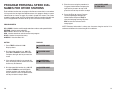
RESET STATION PASSCODES TO
DEFAULT
Individual keyset users can set or change their own individual passcodes. These
passcodes are used to lock and unlock keysets, override toll restriction and
access the DISA feature. At times, it may be necessary for the system administrator to reset a station’s passcode to default “1234.” This program cannot be
used to display passcodes, only to reset them.
PROGRAM KEYS
PROGRAM STATION NAMES
This program is used to assign a character name or identification for each extension. To verify the system software version, press TRSF 727. If the version is
V1.x, you may assign a name ten characters long. If the version is V2.x, you
may assign a name 11 characters long.
PROGRAM KEYS
UP & DOWN - Used to scroll and move cursor.
KEYPAD - Used to enter characters.
HOLD - Press to clear entry.
UP & DOWN - Select the extension number.
HOLD - Press to reset the passcode.
Open customer programming and follow the instructions below.
Open customer programming and follow the instructions below.
ACTION
DISPLAY
ACTION
DISPLAY
1. Press TRSF and then dial 104
Display shows
[201] STN NAME
1. Press TRSF and then dial 101
Display shows
[201] PASSCODE
PASSCODE:✱✱✱✱
[205] STN NAME
2. Dial the station number OR use the
UP and DOWN keys to scroll through
the keyset numbers and press the
right soft key to move the cursor right
[205] PASSCODE
PASSCODE:✱✱✱✱
2. Dial station number (e.g., 205)
OR press UP or DOWN to select the
station and press the right soft key to
move the cursor
[205] STN NAME
SAM SMITH
3. Press HOLD to reset passcode
[205] PASSCODE
PASSCODE:1234
3. Enter the station name using the
procedure described on the next page
and press the right soft key to return to
step 2
4. Press the right soft key to return to
step 2 OR press TRSF to store and exit
programming OR press SPK to
store and advance to the next program
DEFAULT DATA: ALL STATION PASSCODES = 1234
4. Press TRSF to store and exit
programming OR press SPK to store
and advance to the next program
NOTE: Directory information is always ten characters long for version V1.x.
software and eleven characters long for V2.x software.
DEFAULT DATA: NONE
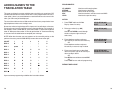
Names are written using the keypad. Each press of a key will select a character.
Pressing the dial pad key moves the cursor to the next position. For example, if
the directory name is “SAM SMITH,” press the number “7” three times to get the
letter “S.” Press the number “2” once to get the letter “A.” Continue selecting
characters from the table below to complete your message. Press the “A” key to
change the letter from upper case to lower case.
10
11