1
User Interface Overview
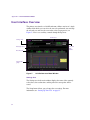
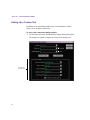
Control Area
The Control area in the main window has Start and Stop buttons along with
test timing information. For more information, see “Starting and Stopping
the Test” on page 41.
Messages Area
The Messages area provides test progress and diagnostic information about
the operation of the utility. If you need to troubleshoot, the detailed text
information in these messages might be helpful.
Results Area
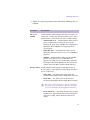
The Results area provides the following numerical test results:
Item
Description
IOs
Displays the current number of I/O operations that
have been completed during the test.
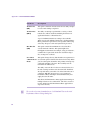
Current Rate (MB/s)
Displays the calculated throughput or bandwidth (in
megabytes per second [MB/s]) for recent I/O
operations that have been completed.
Average Rate (MB/s)
Displays the average throughput or bandwidth (in
megabytes per second) for the duration of the test.
Errors
Displays the number of errors encountered during
testing. This is the total of all errors generated for both
read and write operations and can include errors
related to the following:
•
Opening or closing data files
•
Validity of the specified file system path
•
User access privileges
•
Read or write operations
33