1
This reset of the switch to factory defaults deletes all customized switch settings, which includes the
IP address. The same software image is retained.
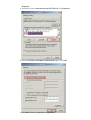
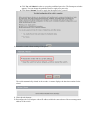
3. Click OK in order to continue the reset of the device.
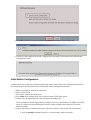
The switch automatically reloads in 60 seconds. A counter displays the time that remains for the
reload.
4. After the switch completes the reload, configure the switch again.
This is described in the Initial Switch Configuration section.
Reset the Switch When the Device Manager Is Not Available
These are the prerequisites in order to reset the switch without the Device Manager:
• You must have physical access to the switch.
• At least one switch port is enabled and is not connected to any device.
• A PC or laptop with Windows 2000 or Windows XP installed. A web browser with JavaScript
enabled.
Complete these steps:
1. The LAN adapter of the PC/laptop must be configured to obtain the IP address via DHCP. Complete
these steps in order to configure the PC:
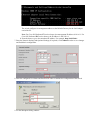
a. Choose Start > Settings > Network and Dial−up Connections.
b. Choose the Local Area Connection for the concerned LAN adapter. Right−click and choose