1
Setup Your VorTech Pump
EcoSmart Driver (wireless and non-wireless)
The EcoSmart driver unlocks the full potential of your VorTech pump by allowing you to be in
complete control. Capable of controlling your VorTech pump in a variety of different ways, the
EcoSmart driver allows for virtually endless flow possibilities within your reef tank. Please note that
not all EcoSmart drivers are wireless enabled. If your EcoSmart driver is wirelessly enabled the ‘w’
at the top of the driver will illuminate blue.
Specifications
Wireless Enabled: ‘w’ versions only
Dimensions:Length: 5” (127mm)
Width: 3.5” (89mm)
Depth: 1.375” (34.9mm)
Power Input: 24 volt DC input
Battery Backup Input: 12 volt DC input
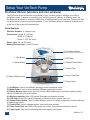
4.) Wireless Indicator
(Illuminates on wireless versions only.)
1.) Set Button
2.) Mode Button
5.) LED Strip
6.) Option/Power Button
7.) Control Dial
3.) Battery Backup Input
8.) Pump Cable Slot
9.) Power Input
1.) Set Button: Used to set different settings in each operational mode.
2.) Mode Button: Used to select between different operational modes.
3.) Battery Backup Input: Input slot for EcoTech’s Battery Backup for protection against power
failures. Available at your local retailer.
4.) Wireless indicator: Blue LED that will illuminate on wireless versions
5.) LED Strip: Blue LEDs that will illuminate to indicate modes, speeds, time, etc.
6.) Option/Power Button: Used to select different options in certain configuration modes and used
to power pump on/off.
7.) Control Dial: Used to change speeds, times and other settings.
8.) Pump Cable Slot: Input Slot for the pump cord. Note: Pump comes attached to driver.
9.) Power Input: Input slot for attaching the power supply to the pump.
12
Section 3.4