1
1.
Game Sequence
1.1
Sega Brand Game Sequence
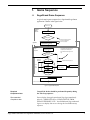
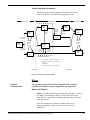
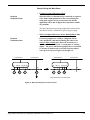
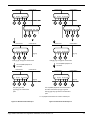
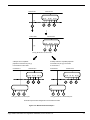
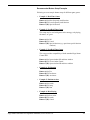
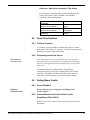
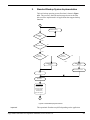
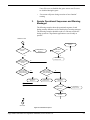
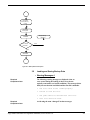
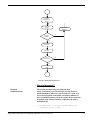
A typical sample game sequence for a Sega brand Sega Saturn
application is shown in the figure below.
Power ON
Boot ROM
Start-Up
Sequence
Display Saturn Logo
Security check
Boot Rom-based logo data is
used for the initial Sega
license logo display.
Application
Display SEGA license logo
Demo/Title
Loop
The application-based Sega logo is
Peripheral Check
not displayed immediately after
Sequence
the boot ROM-based Sega license
logo.
Yes
Was Sega license
logo displayed?
No
Title Loop
Sequence
Application-based Sega Logo
SEGA logo
Timer
Press
Press
Game Title
Start
Start
Screen
Button
Button
Start/Options
Options Screen
Select Screen
Timer
Demonstration
Sequence
Timer
Main Game
Press Start Button or Wait for Timer
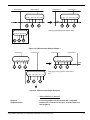
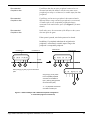
Figure 1.1 Typical Game Sequence
Required
Compliance Item
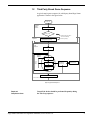
Control Pad checks should be performed frequently during
the Title Loop sequence.
Recommended
Compliance Item
Do not display the application-based Sega logo immediately
after the “PRODUCED BY or UNDER LICENSE FROM
SEGA ENTERPRISES, LTD.” boot ROM-based Sega trademark
logo screen display that occurs during the boot ROM startup
sequence.
Sega Saturn Software Development Standards, SOA version 2.0
1