1
Set Up (Continued)
2.4
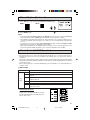
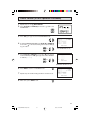
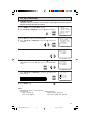
Press MENU to exit.
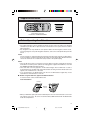
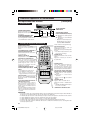
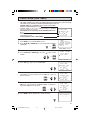
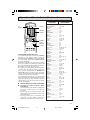
CH MEMOR Y
A
B
C
D
CH
VOL
—
C H MEMOR Y
VOL
+
CH
MENU
AIR
12
AIR
MUTE
12
CATV
TO
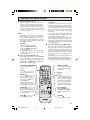
ADD
: +
(CH MEMORY
unmemorized channel)
VOLUME
(+)/(–)
PERSONAL PREFERENCE
VOL (+)
To add channel 12 to
the TV memory
VOL (–)
To erase channel 12
from the TV memory
TO
ERASE : –
TV
CHANNEL
UP (8)/
DOWN (9)
MENU
(CH MEMORY
memorized channel)
NOTE:
• If you press VOL (+) again while in the CH SEARCH mode, auto-program will start again, and the
previously memorized channels will be lost.
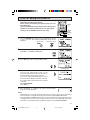
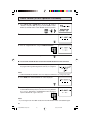
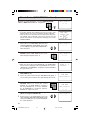
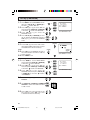
L BLUE SCREEN
Automatically turns the screen blue if a broadcast signal is not received.
1
2
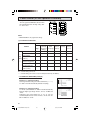
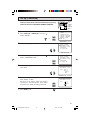
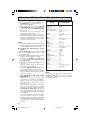
Press MENU to access MAIN MENU screen.
Press CH UP (8) or DOWN (9) to move the “
UP”.
” mark to “SET
→
T I ME R
V I D EO AD J U S T
C L O S E D C A P T I ON
P A R E N T CON T RO L
E N E RG Y S A V E
SE T UP
(MAIN MENU screen)
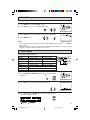
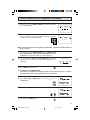
3
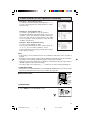
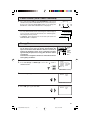
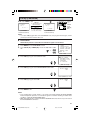
Press VOL (+) or (–) to access SET UP mode.
B L UE SCRE EN
P E R S ON A L P R E F .
UN I V E RS A L P L US
L A N GU A GE
C H S E T T I NG
(SET UP mode)
4
Press VOL (+) or (–) to access BLUE SCREEN select mode.
B LUE
S CR E E N
: OF F
(BLUE SCREEN select mode)
5
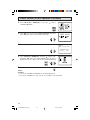
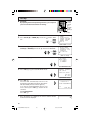
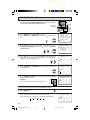
Press VOL (+) or (–) to select “ON”.
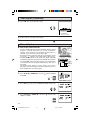
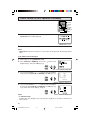
6
Press MENU to exit.
B LUE
S CR E E N
: ON
NOTE:
• Poor reception due to weak signals, or too much noise might activate the BLUE SCREEN
function despite the presence of a broadcast signal. To continue watching TV under these
conditions, switch the BLUE SCREEN “OFF”.
• While VCR input mode is selected, the BLUE SCREEN will not be shown on your TV even if
the BLUE SCREEN is turned on.
29
27-32/25N-M180 w/Imp. Safe
29
6/1/00, 10:01 AM