1
Quick Setup Guide
Start Here
(EU only)
HL-3070CW
Before you can use the printer, read this Quick Setup Guide for the correct setup and installation.
To view the Quick Setup Guide in other languages, please visit http://solutions.brother.com/.
IMPORTANT
DO NOT connect the interface cable yet.
1
Unpack the printer and check the components
1
3
a
b
c
d
e
f
g
h
Face-down Output Tray Support Flap (Support Flap)
Control Panel
USB Direct Interface
Manual Feed Slot
Manual Feed Slot Cover
Paper Tray
Manual Feed Paper Guide
Power Switch
CD-ROM
(including User's Guide and
Network User's Guide)
Waste Toner Box
(pre-installed)
i
j
k
l
m
n
o
p
Ventilation Hole
Top Cover
Face-down Output Tray
Back Cover (Back Output Tray)
AC Power Connector
Network Status LEDs (Light Emitting Diodes)
10/100BASE-TX (Ethernet) port
USB Interface Connector
Quick Setup Guide
AC Power Cord
Belt Unit
(pre-installed)
Drum Unit and Toner Cartridge
Assemblies
(Black, Cyan, Magenta and Yellow)
ENG Version 0
1
WARNING
• Plastic bags are used in the packaging of your printer. To avoid danger of suffocation, please keep
these bags away from babies and children.
• This printer is heavy and weighs approximately 41.9 lb. (19.0 kg). To prevent injuries use at least two
people to lift the printer. Be careful not to pinch your fingers when you put the printer back down.
Note
Keep a minimum gap around the printer as shown in the illustration.
510mm (20.1 in.)
100mm
(4 in.)
100mm
(4 in.)
120mm
(4.7 in.)
Note
The interface cable is not a standard accessory. Buy the appropriate interface cable for the interface you want to use (USB
or Network).
USB cable
• Please make sure you use a USB 2.0 (Type A/B) interface cable that is no longer than 6 feet (2 meters).
• When you use a USB cable, make sure you connect it to the USB port of your computer and not to a USB port on a
keyboard or non-powered USB hub.
Network cable
Use a straight-through Category5 (or greater) twisted-pair cable for 10BASE-T or 100BASE-TX Fast Ethernet Network.
2
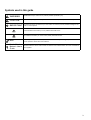
Symbols used in this guide
WARNING
WARNINGS tell you what to do to prevent possible personal injury.
CAUTION
CAUTIONS specify procedures you must follow or avoid to prevent possible minor injuries.
IMPORTANT
IMPORTANT specify procedures you must follow or avoid to prevent possible damage to the
printer or other objects.
Electrical Hazard icons alert you to a possible electrical shock.
Hot Surface icons warn you not to touch printer parts that are hot.
Note
Notes tell you how you should respond to a situation that may arise or give tips about how the
current operation works with other features.
User's Guide
Network User's
Guide
Indicates reference to the User's Guide or Network User's Guide which is on the CD-ROM we
have supplied.
3
2
3
Remove the packing
material from the printer
IMPORTANT
a
• Save all packing material and the carton in
case you have to ship your printer.
Install the drum unit and
toner cartridge
assemblies
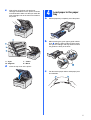
Unpack the four drum unit and toner cartridge
assemblies and gently shake each of them
from side to side several times to distribute the
toner evenly inside the assembly.
• DO NOT plug in the AC power cord yet.
a
b
Remove the packing tape from the outside of
the printer.
b
Remove the protective cover by pulling on the
tab as shown in the illustration.
Fully open the top cover by lifting up on the
handle a.
IMPORTANT
c
4
Remove the packing material from the inside of
the printer.
To avoid print quality
problems, DO NOT touch the
surface of the drum unit.
c
Slide all four of the drum unit and toner
cartridge assemblies into the printer as shown
in the illustration. Make sure that you match the
toner cartridge color to the same color label on
the printer.
a
b
C - Cyan
Y - Yellow
M - Magenta
K - Black
d
4
Load paper in the paper
tray
Pull the paper tray completely out of the printer.
While pressing the green paper-guide release
lever a, slide the paper guides to fit the paper
size you are loading in the tray. Make sure that
the guides are firmly in the slots.
Close the top cover of the printer.
c
Fan the stack of paper well to avoid paper jams
and misfeeds.
5
d
5
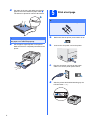
Put paper in the tray, and make sure that the
paper is below the maximum paper mark a.
The side to be printed on must be face down.
Print a test page
IMPORTANT
DO NOT connect the interface cable yet.
IMPORTANT
a
Make sure that the printer power switch is off.
b
Connect the AC power cord to the printer.
Make sure the paper guides touch the sides of
the paper so it will feed properly.
e
Put the paper tray firmly back in the printer.
Make sure that it is completely inserted into the
printer.
c
d
6
Plug the AC power cord into an AC power
outlet. Turn on the printer power switch.
After the printer has finished warming up, the
LCD will show Ready.
e
6
Press Go. The printer prints a test page. Check
that the test page has printed correctly.
Set your language on the
control panel
Note
This function will not be available after the first
print job you send from your computer.
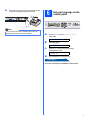
a
Press + or - to choose General Setup.
Press OK.
General Setup
b
Press OK again.
Local Language
c
Press + or - to choose your language.
Press OK to accept.
English
d
Press Cancel to exit from Menu.
Now go to
Go to the next page to install the printer driver.
7
8
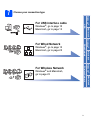
Windows®
Macintosh
9
Macintosh
Windows® and Macintosh,
go to page 23
Wireless Network
For Wireless Network
Windows®
Windows®, go to page 15
Macintosh, go to page 20
Wired Network
For Wired Network
Macintosh
Windows®, go to page 10
Macintosh, go to page 13
USB
For USB interface cable
Windows®
7
Choose your connection type
Windows®
USB
For USB Interface Cable Users
8
Install the printer driver
and connect the printer
to your computer
d
Put the supplied CD-ROM into your CD-ROM
drive. The opening screen will appear
automatically.
Choose your printer model and the language.
IMPORTANT
• DO NOT connect the USB interface cable
yet.
Note
If the Brother screen does not appear
automatically, go to My Computer (Computer),
double-click the CD-ROM icon, and then doubleclick start.exe.
• Make sure there are no USB Flash memory
drive inserted.
Note
If the Found New Hardware Wizard appears on
your computer, click Cancel.
e
Click Install Printer Driver on the menu
screen.
Note
Choose the Install Printer Driver icon for your
region.
a
b
c
10
Turn off the printer power switch.
Make sure the USB interface cable is NOT
connected to the printer, and then begin
installing the printer driver. If you have already
connected the cable, remove it.
Turn on your computer. (You must be logged
on with Administrator rights.)
f
Click USB cable users.
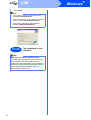
Windows®
USB
Note
When this screen appears, make sure the
printer power switch is on.
Connect the USB cable to the USB connector
marked with the
symbol, and then connect
the cable to the computer. Click Next.
g
h
When the License Agreement window
appears, click Yes if you agree to the License
Agreement.
Remove the label covering the USB interface
connector.
11
Macintosh
USB
• If you want to install the PS driver (Brother’s
BR-Script Driver), choose Custom Setup and
then follow the on-screen instructions. When
the Select Components screen appears,
check PS (PostScript Emulation) Driver, and
then continue following the on-screen
instructions.
Windows®
• For Windows Vista®, when the User Account
Control screen appears, click Continue.
i
USB
j
Click Finish.
Note
• If you want to register your product on-line,
check On-Line Registration.
• If you do not want to set your printer as Default
printer, uncheck Set as Default Printer.
• If you want to disable the Status Monitor,
uncheck Enable Status Monitor.
Finish
The installation is now
complete.
Note
XML Paper Specification Printer Driver
The XML Paper Specification Printer Driver is the
most suitable driver when printing from the
applications that use the XML Paper Specification
documents. Please download the latest driver by
accessing the Brother Solutions Center at
http://solutions.brother.com/.
12
Windows®
USB
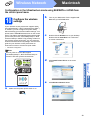
Macintosh
For USB Interface Cable Users
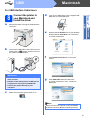
Remove the label covering the USB interface
connector.
Double-click the HL3000 icon on your desktop.
Double-click the Start Here icon. Follow the
on-screen instructions.
Connect the USB cable to the USB connector
marked with a
symbol, and then connect
the cable to your Macintosh.
f
Click Install Printer Driver on the menu
screen.
IMPORTANT
• Make sure there are no USB Flash memory
drive inserted.
• DO NOT connect the printer to a USB port on
a keyboard or a non-powered USB hub.
g
Click USB cable users and follow the
on-screen instructions. Then, restart your
Macintosh.
• Connect the printer directly to your
computer.
c
Make sure the printer power switch is on.
Note
Please see the User’s Guide on the CD-ROM to
install the PS driver (Brother’s BR-Script Driver).
13
Macintosh
e
b
Turn on your Macintosh. Put the supplied CDROM into your CD-ROM drive.
USB
a
d
Windows®
8
Connect the printer to
your Macintosh and
install the driver
USB
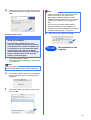
h
i
j
The Brother software will search for the Brother
printer. During this time the following screen
will appear.
Choose the printer you wish to connect, and
then click OK.
When this screen appears, click OK.
Finish
14
The installation is now
complete.
Macintosh
Windows®
Wired Network
For Wired Network Interface Cable Users
8
For Peer-to-Peer network
printer users
d
Put the supplied CD-ROM into your CD-ROM
drive. The opening screen will appear
automatically.
Choose your printer model and the language.
1
TCP/IP
TCP/IP
Note
Note
• If you are going to connect the printer to your
network, we recommend that you contact your
system administrator prior to installation or see
the Network User’s Guide on the CD-ROM.
e
Click Install Printer Driver on the menu
screen.
Choose the Install Printer Driver icon for your
region.
Connect the printer to your network and install
the driver
IMPORTANT
Make sure there are no USB Flash memory
drive inserted.
a
b
c
Connect the network interface cable to the LAN
connector marked with a
symbol and then
connect it to a free port on your hub.
f
Click Network cable users.
Make sure the printer power switch is on.
Turn on your computer. (You must be logged
on with Administrator rights.)
15
Macintosh
Note
• If you are using Windows® Firewall or a firewall
function of anti-spyware or antivirus
applications, temporarily disable them. Once
you are sure that you can print, configure the
software settings following the instructions.
Wired Network
If the Brother screen does not appear
automatically, go to My Computer (Computer),
double-click the CD-ROM icon, and then doubleclick start.exe.
Windows®
a Router
b Network printer
Windows®
Wired Network
Note
i
• For Windows Vista®, when the User Account
Control screen appears, click Continue.
• If you want to install the PS driver (Brother’s
BR-Script Driver), choose Custom Setup and
then follow the on-screen instructions. When
the Select Components screen appears,
check PS (PostScript Emulation) Driver, and
then continue following the on-screen
instructions.
g
h
16
When the License Agreement window
appears, click Yes if you agree to the License
Agreement.
Choose Brother Peer-to-Peer Network
Printer, and then click Next.
Choose Search the network for devices and
choose from a list of discovered devices
(Recommended). Or enter your printer's IP
Address or its node name. Click Next.
Note
You can find your printer’s IP Address and the
node name by printing out the Printer Settings
Page. See Print the Printer Settings
Page on page 44.
j
Choose your printer, and then click Next.
Note
If your printer takes a long time (about 1 minute)
to appear on the list, click Refresh.
Wired Network
k
Windows®
Click Finish.
Note
• If you want to register your product on-line,
check On-Line Registration.
• If you do not want to set your printer as Default
printer, uncheck Set as Default Printer.
• If you want to disable the Status Monitor,
uncheck Enable Status Monitor.
• If you disable your Personal Firewall software
(e.g. Windows® Firewall), turn it back on.
XML Paper Specification Printer Driver
The XML Paper Specification Printer Driver is the
most suitable driver when printing from the
applications that use the XML Paper Specification
documents. Please download the latest driver by
accessing the Brother Solutions Center at
http://solutions.brother.com/.
17
Macintosh
Note
Windows®
The installation is now
complete.
Wired Network
Finish
Windows®
Wired Network
8
For shared network printer
users
c
Click Install Printer Driver on the menu
screen.
Note
Choose the Install Printer Driver icon for your
region.
TCP/IP
a
b
c
d
Client computer
Also known as “Server” or “Print server”
TCP/IP or USB
Printer
d
Click Network cable users.
Note
If you are going to connect to a shared printer on
your network, we recommend that you ask your
system administrator about the queue or share
name for the printer prior to installation.
Install the driver and choose the correct printer
queue or share name
IMPORTANT
Make sure there are no USB Flash memory
drive inserted.
a
b
• For Windows Vista®, when the User Account
Control screen appears, click Continue.
Turn on your computer. (You must be logged
on with Administrator rights.)
Put the supplied CD-ROM into your CD-ROM
drive. The opening screen will appear
automatically.
Choose your printer model and the language.
Note
If the Brother screen does not appear
automatically, go to My Computer (Computer),
double-click the CD-ROM icon, and then doubleclick start.exe.
18
Note
• If you want to install the PS driver (Brother’s
BR-Script Driver), choose Custom Setup and
then follow the on-screen instructions. When
the Select Components screen appears,
check PS (PostScript Emulation) Driver, and
then continue following the on-screen
instructions.
Windows®
Wired Network
e
When the License Agreement window
appears, click Yes if you agree to the License
Agreement.
h
Click Finish.
Note
• If you want to register your product on-line,
check On-Line Registration.
• If you do not want to set your printer as Default
printer, uncheck Set as Default Printer.
• If you want to disable the Status Monitor,
uncheck Enable Status Monitor.
f
Choose Network Shared Printer, and then
click Next.
g
XML Paper Specification Printer Driver
Choose your printer's queue, and then click
OK.
The XML Paper Specification Printer Driver is the
most suitable driver when printing from the
applications that use the XML Paper Specification
documents. Please download the latest driver by
accessing the Brother Solutions Center at
http://solutions.brother.com/.
Note
Contact your administrator if you do not know the
location or the name of the printer in the network.
19
Macintosh
Note
Windows®
The installation is now
complete.
Wired Network
Finish
Wired Network
Macintosh
For Wired Network Interface Cable Users
8
Connect the printer to
your Macintosh and
install the driver
e
Click Install Printer Driver on the menu
screen.
IMPORTANT
Make sure there are no USB Flash memory
drive inserted.
a
b
Connect the network interface cable to the LAN
connector marked with a
symbol and then
connect it to a free port on your hub.
f
Click Network cable users and follow the
on-screen instructions. Then, restart your
Macintosh.
Make sure the printer power switch is on.
Note
c
d
20
Turn on your Macintosh. Put the supplied CDROM into your CD-ROM drive.
Double-click the HL3000 icon on your desktop.
Double-click the Start Here icon. Follow the
on-screen instructions.
Please see the User’s Guide on the CD-ROM to
install the PS driver (Brother’s BR-Script Driver).
g
h
The Brother software will search for the Brother
printer. During this time the following screen
will appear.
Choose the printer you wish to connect, and
then click OK.
Wired Network
Macintosh
Note
• If there is more than one of the same printer
model connected on your network, the
MAC Address (Ethernet Address) will be
displayed after the model name. You can also
confirm your IP Address by scrolling to the
right.
• You can find your printer’s MAC Address
(Ethernet Address) and the IP Address by
printing out the Printer Settings Page. See Print
the Printer Settings Page on page 44.
i
When this screen appears, click OK.
Macintosh
21
Windows®
The installation is now
complete.
Wired Network
Finish
Wireless Network
Windows®
For Wireless Network Interface Users
8
Before you begin
First you must configure the wireless network settings of your printer to communicate with your network access
point/router. After the printer is configured to communicate with your access point/router computers on your
network will have access to the printer. To use the printer from these computers, you will need to install the printer
driver. The following steps will guide you through the configuration and installation process.
Note
• To achieve optimum results with normal everyday document printing, place the Brother printer as close to
the network access point/router as possible with minimal obstructions. Large objects and walls between the
two devices as well as interference from other electronic devices can affect the data transfer speed of your
documents.
• Due to these factors, wireless may not be the best method of connection for all types of documents and
applications. If you are printing large files, such as multi-page documents with mixed text and large graphics,
you may want to consider choosing wired Ethernet for a faster data transfer or USB for the fastest
throughput speed.
• Although the Brother HL-3070CW can be used in a both wired and wireless network, only one of the
connection methods can be used at a time.
• The following instructions are for infrastructure mode.
To set up your printer in any other wireless environment you can find instructions in the Network User’s
Guide on the CD-ROM.
You can view the Network User’s Guide by following the instructions below.
1
2
3
4
Turn on your computer. Insert the Brother CD-ROM into your CD-ROM drive.
(Macintosh user only) Double-click the HL3000 icon on your desktop. Double-click the Start Here icon.
Choose your printer model and the language. The CD-ROM main menu will appear.
Click the Documentation, and then click HTML documents.
IMPORTANT
• If you are going to connect the printer to your network, we recommend that you contact your system
administrator prior to installation. You must know your wireless network settings before you
proceed with this installation.
• If you are using Windows® Firewall or a firewall function of anti-spyware or antivirus applications,
temporarily disable them. Once you are sure that you can print, configure the software settings
following the instructions.
• If you have previously configured the wireless settings of the printer, you must reset the print server
back to its factory default settings (see page 44).
• Make sure there are no USB Flash memory drive inserted.
Infrastructure Mode
1
3
22
a Access Point
b Wireless Network machine (your printer)
c Wireless capable computer connected to the
access point
d Wired computer which is not wireless capable
connected to the access point with an Ethernet
cable
Wireless Network
9
Windows®
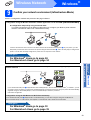
Confirm your network environment (Infrastructure Mode)
Choose a configuration method and proceed to the page indicated.
Configuration using the Brother automatic installer application on the CD-ROM
(Recommended)
Configuration temporarily using a network cable
You need to temporarily use an Ethernet cable when you configure your Brother printer with this
method. The Ethernet cable is not a standard accessory.
1
If there is an Ethernet Hub or Router in the same network as the wireless access point a of your printer, you can
temporarily connect the Hub or Router to the printer using an Ethernet cable b, this is an easy way to configure the
printer. You can then remotely configure the printer from a computer on the network.
Now go to
For Windows® Users go to page 24
For Macintosh Users go to page 34
1
Push Button Configuration
Configuration using the PIN Method of Wi-Fi Protected Setup
If your wireless access point a supports Wi-Fi Protected Setup, you can also configure using the PIN Method of
Wi-Fi Protected Setup. For instructions, see Chapter 7 in the Network User’s Guide on the CD-ROM.
Now go to
For Windows® Users go to page 30
For Macintosh Users go to page 39
23
Macintosh
If your wireless access point a supports either SecureEasySetup™, Wi-Fi Protected Setup (PBC 1) or AOSS™, you do
not need to use a computer to configure the wireless settings. The access point/router and your printer can automatically
negotiate using the SecureEasySetup™, Wi-Fi Protected Setup or AOSS™ procedure.
Windows®
1
Wireless Network
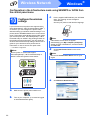
Configuration using the SES/WPS/AOSS from the control panel menu to configure your printer for a
wireless network
Windows®
Wireless Network
Configuration in Infrastructure mode, using a network cable temporarily
10
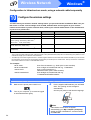
Configure the wireless settings
You must know your wireless network settings before you proceed with this installation. Make sure you
take notes on all the current settings such as SSID, authentication and encryption of your wireless
network environment. If you do not know them, contact your network administrator or the manufacturer
of your access point/router.
Item
Example
Communication mode: (Infrastructure)
Infrastructure
Network name: (SSID, ESSID)
HELLO
Authentication method:
WPA2-PSK
Record the current wireless network settings
(Open System, Shared key, WPA-PSK 1,
WPA2-PSK 1, LEAP, EAP-FAST)
Encryption mode:
(None, WEP,TKIP, AES, CKIP)
AES
Network key: (Encryption key, WEP key 2,
Passphrase)
12345678
1
WPA/WPA2-PSK is a Wi-Fi Protected Access Pre-Shared Key, which lets the Brother wireless machine associate with access points using
TKIP or AES encryption (WPA-Personal). WPA-PSK (TKIP or AES) and WPA2-PSK (AES) use a Pre-Shared Key (PSK) that is 8 or more
characters in length, up to a maximum of 63 characters.
2
The WEP key is for 64-bit encrypted networks or 128-bit encrypted networks and can contain both numbers and letters. If you do not know
this information you should see the documentation provided with your access point or wireless router. This key is a 64-bit or 128-bit value
that must be entered in an ASCII or HEXADECIMAL format.
For example:
64-bit ASCII:
64-bit Hexadecimal:
128-bit ASCII:
128-bit Hexadecimal:
Uses 5 text characters e.g. “Hello” (this is case sensitive)
Uses 10 digits of hexadecimal data e.g. “71f2234aba”
Uses 13 text characters e.g.
“Wirelesscomms” (this is case sensitive)
Uses 26 digits of hexadecimal data e.g.
“71f2234ab56cd709e5412aa3ba”
IMPORTANT
You need to temporarily use an Ethernet cable during configuration. (cable not included)
a
b
Make sure the printer power switch is on.
c
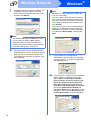
Put the supplied CD-ROM into your CD-ROM
drive. The opening screen will appear
automatically.
Choose your printer model and the language.
Turn on your computer. (You must be logged
on with Administrator rights.)
Note
If the Brother screen does not appear
automatically, go to My Computer (Computer),
double-click the CD-ROM icon, and then doubleclick start.exe.
24
Wireless Network
d
Click Install Printer Driver on the menu
screen.
g
Windows®
Choose Step by Step install
(Recommended) and then click Next.
Note
Choose the Install Printer Driver icon for your
region.
h
e
Choose With cable (Recommended) and
then click Next.
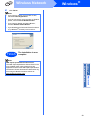
Click Wireless Network users.
i
Connect your Brother wireless device (your
printer) to your access point using a network
cable and then click Next.
Choose Wireless Setup and Driver Install
(Recommended), and then click Next.
25
Macintosh
f
Wireless Network
For Windows Vista®, when the User Account
Control screen appears, click Allow.
Windows®
Note
Windows®
Wireless Network
j
Choose the printer you wish to configure, and
click Next. If the list is blank, check if the
access point and the printer are powered on,
and then click Refresh.
Note
• SETUP is the default SSID of the printer. Do
not choose this SSID.
• If the list is blank, check that the access point
has power and is broadcasting the SSID, and
then see if the printer and the access point are
within range for wireless communication. Then,
click Refresh.
• If your access point is set to not broadcast the
SSID you can manually add it by clicking the
Add button. Follow the on-screen instructions
for entering the Name (SSID), and then click
Next.
Note
• The default Node name is “BRNxxxxxxxxxxxx”.
• You can find your printer’s MAC Address
(Ethernet Address) and the IP Address by
printing out the Printer Settings Page. See Print
the Printer Settings Page on page 44.
k
The wizard will search for wireless networks
available from your printer. Choose the access
point you wish to associate the printer with
(The SSID you wrote down on page 24), and
then click Next.
l
m
26
If your network is not configured for
Authentication and Encryption, the following
screen will appear. To continue configuration,
click OK and go to n.
If your network is configured for Authentication
and Encryption, the following screen will
appear. When configuring your Brother
wireless printer, you must configure your
printer to match the Authentication and
Encryption settings you wrote down on
page 24 for your existing wireless network.
Choose the Authentication Method and
Encryption Mode from the pull-downs in each
setting box. Then enter the Network key and
Confirm Network Key, and then click Next.
Wireless Network
Note
o
• If you want to setup or configure additional
WEP key indexes other than WEP key1, click
Advanced.
• If you do not know the Authentication or
Encryption settings for your network, contact
your network administrator or the manufacture
of your access point/router.
Windows®
Check the printed Network Configuration page.
Choose the status as it is shown for the
Wireless Link Status on the Network
Configuration page. Click Next.
If your status is Link OK, go to q.
If your status is Failed to Associate, go to p.
• If you are using WEP and the printed Network
Configuration page in n shows Link OK in the
Wireless Link Status, but the printer is not
found on your network, make sure you entered
the WEP key correctly. The WEP key is case
sensitive.
n
Click Next. The settings will be sent to your
printer. The settings will remain unchanged if
you click Cancel. The Network Configuration
page will be printed.
p
• If you want to manually enter the IP Address
settings of your printer, click
Change IP Address and enter the necessary
IP Address settings for your network.
• The control panel settings will be automatically
changed to WLAN Enable when the wireless
settings are sent to your printer.
27
Macintosh
Note
Windows®
Disconnect the network cable between your
access point (hub or router) and the printer,
and click Next.
Wireless Network
q
Click Finish. Wireless setup was unable to
associate with a wireless network. This is
probably due to incorrect security settings.
Reset the print server back to its factory default
settings (see page 44). Confirm the security
settings of your wireless network that you wrote
down on page 24 and try starting from d on
page 25 again.
Windows®
Wireless Network
Install the printer driver
t
Choose Search the network for devices and
choose from a list of discovered devices
(Recommended). Or enter your printer's IP
Address or its node name. Click Next.
IMPORTANT
• DO NOT try to cancel any of the screens
during this installation.
• If your wireless settings fail, an error
message will appear during the installation
of the printer driver and the installation will
be terminated. If you encounter this failure,
reset the print server back to its factory
default settings (see page 44), and please go
back to step d on page 25 and setup the
wireless connection again.
r
When the License Agreement window
appears, click Yes if you agree to the License
Agreement.
Note
You can find your printer’s IP Address and the
node name by printing out the Printer Settings
Page. See Print the Printer Settings
Page on page 44.
u
s
Choose your printer, and then click Next.
Choose Standard Installation, and then click
Next.
Note
If your printer takes a long time to appear on the
list, 1 minute or more, then click Refresh. If your
printer still fails to appear, reset the print server
back to its factory default settings (see page 44)
and go back to d on page 25 and try the wireless
setup again.
Note
If you want to install the PS driver (Brother’s BRScript Driver), choose Custom Installation and
then follow the on-screen instructions. When the
Select Components screen appears, check PS
(PostScript Emulation) Driver, and then
continue following the on-screen instructions.
28
Wireless Network
v
Windows®
Click Finish.
Note
• If you want to register your product on-line,
check On-Line Registration.
• If you do not want to set your printer as Default
printer, uncheck Set as Default Printer.
• If you want to disable the Status Monitor,
uncheck Enable Status Monitor.
• If you disabled your Personal Firewall software
(e.g. Windows® Firewall), turn it back on.
Finish
The installation is now
complete.
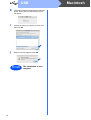
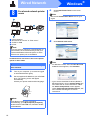
Note
XML Paper Specification Printer Driver
Macintosh
29
Windows®
Wireless Network
The XML Paper Specification Printer Driver is the
most suitable driver when printing from the
applications that use the XML Paper Specification
documents. Please download the latest driver by
accessing the Brother Solutions Center at
http://solutions.brother.com/.
Windows®
Wireless Network
Configuration in the Infrastructure mode using SES/WPS or AOSS from
the control panel menu
10
Configure the wireless
settings
If your wireless access point/router supports either
SecureEasySetup™, Wi-Fi Protected Setup (PBC 1)
or AOSS™, you can configure the printer easily
without knowing your wireless network settings. Your
printer has the SES/WPS/AOSS menu on the control
panel. This feature automatically detects which mode
your access point uses, SecureEasySetup™, Wi-Fi
Protected Setup or AOSS™. By pushing a button on
the wireless access point/router, you can setup the
wireless network and security settings. See the user’s
guide for your wireless access point/router for
instructions on how to access one-push mode.
1
Push Button Configuration
Note
Access points or routers that support
SecureEasySetup™, Wi-Fi Protected Setup or
AOSS™ have the symbols shown below.
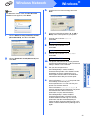
c
Note
If the Brother screen does not appear
automatically, go to My Computer (Computer),
double-click the CD-ROM icon, and then doubleclick start.exe.
d
b
30
Make sure the printer power switch is on.
Turn on your computer. (You must be logged
on with Administrator rights.)
Click Install Printer Driver on the menu
screen.
Note
Choose the Install Printer Driver icon for your
region.
e
a
Put the supplied CD-ROM into your CD-ROM
drive. The opening screen will appear
automatically.
Choose your printer model and the language.
Click Wireless Network users.
Windows®
Wireless Network
Note
h
Confirm the on-screen message and click
Next.
For Windows Vista®, when the User Account
Control screen appears, click Allow.
f
i
Choose Wireless Setup and Driver Install
(Recommended), and then click Next.
j
Press any of the Menu buttons (a, b, OK or
Back) of the control panel on your printer.
Press a or b to choose Network.
Press OK.
Network
k
Press a or b to choose WLAN.
Press OK.
WLAN
l
g
Choose Automatic install (Advanced) and
click Next.
Press a or b to choose SES/WPS/AOSS.
Press OK.
SES/WPS/AOSS
m
If the LCD shows Connection Error, a
session overlap has been detected. The printer
has detected more than one access
point/router on your network with the
SecureEasySetup™ mode, the Wi-Fi
Protected Setup mode or AOSS™ mode
enabled. Make sure that only one access
point/router has the SecureEasySetup™
mode, the Wi-Fi Protected Setup mode or the
AOSS™ mode enabled and try starting from i
again.
31
Macintosh
If the LCD shows Connected, the printer has
successfully connected to your
access point/router. You can now use your
printer in a wireless network.
Windows®
o
Put your access point in the
SecureEasySetup™ mode, the Wi-Fi
Protected Setup mode or the AOSS™ mode,
depending on what is supported by your
access point. Please refer to the instruction
manual that came with your access point.
Wireless Network
n
The printer searches for an access point that
supports SecureEasySetup™, Wi-Fi Protected
Setup or AOSS™ for 2 minutes.
Windows®
Wireless Network
If the LCD shows No Access Point, the
printer has not detected your access
point/router on your network with the
SecureEasySetup™ mode, the Wi-Fi
Protected Setup mode or AOSS™ mode
enabled. Move the printer closer to your
access point/router and try starting from i
again.
If the LCD shows Connection Fail, the
printer has not successfully connected to your
access point/router. Try starting from i again. If
the same message is indicated again, reset the
print server back to its factory default settings
and try again. For resetting, see Reset the
network settings to the factory
default on page 44.
p
q
Install the printer driver
IMPORTANT
• DO NOT try to cancel any of the screens
during this installation.
• If your wireless settings fail, an error
message will appear during the installation
of the printer driver and the installation will
be terminated. If you encounter this failure,
reset the print server back to its factory
default settings (see page 44), and please go
back to step d on page 30 and setup the
wireless connection again.
r
When the License Agreement window
appears, click Yes if you agree to the License
Agreement.
Click Next.
Check the box after you confirm that you have
completed the wireless settings, and then click
Next.
s
Choose Standard Installation, and then click
Next.
Note
If you want to install the PS driver (Brother’s BRScript Driver), choose Custom Installation and
then follow the on-screen instructions. When the
Select Components screen appears, check PS
(PostScript Emulation) Driver, and then
continue following the on-screen instructions.
32
Windows®
Wireless Network
t
Choose Search the network for devices and
choose from a list of discovered devices
(Recommended). Or enter your printer's IP
Address or its node name. Click Next.
v
Click Finish.
Note
• If you want to register your product on-line,
check On-Line Registration.
• If you do not want to set your printer as Default
printer, uncheck Set as Default Printer.
• If you want to disabled the Status Monitor,
uncheck Enable Status Monitor.
• If you disabled your Personal Firewall software
(e.g. Windows® Firewall), turn it back on.
Note
You can find your printer’s IP Address and the
node name by printing out the Printer Settings
Page. See Print the Printer Settings
Page on page 44.
u
Choose your printer, and then click Next.
Finish
The installation is now
complete.
Note
XML Paper Specification Printer Driver
Macintosh
33
Windows®
If your printer takes a long time to appear on the
list, 1 minute or more, then click Refresh. If your
printer still fails to appear, reset the print server
back to its factory default settings (see page 44)
and go back to d on page 30 and try the wireless
setup again.
Wireless Network
Note
The XML Paper Specification Printer Driver is the
most suitable driver when printing from the
applications that use the XML Paper Specification
documents. Please download the latest driver by
accessing the Brother Solutions Center at
http://solutions.brother.com/.
Wireless Network
Macintosh
Configuration in Infrastructure mode, using a network cable temporarily
10
Configure the wireless settings
You must know your wireless network settings before you proceed with this installation. Make sure you
take notes on all the current settings such as SSID, authentication and encryption of your wireless
network environment. If you do not know them, contact your network administrator or the manufacturer
of your access point/router.
Item
Example
Record the current wireless network settings
Communication mode: (Infrastructure)
Infrastructure
Network name: (SSID, ESSID)
HELLO
Authentication method:
(Open System, Shared key, WPA-PSK 1,
WPA2-PSK
WPA2-PSK 1, LEAP, EAP-FAST)
Encryption mode:
(None, WEP,TKIP, AES, CKIP)
AES
Network key: (Encryption key, WEP key 2,
Passphrase)
12345678
1
WPA/WPA2-PSK is a Wi-Fi Protected Access Pre-Shared Key, which lets the Brother wireless machine associate with access points using
TKIP or AES encryption (WPA-Personal). WPA-PSK (TKIP or AES) and WPA2-PSK (AES) use a Pre-Shared Key (PSK) that is 8 or more
characters in length, up to a maximum of 63 characters.
2
The WEP key is for 64-bit encrypted networks or 128-bit encrypted networks and can contain both numbers and letters. If you do not know
this information you should see the documentation provided with your access point or wireless router. This key is a 64-bit or 128-bit value
that must be entered in an ASCII or HEXADECIMAL format.
For example:
64-bit ASCII:
64-bit Hexadecimal:
128-bit ASCII:
128-bit Hexadecimal:
Uses 5 text characters e.g. “Hello” (this is case sensitive)
Uses 10 digits of hexadecimal data e.g. “71f2234aba”
Uses 13 text characters e.g.
“Wirelesscomms” (this is case sensitive)
Uses 26 digits of hexadecimal data e.g.
“71f2234ab56cd709e5412aa3ba”
IMPORTANT
You need to temporarily use an Ethernet cable during configuration. (cable not included)
a
b
34
Make sure the printer power switch is on.
Turn on your Macintosh. Put the supplied CDROM into your CD-ROM drive.
c
Double-click the HL3000 icon on your desktop.
Double-click the Start Here icon. Follow the
on-screen instructions.
Wireless Network
d
e
f
Click Install Printer Driver on the menu
screen.
Click Wireless Network users.
h
i
Choose With cable (Recommended) and
then click Next.
Connect the Brother printer to you access point
using a network cable and click Next.
Choose Wireless Setup and Driver Install
(Recommended), and then click Next.
• The default Node name is “BRNxxxxxxxxxxxx”.
• You can find your printer’s MAC Address
(Ethernet Address) and the IP Address by
printing out the Printer Settings Page. See Print
the Printer Settings Page on page 44.
35
Macintosh
Note
Windows®
Choose Step by Step install
(Recommended) and then click Next.
Choose the printer you wish to configure, and
click Next. If the list is blank, check if the
access point and the printer are powered on,
and then click Refresh.
Wireless Network
j
g
Macintosh
Wireless Network
k
The wizard will search for wireless networks
available from your printer. Choose the access
point you wish to associate the printer with, and
then click Next.
m
Macintosh
If your network is configured for Authentication
and Encryption, the following screen will
appear. When configuring your Brother
wireless printer, you must configure your
printer to match the Authentication and
Encryption settings you wrote down on
page 34 for your existing wireless network.
Choose the Authentication Method and
Encryption Mode from the pull-downs in each
setting box. Then enter the Network key and
Confirm Network Key, and then click Next.
Note
• SETUP is the default SSID of the printer. Do
not choose this SSID.
• If the list is blank, check that the access point
has power and is broadcasting the SSID, and
then see if the printer and the access point are
within range for wireless communication. Then,
click Refresh.
• If your access point is set to not broadcast the
SSID you can manually add it by clicking the
Add button. Follow the on-screen instructions
for entering the Name (SSID), and then click
Next.
Note
• If you want to setup or configure additional
WEP key indexes other than WEP key1, click
Advanced.
• If you do not know the Authentication or
Encryption settings for your network, contact
your network administrator or the manufacture
of your access point/router.
• If you are using WEP and the printed Network
Configuration page in n shows Link OK in the
Wireless Link Status, but the printer is not
found on your network, make sure you entered
the WEP key correctly. The WEP key is case
sensitive.
l
36
If your network is not configured for
Authentication and Encryption, the following
screen will appear. To continue configuration,
click OK and go to n.
Wireless Network
n
Click Next. The settings will be sent to your
printer. The settings will remain unchanged if
you click Cancel. The Network Configuration
page will be printed.
p
q
Macintosh
Click Finish. Wireless setup was unable to
associate with a wireless network. This is
probably due to incorrect security settings.
Reset the print server back to its factory default
settings (see page 44). Confirm the security
setting of your wireless network that you wrote
down on page 34 and try starting from d on
page 35 again.
Disconnect the network cable between your
access point (hub or router) and the printer,
and click Next.
Note
o
Install the printer driver
IMPORTANT
• DO NOT try to cancel any of the screens
during this installation.
• If your wireless settings fail, an error
message will appear during the installation
of the printer driver and the installation will
be terminated. If you encounter this failure,
reset the print server back to its factory
default settings (see page 44), and please go
back to step d on page 35 and setup the
wireless connection again.
r
The driver installation starts.
Follow the on-screen instructions. Then, restart
your Macintosh.
Note
Please see the User’s Guide on the CD-ROM to
install the PS driver (Brother’s BR-Script Driver).
37
Macintosh
Check the printed Network Configuration page.
Choose the status as it is shown for the
Wireless Link Status on the Network
Configuration page. Click Next.
If your status is Link OK, go to q.
If your status is Failed to Associate, go to p.
Wireless Network
• The control panel settings will be automatically
changed to WLAN Enable when the wireless
settings are sent to your printer.
Windows®
• If you want to manually enter the IP Address
settings of your printer, click
Change IP Address and enter the necessary
IP Address settings for your network.
Wireless Network
s
t
The Brother software will search for the Brother
printer. During this time the following screen
will appear.
Choose the printer you wish to connect, and
then click OK.
If
Note
• If there is more than one of the same printer
model connected on your network, the
MAC Address (Ethernet Address) will be
displayed after the model name.
• You can find your printer’s MAC Address
(Ethernet Address) and the IP Address by
printing out the Printer Settings Page. See Print
the Printer Settings Page on page 44.
• If your printer fails to appear on the list, reset
the print server back to its factory default
settings (See Reset the network settings to the
factory default on page 44) and go back to d
on page 35 and try the wireless setup again.
u
When this screen appears, click OK.
Finish
38
The installation is now
complete.
Macintosh
Wireless Network
Macintosh
Configuration in the Infrastructure mode using SES/WPS or AOSS from
the control panel menu
10
Configure the wireless
settings
If your wireless access point/router supports either
SecureEasySetup™, Wi-Fi Protected Setup (PBC 1)
or AOSS™, you can configure the printer easily
without knowing your wireless network settings. Your
printer has the SES/WPS/AOSS menu on the control
panel. This feature automatically detects which mode
your access point uses, SecureEasySetup™, Wi-Fi
Protected Setup or AOSS™. By pushing a button on
the wireless access point/router, you can setup the
wireless network and security settings. See the user’s
guide for your wireless access point/router for
instructions on how to access one-push mode.
1
b
c
Turn on your Macintosh. Put the supplied CDROM into your CD-ROM drive.
Double-click the HL3000 icon on your desktop.
Double-click the Start Here icon. Follow the
on-screen instructions.
Push Button Configuration
Note
Access points or routers that support
SecureEasySetup™, Wi-Fi Protected Setup or
AOSS™ have the symbols shown below.
d
Make sure the printer power switch is on.
39
Macintosh
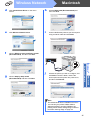
Click Wireless Network users.
Windows®
a
Wireless Network
e
Click Install Printer Driver on the menu
screen.
Wireless Network
f
Choose Wireless Setup and Driver Install
(Recommended), and then click Next.
n
o
g
h
Macintosh
Put your access point in the
SecureEasySetup™ mode, the Wi-Fi
Protected Setup mode or the AOSS™ mode,
depending on what is supported by your
access point. Please refer to the instruction
manual that came with your access point.
If the LCD shows Connected, the printer has
successfully connected to your
access point/router. You can now use your
printer in a wireless network.
If the LCD shows Connection Error, a
session overlap has been detected. The printer
has detected more than one access
point/router on your network with the
SecureEasySetup™ mode, the Wi-Fi
Protected Setup mode or AOSS™ mode
enabled. Make sure that only one access
point/router has the SecureEasySetup™
mode, the Wi-Fi Protected Setup mode or the
AOSS™ mode enabled and try starting from i
again.
Choose Automatic install (Advanced) and
click Next.
If the LCD shows No Access Point, the
printer has not detected your access
point/router on your network with the
SecureEasySetup™ mode, the Wi-Fi
Protected Setup mode or AOSS™ mode
enabled. Move the printer closer to your
access point/router and try starting from i
again.
Confirm the on-screen message and click
Next.
If the LCD shows Connection Fail, the
printer has not successfully connected to your
access point/router. Try starting from i again. If
the same message is indicated again, reset the
print server back to its factory default settings
and try again. For resetting, see Reset the
network settings to the factory
default on page 44.
i
j
Press any of the Menu buttons (a, b, OK or
Back) of the control panel on your printer.
Press a or b to choose Network.
Press OK.
Network
k
Press a or b to choose WLAN.
Press OK.
WLAN
l
Press a or b to choose SES/WPS/AOSS.
Press OK.
SES/WPS/AOSS
m
40
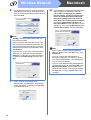
The printer searches for an access point that
supports SecureEasySetup™, Wi-Fi Protected
Setup or AOSS™ for 2 minutes.
p
Click Next.
q
Check the box after you confirm that you have
completed the wireless settings, and then click
Next.
Note
• If there is more than one of the same printer
model connected on your network, the
MAC Address (Ethernet Address) will be
displayed after the model name. You can also
confirm your IP Address by scrolling to the
right.
• You can find your printer’s MAC Address
(Ethernet Address) and the IP Address by
printing out the Printer Settings Page. See Print
the Printer Settings Page on page 44.
Install the printer driver
u
When this screen appears, click OK.
IMPORTANT
• DO NOT try to cancel any of the screens
during this installation.
• If your wireless settings fail, an error
message will appear during the installation
of the printer driver and the installation will
be terminated. If you encounter this failure,
reset the print server back to its factory
default settings (see page 44), and please go
back to step d on page 39 and setup the
wireless connection again.
r
Finish
The installation is now
complete.
The driver installation starts.
Follow the on-screen instructions. Then, restart
your Macintosh.
Note
Please see the User’s Guide on the CD-ROM to
install the PS driver (Brother’s BR-Script Driver).
s
t
The Brother software will search for the Brother
printer. During this time the following screen
will appear.
Choose the printer you wish to connect, and
then click OK.
41
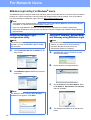
For Network Users
BRAdmin Light utility (For Windows® users)
The BRAdmin Light is a utility for initial setup of Brother network connected devices. It can also search for Brother
products in a TCP/IP environment, view the status and configure basic network settings, such as IP Address.
For more information on BRAdmin Light, visit us at http://solutions.brother.com/.
Note
• If you require more advanced printer management, use the latest Brother BRAdmin Professional utility that
is available as a download from http://solutions.brother.com/.
• If you are using Windows® Firewall or a firewall function of anti-spyware or antivirus applications,
temporarily disable them. Once you are sure that you can print, configure the software settings following
the instructions.
Install the BRAdmin Light
configuration utility
Set your IP Address, Subnet Mask
and Gateway using BRAdmin Light
Note
The default password for the print server is
‘access’. You can use BRAdmin Light to change
this password.
a
Click Install Other Drivers or Utilities on the
menu screen.
Note
If you have a DHCP/BOOTP/RARP server in your
network, you don’t have to do the following
operation. Because the print server will
automatically obtain its IP Address.
a
b
b
Start BRAdmin Light. It will search for new
devices automatically.
Double-click the unconfigured device.
Click BRAdmin Light and follow the on-screen
instructions.
c
Choose STATIC for the Boot Method. Enter
the IP Address, Subnet Mask and Gateway,
and then click OK.
Note
For Windows Vista®, when the User Account
Control screen appears, click Allow.
d
42
The address information will be saved to the
printer.
For Network Users
BRAdmin Light utility (For Mac OS X users)
The BRAdmin Light is a utility for initial setup of Brother network connected devices. It can also search for Brother
products on your network, view the status and configure basic network settings, such as IP Address from a
computer running Mac OS X 10.3.9 or greater.
The BRAdmin Light software will be installed automatically when you install the printer driver. If you have already
installed the printer driver, you don’t have to install it again. For more information on BRAdmin Light, visit us at
http://solutions.brother.com/.
Set your IP Address, Subnet Mask
and Gateway using BRAdmin Light
c
Double click the file BRAdmin Light.jar and
run the software. BRAdmin Light will then
search for new devices automatically.
Note
• If you have a DHCP/BOOTP/RARP server in
your network, you don’t have to do the
following operation. The print server will
automatically obtain its own IP Address.
• Make sure that version 1.4.2 or later of Java
client software is installed on your computer.
• The default password for the print server is
‘access’. You can use BRAdmin Light to
change this password.
a
b
d
Double-click the unconfigured device.
Double-click the Macintosh HD icon on your
desktop.
Choose Library, Printers, Brother and then
Utilities.
e
f
Choose STATIC for the Boot Method. Enter
the IP Address, Subnet Mask and Gateway,
and then click OK.
The address information will be saved to the
printer.
43
For Network Users
Web Based Management (web
browser)
Reset the network settings to the
factory default
The Brother print server is equipped with a web server
that allows you to monitor its status or change some
of its configuration settings, using HTTP (Hyper Text
Transfer Protocol).
To reset all network settings of the print server to its
factory default, follow the steps below.
a
Note
• The login name for the Administrator is ‘admin’
(case sensitive) and the default password is
‘access’.
• We recommend Microsoft® Internet Explorer®
6.0 (or greater) or Firefox 1.0 (or greater) for
Windows® and Safari 1.3 (or greater) for
Macintosh. Please also make sure that
JavaScript and Cookies are always enabled in
whichever browser you use. To use a web
browser, you will need to know the IP Address
of the print server. The IP Address of the print
server is listed on the Printer Setting Page.
Press the + or - to choose Network.
Press OK.
Network
b
Press the + or - to choose Factory Reset.
Press OK.
Factory Reset
c
Press OK again.
Restart Printer?
Print the Printer Settings Page
The Printer Settings Page lists all the current printer
settings, including network settings. To print the
printer settings page:
a
Press the + or - to choose Machine Info..
Press OK.
Machine Info.
b
Press OK again.
Print Settings
c
Press OK again to print the Printer Settings
Page.
Note
a
Type http://printer_ip_address/ into
your browser.
(Where printer_ip_address is the IP
Address or the print server name)
For example: http://192.168.1.2/
See Chapter 10 of the Network User's
Guide.
44
If the IP Address on the Printer Settings Page
shows 0.0.0.0, wait for one minute and try again.
Other Information
Safety precautions
To use the printer safely
If you DO NOT follow these safety instructions, there is a possibility of a fire, electrical shock, burn or
suffocation. Please keep these instructions for later reference and read them before attempting any
maintenance.
WARNING
There are high voltage electrodes inside the printer. Before you clean the inside of the printer, make
sure that you have turned off the power switch and unplugged the printer from the AC power outlet.
DO NOT handle the plug with wet hands. Doing this might cause an electrical shock.
Always make sure the plug is fully inserted.
Plastic bags are used in the packaging. To avoid danger of suffocation, keep these bags away from
babies and children.
DO NOT use flammable substances, any type of spray or any organic solvent/liquids containing
alcohol or ammonia to clean the inside or outside of the printer. Doing this may cause a fire or electrical
shock. Refer to Chapter 6 of the User's Guide for how to clean the printer.
DO NOT use a vacuum cleaner to clean up scattered toner. Doing this might cause the toner dust to
ignite inside the vacuum cleaner, potentially starting a fire. Carefully clean the toner dust with a dry,
lint-free cloth and dispose of it according to local regulations.
Cleaning the outside of the printer:
Make sure that you have unplugged the printer from the AC power outlet.
Use neutral detergents. Cleaning with volatile liquids such as thinner or benzine will damage the outside
surface of the printer.
DO NOT use cleaning materials that contain ammonia.
45
Other Information
CAUTION
Lightning and power surges can damage this product! We recommend that you use a quality surge
protection device on the AC power outlet, or unplug the cords during a lightning storm.
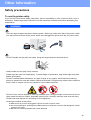
After you have just used the printer, some internal parts of the printer will be extremely hot. When you
open the top or back cover (back output tray) of the printer, DO NOT touch the shaded parts shown
in the illustration.
s
Inside the printer
(Front View)
Inside the printer
(Back View)
IMPORTANT
DO NOT remove or damage the caution labels located on or around the fuser.
46
Other Information
Regulations
Federal Communications Commission (FCC)
Declaration of Conformity (USA only)
Responsible
Party:
Brother International Corporation
100 Somerset Corporate Boulevard
Bridgewater, NJ 08807-0911
USA
Telephone: (908) 704-1700
declares, that the products
Product name:
Color Printer HL-3070CW
Model number:
HL-30C
comply with Part 15 of the FCC Rules. Operation is
subject to the following two conditions: (1) This device
may not cause harmful interference, and (2) this
device must accept any interference received,
including interference that may cause undesired
operation.
This equipment has been tested and found to comply
with the limits for a Class B digital device, pursuant to
Part 15 of the FCC Rules. These limits are designed
to provide reasonable protection against harmful
interference in a residential installation. This
equipment generates, uses, and can radiate radio
frequency energy and, if not installed and used in
accordance with the instructions, may cause harmful
interference to radio communications. However, there
is no guarantee that interference will not occur in a
particular installation. If this equipment does cause
harmful interference to radio or television reception,
which can be determined by turning the equipment off
and on, the user is encouraged to try to correct the
interference by one or more of the following
measures:
Reorient or relocate the receiving antenna.
Increase the separation between the
equipment and receiver.
Connect the equipment into an outlet on a
circuit different from that to which the
receiver is connected.
Call the dealer or an experienced radio/TV
technician for help.
This transmitter must not be co-located or
operated in conjunction with any other
antenna or transmitter.
Important
Changes or modifications not expressly approved by
Brother Industries, Ltd. could void the user's authority
to operate the equipment.
Industry Canada Compliance Statement
(For Canada only)
This Class B digital apparatus complies with
Canadian ICES-003.
Cet appareil numérique de la classe B est conforme à
la norme NMB-003 du Canada.
Operation is subject to the following two conditions:
(1) this device may not cause interference, and (2)
this device must accept any interference, including
interference that may cause undesired operation of
this device.
EC Declaration of Conformity (For EU only)
International ENERGY STAR® Compliance
Statement
The purpose of the International ENERGY STAR®
Program is to promote the development and
popularization of energy-efficient office equipment.
As an ENERGY STAR® Partner, Brother Industries,
Ltd. has determined that this product meets the
ENERGY STAR® guidelines for energy efficiency.
Important - about the interface cable
A shielded interface cable should be used in order to
ensure compliance with the limits for a Class B digital
device.
Radio interference
This product compiles with EN55022 (CISPR
Publication 22)/Class B.
47
Other Information
Disconnect device
This product must be installed near an AC power
outlet that is easily accessible. In case of
emergencies, you must disconnect the power cord
from the AC power outlet to shut off power
completely.
EU Directive 2002/96/EC and EN50419
This equipment is marked with the above recycling
symbol. It means that at the end of the life of the
equipment you must dispose of it separately at an
appropriate collection point and not place it in the
normal domestic unsorted waste stream. This will
benefit the environment for all.
IMPORTANT - For Your Safety
To ensure safe operation, the supplied three-pin plug
must be inserted only into a standard three-pin power
outlet that is properly grounded through the normal
household wiring.
Extension cords used with this printer must be threepin plug type and correctly wired to provide proper
grounding. Incorrectly wired extension cords may
cause personal injury and equipment damage.
The fact that the equipment operates satisfactorily
does not imply that the power is grounded and that
the installation is completely safe. For your safety, if
in any doubt about the effective grounding of the
power, call a qualified electrician.
This product should be connected to an AC power
source within the range indicated on the rating label.
DO NOT connect it to a DC power source. If you are
not sure, contact a qualified electrician.
LAN connection
CAUTION
DO NOT connect this product to a LAN connection
that is subject to over-voltages.
Wiring information (UK only)
If you need to replace the plug fuse, fit a fuse that is
approved by ASTA to BS1362 with the same rating as
the original fuse.
Always replace the fuse cover. Never use a plug that
does not have a cover. If in any doubt, call a qualified
electrician.
48
Warning - This printer must be earthed.
The wires in the mains lead are coloured in line with
the following code:
Green and Yellow: Earth
Blue:
Neutral
Brown:
Live
Other Information
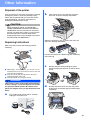
Shipment of the printer
If for any reason you must ship your printer, carefully
package the printer to avoid any damage during
transit. We recommend that you save and use the
original packaging. The printer should also be
adequately insured with the carrier.
b
Fully open the top cover and take out all the
drum unit and toner cartridge assemblies.
CAUTION
When shipping the printer, the DRUM UNIT,
TONER CARTRIDGE assemblies and WASTE
TONER BOX must be removed from the printer
and put in a plastic bag. Failure to remove these
items and put them in a plastic bags before
shipping may cause severe damage to the printer
and may VOID THE WARRANTY.
Repacking Instructions
Attach the protective cover to each of the drum unit
and toner cartridge assemblies.
Make sure that you have the following parts for
repacking.
Put each assembly into a plastic bag and completely
seal each bag.
c
a Plastic bags – to be supplied by you, the user; one for
the waste toner box, and one each for the four drum and
toner cartridge assemblies
b Protective covers that the original drum and toner
cartridge assembly came with
c Packing material for locking the belt unit
Remove the belt unit by holding the green
handle and lifting the belt unit up and out of the
printer.
WARNING
This printer is heavy and weights approximately
41.9 lb. (19.0 kg). To prevent injuries use at least
two people to lift the printer. Be careful not to
pinch your fingers when you put the printer back
down.
a
d
Remove the waste toner box from the printer,
and then put it in a plastic bag and seal the bag
completely.
Turn off the printer power switch, and then
unplug the AC power cord.
49
Other Information
e
Reinstall the belt unit back in the printer.
i
j
f
50
Using two people, place the printer into the
plastic bag.
Put the printer and the Styrofoam pieces into
the carton. Match the front side of the printer to
the “FRONT” mark on the Styrofoam pieces.
Put the Styrofoam piece for the drum unit and
toner cartridge assemblies on the top of the
printer.
Reinstall the original packing material into the
printer.
g
Close the top cover.
h
Put the waste toner box in the Styrofoam piece.
k
Put the power cord, drum unit and toner
cartridge assemblies into the Styrofoam piece
as shown in the illustration.
l
Put the two carton trays on the top.
m
Close the carton and tape it shut.
Other Information
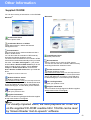
Supplied CD-ROM
You can find a variety of information on the CD-ROM.
Windows®
Macintosh
Install Printer Driver
Install the printer driver.
Install Other Drivers or Utilities
Install optional drivers, utilities and Network
management tools.
Documentation
View the Printer User’s Guide and Network User's
Guide in HTML format.
You can also view the manuals in PDF format by
accessing the Brother Solutions Center.
The User’s Guide and Network User’s Guide in HTML
format will be installed automatically when you install
the driver. Click Start, All Programs 1, your printer,
and then User’s Guide in HTML format. If you do not
want to install the User’s Guide, choose Custom
setup from Install Printer Driver, and uncheck
User’s Guides in HTML format when you install the
driver.
1
Programs for Windows® 2000 users
Brother Solutions Center
The Brother Solutions Center
(http://solutions.brother.com/) is a one-stop resource
for all your printer support needs. Download the latest
drivers and utilities for your printer, read FAQs and
troubleshooting tips, or learn about printer solutions.
On-Line Registration
Register your product on-line.
Install Printer Driver
Install the printer driver.
Documentation
View the Printer User’s Guide in HTML format.
You can also view the User’s Guide in PDF format by
accessing the Brother Solutions Center.
Brother Solutions Center
The Brother Solutions Center
(http://solutions.brother.com/) is a one-stop resource
for all your printer support needs. Download the latest
drivers and utilities for your printer, read FAQs and
troubleshooting tips, or learn about printer solutions.
On-Line Registration
Register your product on-line.
Supplies Information
Visit our web site for original/genuine Brother supplies
at http://www.brother.com/original/
Supplies Information
Visit our web site for original/genuine Brother supplies
at http://www.brother.com/original/
Note
For visually impaired users, we have prepared an HTML file
on the supplied CD-ROM: readme.html. This file can be read
by Screen Reader ‘text-to-speech’ software.
51
Other Information
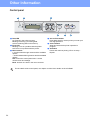
Control panel
3
a Data LED
On: Data is in the printer memory.
Blinking: Receiving / processing data.
Off: No remaining data in the memory.
b Error LED
Blinking: There is a problem with the printer.
Off: There is no problem with the printer.
c Menu buttons
+: Scroll forward through menus and the available
options.
-: Scroll backward through menus and the available
options.
OK: Choose the control panel menu. Set the
chosen menu and settings.
Back: Go back one level in the menu structure.
d Secure Print button
Prints data saved in memory when you enter your
four-digit password.
e Cancel button
Stops and Cancels the printer operation in
progress.
f Go button
Pause and continue printing / Error recovery /
Reprint
For the details of the control panel, see chapter 3 of the User's Guide on the CD-ROM.
52
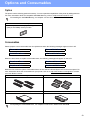
Options and Consumables
Option
The printer has the following optional accessory. You can expand the capabilities of the printer by adding this item.
For more information about the compatible SO-DIMM Memory, visit us at http://solutions.brother.com/.
For installing the SO-DIMM Memory, see Chapter 4 of the User's Guide on the CD-ROM.
SO-DIMM Memory
You can expand the memory by installing
a (144-pin SO-DIMM) memory module.
Consumables
Please prepare a new consumable item for replacement when the following messages appear on the LCD.
Toner Low
Drums End Soon
Belt End Soon
WT Box End Soon
When the time comes to replace consumable items, the following messages will appear on the LCD.
Replace Toner
Replace Drums
Replace Belt
Replace WT Box
When the time comes to replace consumable items, an error will be indicated by the LCD on the control panel. For
more information about the consumables for your printer, visit us at http://www.brother.com/original/ or contact
your local Brother reseller.
Toner cartridges
Drum units
Belt Unit (BU-200CL)
Waste Toner Box (WT-200CL)
For replacing the consumable items, see Chapter 5 of the User's Guide on the CD-ROM.
53
Trademarks
Brother and the Brother logo are registered trademarks and BRAdmin Light and BRAdmin Professional are trademarks of
Brother Industries, Ltd.
Microsoft, Windows, Windows Server and Internet Explorer are registered trademarks of Microsoft Corporation in the United
States and/or other countries.
Windows Vista is either a registered trademark or a trademark of Microsoft Corporation in the United States and/or other
countries.
Apple, Macintosh and Safari are trademarks of Apple Inc., registered in the United States and other countries.
BROADCOM, SecureEasySetup and the SecureEasySetup logo are trademarks or registered trademarks of Broadcom
Corporation in the United States and/or other countries.
Wi-Fi, WPA, WPA2, Wi-Fi Protected Access and Wi-Fi Protected Setup are either trademarks or registered trademarks of WiFi Alliance in the United States and/or other countries.
AOSS is a trademark of Buffalo Inc.
Each company whose software title is mentioned in this manual has a Software License Agreement specific to its proprietary
programs.
All other trademarks are the property of their respective owners.
Compilation and Publication Notice
Under the supervision of Brother Industries Ltd., this manual has been compiled and published, covering the latest product
descriptions and specifications.
The contents of this manual and the specifications of this product are subject to change without notice.
Brother reserves the right to make changes without notice in the specifications and materials contained herein and shall not be
responsible for any damages (including consequential) caused by reliance on the materials presented, including but not limited
to typographical and other errors relating to the publication.
This product is designed for use in a professional environment.
Copyright and License
© 2009 Brother Industries, Ltd.
© 1983-1998 PACIFIC SOFTWORKS INC.
This product includes the "KASAGO TCP/IP" software developed by ELMIC WESCOM,INC.
© 2009 Devicescape Software, Inc.
This product includes RSA BSAFE Cryptographic software from RSA Security Inc.
Portions Copyright for ICC profiles 2003 by European Color Initiative, www.eci.org. ALL RIGHTS RESERVED.