1
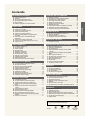
English Contents GENERAL INFORMATION ■ ■ ■ ■ ■ ■ ChANNEL CONTROL List of Features ..................................................................2 Accessories .......................................................................2 Viewing the Control Panel ................................................3 Viewing the Connection Panel ..........................................4 Remote Control .................................................................5 Installing Batteries in the Remote Control .........................6 CONNECTIONS ■ ■ ■ ■ ■ ■ ■ ■ ■ ■ Connecting VHF and UHF Antennas .................................6 Connecting Cable TV ........................................................7 Connecting a VCR .............................................................8 Connecting a Camcorder ..................................................9 Connecting a DVD Player/Set-Top Box .............................9 Connecting a DVD Player/Set-Top Box via HDMI ...........10 Connecting a DVD Player/Set-Top Box via DVI ..............10 Connecting a Digital Audio System .................................11 Connecting an Ampliier/DVD Home Theater ..................11 Connecting a PC .............................................................11 Turning the TV On and Off ..............................................12 Plug & Play Feature.........................................................12 Changing Channels .........................................................13 Adjusting the Volume .......................................................14 Viewing the Display .........................................................14 Viewing the Menus ..........................................................15 Memorizing the Channels ................................................15 Setting Up Your Remote Control .....................................17 Remote Control Codes ....................................................19 To Select the Source .......................................................22 To Edit the Input Source Name .......................................22 PICTURE CONTROL ■ ■ ■ ■ ■ ■ ■ ■ ■ ■ Selecting the Antenna......................................................38 Clearing Scrambled Channels - Digital............................38 Setting the Channel Lists.................................................39 To set-up Your Favorite Channels ...................................40 Using the Channel Lists...................................................41 Viewing the Channel Lists ...............................................41 Labeling Channels ...........................................................42 LNA (Low Noise Ampliier) ...............................................42 Fine Tuning Analog Channels..........................................43 Checking the Digital-Signal Strength ...............................43 PC DISPLAy ■ ■ ■ ■ Using Your TV as a Computer (PC) Display ....................44 Display Modes .................................................................44 Setting up the TV with your PC .......................................45 Setting the Home Theater PC .........................................46 TIME SETTING ■ Setting the Clock..............................................................47 OPERATION ■ ■ ■ ■ ■ ■ ■ ■ ■ ■ ■ ■ ■ ■ ■ ■ ■ ■ ■ ■ ■ Using Automatic Picture Settings ....................................23 Adjusting the Color Tone .................................................24 Adjusting the Detailed Settings........................................25 Changing the Screen Size ...............................................28 Setting the Active Color ...................................................29 DNIe (Digital Natural Image engine)................................29 Freezing the Picture ........................................................30 Setting the Film Mode......................................................30 HDMI Black Level ............................................................30 Viewing Picture-in-Picture ...............................................31 FUNCTION DESCRIPTION ■ ■ ■ ■ ■ ■ ■ ■ ■ ■ ■ ■ Selecting a Menu Language ............................................50 Setting the Blue Screen Mode .........................................51 Using the Game Mode.....................................................51 Viewing Closed Captions (On-Screen Text Messages) - Analog ..............................52 Viewing Closed Captions (On-Screen Text Messages) - Digital ...............................53 Menu Transparency Level ...............................................54 Using the Energy Saving Feature....................................54 Setting the Function Help ................................................55 Digital Noise Reduction ...................................................55 Using the V-Chip..............................................................56 Setting the Light Effect ...................................................63 Upgrading the Software ..................................................63 WISELINK ■ ■ ■ ■ ■ ■ WISELINK .......................................................................64 Using the WISELINK Function ........................................64 Using the WISELINK Menu .............................................65 Using the PHOTO (JPEG) List ........................................66 Using the MP3 List ..........................................................73 Using the Setup Menu .....................................................75 SOUND CONTROL ■ ■ ■ ■ ■ ■ ■ ■ ■ ■ ■ Customizing the Sound ...................................................33 Using Automatic Sound Settings .....................................33 Setting the TruSurround XT .............................................34 Choosing a Multi-Channel Sound (MTS) track - Digital ..34 Choosing a Multi-Channel Sound (MTS) track - Analog .35 Automatic Volume Control ...............................................35 Selecting the Internal Mute ..............................................36 Setting the On/Off Melody ...............................................36 Listening to the Sound of the Sub (PIP) Picture ..............37 Resetting the Sound Settings to the Factory Defaults .....37 Connecting Headphones .................................................37 About Anynet+ ■ ■ ■ ■ ■ ■ ■ APPENDIx ■ ■ ■ ■ ■ ■ ■ Symbol Press Important Note What is Anynet+?.............................................................77 Connecting Anynet+ Devices...........................................77 Setting Up Anynet+ ..........................................................78 Scanning and Switching between Anynet+ Devices ........78 Recording ........................................................................79 Listening through a Receiver (Home theater)..................80 Check Points before Requesting Service ........................80 Troubleshooting ...............................................................81 Installing the Stand ..........................................................83 Disconnecting the Stand..................................................83 Wall-Mount Adjustment (Sold separately)........................84 Wall Mount Kit Specifications (VESA) .............................85 Using the Anti-Theft Kensington Lock .............................86 Speciications ..................................................................87 One-Touch Button English - 2007-02-15 9:44:40