1
Euphonix Media Application Controller
Multiple Workstation Installation Guide
Document Revision: C
Software Version: 1.4.1
Part Number: 840-10050-04
Release Date: April 2009
Euphonix, Inc.
220 Portage Ave.
Palo Alto, California 94306
Phone: 650-855-0400
Fax:
650-855-0410
Web: http://www.euphonix.com
e-mail: [email protected]
Media Application Controller Multiple Workstation Install Guide
Table of Contents
Chapter 1: Hardware Connections and MC Client Setup .............................5
1.1
Connect the MC.........................................................................................5
1.2
Network Configuration..............................................................................6
1.2.1
1.2.2
MC Standalone............................................................................6
System 5-MC ..............................................................................6
1.3
EuCon Software Installation......................................................................6
1.4
Workstation Connection and Control......................................................10
1.5
Display Switching ...................................................................................12
1.6
Ready to Proceed.....................................................................................12
Chapter 2: Nuendo–PC and Mac ..............................................................................13
Chapter 3: Logic Pro .......................................................................................................15
Chapter 4: Pro Tools .......................................................................................................17
4.1
Workstation Configuration......................................................................17
4.2
Pro Tools Configuration ..........................................................................18
Chapter 5: Pyramix ..........................................................................................................21
Chapter 6: MOTU Digital Performer 6.02....................................................... 25
Chapter 7: Support and Troubleshooting ...........................................................26
7.1
Support ....................................................................................................26
7.2
Troubleshooting.......................................................................................26
Appendix A:DAW Parts List and Schematics .................................................... 28
iii
Media Application Controller Multiple DAW Install Guide
Chapter 1: Hardware Connections and MC Client Setup
Schematics and parts are listed for each DAW setup in Appendix A: DAW Parts List
and Schematics.
1.1
Connect the MC
1.
Unpack the MC from its packaging and select a place to put it. The MC should
go on a hard flat surface inorder to allow proper ventilation. (System 5-MC has
its own frame for the MC and CM408T modules).
NOTE: The MC and CM408T modules require sufficient ventilation space on the bottom. The MC has detachable feet for standalone users without a System 5
frame, but the CM408T modules do not. If you do not use a System 5 frame,
you MUST have at least 1 inch of clearance under the CM408T modules and
MC or damage to the units may occur.
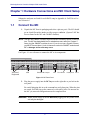
Use Figure 1-1 as a reference to connect the MC to its components.
FOOT
VGA
KEYBOARD
USB
SWITCH
TALKBACK MIC
VGA and
Keyboard
USB
LAN
Talkback Mic Output
LAN
HEADPHONES
DC IN
Foot Switch
Headphone DC In
Figure 1-1 MC Rear Panel
2.
Plug the power supply into the DC In port on the right side as you look at the
rear panel.
Be careful plugging this in as the connector has easily-bent pins. When the pins
are seated, twist the ring on the connector’s side until it locks. Do not turn on
the MC yet; network configuration must be completed first.
WARNING: Attach power supply to the MC BEFORE plugging into AC power or the
unit may be damaged.
5
Media Application Controller Multiple DAW Install Guide
1.2
Network Configuration
1.2.1
MC Standalone
Hardware Connections and MC Client Setup
Using the RJ-45 Ethernet (included) cables, connect your workstations to the LAN
ports on the Netgear RP614 router. Then connect the MC to one of the otherLAN ports
on the Netgear router. Because the Netgear has four LAN ports, you must use an additional Ethernet switch if you have more than three workstations.
NOTE: You have now created a small local area network comprised of just the MC
and your workstations.
The MC ships with DHCP enabled, allowing it to automatically obtain an IP address.
The Netgear RP614 has a DHCP server and hands out IP addresses to the devices connected to its LAN ports (the MC and your workstations). This allows for easy plug and
play network configuration. For this reason, the Netgear router must be turned on before the MC and your workstation.
1.2.2
System 5-MC
1.
Connect the MC andCM408T modules to LAN ports on the SonicWALL 1260
router.
2.
Connect your workstations to LAN ports on the SonicWALL.
The MC ships with DHCP enabled, allowing it to automatically obtain an IP
address. The SonicWALL ships from Euphonix with its DHCP server enabled,
such that it hands out IP addresses to the MC, CM408T modules, and your
workstations. For this reason the SonicWALL must be turned on before the
MC, CM408T modules, and your workstations.
1.3
EuCon Software Installation
Follow these instructions to install the EuCon Software on each workstation:
1.
Insert the Euphonix MC Software Installation CD in your workstation’s CD/
DVD drive.
2.
In Mac OS X, double-click the CD icon on the desktop, and double-click the
EuConWS package.
The Install program launches. Proceed to Step 4.
3.
In Windows, if AutoRun is enabled, the setup program starts from the CD automatically. If AutoRun is not enabled:
6
Media Application Controller Multiple DAW Install Guide
Hardware Connections and MC Client Setup
a. Minimize all programs.
b. Double-click My Computer on the desktop to display the drives on your
computer.
c. Double-click the CD/DVD drive.
d. Double-click the EuConWS executable file.
The Setup Wizard begins running.
4.
Click Next and choose a directory to install the software.
The default Windows directory is C:\Program Files\Euphonix\EuCon.
The default Macintosh OS X directory is the Applications folder.
5.
For Windows installations, click Next to customize the software components
to install. EuCon Workstation Core is automatically selected (this is thebasic
software used to communicate with the MC. Select further options according
to your DAW:
a. For Nuendo workstations, select only the EuCon adapter for Nuendo and
VST plugin layouts for Nuendo options.
b. For Pyramix, select only the EuCon adapter for Pyramix option.
c. For all other DAWs, select Studio Monitor Express or Studio Monitor
Pro 2 option.
WARNING:Running Studio Monitor Express and Studio Monitor Pro 2 on the same
machine may cause conflicts and is not recommended
6.
Click Next to continue.
7.
Select locations for application shortcuts in the Start menu.
The default is a EuCon folder in the Start menu with shortcuts to the MC’s
applications.
8.
Click Next to continue.
The Wizard now displays a summary of all options selected during the setup
process. To change them, click Back until the desired setup option appears.
9.
Click Install.
The Wizard installs the selected components to your workstation.
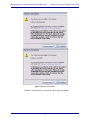
10. The windows installer may ask you abouttwo Euphonix drivers: Euphonix Virtual MIDI Driver and Euphonix Virtual Keyboard. Click Continue Anyway.
7
Media Application Controller Multiple DAW Install Guide
Hardware Connections and MC Client Setup
Figure 1-2 New Driver prompt
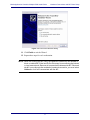
Windows will detect the new hardware. Do not press anything.
8
Media Application Controller Multiple DAW Install Guide
Hardware Connections and MC Client Setup
Figure 1-3 Found New Hardware dialog
11. Click Finish to exit the Wizard.
12. Repeat these steps for each workstation.
NOTE: When first running the MC Client, the Windows Firewall may ask whether to
block or unblock MC Client and EuCon Discovery from accessing the Internet
or local area network. Because all communication between the MC Client and
the MC occurs through the workstation’s network connection, you must select
Unblock or it will not communicate with the MC.
9
Media Application Controller Multiple DAW Install Guide
1.4
Hardware Connections and MC Client Setup
Workstation Connection and Control
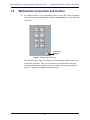
1.
To connect the MC to your workstations, make sure the MC Client is running
on all workstations, and thenpress the Strip Control Setup key on the right side
of the MC.
Strip Control
Layouts
Flip
Home
MC
Nudge
Nudge
Bank
Bank
Setup
Setup
Strip Control
Setup key
Figure 1-4 Strip Control Setup key
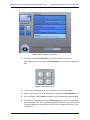
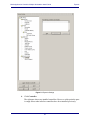
The Touchscreen in Figure 1-5 displays all workstations available on the network in the right pane. There are two choices: none/disconnect and your
workstation (showing computer name, user name, and operating system).
Figure 1-5 displays a multiple workstation setup.
10
Media Application Controller Multiple DAW Install Guide
Hardware Connections and MC Client Setup
Figure 1-5 Workstation Touchscreen
2.
Touch the desired Workstation key on the left of the Touchscreen.
These buttons map to the physical Workstation keys on the upper right of the
MC.
Workstation
1
2
3
4
Figure 1-6 Workstation keys
3.
Touch your workstation in the list to assign it to the selected number.
4.
Repeat Steps 2 and 3 for eachworkstation to assign them toWorkstation keys.
5.
Press the Strip Control Setup key again to exit Workstation assignment mode.
6.
To control a workstation, press the Workstation key to which you assigned
that workstation. The MC’s right-hand trackball (which acts as the mouse) and
keyboard should now function just as if they were connected directly to your
workstation.
11
Media Application Controller Multiple DAW Install Guide
1.5
Hardware Connections and MC Client Setup
Display Switching
The MC uses the Ontrack ADU-200 relay device to control a KVM (keyboard/video/
mouse) switch with an RJ-45 port, such as the Gefen eX-Tend-It series. To implement
this functionality:
1.
Connect the video outputs of your workstations to the KVM inputs.
2.
Connect the KVM video output to your main display.
3.
Connect the Ontrack ADU-200’s USB plug to the MC’s USB port (left side of
MC’s rear panel).
4.
Connect a shielded RJ-45Ethernet cable from the Ontrack’s RJ-45 port to your
KVM’s RJ-45 port.
The cable MUST BE SHIELDED or the switching will not function properly.
Check that the RJ-45 connectors have metal ends.
Now when a Workstation key is pressed, the MC sends a switch command to the KVM
and changes your display to reflect that KVM input.
NOTE: Since the MC does not know the order your workstations were connected to
the KVM, we recommend assigning the workstation attached to KVM input 1
to Workstation key 1, the workstation attached to KVM input 2 to Workstation
key 2, etc. Otherwise the MC will not control the desired workstation when the
display is switched.
1.6
Ready to Proceed
You have successfully connected your MC to your workstation. Proceed to the chapter
of this installation guide for your DAW software to configure it to work with the MC.
Chapter 3: Logic Pro
Chapter 2: Nuendo–PC and Mac
Chapter 4: Pro Tools
Chapter 5: Pyramix
NOTE: If your MC did not connect properly, or a step failed, see Chapter 6: Support
and Troubleshooting.
12
Media Application Controller Multiple Workstation Install Guide
Chapter 2: Nuendo–PC and Mac
To enable Nuendo to work with the MC, you must obtain a Nuendo EuCon Adapter license from Euphonix and download it to yourNuendo USB protection device (dongle):
1.
Close all open applications. Make sureyour Syncrosoft USB dongle is plugged
into your Nuendo workstation.
2.
Start the Syncrosoft License Control Center by choosing Start Menu->Steinberg Nuendo 4->License Control Center.
Windows: Click Start Menu->Syncrosoft->License Control Center.
OS X:
Navigate to the Applications\Syncrosoft folder and run License
Control Center.
3.
Choose License Download from the Wizards menu.
Choose License Transfer to transfer an existing Nuendo EuCon license to a
new USB dongle.
4.
When prompted, enter the activation code for Nuendo EuCon provided by
Euphonix.
5.
Make sure you are downloading the correct license, then click Next.
6.
If you have more than one Syncrosoft USB dongle attached to your workstation, select the one onto which you wish to download the license. Click Next.
7.
Press Download to transfer the license onto your USB dongle.
8.
Close the wizard and open Nuendo.
The Nuendo EuCon Adapter must be installed must be installed during the EuConWS
software installation (see page 7). Note thatthis is the MC Client’s Nuendo adapter. For
Nuendo to communicate with the MC, Nuendo’s EuCon device must be added in the
Nuendo Device Setup dialog:
1.
Choose Device Setup from Nuendo’s Devices menu.
The Device Setup dialog opens.
2.
Click the + button (add) on the top-left.
A drop-down list of devices appears. EuCon should appear near the top of the
list. If not, check that you have successfully downloaded the license for the EuCon Adapter to your USB dongle using the License Control Center.
13
Media Application Controller Multiple Workstation Install Guide
3.
Nuendo–PC and Mac
Select EuCon from the drop-down list.
The EuCon device is added and the MC surface immediately updates with the
Nuendo default Application Set to reflect the open Nuendo project. For the
System 5-MC, the MC auto-assigns the Nuendo channels to the CM408T
strips, beginning with channel 1 on the first CM408T’s leftmost strip.
Steinberg has created a default Nuendo Application Set with the most commonly used
functions and commands.
14
Media Application Controller Multiple Workstation Install Guide
Chapter 3: Logic Pro
Logic Pro 8.02 has EuCon support and connectivity built into the
application. With the MC Client running on your Macintosh, load Logic Pro, and the
MC automatically connects to the application and displays the Logic Pro application
set.
Versions of Logic prior to 8.02 do not have EuCon support. However, the updates for
Logic are part of Apple’s Software Update program, so simply check for new updates
(Apple Menu-> System Preferences -> Software Update -> Check Now), download,
and install the Logic 8.02 update. Then re-open Logic and the MC will connect. You
have now successfully set up the MC to operate with your Logic Pro workstation.
•
See the MC Operation Manual to learn about the MC’s application sets, touchscreens, and any other information.
•
Check the Euphonix website (www.euphonix.com) for technical bulletins,
product support notices, and new software releases.
•
Please register your MC by filling out the online registration form at www.euphonix.com/registration. Registration is required to download software updates.
15
Media Application Controller Multiple Workstation Install Guide
16
Logic Pro
Media Application Controller Multiple Workstation Install Guide
Chapter 4: Pro Tools
4.1
Workstation Configuration
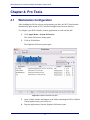
After installing the EuCon software and restarting your Mac, the MC Client launches
automatically upon startup of OS X and EuCon applications can now function.
To configure your HUI or Mackie Control applications to work with the MC:
1.
Click Apple Menu-> System Preferences.
The System Preferences dialog opens.
2.
Click on EuPrefsPane.
The Euphonix Preferences pane opens.
Figure 4-1 Euphonix Preferences pane
3.
Open a Finder window and navigate to the folder containing the HUI or Mackie
Control application(s) you wish to use.
4.
Drag the application(s) into the Euphonix Preferences pane.
17
Media Application Controller Multiple Workstation Install Guide
Pro Tools
NOTE: You must drag the actual application icon into the preferences pane, not a
shortcut or alias!
5.
For each application, select HUI or Mackie Control from the drop-down
menu under Protocol, and select the MIDI ports for the application to use.
NOTE: The EuCon software sets up a virtual MIDI driver with 32 ports, and each application can use up to four (the limit with HUI applications). Keep track of
which application uses which ports in order to configure them properly.
4.2
6.
Close the Euphonix Preferences pane. When prompted, restart your Macintosh.
7.
Connect the MC to the Macintosh.
Pro Tools Configuration
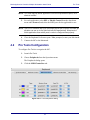
To configure Pro Tools to recognize the MC:
1.
Launch Pro Tools.
2.
Choose Peripherals from the Operations menu.
The Peripherals dialog opens.
3.
Click the MIDI Controllers tab.
Figure 4-2 Pro Tools Peripherals dialog
18
Media Application Controller Multiple Workstation Install Guide
Pro Tools
Pro Tools has configuration boxes for the four possible controllers. MC standalone users need to configure only one controller. System 5-MC users need to
configure one controller for each CM408T module because the MC mirrors
one CM408T and does not require an extra HUI controller.
4.
For each controller you use, select HUI from the Type drop-down menu.
5.
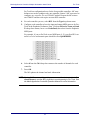
Configure each controller to have the input and output MIDI ports set for ProTools in the Euphonix Preferences Pane. Click on theReceive From and Send
To drop-down menus, hover over Predefined, then select from the Euphonix
MIDI ports.
For example, if you set ProTools to use MIDI ports 9–12, your first HUI controller’s receive and transmit ports should be set to EphMIDIEP9.
Figure 4-3 Excerpt from Pro Tools MIDI menu
6.
Select 8 from the Ch # drop-down menu as the number of channels for each
controller.
7.
Press OK.
The MC updates the channel and track information.
NOTE: System 5-MC owners with joystick panners can set the last controller to Surround Panner to use the MC's joysticks to control panning in Pro Tools. See
the Media Application Controller Operation Manual for more information.
19
Media Application Controller Multiple Workstation Install Guide
20
Pro Tools
Media Application Controller Multiple Workstation Install Guide
Chapter 5: Pyramix (v6.1.3)
To enable the use of the MC with Pyramix, the EuCon adapter for Pyramix checkbox
must be selected during the MC Client software installation (see page 7). Then add the
MC as an installed controller in Pyramix:
1.
Launch the Pyramix Virtual Studio software.
2.
Press the Pref key on the top bank of the MC Soft Keys.
The bank changes to show two options:
Home: Restores the first bank of soft keys
Show Settings: Opens the Pyramix Settings dialog box (alternatively, choose
All Settings from the Settings menu in Pyramix Virtual Studio).
3.
Click Show Settings.
A dialog appears showing a list of the various types of adjustable settings on
the left side.
21
Media Application Controller Multiple Workstation Install Guide
Pyramix
Figure 5-1 Pyramix Settings
4.
Click Controller.
The right pane shows any installed controllers. However, at this point the pane
is empty unless other interface controllers have been installed previously.
22
Media Application Controller Multiple Workstation Install Guide
5.
Pyramix
Click the Add button.
The Controller Properties dialog opens.
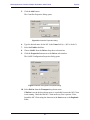
Figure 5-2 Controller Properties dialog
6.
Type the desired name for the MC in the Name field (i.e., MC in Studio 2).
7.
Select the Enable checkbox.
8.
Choose OASIS from the Driver drop-down selection box.
9.
Click the Properties button next to the Driver selection box.
The OASIS Configuration Properties dialog opens.
Figure 5-3 OASIS Configuration Properties dialog
10. Select EuCon from the Transport drop-down menu.
If EuCon is not in the drop-down menu, it is probably because the MC Client
is not running. Check that the MC Client menu tray icon is present. If not,
launch the MC Client using the shortcuts in the Start menu or the Euphonix
folder.
23
Media Application Controller Multiple Workstation Install Guide
Pyramix
Leave the Station ID at its default setting of 1 unless you have multiple controllers, in which case simply increment the setting (i.e., if two controllers are
installed, set the Station ID = 3 for the MC).
11. Press OK to exit that dialog, press OK on the Controller Properties dialog and
press OK on the General Settings dialog.
12. Close Pyramix, reboot the workstation, and then open Pyramix Virtual Studio.
Pyramix will not connect to the MC properly without rebooting the workstation.
The MC will now load the default Pyramix Application Set if a project is open. Otherwise, the Application Set will not be loaded, but the Soft Keysat the top-left illuminate
to show that EuCon communication is enabled.
24
Chapter 6: MOTU Digital Performer 6.02
6.1 Configuration
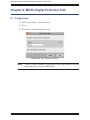
1. In DP 6, goto: Setup > Control Surfaces
2. Press +
3. Select EuCon from the dropdown menu
Figure 11-16 DP6 - Add Control Surface
NOTE:
“Listen to Control Surfaces in Background” should be Enabled at all times
when using EuCon Control Surface Driver.
25
Media Application Controller Multiple Workstation Install Guide
Chapter 7: Support and Troubleshooting
The MC is a professional control surface engineered with industrial-grade components,
and it should operate reliably in your studiosetup. It is, however, a complex device and
issues can arise due to environmental or other factors. Euphonix provides a one year
warranty on the MC and CM408T modules.
If you are having trouble with your MC, these sections can either resolve the problem
or provide useful troubleshooting information for our technical support personnel.
7.1
Support
Euphonix maintains a support section for the MC on our website:
http://www.euphonix.com/support/mc.htm. This page has the latest versions of:
•
the EuCon software (for both workstations and the MC);
•
this manual;
•
constantly expanding FAQ section.
You must sign up for a user account to download new versions of the EuCon software.
If you cannot find an answer for your question in this manual, consult the FAQ section
to see if it is answered there.
Those who purchased their MC through a VAR (value-added reseller), such as Guitar
Center Pro, are supported by that reseller. Euphonix does not provide service directly
to VAR customers. This avoids confusion between Euphonix and your VAR regarding
your MC and its support needs. System 5-MCs are supported only by Euphonix.
7.2
Troubleshooting
If you are having problems with your MC or System-5 MC:
1.
Look for a solution in the Common Issues and Solutions section below.
2.
Then try the Euphonix website’s FAQ or technical bulletins.
3.
If you still are unable to solve your issue, contact your VAR (if applicable) or
Euphonix for support.
Our technical support phone hours (650-855-0412) areMonday through Friday
9 AM – 5 PM. The website is always available.
26
Media Application Controller Multiple Workstation Install Guide
Support and Troubleshooting
Common Issues and Solutions
My MC does not turn on.
Make sure the MC’s power connector is securely connected. Push on it lightly to seat
it, twist the outer ring to lock it onto the MC, and make sure the transformer is plugged
into the wall.
The MC cannot connect to a workstation; the workstation does not appear in the
MC's Workstation Setup screen.
•
•
•
•
Make sure the MC Client is installed on the workstation, and that the Windows
Firewall is not blocking the MC Client and EuCon Discovery applications.
The MC, CM408T modules, and workstation must be connected to the same
network segment (router/switch): the Netgear RP614 or SonicWALL 1260.
Both the workstation and MC must have thesame version of the EuCon software.
To further troubleshoot this issue, we recommend using a cross-over cable between the MC and one workstation, to remove network variables from the
equation. Once this setup is working, re-connect the MC and workstation(s) to
the switch/router, and verify proper operation.
The MC does not connect to Nuendo.
•
•
•
The Nuendo EuCon Adapter must also be installed when installing the EuCon
software on your workstation. Make sure Studio Monitor Pro isNOT installed,
as SME usurps Nuendo when installed on the same machine.
Make sure your Nuendo license includes EuCon connectivity, and that you
have added the EuCon device in Nuendo Device Setup.
Make sure the MC is properly connected to the workstation. The MC’s Main
Touchscreen should display the networkname of your workstation in the upper
left-hand corner.
The MC does not connect to Pyramix.
•
The Pyramix EuCon Adapter must alsobe installed when installing the EuCon
software on your workstation. Make sure Studio Monitor Pro isNOT installed,
as SME interferes with Pyramix-MC connectivity.
•
Verify that the Pyramix connection procedure has been properly executed, and
that the MC is properly connected to the workstation.
The talkback mic does not produce any audio.
The talkback mic is a condenser microphone and the XLR output is at mic level so it
must be connected to a pre-amp with +48V phantom power.
27
Media Application Controller Multiple Workstation Install Guide
Appendix A: DAW Parts List and Schematics
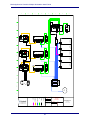
The following diagrams illustrate how to use the supplied parts to interconnect the MC
with the supported DAWs.
System 5 MC
QTY
(32 Fader shown)
DESCRIPTION
1
Euphonix 32 Fader System 5 MC
1
1
1
Sonic Wall Pro 1260 DHCP Router/Ethernet Switch
Apple 20" Cinema Display
Euphonix USB Relay Box
(included with Euphonix packout)
1
Euphonix RJ45 Control Cable
(included with Euphonix packout)
1
DVI Cable M-M
(included with Cinema Display packout)
6
1
Ethernet Cable
USB Memory Stick (for app sets and configuration data)
1
PC Audio Labs (or equivalent) Workstation fitted:
1
1
1
1
1
2
Nuendo 4.2.2 (PC Version)
Euphonix Nuendo EUCO License
Euphonix Studio Monitor Pro V1.0
RME Fireface 400
Gefen DVI Detective
DVI Cable M-M
( 1 included with Gefen packout)
Firewire Cable
Ethernet Cable
Audio Cables for Speakers
1
1
1
Apple G5 Workstation fitted:
1
1
1
2
Apple Logic Pro 8.02
Apogee Ensemble Audio Interface
Gefen DVI Detective
DVI Cable M-M
( 1 included with Gefen packout)
Firewire Cable
Ethernet Cable
Audio Cables to Nuendo Audio Input(s)
1
1
1
Apple G5 Workstation fitted:
1
1
1
2
DigiDesign ProTools LE7 (or higher)
DigiDesign 007 Rack
Gefen DVI Detective
DVI Cable M-M
( 1 included with Gefen packout)
Firewire Cable
Ethernet Cable
Audio Cables to Nuendo Audio Input(s)
1
1
28
Media Application Controller Multiple Workstation Install Guide
H
G
GEFEN
4 x 2 DVI SW
USB
USB OUT
DVI OUT
APPLE
CINEMA DISPLAY
DVI IN
USB IN
DVI IN
DVI IN
DVI IN
DVI IN
1
USB IN
RJ45
EUPHONIX SYSTEM 5MC
FADERS 1-8
USB
EUPHONIX SYSTEM 5MC
FADERS 9-16
EUPHONIX
MC CONTROLLER
USB
DVI OUT
NET
GEFEN
DVI DETECTIVE
EUPHONIX SYSTEM 5MC
FADERS 17-24
EUPHONIX SYSTEM 5MC
FADERS 25-32
DVI IN
NET
GEFEN
DVI DETECTIVE
DVI OUT
1
16
15
14
13
SONIC WALL 1260
ROUTER/SWITCH
2
24
24
23
22
21
20
19
18
17
3
5
WAN
4
6
7
8
9
10
11
12
NET
10
WAN
11
USB
FIREWIRE
NETWORK
DVI
ANALOG
Legend:
Comments
-
220 Portage Ave.
Palo Alto, CA 94306
Revisions
Scale
1
2
3
4
2
USB
RELAY BOX
(supplied)
DVI IN
NET
NET
2
1
9
-
USB IN
DVI OUT
NET
1
3
2
4
5
6
8
7
8
29
Drawing
3
GEFEN
DVI DETECTIVE
PC AUDIO LABS
NUENDO 3.2
NET 1
NET
APPLE G5
LOGIC
PRO
NET 2
NET 1
DVI OUT
APPLE G5
Protools
LE
NET 2
USB
USB
PCI
DVI OUT
DVI OUT
PCIe
USB
FW400
RME
FIREFACE 400
LINE OUT
ADAT OUT
SPDIF OUT
1
2
PCIe
FIRE
WIRE
SPDIFIN
ADAT IN
LINE IN
INST IN
MIC IN
USB
1
2
1
2
1
4
3
2
1
4
3
2
USB
FW400
APOGEE
ENSEMBLE
LINE
OUT
WC OUT
1
2
3
4
5
6
7
8
USB
MIC IN
FW-400
WC IN
LINE IN
USB
FW400
Digidesign
002 Rack
LINE
OUT
1
2
USB
1
2
3
4
1
2
3
4
7
USB
1
2
1
2
3
4
5
6
7
8
6
Apprvl
USB IN
DVI IN
MIC IN
LINE IN
FW-400
5
DH
4
REMOTE
1
2
3
4
1
2
3
4
1
2
4
LAN PORTS
EUPHONIX INC.
EUPHONIX S5-MC 32 FADER
MULTI DAW
INTERCONNECT
Drafter
ORG 5-05-06 DH
REV1
REV2
REV3
REV4
REV5
REV6
REV7
NONE
This drawing represents original
concepts and ideas that belong
exclusively to Euphonix.
The information presented herein
is not to be reproduced in any form
without prior written consent from
Euphonix.
Title
DH
Designer
F
E
3
R
Sub
D
2
Rs
C
B
A
1
L
C
Studio Monitor Pro V1.0
LAN PORTS
Ls
Euphonix EUCON License