1
AVS4YOU Programs Help - AVS DVD Authoring
Page 5 of 53
Main Menu
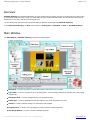
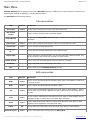
AVS DVD Authoring can be operated with the help of Main Menu elements. Flexible system of menu elements is a perfect tool for
navigating and operating the application, controlling all the processes.
The Main Menu has the following structure:
File menu section
Item
Shortcut
New Project
Ctrl+N
New Custom
Project
Description
Use it to start a new project and create a new DVD with a menu.
Use it to create a new project with your custom settings.
Use it to start the Project Wizard that will help you easily create a new project with preset
parameters.
Project Wizard
Open Project
Ctrl+O
Use it to open a previously saved project to edit it or to create and burn a DVD.
Save Project
Ctrl+S
Use it to save the currently edited project.
Save Project
as...
Use it to save the currently edited project under a different name.
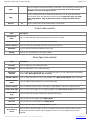
Import Video
Use it to add video to the DVD structure. You can select video files of different formats, they
will be converted to DVD format once you finish your DVD creation.
Recent Projects
Use it to open a list of recently opened projects to select one for editing.
Build DVD
Use it to start DVD creation and burning it onto a disc.
Exit
Use it to finish work with AVS DVD Authoring and exit.
Edit menu section
Item
Shortcut
Description
Undo
Ctrl+Z
Use it to reverse the latest performed command. If this option is not available, it means there
is no action to undo.
Redo
Ctrl+Y
Use it to repeat your latest performed command or action.
Cut
Ctrl+X
Use it to cut the selected object of the DVD menu (text, image or simple graphics) - delete it
from the menu and put into the clipboard to be able to paste it later to some other place of
the menu.
Copy
Ctrl+C
Use it to copy the selected object of the DVD menu (text, image or simple graphics) into the
clipboard to be able to paste it later to some other place of the menu.
Paste
Ctrl+V
Use it to paste the previously copied or cut object of the DVD menu (text, image or simple
graphics) from the clipboard to some place of the menu.
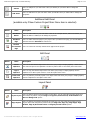
Delete
Del
Select All Layers
Ctrl+A
Use it to delete the selected object of the DVD menu (text, image or simple graphics).
Use it to select all the layers with objects in the Editing Area.
© Online Media Technologies Ltd., UK 2004 - 2009 All rights reserved.
www.avs4you.com