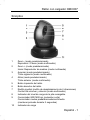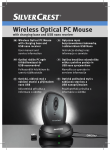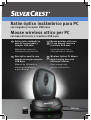
1
Ratón óptico inalámbrico para PC con cargador y receptor USB nano Mouse wireless ottico per PC con base di ricarica e ricevitore USB nano ES Ratón óptico inalámbrico para PC con cargador y receptor USB nano IT MT Manual del usuario e información de servicio PT Rato óptico sem fio com estação de carga e receptor USB Nano Manual do Utilizador e Informação Relativa a Assistência Mouse wireless ottico per PC con base di ricarica e ricevitore USB nano Istruzioni per l’uso e informationi di servizio GB MT Wireless Optical PC Mouse with charging base and USB nano receiver User manual and service information OMC807 Ratón con cargador OMC807 Sinóptico 1 2 3 4 5 6 7 8 9 10 Zoom - (modo predeterminado) Reproducir / Pausa (modo multimedia) Zoom + (modo predeterminado) Iniciar Reproductor de medios (modo multimedia) Avanzar (modo predeterminado) Título siguiente (modo multimedia) Atrás (modo predeterminado) Título anterior (modo multimedia) Botón izquierdo del ratón Botón derecho del ratón Rodillo joystick (rodillo de desplazamiento de 4 direcciones) Control de volumen y silencio (modo multimedia) Indicador del nivel de carga de la pila recargable Conmutador 800/1600 cpi (pulsación corta) Conmutador modos predeterminado/multimedia (mantener pulsado durante 3 segundos) Indicador de carga Español - 1 Ratón con cargador OMC807 Índice Sinóptico........................................................................................... 1 Instrucciones de seguridad importantes .......................................... 3 Uso destinado............................................................................... 3 Condiciones ambientales.............................................................. 4 Niños y personas discapacitadas ................................................. 5 Pila recargable.............................................................................. 5 Interfaz de radiofrecuencia ........................................................... 6 Reparación y mantenimiento ........................................................ 7 Copyright ...................................................................................... 7 Almacenar el producto si no se emplea ....................................... 7 Nota sobre la Conformidad........................................................... 8 Desecho de equipos usados ........................................................ 8 Volumen de suministro..................................................................... 9 Introducción...................................................................................... 9 Requisitos del sistema ................................................................... 10 Instalar el hardware........................................................................ 10 Insertar la pila recargable ........................................................... 10 Conectar el receptor nano USB.................................................. 12 Instalar el software ......................................................................... 13 El manejo ....................................................................................... 15 Cambiar el tipo de función .......................................................... 15 La configuración ......................................................................... 15 Anexo ............................................................................................. 17 Solución de problemas ............................................................... 17 Datos técnicos ............................................................................ 18 Indicaciones de la garantía ............................................................ 19 2 - Español Ratón con cargador OMC807 Instrucciones de seguridad importantes Antes de usar este dispositivo por primera vez, lea detenidamente las instrucciones correspondientes en este manual y siga todas las advertencias, incluso si está acostumbrado a manejar aparatos electrónicos. Conserve este manual para cualquier referencia futura. Si vende o traspasa el aparato, asegúrese de entregar también el presente manual. Este icono denota información importante para garantizar un manejo seguro del producto y la seguridad del usuario. Este icono advierte de una fuente de luz intensa. Este icono denota más información sobre el tema. Advertencia: ¡Radiación de diodos luminosos LED! Diodo luminoso de Clase 1 ¡Evite daños en los ojos! No mire nunca directamente al haz del LED. No enfoque el haz del LED a personas ni animales. Uso destinado Este ratón, que consiste en un ratón óptico inalámbrico, un cargador y un receptor nano USB, es un producto perteneciente a las tecnologías de la información. El dispositivo no debe ser empleado a la intemperie ni en climas tropicales. Este producto no ha sido diseñado para fines corporativos ni comerciales (p.ej. en la oficina). Solamente debe emplear este producto en entornos Español - 3 Ratón con cargador OMC807 domésticos para fines privados. Sólo debe emplear cables y equipos periféricos que cumplan la normativa en cuanto a seguridad y compatibilidad electromagnética y que garanticen un blindaje suficiente. Este dispositivo cumple con todo lo relacionado en cuanto a la conformidad CE incluyendo la normativa y los estándares pertinentes. Cualquier modificación del equipo que no haya sido recomendada por el fabricante puede provocar que estas normativas ya no se cumplan. El fabricante no será responsable de cualquier daño o interferencias resultantes de modificaciones no autorizadas. Emplee sólo complementos y accesorios recomendados por el fabricante. Cualquier empleo diferente al mencionado no corresponde a su uso destinado. Si no emplea este dispositivo en la República Federal de Alemania, observe la legislación y las directivas del país en el que lo emplea. Condiciones ambientales Coloque el ratón inalámbrico en una superficie estable y no coloque objetos sobre él. Este equipo no ha sido diseñado para entornos con altas temperaturas o humedad (p. ej. cuartos de baño) y debe mantenerse libre de polvo. Temperatura y humedad de funcionamiento: 5°C a 40°C, 90% de humedad relativa máx. Siempre garantice lo siguiente: - - No exponga el dispositivo a fuentes de calor (p. ej. radiadores). No deje que la luz solar o una luz artificial incidan sobre el equipo. Evite el contacto con spray y agua así como líquidos corrosivos. No utilice el dispositivo cerca del agua. No lo sumerja ni coloque recipientes con líquidos (jarrones, vasos, bebidas, etc.) encima o al lado del dispositivo. No coloque el dispositivo en campos magnéticos (p. ej. altavoces). No coloque fuentes incandescentes (p. ej. velas) encima o al lado del dispositivo. 4 - Español Ratón con cargador OMC807 - No inserte objetos extraños en el equipo. Evite exponer el equipo a cambios de temperatura bruscos. Evite exponer el equipo a golpes o vibraciones. Niños y personas discapacitadas Los equipos eléctricos no son para los niños. También las personas discapacitadas deberían usar equipos eléctricos con precaución. No permita que los niños o personas discapacitadas utilicen equipos eléctricos sin supervisión. Estas personas no suelen ser conscientes de los posibles riesgos y peligros. Peligro de asfixia con las baterías y las piezas pequeñas. Mantenga las pilas fuera de su alcance. Si se traga una pila accidentalmente, acuda inmediatamente a un médico. Mantenga el embalaje fuera del alcance de los niños y de las personas discapacitadas. Hay peligro de asfixia. Pila recargable Inserte la pila recargable respetando la polaridad. No vierta la pila recargable al fuego. Retire la pila recargable cuando no vaya a utilizar el equipo durante un tiempo prolongado. El empleo de modelos no compatibles puede causar explosión y muerte. No emplee una pila convencional (no recargable) en lugar de la pila recargable. Utilice sólo pilas recargables del mismo tipo. Español - 5 Ratón con cargador OMC807 Interfaz de radiofrecuencia Desconecte el conjunto estando en un avión, conduciendo o encontrándose en un hospital, en un quirófano o cerca de un sistema electrónico de uso medico. Las ondas de radio transmitidas pueden afectar al funcionamiento de aparatos sensibles. Mantenga el conjunto como mínimo a una distancia de 20 cm de un marcapasos, ya que lo contrario podría afectar al correcto funcionamiento del marcapasos por las ondas de radio. Las ondas de radio transmitidas pueden provocar ruidos molestos en audífonos. No coloque el conjunto con la componente de radiofrecuencia conectada cerca de gases inflamables ni en un entorno con riesgo de explosión (p. ej. instalación de pintura), ya que las ondas de radio transmitidas podrían provocar una explosión o un incendio. El alcance de las ondas de radio depende de las condiciones ambientales y del entorno. En la transmisión de datos a través de una conexión inalámbrica, también es posible que terceras partes no autorizadas reciban los datos. TARGA GmbH no es responsable de averías de radio o televisión provocadas por modificaciones no autorizadas en este conjunto. TARGA no asume tampoco ninguna responsabilidad por la sustitución o el intercambio de cables de conexión y aparatos que no hayan sido indicados por TARGA GmbH. El usuario es el único responsable de solucionar las averías provocadas por esta modificación no autorizada, así como de la sustitución o el intercambio de los aparatos. 6 - Español Ratón con cargador OMC807 Reparación y mantenimiento Una reparación o un mantenimiento serán necesarios cuando esta unidad sufra problemas como, por ejemplo, haya entrado líquido en la unidad, si el aparato ha sido expuesto a la lluvia o humedad, si no funciona normalmente o si se ha caído. Si observa humo, ruidos u olores extraños, apague el equipo inmediatamente. En este caso, deje de utilizar el equipo y déjelo comprobar por un técnico autorizado. Contacte con personal técnico cualificado cuando necesite repararlo. No abra nunca la carcasa del dispositivo o de cualquier accesorio. Limpie el equipo únicamente con un paño seco y suave. No emplee líquidos corrosivos. Copyright Todo el contenido del presente Manual del usuario está sujeto a derechos de autor y se ofrece al lector con fines informativos exclusivamente. Queda totalmente prohibida cualquier reproducción o copia de datos o información sin el previo consentimiento escrito del autor. Lo mismo será aplicable a cualquier uso comercial de los contenidos y la información ofrecidos. Todos los textos y las figuras son actuales en el momento de la publicación impresa. No asumimos ninguna responsabilidad por modificaciones u omisiones. Almacenar el producto si no se emplea Si no va a emplear el equipo durante un tiempo prolongado, retire las pilas del ratón inalámbrico. Desconecte el receptor nano USB del puerto USB de su ordenador e insértelo en el compartimento de almacenamiento del ratón. Asegúrese de que la temperatura ambiental durante el almacenamiento se mantenga entre 5 °C y 40 °C. La humedad relativa no debe sobrepasar el 90%. Español - 7 Ratón con cargador OMC807 Nota sobre la Conformidad Este ratón inalámbrico ha sido revisado y aprobado respecto al cumplimiento de los requisitos básicos y otras normas relevantes de la Directiva R&TTE 1999/5/EC. Encontrará la Declaración de Conformidad correspondiente al final de este manual del usuario. Desecho de equipos usados Los dispositivos señalizados con este símbolo están sujetos a la Directiva Europea 2002/96/EC. Todos los aparatos eléctricos y electrónicos usados se deben depositar en centros habilitados, y no se deben verter en ningún caso con los residuos domésticos. El receptor nano USB también es un dispositivo electrónico y, por lo tanto, debe reciclarlo debidamente. Participe activamente en la protección del medio ambiente y de su propia salud respetando las normas de desecho de los aparatos usados. Para más información sobre el desecho y reciclaje, póngase en contacto con las autoridades pertinentes, los centros de recogida o la tienda en donde adquirió el producto. Proteja el medio ambiente. No vierta las pilas usadas a la basura doméstica. Debe depositarlas en un centro de recogida especial. Recicle también el material de embalaje. Los cartones pueden depositarse en los contenedores correspondientes o ser depositados en los centros de recogida públicos para su reciclaje. Los materiales plásticos contenidos en este embalaje deben ser depositados en los centros de recogida públicos. 8 - Español Ratón con cargador OMC807 Volumen de suministro Rogamos compruebe la integridad del contenido del embalaje por medio de la siguiente lista: Ratón inalámbrico OMC807 Cargador Receptor nano USB 1 pila recargable del tipo AA, 1,2V, 1300mAh CD con controladores Manual del usuario Si alguno de los artículos faltara o estuviera dañado, póngase en contacto con nuestra Línea Directa. Encontrará el número de teléfono correspondiente en el último capítulo “Información sobre la garantía”. Introducción Gracias por haber adquirido este ratón inalámbrico SilverCrest OMC807. Este ratón óptico por radio frecuencia esta provisto, aparte de las 3 teclas estándar, de cinco teclas especiales que le facilitarán el acceso a funciones frecuentemente repetidas. La rueda scroll es de 4 vías, permitiendo recorrer las imágenes vertical como horizontalmente. Con el pulsador especial CPI (9) podrá cambiar la resolución óptica entre 800 cpi y 1600 cpi o cambiar entre la función estándar o Media. El ratón inalámbrico lleva una función automática de reposo. Cuando no emplee el ratón inalámbrico durante un tiempo, éste se apagará. Pulse cualquier botón del ratón inalámbrico para volver a encenderlo. Español - 9 Ratón con cargador OMC807 Requisitos del sistema ® ® TM Intel Pentium III / AMD Athlon o superior 1 puerto USB 2.0 libre ® ® ® ® Microsoft Windows XP, Windows Vista o Windows 7 Disquetera de CD-Rom o DVD para la instalación del software Instalar el hardware Insertar la pila recargable No emplee una pila convencional (no recargable) en lugar de la pila recargable. Nunca coloque el ratón en el cargador cuando tenga insertada una pila convencional (no recargable). Existe el riesgo de explosión y de pérdida de electrolito o gas. Todo escape de gas o líquido es peligroso y nocivo. Debe cargar la pila recargable antes de usar el producto por primera vez. Para ello, inserte la pila recargable en el ratón inalámbrico y luego coloque el ratón encima del cargador conectado. 10 - Español Ratón con cargador OMC807 11 Sensor óptico 12 Receptor nano USB insertado 13 Botón de encendido/apagado 14 Contactos de carga Abra el compartimento de la pila en la parte inferior del ratón inalámbrico. Inserte la pila recargable suministrada (tamaño AA) en el ratón inalámbrico respetando la polaridad según las marcas (+ y -) (véase la figura). Retire el receptor nano USB. Cierre el compartimento de las pilas. Pulse el botón de encendido/apagado (13) en la parte inferior del ratón inalámbrico para encenderlo. Inserte el cable USB del cargador en un puerto USB libre del ordenador encendido. El indicador de carga (10) parpadea. Espere unos instantes hasta que el indicador de carga ya no parpadee. Coloque el ratón inalámbrico en el cargador. Durante la carga, el indicador de carga (10) se ilumina de color naranja. Cuando la carga haya terminado, el indicador de carga cambia a color verde. Si el indicador (8) de la parte superior del ratón inalámbrico se ilumina de color naranja, la pila recargable está descargada. En este caso, coloque el ratón inalámbrico en el cargador. En case de que el ratón inalámbrico deje de funcionar, apague y reenciéndalo. A veces, el problema también se puede resolver retirando y reinsertando las pilas. Español - 11 Ratón con cargador OMC807 Tras insertar la pila recargable en el ratón o tras encenderlo, el indicador (8) parpadeará durante unos instantes mientras dure la sincronización automática con el receptor. Una vez concluida la sincronización, el indicador de estado se apagará. La energía necesaria para cargar la pila recargable se obtiene del puerto USB del ordenador. Según el modelo de ordenador, es posible que la alimentación a través del bus USB se corte al apagar el ordenador. En tal caso, sólo podrá cargar la pila recargable del ratón inalámbrico cuando tenga el ordenador encendido. Conectar el receptor nano USB Conecte el receptor nano USB (12) al puerto USB libre de su ordenador, estando éste encendido. El sistema operativo detectará el nuevo hardware e instalará automáticamente los drivers necesarios. En función del sistema operativo instalado, aparecerán los siguientes mensajes en la pantalla: ® Con Windows XP Con la primera conexión del receptor, el sistema operativo ® Windows XP indica “Nuevo hardware encontrado.” Espere hasta que aparezca el mensaje “El nuevo hardware ha sido instalado y puede utilizarse ahora”, para poder utilizar el ratón. ® ® Con Windows Vista , Windows 7 Con la primera conexión del receptor, el sistema operativo indica “Instalar software del driver del aparato”. Espere hasta que aparezca el mensaje “Ahora se podrán utilizar los aparatos”. Ahora, el ratón está preparado y podrá ser utilizado. Si tiene instalado todavía en su ordenador el ratón anterior, apague el ordenador, desconecte el aparato en cuestión y reinicie el ordenador. 12 - Español Ratón con cargador OMC807 Instalar el software Para poder aprovechar todo el alcance de funciones de su ratón por radio frecuencia, deberá instalar el software proporcionado. Para ello, introduzca el CD-Rom adjunto en la disquetera para CDRoms de su ordenador. El proceso de instalación debería iniciarse automáticamente, de lo contrario, active manualmente mediante doble clic el fichero “setup.exe” del CD-Rom. ® ® Solamente con el sistema operativo Windows Vista , Windows 7 la instalación es interrumpida por el control de las cuentas de usuarios con el mensaje “Un programa no identificado quiere acceder a su ordenador”. Haga clic en “Permitir” para continuar con la instalación. Las siguientes imágenes de la instalación corresponden al sistema ® ® operativo Windows Vista , Windows 7. En el sistema operativo ® Windows XP, las imágenes son ligeramente distintas, pero idénticas en su contenido. Haga clic en Siguiente para continuar con la instalación. Español - 13 Ratón con cargador OMC807 Aquí podrá seleccionar la carpeta de destino para la instalación mediante el botón Cambiar o utilizar la carpeta propuesta. Para continuar, haga clic en Siguiente. Pulse Finalizar para salir del programa de instalación. 14 - Español Ratón con cargador OMC807 El manejo Cambiar el tipo de función Con la tecla CPI (9) podrá cambiar rápidamente entre las resoluciones de 800 cpi y 1600 cpi para la palpación óptica mediante una sencilla pulsación de la tecla. La palpación es más precisa con 1600 cpi y la flecha del ratón se mueve con más rapidez con el mismo movimiento. Para cambiar entre la función estándar y Media del ratón óptico, pulse la tecla CPI (9) y manténgala presionada como mínimo durante 3 segundos, hasta que la luz de control de la carga (8) se ilumine brevemente. Encontrará las funciones disponibles para la función Media en la lista de la página 1 - Sinóptico. La configuración de la barra de tareas (esquina Haga doble clic en el icono inferior derecha de la pantalla, al lado del reloj). Con el botón derecho del ratón, pulse en el icono y seleccione la opción “Abrir” del menú contextual. Aparecerá el menú del configuración del ratón. Aquí podrá determinar una función para las teclas señaladas del ratón. Para ello, haga clic en el campo de selección detrás de la correspondiente tecla del ratón y seleccione la función del menú mediante un clic con la tecla izquierda. Con el botón “Restablecer predeterminado” podrá restablecer el estado de suministro. Todas las opciones seleccionadas se refieren al modo predeterminado. Las asignaciones de botones del modo multimedia no se pueden cambiar. Español - 15 Ratón con cargador OMC807 Podrá activar los cambios haciendo clic en el botón “Aplicar” (la ventana sigue abierta a pesar de ello) y en el botón “Aceptar” (la ventana se cierra). ® ® ® Aviso para los usuarios de Microsoft Windows Vista , Windows 7 ® (Windows XP no incluye esta función): En el control del sistema operativo, en el subpunto “Ratón” también es posible ajustar el recorrido horizontal de la pantalla con la rueda scroll. Para poder seleccionar el menú del control del sistema, el menú de configuración del driver del ratón debe estar cerrado. 16 - Español Ratón con cargador OMC807 Anexo Solución de problemas Si después de la instalación, el ratón por radiofrecuencia no es detectado o no reacciona a los comandos, compruebe lo siguiente: ; Compruebe la polaridad de la pila recargable. ; Compruebe si el ratón inalámbrico está encendido. ; Compruebe, si el receptor USB mini está conectado correctamente al ordenador (vea la página 12 – Conectar el receptor USB). ; Pruebe otro puerto de USB. ; Compruebe el nivel de carga de la pila recargable y, si fuera necesario, inserte una pila recargable nueva. ; Tenga en cuenta que debe utilizar una alfombrilla (p. ej. Mousepad), si utiliza el ratón en una superficie de cristal o brillante. Español - 17 Ratón con cargador OMC807 Datos técnicos - Ratón óptico inalámbrico con receptor USB mini - 8 teclas, de las cuales 7 programables - Tilt-Wheel para el recorrido vertical y horizontal - Resolución seleccionable: 800 cpi o 1600 cpi - SmartLink (ya no necesaria la laboriosa conexión entre receptor y ratón) - Frecuencia de radio: 2,4 GHz - Alimentación: 1 batería del tipo AA, 1,2 V, NiMH, 1300mAh - Diodo luminoso de Clase 1 - Posibilidad de conmutación entre Media Player y modo Office (función estándar) mediante pulsación de la tecla - Alcance de hasta 5 m - Alimentación del cargador: a través del puerto USB 5V - Dimensiones del ratón inalámbrico: 125 mm x 75 mm x 40 mm (L x An x Al) - Dimensiones del receptor nano USB: 15,5 mm x 7 mm x 18 mm (L x An x Al) - Dimensiones del cargador: 100 mm x 80 mm x 37 mm (L x An x Al) - Peso del ratón inalámbrico: 87 g (sin pila recargable, con receptor nano USB nano insertado) - Peso del receptor nano USB: 2 g - Peso del cargador: 84 g 18 - Español Ratón con cargador OMC807 Indicaciones de la garantía Español - 19 Ratón con cargador OMC807 20 - Español Mouse con caricabatteria OMC807 Visione d’insieme 1 2 3 4 5 6 7 8 9 10 Zoom - (modalità predefinita) Riproduci / Pausa (modalità Media) Zoom + (modalità predefinita) Apri Media Player (modalità Media) Avanti (predefinito) Titolo successivo (modalità Media) Indietro (predefinito) Titolo precedente (modalità Media) Pulsante sinistro del mouse Pulsante destro del mouse Tilt wheel (rotellina di scorrimento a 4 direzioni) Volume e muto (modalità Media) Indicatore del livello della batteria ricaricabile Interruttore di scelta 800/1600 cpi (pressione breve) Interruttore di scelta modalità Standard /Media (tenere premuto per 3 sec) Indicatore di carica Italiano - 21 Mouse con caricabatteria OMC807 Indice Visione d’insieme ........................................................................... 21 Istruzioni importanti per la sicurezza.............................................. 23 Utilizzo Previsto .......................................................................... 23 Ambiente operativo..................................................................... 24 Bambini e disabili........................................................................ 25 Batteria ricaricabile ..................................................................... 25 Interfaccia radio .......................................................................... 26 Riparazione e manutenzione ...................................................... 27 Copyright .................................................................................... 27 Quando non si utilizza il prodotto, conservarlo con cura ............ 27 Nota di conformità....................................................................... 28 Smaltimento Dei Dispositivi Usati ............................................... 28 Volume della fornitura .................................................................... 29 Introduzione.................................................................................... 29 Requisiti del sistema ...................................................................... 30 Installazione dell’Hardware ............................................................ 30 Inserimento della batteria ricaricabile ......................................... 30 Collegamento del mini ricevitore USB ........................................ 32 Installazione del software ............................................................... 33 L’uso............................................................................................... 35 Commutazione del modo operativo ............................................ 35 Configurazione............................................................................ 35 Appendice ...................................................................................... 37 Soluzione dei problemi ............................................................... 37 Dati tecnici .................................................................................. 38 Indicazioni sulla garanzia ............................................................... 39 22 - Italiano Mouse con caricabatteria OMC807 Istruzioni importanti per la sicurezza Prima di utilizzare questo dispositivo per la prima volta, leggere le seguenti note in questo manuale e rispettare tutti gli avvertimenti, anche se si ha dimestichezza con i dispositivi elettronici. Conservare queste istruzioni per successive consultazioni. In caso di vendita o cessione del dispositivo, è importante che questo manuale vi sia allegato. Questa icona indica informazioni importanti al fine di un sicuro funzionamento del prodotto e per la sicurezza dell’utente. Questa icona avverte della presenza di una fonte di luce forte. Questo simbolo indica ulteriori informazioni sull’argomento. Attenzione: Radiazione LED! LED di classe 1 Evitare di ferirsi gli occhi! Non guardare mai il raggio LED. Non puntare mai il raggio LED direttamente su animali o persone! Utilizzo Previsto Questo mouse wireless, formato da mouse ottico, caricabatteria e mini ricevitore USB, è un dispositivo informatico. Il dispositivo non può essere fatto funzionare all’esterno o in climi tropicali. Questo prodotto non è stato progettato per scopi commerciali o aziendali (per esempio, in ufficio). Utilizzare il dispositivo solo in ambiente domestico e a scopo privato. Utilizzare solo cavi di connessione e dispositivi esterni conformi agli standard di sicurezza, di compatibilità elettromagnetica e di qualità di schermatura di questo apparecchio. Questo dispositivo è conforme a tutte le norme e gli Italiano - 23 Mouse con caricabatteria OMC807 standard in material di Conformità CE. Ogni alterazione dell’attrezzatura diversa da quelle consigliate dal produttore può rendere nulla la conformità a queste direttive. Il produttore non è responsabile di danni o interferenze provocati da modifiche non autorizzate. Utilizzare esclusivamente accessori consigliati dal produttore. Qualsiasi impiego diverso da quello summenzionato non corrisponde all’utilizzo previsto. In caso di impiego al di fuori della Germania, rispettare le normative del paese di utilizzo. Ambiente operativo Posizionare il mouse wireless su una superficie piana e stabile e non collocare alcun oggetto su di esso. Non utilizzare il dispositivo in ambienti con alte temperature o forti tassi di umidità (es. stanze da bagno) e tenerlo sempre pulito. Temperatura e umidità operative: Da 5°C a 40°C, max. 90% RH. Prestare attenzione che: - - Il dispositivo non venga esposto a fonti di calore diretto (es. termosifoni) non venga colpito da luce solare diretta o forti luci artificiali Il dispositivo non entri in contatto con spray, gocce d’acqua e liquidi corrosivi e non venga mai messo in funzione in prossimità di acqua, né sia immerso (non posizionare oggetti contenti liquidi, come vasi o bicchieri, nelle vicinanze del dispositivo Il dispositivo non si trovi nelle immediate vicinanze di campi magnetici (es. altoparlanti) non vengano posizionate fiamme libere (come candele accese) sopra o in prossimità del dispositivo. Nel dispositivo non vengano introdotti corpi estranei. Non sia sottoposto a bruschi cambi di temperatura Il dispositivo non sia sottoposto a scosse o vibrazioni eccessive 24 - Italiano Mouse con caricabatteria OMC807 Bambini e disabili Le apparecchiature elettriche devono essere tenute fuori dalla portata dei bambini. Anche i disabili devono utilizzare le apparecchiature elettroniche con attenzione. Non consentire a bambini o disabili di utilizzare da soli i dispositivi elettronici. Potrebbero non essere in grado di comprendere i potenziali rischi. Le componenti più piccolo possono causare il soffocamento. Tenere le batterie lontanoi In caso di ingestione accidentale, consultare immediatamente un medico. Tenere l’involucro di plastica fuori dalla portata di bambini e disabili, rischio di soffocamento. Batteria ricaricabile Inserire la batteria prestando attenzione alla polarità. Non gettare la batteria ricaricabile nel fuoco. Quando il dispositivo rimane inutilizzato per lunghi periodi di tempo, rimuovere la batteria. Un uso inappropriato può provocare esplosioni e mettere in pericolo vite. Non utilizzare mai batterie tradizionali (non ricaricabili) al posto della batteria ricaricabile. Utilizzare solo batterie ricaricabili dello stesso tipo. Italiano - 25 Mouse con caricabatteria OMC807 Interfaccia radio Spegnere l’apparecchio quando vi trovate su di un aereo, in un ospedale, in una sala operatoria o nelle vicinanze di sistemi elettronici medici. Le onde radio trasmesse possono interferire con la funzionalità di apparecchi sensibili. Tenete l’apparecchio almeno 20 cm lontano da un pacemaker per evitare che le onde radio possano compromettere la corretta funzionalità del pacemaker stesso. La trasmissione delle onde radio può causare brusio nelle apparecchiature acustiche. Non avvicinare mai l’apparecchio con i componenti radio accesi in prossimità di gas infiammabili o in un ambiente a rischio di esplosioni (p. es. vernicerie) dato che le onde radio trasmesse potrebbero causare un esplosione o un incendio. La distanza delle onde radio dipende dalle condizioni ambientali. Durante il traffico di dati mediante un collegamento cordless sussiste la possibilità che anche dei terzi possano ricevere i dati. Targa GmbH non è responsabile delle interferenze radio o televisive che sono causate da una manipolazione non autorizzata di questo apparecchio. Targa inoltre non si assume alcuna responsabilità per la sostituzione e/o cambio di linee di allacciamento e apparecchi che non sono state dichiarate da Targa GmbH. Per la rimozione delle interferenze che sono state causate da modifiche non autorizzate e per la sostituzione e/o cambio delle apparecchiature l’unico responsabile è l’utente stesso. 26 - Italiano Mouse con caricabatteria OMC807 Riparazione e manutenzione È necessario rivolgersi all’assistenza quando il dispositivo subisce dei danni di qualsiasi natura, come per esempio nel caso in cui liquidi siano penetrati nel dispositivo, o se l’apparecchio sia stato esposto a pioggia o umidità, in caso di malfunzionamento o di caduta. In presenza di fumo, rumori od odori insoliti spegnere immediatamente il dispositivo. In questo caso, non utilizzarlo ulteriormente e farlo controllare da personale autorizzato. Per l’assistenza rivolgersi sempre a personale autorizzato. Non smontare mai il dispositivo o gli accessori. Per la pulizia, utilizzare solo un panno pulito e asciutto. Non impiegare mai liquidi corrosivi. Copyright Tutti i contenuti del presente Manuale per l’utente sono coperti da copyright e vengono forniti all’utente unicamente a scopo informativo. È rigorosamente vietato copiare qualsiasi dato o informazione senza l’autorizzazione scritta ed esplicita dell’autore. Questo si applica anche a un qualsiasi uso commerciale dei contenuti e delle informazioni. Tutti i testi e le illustrazioni sono aggiornati alla data di pubblicazione. Non si assumono responsabilità per eventuali modifiche. Quando non si utilizza il prodotto, conservarlo con cura Se si lascia il mouse inutilizzato per un lungo periodo di tempo, rimuovere le batterie. Rimuovere il mini ricevitore USB dalla porta USB del computer e inserirlo nell’alloggiamento della memoria del mouse. Inoltre, accertarsi che la temperatura di conservazione si mantenga fra 5 e 40°C e il tasso d’umidità non superi il 90% di umidità relativa. Italiano - 27 Mouse con caricabatteria OMC807 Nota di conformità Questo mouse wireless è stato sottoposto a test e approvato come conforme ai requisiti base e a quelli relativi della Direttiva R&TTE 1999/5/EC. La relativa dichiarazione di conformità si trova alla fine di questo manuale. Smaltimento Dei Dispositivi Usati I dispositivi contrassegnati da questo simbolo sono soggetti alla Direttiva europea 2002/96/EC. Tutti i dispositivi elettrici ed elettronici devono essere smaltiti separatamente dai rifiuti domestici presso gli enti prestabiliti. Anche il mini ricevitore USB è un dispositivo elettronico e richiede un corretto smaltimento. Evitare rischi per l’ambiente e pericoli per le persone smaltendo il dispositivo in maniera appropriata. Per ulteriori informazioni su uno smaltimento appropriato, contattare i locali enti di smaltimento, le autorità competenti o il negozio dove è stato acquistato l’apparecchio. Rispettare l’ambiente. Non smaltire le batterie usate fra i rifiuti domestici. Portarle in un apposito punto di raccolta. Riciclare correttamente il materiale d’imballaggio. I cartoni dell’imballaggio possono essere portati ai cassonetti per la carta o nei punti di raccolta pubblica per essere riciclati. Eventuali pellicole o plastiche contenute nell’imballaggio possono essere portati nei punti di raccolta pubblica. 28 - Italiano Mouse con caricabatteria OMC807 Volume della fornitura Controlli la completezza del contenuto della confezione in base a questa lista: - Mouse wireless OMC807 Caricabatteria Mini ricevitore USB 1 batteria ricaricabile di tipo AA, 1.2 V, 1300 mAh CD-ROM con driver manuale per l’utente In presenza di parti mancanti o danneggiate, contattare telefonicamente la nostra linea diretta. Il numero della linea diretta si trova all’ultimo capitolo “Informazioni sulla garanzia”. Introduzione La ringraziamo per aver scelto il SilverCrest Mouse ottico wireless OMC807. Oltre ai 3 tasti standard, questo radiomouse ottico è dotato di 5 tasti speciali che Le consentono l’accesso a funzioni ricorrenti. La rotella di scorrimento è una rotella a 4 vie che permette lo scorrimento sia verticale che orizzontale. Con il tasto speciale CPI (9) può scegliere tra una definizione ottica di 800 cpi e 1600 cpi oppure commutare tra funzionamento standard e media. Il mouse wireless è dotato della funzione di standby automatico. Quando non viene utilizzato per un dato periodo di tempo, il mouse si spegne. Premere uno dei suoi pulsanti per riattivarlo. Italiano - 29 Mouse con caricabatteria OMC807 Requisiti del sistema - ® ® Intel Pentium III / AMD Athlon™ o superiore 1 porta USB 2.0 libera ® ® ® ® Microsoft Windows XP, Windows Vista oppure Windows 7 Drive CD-Rom o DVD per l’installazione del software Installazione dell’Hardware Inserimento della batteria ricaricabile Non utilizzare mai batterie tradizionali (non ricaricabili) al posto della batteria ricaricabile. Non posizionare mai il mouse sul caricabatteria con una batteria tradizionale (non ricaricabile) inserita Pericolo di esplosioni e rischio di fuoriuscite di gas o liquidi. La fuoriuscita di gas o liquidi è nociva. Quando si utilizza il prodotto per la prima volta è necessario caricare la batteria. A tale scopo, inserire la batteria nel mouse wireless e posizionare quest’ultimo sul caricabatteria collegato. 30 - Italiano Mouse con caricabatteria OMC807 - - - 11 Sensore ottico 12 Mini ricevitore USB inserito 13 Pulsante di accensione/spegnimento 14 Contatti per la carica Aprire l’alloggiamento della batteria sulla parte inferiore del mouse. Inserire la batteria ricaricabile in dotazione (tipo AA) nel mouse e accertarsi di aver rispettato la polarità (+ e -) (vedere illustrazione). Rimuovere il mini ricevitore USB Chiudere il coperchio. Premere il pulsante On/Off (13) sulla parte inferiore del mouse per accenderlo. Collegare il cavo USB del caricabatteria a una porta USB libera del computer acceso. L’indicatore di carica (10) lampeggerà. Attendere fino a quando l’indicatore di carica non smette di lampeggiare. Posizionare il mouse sul caricabatteria. Durante l’operazione di carica, l’indicatore di carica (10) sarà illuminato in arancione. Quando il processo di carica sarà terminato, l’indicatore di carica diventerà verde. Se la luce dell’indicatore (8), sul lato superiore del mouse, si illumine in arancione, vuol dire che la batteria ricaricabile è scarica. Posizionare il mouse sul caricabatteria. In caso di malfunzionamento del mouse wireless, spegnerlo e riaccenderlo. A volte può essere d’aiuto rimuovere le batterie e reinserirle. Italiano - 31 Mouse con caricabatteria OMC807 Dopo aver inserito la batteria ricaricabile nel mouse o quando si accende il mouse, l’indicatore (8) lampeggerà diverse volte durante la sincronizzazione automatica con il ricevitore. Quando la sincronizzazione è completata, l’indicatore di stato si spegnerà. L’alimentazione per caricare la batteria proviene dalla porta USB del computer. A seconda del computer, l’alimentazione tramite USB può essere interrotta allo spegnimento del pc. In questo caso, la batteria del mouse potrà essere ricaricata solo quando il computer è acceso. Collegamento del mini ricevitore USB Colleghi il miniricevitore USB (12) a una porta USB libera del Suo computer acceso. Il sistema operativo riconosce il nuovo hardware e installa automaticamente il driver necessario. A seconda del sistema operativo installato, sullo schermo appaiono i seguenti messaggi: ® In caso di Windows XP ® Al primo collegamento del ricevitore, i sistemi operativi Windows XP segnalano “Trovato nuovo hardware”. Per potere usare il mouse, attenda fino a quando viene visualizzato il messaggio “Il nuovo hardware è stato installato e ora può essere utilizzato”. ® ® In caso di Windows Vista , Windows 7 Al primo collegamento del ricevitore, il sistemo operativo segnala “Installazione del software driver per apparecchi”. Attenda fino a quando viene visualizzato il messaggio “Gli apparecchi ora possono essere utilizzati”. Il mouse è così pronto per l’uso è può essere utilizzato. Se ha ancora allacciato al Suo computer il mouse precedente, spegna il PC, stacchi l’apparecchio e riavvi il computer. 32 - Italiano Mouse con caricabatteria OMC807 Installazione del software Per sfruttare appieno tutte le funzioni del Suo radiomouse, deve installare il software in dotazione. A questo scopo inserisca il CDROM accluso nel relativo drive del Suo computer. Il processo di installazione dovrebbe iniziare automaticamente, in caso contrario avvii manualmente il file “setup.exe” sul CD-ROM con un doppio clic. ® ® Solo nel sistema operativo Windows 7, Windows Vista l’installazione viene dapprima arrestata dal comando account con il messaggio “Un programma non identificato vuole accedere al computer”. Per proseguire l’installazione clicchi su “Consenti”. Le seguenti illustrazioni dell’installazione corrispondono al sistema ® ® 7, Windows Vista . Nei sistemi operativi operativo Windows ® Windows XP le raffigurazioni sono leggermente diverse, ma identiche nel contenuto. Per avviare l’installazione, clicchi su Avanti. Italiano - 33 Mouse con caricabatteria OMC807 Qui, con il pulsante “Cambia…” può selezionare la cartella di destinazione oppure usare quella proposta. Per proseguire clicchi su Avanti. Fare clic su Fine per terminare il programma d’installazione. 34 - Italiano Mouse con caricabatteria OMC807 L’uso Commutazione del modo operativo Con una semplice pressione del tasto CPI (9) può commutare velocemente tra le definizioni 800 cpi e 1600 cpi per la scansione ottica, che con 1600 cpi diventa più precisa e il puntatore del mouse si sposta più rapidamente, rimanendo il movimento identico. Per commutare tra il funzionamento standard e quello media del mouse ottico, prema il tasto CPI (9) e lo tenga premuto per almeno 3 secondi finché la spia della carica (8) si illumina brevemente. Le funzioni disponibili per il funzionamento media possono essere rilevate dall’elenco a pagina 21 – Visione d’insieme. Configurazione nella barre delle applicazioni Fare doppio clic sull’icona (nell’angolo in basso a destra dello schermo, vicino all’orologio). O e selezionare “Apri” dal fare clic con il tasto destro sull’icona menu. Apparirà il menu di configurazione del mouse. Qui può stabilire una funzione per i tasti evidenziati del mouse. Per questo clicchi sul pulsante di selezione dietro il relativo tasto del mouse e con un clic sul tasto sinistro selezioni la funzione dal menu. Con il pulsante “Ripristina impostazioni predefinite” può ripristinare lo stato della consegna. Tutte le opzioni selezionate si applicano alla modalità predefinita. L’assegnazione dei pulsanti per la modalità Media non può essere modificata. Italiano - 35 Mouse con caricabatteria OMC807 Attiva modifiche cliccando sul pulsante “Applica” (la finestra rimane comunque aperta) o sul pulsante “OK” (la finestra si chiude). ® ® ® Indicazioni per gli utenti di Microsoft Windows 7, Windows Vista ® (Windows XP non include questa funzione): Nel sottomenu “Mouse” del controllo del sistema del sistema operativo può anche impostare lo scorrimento orizzontale della rotella di scorrimento. Per richiamare il menu del controllo del sistema, il menu di configurazione del driver del mouse deve essere chiuso. 36 - Italiano Mouse con caricabatteria OMC807 Appendice Soluzione dei problemi Se dopo l’installazione il radiomouse non viene riconosciuto o non reagisce alle immissioni, proceda come segue: ; Controllare la polarità della batteria ricaricabile ; Controllare che il mouse wireless sia acceso ; controlli se il miniricevitore USB è collegato correttamente con il computer (vedi pagina 32 – Collegamento del mini ricevitore USB) ; provi un'altra porta USB ; Controllare il livello di carica della batteria e, se necessario, inserire una nuova batteria ricaricabile ; se usa il mouse su una superficie di vetro o un piano lucido, consideri che dovrebbe usare un appoggio (p. es. tappetino per mouse) Italiano - 37 Mouse con caricabatteria OMC807 Dati tecnici - Mouse ottico wireless con miniricevitore USB - 8 tasti, di cui 7 programmabili - Tilt-Wheel per lo scorrimento verticale e orizzontale - Definizione selezionabile: 800 cpi oppure 1600 cpi - Smart Link (niente più collegamenti dispendiosi tra ricevitore e mouse) - Radiofrequenza: 2,4 GHz - Alimentazione: 1 batteria ricaricabile di tipo AA, 1.2 V, NiMH, 1300 mAh - LED di classe 1 - Possibilità di commutazione tra Media Player e modo Office (funzionamento standard) premendo un tasto - Raggio d’azione max. 5m - Alimentazione per il caricabatteria: tramite la porta USB del computer 5V - Dimensioni del mouse wireless: 125 mm x 75 mm x 40 mm (LxPxH) - Dimensioni del mini ricevitore USB: 15,5 mm x 7 mm x 18 mm (LxPxH) - Dimensioni del caricabatteria: 100 mm x 80 mm x 37 mm (LxPxH) - Peso del mouse wireless: 87 g (senza la batteria ricaricabile, con il mini ricevitore USB inserito) - Peso del mini ricevitore USB: 2 g - Peso del caricabatteria: 84 g 38 - Italiano Mouse con caricabatteria OMC807 Indicazioni sulla garanzia Italiano - 39 Mouse con caricabatteria OMC807 40 - Italiano Rato com estação de carregamento OMC807 Panorâmica 1 2 3 4 5 6 7 8 9 10 Zoom – (modo predefinido) Reproduzir / Pausar (modo de media) Zoom + (modo predefinido) Lançar o Media Player (modo de media) Para a frente (modo predefinido) Título seguinte (modo de media) Para trás (modo predefinido) Título anterior (modo de media) Botão esquerdo do rato Botão direito do rato Roda do rato (roda de deslocamento quadridireccional) Controlo do volume e para cortar o som (modo de media) Indicador do nível da pilha recarregável Interruptor 800/1600 cpi (prima brevemente) Interruptor para alternar entre os modos predefinido/media (prima durante 3 segundos) Indicador de carregamento Português - 41 Rato com estação de carregamento OMC807 Índice Panorâmica .................................................................................... 41 Instruções Importantes Relativas a Segurança ............................. 43 Fim a que se Destina.................................................................. 43 Ambiente de Utilização ............................................................... 44 Crianças e Deficientes................................................................ 45 Pilha Recarregável ..................................................................... 45 Interface de rádio........................................................................ 46 Reparação e Manutenção .......................................................... 47 Copyright .................................................................................... 47 Guardar o Dispositivo Quando Não Estiver a Utilizá-lo.............. 47 Aviso de Conformidade .............................................................. 48 Descarte de Dispositivos Antigos ............................................... 48 Âmbito do fornecimento ................................................................. 49 Introdução ...................................................................................... 49 Requisitos do sistema .................................................................... 50 Instalar o hardware ........................................................................ 50 Inserir a Pilha Recarregável ....................................................... 50 Ligar o Nanorreceptor USB ........................................................ 52 Instalar o software .......................................................................... 53 O funcionamento ............................................................................ 55 Comutação do modo de funcionamento..................................... 55 Configuração .............................................................................. 55 Anexo ............................................................................................. 57 Solução de problemas ................................................................ 57 Especificações técnicas.............................................................. 58 Avisos de garantia.......................................................................... 59 42 - Português Rato com estação de carregamento OMC807 Instruções Importantes Relativas a Segurança Antes de utilizar este dispositivo pela primeira vez, leia as notas que se seguem e respeite todos os avisos, mesmo se estiver habituado a lidar com dispositivos electrónicos. Guarde este manual num local seguro, para futura referência. Se vender o dispositivo ou se o ceder a alguém, é imperativo que o faça acompanhar deste manual. Este ícone identifica importante informação para utilizar o produto com segurança e para a segurança do utilizador. Este ícone alerta para a presença duma forte fonte de luz. Este símbolo identifica informação adicional sobre o tópico em questão. Atenção: Radioação LED! LED de Classe 1 Evite danificar os olhos! Nunca olhe directamente para o feixe LED. Nunca aponte o feixe LED directamente para pessoas ou animais! Fim a que se Destina Este rato sem fios, que inclui uma estação de carregamento para rato óptico e um nanorreceptor USB, é um dispositivo informático. O dispositivo não deve ser utilizado em exteriores ou em climas tropicais. Este produto não foi concebido para uso empresarial ou comercial (por exemplo, no escritório). Utilize o produto apenas em ambientes domésticos e para uso privado. Apenas podem ser utilizados cabos eléctricos e dispositivos externos que estejam em Português - 43 Rato com estação de carregamento OMC807 conformidade com as normas de segurança e a compatibilidade e blindagem electromagnéticas deste dispositivo. Este dispositivo satisfaz tudo o que esteja relacionado com a Conformidade CE, e relevantes normas e padrões. Modificações ao equipamento não recomendadas pelo fabricante podem fazer com que estas directivas já não se apliquem. O fabricante não é responsável por quaisquer danos ou interferências causados por modificações não autorizadas. Utilize apenas os acessórios recomendados pelo fabricante. Este produto não se destina a qualquer outro fim diferente dos acima mencionados. Se não estiver a utilizar o dispositivo em Portugal, obedeça aos regulamentos e leis do país onde se encontra. Ambiente de Utilização Posicione o rato numa superfície estável e plana, e não coloque em cima dele quaisquer objectos. O dispositivo não deve ser utilizado em ambientes com temperatura ou humidade elevadas (por exemplo, casas de banho), e deve ser mantido livre de pó. Temperatura e humidade de utilização: 5°C a 40°C, máximo de 90% de humidade relativa. Assegure-se sempre que: - - O dispositivo não está directamente exposto a fontes de calor (por exemplo, aquecedores); O dispositivo não está directamente exposto a luz solar ou artificial; Evita contacto com sprays, pingos ou salpicos, e líquidos corrosivos, e que o dispositivo nunca é utilizado perto de água, e, em particular, que nunca o submerge (nunca coloque objectos com líquidos, tais como vasos ou bebidas, perto do dispositivo); O dispositivo não é colocado na vizinhança imediata de campos magnéticos (por exemplo, colunas de som); 44 - Português Rato com estação de carregamento OMC807 - Não são colocadas fontes de chama (por exemplo, velas acesas) em cima ou perto do dispositivo; Não são introduzidos corpos estranhos no dispositivo; O dispositivo não é submetido a bruscas mudanças de temperatura; O dispositivo não é submetido a excessivas pancadas ou vibrações. Crianças e Deficientes As crianças não devem manusear dispositivos eléctricos. Os deficientes também devem utilizar dispositivos eléctricos em conformidade com as regras. Não permita que crianças ou deficientes utilizem dispositivos eléctricos se não se encontrarem sob supervisão. Eles podem não se aperceber da presença de potenciais riscos. As pilhas, bem como outros componentes pequenos, constituem perigo de asfixia. Mantenha as pilhas fora de alcance. Se uma pilha for engolida, procure imediatamente ajuda médica. Mantenha a embalagem e respectivo material de embalamento afastados das crianças e de deficientes pois existe perigo de asfixia. Pilha Recarregável Insira a pilha recarregável respeitando as marcas de polaridade. Nunca deite ao fogo a pilha recarregável. Remova a pilha recarregável se antecipar que o dispositivo não vai ser utilizado durante um longo período de tempo. A utilização de pilhas duma forma para a qual elas não foram concebidas pode provocar uma explosão e colocar a sua vida em perigo. Nunca utilize uma pilha convencional (não-recarregável) em vez duma pilha recarregável. Utilize apenas pilhas recarregáveis do mesmo tipo. Português - 45 Rato com estação de carregamento OMC807 Interface de rádio Desligar o aparelho, quando se encontrar num avião, num hospital, numa sala de operação ou nas proximidades de um sistema electrónico de medicina. As ondas de rádio transmitidas podem influenciar o funcionamento de aparelhos sensíveis. Manter o aparelho no mínimo a 20 cm de um marca-passos cardíaco, pois senão as funções correctas do masca-passos podem ser influenciadas pelas ondas de rádio. As ondas de rádio transmitidas podem causar ruídos parasitas em aparelhos auditivos. Não colocar o aparelho com os componentes de rádio ligados nas proximidades de gases inflamáveis ou num ambiente com risco de explosão (p.ex. oficina de pintura), pois as ondas de rádio transmitidas podem ocasionar uma explosão ou um incêndio. O alcance das ondas de rádio depende das condições do meio ambiente e das vizinhanças. No caso do tráfego de dados através de uma conexão sem fio, é também possível que terceiros, sem autorização, possam captar dados. A Targa GmbH não é responsável por perturbações de rádio e televisão, que sejam originadas através de modificações não autorizadas neste aparelho. A Targa não assume, para além disso, nenhuma responsabilidade pela reposição, respect., substituição de condutores de conexão e aparelhos, que não foram fornecidos pela Targa GmbH. Para a eliminação de falhas, que foram ocasionadas devido a uma modificação não permitida de tal tipo e para a reposição, respect., substituição dos aparelhos, o utilizador é unicamente responsável. 46 - Português Rato com estação de carregamento OMC807 Reparação e Manutenção É necessária reparação sempre que este dispositivo estiver danificado, por exemplo, quando entrou líquido no produto, quando o produto foi exposta a chuva ou humidade, quando o produto não funcionar devidamente, ou se deixou cair o produto. Se observar fumo, odores ou ruídos incomuns, desligue imediatamente o dispositivo. Neste caso, o dispositivo não deve ser utilizado mais, e deve ser inspeccionado por técnicos de reparação devidamente autorizados. Contacte pessoal qualificado quando for necessária reparação. Nunca remova a cobertura do dispositivo, ou dos acessórios. Para limpeza, utilize apenas um pano seco e limpo. Nunca utilize líquidos corrosivos. Copyright O conteúdo inteiro deste Manual do Utilizador está protegido por copyright e é fornecido ao leitor apenas para fins informativos. É expressamente proibido copiar dados e informação sem prévia autorização escrita e explícita por parte do autor. Tal também se aplica a qualquer fim comercial do conteúdo e informação. Todos os textos e imagens são actuais à data de impressão. Não assumimos responsabilidade por quaisquer alterações. Guardar o Dispositivo Quando Não Estiver a Utilizá-lo Se antecipar que não vai utilizar o rato durante um longo período de tempo, remova a pilha do rato sem fios. Remova o nanorreceptor USB do porto USB do seu computador e insira-o no respectivo compartimento do rato. Assegure-se igualmente que a temperatura de armazenamento é entre 5 ºC e 40 ºC. A humidade não deve exceder os 90% de humidade relativa. Português - 47 Rato com estação de carregamento OMC807 Aviso de Conformidade Este rato sem fios foi testado e demonstrou estar em conformidade com os requisitos básicos e outros requisitos relevantes da Directiva R&TTE 1999/5/EC. A respectiva Declaração de Conformidade pode ser encontrada no fim deste Manual do Utilizador. Descarte de Dispositivos Antigos Os dispositivos marcados com este símbolo estão sujeitos à Directiva Europeia 2002/96/EC. O descarte de todos os dispositivos eléctricos e electrónicos deve ser efectuado separadamente do lixo residencial, em locais estabelecidos para o efeito. Para além disso, o nanorreceptor é um dispositivo electrónico e deve descartar-se dele devidamente. Evite contaminar o ambiente e colocar em perigo a sua saúde; descarte-se devidamente do dispositivo. Para mais informação sobre como se descartar devidamente do dispositivo, contacte as agências governamentais locais, organizações envolvidas no descarte, ou a loja onde o adquiriu. Respeite o ambiente. Não deve descartar-se de pilhas gastas juntamente com lixo doméstico. Elas devem ser entregues num ponto de recolha criado para este efeito. Recicle devidamente o material de embalamento. O cartão da embalagem pode ser depositado em caixas de reciclagem de papel ou entregue em pontos de recolha públicos para reciclagem. Quaisquer películas ou plástico contidos na embalagem devem ser entregues a um ponto de recolha público. 48 - Português Rato com estação de carregamento OMC807 Âmbito do fornecimento Verificar, sff., a integralidade do conteúdo da embalagem baseando-se nesta lista: Rato sem fios OMC807 Estação de carregamento Nanorreceptor USB 1 pilha recarregável, tipo AA, 1,2 V, 1300 mAh CD do controlador Manual do Utilizador Se estiverem itens em falta ou danificados, contacte a nossa linha de apoio ao cliente. O número de telefone relevante encontra-se no último capítulo, “Informação Relativa à Garantia". Introdução Obrigado por ter adquirido o rato sem fios SilverCrest OMC807. Este rato óptico operado por rádio está equipado, para além das 3 teclas padrão, com cinco teclas especiais, que possibilitam o acesso a funções de uso frequente. A roda de rolamento é uma roda de rolamento de 4 vias, que possibilita tanto a movimentação de imagem na vertical quanto na horizontal. Com a tecla especial CPI (9), poderá comutar a resolução óptica entre 800 cpi e 1600 cpi ou entre a operação padrão e de média. O rato sem fios possui uma função “em espera” automática. Se o rato sem fios não tiver sido utilizado durante um certo período de tempo, ele desliga-se. Prima qualquer botão no rato sem fios para o voltar a ligar. Português - 49 Rato com estação de carregamento OMC807 Requisitos do sistema ® ® Intel Pentium III / AMD Athlon™ ou superior 1 conexão USB 2.0 livre ® ® ® ® Microsoft Windows XP, Windows Vista ou Windows 7 Leitora de CD-Rom ou leitora de DVD para a instalação do software Instalar o hardware Inserir a Pilha Recarregável Nunca utilize uma pilha convencional (nãorecarregável) em vez duma pilha recarregável. Nunca coloque o rato na estação de carregamento com uma pilha convencional (não-recarregável) inserida nele. Existe perigo de explosão e possibilidade de ocorrência de fugas. Existe perigo de explosão e possibilidade de ocorrência de fugas. Todo e qualquer gás ou líquido proveniente de fugas é prejudicial. Carregue a pilha antes de a utilizar pela primeira vez com o produto. Para tal, insira a pilha no rato sem fios e coloque-o na estação de carregamento devidamente alimentada. 50 - Português Rato com estação de carregamento OMC807 11 Sensor óptico 12 Nanorreceptor USB inserido 13 Botão Ligar/Desligar 14 Contactos de carregamento Abra o compartimento da pilha na parte de baixo do rato sem fios. Insira a pilha sem fios recarregável (tamanho AA) no rato sem fios assegurando-se que a pilha está alinhada de acordo com a polaridade (+ e –) (consulte a figura). Remova o nanorreceptor USB. Feche o compartimento da pilha. Prima o botão Ligar/Desligar (13) na parte de baixo do rato sem fios para o ligar. Insira o cabo USB da estação de carregamento num porto USB livre do computador (que deve estar ligado). O indicador de carregamento (10) começa a piscar. Aguarde um momento até o indicador de carregamento parar de piscar. Coloque o rato sem fios na estação de carregamento. Durante o carregamento, o indicador de carga (10) fica cor-delaranja. Quando o processo de carregamento tiver terminado, o indicador de carregamento fica verde. Se a luz do indicador (8) na parte de cima do rato sem fios ficar cor-de-laranja, a pilha recarregável está gasta. Neste caso, coloque o rato sem fios na estação de carregamento. Se o rato sem fios não funcionar, desligue-o e volte a ligá-lo. Às vezes, retirar e voltar a inserir as pilhas pode ajudar. Português - 51 Rato com estação de carregamento OMC807 Depois de inserir uma pilha recarregável no rato ou depois de ligar o rato, o indicador (8) pisca várias vezes durante a sincronização automática com o receptor. Quando a sincronização tiver terminado, o indicador de estado apaga-se. A energia para carregar a pilha vem do porto USB do computador. Dependendo do seu computador, a energia USB pode ser cortada ou não quando o computador é desligado. Se for o caso que a energia USB é cortada com o computador desligado, apenas pode recarregar a pilha do rato sem fios quando o computador estiver ligado. Ligar o Nanorreceptor USB Conectar o Nanorreceptor USB (12) numa porta USB livre do seu computador ligado. O sistema operacional identifica o novo hardware e instala automaticamente o drive necessário. Dependendo do sistema operacional instalado, aparece as seguintes mensagens de ecrã: ® No Windows XP Quando da primeira conexão do receptor, o sistema operacional ® Windows XP notifica „Encontrado novo hardware“. Esperar até que a mensagem „O novo hardware foi instalado e pode ser agora utilizado“ apareça, para poder utilizar o rato. ® ® No Windows Vista , Windows 7 Quando da primeira conexão do receptor, os sistemas operacionais notifica „Instalação do software do driver do aparelho“. Esperar até que a mensagem „O aparelho pode ser agora utilizado“ apareça. O rato está, então, pronto para funcionamento e pode ser utilizado. Se ainda tiver instalado no seu computador o rato anteriormente conectado, desligar o computador, desconectar o aparelho e reiniciar o computador novamente. 52 - Português Rato com estação de carregamento OMC807 Instalar o software Para poder utilizar o seu rato que opera por rádio no seu âmbito de funcionamento pleno, deverá instalar o software juntamente fornecido. Para isso, colocar o CD-Rom que acompanha na leitora de CD-Rom do seu computador. O processo de instalação deve iniciar automaticamente, se isso não ocorrer, iniciar o ficheiro „setup.exe“ manualmente clicando duplo no CD-Rom. ® Somente no caso do sistema operacional Windows 7, Windows ® Vista , a instalação será, primeiramente, parada através do controlo de conta do utilizador com a mensagem „Um programa não identificado está tentando aceder ao computador“. Clicar em „Permitir“, para continuar a instalação. As seguintes ilustrações da instalação correspondem ao sistema ® ® operacional Windows 7, Windows Vista . No caso dos sistemas ® operacionais Windows XP, as representações são levemente divergentes, mas idênticas quanto ao conteúdo. Clicar em Seguinte, para iniciar a instalação. Português - 53 Rato com estação de carregamento OMC807 Aqui, poderá seleccionar o directório alvo para a instalação através do botão „Alterar...“ ou utilizar o directório proposto. Para continuar, clicar em Seguinte. Clique em terminar o configuração “Concluir” para programa de 54 - Português Rato com estação de carregamento OMC807 O funcionamento Comutação do modo de funcionamento Com a tecla CPI (9), poderá comutar rapidamente, com um simples premir de tecla, entre as resoluções de 800 cpi e 1.600 cpi para a detecção óptica. A detecção será mais precisa com 1.600 cpi e o indicador do rato movimenta-se mais rápido num movimento idêntico. Para comutar o rato óptico entre a operação padrão e a operação de média, premir a tecla CPI (9) e mantê-la premida por, no mínimo, 3 segundos, até que o luminoso de controlo de carga (8) fique brevemente intermitente. As funções disponíveis para a operação de média podem ser verificadas na exposição da página 41 - Panorâmica. Configuração da barra de tarefas (canto Efectue um duplo clique no ícone inferior direito do ecrã, perto do relógio do sistema). Pode também clicar com o botão direito no ícone e seleccionar Abrir a partir do menu de contexto. O menu de configuração do rato aparece. Aqui, poderá determinar uma função para a tecla marcada do rato. Clicar, a seguir, no botão selector atrás da tecla correspondente do rato e seleccionar uma função do menu com um clique à esquerda. Com o botão „Restaurar para as predefinições“, poderá restaurar o estado do fornecimento. Todas as opções seleccionadas aplicam-se ao modo predefinido. A função dos botões no modo de media não pode ser alterada. Português - 55 Rato com estação de carregamento OMC807 As modificações poderão ser activadas, clicando no botão „Aplicar“ (a janela permanece, apesar disso, aberta) ou no botão „OK“ (a janela fecha). ® ® ® Aviso para utilizador de Microsoft Windows 7, Windows Vista ® (Windows XP não suporte esta função): No controlo de sistema do sistema operacional, poderá ajustar, no submenu „Rato“, também a movimentação de imagem na horizontal da roda de rolamento. Para poder chamar o menu do controlo de sistema, o menu de configuração do driver do menu deve estar encerrado. 56 - Português Rato com estação de carregamento OMC807 Anexo Solução de problemas Quando o rato operado a rádio não for reconhecido após a instalação ou não reagir a entradas, testar o seguinte: ; Verifique a polaridade da pilha recarregável. ; Verifique se o rato sem fios está ligado. ; Testar se o receptor mini-USB está correctamente conectado ao computador (vide a página 52 – Conectar o receptor USB). ; Verificar uma outra conexão USB. ; Verifique o nível de carga da pilha e, se necessário, insira uma pilha recarregável nova. ; Observar, se quer utilizar um substrato (p.ex. mousepad), ao utilizar o rato sobre uma superfície de vidro ou uma superfície brilhante. Português - 57 Rato com estação de carregamento OMC807 Especificações técnicas - Rato óptico sem fio com receptor mini-USB. - 8 Teclas, das quais 7 programáveis. - Roda de toque para rolamento vertical e horizontal. - Resolução seleccionável: 800 cpi ou 1600 cpi. - Smart Link (nenhuma ligação elaborada mais necessária entre receptor e rato). - Frequência de rádio: 2,4 GHz. - Fonte de energia: 1 pilha recarregável, tipo AA, 1,2 V, NiMH, 1300 mAh - LED de Classe 1 - Comutação entre Media Player e modo Office (operação padrão) possível por clique de tecla. - Alcance, até 5m. - Fonte de energia para a estação de carregamento: via porto USB do computador 5V - Dimensões do rato sem fios: 125 mm x 75 mm x 40 mm (C x L x A) - Dimensões do nanorreceptor USB: 15,5 mm x 7 mm x 18 mm (C x L x A) - Dimensões da estação de carregamento: 100 mm x 80 mm x 37 mm (C x L x A) - Peso do rato sem fios: 87 g (sem a pilha recarregável, com o nanorreceptor USB inserido) - Peso do nanorreceptor USB: 2 g - Peso da estação de carregamento: 84 g 58 - Português Rato com estação de carregamento OMC807 Avisos de garantia Português - 59 Rato com estação de carregamento OMC807 60 - Português Mouse with charging cradle OMC807 Overview 1 2 3 4 5 6 7 8 9 10 Zoom - (default mode) Play / Pause (media mode) Zoom + (default mode) Launch Media Player (media mode) Forward (default) Next title (media mode) Back (default) Previous title (media mode) Left mouse button Right mouse button Tilt wheel (4-way scroll wheel) Volume control and mute (media mode) Rechargeable battery level indicator 800/1600 cpi toggle switch (press briefly) Standard / media mode toggle switch (keep pressed for 3 seconds) Charging indicator English - 61 Mouse with charging cradle OMC807 Contents Overview ........................................................................................ 61 Important Safety Instructions ......................................................... 63 Intended Use .............................................................................. 63 Operating Environment............................................................... 64 Children and Persons with Disabilities ....................................... 65 Rechargeable Battery ................................................................. 65 R/F Interface ............................................................................... 66 Repair and Maintenance............................................................. 67 Copyright .................................................................................... 67 Storing When Not Using the Product.......................................... 67 Conformity Notice ....................................................................... 68 Disposal of Old Devices.............................................................. 68 Package Contents .......................................................................... 69 Introduction..................................................................................... 69 System Requirements .................................................................... 70 Hardware Installation...................................................................... 70 Inserting the Rechargeable Battery ............................................ 70 Connecting the USB Nano Receiver .......................................... 72 Software Installation ....................................................................... 73 Operation........................................................................................ 75 Toggling between Operating Modes........................................... 75 Configuration .............................................................................. 75 Attachment ..................................................................................... 77 Troubleshooting .......................................................................... 77 Technical Data............................................................................ 78 Warranty Information...................................................................... 79 62 - English Mouse with charging cradle OMC807 Important Safety Instructions Before you use this device for the first time, please read the following notes in this manual and heed all warnings, even if you are familiar with handling electronic devices. Keep this manual safe for future reference. If you sell the device or pass it on, it is essential you hand over this manual also. This icon denotes important information for the safe operation of the product and for the user’s safety. This icon alerts about a strong light source. This symbol denotes further information on the topic. Warning: LED Radiation! LED Class 1 Avoid harm to the eyes! Never look into the LED beam. Never point the LED beam directly at people or animals! Intended Use This wireless mouse, consisting of an optical mouse charging cradle and USB nano receiver, is an IT device. The device may not be used outdoors or in tropical climates. This product has not been designed for corporate or commercial (e.g. office) applications. Use the product in domestic environments for private applications only. Only connection cables and external devices may be used that comply with safety standards and the electromagnetic compatibility and shielding quality of this device. This device fulfils all that relates English - 63 Mouse with charging cradle OMC807 to CE Conformity, relevant norms and standards. Any modifications to the equipment other than recommended changes by the manufacturer may result in these directives no longer being met. The manufacturer is not liable for any damage or interference caused by unauthorized modifications. Only use the accessories recommended by the manufacturer. Any use other than that mentioned above does not correspond to the intended use. If you are not using the device within the Republic of Germany, you must observe the regulations and laws in the country of use. Operating Environment Position the wireless mouse on a stable, even surface and do not place any objects on the device. The device is not for use in environments with a high temperature or humidity (e.g. bathrooms), and must be kept free of dust. Operating temperature and operating humidity: 5°C to 40°C, max. 90% RH. Always make sure that: - - no direct heat sources (e.g. heating) can affect the device; no direct sunlight or artificial light reaches the device; contact with spray, dripping water and corrosive liquids must be avoided and the device should never be operated near water, and it must especially never be immersed (do not place any objects filled with liquids such as vases or drinks near the device); the device is never placed in the immediate vicinity of magnetic fields (e.g. loudspeakers); no fire sources (e.g. burning candles) are placed on or near the device; no foreign bodies are introduced into the device; the device should not be subject to any sharp temperature changes; the device is not subject to excessive shocks and vibrations; 64 - English Mouse with charging cradle OMC807 Children and Persons with Disabilities Electrical appliances do not belong in the hands of children. Also people with disabilities shall use electrical devices accordingly. Do not allow children or persons with disabilities to use electrical devices when not under supervision. These people may not comprehend the presence of potential risks. Batteries and small parts represent potential choking hazards. Keep the batteries out of reach. If a battery is swallowed, seek medical help immediately. Keep the packaging away from children and persons with disabilities too. as there is danger of suffocation. Rechargeable Battery Insert the rechargeable battery with the correct polarity. Never throw the rechargeable battery into fire. Remove the rechargeable battery when the device is not to be used for a long time. Nonintended use may cause explosion and danger to life. Never use a conventional (non-rechargeable) battery instead of a rechargeable battery. Only use rechargeable batteries of the same type. English - 65 Mouse with charging cradle OMC807 R/F Interface Please switch off the appliance in airplanes, hospitals, operating theatres and in the vicinity of medical electronic system. The radio waves transmitted could impair the functionality of sensitive appliances. Observe a minimum distance of 20 cm between the appliance and any pacemaker as the radio waves could impair the function of the pacemaker. The transmitted radio waves may create interference noises in hearing aids. Do not allow the appliance to be introduced in the vicinity of inflammable gases or in environments subject to a risk of explosion (e.g. paint shops) as long as the radio component is switched on, because the transmitted radio waves could trigger an explosion or fire. The coverage/range of the radio waves varies depending on the surrounding and environmental conditions. In any data exchange via wireless connections, unauthorized third parties are also able to receive the data. Targa GmbH is not liable for any radio or television interference caused by unauthorized modifications of this appliance. Targa furthermore accepts no liability for the replacement or exchange of connection cables and appliances not specified by Targa GmbH. The user is solely responsible for the elimination of interferences caused by such an unauthorized modification, as well as for the replacement or exchange of the appliances concerned. 66 - English Mouse with charging cradle OMC807 Repair and Maintenance Repairs are required when this device has been damaged in any way, for example, when liquid has entered the product, when the product has been exposed to rain or moisture, when the product does not work normally or if the product has been dropped. If smoke, unusual noises or smells are noticed, power off the device immediately. In this case the device should not be used further and should be inspected by authorized service personnel. Please contact qualified personnel when repair is needed. Never open the housing of the device, or the accessories. Only use a clean, dry cloth for cleaning. Never use any corrosive liquids. Copyright The entire content of this User’s Manual is copyrighted and is provided to the reader for information purposes only. Copying data and information without the prior written and explicit authorization from the author is strictly forbidden. This also applies to any commercial use of the contents and information. All texts and figures are up-to-date as per the date of print release. We assume no liability for any changes. Storing When Not Using the Product When left unused for a long period of time, remove the batteries from the wireless mouse. Remove the USB nano receiver from your computer’s USB port and insert it into the storage compartment of the mouse. Also make sure that the storage temperature is maintained between 5 °C and 40 °C. Humidity must not exceed 90% RH. English - 67 Mouse with charging cradle OMC807 Conformity Notice The wireless mouse has been tested and approved for compliance with the basic and other relevant requirements of the R&TTE Directive 1999/5/EC. The corresponding Declaration of Conformity can be found at the end of this User's Manual. Disposal of Old Devices Devices marked with this symbol are subject to the European Directive 2002/96/EC. All electric and electronic devices must be disposed of separately from household waste at established bodies. The USB nano receiver is also an electronics device and must be properly disposed of. Avoid hazards to the environment and dangers to your personal health by disposing of the device properly. For further information about proper disposal, contact your local government, disposal bodies or the shop where you bought the device. Respect the environment. Old batteries do not belong in with domestic waste. They must be handed in to a collection point for old batteries. Also recycle the packaging material properly. Cardboard packaging can be taken to paper recycling containers or public collection points for recycling. Any films or plastic contained in the packaging should be taken to your public collection points. 68 - English Mouse with charging cradle OMC807 Package Contents Please check the completeness of package contents using the following list: - Wireless mouse OMC807 - Charging cradle - USB nano receiver - 1 rechargeable battery, type AA, 1.2V, 1300mAh - Driver CD - User's Manual If you find any items missing or damaged, please phone our hotline. You will find the corresponding phone number in the last chapter “Warranty Information”. Introduction Thank you for purchasing the wireless mouse SilverCrest OMC807. Besides the 3 standard buttons, this optical wireless mouse is equipped with five special buttons for easier access to frequently used functions. The scrolling wheel is a tilt wheel enabling you to scroll in horizontal as well as vertical directions. The special CPI button (9) puts you in a position to toggle between the optical resolutions of 800 cpi and 1600 cpi or between standard and media operation. The wireless mouse features an automatic standby function. When not using the wireless mouse for a certain time, it will power off. Press any button on the wireless mouse to power it back on. English - 69 Mouse with charging cradle OMC807 System Requirements ® ® - Intel Pentium III / AMD Athlon™ or higher - 1 free USB 2.0 port - Microsoft Windows XP, Windows Vista or Windows 7 - CD-ROM drive or DVD drive for installing the software ® ® ® ® Hardware Installation Inserting the Rechargeable Battery Never use a conventional (non-rechargeable) battery instead of a rechargeable battery. You must never place the mouse on the charging cradle with a conventional (non-rechargeable) battery inserted into it. There is danger of explosion and risk of leakage. Any leaking gases and liquids are harmful. Please charge the battery before first use of the product. To do this, insert the battery into the wireless mouse and then place the mouse onto the connected charging cradle. 70 - English Mouse with charging cradle OMC807 11 Optical sensor 12 Inserted USB nano receiver 13 On/Off button 14 Charging contacts Open the battery compartment on the bottom of the wireless mouse. Insert the supplied rechargeable battery (size AA) into the wireless mouse and make sure that the battery is properly aligned according to the polarity (+ and -) (see figure). Remove the USB nano receiver Close the battery compartment. Press the On/Off button (13) on the bottom of the wireless mouse to power it on. Plug the USB cable of the charging cradle into a free USB port on your powered-on computer. The charging indicator (10) blinks. Please wait a moment until the charging indicator stops blinking. Place the wireless mouse onto the charging cradle. During charging the charge indicator (10) will light orange. When the charging process is completed, the charging indicator will light green. If the indicator light (8) on the upper side of the wireless mouse lights orange, the rechargeable battery is exhausted. Then place the wireless mouse onto the charging cradle. English - 71 Mouse with charging cradle OMC807 Should the wireless mouse fail to work, power it off and back on. Sometimes removing and re-inserting the batteries will also help. After inserting a rechargeable battery into the mouse or powering the mouse on, the indicator (8) will flash several times during automatic synchronisation with the receiver. When the synchronisation is completed, the status indicator will stop lighting. The power for charging the battery is obtained from the computer’s USB port. Depending on your computer, the USB power may be cut when the computer is powered off. In this case, you may only charge the wireless mouse battery when the computer is powered on. Connecting the USB Nano Receiver Connect the USB Nano Receiver (12) to a free USB port of your running computer. The operating system will automatically recognize the new hardware and install the required drivers. Depending on the operating system installed, the following screen messages may appear: ® Windows XP When the receiver is connected for the first time, the operating system displays the message „New hardware detected“. Wait until the message „The new hardware has been installed and is now ready for use“ is displayed before using your mouse. ® ® Windows Vista , Windows 7 When the receiver is connected for the first time, the operating system displays the message „Installation of appliance driver software“. Wait until the message „The appliances are ready for use now“ appears. The mouse is now operational and ready to be used. 72 - English Mouse with charging cradle OMC807 If your previous mouse is still connected to the computer, please shut down the computer, disconnect the appliance and then restart the computer. Software Installation If you would like to use all of the functions of your wireless mouse you need to install the software included. Insert the included CDROM in the CD-ROM drive of your computer. The installation process should start automatically, failing that, start the CD-ROM file "setup.exe" manually by double-clicking it. ® ® Only with the operating system Windows 7, Windows Vista will the installation initially be stopped by the user account control function with the message: „An unidentified program is attempting to access the computer”. Click on „OK“ to continue with the installation. The following installation illustrations correspond to the operating ® ® system Windows 7, Windows Vista . The windows shown in the ® operating system Windows XP are slightly different, but their content is the same. Click on Next installation. to start the English - 73 Mouse with charging cradle OMC807 Here you can select the target file for the installation via the Change button or use the suggested file. Click on Next to proceed with the installation. Click Finish to finish the setup programme. 74 - English Mouse with charging cradle OMC807 Operation Toggling between Operating Modes The CPI button (9) puts you in a position to toggle between the optical scan resolutions of 800 cpi und 1600 cpi. The scanning is more precise at 1600 cpi and the mouse cursor will move faster given the same movements. If you would like to toggle between standard operation and media operation, press the CPI button (9) and keep it pressed for a minimum of 3 seconds until the power control lamp (8) briefly lights up. Please see the list on page 61 for information on the functions available in the media operation mode. Configuration icon in the task bar (lower-right corner on Double-click on the your screen, near the system clock). Or right-click on the icon and select “Open” from the context menu. The mouse configuration menu will appear. Here you can specify functions for selected mouse buttons. Simply click on the selection switch next to the corresponding mouse button and select a function from the menu by clicking on it with the left mouse button. You can restore the mouse to its original state by clicking on the „Restore to default“ button. All selected options apply to the default mode. The button assignments for media mode cannot be modified. English - 75 Mouse with charging cradle OMC807 If you would like to apply your changes, please click on the „Apply“ button (the window will still stay open) or the „OK“ button (the window will close). ® ® ® Tip for users of Microsoft Windows 7, Windows Vista ® (Windows XP does not include this function): You can also adjust the horizontal scrolling of the tilt wheel in the system control of the operating system in the submenu „Mouse“. The configuration menu of the mouse driver needs to be closed in order to access the system control menu. 76 - English Mouse with charging cradle OMC807 Attachment Troubleshooting If the wireless mouse is not being recognized following installation or does not respond to input, please check the following: ; Please check the polarity of the rechargeable battery. ; Please check if the wireless mouse is switched on. ; Check whether the miniature USB receiver is properly connected to the computer; see page 72 – Connecting the USB Receiver). ; Try another USB port. ; Check the charging level of the battery and, if necessary, insert a new rechargeable battery. ; Please note that you need to use a mat (e.g. mouse pad) if you intend to use the mouse on a glass surface or glossy surface. English - 77 Mouse with charging cradle OMC807 Technical Data - Wireless optical mouse with miniature USB receiver - 8 buttons, 7 of which are programmable - Tilt wheel for vertical and horizontal scrolling - Selectable resolution: 800 cpi or 1600 cpi - Smart Link (no complicated connection process required for receiver and mouse) - Radio frequency: 2.4 GHz - Power supply: 1 rechargeable battery, type AA, 1.2 V, NiMH, 1300mAh - LED Class 1 - Toggling between Media Player and Office Mode (standard operation) by simple key operation - Range: up to 5m - Power supply for charging cradle: via computer USB port 5V - Dimensions of wireless mouse: 125 mm x 75 mm x 40 mm (LxWxH) - Dimensions of USB nano receiver: 15,5 mm x 7 mm x 18 mm (LxWxH) - Dimensions of charging cradle: 100 mm x 80 mm x 37 mm (LxWxH) - Weight of wireless mouse: 87 g (without rechargeable battery, with USB nano receiver inserted) - Weight of USB nano receiver: 2 g - Weight of charging cradle: 84 g 78 - English Mouse with charging cradle OMC807 Warranty Information English - 79 Mouse with charging cradle OMC807 80 - English Mouse with charging cradle OMC807 English - 81 EC Declaration of Conformity $GGUHVV Targa GmbH Lange Wende 41 59494 Soest, Germany RF PC Mouse OMC807 3URGXFW 0RGHO The product complies with the requirements of the following European directives: (& R&TTE Compliance was proved by the application of the following standards: 5) EN 300 440-2 V 1.3.1:2009-03 (0& EN 301 489-1 V 1.8.1:2008-04 EN 301 489-3 V 1.4.1: 2002-08 6DIHW\ EN 60950-1: 2006 +XPDQH[SRVXUH EN 50371:2002-03 <HDURI&(PDUNLQJ 2010 Soest, 23 rd of July 2010 Matthias Klauke, Managing Director Ma t-No : 1579000 TARGA GmbH Lange Wende 41 D-59494 Soest www.silvercrest.cc 5