1
Agilent 8703B
Lightwave Component Analyzer
Reference
Notices
© Agilent Technologies, Inc.
July 2004
proceed beyond a caution sign
until the indicated conditions
are fully understood and met.
No part of this manual may be
reproduced in any form or by
any means (including electronic storage and retrieval or
translation into a foreign language) without prior agreement and written consent from
Agilent Technologies, Inc. as
governed by United States and
international copyright lays.
WARNING
Warning denotes a hazard. It
calls attention to a procedure
which, if not correctly performed or adhered to, could
result in injury or loss of life.
Do not proceed beyond a
warning sign until the indicated conditions are fully
understood and met.
Manual Part Number
08703-90059
Edition
First edition, July 2004
Printed in Malaysia
Agilent Technologies, Inc.
Digital Signal Analysis
1400 Fountaingrove Parkway
Santa Rosa, CA 95403, USA
Warranty
The material contained in this
document is provided “as is,”
and is subject to being
changed, without notice, in
future editions. Further, to the
maximum extent permitted by
applicable law, Agilent disclaims all warranties, either
express or implied, with regard
to this manual and any information contained herein,
including but not limited to the
implied warranties of merchantability and fitness for a
particular purpose. Agilent
shall not be liable for errors or
for incidental or consequential
damages in connection with
the furnishing, use, or performance of this document or of
any information contained
herein. Should Agilent and the
user have a separate written
agreement with warranty
terms covering the material in
this document that conflict
with these terms, the warranty
terms in the separate agreement shall control.
Safety Notices
CAUTION
Caution denotes a hazard. It calls
attention to a procedure
which, if not correctly performed or adhered to, could
result in damage to or destruction of the product. Do not
2
Restricted Rights Legend.
Use, duplication, or disclosure
by the U.S. Government is subject to restrictions as set forth
in subparagraph (c) (1) (ii) of
the Rights in Technical Data
and Computer Software clause
at DFARS 252.227-7013 for
DOD agencies, and subparagraphs (c) (1) and (c) (2) of
the Commercial Computer
Software Restricted Rights
clause at FAR 52.227-19 for
other agencies.
Certification
Certification
Agilent Technologies certifies that this product met its published specifications at the time of shipment
from the factory. Agilent Technologies further certifies that its calibration measurements are traceable to
the United States National Institute of Standards and Technology, to the extent allowed by the Institute's
calibration facility, and to the calibration facilities of other International Standards Organization members.
General Safety Considerations
This product has been designed and tested in accordance with the standards listed on the Manufacturer’s
Declaration of Conformity, and has been supplied in a safe condition. The documentation contains information and warnings that must be followed by the user to ensure safe operation and to maintain the product
in a safe condition.
WARNING
If this product is not used as specified, the protection provided by the equipment could be
impaired. This product must be used in a normal condition (in which all means for protection are
intact) only.
WARNING
No operator serviceable parts inside. Refer servicing to qualified personnel. To prevent electrical
shock, do not remove covers.
Safety and Regulatory Information
For safety and regulatory information, see “Laser Safety Considerations” on page 1-15 and “Regulatory
Information” on page 1-18
3
Safety and Regulatory Information
4
Contents
1.
Specifications and Regulatory Information
Specifications and Characteristics 1-2
Laser Safety Considerations 1-15
Declaration of Conformity 1-17
Regulatory Information 1-18
2.
Front/Rear Panel
Front Panel Features 2-2
Analyzer Display 2-4
Rear Panel Features and Connectors 2-8
3.
Menu Maps
Menu Maps 3-2
4.
5.
Hardkey and Softkey Reference
Operating Concepts
Operating Concepts 5-2
Lightwave Component Analyzer Operation 5-2
Output Power 5-4
Sweep Time 5-5
Channel Stimulus Coupling 5-6
Sweep Types 5-6
S-Parameters 5-11
Analyzer Display Formats 5-13
Electrical Delay 5-23
Noise Reduction Techniques 5-24
Measurement Calibration 5-27
Calibration Routines 5-42
Optical Calibration Kit Modifications 5-42
Electrical Calibration Kit Modifications 5-43
GPIB Operation 5-44
Limit Line Operation 5-47
6.
Error Messages
Introduction 6-2
Error Messages in Alphabetical Order 6-2
Error Messages in Numerical Order 6-14
7.
Options and Accessories
Options Available 7-2
Accessories Available 7-2
8.
Preset State and Memory Allocation
Introduction 8-2
Preset State 8-2
Contents-1
Contents
Memory Allocation 8-11
9.
Understanding the CITIfile Data Format
Introduction 9-2
The CITIfile Data Format 9-2
CITIfile Keywords 9-6
Useful Calculations 9-8
10. Returning the Agilent 8703B for Service
Returning the Instrument for Service 10-2
Agilent Technologies Service Offices 10-4
Contents-2
1
Specifications and Characteristics 1-2
8703B Performance Data 1-3
Optical-to-Optical Device Measurement Specifications 1-4
Optical-to-Electrical Device Measurement Specifications 1-4
Electrical-to-Optical Device Measurement Specifications 1-8
General Information 1-11
Laser Safety Considerations 1-15
Declaration of Conformity 1-17
Regulatory Information 1-18
Specifications and Regulatory Information
Specifications and Regulatory Information
Specifications and Characteristics
Specifications and Characteristics
Specifications apply to instruments in the following situation:
•
temperature is in the range of +20°C to +30°C
•
analyzer has had a warm-up time of two hours in a stable ambient temperature
•
measurement calibration has been performed
Performance Definitions
Specifications: Warranted performance. Specifications include guardbands to account for the expected
statistical performance distribution, measurement uncertainties, and changes in performance due to
environmental conditions.
Characteristics: Useful, non warranted, information about the functions and performance of the system.
Calibration Cycle
Agilent Technologies warrants instrument specifications over the recommended calibration interval. To
maintain specifications, periodic recalibrations are necessary. We recommend that the analyzer be calibrated at an Agilent Technologies service facility every 12 months.
User Calibration Cycle
A user calibration, also known as a measurement calibration, should be performed at least once every 8
hours. If the ambient temperature drifts, then you should perform a calibration more frequently.
1-2
Specifications and Regulatory Information
Specifications and Characteristics
8703B Performance Data
8703B Performance Data
Description
Specification
Characteristic
Lightwave Source
Wavelength
Option 155
Option 131
1555 nm, ±5 nm
1308 nm, ±9.5 nm
Average Optical Output Power from Laser
+5 dBm
Laser Beam Divergence
12%
Spectral Width
< 20 MHz
Modulation Bandwidth
0.05 to 20.05 GHz
Modulation Frequency Resolution
1 Hz
Maximum Optical Power Input to Modulator
10 dBm (10 mW)
Insertion Loss of Modulator
9 dB
Average Optical Output Power from Modulator
–4 dBm (400 µW)
Modulated Signal Output Power from Modulator (p-p)
–7 dBm (200 mW)
Modulation Indexa
40% to 100%
Optical Output Return Loss (for all front panel optical ports)
> 30dB
Lightwave Receiver
Wavelength
1000-1600 nm
Input Modulation Bandwidth
0.05 to 20.05 GHz
Maximum Average Input Power Operating Level
+3 dBm
>30 dB
Input Port Return Loss
Microwave Source
Frequency Bandwidth
0.05 to 20.05 GHz
Frequency Resolution
1 Hz
Output Power Range
–65 to +5 dBm
Microwave Receiver
Frequency Bandwidth
0.05 to 20.05 GHz
Maximum Input Power Operating Level
+10 dBm
a. Modulation index is calculated as: maximum signal power/average power.
Measurement Conditions
The specifications in the following section apply for measurements made using these conditions:
•
•
•
•
30 Hz IF Bandwidth
Stepped Sweep Mode
Autobias ON
0.5% Smoothing
1-3
Specifications and Regulatory Information
Specifications and Characteristics
Optical-to-Optical Device Measurement Specifications
The following data applies after a response and isolation calibration has been performed. Connectors
should be HMS-10 or equivalent.
O/O Noise Floor
Optical-to-Optical Measurement Performance Data
Description
Frequency Range
Noise Floor (dBo)
Maximum Noise Floor Amplitudea
0.05 to 8 GHz
–30
8 to 20 GHz
–25
a. Noise Floor is measured with 30 Hz IF bandwidth and with an averaging factor of 6.
Optical-to-Electrical Device Measurement Specifications
Relative frequency response can be used to calculate the error in measuring the 3 dB bandwidth of an O/E
device.
Relative Frequency Response Performance Data
Optical-to-Electrical Measurement Performance Data
Description
Frequency Range
Specificationa
System Relative Frequency Response Accuracy
0.05 to 11 GHz
±0.65 dB
11 to 20.05
±0.90 dB
a. Applies to a device with ρ = <0.25 and measurement settings of IF bandwidth = 30 Hz and smoothing = 0.5%.
1-4
Specifications and Regulatory Information
Specifications and Characteristics
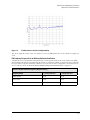
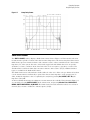
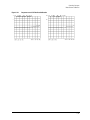
Figure 1-1.
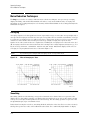
O/E Port 1 Characteristic Relative Frequency Response Error
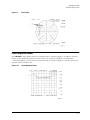
Figure 1-2.
O/E Port 1 Characteristic Peak-to-Peak Repeatability
The above graph shows the worst case deviation across a 20 GHz span between any 2 units in a sample set
of 12.
1-5
Specifications and Regulatory Information
Specifications and Characteristics
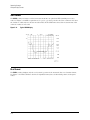
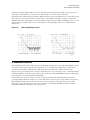
Figure 1-3.
O/E Port 2 Characteristic Relative Frequency Response Error
Figure 1-4.
O/E Port 2 Characteristic Peak-to-Peak Repeatability
The above graph shows the worst case deviation across a 20 GHz span between any 2 units in a sample set
of 12.
1-6
Specifications and Regulatory Information
Specifications and Characteristics
O/E Frequency Response Error for Different Reflection Coefficients
A significant error term in this measurement is the electrical port match of the device under test (DUT).
The following table lists the measurement uncertainty as a function of DUT electrical reflection coefficient.
On PORT 1 measurements, you can perform response and match calibration to achieve values comparable
to measurements of devices with ρ = < 0.25, as shown in “Relative Frequency Response Performance Data” on
page 1-4.
Optical-to-Electrical Relative Frequency Response Versus ρ
Frequency Range
r < 0.5 Specification
ρ < 1.0 Specification
0.05 to 11 GHz
± 1.25
± 2.35
11 to 20.05 GHz
± 1.70
± 3.5
System Dynamic Range Characteristics and Responsivity Measurement Range
The following table shows the maximum and minimum values of the O/E device under test (DUT)
frequency response.
Optical-to-Electrical Measurement Performance Data
Description
Frequency Range
Characteristic
System Dynamic Range
0.05 to 0.84 GHz
77 dB
0.84 to 20.05 GHz
100 dB
0.05 to 0.84 GHz
Maximum Value
Responsivity Measurement Rangea
+43 dBe (A/W)
Minimum Value
–34 dBe (A/W)
0.84 to 20.05 GHz
Maximum Value
+43 dBe (A/W)
Minimum Value
–57 dBe (A/W)
a. Pertains to a 10 Hz IF bandwidth.
1-7
Specifications and Regulatory Information
Specifications and Characteristics
Electrical-to-Optical Device Measurement Specifications
Relative frequency response can be used to calculate the error in measuring the 3 dB bandwidth of an E/O
device.
Relative Frequency Response Performance Data
Electrical-to-Optical Measurement Performance Data
Description
Frequency Range
Specificationa
System Relative Frequency Response Accuracy
0.05 to 0.5 GHz
±1.15 dB
0.05 to 11 GHz
±0.85 dB
11 to 20.05 GHz
±0.90 dB
a. Applies to a device with ρ = <0.25 and measurement settings of IF bandwidth = 30 Hz and smoothing = 0.5%.
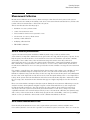
Figure 1-5.
1-8
E/O Characteristic Relative Frequency Response Error
Specifications and Regulatory Information
Specifications and Characteristics
Figure 1-6.
E/O Characteristic Peak-to-Peak Repeatability
The above graph shows the worst case deviation across a 20 GHz span between any 2 units in a sample set
of 12.
E/O Frequency Response Error for Different Reflection Coefficients
A significant error term in this measurement is the electrical port match of the device under test (DUT).
The following table lists the measurement uncertainty as a function of DUT electrical reflection coefficient.
If you perform a response and match calibration, you can achieve values comparable to measurements of
devices with ρ = < 0.25, as shown in “Relative Frequency Response Performance Data” on page 1-8.
Electrical-to-Optical Relative Frequency Response Versus ρ
Frequency Range
ρ < 0.5 Specification
ρ < 1.0 Specification
0.05 to 0.5 GHz
± 1.75
± 3.10
0.5 to 11 GHz
± 2.05
± 3.35
11 to 20.05 GHz
± 2.40
± 3.40
1-9
Specifications and Regulatory Information
Specifications and Characteristics
Electrical-to-Optical Measurement Dynamic Range Characteristics
Electrical-to-Optical Measurement Dynamic Rangea
Description
Frequency Range
Characteristic
System Dynamic Range
0.05 to 20.05 GHz
80 dB
a. Pertains to a 10 Hz IF bandwidth.
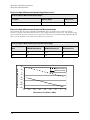
Electrical-to-Optical Measurement Responsivity Measurement Range
The following table shows the maximum and minimum values of the E/O device under test (DUT)
frequency response, measured with microwave power applied from microwave port 1. The dynamic range
stays constant irrespective of the microwave port power. That is, the maximum and the minimum dB W/A
that can be measured increase with reduced microwave port power.
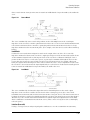
Electrical-to-Optical Measurement Responsivity Measurement Rangea
Power at Port 1
(dBm)
Maximum Value
(dB W/A) Characterisitc
Minimum Value
(dB W/A) Characterisitc
Dynamic Range
(dB) Characterisitc
5
–30
–110
80
–65
40
–40
80
a. Pertains to a 10 Hz IF bandwidth.
E/O Responsivity (dB W/A)q
40
Maximum Value
20
Minimum Value
0
-20
-40
-60
-80
-100
-120
-70
-60
-50
-40
-30
-20
-10
Microwave Port Power (dBm)
1-10
0
10
Specifications and Regulatory Information
Specifications and Characteristics
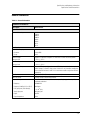
General Information
Table 1-1. General Information
8703B General Information
Description
Characteristic
System Bandwidths
IF bandwidth settings
6000 Hz
3700 Hz
3000 Hz
1000 Hz
300 Hz
100 Hz
30 Hz
10 Hz
Rear Panel
External Auxiliary Input
Connector
Female BNC
Range
±10 V
External Trigger
Triggers on a positive or negative TTL transition or contact closure to ground.
Damage Level
< −0.2 V; > +5.2 V
Limit Test Output
Female BNC.
Damage Level
< −0.2 V; > +5.2 V
Test Sequence Output
Outputs a TTL signal which can be set to a TTL high pulse (default) or low pulse at
end of sweep; or a fixed TTL high or low. If limit test is on, the end of sweep pulse
occurs after the limit test is valid. This is useful when used in conjunction with test
sequencing.
Test Set Interconnect
25-pin-D-sub (DB-25) female; use to connect the lightwave test sets
Measure Restart
Floating closure to restart measurement.
External AM Input
±1 volt into a 5 kΩ resistor, 1 kHz maximum, resulting in approximately 2 dB/volt
amplitude modulation.
Frequency
10.0000 MHz
Frequency Stability (0 °C to 55 °C)
±0.05 ppm
Daily aging rate (after 30 days)
< 3 x 10⁻⁹/day
Yearly aging rate
±0.5 ppm/year
Ouput
≥0 dBm
Output Impedance
50 Ω
1-11
Specifications and Regulatory Information
Specifications and Characteristics
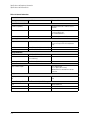
Table 1-2. General Information
General Information
Description
Specification
Characteristic
Rear Panel
Test Port Bias Input
Maximum voltage
±40 Vdc
Maximum current
±500 mA
External Reference In
Input Frequency
1, 2, 5, and 10 MHz
±200 Hz at 10 MHz
Input Power
−10 dBm to +20 dBm
Input Impedance
50 Ω
VGA Video Output
15-pin mini D-Sub; female. Drives VGA
compatible monitors.
GPIB
Type-57, 24-pin; Microribbon female
Parallel Port
25-pin D-Sub (DB-25); female; may be used
as printer port or general purpose I.O. port
RS232
9-pin D-Sub (DB-9); male
Mini-DIN Keyboard/Barcode Reader
6-pin mini DIN (PS/2); female
Line Power
A third-wire ground is required.
Frequency for Microwave Test Set
47 Hz to 63 Hz
Frequency for Lightwave Test Set
50 Hz to 60 Hz
Voltage at 115 V setting
90 V to 132 V
115 V
Voltage at 230 V setting
198 V to 265 V
230 V
VA Maximum for Microwave Test Set
450 VA max
VA Maximum for Lightwave Test Set
70W max
Front Panel
RF Connector
1-12
3.5-mm precision (male)
Specifications and Regulatory Information
Specifications and Characteristics
Table 1-3. General Information
General Information
Description
Specification
Front Panel
Display Pixel Integrity
Red, Green, or Blue Pixels
Red, green, or blue “stuck on” pixels may appear against a black background. In a
properly working display, the following will not occur:
• complete rows or columns of stuck pixels
• more than 5 stuck pixels (not to exceed a maximum of 2 red or blue, and 3
green)
• 2 or more consecutive stuck pixels
• stuck pixels less than 6.5 mm apart
Dark Pixels
Dark “stuck on” pixels may appear against a white background. In a properly working
display, the following will not occur:
• more than 12 stuck pixels (not to exceed a maximum of 7 red, green, or blue)
• more than one occurrence of 2 consecutive stuck pixels
• stuck pixels less than 6.5 mm apart
1-13
Specifications and Regulatory Information
Specifications and Characteristics
Table 1-4. General Information
General Information
Description
Specification
Characteristic
General Environmental
RFI/EMI Susceptibility
Defined by CISPR Pub. 11 and FCC Class B
standards.
ESD
Minimize using static-safe work procedures and
an antistatic bench mat
(part number 9300-0797).
Dust
Minimize for optimum reliability.
Operating Environment
Temperature
+20 °C to +30 °C
Humidity
5% to 95% at +30 °C (non-condensing)
Altitude
0 to 4.5 km (15,000 ft)
Instrument powers up, phase locks, and displays
no error messages within this temperature
range.
Storage Conditions
Temperature
−40 ×°C to +55 °C
Humidity
5% to 95% RH at +40 °C
(non-condensing)
Altitude
0 to 15.24 km (50,000 ft)
Cabinet Dimensions
Height x Width x Depth
(323 x 430x 476 mm)
(12.71 x 16.93 x 18.74 inches)
Cabinet dimensions exclude front and rear
protrusions.
Weight
Shipping
151 lb
Net
76 lb
Internal Memory - Data Retention Time with 3 V, 1.2 Ah Batterya
70 °C
250 days (0.68 year)
40 °C
1244 days (3.4 years)
25 °C
10 years
a. Analyzer power is switched off.
1-14
Specifications and Regulatory Information
Laser Safety Considerations
Laser Safety Considerations
Laser radiation in the ultraviolet and far infrared parts of the spectrum can cause damage primarily to the
cornea and lens of the eye. Laser radiation in the visible and near infrared regions of the spectrum can
cause damage to the retina of the eye.
The CW laser sources use a laser from which the greatest dangers to exposure are:
1. To the eyes, where aqueous flare, cataract formation, and/or corneal burn are possible.
2. To the skin, where burning is possible.
WARNING
Do NOT, under any circumstances, look into the optical output or any fiber/device attached to the
output while the laser is in operation.
WARNING
Do not enable the laser unless fiber or an equivalent device is attached to the optical output
connector.
This system should be serviced only by authorized personnel.
CAUTION
Use of controls or adjustments or performance of procedures other than those specified herein can result in
hazardous radiation exposure.
Laser Classifications
United States-FDA Laser Class IIIb. The system is rated USFDA (United States Food and Drug Administration) Laser Class IIIb according to Part 1040, Performance Standards for Light Emitting Products, from the
Center for Devices and Radiological Health.
International-IEC Laser Class 3B. The system is rated IEC (International Electrotechnical Commission)
Laser Class 3B laser products according to Publication 825.
International-IEC 825-1: 1993-11. The system helps satisfy the International (IEC825) safety requirements
with the use of a REMOTE SHUTDOWN and a KEY SWITCH.
1-15
Specifications and Regulatory Information
Laser Safety Considerations
Laser Warning Labels
The 8703B is shipped with the following warning labels. For systems used outside of the USA, both laser
aperture and laser warning labels will be included with the shipment (The labels are located in the same
box as this manual). Place these labels directly over the USA laser warning and aperture labels.
Figure 1-7.
Laser safety label locations
CAUTION
Exposure to temperatures above 55°C may cause the front panel fiber to retract. In this case a matching
compound can be used to temporarily improve return loss. However, the system should be returned to Agilent
Technologies for repair.
CAUTION
This product is designed for use in INSTALLATION CATEGORY II and POLLUTION DEGREE 2, per IEC 1010 and
664 respectively.
1-16
Specifications and Regulatory Information
Declaration of Conformity
Declaration of Conformity
1-17
Specifications and Regulatory Information
Regulatory Information
Regulatory Information
•
•
•
This product is classified as Class I according to 21 CFR 1040.10 and Class I according to IEC 60825-1.
This product complies with 21 CFR 1040.10 and 21 CFR 1040.11.
This is to declare that this system is in conformance with the German Regulation on Noise Declaration
for Machines (Laermangabe nach der Maschinenlaermrerordnung -3.GSGV Deutschland).
Notice for Germany: Noise Declaration
Acoustic Noise Emission
Geraeuschemission
LpA < 70 dB
LpA < 70 dB
Operator position
am Arbeitsplatz
Normal position
normaler Betrieb
per ISO 7779
nach DIN 45635 t.19
COMPLIANCE WITH CANADIAN EMC REQUIREMENTS
This ISM device complies with Canadian ICES-001.
Cet appareil ISM est conforme a la norme NMB du Canada.
1-18
2
Front Panel Features 2-2
Analyzer Display 2-4
Rear Panel Features and Connectors 2-8
Front/Rear Panel
Front/Rear Panel
Front Panel Features
Front Panel Features
CAUTION
Do not mistake the line switch for the disk eject button. See the following illustrations. If
the line switch is mistakenly pushed, the instrument will be turned off, losing all settings
and data that have not been saved.
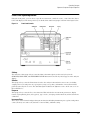
Figure 2-1.
8703B Front Panel
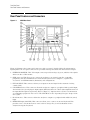
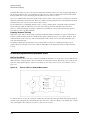
The location of the following front panel features and key function blocks is shown in Figure 2-1 and
Figure 2-2. These features are described in more detail later in this chapter, and in Chapter 4, “Hardkey
and Softkey Reference”
1. 1. LINE switch. The front panel LINE switch disconnects the mains circuits from the mains supply after
the EMC filters and before other parts of the instrument. 1 is on, 0 is off.
2. Display. This shows the measurement data traces, measurement annotation, and softkey labels. The
display is divided into specific information areas, illustrated in Figure 2-2 on page 2-4.
3. Disk drive. This 3.5 inch floppy-disk drive allows you to store and recall instrument states and
measurement results for later analysis.
4. Disk eject button.
5. Softkeys. These keys provide access to menus that are shown on the display.
6. STIMULUS function block. The keys in this block allow you to control the analyzer source's frequency,
power, and other stimulus functions.
7. RESPONSE function block. The keys in this block allow you to control the measurement and display
2-2
Front/Rear Panel
Front Panel Features
functions of the active display channel.
8. ACTIVE CHANNEL keys. The analyzer has two independent primary channels and two auxiliary
channels. These keys allow you to select the active channel. Any function you enter applies to the
selected channel.
9. The ENTRY block. This block includes the knob, the step up and down keys, the number pad, and the
backspace key. These allow you to enter numerical data and control the markers.
You can use the numeric keypad to select digits, decimal points, and a minus sign for numerical entries. You
must also select a units terminator to complete value inputs.
The backspace key has two independent functions: it modifies entries, and it turns off the softkey menu so
that marker information can be moved off of the grids and into the softkey menu area. For more details,
refer to the “Making Measurements” chapter in the user’s guide.
10. INSTRUMENT STATE function block. These keys allow you to control channel-independent system
functions such as the following:
•
copying, save/recall, and GPIB controller mode
•
limit testing
•
tuned receiver mode
•
test sequence function
•
GPIB STATUS indicators are also included in this block.
11. Preset key. This key returns the instrument to either a known factory preset state, or a user preset
state that can be defined. Refer to Chapter 8, “Preset State and Memory Allocation” for a complete
listing of the instrument preset condition.
12. PORT 1 and PORT 2. These ports output an RF signal from the source and receive electrical signals
from a device under test. The ports provide the stimulus for E/O devices and the receiver O/E devices.
PORT 1 allows you to measure S12 and S11. PORT 2 allows you to measure S21 and S22.
13. OPTICAL OUTPUT and OPTICAL RECEIVER ports. The OPTICAL OUTPUT port emits a lightwave
signal from the internal laser and allows you to measure devices that require an optical stimulus. The
OPTICAL RECEIVER port receives lightwave input signals from an optical device under test and allows
you to measure the device response.
14. LASER OUTPUT and LASER INPUT ports. The LASER OUTPUT port emits a lightwave signal from the
internal laser and allows you to modulate a device under test. the LASER INPUT port allows you to use
an external laser for 8703B measurements.
15. LASER ON/OFF. The LASER ON switch position allows analyzer internal laser to output a lightwave
signal from the OPTICAL OUTPUT port. The LASER OFF switch position shuts down the analyzer
internal laser.
2-3
Front/Rear Panel
Analyzer Display
Analyzer Display
Figure 2-2.
Analyzer Display (Single Channel, Cartesian Format)
The analyzer display shows various measurement information:
•
The grid where the analyzer plots the measurement data.
•
The currently selected measurement parameters.
•
The measurement data traces.
Figure 2-2 illustrates the locations of the different information labels described below. In addition to the
full-screen display shown in the illustration above, multi-graticule and multi-channel displays are available,
as described in the “Making Measurements” chapter of the user’s guide. Several display formats are
available for different measurements, as described under Format, in Chapter 4, “Hardkey and Softkey
Reference”
1. Stimulus Start Value. This value could be any one of the following:
•
The start frequency of the source in frequency domain measurements.
•
The start time in CW mode (0 seconds) measurements.
•
The lower power value in power sweep.
When the stimulus is in center/span mode, the center stimulus value is shown in this space. The color of
the stimulus display reflects the current active channel.
2-4
Front/Rear Panel
Analyzer Display
2. Stimulus Stop Value. This value could be any one of the following:
•
The stop frequency of the source in frequency domain measurements.
•
The upper limit of a power sweep.
When the stimulus is in center/span mode, the span is shown in this space. The stimulus values can be
blanked, as described under the FREQUENCY BLANK, softkey in Chapter 4, “Hardkey and Softkey
Reference”. (For CW time and power sweep measurements, the CW frequency is displayed centered
between the start and stop times or power values.)
3. Status Notations. This area shows the current status of various functions for the active channel.
The following notations are used:
A∆
Previous autobias value is used and autobias is switched on.
Aut
Correct autobias value is used and autobias is switched on.
Avg
Sweep-to-sweep averaging is on. The averaging count is shown
immediately below. (See the Avg, key in Chapter 4, “Hardkey and
Softkey Reference”)
A/W
Units of calibrated O/E measurements.
Cor
Error correction is on. (For error-correction procedures, refer to the
“Calibrating for Increased Measurement Accuracy” chapter in the
user’s guide. For error correction theory, refer to Chapter 5,
“Operating Concepts”.
C∆
Stimulus parameters have changed from the error-corrected state, or
interpolated error correction is on. (For error-correction procedures,
refer to the “Calibrating for Increased Measurement Accuracy”
chapter in the user’s guide. For error correction theory, refer to
Chapter 5, “Operating Concepts”.
C2
Full two-port error-correction is on and the reverse sweep is not
updated each sweep.
Any one of the following causes the reverse sweep not to be updated
each sweep:
•
the instrument uses a mechanical switch.
•
different channel power ranges (PORT POWER UNCOUPLED)
which puts the test set switch in HOLD mode.
•
the user manually puts the test set switch in HOLD mode
(TESTSET SW 0 or >1).
dBe
Dedicated measurement E/O, O/E, or E/E.
dBo
Optical measurement only (O/O).
Del
Electrical delay has been added or subtracted, or port extensions are
active. (See “Operating Concepts” on page 5-1 and the Scale Ref,
key in Chapter 4, “Hardkey and Softkey Reference”)
ext
Waiting for an external trigger.
Hld
Hold sweep. (See HOLD, in Chapter 4, “Hardkey and Softkey
Reference”)
man
Waiting for manual trigger.
2-5
Front/Rear Panel
Analyzer Display
PC
Power meter calibration is on. (For power meter calibration
procedures, refer to the “Calibrating for Increased Measurement
Accuracy” chapter of the user’s guide.)
PC?
The analyzer's source could not be set to the desired level, following
a power meter calibration. (For power meter calibration procedures,
refer to the “Calibrating for Increased Measurement Accuracy”
chapter in the user’s guide.)
P?
Source power is unleveled at start or stop of sweep.
P↓
Source power has been automatically set to minimum, due to
receiver overload. (See POWER, in Chapter 4, “Hardkey and Softkey
Reference”)
PRm
Power range is in manual mode.
Smo
Trace smoothing is on. (See AVG and SMOOTHING in Chapter 4,
“Hardkey and Softkey Reference”)
tsH
Indicates that the test set hold mode is engaged. That is, a mode of
operation is selected which would cause repeated switching of the
step attenuator, or a mechanical switch. This hold mode may be
overridden. See MEASURE RESTART, or NUMBER OF GROUPS,
in Chapter 4, “Hardkey and Softkey Reference”
W/A
Units of calibrated E/O measurements.
↑
Fast sweep indicator. This symbol is displayed in the status notation
block when sweep time is ≤1.0 second. When sweep time is ≥ 1.0
second, this symbol moves along the displayed trace.
*
Source parameters changed: measured data in doubt until a
complete fresh sweep has been taken.
4. Active Entry Area. This displays the active function and its current value.
5. Message Area. This displays prompts or error messages.
6. Title. This is a descriptive alphanumeric string title that you define and enter through an attached
keyboard or as described in the user’s guide.
7. Active Channel. This is the label for the number for the active channel, selected with the Chan 1, Chan
2, Chan 3, and Chan 4, keys.
If multiple channels are overlaid, the labels will appear in this area. The active channel is denoted by a
rectangle around the channel number.
For multiple-graticule displays, the channel information labels will be in the same relative position for each
graticule.
NOTE
The label of the active channel is enclosed in a rectangle to differentiate it from inactive
channels.
8. Measured Input(s). This shows the parameter, input, or ratio of inputs currently measured, as selected
using the Meas key. Also indicated in this area is the current display memory status.
9. Format. This is the display format that you selected using the Format key.
10. Scale/Div. This is the scale that you selected using the Scale Ref key, in units appropriate to the
current measurement.
11. Reference Level. This value is the reference line in Cartesian formats or the outer circle in polar
2-6
Front/Rear Panel
Analyzer Display
formats, whichever you selected using the Scale Ref, key. The reference level is also indicated by a
small triangle adjacent to the graticule, at the left for channel 1 and at the right for channel 2 in
Cartesian formats.
12. Marker Values. These are the values of the active marker, in units appropriate to the current
measurement.
13. Marker Stats, Bandwidth. These are statistical marker values that the analyzer calculates when you
access the menus with the Marker Fctn, key.
This general area is also where information for additional markers is placed. Note that
Stats and Bandwidth have priority.
14. Softkey Labels. These menu labels redefine the function of the softkeys that are located to the right of
the analyzer display.
15. Pass Fail. During limit testing, the result will be annunciated as PASS if the limits are not exceeded, and
FAIL if any points exceed the limits.
2-7
Front/Rear Panel
Rear Panel Features and Connectors
Rear Panel Features and Connectors
Figure 2-3.
8703B Rear Panel
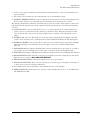
Figure 2-3 illustrates the features and connectors of the rear panel, described below. Requirements for
input signals to the rear panel connectors are provided in the specifications and characteristics chapter.
1. EXTERNAL MONITOR: VGA. VGA output connector provides analog red, green, and blue video signals
which can drive a VGA monitor.
2. GPIB connector. This allows you to connect the analyzer to an external controller, compatible
peripherals, and other instruments for an automated system. Refer to Chapter 7, “Options and
Accessories” for GPIB information, limitations, and configurations.
3. EXT ALC INPUT. This connector allows you to input an external signal for the automatic leveling
control (ALC).
4. PARALLEL interface. This connector allows the analyzer to output to a peripheral with a parallel input.
Also included, is a general purpose input/output (GPIO) bus that can control eight output bits and read
five input bits through test sequencing. Refer to Chapter 7, “Options and Accessories” for information
on configuring a peripheral. Also refer to “The GPIO Mode” in the “Operating Concepts” chapter of the
user’s guide.
5. RS-232 interface. This connector allows the analyzer to output to a peripheral with an RS-232 (serial)
input.
6. KEYBOARD input (mini-DIN). This connector allows you to connect an external keyboard. This
provides a more convenient means to enter a title for storage files, as well as substitute for the
analyzer's front panel keyboard.
2-8
Front/Rear Panel
Rear Panel Features and Connectors
7. Power cord receptacle, with fuse. For information on replacing the fuse, refer to the installation and
quick start guide.
8. Line voltage selector switch. For more information, refer to the installation guide.
9. EXTERNAL REFERENCE INPUT connector. This allows for a frequency reference signal input that can
phase lock the analyzer to an external frequency standard for increased frequency accuracy.
The analyzer automatically enables the external frequency reference feature when a signal is connected to
this input. When the signal is removed, the analyzer automatically switches back to its internal frequency
reference.
10. AUXILIARY INPUT connector. This allows for a dc or ac voltage input from an external signal source,
such as a detector or function generator, which you can then measure, using the S-parameter menu.
(You can also use this connector as an analog output in service routines, as described in the service
guide.)
11. EXTERNAL AM connector. This allows for an external analog signal input that is applied to the ALC
circuitry of the analyzer's source. This input analog signal amplitude modulates the RF output signal.
12. EXTERNAL TRIGGER connector. This allows connection of an external negative-going TTL-compatible
signal that will trigger a measurement sweep. The trigger can be set to external through softkey
functions.
13. TEST SEQUENCE. This outputs a TTL signal that can be programmed in a test sequence to be high or
low, or pulse (10 µseconds) high or low at the end of a sweep for robotic part handler interface.
14. LIMIT TEST. This outputs a TTL signal of the limit test results as follows: Pass: TTL high, Fail: TTL low
15. MEASURE RESTART. This allows the connection of an optional foot switch. Using the foot switch will
duplicate the key sequence Meas, MEASURE RESTART.
16. TEST SET INTERCONNECT. Connects the lightwave test set to the analyzer.
17. BIAS INPUTS AND FUSES. These connectors bias devices connected to port 1 and port 2. The fuses (1
A, 125 V) protect the port 1 and port 2 bias lines.
18. Serial number plate. The serial number of the instrument is located on this plate.
19. REMOTE SHUTDOWN. This allows you to remotely control whether the laser is on or off: OPEN=Laser
ON, SHORT=Laser OFF.
2-9
Front/Rear Panel
Rear Panel Features and Connectors
2-10
3
Avg Menu 3-2
Cal Menu (1 of 4) 3-3
Cal Menu (2 of 4): Electrical Parameter Measurement Setup 3-4
Cal Menu (3 of 4): Optical Measurement Setup 3-5
Cal Menu (4 of 4) 3-6
Copy Menu 3-7
Display Menu 3-8
Format Menu 3-9
Local Menu 3-9
Marker, Marker Fctn, and Marker Search Menus 3-10
Meas Menu 3-11
Power and Sweep Setup Menu 3-12
Preset Menu 3-13
Save/Recall Menu 3-14
Scale Ref Menu 3-15
Seq Menu 3-16
System Menu (1of 2) 3-17
System Menu (2of 2) 3-18
Menu Maps
Menu Maps
Menu Maps
Menu Maps
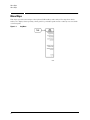
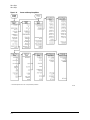
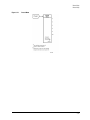
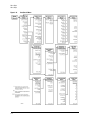
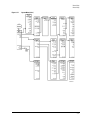
This chapter provides menu maps of the Agilent 8703B hardkeys and softkeys. The maps show which
softkeys are displayed after pressing a front-panel key, and subsequent menus or softkeys associated with
each menu path.
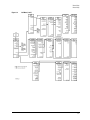
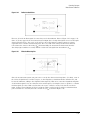
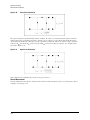
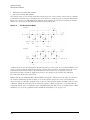
Figure 3-1.
3-2
Avg Menu
Menu Maps
Menu Maps
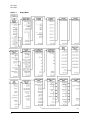
Figure 3-2.
Cal Menu (1 of 4)
3-3
Menu Maps
Menu Maps
Figure 3-3.
3-4
Cal Menu (2 of 4): Electrical Parameter Measurement Setup
Menu Maps
Menu Maps
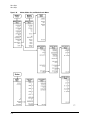
Figure 3-4.
Cal Menu (3 of 4): Optical Measurement Setup
3-5
Menu Maps
Menu Maps
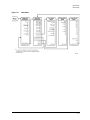
Figure 3-5.
3-6
Cal Menu (4 of 4)
Menu Maps
Menu Maps
Figure 3-6.
Copy Menu
3-7
Menu Maps
Menu Maps
Figure 3-7.
3-8
Display Menu
Menu Maps
Menu Maps
Figure 3-8.
Format Menu
Figure 3-9.
Local Menu
3-9
Menu Maps
Menu Maps
Figure 3-10.
3-10
Marker, Marker Fctn, and Marker Search Menus
Menu Maps
Menu Maps
Figure 3-11.
Meas Menu
3-11
Menu Maps
Menu Maps
Figure 3-12.
3-12
Power and Sweep Setup Menu
Menu Maps
Menu Maps
Figure 3-13.
Preset Menu
3-13
Menu Maps
Menu Maps
Figure 3-14.
3-14
Save/Recall Menu
Menu Maps
Menu Maps
Figure 3-15.
Scale Ref Menu
3-15
Menu Maps
Menu Maps
Figure 3-16.
3-16
Seq Menu
Menu Maps
Menu Maps
Figure 3-17.
System Menu (1of 2)
3-17
Menu Maps
Menu Maps
Figure 3-18.
3-18
System Menu (2of 2)
4
Hardkey and Softkey Reference
Hardkey and Softkey Reference
Hardkey and Softkey Reference
This section contains an alphabetical listing of softkey and front-panel functions, and a brief description of
each function. The SERVICE MENU keys are not included in this chapter.
. is used to add a decimal point to the number you are entering.
− . is used to add a minus sign to the number you are entering.
up. is used to step up the current value of the active function. The analyzer defines the step size for different functions.
No units terminator is required. For editing a test sequence, this key can be used to scroll through and execute the
displayed sequence one step at a time.
down. is used to step down the current value of the active function. The analyzer defines the step size for different
functions. No units terminator is required. For editing a test sequence, this key can be used to scroll backwards
through the displayed sequence without executing it.
back. has two independent functions: 1) modifies entries and test sequences and 2) moves marker information off of
the graticules
backspace key. will delete the last entry, or the last digit entered from the numeric keypad. The backspace key can also
be used in two ways for modifying a test sequence: 1) deleting a single-key command that you may have pressed by
mistake, (for example A/R) and 2) deleting the last digit in a series of entered digits, as long as you haven't yet pressed
a terminator, (for example if you pressed Start 1 2 but did not press G/n, etc.). The second function of this key is to
move marker information off of the graticules so that the display traces are clearer. If there are two or more markers
activated on a channel on the right side of the display, pressing back will turn off the softkey menu and move the
marker information into the softkey display area. Pressing back, or any hardkey which brings up a menu, or a softkey,
will restore the softkey menu and move the marker information back onto the graticules.
∆ MODE MENU. goes to the delta marker menu, which is used to read the difference in values between the active
marker and a reference marker.
∆ MODE OFF. turns off the delta marker mode, so that the values displayed for the active marker are absolute values.
∆ REF = 1. establishes marker 1 as a reference. The active marker stimulus and response values are then shown
relative to this delta reference. Once marker 1 has been selected as the delta reference, the softkey label ∆ REF = 1 is
underlined in this menu, and the marker menu is returned to the screen. In the marker menu, the first key is now
labeled MARKER ∆ REF = 1. The notation “∆REF=1” appears at the top right corner of the graticule.
∆ REF = 2. makes marker 2 the delta reference. Active marker stimulus and response values are then shown relative
to this reference.
∆ REF = 3. makes marker 3 the delta reference.
∆ REF = 4. makes marker 4 the delta reference.
∆ REF = 5. makes marker 5 the delta reference.
∆ REF = ∆ FIXED MKR. sets a user-specified fixed reference marker. The stimulus and response values of the
reference can be set arbitrarily, and can be anywhere in the display area. Unlike markers 1 to 5, the fixed marker need
not be on the trace. The fixed marker is indicated by a small triangle ∆, and the active marker stimulus and response
values are shown relative to this point. The notation "∆REF=∆" is displayed at the top right corner of the graticule.
Pressing this softkey turns on the fixed marker. Its stimulus and response values can then be changed using the fixed
marker menu, which is accessed with the FIXED MKR POSITION softkey described below. Alternatively, the fixed
marker can be set to the current active marker position, using the MKR ZERO softkey in the marker menu.
1/S. expresses the data in inverse S-parameter values, for use in amplifier and oscillator design.
2X: [12]/[34]. sets up a two-graticule display with channel 1 and 2 on the top graticule and channels 3 and 4 in the
bottom graticule.
2X: [13]/[24]. sets up a two-graticule display with channel 1 and 3 in the top graticule and channels 2 and 4 in the bottom
graticule.
2.4mm 85056. selects the 85056A or the 85056D cal kit.
2.92* 85056K. selects the 85056K cal kit.
4-2
Hardkey and Softkey Reference
2.92mm other kits. selects the 2.92 mm cal kit model.
3 DB Bandwidth. searches for the 3 dB bandwidth to the high side of marker 1, the reference marker. This search is
intended for low-pass devices.
3.5mm C 85033C. selects the 85033C cal kit.
3.5mm D 85052. selects the 85052B or the 85052D cal kit.
3.5mm E 85033D/E. selects the 85033D or the 85033E cal kit.
4X: [1] [2]/[3] [4]. sets up a four-graticule display with channel 2 in the upper right quadrant and channel 3 in the lower
left quadrant.
4X: [1] [3]/[2] [4]. sets up a four-graticule display with channel 3 in the upper right quadrant and channel 2 in the lower
left quadrant.
4 PARAM DISPLAYS. provides single-keystroke options to quickly set up multiple-channel displays, and information on
multiple-channel displays.
7-16 85038. selects the 85038A/F/M cal kit.
7mm 85050. selects the 85050B/D cal kit.
A. measures the absolute power amplitude at input A.
A/B. calculates and displays the complex ratio of input A to input B.
A/R. calculates and displays the complex ratio of the signal at input A to the reference signal at input R.
ACTIVE ENTRY. puts the name of the active entry in the display title.
ACTIVE MRK MAGNITUDE. puts the active marker magnitude in the display title.
ADAPTER: COAX. selects coaxial as the type of adapter used in adapter removal calibration.
ADAPTER: WAVEGUIDE. selects waveguide as the type of adapter used in adapter removal calibration.
ADAPTER DELAY. is used to enter the value of electrical delay of the adapter used in adapter removal calibration.
ADAPTER REMOVAL. provides access to the adapter removal menu.
ADD. 1) displays the edit segment menu and adds a new segment to the end of the list. The new segment is initially a
duplicate of the segment indicated by the pointer > and selected with the SEGMENT softkey.
2) adds a new frequency band to the Ripple Limit list which is indicated by the pointer >. The new frequency band is a
duplicate of the most recently selected frequency band.
ADDRESS: 8703. sets the GPIB address of the analyzer, using the entry controls. There is no physical address switch to
set in the analyzer. The default GPIB address is 16.
ADDRESS: CONTROLLER. sets the GPIB address the analyzer will use to communicate with the external controller.
ADDRESS: DISK. sets the GPIB address the analyzer will use to communicate with an external GPIB disk drive.
ADDRESS: P MTR/GPIB. sets the GPIB address the analyzer will use to communicate with the power meter used in
service routines.
ADJUST DISPLAY. presents a menu for adjusting display intensity, colors, and accessing save and recall functions for
modified LCD color sets.
ALL SEGS SWEEP. retrieves the full frequency list sweep.
ALC ON off. turns the source ALC off, sets the power to maximum. May cause a test port overload message.
ALTERNATE A and B. measures only one input, A or B, per frequency sweep, in order to reduce spurious signals. Thus,
this mode optimizes the dynamic range for all measurements.
AMPLITUDE OFFSET. adds or subtracts an offset in amplitude value. This allows limits already defined to be used for
testing at a different response level. For example, if attenuation is added to or removed from a test setup, the limits can
be offset an equal amount. Use the entry block controls to specify the offset.
ANALOG IN Aux Input. displays a dc or low frequency ac auxiliary voltage on the vertical axis, using the real format. An
external signal source such as a detector or function generator can be connected to the rear panel AUXILIARY INPUT
connector.
ARBITRARY IMPEDANCE. defines the standard type to be a load, but with an arbitrary impedance (different from
system Z0).
4-3
Hardkey and Softkey Reference
ASSERT SRQ. sets the sequence bit in the Event Status Register, which can be used to generate an SRQ (service
request) to the system controller.
AUTO FEED ON off. turns the plotter auto feed function on or off when in the define plot menu. It turns the printer auto
feed on or off when in the define print menu.
AUTO SCALE. brings the trace data in view on the display with one keystroke. Stimulus values are not affected, only
scale and reference values. The analyzer determines the smallest possible scale factor that will put all displayed data
onto 80% of the vertical graticule. The reference value is chosen to put the trace in center screen, then rounded to an
integer multiple of the scale factor.
AUX CHAN on OFF. enables and disables auxiliary channels 3 and 4.
AUX OUT on OFF. allows you to monitor the analog bus nodes (except nodes 1, 2, 3, 4, 9, 10, and 12) with external
equipment. To do this, connect the equipment to the AUX INPUT BNC connector on the rear panel.
AVERAGING FACTOR. makes averaging factor the active function. Any value up to 999 can be used. The algorithm used
for averaging is:
A ( n ) = [ S ( n ) + S ( n – 1 ) + ... + S ( n – F + 1 ) ] ⁄ F
where
A(n) = current average
S(n) = current measurement
F = average factor
AVERAGING on OFF. turns the averaging function on or off for the active channel. “Avg” is displayed in the status
notations area at the left of the display, together with the sweep count for the averaging factor, when averaging is on.
The sweep count for averaging is reset to 1 whenever an instrument state change affecting the measured data is made.
At the start of the averaging or following AVERAGING RESTART, averaging starts at 1 and averages each new sweep
into the trace until it reaches the specified averaging factor. The sweep count is displayed in the status notations area
below “Avg” and updated every sweep as it increments. When the specified averaging factor is reached, the trace data
continues to be updated, weighted by that averaging factor.
AVERAGING RESTART. averaging starts at 1 and averages each new sweep into the trace until it reaches the specified
averaging factor. The sweep count is displayed in the status notations area below “Avg” and updated every sweep as it
increments.
Avg. is used to access three different noise reduction techniques: sweep-to-sweep averaging, display smoothing, and
variable IF bandwidth. Any or all of these can be used simultaneously. Averaging and smoothing can be set
independently for each channel, and the IF bandwidth can be set independently if the stimulus is uncoupled.
B. measures the absolute power amplitude at input B.
B/R. calculates and displays the complex ratio of input B to input R.
B SAMPLER lw/RF. manually sets the RF switch in the lightwave test set, which feeds directly to the B sampler. The
switch toggles between the OPTICAL RECEIVER INPUT port of the lightwave test set and the electrical PORT 2 of the
instrument. If COUPLED SW is set to ON, the B SAMPLER setting will revert back to the default position at the end of
the sweep.
BACK SPACE. deletes the last character entered.
BACKGROUND INTENSITY. sets the background intensity of the LCD as a percent of white. The factory-set default value
is stored in non-volatile memory.
BANDWIDTH. in the Marker Search menu, this key turns on the search for the 3 dB bandwidth point on the high side of
the reference marker. You must first place the reference marker (marker 1), and then press BANDWIDTH . This search
is intended for lowpass devices. In the Marker Function menu, this key turns on the bandwidth search feature and
calculates the center stimulus value, bandwidth, and Q of a bandpass or band-reject shape on the trace. This search is
intended for bandpass devices.
BANDWIDTH LIMIT. selects the bandwidth limit line choice. This selection leads to the menu used to define and test
bandwidth limits of a bandpass filter.
BANDWIDTH VALUE. sets the magnitude value that defines the passband or rejectband of BANDWIDTH.
BEEP DONE ON off. toggles an annunciator which sounds to indicate completion of certain operations such as
calibration or instrument state save.
4-4
Hardkey and Softkey Reference
BEEP FAIL on OFF. turns the limit fail beeper on or off. When limit testing is on and the fail beeper is on, a beep is
sounded each time a limit test is performed and a failure detected. The limit fail beeper is independent of the warning
beeper and the operation complete beeper.
BEEP WARN on OFF. toggles the warning annunciator. When the annunciator is on it sounds a warning when a
cautionary message is displayed.
BIAS MODE on OFF. when this mode is ON, the analyzer automatically performs periodic biasing of the modulator in the
optical test set.
BLANK DISPLAY. switches off the analyzer's display. This feature may be helpful in prolonging the life of the LCD in
applications where the analyzer is left unattended (such as in an automated test system). Pressing any front panel key
will restore the default display operation.
BRIGHTNESS. adjusts the brightness of the color being modified. Refer to the user’s guide for an explanation of using
this softkey for color modification of display attributes.
BW DISPLAY on OFF. displays the measured bandwidth value to the right of the pass/fail message.
BW MARKER on OFF. displays the cutoff frequencies of the bandwidth using markers on the data trace.
BW TEST on OFF. turns bandpass filter bandwidth testing on or off. When bandwidth testing is on, the analyzer locates
the maximum point of the data trace and uses it as the reference from which to measure the filter’s bandwidth. Then,
the analyzer determines the two cutoff frequencies of the bandpass filter. The cutoff frequencies are the two points on
the data trace at a user-specified amplitude below the reference point. The cutoff frequencies are also referred to as
the N dB Points where “N” is defined as the number of decibels below the peak of the bandpass that the filter is
specified. (The amplitude is specified using the N DB POINTS softkey.) The bandwidth is the frequency difference
between the two cutoff frequencies. The bandwidth is compared to the user-specified minimum and maximum
bandwidth limits (entered using the MINIMUM BANDWIDTH and MAXIMUM BANDWIDTH softkeys.) If the test
passed, a message is displayed in green text in the upper left portion of the LCD. An example of this message is: BW1:
Pass, where the “1” indicates the channel where the bandwidth test is performed. If the bandwidth test does not pass,
a fail message indicating whether the bandpass was too wide or too narrow is displayed in red text. An example of this
message is BW1: Wide.
C0. is used to enter the C0 term in the definition of an OPEN standard in a calibration kit, which is the constant term of
the cubic polynomial and is scaled by 10−15.
C1. is used to enter the C1 term, expressed in F/Hz (Farads/Hz) and scaled by 10−27.
C2. is used to enter the C2 term, expressed in F/Hz2 and scaled by 10−36.
C3. is used to enter the C3 term, expressed in F/Hz3 and scaled by 10−45.
Cal. key leads to a series of menus to perform measurement calibrations for vector error correction (accuracy
enhancement), and for specifying the calibration standards used. The CAL key also leads to softkeys which activate
interpolated error correction and power meter calibration.
CAL FACTOR. accepts a power sensor calibration factor % for the segment.
CAL FACTOR SENSOR A. brings up the segment modify menu and segment edit (calibration factor menu) which allows
you to enter a power sensor's calibration factors. The calibration factor data entered in this menu will be stored for
power sensor A.
CAL INTERP ON off. sets the preset state of interpolated error-correction on or off.
CAL FACTOR SENSOR B. brings up the segment modify menu and segment edit (calibration factor menu) which allows
you to enter a power sensor's calibration factors. The calibration factor data entered in this menu will be stored for
power sensor B.
CAL KIT. indicates the currently selected cal kit and leads to the select cal kit menu, which is used to select one of the
default calibration kits available for different connector types. This, in turn, leads to additional menus used to define
calibration standards other than those in the default kits “Electrical Calibration Kit Modifications” on page 5-43. When
a calibration kit has been specified, its connector type is displayed in brackets in the softkey label. The cal kits available
4-5
Hardkey and Softkey Reference
are listed below.
2.4mm 85056
2.92 85056K
2.92mm other kits
3.5mm C 85033C
3.5mm E 85033D/E
3.5mm D 85052D
7-16 85038
7mm 85050
N 50Ω 85032 F
N 50Ω 85054
N 75Ω 85036
TRL 3.5 mm 85052C
CAL ZO: LINE ZO. this default selection establishes the TRL/LRM LINE/MATCH standard as the characteristic
impedance.
CAL ZO: SYSTEM ZO. allows you to modify the characteristic impedance of the system for TRL/LRM calibration.
CALIBRATE MENU. leads to the calibration menu, which provides several accuracy enhancement procedures ranging
from a simple frequency response calibration to a full two-port calibration. At the completion of a calibration
procedure, this menu is returned to the screen, correction is automatically turned on, and the notation Cor or C2 is
displayed at the left of the screen.
Center. is used, along with the Span key, to define the frequency range of the stimulus. When the Center key is
pressed, its function becomes the active function. The value is displayed in the active entry area, and can be changed
with the knob, step keys, or numeric keypad.
CENTER. sets the center frequency of a subsweep in a list frequency sweep.
CH1 DATA [ ]. brings up the printer color selection menu. The channel 1 data trace default color is magenta for color
prints.
CH1 DATA LIMIT LN. selects channel 1 data trace and limit line for display color modification.
CH1 MEM. selects channel 1 memory trace for display color modification.
CH1 MEM [ ]. brings up the printer color selection menu. The channel 1 memory trace default color is green for color
prints.
CH2 DATA [ ]. brings up the printer color selection menu. The channel 2 data trace default color is blue for color prints.
CH2 DATA LIMIT LN. selects channel 2 data trace and limit line for display color modification.
CH2 MEM. selects channel 2 memory trace for display color modification.
CH2 MEM [ ]. brings up the printer color selection menu. The channel 2 memory trace default color is red for color
prints.
CH3 DATA [ ]. brings up the printer color selection menu. The channel 3 data trace default color is magenta for color
prints.
CH3 DATA LIMIT LN. selects channel 3 data trace and limit line for display color modification.
CH3 MEM. selects channel 3 memory trace for display color.
CH3 MEM [ ]. brings up the printer color selection menu. The channel 2 data trace default color is green for color prints.
CH4 DATA [ ]. brings up the printer color selection menu. The channel 4 data trace default color is blue for color prints.
CH4 DATA LIMIT LN. selects channel 4 data trace and limit line for display color modification.
CH4 MEM. selects channel 4 memory trace for display color modification.
CH4 MEM [ ]. brings up the printer color selection menu. The channel 2 memory trace default color is red for color
prints.
Chan 1 . allows you to select channel 1 as the active channel. The active channel is indicated by an amber LED
adjacent to the corresponding channel key. All of the channel-specific functions you select, such as format or scale,
apply to the active channel. By default, Chan 1 measures S11 in log mag format.
4-6
Hardkey and Softkey Reference
Chan 2 . allows you to select channel 2 as the active channel. The active channel is indicated by an amber LED
adjacent to the corresponding channel key. All of the channel-specific functions you select, such as format or scale,
apply to the active channel. By default, Chan 2 measures S21 in log mag format.
Chan 3 . allows you to select channel 3 as the active channel. The active channel is indicated by an amber LED
adjacent to the corresponding channel key. All of the channel-specific functions you select, such as format or scale,
apply to the active channel. Chan 3 is the auxiliary channel of Chan 1.
Chan 4 . allows you to select channel 4 as the active channel. The active channel is indicated by an amber LED
adjacent to the corresponding channel key. All of the channel-specific functions you select, such as format or scale,
apply to the active channel. Chan 4 is the auxiliary channel of Chan 2.
CHAN POWER [COUPLED]. is used to apply the same power levels to Chan 1/3 & 2/4.
CHAN POWER [UNCOUPLED]. is used to apply different power levels to Chan 1/3 & 2/4.
CHANNEL POSITION. configures multiple-channel displays so that the auxiliary channels are adjacent to or beneath the
primary channels.
CHOP A and B. measures A and B inputs simultaneously for faster measurements.
CLEAR BIT. when the parallel port is configured for GPIO, 8 output bits can be controlled with this key. When this key is
pressed, “TTL OUT BIT NUMBER” becomes the active function. This active function must be entered through the
keypad number keys, followed by the x1 key. The bit is cleared when the x1 key is pressed. Entering numbers larger
than 7 will result in bit 7 being cleared, and entering numbers lower than 0 will result in bit 0 being cleared.
CLEAR LIST. deletes all segments or bands in the list.
CLEAR SEQUENCE. clears a sequence from memory. The titles of cleared sequences will remain in load, store, and purge
menus. This is done as a convenience for those who often reuse the same titles.
COAX. defines the standard (and the offset) as coaxial. This causes the analyzer to assume linear phase response in
any offsets.
COAXIAL DELAY. applies a linear phase compensation to the trace for use with electrical delay. That is, the effect is the
same as if a corresponding length of perfect vacuum dielectric coaxial transmission line was added to the reference
signal path.
COEFFIC’T MODEL MENU. leads to menus used to enter coefficients for a polynomial equation model. The coefficient
model menus make it possible to enter coeffiecients for a polynomial equation of the fourth order, describing response
versus frequency.
COLOR. adjusts the degree of whiteness of the color being modified. Refer to the user’s guide for an explanation of
using this softkey for color modification of display attributes.
CONFIGURE EXT DISK. provides access to the configure ext disk menu. This menu contains softkeys used to the disk
address, unit number, and volume number.
CONFIGURE MENU. provides access to the configure menu. This menu contains softkeys to control raw offsets, spur
avoidance, the test set transfer switch, and user preset settings.
CONTINUE SEQUENCE. resumes a paused sequence.
CONTINUOUS. located under the Menu key, is the standard sweep mode of the analyzer, in which the sweep is
triggered automatically and continuously and the trace is updated with each sweep.
CONVERSION [ ]. brings up the conversion menu which converts the measured data to impedance (Z) or admittance
(Y). When a conversion parameter has been defined, it is shown in brackets under the softkey label. If no conversion
has been defined, the softkey label reads CONVERSION [OFF].
Copy. provides access to the menus used for controlling external plotters and printers and defining the plot
parameters.
CORRECTION on OFF. turns error correction on or off. The analyzer uses the most recent calibration data for the
displayed parameter. If the stimulus state has been changed since calibration, the original state is recalled, and the
message "SOURCE PARAMETERS CHANGED" is displayed.
COUNTER: ANALOG BUS. switches the counter to count the analog bus.
COUNTER: DIV FRAC N. switches the counter to count the A14 fractional-N VCO frequency after it has been divided
down to 100 kHz for phase-locking the VCO.
COUNTER: FRAC N. switches the counter to count the A14 fractional-N VCO frequency at the node shown on the overall
4-7
Hardkey and Softkey Reference
block diagram.
COUNTER: OFF. switches the internal counter off and removes the counter display from the LCD.
COUPLED CH ON off. toggles the channel coupling of stimulus values. With COUPLED CH ON (the preset condition),
both channels have the same stimulus values of FREQUENCY, NUMBER of POINTS, SOURCE PWR, NUMBER of
GROUPS, SWEEP TIME, IF BW, TRIGGER TYPE, and SWEEP TYPE (the inactive channel takes on the stimulus values
of the active channel).
COUPLED SW ON/OFF. couples the RF switch settings to the measurement setup. If the switch is set to OFF, you can set
the RF switches manually. The switch will remain in that state until you change it. If the switch is set to ON, the RF
switches will revert back to the setup-required state at the end of the sweep.
CW FREQ. is used to set the frequency for power sweep and CW time sweep modes. If the instrument is not in either of
these two modes, it is automatically switched into CW time mode.
CW TIME. turns on a sweep mode similar to an oscilloscope. The analyzer is set to a single frequency, and the data is
displayed versus time. The frequency of the CW time sweep is set with CW FREQ in the stimulus menu.
D2/D1 to D2 on OFF. this math function ratios channels 1 and 2, and puts the results in the channel 2 data array. Both
channels must be on and have the same number of points.
DAC NUM HIGH BAND. sets the source tune DAC for frequencies above 20.05 GHz.
DAC NUM LOW BAND. sets the source tune DAC for frequencies below 2.55 GHz.
DAC NUM MID BAND. sets the source tune DAC for frequencies above 2.55 GHz and below 20.05 GHz.
DATA ARRAY on OFF. specifies whether or not to store the error-corrected data on disk with the instrument state.
DATA → MEMORY. stores the current active measurement data in the memory of the active channel. It then becomes
the memory trace, for use in subsequent math manipulations or display. If a parameter has just been changed and the *
status notation is displayed at the left of the display, the data is not stored in memory until a clean sweep has been
executed. The smoothing status of the trace are stored with the measurement data.
DATA ONLY on OFF. stores only the measurement data of the device under test to a disk file. The instrument state and
calibration are not stored. This is faster than storing with the instrument state, and uses less disk space. It is intended
for use in archiving data that will later be used with an external controller, and data cannot be read back by the
analyzer.
DECISION MAKING. presents the sequencing decision making menu under the Seq menu.
DECR LOOP COUNTER. decrements the value of the loop counter by 1.
DEFAULT COLORS. returns all the display color settings back to the factory-set default values that are stored in
non-volatile memory.
DEFAULT PLOT SETUP. resets the plotting parameters to their default values.
DEFAULT PRNT SETUP. resets the printing parameters to their default values.
DEFINE DISK-SAVE. leads to the define save menu. Use this menu to specify the data to be stored on disk in addition to
the instrument state.
DEFINE PLOT. leads to a sequence of three menus. The first defines which elements are to be plotted and the auto feed
state. The second defines which pen number is to be used with each of the elements (these are channel dependent.)
The third defines the line types (these are channel dependent), plot scale, and plot speed.
DEFINE PRINT. leads to the define print menu. This menu defines the printer mode (monochrome or color) and the
auto-feed state.
DEFINE STANDARD. makes the standard number the active function, and brings up the define standard menus. The
standard number (1 to 8) is an arbitrary reference number used to reference standards while specifying a class.
DELAY. selects the group delay format, with marker values given in seconds.
DELAY/THRU. defines the standard type as a transmission line of specified length, for calibrating transmission
measurements.
DELETE. deletes the segment or the frequency band indicated by the > pointer.
DELETE ALL FILES. deletes all files.
DELETE FILE. deletes a selected file.
4-8
Hardkey and Softkey Reference
DELTA LIMITS. sets the limits an equal amount above and below a specified middle value, instead of setting upper and
lower limits separately. This is used in conjunction with MIDDLE VALUE or MARKER → MIDDLE, to set limits for
testing a device that is specified at a particular value plus or minus an equal tolerance. For example, a device may be
specified at 0 dB ±3 dB. Enter the delta limits as 3 dB and the middle value as 0 dB.
DENOMIN: B1. the first order coefficient in the denominator of the response versus frequency polynomial equation.
DENOMIN: B2. the second order coefficient in the denominator of the response versus frequency polynomial equation.
DENOMIN: B3. the third order coefficient in the denominator of the response versus frequency polynomial equation.
DENOMIN: B4. the fourth order coefficient in the denominator of the response versus frequency polynomial equation.
DIRECTORY SIZE. lets you specify the number of directory files to be initialized on a disk. This is particularly useful with
a hard disk, where you may want a directory larger than the default 256 files, or with a floppy disk you may want to
reduce the directory to allow extra space for data files. The number of directory files must be a multiple of 8. The
minimum number is 8, and there is no practical maximum limit. Set the directory size before initializing a disk.
DISK UNIT NUMBER. specifies the number of the disk unit in the disk drive that is to be accessed in an external disk
store or load routine. This is used in conjunction with the GPIB address of the disk drive, and the volume number, to
gain access to a specific area on a disk. The access hierarchy is GPIB address, disk unit number, disk volume number.
DISP MKRS ON off. displays response and stimulus values for all markers that are turned on. Available only if no marker
functions are on, for example MKR STATS.
Display. provides access to a series of menus for instrument and active channel display functions. The first menu
defines the displayed active channel trace in terms of the mathematical relationship between data and trace memory.
Other functions include auxiliary channel enabling, dual channel display (overlaid or split), display intensity, color
selection, active channel display title, and frequency blanking.
DISPLAY: DATA. displays the current measurement data for the active channel.
DISPLAY: DATA and MEMORY. displays both the current data and memory traces.
DISPLAY: MEMORY. displays the trace memory for the active channel. This is the only memory display mode where the
smoothing of the memory trace can be changed. If no data has been stored in the active memory, a warning message is
displayed.
DISPLAY TESTS. leads to a series of service tests for the display.
DO BOTH FWD + REV. activates both forward and reverse measurements of selected calibration standards.
DO BOTH FWD THRUS. activates both forward measurements (reflection and transmission) of the thru standard from
the selective enhanced response calibration menus.
DO BOTH REV THRUS. activates both reverse measurements of the thru standard S22/S12 from the S11/S21 selective
enhanced response calibration menus.
DO SEQUENCE. has two functions: 1) It shows the current sequences in memory. To run a sequence, press the softkey
next to the desired sequence title. 2) When entered into a sequence, this command performs a one-way jump to the
sequence residing in the specified sequence position (SEQUENCE 1 through 6). DO SEQUENCE jumps to a softkey
position, not to a specific sequence title. Whatever sequence is in the selected softkey position will run when the DO
SEQUENCE command is executed. This command prompts the operator to select a destination sequence position.
DONE 1-PORT CAL. finishes one-port calibration (after all standards are measured) and turns error correction on.
DONE 2-PORT CAL. finishes two-port calibration (after all standards are measured) and turns error correction on.
DONE FWD ENH. RESP. finishes the transmission portion of the enhanced response calibration.
DONE LOADS. finishes all the load standards when the cal kit defines more than one load standard.
DONE OPENS. finishes all the open standards when the cal kit defines more than one open standard.
DONE SHORTS. finishes all the short standards when the cal kit defines more than one short standard.
DONE RESP ISOL'N CAL. finishes response and isolation calibration (after all standards are measured) and turns error
correction on.
DONE REV ENH. RESP. finishes the transmission portion of the enhanced response calibration.
DONE SEQ MODIFY. terminates the sequencing edit mode.
DONE TRL/LRM. finishes TRL/LRM two-port calibration (after all standards are measured) and turns error correction
4-9
Hardkey and Softkey Reference
on.
DRIVEPORT LW / RF. allows you to manually set the RF drive port. If COUPLED SW is set to ON, the driveport will
automatically change back to the setup-defined setting at the end of the sweep. It is not recommended to change this
setting.
DUAL CH on OFF. toggles between the display of both measurement channels or the active channel only. This is used in
conjunction with SPLIT DISP 1X 2X 4X in the display DUAL|QUAD SETUP menu to display multiple channels. With
SPLIT DISP 1X the two traces are overlaid on a single graticule.
DUAL|QUAD SETUP. activates a sub-menu of Display, which allows you to enable the auxiliary channels and configure
multiple-channel displays.
DUPLICATE SEQUENCE. duplicates a sequence currently in memory into a different softkey position. Duplicating a
sequence is straightforward. Follow the prompts on the analyzer screen. This command does not affect the original
sequence.
EACH SWEEP. Power meter calibration occurs on each sweep. Each measurement point is measured by the power
meter, which provides the analyzer with the actual power reading. The analyzer corrects the power level at that point.
The number of measurement/correction iterations performed on each point is determined by the NUMBER OF
READINGS softkey. This measurement mode sweeps slowly, especially when the measured power is low. Low power
levels require more time for the power meter to settle. The power meter correction table in memory is updated after
each sweep. This table can be read or changed via GPIB.
EDIT LIMIT LINE. displays a table of limit segments on the LCD, superimposed on the trace. The edit limits menu is
presented so that limits can be defined or changed. It is not necessary for limit lines or limit testing to be on while limits
are defined.
EDIT LIST. presents the edit list menu. This is used in conjunction with the edit subsweep menu to define or modify the
frequency sweep list. The list frequency sweep mode is selected with the LIST FREQ softkey described below.
EDIT RIPL LIMIT. selects the menu used to edit the ripple limits. The edit ripple limits menu allows you to add, change,
or delete ripple limits for the ripple test.
ELECTRICAL DELAY. adjusts the electrical delay to balance the phase of the DUT. It simulates a variable length loss-less
transmission line, which can be added to or removed from a receiver input to compensate for interconnecting cables,
etc. This function is similar to the mechanical or analog “line stretchers” of other analyzers. Delay is annotated in units
of time with secondary labeling in distance for the current velocity factor.
ELECTRICAL PARAMETERS. presents a menu that allows you to select an electrical measurement: S11, S21, S12, S22, or
direct sampler inputs.
EMIT BEEP. causes the instrument to beep once.
END OF LABEL. terminates the HPGL "LB" command.
END SWEEP HIGH PULSE. sets the TTL output on TEST SEQ BNC or the test set interconnect to normally high with a
10 microseconds pulse high at the end of each sweep.
END SWEEP LOW PULSE. sets the TTL output on TEST SEQ BNC or the test set interconnect to normally low with a 10
µs pulse low at the end of each sweep.
ENHANCED RESPONSE. provides access to the series of menus used to perform an enhanced response calibration.
ENH. REFL. on OFF. selects the enhanced reflection calibration. This calibration improves the response of an enhanced
response calibration. Use enhanced reflection only on a bilateral device. A bilateral device has similar forward and
reverse transmission characteristics. Examples of bilateral devices are passive devices (filters, attenuators, and
switches). Most active devices (amplifiers) and some passive devices (isolators and circulators) are not bilateral. If this
calibration is used for a non-bilateral device, errors may occur in the resulting measurement.
ENTRY Off. turns the active entry off. This also removes error and warning messages.
EO CAL Parameter. shows the internal path used during E/O mode calibration.
ERASE TITLE. deletes the entire title.
EXT TRIG ON POINT. is similar to the trigger on sweep, but triggers each data point in a sweep.
EXT TRIG ON SWEEP. is used when the sweep is triggered on an externally generated signal connected to the rear panel
EXT TRIGGER input. The sweep is started with a high to low transition of a TTL signal. If this key is pressed when no
external trigger signal is connected, the notation “Ext” is displayed at the left side of the display to indicate that the
4-10
Hardkey and Softkey Reference
analyzer is waiting for a trigger. When a trigger signal is connected, the “Ext” notation is replaced by the sweep speed
indicator either in the status notation area or on the trace. External trigger mode is allowed in every sweep mode.
EXTENSION INPUT A. Use this feature to add electrical delay (in seconds) to extend the reference plane at input A to
the end of the cable. This is used for any input measurements including S-parameters.
EXTENSION INPUT B. adds electrical delay to the input B reference plane for any B input measurements including
S-parameters.
EXTENSION PORT 1. extends the reference plane for measurements of S11, S21, and S12.
EXTENSION PORT 2. extends the reference plane for measurements of S22, S12, and S21.
EXTENSIONS on OFF. toggles the reference plane extension mode. When this function is on, all extensions defined
above are enabled; when off, none of the extensions are enabled.
EXTENSION OPTICAL OUTPUT. extends the reference plane for measurements of O/O and E/O devices.
EXTERNAL DISK. selects an (optional) external disk drive for SAVE/RECALL.
EXTERNAL TESTS. leads to a series of service tests.
FILETITLE FILE0. appears during sequence modification, when external disk is selected. FILE0 is the default name. A
new name can be entered when you save the state to disk.
FILETYPE: GRAPHIC. saves the display to the disk drive as a graphic file when SAVE FILE is pressed. The format of the
graphic file is determined by the GRAPH FMT [ ] selection.
FILETYPE: TEXT. saves the display to the disk drive as a text file whenSAVE FILE is pressed. The form of the text file is
determined by the TEXT FMT [ ] selection.
FILE NAME FILE0. supplies a name for the saved state and or data file. Brings up the TITLE FILE MENU.
FILE UTILITIES. provides access to the file utilities menu.
FIXED. defines the load in a calibration kit as a fixed (not sliding) load.
FIXED MKR AUX VALUE. is used only with a polar or Smith format. It changes the auxiliary response value of the fixed
marker. This is the second part of a complex data pair, and applies to a magnitude/phase marker, a real/imaginary
marker, an R+jX marker, or a G+jB marker. Fixed marker auxiliary response values are always uncoupled in the two
channels. To read absolute active marker auxiliary values following a MKR ZERO operation, the auxiliary value can be
reset to zero.
FIXED MKR POSITION. leads to the fixed marker menu, where the stimulus and response values for a fixed reference
marker can be set arbitrarily.
FIXED MKR STIMULUS. changes the stimulus value of the fixed marker. Fixed marker stimulus values can be different
for the two channels if the channel markers are uncoupled using the marker mode menu. To read absolute active
marker stimulus values following a MKR ZERO operation, the stimulus value can be reset to zero.
FIXED MKR VALUE. changes the response value of the fixed marker. In a Cartesian format this is the y-axis value. In a
polar or Smith chart format with a magnitude/phase marker, a real/imaginary marker, an R+jX marker, or a G+jB
marker, this applies to the first part of the complex data pair. Fixed marker response values are always uncoupled in
the two channels. To read absolute active marker response values following a MKR ZERO operation, the response
value can be reset to zero.
FLAT LINE. defines a flat limit line segment whose value is constant with frequency or other stimulus value. This line is
continuous to the next stimulus value, but is not joined to a segment with a different limit value. If a flat line segment is
the final segment it terminates at the stop stimulus. A flat line segment is indicated as FL on the table of limits.
FORM FEED. puts a form feed command into the display title.
Format. presents a menu used to select the display format for the data. Various rectangular and polar formats are
available for display of magnitude, phase, impedance, group delay, real data, and SWR.
FORMAT ARY on OFF. specifies whether or not to store the formatted data on disk with the instrument state.
FORMAT DISK. brings up a menu for formatting a LIF or DOS disk.
FORMAT: DOS. causes subsequent disk initialization to use the DOS disk format.
FORMAT: LIF. causes subsequent disk initialization to use the LIF disk format. FORMAT: DOS is the default setting.
FORMAT EXT DISK. initializes media in external drive, and formats the disk using the selected (DOS or LIF) format.
4-11
Hardkey and Softkey Reference
FORMAT INT DISK. initializes media in internal drive, and formats the disk using the selected (DOS or LIF) format.
FORMAT INT MEMORY. clears all internal save registers and associated cal data and memory traces.
FORWARD: OPENS. provides access to the menu for selecting an open calibration type when the cal kit defines more
than one open standard.
FRESNEL. in the Optical Kit, Modify Standards menu, this key is used to modify the Fresnel reflection model
coefficient.
in the optical reflection and transmission Response Calibration menus, this key is used to measure a Fresnel reference
standard (14.5 dB return loss, or 3.5% reflection).
FREQUENCY. specifies the frequency of a calibration factor or loss value in the power meter cal loss/sensor lists.
FREQUENCY BAND. selects an existing frequency band to be reviewed, edited, or deleted. The maximum number of
frequency bands is 12 (numbered 1 to 12).
FREQUENCY BLANK. blanks the displayed frequency notation for security purposes. Frequency labels cannot be
restored except by instrument preset or turning the power off and then on.
FULL 2-PORT. provides access to the series of menus used to perform a complete calibration for measurement of all four
S-parameters of a two-port device. This is the most accurate calibration for measurements of two-port devices.
FULL PAGE. draws a full-size plot according to the scale defined with SCALE PLOT in the define plot menu.
FWD ISOL'N. measures the forward isolation of the calibration standard.
FWD MATCH (Label Class). lets you enter a label for the forward match class. The label appears during a calibration
that uses this class.
FWD MATCH (Specify Class). specifies which standards are in the forward match class in the calibration kit.
FWD MATCH THRU. measures the forward match using a thru standard.
FWD TRANS (Label Class) lets you enter a label for the forward transmission class. The label appears during a
calibration that uses this class.
FWD TRANS (Specify Class) specifies which standards are in the forward transmission class in the calibration kit.
FWD TRANS THRU. measures the forward transmission frequency response in a two-port calibration.
G+jB MKR. displays the complex admittance values of the active marker in rectangular form. The active marker values
are displayed in terms of conductance (in Siemens), susceptance, and equivalent capacitance or inductance. Siemens
are the international units of admittance, and are equivalent to mhos (the inverse of Ωs). The Smith chart graticule is
changed to admittance form.
G/n. giga/nano (109 / 10−9). Used to terminate numeric entries.
GET SEQ TITLES. copies the sequence titles currently in memory into the six softkey positions.
GOSUB SEQUENCE. calls sub-routines in sequencing.
GPIB DIAG on off. toggles the GPIB diagnostic feature (debug mode). This mode should only be used the first time a
program is written: if a program has already been debugged, it is unnecessary. When diagnostics are on, the analyzer
scrolls a history of incoming GPIB commands across the display in the title line. Nonprintable characters are
represented as pi. If a syntax error is received, the commands halt and a pointer wedge indicates the misunderstood
character. For information on clearing a syntax error, refer to the programmer's guide.
GRAPH FMT [ ]. sets the format of the graphic file when FILETYPE: GRAPHIC is selected. The only graphic selection
currently available is the JPEG format.
GRAPHICS on OFF. specifies whether or not to store display graphics on disk with the instrument state.
GRATICULE [ ]. brings up the graticule print color definition menu. The graticule default print color is cyan.
GRATICULE. selects the display graticule for color modification.
HELP ADAPT REMOVAL. provides an on-line quick reference guide to using the adapter removal technique.
HOLD. freezes the data trace on the display, and the analyzer stops sweeping and taking data. The notation “Hld” is
displayed at the left of the graticule. If the * indicator is on at the left side of the display, trigger a new sweep with
SINGLE.
IF BW [ ]. is used to select the bandwidth value for IF bandwidth reduction. Allowed values (in Hz) are 6000, 3700,
3000, 1000, 300, 100, 30, and 10. Any other value will default to the closest allowed value. A narrow bandwidth slows
4-12
Hardkey and Softkey Reference
the sweep speed but provides better signal-to-noise ratio. The selected bandwidth value is shown in brackets in the
softkey label.
IF LIMIT TEST FAIL. jumps to one of the six sequence positions (SEQUENCE 1 through 6) if the limit test fails. This
command executes any sequence residing in the selected position. Sequences may jump to themselves as well as to any
of the other sequences in memory. When this softkey is pressed, the analyzer presents a softkey menu showing the six
sequence positions and the titles of the sequences located in them. Choose the destination sequence to be called if the
limit test fails.
IF LIMIT TEST PASS. jumps to one of the six sequence positions (SEQUENCE 1 through 6) if the limit test passes. This
command executes any sequence residing in the selected position. Sequences may jump to themselves as well as to any
of the other sequences in memory. When this softkey is pressed, the analyzer presents a softkey menu showing the six
sequence positions, and the titles of the sequences located in them. Choose the sequence to be called if the limit test
passes (destination sequence).
IF LOOP COUNTER = 0. prompts the user to select a destination sequence position (SEQUENCE 1 through 6). When the
value of the loop counter reaches zero, the sequence in the specified position will run.
IF LOOP COUNTER < > 0. prompts the user to select a destination sequence position (SEQUENCE 1 through 6). When
the value of the loop counter is no longer zero, the sequence in the specified position will run.
IMAGINARY. displays only the imaginary (reactive) portion of the measured data on a Cartesian format. This format is
similar to the real format except that reactance data is displayed on the trace instead of impedance data.
INCR LOOP COUNTER. increments the value of the loop counter by 1.
INPUT PORTS. accesses a menu that allows you to measure the R, A, and B channels and their ratios.
INSTRUMENT MODE. presents the instrument mode menu. This provides access to the primary modes of operation
(analyzer modes).
INTENSITY. sets the LCD intensity as a percent of the brightest setting. The factory-set default value is stored in
non-volatile memory.
INTERNAL TESTS. leads to a series of service tests.
INTERNAL DISK. selects the analyzer internal disk for the storage device.
INTERNAL MEMORY. selects internal non-volatile memory as the storage medium for subsequent save and recall
activity.
INTERPOL on OFF. turns interpolated error correction on or off. The interpolated error correction feature allows the
operator to calibrate the system, then select a subset of the frequency range or a different number of points.
Interpolated error correction functions in linear frequency, power sweep and CW time modes. When using the analyzer
in linear sweep, it is recommended that the original calibration be performed with at least 67 points per 1 GHz of
frequency span.
ISOLATION. leads to the isolation menu.
ISOLATION DONE. returns to the two-port cal menu.
ISOL'N STD. measures the isolation of the device connected to the test port.
k/m. kilo/milli (103 / 10−3)
KIT DONE (MODIFIED). terminates the cal kit modification process, after all standards are defined and all classes are
specified. Be sure to save the kit with the SAVE USER KIT softkey, if it is to be used later.
LABEL CLASS. leads to the label class menu, to give the class a meaningful label for future reference during calibration.
LABEL CLASS DONE. finishes the label class function and returns to the modify cal kit menu.
LABEL KIT. leads to a menu for constructing a label for the user-modified cal kit. If a label is supplied, it will appear as
one of the five softkey choices in the select cal kit menu. The approach is similar to defining a display title, except that
the kit label is limited to ten characters.
LABEL STD. The function is similar to defining a display title, except that the label is limited to ten characters.
LASER INT / EXT. switches the analyzer between the internal and external laser. When the external laser is selected, the
internal laser is automatically switched off.
LASER ON/OFF. allows you to turn the internal laser ON or OFF through the software. The laser key must be in the ON
position, and the safety interlock at the rear of the lightwave test set must be in place for this software setting to
4-13
Hardkey and Softkey Reference
control the laser.
LEFT LOWER. draws a quarter-page plot in the lower left quadrant of the page.
LEFT UPPER. draws a quarter-page plot in the upper left quadrant of the page.
LIGHTWAVE PARAMETERS. presents a menu that allows you to select a lightwave measurement: optical reflection,
optical transmission, electrical-to-optical transmission, and optical-to-electrical transmission.
LIGHTWAVE TESTS. leads to the internal service test for the lightwave portion of the hardware.
LIMIT LINE. selects the standard limit line choice. This selection leads to a series of menus used to define limits or
specifications with which to compare a test device. Refer to “Limit Line Operation” in the “Operating Concepts”
chapter of the user’s guide and the limit line testing section of the “Making Measurements” chapter of the user’s guide.
LIMIT LINE OFFSETS. leads to the offset limits menu, which is used to offset the complete limit set in either stimulus or
amplitude value.
LIMIT LINE on OFF. turns limit lines on or off. To define limits, use the EDIT LIMIT LINE softkey described below. If
limits have been defined and limit lines are turned on, the limit lines are displayed on the LCD for visual comparison of
the measured data in all Cartesian formats. If limit lines are on, they are plotted with the data on a plot, and saved in
memory with an instrument state. In a listing of values from the copy menu with limit lines on, the upper limit and
lower limit are listed together with the pass or fail margin, as long as other listed data allows sufficient space.
LIMIT MENU. accesses the menu that allows you to set up the three limit line types: standard limit lines, ripple limit
lines, and bandwidth limit lines.
LIMIT TEST on OFF. turns limit testing on or off. When limit testing is on, the data is compared with the defined limits at
each measured point. Limit tests occur at the end of each sweep, whenever the data is updated, when formatted data is
changed, and when limit testing is first turned on. Limit testing is available for both magnitude and phase values in
Cartesian formats. In polar and Smith chart formats, the value tested depends on the marker mode and is the
magnitude or the first value in a complex pair. The message "NO LIMIT LINES DISPLAYED" is displayed in polar and
Smith chart formats if limit lines are turned on. Five indications of pass or fail status are provided when limit testing is
on. A PASS or FAIL message is displayed at the right of the LCD. The trace vector leading to any measured point that is
out of limits is set to red at the end of every limit test, both on a displayed plot and a hard copy plot. The limit fail
beeper sounds if it is turned on. In a listing of values using the copy menu, an asterisk * is shown next to any measured
point that is out of limits. A bit is set in the GPIB status byte.
LIMIT TEST RESULT. puts the result of a limit test into the display title.
LIMIT TYPE. leads to the limit type menu, where one of three segment types can be selected: sloping line, flat line, or
single point.
LIN FREQ. activates a linear frequency sweep displayed on a standard graticule with ten equal horizontal divisions. This
is the default preset sweep type.
LIN MAG. displays the linear magnitude format. This is a Cartesian format used for unitless measurements such as
reflection coefficient magnitude ρ or transmission coefficient magnitude τ, and for linear measurement units. It is used
for display of conversion parameters and time domain transform data.
LIN MKR. displays a readout of the linear magnitude and the phase of the active marker. Marker magnitude values are
expressed in units and phase is expressed in degrees.
LINE/MATCH. provides access to the Line/Match Menu for TRL/LRM calibration.
LINE TYPE DATA. selects the line type for the data trace plot. The default line type is 7, which is a solid unbroken line.
LINE TYPE MEMORY. selects the line type for the memory trace plot. The default line type is 7.
LIST. provides a tabular listing of all the measured data points and their current values, together with limit information
if it is turned on. At the same time, the screen menu is presented, to enable hard copy listings and access new pages of
the table. 30 lines of data are listed on each page, and the number of pages is determined by the number of
measurement points specified in the stimulus menu.
LIST FREQ [STEPPED] or [SWEPT]. provides two user-definable arbitrary frequency list modes. This list is defined
and modified using the edit list menu and the edit subsweep menu. Up to 30 frequency subsweeps (called “segments”)
of several different types can be specified, for a maximum total of 1601 points. One list is common to both channels.
Once a frequency list has been defined and a measurement calibration performed on the full frequency list, one or all of
the frequency segments can be measured and displayed without loss of calibration. For more information on the
different list frequency sweep modes, refer to “Sweep Types” on page 5-6“.
4-14
Hardkey and Softkey Reference
LIST IF BW on OFF. enables or disables the ability to set independent IF bandwidths for each segment in a swept list
measurement.
LIST POWER on OFF. enables or disables the ability to set independent power levels for each segment in a swept list
measurement. When on, sets power range mode to manual to set a range for the power values. (The range can be
chosen using the PWR RANGE key.) The power values can be entered using the SEGMENT POWER key. If ports are
uncoupled, the power can be set independently for each port. When off, the SEGMENT POWER key will not function
and the power column in the swept list table will display asterisks. In this case, the power is set by the normal test port
power value.
LIST TYPE [STEPPED]. selects either stepped or swept list mode. For in-depth information on stepped list mode, refer to
“Stepped List Frequency Sweep (Hz)” on page 5-7“.
LIST VALUES. provides a tabular listing of all the measured data points and their current values, together with limit
information if it is turned on. At the same time, the screen menu is presented, to enable hard copy listings and access
new pages of the table. 30 lines of data are listed on each page, and the number of pages is determined by the number
of measurement points specified in the stimulus menu.
LN/MATCH 1. measures the TRL/LRM line or match standard for PORT 1.
LN/MATCH 2. measures the TRL/LRM line or match standard for PORT 2.
LOAD. defines the standard type as a load (termination). Loads are assigned a terminal impedance equal to the system
characteristic impedance Z0, but delay and loss offsets may still be added. If the load impedance is not Z0, use the
arbitrary impedance standard definition.
LOAD NO OFFSET. initiates measurement of a calibration standard load without offset.
LOAD OFFSET. initiates measurement of a calibration standard load with offset.
LOAD SEQ FROM DISK. presents the load sequence from disk menu. Select the desired sequence and the analyzer will
load it from disk.
Local. This key is used to return the analyzer to local (front panel) operation from remote (computer controlled)
operation. This key will also abort a test sequence or hardcopy print/plot. In this local mode, with a controller still
connected on GPIB, the analyzer can be operated manually (locally) from the front panel. This is the only front panel
key that is not disabled when the analyzer is remotely controlled over GPIB by a computer. The exception to this is
when local lockout is in effect: this is a remote command that disables the Local key, making it difficult to interfere
with the analyzer while it is under computer control.
LOG FREQ. activates a logarithmic frequency sweep mode. The source is stepped in logarithmic increments and the
data is displayed on a logarithmic graticule. This is slower than a continuous sweep with the same number of points,
and the entered sweep time may therefore be changed automatically. For frequency spans of less than two octaves, the
sweep type automatically reverts to linear sweep.
LOG MAG. displays the log magnitude format. This is the standard Cartesian format used to display magnitude-only
measurements of insertion loss, return loss, or absolute power in dB versus frequency.
LOG MKR. displays the logarithmic magnitude value and the phase of the active marker in Polar or Smith chart format.
Magnitude values are expressed in dB and phase in degrees. This is useful as a fast method of obtaining a reading of the
log magnitude value without changing to log magnitude format.
LOOP COUNTER. displays the current value of the loop counter and allows you to change the value of the loop counter.
Enter any number from 0 to 32767 and terminate with the x1 key. The default value of the counter is zero. This
command should be placed in a sequence that is separate from the measurement sequence. For this reason: the
measurement sequence containing a loop decision command must call itself in order to function. The LOOP
COUNTER command must be in a separate sequence or the counter value would always be reset to the initial value.
LOOP COUNTER (Sequence Filenaming). inserts the string “[LOOP]” into the file name.
LOSS. accepts a power loss value for a segment in the power meter cal power loss list. This value, for example, could be
the difference (in dB) between the coupled arm and through arm of a directional coupler.
LOSS/SENSR LISTS. presents the power loss/sensor lists menu. This menu performs two functions: 1) Corrects
coupled-arm power loss when a directional coupler is used to sample the RF output. 2) Allows calibration factor data to
be entered for one or two power sensors. Each function provides up to 12 separate frequency points, called segments,
at which the user may enter a different power loss or calibration factor. The instrument interpolates between the
selected points. Two power sensor lists are provided because no single power sensor can cover the frequency range of
the analyzer.
4-15
Hardkey and Softkey Reference
LOWER LIMIT. sets the lower limit value for the start of the segment in a limit line list. If an upper limit is specified, a
lower limit must also be defined. If no lower limit is required for a particular measurement, force the lower limit value
out of range (for example −500 dB).
MANUAL TRG ON POINT. waits for a manual trigger for each point. Subsequent pressing of this softkey triggers each
measurement. The annotation “man” will appear at the left side of the display when the instrument is waiting for the
trigger to occur. This feature is useful in a test sequence when an external device or instrument requires changes at
each point.
Marker. displays an active marker on the screen and provides access to a series of menus to control from one to five
display markers for each channel. Markers provide numerical readout of measured values at any point of the trace. The
menus accessed from the Marker key provide several basic marker operations. These include special marker modes for
different display formats, and a marker delta mode that displays marker values relative to a specified value or another
marker.
MARKER → AMP. OFS. uses the active marker to set the amplitude offset for the limit lines. Move the marker to the
desired middle value of the limits and press this softkey. The limits are then moved so that they are centered an equal
amount above and below the marker at that stimulus value.
MARKER → CENTER. changes the stimulus center value to the stimulus value of the active marker, and centers the
new span about that value.
MARKER → CW. sets the CW frequency of the analyzer to the frequency of the active marker. This feature is useful
in automated compression measurements. Test sequences allow the instrument to automatically find a maximum or
minimum point on a response trace. The MARKER → CW command sets the instrument to the CW frequency of the
active marker. When power sweep in engaged, the CW frequency will already be selected.
MARKER → DELAY. adjusts the electrical delay to balance the phase of the DUT. This is performed automatically,
regardless of the format and the measurement being made. Enough line length is added to or subtracted from the
receiver input to compensate for the phase slope at the active marker position. This effectively flattens the phase trace
around the active marker, and can be used to measure electrical length or deviation from linear phase. Additional
electrical delay adjustments are required on DUTs without constant group delay over the measured frequency span.
Since this feature adds phase to a variation in phase versus frequency, it is applicable only for ratioed inputs.
MARKER → MIDDLE. sets the midpoint for DELTA LIMITS using the active marker to set the middle amplitude
value of a limit segment. Move the marker to the desired value or device specification, and press this key to make that
value the midpoint of the delta limits. The limits are automatically set an equal amount above and below the marker.
MARKER → REFERENCE. makes the reference value equal to the active marker's response value, without changing
the reference position. In a polar or Smith chart format, the full scale value at the outer circle is changed to the active
marker response value. This softkey also appears in the scale reference menu.
MARKER → SPAN. changes the start and stop values of the stimulus span to the values of the active marker and the
delta reference marker. If there is no reference marker, the message
"NO MARKER DELTA − SPAN NOT SET" is displayed.
MARKER → START. changes the stimulus start value to the stimulus value of the active marker.
MARKER → STIMULUS. sets the starting stimulus value of a limit line segment using the active marker. Move the
marker to the desired starting stimulus value before pressing this key, and the marker stimulus value is entered as the
segment start value.
MARKER → STOP. changes the stimulus stop value to the stimulus value of the active marker.
MARKER 1. turns on marker 1 and makes it the active marker. The active marker appears on the display as ∇. The
active marker stimulus value is displayed in the active entry area, together with the marker number. If there is a marker
turned on, and no other function is active, the stimulus value of the active marker can be controlled with the knob, the
step keys, or the numeric keypad. The marker response and stimulus values are displayed in the upper right-hand
corner of the screen.
MARKER 2. turns on marker 2 and makes it the active marker. If another marker is present, that marker becomes
inactive and is represented on the display as ∆.
MARKER 3. turns on marker 3 and makes it the active marker.
MARKER 4. turns on marker 4 and makes it the active marker.
MARKER 5. turns on marker 5 and makes it the active marker.
4-16
Hardkey and Softkey Reference
MARKER all OFF. turns off all the markers and the delta reference marker, as well as the tracking and bandwidth
functions that are accessed with the MKR FCTN key.
Marker Fctn. key activates a marker if one is not already active, and provides access to additional marker functions.
These can be used to quickly change the measurement parameters, to search the trace for specified information, and to
analyze the trace statistically.
MARKER MODE MENU. provides access to the marker mode menu, where several marker modes can be selected
including special markers for polar and Smith chart formats.
MARKERS: CONTINUOUS. located under the Marker key, interpolates between measured points to allow the markers to
be placed at any point on the trace. Displayed marker values are also interpolated. This is the default marker mode.
MARKERS: COUPLED. couples the marker stimulus values for the two display channels. Even if the stimulus is
uncoupled and two sets of stimulus values are shown, the markers track the same stimulus values on each channel as
long as they are within the displayed stimulus range.
MARKERS: DISCRETE. places markers only on measured trace points determined by the stimulus settings.
MARKERS: UNCOUPLED. allows the marker stimulus values to be controlled independently on each channel.
MATH: DATA/MEM. divides the data by the memory, normalizing the data to the memory, and displays the result. This is
useful for ratio comparison of two traces, for instance in measurements of gain or attenuation.
MATH: DATA - MEM. subtracts the memory from the data. The vector subtraction is performed on the complex data.
This is appropriate for storing a measured vector error, for example directivity, and later subtracting it from the device
measurement.
MATH: DATA * MEM. multiplies memory and data.
MATH: DATA + MEM. adds memory and data.
MATH: MEM / DATA . divides memory by data. This operation normalizes the memory to the data. This is useful for ratio
comparison of two traces, for instance in measurements of gain or attenuation.
MATH: MEM - DATA . subtracts memory from data.
MATH: MEM1 / MEM2 . divides memory 1 by memory 2.
MATH: MEM1 - MEM2 . subtracts memory 2 from memory 1.
MATH: MEM1 * MEM2 . multiplies memory 1 and memory 2.
MATH: MEM1 + MEM2 . adds memory 1 and memory 2.
MATH: MEM2 / MEM1 . divides memory 2 by memory 1.
MATH: MEM2 - MEM1 . subtracts memory 1 from memory 2.
MAX. moves the active marker to the maximum point on the trace.
MAXIMUM BANDWIDTH. sets the maximum bandwidth value of the bandwidth test limits.
MAXIMUM FREQUENCY. is used to: 1) define the highest frequency at which a calibration kit standard can be used
during measurement calibration. In waveguide, this is normally the upper cutoff frequency of the standard. or 2) set
the maximum frequency of the selected frequency band when setting up ripple test parameters.
MAXIMUM RIPPLE. sets the maximum ripple allowed of the selected frequency band. The maximum allowable ripple is
100 dB.
Marker Search. allows user to turn tracking on, off and search for the maximum, minimum, bandwidth, and target
points on the trace.
Meas. key provides access to a series of lightwave measurements and a softkey menus for selecting the electrical
parameters or inputs to be measured.
MEASURE RESTART. aborts the sweep in progress, then restarts the measurement. This can be used to update a
measurement following an adjustment of the device under test. When a full two-port calibration is in use, the
MEASURE RESTART key will initiate another update of both forward and reverse data. This softkey will also override
the test set hold mode, which inhibits continuous switching of either the test port transfer switch or step attenuator.
This softkey will override the test set hold mode for one measurement. If the analyzer is taking a number of groups, the
sweep counter is reset at 1. If averaging is on, MEASURE RESTART resets the sweep-to-sweep averaging and is
effectively the same as AVERAGING RESTART. If the sweep trigger is in HOLD mode, MEASURE RESTART
executes a single sweep.
4-17
Hardkey and Softkey Reference
MEMORY. displays the trace memory for the active channel. This is the only memory display mode where the
smoothing of the memory trace can be changed. If no data has been stored in memory for this channel, a warning
message is displayed.
MEMORY1. causes memory 1 to be the active memory.
MEMORY2. causes memory 2 to be the active memory.
MEMORY1 → 2. copies the contents of memory 1 into memory 2.
MEMORY2 → 1. copies the contents of memory 2 into memory 1.
MIDDLE VALUE. sets the midpoint for DELTA LIMITS. It uses the entry controls to set a specified amplitude value
vertically centered between the limits.
MIN. moves the active marker to the minimum point on the trace.
MINIMUM BANDWIDTH. sets the minimum bandwidth value of the bandwidth test limits.
MINIMUM FREQUENCY . is used to: 1) define the lowest frequency at which a calibration kit standard can be used
during measurement calibration. In waveguide, this must be the lower cutoff frequency of the standard, so that the
analyzer can calculate dispersive effects correctly (see OFFSET DELAY). or 2) set the minimum frequency of the
selected frequency band when setting up ripple test parameters.
MKR SEARCH [ ]. leads to the marker search menu, which is used to search the trace for a particular value or
bandwidth.
MKR ZERO. puts a fixed reference marker at the present active marker position, and makes the fixed marker stimulus
and response values at that position equal to zero. All subsequent stimulus and response values of the active marker
are then read out relative to the fixed marker. The fixed marker is shown on the display as a small triangle ∆ (delta),
smaller than the inactive marker triangles. The softkey label changes from MKR ZERO to MKR ZERO ∆REF = ∆ and
the notation “∆REF = ∆” is displayed at the top right corner of the graticule. Marker zero is canceled by turning delta
mode off in the delta marker menu or turning all the markers off with the ALL OFF softkey.
MODIFY [ ]. leads to the modify cal kit menu, where a default cal kit can be user-modified.
MODIFY COLORS. present a menu for color modification of display elements. Refer to the user’s guide for information
on modifying display elements.
MODIFY: FRESNEL. leads to a menu used to modify the Fresnel reflection model coefficient.
MODIFY: REFLECTOR. leads to a menu used to modify the reflector model coefficient.
MODIFY: THRU. leads to a menu used to modify the optical thru model coefficient.
MORE RANGES. provides access to more power ranges.
N 50Ω 85054. selects the 85054 cal kit.
N 50Ω 85032F. selects the 85032F cal kit.
N 75Ω 85036. selects the 85036B/E cal kit.
N DB POINTS. sets the N dB point which is used to determine the bandwidth test cutoff frequencies. Enter the number
of decibels below the peak of the bandpass that the filter is specified.
NETWORK ANALYZER. sets the analyzer to network analyzer mode.
NEW SEQ/MODIFY SEQ. activates the sequence edit mode and presents the new/modify sequence menu with a list of
sequences that can be created or modified.
NEWLINE. puts a new line command into the display title.
NEXT PAGE. steps forward through a tabular list of data page-by-page.
NUMBER OF GROUPS. triggers a user-specified number of sweeps, and returns to the hold mode. This function can be
used to override the test set hold mode (indicated by the notation “tsH” at the left of the screen). In this mode, the
electro-mechanical transfer switch and attenuator are not protected against unwanted continuous switching. This
occurs in a full two-port calibration, in a measurement of two different parameters that require power out from both
ports, or when the channels are uncoupled and a different power level is set for each channel. If averaging is on, the
number of groups should be at least equal to the averaging factor selected to allow measurement of a fully averaged
trace. Entering a number of groups resets the averaging counter to 1.
NUMBER of POINTS. is used to select the number of data points per sweep to be measured and displayed. Using fewer
4-18
Hardkey and Softkey Reference
points allows a faster sweep time but the displayed trace shows less horizontal detail. Using more points gives greater
data density and improved trace resolution, but slows the sweep and requires more memory for error correction or
saving instrument states. The possible values that can be entered for number of points are 3, 11, 26, 51, 101, 201,
401,801, and 1601. The number of points can be different for the two channels if the stimulus values are uncoupled. In
list frequency sweep, the number of points displayed is the total number of frequency points for the defined list (see
“Sweep Types” on page 5-6“).
NUMBER OF READINGS. determines the number of measurement/correction iterations performed on each point in a
power meter calibration. This feature helps eliminate residual power errors after the initial correction. The amount of
residual error is directly proportional to the magnitude of the initial correction. The user should initially set the source
power so that it is approximately correct at the device under test. If power uncertainty at the device under test is
expected to be greater than a few dB, it is recommended that the number of readings be greater than 1.
NUMERATOR: k. is the multiplication constant in the numerator of the response versus frequency coefficient model.
NUMERATOR: DELAY. is a phase or delay factor of the response versus frequency coefficient model. The delay is a
function of frequency.
NUMERATOR: A1. is the first order coefficient in the numerator.
NUMERATOR: A2. is the second order coefficient in the numerator.
NUMERATOR: A3. is the third order coefficient in the numerator.
NUMERATOR: A4. is the fourth order coefficient in the numerator.
OFFSET. selects the calibration standard load as being offset.
OFFSET DELAY. is used to specify the one-way electrical delay from the measurement (reference) plane to the standard,
in seconds (s). (In a transmission standard, offset delay is the delay from plane to plane.) Delay can be calculated from
the precise physical length of the offset, the permittivity constant of the medium, and the speed of light.
OFFSET LENGTH. is used to enter an offset length to adjust the position of the standards to the desired reference plane.
OFFSET LOADS DONE. completes the selection in the Offset Load Menu.
OFFSET LOSS. is used to specify energy loss, due to skin effect, along a one-way length of coax offset. The value of loss
is entered as Ωs/nanosecond (or Giga Ωs/second) at 1 GHz. (Such losses are negligible in waveguide, so enter 0 as the
loss offset.)
OFFSET Z0. is used to specify the characteristic impedance of the coax offset. (Note: This is not the impedance of the
standard itself.) (For waveguide, the offset impedance should always be assigned a value equal to the system Z0.)
OMIT ISOLATION. is used to omit the isolation portion of the calibration.
ONE SWEEP. This mode does not measure each sweep, but corrects each point with the data currently in the power
meter correction table.
OP PARMS (MKRS etc). provides a tabular listing on the analyzer display of the key parameters for both channels. The
screen menu is presented to allow hard copy listings and access new pages of the table. Four pages of information are
supplied. These pages list operating parameters, marker parameters, and system parameters that relate to control of
peripheral devices rather than selection of measurement parameters.
OPEN. defines the standard type as an open, used for calibrating reflection measurements. Opens are assigned a
terminal impedance of infinite Ωs, but delay and loss offsets may still be added.
OPEN (F). for cal kits with different models for male and female test port standards, this selects the open model for a
female test port. Note that the sex of a calibration standard always refers to the test port.
OPEN (M). for cal kits with different models for male and female test port standards, this selects the open model for a
male test port. Note that the sex of a calibration standard always refers to the test port.
OPT. KIT. leads to the optical cal kit menu, which is used to select the default optical cal kit or to modify the cal kit.
P MTR/GPIB TO TITLE. gets data from an GPIB device set to the address at which the analyzer expects to find a power
meter. The data is stored in a title string. The analyzer must be in system controller or pass control mode.
PARALL IN BIT NUMBER. while creating a sequence, this softkey will insert a command that selects the single bit (0 to
4) that a sequence will be looking for from the GPIO bus.
PARALL IN IF BIT H. while creating a sequence, this softkey inserts a command to jump to another sequence if the single
input selected is in a high state.
4-19
Hardkey and Softkey Reference
PARALL IN IF BIT L. while creating a sequence, this softkey inserts a command to jump to another sequence if the single
input selected is in a low state.
PARALLEL. sets the printer or plotter port to parallel.
PARALLEL [COPY/GPIO]. toggles the parallel output port between the copy and GPIO output modes.
PARALLEL OUT ALL. allows you to input a number (0 to 255) in base 10, and outputs it to the bus as binary, when the
parallel port is in GPIO mode.
PAUSE. pauses the sequence so the operator can perform a needed task, such as changing the DUT, changing the
calibration standard, or other similar task. Press CONTINUE SEQUENCE when ready.
PAUSE TO SELECT. when editing a sequence, PAUSE TO SELECT appears when you press DO SEQUENCE. When
placed in a sequence, it presents the menu of up to 6 available sequences (softkeys containing non-empty sequences).
If the operator selects one of the sequences, that sequence is executed. Any other key can be used to exit this mode.
This function is not executed if used during modify mode and does nothing when operated manually. This softkey is not
visible on the display, and the function is not available, unless programmed into analyzer memory.
PEN NUM DATA. selects the number of the pen to plot the data trace. The default pen for channel 1 is pen number 2,
and for channel 2 is pen number 3.
PEN NUM GRATICULE. selects the number of the pen to plot the graticule. The default pen for channel 1 is pen number
1, and for channel 2 is pen number 1.
PEN NUM MARKER. selects the number of the pen to plot both the markers and the marker values. The default pen for
channel 1 is pen number 7, and for channel 2 is pen number 7.
PEN NUM MEMORY. selects the number of the pen to plot the memory trace. The default pen for channel 1 is pen
number 5, and for channel 2 is pen number 6.
PEN NUM TEXT. selects the number of the pen to plot the text. The default pen for channel 1 is pen number 7, and for
channel 2 is pen number 7.
PHASE OFFSET. adds or subtracts a phase offset that is constant with frequency (rather than linear). This is
independent of MARKER → DELAY and ELECTRICAL DELAY.
PHASE. displays a Cartesian format of the phase portion of the data, measured in degrees. This format displays the
phase shift versus frequency.
PLOT. makes a hard copy plot of one page of the tabular listing on the display, using a compatible plotter connected to
the analyzer through GPIB. This method is appropriate when speed of output is not a critical factor.
PLOT DATA ON off. specifies whether the data trace is to be drawn (on) or not drawn (off) on the plot.
PLOT GRAT ON off. specifies whether the graticule and the reference line are to be drawn (on) or not drawn (off) on the
plot. Turning PLOT GRAT ON and all other elements off is a convenient way to make preplotted grid forms. However,
when data is to be plotted on a preplotted form, PLOT GRAT OFF should be selected.
PLOT MEM ON off. specifies whether the memory trace is to be drawn (on) or not drawn (off) on the plot. Memory can
only be plotted if it is displayed (refer to the “Making Measurements” chapter in the user’s guide).
PLOT MKR ON off. specifies whether the markers and marker values are to be drawn (on) or not drawn (off) on the plot.
PLOT NAME PLOTFILE. supplies a name for the plot file generated by a PLOT to disk. Brings up the TITLE FILE MENU.
PLOT SPEED [ ]. toggles between fast and slow speeds.
PLOT TEXT ON off. selects plotting of all displayed text except the marker values, softkey labels, and display listings
such as the frequency list table or limit table. (Softkey labels can be plotted under the control of an external controller.
Refer to the programmer’s guide.)
PLOTTER BAUD RATE. sets the serial port data transmission speed for plots.
PLOTTER FORM FEED. sends a page eject command to the plotter.
PLOTTER PORT. configures the port analyzer will use to communicate with the plotter.
PLTR PORT: DISK. directs plots to the selected disk (internal or external).
PLTR PORT GPIB. directs plots to the GPIB port and sets the GPIB address the analyzer will use to communicate with
the plotter.
PLTR PORT PARALLEL. configures the analyzer for a plotter that has a parallel (centronics) interface.
4-20
Hardkey and Softkey Reference
PLTR PORT SERIAL. configures the analyzer for a plotter that has a serial (RS-232) interface.
PLTR TYPE [PLOTTER]. selects a pen plotter such as the HP 7440A, HP 7470A, HP 7475A, or HP 7550B as the plotter
type.
PLTR TYPE [HPGL PRT]. selects a PCL5 compatible printer, which supports HP-GL/2, such as the LaserJet III or LaserJet
4 for a monochrome plotter type, or the DeskJet 1200C for a color plotter type.
POLAR. displays a polar format. Each point on the polar format corresponds to a particular value of both magnitude
and phase. Quantities are read vectorally: the magnitude at any point is determined by its displacement from the
center (which has zero value), and the phase by the angle counterclockwise from the positive x-axis. Magnitude is
scaled in a linear fashion, with the value of the outer circle usually set to a ratio value of 1. Since there is no frequency
axis, frequency information is read from the markers.
POLAR MKR MENU. leads to a menu of special markers for use with a polar format.
PORT EXTENSIONS. goes to the reference plane menu, which is used to extend the apparent location of the
measurement reference plane or input.
PORT POWER [COUPLED]. is used to set the same power levels at each port.
PORT POWER [UNCOUPLED]. allows you to set different power levels at each port.
Power. makes power level the active function and sets the RF output power level of the analyzer's internal source. The
analyzer will detect an input power overload at any of the three receiver inputs. This is indicated with the message
“OVERLOAD ON INPUT (R, A, B).” If power meter cal is on, cal power is the active entry.
POWER RANGES. leads to the power ranges menu which allows the user to select among 12 power ranges from −75 to
−5 dBm.
POWER LOSS. brings up the segment modify menu and segment edit (power loss) menu explained in the following
pages. This softkey is intended for use when the power output is being sampled by a directional coupler or power
splitter. In the case of the directional coupler, enter the power loss caused by the coupled arm. This feature may be
used to compensate for attenuation non-linearities in either a directional coupler or a power splitter. Up to 12 segments
may be entered, each with a different frequency and power loss value.
POWER MTR. toggles between 436A or 438A/437. These power meters are GPIB compatible with the analyzer. The
model number in the softkey label must match the power meter to be used.
POWER SWEEP. turns on a power sweep mode that is used to characterize power-sensitive circuits. In this mode, power
is swept at a single frequency, from a start power value to a stop power value, selected using the Start and Stop keys
and the entry block. This feature is convenient for such measurements as gain compression or AGC (automatic gain
control) slope. To set the frequency of the power sweep, use CW FREQ in the stimulus menu. Note that power range
switching is not allowed in power sweep mode.
In power sweep, the entered sweep time may be automatically changed if it is less than the minimum required for the
current configuration (number of points, IF bandwidth, averaging, etc.).
Preset. presents a menu to select a factory or user defined preset state.
PRESET: FACTORY. is used to select the preset conditions defined by the factory.
PRESET: USER. is used to select a preset condition defined by the user. This is done by saving a state in a register under
Save/Recall and naming the register UPRESET. When PRESET: USER is underlined, the Preset key will bring up the
state of the UPRESET register.
PRESET SETTINGS. selects a menu to set the preset states of some items, such as calibration interpolation and step
sweep mode.
PREVIOUS PAGE. steps backward through a tabular list of data page-by-page.
PREVIOUS RANGES. steps back to the previous range menus.
PRINT ALL COLOR. when displaying list values, prints the entire list in color. When displaying operating parameters,
prints all but the last page in color. The data is sent to the printer as ASCII text rather than as raster graphics, which
causes the printout to be faster.
PRINT ALL MONOCHROME. when displaying list values or operating parameters, prints the entire list in monochrome.
The data is sent to the printer as ASCII text rather than as raster graphics, which causes the printout to be faster.
PRINT: COLOR. sets the print command to default to a color printer. The printer output is always in the analyzer default
color values. This command does not work with a black and white printer.
4-21
Hardkey and Softkey Reference
PRINT COLOR. prints the displayed measurement results in color.
PRINT COLORS. is used to select the print colors menu.
PRINT: MONOCHROME. sets the print command to default to a black and white printer.
PRINT MONOCHROME. prints the displayed measurement results in black and white.
PRINT SEQUENCE. prints any sequence currently in memory to a compatible printer.
PRINTER BAUD RATE. sets the serial port data transmission speed for prints.
PRINTER FORM FEED. sends a conditional form feed to the printer.
PRINTER PORT. configures the port the analyzer will use to communicate with the printer.
PRNTR PORT GPIB. directs prints to the GPIB port and sets the GPIB address the analyzer will use to communicate with
the printer.
PRNTR PORT PARALLEL. configures the analyzer for a printer that has a parallel (centronics) interface.
PRNTR PORT SERIAL. configures the analyzer for a printer that has a serial (RS-232) interface.
PRNTR TYPE [DESKJET]. sets the printer type to the DeskJet series.
PRNTR TYPE [EPSON-P2]. sets the printer type to Epson compatible printers, which support the Epson ESC/P2 printer
control language.
PRNTR TYPE [LASERJET]. sets the printer type to the LaserJet series.
PRNTR TYPE [PAINTJET]. sets the printer type to the PaintJet.
PRNTR TYPE [THINKJET]. sets the printer type to the ThinkJet or QuietJet.
PULSE VALUE. sets the two response points at which the pulse width is calculated. Pulse value is the percentage of
pulse height where the width is to be measured.
PULSE WIDTH. calculates the width of a pulse.
PWR DAC on OFF. sets the power level directly from the power DAC.
PWR LOSS on OFF. turns on or off power loss correction. Power loss correction should be used when the power output
is measured by a directional coupler. Enter the power loss caused by the coupled arm with the LOSS/SENSR LISTS
softkey submenus described below.
PWR RANGE AUTO man. toggles the power range mode between auto and manual. Auto mode selects the power range
based on the power selected. Manual mode limits power entry to within the ±6 to −12 dB selected range.
PWRMTR CAL [ ]. leads to the power meter calibration menu which provides two types of power meter calibration,
continuous (each sweep) and single-sample (one sweep).
PWRMTR CAL [OFF]. turns off power meter calibration, terminate a power meter calibration sweep.
R. measures the absolute power amplitude at input R.
R+jX MKR. converts the active marker values into rectangular form. The complex impedance values of the active
marker are displayed in terms of resistance, reactance, and equivalent capacitance or inductance. This is the default
Smith chart marker. Each of the range softkeys will have different ranges dependent on the analyzer model and options
installed.
RANGE 0 -15 TO +10. selects power range 0 when in manual power range.
RANGE 1 -25 TO 0. selects power range 1 when in manual power range.
RANGE 2 -35 TO -10. selects power range 2 when in manual power range.
RANGE 3 -45 TO -20. selects power range 3 when in manual power range.
RANGE 4 -55 TO -30. selects power range 4 when in manual power range.
RANGE 5 -65 TO -40. selects power range 5 when in manual power range.
RANGE 6 -75 TO -50. selects power range 6 when in manual power range.
RANGE 7 -85 TO -60. selects power range 7 when in manual power range.
RANGE 4 -55 TO -30. selects power range 8 when in manual power range.
RANGE 5 -65 TO -40. selects power range 9 when in manual power range.
4-22
Hardkey and Softkey Reference
RANGE 6 -75 TO -50. selects power range 10 when in manual power range.
RANGE 7 -85 TO -60. selects power range 11 when in manual power range.
RAW ARRAY on OFF. specifies whether or not to store the raw data (ratioed and averaged) on disk with the instrument
state.
RAW OFFSET On Off. selects whether sampler and attenuator offsets are ON or OFF. By selecting raw offsets OFF, a full
two port error correction can be performed without including the effects of the offsets. It also saves substantial time at
recalls and during frequency changes. Raw offsets follow the channel coupling. This softkey is used with "Take4" mode.
Refer to the examples in the programmer’s guide.
Re/Im MKR. when in the smith marker menu, Re/Im MKR displays the values of the active marker on a Smith chart as a
real and imaginary pair. The complex data is separated into its real part and imaginary part. The first marker value
given is the real part M cos θ, and the second value is the imaginary part M sin θ, where M =magnitude. When in the
polar marker menu, Re/Im MKR displays the values of the active marker as a real and imaginary pair. The complex
data is separated into its real part and imaginary part. The first marker value given is the real part M cos θ, and the
second value is the imaginary part M sin θ, where M = magnitude.
READ FILE TITLES. searches the directory of the disk for file names recognized as belonging to an instrument state, and
displays them in the softkey labels. No more than five titles are displayed at one time. If there are more than five,
repeatedly pressing this key causes the next five to be displayed. If there are fewer than five, the remaining softkey
labels are blanked.
READ SEQ FILE TITLS. is a disk file directory command. Pressing this softkey will read the first six sequence titles and
display them in the softkey labels. These sequences can then be loaded into internal memory. If READ SEQ FILE
TITLS is pressed again, the next six sequence titles on the disk will be displayed. To read the contents of the disk
starting again with the first sequence: remove the disk, reinsert it into the drive, and press READ SEQ FILE TITLS.
REAL. displays only the real (resistive) portion of the measured data on a Cartesian format. This is similar to the linear
magnitude format, but can show both positive and negative values.
RECALL CAL PORT 1. Press this key after selecting the file associated with port 1 error correction for adapter removal
calibration.
RECALL CAL PORT 2. Press this key after selecting the file associated with port 2 error correction for adapter removal
calibration.
RECALL COLORS. recalls the previously saved modified version of the color set. This key appears only when a color set
has been saved.
RECALL KEYS. accesses two recall keys which allows you to set the recall keys menu as the initial menu displayed when
Save/Recall is pressed or select specific registers to recall.
RECALL KEYS MENU. provides access to the recall keys menu where specific registers can be recalled.
RECALL KEYS on OFF. presents the recall keys menu as the initial menu when Save/Recall has been pressed.
RECALL REGX. recalls the instrument state saved in register 1, 2, 3, 4, 5, 6, or 7.
RECALL STATE. when the internal disk is selected in the Save/Recall menus this key recalls the instrument state that is
highlighted in the directory.
RECEIVER CAL. provides access to the Receiver Cal Menu.
RECEIV OUT CAL/OPT. manually selects the switch position for the lightwave test set, which is either in the external
optical path position or the internal calibration path position. If the COUPLED SW is set to ON, the lightwave test set
switch position will revert back to the default position at the end of the sweep.
REF LINE. selects the display reference line for color modification.
REF LINE [ ]. selects the reference line for printer color modification.
REFERENCE POSITION. sets the position of the reference line on the graticule of a Cartesian display, with 0 the bottom
line of the graticule and 10 the top line. It has no effect on a polar or Smith display. The reference position is indicated
with a small triangle just outside the graticule, on the left side for channel 1 and the right side for channel 2.
REFERENCE VALUE. changes the value of the reference line, moving the measurement trace correspondingly. In polar
and Smith chart formats, the reference value is the same as the scale, and is the value of the outer circle.
REFL: FWD S11 (A/R). defines the measurement as S11, the complex reflection coefficient (magnitude and phase) of the
test device input.
4-23
Hardkey and Softkey Reference
REFL: O. configures the instrument for a measurement of the optical complex reflection coefficient (magnitude and
phase) of the device under test.
REFL: REV S22 (B/R). defines the measurement as S22, the complex reflection coefficient (magnitude and phase) of the
test device output.
REFLECT AND LINE. measures the reflection and thru paths of the current calibration standard.
REFLECTED POWER. is used to enter the percent of reflected power for either the Fresnel reflection or the reflector. If
this value is set to zero, reflected power is calculated as a Fresnel reflection using the offset index of refraction and air.
REFLECTION. leads to the reflection calibration menu.
REFLECTOR. in the Optical Kit, Modify Standards menu this key is used to modify the reflector model coefficient. in the
optical reflection and transmission Response Calibration menus, this key is used to measure the reflector reference
standard.
REFL SENS. initiates the response calibration for an E/O reflection sensitivity measurement.
REMOVE ADAPTER. completes the adapter removal procedure, removing the effects of the adapter being used.
RENAME FILE. allows you to change the name of a file that has already been saved.
RE-SAVE STATE. re-saves file data to an existing file or register. (The analyzer overwrites the existing file or register
contents.)
RESET COLOR. resets the color being modified to the default color.
RESET MODEL. resets “k” to one and all other model coefficients to zero.
RESPONSE. When in the specify class more menu, RESPONSE is used to enter the standard numbers for a response
calibration. This calibration corrects for frequency response in either reflection or transmission measurements,
depending on the parameter being measured when a calibration is performed. (For default kits, the standard is either
the open or short for reflection measurements, or the thru for transmission measurements.) When in the response cal
menu, RESPONSE leads to the frequency response calibration. This is the simplest and fastest accuracy enhancement
procedure, but should be used when extreme accuracy is not required. It effectively removes the frequency response
errors of the test setup for reflection or transmission measurements. For electrical reflection measurements, the
standard is either an open or a short. For optical reflection measurements, the standard is either a Fresnel reflection or
a user-defined reflecting device.
RESPONSE ISOL'N. When in the specify class more menu, RESPONSE ISOL'N is used to enter the standard numbers
for a response and isolation calibration. This calibration corrects for frequency response and directivity in reflection
measurements, or frequency response and isolation in transmission measurements. When in the response and isolation
menu, RESPONSE ISOL'N leads to the menus used to perform a response and isolation measurement calibration, for
measurement of devices with wide dynamic range. This procedure effectively removes the same frequency response
errors as the response calibration. In addition, it effectively removes the isolation (crosstalk) error in transmission
measurements or the directivity error in reflection measurements. As well as the devices required for a simple
response calibration, an isolation standard is required. For electrical measurements, the standard normally used is a
broadband termination (load). For optical measurements, remove optical power from the optical input either by
turning the laser off or by disconnecting the cable from the optical input.
RESPONSE & MATCH. removes frequency response errors and electrical port match errors due to reflections between:
1) The electrical output port of the analyzer and the input port of an E/O device. 2) The output port of an O/E device
and the electrical input port of the analyzer.
RESTORE DISPLAY. turns off the tabular listing and returns the measurement display to the screen.
RESUME CAL SEQUENCE. eliminates the need to restart a calibration sequence that was interrupted to access some
other menu. This softkey goes back to the point where the calibration sequence was interrupted. If you change any of
the following settings, the calibration will become invalid: IF bandwidth, frequency range, number of points, power.
RETRACE PWR on STD. when on, causes the analyzer to retrace the sweep only over the current frequency range, and
does not turn off the power during retrace, unless crossing a 20.05 GHz source band. When in STD mode, the analyzer
may turn off the source power, or sweep to a lower frequency if it provides a faster retrace.
REV ISOL'N. measures the reverse isolation of the calibration standard during an enhanced response cal.
REV ISOL'N ISOL'N STD. measures the reverse isolation of the calibration standard during a full 2-port cal.
REV MATCH (Label Class). lets you enter a label for the reverse match class. The label appears during a calibration
4-24
Hardkey and Softkey Reference
that uses this class.
REV MATCH (Specify Class). specifies which standards are in the reverse match class in the calibration kit.
REV MATCH THRU. is used to enter the standard numbers for the reverse match (thru) calibration. (For default kits,
this is the thru.)
REV TRANS (Label Class). lets you enter a label for the reverse transmission class. The label appears during a
calibration that uses this class.
REV TRANS (Specify Class). specifies which standards are in the reverse transmission class in the calibration kit.
REV TRANS THRU. is used to enter the standard numbers for the reverse transmission (thru) calibration. (For default
kits, this is the thru.)
REVERSE: OPENS. provides access to the menu for selecting an open calibration type when the cal kit defines more than
one open standard.
RIGHT LOWER. draws a quarter-page plot in the lower right quadrant of the page.
RIGHT UPPER. draws a quarter-page plot in the upper right quadrant of the page.
RIPL LIMIT on OFF. displays lines that represent the ripple limits when the ripple test is set to ON.
RIPL TEST on OFF. turns ripple testing on or off. When ripple testing is on, the analyzer sets the lower ripple limit line at
the lowest amplitude point within the frequency band and sets the upper limit line at the user-specified amplitude
above. If the trace data remains at or below the upper limit line, that portion of the ripple test passes. If the trace data
rises above the upper limit line within the frequency band, the test fails. Data within each frequency band is compared
with the defined ripple limit of the band. The ripple test checks each frequency band using this method. A maximum of
12 frequency bands can be tested on each channel. These bands may overlap in frequency. If all of the channel’s
frequency bands pass the ripple test, the analyzer displays a pass message. If the test passed, a message is displayed in
orange text in the upper right portion of the LCD. An example of this message is: RIPL1 PASS, where the “1” indicates
the channel where the ripple test is performed. If the ripple test does not pass, a fail message is displayed in red text.
An example of this message is RIPL1 FAIL.
RIPL VALUE [ ]. displays the ripple value of the selected frequency band. The ripple value can be displayed in two ways
or turned off. Selecting OFF removes the displayed ripple value from the display. Selecting ABSOLUTE or MARGIN
displays the ripple value. The ripple value is preceded on the display by an indicator of the selected band. For example,
when the ripple value is preceded by “B2”, this indicates that the ripple value shown is for Band 2. The frequency band
indicator and ripple value are displayed in the same color as the pass/fail message for the overall ripple test. When
ABSOLUTE is selected, the display shows the absolute ripple of the data trace within the frequency band. When
MARGIN is selected, the display shows the difference between the maximum allowable ripple and the absolute ripple
value within the frequency band. When the margin value is preceded by a plus sign (+), this indicates that the ripple
within the selected frequency band is passing by the value shown. When the margin value is preceded by a negative
sign (−), this indicates that the ripple within the selected band is failing by the value shown.
RIPL VALUE BAND. selects a frequency band to display the ripple value. When RIPL VALUE [ ] is set to the absolute or
margin choices, this softkey selects the ripple measurement for the selected frequency band.
RIPPLE LIM LINES. selects ripple limit line trace on the display color modification.
RIPPLE LIMIT. selects the ripple limit line choice. This selection leads to menus used to define ripple limits or
specifications with which to compare a test device. Refer to the “Using Ripple Limits to Test a Device” section in the
“Making Measurements” chapter of the user’s guide.
ROUND SECONDS. resets the seconds counter to zero in real-time clock.
S PARAMETERS. presents the S-parameter menu, which is used to define the input ports and test set direction for
S-parameter measurements.
S11 1-PORT. provides a measurement calibration for reflection-only. Measurements of one-port devices or properly
terminated two-port devices, at port 1 of an S-parameter test set.
S11A. is used to enter the standard numbers for the first class required for an S11 1-port calibration. (For default cal
kits, this is the open.)
S11B. is used to enter the standard numbers for the second class required for an S11 1-port calibration. (For default cal
kits, this is the short.)
S11C. is used to enter the standard numbers for the third class required for an S11 1-port calibration. (For default kits,
4-25
Hardkey and Softkey Reference
this is the load.)
S11 REFL SHORT. measures the short circuit TRL/LRM calibration data for PORT 1.
S11/21 ENH. RESP. provides an S11 and S21 enhanced response calibration (forward direction). Enhanced response
generates a 1-port cal for S11 and an improved calibration over the response cal for S21 .
S22 1-PORT. provides a measurement calibration for reflection-only. Measurements of one-port devices or properly
terminated two-port devices, at port 2 of an S-parameter test set.
S22/12 ENH. RESP. provides an S22 and S12 enhanced response calibration (reverse direction). Enhanced response
generates a 1-port cal for S22 and an improved calibration over the response cal for S12 .
S22A. is used to enter the standard numbers for the first class required for an S22 1-port calibration. (For default cal
kits, this is the open.)
S22B. is used to enter the standard numbers for the second class required for an S22 1-port calibration. (For default cal
kits, this is the short.)
S22C. is used to enter the standard numbers for the third class required for an S22 1-port calibration. (For default kits,
this is the load.)
S22 REFL SHORT. measures the short circuit TRL/LRM calibration data for PORT 2.
SAMPLR COR on OFF. selects whether sampler correction is on or off.
SAVE COLORS. saves the modified version of the color set.
SAVE FILE. saves the display information to the disk drive. The type of information saved is dependent on the
FILETYPE selection. The FILETYPE selection can either be graphic or text.
SAVE FILE FORMATS. accesses the save file menu which allows you to save the display information to the disk drive as
either graphic or textual information.
SAVE STATE. saves file data in the next available register if you are saving to internal memory, or saves the data to a
disk.
SAVE USER KIT. stores the user-modified or user-defined kit into memory, after it has been modified.
SAVE USING ASCII. selects ASCII format for data storage to disk.
SAVE USING BINARY. selects binary format for data storage.
Save/Recall. provides access to all the menus used for saving and recalling instrument states in internal memory and
for storing to, or loading from the internal or external disk. This includes the menus used to define titles for internal
registers and external disk files, to define the content of disk files, to initialize disks for storage, and to clear data from
the registers or purge files from disk.
SCALE/DIV. changes the response value scale per division of the displayed trace. In polar and Smith chart formats, this
refers to the full scale value at the outer circumference, and is identical to reference value.
SCALE PLOT [ ]. toggles between two selections for plot scale, FULL and GRAT.
SCALE PLOT [FULL]. is the normal scale selection for plotting on blank paper. It includes space for all display annotations
such as marker values, stimulus values, etc. The entire display fits within the user-defined boundaries of P1 and P2 on
the plotter, while maintaining the exact same aspect ratio as the display.
SCALE PLOT [GRAT]. expands or reduces the horizontal and vertical scale so that the lower left and upper right graticule
corners exactly correspond to the user-defined P1 and P2 scaling points on the plotter. This is convenient for plotting
on preprinted rectangular or polar forms (for example, on a Smith Chart).
Scale Ref. makes scale per division the active function. A menu is displayed that is used to modify the vertical axis
scale and the reference line value and position. In addition this menu provides electrical delay offset capabilities for
adding or subtracting linear phase to maintain phase linearity.
SEARCH LEFT. searches the trace for the next occurrence of the target value to the left.
SEARCH RIGHT. searches the trace for the next occurrence of the target value to the right.
SEARCH: MAX. moves the active marker to the maximum point on the trace.
SEARCH: MIN. moves the active marker to the minimum point on the trace.
SEARCH: OFF. turns off the marker search function.
4-26
Hardkey and Softkey Reference
SEARCH: TARGET. searches for the user-specified target point on the trace.
SEGMENT. specifies which limit segment in the table is to be modified. A maximum of three sets of segment values are
displayed at one time, and the list can be scrolled up or down to show other segment entries. Use the entry block
controls to move the pointer > to the required segment number. The indicated segment can then be edited or deleted.
If the table of limits is designated “EMPTY,” new segments can be added using the ADD or EDIT softkey.
SEGMENT: CENTER. sets the center frequency of a subsweep in a list frequency sweep.
SEGMENT IF BW. enters the IF bandwidth for the active segment in a swept list table. This key is disabled if is set to
OFF.
SEGMENT POWER. enters absolute power values in the swept list table. The power values are restricted to the current
power range setting. If port power is uncoupled, power applies to the currently selected port, otherwise it applies to
both ports. (The list table only displays one port's power values at time due to limited display area.) To set the
alternate port's power level, you must exit the edit list menus, select a measurement that activates the alternate port,
and then re-enter the edit list menus. This key is disabled if LIST POWER is set to OFF.
SEGMENT: SPAN. sets the frequency or power span of a subsweep about a specified center frequency.
SEGMENT: START. sets the start frequency of a subsweep.
SEGMENT: STOP. sets the stop frequency of a subsweep.
SEL QUAD. leads to the select quadrant menu, which provides the capability of drawing quarter-page plots.
SELECT DEFAULTS. leads to the default menu.
SELECT DISK. provides access to the select disk menu.
SELECT LETTER. The active entry area displays the letters of the alphabet, digits 0 through 9, and mathematical
symbols. To define a title, rotate the knob until the arrow ↑ points at the first letter, then press SELECT LETTER.
Repeat this until the complete title is defined, for a maximum of 50 characters. As each character is selected, it is
appended to the title at the top of the graticule.
Seq. accesses a series of sequencing menus. These allow you to create, modify, and store up to 6 sequences which can
be run automatically.
SEQUENCE 1 SEQ1. activates editing mode for the segment titled "SEQ1" (default title).
SEQUENCE 2 SEQ2. activates editing mode for the segment titled "SEQ2" (default title).
SEQUENCE 3 SEQ3. activates editing mode for the segment titled "SEQ3" (default title).
SEQUENCE 4 SEQ4. activates editing mode for the segment titled "SEQ4" (default title).
SEQUENCE 5 SEQ5. activates editing mode for the segment titled "SEQ5" (default title).
SEQUENCE 6 SEQ6. activates editing mode for the segment titled "SEQ6" (default title).
SEQUENCE FILENAMING. accesses a file naming menu which is used to automatically increment or decrement the name
of a file that is generated by the network analyzer during a SEQUENCE.
SERVICE MENU. leads to a series of service and test menus.
SERVICE MODES. a collection of common modes used for troubleshooting.
SET ADDRESSES. goes to the address menu, which is used to set the GPIB address of the analyzer, and to display and
modify the addresses of peripheral devices in the system, such as the printer, plotter, disk drive, and power meter.
SET CLOCK. allows you to set the analyzer's internal clock.
SET DAY. allows you to set the day in the analyzer's internal clock.
SET HOUR. allows you to set the hour in the analyzer's internal clock.
SET MINUTES. allows you to set the minutes in the analyzer's internal clock.
SET MONTH. allows you to set the month in the analyzer's internal clock.
SET REF: REFLECT. sets the measurement reference plane to the TRL/LRM REFLECT standard.
SET REF: THRU. sets the measurement reference plane to the TRL/LRM THRU standard.
SET YEAR. allows you to set the year in the analyzer's internal clock.
SET Z0. sets the characteristic impedance used by the analyzer in calculating measured impedance with Smith chart
markers and conversion parameters. Characteristic impedance must be set correctly before calibration procedures are
4-27
Hardkey and Softkey Reference
performed.
SETUP A. sets up four-graticule, four-channel display as described in the 4 PARAM HELP KEYS menu. All four
graticules are in log format.
SETUP B. sets up two-graticule, four-channel display as described in the 4 PARAM HELP KEYS menu.
SETUP C. sets up single-graticule, four-channel display as described in the 4 PARAM HELP KEYS menu.
SETUP D. sets up four-graticule, four-channel display as described in the 4 PARAM HELP KEYS menu. Two of the
graticules are in Smith chart format with the other two in log format.
SETUP E. sets up two-graticule, four-channel display as described in the 4 PARAM HELP KEYS menu.
SETUP F. sets up three-graticule, three-channel display as described in the 4 PARAM HELP KEYS menu.
OPEN (F). for cal kits with different models for male and female test port standards, this selects the short model for a
female test port. Note that the sex of a calibration standard always refers to the test port.
OPEN (M). for cal kits with different models for male and female test port standards, this selects the short model for a
male test port. Note that the sex of a calibration standard always refers to the test port.
SHORT. short calibration standard.
SHOW MENUS. used to display a specific menu prior to a pause statement in a sequence.
SINGLE. takes one sweep of data and returns to the hold mode.
SINGLE POINT. sets the limits at a single stimulus point. If limit lines are on, the upper limit value of a single point limit
is displayed as ∨ and the lower limit is displayed as ∧. A limit test at a single point not terminating a flat or sloped line
tests the nearest actual measured data point. A single point limit can be used as a termination for a flat line or sloping
line limit segment. When a single point terminates a sloping line or when it terminates a flat line and has the same limit
values as the flat line, the single point is not displayed as ∨ and ∧. The indication for a single point segment in the
displayed table of limits is SP.
SINGLE SEG SWEEP. enables a measurement of a single segment of the frequency list, without loss of calibration. The
segment to be measured is selected using the entry block. In single segment mode, selecting a measurement calibration
will force the full list sweep before prompting for calibration standards. The calibration will then be valid for any single
segment. If an instrument state is saved in memory with a single-segment trace, a recall will re-display that segment
while also recalling the entire list.
SLIDING. defines the load as a sliding load. When such a load is measured during calibration, the analyzer will prompt
for several load positions, and calculate the ideal load value from it.
SLOPING LINE. defines a sloping limit line segment that is linear with frequency or other stimulus value, and is
continuous to the next stimulus value and limit. If a sloping line is the final segment, it becomes a flat line terminated at
the stop stimulus. A sloping line segment is indicated as SL on the displayed table of limits.
SMITH CHART. displays a Smith chart format. This is used in reflection measurements to provide a readout of the data
in terms of impedance. It provides information such as the reflection coefficient and input/output impedance of the
DUT.
SMITH MKR MENU. leads to a menu of special markers for use with a Smith chart format.
SMOOTHING APERTURE. lets you change the value of the smoothing aperture as a percent of the span. When smoothing
aperture is the active function, its value in stimulus units is displayed below its percent value in the active entry area.
Smoothing aperture is also used to set the aperture for group delay measurements. Note that the displayed smoothing
aperture is not the group delay aperture unless smoothing is on.
SMOOTHING on OFF. turns the smoothing function on or off for the active channel. When smoothing is on, the
annotation “Smo” is displayed in the status notations area. Use this key to restore power after a power interruption. ON
returns the source power to its original setting, while OFF sets the source to the minimum power level of the analyzer.
SOURCE TUNE OFF. provides service access to pretune the source, without using the phase-locked loop.
SPACE. inserts a space in the title.
Span. is used, along with the Center key, to define the frequency range of the stimulus. When the Span key is pressed,
it becomes the active function. The value is displayed in the active entry area, and can be changed with the knob, step
keys, or numeric keypad.
SPAN. sets the frequency or power span of a subsweep about a specified center frequency.
4-28
Hardkey and Softkey Reference
SPECIAL FUNCTIONS. presents the special function menu.
SPECIFY CLASS. leads to the specify class menu. After the standards are modified, use this key to specify a class to
consist of certain standards.
SPECIFY CLASS DONE. finishes the specify class function and returns to the modify cal kit menu.
SPECIFY OFFSET. allows additional specifications for a user-defined standard. Features specified in this menu are
common to all five types of standards.
SPLIT DISP 1X 2X 4X. toggles between a full-screen single graticule display or two-, three-, or four-graticule,
multiple-channel display. Works with DUAL CHAN on OFF to determine the number of channels displayed.
STANDARD DONE. returns to the define standard menu.
Start. is used to define the start frequency of a frequency range. When the Start key is pressed it becomes the active
function. The value is displayed in the active entry area, and can be changed with the knob, step keys, or numeric
keypad.
STATS. calculates and displays the mean, standard deviation, and peak-to-peak values of the section of the displayed
trace between the active marker and the delta reference marker. If there is no delta reference, the statistics are
calculated for the entire trace. A convenient use of this feature is to find the peak-to-peak value of passband ripple
without searching separately for the maximum and minimum values. The statistics are absolute values: the delta
marker here serves to define the span. For polar and Smith chart formats, the statistics are calculated using the first
value of the complex pair (magnitude, real part, resistance, or conductance).
STD OFFSET DONE. is used to end the specify offset sequence.
STD TYPE: is used to specify the type of calibration device being measured.
STD TYPE: ARBITRARY\IMPEDANCE. defines the standard type to be a load, but with an arbitrary impedance (different
from system Z0).
STD TYPE: DELAY/THRU. defines the standard type as a transmission line of specified length, for calibrating transmission
measurements.
STD TYPE: LOAD. defines the standard type as a load (termination). Loads are assigned a terminal impedance equal to
the system characteristic impedance ZO, but delay and loss offsets may still be added. If the load impedance is not ZO,
use the arbitrary impedance standard definition.
STD TYPE: OPEN. defines the standard type as an open used for calibrating reflection measurements. Opens are
assigned a terminal impedance of infinite Ωs, but delay and loss offsets may still be added. Pressing this key also brings
up a menu for defining the open, including its capacitance.
STD TYPE: SHORT. defines the standard type as a short used for calibrating reflection measurements. Shorts are
assigned a terminal impedance of 0 Ωs, but delay and loss offsets may still be added.
STEP SIZE. is used to specify the subsweep in frequency steps instead of number of points. Changing the start
frequency, stop frequency, span, or number of points may change the step size. Changing the step size may change the
number of points and stop frequency in start/stop/step mode or the frequency span in center/span/step mode. In each
case, the frequency span becomes a multiple of the step size.
STIMULUS VALUE. sets the starting stimulus value of a segment, using entry block controls. The ending stimulus value
of the segment is defined by the start of the next line segment. No more than one segment can be defined over the
same stimulus range.
STIMULUS OFFSET. adds or subtracts an offset in stimulus value. This allows limits already defined to be used for
testing in a different stimulus range. Use the entry block controls to specify the offset required.
Stop. is used to define the stop frequency of a frequency range. When the Stop key is pressed, it becomes the active
function. The value is displayed in the active entry area, and can be changed with the knob, step keys, or numeric
keypad.
STOP. sets the stop frequency of a subsweep.
STORE SEQ TO DISK. presents the store sequence to disk menu with a list of sequences that can be stored.
Menu. provides access to a series of menus which are used to define and control all stimulus functions other than start,
stop, center, and span. Operating parameters such as power, sweeptime, trigger condition, and number of points are
accessible through this hardkey.
SWEEP TIME [ ]. toggles between automatic and manual sweep time.
4-29
Hardkey and Softkey Reference
SWEEP TYPE MENU. presents the sweep type menu, where one of the available types of stimulus sweep can be
selected.
SWR. reformats a reflection measurement into its equivalent SWR (standing wave ratio) value. SWR is equivalent to
(1+ρ)/(1−ρ), where ρ is the magnitude of the reflection coefficient. Note that the results are valid only for reflection
measurements. If the SWR format is used for measurements of S21 or S12, the results are not valid.
System. presents the system menu. It allows to set the instrument mode and to access the configure, limit and service
menus.
SYSTEM CONTROLLER. is the mode used when peripheral devices are to be used and there is no external controller. In
this mode, the analyzer can directly control peripherals (plotter, printer, disk drive, or power meter). System controller
mode must be set in order for the analyzer to access peripherals from the front panel to plot, print, store on disk, or
perform power meter functions, if there is no other controller on the bus. The system controller mode can be used
without knowledge of GPIB programming. However, the GPIB address must be entered for each peripheral device. This
mode can only be selected manually from the analyzer's front panel, and can be used only if no active computer
controller is connected to the system through GPIB. If you try to set system controller mode when another controller is
present, the message ANOTHER SYSTEM CONTROLLER ON GPIB is displayed. Do not attempt to use this mode for
programming.
TAKE CAL SWEEP. Each data point is measured during the initial sweep and the correction data is placed in the power
meter correction table. This provides data usable in the ONE SWEEP mode.
TAKE RCVR CAL SWEEP. executes a receiver calibration.
TALKER/LISTENER. is the mode normally used for remote programming of the analyzer. In this mode, the analyzer and
all peripheral devices are controlled from the external controller. The controller can command the analyzer to talk, and
the plotter or other device to listen. The analyzer and peripheral devices cannot talk directly to each other unless the
computer sets up a data path between them. This mode allows the analyzer to be either a talker or a listener, as
required by the controlling computer for the particular operation in progress. A talker is a device capable of sending
out data when it is addressed to talk. There can be only one talker at any given time. The analyzer is a talker when it
sends information over the bus. A listener is a device capable of receiving data when it is addressed to listen. There can
be any number of listeners at any given time. The analyzer is a listener when it is controlled over the bus by a computer.
TARGET. makes target value the active function, and places the active marker at a specified target point on the trace.
The default target value is −3 dB. The target menu is presented, providing search right and search left options to
resolve multiple solutions. For relative measurements, a search reference must be defined with a delta marker or a
fixed marker before the search is activated.
TARGET VALUE. sets the value for target searches, without activating a search.
TERMINAL IMPEDANCE. is used to specify the (arbitrary) impedance of the standard, in Ωs.
TEST OPTIONS. is used to set configurations before running the service tests.
TESTPORT 1 2. is used to direct the RF power to port 1 or port 2. (For non-S parameter inputs only.)
TESTSET I/O FWD. is used to support specialized test sets, such as a test set that measures duplexers. It allows you to
set three bits (D1, D2, and D3) to a value of 0 to 7, and outputs it as binary from the rear panel test set connector. It
tracks the coupling flag, so if coupling is on, and FWD channel 1 is the active channel, FWD channel 2 will be set to the
same value.
TESTSET I/O REV. is used to support specialized test sets, such as a test set that measures duplexers. It allows you to set
three bits (D1, D2, and D3) to a value of 0 to 7, and outputs it as binary from the rear panel test set connector. It tracks
the coupling flag, so if coupling is on, and REV channel 1 is the active channel, REV channel 2 will be set to the same
value.
TESTSET SW CONTINUOUS. toggles the internal solid state switch from a hold mode, to a continuously switching mode,
or to a number of sweeps mode when full 2-port correction is enabled. Use for fast 2-port calibration.
TESTS. presents the service test menu.
TEXT. selects all the non-data display text for color modification. For example: operating parameters.
TEXT [ ]. brings up the print color definition menu. The default color for text is black.
TEXT FMT [ ]. sets the format of the text file when FILETYPE: TEXT is selected. The only text selection currently
available is the comma separated values (CSV) format.
THRU. starts the measurement of a calibration standard used for transmission measurements. This standard directly
4-30
Hardkey and Softkey Reference
connects between the analyzer output and input ports.
THRUS. starts the measurement of calibration standards used for transmission measurements. There is one cable that
directly connects between the analyzer electrical output and input ports (PORT 1 and PORT 2). There is also one cable
that directly connects between the analyzer optical output and input ports (OPTICAL OUTPUT and OPTICAL
RECEIVER).
THRU/RCVR. starts the frequency response calibration of the instrument when in the E/O mode. RCVR stands for
receiver, and implies that the instrument will use the internally stored calibration data for the internal optical receiver.
Use this type of calibration when the DUT can be connected directly to the optical receiver input port, or when the loss
and delay of an optical cable are of no concern. For more information, refer to chapter 4 of the user’s guide.
THRU/SRC. starts the frequency response calibration of the instrument when in the O/E (port 2) mode. SRC stands for
source, and implies that the internally stored calibration data for the optical source and modulator will be used to
compute the calibration coefficients. Use this type of calibration when the DUT can be connected directly to the
OPTICAL OUTPUT, or when the loss and delay of an optical cable are of no concern. For more information, refer to
chapter 4 of the user’s guide.
THRU THRU. measures all four S-parameters in a TRL/LRM calibration.
TIME STAMP on OFF. turns the time stamp function on or off.
TINT. adjusts the continuum of hues on the color wheel of the chosen attribute. Refer to the section on adjusting the
display color in the “Making Measurements” chapter of the user’s guide for an explanation of using this softkey for color
modification of display attributes.
TITLE. presents the title menu in the softkey labels area and the character set in the active entry area. These are used
to label the active channel display. A title more menu allows up to four values to be included in the printed title active
entry, active marker amplitude, limit test results, and loop counter value.
TITLE SEQUENCE. allows the operator to rename any sequence with an eight character title. All titles entered from the
front panel must begin with a letter, and may only contain letters and numbers. A procedure for changing the title of a
sequence is provided at the beginning of this chapter.
TITLE TO MEMORY. moves the title string data obtained with the P MTR/GPIB TO TITLE command into a data array.
TITLE TO MEMORY strips off leading characters that are not numeric, reads the numeric value, and then discards
everything else. The number is converted into analyzer internal format, and is placed into the real portion of the
memory trace at: Display point = total points − 1 − loop counter. If the value of the loop counter is zero, then the title
number goes in the last point of memory. If the loop counter is greater than or equal to the current number of
measurement points, the number is placed in the first point of memory. A data to memory command must be executed
before using the title to memory command.
TITLE TO P MTR/GPIB. outputs a title string to any device with an GPIB address that matches the address set with the
analyzer Local, SET ADDRESSES, ADDRESS: P MTR/GPIB commands. This softkey is generally used for two
purposes: sending a title to a printer when a CR-LF is not desired and sending commands to an GPIB device.
TITLE TO PERIPHERAL. outputs a title string to any device with an GPIB address that matches the address set with the
analyzer Seq, SPECIAL FUNCTIONS, PERIPHERAL GPIB ADDR commands. This softkey is generally used for two
purposes: sending a title to a printer when a CR-LF is not desired and sending commands to an GPIB device.
TITLE TO PRNTR/GPIB. outputs a title string to any device with an GPIB address that matches the address set with the
analyzer Local, SET ADDRESSES, ADDRESS: PRINTER commands. This softkey is generally used for two
purposes: sending a title to a printer for data logging or documentation purposes and sending commands to a printer or
other GPIB device.
TRACKING on OFF. is used in conjunction with other search features to track the search with each new sweep. Turning
tracking on makes the analyzer search every new trace for the specified target value and put the active marker on that
point. If bandwidth search is on, tracking searches every new trace for the specified bandwidth, and repositions the
dedicated bandwidth markers.
When tracking is off, the target is found on the current sweep and remains at the same stimulus value regardless of
changes in trace response value with subsequent sweeps. A maximum and a minimum point can be tracked
simultaneously using two channels and uncoupled markers.
TRANS: O/O. configures the instrument for a measurement of the optical complex forward transmission coefficient
(magnitude and phase) of the device under test.
TRANS: E/O. configures the instrument for a measurement of the electrical-to-optical complex forward transmission
4-31
Hardkey and Softkey Reference
coefficient (magnitude and phase) of the device under test. This is also referred to as the modulation transfer or
response function of the device under test.
TRANS: O/E PORT 1. configures the instrument for a measurement of the electrical-to-optical complex forward
transmission coefficient (magnitude and phase) of the device under test through port 1. This is also referred to as the
demodulation transfer or response function of the device under test.
TRANS: O/E PORT 2. configures the instrument for a measurement of the electrical-to-optical complex forward
transmission coefficient (magnitude and phase) of the device under test through port 2. This is also referred to as the
demodulation transfer or response function of the device under test.
TRANS: FWD S21 (B/R). defines the measurement as S21, the complex forward transmission coefficient (magnitude and
phase) of the test device.
TRANS: REV S12 (A/R). defines the measurement as S12, the complex reverse transmission coefficient (magnitude and
phase) of the test device.
TRANSMISSION. leads to the transmission menu.
TRIGGER MENU. presents the trigger menu, which is used to select the type and number of the sweep trigger.
TRIGGER: TRIG OFF. turns off external trigger mode.
TRL 3.5 mm 85052C. selects the 85052C cal kit.
TRL*/LRM* 2-PORT. leads to the TRL*/LRM* 2-port calibration menu.
TRL/LRM OPTION. selects the TRL/LRM Option Menu, under the modify cal kit menu.
TRL LINE OR MATCH. is used to enter the standard numbers for the TRL LINE or MATCH class.
TRL THRU. is used to enter the standard numbers for the TRL THRU class.
TRL REFLECT. is used to enter the standard numbers for the TRL REFLECT class.
TTL OUT HIGH. sets the TTL output (TEST SEQ BNC) on the back of the analyzer high.
TTL OUT LOW. sets the TTL output (TEST SEQ BNC) on the back of the analyzer low.
TUNED RECEIVER. sets the analyzer to function as a tuned receiver only, disabling the source.
UNCOUPLED. allows the marker stimulus values to be controlled independently on each channel.
UPPER LIMIT. sets the upper limit value for the start of the segment. If a lower limit is specified, an upper limit must
also be defined. If no upper limit is required for a particular measurement, force the upper limit value out of range (for
example +500 dB). When UPPER LIMIT or LOWER LIMIT is pressed, all the segments in the table are displayed in
terms of upper and lower limits, even if they were defined as delta limits and middle value. If you attempt to set an
upper limit that is lower than the lower limit, or vice versa, both limits will be automatically set to the same value.
USE PASS CONTROL. lets you control the analyzer with the computer over GPIB as with the talker/listener mode, and
also allows the analyzer to become a controller in order to plot, print, or directly access an external disk. During this
peripheral operation, the host computer is free to perform other internal tasks that do not require use of the bus (the
bus is tied up by the analyzer during this time). The pass control mode requires that the external controller is
programmed to respond to a request for control and to issue a take control command. When the peripheral operation is
complete, the analyzer passes control back to the computer. Refer to the GPIB programming chapters in the
programmer's guide for more information. In general, use the talker/listener mode for programming the analyzer unless
direct peripheral access is required.
USE SENSOR A/B. selects the A or B power sensor calibration factor list for use in power meter calibration
measurements.
USER. is used to select the preset condition defined by the user.
USER KIT. is used to define kits other than those offered by Agilent Technologies.
USER SETTINGS. selects a menu of user settings, including preset settings that can be changed by the user.
VELOCITY FACTOR. enters the velocity factor used by the analyzer to calculate equivalent electrical length in
distance-to-fault measurements using the time domain option. Values entered should be less than 1. Velocity factor is
the ratio of the velocity of wave propagation in a coaxial cable to the velocity of wave propagation in free space. Most
cables have a relative velocity of about 0.66 the speed in free space. This velocity depends on the relative permittivity
4-32
Hardkey and Softkey Reference
of the cable dielectric (εr) as:
1
Velocity Factor = -------εr
VERIFY INSTRUMENT. allows you to run a routine that verifies the analyzer by measuring a device from the N1011A
verification kit and comparing the measured data to data provided in the kit.
VOLUME NUMBER. specifies the number of the disk volume to be accessed. In general, all 3.5 inch floppy disks are
considered one volume (volume 0). For hard disk drives, a switch in the disk drive must be set to define the number of
volumes on the disk. (This function only applies to external GPIB disks.)
WAIT x. pauses the execution of subsequent sequence commands for x number of seconds. Terminate this command
with x1. Entering a 0 in wait x causes the instrument to wait for prior sequence command activities to finish before
allowing the next command to begin. The wait 0 command only affects the command immediately following it, and does
not affect commands later in the sequence.
WARNING. selects the display warning annotation for color modification.
WARNING [ ]. brings up the color definition menu. The warning annotation default color is black.
WAVEGUIDE. defines the standard (and the offset) as rectangular waveguide. This causes the analyzer to assume a
dispersive delay. See OFFSET DELAY.
WAVEGUIDE DELAY. applies a non-linear phase shift for use with electrical delay which follows the standard dispersive
phase equation for rectangular waveguide. When WAVEGUIDE DELAY is pressed, the active function becomes the
WAVEGUIDE CUTOFF frequency, which is used in the phase equation. Choosing a Start frequency less than the Cutoff
frequency results in phase errors.
WIDTH VALUE. is used to set the amplitude parameter (for example 3 dB) that defines the start and stop points for a
bandwidth search. The bandwidth search feature analyzes a bandpass or band reject trace and calculates the center
point, bandwidth, and Q (quality factor) for the specified bandwidth. Bandwidth units are the units of the current
format.
WIDTHS on OFF. turns on the bandwidth search feature and calculates the center stimulus value, bandwidth, and Q of a
bandpass or band reject shape on the trace. The amplitude value that defines the pass band or reject band is set using
the WIDTH VALUE softkey. Four markers are turned on, and each has a dedicated use. Marker 1 is a starting point
from which the search is begun. Marker 2 goes to the bandwidth center point. Marker 3 goes to the bandwidth cutoff
point on the left, and Marker 4 to the cutoff point on the right. If a delta marker or fixed marker is on, it is used as the
reference point from which the bandwidth amplitude is measured. For example, if marker 1 is the delta marker and is
set at the passband maximum, and the width value is set to −3 dB, the bandwidth search finds the bandwidth cutoff
points 3 dB below the maximum and calculates the 3 dB bandwidth and Q. If marker 2 (the dedicated bandwidth
center point marker) is the delta reference marker, the search finds the points 3 dB down from the center. If no delta
reference marker is set, the bandwidth values are absolute values.
x1. is used to terminate basic units: dB, dBm, Hz, dB/GHz, degrees, or seconds. It may also be used to terminate
unitless entries such as averaging factor.
XMIT CNTRL [ ]. toggles the PLOTTER/PRINTER serial port data transmit control mode between the Xon-Xoff protocol
handshake and the DTR-DSR (data terminal ready-data set ready) hardwire handshake.
Y: REFL. converts reflection data to its equivalent admittance values.
Y: TRANS. converts transmission data to its equivalent admittance values.
Z: REFL. converts reflection data to its equivalent impedance values.
Z: TRANS. converts transmission data to its equivalent impedance values.
4-33
Hardkey and Softkey Reference
4-34
5
Types of Devices You Can Measure 5-2
Lightwave Component Analyzer Operation 5-2
Output Power 5-4
Sweep Time 5-5
Channel Stimulus Coupling 5-6
Sweep Types 5-6
S-Parameters 5-11
Analyzer Display Formats 5-13
Electrical Delay 5-23
Noise Reduction Techniques 5-24
Measurement Calibration 5-27
Calibration Routines 5-42
Optical Calibration Kit Modifications 5-42
Electrical Calibration Kit Modifications 5-43
GPIB Operation 5-44
Limit Line Operation 5-47
Operating Concepts
Operating Concepts
Operating Concepts
Operating Concepts
In this chapter, you can find basic information about instrument operation and measurement techniques
you can use with your Lightwave Component Analyzer.
The first two sections of this chapter cover different types of devices you can measure, and basic analyzer
operation and functions. Following these discussions are sections explaining important details of specific
analyzer functions.
The remaining sections explain measurement enhancement techniques, calibration, and GPIB operation.
Types of Devices You Can Measure
The lightwave component analyzer can measure four types of devices as a function of frequency. These
devices are categorized according to their input and output signals: electrical or optical. The lightwave
component analyzer can be thought of as both an optical and an electrical measuring instrument. The types
of devices the analyzer can measure are defined as follows:
•
Optical-to-Optical (O/O) device: This is any device with an optical input and optical output signal. This
includes fiber cables, fiber cable connectors, couplers, splitters, tees, and so on.
•
Electrical-to-Optical (E/O) device: This is any device with an electrical input signal and an optical
output signal. This includes E/O modulators or sources (often called E/O converters), directly
modulatable laser sources, transmitters, and optical modulators.
•
Optical-to-Electrical (O/E) device: This is any device with an optical input signal and an electrical
output signal. This includes O/E demodulators or receivers (often call O/E converters), lightwave
receivers, and photo-diodes.
•
Electrical-to-Electrical (E/E) device: This is any device with an electrical input signal and an electrical
output signal. This includes any type of device that is typically measured on an RF or microwave
network analyzer.
Lightwave Component Analyzer Operation
For either optical or electrical measurements, the operation of the lightwave component analyzer is similar
to an RF or microwave network analyzer. For electrical measurements the signal is split. The reference
signal goes directly into the analyzer and the test signal is applied to the device. The signal transmitted
through the device or the signal reflected back from the device’s input is measured. The ratio of the
transmitted or reflected signal to the reference signal is taken. The result is displayed on the analyzer
display as a trace value, where the X-axis is frequency and the Y-axis is magnitude.
For optical measurements, the same sequence is followed except that the electrical signal is used to
modulate a lightwave carrier. After being applied to the test device, the optical response signal is
demodulated. The response signal is the demodulated electrical signal.
In order to make these ratio measurements, an electrical source, a lightwave source, a lightwave receiver,
and an electrical receiver are required.
5-2
Operating Concepts
Lightwave Component Analyzer Operation
Front Panel System Operation
Using the front panel, you can choose a specific measurement, control the source, control how the data is
taken and displayed. The front panel keys are divided into functional groups as shown in the figure below.
Figure 5-1.
Front Panel Controls
Softkeys
The function of this group of keys is not fixed but is determined prior to their use by keys in the
STIMULUS, RESPONSE, and INSTRUMENT STATE function blocks. The key labels appear on the analyzer
display.
Stimulus
This group of keys controls all functions related to the analyzer’s internal microwave source, including
output power levels and power sweep, frequency range, sweep time, and number of measurement data
points measured by the receiver. The stimulus signal modulates the lightwave source in the test set or an
E/O or E/E device.
Response
This group of keys controls all receiver functions. This includes the measurement parameters, display
format (log magnitude, phase, delay, polar), type of scale, averaging, marker functions, and measurement
calibration.
Instrument State
These keys control channel-independent system functions including instrument preset, plotter and printer
control, memory save and recall (internal or external disk), and limit testing.
5-3
Operating Concepts
Output Power
Output Power
Understanding the Power Ranges
The built-in synthesized source contains a programmable step attenuator that allows you to directly and
accurately set power levels in twelve different power ranges. Each range has a total span of 20 dB. The
twelve ranges cover the instrument's full operating range. In addition, some amount of overrange and
underrange is permitted beyond the stated limits. Performance outside of the range limits varies from one
analyzer to another and is not specified. A power range can be selected either manually or automatically.
Automatic mode
If you select PWR RANGE AUTO, you can enter any power level within the total operating range of the
instrument and the source attenuator will automatically switch to the corresponding range.
Each range overlaps its adjacent ranges by 15 dB, therefore, certain power levels are designated to cause
the attenuator to switch to the next range so that optimum (leveled) performance is maintained. These
transition points exist at −10 dB from the top of a range and at +5 dB from the bottom of a range. This
leaves 10 dB of operating range. By turning the analyzer front panel knob with PORT POWER, being the
active function, you can hear the attenuator switch as these transitions occur. See Chapter 1,
“Specifications and Regulatory Information” for the analyzer’s power limits.
Manual mode
If you select PWR RANGE MAN, you must first enter the power ranges menu and manually select the
power range that corresponds to the power level you want to use. This is accomplished by pressing the
POWER RANGES, softkey and then selecting one of the 12 available ranges. The active power will always
be reset to be within this range. In this mode, you will be able to select power levels above or below the
range limits. The factory limits on setting power level are +6 dB above the maximum range power and −12
dB below the minimum range power. Typical performance for power overrange is 2 dB above the maximum
(more at lower frequencies and less at higher frequencies) and typical under range is 12 dB. An
under-range condition may cause a phase lock lost message to be displayed.
When a calibration is active, the power range selection is switched from auto to manual mode, and PRm
appears on the display. This feature is necessary to maintain accuracy once a measurement calibration is
activated.
NOTE
After measurement calibration, you can change the power within a range and still maintain
nearly full accuracy. In some cases better accuracy can be achieved by changing the power
within a range. It can be useful to set different power levels for calibration and
measurement to minimize the effects of sampler compression or noise floor. If you decide to
switch power ranges, the calibration accuracy is degraded and accuracy is no longer
specified. However, the analyzer leaves the correction on. The annotation C∆ will be
displayed whenever you change the power after calibration.
Power Coupling Options
There are two methods you can use to couple and uncouple power levels with the analyzer:
•
5-4
channel coupling
Operating Concepts
Sweep Time
•
port coupling
By uncoupling the channel powers, you effectively have two separate sources. Uncoupling the test ports
allows you to have different power levels on each port.
Channel coupling
CH PWR [COUPLED], toggles between coupled and uncoupled channel power. With the channel power
coupled, the power levels are the same on each channel. With the channel power uncoupled, you can set
different power levels for each channel. For the channel power to be uncoupled, the other channel
stimulus functions must also be uncoupled (COUPLED CH OFF,).
Test port coupling
PORT PWR [COUPLED], toggles between coupled and uncoupled test ports. With the test ports coupled,
the power level is the same at each port. With the ports uncoupled, you can set a different power level at
each port. This can be useful, for example, if you want to simultaneously perform a gain and reverse
isolation measurement on a high-gain amplifier using the dual channel mode to display the results. In this
case, you would want the power in the forward direction (S21) much lower than the power in the reverse
direction (S12).
Sweep Time
The SWEEP TIME [ ], softkey selects sweep time as the active entry and shows whether the automatic or
manual mode is active. The following explains the difference between automatic and manual sweep time:
•
Manual sweep time. As long as the selected sweep speed is within the capability of the instrument, it
will remain fixed, regardless of changes to other measurement parameters. If you change measurement
parameters such that the instrument can no longer maintain the selected sweep time, the analyzer will
change to the fastest sweep time possible.
•
Auto sweep time. Auto sweep time continuously maintains the fastest sweep speed possible with the
selected measurement parameters.
Sweep time refers only to the time that the instrument is sweeping and taking data, and does not include
the time required for internal processing of the data, retrace time, or band switching time. A sweep speed
indicator ↑ is displayed on the trace for sweep times longer than 1.0 second. For sweep times equal to or
faster than 1.0 second, the ↑ indicator appears in the status notations area at the left of the analyzer's
display.
Manual Sweep Time Mode
When this mode is active, the softkey label reads SWEEP TIME [MANUAL]. This mode is engaged
whenever you enter a sweep time greater than zero. This mode allows you to select a fixed sweep time. If
you change the measurement parameters such that the current sweep time is no longer possible, the
analyzer will automatically increase to the next fastest sweep time possible. If the measurement
parameters are changed such that a faster sweep time is possible, the analyzer will not alter the sweep time
while in this mode.
Auto Sweep Time Mode
When this mode is active, the softkey label reads SWEEP TIME [AUTO]. This mode is engaged whenever
you enter 0, x1, as a sweep time. Auto sweep time continuously maintains the fastest sweep time possible
with the selected measurement parameters.
5-5
Operating Concepts
Channel Stimulus Coupling
Minimum Sweep Time
The minimum sweep time is dependent on the following measurement parameters:
• the number of points selected
• IF bandwidth
• sweep-to-sweep averaging in dual channel display mode
• error-correction
• type of sweep
In addition to the these parameters, the actual cycle time of the analyzer is also dependent on the following
measurement parameters:
• smoothing
• limit test
• trace math
• marker statistics
Refer to Chapter 1, “Specifications and Regulatory Information” to see the minimum cycle time values for
specific measurement parameters.
Channel Stimulus Coupling
COUPLED CH on OFF, toggles the channel coupling of stimulus values. With COUPLED CH ON, (the
preset condition), both channels have the same stimulus values. (The inactive channel takes on the
stimulus values of the active channel.)
In the stimulus coupled mode, the following parameters are coupled:
• frequency
• number of points
• source power
• number of groups
• IF bandwidth
• sweep time
• trigger type
• sweep type
• power meter calibration
Coupling of stimulus values for the two channels is independent of DUAL CHAN on OFF, in the display
menu and MARKERS: UNCOUPLED, in the marker mode menu. COUPLED CH OFF, activates an
alternate sweep function when dual channel display is on. In this mode, the analyzer alternates between
the two sets of stimulus values and displays the measurement data of both channels.
Sweep Types
The following sweep types will function with the interpolated error-correction feature:
• linear frequency
• power sweep
• CW time
The following sweep types will not function with the interpolated error correction feature:
5-6
Operating Concepts
Sweep Types
•
•
logarithmic frequency sweep
list frequency sweep
Linear Frequency Sweep (Hz)
The LIN FREQ softkey activates a linear frequency sweep that is displayed on a standard graticule with ten
equal horizontal divisions. This is the preset default sweep type.
For a linear sweep, sweep time is combined with the channel's frequency span to compute a source sweep
rate:
sweep rate = (frequency span) / (sweep time)
Since the sweep time may be affected by various factors, the equation provided here is merely an
indication of the ideal (fastest) sweep rate. If the user-specified sweep time is greater than 15 ms times the
number of points, the sweep changes from a continuous ramp sweep to a stepped CW sweep. Also, for 10
Hz or 30 Hz IF bandwidths, the sweep is automatically converted to a stepped CW sweep.
Logarithmic Frequency Sweep (Hz)
The LOG FREQ softkey activates a logarithmic frequency sweep mode. The source is stepped in
logarithmic increments and the data is displayed on a logarithmic graticule. This is slower than a
continuous sweep with the same number of points, and the entered sweep time may therefore be changed
automatically. For frequency spans of less than two octaves, the sweep type automatically reverts to linear
sweep.
Stepped List Frequency Sweep (Hz)
The LIST FREQ [STEPPED] softkey activates a stepped list frequency sweep, one of two list frequency
sweep modes. The stepped list mode allows the analyzer to sweep a list of arbitrary frequency points. This
list is defined and modified using the edit list menu and the edit subsweep menu. Up to 30 frequency
subsweeps (called "segments") of several different types can be specified, for a maximum total of 1601
points.
One list is common to both channels. Once a frequency list has been defined and a measurement
calibration performed on the full frequency list, one or all of the frequency segments can be measured and
displayed without loss of calibration.
When the LIST FREQ [STEPPED], key is pressed, the analyzer sorts all the defined frequency segments
into CW points in order of increasing frequency. It then measures each point and displays a single trace
that is a composite of all data taken. If duplicate frequencies exist, the analyzer makes multiple
measurements on identical points to maintain the specified number of points for each subsweep. Since the
frequency points may not be distributed evenly across the display, the display resolution may be uneven,
and more compressed in some parts of the trace than in others. However, the stimulus and response
readings of the markers are always accurate. Because the list frequency sweep is a stepped CW sweep, the
sweep time is slower than for a continuous sweep with the same number of points.
Segment Menu
The LIST FREQ [STEPPED], softkey provides access to the segment menu, which allows you to select
any single segment (SINGLE SEG SWEEP,) in the frequency list or all of the segments (ALL SEGS
SWEEP,) in the frequency list. See the following information on how to enter or modify the list
5-7
Operating Concepts
Sweep Types
frequencies. If no list has been entered, the message CAUTION: LIST TABLE EMPTY is displayed. A
tabular printout of the frequency list data can be obtained using the LIST VALUES, function in the copy
menu.
Stepped Edit List Menu
The EDIT LIST, softkey within the sweep type menu provides access to the edit list menu.
This menu is used to edit the list of frequency segments (subsweeps) defined with the edit subsweep
menu, described next. Up to 30 frequency subsweeps can be specified, for a maximum of 1601 points. The
segments do not have to be entered in any particular order: the analyzer automatically sorts them and
shows them on the display in increasing order of start frequency. This menu determines which entry on the
list is to be modified, while the edit subsweep menu is used to make changes in the frequency or number of
points of the selected entry.
Stepped Edit Subsweep Menu
Using the EDIT, or ADD, softkey within the edit list menu will display the edit subsweep menu. This menu
lets you select measurement frequencies arbitrarily. Using this menu it is possible to define the exact
frequencies to be measured on a point-by-point basis. For example, the sweep could include 100 points in a
narrow passband, 100 points across a broad stop band, and 50 points across the third harmonic response.
The total sweep is defined with a list of subsweeps.
The frequency subsweeps, or segments, can be defined in any of the following terms:
• start/stop/number of points
• start/stop/step
• center/span/number of points
• center/span/step
• CW frequency
The subsweeps can overlap, and do not have to be entered in any particular order. The analyzer sorts the
segments automatically and lists them on the display in order of increasing start frequency, even if they are
entered in center/span format. If duplicate frequencies exist, the analyzer makes multiple measurements
on identical points to maintain the specified number of points for each subsweep. The data is shown on the
display as a single trace that is a composite of all data taken. The trace may appear uneven because of the
distribution of the data points, but the frequency scale is linear across the total range. Once the list
frequencies have been defined or modified, the list frequency sweep mode can be selected with the LIST
FREQ [STEPPED], softkey in the sweep type menu. The frequency list parameters can also be saved with
an instrument state.
Swept List Frequency Sweep (Hz)
The LIST FREQ [SWEPT] softkey activates a swept list frequency sweep, one of two list frequency sweep
modes. The swept list mode allows the analyzer to sweep a list of arbitrary frequency points which are
defined and modified in a way similar to the stepped list mode. However, this mode takes data while
sweeping through the defined frequency points, increasing throughput by up to 6 times over a stepped
sweep. In addition, this mode allows the test port power and IF bandwidth to be set independently for each
segment that is defined. The only restriction is that you cannot specify overlapping frequency segments.
Similar to stepped list mode, the LIST FREQ [SWEPT] softkey also provides access to the segment menu.
However, swept list mode expands the way segments can be defined. Refer to the following information on
how to enter or modify the list segments.
Swept Edit List Menu
The EDIT LIST, softkey within the sweep type menu provides access to the edit list menu. The function of
this menu is the same as in the stepped list mode.
5-8
Operating Concepts
Sweep Types
Swept Edit Subsweep Menu
Using the EDIT, or ADD, softkey within the edit list menu will display the edit subsweep menu. This menu
lets you select measurement frequencies arbitrarily. Using this menu it is possible to define the exact
frequencies to be measured on a point-by-point basis at specific power levels and IF bandwidth settings.
The total sweep is defined with a list of subsweeps.
The frequency subsweeps, or segments, can be defined in any of the following terms:
•
start/stop/number of points/power/IFBW
•
start/stop/step/power/IFBW
•
center/span/number of points/power/IFBW
•
center/span/step/power/IFBW
See “Setting Segment Power” and “Setting Segment IF Bandwidth” on page 5-9 for information on how
to set the segment power and IF bandwidth.
The subsweeps may be entered in any particular order but they cannot overlap. The analyzer sorts the
segments automatically and lists them on the display in order of increasing start frequency, even if they are
entered in center/span format. The data is shown on the display as a single trace that is a composite of all
data taken. The trace may appear uneven because of the distribution of the data points, but the frequency
scale is linear across the total range.
Once the list frequencies have been defined or modified, the list frequency sweep mode can be selected
with the LIST FREQ [SWEPT], softkey in the sweep type menu. The frequency list parameters can also be
saved with an instrument state.
Setting Segment Power
To enable the SEGMENT POWER, function, you must first select LIST POWER ON off, in the edit
subsweep menu. List power is off by default and the asterisks that appear in the "power" column of the list
table indicate that power for the sweep is being set by the normal analyzer power controls.
The power settings for all segments are restricted to a single power range. This prevents the attenuator
from switching to different settings mid-sweep. Select the power range and then edit the list table to
specify the segment powers. If the power range is selected after the list has been defined, the list settings
may be affected.
When analyzer port power is uncoupled, the segment power level can be set independently for each port.
To do this, you must first select a measurement parameter to activate the port whose power you want to
set. For example, select S11 to set port 1 power, or S22 to set port 2 power. (Notice that the list mode table
will only display the currently selected port in the table. This is due to restricted display space.)
When analyzer port power is uncoupled, the LIST POWER ON off, softkey can also be set independently
for each port. For example, you may choose to set LIST POWER ON off, for forward measurements and
LIST POWER on OFF, for reverse measurements. In this case, the power would be set according to values
in the list when measuring the forward parameters. When measuring the reverse parameters, the power
would be set according to the normal analyzer power controls.
Setting Segment IF Bandwidth
To enable the SEGMENT IF BW, function, you must first select LIST IF BW ON off, in the edit subsweep
menu. List IF bandwidth is off by default and the asterisks that appear in the "IFBW" column of the list
table indicate that the IF bandwidth for the sweep is being set by the normal analyzer controls.
Narrow IF bandwidths require more data samples per point and thus slow down the measurement time.
Selectable IF bandwidths can increase the throughput of the measurement by allowing you to specify
narrow bandwidths only where needed.
5-9
Operating Concepts
Sweep Types
Power Sweep (dBm)
The POWER SWEEP, softkey turns on a power sweep mode that is used to characterize power-sensitive
circuits. In this mode, power is swept at a single frequency, from a start power value to a stop power value,
selected using the Start, and Stop, keys and the entry block. This feature is convenient for such
measurements as gain compression or AGC (automatic gain control) slope. To set the frequency of the
power sweep, use CW FREQ, in the stimulus menu.
The span of the swept power is limited to being equal to or within one of the eight pre-defined power
ranges. The attenuator will not switch to a different power range while in the power sweep mode.
Therefore, when performing a power sweep, power range selection will automatically switch to the
manual mode.
In power sweep, the entered sweep time may be automatically changed if it is less than the minimum
required for the current configuration (number of points, IF bandwidth, averaging, etc.).
CW Time Sweep (Seconds)
The CW TIME, softkey turns on a sweep mode similar to an oscilloscope. The analyzer is set to a single
frequency, and the data is displayed versus time. The frequency of the CW time sweep is set with CW
FREQ, in the stimulus menu. In this sweep mode, the data is continuously sampled at precise, uniform
time intervals determined by the sweep time and the number of points minus 1. The entered sweep time
may be automatically changed if it is less than the minimum required for the current instrument
configuration.
5-10
Operating Concepts
S-Parameters
S-Parameters
The Meas, key accesses the S-parameter (Electrical Parameters) menu which contains softkeys that can
be used to select the parameters or inputs that define the type of measurement being performed.
Understanding S-Parameters
S-parameters (scattering parameters) are a convention used to characterize the way a device modifies
signal flow. A brief explanation of the S-parameters of a two-port device is provided, however, for additional
details, refer to Application Notes 95-1 and 154.
S-parameters are always a ratio of two complex (magnitude and phase) quantities. S-parameter notation
identifies these quantities using the numbering convention:
S out in
where the first number (out) refers to the test-device port where the signal is emerging and the second
number (in) is the test-device port where the signal is incident. For example, the S-parameter S21
identifies the measurement as the complex ratio of the signal emerging at the test device's port 2 to the
signal incident at the test device's port 1.
Figure 5-2 on page 5-11 is a representation of the S-parameters of a two-port device, together with an
equivalent flowgraph. In the illustration, "a" represents the signal entering the device and "b" represents
the signal emerging. Note that a and b are not related to the A and B input ports on the analyzer.
Figure 5-2.
S-Parameters of a Two-Port Device
S-parameters are exactly equivalent to these more common description terms, requiring only that the
5-11
Operating Concepts
S-Parameters
measurements be taken with all test device ports properly terminated.
S-Parameter
Definition
Test Set Description
Direction
S11
b1/a1
a2 = 0
Input reflection coefficient
FWD
S21
b2/a1
a2 = 0
Forward gain
FWD
S12
b1/a2
a1 = 0
Reverse Gain
REV
S22
b2/a2
a1 = 0
Output reflection coefficient
REV
The Electrical Parameters Menu
The Electrical Parameters menu allows you to define the input ports and test set direction for S-parameter
measurements. The analyzer automatically switches the direction of the measurement according to the
selections you made in this menu. Therefore, the analyzer can measure all four S-parameters with a single
connection. The S-parameter being measured is labeled at the top left corner of the display.
The Electrical Parameters menu contains the following softkeys:
•
Refl: FWD S11 (A/R),
•
Trans: FWD S21 (B/R),
•
Trans: REV S12 (A/R),
•
Refl: REV S22 (B/R),
•
ANALOG IN Aux Input,
•
CONVERSION [ ], accesses the conversion menu.
•
INPUT PORTS, accesses the input ports menu.
Analog In Menu
This menu allows you to monitor voltage and frequency nodes, using the analog bus and internal counter.
Conversion Menu
This menu converts the measured reflection or transmission data to the equivalent complex impedance (Z)
or admittance (Y) values. This is not the same as a two-port Y or Z parameter conversion, as only the
measured parameter is used in the equations. Two simple one-port conversions are available, depending on
the measurement configuration.
An S11 or S22 trace measured as reflection can be converted to equivalent parallel impedance or
admittance using the model and equations shown in Figure 5-3.
Figure 5-3.
5-12
Reflection Impedance and Admittance Conversions
Operating Concepts
Analyzer Display Formats
In a transmission measurement, the data can be converted to its equivalent series impedance or
admittance using the model and equations shown in Figure 5-4 on page 5-13.
Figure 5-4.
Transmission Impedance and Admittance Conversions
NOTE
Avoid the use of Smith chart, SWR, and delay formats for display of Z and Y conversions, as
these formats are not easily interpreted.
Input Ports Menu
This menu allows you to define the input ports for power ratio measurements, or a single input for
magnitude only measurements of absolute power. You cannot use single inputs for phase or group delay
measurements, or any measurements with averaging activated.
Analyzer Display Formats
The Format, key accesses the format menu. This menu allows you to select the appropriate display format
for the measured data. The analyzer automatically changes the units of measurement to correspond with
the displayed format. Special marker menus are available for the polar and Smith formats, each providing
several different marker types for readout of values. The selected display format of a particular
S-parameter or input is assigned to that parameter. Thus if different S-parameters are measured, even if
only one channel is used, each parameter is shown in its selected format each time it is displayed. The
following illustrations show a reflection measurement of a bandpass filter displayed in each of the available
formats.
Log Magnitude Format
The LOG MAG, softkey displays the log magnitude format. This is the standard Cartesian format used to
display magnitude-only measurements of insertion loss, return loss, or absolute power in dB versus
frequency. The bandpass filter reflection data in a log magnitude format is illustrated in Figure 5-5.
5-13
Operating Concepts
Analyzer Display Formats
Figure 5-5.
Log Magnitude Format
Phase Format
The PHASE, softkey displays a Cartesian format of the phase portion of the data, measured in degrees.
This format displays the phase shift versus frequency. The phase response of the same filter in a phase-only
format is illustrated in Figure 5-6 on page 5-14.
Figure 5-6.
Phase Format
Group Delay Format
The DELAY, softkey selects the group delay format, with marker values given in seconds. The bandpass
filter response formatted as group delay is shown in Figure 5-7. Group delay principles are described in the
next few pages.
5-14
Operating Concepts
Analyzer Display Formats
Figure 5-7.
Group Delay Format
Smith Chart Format
The SMITH CHART, softkey displays a Smith chart format. Refer to Figure 5-8. This is used in reflection
measurements to provide a readout of the data in terms of impedance. The intersecting dotted lines on the
Smith chart represent constant resistance and constant reactance values, normalized to the characteristic
impedance, Z0, of the system. Reactance values in the upper half of the Smith chart circle are positive
(inductive) reactance, and those in the lower half of the circle are negative (capacitive) reactance. The
default marker readout is in ohms (Ω) to measure resistance and reactance (R+jX). Additional marker
types are available in the Smith marker menu.
The Smith chart is most easily understood with a full scale value of 1.0. If the scale per division is less than
0.2, the format switches automatically to polar. If the characteristic impedance of the system is not 50
ohms, modify the impedance value recognized by the analyzer by pressing Cal, MORE, SET Z0, (the
impedance value) x1.
An inverted Smith chart format for admittance measurements is also available. This is shown in Figure 5-8.
Access this by selecting SMITH CHART, in the format menu, and pressing Marker Fctn, MKR MODE
MENU, SMITH MKR MENU, G+jB MKR. The Smith chart is inverted and marker values are read out in
siemens (S) to measure conductance and susceptance (G+jB).
5-15
Operating Concepts
Analyzer Display Formats
Figure 5-8.
Standard and Inverse Smith Chart Formats
Polar Format
The POLAR, softkey displays a polar format as shown in Figure 5-9 on page 5-17. Each point on the polar
format corresponds to a particular value of both magnitude and phase. Quantities are read vectorally: the
magnitude at any point is determined by its displacement from the center (which has zero value), and the
phase by the angle counterclockwise from the positive x-axis. Magnitude is scaled in a linear fashion, with
the value of the outer circle usually set to a ratio value of 1. Since there is no frequency axis, frequency
information is read from the markers. The default marker readout for the polar format is in linear
magnitude and phase. A log magnitude marker and a real/imaginary marker are available in the polar
marker menu.
5-16
Operating Concepts
Analyzer Display Formats
Figure 5-9.
Polar Format
Linear Magnitude Format
The LIN MAG, softkey displays the linear magnitude format as shown in Figure 5-10. This is a Cartesian
format used for unitless measurements such as reflection coefficient magnitude ρ or transmission
coefficient magnitude τ, and for linear measurement units. It is used for display of conversion parameters
and time domain transform data.
Figure 5-10.
Linear Magnitude Format
5-17
Operating Concepts
Analyzer Display Formats
SWR Format
The SWR, softkey reformats a reflection measurement into its equivalent SWR (standing wave ratio)
value. See Figure 5-11. SWR is equivalent to (1 + ρ)/(1 − ρ), where ρ is the reflection coefficient. Note that
the results are valid only for reflection measurements. If the SWR format is used for measurements of S21
or S12 the results are not valid.
Figure 5-11.
Typical SWR Display
Real Format
The REAL, softkey displays only the real (resistive) portion of the measured data on a Cartesian format.
See Figure 5-12. This is similar to the linear magnitude format, but can show both positive and negative
values.
5-18
Operating Concepts
Analyzer Display Formats
Figure 5-12.
Real Format
Imaginary Format
The IMAGINARY, softkey displays only the imaginary (reactive) portion of the measured data on a
Cartesian format. This format is similar to the real format except that reactance data is displayed on the
trace instead of resistive data.
Group Delay Principles
For many networks, the amount of insertion phase is not as important as the linearity of the phase shift
over a range of frequencies. The analyzer can measure this linearity and express it in two different ways:
directly, as deviation from linear phase, or as group delay, a derived value.
Group delay is the measurement of signal transmission time through a test device. It is defined as the
derivative of the phase characteristic with respect to frequency. Since the derivative is basically the
instantaneous slope (or rate of change of phase with respect to frequency), a perfectly linear phase shift
results in a constant slope, and therefore a constant group delay. See Figure 5-13.
5-19
Operating Concepts
Analyzer Display Formats
Figure 5-13.
Constant Group Delay
Note, however, that the phase characteristic typically consists of both linear and higher order (deviations
from linear) components. The linear component can be attributed to the electrical length of the test
device, and represents the average signal transit time. The higher order components are interpreted as
variations in transit time for different frequencies, and represent a source of signal distortion. See
Figure 5-14 on page 5-20.
Figure 5-14.
Higher Order Phase Shift
The analyzer computes group delay from the phase slope. Phase data is used to find the phase change, ∆ Φ
over a specified frequency aperture, ∆ f, to obtain an approximation for the rate of change of phase with
frequency. Refer to Figure 5-15. This value, (τ)g, represents the group delay in seconds assuming linear
phase change over ∆f. It is important that ∆ Φ be ≤ 180°, or errors will result in the group delay data. These
errors can be significant for long delay devices. You can verify that ∆ Φ is ≤ 180° by increasing the number
of points or narrowing the frequency span (or both) until the group delay data no longer changes.
5-20
Operating Concepts
Analyzer Display Formats
Figure 5-15.
Rate of Phase Change Versus Frequency
When deviations from linear phase are present, changing the frequency step can result in different values
for group delay. Note that in this case the computed slope varies as the aperture ∆f is increased. See
Figure 5-16 on page 5-21. A wider aperture results in loss of the fine grain variations in group delay. This
loss of detail is the reason that in any comparison of group delay data, it is important to know the aperture
that was used to make the measurement.
Figure 5-16.
Variations in Frequency Aperture
In determining the group delay aperture, there is a trade-off between resolution of fine detail and the
effects of noise. Noise can be reduced by increasing the aperture, but this will tend to smooth out the fine
detail. More detail will become visible as the aperture is decreased, but the noise will also increase, possibly
to the point of obscuring the detail. A good practice is to use a smaller aperture to assure that small
variations are not missed, then increase the aperture to smooth the trace.
The default group delay aperture is the frequency span divided by the number of points across the display.
To set the aperture to a different value, turn on smoothing in the average menu, and vary the smoothing
aperture. The aperture can be varied up to 20% of the span swept.
Group delay measurements can be made on linear frequency, log frequency, or list frequency sweep types
5-21
Operating Concepts
Analyzer Display Formats
(not in CW or power sweep). Group delay aperture varies depending on the frequency spacing and point
density, therefore the aperture is not constant in log and list frequency sweep modes. In list frequency
mode, extra frequency points can be defined to ensure the desired aperture.
To obtain a readout of aperture values at different points on the trace, turn on a marker. Then press Avg,
SMOOTHING APERTURE. Smoothing aperture becomes the active function, and as the aperture is varied
its value in Hz is displayed beneath the active entry area.
5-22
Operating Concepts
Electrical Delay
Electrical Delay
The ELECTRICAL DELAY, softkey adjusts the electrical delay to balance the phase of the test device.
This softkey must be used in conjunction with COAXIAL DELAY, or WAVEGUIDE DELAY, (with cut-off
frequency) in order to identify which type of transmission line the delay is being added to. These softkeys
can be accessed by pressing the Scale Ref, key.
Electrical delay simulates a variable length lossless transmission line, which can be added to or removed
from a receiver input to compensate for interconnecting cables, etc. This function is similar to the
mechanical or analog "line stretchers" of network analyzers. Delay is annotated in units of time with
secondary labeling in distance for the current velocity factor.
With this feature, and with MARKER DELAY, an equivalent length of air-filled, lossless transmission line is
added or subtracted according to the following formula:
Φ
Length ( meters ) = ------------------------------------------------------------------( Freq ( MHz ) × 1.20083 )
Once the linear portion of the test device's phase has been removed, the equivalent length of the lossless,
transmission line can be read out in the active marker area. If the average relative permittivity (εr) of the
test device is known over the frequency span, the length calculation can be adjusted to indicate the actual
length of the test device more closely. This can be done by entering the relative velocity factor for the test
device using the calibrate more menu. The relative velocity factor for a given dielectric can be calculated
by:
1
Velocity Factor = -------εr
assuming a relative permeability of 1.
5-23
Operating Concepts
Noise Reduction Techniques
Noise Reduction Techniques
The Avg, key is used to access three different noise reduction techniques: sweep-to-sweep averaging,
display smoothing, and variable IF bandwidth. All of these can be used simultaneously. Averaging and
smoothing can be set independently for each channel, and the IF bandwidth can be set independently if the
stimulus is uncoupled.
Averaging
Averaging computes each data point based on an exponential average of consecutive sweeps weighted by a
user-specified averaging factor. Each new sweep is averaged into the trace until the total number of sweeps
is equal to the averaging factor, for a fully averaged trace. Each point on the trace is the vector sum of the
current trace data and the data from the previous sweep. A high averaging factor gives the best
signal-to-noise ratio, but slows the trace update time. Doubling the averaging factor reduces the noise by 3
dB. Averaging is used for ratioed measurements: if it is attempted for a single-input measurement (e.g. A or
B), the message CAUTION: AVERAGING INVALID ON NON-RATIO MEASURE is displayed. The effect of
averaging on a log magnitude format trace is shown in Figure 5-17.
NOTE
If you switch power ranges with averaging on, the average will restart.
Figure 5-17.
Effect of Averaging on a Trace
Smoothing
Smoothing (similar to video filtering) averages the formatted active channel data over a portion of the
displayed trace. Smoothing computes each displayed data point based on one sweep only, using a moving
average of several adjacent data points for the current sweep. The smoothing aperture is a percent of the
swept stimulus span, up to a maximum of 20%.
Rather than lowering the noise floor, smoothing finds the mid-value of the data. Use it to reduce relatively
small peak-to-peak noise values on broadband measured data. Use a sufficiently high number of display
5-24
Operating Concepts
Noise Reduction Techniques
points to avoid misleading results. Do not use smoothing for measurements of high resonance devices or
other devices with wide trace variations, as it will introduce errors into the measurement.
Smoothing is used with Cartesian and polar display formats. It is also the primary way to control the group
delay aperture, given a fixed frequency span. Refer to “Group Delay Principles” on page 5-19. In polar
display format, large phase shifts over the smoothing aperture will cause shifts in amplitude, since a vector
average is being computed. The effect of smoothing on a log magnitude format trace is illustrated in
Figure 5-18.
Figure 5-18.
Effect of Smoothing on a Trace
IF Bandwidth Reduction
IF bandwidth reduction lowers the noise floor by digitally reducing the receiver input bandwidth. It works
in all ratio and non-ratio modes. It has an advantage over averaging as it reliably filters out unwanted
responses such as spurs, odd harmonics, higher frequency spectral noise, and line-related noise.
Sweep-to-sweep averaging, however, is better at filtering out very low frequency noise. A tenfold reduction
in IF bandwidth lowers the measurement noise floor by about 10 dB. Bandwidths less than 300 Hz provide
better harmonic rejection than higher bandwidths.
Another difference between sweep-to-sweep averaging and variable IF bandwidth is the sweep time.
Averaging displays the first complete trace faster but takes several sweeps to reach a fully averaged trace.
IF bandwidth reduction lowers the noise floor in one sweep, but the sweep time may be slower. The
difference in noise floor between a trace measured with a 3000 Hz IF bandwidth and with a 10 Hz IF
bandwidth is illustrated by Figure 5-19 on page 5-26.
5-25
Operating Concepts
Noise Reduction Techniques
Figure 5-19.
IF Bandwidth Reduction
NOTE
Another capability that can be used for effective noise reduction is the marker statistics
function, which computes the average value of part or all of the formatted trace.
5-26
Operating Concepts
Measurement Calibration
Measurement Calibration
Measurement calibration is an accuracy enhancement procedure that effectively removes the system
errors that cause uncertainty in measuring a test device. It measures known standard devices, and uses the
results of these measurements to characterize the system.
This section discusses the following topics:
•
definition of accuracy enhancement
•
causes of measurement errors
•
characterization of microwave systematic errors
•
effectiveness of accuracy enhancement
•
ensuring a valid calibration
•
modifying calibration kits
•
TRL*/LRM* calibration
What Is Accuracy Enhancement?
A perfect measurement system would have infinite dynamic range, isolation, and directivity
characteristics, no impedance mismatches in any part of the test setup, and flat frequency response. In any
high frequency measurement there are measurement errors associated with the system that contribute
uncertainty to the results. Parts of the measurement setup such as interconnecting cables and
signal-separation devices (as well as the analyzer itself) all introduce variations in magnitude and phase
that can mask the actual performance of the test device. Vector accuracy enhancement, also known as
measurement calibration or error-correction, provides the means to simulate a nearly perfect measurement
system.
For example, crosstalk due to the channel isolation characteristics of the analyzer can contribute an error
equal to the transmission signal of a high-loss test device. For reflection measurements, the primary
limitation of dynamic range is the directivity of the test setup. The measurement system cannot distinguish
the true value of the signal reflected by the test device from the signal arriving at the receiver input due to
leakage in the system. For both transmission and reflection measurements, impedance mismatches within
the test setup cause measurement uncertainties that appear as ripples superimposed on the measured
data.
Error-correction simulates an improved analyzer system. During the measurement calibration process, the
analyzer measures the magnitude and phase responses of known standard devices, and compares the
measurement with actual device data. The analyzer uses the results to characterize the system and
effectively remove the system errors from the measurement data of a test device, using vector math
capabilities internal to the network analyzer. When you use a measurement calibration, the dynamic range
and accuracy of the measurement are limited only by system noise and stability, connector repeatability,
and the accuracy to which the characteristics of the calibration standards are known.
What Causes Measurement Errors?
Network analysis measurement errors can be separated into systematic, random, and drift errors.
Correctable systematic errors are the repeatable errors that the system can measure. These are errors due
5-27
Operating Concepts
Measurement Calibration
to mismatch and leakage in the test setup, isolation between the reference and test signal paths, and
system frequency response. The system cannot measure and correct for the non-repeatable random and
drift errors. These errors affect both reflection and transmission measurements. Random errors are
measurement variations due to noise and connector repeatability. Drift errors include frequency drift,
temperature drift, and other physical changes in the test setup between calibration and measurement.
The resulting measurement is the vector sum of the test device response plus all error terms. The precise
effect of each error term depends upon its magnitude and phase relationship to the actual test device
response.
In most high frequency measurements the systematic errors are the most significant source of
measurement uncertainty. Since each of these errors can be characterized, their effects can be effectively
removed to obtain a corrected value for the test device response. For the purpose of vector accuracy
enhancement, these uncertainties are quantified as directivity, source match, load match, isolation
(crosstalk), and frequency response (tracking). The description of each of these systematic errors follows.
Random and drift errors cannot be precisely quantified, so they must be treated as producing a cumulative
uncertainty in the measured data.
Directivity
Normally a device that can separate the reverse from the forward traveling waves (a directional bridge or
coupler) is used to detect the signal reflected from the test device. Ideally the coupler would completely
separate the incident and reflected signals, and only the reflected signal would appear at the coupled
output, as shown in Figure 5-20a.
Figure 5-20.
Directivity
However, an actual coupler is not perfect, as shown in Figure 5-20b. A small amount of the incident signal
appears at the coupled output due to leakage as well as reflection from the termination in the coupled arm.
Also, reflections from the coupler output connector appear at the coupled output, adding uncertainty to
the signal reflected from the device. The figure of merit for how well a coupler separates forward and
reverse waves is directivity. The greater the directivity of the device, the better the signal separation.
System directivity is the vector sum of all leakage signals appearing at the analyzer receiver input. The
error contributed by directivity is independent of the characteristics of the test device and it usually
produces the major ambiguity in measurements of low reflection devices.
Source Match
Source match is defined as the vector sum of signals appearing at the analyzer receiver input due to the
impedance mismatch at the test device looking back into the source, as well as to adapter and cable
mismatches and losses. In a reflection measurement, the source match error signal is caused by some of
the reflected signal from the test device being reflected from the source back toward the test device and
re-reflected from the test device. This is illustrated in Figure 5-21. In a transmission measurement, the
source match error signal is caused by reflection from the test device that is re-reflected from the source.
5-28
Operating Concepts
Measurement Calibration
Source match is most often given in terms of return loss in dB: thus the larger the number, the smaller the
error.
Figure 5-21.
Source Match
The error contributed by source match is dependent on the relationship between the actual input
impedance of the test device and the equivalent match of the source. It is a factor in both transmission and
reflection measurements. Source match is a particular problem in measurements where there is a large
impedance mismatch at the measurement plane. (For example, reflection devices such as filters with stop
bands.)
Load Match
Load match error results from an imperfect match at the output of the test device. It is caused by
impedance mismatches between the test device output port and port 2 of the measurement system. Some
of the transmitted signal is reflected from port 2 back to the test device as illustrated in Figure 5-22. A
portion of this wave may be re-reflected to port 2, or part may be transmitted through the device in the
reverse direction to appear at port 1. If the test device has low insertion loss (for example a filter pass
band), the signal reflected from port 2 and re-reflected from the source causes a significant error because
the test device does not attenuate the signal significantly on each reflection. Load match is usually given in
terms of return loss in dB: thus the larger the number, the smaller the error.
Figure 5-22.
Load Match
The error contributed by load match is dependent on the relationship between the actual output
impedance of the test device and the effective match of the return port (port 2). It is a factor in all
transmission measurements and in reflection measurements of two-port devices. The interaction between
load match and source match is less significant when the test device insertion loss is greater than about 6
dB. However, source match and load match still interact with the input and output matches of the DUT,
which contributes to transmission measurement errors. (These errors are largest for devices with highly
reflective ports.)
Isolation (Crosstalk)
Leakage of energy between analyzer signal paths contributes to error in a transmission measurement,
5-29
Operating Concepts
Measurement Calibration
much like directivity does in a reflection measurement. Isolation is the vector sum of signals appearing at
the analyzer samplers due to crosstalk between the reference and test signal paths. This includes signal
leakage within the test set and in both the RF and IF sections of the receiver.
The error contributed by isolation depends on the characteristics of the test device. Isolation is a factor in
high-loss transmission measurements. However, analyzer system isolation is more than sufficient for most
measurements, and correction for it may be unnecessary.
For measuring devices with high dynamic range, accuracy enhancement can provide improvements in
isolation that are limited only by the noise floor. Generally, the isolation falls below the noise floor,
therefore, when performing an isolation calibration you should use a noise reduction function such as
averaging or reduce the IF bandwidth.
Frequency Response (Tracking)
This is the vector sum of all test setup variations in which magnitude and phase change as a function of
frequency. This includes variations contributed by signal-separation devices, test cables, adapters, and
variations between the reference and test signal paths. This error is a factor in both transmission and
reflection measurements.
For further explanation of systematic error terms and the way they are combined and represented
graphically in error models, refer to the “Characterizing Microwave Systematic Errors” in the following
section.
Characterizing Microwave Systematic Errors
One-Port Error Model
In a measurement of the reflection coefficient (magnitude and phase) of a test device, the measured data
differs from the actual, no matter how carefully the measurement is made. Directivity, source match, and
reflection signal path frequency response (tracking) are the major sources of error. See Figure 5-23 on
page 5-30.
Figure 5-23.
Sources of Error in a Reflection Measurement
To characterize the errors, the reflection coefficient is measured by first separating the incident signal (I)
from the reflected signal (R), then taking the ratio of the two values. See Figure 5-24. Ideally, (R) consists
only of the signal reflected by the test device (S11A, for S11 actual).
5-30
Operating Concepts
Measurement Calibration
Figure 5-24.
Reflection Coefficient
However, all of the incident signal does not always reach the unknown. Refer to Figure 5-25 on page 5-31.
Some of (I) may appear at the measurement system input due to leakage through the test set or through a
signal separation device. Also, some of (I) may be reflected by imperfect adapters between a signal
separation device and the measurement plane. The vector sum of the leakage and the miscellaneous
reflections is the effective directivity, EDF. Understandably, the measurement is distorted when the
directivity signal combines vectorally with the actual reflected signal from the unknown, S11A.
Figure 5-25.
Effective Directivity EDF
Since the measurement system test port is never exactly the characteristic impedance (50 ohms), some of
the reflected signal bounces off the test port, or other impedance transitions further down the line, and
back to the unknown, adding to the original incident signal (I). This effect causes the magnitude and phase
of the incident signal to vary as a function of S11A and frequency. Leveling the source to produce a constant
incident signal (I) reduces this error, but since the source cannot be exactly leveled at the test device
input, leveling cannot eliminate all power variations. This re-reflection effect and the resultant incident
power variation are caused by the source match error, ESF as shown in Figure 5-26.
5-31
Operating Concepts
Measurement Calibration
Figure 5-26.
Source Match ESF
Frequency response (tracking) error is caused by variations in magnitude and phase flatness versus
frequency between the test and reference signal paths. These are due mainly to coupler roll off,
imperfectly matched samplers, and differences in length and loss between the incident and test signal
paths. The vector sum of these variations is the reflection signal path tracking error, ERF as shown in
Figure 5-27 on page 5-32.
Figure 5-27.
Reflection Tracking ERF
These three errors are mathematically related to the actual data, S11A, and measured data, S11M, by the
following equation:
S 11M
S
11A E RF
= E DF + ----------------------------------------1 – E S
SF 11A
If the value of these three "E" errors and the measured test device response were known for each
frequency, this equation could be solved for S11A to obtain the actual test device response. Because each of
these errors changes with frequency, their values must be known at each test frequency. These values are
found by measuring the system at the measurement plane using three independent standards whose S11A
is known at all frequencies. The first standard applied is a "perfect load," which makes S11A = 0 and
essentially measures directivity. See Figure 5-28 on page 5-33. "Perfect load" implies a reflectionless
5-32
Operating Concepts
Measurement Calibration
termination at the measurement plane. All incident energy is absorbed. With S11A = 0 the equation can be
solved for EDF, the directivity term. In practice, of course, the "perfect load" is difficult to achieve, although
very good broadband loads are available in the compatible calibration kits.
Figure 5-28.
"Perfect Load" Termination
Since the measured value for directivity is the vector sum of the actual directivity plus the actual reflection
coefficient of the "perfect load," any reflection from the termination represents an error. System effective
directivity becomes the actual reflection coefficient of the near "perfect load" as shown in Figure 5-29. In
general, any termination having a return loss value greater than the uncorrected system directivity reduces
reflection measurement uncertainty.
Figure 5-29.
Measured Effective Directivity
Next, a short circuit termination whose response is known to a very high degree is used to establish
another condition as shown in Figure 5-30 on page 5-34.
5-33
Operating Concepts
Measurement Calibration
Figure 5-30.
Short Circuit Termination
The open circuit gives the third independent condition. In order to accurately model the phase variation
with frequency due to fringing capacitance from the open connector, a specially designed shielded open
circuit is used for this step. (The open circuit capacitance is different with each connector type.) Now the
values for EDF, directivity, ESF, source match, and ERF, reflection frequency response, are computed and
stored. See Figure 5-31.
Figure 5-31.
Open Circuit Termination
This completes the calibration procedure for one port devices.
Device Measurement
Now the unknown is measured to obtain a value for the measured response, S11M, at each frequency. Refer
to Figure 5-32 on page 5-35.
5-34
Operating Concepts
Measurement Calibration
Figure 5-32.
Measured S11
This is the one-port error model equation solved for S11A. Since the three errors and S11M are now known
for each test frequency, S11A can be computed as follows:
( S 11M – E DF )
S 11A = ---------------------------------------------------------------E
+
ESF ( S 11M – E DF )
RF
For reflection measurements on two-port devices, the same technique can be applied, but the test device
output port must be terminated in the system characteristic impedance. This termination should have as
low a reflection coefficient as the load used to determine directivity. The additional reflection error caused
by an improper termination at the test device's output port is not incorporated into the one-port error
model.
Two-Port Error Model
The error model for measurement of the transmission coefficients (magnitude and phase) of a two-port
device is derived in a similar manner. The potential sources of error are frequency response (tracking),
source match, load match, and isolation as shown in Figure 5-33 on page 5-35. These errors are effectively
removed using the full two-port error model.
Figure 5-33.
Major Sources of Error
5-35
Operating Concepts
Measurement Calibration
The transmission coefficient is measured by taking the ratio of the incident signal (I) and the transmitted
signal (T). Refer to Figure 5-34. Ideally, (I) consists only of power delivered by the source, and (T) consists
only of power emerging at the test device output.
Figure 5-34.
Transmission Coefficient
As in the reflection model, source match can cause the incident signal to vary as a function of test device
S11A. Also, since the test setup transmission return port is never exactly the characteristic impedance,
some of the transmitted signal is reflected from the test set port 2, and from other mismatches between the
test device output and the receiver input, to return to the test device. A portion of this signal may be
re-reflected at port 2, thus affecting S21M, or part may be transmitted through the device in the reverse
direction to appear at port 1, thus affecting S11M. This error term, which causes the magnitude and phase
of the transmitted signal to vary as a function of S22A, is called load match, ELF. See Figure 5-35 on
page 5-36.
Figure 5-35.
Load Match ELF
The measured value, S21M, consists of signal components that vary as a function of the relationship
5-36
Operating Concepts
Measurement Calibration
between ESF and S11A as well as ELF and S22A, so the input and output reflection coefficients of the test
device must be measured and stored for use in the S21A error-correction computation. Thus, the test setup
is calibrated as described for reflection to establish the directivity, EDF, source match, ESF, and reflection
frequency response, ERF, terms for reflection measurements on both ports.
Now that a calibrated port is available for reflection measurements, the thru is connected and load match,
ELF, is determined by measuring the reflection coefficient of the thru connection. Transmission signal path
frequency response is then measured with the thru connected. The data is corrected for source and load
match effects, then stored as transmission frequency response, ETF.
NOTE
It is very important that the exact electrical length of the thru be known. Most calibration
kits assume a zero length thru. For some connection types such as Type-N, this implies one
male and one female port. If the test system requires a non-zero length thru, for example,
one with two male test ports, the exact electrical delay of the thru adapter must be used to
modify the built-in calibration kit definition of the thru.
Isolation, EXF, represents the part of the incident signal that appears at the receiver without actually
passing through the test device. See Figure 5-36 on page 5-37. Isolation is measured with the test set in the
transmission configuration and with terminations installed at the points where the test device will be
connected. Since isolation can be lower than the noise floor, it is best to increase averaging by at least a
factor of four during the isolation portion of the calibration. The RESUME CAL SEQUENCE, softkey
under the Cal, menu allows a calibration sequence to resume after a change to the averaging factor. If the
leakage falls below the noise floor, it is best to increase averaging before calibration. In this case, omitting
isolation is better than measuring the isolation standards without increasing the averaging factor.
Figure 5-36.
Isolation EXF
Thus there are two sets of error terms, forward and reverse, with each set consisting of six error terms, as
follows:
•
•
•
•
Directivity, EDF (forward) and EDR (reverse)
Isolation, EXF and EXR
Source Match, ESF and ESR
Load Match, ELF and ELR
5-37
Operating Concepts
Measurement Calibration
• Transmission Tracking, ETF and ETR
• Reflection Tracking, ERF and ERR
The analyzer's test set can measure both the forward and reverse characteristics of the test device without
you having to manually remove and physically reverse the device. A full two-port error model illustrated in
Figure 5-37 on page 5-38. This illustration depicts how the analyzer effectively removes both the forward
and reverse error terms for transmission and reflection measurements.
Figure 5-37.
Full Two-Port Error Model
A full two-port error model equations for all four S-parameters of a two-port device is shown in Figure 5-38
on page 5-39. Note that the mathematics for this comprehensive model use all forward and reverse error
terms and measured values. Thus, to perform full error-correction for any one parameter, all four
S-parameters must be measured. Applications of these error models are provided in the calibration
procedures described in the user’s guide.
Enhanced Response Calibration Error Model Enhanced response calibration uses the same error model as
the forward configuration portion of Figure 5-37. In the response portion, the source and load match
effects are fully-accounted for giving the same accuracy to the forward tracking term (ETF) as the two-port
calibration. During the measurement, the enhanced response calibration performs a correction which is
mathematically the same as setting the values of ELF, ELR, ESR, EXR, EDR to zero (0) and the values of ERR
and ETR to one (1) in the equations for S11 and S21 shown in Figure 5-38 on page 5-39.
5-38
Operating Concepts
Measurement Calibration
Figure 5-38.
Full Two-Port Error Model Equations
How Effective Is Accuracy Enhancement?
In addition to the errors removed by accuracy enhancement, other systematic errors exist due to
limitations of dynamic accuracy, test set switch repeatability, and test cable stability. These, combined with
random errors, also contribute to total system measurement uncertainty. Therefore, after accuracy
enhancement procedures are performed, residual measurement uncertainties remain.
The uncorrected performance of the analyzer is sufficient for many measurements. However, the next
three illustrations show the improvements that can be made in measurement accuracy by using a more
complete calibration routine. See Figure 5-39, and Figure 5-40 on page 5-40, and Figure 5-41 on page 5-41.
5-39
Operating Concepts
Measurement Calibration
Figure 5-39a shows a measurement in log magnitude format with a response calibration only. Figure 5-39b
shows the improvement in the same measurement using an S11 one-port calibration. Figure 5-40a shows
the measurement on a Smith chart with response calibration only, and Figure 5-40b shows the same
measurement with an S11 one-port calibration.
Figure 5-39.
Response versus S11 1-Port Calibration on Log Magnitude Format
Figure 5-40.
Response versus S11 1-Port Calibration on Smith Chart
The response of a device in a log magnitude format is shown in Figure 5-41 on page 5-41. Figure 5-41a
shows the response using a response calibration and Figure 5-41b the response using a full two-port
calibration.
5-40
Operating Concepts
Measurement Calibration
Figure 5-41.
Response versus Full Two-Port Calibration
5-41
Operating Concepts
Calibration Routines
Calibration Routines
There are twelve different error terms for a two-port measurement that can be corrected by accuracy
enhancement in the analyzer. These are directivity, source match, load match, isolation, reflection tracking,
and transmission tracking, each in both the forward and reverse direction. The analyzer has several
different measurement calibration routines to characterize one or more of the systematic error terms and
remove their effects from the measured data.
The calibrate menu allows you to perform the measurement calibration routines. These procedures range
from a simple frequency response calibration to a full two-port calibration that effectively removes all
twelve error terms.
Response Calibration for All Device Types
The response calibration provides a normalization of the test setup for reflection or transmission
measurements. This calibration procedure may be adequate for measurement of well matched devices.
This is the simplest error-correction to perform, and should be used when extreme measurement accuracy
is not required. You can access this calibration by pressing the RESPONSE softkey within the calibrate
menu
Response and Isolation Calibration for All Device Types
The response and isolation calibration provides a normalization for frequency response and crosstalk
errors in transmission measurements, or frequency response and directivity errors in reflection
measurements. This procedure may be adequate for measurement of well matched high-loss devices. You
can access this calibration by pressing the RESPONSE & ISOL'N softkey within the calibrate menu.
Response and Match for O/E and E/O Devices
The response and match calibration removes the frequency response errors and electrical port match
errors. The port match errors occur because of reflections between: 1) The electrical output port of the
analyzer and the input port of an E/O device, and 2) The output port of an O/E device and the electrical
input port of the analyzer. You can access this calibration by pressing the RESPONSE & MATCH softkey
within the calibrate menu.
Optical Calibration Kit Modifications
Characteristics of the optical calibration standard models in the analyzer can be modified to more closely
match the actual standards in use.
Definitions
•
Fresnel Reflection: The reflection of a portion of incident light at a planar interface between two
homogenous media having different refractive indexes.
For calibration standards, this term is used to refer to an optical fiber-air interface. The
most common type of Fresnel reflection used for calibration is that formed by an
unterminated connector. Theoretically, the amount of power reflected at this interface is
3.5%. That is, 3.5% of the optical power is reflected back to the source and 96.5% is
transmitted from the cable into air.
•
Reflector: A device that causes the abrupt reversal of direction of a light beam. Reflection from a
smooth surface is termed specular, while reflection from a rough surface is termed diffuse.
5-42
Operating Concepts
Electrical Calibration Kit Modifications
The theoretical power reflected is 100%. However, this factor can be adjusted from 0% to
100% to account for any practical reflector being used in the calibration.
Electrical Calibration Kit Modifications
Modifying electrical calibration kits is necessary only if unusual standards (such as in TRL*) are used or
the very highest accuracy is required. Unless a calibration kit model is provided with the calibration devices
used, a solid understanding of error-correction and the system error model are absolutely essential to
making modifications. You may use modifications to a predefined calibration kit by modifying the kit and
saving it as a user kit. The original predefined calibration kit will remain unchanged.
Before attempting to modify calibration standard definitions, you should read Application Note 8510-5A to
improve your understanding of modifying calibration kits. The part number of this application note is
5956-4352. Although the application note is written for the 8510 family of network analyzers, it also applies
to this network analyzer.
Several situations exist that may require a user-defined calibration kit:
•
A calibration is required for a connector interface different from the four default calibration kits.
(Examples: SMA, TNC, or waveguide.)
•
A calibration with standards (or combinations of standards) that are different from the default
calibration kits is required. (Example: Using three offset shorts instead of open, short, and load to
perform a 1-port calibration.)
•
The built-in standard models for default calibration kits can be improved or refined. Remember that the
more closely the model describes the actual performance of the standard, the better the calibration.
(Example: The 7 mm load is determined to be 50.4 Ω instead of 50.0 Ω.)
Definitions
The following are definitions of terms:
•
A "standard" (represented by a number 1-8) is a specific, well-defined, physical device used to
determine systematic errors. For example, standard 1 is a short in the 3.5 mm calibration kit. Standards
are assigned to the instrument softkeys as part of a class.
•
A standard "type" is one of five basic types that define the form or structure of the model to be used
with that standard (short, open, load, delay/thru, and arbitrary impedance); standard 1 is of the type
short in the 3.5 mm calibration kit.
•
Standard "coefficients" are numerical characteristics of the standards used in the model selected. For
example, the offset delay of the short is 32 ps in the 3.5 mm calibration kit.
•
A standard "class" is a grouping of one or more standards that determines which of the eight standards
are used at each step of the calibration. For example, standard number 2 and 8 usually makes up the
S11A reflection class, which for type-N calibration kits are male and female shorts.
Verify Performance
Once a measurement calibration has been generated with a user-defined calibration kit, its performance
should be checked before making device measurements. To check the accuracy that can be obtained using
the new calibration kit, a device with a well-defined frequency response (preferably unlike any of the
standards used) should be measured. The verification device must not be one of the calibration standards:
measurement of one of these standards is merely a measure of repeatability. To achieve more complete
verification of a particular measurement calibration, accurately known verification standards with a diverse
5-43
Operating Concepts
GPIB Operation
magnitude and phase response should be used, such as the N1011A Verification Kit. National standard
traceable or Agilent standards are recommended to achieve verifiable measurement accuracy.
NOTE
The published specifications for this network analyzer system include accuracy
enhancement with compatible calibration kits. Measurement calibrations made with
user-defined or modified calibration kits are not subject to the analyzer specifications,
although a procedure similar to the system verification procedure may be used.
GPIB Operation
This section contains information on the following topics:
•
•
•
•
local key
GPIB controller modes
instrument addresses
using the parallel port
Local, Key
This key is allows you to return the analyzer to local (front panel) operation from remote (computer
controlled) operation. This key will also abort a test sequence or hardcopy print/plot. In this local mode,
with a controller still connected on GPIB, you can operate the analyzer manually (locally) from the front
panel. This is the only front panel key that is not disabled when the analyzer is remotely controlled over
GPIB by a computer. The exception to this is when local lockout is in effect: this is a remote command that
disables the Local, key, making it difficult to interfere with the analyzer while it is under computer control.
In addition, the Local, key accesses the GPIB menu, where you can set the controller mode, and to the
address menu, where you can enter the GPIB addresses of peripheral devices and select plotter/printer
ports. You can also set the mode of the parallel port here.
The GPIB menu consists of the following softkeys:
• SYSTEM CONTROLLER,
• TALKER/LISTENER,
• USE PASS CONTROL,
• SET ADDRESS,
• PARALLEL [ ],
• GPIB DIAG on OFF,
• DISK UNIT NUMBER,
• VOLUME NUMBER,
The analyzer is factory-equipped with a remote programming interface using the General Purpose
Interface Bus (GPIB). This enables communication between the analyzer and a controlling computer as
well as other peripheral devices. This menu indicates the present GPIB controller mode of the analyzer.
Three GPIB modes are possible: system controller, talker/listener, and pass control.
5-44
Operating Concepts
GPIB Operation
GPIB STATUS Indicators
When the analyzer is connected to other instruments over GPIB, the GPIB STATUS indicators in the
instrument state function block light up to display the current status of the analyzer.
R = remote operation
L = listen mode
T = talk mode
S = service request (SRQ) asserted by the analyzer
System Controller Mode
The SYSTEM CONTROLLER, softkey activates the system controller mode. When in this mode, the
analyzer can use GPIB to control compatible peripherals, without the use of an external computer. It can
output measurement results directly to a compatible printer or plotter, store instrument states using a
compatible disk drive, or control a power meter for performing service routines. The power meter
calibration function requires system controller or pass control mode.
Talker/Listener Mode
The TALKER/LISTENER, softkey activates the talker/listener mode, which is the mode of operation most
often used. In this mode, a computer controller communicates with the analyzer and other compatible
peripherals over the bus. The computer sends commands or instructions to and receives data from the
analyzer. All of the capabilities available from the analyzer front panel can be used in this remote operation
mode, except for control of the power line switch and some internal tests.
Pass Control Mode
The USE PASS CONTROL, softkey activates the third mode of GPIB operation: the pass control mode. In
an automated system with a computer controller, the controller can pass control of the bus to the analyzer
on request from the analyzer. The analyzer is then the controller of the peripherals, and can direct them to
plot, print, or store without going through the computer. When the peripheral operation is complete,
control is passed back to the computer. Only one controller can be active at a time. The computer remains
the system controller, and can regain control at any time.
Preset does not affect the selected controller mode, but cycling the power returns the analyzer to
talker/listener mode.
Information on compatible peripherals is provided in the “Options and Accessories” chapter of the
reference guide.
Address Menu
This menu can be accessed by pressing the SET ADDRESS, softkey within the GPIB menu. In
communications through the General Purpose Interface Bus (GPIB), each instrument on the bus is
5-45
Operating Concepts
GPIB Operation
identified by a GPIB address. This decimal-based address code must be different for each instrument on
the bus. This menu lets you set the GPIB address of the analyzer, and enter the addresses of peripheral
devices so that the analyzer can communicate with them. Most of the GPIB addresses are set at the factory
and need not be modified for normal system operation. The standard factory-set addresses for instruments
that may be part of the system are as follows:
Instrument
GPIB Address
(decimal)
Analyzer
16
Plotter
05
Printer
01
External Disk Drive
00
Controller
21
Power Meter
13
The address displayed in this menu for each peripheral device must match the address set on the device
itself. The analyzer does not have a GPIB switch: its address is set only from the front panel. These
addresses are stored in non-volatile memory and are not affected by preset or by cycling the power.
Using the Parallel Port
The instrument's parallel port can be used in two different modes. By pressing Local, and then toggling
the PARALLEL [ ], softkey, you can select either the [COPY], mode or the [GPIO], mode.
The Copy Mode
The copy mode allows the parallel port to be connected to a printer or plotter for the outputting of test
results. To use the parallel port for printing or plotting, you must do the following:
1. Press Local, SET ADDRESSES.
2. Select either PLOTTER PORT, or PRINTER PORT.
3. Select PARALLEL, so that copy is underlined.
The GPIO Mode
The GPIO mode turns the parallel port into a "general purpose input/output" port.
In this mode the port can be connected to test fixtures, power supplies, and other peripheral equipment
that might be used to interact with the analyzer during measurements. This mode is exclusively used in
test sequencing.
5-46
Operating Concepts
Limit Line Operation
Limit Line Operation
This menu can be accessed by pressing LIMIT MENU, LIMIT LINE, within the system menu. You can have
limit lines drawn on the display to represent upper and lower limits or device specifications with which to
compare the test device. Limits are defined in segments, where each segment is a portion of the stimulus
span. Each limit segment has an upper and a lower starting limit value. Three types of segments are
available: flat line, sloping line, and single point. Limits can be defined independently for the four channels,
up to 22 segments for each channel. These can be in any combination of the three limit types.
Limit testing compares the measured data with the defined limits, and provides pass or fail information for
each measured data point. An out-of-limit test condition is indicated in five ways: with a FAIL message on
the screen, with a beep, by changing the color of the failing portions of a trace, with an asterisk in tabular
listings of data, and with a bit in the GPIB event status register B. (The analyzer also has a BNC rear panel
output that includes this status, but is only valid for a single channel measurement.) The limit test output
has three selectable modes.
Limit lines and limit testing can be used simultaneously or independently. If limit lines are on and limit
testing is off, the limit lines are shown on the display for visual comparison and adjustment of the
measurement trace. However, no pass/fail information is provided. If limit testing is on and limit lines are
off, the specified limits are still valid and the pass/fail status is indicated even though the limit lines are not
shown on the display.
Limits are entered in tabular form. Limit lines and limit testing can be either on or off while limits are
defined. As new limits are entered, the tabular columns on the display are updated, and the limit lines (if
on) are modified to the new definitions. The complete limit set can be offset in either stimulus or amplitude
value.
Limits are checked only at the actual measured data points. It is possible for a device to be out of
specification without a limit test failure indication if the point density is insufficient. Be sure to specify a
high enough number of measurement points in the stimulus menu.
Limit lines are displayed only on Cartesian formats. In polar and Smith chart formats, limit testing of one
value is available: the value tested depends on the marker mode and is the magnitude or the first value in a
complex pair. The message NO LIMIT LINES DISPLAYED is shown on the display in polar and Smith chart
formats.
The list values feature in the copy menu provides tabular listings to the display or a printer for every
measured stimulus value. These include limit line or limit test information if these functions are activated.
If limit testing is on, an asterisk is listed next to any measured value that is out of limits. If limit lines are on,
and other listed data allows sufficient space, the upper limit and lower limit are listed, together with the
margin by which the device data passes or fails the nearest limit.
If limit lines are on, they are plotted with the data on a plot. If limit testing is on, the PASS or FAIL message
is plotted, and the failing portions of the trace that are a different color on the display are also a different
color on the plot. If limits are specified, they are saved in memory with an instrument state.
Edit Limits Menu
This menu allows you to specify limits for limit lines or limit testing, and presents a table of limit values on
the display. Limits are defined in segments. Each segment is a portion of the stimulus span. Up to 22 limit
segments can be specified for each channel. The limit segments do not have to be entered in any particular
order: the analyzer automatically sorts them and lists them on the display in increasing order of start
stimulus value.
5-47
Operating Concepts
Limit Line Operation
For each segment, the table lists the segment number, the starting stimulus value, upper limit, lower limit,
and limit type. The ending stimulus value is the start value of the next segment, or a segment can be
terminated with a single point segment. You can enter limit values as upper and lower limits or delta limits
and middle value. As new limit segments are defined, the tabular listing is updated. If limit lines are
switched on, they are shown on the display.
If no limits have been defined, the table of limit values shows the notation EMPTY. Limit segments are added
to the table using the ADD, softkey or edited with the EDIT, softkey, as previously described. The last
segment on the list is followed by the notation END.
Edit Segment Menu
This menu sets the values of the individual limit segments. The segment to be modified, or a default
segment, is selected in the edit limits menu. The stimulus value can be set with the controls in the entry
block or with a marker (the marker is activated automatically when this menu is presented). The limit
values can be defined as upper and lower limits, or delta limits and middle value. Both an upper limit and a
lower limit (or delta limits) must be defined: if only one limit is required for a particular measurement,
force the other out of range (for example +500 dB or −500 dB).
As new values are entered, the tabular listing of limit values is updated. Segments do not have to be listed
in any particular order: the analyzer sorts them automatically in increasing order of start stimulus value
when the DONE, key in the edit limits menu is pressed. However, the easiest way to enter a set of limits is
to start with the lowest stimulus value and define the segments from left to right of the display, with limit
lines turned on as a visual check. Phase limit values can be specified between +500° and −500°. Limit
values above +180° and below −180° are mapped into the range of −180° to +180° to correspond with the
range of phase data values.
Offset Limits Menu
This menu allows the complete limit set to be offset in either stimulus value or amplitude value. This is
useful for changing the limits to correspond with a change in the test setup, or for device specifications that
differ in stimulus or amplitude. It can also be used to move the limit lines away from the data trace
temporarily for visual examination of trace detail.
5-48
6
Introduction 6-2
Error Messages in Alphabetical Order 6-2
Error Messages in Numerical Order 6-14
Error Messages
Error Messages
Introduction
Introduction
This chapter contains the following information to help you interpret any error messages that may be
displayed on the analyzer LCD or transmitted by the instrument over GPIB:
An alphabetical listing of all error messages, including:
•
An explanation of the message
•
Suggestions to help solve the problem
•
A numerical listing of all error messages
Some messages described in this chapter are for information only and do not indicate an error condition.
These messages are not numbered and so they will not appear in the numerical listing.
Error Messages in Alphabetical Order
ABORTING COPY OUTPUT. Information Message. This message is displayed briefly if you have pressed Local,
to abort a copy operation. If the message is not subsequently replaced by error message number 25, PRINT
ABORTED (or PLOT ABORTED) the copy device may be hung. Press Local, once more to exit the abort
process and verify the status of the copy device. At this point, the copy device will probably have an error
condition which must be fixed. (For example: out of paper or paper jam.)
ADDITIONAL STANDARDS NEEDED. Error Number 68. Error correction for the selected calibration class
cannot be computed until you have measured all the necessary standards.
ADDRESSED TO TALK WITH NOTHING TO SAY. Error Number 31. You have sent a read command to the
analyzer (such as ENTER 716) without first requesting data with an appropriate output command (such as
OUTPDATA). The analyzer has no data in the output queue to satisfy the request.
ALL REGISTERS HAVE BEEN USED. Error Number 200. You have used all of the available registers; you can store
no more instrument states even though you may still have sufficient memory. There are 31 registers
available, plus the preset instrument state.
ANALOG BUS DISABLED IN 6 KHZ IF BW. Error Number 212. When you press Avg, IF BW [6000], the analog bus
is disabled and not available for use in troubleshooting. For a description of the analog bus, refer to the
service guide.
ANALOG INPUT OVERLOAD. Error Number 60. The power level of the analog input is too high. Reduce the
power level of the analog input source.
ANOTHER SYSTEM CONTROLLER ON GPIB. Error Number 37. You must remove the active controller from the
bus or the controller must relinquish the bus before the analyzer can assume the system controller mode.
ARGUMENT OUT OF RANGE. Error Number 206. The argument for a programming command is out of the
specified range. Refer to the programmer’s guide for a list of programming commands and argument
ranges.
6-2
Error Messages
Error Messages in Alphabetical Order
ASCII: MISSING 'BEGIN' STATEMENT. Error Number 193. The CITIfile you just downloaded over the GPIB or
via disk was not properly organized. The analyzer is unable to read the “BEGIN” statement.
ASCII: MISSING 'CITIFILE' STATEMENT. Error Number 194. The CITIfile you just downloaded over the GPIB or
via disk was not properly organized. The analyzer is unable to read the “CITIFILE” statement.
ASCII: MISSING 'DATA' STATEMENT. Error Number 195. The CITIfile you just downloaded over the GPIB or
via disk was not properly organized. The analyzer is unable to read the “DATA” statement.
ASCII: MISSING 'VAR' STATEMENT. Error Number 196. The CITIfile you just downloaded over the GPIB or via
disk was not properly organized. The analyzer is unable to read the “VAR” statement.
AUTOBIAS IS TURNED OFF. Information Message. The modulator bias mode is switched off , either manually
or due to insufficient signal for bias adjust. Autobiasing can be switched on in the Service Menu and it is
advised to switch autobias ON when making O/O and O/E measurements.
AVERAGING INVALID ON NON-RATIO MEASURE. Error Number 13. You cannot use sweep-to-sweep averaging
in single-input measurements. Sweep-to-sweep averaging is valid only for ratioed measurements (A/R, B/R,
A/B, and S-parameters). You can use other noise reduction techniques, such as narrower IF bandwidth, for
single input measurements.
BAD FREQ FOR HARMONIC. Error Number 181. You recalled a calibration that resulted in start and stop
frequencies that are beyond the allowable limits.
BANDWIDTH LIMIT INVALID: MIN BW > MAX BW. Information Message. The bandwidth test has a minimum
bandwidth greater than the maximum bandwidth. Change the minimum bandwidth to a frequency less
than the frequency of the maximum bandwidth or change the maximum bandwidth to a frequency greater
than the frequency of the minimum bandwidth
BATTERY FAILED. STATE MEMORY CLEARED. Error Number 183. The battery protection of the non-volatile
CMOS memory has failed. The CMOS memory has been cleared. Refer to Chapter 8, “Preset State and
Memory Allocation” for more information about the CMOS memory.
BATTERY LOW! STORE SAVE REGS TO DISK. Error Number 184. The battery protection of the non-volatile
CMOS memory is in danger of failing. If this occurs, all of the instrument state registers stored in CMOS
memory will be lost. Save these states to a disk. Refer to Chapter 8, “Preset State and Memory Allocation”
for more information about the CMOS memory.
BLOCK INPUT ERROR. Error Number 34. The analyzer did not receive a complete data transmission. This is
usually caused by an interruption of the bus transaction. Clear by pressing the Local, key or aborting the
I/O process at the controller.
BLOCK INPUT LENGTH ERROR. Error Number 35. The length of the header received by the analyzer did not
agree with the size of the internal array block. Refer to the programmer’s guide for instructions on using
analyzer input commands.
CALIBRATION ABORTED. Error Number 74. You have changed the active channel during a calibration, so the
calibration in progress was terminated. Make sure the appropriate channel is active and restart the
calibration.
CALIBRATION REQUIRED. Error Number 63. A calibration set could not be found that matched the current
stimulus state or measurement parameter. You will have to perform a new calibration.
6-3
Error Messages
Error Messages in Alphabetical Order
CANNOT FORMAT DOS DISKS ON THIS DRIVE. Error Number 185. You have attempted to initialize a floppy disk
to DOS format on an external disk drive that does not support writing to all 80 tracks of the double density
and high density disks. The older single-sided disks had only 66 tracks and some disk drives were limited to
accessing that number of tracks. To format the disk, either choose another external disk drive or use the
analyzer's internal disk drive.
CANNOT MODIFY FACTORY PRESET. Error Number 199. You have attempted to rename, delete, or otherwise
alter the factory preset state. The factory preset state is permanently stored in ROM and cannot be altered.
If your intent was to create a user preset state, you must create a new instrument state, save it, and then
rename it to “UPRESET”. Refer to Chapter 8, “Preset State and Memory Allocation” for more detailed
instructions.
CANNOT READ/WRITE HFS FILE SYSTEM. Error Number 203. The disk is being accessed by the analyzer and is
found to contain an HFS (hierarchical file system) or files nested within subdirectories. The analyzer does
not support HFS. Replace the disk medium with a LIF or DOS formatted disk that does not contain files
nested within subdirectories.
CAN'T STORE/LOAD SEQUENCE, INSUFFICIENT MEMORY. Error Number 127. Your sequence transfer to or from
a disk could not be completed due to insufficient memory.
CAUTION: CORRECTION OFF: AUX CHANNEL(S) DISABLED. Error Number 215. This message is displayed when
correction is forced off due to a stimulus change that is not compatible with the current calibration while
an auxiliary channel is enabled. The auxiliary channels are restored when correction is turned on by
pressing Cal, CORRECTION on OFF.
CAUTION: FLOPPY DISK IS FULL. Error Number 218. This message is displayed if you try to save files to the
floppy disk that does not have enough memory to perform the save task. Correct by inserting a new floppy
disk in the front panel disk drive or by erasing files from the current floppy disk.
CAUTION: INSUFFICIENT SIGNAL FOR BIAS ADJUST. Information Message. This message is displayed when the
optical power is too low to perform an auto bias. The common causes of this message are dirty or poor
optical connectors, defective optical cables, and the safety interlock port at the rear of the test set.
CAUTION: LASER KEY SWITCH IS TURNED OFF. Information Message. Refer to the LASER SOFTKEY IS OFF
error message description.
CAUTION: LASER SOFTKEY IS OFF. Information Message. This message is usually displayed when you are
trying to make an optical measurement when the laser softkey is set to OFF. The message will also be
displayed if the auto bias timer instructs the instrument to perform the auto bias routine. You can disable
the auto bias timer by pressing System, Service Menu, Lightwave Menu, Bias Mode Auto/OFF.
CAUTION: LW TEST SET MISSING. Information Message. This message indicates that the unit is unable to
communicate with the lightwave test set. The probable causes are no power to the lightwave test set, and
the 25-pin test set interconnect cable is not connected properly.
CAUTION: TOO MANY SEGMENTS OR POINTS. Information Message. This message is displayed if you try to
insert too many segments or points using your current function.
CH1 (CH2, CH3, CH4) TARGET VALUE NOT FOUND. Error Number 159. Your target value for the marker search
function does not exist on the current data trace.
CONTINUOUS SWITCHING NOT ALLOWED. Error Number 10. Your current measurement requires different
power ranges on channel 1 and channel 2. To protect the attenuator from undue mechanical wear, test set
6-4
Error Messages
Error Messages in Alphabetical Order
hold will be activated. The “tsH” (test set hold) indicator in the left margin of the display indicates that the
inactive channel has been put in the sweep hold mode.
This message is also displayed if a mechanical switch test set is in use and channels are measuring
parameters that require the test set to switch continuously, for example S11 on Channel 1 and S22 on
Channel 2
COPY: device not responding; copy aborted. Error Number 170. The printer or plotter is not accepting data.
Verify the cable connections, GPIB addresses, and otherwise ensure that the copy device is ready.
COPY OUTPUT COMPLETED. Information Message. The analyzer has completed outputting data to the printer
or plotter. The analyzer can now accept another copy command.
CORRECTION TURNED OFF. Error Number 66. Critical parameters in your current instrument state do not
match the parameters for the calibration set, therefore correction has been turned off. The critical
instrument state parameters are sweep type, start frequency, frequency span, and number of points.
CURRENT PARAMETER NOT IN CAL SET. Error Number 64. Correction is not valid for your selected
measurement parameter. Either change the measurement parameters or perform a new calibration.
D2/D1 INVALID WITH SINGLE CHANNEL. Error Number 130. You can only make a D2/D1 measurement if both
channels are on.
D2/D1 INVALID: CH1 CH2 NUM PTS DIFFERENT. Error Number 152. You can only make a D2/D1 measurement if
both channels have the same number of points.
DEADLOCK. Error Number 111. A fatal firmware error occurred before instrument preset completed. Call your
local Agilent Technologies sales and service office.
DEMODULATION NOT VALID. Error Number 17. Demodulation was selected when the analyzer was not in CW
time mode. Select demodulation only after putting the analyzer into CW time mode.
DEVICE: not on, not connect, wrong addrs. Error Number 119. The device at the selected address cannot be
accessed by the analyzer. Verify that the device is switched on, and check the GPIB connection between
the analyzer and the device. Ensure that the device address recognized by the analyzer matches the GPIB
address set on the device itself.
DIRECTORY FULL. Error Number 188. There is no room left in the directory to add files. Either delete files or
get a new disk.
DISK HARDWARE PROBLEM. Error Number 39. The disk drive is not responding correctly. If using an external
disk drive, refer to the disk drive operating manual.
DISK IS WRITE PROTECTED. Error Number 48. The store operation cannot write to a write-protected disk.
Slide the write-protect tab over the write-protect opening in order to write data on the disk.
DISK MEDIUM NOT INITIALIZED. Error Number 40. You must initialize the disk before it can be used.
DISK MESSAGE LENGTH ERROR. Error Number 190. The analyzer and the external disk drive aren't
communicating properly. Check the GPIB connection and then try substituting another disk drive to isolate
the problem instrument.
DISK: not on, not connected, wrong addrs. Error Number 38. The disk cannot be accessed by the analyzer.
Verify power to the disk drive, and check the GPIB connection between the analyzer and the disk drive.
6-5
Error Messages
Error Messages in Alphabetical Order
Ensure that the disk drive address recognized by the analyzer matches the GPIB address set on the disk
drive itself.
DISK READ/WRITE ERROR. Error Number 189. There may be a problem with your disk. Try a new floppy disk. If
a new floppy disk does not eliminate the error, suspect hardware problems.
DISK WEAR - REPLACE DISK SOON. Error Number 49. Cumulative use of the disk is approaching the maximum.
Copy files as necessary using an external controller. If no controller is available, load instrument states
from the old disk and store them to a newly initialized disk using the save/recall features of the analyzer.
Discard the old disk.
DUPLICATING TO THIS SEQUENCE NOT ALLOWED. Error Number 125. A sequence cannot be duplicated to
itself.
EXCEEDED 7 STANDARDS PER CLASS. Error Number 72. When modifying calibration kits, you can define a
maximum of seven standards for any class.
FACTORY CAL ARRAY X IS NOT FOUND. Information Message. Improper firmware usage. The analyzer needs
to be recalibrated if this message persists. The results of lightwave measurements will be erroneous.
Contact your nearest Agilent office if this message persists.
FILE NOT COMPATIBLE WITH INSTRUMENT. Information Message. You cannot recall user graphics that had
been saved on an earlier model of analyzer with a monochrome display. These files cannot be used with the
analyzer.
FILE NOT FOUND. Error Number 192. The requested file was not found on the current disk medium.
FILE NOT FOUND OR WRONG TYPE. Error Number 197. During a recall operation, either the file was not found
or the type of file was not an instrument state file.
FIRST CHARACTER MUST BE A LETTER. Error Number 42. The first character of a disk file title or an internal
save register title must be an alpha character.
FORMAT NOT VALID FOR MEASUREMENT. Error Number 75. Conversion measurements (Z or Y reflection and
transmission) are not valid with Smith chart and SWR formats.
FORMATTING DATA. Information Message. The list information is being processed for a list data output to a
copy device and stored in the copy spool buffer. During this time, the analyzer's resources are dedicated to
this task (which takes less than a few seconds).
FUNCTION NOT AVAILABLE. Error Number 202. The function you requested over GPIB is not available on the
current instrument.
FUNCTION NOT VALID. Error Number 14. The function you requested is incompatible with the current
instrument state.
FUNCTION NOT VALID DURING MOD SEQUENCE. Error Number 131. You cannot perform sequencing operations
while a sequence is being modified.
FUNCTION NOT VALID FOR INTERNAL MEMORY. Error Number 201. The function you selected only works with
disk files.
FUNCTION ONLY VALID DURING MOD SEQUENCE. Error Number 163. You can only use the GOSUB
6-6
Error Messages
Error Messages in Alphabetical Order
SEQUENCE, capability when you are building a sequence. Attempting to use this softkey at any other time
returns an error message and no action is taken.
8703 SOURCE PARAMETERS CHANGED. Error Number 61. Some of the stimulus parameters of the instrument
state have been changed, because you have turned correction on. A calibration set for the current
measurement parameter was found and activated. The instrument state was updated to match the stimulus
parameters of the calibration state.
GPIB COPY IN PROGRESS, ABORT WITH LOCAL. Error Number 169. An GPIB copy was already in progress when
you requested the GPIB for another function. To abort the first copy, press Local, otherwise the GPIB is
unavailable until the first copy is completed.
IF BW KEY DISABLED, EDIT LIST MODE TBL. Information Message. When list IF bandwidth has been enabled
and swept list mode is on, you will not be able to change the IF bandwidth using the IF BW, key. To change
the IF bandwidth, edit the swept list table.
ILLEGAL UNIT OR VOLUME NUMBER. Error Number 46. The disk unit or volume number set in the analyzer is
not valid. Refer to the disk drive operating manual.
INIT DISK removes all data from disk. Information Message. Continuing with the initialize operation will
destroy any data currently on the disk.
INITIALIZATION FAILED. Error Number 47. The disk initialization failed, probably because the disk is damaged.
INSTRUMENT STATE MEMORY CLEARED. Error Number 56. All instrument state registers have been cleared
from memory along with any saved calibration data, memory traces, and calibration kit definitions.
Additionally, all user-settable selections (such as GPIB addresses) are set to their defaults.
INSUFFICIENT MEMORY. Error Number 51. Your last front panel or GPIB request could not be implemented
due to insufficient memory space. In some cases, this is a fatal error from which you can escape only by
presetting the instrument.
INSUFFICIENT MEMORY FOR PRINT/PLOT. Error Number 168. There is not enough memory available for the
print or plot function. Increase the available memory by changing or eliminating a memory-intensive
operation such as reducing the number of points in the sweep.
INSUFFICIENT SIGNAL FOR BIAS ADJUST. Information Message. Autobias failed due to lack of enough laser
power to the modulator. Check that the jumper is not removed. Contact your nearest Agilent office if this
message persists.
INSUFFICIENT MEMORY, PWR MTR CAL OFF. Error Number 154. There is not enough memory space for the
power meter calibration array. Increase the available memory by clearing one or more save/recall registers,
or by reducing the number of points.
INVALID KEY. Error Number 2. An invalid key was attempted; there may be a possible hardware failure.
ISOL AVERAGES < SWP AVERAGES. Error Number 223. The isolation averages are less than the instrument
sweep averages. Increase the isolation averages to be equal to or greater than instrument sweep averages.
This error can only occur when instrument averaging is turned on.
LASER TEMPERATURE LOOP OPEN. Error Number 219. The laser temperature is unstable. (This message may
appear for the first few minutes when the analyzer is powered up.) Cycle the analyzer power and allow a
warm-up time of two hours, then press any key. If the message persists, contact your nearest Agilent office.
6-7
Error Messages
Error Messages in Alphabetical Order
LIMIT TABLE EMPTY. Error Number 205. Limit lines cannot be turned on unless a limit table has been created.
Refer to the “Making Measurements” chapter of the user’s guide for information on how to create a limit
table.
LIST TABLE EMPTY. Error Number 9. The frequency list is empty. To implement list frequency mode, add
segments to the list table.
LOG SWEEP REQUIRES 2 OCTAVE MINIMUM SPAN. Error Number 150. A logarithmic sweep is only valid if the
stop frequency is greater than four times the start frequency. For frequency spans of less than two octaves,
the sweep type automatically reverts to linear sweep.
LW TESTSET MISSING. Error Number 224. The lightwave testset may be powered down separately, or the
cable at the rear panel may be removed or loose.
MEMORY FOR CURRENT SEQUENCE IS FULL. Error Number 132. All the memory in the sequence you are
modifying is filled with instrument commands.
MODULATOR TEMPERATURE LOOP OPEN. Error Number 220. The modulator temperature is unstable. (This
message may appear for the first few minutes when the analyzer is powered up.) Cycle the analyzer power
and allow a warm-up time of two hours, then press any key. If the message persists, contact your nearest
Agilent office.
MORE SLIDES NEEDED. Error Number 71. When you use a sliding load (in a user-defined calibration kit), you
must set at least three slide positions to complete the calibration.
NO CALIBRATION CURRENTLY IN PROGRESS. Error Number 69. The RESUME CAL SEQUENCE, softkey is not
valid unless a calibration is already in progress. Start a new calibration.
NO DISK MEDIUM IN DRIVE. Error Number 41. You have no disk in the current disk unit. Insert a disk, or check
the disk unit number stored in the analyzer.
NO FAIL FOUND.Service Error Number 114. The self-diagnose function of the instrument operates on an
internal test failure. At this time, no failure has been detected.
NO FILE(S) FOUND ON DISK. Error Number 45. No files of the type created by an analyzer store operation were
found on the disk or the disk drive is empty. If you requested a specific file title, that file was not found on
the disk.
NO IF FOUND: CHECK R INPUT LEVEL. Error Number 5. The first IF signal was not detected during pretune.
Check the front panel R channel jumper. If there is no visible problem with the jumper, refer to the service
guide for troubleshooting.
NO LIMIT LINES DISPLAYED. Error Number 144. You can turn limit lines on but they cannot be displayed on
polar or Smith chart display formats.
NO MARKER DELTA - SPAN NOT SET. Error Number 15. You must turn the delta marker mode on, with at least
two markers displayed, in order to use the MARKER -> SPAN, softkey function.
NO MEMORY AVAILABLE FOR INTERPOLATION. Error Number 123. You cannot perform interpolated error
correction due to insufficient memory.
NO MEMORY AVAILABLE FOR SEQUENCING. Error Number 126. You cannot modify the sequence due to
insufficient memory.
6-8
Error Messages
Error Messages in Alphabetical Order
NO SPACE FOR NEW CAL. CLEAR REGISTERS. Error Number 70. You cannot store a calibration set due to
insufficient memory. You can free more memory by clearing a saved instrument state from an internal
register (which may also delete an associated calibration set, if all the instrument states using the
calibration set have been deleted). You can store the saved instrument state and calibration set to a disk
before clearing them. After deleting the instrument states, press Preset, to run the memory packer.
NOT ALLOWED DURING POWER METER CAL. Error Number 198. When the analyzer is performing a power
meter calibration, the GPIB bus is unavailable for other functions such as printing or plotting.
NOT ENOUGH SPACE ON DISK FOR STORE. Error Number 44. The store operation will overflow the available
disk space. Insert a new disk or purge files to create free disk space.
NO VALID MEMORY TRACE. Error Number 54. If you are going to display or otherwise use a memory trace, you
must first store a data trace to memory.
NO VALID STATE IN REGISTER. Error Number 55. You have requested the analyzer, over GPIB (or by
sequencing), to load an instrument state from an empty internal register.
ONLY LETTERS AND NUMBERS ARE ALLOWED. Error Number 43. You can only use alpha-numeric characters
(and underscores) in disk file titles or internal save register titles. Other symbols are not allowed, except
for the “underscore” symbol.
OVER ILLUMINATION IN OPTICAL INPUT. Warning Message. This message warns that too much optical power
is entering the OPTICAL RECEIVER INPUT. If optical power is not reduced, damage may occur.
OVERLAP! LIST TYPE CHANGED TO STEPPED. Error Number 211. The list type changed to stepped because one
or more frequency segments in the swept list table overlapped. Change the frequency ranges of the
overlapping segments and switch back to swept list mode.
OVERLOAD ON INPUT A, POWER REDUCED . Error Number 58. See OVERLOAD ON INPUT R, POWER
REDUCED (error number 57).
OVERLOAD ON INPUT B, POWER REDUCED . Error Number 59. See OVERLOAD ON INPUT R, POWER
REDUCED (error number 57).
OVERLOAD ON INPUT R, POWER REDUCED. Error Number 57. You have exceeded approximately +14 dBm at
one of the test ports. The RF output power is automatically reduced to -85 dBm. The annotation P?
appears in the left margin of the display to indicate that the power trip function has been activated. When
this occurs, reset the power to a lower level, then toggle the softkey to switch on the power again.
PARALLEL PORT NOT AVAILABLE FOR GPIO. Error Number 165. You have defined the parallel port as COPY for
printing in the GPIB menu. To access the parallel port for general purpose I/O (GPIO), set the selection to
PARALLEL [GPIO].
PARALLEL PORT NOT AVAILABLE FOR COPY. Error Number 167. You have defined the parallel port as general
purpose I/O (GPIO) for sequencing. The definition was made under the Local, key menus. To access the
parallel port for copy, set the selection to PARALLEL [COPY].
PHASE LOCK CAL FAILED. Error Number 4. An internal phase lock calibration routine is automatically
executed at power-on, preset, and any time a loss of phase lock is detected. This message indicates that
phase lock calibration was initiated and the first IF detected, but a problem prevented the calibration from
completing successfully.
6-9
Error Messages
Error Messages in Alphabetical Order
PHASE LOCK FAILURE. Error Number 7. The first IF signal was detected at pretune, but phase lock could not
be acquired. Check the signal level to the R channel input to make sure it is -35 dBm or higher.
PHASE LOCK LOST. Error Number 8. Phase lock was acquired but then lost.
PLOT ABORTED. Error Number 27. When you press the Local, key, the analyzer aborts the plot in progress.
PLOTTER: not on, not connect, wrong addrs. Error Number 26. The plotter does not respond to control. Verify
power to the plotter, and check the GPIB connection between the analyzer and the plotter. Ensure that the
plotter address recognized by the analyzer matches the GPIB address set on the plotter itself.
PLOTTER NOT READY-PINCH WHEELS UP. Error Number 28. The plotter pinch wheels clamp the paper in
place. If you raise the pinch wheels, the plotter indicates a “not ready” status on the bus.
POSSIBLE FALSE LOCK. Error Number 6. Phase lock has been achieved, but the source may be phase locked to
the wrong harmonic of the synthesizer.
POWER METER INVALID. Error Number 116. The power meter indicates an out-of-range condition. Check the
test setup.
POWER METER NOT SETTLED. Error Number 118. Sequential power meter readings are not consistent. Verify
that the equipment is set up correctly. If so, preset the instrument and restart the operation.
POWER OUT MAY BE UNLEVELED. Error Number 179. There is either a hardware failure in the source or you
have attempted to set the power level too high. The analyzer allows the output power to be set higher or
lower than the specified available power range. However, these output powers may be un-leveled or
unavailable. Check to see if the power level you set is within specifications.
POWER SUPPLY HOT!. Error Number 21. The temperature sensors on the A8 post-regulator assembly have
detected an over-temperature condition. The power supplies regulated on the post-regulator have been
shut down.
POWER SUPPLY SHUT DOWN!. Error Number 22. One or more supplies on the A8 post-regulator assembly
have been shut down due to an over-current, over-voltage, or under-voltage condition.
PRINT ABORTED. Error Number 25. When you press the Local, key, the analyzer aborts output to the printer.
print color not supported with EPSON. Error Number 178. You have defined the printer type as EPSON-P2.
Color print is not supported with this printer. The print will abort.
PRINTER: busy. Error Number 176. The parallel port printer is not accepting data.
PRINTER: error. Error Number 175. The parallel port printer is malfunctioning. The analyzer cannot complete
the copy function.
PRINTER: not connected. Error Number 173. There is no printer connected to the parallel port.
PRINTER: not handshaking. Error Number 177. The printer at the parallel port is not responding.
PRINTER: not on line. Error Number 172. The printer at the parallel port is not set on line.
PRINTER: not on, not connected, wrong addrs. Error Number 24. The printer does not respond to control. Verify
power to the printer, and check the GPIB connection between the analyzer and the printer. Ensure that the
6-10
Error Messages
Error Messages in Alphabetical Order
printer address recognized by the analyzer matches the GPIB address set on the printer itself.
PRINTER: paper error. Error Number 171. There is a paper-related problem with the parallel port printer such
as a paper jam or out-of-paper condition.
PRINTER: power off. Error Number 174. The power to the printer at the parallel port is off.
PRINTER: reset in progress. Information Message. If the printer takes longer than a half-second to reset, this
message will be displayed until printer is finished with reset.
PRINT/PLOT IN PROGRESS, ABORT WITH LOCAL. Error Number 166. If a print or plot is in progress and you
attempt a second print or plot, this message is displayed and the second attempt is ignored. To abort a
print or plot in progress, press Local.
PROCESSING DISPLAY LIST. Information Message. The display information is being processed for a screen
print to a copy device and stored in the copy spool buffer. During this time, the analyzer's resources are
dedicated to this task (which takes less than a few seconds).
PWR MTR NOT ON/CONNECTED OR WRONG ADDRS. Error Number 117. The power meter cannot be accessed
by the analyzer. Verify that the power meter address and model number set in the analyzer match the
address and model number of the actual power meter.
RANGE CAUSED POWER LVL CHANGE IN LIST. Error Number 213. The selected power range changed the
power level of one or more segments in the swept list table. Change the segment power or change the
power range.
RECEIVER TEMPERATURE LOOP OPEN. Error Number 219. The receiver temperature is unstable. (This message
may appear for the first few minutes when the analyzer is powered up.) Cycle the analyzer power and allow
a warm-up time of two hours, then press any key. If the message persists, contact your nearest Agilent
office.
REQUESTED DATA NOT CURRENTLY AVAILABLE. Error Number 30. The analyzer does not currently contain the
data you have requested. For example, this condition occurs when you request error term arrays and no
calibration is active.
RIPPLE LIMIT TABLE EMPTY. Information Message. The ripple limit table does not have any frequency bands
defined. Add at least one frequency band to the ripple limit table for ripple testing.
SAVE FAILED. INSUFFICIENT MEMORY. Error Number 151. You cannot store an instrument state in an internal
register due to insufficient memory. Increase the available memory by clearing one or more save/recall
registers and pressing Preset, or by storing files to a disk.
SEGMENT #n POWER OUTSIDE RANGE LIMIT. Information Message. The selected power range does not
support the power level of one or more segments in the swept list table. This message appears when swept
list mode is not on and reports the first segment that is out of range. Change the segment power or change
the power range.
SEGMENT #n START FREQ OVERLAPS PREVIOUS SEGMENT. Information Message. A segment entered in the
swept list table caused one or more frequency segments to overlap. This message appears when swept list
mode is not on and reports the first segment that is overlapping another. Change the frequency ranges of
the overlapping segments.
SELECTED SEQUENCE IS EMPTY. Error Number 124. The sequence you attempted to run does not contain
6-11
Error Messages
Error Messages in Alphabetical Order
instrument commands.
SELF TEST #n FAILED. Service Error Number 112. Internal test #n has failed. Several internal test routines are
executed at instrument preset. The analyzer reports the first failure detected.
SEQUENCE ABORTED. Error Number 157. The sequence running was stopped prematurely when you pressed
the Local, key.
SEQUENCE MAY HAVE CHANGED, CAN'T CONTINUE. Error Number 153. When you pause a sequence, you
cannot continue it if you have modified it. You must start the sequence again.
SLIDES ABORTED (MEMORY REALLOCATION). Error Number 73. You cannot perform sliding load
measurements due to insufficient memory. Increase the available memory by clearing one or more
save/recall registers and pressing Preset, or by storing files to a disk and then deleting them from internal
memory.
SOURCE POWER DISABLED, EDIT LIST MODE TBL. Information Message. When list power has been enabled
and swept list mode is on, you will not be able to change the power level using the Power, key. To change
the power level, edit the swept list table.
SOURCE POWER TURNED OFF, RESET UNDER POWER MENU. Information Message. You have exceeded the
maximum power level at one of the inputs and power has been automatically reduced. The annotation P?
indicates that power trip has been activated. When this occurs, reset the power and then press Power,
SOURCE PWR on OFF, to switch on the power.
STARTING COPY SPOOLER. Information Message. The analyzer is beginning to output data from the spool
buffer to the copy device. The analyzer resumes normal operation; the data is being output to the copy
device in the background.
SWEEP MODE CHANGED TO CW TIME SWEEP. Error Number 187. If you select external source auto or manual
instrument mode and you do not also select CW mode, the analyzer is automatically switched to CW.
SWEEP TIME INCREASED. Error Number 11. You have made instrument changes that cause the analyzer
sweep time to be automatically increased. Some parameter changes that cause an increase in sweep time
are narrower IF bandwidth, an increase in the number of points, and a change in sweep type.
SWEEP TIME TOO FAST. Error Number 12. The fractional-N and digital IF circuits have lost synchronization.
SWEEP TRIGGER SET TO HOLD. Information Message. The instrument is in a hold state and is no longer
sweeping. To take a new sweep, press Sweep Setup, TRIGGER MENU, SINGLE, or CONTINUOUS.
SYNTAX ERROR. Error Number 33. You have improperly formatted a GPIB command. Refer to the
programmer’s guide for proper command syntax.
SYST CTRL OR PASS CTRL IN LOCAL MENU. Error Number 36. The analyzer is in talker/listener mode. In this
mode, the analyzer cannot control a peripheral device on the bus. Use the local menu to change to system
controller or pass control mode.
TEST PORT OVERLOAD, REDUCE POWER. Error Number 57. You have exceeded approximately +14 dBm at one
of the test ports (or 0 dBm at the A or B sampler, Option 012 only). When this occurs, reduce the power to
a lower level.
THIS LIST FREQ INVALID. Error Number 133. You have set frequencies in the list that are outside of the
6-12
Error Messages
Error Messages in Alphabetical Order
allowable frequency range of the analyzer. Reduce the frequency range of the list.
TOO MANY NESTED SEQUENCES. SEQ ABORTED. Error Number 164. You can only nest sequences to a
maximum level of six. The sequence will abort if you nest more than six.
TOO MANY SEGMENTS OR POINTS. Error Number 50. You can have a maximum of 30 segments or 1601 points
in frequency list mode. In power meter calibrations, you can have a maximum of 12 segments for power
sensor cal factors and power loss functions.
VALID ONLY FOR BILATERAL DEVICES. Information Message. This message is displayed when an enhanced
reflection calibration is initiated. If the device tested is not a bilateral device, the enhanced reflection
calibration will cause errors in the measurement results.
A bilateral device has similar forward and reverse transmission characteristics. Examples of bilateral
devices are passive devices (filters, attenuators, and switches). Most active devices (amplifiers) and some
passive devices (isolators and circulators) are not bilateral.
WAITING FOR CLEAN SWEEP. Information Message. In single sweep mode, the instrument ensures that all
changes to the instrument state, if any, have been implemented before taking the sweep. The command
that you have initiated is being processed and will not be complete until the new sweep is completed. An
asterisk * is displayed in the left margin until a complete fresh sweep has been taken.
WAITING FOR DISK. Information Message. This message is displayed between the start and finish of a read or
write operation to a disk.
WAITING FOR GPIB CONTROL. Information Message. You have instructed the analyzer to use pass control
(USEPASC). When you send the analyzer an instruction that requires active controller mode, the analyzer
requests control of the bus and simultaneously displays this message. If the message remains, the system
controller is not relinquishing the bus.
WRITE ATTEMPTED WITHOUT SELECTING INPUT TYPE. Error Number 32. You have sent the data header “#A” to
the analyzer with no preceding input command (such as INPUDATA). The instrument recognized the
header but did not know what type of data to receive. Refer to the programmer’s guide for command
syntax information.
WRONG DISK FORMAT, INITIALIZE DISK. Error Number 77. You have attempted to store, load, or read file titles,
but your disk format does not conform to the Logical Interchange Format (LIF) or DOS format. You must
initialize the disk before reading or writing to it.
6-13
Error Messages
Error Messages in Numerical Order
Error Messages in Numerical Order
Error
Number
Error
2
INVALID KEY
4
PHASE LOCK CAL FAILED
5
NO IF FOUND: CHECK R INPUT LEVEL
6
POSSIBLE FALSE LOCK
7
PHASE LOCK FAILURE
8
PHASE LOCK LOST
9
LIST TABLE EMPTY
10
CONTINUOUS SWITCHING NOT ALLOWED
11
SWEEP TIME INCREASED
12
SWEEP TIME TOO FAST
13
AVERAGING INVALID ON NON-RATIO MEASURE
14
FUNCTION NOT VALID
15
NO MARKER DELTA - SPAN NOT SET
17
DEMODULATION NOT VALID
21
POWER SUPPLY HOT!
22
POWER SUPPLY SHUT DOWN!
24
PRINTER: not on, not connect, wrong addrs
25
PRINT ABORTED
26
PLOTTER: not on, not connect, wrong addrs
27
PLOT ABORTED
28
PLOTTER NOT READY-PINCH WHEELS UP
30
REQUESTED DATA NOT CURRENTLY AVAILABLE
31
ADDRESSED TO TALK WITH NOTHING TO SAY
32
WRITE ATTEMPTED WITHOUT SELECTING INPUT TYPE
33
SYNTAX ERROR
34
BLOCK INPUT ERROR
35
BLOCK INPUT LENGTH ERROR
6-14
Error Messages
Error Messages in Numerical Order
Error
Number
Error
36
SYST CTRL OR PASS CTRL IN LOCAL MENU
37
ANOTHER SYSTEM CONTROLLER ON GPIB
38
DISK: not on, not connected, wrong addrs
39
DISK HARDWARE PROBLEM
40
DISK MEDIUM NOT INITIALIZED
41
NO DISK MEDIUM IN DRIVE
42
FIRST CHARACTER MUST BE A LETTER
43
ONLY LETTERS AND NUMBERS ARE ALLOWED
44
NOT ENOUGH SPACE ON DISK FOR STORE
45
NO FILE(S) FOUND ON DISK
46
ILLEGAL UNIT OR VOLUME NUMBER
47
INITIALIZATION FAILED
48
DISK IS WRITE PROTECTED
49
DISK WEAR-REPLACE DISK SOON
50
TOO MANY SEGMENTS OR POINTS
51
INSUFFICIENT MEMORY
54
NO VALID MEMORY TRACE
55
NO VALID STATE IN REGISTER
56
INSTRUMENT STATE MEMORY CLEARED
57
OVERLOAD ON INPUT R, POWER REDUCED
58
OVERLOAD ON INPUT A, POWER REDUCED
59
OVERLOAD ON INPUT B, POWER REDUCED
60
ANALOG INPUT OVERLOAD
61
8703 SOURCE PARAMETERS CHANGED
62
NOT VALID FOR PRESENT TEST SET
63
CALIBRATION REQUIRED
64
CURRENT PARAMETER NOT IN CAL SET
66
CORRECTION TURNED OFF
68
ADDITIONAL STANDARDS NEEDED
69
NO CALIBRATION CURRENTLY IN PROGRESS
6-15
Error Messages
Error Messages in Numerical Order
Error
Number
Error
70
NO SPACE FOR NEW CAL. CLEAR REGISTERS
71
MORE SLIDES NEEDED
72
EXCEEDED 7 STANDARDS PER CLASS
73
SLIDES ABORTED (MEMORY REALLOCATION)
74
CALIBRATION ABORTED
75
FORMAT NOT VALID FOR MEASUREMENT
77
WRONG DISK FORMAT, INITIALIZE DISK
111
DEADLOCK
112
SELF TEST #n FAILED
114
NO FAIL FOUND
116
POWER METER INVALID
117
PWR MTR: NOT ON/CONNECTED OR WRONG ADDRS
118
POWER METER NOT SETTLED
119
DEVICE: not on, not connect, wrong addrs
123
NO MEMORY AVAILABLE FOR INTERPOLATION
124
SELECTED SEQUENCE IS EMPTY
125
DUPLICATING TO THIS SEQUENCE NOT ALLOWED
126
NO MEMORY AVAILABLE FOR SEQUENCING
127
CAN'T STORE/LOAD SEQUENCE, INSUFFICIENT MEMORY
130
D2/D1 INVALID WITH SINGLE CHANNEL
131
FUNCTION NOT VALID DURING MOD SEQUENCE
132
MEMORY FOR CURRENT SEQUENCE IS FULL
133
THIS LIST FREQ INVALID
144
NO LIMIT LINES DISPLAYED
145
SWEEP TYPE CHANGED TO LINEAR SWEEP
150
LOG SWEEP REQUIRES 2 OCTAVE MINIMUM SPAN
151
SAVE FAILED / INSUFFICIENT MEMORY
152
D2/D1 INVALID: CH1 CH2 NUM PTS DIFFERENT
153
SEQUENCE MAY HAVE CHANGED, CAN'T CONTINUE
154
INSUFFICIENT MEMORY, PWR MTR CAL OFF
6-16
Error Messages
Error Messages in Numerical Order
Error
Number
Error
157
SEQUENCE ABORTED
159
CH1 (CH2) TARGET VALUE NOT FOUND
163
FUNCTION ONLY VALID DURING MOD SEQUENCE
164
TOO MANY NESTED SEQUENCES. SEQ ABORTED
165
PARALLEL PORT NOT AVAILABLE FOR GPIO
166
PRINT/PLOT IN PROGRESS, ABORT WITH LOCAL
167
PARALLEL PORT NOT AVAILABLE FOR COPY
168
INSUFFICIENT MEMORY FOR PRINT/PLOT
169
GPIB COPY IN PROGRESS, ABORT WITH LOCAL
170
COPY: device not responding; copy aborted
171
PRINTER: paper error
172
PRINTER: not on line
173
PRINTER: not connected
174
PRINTER: power off
175
PRINTER: error
176
PRINTER: busy
177
PRINTER: not handshaking
178
print color not supported with EPSON
179
POWER OUT MAY BE UNLEVELED
180
DOS NAME LIMITED TO 8 CHARS + 3 CHAR EXTENSION
181
BAD FREQ FOR HARMONIC
183
BATTERY FAILED. STATE MEMORY CLEARED
184
BATTERY LOW! STORE SAVE REGS TO DISK
185
CANNOT FORMAT DOS DISKS ON THIS DRIVE
187
SWEEP MODE CHANGED TO CW TIME SWEEP
188
DIRECTORY FULL
189
DISK READ/WRITE ERROR
190
DISK MESSAGE LENGTH ERROR
192
FILE NOT FOUND
193
ASCII: MISSING 'BEGIN' statement
6-17
Error Messages
Error Messages in Numerical Order
Error
Number
Error
194
ASCII: MISSING 'CITIFILE' statement
195
ASCII: MISSING 'DATA' statement
196
ASCII: MISSING 'VAR' statement
197
FILE NOT FOUND OR WRONG TYPE
198
NOT ALLOWED DURING POWER METER CAL
199
CANNOT MODIFY FACTORY PRESET
200
ALL REGISTERS HAVE BEEN USED
201
FUNCTION NOT VALID FOR INTERNAL MEMORY
202
FUNCTION NOT AVAILABLE
203
CANNOT READ/WRITE HFS FILE SYSTEM
205
LIMIT TABLE EMPTY
206
ARGUMENT OUT OF RANGE
207
POWER OUT MAY BE UNLEVELED
208
EXT R CHAN MUST BE ON FOR FREQUENCY OFFSET MODE
209
SWEEP MUST BE STEPPED FOR FREQUENCY OFFSET MODE?
211
OVERLAP!LIST TYPE CHANGED TO STEPPED
212
ANALOG BUS DISABLED IN 6 KHZ IF BW
213
RANGE CAUSED POWER LVL CHANGE IN LIST
215
CAUTION: CORRECTION OFF: AUX CHANNEL(S) DISABLED
218
CAUTION: FLOPPY DISK IS FULL
219
LASER TEMPERATURE LOOP OPEN
220
MODULATOR TEMPERATURE LOOP OPEN
221
RECEIVER TEMPERATURE LOOP OPEN
223
ISOL AVGS < SWP AVGS
6-18
7
Options Available 7-2
Accessories Available 7-2
Options and Accessories
Options and Accessories
Options Available
Options Available
Table 7-1. 8703B Lightwave Component Analyzer Options
Option
Description
81000AI
Diamond HMS-10 Connector Interface
81000FI
FC/PC Connector Interface
81000SI
DIN 47256 Connector Interface
81000VI
ST Optical Connector Interface
81000KI
SC Optical Connector Interface
131
1310 nm Wavelength Laser Source
155
1550 nm Wavelength Laser Source
830
3.5 mm Economy Calibration Kit and Test Port Cable
908
Rack Mount Kit with Mounting Flanges
913
Rack Mount Kit with Mounting Flanges and Handles
UK6
Commercial Calibration Certificate with Test Data
Service and Support Options
Agilent Technologies offers many repair and calibration options for your analyzer. Contact the nearest
Agilent Technologies sales or service office for information on options available for your analyzer.
Accessories Available
For accessories not listed in this section, refer to the configuration guide for your analyzer or refer to the
following Internet site:
www.agilent.com/
Search for 8703B in Quick Search for the current information on the Website.
Measurement Accessories
Optical Test-Port Cables
•
•
•
7-2
81101AC, HMS-10 cable, 9/125 um, 2 meters
11871A, PC fiber cable, 9/125 um, 1 meter
11871B, ST fiber cable, 9/125 um, 1 meter
Options and Accessories
Accessories Available
•
11886A, HMS-10 cable, 9/125 um
Microwave Test-Port Cables: 3.5mm
•
•
•
•
•
85131C single, semi-rigid: 3.5-mm to 3.5-mm, 81-cm (32-in).
85131D set, semi-rigid: 3.5-mm to 3.5-mm, 53-cm (21-in) each.
85131E single, flexible: 3.5-mm to 3.5-mm, 96-cm (38-in).
85131F set, flexible: 3.5-mm to 3.5-mm, 53-cm (21-in) each.
85132C single, semi-rigid: 7-mm to 3.5-mm, 81-cm (32-in).
Microwave Test-Port Cables: 7mm
•
•
•
85132D set, semi-rigid: 7-mm to 3.5-mm, 53-cm (21-in) each.
85132E single, flexible: 7-mm to 3.5-mm, 96-cm (38-in).
85132F set, flexible: 7-mm to 3.5-mm, 53-cm (21-in) each.
Calibration Kits
Choose a kit for each connector type to be used.
•
85052B 3.5-mm standard calibration kit (0.045 to 26.5 GHz)
Contains fixed loads, sliding loads, open and short circuits, and adapters for both connector sexes for
use with 3.5-mm test-port cables. Option K11 PSC-3.5 slotless female center contact repair kit.
•
85052C 3.5-mm LTRA calibration kit (0.045 to 26.5 GHz)
Contains fixed loads, open and short circuits, TRL lines, and adapters for both connector sexes for use
with 3.5-mm test-port cables.
•
85052D 3.5-mm economy calibration kit (0.045 to 26.5 GHz)
Contains fixed loads, open and short circuits, and adapters for both connector sexes for use with
3.5-mm test-port cables.
•
85032F 50 Ω type-N calibration kit (30 kHz to 9 GHz)
Contains a female and male open and short, female and male load standard, and a torque wrench.
•
85033D 3.5-mm RF calibration kit (DC to 6 GHz)
Contains fixed loads, open and short circuits, and 3.5-mm to 7-mm adapters. Option 001 deletes
3.5-mm to 7-mm adapters.
•
85033E 50 Ω 3.5-mm calibration kit (30kHz to 9 GHz)
Contains a female and male open and short, female and male load standard, and a torque wrench.
•
85050B 7-mm standard calibration kit (0.045 to 18 GHz)
Contains fixed loads, open and short circuits, and terminations.
•
85050C 7-mm TRL calibration kit (0.045 to 18 GHz)
Contains fixed loads, open and short circuits, terminations, and collets.
•
85050D 7-mm economy calibration kit (0.045 to 18 GHz)
Contains fixed loads, open and short circuits, and adapters.
•
85031B 7-mm RF calibration kit (30 kHz to 6 GHz)
Contains open and short circuits, and a coax termination.
•
85054B type-N standard calibration kit (0.045 to 18 GHz)
Contains fixed loads, sliding loads, open and short circuits, gages, and terminations. Option K11 adds a
PSC-N slotless contact repair kit.
•
85054D type-N economy calibration kit (0.045 to 18 GHz)
Contains fixed loads, open and short circuits, and terminationss.
•
85056A 2.4-mm standard calibration kit (0.045 to 50GHz)
Contains fixed loads, sliding loads, open and short circuits, and adapters.
•
85056D 2.4-mm economy calibration kit (0.045 to 50 GHz)
Contains fixed loads, open and short circuits, and adapters.
7-3
Options and Accessories
Accessories Available
•
85056K K-connector calibration kit (2.92-mm)
Contains 2.4-mm fixed loads, open and short circuits, and 2.4-mm to 2.92-mm adapters. Option 001
adds 2.4-mm sliding loads and gages.
•
85038A 7-16 calibration kit (30 kHz to 7.5 GHz)
Contains male and female open and short circuits, fixed loads and wrenches.
•
85038F 7-16 (female) calibration kit (30 kHz to 7.5 GHz)
Contains a female fixed load, open and short circuits, and adapters.
•
85038M 7-16 (male) calibration kit (30 kHz to 7.5 GHz)
Contains a male fixed load, open and short circuits, and a male-to-male adapter.
Optical Accessories
•
•
11890A optical coupler
81000BR optical reflector (requires 81000AI connector adaptor)
Adapters
•
•
•
•
•
•
•
•
•
•
•
•
•
•
11904A 2.4-mm (m) to K (m) adapter
11904B 2.4-mm (f) to K (f) adapter
11904C 2.4-mm (m) to K (f) adapter
11904D 2.4-mm (f) to K (m) adapter
11904S 2.4-mm to K adapter set
11906A 7-16 to 7-16 adapter kit
Contains one 7-16(m) to 7-16(m) adapter, one 7-16(f) to 7-16(f) adapter, and two 7-16(m) to 7-16(f)
adapters.
11906B 7-16 to 50 Ω type-N adapter kit
Contains adapters for type-N (m) to 7-16(m), type-N (m) to 7-16(f), type-N (f) to 7-16(m), and type-N
(f) to 7-16(f).
11906C 7-16 to 7-mm adapter kit
Contains two 7-mm to 7-16(m) adapters and two 7-mm to 7-16(f) adapters.
11906D 7-16 to 3.5-mm adapter kit
Contains adapters for 3.5-mm(m) to 7-16(m), 3.5-mm(m) to 7-16(f), 3.5-mm(f) to 7-16(m), and
3.5-mm(f) to 7-16(f) adapters.
85130B Test Port 3.5-mm to 7-mm adapter kit
85130D Test Port 3.5-mm to 3.5-mm adapter kit
85130E Test Port 2.4-mm to 7-mm adapter kit
85130F Test Port 2.4-mm to 3.5-mm adapter kit
85130G Test Port 2.4-mm to 2.4-mm adapter kit
Optical Adapters
•
•
•
•
•
81000AI Diamond HMS 10 adapter
81000FI FC/PC adapter
81000SI DIN 47256 adapter
81000VI ST adapter
81000KI SC adapter
Verification Kits
•
7-4
N1011A verification kit (85053B 3.5 mm RF verification kit is NOT recommended for use with the
8703B)
Options and Accessories
Accessories Available
Keyboard Template
The analyzer is designed to accept most PC-AT-compatible keyboards with a mini-DIN connector. The
keyboard can be used for control or data input, such as titling files. The information found on the analyzer
keyboard template (part number 08753-80220) is also listed in Table 7-2.
Table 7-2. Keyboard Template Definition
Keyboard
Key Name
Analyzer Function
Keyboard
Key Name
Analyzer Function
F1
Softkey 1
Shift F8
CAL
F2
Softkey 2
Shift F9
MARKER
F3
Softkey 3
Shift F10
MARKER SEARCH
F4
Softkey 4
Shift F11
MARKER FUNCTION
F5
Softkey 5
Shift F12
SEQ
F6
Softkey 6
Ctrl F1
CHAN 3
F7
Softkey 7
Ctrl F2
CHAN 4
F8
Softkey 8
Ctrl F3
POWER
F9
x1
Ctrl F4
SWEEP SETUP
F10
k/m
Ctrl F5
START
F11
M/µ
Ctrl F6
STOP
F12
G/n
Ctrl F7
CENTER
Shift F1
CHAN 1
Ctrl F8
SPAN
Shift F2
CHAN 2
Ctrl F9
SYSTEM
Shift F3
MEAS
Ctrl F10
LOCAL
Shift F4
FORMAT
Ctrl F11
COPY
Shift F5
SCALE
Ctrl F12
SAVE/RECALL
Shift F6
DISPLAY
Alt F1
TITLE
Shift F7
AVG
7-5
Options and Accessories
Accessories Available
7-6
8
Preset State 8-2
Memory Allocation 8-11
Preset State and Memory Allocation
Preset State and Memory Allocation
Introduction
Introduction
This chapter contains information about instrument settings that occur when
•
the Preset key is pressed
•
a preset command is sent over GPIB
•
an instrument power-cycle occurs
You can also find information in this chapter on saving instrument states to internal memory locations, or to
internal or external disks.
Preset State
When the Preset key is pressed, the analyzer reverts to a known state called the factory preset state. This
state is defined in Table 8-1 on page 8-3. There are subtle differences between the preset state and the
power-up state. These differences are documented in Table 8-3 on page 8-10. If power to non-volatile
memory is lost, the analyzer will have certain parameters set to default settings. The affected parameters
are shown in Table 8-4 on page 8-10.
When line power is cycled, the analyzer performs a self-test routine. Upon successful completion of that
routine, the instrument state is set to the conditions shown in Table 8-1. The same conditions are true
following a “PRES;” or “RST;” command over GPIB, although the self-test routines are not executed.
You also can create an instrument state and define it as your user preset state:
1. Set the instrument state to your desired preset conditions.
2. Save the state (save/recall menu).
3. Rename that register to “UPRESET”.
4. Press Preset, PRESET:USER.
The Preset, key is now toggled to the USER, selection and your defined instrument state will be recalled
each time you press Preset, and when you turn power on. You can toggle back to the factory preset
instrument state by pressing Preset, and selecting FACTORY.
NOTE
8-2
When you send a preset over GPIB, you will always get the factory preset. You can,
however, activate the user-defined preset over GPIB by recalling the register in which it is
stored.
Preset State and Memory Allocation
Preset State
Table 8-1. Preset Conditions (1 of 7)
Preset Conditions
Preset Value
Analyzer Mode
Analyzer Mode
Network Analyzer Mode
Drive Port
lw
Offset Value
0
Stimulus Conditions
Sweep Type
Linear Frequency
Step Sweep
On
Display Mode
Start/Stop
Trigger Type
Continuous
External Trigger
Off
Sweep Time
459 ms, Auto Mode (depends on model)
Start Frequency
50 MHz
Stop Frequency
20.05 GHz
Frequency Span
Stop Frequency--Start Frequency
Start Time
0
Time Span
100 ms
CW Frequency
1000 MHz
Source Power Setting
0 dBm
Start Power
−15.0 dBm
Power Span
20 dB
Coupled Channel Power
On
Source Power On/Off
On
Coupled Channels
On
Coupled Port Power
On
Power Range
Auto; Range 0
Laser
Internal
Number of Points
201
List Freq Sweep Mode
Stepped
Frequency List
Frequency List
Empty
8-3
Preset State and Memory Allocation
Preset State
Table 8-1. Preset Conditions (2 of 7)
Preset Conditions
Edit Mode
Preset Value
Start/Stop, Number of Points
Response Conditions
Parameter
Channel 1: Trans: O/O
Channel 2: Trans: O/O
Channel 3: Trans: E/O
Channel 4: Trans: O/E (Port 1)
Conversion
Off
Format
Log Magnitude (all inputs)
Display
Data
Color Selections
Same as before Preset
Dual Channel
Off
Active Channel
Channel 1
Auxiliary Channel
Off
Frequency Blank
Disabled
Retrace Power
Standard
Test Set Switch
Hold
Split Display
2X
Intensity
If set to <15%, Preset increases intensity to 15%. Otherwise, Preset has no
effect.
Beeper: Done
On
Beeper: Warning
Off
D2/D1 to D2
Off
Title
Channel 1 = Empty
Channel 2 = Empty
IF Bandwidth
3000 Hz
IF Averagine On/Off
Off
IF Averaging Factor
16
Smoothing Aperture On/Off
Off
Smoothing Aperture Setting
1% SPAN
Phase Offset
0 Degrees
Electrical Delay
0 ns
8-4
Preset State and Memory Allocation
Preset State
Table 8-1. Preset Conditions (3 of 7)
Preset Conditions
Scale/Division
Preset Value
10 dB/Division
Calibration
Correction
Off
Calibration Type
None
Calibration Kit
3.5-mm
Enhanced Reflection Calibration
Off
System Z0
50 Ohms
Velocity Factor
1
Extensions
Off
Port 1
0s
Port 2
0s
Input A
0s
Input B
0s
Optical Output
0s
Chop A and B
On
Power Meter Calibration
Off
Number of Readings
1
Power Loss Correction
Off
Sensor A/B
A
Interpolated Error Correction
On
Index of Refraction
1
Wavelength
1550 nm
Magnitude Offset
dB
Markers (coupled)
Markers On/Off
All Markers Off
Marker Setting (all Markers)
1 GHz
Last Active Marker
1
Reference Marker
None
Marker Mode
Continuous
Display Markers
On
Delta Marker Mode
Off
8-5
Preset State and Memory Allocation
Preset State
Table 8-1. Preset Conditions (4 of 7)
Preset Conditions
Preset Value
Coupling
On
Marker Search
Off
Marker Target Value
−3 dB
Marker Width On/Off
Off
Marker Width Value
−3 dB
Marker Tracking
Off
Marker Stimulus Offset
0 Hz
Marker Value Offset
0 dB
Marker Aux Offset (Phase)
0 Degrees
Marker Statistics
Off
Polar Marker
Lin Mkr
Smith Marker
R+jX Mkr
Limit Menu
Limit Lines
Limit Lines
Off
Limit Testing
Off
Limit List
Empty
Edit Mode
Upper Limits, Lower Limits
Stimulus Offset
0 Hz
Amplitude Offset
0 dB
Limit Type
Sloping Line
Beep Fail
Off
Ripple Limit
Ripple Limit
Off
Ripple Test
Off
Bandwidth Limit
Bandwidth Test
Off
Bandwidth Display
Off
Bandwidth Marker
Off
System Parameters
GPIB Addresses
8-6
Last Active State
Preset State and Memory Allocation
Preset State
Table 8-1. Preset Conditions (5 of 7)
Preset Conditions
Preset Value
GPIB Mode
Last Active State
Clock Time Stamp
On
Preset: Factory/User
Last Selected State
Copy Configuration
Parallel Port
Last Active State
Plotter Type
Last Active State
Plotter Port
Last Active State
Plotter Baud Rate
Last Active State
Plotter Handshake
Last Active State
GPIB Address
Last Active State
Printer Type
Last Active State
Printer Port
Last Active State
Printer Baud Rate
Last Active State
Printer Handshake
Last Active State
Printer GPIB Address
Last Active State
Disk Save Configuration (Define Store)
Data Array
Off
Raw Data Array
Off
Formatted Data Array
Off
Graphics
Off
Data Only
Off
Directory Size
Defaulta
Save Using
Binary
Select Disk
Internal Memory
Disk Format
DOS
Sequencingb
Preset switches off sequencing modify (edit) mode and stops any running sequence.
Loop Counter
0
TTL OUT
High
Service Modes
GPIB Diagnostic
Off
8-7
Preset State and Memory Allocation
Preset State
Table 8-1. Preset Conditions (6 of 7)
Preset Conditions
Preset Value
Source Phase Lock
Loop On
Aux Input Resolution
Low
Analog Bus Node
11 (Aux Input)
Laser
ON
Bias Mode
ON (AUTO)
Receiv Out
OPT
Coupled SW
ON
B Sampler
LW
Plot
Plot Data
On
Plot Memory
On
Plot Graticule
On
Plot Text
On
Plot Marker
On
Autofeed
On
Plot Quadrant
Full Page
Scale Plot
Full
Plot Speed
Fast
Pen Number:
Ch1/Ch3 Data
2
Ch2/Ch4 Data
3
Ch1/Ch3 Memory
5
Ch2/Ch4 Memory
6
Ch1/Ch3 Graticule
1
Ch2/Ch4 Graticule
1
Ch1/Ch3 Text
7
Ch2/Ch4 Text
7
Ch1/Ch3 Marker
7
Ch2/Ch4 Marker
7
Line Type:
8-8
Preset State and Memory Allocation
Preset State
Table 8-1. Preset Conditions (7 of 7)
Preset Conditions
Preset Value
Ch1/Ch3 Data
7
Ch2/Ch4 Data
7
Ch1/Ch3 Memory
7
Ch2/Ch4 Memory
7
Print
Printer Mode
Last Active State
Auto-Feed
On
Printer Colors
Ch1/Ch3 Data
Magenta
Ch1/Ch3 Mem
Green
Ch2/Ch4 Data
Blue
Ch2/Ch4 Mem
Red
Graticule
Cyan
Warning
Black
Text
Black
Reference Line
Black
a. The directory size is calculated as 0.013% of the floppy disk size (which is ≈256) or 0.005% of the hard disk size.
b. Pressing preset turns off sequencing modify (edit) mode and stops any running sequence.
Table 8-2. Preset Conditions
Format Table
Scale
Reference
Position
Value
Log Magnitude (dB)
10.0
5.0
0.0
Phase (degree)
90.0
5.0
0.0
Group Delay (ns)
10.0
5.0
0.0
Smith Chart
1.00
NA
1.0
Polar
1.00
NA
1.0
Linear Magnitude
0.1
0.0
0.0
Real
0.2
5.0
0.0
Imaginary
0.2
5.0
0.0
SWR
1.00
0.0
1.0
8-9
Preset State and Memory Allocation
Preset State
Table 8-3. Power-On Conditions (versus Preset)
GPIB MODE
Talker/listener.
SAVE REGISTERS
Power meter calibration data and calibration data not associated with an
instrument state are cleared.
COLOR DISPLAY
Default color values.
SEQUENCES
Sequence 1 through 5 are erased.
DISK DIRECTORY
Cleared.
Table 8-4. Results of Power Loss to Non-Volatile Memory
GPIB ADDRESSES are set to the following defaults:
ANALYZER
16
USER DISPLAY
17
PLOTTER
5
PRINTER
1
POWER METER
13
DISK
0
DISK UNIT NUMBER
0
DISK VOLUME NUMBER
0
POWER METER TYPE is set to 438A/437
INTERNAL REGISTER TITLESa are set to defaults: REG1 through REG32
EXTERNAL REGISTER TITLESa (store files) are set to defaults: FILE1 through FILE 5
PRINT TYPE is set to default: MONOCHROME
PRINTING/PLOTTING SETUPS are set to the following defaults:
PARALLEL PORT
COPY
PLOTTER TYPE
PLOTTER
PLOTTER PORT
GPIB
PLOTTER BAUD RATE
9600
PLOTTER HANDSHAKE
Xon-Xoff
PRINTER TYPE
DESKJET
PRINTER PORT
PARALLEL
PRINTER BAUD RATE
19200
PRINTER HANDSHAKE
Xon-Xoff
a. Only applies to GPIB operation.
8-10
Preset State and Memory Allocation
Memory Allocation
Memory Allocation
The analyzer is capable of saving complete instrument states for later retrieval. It can store these
instrument states into the internal memory, to the internal disk, or to an external disk. This section
contains information on the following subjects:
•
“Types of Memory and Data Storage” (below)
•
“Determining Memory Requirements” on page 8-12
•
“Storing Data to Disk” on page 8-14
•
“Conserving Memory” on page 8-16
•
“Using Saved Calibration Sets” on page 8-16
Types of Memory and Data Storage
The analyzer utilizes two types of internal memory and can also utilize the internal disk drive or be
connected to an external disk drive:
Volatile Memory
This is dynamic read/write memory, of approximately 4 Mbytes, that contains all of the parameters that
make up the current instrument state. An instrument state consists of all the stimulus and response
parameters that set up the analyzer to make a specific measurement. Some data that you may think is part
of the instrument state (such as calibration data and memory traces) are actually stored in non-volatile
memory. See “Non-Volatile Memory” to read more about the differences. Volatile memory is cleared upon a
power cycle of the instrument and, except as noted, upon instrument preset.
Non-Volatile Memory
This is CMOS read/write memory that is protected by a battery to provide storage of data when line power
to the instrument is turned off. With this battery protection, data can be retained in memory for ≈ 250 days
at 70 °C and for ≈ 10 years at 25 °C (characteristically). Non-volatile memory consists of a block of
user-allocated memory and a block of fixed memory. The user-allocated memory is available for you to save
the following data:
•
•
•
•
•
•
instrument states
measurement calibration data
power meter calibration data
user calibration kit definitions
memory traces
user preset
NOTE
Even though calibration data is stored in non-volatile memory, if the associated instrument
state is not saved, you will not be able to retrieve the calibration data after a power cycle.
The fixed memory is used to store the following data (you cannot change where this data is stored and it
does not affect your memory availability for storing user-allocated data):
•
•
•
•
GPIB addresses
copy configuration (printer and plotter type, port, baud rate, handshake)
power meter type (436/437/438)
display colors
8-11
Preset State and Memory Allocation
Memory Allocation
• sequence titles
• sixth sequence
• power sensor calibration factors and loss tables
• user-defined calibration kits
• system Z0
• factory preset
• GPIB configuration
• display intensity default
The maximum number of instrument states, calibrations, and memory traces that can reside in non-volatile
memory at any one time is limited to 31 instrument states, 128 calibrations (4 per instrument state,
including the present instrument state), and 64 memory traces (4 per instrument state, including the
present instrument state).
In addition, the number of instrument states and associated calibrations and memory traces are limited by
the available memory. To display the amount of unused memory on the analyzer, press Save/Recall. (Be
sure you have selected INTERNAL MEMORY, as your disk type.) In the upper right-hand portion of the
display, the value displayed as Bytes free: is the unused non-volatile memory. When you save to the
internal memory, you will see the number of bytes free decrease. When you delete files, the number of
bytes free increases. There is a maximum of 2 MBytes available.
If you have deleted registers since the last time the instrument was preset, the bytes available for you to
use may be less than the actual “bytes free” that is displayed. Deleting registers to increase the available
memory will work in cases where the registers being deleted and the registers needing to be added are of
the same standard size (such as instrument states not having calibrations associated with them). In certain
other cases, however, you may have to press Preset, after deleting registers so that the “bytes free” value
equals the available memory value. During a preset, the analyzer runs a memory packer that de-fragments
the free memory into one contiguous block.
Determining Memory Requirements
Table 8-5 shows the memory requirements of calibration arrays and memory trace arrays to help you
approximate memory requirements. For example, add the following memory requirements:
•
a full 2-port calibration with 801 points (58 k)
•
the memory trace array (4.9 k)
•
the instrument state (6 k)
The total memory requirement is 68.9 kbytes. There is sufficient memory to store 29 calibrations of this
type. However, the same calibration performed with 1601 points and 2 channels uncoupled would require
255 k bytes:
•
a full 2-port calibration with 1601 points, two channels, uncoupled (230 k)
•
the memory trace array (19 k)
•
the instrument state (6 k)
Only 2 of these calibrations could reside in memory before the available memory would be depleted.
8-12
Preset State and Memory Allocation
Memory Allocation
Table 8-5. Memory Requirements of Calibration and Memory Trace Arrays
Calibration Arrays
Approximate Totals (Bytes)
Data Length (Bytes)a
401 pts
801 pts
1 chan
1601 pts
1 chan
2 chans
Reflection O and
Transmission O/O
Response
N × 6 + 52
2.5 k
5k
10 k
19 k
Response and isol.
N × 6 × 2 + 52
5k
10 k
19 k
38 k
N × 6 × 3 + 52
7k
14 k
29 k
58 k
Response and isol.
N × 6 × 3+ 52
7k
14 k
29 k
58 k
Response and match
N × 6 × 4 + 52
9.7 k
19.3 k
38.5 k
77 k
N × 6 × 7 + 52
17 k
33.7 k
67.3 k
134.5k
Response and isol.
N × 6 × 2 + 52
5k
10 k
19 k
38 k
Response and match
N × 6 × 3+ 52
7k
14 k
29 k
58 k
N × 6 × 10+ 52
24.1 k
48.1 k
96.1 k
192.2k
Response
N × 6 + 52
2.5 k
5k
10 k
19 k
Response and isol.
Transmission E/O
Response
Transmission E/O
Response
Reflection and
Transmission E/E
N × 6 × 2 + 52
5k
10 k
19 k
38 k
1-Port
N × 6 × 3 + 52
7k
14 k
29 k
58 k
2-Port
N × 6 × 12 + 52
29 k
58 k
115 k
230 k
(Nc × 2 × number channelsd) +208
1k
1.8 k
3.4 k
6.6 k
N × 6 + 52
2.5 k
4.9 k
9.7 k
19 k
6k
6k
6k
6k
Interpolated cal
Power Meter Calb
Same as above in addition to
regular cal
Measurement Data
Memory trace arrayb
Instrument Statee
a. N = number of points
b. This variable is allocated once per active channel.
c. The number of points that was set at the time the cal was turned on.
8-13
Preset State and Memory Allocation
Memory Allocation
d. If the channels are coupled, this number is always 1. If the channels are uncoupled, this number refers to the number of
channels that have power meter cal on.
e. This value may change with different firmware revisions.
The analyzer attempts to allocate memory at the start of a calibration. If insufficient memory is available,
an error message is displayed. It is possible that the CMOS memory might be fragmented due to the
sequence of saving and deleting states of various sizes. So another alternative would be to store the current
state to disk and then press Preset. The analyzer runs a memory packer which might regain some
previously inaccessible memory. If memory is still inadequate, delete an instrument state and restart the
calibration.
Storing Data to Disk
You can use the internal disk drive or connect an external disk drive for storage of instrument states,
calibration data, measurement data, and plot files. (Refer to user’s guide for more information on saving
measurement data and plot files.)
The analyzer displays one file name per stored instrument state when you list the disk directory. In reality,
several files are actually stored to the disk when you store the instrument state. Thus, when the disk
directory is accessed from a remote system controller, the directory will show several files associated with
a particular saved state. The maximum number of files that you can store on a disk depends on the
directory size. You can define the directory size when you format a disk. For the default directory size for
floppy disks and hard disks, refer to Table 8-1.
The maximum number of instrument states and calibrations that can reside on a disk is limited by the
available disk space. To see the available disk space displayed on the analyzer, press Save/Recall. (Be sure
you have selected either INTERNAL DISK, or EXTERNAL DISK, depending on your disk type.) In the
upper right-hand portion of the display, the value displayed as Bytes free: is the available disk space. If
your disk is formatted in LIF, this value is the largest contiguous block of disk space. Since the analyzer is
reporting the largest contiguous block of disk space, you may or may not see the bytes free number change
when you delete files. If your disk is formatted in DOS, the number reported as bytes free is the total
available disk space. That number is updated whenever you save to or delete files from the disk.
A disk file created by the analyzer appends a suffix to the file name. (This is on the analyzer's directory and
is not visible.) The suffix consists of one or two characters: the first character is the file type and the
second is a data index. (Each suffix character is defined in Table 8-6.)
8-14
Preset State and Memory Allocation
Memory Allocation
Table 8-6. Suffix Character Definitions
Char 1
Definition
I, P
Instrument statea
W
Four-channel instrument state
G
Graphics
D
R
F
Error corrected data
Raw data
Formatted data
Char 2
Definition
1
Display graphics
0
Graphics index
1
Channel 1
2
Channel 2
3
Channel 3
4
Channel 4
1 to 4
Channel 1/3, raw arrays 1 to 4b
5 to 8
Channel 2/4, raw arrays 5 to 8
1
Channel 1
2
Channel 2
3
Channel 3
4
Channel 4
C
Cal
K
Cal kit
1
Cal data, channel 1
0
Stimulus state
1 to 9
Coefficients 1 to 9
A
Coefficient 10
B
Coefficient 11
C
Coefficient 12
2
Cal data, channel 2
0 to C
same as channel 1
M
Memory trace data
1
Channel 1
2
Channel 2
3
Channel 3
4
Channel 4
1
Channel 1
2
Channel 2
S
Error corrected data (S2P)c
a. These are two-channel instrument states readable by previous firmware versions.
b. Files R1 through R8 will be saved if a full two-port calibration is active. Otherwise, only R1 is saved for Channel 1, R5
for Channel 3, R2 for Channel 2, and R6 for Channel 4.
c. These files are written only when a 2-port error correction (full 2-port or TRL) has been applied.
8-15
Preset State and Memory Allocation
Memory Allocation
If correction is on at the time of an external store, the calibration set is stored to disk. (Note that inactive
calibrations are not stored to disk.) When an instrument state is loaded into the analyzer from disk, the
stimulus and response parameters are restored first. If correction is on for the loaded state, the analyzer
will load a calibration set from disk that carries the same title as the one stored for the instrument state.
Conserving Memory
If you are concerned about conserving memory, either internal memory or external disk space, some of the
most memory-intensive operations include:
•
two-port error correction
•
interpolated error correction
•
1601 measurement points
•
saving data arrays and graphics with the instrument state
Using Saved Calibration Sets
When you are saving to internal memory (CMOS, non-volatile memory), calibration sets are linked to the
instrument state and measurement parameter for which the calibration was done. Therefore a saved
calibration can be used for multiple instrument states as long as the measurement parameter, frequency
range, and number of points are the same. A full 2-port calibration is valid for any measurement with the
same frequency range and number of points. When an instrument state is deleted from memory, the
associated calibration set is also deleted if it is unused by any other state.
The following hints will help you avoid potential problems:
•
If a measurement is saved with calibration and interpolated calibration on, it will be restored with
interpolated calibration on.
•
A calibration stored from one instrument and recalled by a different one will be invalid. To ensure
maximum accuracy, always recalibrate in these circumstances.
•
No record is kept in memory of the temperature when a calibration set was stored. Instrument
characteristics change as a function of temperature, and a calibration stored at one temperature may be
inaccurate if recalled and used at a different temperature. Refer to Chapter 1, “Specifications and
Regulatory Information”.
8-16
9
The CITIfile Data Format
CITIfile Keywords 9-6
Useful Calculations 9-8
9-2
Understanding the CITIfile Data Format
Understanding the CITIfile Data Format
Introduction
Introduction
This chapter explains the use of the CITIfile (Common Instrumentation Transfer and Interchange file)
format for the storage and transfer of measurement and data information. Several examples of CITIfiles
have been included in this chapter to demonstrate how the format can used to simplify the transfer of
measurement and data information between instruments and computers. For many data processing
applications, the S2P file (filename.S1 and filename.S2) may provide a more convenient format.
The CITIfile Data Format
CITIfile is a standardized data format, used for exchanging data between different computers and
instruments. CITIfile is an abbreviation for "Common Instrumentation Transfer and Interchange file". This
standard has been a group effort between instrument designers and designers of computer-aided design
programs. As much as possible, CITIfile meets current needs for data transfer, and it was designed to be
expandable so it can meet future needs.
CITIfile defines how the data inside an ASCII package is formatted. Since it is not tied to any particular disk
or transfer format, it can be used with any operating system (BASIC, DOS, UNIX, etc.), with any disk
format (LIF, DOS, HFS, etc.), or with any transfer mechanism (disk, LAN, GPIB, etc.). By careful
implementation of the standard, instruments and software packages using CITIfile are able to load and
work with data created on another instrument or computer. It is possible, for example, for a network
analyzer to directly load and display data measured on a scalar analyzer, or for a software package running
on a computer to read data measured on a lightwave component analyzer.
Data Formats
There are two main types of data formats: binary and ASCII. CITIfile uses the ASCII text format. While this
format does take up more bytes of space than a binary format, ASCII data is a transportable, standard type
of format which is supported by all operating systems. In addition, the ASCII format is accepted by most
text editors. This allows files to be created, examined, and edited easily, making CITIfile easier to test and
debug.
File and Operating System Formats
CITIfile was designed to be independent of the data storage mechanism, and therefore may be
implemented for any file system. However transfer between file systems may sometimes be necessary. Any
commercially available software that has the ability to transfer ASCII files between systems may be used to
transfer CITIfile data.
Definition of CITIfile Terms
This section will define the following terms:
•
package
•
header
•
data array
•
keyword
9-2
Understanding the CITIfile Data Format
The CITIfile Data Format
A CITIfile Package
A typical package is divided into two parts: The first part, the header, is made up of keywords and setup
information. The second part, the data, usually consists of one or more arrays of data. Example 1 shows the
basic structure of a CITIfile package:
Example 1, A CITIfile Package
The “header” part
CITIFILE A.01.00
NAME MEMORY
VAR FREQ MAG 3
DATA S RI
The “data” part
BEGIN
-3.54545E-2, -1.38601E-3
0.23491E-3, -1.39883QE-3
2.00382E-3, -1.40022E-3
END
When stored in a disk file there may be more than one CITIfile package. With the 8510 network analyzer,
for example, storing a "memory all" will save all eight of the memories held in the instrument. This results
in a single file which contains eight CITIfile packages.
The CITIfile Header
The header section contains information about the data that will follow. It may also include information
about the setup of the instrument that measured the data. For example, the header may include
information such as:
•
CITIfile version number
•
Analyzer model number
•
Firmware revision currently installed in the analyzer
•
Type of Data
•
Data Format
•
Measurement parameters
•
Start and stop frequencies
•
Number of sample points
The CITIfile header shown in Example 1 has just the bare minimum of information necessary; no
instrument setup information was included.
An Array of Data
An array is numeric data that is arranged with one data element per line. In the Smith chart and polar
formats, the data is in real and imaginary pairs. In all other formats, the data is still in pairs, but the second
term of the pair is 0E0. All information is true formatted data in the same format as on the analyzer display
(dB, SWR, etc.). A CITIfile package may contain more than one array of data. Arrays of data start after the
BEGIN keyword, and the END keyword will follow the last data element in an array. A CITIfile package
does not necessarily need to include data arrays; for instance, CITIfile could be used to store the current
state of an instrument. In that case the keywords VAR, DATA, BEGIN, and END would not be required.
CITIfile Keyword
Keywords are always the first word on a new line. They are always one continuous word without embedded
spaces. A listing of all the keywords used in the latest A.01.01 version of CITIfile is shown in "CITIfile
9-3
Understanding the CITIfile Data Format
The CITIfile Data Format
Keywords." When reading a CITIfile, unrecognized keywords should be ignored. This allows new keywords
to be added, without affecting an older program or instrument that might not use the new keywords. The
older instrument or program can still use the rest of the data in the CITIfile as it did before. Ignoring
unknown keywords allows backwards compatibility to be maintained.
CITIfile Examples
Example 2, An 8510 Display Memory File
Example 2 shows a simple file that contains no frequency information. Some instruments do not keep
frequency information for display memory data, so this information is not included in the CITIfile package.
Note that instrument-specific information (#NA= Network Analyzer information) is also stored in this file.
This convention allows the designer to define keywords that are particular to his or her particular
implementation.
Example:
CITIFILE A.01.00
#NA VERSION 8510B.05.00
NAME MEMORY
#NA REGISTER 1
VAR FREQ MAG 5
DATA S RI
BEGIN
-1.31189E-3,-1.47980E-3
-3.67867E-3,-0.67782E-3
-3.43990E-3,0.58746E-3
-2.70664E-4,-9.76175E-4
0.65892E-4,-9.61571E-4
END
Example 3, 8510 Data file
Example 3 shows a CITIfile package created from the data register of an 8510 Network Analyzer. In this
case 10 points of real and imaginary data was stored, and frequency information was recorded in a segment
list table.
Example:
CITIFILE A.01.00
#NA VERSION 8510B.05.00
NAME DATA
#NA REGISTER 1
VAR FREQ MAG 10
DATA S[1,1] RI
SEG_LIST_BEGIN
SEG 1000000000 4000000000 10
SEG_LIST_END
BEGIN
0.86303E-1,-8.98651E-1
8.97491E-1,3.06915E-1
-4.96887E-1,7.87323E-1
-5.65338E-1,-7.05291E-1
8.94287E-1,-4.25537E-1
1.77551E-1,8.96606E-1
-9.35028E-1,-1.10504E-1
9-4
Understanding the CITIfile Data Format
The CITIfile Data Format
3.69079E-1,-9.13787E-1
7.80120E-1,5.37841E-1
-7.78350E-1,5.72082E-1
END
Example 4, 8510 3-Term Frequency List Cal Set File
Example 4 shows how CITIfile may be used to store instrument setup information. In the case of an 8510
Cal Set, a limited instrument state is needed in order to return the instrument to the same state that it was
in when the calibration was done. Three arrays of error correction data are defined by using three DATA
statements. Some instruments require these arrays to be in the proper order, from E1 to E3. In general,
CITIfile implementations should strive to handle data arrays that are arranged in any order.
Example:
CITIFILE A.01.00
#NA VERSION 8510B.05.00
NAME CAL_SET
#NA REGISTER 1
VAR FREQ MAG 4
DATA E[1] RI
DATA E[2] RI
DATA E[3] RI
#NA SWEEP_TIME 9.999987E-2
#NA POWER1 1.0E1
#NA POWER2 1.0E1
#NA PARAMS 2
#NA CAL_TYPE 3
#NA POWER_SLOPE 0.0E0
#NA SLOPE_MODE 0
#NA TRIM_SWEEP 0
#NA SWEEP_MODE 4
#NA LOWPASS_FLAG -1
#NA FREQ_INFO 1
#NA SPAN 1000000000 3000000000 4
#NA DUPLICATES 0
#NA ARB_SEG 1000000000 1000000000 1
#NA ARB_SEG 2000000000 3000000000 3
VAR_LIST_BEGIN
1000000000
2000000000
2500000000
3000000000
VAR_LIST_END
BEGIN
1.12134E-3,1.73103E-3
4.23145E-3,-5.36775E-3
-0.56815E-3,5.32650E-3
-1.85942E-3,-4.07981E-3
END
BEGIN
2.03895E-2,-0.82674E-2
-4.21371E-2,-0.24871E-2
0.21038E-2,-3.06778E-2
1.20315E-2,5.99861E-2
END
9-5
Understanding the CITIfile Data Format
CITIfile Keywords
BEGIN
4.45404E-1,4.31518E-1
8.34777E-1,-1.33056E-1
-7.09137E-1,5.58410E-1
4.84252E-1,-8.07098E-1
END
When an instrument’s frequency list mode is used, as it was in Example 4, a list of frequencies is stored in
the file after the VAR_LIST_BEGIN statement. The unsorted frequency list segments used by this
instrument to create the VAR_LIST_BEGIN data are defined in the #NA ARB_SEG statements.
CITIfile Keywords
Keyword
Explanation and Examples
CITIFILE
CITIFILE A.01.01 identifies the file as a CITIfile, and indicates the
revision level of the file. The CITIfile keyword and revision code must
precede any other keywords. The CITIfile keyword at the beginning
of the package assures the device reading the file that the data that
follows is in the CITIfile format. The revision number allows for
future extensions of the CITIfile standard. The revision code shown
here following the CITIfile keyword indicates that the machine
writing this file is using the A.01.01 version of CITIfile as defined
here. Any future extensions of CITIfile will increment the revision
code.
NAME
NAME CAL_SET allows the current CITIfile "package" to be named.
The name of the package should be a single word with no embedded
spaces. A list of standard package names follows:
Label
Definition.
RAW_DATA
Uncorrected data.
DATA
Data that has been error corrected.When only a single data array
exists, it should be named DATA.
FORMATTED
Corrected and formatted data.
MEMORY
Data trace stored for comparison purposes.
CAL_SET
Coefficients used for error correction.
CAL_KIT
Description of the standards used.
DELAY_TABLE
Delay coefficients for calibration.
VAR
VAR FREQ MAG 201 defines the name of the independent variable
(FREQ), the format of values in a VAR_LIST_BEGIN table (MAG, if
used), and the number of data points (201).Typical names for the
independent variable are FREQ (in Hz), TIME (in seconds), and
POWER (in dBm). For the VAR_LIST_BEGIN table, only the "MAG"
format is supported at this point. # #NA POWER1 1.0E1 allows
variables specific to a particular type of device to be defined. The
pound sign (#) tells the device reading the file that the following
variable is for a particular device. The "NA" shown here indicates that
9-6
Understanding the CITIfile Data Format
CITIfile Keywords
the information is for a Network Analyzer. This convention allows
new devices to be defined without fear of conflict with keywords for
previously defined devices. The device identifier (i.e. NA) may be
any number of characters.
SEG_LIST_BEGIN
SEG_LIST_BEGIN indicates that a list of segments for the
independent variable follow. Format for the segments is: [segment
type] [start] [stop] [number of points]. The current implementation
only supports a single segment. If there is more than one segment,
the VAR_LIST_BEGIN construct is used. CITIfile revision A.01.00
supports only the SEG (linear segment) segment type.
SEG_LIST_END
SEG_LIST_END defines the end of a list of independent variable
segments.
VAR_LIST_BEGIN
VAR_LIST_BEGIN indicates that a list of the values for the
independent variable (declared in the VAR statement) follow. Only
the MAG format is supported in revision A.01.00.
VAR_LIST_END
VAR_LIST_END defines the end of a list of values for the
independent variable.
DATA
DATA S[1,1] RI defines the name of an array of data that will be read
later in the current CITIfile package, and the format that the data will
be in. Multiple arrays of data are supported by using standard array
indexing. Versions A.01.00 and A.01.01 of CITIfile only support the RI
(real and imaginary) format, and a maximum of two array indexes.
Commonly used array names include the following: "S" for "S
parameter" Example: S[2,1] "E" for "Error term" Example: E[1]
"USER" for "User parameter" Example: USER[1] "VOLTAGE"
Example: VOLTAGE[1] "VOLTAGE_RATIO" for a ratio of Example:
VOLTAGE_RATIO[1,0] two voltages (A/R).
CONSTANT
CONSTANT [name] [value] allows for the recording of values which
don’t change when the independent variable changes. CONSTANTs
are part of the main CITIfile definition. Users must not define their
own CONSTANTs. Use the #KEYWORD device specification to create
your own KEYWORD instead. The #NA device specification is an
example of this. No constants were defined for revision A.01.00 of
CITIfile. CITIfile revision A.01.01 defined the following constant:
CONSTANTs are part of the main CITIfile definition. Users must not
define their own CONSTANTs. Use the #KEYWORD device
specification to create your own KEYWORD instead. The #NA device
specification is an example of this. No constants were defined for
revision A.01.00 of CITIfile. CITIfile revision A.01.01 defined the
following constant:
CONSTANT TIME [year] [month] [day] [hour] [min] [secs] Example:
COMMENT
YEAR
MONTH
DAY
HOUR
MINUTE
SECONDS
CONSTANT TIME
1999
02
26
17
33
53.25
•
The COMMENT statement is not absolutely required, but is highly recommended to aid readability.
•
The year should always be the full four digits ("1999" is correct, but "99" is not). This is to avoid
9-7
Understanding the CITIfile Data Format
Useful Calculations
problems with the year 2000, when the shortened version of the year will be "00."
•
The hour value should be in 24-hour "military" time.
•
When writing a CITIfile and the fractional seconds value is zero, then the "seconds" value may be
printed either with or without a decimal point: either "47.0" or "47" would be acceptable. When reading
a CITIfile, the seconds value should always be read as if it were a floating point number.
Useful Calculations
This section contains information on computing frequency points and expressing CITIfile data in other data
formats.
Computing Frequency Points
In CITIfile, the frequency data is not listed point by point, only the start and stop values are given. If you
are using a spreadsheet program, you can create a new frequency column to the left of the data pairs. Use
the following formula to obtain each frequency point:
Fn = Fstart + {(n-1) * [(Fstop - Fstart) / (# of points - 1)]}
where:
Fstart = Start Frequency
Fstop = Stop Frequency
Fn = Frequency point with n being an integer
# of points = number of sample points per sweep
Here is an example of how this formula may be entered:
F1 = 30E3 + {(1-1) * [(6E9 - 30E3) / (201 - 1)]} = 30E3 = 30 kHz
F2 = 30E3 + {(2-1) * [(6E9 - 30E3) / (201 - 1)]} = 30E6 = 30 MHz
F201 = 30E3 + {(201 - 1) * [(6E9 - 30E3) / (201 - 1)]} = 6E9 = 6 GHz
Once these cells are entered, copy the formula to the remaining data points, and the frequency will be
indicated for each row.
Expressing CITIfile Data in Other Data Formats
CITIfile data is represented in real and imaginary pairs. Equations can be used to express this information
in logarithmic magnitude, phase, polar, and Smith chart formats. Refer to the following table for these
equations.
9-8
Understanding the CITIfile Data Format
Useful Calculations
Desired Format
Mathematical Equationa
Microsoft Excel Commandb
Log Magnitude
20*Log10((Re2 + Im2)) 1/2
=20*LOG10(SQRT((SUMSQ(ReCell 1,Im Cell 1)))) (dB)
Phase
tan-1(Im/Re) or arctan (Im/Re)
ATAN2(ReCell 1, ImCell 1)*180/PI() (Degree)
Polar
Magnitude = ((Re2 + Im2)) 1/2
Magnitude = (SQRT((SUMSQ(ReCell 1,Im Cell 1)))
Phase = tan-1(Im/Re) or
Phase = ATAN2(ReCell 1, ImCell 1)*180/PI()
arctan (Im/Re)
Smith Chart
Resistance =
Resistance =
(Marker)
(1 - Re2-Im2) /
((1-POWER(ReCell 1,2)-POWER(ImCell 1,2)) /
((1 -Re) 2+Im2)) * Z0
(POWER((1- ReCell 1),2)+POWER(ImCell 1,2))) * Z Cell 1
Reactance =
Reactance =
(2*Im) /
(2*ImCell 1) /
((1 - Re) 2+Im2)) * Z0
(POWER((1- ReCell 1),2)+POWER(ImCell 1,2)))*Z Cell 1
a. Re = real. Im = imaginary.
b. The references to ReCell 1, ImCell 1, and Z Cell 1 refer to the real and imaginary data pair numeric values that
have been entered into specific cells in the Microsoft Excel spread sheet.
9-9
Understanding the CITIfile Data Format
Useful Calculations
Example Data
This example shows how the following CITIfile data for a three-point trace can be expressed in other data
formats.
CITIFILE A.01.00
#NA VERSION 8753E.07.12
NAME DATA
VAR FREQ MAG 3.0000
DATA S[11] RI
SEG_LIST_BEGIN
SEG 1550000000 1570000000 3.0000
SEG_LIST_END
BEGIN
Table 9-1. Data Values
Calculated Smith Chart
Readings
Calculated Polar
Readings
Real Value
Imag Value
Calculated
LogMag
Calculated
Phase
Resistance Reactance Magnitude
4.43Ε−02
−4.52Ε−01
−6.8593
−84.4025
35.5204
−40.4294
0.4539
−84.4025
−6.32Ε−02
−4.47Ε−01
−6.9150
−98.0545
29.9477
−33.5840
0.4510
−98.0545
−1.66Ε−01
−4.38Ε−01
−6.5847
−110.7272
25.1562
−28.2510
0.4685
−110.727
Table 9-2. Marker Reading Values
Log Mag
(Marker)
Phase
(Marker)
S11 Smith
Chart
Resistance
(Marker)
S11 Smith
Chart
Reactance
(Marker)
Polar
Magnitude
(Marker)
−6.859
−84.403
35.520
−40.429
454.98mU
−6.915
−98.055
29.948
−33.584
451.07mU
−6.585
−110.737
25.156
−28.251
468.56mU
9-10
Phase
10
Returning the Instrument for Service 10-2
Agilent Technologies Service Offices 10-4
Returning the Agilent 8703B for Service
Returning the Agilent 8703B for Service
Returning the Instrument for Service
Returning the Instrument for Service
The instructions in this section show you how to properly package the instrument for return to a Agilent
Technologies service office. For a list of offices, refer to “Agilent Technologies Service Offices” on page
10-4.
If the instrument is still under warranty or is covered by an Agilent maintenance contract, it will be
repaired under the terms of the warranty or contract (the warranty is at the front of this manual). If the
instrument is no longer under warranty or is not covered by an Agilent maintenance plan, Agilent will
notify you of the cost of the repair after examining the unit.
When an instrument is returned to a Agilent service office for servicing, ship the analyzer using the
original packaging materials. Returning the analyzer in anything other than the original packaging may
result in non-warranted damage.
Include a complete description of any failure symptoms. When describing a failure, please be as specific as
possible about the nature of the problem. Include copies of additional failure information (such as the
instrument failure settings, data related to instrument failure, and error messages) along with the original
cal data disks and the instrument being returned.
Please notify the service office before returning your instrument for service. Any special arrangements for
the instrument can be discussed at this time. This will help the Agilent service office repair and return
your instrument as quickly as possible.
Preparing the instrument for shipping
1. Write a complete description of the failure and attach it to the instrument. Include any specific
performance details related to the problem. The following information should be returned with the
instrument.
•
•
•
•
•
•
•
•
•
Type of service required.
Date instrument was returned for repair.
Description of the problem:
• Whether problem is constant or intermittent.
• Whether instrument is temperature-sensitive.
• Whether instrument is vibration-sensitive.
• Instrument settings required to reproduce the problem.
• Performance data.
Company name and return address.
Name and phone number of technical contact person.
Model number of returned instrument.
Full serial number of returned instrument.
List of any accessories returned with instrument.
The original cal data disks.
2. Cover all front or rear-panel connectors that were originally covered when you first received the
instrument.
CAUTION
10-2
Cover electrical connectors to protect sensitive components from electrostatic damage. Cover optical
connectors to protect them from damage due to physical contact or dust.
Returning the Agilent 8703B for Service
Returning the Instrument for Service
CAUTION
Instrument damage can result from using packaging materials other than the original materials. Never use
styrene pellets as packaging material. They do not adequately cushion the instrument or prevent it from
shifting in the carton. They may also cause instrument damage by generating static electricity.
3. Pack the instrument in the original shipping containers. Original materials are available through any
Agilent office. Or, use the following guidelines:
•
Wrap the instrument in antistatic plastic to reduce the possibility of damage caused by electrostatic
discharge.
•
For instruments weighing less than 54 kg (120 lb), use a double-walled, corrugated cardboard carton of
159 kg (350 lb) test strength.
•
The carton must be large enough to allow approximately 7 cm (3 inches) on all sides of the instrument
for packing material, and strong enough to accommodate the weight of the instrument.
•
Surround the equipment with approximately 7 cm (3 inches) of packing material, to protect the
instrument and prevent it from moving in the carton. If packing foam is not available, the best
alternative is S.D-240 Air Cap™ from Sealed Air Corporation (Commerce, California 90001). Air Cap
looks like a plastic sheet filled with air bubbles. Use the pink (antistatic) Air Cap™ to reduce static
electricity. Wrapping the instrument several times in this material will protect the instrument and
prevent it from moving in the carton.
4. Seal the carton with strong nylon adhesive tape.
5. Mark the carton “FRAGILE, HANDLE WITH CARE”.
6. Retain copies of all shipping papers.
10-3
Returning the Agilent 8703B for Service
Agilent Technologies Service Offices
Agilent Technologies Service Offices
Before returning an instrument for service, call the Agilent Technologies Instrument Support Center at
(800) 403-0801, visit the Test and Measurement Web Sites by Country page at
http://www.tm.agilent.com/tmo/country/English/index.html, or call one of the numbers listed below.
Table 10-1. Agilent Technologies Service Numbers
Austria
01/25125-7171
Belgium
32-2-778.37.71
Brazil
(11) 7297-8600
China
86 10 6261 3819
Denmark
45 99 12 88
Finland
358-10-855-2360
France
01.69.82.66.66
Germany
0180/524-6330
India
080-34 35788
Italy
+39 02 9212 2701
Ireland
01 615 8222
Japan
(81)-426-56-7832
Korea
82/2-3770-0419
Mexico
(5) 258-4826
Netherlands
020-547 6463
Norway
22 73 57 59
Russia
+7-095-797-3930
Spain
(34/91) 631 1213
Sweden
08-5064 8700
Switzerland
(01) 735 7200
United Kingdom
01 344 366666
United States and Canada
(800) 403-0801
10-4
Index
A
accessories available, 7-2
keyboard template, 7-5
measurement accessories, 7-2
accuracy enhancement, 5-27, 5-39
adapters, 7-4
address menu, 5-45
Agilent offices, 10-4
allocation, memory, 8-11
analog in menu, 5-12
Analyzer
panels
front, 2-2
analyzer display, 2-4
analyzer display formats, 5-13
group delay format, 5-14
group delay principles, 5-19
imaginary format, 5-19
linear magnitude format, 5-17
log magnitude format, 5-13
phase format, 5-14
polar format, 5-16
real format, 5-18
smith chart format, 5-15
SWR format, 5-18
analyzer options available, 7-2
service and support options, 7-2
auto sweep time mode, 5-5
automatic mode, 5-4
averaging, 5-24
C
calculations, 9-8
computing frequency points, 9-8
expressing CITIfile data in other data
formats, 9-8
calibration
recommended cycle time, 1-2
calibration kits, 7-3
calibration kits, modifying, 5-43
calibration routines, 5-42
response and isolation calibration,
5-42
response calibration, 5-42
calibration, measurement, 5-27
channel coupling, 5-5
channel stimulus coupling, 5-6
characterizing microwave systematic
errors, 5-30
device measurement, 5-34
one-port error model, 5-30
two-port error model, 5-35
CITIfile data format, 9-2
examples, 9-4
CITIfile data, expressing in other data
formats, 9-8
CITIfile keywords, 9-6
CITIfile terms
array of data, 9-3
header, 9-3
keyword, 9-3
package, 9-3
computing frequency points, 9-8
connectors and features, rear panel, 2-8
conserving memory, 8-16
conversion menu, 5-12
copy mode, 5-46
coupling, channel stimulus, 5-6
crosstalk, 5-29
CW time sweep, 5-10
D
data format, CITIfile, 9-2
data storage, 8-11
data, storing to disk, 8-14
delay, electrical, 5-23
determining memory requirements,
8-12
device measurement, 5-34
display, analyzer, 2-4
E
edit limits menu, 5-47
edit segment menu, 5-48
electrical delay, 5-23
enhancement, accuracy, 5-27
error messages in alphabetical order,
6-2
error messages in numerical order,
6-14
errors, measurement, 5-27
expressing CITIfile data in other data
formats, 9-8
F
features, front panel, 2-2
fiber optics
connectors, covering, 10-2
formats, analyzer display, 5-13
frequency points, computing, 9-8
frequency response, 5-30
front panel features, 2-2
G
GPIB operation
address menu, 5-45
GPIB STATUS indicators, 5-45
local key, 5-44
pass control mode, 5-45
system controller mode, 5-45
talker/listener mode, 5-45
using the parallel port, 5-46
GPIO mode, 5-46
group delay format, 5-14
group delay principles, 5-19
I
IF bandwidth reduction, 5-25
IF bandwidth, setting segment, 5-9
imaginary format, 5-19
indicators, GPIB STATUS, 5-45
input ports menu, 5-13
instrument
returning for service, 10-2
isolation, 5-29
K
keyboard template, 7-5
kits, calibration, 7-3
L
laser
warning, 1-16
limit line operation, 5-47
edit limits menu, 5-47
edit segment menu, 5-48
offset limits menu, 5-48
linear frequency sweep, 5-7
linear magnitude format, 5-17
load match, 5-29
local key, 5-44
log magnitude format, 5-13
logarithmic frequency sweep, 5-7
M
manual mode, 5-4
manual sweep time mode, 5-5
measurement accessories, 7-2
calibration kits, 7-3
minimum loss pads and adapters, 7-4
measurement calibration, 5-27
accuracy enhancement, 5-27, 5-39
characterizing microwave systematic
errors, 5-30
measurement errors, 5-27
measurement error
crosstalk, 5-29
frequency response, 5-30
isolation, 5-29
load match, 5-29
measurement errors
directivity, 5-28
source match, 5-28
memory, 8-11
non-volatile, 8-11
volatile, 8-11
memory allocation, 8-11
conserving memory, 8-16
Index-1
Index
determining memory requirements,
8-12
storing data to disk, 8-14
types of memory and data storage,
8-11
using saved calibration sets, 8-16
menu
address, 5-45
analog in, 5-12
conversion, 5-12
edit limits, 5-47
edit segment, 5-48
input ports menu, 5-13
offset limits, 5-48
segment, 5-7
S-parameter, 5-12
stepped edit list, 5-8
stepped edit subsweep, 5-8
swept edit list, 5-8
swept edit subsweep, 5-9
microwave systematic errors,
characterizing, 5-30
minimum loss pads, 7-4
minimum sweep time, 5-6
mode
auto sweep time, 5-5
copy, 5-46
GPIO, 5-46
manual sweep time, 5-5
pass control, 5-45
system controller, 5-45
talker/listener, 5-45
model
one-port error, 5-30
two-port error, 5-35
modifying calibration kits, 5-43
verifying performance, 5-43
N
noise reduction techniques, 5-24
averaging, 5-24
IF bandwidth reduction, 5-25
smoothing, 5-24
non-volatile memory, 8-11
O
offset limits menu, 5-48
one-port error model, 5-30
operation, GPIB, 5-44
operation, limit line, 5-47
options available, analyzer, 7-2
options, service and support, 7-2
output power, 5-4
power coupling options, 5-4
understanding power ranges, 5-4
Index-2
P
packaging for shipment, 10-3
pads, minimum loss, 7-4
pass control mode, 5-45
performance, verifying, 5-43
phase format, 5-14
polar format, 5-16
power coupling options, 5-4
channel coupling, 5-5
test port coupling, 5-5
power ranges, 5-4
automatic mode, 5-4
manual mode, 5-4
power sweep, 5-10
power, output, 5-4
preset state, 8-2
principles, group delay, 5-19
R
real format, 5-18
rear panel features and connectors, 2-8
recommended calibration cycle, 1-2
reduction, IF bandwidth, 5-25
regulatory information, 1-2
response and isolation calibration, 5-42
response calibration, 5-42
S
sales and service offices, 10-4
saved calibration sets, 8-16
segment menu, 5-7
segment power, setting, 5-9
service, 10-2
sales and service offices, 10-4
service and support options, 7-2
setting segment IF bandwidth, 5-9
setting segment power, 5-9
settings and data, 2-2
shipping procedure, 10-2
smith chart format, 5-15
smoothing, 5-24
source match, 5-28
S-parameter menu
analog in menu, 5-12
conversion menu, 5-12
S-parameters, 5-11
S-parameter menu, 5-12
understanding, 5-11
S-parameters menu
input ports menu, 5-13
specifications, 1-2
stepped edit list menu, 5-8
stepped edit subsweep menu, 5-8
stepped list frequency sweep, 5-7
segment menu, 5-7
stepped edit list menu, 5-8
stepped edit subsweep menu, 5-8
storing data to disk, 8-14
sweep time, 5-5
auto sweep time mode, 5-5
manual sweep time mode, 5-5
minimum sweep time, 5-6
sweep types, 5-6
CW time sweep, 5-10
linear frequency sweep, 5-7
logarithmic frequency sweep, 5-7
power sweep, 5-10
stepped list frequency sweep, 5-7
swept list frequency sweep, 5-8
swept edit list menu, 5-8
swept edit subsweep menu, 5-9
swept list frequency sweep, 5-8
setting segment IF bandwidth, 5-9
setting segment power, 5-9
swept edit list menu, 5-8
swept edit subsweep menu, 5-9
SWR format, 5-18
system controller mode, 5-45
systematic errors, 5-30
T
talker/listener mode, 5-45
test port coupling, 5-5
tracking, 5-30
two-port error model, 5-35
U
understanding power ranges, 5-4
understanding S-parameters, 5-11
using the parallel port, 5-46
copy mode, 5-46
GPIO mode, 5-46
V
verifying performance, 5-43
volatile memory, 8-11