1
1.7
System memory
1.7.1 DIMM sockets location
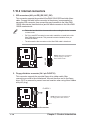
You can install 64MB, 256MB, 512MB, and 1GB DDR DIMMs into the DIMM
sockets of this motherboard. The following figure illustrates the location of the DDR
DIMM sockets.
80 Pins
104 Pins
P4BP-MX
P4BP-MX 184-Pin DDR DIMM Sockets
Make sure to unplug the power supply before adding or removing DIMMs or
other system components. Failure to do so may cause severe damage to
both the motherboard and the components.
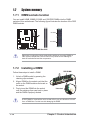
1.7.2 Installing a DIMM
DDR DIMM
Follow these steps to install a DIMM.
1. Unlock a DIMM socket by pressing the
retaining clips outward.
2. Align a DIMM on the socket such that the
notch on the DIMM matches the break on
the socket.
3. Firmly insert the DIMM into the socket
until the retaining clips snap back in place
and the DIMM is properly seated.
Unlocked
A DDR DIMM is keyed with a notch so that it fits in only one direction. DO NOT
force a DIMM into a socket to avoid damaging the DIMM.
1-10
Chapter 1: Product introduction