1
Input and controls
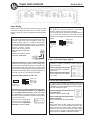
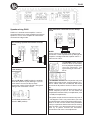
Input Wiring
Inputs may be low level from the RCA output of the
car stereo or high level from the car stereo speaker
output. Low level = RCA is to prefer for the best sound
quality.
Low level input
Use a pair of shielded stereo audio cables with RCA
type jack. Most trunk-mount amplifiers need a 20
feet RCA cable ( appr 5 – 6 meters). Most under
the seat installations require 12 feet ( 2 – 3 meters)
RCA cables. Avoid placing the RCA cable close to
speaker cables, power
cables and remote control
cable. Connect to RCA input
sockets.
Set the input selector switch
to position ”Low level”.
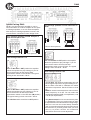
RA20 & RA40
RA40 high level input for ch 3 & 4.
The RA40 four channel amplifier is connected
likewise, however we have four channels.
You can feed all four channels using high level input, or feed two channels from RCA and two
channels using high level input from rear speaker
cables.
CH4 CH3
Hi level input
socket on
amp.
Green: Left +
Black: Left Black: Right Grey: Right +
Hi level input plug.
High / Low level input switch
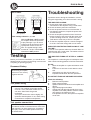
High Level Input for ch 1 & 2 on RA20 and RA40
Connect left and right speaker wires coming from
the car stereo to the high level input as shown. You
must connect both plus and minus as the inputs
are balanced, connecting plus only gives lower level
and bad sound quality. By changing the polarity of
plus and minus, you can change the phase.
High level input socket for CH 1 & 2
CH2 CH1
Hi level input
socket on amp.
Green: Left +
Black: Left Black: Right Grey: Right +
Hi level input plug.
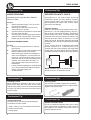
Automatic turn on when using high level input.
With the ”Input selector switch” set to High level
and the ”High level Auto Start” switch set to IN,
the amplifier turns on automatically on high input.
You don´t need to connect a separate remote wire
from your head unit.
If you want to use high level
input but use a remote start
wire, just set the ”High level
Auto Start” switch to OUT.
To ensure best possible performance from the
amplifiers a switch is installed to select between
Hi and Low input.
When using High Level input:
Push in the button to position
”High Level”
When using Low level input:
Push out the button to position
”Low Level”
Hi level auto start switch
To ensure best possible performance from the
amplifiers when used with high level input a switch
is installed to select between Automatic amplifier
start and remote wire start.
When using High Level input with
automatic start:
Push the button to position IN
When using High level input with
remote wire start:
Push out the button to position OUT
NOTE!
Some head units use BTL output IC:s that have a
constant 12 Volt + on the speaker terminal, also
when shut off (the Power LED indicator lights
constantly even when the head unit is off). In this
case you have to use a separate remote wire
connected to the REMOTE-terminal instead.
5