1
Features and
Specifications Manual
NEC Business Solutions Ltd.
Document No.:8802
Release 2.0
April, 2005
NEC Business Solutions Ltd
April 2005
Doc. No. 8802 - Release 2.0
April 2005
THIS PAGE INTENTIONALLY LEFT BLANK
ii
Table of Contents
Chapter 1
Regulatory Information ..................................... 1
Section
Section
Section
Section
Section
Section
Section
Section
Section
Chapter 2
1
2
3
4
5
6
7
8
9
Electromagnetic Interference (EMI). . . . . . . . . . . . . . . . . . . . . . . . . .
Incidence of Harm. . . . . . . . . . . . . . . . . . . . . . . . . . . . . . . . . . . . . . . .
Hearing Aid Compatibility . . . . . . . . . . . . . . . . . . . . . . . . . . . . . . . . .
Service Requirements . . . . . . . . . . . . . . . . . . . . . . . . . . . . . . . . . . . .
Compliance Information. . . . . . . . . . . . . . . . . . . . . . . . . . . . . . . . . . .
Connection Requirements for Earthing the Topaz KSU . . . . . . . . .
Voice Announcement/Monitoring . . . . . . . . . . . . . . . . . . . . . . . . . . .
Music on Hold . . . . . . . . . . . . . . . . . . . . . . . . . . . . . . . . . . . . . . . . . . .
Battery Disposal and Safety . . . . . . . . . . . . . . . . . . . . . . . . . . . . . . .
1
1
1
1
1
2
2
3
3
About This Manual ........................................... 5
Section 1 Features . . . . . . . . . . . . . . . . . . . . . . . . . . . . . . . . . . . . . . . . . . . . . . . . 5
Chapter 3
Charts and Illustrations ..................................... 7
Section 1 Charts And Illustrations . . . . . . . . . . . . . . . . . . . . . . . . . . . . . . . . . . . 7
Chapter 4
Features ...................................................... 43
Abbreviated Dialling ................................................................ 43
Account Codes ....................................................................... 49
Alarm ................................................................................. 54
Alphanumeric Display .............................................................. 56
Attendant Call Queuing ............................................................ 57
Automatic Route Selection (F-Route) ............................................ 58
Background Music ................................................................... 65
Barge In ............................................................................... 67
Call Forwarding ..................................................................... 70
Doc. No. 8846 - Release 2.0
April 2005
Call Forwarding, Fixed ............................................................. 74
Call Forwarding, Off-Premise ..................................................... 76
Call Forwarding to Abbreviated Dial ............................................. 80
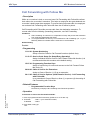
Call Forwarding with Follow Me .................................................. 83
Call Forwarding/Do Not Disturb Override ....................................... 85
Call Redirect ......................................................................... 86
Features and Specifications Manual
Chapter 1 - iii
April 2005
NEC Business Solutions Ltd
Call Timer ............................................................................ 88
Call Waiting / Camp On ............................................................ 89
Callback .............................................................................. 91
Caller ID .............................................................................. 93
Caller ID Sending .................................................................... 99
Central Office Calls, Answering ..................................................100
Central Office Calls, Placing .....................................................104
Class of Service .....................................................................108
Conference ..........................................................................120
Conference, Voice Call/Privacy Release .......................................124
Continued Dialling .................................................................126
Cost Centre Codes .................................................................128
Department Calling ................................................................129
Department Group - Call Forward ...............................................135
Department Step Calling ..........................................................138
Dial Number Preview ..............................................................139
Dial Pad Confirmation Tone ......................................................140
Direct Inward Dialling (DID) ......................................................141
Direct Inward Line (DIL) ...........................................................147
Direct Inward System Access (DISA) .............................................152
Direct Station Selection (DSS) Console .........................................159
Directed Call Pickup ...............................................................163
Do Not Disturb ......................................................................165
Doorphone ...........................................................................167
Fax Machine Compatibility .......................................................169
Flash .................................................................................171
Flexible System Numbering .......................................................173
Forced Trunk Disconnect .........................................................175
Handsfree and Monitor ............................................................180
Handsfree Answerback/Forced Intercom Ringing .............................182
Headset Operation .................................................................184
Hold ..................................................................................186
Hotline ...............................................................................190
iv
Table of Contents
Doc. No.: 8846 - Release 1.1
April 2005
Group Call Pickup ..................................................................177
Xen IPK
Features and Specifications Manual
Intercom .............................................................................192
ISDN Compatibility .................................................................195
Last Number Redial ................................................................201
LCR – Least Cost Routing ..........................................................203
Line Preference ....................................................................210
Long Conversation Cutoff .........................................................213
Loop keys ............................................................................215
Meet Me Conference ...............................................................218
Meet Me Paging .....................................................................221
Meet Me Paging Transfer ..........................................................223
Memo Dial ...........................................................................225
Message Waiting ....................................................................227
Microphone Mute ...................................................................231
Multiple Directory Numbers / Call Coverage ..................................233
Music on Hold .......................................................................237
Name Storing .......................................................................240
Night Service ........................................................................242
Off Hook Signalling ................................................................247
Paging, External ....................................................................250
Paging, Internal ....................................................................253
Park ..................................................................................256
PBX Compatibility ..................................................................259
Prime Line Selection ..............................................................262
Private Line .........................................................................264
Programmable Function Keys ....................................................266
Reason of Transfer Display .......................................................273
Repeat Redial .......................................................................274
Ring Groups .........................................................................276
Doc. No.: 8846 - Release 1.1
April 2005
Ringdown Extension, Internal / External .......................................278
Room Monitor .......................................................................280
Save Number Dialled ..............................................................283
Secretary Call Buzzer ..............................................................285
Secretary Call Pickup ..............................................................287
Selectable Display Messaging ....................................................289
Features and Specifications Manual
v
April 2005
NEC Business Solutions Ltd
Serial Call ...........................................................................292
Single Line Telephones, Analogue Sets .........................................293
Station Message Detail Recording ...............................................295
Tandem Trunking (Unsupervised Conference) .................................307
Time and Date ......................................................................311
Toll Restriction .....................................................................313
Toll Restriction-Dial Block ........................................................317
Toll Restriction Override ..........................................................320
Transfer .............................................................................322
Trunk Group Routing ..............................................................326
Trunk Groups .......................................................................329
Trunk Queuing/Camp On .........................................................331
Trunk to Trunk Forwarding .......................................................333
Trunk to Trunk Transfer ..........................................................335
Voice Mail ...........................................................................338
Voice Mail Integration .............................................................356
Voice Response System (VRS) ....................................................365
Volume Controls ....................................................................379
Doc. No.: 8846 - Release 1.1
April 2005
Warning Tone For Long Conversation ...........................................380
vi
Table of Contents
Disclaimer
NEC shall not be liable for any direct, indirect, consequential or incidental
damages about the use of this equipment, manual or any related materials.
The information in this technical manual is advisory in nature and is subject to
change. NEC may make improvements and changes in the products described
in this manual without notice.
Changes will be periodically made to the information in the new editions. Efforts
have been made to ensure that the contents of this manual are correct. Should
you find any error, NEC welcomes your comments to improve our
communications. Please contact NEC on 1800 036 136.
Contents of this manual are subject to change without prior notice at the
discretion of NEC Business Solutions Ltd.
This document has been prepared for the use of employees and customers of
NEC Business Solutions Ltd and may not be reproduced without prior written
approval of NEC Business Solutions Ltd.
Doc. No. 8802 - Release 2.0
April 2005
Copyright © 2005
NEC Business Solutions Ltd
633 - 647 Springvale Road
Mulgrave Vic 3170
Features and Specifications Manual
Disclaimer - vii
April 2005
NEC Business Solutions Ltd
Doc. No. 8802 - Release 2.0
April 2005
THIS PAGE INTENTIONALLY LEFT BLANK
viii - Disclaimer
Features and Specifications Manual
Regulatory
Information
SECTION 1
Chapter 1
ELECTROMAGNETIC INTERFERENCE (EMI)
WARNING
This is a Class A product. In a domestic environment this product may cause radio
interference in which case the user may be required to take adequate measures.
SECTION 2
INCIDENCE OF HARM
If the System is malfunctioning, it may also be causing harm to the telephone network.
The Telephone system should be disconnected until the source of the problem can be
determined and until repair has been made. If this is not done, the Network Provider
may temporarily disconnect the service.
SECTION 3
HEARING AID COMPATIBILITY
The NEC Multiline Terminals that are provided for this system are hearing aid
compatible. The manufacturer of Single Line Telephones for use with the system must
provide notice of hearing aid compatibility to comply with ACA Technical Standards.
SECTION 4
SERVICE REQUIREMENTS
WARNING
This equipment must only be installed and maintained by service personnel.
In the event of equipment malfunction, all repairs must be performed by an authorised
dealer of NEC Business Solutions Ltd or by NEC Business Solutions Ltd. It is the
responsibility of users requiring service to report the need for service to one of NEC
Business Solutions Ltd authorised agents or to NEC Business Solutions Ltd.
Doc. No. 8802 - Release 2.0
April 2005
SECTION 5
COMPLIANCE INFORMATION
This equipment has been tested to comply with all relevant ACA Technical Standards.
The Xen Topaz KSU must be permanently connected to protective earth, via the earth
terminal inside the KSU.
Features and Specifications Manual
Chapter 1 - 1
NEC Business Solutions Ltd
SECTION 6
XEN Topaz
CONNECTION REQUIREMENTS FOR EARTHING THE TOPAZ KSU
Because this Topaz KSU has been ACA approved as an Earthed-SELV Customer
Switching System for connection to a telecommunications network, the KSU Earth
terminal E (on the 308M System Mainboard) MUST be permanently connected to
Earth by connecting a minimum of 2.5mm2 green/yellow conductor cable.
This cable MUST be connected between a Multiple Earth Neutral (MEN) Bonding Bar
at the nearest convenient mains Switch Board to the KSU. This cable must serve no
other purpose than installing the KSU.
CAUTION: If this cable is not installed or requires disconnection, then the
telecommunication network connection(s), namely CO and/or ISDN, must be
disconnected first from the KSU.
Liability for this installation rests solely with the licensed installer/dealer. It is
recommended that the installer provide their label and it is to be placed in the Main
Switch Board, certifying that the installation complies with the safety earthing
installation manual instructions for the Topaz KSU Section 3.1.
(Technical References: AS/NZS 60950:2000, ACIF S009:2001. See Protective
Earthing Conductor requirements.)
SECTION 7
VOICE ANNOUNCEMENT/MONITORING
C AU T I O N
For example: “Your call may be listened to and recorded for quality and coaching
purposes. Please tell the consultant if you don’t want this to happen.”
Section 6 of the Industry Guidelines also make recommendations in relation to
notifications in writing.
Chapter 1 - 2
Regulatory Information
Doc. No. 8802 - Release 2.0
April 2005
The use of monitoring, recording or listening devices to eavesdrop, monitor, retrieve or
record telephone conversations or other sound activities, whether or not
contemporaneous with its transmission may be illegal in certain circumstances under
federal or state laws. Legal advise should be sought prior to implementing any practice
that monitors or records any telephone conversation. The telecommunications
(Interception) Act 1979 (Cth), The telecommunications Act 1997, The Privacy Act 1988
and State and Territory Listening Devices Legislation are all relevant. Some federal and
state laws require some form of notification to all parties to the telephone conversation,
such as using a beep tone or other notification methods, or require the consent of all
parties to the telephone conversation, prior to monitoring or recording a telephone
conversation. Some of these laws incorporate strict penalties. Section 6 of the Industry
Guidelines recommend pre-recorded messages or verbal notification to alert callers
that the calls may be monitored:
XEN Topaz
SECTION 8
NEC Business Solutions Ltd
MUSIC ON HOLD
IMPORTANT NOTE
In accordance with Australian Copyright Law, a license may be required from The
Australian Performing Right Association Limited (APRA), or other similar organisation,
when radio or TV broadcasts are transmitted through the Music On Hold feature of this
telecommunication system. NEC Business Solutions Ltd hereby disclaims any liability
arising out of the failure to obtain such a license.
SECTION 9
BATTERY DISPOSAL AND SAFETY
This system includes the batteries listed below. When disposing of these batteries,
KSUs and/or cards, you must comply with applicable Federal and State regulations
regarding proper disposal procedures.
IMPORTANT SAFEGUARDS FOR BATTERY DISPOSAL
The incineration, landfilling or mixing of nickel-cadmium or sealed lead batteries with
the municipal solid waste stream is PROHIBITED BY LAW in most areas. Contact your
local solid waste management officials for other information regarding the
environmentally sound collection, recycling and disposal of the battery.
Nickel-Cadmium or sealed lead batteries must be returned to a Federal or State
approved nickel-cadmium or sealed lead battery recycler. This may be where the
batteries were originally sold or a local seller of automotive batteries. Contact your local
waste management officials for other information regarding the environmentally sound
collection, recycling and disposal of the battery contained in this product.
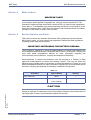
Table 1-1
Unit Name
IP2AT-924M KSU
DX2E-32i/NXE Battery Box
Type of Battery
Quantity
Lithium
1
Lead Acid
2/4
(User supplied)
Doc. No. 8802 - Release 2.0
April 2005
C AU T I O N
Danger of explosion if batteries are incorrectly installed. Replace only with the same or
equivalant type of battery as indicated throughout this manual.
Features and Specifications Manual
Chapter 1 - 3
NEC Business Solutions Ltd
XEN Topaz
Doc. No. 8802 - Release 2.0
April 2005
THIS PAGE INTENTIONALLY LEFT BLANK
Chapter 1 - 4
Regulatory Information
About This Manual
SECTION 1
Chapter 2
FEATURES
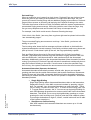
Before Reading This Section
This section provides detailed information on the system's features. If you don't know
what the various features are, review the Table of Contents for this section and the
manual's Index. After reviewing, turn back to this section for the specifics.
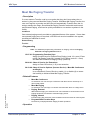
Using This Section
The features in this section are in alphabetical order, like a dictionary. This section
subdivides each feature definition into headings as follows:
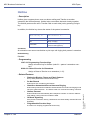
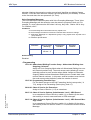
The Compatibility Chart at the top of each feature shows you if the feature is
available for each system and what system software is required.
Description tells what the feature is and describes its benefits. Along with the
Description are the Conditions and Default Setting. Conditions provides the feature's
operational limits (if any). Default Setting outlines how the feature works with the
default programming. When initially installed, the system uses the default setting. For
specific default settings on each program, refer to the chart at the end of this book.
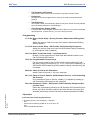
Programming explains the system programming that lets you customize the feature.
Some features require programming; other's don't. If you decide to customize a
feature, use Section 2 to enter the change into the system.
Related Features presents the feature interaction.
Operation consists of instructions on how to use each feature.
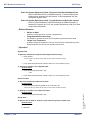
Read These Notes
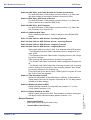
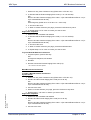
Simplifying System Phone Operation with One-Touch Keys
Doc. No. 8846 - Release 2.0
April 2005
A system phone user can access many features through Service Codes (e.g., Service
Code 841 answers a Message Waiting indication from a co-worker). To streamline the
operation of their phone, a system phone user can store these codes under One-Touch
Keys. This provides one-button operation for almost any feature. To find out more, turn
to the One-Touch Calling and One-Touch Serial Operation features.
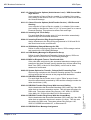
Programmable Keys
When reading an instruction using programmable keys, you will see a notation similar
to (PGM 15-07 or SC nnn). This means that the key requires function code nnn, and
you can program this code through Program 15-07 or by dialling Service Code 851 or
852. Refer to the Programmable Function Keys feature for more information.
System Hardware Manual
Chapter 2 - 5
NEC Business Solutions Ltd
XEN Topaz
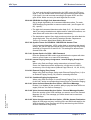
Using Handsfree
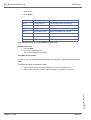
The manual assumes each extension has Automatic Handsfree. This lets a user just
press a line key or CALL key to answer or place a call. For extensions without
Automatic Handsfree, the user must:
Lift the handset or press SPK for Intercom dial tone
Lift the handset or press SPK, then press a line key for trunk dial tone
Doc. No. 8846 - Release 2.0
April 2005
Chapter 2 - 6
About This Manual
Charts and Illustrations
SECTION 1
Chapter 3
CHARTS AND ILLUSTRATIONS
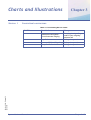
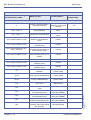
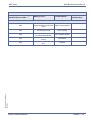
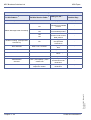
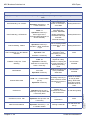
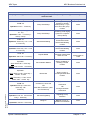
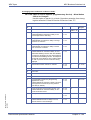
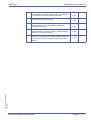
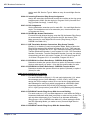
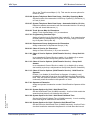
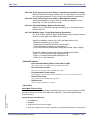
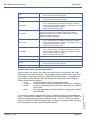
Table 3-1 Post Dialling Service Codes
Dial This...
For this feature...
When you are...
Handsfree Answerback /
Forced intercom Ringing
Changing the signalling
mode of your outgoing
Intercom call
2
Step Call
Calling a busy station
*
Intercom Off-Hook Signalling Calling a busy station
0
Camp On/Callback
Calling a busy station
Doc. No. 8846 - Release 2.0
April 2005
1
System Hardware Manual
Chapter 3 - 7
NEC Business Solutions Ltd
XEN Topaz
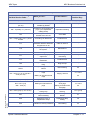
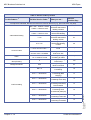
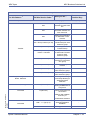
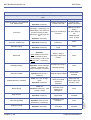
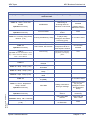
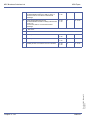
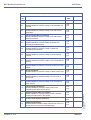
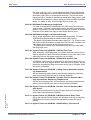
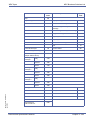
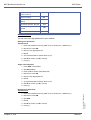
Table 2: Service Codes by Number
Dial this Service Code…1
For this feature...
Also see
Function Key...
Except where indicated, dial Service Code from Intercom dial tone (e.g., press idle CALL key first).
* + Enter Account Code + *
Entering an Account Code
Account Codes
-
715 + Extension No.
Picking up a call ringing or
waiting at another extension
Directed Call Pickup
Voice Response
System (VRS)
-
867
Picking up a call ringing an
extension in your own pickup
group (including Ring Group
calls)
Group Call Pickup
24
841
Answer a Message Waiting
Indication
Message Waiting
38
833
Setting the Automatic
Transfer for each trunk line
Transfer
-
834
Cancelling the Automatic
Transfer for each trunk line
Transfer
-
835
Setting the Destination for
Automatic Trunk Transfer
Transfer
-
751
Making a Combined Page
Paging
-
888 + 0
Cancelling Call Forwarding
Call Forwarding
16
888 + 1 + Type (2-4)
Activating Personal
Answering Machine
Emulation
Voice Mail (Personal
Answering Machine
Emulation)
16
888 + 2 + Destination + Type (2-4)
Activating Call Forwarding
when Busy/Not Answered
Call Forwarding
16
888 + 3 + Destination + Type (2-4)
Activating Call Forward
Follow Me at the destination
extension
Call Forwarding with
Follow Me
16
888 + 4 + Destination + Type (2-4)
Activating Call Forwarding
Immediate
Call Forwarding
16
888 + 6 + Destination + Type (2-4)
Activating Call Forwarding
when Unanswered (delayed)
Call Forwarding
16
888 + 7 + Destination + Type (2-4)
Activating Call Forwarding
(Both Ringing)
Call Forwarding
16
724 (After #9 805 + 01-51 + busy)
Disconnecting a call in
progress on a trunk
Forced Trunk
Disconnect
-
713 + 3 + Message (01-20), or *4
713 + 3 + Hang up to cancel
Activating and cancelling
Selectable Display
Messaging
Selectable Display
Messaging
17
713 + 6 + Trunk access code +
Outside number, or 713 + 6 + Hold
+ Hang up to cancel
Forwarding your calls to an
off-premise telephone
number
Call Forwarding OffPremise
17
Chapter 3 - 8
Charts and Illustrations
Doc. No. 8846 - Release 2.0
April 2005
1
When you are...
XEN Topaz
NEC Business Solutions Ltd
Table 2: Service Codes by Number
Dial this Service Code…1
1
For this feature...
Also see
Function Key...
Except where indicated, dial Service Code from Intercom dial tone (e.g., press idle CALL key first).
713 + 7 + Record message + # +
Condition (2, 4, 6 or 7) +
Destination + Type (2 or 3) or *4
713 + 7 + 3 to cancel
Recording, listening to or
erasing a Personal Greeting
or Park and Page
Voice Response
System (VRS)
(Personal Greeting)
17
861 + Orbit (01-64)
Picking up a call parked in a
system Park orbit (01-64)
Park
*04 + orbit
894
Doc. No. 8846 - Release 2.0
April 2005
When you are...
Splitting (switching) between
Call Waiting / Camp On
calls on an SLT
-
884
Calling your mailbox
Voice Mail Integration
67
6321
Entering the system
programming mode
System Programming
Password Protection
-
6322
Backing up system data
Maintenance
-
Hookflash + ## 891 + Enter
Account Code + Hookflash
Entering an Account Code at
an SLT
Account Codes
-
872
Using Universal Answer
Code to pick up a call ringing
over the paging system
Central Office Calls,
Answering
-
Hookflash + #1 826 + extension +
hookflash twice
Activating Conference from a
Single Line set
Conference
-
* + bin
Dialling a Common Personal
Abbreviated Dialling number
Abbreviated Dialling
27
806
Flashing a trunk from an SLT
Flash
-
814 + bin
Dialling a group Abbreviated
Dialling number
Abbreviated Dialling
28
#
Using Last Number Redial
Last Number Redial
-
831 + orbit (01-64)
Parking a call in a system
Park orbit (1-8, 01-32 or 0164)
Park
*04 + orbit (1-64)
753
Setting up an Unsupervised
Conference
Tandem Trunking
(Unsupervised
Conference)
-
805 + 01 -51
Placing a call over a specific
trunk
Central Office Calls,
Placing
*01 + trunk (001-51)
1 (Off-hook)
Changing the signalling mode
of your outgoing Intercom call
Handsfree
Answerback/Forced
Intercom Ringing
-
4 (On-hook)
Listening to the General
Message
Voice Response
System (VRS)
-
6 (On-hook)
Checking an extension's
number
Voice Response
System (VRS)
-
8 (On-hook)
Listening for the time
Voice Response
System (VRS)
-
System Hardware Manual
Chapter 3 - 9
NEC Business Solutions Ltd
XEN Topaz
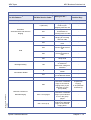
Table 2: Service Codes by Number
Dial this Service Code…1
For this feature...
Also see
Function Key...
Except where indicated, dial Service Code from Intercom dial tone (e.g., press idle CALL key first).
0
Placing a call using ARS or
Trunk Group Routing
Automatic Route
Selection Trunk Group
Routing
*02
700 + code + 0
Using Dial Block
Toll Restriction, Dial
Block
-
701 + code + 0
A supervisor using Dial Block
Toll Restriction, Dial
Block
-
702 + Group number (01-32)
Setting Automatic Transfer
Setup for each extension
group
Transfer
-
703 + Group number (01-32)
Cancelling Automatic
Transfer Setup
Transfer
-
704 + Group number (01-32) +
mode + extension
Setting the destination for
Automatic Transfer Setup for
each extension group
Transfer
-
705 + Group number (01-32)
Setting Delayed Transfer for
each extension group (on no
answer)
Transfer
-
706 + Group number (01-32)
Cancelling Delayed Transfer
Transfer
-
707 + Group number (01-32)
Setting up DND for each
extension group
Transfer
-
708 + Group number (01-32)
Cancelling DND for each
extension group
Transfer
-
711
SLT Listening to the General
Message
Voice Response
System (VRS)
-
712 + 3 to erase, 5 to listen or 7 to
Recording, listening to or
record
erasing the General Message
Voice Response
System (VRS)
-
716 + 3 to erase, 5 to listen or 7 to
record
Recording, listening to or
erasing a VRS Message
Voice Response
System (VRS)
-
718
Night Mode Switching for
other group
Night Answer
-
720
Common Cancelling Service
Code
721
Print the SMDR Extension
Accumulated printout
Station Message Detail
Recording (SMDR)
-
722
Print the SMDR Group
Accumulated printout
Station Message Detail
Recording (SMDR)
-
723
Print the SMDR Account
Code Accumulated printout
Station Message Detail
Recording (SMDR)
-
726
Leaving a message at an
extension, without first calling
that extension
Message Waiting
-
Chapter 3 - 10
Charts and Illustrations
Doc. No. 8846 - Release 2.0
April 2005
1
When you are...
XEN Topaz
NEC Business Solutions Ltd
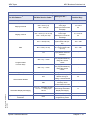
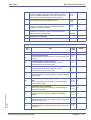
Table 2: Service Codes by Number
Dial this Service Code…1
1
For this feature...
Also see
Function Key...
Except where indicated, dial Service Code from Intercom dial tone (e.g., press idle CALL key first).
745 + Trunk No.
(01~51)
Trunk Port Disable (1)
Disable (0) Enable
-
750 + 0 (install) or 1 (remove)
Logging in (0) or logging out
(1) for your Department
Calling Group
Department Calling
-
754
Enabling Conversation
Record at an SLT set
Voice Mail
-
763 + 6-digit code + line + phone
number
Overriding Toll Restriction
Toll Restriction
-
777
Changing the COS of another
extension. Must be allowed in
Program 20-13-28.
Class of Service
-
778
Displaying the language of
the system.
Maintenance
-
725
Live MonitoringVoice Mail
Voice Mail
-
771
Charge Cost Display by the
supervisor.
Station Message Detail
Recording
-
774
Entry Credit for Toll
Restriction
Toll Restriction
-
780
Change to Station Group All
Ring
Ring Groups
-
800 + extension # + enter name +
HOLD
Programming extension
names
Name Storing
55
801 + zone (1-9 or 01-32) 801 +
zone (0 or 00)
802 + Doorphone (1-6)
803 + zone (1-6)
803 + zone (0)
804 + trunk group (1-9 or 01-51)
Doc. No. 8846 - Release 2.0
April 2005
When you are...
807
Making an Internal Zone
Page
Making an All Call Internal
Page
Placing a call to a Doorphone
Making an External Zone
page
Placing an outside call over a
trunk group
Paging, Internal
21 + zone
22
Doorphone
-
Making an External
Zone page
19 + zone
Making an External All
Call page
Central Office Calls,
Placing
Overriding Do Not Disturb or Call Forwarding Do Not
Call Forwarding
Disturb
20
*02 + group
37
808
Stepping through a
Department Group
Department Step
Calling
36
809
Sending a Call Waiting
indication to a busy extension
Call Waiting
33
System Hardware Manual
Chapter 3 - 11
NEC Business Solutions Ltd
XEN Topaz
Table 2: Service Codes by Number
Dial this Service Code…1
1
When you are...
For this feature...
Also see
Function Key...
Except where indicated, dial Service Code from Intercom dial tone (e.g., press idle CALL key first).
810
Breaking into another
extension's call
Barge In
-
812
Changing the signal type for
calling an extension
Intercom
-
815
Saving a number (from SLT)
or dialling a saved number
Save Number Dialled
30
818 + 1
Activating Day 1 Mode
09+0 (Toggle Day 1/
Night1)
818 + 2
Activating Night 1 Mode
09 + 1
818 + 3
Activating Midnight 1 Mode
09 + 2
818 + 4
Activating Rest 1 Mode
818 + 5
Activating Day 2 Mode
818 + 6
Activating Night 2 Mode
09 + 5
818 + 7
Activating Midnight 2 Mode
09 + 6
818 + 8
Activating Rest 2 Mode
09 + 7
09 + 3
Night Service
09 + 4
09 + 8
822
Calling off-premise with a
Doorphone
Handsfree
Answerback/Forced
Intercom Ringing
Call Forwarding, OffPremise
-
54
Doorphone
Handsfree
Answerback/ Forced
Intercom ringing
823
Enabling Forced Ringing for
incoming Intercom calls
824
Enabling/disabling Dial Pad
Confirmation Tone
825
Turning Background Music on
and off
Background Music
04
827 + 1 or 2 + time, or 827 + 1 or 2
+ 9999 to cancel
Checking, setting or
cancelling an alarm
Alarm
-
828 + hour + minutes
Setting the system Time
Time and Date
-
Volume Control
-
829
Chapter 3 - 12
Checking or changing ring
volume
Dialling Pad
Confirmation tone
-
-
830
Remote maintenance
-
-
832
Placing a call on Group Hold
Hold
-
836
Text Message Setting
Select Display
Messaging
-
Charts and Illustrations
Doc. No. 8846 - Release 2.0
April 2005
821
Enabling Handsfree
Answerback for incoming
Intercom calls
XEN Topaz
NEC Business Solutions Ltd
Table 2: Service Codes by Number
Dial this Service Code…1
1
When you are...
For this feature...
Also see
Function Key...
Except where indicated, dial Service Code from Intercom dial tone (e.g., press idle CALL key first).
840
System alarm message
delete
-
-
842
Setting Call Forward (Both
Ring)
Call Forwarding
14
843
Setting Call Forward (Busy)
Call Forwarding
11
844
Setting Call Forward (Busy/
No Answer)
Call Forwarding
13
845
Setting Call Forward (No
Answer)
Call Forwarding
12
846
Setting Call Forward (Follow
Me)
Call Forwarding
15
Call Forwarding
10
Activating Do Not Disturb
Do Not Disturb
-
849
Placing a call on Exclusive
Hold at a SLT set.
Hold
-
850
Camping On to an extension
when calling into the system
through the VRS
Voice Response
System (VRS)
35
851 + key + code
Changing the function of a
programmable key using 851
service codes
Programmable
Function Keys
-
852 + key + code
Changing the function of a
programmable key using 852
service codes
One-Touch Serial
Operation
-
853 + bin + number + HOLD +
Name + HOLD to store
Storing Common Abbreviated
Dialling numbers
Abbreviated Dialling
-
854 + bin + number + HOLD +
Name + HOLD to store
Storing Group Abbreviated
Dialling numbers
Abbreviated Dialling
-
855 + One Touch key + code
Programming a One-Touch
Key or Personal Speed Dial
One-Touch Dialling
-
856
Answering a call ringing a
phone in your pickup group
(except Ring Group calls)
Group Call Pickup
-
848
Setting Call Forward
(Immediate)
847 +
0 (Cancel)
1 (Trunk calls)
2 (Paging, ICM, Call Forward and
transfers)
3 (All calls)
Doc. No. 8846 - Release 2.0
April 2005
4 (Call Forwards)
System Hardware Manual
Chapter 3 - 13
NEC Business Solutions Ltd
XEN Topaz
Table 2: Service Codes by Number
Dial this Service Code…1
For this feature...
Also see
Function Key...
Except where indicated, dial Service Code from Intercom dial tone (e.g., press idle CALL key first).
773
Parking a call or picking up a
parked call at an extension
Park
-
859
Retrieving a call from
Exclusive Hold at a DSL/SLT
set.
Hold
-
862
Picking up a call from Group
Hold
Hold
-
863
Joining a Meet Me
Conference or Meet Me Page
on an Internal Paging Zone (if
your extension is in the group
called)
Meet Me Conference
Meet Me Paging
23 or 32
Joining a Meet Me
Conference or Meet Me Page
if your extension is not in the
group paged
Meet Me Paging
23 or 32
Using trunk access via
Networking
Networking
-
Answering a call ringing a
phone in another pickup
group (except Ring Group
calls)
Group Call Pickup
26 + group
869
Answering a call ringing a
phone in another pickup
group if you don't know the
group's number (except Ring
Group Calls)
Group Call Pickup
25
870
Cancelling a Callback request
Callback
-
871 + ext
Cancelling Messages Waiting
you have left at a specific
extension
Message Waiting
-
873
Cancelling all Messages
Waiting you have left at other
extensions
Message Waiting
-
875 + pswd (0000) + place
Temporarily overriding an
Toll Restriction
outside call
extension's Toll Restriction
Override
876
Clearing number saved by
Last Number Redial
Last Number Redial
-
881 + 00 (no tone), 01 (general) or
02 (holiday)
Changing the Music on Hold
Tone
Music on Hold
-
882
Routing ANI/DNIS to the
VRS. It can also be used
when transferring to VRS.
864 + zone paged
(0-9 or 00-32)
866
868 + pickup group
(1-9 or 01-32)
Chapter 3 - 14
-
Transfer
Voice Response
Service (VRS)
-
Charts and Illustrations
Doc. No. 8846 - Release 2.0
April 2005
1
When you are...
XEN Topaz
NEC Business Solutions Ltd
Table 2: Service Codes by Number
Dial this Service Code…1
For this feature...
Also see
Function Key...
Except where indicated, dial Service Code from Intercom dial tone (e.g., press idle CALL key first).
883
Enabling the data
communication auto-answer
mode
Data Communications
-
884
Accessing the VRS
Voice Response
Service (VRS)
-
885
Clearing the number saved
by Save Number Redial
Save Number Redial
-
894
Splitting between two calls on
an SLT
Call Waiting
-
899
Testing Callback operation for
SLT
Callback
-
Doc. No. 8846 - Release 2.0
April 2005
1
When you are...
System Hardware Manual
Chapter 3 - 15
NEC Business Solutions Ltd
XEN Topaz
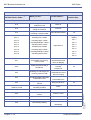
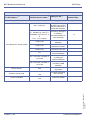
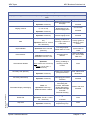
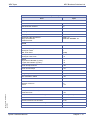
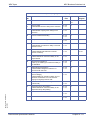
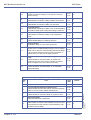
Table 3: Service Codes by Feature
For this feature...1
1
Also see
Function Key...
Dial this Service Code...1 When you are...
Except where indicated, dial Service Code from Intercom dial tone (e.g., press idle CALL key first).
853 + bin + number + HOLD
+ Name + HOLD to store
Storing Common/
Personal Abbreviated
Dialling numbers
-
854 + bin + number + HOLD
+ Name + HOLD to store
Storing Group
Abbreviated Dialling
-
* + bin
Dialling a Common/
Personal Abbreviated
Dialling number
27
814 + bin
Dialling a Group
Abbreviated Dialling
number
28
* + Enter Account code + *
Entering an Account
Code
-
Hookflash + 891 + Enter
account code + Hookflash
Entering an Account
Code at an SLT
-
Alarm
827 + 1 or 2 + time, or 827 +
1 or 2 + 9999 to cancel
Checking, setting or
cancelling an alarm
-
Automatic Route Selection or Trunk
Group Routing
0
Placing a call using
Trunk Group
*02
Background Music
825
Turning Background
Music on and off
04
888 + 0
Cancelling Call
Forwarding
16
842 + 1 + Destination
Activating Call
Forwarding (Both
Ringing)
14
843 + 1 + Destination
Activating Call
Forwarding when Busy
11
844 + 1 + Destination
Activating Call
Forwarding when Busy/
Not Answered
13
Abbreviated Dialling
Account Codes
Call Forwarding
845 + 1 + Destination
Activating Call
Forwarding when
12
Chapter 3 - 16
846 + 1 + Destination
Activating Call
Forwarding Follow Me
15
848 + 1 + Destination
Activating Call
Forwarding Immediate
10
Charts and Illustrations
Doc. No. 8846 - Release 2.0
April 2005
Unanswered (delayed)
XEN Topaz
NEC Business Solutions Ltd
Table 3: Service Codes by Feature
For this feature...1
1
Dial this Service Code...1 When you are...
Also see
Function Key...
Except where indicated, dial Service Code from Intercom dial tone (e.g., press idle CALL key first).
713 + 6 + Trunk access code
Forwarding your calls to
an off-premise
713 + 6 + Hold + Hang up to
telephone number
cancel
17
822
Calling off-premise with
a Doorphone
54
Call Forwarding/Do Not Disturb
Override
807
Overriding an
extension's Call
Forward or DND
setting.
37
Call Forwarding with Follow Me
888 + 3 + Destination + Type
(2-4)
Activating Call Forward
Follow Me at the
destination extension
16
Call Waiting / Camp On
894
Splitting (switching)
between calls on an
SLT
-
0
Camping On or leaving
a Callback for a busy
extension or trunk
35
870
Cancelling a Callback
request
-
899
Testing Callback
operation for SLT
-
872
Using Universal Answer
to pick up a call ringing
over the paging system
-
772 + Line number (01-51)
Answering a call on a
specific trunk
-
799 + 1 (set) or 0 (cancel)
Changing the ability for
a second call with DID/
DISA/DIL
-
805 + 01-51
Placing a call over a
specific trunk
*01 + trunk (01-51)
804 + trunk group (1-9 or 0151)
Placing an outside call
over a trunk group
*02 + group
Class of Service
777
Changing the COS of
another extension.
Must be allowed in
Program 20-13-28.
-
Conference
Hookflash + 826 + extension
+ hookflash twice
Activating Conference
from a Single Line set
1016
Call Forwarding
Off-Premise
Call Forwarding, Off- Premise
Doorphone
Callback / Camp On / Trunk
Queuing
Central Office Calls, Answering /
Hold
Doc. No. 8846 - Release 2.0
April 2005
Central Office Calls, Placing
System Hardware Manual
+ Outside number, or
Chapter 3 - 17
NEC Business Solutions Ltd
XEN Topaz
Table 3: Service Codes by Feature
For this feature...1
1
Also see
Function Key...
Dial this Service Code...1 When you are...
Except where indicated, dial Service Code from Intercom dial tone (e.g., press idle CALL key first).
Logging in (0) or
logging out (1) for your
Department Calling
Group
46
#
Step Calling through a
Department Group
36
Dial Pad Confirmation Tone
824
Enabling/disabling Dial
Pad Confirmation Tone
-
Directed Call Pickup
815 + ext.
Picking up a call ringing
or waiting at an
extension
-
Activating Do Not
Disturb
-
Department Calling
Department Step
Calling
750 + 0 (install) or
1 (remove)
847 + 0 (Cancel)
1 (Trunk calls)
Do Not Disturb
2 (Paging, ICM, Call
Forwards, and Transfers)
3 (All calls)
Doorphone
802 + Doorphone (1-6)
Placing a call to a
Doorphone
-
Flash
806
Flashing a trunk from
an SLT
-
Forced Trunk
724 (after 805 + 01-51 +
busy)
Disconnecting a call in
progress on a trunk
-
867
Picking up a call ringing
an extension in your
own pickup group
(except Ring Group
calls)
24
868 + pickup group (1-9 or
01-32)
Answering a call ringing
a phone in another
pickup group
26 + group
869
Answering a call ringing
a phone in another
pickup group if you
don't know the group's
number (except Ring
Group calls)
25
Disconnect
Group Call Pickup
Chapter 3 - 18
Charts and Illustrations
Doc. No. 8846 - Release 2.0
April 2005
4 (Call Forwards)
XEN Topaz
NEC Business Solutions Ltd
Table 3: Service Codes by Feature
For this feature...1
1
Dial this Service Code...1 When you are...
Also see
Function Key...
Except where indicated, dial Service Code from Intercom dial tone (e.g., press idle CALL key first).
1 (Off-hook)
Changing the signalling
mode of your
-
outgoing Intercom call
Handsfree
Answerback/Forced Intercom
Ringing
821
Enabling Handsfree
Answerback for
incoming Intercom calls
-
823
Enabling Forced
Ringing for incoming
Intercom calls
-
832
Placing a call on Group
Hold
-
849
Placing a call on
Exclusive Hold at a SLT
set
-
859
Retrieving a call from
Exclusive Hold at a
DSL
-
862
Picking up a call from
Group Hold
-
Hold
Message Waiting
726
System Hardware Manual
Doc. No. 8846 - Release 2.0
April 2005
-
Using Last Number
Redial
-
876
Clearing number saved
by Last Number Redial
-
6322
Backing up system data
-
863
Joining a Meet Me
Conference or Meet Me
Page on an Internal
Paging Zone (if your
extension is in the
group called)
864 + zone paged
Joining a Meet Me
Conference or Meet Me
Page if your extension
is not in the group
paged
-
865 + zone (0-8)
Joining a Meet Me
conference or Meet Me
Page on an External
Paging Zone.
-
Meet Me Conference
Meet Me Paging
without first calling that
extension
#
Last Number Redial
Maintenance
Leaving a message at
an extension,
23 (Meet Me
Paging)
or 32 (Meet Me
Conference)
Chapter 3 - 19
NEC Business Solutions Ltd
XEN Topaz
Table 3: Service Codes by Feature
For this feature...1
Except where indicated, dial Service Code from Intercom dial tone (e.g., press idle CALL key first).
0 (Off-hook)
Leaving a Message
Waiting at a
co-worker's busy or
unanswered extension
38
841
Answering a Message
Waiting request
38
871 + ext
Cancelling Messages
Waiting you have left at
a specific extension
-
873
Cancelling all
Messages Waiting you
have left at other
extensions
-
Music on Hold
881 + 00 (no tone), 01
(general) or 02 (holiday)
Changing the Music on
Hold Tone
-
Name Storing
800 + enter name + HOLD
Programming extension
names
55
718
Night Mode Switching
for other group
818 + 0
Activating Day 1 Mode
09 + 0
818 + 1
Activating Night 1 Mode
09 + 1
818 + 2
Activating Midnight 1
Mode
09 + 2
818 + 3
Activating Rest 1 Mode
09 + 3
818 + 4
Activating Day 2 Mode
09 + 4
818 + 5
Activating Night 2 Mode
09 + 5
818 + 6
Activating Midnight 2
Mode
09 + 6
818 + 7
Activating Rest 2 Mode
09 + 7
809
Sending off-hook signal
tones to a busy
extension
33
Message Waiting
Night Service
Off Hook Signalling
One-Touch Dialling
855 + One-Touch key + code
Programming a OneTouch Key or
-
Personal Speed Dial
Paging, Combined
Chapter 3 - 20
Making a combined
zone page.
751 + Zone (1-6) 751 + Zone
(0)
Making a combined All
Call page.
19 + zone
20
Charts and Illustrations
Doc. No. 8846 - Release 2.0
April 2005
1
Also see
Function Key...
Dial this Service Code...1 When you are...
XEN Topaz
NEC Business Solutions Ltd
Table 3: Service Codes by Feature
For this feature...1
1
Dial this Service Code...1 When you are...
Also see
Function Key...
Except where indicated, dial Service Code from Intercom dial tone (e.g., press idle CALL key first).
Paging, External
Paging, Internal
Park
803 + zone (1-6)
803 + zone (0)
801 + zone (1-9 or 01-32)
801 + zone (0 or 00)
Making an external All
Call page
Making an Internal
Zone Page
Making an internal All
Call Page
19 + zone
20
21 + zone or
22
831 + orbit (01-64)
Parking a call in a
system Park orbit (0164)
*04 + orbit
861 + orbit ( 01-64)
Picking up a call parked
in a system Park orbit
(01-64)
*04 + orbit
773
Parking a call or picking
up a parked call at an
extension
-
851 + key + code
Changing the function
of a programmable key
using 851 service
codes
-
852 + key + code
Changing the function
of a programmable key
using 852 service
codes
-
780
Change to STG All Ring
-
815
Saving a number (from
Station Group) or
dialling a saved number
30
Programmable
Function Keys
Ring Groups
Making an external
zone page
Save Number Dialled
885
Clearing the number
saved by Save
-
Number Redial number
Doc. No. 8846 - Release 2.0
April 2005
Selectable Display Messaging
System Programming Password
Protection
System Hardware Manual
713 + 3 + message (01-20),
or 713 + 3 + Hang up to
cancel
Activating and
Cancelling Selectable
836
Text Message Setting
-
6321
Entering the system
programming mode
-
17
Display Messaging
Chapter 3 - 21
NEC Business Solutions Ltd
XEN Topaz
Table 3: Service Codes by Feature
For this feature...1
1
Also see
Function Key...
Dial this Service Code...1 When you are...
Except where indicated, dial Service Code from Intercom dial tone (e.g., press idle CALL key first).
Print the SMDR
Extension Accumulated
printout
-
Print the SMDR Group
Accumulated printout
-
Print the SMDR
Account Code Accumu
lated printout
-
#8
Setting up an
Unsupervised
Conference
-
Time and Date
828 + hour + minutes
Setting the system
Time
-
Toll Restriction, Dial Block
700 + code + 0
Using Dial Block
-
701 + code + 0
A supervisor using Dial
Block
-
774
Entry Credit
-
875 + pswd (0000) + place
outside call
Temporarily overriding
an extension’s Toll
Restriction
-
763 + digit digit code + line +
telephone number
Overriding Toll
Restriction
-
121
721
Station Message Detail Recording
122
722
123
723
Tandem Trunking (Unsupervised
Conference)
Toll Restriction
Doc. No. 8846 - Release 2.0
April 2005
Override
Chapter 3 - 22
Charts and Illustrations
XEN Topaz
NEC Business Solutions Ltd
Table 3: Service Codes by Feature
For this feature...1
1
Dial this Service Code...1 When you are...
Except where indicated, dial Service Code from Intercom dial tone (e.g., press idle CALL key first).
833
Setting the Automatic
Transfer for each trunk
line
834
Cancelling the
Automatic Transfer for
each trunk line
835
Setting the Destination
for Automatic Trunk
Transfer
Setting Automatic
702 + Group number (01-32) Transfer Setup for each
extension group
-
703 + Group number (01-32)
Cancelling Automatic
Transfer Setup
-
704 + Group number (01-32)
+ mode + extension
Setting the destination
for Automatic Transfer
Setup for each
extension group
-
705 + Group number (01-32)
Setting Delayed
Transfer for each exten
sion group
-
706 + Group number (01-32)
Cancelling Delayed
Transfer
-
707 + Group number (01-32)
Setting up DND for
each extension group
-
708 + Group number (01-32)
Cancelling DND for
each extension group
-
Trunk Group Routing or Automatic
Route Selection
0
Placing a call using
Trunk Group Routing or
Automatic Route
Selection
*02
Trunk Queuing
2 (Off-hook)
Camping on to or
leaving a Callback at a
busy trunk
35
Voice Mail
8 (Off-hook)
Leaving a message in a
co-worker’s
-
Transfer
Doc. No. 8846 - Release 2.0
April 2005
Also see
Function Key...
mailbox after callback
their busy or
unanswered extension
Voice Mail
System Hardware Manual
888 + 1 + Type (2-4)
Activating Personal
Answering Machine
Emulation
-
884
Calling your mailbox
67
Chapter 3 - 23
NEC Business Solutions Ltd
XEN Topaz
Table 3: Service Codes by Feature
For this feature...1
1
Also see
Function Key...
Dial this Service Code...1 When you are...
Except where indicated, dial Service Code from Intercom dial tone (e.g., press idle CALL key first).
815 + ringing ext.
713 + 7 + Record message +
# + Condition (2, 4,6 or 7) +
Destination+ Type (2 or 3). or
*4
713 + 7 + 3 to cancel
Voice Response System (VRS)
Common Cancel code
Personal Greeting or
Park and Page
17
Listening to the General
Message
-
6 (On-hook)
Checking an
extension’s number
-
8 (On-hook)
Listening for the time
-
711
SLT listening to the
General Message
-
Recording, listening to
or erasing the
-
General Message
716 + 3 to erase, 5 to listen or
7 to record
Recording, listening to
or erasing a VRS
Message
-
829
Checking or changing
ring volume
-
Common Cancelling
Service Code
-
Trunk Port Disable
-
120
720
145
745
Doc. No. 8846 - Release 2.0
April 2005
Trunk Port Disable
Recording, listening to
or erasing a
-
4 (On-hook)
712 + 3 to erase, 5 to listen or
7 to record
Volume Control
Picking up a call ringing
another exten sion for
Directed Call Pickup or
VRS Park and Page.
Chapter 3 - 24
Charts and Illustrations
XEN Topaz
NEC Business Solutions Ltd
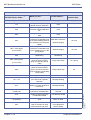
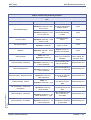
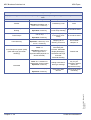
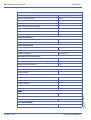
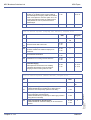
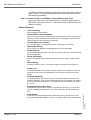
Table 4: Function Key Codes by Features
To program a key, press CALL, dial 851 (for 2-digit codes) or 852 (for 3-digit codes), press the key and enter the
code.
For this feature...
Abbreviated Dialling
Use this key...
When your are...
Key Lamp Status
Code: 27
Dialling a stored
Common Abbreviated
Dialling number
None
Dialling a stored Group
Abbreviated Dialling
number
None
Entering Account
Codes
None
Turning Background
Music on or off
None
Barging In on a coworker’s conversation
None
Placing or answering a
call to your co-worker’s
extension
Slow Flash red
when ringing, On
red when busy
Call Forwarding Dual
Ring to extension
Slowly flashes red
Call Forwarding Busy to
extension or Voice Mail
Slowly flashes red
Call Forwarding Busy/
No Answer to extension
or Voice Mail
Slowly flashes red
Call Forwarding Device
to a device or Voice
Operation: Press key + type
Mail
Slowly flashes red
Operation: Press key + bin +
Line or CALL
Code: 28
Operation: Press key + bin +
Line or CALL key
Code: 50
Account Codes
Background Music
Operation: Press key + Dial
Account Code
Code: 04
Operation: Press key
Code: 34
Barge In
Call Coverage
Operation: Call ext + Press
key
Code: *03 + ext.
Operation: Press key
Code: 14
Call Forwarding, Dual Ring
Operation: Press key + 1/0
+ Dest. Extension
Code: 11
Call Forwarding, Busy
Operation: Press key + 1/0
+ Dest. Extension
Code: 13
Call Forwarding, Busy/No Answer
Call Forwarding, Device
Call Forwarding, External by
Doorphone
Operation: Press key +
Dest. Extension
Code: 17
Code: 54
Operation: Press key +
Dest. Number
Doc. No. 8846 - Release 2.0
April 2005
Code: 15
Call Forwarding, Follow Me
Operation: Press key + 3/0
+ Dest. Extension + Type
Code: 10
Call Forwarding, Immediate
System Hardware Manual
Operation: Press key + 1/0
+ Dest. Extension
Externally Call
Forwarding Doorphone
calls
Slowly flashes red
Call Forwarding Follow
Me to extension or
Voice Mail
Slowly flashes red
Call Forwarding
Immediate to extension
or Voice Mail
Slowly flashes red
Chapter 3 - 25
NEC Business Solutions Ltd
XEN Topaz
Table 4: Function Key Codes by Features
To program a key, press CALL, dial 851 (for 2-digit codes) or 852 (for 3-digit codes), press the key and enter the
code.
For this feature...
Call Forwarding, No Answer
Use this key...
When your are...
Key Lamp Status
Code: 12
Call Forwarding No
Answer to extension or
Voice Mail
Slowly flashes red
Operation: Press key + 1/0
+ Dest. Extension
Code: 17
Call Forwarding, Off-Premise
Operation: Press key +
device type code +
requested data (depends on
device selected).
Setting up Call
Forwarding OffPremise, Selectable
Display Messaging,
VRS Park and Page
and VRS
Slowly flashes red
Personal Greeting
Call Forwarding, Station
Call Forwarding / Do Not Disturb
Override
Operation: Press key +
Condition + Dest. Extension
+ Type
Code: 37
Operation: Call
extension + Press key
Code: 35
Callback / Camp On/ Trunk
Queuing
Call Redirect
Operation: Call busy
extension or access busy
trunk + Press key
Code: 49 + extension or
voice mail
Operation: Press key
Central Office Calls
Code: *01 + Trunk number
(01-51)
Operation: Press key
Code: 07
Conference
Operation: Set up call +
Press key + set up call to add
+ Press key twice
Code: 32
Conference, Voice Call
Operation: Set up trunk call
+ Press key
Call Forwarding Station
to extension or Voice
Mail
Slowly flashes red
Overriding an
extension’s Call
Forwarding or Do Not
Disturb
None
Leaving a Call back
request at a busy
extension, Camping On
to a busy extension, or
Queuing for a busy
trunk
Redirect a ringing call
to the predefined
destination
Chapter 3 - 26
Operation: Press key + ext
or outside number
activated
On red when
activated
On green when
seized, on red when
Pressing a line key to
in use (by other
place or answer a trunk
party), Slow Flash
call (where trunks are
green when ringing,
01-51)
Hold flash when on
Hold
Setting up a
Conference or a Meet
Me Conference
Setting up a Voice Call
Conference
Code: 66
Data Communications
On red when
Placing a data call
On red during setup
None
On red when call
set up
Charts and Illustrations
Doc. No. 8846 - Release 2.0
April 2005
Code: 16
XEN Topaz
NEC Business Solutions Ltd
Table 4: Function Key Codes by Features
To program a key, press CALL, dial 851 (for 2-digit codes) or 852 (for 3-digit codes), press the key and enter the
code.
For this feature...
Use this key...
When your are...
Key Lamp Status
Department
Calling
Code: 46
Logging in or logging
out of your Department
Calling Group
On when removed,
Off when installed
Stepping through a
Department Group for
an idle member
None
Operation: Press Key
Code: 36
Department Step Calling
Operation: Dial busy ext +
Press key
Direct Station
Selection
Code: 01
On = extension busy
Setting your phone in
DND
DND key on red
Calling an extension
which is in DND or Call
Forwarded
None
Answering a call ringing
another phone in your
Pickup Group
None
Answering a call ringing
a phone in another
Pickup Group - if you
don’t know the group
number
None
Code: 26 + Pickup Group (1Answering a call ringing
9 or 01-32)
a phone in a specific
Operation: CALL + Press
Pickup Group
key + Pkup Group
None
Operation: Press key
Code: 03
Do Not Disturb
Operation: Press key + code
(0-4)
Do Not Disturb/Call Forward
Override
Code: 37
Operation: Press key
Code: 24
Operation: CALL +
Press key
Code: 25
Group Call Pickup
Operation: CALL +
Press key
Handset Mute
Hotline
Doc. No. 8846 - Release 2.0
April 2005
Headset Operation
Hold
Flashing = DND
Muting the handset
transmission while on a
call
On when feature
active (no
transmission on
handset)
Operation: Press key
Placing a call to your
Hotline partner
Full BLF (red) for
covered ext.
Code: 05
Enabling or disabling
On red when
Operation: Press key
Headset Operation
activated
Code: 44
Putting a call on
System Hold (if your
phone’s Hold key is
reassigned)
None
Putting a call on
Exclusive Hold
None
Code: 40
Operation: Press key
Code: 01 + dest. ext
Operation: Place or answer
call + Press key
Code: 45
Operation: Place or answer
call + Press key
System Hardware Manual
Off = extension idle
Calling an extension
using a DSS key
Chapter 3 - 27
NEC Business Solutions Ltd
XEN Topaz
Table 4: Function Key Codes by Features
To program a key, press CALL, dial 851 (for 2-digit codes) or 852 (for 3-digit codes), press the key and enter the
code.
For this feature...
Use this key...
When your are...
Key Lamp Status
Incoming Caller ID List (Answered
and Missed calls)
Code: 08
Viewing answered and
missed trunk calls
Flashing when
missed call stored
Operation: Press key
Code: *05 + 0
Loop Keys
(Incoming), 1 (Outgoing) or 2
(Both Ways) + 00 (All trunk
Placing or answering a
groups incoming or ARS
trunk call
outgoing) or Trunk group (0125).
Operation: Press Key
Meet Me Conference
Code: 32
(Also see Conference)
Operation: Press key
Meet Me Paging
Code: 23
Operation: Press key
Flashing red when
ringing
On green when in
use
Flashing green
when on hold
Joining a Meet Me
Conference
None
Joining a Meet Me
Page
None
Storing, using or
checking a Memo dial
number
None
Code: 31
Operation:
Memo Dial
Store: While on call, press
key + number to store
Use: Press Key + Call or line
Erase: CALL + Press key
Code: 38
Message Waiting
Operation: Leave message:
Call ext + Press key OR
Answer message: Press key
Answering/Leaving a
Message Waiting
Code: 40
Microphone Mute
Multiple Directory Numbers
Operation: Set up call +
Press key
Code: *03 + ext. or dept
group
Operation: Press key
Using Microphone Mute
Placing or answering a
call to your virtual
(phantom)
extension
Entering a name for the
extension to be
Operation: Press key + ext #
displayed on
+ name + HOLD
telephones
None
On red when
activated
Slow Flash red
when ringing, On
red when busy
Code: 55
Night Service
Code: 09 + mode (1-8)
Operation: Press key
Code: 33
Off Hook Signalling
Paging, External
Chapter 3 - 28
Operation: Call ext. and
receive busy + Press key
Code: 19 + zone (1-6)
Operation: Press Key
Activating the Day/
Night Mode
Signalling a busy
extension
Making an external
zone page
None
On red when
activated
None
On red when
activated
Charts and Illustrations
Doc. No. 8846 - Release 2.0
April 2005
Name Storing
XEN Topaz
NEC Business Solutions Ltd
Table 4: Function Key Codes by Features
To program a key, press CALL, dial 851 (for 2-digit codes) or 852 (for 3-digit codes), press the key and enter the
code.
For this feature...
Use this key...
When your are...
Key Lamp Status
Code: 20
Making an external All
Call page
On red when
Broadcasting to an
Internal Paging Zone
On red when
Broadcasting to all
Internal Paging zones
On red when
Operation: Press key
Code: 21 + zone
Paging, Internal
(1-9 or 01-32)
Operation: Press key
Code: 2
Operation: Press key
Park
Code: *04 + orbit (1-9 or 0164)
Operation: Place or answer
call + Press key
Code: 29
Repeat Redial
Operation: Place call and
press key
Code: 39
Room Monitor
Operation: Press key at
destination & source + ext
activated
activated
activated
Fast flash when orbit
is busy (green at
retrieving a call from a
originator, red at
Park Orbit
others)
Placing a call into or
Activating Repeat
Redial while on a call
Fast Flash while
system waits to
redial
Activating Room
Monitor
Dest. Fast Flash
red, Source Hold
Flash red
Saving, redialling or
checking a saved
number
None
Calling your secretary
(using the buzzer)
On red at source
Fast Flash red at
destination
Code: 30
Operation:
Save Number Dialled
Save: Place call + Press key
Redial: Line or CALL +
Press key
Secretary Call (Buzzer)
Secretary Call Pickup
Code: 41 + sec. ext
Operation: Press key
Code: 42 + boss ext
Operation: Press key
Code: 18
Selectable Display Messaging
Operation: Press key +
additional data if needed
A secretary picking up a
call ringing your boss’s
extension
Setting up Call
Forwarding OffPremise, Selectable
Display Messaging,
VRS Park and Page
and VRS
On red when
activated
Flashes red when
activated
Doc. No. 8846 - Release 2.0
April 2005
Personal Greeting
Code: 43
Serial Call
Step Call
System Hardware Manual
Operation: Trk call + Hold +
ext + Press key
Code: 36
Operation: Press key
Placing a Serial Call to
a
None
co-worker
Stepping through a
department group
None
Chapter 3 - 29
NEC Business Solutions Ltd
XEN Topaz
Table 4: Function Key Codes by Features
To program a key, press CALL, dial 851 (for 2-digit codes) or 852 (for 3-digit codes), press the key and enter the
code.
For this feature...
Use this key...
When your are...
Key Lamp Status
Code: 06
Transfer
Operation: Establish call +
Hold + Ext + Press key
Transferring a call
None
Trunk Group
Code: *05
Routing
Operation: Press key
Accessing a trunk using
Trunk Group Routing
On red when active
Code: *02 + Trunk group (1- Using a trunk group key
9 or 01-51)
to access a Trunk
Group
Operation: Press key
On red when active
Trunk Groups
Code: 35
Trunk Queuing
Operation: Hear busy tone
for Trk + Press key
Code: 17
Voice Response System (VRS)
(Park and Page) (Personal
Greeting)
Operation: Press key +
device type code +
requested data (depends on
device selected).
Camping On or
Queuing for a trunk
On red while
camped on
Setting up Call
Forwarding OffPremise, Selectable
Display Messaging,
VRS Park and Page
and VRS
Flashes red
Personal Greeting
Voice Mail
Code: 67 + extension or
Department Group number
Operation: Press key
Calling Voice Mail or
Code: 68 + code (0-2)
Using Voice Mail
Service
Flashes slowly when
monitoring
Doc. No. 8846 - Release 2.0
April 2005
Operation: Press key
leaving a message
Flashes red on your
key for your
messages or flashes
red for the
Department Group
Chapter 3 - 30
Charts and Illustrations
XEN Topaz
NEC Business Solutions Ltd
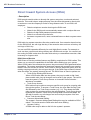
Table 3-2: Function Key Codes by Number
To program a key, press CALL, dial 851 (for 2-digit codes) or 852 (for 3-digit codes), press the key and
enter the code.
Use this key...
For this feature...
When you are...
DSS only
Direct Station Selection,
Code: 01 + any digits + HOLD
Hotline,
Operation: Press key
Outside calls,
Key Lamp Status
Calling an extension
using a DSS key
Off = extension idle
On = extension busy
Flashing = DND
Service Codes
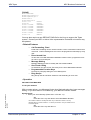
The DSS Function key will allow the entry of up to 24 digits, these can be any
digits e.g extension numbers, Service Codes or outside numbers.
If the digits entered match an extension number then the function key will be a
DSS key for the extension and show busy lamp information.
If the digits entered match a Service Code the function key will access the
feature.
If the digits entered begin with a trunk access code the Topaz will seize a
trunk and dial the remaining digits to line. For trunk calls the digits can contain
the special functions: Flash, Pause and Wait for Answer.
Code: 40
Operation: Set up call + Press key
Code: 03
Operation: Press key
Code: 04
Operation: Press key
Code: 05
Operation: Press key
Microphone Mute
Using Microphone Mute
On red when
activated
Do Not Disturb
Activating DND
On red when
activated
Background Music
Turning BGM on or off
On red when
activated
Headset Operation
Enabling or disabling
Headset Operation
On red when
activated
Transferring a call
None
Code: 06
Operation: Establish call + Hold +
Ext + Press key
Transfer
Code: 07
Operation: Set up call + Press key
+ set up call to add + Press key
twice
Code: 08
Operation: Press key
Code: 09 + mode (1-8)
Doc. No. 8846 - Release 2.0
April 2005
Operation: Press key
Code: 10
Operation: Press key 1/0 + Dest.
Ext.
Code: 11
Operation: Press key 1/0 + Dest.
Ext.
System Hardware Manual
Conference
Setting up a conference
or a Meet Me
On red during setup
Conference
Missed Calls
Viewing answered/
missed trunk calls
Flashing when
missed call stored
Night Service
Activating the Day/
Night Mode
On red when
Call Forwarding,
Immediate
Call Forwarding to
extension or Voice Mail
Slowly flashes red
Call Forwarding,
Busy
Call Forwarding to
extension or Voice Mail
Slowly flashes red
activated
Chapter 3 - 31
NEC Business Solutions Ltd
XEN Topaz
Table 3-2: Function Key Codes by Number
To program a key, press CALL, dial 851 (for 2-digit codes) or 852 (for 3-digit codes), press the key and
enter the code.
Use this key...
Code: 12
Operation: Press key 1/0 + Dest.
Ext.
Code: 13
Operation: Press key 1/0 + Dest.
Ext.
Code: 14
Operation: Press key 1/0 + Dest.
Ext.
Code: 15
Operation: Press key 1/0 + Dest.
Ext. + Type
Code: 16
Operation: Press key Condition +
Dest. Ext. + Type
For this feature...
When you are...
Key Lamp Status
Call Forwarding,
No Answer
Call Forwarding to
extension or Voice Mail
Slowly flashes red
Call Forwarding,
Busy/No Answer
Call Forwarding to
extension or Voice Mail
Slowly flashes red
Call Forwarding,
Dual Ring
Call Forwarding to
extension with both
phones ringing
Slowly flashes red
Call Forwarding,
Follow Me
Call Forwarding to
extension or Voice Mail
Slowly flashes red
Call Forwarding,
to Station
Call Forwarding to
extension or Voice Mail
Slowly flashes red
Call Forwarding,
to Device
Off-Premise
Code: 17
Operation: Press key + device
type code + requested data
(depends on device selected).
Selectable Display
Messaging
Voice Response System
(VRS)
(Park and Page)
Voice Response System
(VRS)
Setting up Call
Forwarding OffPremise, Selectable
Display Messaging,
VRS Park and Page
and VRS
Flashes red
Personal Greeting
(Personal Greeting)
Operation: Press key
Code: 20
Operation: Press key
Code: 21 + zone (1- 9 or 01-32)
Operation: Press Key
Code: 22
Operation: Press key
Code: 23
Operation: Press key
Code: 24
Operation: CALL + Press Key
Chapter 3 - 32
Paging, External
Broadcasting to an
External Paging Zone
On red when
Paging, External
Broadcasting to all
External Paging Zones
On red when
Paging, Internal
Broadcasting to an
Internal Paging Zone
On red when
Paging, Internal
Broadcasting to all
Internal Paging Zone
On red when
Meet Me Paging
Joining a Meet Me
Page
None
Group Call Pickup
Answering a call ringing
another phone in your
Pickup Group
None
activated
activated
activated
activated
Charts and Illustrations
Doc. No. 8846 - Release 2.0
April 2005
Code: 19 + zone (1- 6)
XEN Topaz
NEC Business Solutions Ltd
Table 3-2: Function Key Codes by Number
To program a key, press CALL, dial 851 (for 2-digit codes) or 852 (for 3-digit codes), press the key and
enter the code.
Use this key...
Code: 25
Operation: CALL + Press key
Code: 26 + Pickup Group (1-9 or
01- 32)
Operation: CALL + Press key +
Pickup Group
For this feature...
When you are...
Key Lamp Status
Group Call Pickup
Answering a call ringing
a phone in another
Pickup Group - if you
don’t know the group
number
None
Group Call Pickup
Answering a call ringing
a phone in a specific
Pickup Group
None
Abbreviated Dialling
Dialling a stored
Common/Personal
Abbreviated Dialling
number
None
Dialling a stored Group
Abbreviated Dialling
number
None
Code: 27
Operation: Press key + bin + Line
or CALL key
Code: 28
Operation: Press key + bin + Line
or CALL key
Code: 29
Operation: Place call + Press key
Fast Flash while
Repeat Redial
Activating repeat redial
while on a call
Save Number Dialled
Saving, redialling or
checking a saved
number
None
Memo Dial
Storing, using or
checking a Memo Dial
number
None
system waits to
redial
Code: 30
Operation:
Save: Place call + Press key
Redial: Line or CALL + Press key
Code: 31
Operation:
Store: While on call, Press key +
number to store
Use: Press key + CALL or line
Erase: CALL + Press key
Code: 32
Conference, Voice Call
Operation: Set up trunk call +
Press key OR
OR
Doc. No. 8846 - Release 2.0
April 2005
Press key
Code: 34
Operation: Call ext + Press key
System Hardware Manual
Conference
OR
None
Meet Me Conference (Also
see Conference)
Joining a Meet Me
Off Hook Signalling
Signalling a busy
extension
None
Barge In
Barging In on a coworker’s conversation
None
Code: 33
Operation: Call ext. and receive
busy + Press key
Setting up a Voice Call
Conference
Chapter 3 - 33
NEC Business Solutions Ltd
XEN Topaz
Table 3-2: Function Key Codes by Number
To program a key, press CALL, dial 851 (for 2-digit codes) or 852 (for 3-digit codes), press the key and
enter the code.
Use this key...
Code: 35
Operation: Call busy extension or
access busy trunk + Press key
For this feature...
Leaving a Callback
request at a busy
Callback / Camp On / Trunk extension, Camping On
Queuing
to a busy extension,
Queuing for a busy
trunk
Code: 36
Operation: Dial busy ext + Press
key
Code: 37
Operation: Call extension + Press
key
When you are...
Department Step Calling
Stepping through a
Department Group for
an idle member
Call Forwarding / Do Not
Disturb Override
Overriding an
extension’s Call
Forwarding or Do Not
Disturb
Key Lamp Status
On red when
activated
None
On red when
activated
Code: 38
Message Waiting
Code: 39
Operation: Press key at
destination and source + ext
Code: 40
Operation: Press key
Code: 41 + sec. ext.
Operation: Press key
Fast Flash red at
destination, Hold
Flash red at source
Handset Mute
Muting the handset
transmission while on a
call
On when feature
active (no
transmission on
handset)
Secretary Call
Calling your secretary
(using the buzzer)
On red at source
Fast Flash red at
destination
A secretary picking up a
call ringing your boss’s
extension.
Code: 43
Serial Call
Hold
Code:45
Operation:Place or answer call +
Press key
Operation: Press key
Chapter 3 - 34
Placing a Serial Call to
a
On red when
activated
None
co-worker
Code: 44
Code: 46
None
Activating Room
Monitor
Operation: Press key
Operation: Place or answer call +
Press key
Message Waiting
Room Monitor
Code: 42 + boss ext.
Operation: TRK call + Hold + ext +
Press key
Answering/Leaving a
Department Calling
Putting a call on
System Hold (if hold
key is reassigned)
None
Putting a call on
Exclusive Hold
None
Logging in or logging
out of your Department
Calling Group
On when removed,
Off when installed
Charts and Illustrations
Doc. No. 8846 - Release 2.0
April 2005
Operation: Leave message: Call
ext + Press key OR Answer
message: Press key
XEN Topaz
NEC Business Solutions Ltd
Table 3-2: Function Key Codes by Number
To program a key, press CALL, dial 851 (for 2-digit codes) or 852 (for 3-digit codes), press the key and
enter the code.
Use this key...
Code: 49 + ext or voice mail
number
For this feature...
When you are...
Call Redirect
Redirecting an
incoming call to an
extension or voice mail
Account Codes
Entering Account
Codes
Operation: Press key
Code: 50
Operation: Press key
Busy on a call and wish
Code: 52 + Incoming Ring Group
to play a delay
Incoming Call Queuing Setup
Number (1~8)
message to new callers
to that ring group
Code: 53
Code: 54
Operation: Press key
Call Forward, Off- Premise
On red when
activated
Flashes when in
DND/Call Forward
None
On red when active
On red when active
Forwarding a
Doorphone call to an
external phone number
On red when
Changing the name displayed on your display
phone
None
activated
Code:55
Operation: Do not lift handset + Press
key + Enter extension number + Enter
name + Press HOLD
Name Storing
Code:56
Automatic Transfer
Code:57
Department Incoming Call Delayed
Code: 58 + Dept. Group (1-32)
Department Incoming Call Immediate
Code: 59 + Dept. Group (1-32)
Department Incoming Call Delay
Code:60 + Dept. Group (1-64)
Department Incoming Call DND
Code: 63
Outgoing Call Without Caller
ID (ISDN)
On red when active
Voice Mail
Flashes red on your
key for your
messages or red for
the Department
Group
Code: 67 + Ext or Department
Group number
Operation: Press key
Code:68 + 0-2
Doc. No. 8846 - Release 2.0
April 2005
Queuing Message Starting
Key Lamp Status
On red when active
Calling Voice Mail or
leaving a message
Using Voice Mail
Service
Flashes slowly when
monitoring
Operation: Set up call + Press key
Using Voice Mail
Record
Slow Flash red
when active
Code: 70 + Ext. # or Dept. Group
(1-32)
Automated Attendant
for Extension
None
Operation: Press key
Code: 69 + 0
System Hardware Manual
Chapter 3 - 35
NEC Business Solutions Ltd
XEN Topaz
Table 3-2: Function Key Codes by Number
To program a key, press CALL, dial 851 (for 2-digit codes) or 852 (for 3-digit codes), press the key and
enter the code.
Use this key...
For this feature...
Code: 71 + Ext. # or Dept. Group
(1-32)
Code: 76
Central Office Calls
Operation: Press key
Code: *02 + Trk group (1-9 or 0151)
Trunk Groups
Operation: Press key
Code: *03 + ext. or department
group
Operation: Press key
Multiple Directory
Numbers/Call Coverage
Message Change for
Voice Attendant
Off=Message 1
On=Message 2
Flash Red =
Message 3
On green when
seized, on red when
Pressing a line key to
in use (by other
place or answer a trunk
party), Slow Flash
call (where trunks are
green when ringing,
01-51)
Hold flash when on
Hold
Using a trunk group key
to access a Trunk
Group
On red when active
Multiple Directory
Number: Placing or
answering a call from
your virtual (phantom)
extension or Call
Coverage: Placing or
answering a call to your
co-worker’s extension
Slow Flash red
when ringing, On
red when busy
Placing a call into or
Code: *04 + orbit (01-64)
Operation: Place or answer call +
Press key
Key Lamp Status
Toll Restriction in Credit
Code: *01 + Trunk
number (01-51)
When you are...
Park
retrieving a call from a
Park Orbit
Code: *05 + 0 (Incoming), 1
(Outgoing) or 2 (Both ways) + 00
(All trunk groups
incoming or ARS outgoing) or
Trunk group (01-25)
Flash red when
Loop Keys,
Trunk Group Routing
Placing or answering a
trunk call
ringing,
On green when in
use,
Flash green when
on hold
Doc. No. 8846 - Release 2.0
April 2005
Operation: Press key
Fast Flash when
orbit is busy (green
at originator, red at
others)
Chapter 3 - 36
Charts and Illustrations
XEN Topaz
NEC Business Solutions Ltd
Maximum System Capacities
Items
Topaz
System
Class of Service
15
Toll Restriction Classes
15
Verifiable Account Code Table
2000
Day/Night Mode Numbers
8
Day/Night Service Patterns
10
Analogue Caller ID Detector
Busy Tone Detector
DTMF Receiver
924M : 16
924M with DSPDBU: 32
Trunk
Trunk Port Number
1-51
Trunk Ports(Total)
Analogue Trunks
BRI Trunk Ports
9+16=25
9
8(16B)
924M(308M+308E+308E)
Analogue Trunk Ports :
1-9
4BRIU
Physical Port Number (T-point) :
Logical Port Number (T-point) :
1-4
1-8
Trunk Group Numbers
1-25
Trunk Access Maps
1-51
Trunk Routes
1-25
Ring Groups
1-8
DID Translation Tables
1-20
DID Translation Tables Entries
2000
DISA
Classes of Service
Users
15
1-15
Doc. No. 8846 - Release 2.0
April 2005
Extension
924M(308M+308E+308E)
Extension Ports
1-24
Telephone Extension Number Range
200-225 (default)
Virtual Extension Ports
50
Virtual Extension Port Numbers
01-50
Virtual Extension Port Number Range
Undefined
Class of Service
15
System Hardware Manual
Chapter 3 - 37
NEC Business Solutions Ltd
XEN Topaz
Maximum System Capacities
Items
Topaz
Operator Access Number
0 or 9
Operator Extension
1-8
DSS Console Number
1-3
DSS Console Maximum Installed
3
DLS Console Maximum Installed
24
Doorphone Numbers
1-2
Ringdown Assignment
122
Abbreviated Dialling
Abbreviated Dialling Groups
1-32
Abbreviated Dial Bins
0-1999
Automated Attendant
VRS Message Numbers
1-48
Conference
Conference Circuits
32ch (8ch x 4)
Department and Pickup Groups
Department (Extension) Group Numbers
1-32
Department (Extension) Group Number Range
1-4 digits
Call Pickup Group Numbers
1-8
Hotline
Internal Hotline
24
External Hotline
9
Paging and Park
Internal Page Group Numbers
32
External Page Group Numbers
6
External Speakers
6
Park Group Numbers
1-64
Park Orbits
1-64
SMDR Ports
1(COM)
VRS
VRS(on DSPDB Daughter Board)
1
Voice Mail(DSPDBU)
Voice Mail(DSPDB) Mailboxes
Chapter 3 - 38
300
Charts and Illustrations
Doc. No. 8846 - Release 2.0
April 2005
SMDR
XEN Topaz
NEC Business Solutions Ltd
Maximum System Capacities
Items
Voice Mail Channels
Topaz
8
Passwords
User Password for setting Toll restriction Override and
Changing Class of Service using a Service Code
No Setting_@
Programming Passwords
12345678
Level 3 (SA)
0000
Level 4 (SB)
9999
Programming Password Users
1-8
Telephone Extension Port Number(Total)
Key Telephones
Single Line Telephones
1-24
Doc. No. 8846 - Release 2.0
April 2005
Level 2 (IN)
System Hardware Manual
Chapter 3 - 39
NEC Business Solutions Ltd
SECTION 2
XEN Topaz
LOCATION OF CONTROLS
Functions
12TXD
12TD
6TXD
6TD
Programmable Line
Keys
12
12
6
6
Programmable
Function Keys
10
10 (NO BLF)
10
10 (NO BLF)
Display
Yes
No
Yes
No
CHECK/CLEAR Keys
Yes
No
Yes
No
Handsfree
Yes
No (Talkback)
Yes
No (Talkback)
Accept DLS Console
Yes
No
Yes
No
Yes (Built-in)
Yes (Built-in)
Yes (Built-in)
Yes (Built-in)
Wall Mount Kit
Chapter 3 - 40
Charts and Illustrations
Doc. No. 8846 - Release 2.0
April 2005
1. Key Telephone
XEN Topaz
NEC Business Solutions Ltd
2. DSS (Direct Station Selection) Console
Function Keys
Doc. No. 8846 - Release 2.0
April 2005
Indication
System Hardware Manual
Function Name
IZ1 ~ IZ4
Internal Paging (Zone 1 ~ 4)
EZ1 ~ EZ2
External Paging (Zone 1 and 2)
EAZ
External All Paging
AC
External / Internal All Call
DOOR1 ~ DOOR2
Doorphone Call (Doorphone 1 and 2)
NT
Night Mode Switching
M/W
Message Waiting
SG/VC
Intercom Call Mode Switching (Signal / Voice)
TRFR
Transfer
Chapter 3 - 41
NEC Business Solutions Ltd
XEN Topaz
Doc. No. 8846 - Release 2.0
April 2005
3. DLS (Direct Line Selection) Console
Chapter 3 - 42
Charts and Illustrations
Features
Chapter 4
Abbreviated Dialling
• Description
Abbreviated Dialling gives an extension user quick access to frequently called
numbers. This saves time, for example, when calling a client with whom they deal
often. Instead of dialling a long telephone number, the extension user just dials the
Abbreviated Dialling code.
There are three types of Abbreviated Dialling: Common, Group and Personal. All coworkers can share the Common Abbreviated Dialling numbers. All co-worker’s in the
same Abbreviated Dialling Group can share the Group Abbreviated Dialling numbers.
Personal Abbreviated Dialling numbers are available only at a user’s own extension.
The system has 2000 Abbreviated Dialling bins that you can allocate between
Common and Group Abbreviated Dialling. In addition, each user has 20 personal
Abbreviated Dialling bins.
Each Abbreviated Dialling bin can store a number up to 36 digits long.
When placing an Abbreviated Dialling call, the system normally routes the call through
Trunk Group Routing or ARS (whichever is enabled). Or, the user can pre-select a
specific trunk for the call. In addition, the system can optionally force Common
Abbreviated Dialling numbers to route over a specific Trunk Group. User pre-selection
always overrides the system routing.
Common Abbreviated Dialling
At default the system has 900 Common Abbreviated Dials set by Program 13-01-03.
Although there are 2000 abbreviated dialling bins available we do not recommend that
you increase the quantity of Common Abbreviated Dial bins (since the Personal
Abbreviated bins are also accessed with bin numbers 900-919 by the user).
Doc. No. 8846 - Release 2.0
April 2005
The entries of the Common Abbreviated bins can be set either with Program 13-04-01
or with Service Code 853. They can be dialled by pressing the DC key or Service Code
* followed by the bin number.
Group Abbreviated Dialling
At default there are no groups assigned in Program 13-02-01. There are up to 32
groups available. You can set the quantity of bins available for each group; the quantity
must be in multiples of 10. The bins used for each group cannot overlap any other
group or the Common Abbreviated bins.
The entries of the Group Abbreviated bins can be set either with Program 13-04-01 or
with Service Code 854. They can be dialled by Service Code 814 followed by the bin
number.
When using Service Codes 854 and 814 the bin number starts at 000 for each group
regardless of the actual start bin number defined in Program 13-02-01.
Features and Specifications Manual
Chapter 4 - 43
NEC Business Solutions Ltd
XEN Topaz
Personal Abbreviated Dialling
There are 20 Personal bins available for each extension.
The entries of the Personal Abbreviated bins can be set with Service Code 853 at each
telephone. They can be dialled by Service Code * followed by the bin number 900-919.
DSS Console Chaining
DSS Console chaining allows an extension user with a DSS Console to chain to an
Abbreviated Dialling number stored under a DSS Console key. The stored number dials
out (chains) to the initial call. This can, for example, simplify Dialling when calling a
company with an Automated Attendant. You can program the bin for the company
number under one DSS Console key and the client’s extension number under the other
DSS Console key. The DSS Console user presses the first key to call the company,
waits for the Automated Attendant to answer, then presses the second key to call the
client extension. See Programming below for additional details.
The DSS Console user can also chain to an Abbreviated Dialling number Dialled
manually, from a Programmable Function Key or a One-Touch Key.
Storing a Flash
To enhance compatibility with connected PBX lines, an Abbreviated Dialling bin can
have a stored Flash command. For example, storing 0 Flash 926 5400 will cause the
system to dial 0, flash the line and then dial 926 5400. The Flash can be stored by the
user from their telephone or by the system administrator during system programming.
Using a Programmable Function Key
To streamline frequently-called numbers, an Abbreviated Dialling Programmable
Function Key can also store an Abbreviated Dialling bin number. When the extension
user presses the key, the phone automatically dials out the stored number. This
provides true one-touch calling via a phone’s function keys.
Conditions
None
Default Setting
900 Common Abbreviated Dialling Bins (000~899)
20 Personal Abbreviated Dialling Bins (900~919)
There are no Group Abbreviated Dialling bins assigned.
13-01-01 :Abbreviated Dialling Function Setup - Abbreviated Dialling Auto
Outgoing Call mode
Assign as Trunk Outgoing Mode when all Abbreviated Dialling bins contain external numbers only. The trunk access code (default=0) is automatically prefixed to each number when dialled. Assign as Extension
Outgoing Mode to allow Abbreviated Dialling bins to contain both external and internal numbers. In this case, external numbers must include
the trunk access code (default=0) when the number is stored.
13-01-02 :Abbreviated Dialling Function Setup - Personal Abbreviated Dial
Chapter 4 - 44
Features
Doc. No. 8846 - Release 2.0
April 2005
• Programming
XEN Topaz
NEC Business Solutions Ltd
Enable to allow access to Personal Abbreviated Dialling bins or disable
to provide Common Abbreviated Dialling bins only. When Personal
Abbreviated Dialling is enabled, these 20 bin numbers cannot be used
for Common Abbreviated Dialling, even though the numbering ranges
may overlap.
13-01-03 :Abbreviated Dialling Function Setup - Common Abbreviated Dialling Bins
Designate the bins the system will use for Common Abbreviated Dialling.
Depending on the number of bins assigned in Program 13-01-03, the
number of digits used for Abbreviated Dialling will be different:
13-01-03 = 0-100,
Abbreviated Dialling is 2 digit.
13-01-03 = 200-1000,
Abbreviated Dialling is 3 digit.
13-01-03 = 1100-2000,
Abbreviated Dialling is 4 digit.
13-01-03
13-01-02
Common ABB Bins
Personal ABB Bins
100
1
00-79
80-99
100
0
00-99
None
200-900
1
000-899
900-919
200-900
0
000-899
None
1100-2000
1
0000-1999
0900-0919
1100-2000
0
0000-1999
None
13-02-01: Group Abbreviated Dialling Bins
Designate the bins the system will use for Group Abbreviated Dialling.
13-03-01: Abbreviated Dialling Groups Assignment for Extensions
For Group Abbreviated Dialling, assign extensions to Abbreviated Dialling groups (1-32).
13-04-01: Abbreviated Dialling Number and Name
Enter the Common and Group Abbreviated Dialling numbers and
names.
Doc. No. 8846 - Release 2.0
April 2005
13-05-01: Abbreviated Dialling Trunk Group
For each Common Abbreviated Dialling number, enter the routing
option. To use ARS or Trunk Group Routing, enter 0. To use a specific
Trunk Group, enter the group number (1-25).
14-02-06: Analogue Trunk Data Setup - Pause Time
Enable/disable the systems ability to pause after dialling the first digit.
15-07-01: Programming Function Keys
Assign a function key for Common/Personal Abbreviated Dialling (code
27) or Group Abbreviated Dialling (code 28). You can program the key
as either a general Abbreviated Dialling key or you can choose to store
a bin number with the function key. This key would then always dial the
Features and Specifications Manual
Chapter 4 - 45
NEC Business Solutions Ltd
XEN Topaz
associated bin number. If storing a bin number along with the code, do
not store 0, 00 or 000. To bypass entering a bin number, press HOLD
(HOLD is also required if programming the function key using the service
code 851).
20-06-01: Class of Service for Extensions
Assign a Class of Service (1-15) to an extension.
20-07-04: COS Options - Storing Abbreviated Dialling Entries
In an extension’s COS, allow (1) or prevent (0) the storing of Abbreviated
Dialling entries (codes 853 and 854). Preventing this option will also prevent the user’s display from showing the telephone number. This can be
used when you want to prevent account codes from being displayed.
20-08-03: COS Options (Outgoing Call Service) - Common Abbreviated Dialling
In an extension’s COS, enable (1) or disable (0) Common Abbreviated
Dialling.
20-08-04: COS Options (Outgoing Call Service) - Group Abbreviated Dialling
In an extension’s Class of Service, enable (1) or disable (0) Group
Abbreviated Dialling.
30-03-01: DSS Console Key Assignment
For DSS Console Chaining, assign an Abbreviated Dialling Service
Code (813 or 814) plus a two-digit bin number to a DSS Console key.
• Related Features
•
Account Codes
Abbreviated Dialling bins can contain stored Account Codes. Prevent them from
being displayed using 20-07-04.
•
Automatic Route Selection
For systems with Automatic Route Selection, ARS selects the trunk for the call
unless the user preselects.
•
Central Office Calls, Placing
A user can implement Abbreviated Dialling only if their extension has outgoing
access to trunks.
•
PBX Compatibility
If you enter a PBX trunk access code in an Abbreviated Dialling bin, the system
automatically inserts a pause after the bin.
•
Programmable Function Keys
Function keys simplify Abbreviated dialling operation.
•
Single Line Telephones
•
Toll Restriction
Toll Restriction may prevent a user from using a stored Abbreviated dialling number.
•
Trunk Group Routing
Unless a user preselects a trunk, Trunk Group Routing selects the trunk Abbreviated dialling uses for trunk calls.
Chapter 4 - 46
Features
Doc. No. 8846 - Release 2.0
April 2005
Single line telephones can only dial Common, Personal and Group Abbreviated
dialling numbers.
XEN Topaz
NEC Business Solutions Ltd
• Operation
Store Abbreviated Dialling number (display system phones only):
1. Press SPK key.
2. Dial 853 (for common/personal) or 854 (for group).
3. Dial the Abbreviated Dialling bin number,
Common = 000-899,
Personal = 900-919,
Group = 000-1999 (not set in default).
4. Dial telephone number you want to store (up to 36 digits).
Valid entries are 0-9, # and *. To enter a pause, press MIC. To store a Flash, press FLASH.
5. Press HOLD.
6. Enter the associated name (up to 12 digits).
Use the keypad digits as shown in the character table below.
7. Press HOLD.
8. Press SPK to hang up.
Use this
keypad digit …
When you want to …
1
Enter characters: 1 @ [ ¥ ] ^ _ ‘ { | } ← →
2
Enter characters: A-C, a-c, 2.
3
Enter characters: D-F, a-f, 3.
4
Enter characters: G-I, g-i, 4.
5
Enter characters: J-L, j-l, 5.
6
Enter characters: M-O, m-o, 6.
7
Enter characters: P-S, p-s, 7.
8
Enter characters: T-V, t-v, 8.
9
Enter characters: W-Z, w-z, 9.
0
Enter characters: 0 ! “ # $ % & ‘ ( )
*
Enter characters: * + , - . / : ; < = > ?
#
# = Accepts an entry (only required if two letters on the same key are needed - ex: STA).
DND/CONF
Clear all the entries from the point of the flashing cursor and to the right.
Doc. No. 8846 - Release 2.0
April 2005
CLEAR
Clear the character entry one character at a time.
Features and Specifications Manual
Chapter 4 - 47
NEC Business Solutions Ltd
XEN Topaz
To dial a Common/Personal Abbreviated Dialling number:
1. Press SPK key (or lift handset).
2. Dial *.
-ORPress DC key.
-ORPress Common/Personal Abbreviated Dialling key (PGM 15-07 or SC 851: 27).
To preselect, press a line key in step 1 (instead of CALL) before pressing the DC or Abbreviated Dialling key).
3. Dial Abbreviated Dialling bin number.
Common=000-899,
Personal=900-919.
The stored number dials out. Unless you preselect, Trunk Group Routing selects the trunk for
the call. The system may optionally select a specific Trunk Group for the call. If you have a
DSS Console, you may be able to press a DSS Console key to chain to a stored number.
To dial a Group Abbreviated Dialling Number:
1. Press SPK key (or lift handset).
2. Dial 814.
-ORPress DC key.
-ORPress Group Abbreviated Dialling key (PGM 15-07 or SC 851: 28).
To preselect, press a line key in step 1 (instead of CALL) before pressing the DC or Abbreviated Dialling key).
3. Dial Abbreviated Dialling bin number.
Group=000-1999 (not set in default).
The stored number dials out. Unless you preselect, Trunk Group Routing selects the trunk for
the call. The system may optionally select a specific Trunk Group for the call. If you have a
DSS Console, you may be able to press a DSS Console key to chain to a stored number.
To Check an Abbreviated Dialling number (display system phone only):
1. Press CHECK.
2. Press DC.
3. Dial the Abbreviated Dialling bin number.
If the entire stored number is too long for your phone’s display, press * to see the rest of it.
4. Press CLEAR.
1. Press CHECK.
2. Press the Common/Personal/Group Abbreviated Dialling key.
If the entire stored number is too long for your phone’s display, press * to see the rest of it
3. Press CLEAR.
Chapter 4 - 48
Features
Doc. No. 8846 - Release 2.0
April 2005
-OR-
XEN Topaz
NEC Business Solutions Ltd
Account Codes
• Description
Account Codes are user-Dialled codes that help the system administrator categorize
and/or restrict trunk calls. The system has three types of Account Codes:
Optional Account Codes
Optional Account Codes allow a user to enter an Account Code while placing a trunk
call or anytime while on a call. This type of Account Code is optional; the system does
not require the user to enter it.
Forced Account Codes
Forced Account Codes require an extension user to enter an Account Code every time
they place a trunk call. If the user doesn’t enter the code, the system prevents the call.
As with Optional Account Codes, the extension user can elect to enter an Account
Code for an incoming call. However, the system does not require it.
Once set up in system programming, you can enable Forced Account Codes on a
trunk-by-trunk basis. In addition, Forced Account Codes can apply to all outside calls or
just long distance calls.
Verified Account Codes
With Verified Account Codes, the system compares the Account Code the user dials to
a list of up to 1000 pre-programmed codes. If the Account Code is in the list, the call
goes through. If the code Dialled is not in the list, the system prevents the call. Verified
Account Codes can be from 3-16 digits long using the characters 0-9 and #. During
programming, you can use “wild cards” to streamline entering codes into system
memory. For example, the entry 123W lets users dial Verified Account Codes from
1230 through 1239.
Operator Notification
To prevent Account Code abuse, the system can notify the operator each time an
Account Code violation occurs. This can happen if the user fails to enter an Account
Code (if Forced) or enters a Verified Account Code that is not in the list. The notification
is an automatic Intercom call to the attendant and a “RESTRICT” message in the
operator’s display. (If the attendant fails to enter a valid Account Code, the system
drops the call.)
Doc. No. 8846 - Release 2.0
April 2005
Account Codes for Incoming Calls
The system can control the ability of extension users to enter Account Codes for
incoming calls. When this option is enabled, a user can dial * while on an incoming call,
enter an Account Code, and then dial * to return to their caller. If the option is disabled,
any digits the user dials after answering an incoming call outdial on the connected
trunk.
Hiding Account Codes
Account Codes can be optionally hidden from a telephone’s display. This would
prevent, for example, an unauthorized co-worker from obtaining a Verified Account
Code by watching the display and making note of the digits that dial out. When hidden,
the Account Code digits show as the character “ * ” on the telephone’s display.
Features and Specifications Manual
Chapter 4 - 49
NEC Business Solutions Ltd
XEN Topaz
Account Code Capacity
Account Codes print along with the other call data on the SMDR record after the call
completes. Account Codes can be 1-16 digits in length using 0-9 and #. Verified
Account Codes can be from 3-16 digits long.
Redialled Numbers Do Not Contain Account Codes
When using the Last Number Redial, Save or Repeat Dial features, the system will not
retain Account Code information. Any number redialled with these features, the user
will need to re-enter an Account Code.
Note: If a user enters *12345*203 926 5400*67890*, if the Last Number Redial
feature is used, the system dials the number as 203 926 5400*67890*. The
*67890* is not treated as an Account Code.
Access to Emergency Numbers
When Forced or Verified Account Codes are enabled, the emergency number 000 may
be blocked. To allow access to the emergency number, as required by law, assign 000
to an Abbreviated Dialling bin (e.g. 000=*1*000) and then program this to a
Programmable Feature key (e.g. SC851 : 01:*000). This key must be labelled as
Emergency.
Conditions
A. Account Codes are user-Dialled codes that help the system administrator categorize and/or restrict trunk calls. The system has three types of Account Codes,
optional, forced and verified.
B. If a user enters a code that exceeds the 16 digit limit, the system ignores the
Account Code entry.
If the system has Account Codes disabled, the digits Dialled (e.g., *1234*) appear
on the SMDR report as part of the number Dialled.
C. Do not use an asterisk within a PBX access code when using Account Codes.
Otherwise, after the *, the trunk will stop sending digits to the central office.
Default Setting
Account Codes are disabled.
• Programming
14-01-11: Basic Trunk Data Setup - Account Code
Enable (1) or disable (0) Forced Account Codes for each trunk.
15-07-01: Programming Function Keys
Assign a function key as an Account Code key (code 50). Use this key
instead of the dial pad to enter the * before and after the Account Code.
20-13-20: Class of Service Options (Supplementary Service) - Account Code/
Toll Restriction Operator Alert
When enabled, the operator is alerted when an extension improperly
enters an Account Code or violates Toll Restriction.
21-01-14: Forced Account Code Inter-digit Timer
The system waits this amount of time for a user to dial Forced Account
Code digits (0-64800 sec.).
21-04-01: Toll Restriction Class for Extensions
Chapter 4 - 50
Features
Doc. No. 8846 - Release 2.0
April 2005
20-06-01: Class of Service for Extensions
Assign a Class of Service (1-15) to an extension.
XEN Topaz
NEC Business Solutions Ltd
Use this option to assign a Toll Restriction Class (1-15) to an extension.
35-05-01: Account Code Setup - Account Code Mode
For each Class of Service (1-15) use this option to select the Account
Code Mode. The options are:
0 Account Codes disabled. (Any codes you enter dial out as part of your
initial call.)
1 Account Codes optional (not required).
2 Account Codes required (forced) but not verifiable.
3 Account Codes required (forced) and verifiable.
35-05-03: Account Code Setup - Account Codes for Incoming Calls
For each Class of Service (1-15), enter 1 in this option to enable
Account Codes for incoming calls. Enter 0 to disable Account Codes for
incoming calls. If disabled, any codes you enter dial out on the connected trunk.
35-05-04: Account Code Setup - Hiding Account Codes
For each Class of Service (1-15), enter 1 to have the system hide
Account Codes on an extension’s display as they are entered. Enter 0 to
have the Account Codes displayed.
35-06-01: Verified Account Code Table
Use this option to enter data into the Verified Account Code Table. You
can enter up to 2000 codes from 3-16 digits in length. For a wild card,
press the FLASH key.
• Related Features
•
Abbreviated Dialling
Abbreviated dialling bins can contain stored Account Codes. Prevent them from
being displayed using 20-07-04.
•
Automatic Route Selection
ARS can force a user to enter an Authorization Code prior to using a certain
route. The system verifies the ARS Authorization Code dialled against the ARS
Authorization Code list (Program 44-03).
•
Programmable Function Keys
To simplify Account Code entry, store the Account Code (e.g., *1234*) in a OneTouch Key. Just press the key instead of dialling the codes.
•
PBX Compatibility
When using Account Codes, do not use an asterisk within a PBX access code.
Otherwise, after the *, the trunk would stop sending digits to the central office.
•
Station Message Detail Recording
Doc. No. 8846 - Release 2.0
April 2005
Account Codes appear on the SMDR report (even if they are hidden on the
phone’s display).
• Operation
To enter an Account Code any time while on a trunk call:
The outside caller cannot hear the Account Code digits you enter. You can use this procedure if your system has Optional Account Codes enabled. You may also be able to use this procedure for incoming calls.
This procedure is not available at SLTs.
Features and Specifications Manual
Chapter 4 - 51
NEC Business Solutions Ltd
XEN Topaz
1. Dial *.
OR
Press your Account Code key (PGM 15-07 or SC 851: code 50).
2. Dial your Account Code (1-16 digits, using 0-9 and #).
If Account Codes are hidden, each digit you dial will show an “ * “ character on the telephone’s display.
3. Dial *.
OR
Press your Account Code key (PGM 15-07 or SC 851: code 50).
To enter an Account Code before dialling the outside number:
If your system has Forced Account Codes, you must use this procedure. If it has Verified Account Codes,
you can use this procedure instead of letting the system prompt you for your Account Code. You may also
use this procedure if your system has Optional Account Codes. If your system has Verified Account Codes
enabled, be sure to choose a code programmed into your Verified Account Code list.
1. Access trunk for outside call.
You can access a trunk by pressing a line key or Dialling a code (except 0). Refer to Central Office Calls,
Placing for more information.
2. Dial *.
OR
Press your Account Code key (PGM 15-07 or SC 851: code 50)
3. 3. Dial your Account Code (1-16 digits, using 0-9 and #).
If you make an incorrect entry, your system may automatically alert the operator. If Account Codes are hidden, each digit you dial will show an “ * “ character on the telephone’s display.
4. Dial *.
OR
Press your Account Code key (PGM 15-07 or SC 851: code 50)
5. Dial the number you want to call.
If you hear “stutter dial tone after Dialling the number, ARS is requesting that you enter an ARS Authorization Code. Refer to Automatic Route Selection for more information.
To dial an outside number and let your system tell you when an Account Code is
required:
1. Access a trunk and dial the number you want to call.
2. Wait for your call to go through.
OR
If you hear “Please enter an Account Code,” and your display shows ENTER ACCOUNT:
Dial *.
OR
Press your Account Code key (PGM 15-07 or SC 851: code 50)
Dial your Account Code (1-16 digits, using 0-9 and #).
If Account Codes are hidden, each digit you dial will show an “ * “ character on the telephone’s display.
Dial *.
OR
Press your Account Code key (PGM 15-07 or SC 851: code 50)
To enter an Account Code for an incoming call:
This procedure is not available at SLTs.
1. Answer incoming call.
If Account Codes for Incoming Calls is disabled, the following steps will dial digits out onto the connected
trunk.
Chapter 4 - 52
Features
Doc. No. 8846 - Release 2.0
April 2005
If you hear “stutter dial tone after Dialling the number, ARS is requesting that you enter an ARS Authorization Code. Refer to Automatic Route Selection for more information.
XEN Topaz
NEC Business Solutions Ltd
2. Dial *.
3. Enter the Account Code.
You can enter any code of the proper length. Incoming Account Codes cannot be Forced or Verified.
4. Dial *.
To enter an Account Code while placing a trunk call:
If your system has Forced Account Codes, you must follow this procedure.
1. 1. Access trunk for outside call.
You can access a trunk by pressing a line key or Dialling a code. Refer to Central Office Calls, Placing for
more information.
With Forced Account Codes, you hear, “Please enter an Account Code.” Your display shows: ENTER
ACCOUNT.
2. Dial *.
3. Dial your Account Code (1-16 digits, using 0-9 and #).
4. Dial *.
If the system has Forced Account Codes and you don’t enter a code, your call cannot go through. You can,
however, dial ** to bypass Forced Account Code entry.
5. Dial number you want to call.
If you hear “stutter” dial tone after Dialling the number, ARS is requesting you to enter an ARS Authorization
Code. Refer to the Automatic Route Selection feature for more information on ARS Authorization Codes.
To enter an Account Code at a single line set:
1. Access trunk for outside call.
You can access a trunk by Dialling a code. Refer to Central Office Calls, Placing for more information. With
Forced Account Codes, you hear, “Please enter an Account Code.” Your display shows: ENTER
ACCOUNT.
2. 2. Dial *.
3. 3. Enter Account Code (1-16 digits).
4. 4. Dial *.
5. 5. Dial number you want to call.
Doc. No. 8846 - Release 2.0
April 2005
If you hear “stutter” dial tone after Dialling the number, ARS is requesting you to enter an ARS Authorization
Code. Refer to the Automatic Route Selection feature for more information on ARS Authorization Codes.
Features and Specifications Manual
Chapter 4 - 53
NEC Business Solutions Ltd
XEN Topaz
Alarm
• Description
Alarm lets a system phone extension work like an Alarm clock. An extension user can
have Alarm remind them of a meeting or an appointment. There are two types of
Alarms:
•
Alarm 1 (sounds only once at the preset time)
•
Alarm 2 (sounds every day at the preset time)
Conditions
Single line sets will ring and Music on Hold will be heard when the alarm sounds.
Default Setting
Alarm is enabled.
• Programming
20-01-06: System Options - Alarm Duration
Set the duration of the Alarm signal (0-64800 seconds).
• Related Features
None
• Operation
To set the alarm:
1. At system phone, press a SPK key.
OR
At single line set, lift handset.
2. Dial 827.
3. Dial alarm type (1 or 2).
Alarm 1 sounds only once. Alarm 2 sounds each day at the preset time.
4. Dial the alarm time (24-hour clock).
For example, for 1:15 PM dial 1315.
A confirmation tone will be heard if the alarm has been set. If the alarm was not set, an error tone will be
heard instead.
5. At system phone, press SPK to hang up.
OR
At single line set, hang up.
Note: When Alarm 2 is set, no indication is given on the telephone display until the
alarm sounds (Alarm 2 sounds daily at the assigned time).
To silence an alarm:
1. At system phone, press CLEAR.
OR
At single line set, lift handset.
The single line set user will hear Music on Hold when the handset is lifted.
Chapter 4 - 54
Features
Doc. No. 8846 - Release 2.0
April 2005
Note: When Alarm 1 is set, the telephone display will show “Alarm 1” until the
alarm has sounded (Alarm 1 sounds once only at the assigned time).
XEN Topaz
NEC Business Solutions Ltd
To check the programmed alarm time:
1. Press CHECK.
2. Dial 827.
3. Dial alarm type (1 or 2).
The programmed time displays.
4. Press CLEAR.
To cancel an alarm:
1. At system phone, press a SPK key.
OR
At single line set, lift handset.
2. Dial 827.
3. Dial alarm type (1 or 2).
4. Dial 9999.
Doc. No. 8846 - Release 2.0
April 2005
5. At system phone, press SPK to hang up.
OR
At single line set, hang up.
Features and Specifications Manual
Chapter 4 - 55
NEC Business Solutions Ltd
XEN Topaz
Alphanumeric Display
• Description
System display telephones have a 2-line, 16 character per line alphanumeric display
that provides various feature status messages. These messages help the display
telephone user process calls, identify callers and Customise features.
Conditions
The contrast is not adjustable when the telephone has background music enabled.
Default Setting
Enabled for all display telephones.
• Programming
20-06-01: Class of Service for Extensions
Assign a Class of Service (1-15) to an extension.
20-11-08: Class of Service Options (Hold/Transfer Service) - Transfer
Information Display
In an extension’s Class of Service, enable (1) or disable (0) an
extension’s incoming Transfer pre-answer display.
• Related Features
None
• Operation
Doc. No. 8846 - Release 2.0
April 2005
Operation is automatic if enabled in programming.
Chapter 4 - 56
Features
XEN Topaz
NEC Business Solutions Ltd
Attendant Call Queuing
• Description
Attendant extensions can have up to 32 incoming calls queued before additional
callers hear busy tone. This helps minimize call congestion in systems that use the
attendant as the overflow destination for unanswered calls. For example, you can
program Direct Inward Lines and Voice Mail calls to route to the attendant when their
primary destination is busy. With Attendant Call Queuing, these unanswered calls
would normally “stack up” for the attendant until they can be processed.
The 32 call queue total includes Intercom, DISA, DID/DDI, DIL and transferred calls. If
the attendant doesn’t have an appearance for the queued call, it waits in line on the
CALL key. If the attendant has more than 32 calls queued, an extension can Transfer a
call to the attendant only if they have Busy Transfer enabled.
Attendant Call Queuing is a permanent, non-programmable system feature, for each
telephone assigned in Program 20-17-01. It is automatic for incoming exchange line
calls to a Ring Group (Program 22-04-01 to place phones into Ring Groups.
Conditions
None
Default Setting
Enabled.
• Programming
20-17-01: Operator’s Extension Number
Assign the operator (attendant’s) extension.
24-02-01: System Options for Transfer - Busy Transfer
Prevent (0) or allow (1) extensions to Transfer calls to an attendant that
has more than 32 calls in queue.
• Related Features
•
Call Forwarding / Personal Greeting
Forwarding when unanswered or busy can only occur at the attendant if there are
more than 32 calls in queue.
• Operation
Doc. No. 8846 - Release 2.0
April 2005
None
Features and Specifications Manual
Chapter 4 - 57
NEC Business Solutions Ltd
XEN Topaz
Automatic Route Selection (F-Route)
• Description
Automatic Route Selection (ARS) provides call routing and digit translation based on
the digits a user dials. ARS consists of look up tables that compare the dialled digits
and decide which translation table should be used. The decision can optionally be
dependant on time and day of the week. The translation table will then delete and/or
add digits select the trunk group and seize the outgoing trunk.
ARS Feature Summary
1
Use Program 26-04-01 to assign an extension’s ARS Class of Service. An
extension’s Class of Service (set in Programs 20-xx has not effect on ARS
routing choices.
Chapter 4 - 58
Features
Doc. No. 8846 - Release 2.0
April 2005
• Basic ARS Operation
When a user places an outside call, ARS analyses the digits dialled
and assigns one of 64 Selection Numbers to the call. The Selection
Number chosen depends on which digits the user dialled. ARS then
checks the time of the day, the day of the week and the extension’s
ARS Class of Service. Based on these call routing options, ARS
selects a trunk group for the call and imposes the Dial Treatment
instructions (if any).
• Call Routing
ARS can apply up to 24-digit analysis to every number dialled. For programming, ARS provides separate 8-digit and 24 digit tables. Each
table can have up to 250 numbers.
• Dialling Translation (Special Dialling Instructions)
ARS can automatically execute stored dialling instructions (called Dial
Treatments) when it chooses a route for a call. The system allows up
to 15 Dial Treatments. The Dial Treatments can:
- Automatically insert or delete a leading 1
- Insert or delete and area code (NPA)
- Add digits (such as a dial-OCC number), pauses and waits to the dialling sequence
- Require the user to enter an authorisation code when placing a call
(see Forced Authorisation Code below)
• Time of Day Selection
For routing purposes, ARS provides ten different day selections (called
Time Schedule Patterns). Each Time Schedule Pattern can provide up
to 20 time intervals which are assigned to a day of the week (MondayFriday, Saturday, Sunday or Holiday).
• Hierarchical Class of Service Control
ARS allows or denies call route choices based on an extension’s ARS1
Class of Service. This allows lower Classes of Service (e.g., 1) to
access routes unavailable to higher Classes of Service (e.g., 16). The
system provides up to 16 (0=unrestricted, 1-16) ARS Classes of Service.
XEN Topaz
NEC Business Solutions Ltd
Conditions
A. Line keys, outgoing loop keys, outgoing trunk group keys, Dialling 804+trunk
group, Dialling 805+trunk number, and abbreviated dial numbers assigned to a
certain trunk group can all be used to by-pass ARS.
B. Do not use Dial Analysis Table 1 when configuring the system for Australian numbering plan.
Default Setting
ARS is not programmed.
• Programming
11-01-01 : Tab System Numbering
Set up a Service Code for ARS/F-Route Access (normally 0).
11-09-01: Trunk Access Code
Specify the single digit code used to access ARS (normally 0).
14-05-01: Trunk Groups
Program trunks of the same carrier type into the same trunk group.
14-07-01: Trunk Access Map Setup
Set up the Trunk Access Maps (1-51). This sets the access options for
trunks.
15-06-01: Trunk Access Map for Extensions
Assign Trunk Access Maps (1-51) to extensions.
26-01-01: Automatic Route Selection Service – ARS Service
Enable (1) or disable (0) ARS.
26-01-02: Automatic Route Selection Service - Network Outgoing Inter-Digit
ARS Timer
With Networking, this timer (0-64800 x 100msec.) replaces 20-03-04
when determining if all network protocol digits have been received. If
ARS is enabled at Site B, this timer can be programmed for 5 (500
msec) at Site A. If ARS is disabled and Site B is using F-Route for outbound dialling, this timer should be programmed for 30 (3 seconds) at
Site A.
Doc. No. 8846 - Release 2.0
April 2005
26-01-03: Automatic Route Selection Service - ARS Misdialled Number
Handling
If a user dials a number not programmed in ARS, this option determines
if the system should route over trunk group 1 (0) or play error tone (1).
26-02-01: Dial Analysis Table for ARS – Dial
Enter the digits (16 digits maximum: 1-9, 0 * #, @; 200 separate entries)
for the Dial Analysis Table which will be analysed by ARS/LCR. This
table will be checked after any programmed F-Route operations have
completed. The system will then refer to Program 26-02-02 and 26-0203 to determine the routing for the call. To enter a wild card/don’t care
digit, press Line Key 1 to enter an @ symbol. It is important to remember that the system checks the table numbers in numerical order.
This means that entries for specific numbers should be entered first
(such as your local area codes), then enter the items containing wild
Features and Specifications Manual
Chapter 4 - 59
NEC Business Solutions Ltd
XEN Topaz
card digits. If the system sees an entry of “2@@” then any table entries
which follow will be ignored. For example, if 268, 269, and 270 are local
exchanges, these would be the first three table entries which would
route according to the settings made in Program 26-02-02 and 26-02-03
for each of the table entries. If the next entry is “2@@”, then the system
checks no further in this program and routes all other “2xx” numbers
according to the entries made in Program 26-02-02 and 26-02-03 for this
table entry.
26-02-02: Dial Analysis Table for ARS - Service Type
For each Dial Analysis Table (1-200), select ‘0’ for no ARS, ‘1’ for Service Type 1 - Route to Trunk Group Number to have the number route to
a trunk group [Refer to Program 26-02-03] or ‘2’ for Service Type 2 - FRoute Selected to have the dialled number controlled by the F-Route
table. If Service Type 2 is selected and F-Route operation is on, the FRoute table used is determined by Program 44-04. If F-Route operation
is off, the routing is determined by Program 44-05.
26-02-03: Dial Analysis Table for ARS - Service Number
For each Dial Analysis Table (1-200), if Service Type 1 was selected in
Program 26-02-02, enter the trunk group number (0-25, 0=no route).
26-02-04: Dial Analysis Table for ARS - ARS Class of Service
For each Dial Analysis Table (1-200), set the Automatic Route Selection
(ARS) Class of Service (0-16).
26-03-01: ARS Dial Treatment
Assign the 15 Dial Treatments for automatic ARS Dialling translation.
The ARS Dial Treatment options are:
• 3 - Delete the NPA if dialled as part of the initial call.
• 2 - Delete the leading digit if dialled as part of the initial call.
• 1 - Add a leading 1 if not dialled as part of the initial call.
• INPA - Insert the NPA specified by NPA.
• DNN - Outdial the NN number of digits or execute the code that follows.
For example, D041234 out-dials 1234. Valid entries are 0-9, #, *, Wnn
(wait nn seconds) and P (pause). Each digits code counts as a digit. So
for example, if a P was added for a pause, the entry would look like:
D05P1234. This Dial Treatment can only be added from telephone programming.
• Wnn - Wait nn seconds.
• P - Pause in analogue trunk.
• R - Redial the initially dialled number, including any modifications
• E - End of Dial Treatment. All Dial Treatments must end with the E
code.
26-04-01: ARS Class of Service
Set an extension’s ARS Class of Service (0-16). Automatic Route Selection uses ARS Class of Service when determining how to route an extension’s calls.
Chapter 4 - 60
Features
Doc. No. 8846 - Release 2.0
April 2005
26-02-05: Dial Analysis Table for ARS - Dial Treatment
For each Dial Analysis Table (1-200), set the Automatic Route Selection
(ARS) Dial Treatment (0-15) to be used.
XEN Topaz
NEC Business Solutions Ltd
44-01-01: System Options for ARS
Select whether the ARS feature should use the time schedule (0=not
used, 1=used).
44-02-01: Dial Analysis Table for ARS Access – Dial
Set the Dial digits for the Pre-Transaction Table for selecting ARS(8 digits).
44-02-02: Dial Analysis Table for ARS Access - Service Type
Set the Service Type (0-3) for the Pre-Transaction Table for selecting
ARS .
44-02-03: Dial Analysis Table for ARS Access - Additional Data
If a Service Type is selected in Program 44-02-02, set the additional
data, if required, for the Pre-Transaction Table for selecting ARS
44-02-04: Dial Analysis Table for ARS Access - Dial Tone Simulation
Determine if the Dial Tone Simulation is on (1) or off (0) for the PreTransaction Table for selecting ARS .
44-03-01: Dial Analysis Extension Table – Dial
Set the Dial digits to be used for the Dial Extension Analyze Table.
44-03-02: Dial Analysis Extension Table - Table Number
Select the ARS/R-Route table number (0-500) to be used for the Dial
Extension Analyse Table.
44-03-03: Dial Analysis Extension Table - Table Number (251)
Select the ARS/R-Route table number (0-500) to be used for the Dial
Extension Analyse Table 251.
44-03-04: Dial Analysis Extension Table - Next Table Number
Select the Next Table Area Number (0-4) to be used for the Dial Extension Analyse Table 252.
44-04-01: ARS Selection for Time Schedule
Assign each ARS Selection number (1-500) to an ARS table number for
each ARS time mode. There are 8 time modes for ARS Access.
44-05-02: ARS Table - Delete Digits
For each ARS table (1-500) assign a priority number (1-4). Enter the
number of digits to be deleted (0-255).
Doc. No. 8846 - Release 2.0
April 2005
44-05-03: ARS Table - Additional Dial Number
For each ARS table (1-500) assign a priority number (1-4). Enter the
number of additional digits to be Dialled (0-1000).
44-05-04: ARS Table - Beep Tone
For each ARS table (1-500) assign a priority number (1-4). Select
whether or not a beep is heard if a lower priority trunk group is used
(0=no beep, 1=beep).
44-05-05: ARS Table - Gain Table Number for Internal Call
For each ARS table (1-500) assign a priority number (1-4). Select the
gain table number to be used for internal calls (0-500).
Features and Specifications Manual
Chapter 4 - 61
NEC Business Solutions Ltd
XEN Topaz
44-05-06: ARS Table - Gain Table Number for Tandem Connections
For each ARS table (1-500) assign a priority number (1-4). Select the
gain table number to be used for tandem connection (0-500).
44-05-07: ARS Table - ARS Class of Service
For each ARS table (1-500) assign a priority number (1-4). Select the
Class of Service to be used for ARS (0-16).
44-05-08: ARS Table - Dial Treatment
For each ARS table (1-500) assign a priority number (1-4). Select the
Dial Treatment to be used (0-15).
44-06-01: Additional Dial Table
Set the additional dial table (1-1000) to add prior to the Dialled ARS
number.
44-07-01: Gain Table for ARS Access - Incoming Transmit
44-07-02: Gain Table for ARS F-Route Access - Incoming Receive
44-07-03: Gain Table for ARS Access - Outgoing Transmit
44-07-04: Gain Table for ARS Access - Outgoing Receive
Set the gain table to be used (1-500). If an extension dials ARS number;
- The Extension Dial Gain Table is activated, which is assigned in Program 44-05.
- The Extension Dial Gain Table follows “Outgoing transmit” and “Outgoing receive” settings.
If the incoming call is transferred to another line using ARS ;
- The Tandem Gain Table is activated, which is assigned in Program 4405.
- The Tandem Gain Table follows the “Incoming transmit” and “Incoming
receive” settings for incoming line, and “Outgoing transmit” and “Outgoing receive” settings for the outgoing line.
For the ARS call (in the above case), CODEC gain in Program 14-01-02
and 14-01-03 are not activated.
44-08-01: Time Schedule for ARS
Define the daily pattern of the ARS feature. ARS has 10 time patterns.
These patterns are used in Program 44-09 and 44-10. The daily pattern
consists of 20 time settings.
44-10-01: Holiday Schedule for ARS
Define a yearly schedule for ARS. This schedule is used for setting special days such as national holidays (pattern numbers 1-10).
• Related Features
•
Abbreviated Dialling
Abbreviated dialling may bypass ARS routing.
•
Chapter 4 - 62
Central Office Calls, Placing
Features
Doc. No. 8846 - Release 2.0
April 2005
44-09-01: Weekly Schedule for ARS
Define a weekly schedule for using ARS (day numbers 1-7 (1=Sun,
7=Sat), pattern numbers 1-10).
XEN Topaz
NEC Business Solutions Ltd
Set up other options for outgoing calls (e.g., unassign line keys, adjust gains,
ARS access key, loop keys, etc.).
•
Least Cost Routing (LCR)
LCR is applied after trunk routing has been determined and is used to modify the
dialled digits which will be sent to line.
•
Toll Restriction
Toll Restriction overrides ARS.
•
Trunk Group Routing
A system with Automatic Route Selection cannot also have Trunk Group Routing.
•
Trunk Queuing/Camp On
With ARS installed, Trunk Queuing automatically queues for the least costly
route. The system automatically redials the queued call when the extension user
lifts the handset.
• Operation
To place a call using ARS:
1. At keyset, press the SPK key.
- OR At single line set, lift handset.
You will hear normal Intercom dial tone.
1. Dial 0
You will hear a second “stutter” dial tone.
Doc. No. 8846 - Release 2.0
April 2005
Dial outside number.
If you hear another “stutter” dial tone, you must enter your extension’s ARS Authorisation Code.
Features and Specifications Manual
Chapter 4 - 63
NEC Business Solutions Ltd
XEN Topaz
Doc. No. 8846 - Release 2.0
April 2005
F-Routing Dial Analysis
Chapter 4 - 64
Features
XEN Topaz
NEC Business Solutions Ltd
Background Music
• Description
Background Music (BGM) sends music from a customer-provided music source to
speakers in system phones. If an extension user activates it, BGM plays whenever the
user’s extension is idle.
A. Refer to the System Hardware Manual for installation instructions.
B. The system supports one Background Music source input, via either the built-in
music port or the 2PGDU card.
C. If a 2PGDU card is installed and has BGM assigned to one of its ports (Program
10-03-01=9 and 33-01-01=3), the built-in music port is no longer used for BGM,
i.e. the 2PGDU card takes priority.
Default Setting
The built-in music port is assigned for Background Music.
• Programming
10-03-01 :PCB Setup – Terminal Type (2PGDU)
Set the terminal type to 9:External Music Source (MOH or BGM).
Assign port numbers in the following order to avoid duplication in Program 10-03-02:
Program 10-03-01 Port 3 = 9 (External Music Source), system assigns
10-03-02 = Port 1.
Program 10-03-01 Port 4 = 6 (External Speaker), system assigns 10-0302 = Port 2.
10-03-02 :PCB Setup – Logical Port Number (2PGDU)
Assign port numbers for the devices assigned in Program 10-03-01.
May be automatically assigned when Program 10-03-01 is set.
20-06-01 :Class of Service for Extensions
Assign a Class of Service (1~15) to an extension.
20-13-30 :Class of Service for Extensions
Class of Service Options (Supplementary Service)
- Background Music
In an extensions Class of Service, enable (1) or disable (0) the ability to
activate Background Music.
Doc. No. 8846 - Release 2.0
April 2005
33-01-01 :Analogue Interface Port Type Setup
Set the Analogue Interface port (1-6) assigned as an External Music
Source in Program 10-03-01 to 3 (BGM). Note that the 2PGDU card
resides in Slot 4.
• Related Features
•
•
Music on Hold
Single Line Telephones
Features and Specifications Manual
Chapter 4 - 65
NEC Business Solutions Ltd
XEN Topaz
• Operation
To turn Background Music on or off:
1. Press a SPK key.
2. Dial 825.
Doc. No. 8846 - Release 2.0
April 2005
3. Press SPK to hang up.
Chapter 4 - 66
Features
XEN Topaz
NEC Business Solutions Ltd
Barge In
• Description
Barge In permits an extension user to break into another extension user’s established
call, including Conference calls. This sets up a Conference-type conversation between
the intruding extension and the parties on the initial call. With Barge In, an extension
user can get a message through to a busy co-worker right away.
There are two Barge In modes: Monitor Mode (Silent Monitor) and Speech Mode. With
Monitor Mode, the caller Barging In can listen to another user’s conversation but
cannot participate. With Speech Mode, the caller Barging In can listen and join another
user’s conversation.
CAUTION
The use of monitoring, recording or listening devices to eavesdrop, monitor,
retrieve or record telephone conversations or other sounds activities,
whether or not contemporaneous with its transmission may be illegal in certain circumstances under federal or state laws. Legal advice should be
sought prior to implementing any practice that monitors or records any telephone conversation. The Telecommunications (Interception) Act 1979 (Cth),
The Telecommunications Act 1997, The Privacy Act 1988 and State and Territory Listening Devices Legislation are all relevant. Some federal and state
laws require some form of notification to all parties or require the consent of
all parties to the telephone conversation, prior to monitoring or recording a
telephone conversation. Some of these laws incorporate strict penalties.
Section 6 of the Industry Guidelines recommend pre-recorded messages or
verbal notification to alert callers that the calls may be monitored:
e.g. “your call may be listened to and recorded for quality and coaching purposes. Please tell the consultant if you don’t want this to happen”.
Section 6 of the Industry Guidelines also make recommendations in relation
to notifications in writing.
Conditions
Each Barge In requires a conference circuit to be available. If all 32 conference circuits
are in use, Barge In cannot be performed.
Default Setting
Disabled
Doc. No. 8846 - Release 2.0
April 2005
• Programming
11-12-08: Service Code Setup (for Service Access) - Barge In
Determine what the service code should be for an internal party to use
the Barge In feature (default=810).
11-16-02: One-Digit Service Code Setup - Barge In
Features and Specifications Manual
Chapter 4 - 67
NEC Business Solutions Ltd
XEN Topaz
Use this option to set up Item 02 for single digit Barge In. For example,
you can assign Item 02 to use digit 5 for Barge In. This would allow you
to program a function key with an extension number plus the Barge In
code (i.e., 205 5). This allows one-touch access to the Barge In feature
for extension 205. If you undefine a service code, be careful when you
change this item that you don’t inadvertently disable any essential Dialling function (such as Voice Mail or Message Waiting).
15-07-01: Programming Function Keys
Assign a function key for Barge In (code 34).
20-06-01: Class of Service for Extensions
Assign a Class of Service (1-15) to an extension.
20-13-10: Class of Service Options (Supplementary Service) - Barge In Mode
In an extension’s Class of Service, enable the Barge In Speech Mode (0)
or Monitor Mode (1) at the initiating extension (i.e., Barge In initiator).
20-13-15: Class of Service Options (Supplementary Service) - Barge In, Initiate
In an extension’s Class of Service, enable (1) or disable (0) Barge In at
the initiating extension (i.e., Barge In initiator).
20-13-16: Class of Service Options (Supplementary Service) - Barge In,
Receive
In an extension’s Class of Service, enable (1) or disable (0) Barge In at
the receiving extension (i.e., Barge In receive).
20-13-17: Class of Service Options (Supplementary Service) - Barge In Tone/
Display
Enable (1) or disable (0) the Barge In Tone. If disabled, this also turns off
the Barge In display at the called extension.
20-13-32: Class of Service Options (Supplementary Service) - Multiple Barge
In
Enable (1) or disable (0) the extension’s ability to have multiple user’s
Barge In to their conversation.
20-14-11: Class of Service Options for DISA - DISA Trunk Barge In
Use this option to enabled (1) or disable (0) a DISA user from using the
Barge In feature with the service code defined in Program 11-12-08.
21-01-03: System Options for Outgoing Calls - Trunk Interdigit Time (External)
Program how long an extension must wait before using the Barge In feature can be used on a call (this timer waits until this timer expires before
putting a call in a talk state).
Chapter 4 - 68
Features
Doc. No. 8846 - Release 2.0
April 2005
20-18-07: Service Tone Timer - Intrusion Tone Repeat Time
After a user Barges In, the system repeats the Barge In tone after this
interval. Normally, you should disable this timer by entering 0. (This timer
also affect any other types of call interruption features, such as Voice
Mail Conversation Recording.
XEN Topaz
NEC Business Solutions Ltd
• Related Features
•
Conference
An extension user cannot Barge In on a Conference.
•
Intercom
An extension user cannot Barge In on an Intercom call if one of the Intercom callers is using Handsfree Answerback. Both Intercom parties must have lifted the
handset or pressed SPK.
•
Off Hook Signalling
An extension user cannot Barge In on an Intercom call if one of the Intercom callers is using Handsfree Answerback. Both Intercom parties must have lifted the
handset or pressed SPK.
•
Programmable Function Keys
Function keys simplify Barge In operation.
• Operation
To Barge In after calling a busy extension:
The call must be set up for about 10 seconds before you can Barge In.
Listen for busy/ring or busy tone.
1. Call busy extension.
2. Press Barge In key (PGM 15-07 or SC 851: 34).
To Barge in without first calling the busy extension:
1. Press a SPK key.
2. Dial 810.
OR
Press Barge In key (PGM 15-07 or SC 851: 34).
3. Dial busy extension.
To Barge In to a Conference call, dial the extension number of a user active on a Conference call. When a
new call is added to the conference, an intrusion tone is heard by all parties, depending on system programming, and all display system phones show the joined party. If Barge In is not possible:
- the extension user will hear a warning tone
- the DISA user will be rerouted to the defined ring group
OR
Not available for DISA trunks:
1. Dial the extension number of the busy internal party.
2. Dial the single digit service code.
Doc. No. 8846 - Release 2.0
April 2005
Instead of the single digit service code, the service code 810 can also be Dialled at this point.
Features and Specifications Manual
Chapter 4 - 69
NEC Business Solutions Ltd
XEN Topaz
Call Forwarding
• Description
Call Forwarding permits an extension user to redirect their calls to another extension.
Call Forwarding ensures that the user’s calls are covered when they are away from
their work area. The types of Call Forwarding are:
• Call Forwarding when Busy or Not Answered
• Call Forwarding Immediate
• Call Forwarding with Dual Ringing
• Call Forwarding when Unanswered
• Personal Answering Machine Emulation (Not available with the DSPDB
Voice Mail).
Call Forwarding will reroute calls ringing an extension, including calls transferred from
another extension. The extension user must enable Call Forwarding from their phone.
To redirect calls while a user is at another phone, use “Call Forwarding with Follow Me”.
A periodic VRS announcement may remind users that their calls are forwarded.
Conditions
A. Normally, the system does not allow the chaining of Call Forwards. For example,
extension 216 forwards to 218, and 218 in turn forwards to 220. Calls to 216 route
to 218. Calls to 218 route to 220. The system does allow a single chain, however,
if the second extension in the chain is forwarded off- premise (*46 + trunk access
code + destination telephone number).
B. Periodic reminder message requires a DSP daughter board for Voice Response
System (VRS).
C. Call Forwarding an extension in a Department Group will prevent that extension
from receiving Department Pilot Calls.
D. If a Programmable Function key is not defined for Call Forwarding (10 - 17), the
DND key flashes to indicate that the extension is call forwarded.
E. Ring Groups do not follow Call Forward to voice mail.
F. Multiple Directory and Call Coverage Key calls do not follow Call Forwarding.
Default Setting
Enabled.
• Programming
11-11-xx: Service Code Setup (for Setup/Entry Operation)
Assign individual Service Codes for each of the Call Forward functions
(it is recommended that these remain at the default settings).
01 : Call Forward – Immediate
(default: 848)
02 : Call Forward – Busy
(default: 843)
03 : Call Forward – No Answer
(default: 845)
04 : Call Forward – Busy/No Answer (default: 844)
05 : Call Forward – Dual Ring
(default: 842)
06 : Call Forwarding – Select Option (default: 888)
07 : Call Forwarding – Follow Me
(default: 846)
Chapter 4 - 70
Features
Doc. No. 8846 - Release 2.0
April 2005
11-01-01: System Numbering
Setup a Service Code for Call Forward function (default: 8xx)
XEN Topaz
NEC Business Solutions Ltd
15-07-xx: Programming Function Keys
Assign Programmable Function Keys for the required Call Forward functions. Alternatively, the user may program these keys using Service
Code 851 + Call forward code (below).
10 : Call Forward – Immediate
11 : Call Forward – Busy
12 : Call Forward – No Answer
13 : Call Forward – Busy/No Answer
14 : Call Forward – Both Ring
15 : Call Forward – Follow Me
16 : Call Forward – Select
17 : Call Forward – Device
14-02-08: Analogue Trunk Data Setup – Answering Condition.
All Analogue trunks involved in a Call Forward Off Premise must be
assigned with Polarity Reversal.
20-06-01: Class of Service for Extensions
Assign a Class Of Service (1-15) to an extension.
20-11-02: Class of Service Options - Call Forwarding (When Busy)
In an extension’s Class of Service, enable (1) or disable (0) an extension’s ability to set Call Forwarding when Busy.
20-11-03: Class of Service Options - Call Forwarding (When Unanswered)
In an extension’s Class of Service, enable (1) or disable (0) an extension’s ability to set Call Forwarding when Unanswered.
20-11-04: Class of Service Options - Call Forwarding (Dual Ringing)
In an extension’s Class of Service, enable (1) or disable (0) an extension’s ability to set Call Forwarding with Both Ringing.
24-02-03: System Options for Transfer - Delayed Call Forwarding Time
Set the Delayed Call Forwarding interval. For an unanswered call, Call
Forwarding when Unanswered occurs after this interval.
• Related Features
•
Call Forwarding, Fixed
Fixed Call Forwarding is a permanent type of forwarding that automatically
reroutes calls under certain condition - without any user action. User entered Call
Forwarding overrides Fixed Call Forwarding.
•
Call Forwarding, Off-Premise
An extension user can forward their calls to an off-premise location.
Doc. No. 8846 - Release 2.0
April 2005
•
Call Forwarding with Follow Me
While away from their desk, a user can redirect their calls to a co-worker’s extension.
•
Call Forwarding/Do Not Disturb Override
Override Call Forwarding or DND at another extension.
•
Central Office Calls, Answering
When a call is transferred because of Call Forwarding No Answer, Call Forwarding Busy, or DND, the Reason for Transfer option can display to the transferred
extension why the call is ringing to their phone.
Features and Specifications Manual
Chapter 4 - 71
NEC Business Solutions Ltd
•
XEN Topaz
Department Calling
An extension user can forward their calls to a Department number.
•
Do Not Disturb
If an extension user activates DND option 4, the system prevents other extensions from forwarding calls to them. If an extension already receiving forwarded
calls activates DND option 4, callers to the forwarded extension hear DND tone.
•
Programmable Function Keys
Function keys simplify Call Forwarding operation.
•
Voice Response System (VRS)
The periodic reminder message requires a Voice Response System (VRS).
• Operation
To Activate or Cancel Call Forward:
1. Press a programmed Call Forward key (PGM 15-07 or SC 851:10, 11, 12, 13, 14,15).
2. To Enable: Dial 1 + Extension Number;
To Disable: Dial 0.
3. Press SPK to hang up.
-OR4. Press SPK key (or lift handset)
5. Dial Call Forward service code:
842 = Call Forward Dual Ring
843 = Call Forward Busy
844 = Call Forward Busy/No Answer
845 = Call Forward No Answer
6. 846 = Call Forward Follow Me
848 = Call Forward Immediate
7. To Enable: Dial 1 + Extension Number;
To Disable: Dial 0.
8. Press SPK to hang up.
-OR9. Press a programmed Call Forward - Select key (PGM 15-07 or SC 851:16).
-ORPress SPK key (or lift handset) and dial 888.
Doc. No. 8846 - Release 2.0
April 2005
10. Dial Call Forwarding condition:
1 = Personal Answering Machine
Emulation (then skip to step 5).
2 = Busy or No Answer
3 = Follow Me
4 = Immediate All Calls
6 = No Answer
7 = Immediate with Dual Ringing
0 = Cancel
11. Dial destination extension.
Chapter 4 - 72
Features
XEN Topaz
NEC Business Solutions Ltd
12. Dial Call Forwarding type:
2 = All calls
3 = Outside calls only
4 = Intercom calls only
13. Press SPK to hang up (hang up at SLT).
Doc. No. 8846 - Release 2.0
April 2005
Note: When using a Call Forward – Select key (PGM 15-07 or SC851 : 16), the
last call forward setting made with this key (i.e., call forward type and
destination) can be repeated by pressing this key and waiting for 5 seconds.
A confirmation tone will be heard once the call forward is set. To cancel the
call forward setting, press this key and again wait for 5 seconds.
Features and Specifications Manual
Chapter 4 - 73
NEC Business Solutions Ltd
XEN Topaz
Call Forwarding, Fixed
• Description
Fixed Call Forwarding is a type of forwarding that is permanently in force at an
extension. Calls to an extension with Fixed Call Forwarding enabled automatically
reroute - without any user action. Unlike normal Call Forwarding (which is turned on
and off by extension users), Fixed Call Forwarding is set by the administrator in system
programming. Fixed Call Forwarding complements Voice Mail, for example. The
administrator can program Fixed Call Forwarding to send a user’s unanswered calls to
their Voice Mail mailbox. Each individual user no longer has to manually set this
operation.
In system programming, the administrator can set the Fixed Call Forwarding
destination and type for each extension and virtual extension. The forwarding
destination can be an on- or off-premise extension or Voice Mail. The Fixed Call
Forwarding types are:
• Fixed Call Forwarding with Dual Ringing (Program 24-06 Option 1)
• Fixed Call Forwarding when Unanswered (Program 24-06 Option 2)
• Fixed Call Forwarding Immediate (Program 24-06 Option 3)
• Fixed Call Forwarding when Busy or Unanswered (Program 24-06
Option 4)
• Fixed Call Forwarding Off-Premise (Program 24-07)
Fixed Call Forwarding reroutes the following types of incoming calls:
• Ringing intercom calls from co-worker’s extensions
• Calls routed from the VRS or Voice Mail
• Direct Inward Lines
• DISA and DID line calls to the forwarded extension
• Transferred calls
Keep the following in mind when setting up Fixed Call Forwarding Chaining:
• If Fixed Call Forwarding Chaining forms a complete Call Forwarding loop
(i.e., 201 + 202 + 203 + 201), the system rings the last extension in the
chain (203). It does not complete the loop.
• If Fixed Call Forwarding Chaining finds an extension with user-implemented Call Forwarding in the middle of a chain, it rings that extension. It
does not continue routing to the other extensions in the chain.
• If one of the extensions in a Fixed Call Forwarding chain has its fixed
option set for Both Ringing (1), the system rings that extension. It does not
continue routing to the other extensions in the chain.
• The receiving extension’s display shows:
Chapter 4 - 74
Features
Doc. No. 8846 - Release 2.0
April 2005
Fixed Call Forwarding Chaining
Fixed Call Forward Chaining allows Fixed Call Forwards to loop from one extension to
the next. For example, you could have the chain 201 + 202 + 203 + 204 set up for Fixed
Call Forwarding when Busy. If extension 201 is busy, calls to 201 route to 202. If 202 is
also busy, the calls route to 203 and so on. Chaining allows you to set up very basic
hunting between co-workers.
XEN Topaz
NEC Business Solutions Ltd
EXT AAA
AAA is the extension that initially placed the call.
TRANS << EXT BBB
BBB is the first extension in the Fixed Call
Forwarding chain.
Conditions
A. Call Forwarding an extension in a Department Group will prevent that extension
from receiving Department Pilot Calls.
B. Multiple Directory and Call Coverage Key calls follow Call Forwarding.
C. Ring Group calls do not follow Call Forward to voice mail.
Default Setting
Disabled.
• Programming
14-02-08: Analogue Trunk Data Setup – Answering Condition
All analogue trunks involved in a Call Forward Off Premise must be
assigned with Polarity Reversal on Answer.
24-02-03: System Options for Transfer - Delayed Call Forwarding Time
Set the Delayed Call Forwarding interval. For an unanswered call, Fixed
Call Forwarding When Unanswered occurs after this interval.
24-06-01: Fixed Call Forwarding
For an extension port, assign the Fixed Call Forwarding Type (0-4) and
the destination extension port. Available types are: 0 = Fixed Call Forwarding off 1 = Fixed Call Forwarding with Dual Ringing (do not use for
Voice Mail ports) 2 = Fixed Call Forwarding when Unanswered 3 = Fixed
Call Forwarding Immediate 4 = Fixed Call Forwarding when Busy or Not
Answered
24-07-01: Fixed Call Forwarding Off-Premise
For each extension, assign the Fixed Call Forwarding Off-Premise telephone number (up to 24 digits). Be sure to include the trunk access
code.
• Related Features
•
Alphanumeric Display
When a call is Fixed Call Forwarded, the display at the destination shows from
which extension the call was routed.
•
Call Forwarding
User entered Call Forwarding overrides Fixed Call Forwarding.
•
Call Forwarding, Off-Premise
Doc. No. 8846 - Release 2.0
April 2005
An extension user can forward their calls to an outside telephone number.
•
Multiple Directory Numbers
Calls to virtual extension numbers follow the Fixed Call Forwarding assignment of
their virtual port.
• Operation
None
Features and Specifications Manual
Chapter 4 - 75
NEC Business Solutions Ltd
XEN Topaz
Call Forwarding, Off-Premise
• Description
Off-Premise Call Forwarding allows an extension user to forward their calls to an off
site location. By enabling Off-Premise Call Forwarding, the user can stay in touch by
having the system forward their calls while they are away from the office. The
forwarding destination can be any phone number the user enters, such as a car phone,
home office, hotel or meeting room. Off-Premise Call Forwarding can route the off-site
phone number over a specific trunk or through a trunk group, Automatic Route
Selection or Trunk Group Routing.
Off-Premise Call Forwarding reroutes the following types of incoming calls:
•
•
•
•
•
Ringing intercom calls from co-worker’s extensions
Calls routed from the VRS or Voice Mail *
Direct Inward Lines *
DISA, DID and DDI calls to the forwarded extension *
Transferred calls *
Off-Premise Call Forwarding does not reroute Call Coverage keys, Multiple Directory
Number keys, or Ring Group calls (i.e., trunk ringing according to Ring Group
assignments made in Programs 22-04 and 22-05).
* Off-Premise Call Forwarding can reroute an incoming trunk call only if the outgoing trunk selected has
answer/disconnect supervision enabled (see Programming above).
Conditions
A. Call Forwarding Off-Premise requires ISDN, or loop start trunks with disconnect
supervision.
B. The trunk access code and the outside telephone number combined cannot
exceed 4 digits.
C. Normally, the system does not allow the chaining of Call Forwards. For example,
extension 216 forwards to 218, and 218 in turn forwards to 220. Calls to 216 route
to 218. Calls to 218 route to 220. The system does allow a single chain, however,
if the second extension in the chain is forwarded off-premise (*46 + trunk access
code + destination telephone number).
D. Call Forwarding an extension in a Department Group will prevent that extension
from receiving Department Pilot Calls.
E. If a Programmable Function key is not defined for Call Forwarding (10 - 17), the
DND key flashes to indicate that the extension is call forwarded.
F. A Forced/Verified Account Code (when enabled) must be entered before the Call
Forward destination number.
Default Setting
Disabled.
Chapter 4 - 76
Features
Doc. No. 8846 - Release 2.0
April 2005
Off-Premise Call Forward for Doorphones
Off-Premise Call Forwarding allows Doorphone callers to be transferred automatically
to the pre-programmed external party. The destination telephone number is stored in
the Common Abbreviated Dial area. This feature may be used in case a co-worker is
out of the office. All incoming calls for their extension will be automatically transferred to
their external number (example: cell phone). Off-Premise Call Forward for Doorphones
can be transferred to the external party through ISDN lines only.
XEN Topaz
NEC Business Solutions Ltd
• Related Features
•
Call Forwarding, Fixed
Fixed Call Forwarding can automatically forward an extensions calls to an outside
number.
•
Call Forward to Abbreviated Dial
Call forward codes can be used to forward to abbreviated dial that will route off
premise.
•
Doorphone
Doorphones must be programmed in order for the calls to be transferred offpremise.
•
Toll Restriction
The outside number OPX Call Forwarding dials can only be a number normally
allowed by the forwarded extension’s Toll Restriction.
•
Voice Response System (VRS)
In systems with a DSP daughter board for VRS, callers to an extension forwarded
off-premise hear, “Please hold on, your call is being rerouted.”
• Programming
11-10-04: Service Code Setup (for System Administrator) - Storing Common
Abbreviated Dialling Numbers.
Assign the service code to be used for Common Abbreviated Dialling
(853 by default).
11-10-18: Service Code Setup (for System Administrator) - Off-Premise Call
Forward by Doorphone
Assign the service code to be used for Off-Premise Calling Forwarding
by a Doorphone (822 by default).
14-01-13: Basic Trunk Data Setup - Loop Supervision
Enable (1) loop supervision for each trunk that should be able to use
Call Forwarding Off-Premise.
14-02-08: Analogue Trunk Data Setup – Answering Condition
All analogue trunks involved in Call Forward Off Premise must be
assigned with Polarity Reversal (Line Reversal on Answer).
Doc. No. 8846 - Release 2.0
April 2005
14-02-12: Detect Network Disconnect Signal
Enable the network disconnect signal detection for proper release of
analogue trunks.
14-02-13: Trunk to Trunk Limitation
When 14-02-12=1 (enabled) and 14-02-13=0 (disabled),
Trunk to Trunk Transfer/Call Forward Off-Premise uses the following disconnect timers:
25-07-07 (DISA Conversation Warning Tone Time)
25-07-08 DISA Long Conversation Disconnect)
When 14-02-12=1 (enabled) and 14-02-13=1(enabled),
Trunk to Trunk Transfer/Call Forward Off-Premise uses the following disconnect timer:
24-02-07 (Forced Release Timer for Trunk to Trunk Transfer)
Features and Specifications Manual
Chapter 4 - 77
NEC Business Solutions Ltd
XEN Topaz
15-07-01: Programmable Function Keys
For one-touch access to the Call Forwarding Device setup code (713),
assign a function key (17) for Call Forwarding (Device).
For Off-Premise Call Forwarding by a Doorphone, assign a function key
(54) if required.
20-06-01: Class of Service for Extensions
Assign Class of Service (1-15) to an extension.
20-11-12: Class of Service Options (Hold/Transfer Service) - Call Forwarding
Off- Premise
In an extensions Class of Service, enable (1) or disable (0) setting up
Call Forwarding Off-Premise at the extension.
21-03-01: Trunk Group Routing for Trunks
Assigns the routes set in Program 14-06 for use with automatic external
call forward.
For each mode, assign the trunks used for call forward off-premise to
Route Table Number 1.
24-02-07: Forced Release Timer for Trunk to Trunk Transfer
All trunk to trunk transferred calls will be disconnected after this timer
has expired (default=30 minutes). Set this timer to 0 to prevent call cut
off. This applies to a manual trunk to trunk transfer call.
25-07-07: DISA Conversion Warning Tone Time
Determine the length of time a DISA/T2T/CFOP caller can talk before
the Long Conversation tone is heard (0-64800 seconds).
25-07-08: DISA Long Conversation Disconnect
This timer determines how long the system will wait before disconnecting a call after the Long Conversation tone from Program 25-07-07 is
heard (0-64800 seconds)
32-01-03: Doorphone Timers - Off-Premise Call Forward by Doorphone Disconnect Timer
Define the conversation period for an Off-Premise Call Forward by Doorphone call. When this timer expires, the caller will hear busy tone for 3
seconds (fixed timer) and the call will then be disconnected (0-64800).
• Operation
To activate Call Forwarding Off-Premise
1. Press SPK key (or lift handset) and dial 713.
-ORPress Call Forward (Device) key (PGM 15-07 or SC 851: 17).
Doc. No. 8846 - Release 2.0
April 2005
2. Dial 6 + trunk access code:
0(ARS/Trunk Group Routing),
804 + Line Group (01- 25),
805 + Line number (e.g., 05 for line 5).
3. Dial the outside number to which your calls should be forwarded.
4. For System Phone only, press HOLD.
5. Press SPK (or hang up at SLT) to hang up.
Chapter 4 - 78
Features
XEN Topaz
NEC Business Solutions Ltd
Your DND or Call Forwarding (Device) Programmable Function Key flashes
To cancel Call Forward Off-Premise:
1. Press SPK key (or lift handset) and dial 713.
-ORPress Call Forward (Device) key (PGM 15-07 or SC 851: 17).
2. Dial 6 + HOLD.
3. Press SPK (or hang up at SLT) to hang up.
Your DND or Call Forwarding (Device) Programmable Function Key stops flashing.
Off-Premise Call Forwarding for Door Phones
These operations are performed at the Door Box Ringing Extension only.
To activate Call Forward Off-Premise for Door Phone:
1. Press SPK key (or lift handset) and dial 822.
-ORPress Call Forward (Device) key (PGM 15-07 or SC 851: 54).
2. Dial the door phone number (1-6).
3. Dial the Abbreviated Dialling number to which the calls should be forwarded.
4. Press SPK (or hang up at SLT) to hang up.
Your DND or Off-Premise Call Forwarding Programmable Function Key flashes.
To cancel Call Forward Off-Premise for Door Phone:
1. Press SPK key (or lift handset) and dial 822.
-ORPress Call Forward (Device) key (PGM 15-07 or SC 851: 54).
2. Dial 0.
3. Press SPK (or hang up at SLT) to hang up.
Doc. No. 8846 - Release 2.0
April 2005
Your DND or Off-Premise Call Forwarding Programmable Function Key stops flashing.
Features and Specifications Manual
Chapter 4 - 79
NEC Business Solutions Ltd
XEN Topaz
Call Forwarding to Abbreviated Dial
• Description
Call Forwarding to Abbreviated Dial allows an extension user to forward their calls to an
off-site location. By enabling Call Forwarding to abbreviated dial, the user can stay in
touch by having the system forward their calls while they are away from the office. The
forwarding destination can be any phone number the user enters, such as a car phone,
home office, hotel or meeting room. Off- Premise Call Forwarding will route the off-site
phone number over the trunk route set for the abbreviated dial bin.
Off-Premise Call Forwarding reroutes the following types of incoming calls:
• Ringing intercom calls from co-worker’s extensions
• Calls routed from the VRS or Voice Mail *
• Direct Inward Lines *
• DISA, DID and DDI calls to the forwarded extension *
• Transferred calls *
Call Forwarding does not reroute Call Coverage keys, Multiple Directory Number keys,
or Ring Group calls (i.e., trunk ringing according to Ring Group assignments made in
Programs 22-04 and 22-05).
* Off-Premise Call Forwarding can reroute an incoming trunk call only if the outgoing
trunk selected has disconnect supervision enabled (see Programming above).
Off-Premise Call Forward for Doorphones
Off-Premise Call Forwarding allows Doorphone callers to be transferred automatically
to the pre-programmed external party. The destination telephone number is stored in
the Common Abbreviated Dial area. This feature may be used in case a co-worker is
out of the office. All incoming calls for their extension will be automatically transferred to
their external number (example: cell phone). Off-Premise Call Forward for Doorphones
can be transferred to the external party through ISDN lines only.
Default Setting
Disabled.
• Related Features
•
Call Forwarding, Fixed
Fixed Call Forwarding can automatically forward an extensions calls to an outside
number.
Chapter 4 - 80
Features
Doc. No. 8846 - Release 2.0
April 2005
Conditions
A. Call Forwarding Off-Premise requires ISDN, loop start trunks with disconnect
supervision.
B. The system does not allow the chaining of Call Forwards. For example, extension
216 forwards to 218, and 218 in turn forwards to 220. Calls to 216 route to 218.
Calls to 218 route to 220. The system does allow a single chain, if the second
extension in the chain is forwarded off-premise (848 + 1 + 813 + bin).
C. Call Forwarding an extension in a Department Group will prevent that extension
from receiving Department Pilot Calls.
D. If a Programmable Function key is not defined for Call Forwarding (10 - 17), the
DND key flashes to indicate that the extension is call forwarded.
XEN Topaz
NEC Business Solutions Ltd
•
Call Forward, Off Premise
Call forward codes can be used to forward to a specific outside number.
•
Doorphone
Doorphones must be programmed in order for the calls to be transferred offpremise.
•
Toll Restriction
The outside number Call Forwarding dials can only be a number normally allowed
by the forwarded extension’s Toll Restriction.
•
Voice Response System (VRS)
In systems with a DSP daughter board for VRS, callers to an extension forwarded
off-premise hear, “Please hold on, your call is being rerouted.”
• Programming
11-10-04: Service Code Setup - Storing Common Abbreviated Dialling Numbers
Assign the service code to be used for Common Abbreviated Dialling
(853 by default).
11-10-18: Service Code Setup - Off-Premise Call Forward by Doorphone
Assign the service code to be used for Off-Premise Calling Forwarding
by a Doorphone (822 by default).
14-01-13: Basic Trunk Data Setup - Loop Supervision
Enable (1) loop supervision for each trunk that should be able to use
Call Forwarding Off-Premise.
15-07-01: Programmable Function Keys
For one-touch access to the Call Forwarding setup codes (843, 844,
845, 848), assign a function key (10, 11, 12, 13) for Call Forwarding. For
Off-Premise Call Forwarding by a Doorphone, assign a function key (54)
if required.
20-06-01: Class of Service for Extensions
Assign Class of Service (1-15) to an extension.
20-11-12: Class of Service Options (Hold/Transfer Service) - Call Forwarding
Off- Premise
In an extensions Class of Service, enable (1) or disable (0) setting up
Call Forwarding Off-Premise at the extension.
Doc. No. 8846 - Release 2.0
April 2005
32-01-03: Doorphone Timers - Off-Premise Call Forward by Doorphone Disconnect Timer
Define the conversation period for an Off-Premise Call Forward by Doorphone call. When this timer expires, the caller will hear busy tone for 3
seconds (fixed timer) and the call will then be disconnected (0-64800).
• Operation
To activate Call Forwarding Off-Premise
1. At system phone, press a SPK key + Dial 848.
OR
Press Call Forward key (PGM 15-07 or SC 851: 10)
OR
At SLT, lift handset Dial 848.
Features and Specifications Manual
Chapter 4 - 81
NEC Business Solutions Ltd
XEN Topaz
2. Dial 1 + 813 +1.
813 is the Abbreviated dial access code, can be replaced with the Group Abbreviated dial access code 814.
3. Dial the bin number to which your calls should be forwarded.
4. Press SPK (or hang up at SLT) to hang up if you Dialled 848 in step 1.
Your DND or Call Forwarding (Device) Programmable Function Key flashes.
To cancel Call Forwarding Off-Premise
1. At system phone, press a SPK key + Dial 848.
OR
Press Call Forward (Device) key (PGM 15-07 or SC 851: 10)
OR
At SLT, lift handset and dial 848.
2. Dial 0.
3. Press SPK (or hang up at SLT) to hang up if you Dialled 848 in step 1.
Your DND or Call Forwarding (Device) Programmable Function Key stops flashing.
Off-Premise Call Forwarding for Doorphones:
These operations are performed at the Doorphone Ringing Extension only.
To activate Call Forwarding Off-Premise by Doorphone
1. At system phone, press a SPK key + Dial 822.
OR
Press Call Forward (Device) key (PGM 15-07 or SC 851: 54)
OR
At SLT, lift handset Dial 822.
2. 2. Dial the Doorphone number (1-8).
3. 3. Dial the Abbreviated Dialling number to which the calls should be forwarded.
4. 4. Press SPK (or hang up at SLT) to hang up.
Your DND or Off-Premise Call Forwarding Programmable Function Key flashes.
To cancel Call Forwarding Off-Premise by Doorphone
1. At system phone, press a SPK key + Dial 822.
OR
Press Call Forward (Device) key (PGM 15-07 or SC 851: 54)
OR
At SLT, lift handset and dial 822.
2. Dial 0.
3. Press SPK (or hang up at SLT) to hang up.
Doc. No. 8846 - Release 2.0
April 2005
Your DND or Off-Premise Call Forwarding Programmable Function Key stops flashing.
Chapter 4 - 82
Features
XEN Topaz
NEC Business Solutions Ltd
Call Forwarding with Follow Me
• Description
While at a co-worker’s desk, a user can have Call Forwarding with Follow Me redirect
their calls to the co-worker’s extension. This helps an employee who gets detained at a
co-worker’s desk longer than expected. To prevent losing important calls, the employee
can activate Call Forwarding with Follow Me from the co-worker’s phone.
Call Forwarding with Follow Me reroutes calls from the destination extension. To
reroute calls from the initiating (forwarding) extension, use Call Forwarding.
Conditions
A. Call Forwarding an extension in a Department Group will prevent that extension
from receiving Department Pilot Calls.
B. If a Programmable Function key is not defined for Call Forwarding (10 - 17), the
DND key flashes to indicate that the extension is call forwarded.
Default Setting
Enabled.
• Programming
11-01-01: System Numbering
Setup a Service Code for Call Forward functions (default: 8xx).
11-11-07: Service Code Setup (for Setup/Entry Operation)
Assign individual Service Code for Call Forward Follow Me function (it is
recommended that this remains at the default setting.
15-07-01: Programming Function Keys
Assign a function key for one-touch access to the Call Forward Follow
Me (code 15)
20-06-01: Class of Service for Extensions
Assign a Class of Service (1-15) to an extension.
20-11-05: Class of Service Options (Hold/Transfer Service) - Call Forwarding
with Follow Me
In an extension’s Class of Service, allow (1) or prevent (0) the setting of
Call Forwarding with Follow Me.
• Related Features
•
Programmable Function Keys
Function keys simplify Call Forwarding with Follow Me operation.
Doc. No. 8846 - Release 2.0
April 2005
• Operation
To Activate or Cancel Call Forward Follow Me:
1. Press a programmed Call Forward key (PGM 15-07 or SC 851:15).
2. To Enable
To Disable
: Dial 1 + your extension number,
: Dial 0
3. Press SPK or hang up.
-OR-
Features and Specifications Manual
Chapter 4 - 83
NEC Business Solutions Ltd
XEN Topaz
4. Press SPK key (or lift handset).
5. Dial 846.
6. To Enable
To Disable
: Dial 1 + your extension number,
: Dial 0
7. Press SPK or hang up.
-OR8. Press SPK key (or lift handset).
9. Dial 888.
10. To Enable
To Disable
: Dial 3 + your extension number,
: Dial 0 (Skip to step 6).
11. Dial your extension number.
12. Dial Call Forward type:
0 = Cancel
2 = All Calls
3 = Outside calls only
4 = Intercom calls only
13. Press SPK to hang up (hang up at SLT)
Doc. No. 8846 - Release 2.0
April 2005
When set, your DND or Call Forwarding (Device) Programmable Function Key flashes red.
Chapter 4 - 84
Features
XEN Topaz
NEC Business Solutions Ltd
Call Forwarding/Do Not Disturb Override
• Description
An extension user can override Call Forwarding or Do Not Disturb at another
extension. This is helpful, for example, to dispatchers and office managers that always
need to get through.
Conditions
None
Default Setting
Disabled.
• Programming
15-07-01: Programming Function Keys
Assign a function key for Call Forwarding/Do Not Disturb Override (code
37).
20-06-01: Class of Service for Extensions
Assign a Class of Service (1-15) to an extension.
20-13-04: Class of Service Options (Supplementary Service) - Call Forwarding/DND Override
In an extension’s Class of Service, enable (1) or disable (0) the ability to
initiate Call For- warding/DND Override.
• Related Features
•
Programmable Function Keys
Function keys simplify Call Forwarding/DND Override operation.
• Operation
To override an extension’s Call Forwarding or Do Not Disturb:
1. Call the forwarded or DND extension.
Doc. No. 8846 - Release 2.0
April 2005
2. Press Override key (PGM 15-07 or SC 851: 37).
Features and Specifications Manual
Chapter 4 - 85
NEC Business Solutions Ltd
XEN Topaz
Call Redirect
• Description
Call Redirect allows a system phone user to transfer a call to a pre-defined destination
(such as an operator, voice mail, or another extension) without answering the call. This
can be useful if you are on a call and another rings in to your extension. By pressing the
Call Redirect key, the call is transferred, allowing you to continue with your current call.
This feature works with the following types of calls:
• Normal trunk call
• DID
• DISA
• DIL
• ICM
The following types of calls cannot be redirected with the feature:
• Transferred
• Department Group (all ring mode)
• Doorphone
• Virtual Extension
Conditions
C. After pressing the Call Redirect key, the call will not recall the extension.
D. The pre-defined destination has to be an extension number or voice mail pilot
number.
Default Setting
Disabled.
• Programming
15-07-01: Programmable Function Keys
Assign a function key for Call Redirect (code 49 + destination extension
number).
20-06-01: Class of Service for Extensions
Assign a Class Of Service (1-15) to an extension.
20-11-16: Class of Service Options (Hold/Transfer Service) - Call Redirect
Enable (1) or disable (0) a system phone user’s ability to transfer a call
to a pre-defined destination (such as an operator, voice mail, or another
extension) without answering the call
Doc. No. 8846 - Release 2.0
April 2005
• Related Features
None
Chapter 4 - 86
Features
XEN Topaz
NEC Business Solutions Ltd
• Operation
To redirect a ringing call:
1. 1. With an incoming call ringing your extension, press the Call Redirect key (Program 15-07
or SC 851: 49 + Destination Extension Number) without lifting the handset or pressing the
CALL keys.
Doc. No. 8846 - Release 2.0
April 2005
A confirmation tone is heard over the telephone’s speaker.
Features and Specifications Manual
Chapter 4 - 87
NEC Business Solutions Ltd
XEN Topaz
Call Timer
• Description
Call Timer lets a system phone user time their trunk calls on the telephone display. This
helps users that must keep track of their time on the phone. For incoming trunk calls,
the Call Timer begins as soon as the user answers the call. For outgoing trunk calls, the
Call Timer starts about 10 seconds after the user dials the last digit.
Conditions
None
Default Setting
Enabled.
• Programming
14-02-08: Analogue Trunk Data Setup – Answering Condition
20-13-36: Class of Service Options (Supplementary Service - Caller Timer
In an extension’s Class of Service, enable (1) or disable (0) an extension’s ability to use the Call Timer.
20-06-01: Class of Service for Extensions
Assign a Class Of Service (1-15) to an extension.
21-01-03: System Options for Outgoing Calls - Trunk Interdigit Time (External)
The system waits for this timer to expire before starting the Call Timer.
• Related Features
•
Alphanumeric Display
Disabling the trunk name seize display (Program 20-09-04=0) also disables the
Call Timer.
• Operation
To time your trunk calls:
1. 1. Place trunk call.
Doc. No. 8846 - Release 2.0
April 2005
The timer starts automatically.
Chapter 4 - 88
Features
XEN Topaz
NEC Business Solutions Ltd
Call Waiting / Camp On
• Description
With Call Waiting, an extension user may call a busy extension and wait in line (CampOn) without hanging up. When the user Camps-On, the system signals the busy
extension with two beeps indicating the waiting call. The call goes through when the
busy extension becomes free. Call Waiting helps busy extension users know when
they have additional waiting calls. It also lets callers wait in line for a busy extension
without being forgotten.
Conditions
None
Default Setting
Enabled.
• Programming
11-12-47: Service Code Setup (for Service Access) - Call Waiting Answer /
Split Answer for SLT
If required, use this program to change the code users dial to Split while
on a call. This code is normally 894.
15-07-01: Programming Function Keys
Assign a function key for Camp-On (code 35). This key is also the Callback key.
20-18-06: Service Tone Timer - Call Waiting Tone Timer
Use this option to set the interval between Call Waiting tones. This timer
also sets the interval between Off Hook Signalling alerts.
• Related Features
•
Callback
If an extension user Camps-On and then hangs up, the system converts the
Camp On to a Callback.
•
Off Hook Signalling
The Off Hook Signalling Enhancements give an extension the ability to block a
caller from dialling 804 to Camp On and/or DID callers from automatically camping on.
•
Programmable Function Keys
Function keys simplify Call Waiting/Camp On operation.
•
Transfer
An extension user may be able to Transfer a call to a busy extension.
Doc. No. 8846 - Release 2.0
April 2005
•
Trunk Queuing/Camp-On
Trunk Queuing lets an extension user Camp-On to a trunk.
• Operation
To Camp-On to a busy extension:
1. Call busy extension.
2. Dial 850 or Press Camp-On key (PGM 15-07 or SC 851: 35).
Features and Specifications Manual
Chapter 4 - 89
NEC Business Solutions Ltd
XEN Topaz
3. Do not hang up.
To Camp-On to a trunk, see Trunk Queuing.
To cancel a Camp-On request:
1. Hang up.
2. At system phone, press a SPK key and Dial 870.
OR
At system phone, press Camp-On key (PGM 15-07 or SC 851: 35).
OR
At single line set, lift handset and dial 870.
To Split (answer a waiting call) at a single line telephone:
Listen for Camp On beep.
1. Single Line Telephone:
Hookflash and dial 894
Doc. No. 8846 - Release 2.0
April 2005
To repeatedly split between the two calls.
Chapter 4 - 90
Features
XEN Topaz
NEC Business Solutions Ltd
Callback
• Description
When an extension user calls a co-worker that doesn’t answer, they can leave a
Callback request for a return call. The user does not have to repeatedly call the
unanswered extension back, hoping to find it idle.
The system processes Callback requests as follows:
1. Caller at extension A leaves a Callback at extension B.
Caller can place or answer additional calls in the mean time.
2. 2. When extension B becomes idle, the system rings extension A. This is the Callback
ring.
3. 3. Once caller A answers the Callback ring, the system rings (formerly busy) extension
B.
If caller A doesn’t answer the Callback ring, the system cancels the Callback.
4. 4. As soon as caller B answers, the system sets up an Intercom call between A and B.
Callback Automatic Answer determines how an extension user answers the Callback
ring. When Callback Automatic Answer is enabled, a user answers the Callback ring
when they lift the handset. When Callback Automatic Answer is disabled, the user must
press the ringing line appearance to answer the Callback ring.
Conditions
An extension can leave only one Callback request at a time.
Default Setting
Enabled.
• Programming
15-02-11: Multi-Line Telephone Basic Data Setup - Callback Automatic
Answer
Enable (1) or disable (0) Callback Automatic Answer.
15-07-01: Programming Function Keys
Assign a function key for Callback (code 35). This key is also the CampOn key.
Doc. No. 8846 - Release 2.0
April 2005
20-01-07: System Options - Callback Ring Duration Time
Set the duration of the Callback ring (0-64800 seconds).
20-01-09: System Options - Callback/Trunk Queuing Cancel Time
The system cancels Callback and Trunk Queuing requests after this
interval (0-64800 seconds).
• Related Features
•
Call Waiting (Camp-On)
If an extension user initiates a Callback but does not hang up, their extension
Camps-On to the busy extension.
•
Programmable Function Keys
Function Keys simplify Callback operation.
Features and Specifications Manual
Chapter 4 - 91
NEC Business Solutions Ltd
XEN Topaz
• Operation
To place a Callback:
1. Call unavailable (busy or unanswered) extension.
2. Dial 850 or Press Callback key (PGM 15-07 or SC 851: 35).
3. Hang up.
4. Lift handset when busy extension calls you back.
If the unavailable extension was unanswered (not busy), the Callback goes through after your co-worker
uses their phone for the first time. If you have Callback Automatic Answer, you automatically place a call to
the formerly busy extension when you lift the handset. If you don’t have Callback Automatic Answer, you
must press the ringing line appearance to place the call.
To cancel a Callback:
1. At system phone, press a SPK key and Dial 870.
OR
At system phone, press Camp-On key (PGM 15-07 or SC 851: 35).
OR
At single line set, lift handset and dial 870.
To test Callback at your single line phone:
1. Lift the handset.
2. Dial 899.
3. Hang up.
4. When the phone rings, lift the handset.
You hear synthesized Music on Hold.
Doc. No. 8846 - Release 2.0
April 2005
5. Hang up.
Chapter 4 - 92
Features
XEN Topaz
NEC Business Solutions Ltd
Caller ID
• Description
Caller ID allows a display system phone to show an incoming caller’s telephone
number (called the Directory Number or DN) and optional name. The Caller ID
information is available as a post-answer or pre-answer display. Normally, the system
provides the Caller ID pre-answer display.
With the post-answer display, the user sees the incoming caller’s number/name after
they answer the call. With the pre-answer display, the user previews the caller’s
number before picking up the ringing line. The pre-answer display is only available if
the system has Automatic Handsfree for incoming line/loop keys disabled. Refer to the
table on the following for the available Caller ID displays.
Second Call Display
While busy on a call, the telephone display can show the identity of an incoming trunk
or Intercom call. For incoming trunk calls, the display will show the Caller ID or the
trunk’s name if Caller ID is not enabled. For incoming Intercom calls, the display will
show the calling extension’s name. You can set up the system to present the second
call data automatically or allow the user to select the operation of second calls (with
service code 779).
Caller ID supports the telco’s Called Number Identification (CNI) and Called Number
Delivery (CND) service, when available. These services provide the Caller ID
information (i.e., messages) between the first and second ring burst of an incoming
call. There are two types of Caller ID message formats currently available: Single
Message Format and Multiple Message Format. With Single Message Format, the
telco sends only the caller’s phone number (DN). The DN is either 7 or 10 digits long. In
Multiple Message Format, the telco sends the DN and the caller’s name. The DN for
this format is also 7 or 10 digits long, and the name provided consists of up to 15 ASCII
characters.
Telephone’s display can show up to 12 Caller ID digits.
Doc. No. 8846 - Release 2.0
April 2005
Once installed and programmed, Caller ID is enabled for all types of trunk calls,
including:
• Ring Group calls
• Calls transferred from another extension
• Calls transferred from the VRS
• Direct Inward Lines (DILs)
Caller ID temporarily stores 16 calls (total of abandoned and unanswered). New calls
replace old calls when the buffer fills.
Outputting Caller ID Data
The system includes the Caller ID data on the SMDR report. The report provides the
incoming call’s DN in the DIALLED NUMBER field. The CLASS field shows PIN (just
like all other incoming calls).
Features and Specifications Manual
Chapter 4 - 93
NEC Business Solutions Ltd
XEN Topaz
Caller ID Type (FSK/DTMF)
The type of Caller ID received can be set for each analogue trunk with Program 14-0216.
The type of Caller ID sent to each SLT telephone can be set with Program 15-03-11.
ISDN Calls Display Reason for No Caller ID Information
With Caller ID enabled, the system will provide information for ISDN calls that do not
contain the Caller ID information. If the Caller ID information is restricted, the telephone
display will show “PRIVATE”. If the system is not able to provide Caller ID information
because telco information is not available, then the display will show “No Caller Info”.
Temporary Memory
An unanswered call will the Call History key (PGM 15-07 or SC 851: 08) to flash,
indicating a new call has been placed in the temporary memory. If enabled in
programming, the telephone’s display will show “CHECK LIST”.
This Caller ID data from the temporary memory can be saved either in Abbreviated Dial
bins or in One-Touch keys making them available for placing future calls.
Caller ID to Abbreviated Dial Name Tagging
If the received Caller ID number matches a number in the Abbreviated Dial bin the
name assigned to the Abbreviated Dial bin will be displayed.
Note that if the received Caller ID includes the callers name then the Abbreviated Dial
Name Tagging will not occur; the callers name will be displayed.
Caller ID to Single Line Telephones
The XN120 can send the caller ID to an analogue single line telephone (SLT)
connected to one of the ST telephone ports. The system will also send the calling party
number and name for internal calls to the SLT.
Note: When caller ID is enabled the ringing pattern is fixed at 2 Sec ON/4 Sec
OFF for internal and external calls.
Conditions
To have pre-answer Caller ID from the voice mail, the call must be an unscreened
transfer.
Default Setting
Receiving callers name and number is disabled for analogue trunks (to enable: set
Program 14-02-10 for each trunk).
Sending callers name is enabled for SLT telephones (to disable: set Program 15-03-10
for each SLT telephone).
Receiving callers name and number is enabled for ISDN trunks, it cannot be disabled.
Chapter 4 - 94
Features
Doc. No. 8846 - Release 2.0
April 2005
Sending caller ID (name and number) is disabled for SLT telephones (to enable: set
Program 15-03-09 for each SLT telephone).
XEN Topaz
NEC Business Solutions Ltd
Caller ID Display
Abbreviation
Description
Uses PRG 20-20-01/02/03 for
reference to Absence code
Absence Reason Code P displays as PRIVATE
Absence Reason Code O displays as OUT OF AREA
CID-num
CID-name
Trunk name
NN:NN:NN
HH:MM:SS
MM:DD
XXX
YY
*
^
System’s Caller Timer display
System Time
System Date
Trunk Number
Caller ID order number when reviewing
(ISDN only). Call History view will show a * for unswered call and
blank for answered calls
Caller ID Number may be replaced by a matching Abbreviated
Dialling Bin name.
Pre-Answer
Display
Post-Answer
Display
(Refer to Note 1)
Display When
Reviewing via Call
History key (SC
851:08)
1
XXX: MM-DD HH:MM
Trunk name
NN:NN:NN
* MM-DD HH:MM
2
CID-num^
CID-num^
YY:
1
XXX: MM-DD HH:MM
Trunk name
NN:NN:NN
* MM HH:MM
2
CID-num^
CID-num^
YY:
1
XXX: MM-DD HH:MM
Trunk name
NN:NN:NN
* MM HH:MM
2
CID-name
CID-name
CID-name
Without Caller ID number
Without Caller ID name
With number & name
absence codes
1
XXX: MM-DD HH:MM
Trunk name
NN:NN:NN
* MM HH:MM
2
Name Absence
Code
Name Absence
Code
Name Absence
Code
Without Caller ID number
Without Caller ID name
With number absence
code
1
XXX: MM-DD HH:MM
Trunk name
NN:NN:NN
* MM HH:MM
2
Name Absence
Code
Name Absence
Code
Name Absence
Code
1
XXX: MM-DD HH:MM
Trunk name
NN:NN:NN
* MM-DD HH:MM
Name Absence
Code
Name Absence
Code
Trunk name
Trunk name
NN:NN:NN
Conditions
With Caller ID name and
number
With Caller ID number
Without Caller ID name
With name absence code
Without Caller ID number
With Caller ID name
With number absence
code
Doc. No. 8846 - Release 2.0
April 2005
Caller ID number (Provided by telco)
Caller ID name (provided by telco)
Trunk name provided by phone system (Program 14-01-01)
Without Caller ID number
Without Caller ID name
With name absence code
Without Caller ID number
Without Caller ID name
Without any absence
code
Features and Specifications Manual
Row
2
1
2
CID-num^
CID-num^
Name Absence
Code
No caller id info
stored
Ringing
Chapter 4 - 95
NEC Business Solutions Ltd
Without time and date
With absence reason
Without time and date
With absence reason
XEN Topaz
1
Trunk name
Trunk name
2
Name Absence
Code
Absence code
1
Trunk name
2
NO CALLER INFO
• Programming
10-02-03: Location Setup – Other Area Access Code
Enter the Other Area Access Code digits(default: 0) required to place an
outgoing call (8 digits maximum: 0-9, *, #). This is the code which will be
added to the Caller ID information for incoming trunk calls to allow the
call tho dial out if allowed in 20-19-03.
14-01-19: Privacy Mode Toggle Option
When enabled, post answer CCI display will not show CLI Number or
Name on the second row of the LCD. If the Line Key is pressed while the
line is set to private mode, CLI will then be displayed.
14-01-20: Basic Trunk Data Setup - Block Outgoing Caller ID
Allow (1) or prevent (0) the system from automatically blocking outgoing
Caller ID information when a user places a call. If allowed (i.e., block
enabled), the system automatically inserts the Caller ID block code
(defined in Program 14-01-21) before the user Dialled digits (this
requires Program 14-02-10 to be enabled). If prevented (i.e., block disabled), the system out-dials the call just as it was Dialled by the user.
14-01-21: Caller ID Block Code
Enter the code, up to 8 digits, that should be used as the Caller ID Block
Code. This code is automatically inserted before Dialled digits if Program
14-01-20 is set to ‘1’.
14-02-06: Receiving Type FSK / DTMF
14-02-10: Analogue Trunk Data Setup - Caller ID
Enable (1) or disable (0) a trunk’s ability to receive Caller ID name/number information. If this option is set to ‘1’, the system will suppress ringing and lamping for trunk calls for the first ring in order to receive the
Caller ID information.
15-03-11: Caller-ID Type for External Module
Set the type of Caller ID sent to each analogue telephone, FSK (0) or
DTMF (1) (default = FSK).
20-06-01: Class of Service for Extensions
Assign Class of Service (1-15) to extensions.
20-08-15: Class of Service (Outgoing Call Service) - Block Outgoing Caller ID
Chapter 4 - 96
Features
Doc. No. 8846 - Release 2.0
April 2005
14-02-16: Caller-ID Type for Analogue Trunk
Set the type of Caller ID received on each analogue trunk, FSK (0) or
DTMF (1) (default = FSK).
XEN Topaz
NEC Business Solutions Ltd
Allow (1) or prevent (0) a user’s Class of Service from automatically
blocking outgoing Caller ID information when a call is placed. If allowed
(i.e., block enabled), the system automatically inserts the Caller ID block
code (defined in Program 14-01-21) before the user Dialled digits (this
requires Program 14-02-10 to be enabled). If prevented (i.e., block disabled), the system outdials the call just as it was Dialled by the user.
20-09-01: Class of Service Options (Incoming Call Service) - Second Call for
DID/DISA/ DIL
In an extension’s Class of Service, enable (1) or disable (0) forced second call. When enabled the user can not turn off second call indication
by Service Code 779+0. When disabled the user can choose to receive/
not receive second calls with Service Code 779+1.
20-09-02: Class of Service Options (Incoming Call Service) - Caller ID Display
In an extension’s Class of Service, enable (1) or disable (0) the extension’s ability to display incoming Caller ID name/number information.
20-09-04: Class of Service (Incoming Call Service) – Notification for Incoming Call List Existence
When enabled, “Check List” appears on a System Phone’s LCD for any
new call received with Caller ID. This indicates that there is new Caller
ID information to view in the Caller ID list. When disabled, this LCD indication is not provided, although the new Caller ID information can still be
viewed in the Caller ID list.
20-13-06: Class of Service Options (Supplementary Service) Automatic OffHook Signal
In order for a display phone to show Caller ID information for a second
incoming call, must be enabled (1).
20-19-01: System Options for Caller ID - Caller ID Display Formatting
Determine whether the first 10 digits (0) or last 10 digits (1) should be
displayed when Caller ID exceeds 12 digits.
20-19-02: System Options for Caller ID - Caller ID Wait Timer
Determine how long an incoming CO call should wait for Caller ID information from telco before the system connects the call.
20-19-03: System Options for Caller ID - Edit Caller ID
In an extension’s Class of Service, enable (1) or disable (0) the extension’s ability to edit the stored Caller ID information. For ISDN incoming
calls, the digits assigned in Program 10-02-03 are prefixed to the Caller
ID number (default = 0) when Program 20-19-03 is enabled.
Doc. No. 8846 - Release 2.0
April 2005
80-02-01: DTMF Tone Setup – Duration
80-02-02: DTMF Tone Setup – Pause
With Program 14-01-20 set to 1 and Program 14-02-10 set to 1, if the
Caller ID block code is being sent too quickly for the telco to recognize,
lengthen the pause and duration time for the DTMFs.
• Related Features
•
Automatic Route Selection
Features and Specifications Manual
Chapter 4 - 97
NEC Business Solutions Ltd
XEN Topaz
ARS can block outgoing Caller ID information on a call-by-call basis. To do this,
insert the Caller ID block code (e.g., *67) in the ARS Dial Treatments.
•
Station Message Detail Recording
Doc. No. 8846 - Release 2.0
April 2005
Caller ID information outputs on the SMDR report.
Chapter 4 - 98
Features
XEN Topaz
NEC Business Solutions Ltd
Caller ID Sending
• Description
Caller ID sending allows the XN120 to send the calling party's telephone number
(CGPN) for outgoing ISDN calls.
The CGPN is passed on by the Network provider to the called party.
Note - You may need to request this service with the ISDN Network provider.
The CGPN number can be set for each trunk and/or each extension, when both are set
the extension will take priority over the trunk CGPN.
Conditions
This service may be restricted by the Network provider.
Default Setting
CLIP sending is enabled.
There are no entries for trunk or extension CLIP.
• Programming
10-03-05: CLIP Information Sending - enable/disable for each ISDN BRI
circuit
15-01-04 : CLIP Information Sending - enable/disable for each extension
20-08-13 : CLIP Information Sending - enable/disable per COS
22-12-01 : ISDN Trunk CLIP - enter the CGPN to be sent for each ISDN trunk
Doc. No. 8846 - Release 2.0
April 2005
20-13-01 : Extension CLIP- enter the CGPN to be sent for each extension
Features and Specifications Manual
Chapter 4 - 99
NEC Business Solutions Ltd
XEN Topaz
Central Office Calls, Answering
• Description
The system provides flexible routing of incoming CO (trunks) calls to meet the exact
site requirements. This lets trunk calls ring and be answered at any combination of
system extensions. For additional information on making trunk ring, refer to the Ring
Group feature.
Delayed Ringing
Extensions in a Ring Group can have delayed ringing for trunks. If the trunk is not
answered at its original destination, it rings the DIL No Answer Ring Group (this ring
group applies to DIL or non- DIL trunks). This could help a secretary that covers calls
for their boss. If the boss doesn’t answer the call, it rings the secretary’s phone after a
programmable interval.
Universal Answer
Universal Answer allows an employee to answer a call by going to any system phone
and Dialling a unique Universal Answer code. The employee doesn’t have to know the
trunk number or dial any other codes to pick up the ringing trunk. You’ll normally set up
Universal Answer along with Universal Night Answer (see “Night Service”. When a
Universal Night Answer call rings the External Paging, an employee can answer the
call from the first available phone. You might also want to use Universal Answer in a
noisy warehouse or machine shop where the volume of normal telephone ringing is not
adequate. After hearing the ringing over the Paging, an employee can then easily pick
up the call from a shop phone. See “Night Service” for more on Universal Night Answer.
The Automatic Answer of Universal Answer Calls option (Program 20-10-07)
determines whether or not the extension has the Auto Answer feature for ringing calls.
This option allows a user to simply lift the handset to answer a ringing call; they no
longer need to dial the service code.
Display Reason for Transfer
When incoming DID, DDI, DISA, DIL or ISDN calls are transferred to another extension
or ring group due to a Call Forward or DND setting, the reason for the transfer can be
displayed on the phone receiving the transferred call. The extension user can then
recognize why they are receiving the call. This feature requires a display telephone in
order to view the message.
Conditions
None
Default Setting
Enabled.
10-03-03: PCB Setup - Transmit CODEC Gain Type
10-03-04: PCB Setup - Receive CODEC Gain Type
Customise the transmit and receive levels of the CODEC Gain Types for
single line telephones.
10-08-01: Pre-Ringing Setup
Chapter 4 - 100
Features
Doc. No. 8846 - Release 2.0
April 2005
• Programming
XEN Topaz
NEC Business Solutions Ltd
Enable (1) or disable (0) pre-ringing for outside calls.
14-01-02: Basic Trunk Data Setup - Transmit CODEC Gain Type
14-01-03: Basic Trunk Data Setup - Receive CODEC Gain Type
Customise the transmit and receive levels of the CODEC Gain Types for
each trunk.
14-02-02: Analogue Trunk Data Setup - Ring Detect Type
For each trunk, enable delayed ringing (0) or immediate ringing (1).
14-05-01: Trunk Groups
For Universal Answer, assign trunks to trunk groups (1-25) then go to
Program 14-06 below to set up Trunk Group Routing.
14-06-01: Trunk Group Routing
For Universal Answer, set up trunk routes (1-25) and then go to Program
23-03 below to assign the trunk routes to extensions. An extension user
can use Universal Answer to answer a call if the ringing trunk is in its
assigned route.
14-07-01: Trunk Access Map Setup
Set up the Trunk Access Maps (1-51). This sets the access options for
trunks. Ring Group programming overrides Access Map programming.
15-06-01: Trunk Access Map for Extensions
Assign Trunk Access Maps (1-51) to extensions.
15-07-01: Programming Function Keys
To have outside calls ring specific keys, assign trunks to line keys
(codes 1-51). You can also program function keys as trunk group or loop
keys (*02 or *05). For additional loop key data, in Program 15-13 enter 0
(incoming only), 1 (outgoing only) or 2 (both ways).
20-02-09: System Options for Multi-Line Telephones - Disconnect Supervision
Enable (1) disconnect supervision for the system.
20-06-01: Class of Service for Extensions
For Universal Answer, assign a Class of Service (1-15) that enables
Program to an extension.
Doc. No. 8846 - Release 2.0
April 2005
20-10-07: Class of Service Options (Answer Service) - Automatic Answer of
Universal Calls
In an extension’s Class of Service, enable (1) or disable (0) the extension’s ability to use Auto-Answer to pick up Universal Answer calls. This
allows a user to simply pick up the handset instead of Dialling a service
code.
20-13-23: Class of Service Options (Supplementary Service) - Display the
Reason for Transfer
In an extension’s Class of Service, enable (1) or disable (0) an extension’s ability to display the Reason for Transfer message.
22-01-02: System Options for Incoming Calls - Incoming Call Ring No
Answer Alarm
Features and Specifications Manual
Chapter 4 - 101
NEC Business Solutions Ltd
XEN Topaz
Enable (1) or disable (0) the Incoming Call RNA Alarm. If enabled, the
ring cadence will change for a call that rings longer than the interval set
in 22-01-03.
22-01-03: System Options for Incoming Calls - Ring No Answer Alarm Time
Set the Ring No Answer Alarm interval (0-64800 seconds). If a trunk
rings a system phone-system phone longer than this interval, the system
changes the ring cadence.
22-01-04: System Options for Incoming Calls - DIL No Answer Time
If an incoming trunk call rings longer than this interval, it reroutes to the
Ring Group set in Program 22-08.
22-03-01: Trunk Ring Tone Range
Assign Ring Tone Ranges to trunks. Trunks ring extensions according to
the Ring Tone Range selected in 22-03-01.
22-04-01: Incoming Extension Ring Group Assignment
To have trunks ring extensions, assign extensions to ring groups (1-25).
For each extension in the Ring Group, indicate in Program 22-06 if
trunks should ring (1) or not ring (0).
22-05-01: Incoming Trunk Ring Group Assignment
To have the trunks ring extensions, assign trunks to a Ring Group.
22-06-01: Normal Incoming Ring Mode
Indicate whether the trunks in the Ring Group assigned in 22-04 should
ring (1) or not ring (0).
22-08-01: DIL/IRG No Answer Destination
If an incoming trunk call rings longer than the DIL No Answer Time (Program 22-01-04), it routes to the destination you specify in this option.
Determine if the destination should be a Ring Group (1-25) or DSPDB
Voice Mail (101)
23-03-01: Universal Answer/Auto Answer
For Universal Answer, assign trunk routes (1-25) set in Program 14-06 to
extensions. An extension user can use Universal Answer to answer a
call if the ringing trunk is in its assigned route.
• Related Features
•
Central Office Calls, Answering Call Forward/DID/DIL/DISA/Do Not
Disturb/ISDN
The Reason for Transfer option should be set for each type of trunk which will use
the Reason for Transfer message.
Directed Call Pickup/Group Call Pickup
Using these features, ringing calls can be picked up regardless of access map
programming.
•
Direct Inward Line
Direct Inward Lines ring an extension directly, without Ring Group or Access Map
programming.
•
Line Preference
An extension user can answer an outside call just by lifting the handset.
•
Chapter 4 - 102
Long Conversation Cutoff/Warning Tone for Long Conversation
Features
Doc. No. 8846 - Release 2.0
April 2005
•
XEN Topaz
NEC Business Solutions Ltd
Long Conversation Cutoff can disconnect incoming and outgoing CO calls after a
set time period. Using the Warning Tone for Long Conversation feature allows
users on outgoing calls to hear a warning tone prior to the call disconnecting.
•
Microphone Mute
In order to mute the handset transmitter, set up a Microphone Mute Programmable Function Key.
•
Night Service
Use Universal Answer to pick up Universal Night Answer calls.
•
Programmable Function Keys
Line keys and loop keys simplify answering outside calls.
•
Selectable Text Messaging
If the Absent text message has been set by the originating extension, the destination extension will display the assigned text message instead of the Reason for
Transfer message.
• Operation
To answer an incoming trunk call:
1. Lift handset.
2. At system phone, press flashing line key.
OR
If you don’t have a line or loop key for a trunk call ringing your phone, it rings an a CALL key. If you have
Ringing Line Preference, lifting the handset answers the call. You can dial after answering the call. This
allows you, for example, to respond to computer-generated incoming calls.
1. If you know the specific line number, dial 772 + Line number (01-51).
To use Universal Answer to answer a call ringing over the Paging system:
1. At system phone, press a SPK key.
OR
At single line set, lift handset.
Depending on system programming, this may answer the call and you can skip Step 2.
2. Dial 872.
Doc. No. 8846 - Release 2.0
April 2005
If you hear error tone, your extension’s Class of Service prevents Universal Answer.
Features and Specifications Manual
Chapter 4 - 103
NEC Business Solutions Ltd
XEN Topaz
Central Office Calls, Placing
• Description
The system provides flexibility in the way each extension user can place outgoing trunk
calls. This lets you Customise the call placing options to meet site requirements and
each individual’s needs.
A user can place a call by:
• Pressing Line Keys or “Loop Keys”
• Pressing a Trunk Group (i.e., loop) key
• Pressing a Trunk Group Routing (dial 0) key
• Dialling a code for a specific trunk (805 + the trunk number)
• Dialling a code for a Trunk Group (804 + group number)
• Dialling a code for Trunk Group Routing or ARS (0)
• Dialling an Alternate Trunk Route Access Code (which you must define)
Conditions
None
Default Setting
Enabled.
• Programming
10-03-03: PCB Setup - Transmit CODEC Gain Type
CustomiseCustomise the transmit and receive levels of the CODEC
Gain Types for single line telephones.
10-03-04: PCB Setup - Receive CODEC Gain Type
Customise the transmit and receive levels of the CODEC Gain Types for
single line telephones.
11-01-01: System Numbering
Set up a Service Code for Alternate Trunk Route Access.
11-09-01: Trunk Access Code
If required, change the single-digit Trunk Access Code (normally 0). If
you change this code, you must also review the settings in 11-01 for the
new code selected.
11-12-01: Service Code Setup (for Service Access)
To simplify placing calls, assign function keys for placing trunk calls:
Trunk Group Routing/dial 0 keys (code 804).
14-01-01: Basic Trunk Data Setup - Trunk Name
To make identifying calls easier, assign a name to each trunk.
14-01-02: Basic Trunk Data Setup - Transmit CODEC Gain Type
14-01-03: Basic Trunk Data Setup - Receive CODEC Gain Type
Chapter 4 - 104
Features
Doc. No. 8846 - Release 2.0
April 2005
11-09-02: Trunk Access Code - Alternate Trunk Route Access Code
Assign the Service Code set up in 11-01 for Alternate Trunk Route
Access.
XEN Topaz
NEC Business Solutions Ltd
Assign a CODEC Gain Type to each trunk. This sets the amount of gain
(amplification) for the selected trunk.
14-01-07: Basic Trunk Data Setup - Outgoing Calls
For each trunk, allow (1) or prevent (0) outgoing calls.
14-01-10: Basic Trunk Data Setup - DTMF Tones for Outgoing Calls
For each trunk, enable (1) or disable (0) DTMF tones for outgoing trunk
calls.
14-07-01: Trunk Access Map Setup
Set up the Trunk Access Maps (1-51). This sets the access options for
trunks.
15-06-01: Trunk Access Map for Extensions
Assign Trunk Access Maps (1-51) to extensions.
15-07-01: Programming Function Keys
To simplify placing calls, assign function keys for placing trunk calls: Line
keys (1-51) and Trunk Group/loop keys (code *02 + group).
20-02-06: System Options for Multi-Line Telephones – Pre-selection Time
Set the preselection interval (0-64800 seconds). When a system phone
user preselects a line key, the system remembers the preselection for
this interval.
20-02-09: System Options for Multi-Line Telephones - Disconnect Supervision
Enable (1) disconnect supervision for the system.
20-06-01: Class of Service for Extensions
Assign a Class Of Service (1-15) to extensions.
20-08-02: Class of Service Options (Outgoing Call Service) - Trunk Calls
In an extension’s Class of Service, enable (1) or disable (0) trunk calling.
21-15-01: Alternate Trunk Route for Extensions
Designate the trunk route accessed when a user dials the Alternate
Trunk Route Access Code. Refer to “Trunk Group Routing” to set up outbound routing.
81-01-01: Analogue Trunk Data Setup
Review the Analogue Trunk Timers for compatibility with the connected
telco.
• Related Features
Doc. No. 8846 - Release 2.0
April 2005
•
Alphanumeric Display/Call Timer
If the trunk name seize display is enabled in programming (Program 20-09-04=1)
, Call Timer starts automatically after the user places a trunk call. Disabling the
trunk name seize display (Program 20-09-04=0) also disables the Call Timer.
•
Automatic Route Selection
The system can automatically select the correct type of line to use based on the
number dialled and the time.
•
Handsfree
Features and Specifications Manual
Chapter 4 - 105
NEC Business Solutions Ltd
XEN Topaz
With Automatic Handsfree, an extension user can press a line key to place a trunk
call without first lifting the handset or pressing SPK. Users without Automatic
Handsfree can preselect a line key before lifting the handset or pressing SPK.
•
Long Conversation Cutoff/Warning Tone for Long Conversation
Long Conversation Cutoff can disconnect incoming and outgoing CO calls after a
set time period. Using the Warning Tone for Long Conversation feature allows
users on outgoing calls to hear a warning tone prior to the call disconnecting.
•
Loop Keys
Loop keys simplify placing Central Office Calls.
•
Microphone Mute
In order to mute the handset transmitter, set up a Microphone Mute Programmable Function Key. The MIC key will only mute the Handsfree microphone.
•
Programmable Function Keys
Line keys and loop keys simplify placing outside calls.
•
Trunk Group Routing
Trunk Group Routing sets outbound call routing options for users that dial the
Trunk Group Routing code (0) for trunk calls.
•
Trunk Groups
Use trunk group programming to set the order in which users access trunks within
a specific trunk group.
• Operation
To place a call over a trunk group:
1. At system phone, press a SPK key.
OR
At single line set, lift handset.
2. 2. Dial 804.
3. 3. Dial line group number (01-25).
4. 4. Dial number.
OR
1. At system phone, press trunk group key (PGM 15-07 or SC 851: *02 + group).
Also see the “Loop Keys” feature.
2. Dial number.
To place a call using Trunk Group Routing:
1. 1. At system phone, press a SPK key.
OR
At single line set, lift handset.
2. Dial 0.
If your system has an Alternate Trunk Route Access code, you may dial that instead.
Doc. No. 8846 - Release 2.0
April 2005
3. Dial number.
OR
1. At system phone, press Trunk Group Routing key (PGM 15-07 or SC 852: *05).
Also see the “Loop Keys” feature.
2. Dial number.
Chapter 4 - 106
Features
XEN Topaz
NEC Business Solutions Ltd
To place a call over a specific trunk:
1. At system phone, press a SPK key.
OR
At single line set, lift handset.
2. Dial 805.
3. Dial line number (e.g., 05 for line 5).
4. Dial number.
OR
1. At system phone, press line key (PGM 15-07 or SC 852: 01 to 51).
Also see the “Loop Keys” feature.
Doc. No. 8846 - Release 2.0
April 2005
2. Dial number.
Features and Specifications Manual
Chapter 4 - 107
NEC Business Solutions Ltd
XEN Topaz
Class of Service
• Description
Class of Service (COS) sets various features and Dialling options (called items) for
extensions. The system allows any number of extensions to share the same Class of
Service. An extension can have a different Class of Service for each of the Night
Service modes. This lets you program a different set of Dialling options for daytime
operation, night time operation and even during lunch breaks. An extension’s Class of
Service can be changed in system programming or via a Service Code (normally 777).
Conditions
None
Default Setting
•
•
The attendant (port 01/extension 200 and port 02/extension 201) have
Class of Service 1 in all Night Service modes. All other extensions have
Class of Service 2 in all Night Service modes.
See the Charts for the default settings of the individual options.
If changing Class of Service via Service Code:
•
The password required to change Class of Service via Service Code
777 is 0000 (Program 90-02-02 = 0000).
•
An extension can use Service Code 777 to change another extension’s Class of Service (Program 20-13-28 = 1).
•
An extension automatically blocks another extension’s attempt to
change their Class of Service via Service Code 777 (Program 20-13-28
= 0).
•
The default Service Code for this option is 777 (Program 11-11-24 =
777).
• Programming
11-11-24: Service Code Setup (for Setup/Entry Operation) - Change Extension Class of Service
If required, use this option to change the Service Code a user dials to
change an extension’s Class of Service.
Doc. No. 8846 - Release 2.0
April 2005
20-06-01: Class of Service for Extensions
Assign a Class Of Service to extensions (1-15). Any Class of Service
assignments you change using Service Code 777 (see below) automatically update this program.
20-07 through 20-14 : Class of Service Options
Set the options in a Class of Service.
Chapter 4 - 108
Features
XEN Topaz
NEC Business Solutions Ltd
If changing Class of Service via Service Code:
20-13-28: Class of Service Options (Supplementary Service) - Allow Station
COS to be Changed
Use this option to permit (1) or block (0) another extension from changing this extension’s Class of Service via Service Code 777.
Class of Service Options (Administrator Level), Program 20-07
Item
No.
Item
Input Data
Default
Related
Program
Doc. No. 8846 - Release 2.0
April 2005
COS 1 - 15
01
Manual Night Service Enabled
Enabled/disabled an extension’s ability to use
manual Night Service Switching
0- Off
1- On
0
11-10-01
02
Changing the Music on Hold Tone
Enable/disable an extension’s ability to change
the Music on Hold tone
0- Off
1- On
0
11-10-02
03
Time Setting
Enable/disable an extension’s ability to set the
Time via Service Code 828.
0- Off
1- On
1
11-10-03
04
Storing Abbreviated Dialling Entries
Enables/disables an extension’s ability to store
Abbreviated Dialling numbers. With this disabled,
an extension will display only the name assigned
to the Abbreviated Dialling number - the telephone
number will not be displayed. This could be used if
you wish to prevent Account Codes from being
displayed.
0- Off
1- On
1
11-10-04
05
Set/Cancel Automatic Transfer to Transfer
0- Off
1- On
1
11-10-06
06
- Not Used -
07
- Not Used -
08
- Not Used -
09
- Not Used -
10
Programmable Function Key Programming
(Appearance Level)
Enables/disables an extension’s ability to program
their Appearance function keys using Service
Code 852 (by default).
0- Off
1- On
1
20-13-18
11
Forced Trunk Disconnect (analogue trunk only)
Enables/disables an extension’s ability to use
Forced Trunk Disconnect
0- Off
1- On
0
12
Trunk port disable
0- Off
1- On
0
13
VRS Record
Enables/disable extension’s ability to record,
erase and listen to VRS messages
0- Off
1- On
1
Features and Specifications Manual
11-10-27
Chapter 4 - 109
NEC Business Solutions Ltd
XEN Topaz
VRS General Message Listen
Enables/disable extension’s ability to dial 4 or
Service Code 711 and listen to the General
Message
0- Off
1- On
1
11-10-21
15
VRS General Message Record
Enables/disables extension’s ability to dial Service
Code 712
And record, listen to or erase the General
Message
0- Off
1- On
1
11-10-22
16
- Not Used -
17
- Not Used -
18
SMDR printout accumulated extension data
0- Off
1- On
0
11-10-23
19
SMDR printout accumulated STG data
0- Off
1- On
0
11-10-24
20
SMDR printout accumulated account code data
0- Off
1- On
0
11-10-25
Doc. No. 8846 - Release 2.0
April 2005
14
Chapter 4 - 110
Features
XEN Topaz
NEC Business Solutions Ltd
Class of Service Options (Outgoing Call Service), Program 20-08
Item
No.
Item
Input
Data
Default
Related
Program
COS1 15
Intercom Calls
Enable/disable Intercom calling for the extension.
0- Off
1- On
1
02
Trunk Calls
Enable/disable outgoing trunk calling for the
extension.
0- Off
1- On
1
03
Common Abbreviated Dialling
0- Off
1- On
1
04
Group Abbreviated Dialling
0- Off
1- On
1
05
Dial Number Preview
Enable/disable an extension’s ability to use Dial
Number Pre-view
0- Off
1- On
1
06
Toll Restriction Override
Enables/disables Toll Restriction Override
(Service Code 875).
0- Off
1- On
1
07
Repeat Redial
Enables/disables an extension’s ability to use
Repeat Redial.
0- Off
1- On
1
08
Toll Restriction Dial Block
Enable (1) or disable (0) an extension’s ability to
use Dial Block.
0- Off
1- On
0
09
Hotline/Extension Ringdown
Enables/disables Ringdown Extension for
extensions with this COS.
0- Off
1- On
0
10
Switching from Handsfree Answerback to Forced
Intercom Ringing
Enables/disables an extension’s ability to force
Handsfree Answerback or Forced Intercom
Ringing for outgoing Intercom calls.
0- Off
1- On
1
11
Protect for the call mode switching from caller
(Internal Call)
0- Off
1- On
0
12
Department Group Step Calling
Enables/disables an extension’s ability to use
Department Group Step Calling
0- Off
1- On
1
13
CLIP
0- Off
1- On
1
14
Call Address Information
0- Off
1- On
0
Doc. No. 8846 - Release 2.0
April 2005
01
Features and Specifications Manual
21-01-07
21-07
Chapter 4 - 111
NEC Business Solutions Ltd
XEN Topaz
15
Block Outgoing Caller ID
Enable (1) or disable (0) the system’s ability to
automatically block outgoing Caller ID information
when a user places a call. If this option is on, the
system automatically inserts the Caller ID block
code (defined in 14-01-21) before the user’s
Dialled digits.
17
ARS Override Access Map
0- Off
1- On
0
14-01-20
14-01-21
0
Class of Service Options (Outgoing Call Service), Program 20-09
Item
No.
Item
Input
Data
Default
Related
Program
COS1 15
01
02
03
04
05
0
Second Call for DID / DISA / DIL
0- Off
1- On
Caller ID Display
Enables / disables the Caller ID display at an
extension.
0- Off
1- On
Sub Address Identification
0- Off
1- On
0
Notification for Incoming Call List existence
0- Off
1- On
1
Setting Handsfree Answerback and Forced
Intercom Ringing
Allow/prevents an extension from enabling
Handsfree Answerback or Forced Intercom
Ringing for their incoming Intercom calls
1
1
11-11-15
11-11-16
0- Off
1- On
Class of Service Options (Answer Service), Program 20-10
Item
No.
Item
Input
Data
Default
COS1 15
02
03
Chapter 4 - 112
Call Pickup (Another Group)
Group Call Pickup (Another Group)
Enables/disables Group Call Pickup for calls ringing outside a
group (Service Code 869)
Group Call Pickup for Specific Group
Enables/disables an extension’s ability to use Unscreened
Transfer
0- Off
1
1- On
0- Off
1
1- On
0- Off
1
1- On
Features
Doc. No. 8846 - Release 2.0
April 2005
01
Group Call Pickup (Within Group)
Enables/disables Group Call Pickup for calls ringing an
extension’s own Pickup Group (Service Code 867)
XEN Topaz
NEC Business Solutions Ltd
04
05
06
07
Directed Call Pickup for Own Group
Meet Me Conference and Paging
Enables/disables an extension’s ability to use Meet Me
Conference and Paging
Automatic Answer of Universal Calls
Enables/disables an extension’s ability to use Universal Auto
Answer (no service code required)
Auto Off-Hook Answer for Call Coverage Keys
Enables (1) or disables (0) an extension’s ability to answer an
incoming call on a Call Coverage Key simply by lifting the
handset.
0- Off
1
1- On
0- Off
1
1- On
0- Off
1
1- On
0- Off
1
1- On
0- Off
0
1- On
Doc. No. 8846 - Release 2.0
April 2005
08
Group Call Pickup
Enable/disable an extension’s ability to pick up a call ringing
into a Pickup Group (Service Codes 867 and 868)
Features and Specifications Manual
Chapter 4 - 113
NEC Business Solutions Ltd
XEN Topaz
Class of Service Options (Answer Service), Program 20-11
Item
No.
Item
Input
Data
Default
Call Forward Immediately
Enables/disables an extension’s ability to use Immediate Call
Forward
0- Off
1- On
1
02
Call Forward When Busy
Enables/disables an extension’s ability to use Call Forward
When Busy.
0- Off
1- On
1
03
Call Forwarding When Unanswered
Enables/disables an extension’s ability to use Call Forward
When Unanswered.
0- Off
1- On
1
04
Call Forwarding (Both Ringing)
Enables/Disables an extension’s ability to activate Call
Forwarding with Both Ringing.
0- Off
1- On
1
05
Call Forwarding with Follow Me
Enables/disables an extension’s ability to initiate Call
Forwarding with Follow Me.
0- Off
1- On
1
06
Unscreened Transfer
Enables/disables an extension’s ability to use Unscreened
Transfer.
0- Off
1- On
1
07
Transfer Without Holding
Enables/disables an extension’s ability to use Transfer Without
Holding.
0- Off
1- On
0
08
Transfer Information Display
Enables/disables an extension’s incoming Transfer pre-answer
display.
0- Off
1- On
1
09
Group Hold Initiate
Enables/disables an extension’s ability to initiate a Group Hold.
0- Off
1- On
1
10
Group Hold Answer
Enables/disables an extension’s ability to pick up a call on
Group Hold
0- Off
1- On
1
11
Automatic On Hook Transfer
Enables/disables an extension’s ability to use Automatic On
Hook Transfer.
0- Off
1- On
1
12
Call Forwarding Off-Premise
Enables/disables an extension’s ability to set up Call
Forwarding Off-Premise for their phone.
0- Off
1- On
0
13
Operator Transfer After Hold Callback
Enables/disables an extension’s ability to have a call which
recalls from hold transfer to the operator.
0- Off
1- On
0
14
Trunk to Trunk Transfer Restriction
0- Off
1- On
0
15
VRS Personal Greeting
Enables/disables extension’s ability to dial Service Code *47 to
record, listen to or erase the General Message.
0- Off
1- On
1
01
Chapter 4 - 114
Features
Doc. No. 8846 - Release 2.0
April 2005
COS1 - 15
XEN Topaz
NEC Business Solutions Ltd
16
17
18
19
Call Redirect
Enable or disable a system phone user’s ability to transfer a
call to a pre-defined destination (such as an operator, voice
mail, or another extension) without answering the call.
0- Off
1- On
0
Call transfer setup for each telephone group
0- Off
1- On
1
No Recall
Allow (0) or prevent (1) answered Transferred calls from
recalling the originating extension.
0- Off
1- On
0
Normal/Extended Park
Determine if an extension’s Class of Service should allow
either a normal or extended Park.
0-Normal
1Extende
0
20
Ring Inward recall disable
0
21
On-Hook Trunk to Trunk Transfer Restriction
0
Class of Service Options (Supplementary Service), Program 20-13
Item
No.
Item
Input
Data
Default
COS1 - 15
Long Conversation Alarm
Enables/disables the Warning Tone for Long Conversation (not
for SLTs)
0- Off
1- On
1
Long Conversation Cutoff (Incoming)
Enables/disables an extension’s ability to use Long
Conversation Cut-off for incoming calls.
0- Off
1- On
0
02
Long Conversation Cutoff (Outgoing)
Enables/disables an extension’s ability to use Long
Conversation Cut-off for outgoing calls.
0- Off
1- On
0
03
Call Forwarding/DND Override
Enables/disables an extension’s ability to use Call Forwarding/
DND Override.
0- Off
1- On
1
04
05
Automatic Off Hook Signalling (for KST)/Call Waiting (for
SLT)
Allows a busy extension to manually (0) or automatically (1)
receive off hook signals.
0- Off
1- On
1
06
Automatic Off Hook Signalling
Allows a busy extension to manually (0) or automatically (1)
receive off hook signals.
0- Off
1- On
0
07
Message Waiting
Enables/disables an extension’s ability to leave Message
Waiting.
0- Off
1- On
1
08
Conference
Enables/disables an extension’s ability to initiate a conference
or Meet Me Conference.
0- Off
1- On
1
09
Privacy Release
Enables/disables an extension’s ability to initiate a Voice Call
Conference.
0- Off
1- On
1
Doc. No. 8846 - Release 2.0
April 2005
01
Features and Specifications Manual
Chapter 4 - 115
NEC Business Solutions Ltd
XEN Topaz
10
Barge In Mode
Enables the extension’s Barge In to be speech mode (0) or
Monitor mode (1).
0- Off
1- On
0
11
Room Monitor, Initiating Extension
Enable/disable an extension’s ability to initiate Room Monitor.
0- Off
1- On
0
12
Room Monitor, Extension Being Monitored
Enable/disable an extension’s ability to be monitored.
0- Off
1- On
0
13
Continued Dialling
Enable/disable an extension’s ability to use Continued Dialling
which allows DTMF signal sending while talking on extension.
0- Off
1- On
1
14
Department Calling
Enable/disable an extension’s ability to call a Department
Group.
0- Off
1- On
1
15
Barge In, Initiate
Enables/disables Barge In at initiating extension.
0- Off
1- On
1
16
Barge In, Receive
Blocks/allows Barge In at the receiving extension.
0- Off
1- On
1
17
Barge In Tone/Display
Use this option to enable/disable the Barge In tone. If enabled,
callers hear an alert tone and their display indicates the Barge
In when another extension barges into their conversation. If
disabled, there is no alert tone or display indication.
0- Off
1- On
1
18
Programmable Function Key Programming (General
Level)
Enables/disables an extension’s ability to program their
General function keys using Service Code 851 (by default).
(Refer to Program 20-07-10 for Service Code 852.)
0- Off
1- On
1
19
Selectable Display Messaging
Enables/disables an extension’s ability to use Selectable
Display Messaging.
0- Off
1- On
1
Class of Service Options (Supplementary Service), Program 20-13
Item
No.
Item
Input
Data
Default
Account Code/Toll Restriction Operator Alert
Enables/disables operator alert when an extension improperly
enters an Account Code or violates Toll Restriction.
0- Off
1- On
1
21
Extension Name
Enables/disables an extension’s ability to program its name
0- Off
1- On
1
22
Called Party Status
Display the detail state of called party
0- Off
1- On
0
23
Display the Reason for Transfer
Select whether an extension should display the reason a call is
being transferred to their extension (Call Forward Busy, Call
Forward No Answer, DND).
0- Off
1- On
0
20
Chapter 4 - 116
Features
Doc. No. 8846 - Release 2.0
April 2005
COS1 - 15
XEN Topaz
NEC Business Solutions Ltd
24
Privacy Release by Pressing Line Key
Enable (1) or disable (0) a user’s ability to press a line key to
barge into an outside call. The Barge In feature must be
enabled if this option is to be used.
0- Off
1- On
0
27
Busy on seizing virtual extension
0- Off
1- On
1
28
Allow COS to be Changed
Enable (1) or disable (0) the ability of an extension’s COS to be
Changed via Service Code 777.
0- Off
1- On
0
29
Paging Display
Enables (1) or disables (0) an extension’s ability to display
paging information.
0- Off
1- On
1
30
Background Music
In an extension’s Class of Service, allow (1) or prevent (0) an
extension from turning Background Music on and off.
0- Off
1- On
1
31
Connected Line identification (COLP)
0- Off
1- On
0
32
Deny Multiple Barge Ins
Enable (1) or disable (0) the extension’s ability to have multiple
user’s Barge In to their conversation.
0- Off
1- On
0
34
Block Manual Off-Hook Signalling
Enable (1) or disable (0) an extension’s ability to block off-hook
signals manually sent from a co-worker.
0- Off
1- On
0
35
Block Camp-On
Enable (1) or disable (0) an extension’s ability to block callers
from Dialling the service code (assigned in 11-16-05) to Camp
On.
0- Off
1- On
0
36
Call Timer
In an extension’s Class of Service, enable (1) or disable (0) an
extension’s ability to use the Call Timer.
0- Off
1- On
1
38
Headset Ear Piece Ringing
0
Class of Service Options (DISA Service), Program 20-14
Item
No.
Item
Input
Data
Default
COS1 - 15
Doc. No. 8846 - Release 2.0
April 2005
01
02
Trunk Group Routing/ARS Access
This option enables or disables a DISA caller’s ability to dial 0
for Trunk Group Routing or Automatic Route Selection (ARS).
0- Off
1- On
0
03
Trunk Group Access
This option enables or disables a DISA or caller’s ability to
access trunk groups for outside calls (Service Code 814).
0- Off
1- On
0
04
Common Abbreviated Dialling
This option enables or disables a DISA or caller’s ability to use
the system’s Common Abbreviated Dialling.
0- Off
1- On
0
Features and Specifications Manual
Chapter 4 - 117
NEC Business Solutions Ltd
XEN Topaz
05
Operator Calling
This option enables or disables a DISA caller’s ability to dial 0
for the telephone system operator.
0- Off
1- On
0
06
Internal Paging
This option enables or disables a DISA caller’s ability to use
the telephone system’s Internal Paging.
0- Off
1- On
0
07
External Paging
This option enables or disables a DISA caller’s ability to use
the telephone system’s External Paging.
0- Off
1- On
0
08
Direct Trunk Access
This option enables or disables a DISA caller’s ability to use
Direct Trunk Access (Service Code 815).
0- Off
1- On
0
09
Forced Trunk Disconnect <Not for ISDN T-point>
This option enables or disables a caller’s ability to use Forced
Trunk Disconnect (Service Code *26). This option is not
available to DISA callers.
0- Off
1- On
0
10
Call Forward Setting by Remote Via DISA
0- Off
1- On
0
11
DISA Barge In
This option enables or disables a DISA caller’s ability to use
the Barge In feature.
0- Off
1- On
0
• Related Features
•Night Service
An extension can have a different Class of Service for each Night Service mode:
Day 1, Night 1, Midnight 1, Rest 1, Day 2, Night 2, Midnight 2, or Rest 2.
• Operation
To change an extension’s Class of Service (via Service Code 777):
1. Press a SPK key.
2. Dial 777.
3. Dial the extension number you want to change.
You see: MODE1:nn
Press HOLD to leave the current value unchanged. The extension you dial may be set to block your attempt
to change their Class of Service.
4. Enter the Day 1 Mode Class of Service for the extension you selected in step 3 and press
HOLD.
You see: MODE2:nn
5. Enter the Night 1 Mode Class of Service for the extension you selected in step 3 and press
HOLD.
You see: MODE3:nn
Press HOLD to leave the current value unchanged.
6. Enter the Midnight 1 Mode Class of Service for the extension you selected in step 3 and press
HOLD.
You see: MODE4:nn
Press HOLD to leave the current value unchanged.
Chapter 4 - 118
Features
Doc. No. 8846 - Release 2.0
April 2005
Press HOLD to leave the current value unchanged.
XEN Topaz
NEC Business Solutions Ltd
7. Enter the Rest 1 Mode Class of Service for the extension you selected in step 3 and press
HOLD.
You see: MODE5:nn
Press HOLD to leave the current value unchanged.
8. Enter the Day 2 Mode Class of Service for the extension you selected in step 3 and press
HOLD.
You see: MODE6:nn
Press HOLD to leave the current value unchanged.
9. Enter the Night 2 Mode Class of Service for the extension you selected in step 3 and press
HOLD.
You see: MODE7:nn
Press HOLD to leave the current value unchanged.
10. Enter the Midnight 2 Mode Class of Service for the extension you selected in step 3 and
press HOLD.
You see: MODE8:nn
Press HOLD to leave the current value unchanged.
11. Enter the Rest 2 Mode Class of Service for the extension you selected in step 3 and press
HOLD.
You see: Enter Sta#-
Doc. No. 8846 - Release 2.0
April 2005
12. Go to step 3 and enter another extension number.
OR
Press SPK to hang up.
Features and Specifications Manual
Chapter 4 - 119
NEC Business Solutions Ltd
XEN Topaz
Conference
• Description
The conference feature lets an extension user add additional inside and outside callers
to their conversation. With Conference, a user may set up a multiple-party telephone
meeting without leaving the office. The system provides 32 Conference circuits, and
allows up to 8 internal or external parties to be conferenced. This means that one
extension can Conference up to 7 internal and/or external parties together (the
originator would be the 8th party).
Split (From Conference)
Split allows a user to alternate (i.e., switch) between their callers in Conference. This
will allow a dispatcher, for example, to control a telephone meeting between
themselves, a customer and a service technician. The dispatcher can meet together
with all parties, privately set up a service strategy with the technician and then meet
again to set the schedule.
Split cycles through the Conference in the same order in which the Conference was
initially set up. If a user places an outside call, conferences extension 202 followed by
extension 203, Split will cycle from the trunk, to 202 and finally to 203. The Split cycle
then repeats.
Barge Into Conference
If a user’s extension has Barge In capability enabled, they can also Barge In on an
established Conference. This permits, for example, an attendant or supervisor to join a
Conference in an emergency. It also allows a co-worker to leave a conference -- and
then rejoin the telephone meeting when it is convenient to do so.
Transfer Call Into Conference
An extension with Barge In capability can Transfer a call into an existing Conference.
This would allow, for example, an attendant to locate co-workers and then Transfer
them into an existing telephone meeting. There is no need for the attendant to locate all
the parties at the same time and sequentially add them into the Conference.
Conditions
A. Up to four eight-party conferences may be established simultaneously.
B. Conference circuits may be used by other facilities, such as barge in, conversation recording and tandem trunking.
Default Setting
Enabled.
11-12-08: Service Code Setup (for Service Access) - Barge In
If required, use this program to change the code users dial to Barge In to
a Conference call. This code is normally 810.
11-12-47: Service Code Setup (for Service Access) - Call Waiting Answer /
Split Answer for SLT
If required, use this program to change the code users dial to Split while
on a Conference call. This code is normally 894.
11-16-02: Program 11-16 : One-Digit Service Code Setup - Barge In
Chapter 4 - 120
Features
Doc. No. 8846 - Release 2.0
April 2005
• Programming
XEN Topaz
NEC Business Solutions Ltd
If required, use this program to define the single digit service code users
dial to Barge In to a Conference call.
14-01-04: Basic Trunk Data Setup - Transmit Gain Level for Conference and
Transfer Calls
CODEC gain set at 0 dB (14-01-04 = 32 [CODEC Gain Type 2] ) can be
used to set the CODEC gain type for multi-line Conference calls.
15-07-01: Programming Function Keys
Assign a function key for Conference (code 07).
20-06-01: Class of Service for Extensions
Assign a Class Of Service (1-15) to an extension.
20-13-08: Class of Service Options (Supplementary Service) – Conference
In an extension’s COS, enable (1) or disable (0) the extension’s ability to
initiate a Conference.
20-13-15: Class of Service Options (Supplementary Service) - Barge In Initiate
In an extension’s COS, enable (1) or disable (0) the extension’s ability to
Barge In to a call.
20-13-16: Class of Service Options (Supplementary Service) - Barge In
Receive
In an extension’s COS, enable (1) or disable (0) the extension’s ability to
receive a Barge In on a call.
20-14-11: Class of Service Options For DISA - DISA Trunk Barge In
Determine if DISA users should have the ability to dial a service code to
Barge In to a Conference call (0=disabled, 1=enabled).
• Related Features
•
Central Office Calls, Placing
Define the outgoing call options for each trunk and user.
•
Conference, Voice Call
Set up a Conference with a co-worker in your immediate work area.
•
Direct Inward System Access (DISA)
DISA users may use the Barge In feature on a Conference call if they know the
service code and are permitted in their DISA Class of Service.
•
Meet Me Conference
Meet Me Conference lets an extension user set up a Conference via Paging.
•
Meet Me Paging
Meet Me Paging lets an extension user set up a two-party meeting via Paging.
Doc. No. 8846 - Release 2.0
April 2005
•
Programmable Function Keys
In order for system phone to have Conference, it must have a Conference function key.
•
Tandem Trunking
A user can set up an Unsupervised Trunk-to-Trunk Conference and then drop out
of the call, allowing the remaining parties to continue the conversation.
Features and Specifications Manual
Chapter 4 - 121
NEC Business Solutions Ltd
XEN Topaz
• Operation
To establish a Conference:
System Phone
1. Establish Intercom or trunk call.
2. Press CONF or Conference key (PGM 15-07 or SC 851: 07).
3. Dial extension you want to add.
OR
Access outside call
OR
Retrieve call from Park orbit.
To get the outside call, you can either press a line key or dial a trunk/trunk group code. You can optionally go
back to step 2 to add more parties to your Conference.
4. When called party answers, press CONF or Conference key twice.
If you cannot add additional parties to your Conference, you have exceeded the system’s Conference limit.
5. Repeat steps 2-4 to add more parties.
Single Line Set
1. Establish Intercom or trunk call.
2. Hookflash and dial 826.
3. Dial extension you want to add.
OR
Access trunk call.
OR
Retrieve call from Park orbit.
Hookflash and repeat step 3 to add more parties.
OR
Hookflash twice to set up the Conference.
If you cannot add additional parties to your Conference, you have exceeded the system’s Conference limit.
To exit a Conference without affecting the other parties:
System Phone
1. Hang up.
If you press Hold while on a call with two outside callers, the outside callers hear Music on Hold.
Single Line Set
1. Hang up.
If you are not permitted to use Tandem Trunking, outside callers may hear Music on Hold.
To Barge In to Conference Call:
If the telephone doesn’t have the proper COS, a warning tone is sent. After the user hangs up, the system
will automatically place a Callback to the extension.
2. Dial the extension number or press a DSS key of a telephone within a Conference call.
When a new call is added to the conference, an intrusion tone is heard by all parties in the Conference,
depending on system programming, and all display system phones show the joined party. If a Conference is
not possible:
- the extension user will hear a warning tone
- the DISA user will be rerouted to the defined ring group
OR
Not available for DISA trunks:
Chapter 4 - 122
Features
Doc. No. 8846 - Release 2.0
April 2005
1. Pick up the handset or press SPK and dial the service code (810=default).
XEN Topaz
NEC Business Solutions Ltd
1. Dial the extension number of the internal party.
2. Dial the single digit service code.
Instead of the single digit service code, the service code 810 can also be Dialled at this point.
Doc. No. 8846 - Release 2.0
April 2005
To join a Conference Call via Privacy Release:
A. When invited to join Conference call, press the indicated Line Key.
Features and Specifications Manual
Chapter 4 - 123
NEC Business Solutions Ltd
XEN Topaz
Conference, Voice Call/Privacy Release
• Description
Voice Call Conference lets extension user’s in the same work area join in a trunk
Conference. To initiate a Voice Call Conference, an extension user just presses the
Voice Call Conference key and tells their co-workers to join the call. The system
releases the privacy on the trunk, and other users can just press the trunk’s line key to
join the call.
Voice Call Conference does not use the telephone system features to announce the
call. The person initiating the Voice Call Conference just announces it “through the air.”
Privacy Mode Toggle Option
The Privacy Mode Toggle option allows an extension user to quickly change an outside
call from the non-private mode to the private mode. This would help a workgroup
supervisor, for example, that needed to quickly monitor any group member’s call. If the
supervisor wanted to make a “secure” call, however, they could quickly switch the line’s
mode and be assured that their call would not be monitored. If the outside call is on a
line key, the user just presses the line key to switch modes. If the call is on a loop key,
the user presses their Privacy Release function key instead.
For systems using the Privacy Mode Toggle option, trunks initially have the privacy
released. If privacy is desired for a trunk, use the toggle option or press the Privacy
Release function key to switch modes.
Conditions
none
Default Setting
Disabled.
• Programming
14-01-19: Basic Trunk Data Setup - Privacy Mode Toggle Option
Determine if a trunk should be able to be toggled to a private/non-private
line (0=disabled, 1=enabled).
15-07-01: Programming Function Keys
Assign a function key for Voice Call Conference (code 32).
20-13-09: Class of Service Options (Supplementary Service), Privacy Release
In an extension’s COS, enable (1) or disable (0) an extension’s ability to
use Privacy Release allowing for a Voice Call Conference. The trunk
must be programmed to allow this feature in Program 14-01-19.
31-01-04: System Options for Internal/External Paging - Privacy Release
Time
Set the interval users have to join a Voice Call Conference after it is
announced. (Note that this interval is also used for Meet Me Conference.)
Chapter 4 - 124
Features
Doc. No. 8846 - Release 2.0
April 2005
20-06-01: Class of Service for Extensions
Assign a Class Of Service (1-15) to an extension.
XEN Topaz
NEC Business Solutions Ltd
• Related Features
•
Conference
Set up a multiple-party telephone meeting without leaving the office.
•
Programmable Function Keys
Voice Call Conference requires a Voice Call Conference function key and line
keys.
•
Single Line Telephones
This feature is not available at single line telephones.
• Operation
To join a Voice Call Conference (if invited):
1. After Conference request, press indicated line key.
To exit a Voice Call Conference without affecting the other parties:
1. Press SPK to hang up.
Doc. No. 8846 - Release 2.0
April 2005
To make your trunk call Private (Privacy Mode Toggle Option Enabled):
2. Press the Line Key.
– OR –
Press the Privacy Release key (PGM 15-07 or SC851 : 32) if call is on a loop key.
Features and Specifications Manual
Chapter 4 - 125
NEC Business Solutions Ltd
XEN Topaz
Continued Dialling
• Description
Continued Dialling allows an extension user to dial a call, wait for the called party to
answer and then dial additional digits. This helps users that need services like Voice
Mail, automatic banking and Other Common Carriers (OCCs).
There are two types of Continued Dialling:
• Continued Dialling for Intercom Calls
Depending on an extension’s Class of Service, a system phone user may be
able to dial additional digits after their Intercom call connects. In systems
with Voice Mail, for example, Continued Dialling lets extension users dial the
different options after the Voice Mail answers. Without Continued Dialling,
extension users cannot access these Voice Mail options.
• Continued Dialling for Trunk Calls
Continued Dialling gives a user access to outside services like automatic
banking, an outside Automated Attendant, bulletin boards and Other Common Carriers (OCCs). After the outside service answers, the user can dial
digits for whatever options the services allow. Without Continued Dialling,
the system’s Toll Restriction will cut off the call after a specific number of
Dialled digits. See Programming below for additional information.
NOTICE
Continued Dialling may make the system more susceptible to toll fraud.
Conditions
None
Default Setting
Enabled.
• Programming
20-06-01: Class of Service for Extensions
Assign a Class Of Service (1-15) to an extension.
21-04-01: Toll Restriction Class
Assign a Toll Restriction Class (1-15) to an extension.
21-05-04: Toll Restriction Class - Maximum Number of Digits Table Assignment
Assign Program 21-06-03 entries to each Toll Restriction class.
Chapter 4 - 126
Features
Doc. No. 8846 - Release 2.0
April 2005
20-13-13: Class of Service Options (Supplementary Service) - Continued
Dialling
In an extension’s Class of Service, enable (1) or disable (0) an extension’s ability to use
Continued Dialling for Intercom calls to 2500 type devices.
XEN Topaz
NEC Business Solutions Ltd
• Related Features
•
Toll Restriction
The ability to use Continued dialling on trunk calls is set by Toll Restriction programming.
• Operation
To use Continued Dialling:
1. Place Intercom or trunk call.
2. Continue Dialling after call connects.
Doc. No. 8846 - Release 2.0
April 2005
Toll Restriction and Class of Service programming may limit Continued Dialling.
Features and Specifications Manual
Chapter 4 - 127
NEC Business Solutions Ltd
XEN Topaz
Cost Centre Codes
•Description
Certain Network providers can accept a Cost Centre Code (CCC) that will be used to
provide an itemised bill from their Network provider.
The CCC is inserted automatically by the XN120 before the dialled digits and is
stripped off by the Network provider.
There are two methods that the XN120 can send CCC to the Network:
Send the CCC to the direct carrier.
OR
Send the CCC within the Least Cost Routing (LCR) access codes. You can then get
extension billing from the indirect carrier.
Conditions
You must confirm the quantity of CCC digits required by the Network provider otherwise
calls will not route correctly.
Confirm with the Network provider that Cost Centre Codes are supported if you also
have Carrier Pre-Select (CPS) operation.
Default Setting
Disabled.
• Programming
14-01-23 : LCR Mode - Select type 2: LCR ON(Cost Centre Code only).
26-07-01 : Cost Centre Codes - Set the CCC for each extension.
• Related Features
•LCR - Least Cost Routing
Cost Centre Codes can be combined with the LCR operation.
• Operation
Doc. No. 8846 - Release 2.0
April 2005
The operation is automatic and cannot be bypassed.
Chapter 4 - 128
Features
XEN Topaz
NEC Business Solutions Ltd
Department Calling
• Description
With Department Calling, an extension user can call an idle extension within a preprogrammed Department Group by dialling the group's pilot number. The call would
ring the first available extension in the group. For example, this would let a caller dial
the Sales department just by knowing the Sales department's pilot number. The caller
would not have to know any of the Sales department's extension numbers. The system
allows up to 32 Department Calling Groups.
Department Group Name
When an internal extension is queued at a busy department group the name will be
displayed at the system phone's display. The user will see: WAITING (group name).
The group name is set by Program 16-01-01.
Department Group Routing
There are two types of routing available with Department Calling: Priority Routing and
Circular Routing.
With Priority Routing, an incoming call routes to the highest priority extensions first.
Lower priority extensions ring only if all higher priority extensions are busy. Priority
routing is selected by Program 16-01-02.
With Circular Routing, each call rings a new extension, providing an easy type of
Uniform Call Distribution (UCD).
For example, in a Department Group set for circular routing with extensions 210
(Priority 1), 211 (Priority 2) and 212 (Priority 3).
• The first call rings 210.
• The second call rings 211.
• The third call rings 212.
• The fourth call rings 210 and the cycle repeats.
Note: When programming, the high priority extensions have low priority numbers.
For example, priority 1 has a higher priority than priority 10.
Doc. No. 8846 - Release 2.0
April 2005
Overflow Routing
Department Calling also provides overflow routing for extensions within the group. If a
user directly dials a busy extension within a Department Group, the system can
optionally route the call to the first available group member. Overflow routing is set by
Program 16-01-03.
Hunting Mode
Ringing calls can step around members of the group once only and stop at the last
member or repeatedly search for a free member. Hunting mode is set by Program 1601-04.
Simultaneous Ringing
All idle members of the department group can ring simultaneously for internal and
outside calls to the pilot number. Calls do not cycle between group members.
Simultaneous ringing can be automatic (all members ring when the call is placed to the
pilot number) or manual ( the call to the pilot number will step around each member of
Features and Specifications Manual
Chapter 4 - 129
NEC Business Solutions Ltd
XEN Topaz
the group until the caller selects simultaneous ring mode). The automatic/manual
option is selected by Program 16-01-05. To select manual mode the user must either
dial the service code 780 (set by Program 11-12-09) or the single digit service code set
by Program 11-16-10.
Note, when automatic is selected the operation of Program 16-01-10 is effected. Calls
to the pilot number will not receive ringback tone if all members are busy, they will
receive busy tone and will not wait for a member to become free.
Recall Restriction
Calls transferred to the pilot number that do not get answered will recall at the
extension that transferred the call. The transfer recall can be restricted (turned off) by
Program 16-01-07. When the transfer recall is restricted the transferred call will ring the
group until it is answered or the caller clears down.
Maximum Queuing Limit
The quantity of ISDN DDI trunk calls queuing at a busy Department Group can be
limited when all members of the group are busy. When the queue limit is reached
further calls will receive busy indication. The number of calls in the queue can be set by
Program 16-01-08.
If the queue limit is set to 0 then no ISDN DDI calls will be queued.
Note that the queue limit will be ignored if enhanced hunting is set in Program 16-01-10
or you have enabled Busy step on for the DDI in Program 22-11-04.
Enhanced Hunting
Department Calling is enhanced with expanded hunting capabilities. Hunting sets the
conditions under which calls to a Department Group pilot number will cycle through the
members of the group. The hunting choices are:
• Normal Hunting (Program 16-01-10 = 0)
A call to the pilot number will hunt past a busy group member to the first
available extension.The call will continue to ring the extension until it is
answered or the calling party hangs up, it will also step on to the next available member after the No Answer Step On Time, timer 16-01-09. Calls to the
group when all members are busy will receive busy tone.
• Busy (Program 16-01-10 = 1)
A call to the pilot number will ring the first idle member of a Department
group, following the priority or circular routing. The call will continue to ring
the extension until it is answered or the calling party hangs up, it will not step
on to the next available member. If the Department Group has Priority Routing enabled, and the highest priority member is busy, the call will step on to
the next available member. Calls to the group when all members are busy
will receive ring back tone and wait for a member to become free.
• No Answer (Program 16-01-10 = 2)
A call to the pilot number will ring the first idle member of a Department
group, following the priority or circular routing. The call will continue to ring
the extension until it is answered or the calling party hangs up, it will also
Chapter 4 - 130
Features
Doc. No. 8846 - Release 2.0
April 2005
No Answer Step On Time
An un-answered call ringing at a member of a department group will step on to the next
available member after a preset time, set by Program 16-01-09. If the timer is set to 0
the step on will be disabled.
XEN Topaz
NEC Business Solutions Ltd
step on to the next available member after the No Answer Step On Time,
timer 16-01-09. If the Department Group has Priority Routing enabled, and
the highest priority member is busy, the call will wait for the extension to
become free and will not step on to the next available member. Calls to the
group when all members are busy will receive ring back tone and wait for a
member to become free.
• Busy & No Answer (Program 16-01-10 = 3)
A call to the pilot number will ring the first idle member of a Department
group, following the priority or circular routing. The call will continue to ring
the extension until it is answered or the calling party hangs up, it will also
step on to the next available member after the No Answer Step On Time,
timer 16-01-09. If the Department Group has Priority Routing enabled, and
the highest priority member is busy, the call will step on to the next available
member and continue to step on after the No Answer Step On Time. Calls to
the group when all members are busy will receive ring back tone and wait
for a member to become free.
Note that enhanced hunting will effect the operation of simultaneous ringing and
maximum queue limit.
Queue Announcements
If a call in queue is an outside call, and the system has DSPDB daughter board
installed for VRS, the queued caller can hear a customer recorded announcement.
Up to two different announcements can be given to the queued caller.
There is also a pre-recorded announcement, "Please hold on. All lines are busy. Your
call will be answered when a line becomes free."
The queue announcements are assigned by Program 22-15 for each group.
Note, DDI calls will not receive the queue announcement if the queue limit is set to 0 in
Progam 16-01-08, enhanced hunting is set to normal hunting in Program 16-01-10 and
the DDI has no transfer set in Program 22-11-05 as calls will not queue at the busy
group. You must set either a queue limit greater than 0 or set enhanced hunting to
allow calls to queue at a busy group or set a transfer option in 22-11-05.
Doc. No. 8846 - Release 2.0
April 2005
User Log In/Log Out
An extension user can log out and log in to a Department Calling Group. By logging
out, the user removes their extension from the group. Once logged out, Department
Calling bypasses their extension. When they log back in, Department Calling routes to
their extension normally. All users can dial a code to log in or log out of their
Department Calling Group. A system phone can optionally have a function key
programmed for one-button log in and log out operation.
Secondary Group Allocation
An extension can be a member of one Department Group by allocation in Program 1602-01. An extension can also be a secondary member of other Department Groups by
allocation in Program 16-03-01. Each Department Group can have up to 16 secondary
members.
When a Department Group contains a secondary member allocated in Program 16-0301 then the simultaneous ring option (automatic and manual) is not available.
Features and Specifications Manual
Chapter 4 - 131
NEC Business Solutions Ltd
XEN Topaz
Conditions
When a DIL rings to a Department Group, the DIL will not follow overflow programming
(Programs 22-01-04 and 22-08).
If an extension sets call forward it will be removed from any department groups.
Department group calls cannot follow the call forward.
If an extension sets DND External it will not receive any outside calls to the department
group.
If an extension sets DND Internal it will not receive any internal calls to the department
group.
If an extension sets DND All it will not receive any outside or internal calls to the
department group.
Default Setting
Disabled.
• Programming
11-07-01: Department Group Pilot Numbers
Assign pilot numbers to the Extension (Department) Groups you set up
in Program 16-02.
15-07-01: Programming Function Keys
Assign a Department Calling key so extension users can install or
remove themselves from the Department Calling Group.
16-01-01: Department Group Basic Data Setup - Department Name
Assign a name to the Extension (Department) Groups you set up in Program 16-02.
16-01-02: Department Group Basic Data Setup - Department Calling Cycle
Set the routing cycle for calls into a department (i.e., when a user dials
the department pilot number). The system can ring the highest priority
extension available (Priority Routing, 0) or cycle in circular order through
the group (Circular Routing, 1).
16-01-03: Department Group Basic Data Setup - Department Routing When
Busy
Set how the system routes an Intercom call to a busy Department Group
member. The caller can hear busy tone (0) or overflow to the first available Department Group member (1). This option is for Intercom calls to
an extension, not a pilot number.
16-01-10: Department Group Basic Data Setup - Hunt Type
Set the operation of department group calls.
1
2
Chapter 4 - 132
No Hunting: Calls step around the group. Calls to a busy group receive
busy tone.
Busy Hunting: Calls do not step around the group. Calls will step to the
next member if the priority extension is busy. Calls to a busy group receive
ring back tone.
Features
Doc. No. 8846 - Release 2.0
April 2005
16-01-09: Department Group Basic Data Setup - Department Hunting No
Answer Time
Set the duration a Department Group call will ring at an extension before
it steps on to the next available member.
XEN Topaz
NEC Business Solutions Ltd
3
4
No Answer Hunting: Calls step around the group. Calls will not step on if
the priority extension is busy. Calls to a busy group receive ring back
tone.
Busy/No Answer Hunting: Calls step around the group. Calls will step on if
the priority extension is busy. Calls to a busy group receive ring back
tone.
16-02-01: Department Group Assignment for Extensions
Assign extensions to Department Groups (1-32) and set the priority
assignment.
16-03-01: Secondary Department Group
You may assign extensions to a second Department Group.
20-06-01: Class of Service for Extensions
Assign extension to more than one department group. Each group can
have up to 16 secondary members. Adding a secondary member will
disable simultaneous ring mode for the group.
20-13-14: Class of Service Options (Supplementary Service) - Department
Calling
In an extension’s Class of Service, allow (1) or prevent (0) Department
Calling.
22-02-01: Incoming Call Trunk Setup
If you want a trunk to be a DIL to a Department Group, assign Service
Type 4 for each Night Service Mode. Also see 22-07 below.
22-07-01: DIL Assignment
For each trunk assigned Service Type 4 in 22-02 above, assign the DIL
destination as the Department Group pilot number ( 385-416 for Department Groups 1-32).
• Related Features
•
Department Step Calling
Easily step call to an idle Department Group member if the member called is
busy.
•
Multiple Directory Numbers / Call Coverage
A virtual extension can be programmed allowing a Call Coverage key to receive
multiple calls which can camp on to the extension - no analogue port is required.
•
Transfer
An extension user can Transfer a call to a Department Group master number. If
unanswered, the call will recall the transferring extension after the Transfer Recall
Time (Program 24-02-04).
•
Voice Mail Integration
Doc. No. 8846 - Release 2.0
April 2005
Voice Mail Integration uses one Department Group for voice mail.
• Operation
To call a department:
1. At system phone, press a SPK key.
OR
At single line set, lift handset.
2. Dial department’s extension number.
Features and Specifications Manual
Chapter 4 - 133
NEC Business Solutions Ltd
XEN Topaz
The system routes the call to the first free phone in the department.
To log out of your Department Calling Group:
While you are logged out, Department Calling cannot route calls to your extension.
1. Press a SPK key.
2. Dial 750 + 1.
OR
1. Press Department Calling Log In key (PGM 15-07 or SC 851: 46).
The key lights while you are logged out.
To log back in to your Department Calling Group:
While you log back in, Department Calling will route calls to your extension.
1. Press a SPK key.
2. Dial 750 + 0.
OR
1. Press Department Calling Log In key (PGM 15-07 or SC 851: 46).
Doc. No. 8846 - Release 2.0
April 2005
The key goes out when you log back in.
Chapter 4 - 134
Features
XEN Topaz
NEC Business Solutions Ltd
Department Group - Call Forward
•Description
Department Group Call Forward allows a user to set call forward for calls routed to a
department group.
The forward can be set for each department group and each department group can
have its own destination number that the calls are forwarded to. The destination can be
either an internal extension/ pilot number or an off premise number.
The feature will operate for calls via ISDN trunk ports that are set as DDI (Type 3 in
Program 22-02-01) and internal calls to the pilot number.
The call forward is controlled by service codes and function keys. The destination can
also be changed by the user for each night mode (1-8).
When call forward is set all incoming calls to the department group will be forwarded
immediately or after a delay. Call forward after a delay can only be set via function key
59 and will only operate for incoming DDI calls to the department group. The delay time
is set by Program 24-02-08.
The destination of the call forward is saved in an Abbreviated Dial bin, the bin is
defined by Program 24-05-01. If a different call forward destination is required for each
night mode then a different Abbreviated Dial bin must be defined for each night mode.
To route the call off premise you must enter a trunk access digit (e.g. 9) before the
destination number. If there is no trunk access digit the call will route internally. The
internal number can be an extension or another department group pilot number.
It is also possible to chain the call forwards, for example if department group 01 is
forwarded to department group 02 and group 02 is also forwarded extension 250 then
calls to department group 01 will ring at extension 250.
A call that is forwarded off premise will be disconnected after timers 25-07-07 & 08.
The outgoing trunk route is defined by Program 21-03-01. A free trunk within this route
will be used when a call is forwarded off premise.
Conditions
Analogue trunks must have disconnect clear enabled when call forward off premise is
set, this is to ensure the lines are cleared when a call is disconnected.
Doc. No. 8846 - Release 2.0
April 2005
The call forward destination cannot be set from an analogue SLT via Service Code
704.
Default Setting
The service code to enable department group forwarding is 702.
The service code to disable department group forwarding is 703.
The service code to set/change the destination number is 704.
Features and Specifications Manual
Chapter 4 - 135
NEC Business Solutions Ltd
XEN Topaz
Abbreviated Dial bin 1999 is used as the call forward destination for all night modes.
The disconnect timers are set to give a warning tone after 30 seconds and then
disconnect after another 15 seconds.
The outgoing trunk route is not defined.
Disconnect clear is not set.
Trunk to trunk call forward setting is enabled in Class of Service.
• Programming
11-11-25 : Service Code - 702
11-11-26 : Service Code - 703
11-10-08 : Service Code - 704
13-04-01 : Abbreviated Dial Name and Number
14-01-13 : Trunk to Trunk Transfer
15-07-01 : Programming Function Keys (Codes 58 and 59)
20-11-07 : Class of Service
21-03-01 : Trunk Route for Automatic Trunk to Trunk Routing
24-04-01 : Destination Abbreviated Dial Bin Number (bin 1999 is used at
default)
25-07-07 & 08 : DISA Conversation Timers
• Related Features
•Department Calling
•Trunk to Trunk Transfer
•Call Forward Off Premise
•Call Forward to Abbreviated Dial Bin
•Programmable Function Keys
•Operation
To set the destination number for each department group.
(Cannot be set from an analogue SLT.)
1. Press SPK to go off hook.
3. Dial the department group number (01 to 64).
4. Dial the night mode number (1 to 8).
5. Dial the off premise destination number (include any trunk access digits for off premise).
6. Press HOLD to set the destination for other night modes.
7. Press SPK to hang up.
Chapter 4 - 136
Features
Doc. No. 8846 - Release 2.0
April 2005
2. Dial 704.
XEN Topaz
NEC Business Solutions Ltd
Note that at step 5 the destination number will be saved to the Abbreviated Dial bin
number specified by Program 24-05-01 for the chosen night mode.
If the same Abbreviated Dial bin is also used for other night modes then you do not
need to set them separately. For example at default bin number 1999 is used for all
night modes so when a night mode destination number is set for any night mode it will
be used for all night modes.
To set the call forward for incoming calls to a department group:
1. Press SPK to go off hook.
2. Dial department group call forward service code - 702.
3. Dial the department group number (01 to 64).
4. Press SPK to hang up.
5. Repeat steps 1 to 4 for further department groups.
Or
6. Press the department group call forward function key (851+58+group number). The key will
flash red when the call forward is set.
To cancel the call forward for incoming calls to a department group:
1. Press SPK to go off hook.
2. Dial department group call forward cancel service code - 703.
3. Dial the department number (01 to 64).
4. Press SPK to hang up.
5. Repeat steps 1 to 4 for further department groups.
Or
6. Press the department group call forward function key (851+58+group number). The key will
go out when the call forward is cancelled.
To set delayed call forward for incoming DDI Calls:
1. Press the department group delayed call forward function key (851+59+group number). The
key will flash red when the call forward is set.
2. Incoming DDI calls will ring at the department group until a timer expires (Program 24-02-08)
3. When the timer expires the call to the department group will forward to the destination number.
To cancel delayed call forward for incoming DDI Calls:
Doc. No. 8846 - Release 2.0
April 2005
1. Press the flashing department group delayed call forward function key (851+59+group number). The key will go off when the call forward is cancelled.
Features and Specifications Manual
Chapter 4 - 137
NEC Business Solutions Ltd
XEN Topaz
Department Step Calling
• Description
After calling a busy Department Calling Group member, an extension user can have
Department Step Calling quickly call another member in the group. The caller does not
have to hang up and place another Intercom call if the first extension called is
unavailable. Department Step Calling also allows an extension user to cycle through
the members of a Department Group.
Conditions
None
Default Setting
Enabled.
• Programming
11-16-01: Single Digit Service Code Setup
If required, use this option to change the Department Step Calling Single
Digit Service Code.
15-07-01: Programming Function Keys
Assign a function key Department Step Calling (code 36).
20-06-01: Class of Service for Extensions
Assign a Class Of Service (1-15) to an extension.
20-08-12: Class of Service Options (Outgoing Call Service) - Department Step
Calling
In an extension’s Class of Service, enable (1) or disable (0) an extension’s ability to use Department Step Calling.
• Related Features
•
Department Calling
An extension user can call an idle extension within a pre-programmed Department Group by dialling the group’s pilot number. Department Calling also provides overflow routing for extensions within the group - which simulates Step
Calling.
•
Programmable Function Keys
Function keys simplify Department Step Calling operation.
• Operation
To make a Step Call:
Doc. No. 8846 - Release 2.0
April 2005
You step through Extension Groups set in Program 16-02.
1. Place call to busy Department Group member.
OR
Place call to Department Group pilot number.
2. Press Step Call key (PGM 15-07 or SC 851: 36).
3. Repeat step 2 to call other Department Group members.
Chapter 4 - 138
Features
XEN Topaz
NEC Business Solutions Ltd
Dial Number Preview
• Description
Dialling Number Preview lets a display system phone user dial and review a number
before the system dials it out. Dialling Number Preview helps the user avoid Dialling
errors.
Conditions
An extension user cannot edit the displayed number.
Default Setting
Enabled.
• Programming
20-06-01: Class of Service for Extensions
Assign a Class Of Service (1-15) to an extension.
20-08-05: Class of Service Options (Outgoing Call Service) - Dial Number
Preview
In an extension’s Class of Service, enable (1) or disable (0) an extension’s ability to use Dial Number Preview.
• Related Features
•
Central Office Calls, Placing
In order to place an outgoing call, an extension user must have outgoing access
to a line, loop or trunk group key.
• Operation
To use Dial Number Preview to place a call (system phone only):
1. Do not lift the handset or press a SPK key.
2. To preview any number, press *.
To preview an Abbreviated Dial number, press DC.
3. Dial number you want to call.
The number displays.
4. To dial out the displayed trunk number, press a line/loop/trunk group key.
If the previewed number as a trunk access code (e.g., 0), you can press CALL instead.
Doc. No. 8846 - Release 2.0
April 2005
OR
To dial out the displayed Intercom number, press a SPK key.
OR
To cancel the number without Dialling it out, press HOLD.
Features and Specifications Manual
Chapter 4 - 139
NEC Business Solutions Ltd
XEN Topaz
Dial Pad Confirmation Tone
• Description
For an extension with Dial Pad Confirmation Tone enabled, the user hears a beep each
time they press a key. This is helpful for Intercom calls and Dial Pulse trunk calls, since
these calls provide no Call Progress tones.
Conditions
None
Default Setting
Disabled
• Programming
20-06-01: Class of Service for Extensions
Assign a Class Of Service (1-15) to an extension.
20-18-05: Service Tone Timer - System Phone Confirmation Tone
If required, change the Dial Pad Confirmation Tone frequency and duration.
• Related Features
•
Single Line Telephones
Dial Pad Confirmation Tone does not apply to single line telephones.
• Operation
To enable Dial Pad Confirmation Tone:
1. Press a SPK key
2. Dial 824
To disable Dial Pad Confirmation Tone:
1. Press a SPK key
Doc. No. 8846 - Release 2.0
April 2005
2. Dial 824
Chapter 4 - 140
Features
XEN Topaz
NEC Business Solutions Ltd
Direct Inward Dialling (DID)
• Description
Direct Inward Dialling (DID) lets outside callers directly dial system extensions. DID
saves time for callers who know the extension number they wish to reach. To place a
DID call, the outside caller dials the number to ring the telephone system extension.
For example, DID number 926-5400 can directly dial extension 400. The caller does
not have to rely on attendant or secretary call screening to complete the call.
Note: Direct Inward Dialling requires DID service from the Network Provider.
In addition to direct dialling of system extensions, DID provides:
• DID Dialled Number Translation
• Flexible DID Service Compatibility
• DID Intercept
• DID Camp-On
DID Dialled Number Translation
DID allows different tables for DID number translation. This gives you more flexibility
when buying DID service from telco. If you can’t buy the exact block of numbers you
need (e.g., 301-556 200-499), use the translation tables to convert the digits received.
For example, a translation table could convert digits 501-756 500-799 to extension
numbers 301-556 200-499.
The Topaz system has 2000 DID Translation Table entries that you can allocate among
the 20 DID Translation Tables. There is one translation made in each entry. For a
simple installation, you can put all 2000 entries in the same table. For more flexibility,
you can optionally distribute the 2000 entries among the 20 tables.
In addition to number conversion, each DID Translation Table entry can have a name
assigned to it. When the DID call rings the destination extension, the programmed
name displays.
Flexible DID Service Compatibility
You can program the system to be compatible with up to 8 digit DID service. Be sure to
program your system for compatibility with the provided telco service. For example, if
the telco sends four digits, make sure you set up the translation tables to accept the
four digits.
Doc. No. 8846 - Release 2.0
April 2005
For analogue DID, the system is compatible with Dial Pulse (DP) and DTMF DID
signalling. DID trunks can be either wink start or immediate start.
DID Camp-On
DID Camp-On sets what happens to DID calls to busy extensions when you have Busy
Intercept disabled (22-11-04). With DID Camp-On enabled, a call to a busy extension
camps-on. If Program 22-11-04 is set for No Answer step on, the call will step on after
the DID Ring No Answer Time interval (22-01-06). It will step on to the programmed
DID Intercept extension ring group or Voice Mail (22-11-05/06). Without DID Camp-On,
the caller to the busy extension just hears busy tone.
Features and Specifications Manual
Chapter 4 - 141
NEC Business Solutions Ltd
XEN Topaz
DID Routing Through the VRS
DID calls can optionally route through the VRS. The DID caller hears an initial
Automated Attendant Greeting explaining their dialling options. If the caller misdials,
they can hear a second greeting with additional instructions. For example, the first
Automated Attendant Greeting can be, “Thank you for calling. Please dial the extension
number you wish to reach or dial 0 for the operator.” If the caller inadvertently dials an
extension that doesn’t exist, they could hear, “The extension you dialled is unavailable.
Please dial 0 for assistance or dial # to leave a message so we can call you back.”
You assign Automated Attendant greetings (i.e. VRS Messages) to the numbers in
each Translation Table. This provides you with extensive flexibility when determining
which greetings the system should play for which dialled numbers. You could, for
example, set up 926 5401 through 926 5449 to route to extensions 301- 349, and have
926 5450 route to the automated attendant.
SMDR Includes Dialled Number
The SMDR report can optionally print the trunk’s name (entered in system
programming) or the number the incoming caller dialled (i.e., the dialled DID digits).
This gives you the option of analysing the SMDR report based on the number your
callers dial. (This option also applies to an ISDN trunk as well.)
DID Intercept Destination for Each DID Number
With this feature the system allows you to program a DID Intercept destination for a
DID number which receives no answer or busy call. The system can be programmed to
use a trunk ring group, the VRS or the voice mail as the programmed destination. Each
DID number can have two destinations. The first destination is for an invalid DID
number, busy or no answer extension. The second destination is for a no answer trunk
ring group.
Chapter 4 - 142
Features
Doc. No. 8846 - Release 2.0
April 2005
DID Intercept
DID Intercept automatically reroutes DID calls under certain conditions. There are three
types of DID Intercept:
• Vacant Number Intercept
If a caller dials an extension that does not exist or misdials, Vacant Number
Intercept can reroute the call to the programmed DID Intercept extension
ring group or Voice Mail. Without Vacant Number Intercept, the caller hears
error tone after misdialling.
• Busy Intercept
Busy Intercept determines DID routing when a DID caller dials a busy extension. If Busy Intercept is enabled, the call immediately routes to the programmed DID Intercept extension ring group or Voice Mail. If Busy Intercept
is disabled, the call follows DID Camp-On programming (see below).
• Ring-No-Answer Intercept
Ring-No-Answer Intercept sets the routing options for DID calls that ring
unanswered at the destination extension. With Ring-No-Answer Intercept
enabled, the unanswered call reroutes to the DID Intercept extension ring
group or Voice Mail after the DID Ring-No-Answer Time interval. If Ring-NoAnswer Intercept is disabled, the unanswered call rings the destination until
the outside caller hangs up.
XEN Topaz
NEC Business Solutions Ltd
This feature works for DID trunks with a trunk service type 1 in Program 22-02. Other
types of trunks may use the DID table, but the new DID intercept feature is not yet
supported.
With the DID Intercept for each DID number feature, when the primary destination
(Program 22-11-05) is set to Voice Mail, the Voice Mail protocol is:
1. Busy Intercept = Forward Busy
2. Ring-No-Answer Intercept = Forward RNA
When the secondary destination (Program 22-11-06) is set to Voice Mail, the Voice
Mail protocol is based on the first destination's routing. When the incoming call is
forwarded to the first destination by a busy intercept, the Voice Mail protocol will be that
it forwards busy calls. When the incoming call is routed to the first destination by a ringno-answer intercept, the protocol will be that it forwards ring-no-answer. The Voice Mail
will transfer the calls to the mailbox number defined in Program 22-11-02.
Note: Any valid DID number must be entered in the DID table (Program 22-11). If
a valid DID number is not entered, there will be no ring destination for any
incoming calls to that number (the calls will not ring any extension in the
system).
Conditions
A. DID service must be purchased from you local telephone company
B. DID Intercept for each DID number works for DID trunks with a trunk service type
1 in Program 22-02. Other types of trunks may use the DID table, the DID intercept feature is not supported
C. BRI DID requires a BRI PCB and Option Box.
Default Setting
Disabled.
• Programming
14-05-01 : Trunk Groups
Put DID trunks in the same trunk group (other than group 1).
15-07-01 : Programming Function Keys
You can assign line keys for DID trunks (01-50). Without line keys, DID
calls ring line appearance (CALL) keys.
Doc. No. 8846 - Release 2.0
April 2005
20-09-01 : Class of Service Options (Incoming Call Service) - Second Call for
DID/ DISA/ DIL
Enable (1) or disable (0) an extension’s ability to receive a second call
from a DID, DISA or DIL, caller.
22-01-06 : System Options for Incoming Calls - DID Ring-No-Answer Time
Set the DID Ring-No-Answer (RNA) Intercept interval (0-64800 seconds). In systems with RNA Intercept, the DID call rings the destination
extension for this interval and then rings Intercept Ring Group. This also
sets how long the system should let an unanswered DID ring before
transferring the call to the DID Intercept's first destination.
Features and Specifications Manual
Chapter 4 - 143
NEC Business Solutions Ltd
XEN Topaz
22-02-01 : Incoming Call Trunk Setup
For each Night Service Mode, enter service type 3 when the trunk
should be a DID trunk.
22-04-01 : Incoming Extension Ring Group Assignment
Assign extensions to Ring Groups. Calls ring the extensions according
to programming in 22-06.
22-09-01 : DID Basic Data Setup - Expected Number of Digits
For each DID Translation Table (1-20), enter the number of digits the
table expects to receive from the CO (8 maximum). For example, for a
table used with 3-digit DID service, enter 3.
22-09-02 : DID Basic Data Setup - Received Vacant Number Operation
Selectively enable (1) or disable (0) Vacant Number Intercept based on
each DID Translation Database (Program 22-11-01 and 22-11-02).
22-10-01 : DID Translation Table Setup
Assign the start and end range of DID Translation Table entries (1-2000)
to each DID Translation Table (1-20).
22-11-01 : DID Translation Table Number Conversion - Received Number
For each DID Translation Table entry (1-2000), specify the digits
received by the system (eight max.).
22-11-02 : DID Translation Table Number Conversion - Target Number
For each DID Translation Table entry (1-2000), specify the extension the
system dials after translation (36 digits max.)
22-11-03 : DID Translation Table Number Conversion - Dial-In Name
For each DID Translation Table entry (1-2000), specify the name that
should show on the dialled extension’s display when it rings (twelve
characters max.)
22-11-04 : DID Translation Table Number Conversion - Transfer Operation
Mode
For each DID Translation Table entry (1-2000), specify the condition
required to transfer to the call to the destination defined in 22-11-05 and
22-11-06.
22-11-06 : DID Translation Table Number Conversion - Transfer Destination 2
For each DID Translation Table entry (1-2000), specify the first and second Transfer Destinations if the callers receives a busy or no answer
(action defined in 22-11-04).
(Destination Options: 0 = No setting, 01-25 = Incoming Group, 101 =
DSPDB Voice Mail, 201-232: Department Group, 400 = VRS/AA, 401 =
DISA, 1000-1999 = Abbreviated Number (000-999))
If the Transfer Destinations are busy or receive no answer, those calls
are transferred to the final transfer destination (Program 22-10).
22-11-07 : DID Translation Table Number Conversion - Call Waiting (DDI
Camp On)
For each DID Translation Table entry (1-2000), specify whether Call
Waiting should be allowed (0=disable, 1=enable).
Chapter 4 - 144
Features
Doc. No. 8846 - Release 2.0
April 2005
22-11-05 : DID Translation Table Number Conversion - Transfer Destination 1
XEN Topaz
NEC Business Solutions Ltd
22-11-08 : DID Translation Table Number Conversion - Maximum Number of
Calls
For each DID Translation Table entry (1-2000), specify the maximum
number of DID calls (00-51).
22-11-09 : DID Translation Table Number Conversion - MOH Source
For each DID Translation Table entry (1-2000), specify the source of
music to be used for DID trunks (0=MOH port, 1=BGM port, 2=Music
Source port).
22-11-10 : DID Translation Table Number Conversion - Music Source Port
Number
For each DID Translation Table entry (1-2000), if item 2 is selected in
22-11-09, specify the port to be used for the source of music heard on
DID trunks.
22-12-01 : DID Intercept Ring Group
For each DID Translation Table, program the DID Intercept destination.
The destination can be a Ring Group (01-25), or DSPDB Voice
Mail=101. This program is used when there is no destination programmed in Program 22-12-05. It is unrelated to Program 22-12-06.
22-13-01 : DID Trunk Group to Translation Table Assignment
Assign the DID trunk groups (01-25) to translation tables. If all the DID
trunks use the same type of DID service, you may have only one DID
trunk group and one DID Translation Table (with many entries).
• Related Features
•
Central Office Calls, Answering
When a call is transferred because of Call Forwarding No Answer, Call Forwarding Busy, or DND, the Reason for Transfer option can display to the transferred
extension why the call is ringing to their phone.
•
Direct Inward Line (DIL)
DILs also provide a way for outside callers to dial a system extension, virtual
extension or Department Group directly.
•
Direct Inward System Access (DISA)
DISA also allows outside callers to dial system extensions directly.
•
Off Hook Signalling
The Off Hook Signalling provide DID calls with signalling options. Refer to this
feature for the specifics.
•
Programmable Function Keys
Doc. No. 8846 - Release 2.0
April 2005
To simplify answering DID calls, assign function keys as line keys for the DID
trunks.
•
Station Message Detail Recording
SMDR can print trunk port names or received dialled number for ANI/DNIS or DID
trunks. If enabled, DNIS digits can be printed on the SMDR reports instead of the
trunk name.
Features and Specifications Manual
Chapter 4 - 145
NEC Business Solutions Ltd
XEN Topaz
• Operation
Doc. No. 8846 - Release 2.0
April 2005
DID calls ring extensions like normal trunk calls.
Chapter 4 - 146
Features
XEN Topaz
NEC Business Solutions Ltd
Direct Inward Line (DIL)
• Description
A Direct Inward Line (DIL) is a trunk that rings an extension, virtual extension or
Department Group directly. Since DILs only ring one extension or group (i.e., the DIL
destination), employees always know which calls are for them. For example, a
company operator can have a Direct Inward Line for International Sales Information.
When outside callers dial the DIL's phone number, the call rings the operator on the
International Sales line key. The DIL does not ring other extensions.
DIL Delayed Ringing
Extensions in a Ring Group can have delayed ringing for another extension's DIL. If the
DIL is not answered at its original destination, it rings the DIL No Answer Ring Group.
This could help a Technical Service department, for example, that covers calls for an
Inside Sales department. If the Inside Sales calls are not answered, they ring into the
Technical Service department.
Conditions
A. If unanswered, a DIL without delayed ringing rings an extension until the outside
party hangs up.
B. If a DIL rings a Department Group and all agents are busy, the system routes the
call as follows:
1. The trunk rings the overflow destination assigned in 22-08.
2. If there is 22-08 assignment or PC Attendant, the call rings according to
the Ring Group assignments in 22-04 and 22-05.
3. If none of the destinations in steps 1-3 above are available, the call continues to ring until a destination becomes free.
D. The DIL follows call forwarding programming, even to voice mail.
Default Setting
Disabled.
• Programming
14-07-01: Trunk Access Map Setup
Set up the Trunk Access Maps. All extensions should have at least Hold
access to the DIL (entry 3). Without Hold access, transferred DILs and
DILs on hold can be answered only while they are ringing or recalling.
15-06-01: Trunk Access Map for Extensions
Assign Trunk Access Maps to extensions (1-51).
Doc. No. 8846 - Release 2.0
April 2005
15-07-01: Programming Function Keys
To have the DIL ring a key, program a line key for the DIL trunk.
20-09-01: Class of Service Options (Incoming Call Service) - Second Call for
DID/ DISA/ DIL
Enable (1) or disable (0) an extension’s ability to receive a second call
from a DID, DISA or DIL, caller.
22-01-04: System Options for Incoming Calls - DIL No Answer Time
Set the DIL No Answer Time (0-64800 seconds). If DIL Delayed Ringing
is set in program 22-08, this option sets the DIL Delayed Ring interval.
22-02-01: Incoming Call Trunk Setup
Features and Specifications Manual
Chapter 4 - 147
NEC Business Solutions Ltd
XEN Topaz
Assign each DIL Service Type 4. Make an entry for each Night Service
mode.
22-04-01: Incoming Extension Ring Group Assignment
Assign the extensions that should receive the overflow to the ring group
programmed in 2208. Set the ringing in Program 22-06 (0=trunks don’t
ring [just flash line keys], 1=trunks ring).
22-07-01: DIL Assignment
Set the destination extension port for each DIL - for each Night Service
mode. The destination can be an extension port, virtual extension port,
or Department Group.
22-08-01: DIL/IRG No Answer Destination
For each DIL with delayed ringing, enter the DIL No Answer Ring Group.
An unanswered DIL rings this group after the DIL No Answer Time.
Make an entry for each Night Service mode (Ring Group (1-25) or
DSPDB Voice Mail=101).
22-11-11 :DID Translation Number Conversion, Ring Group Transfer
Enable (1) or disable (0) each conversation tables’ ability to follow the
Ring Group programming defined in Program 22-12-01 : DID Intercept
Ring Group. If Program 22-11-05 : DID Translation Number Conversion,
Transfer Destination Number 1 and Program 22-11-06 : DID Translation
Number Conversion, Transfer Destination Number 2 are set, the priority
of transferring will be in this order: Program 22-11-05 then Program 2211-06 then if Program 22-11-11 is enabled, Program 22-12-01.
25-01-01 :DID/DISA Line Basic Data Setup - DID/DISA Dial-In Mode
Determine whether the system should use option 0 (Extension number/
Service code specify) or option 1 (Use dial conversion table) for calls.
25-01-03 :DID/DISA Line Basic Data Setup - DID/DISA Transfer Alarm
Determine whether the system should use option 0 (Normal) or option 1
(Alarm) for calls.
If VRS facility (DSPDB Unit) is available:
25-03-01 :DID/DISA Transfer Ring Group With Incorrect Dialling
For each trunk port (1-51), set what happens to a call when the DISA or
Automated Attendant caller dials incorrectly or waits too long to dial. The
call can either disconnect (0) or Transfer to an alternate destination
(Ring Group=1-25 or DSPDB Voice Mail=101). When setting the DISA
and DID Operating Mode, you make an entry for each Night Service
mode (1-8).
25-04-01 :DID/DISA Transfer Ring Group With No Answer/Busy
Chapter 4 - 148
Features
Doc. No. 8846 - Release 2.0
April 2005
25-02-01 :DID/DISA VRS Message
For each DID/DISA trunk port (1-51) and each night mode (1-8), select
the message source (0=No Message, 1=VRS, 2=ACI, 3=SLT) and
assign the VRS message number to be used as the Automated Attendant Message for each trunk which is assigned as a DID/DISA (Additional data required with VRS=01-48 [VRS message number], with
ACI=1-4 [ACI group number], and with SLT=1-32 [Station group number]
).
XEN Topaz
NEC Business Solutions Ltd
For each trunk port (1-51), set the operating mode of each DISA trunk.
This sets what happens to the call when the DISA or Automated Attendant caller calls a busy or unanswered extension. The call can either
disconnect (0) or Transfer to an alternate destination (Ring Group=1-25
or DSPDB Voice Mail=101). When setting the DISA and DID Operating
Mode, you make an entry for each Night Service mode (1-8).
25-05-01 :DID/DISA Error Message Assignment
For each trunk that will be answered by the VRS, enter the VRS message number (1-48) the outside caller hears if they dial incorrectly after
answer. If you enter 0, the call reroutes according to Program 25-03 and
Program 25-04. Make one entry for each Night Service mode.
25-06-02 :DID/DISA One-Digit Code Attendant Setup
Set up single digit dialling for Automated Attendant callers. For each
VRS Message programmed to answer outside calls, specify:
- The digit the Automated Attendant caller dials (0-9, *, #). (Keep in mind
that if you assign destinations to digits used for extension numbers, outside callers will not be able to dial system extensions.)
- The destination reached (four digits maximum) when the caller dials
the single digit code.
25-07-01 :System Timers for DID/DISA - VRS Dial Tone Time
After answering a DID/DISA trunk, the system waits this interval for the
caller to dial the first digit of the DISA password. If the caller fails to dial
within this interval, the system drops the call (0-64800).
25-07-02 :System Timers for DID/DISA - DID/DISA No Answer Time
A DID/DISA caller can ring an extension for this interval before the system sets the call as a Ring No Answer. After this interval expires, the call
follows the programmed Ring No Answer routing (set in Program 25-03
and 25-04) (0-64800).
25-07-04 :System Timers for DID/DISA - Calling Time to Automatic Answering Telephone Set
Set the answering waiting time of the automatic answering extension
when an incoming DID trunk call is received (0-64800).
25-07-05 :System Timers for DID/DISA - Duration Time for Guidance Message by Automatic Answering Telephone Set
Set the announcement time of the automatic answering extension after
which in incoming DID trunk caller is disconnected (0-64800).
Doc. No. 8846 - Release 2.0
April 2005
25-07-06 :System Timers for DID/DISA - Duration Time for Guidance Message by ACI
Set the announcement time by the ACI after which an incoming DID
trunk caller is disconnected (0-64800).
25-07-11 :System Timers for DID/DISA - DID/DISA Answer Delay Timer
Set up the interval time the system will wait after receiving an incoming
DID/DISA call until the system will automatically answer the call (064800).
25-07-13 :System Timers for DID/DISA - DID/DISA Busy Tone Interval
Features and Specifications Manual
Chapter 4 - 149
NEC Business Solutions Ltd
XEN Topaz
If a DISA or Automated Attendant caller dials a busy extension (and Program 25-04-01 = 0), the system plays busy tone for this interval before
disconnecting (0-64800).
25-07-14 :System Timers for DID/DISA - Delayed DID Answer Timer
Assign the delay time from switching from a normal incoming status to
DID mode. If this time is set to ‘0’, the call will switch to DID mode immediately (0-64800).
• Related Features
•
Call Forwarding
Call Forwarding reroutes DILs.
•
Central Office Calls, Answering
When a call is transferred because of Call Forwarding No Answer, Call Forwarding Busy, or DND, the Reason for Transfer option can display to the transferred
extension why the call is ringing to their phone.
•
Central Office Calls, Placing
You can place DILs in trunk groups to make outgoing DIL calls easier.
•
Department Calling
A DIL can have an Extension (Department) Group as its destination.
•
Do Not Disturb
If a DILs destination extension is in DND, an incoming call rings according to Ring
Group programming.
•
Group Call Pickup
A user can activate Group Call Pickup to intercept a DIL ringing another extension.
•
Name Storing
Program a name for a DIL. This makes it easier to identify the incoming call.
•
Private Line
To simulate Private Line operation, create a unique Access Map for the DIL that
allows full access only for the destination. Give all other extensions only Hold
access.
•
Off Hook Signalling
If a system phone’s first channel is busy, a DIL always signals the idle second
channel if available. If the second channel already has a call waiting, DIL waits in
line for a channel to become free. The outside caller hears ringback tone while
this occurs.
•
Programmable Function Keys
•
Ring Groups
A DIL will ring its assigned extension without Ring Group programming. A DIL
only rings its assigned extension. It will not ring other extensions in a Ring Group.
Chapter 4 - 150
Features
Doc. No. 8846 - Release 2.0
April 2005
If an extension has a line key for a DIL, the call will ring the key. If not, the call
rings an available line appearance. For other extensions, the DIL indicates as
busy.
XEN Topaz
NEC Business Solutions Ltd
• Operation
To answer a call on your Direct Inward Line:
1. Lift handset.
2. At system phone, press flashing line key for DIL.
If you don’t have a line key for the DIL, the DIL rings a CALL key.
If you have Ringing Line Preference, lifting the handset answers the call.
If you don’t answer the call, it may ring other extensions (i.e., the DIL No Answer Ring Group).
To place a call on your Direct Inward Line:
1. Lift handset.
2. At system phone, press line key for DIL
OR
Dial 805 and the DIL trunk number (e.g., 05).
OR
Dial 804 and the DIL trunk group number (e.g., 05).
OR
Dial 0 for Trunk Group Access
Doc. No. 8846 - Release 2.0
April 2005
3. Dial number.
Features and Specifications Manual
Chapter 4 - 151
NEC Business Solutions Ltd
XEN Topaz
Direct Inward System Access (DISA)
• Description
DISA permits outside callers to directly dial system extensions, trunks and selected
features. This could help an employee away from the office that wants to directly dial
co-workers or use the company’s trunks for long distance calls. To use DISA, the
employee:
• Dials the telephone number that rings the DISA trunk
• Waits for the DISA trunk to automatically answer with a unique dial tone
• Dials the 6-digit DISA password (access code)
• Waits for a second unique dial tone
• Accesses a system trunk, uses a selected feature or dials a system extension
DISA calls ring system extensions like other outside calls. If an extension has a line key
for the DISA trunk, the call rings that key. If the extension does not have a line key, the
call rings a CALL key.
DISA Class of Service
DISA Class of Service provides features and Dialling restrictions for DISA callers. This
allows you to control the capabilities of the DISA callers Dialling into your system.
When a DISA caller first accesses the system, they must enter a DISA password before
proceeding. The system associates the password entered with a specific user number,
which in turn has a Class of Service. If the Class of Service allows the action (such as
making outgoing trunk calls), the call goes through. If the DISA Class of Service doesn’t
allow the action, the system prevents the call. The DISA Class of Service options are:
• Trunk Group Routing/ARS Access
When a DISA caller dials into the system, they may be able to dial 0 and
place outside calls. Any toll charges are incurred by the system. The call follows the system’s Trunk Group Access or Automatic Route Selection whichever is enabled.
• Trunk Group Access
DISA callers may be able to access a specific trunk group for outgoing calls
through the system. To access a Trunk Group, the user dials Service Code
804 followed by the Trunk Group number (e.g., 01). This allows the DISA
caller to place an outgoing call over the selected group. Trunk Group Access
bypasses the system’s Trunk Group Routing/ARS/Trunk Access Maps. As
with dial 0 access, any toll charges are incurred by the system. Also see
Direct Trunk Access below.
• Common Abbreviated Dialling
The system’s Common Abbreviated Dialling bins may be available to DISA
callers. This could save the DISA caller time when Dialling.
• Operator Calling
A DISA caller may be able to dial 9 for the system’s operator.
Chapter 4 - 152
Features
Doc. No. 8846 - Release 2.0
April 2005
You can set DISA operation differently for each Night Service mode. For example, a
trunk can be a normal trunk during the day and a DISA trunk at night. You can also set
the routing for DISA trunks when the caller dials a busy or unanswered extension, dials
incorrectly or forgets to dial.
XEN Topaz
NEC Business Solutions Ltd
•
Paging
Internal and External Paging may be available to DISA callers. This allows
co-workers in adjacent facilities, for example, to broadcast announcements
to each other.
• Direct Trunk Access
DISA callers may be able to select a specific trunk for outgoing calls through
the system. To directly access a trunk, the user dials Service Code 805 followed by the trunk’s number (e.g., 01). This allows the DISA caller to place
an outgoing call over the selected trunk. Direct Trunk Access bypasses the
system’s Trunk Group Routing/ARS/Trunk Access Maps. As with dial 0
access, any toll charges are incurred by the system. Also see Trunk Group
Access above.
• DISA Trunk Barge In
The DISA Trunk Barge In option allows a caller to break into another extension’s established call. This sets up a three-way conversation between the
intruding party and the two parties on the initial call.
DISA Toll Restriction
The digits a DISA caller dials for an outgoing call may be subject to the system’s Toll
Restriction.
DISA Operating Modes
The DISA Operating Modes determine what happens when a DISA caller forgets to
dial, calls a busy or unanswered extension or dials incorrectly. The system can either
drop the call or send it to a preset Ring Group (called a DISA Transfer Destination).
Department Calling with Overflow Message
If a DISA caller dials a busy Department Calling Group, the system can periodically
play the voice prompt, “Please hold on. All lines are busy. Your call will be answered
when a line becomes free.” while the caller waits. The interval between the voice
prompts is the DISA Overflow Message Time. When an extension in the Department
Group becomes available, the call automatically goes through. If the Department
Calling Group remains busy past the DISA No Answer Time, the DISA call routes to the
overflow destination or disconnects. (What happens to the unanswered call is set by
the DISA Operating Mode). The Overflow Message requires a VRS.
DISA Dial in Mode
You can select the method that the digits dialled by a DISA caller are routed by the
system by Program 25-01-01.
Doc. No. 8846 - Release 2.0
April 2005
You can select Intercom mode where the received digits are used to route the DISA
caller or you can select Convert mode where the received digits are passed to the DDI
Conversion table.
When you select the Convert mode the operation of the DISA call is the same as a DDI
call, as follows:
The trunk port that the DISA call is received on will define the trunk group number
(Program 14-05-01).
Features and Specifications Manual
Chapter 4 - 153
NEC Business Solutions Ltd
XEN Topaz
The trunk group number will define the DDI table area for each night mode (Program
22-13-01).
The DDI table area is defined by Program 22-10-01. You now have the DDI conversion
table to be used as the convert table.
The quantity of digits that the DISA caller must dial is define by Program 22-09-01
(default is 4 digits).
The digits received are then compared to the receive dial entries of the DDI table
(Program 22-11-01), if an exact match is found the call will be routed to the DDI target
number (Program 22-11-02). If a match is not found the DISA call will be disconnected.
If the DDI target number is invalid the call will not use the DISA option for Wrong Dial
(Program 25-03-01). If the DDI target is invalid the options for the DDI will be used
(Program 22-11-06 & 06).
If the DDI target number is busy/no answer the call will not use the DISA option for
Busy/RNA (Program 25-04-01). If the DDI target is busy/RNA the options for the DDI
will be used (Program 22-11-04).
DISA Password/User ID
You can enable/disable the DISA password per trunk port by Program 25-01-02. When
enabled all DISA callers must enter a valid 6-digit password before the call can
proceed; the password s are defined in Program 25-08-01. The DISA password is used
to assign a DISA Class of Service.
If the DISA password is disabled the incoming caller does not need to enter any
password to access all of the DISA options.
Care should be taken when the password is disabled as any DISA caller can access
outgoing trunks and paging zones etc.
Conditions
A. The DISA caller must use a DTMF dial telephone. DISA is compatible with calling
devices that meet the DTMF signalling requirements of EIA Specification RS-464.
DISA trunks must be supervised loop start.
B. When accessing Topaz from a remote location via a DISA trunk, a specific DISA
tone will first be heard when the system answers (a fast alternating tone). After
the correct password is entered to allow system access, the tone changes to a
mono tone. It is at this time that allowable system features can be accessed, e.g.,
access code for internal paging. If the caller enters the wrong password (a warning tone will be heard), they can repeat the password entry up to 3 times before
being disconnected.
Default Setting
Disabled.
Chapter 4 - 154
Features
Doc. No. 8846 - Release 2.0
April 2005
Warning Tone for Long DISA Calls
You can set up the system to provide a warning tone to DISA callers that have been on
a call too long. The warning tone can be just a reminder (which the caller can ignore) or
can be followed by a forced disconnect of the call. When the DISA caller hears the
warning tone, they have the option of Dialling a code to continue the conversation or
disconnect.
XEN Topaz
NEC Business Solutions Ltd
• Programming
10-09-01: DTMF and Dial Tone Circuit Setup
Reserve at least one circuit for DTMF reception (entry 0 or 2).
• Use the following as a guide when allocating DTMF receivers:
- In light traffic sites, allocate one DTMF receiver for every 10 devices
that use them.
- In heavy traffic sites, allocate one DTMF receiver for every five devices
that use them.
11-01-01: System Numbering
Set up a Service Code for Alternate Trunk Route Access.
11-09-02: Trunk Access Code - Alternate Trunk Route Access Code
Assign the Service Code set up in 11-01 for Alternate Trunk Route
Access.
14-01-02: Basic Trunk Data Setup - Transmit CODEC Gain Type
Customise the CODEC gains (transmit and receive levels 1-63) for DISA
trunks.
14-01-13: Basic Trunk Setup - Loop Disconnect Supervision
If DISA caller can place outgoing calls through the system (see Program
20-14), enable loop supervision (1) for the DISA trunk. If DISA caller
cannot use the system’s trunks for outgoing calls, enter 0 to disable
loop supervision.
20-01-05: System Options - DTMF Receiver Active Time
After answering the call, the system attaches a DTMF receiver to the
DISA trunk for this interval (0- 64800 seconds).
Doc. No. 8846 - Release 2.0
April 2005
20-09-01: Class of Service Options (Incoming Call Service) - Second Call for
DID/DISA
Enable (1) or disable (0) an extension’s ability to receive a second call
from a DID, DISA, or DIL caller.
20-14-01 - 20-14-11 : Class of Service Options for DISA
Enable (1) or disable (0) the following options for each DISA Class of
Service (1-15).
• First Digit Absorption (Item 1)
• Trunk Group Routing/ARS Access (Item 2)
• Trunk Group Access (Item 3)
• Common Abbreviated Dialling (Item 4)
• Operator Calling (Item 5)
• Internal Paging (Item 6)
• External Paging (Item 7)
• Direct Trunk Access (Item 8)
• Forced Trunk Disconnect (Item 9)
• Call Forward Setting by Remote Via DISA (Item 10)
• DISA Trunk Barge In (Item 11)
21-15-01: Alternate Trunk Route for Extensions
Features and Specifications Manual
Chapter 4 - 155
NEC Business Solutions Ltd
XEN Topaz
Designate the trunk route accessed when a user dials the Alternate
Trunk Route Access Code. Refer to “Trunk Group Routing” to set up outbound routing.
22-01-11: System Options for Incoming Calls -VRS Waiting Message Interval
Time
Setup the sending duration time of the Auto - Attendant & Queuing. The
message is repeatedly sent out within the specified time (0-64800 seconds).
22-02-01: Incoming Call Trunk Setup
For DISA operation, set the trunk service type to 02. You can have a different service type for each Night Service mode.
22-04-01: Incoming Extension Ring Group Assignment
Assign the extensions that should receive the overflow. Set the ringing in
Program 22-06 (0=trunks don’t ring [just flash line keys], 1=trunks ring).
25-03-01: DID/DISA Transfer Ring Group With Incorrect Dialling
Assign the extensions that should receive the overflow. Set the ringing in
Program 22-06 (0=trunks don’t ring [just flash line keys], 1=trunks ring).
25-04-01: DID/DISA Transfer Ring Group With No Answer/Busy
Set the operating mode of each DISA trunk. This sets what happens to
the call when the DISA caller calls a busy or unanswered extension. The
call can either disconnect (0), transfer to an alternate ring group destination (1-25), or transfer to DSPDB Voice Mail (101).
25-07-01: System Timers for DID/DISA - DISA Dial Tone Time
After answering the DISA trunk, the system waits this interval (0-64800
seconds) for the caller to dial the first digit of the password. If the caller
fails to dial within this interval, the system drops the call.
25-07-02: System Timers for DID/DISA - DID/DISA No Answer Time
A DISA caller can ring an extension for this interval (0-64800 seconds)
before the system sets the call as a Ring No Answer. After this interval
expires, the call follows the programmed Ring No Answer routing (see
Program 25-04 below).
25-07-07: System Timers for DID/DISA -DISA Conversation Warning Tone
Time
Determine the length of time a DISA caller can talk before the Long Conversation tone is heard (0-64800 seconds).
25-07-09: System Timers for DID/DISA - DISA Internal Paging Time
This is the maximum length of an Internal Page placed by a DISA caller.
If the Page continues longer than this interval (0-64800 seconds), the
system terminates the DISA call.
25-07-10: System Timers for DID/DISA - DISA External Paging Time
Chapter 4 - 156
Features
Doc. No. 8846 - Release 2.0
April 2005
25-07-08: System Timers for DID/DISA - DISA Long Conversation Disconnect
This timer determines how long the system will wait before disconnecting a call after the Long Conversation tone is heard (0-64800 seconds).
XEN Topaz
NEC Business Solutions Ltd
This is the maximum length of an External Page placed by a DISA caller.
If the Page continues longer than this interval (0-64800 seconds), the
system terminates the DISA call.
25-07-13: System Timers for DID/DISA - DID/DISA Busy Tone Interval
If a DISA caller dials a busy extension (and Program 25-04 = 0), the system plays busy tone for this interval before disconnecting.
25-08-01: DISA User ID Setup
For each DISA user, set the 6-digit password.
25-09-01: Class of Service for DISA Users
Assign a DISA Class of Service for each user. The DISA Class of Service cannot be 0. You cannot use the 20-xx-xx and 42-xx-xx programs
to assign Class of Service to DISA trunks (15 users, with one password
and DISA Class of Service (1-15) for each user).
25-10-01: Trunk Group Routing for DISA
Use this program to assign the Trunk Group Route (1-25) chosen when
a user places a DISA call into the system and dials 0. Set Trunk Group
Routing in Program 14-06. If the system has ARS, Dialling 0 accesses
ARS. The route chosen is based on the DISA Class of Service, which is
determined by the password the caller dials.
25-11-01: DISA Toll Restriction Class
If the system uses Toll Restriction, enter a Toll Restriction Class (1-15)
for each DISA user (1-15). The system uses the Toll Restriction Class
you enter in Program 21-05. The Toll Restriction Class assigned to a
DISA call is based on the DISA Class of Service, which is determined by
the password the caller dials. You cannot use Program 21-04 to assign
Toll Restriction to DISA trunk.
25-12-01: Alternate Trunk Group Routing for DISA
Assign the trunk route that DISA Caller’s access if they dial the Alternate
Trunk Route Access Code. Refer to “Central Office Calls, Placing” for
more on setting up Alternate Trunk
• Related Features
•
Automatic Route Selection
In a system with ARS enabled:
When a DISA caller dials 0 for an outside call (if allowed), the system routes the
call via ARS.
In a system with ARS disabled:
When a DISA caller dials 0 for an outside call (if allowed), the system uses the
routes programmed for Trunk Group Routing.
Doc. No. 8846 - Release 2.0
April 2005
•
Central Office Calls, Answering
When a call is transferred because of Call Forwarding No Answer, Call Forwarding Busy, or DND, the Reason for Transfer option can display to the transferred
extension why the call is ringing to their phone.
•
Direct Inward Dialling (DID) / Direct Inward Line (DIL) / Voice
Response System (VRS)
These features also allow outside callers to directly access system extensions.
•
Long Conversation Cutoff
Features and Specifications Manual
Chapter 4 - 157
NEC Business Solutions Ltd
XEN Topaz
Long conversation cutoff is controlled separately for DISA.
•
Voice Response System (VRS)
Department Calling with Overflow Message requires a DSP daughter board for
VRS.
• Operation
To place a DISA call into the system (from any DTMF dial telephone):
1. Dial the telephone number that rings the DISA trunk.
2. Wait for the DISA trunk to automatically answer with a unique dial tone.
3. Dial the 6-digit DISA password (access code).
4. Wait for a second unique dial tone.
Doc. No. 8846 - Release 2.0
April 2005
5. Dial an extension (200-295).
OR
Dial 0 for Trunk Group Routing or ARS.
OR
Dial Alternate Trunk Route Access Code (if enabled).
OR
Dial 804 + a trunk group number (1-25) for an outside call.
OR
Dial 805 + a trunk number (1-51) for an outside call.
OR
Dial 813 + Common Abbreviated Dialling bin number.
OR
Dial 9 for the operator.
OR
Dial 801 + an Internal Paging Zone number (0, 1-6,00,01~32).
OR
Dial 803 + an External Paging Zone number (1-2 or 0 for All Call).
OR
Dial 810 + a busy extension number to barge in to a call.
OR
Dial 828 to set the time + two digits for two digits for hour (24 hour clock, 13=1:00 PM) + two
digits for minutes.
Chapter 4 - 158
Features
XEN Topaz
NEC Business Solutions Ltd
Direct Station Selection (DSS) Console
• Description
The DSS Consoles (64-Button, 24-Button) gives a system phone user a Busy Lamp
Field (BLF) and one-button access to extensions, trunks and system features. This
saves time for users that do a lot of call processing (e.g., operators or dispatchers).
The DSS Console simplifies:
•
•
•
•
•
Calling extensions and Doorphones
Placing, answering and transferring outside calls
Making an External or Internal Page
Switching the Night Service mode
Activating DSS Console Alternate Answer
The 64 button DSS Console also provides DSS Console Alternate Answer. This lets a
system phone user with a DSS Console quickly reroute their calls to a co-worker.
You can also program the DSS Console keys to store Function codes. This provides
the DSS Console user with many of the features available on Programmable Feature
Keys.
The maximum number of DSS Consoles allowed is 9. There is no limit on the number
of 64-button DSS consoles per extension, but an extension can have only one 24button DLS console. An extension can, however, have both a 24-button DSS and 64button DLS console(s) installed.
Installation of the Consoles
The 64-button console plugs into the eight port of the 308M/308E/008E unit and is
assigned to a system phone in Program 30-02. The keys are set in Program 30-03,
each key has a function number and optional additional data.
Doc. No. 8846 - Release 2.0
April 2005
The 24-button console plugs into any display-type system phone via the socket in the
base of the phone, it does not take a port on the system. The keys are set either via
Program 15-07 or by service codes 851/852 from the system phone it is plugged into.
Each key has a function number and optional additional data.
Conditions
A. Changing flash patterns for DSS Consoles will also change them for Hotline keys.
B. When installing a DSS, the system must auto-detect the console in order for the
LEDS to function correctly. When connecting the DSS to a extension previously
defined with another circuit type, undefine the circuit type (enter 00 in Program
10-03 for the extension number), then connect the DSS Console.
C. To program the keys on a 24-Button DLS in Program 15-07, use the extension
number to which the DLS is installed and, regardless of the type of system phone
connected, start programming the DLS keys at key number 23.
Features and Specifications Manual
Chapter 4 - 159
NEC Business Solutions Ltd
XEN Topaz
Default Setting
•
•
•
•
No 64-button DSS Consoles assigned (in Program 30-02).
All 64-button DSS Console key ranges are DSS/One Touch for extension
numbers 200-295.
Once a 64-button DSS Console is enabled, the console's keys are DSS/
One Touch keys (Program 30-03).
Once a 24-button console is attached the keys are Not Defined (Program
15-07).
• Programming
10-03-01: Terminal Type
The system automatically assigns the terminal type (10) for the port
which has a 64-button DSS console installed.
10-03-09: PCB Setup
15-07-01: Programming Function Keys
Assign function keys to the DSS consoles. When programming a 24Button DSS key, use the extension number to which the DSS is installed
and, regardless of the type of system phone connected, start programming the DSS keys at key number 25 (Key 25=DSS key 1).
20-06-01: Class of Service for Extensions
Assign Class of Service (1-15) to extensions.
30-02-01: DSS Console Extension Assignment
Designate the 64-button DSS Console installations (i.e., the extensions
that have 64-button DSS Consoles assigned to them).
30-03-01: DSS Console Key Assignment
Customise 64-button DSS Console keys to function as DSS keys and
Function Code keys.
• Related Features
•
Central Office Calls, Answering and Placing
A DSS Console can have line keys for placing and answering calls.
•
Doorphone
The 64-button DSS Console provides one-touch calling and a Busy Lamp Field
for Doorphones. Refer to the Doorphone Feature when programming Doorphone.
•
Night Service
The 64-button DSS Console provides one-touch Night Service switching. Refer to
the Night Service feature when programming Night Service options.
Paging, External and Internal
The 64-button DSS Console provides one-touch External and Internal Page zone
access. Refer the External Paging and Internal Paging features when programming Paging.
•
Programmable Function Keys
You can program the DSS Console keys with function codes to provide the functions of many of the Programmable Function keys.
Chapter 4 - 160
Features
Doc. No. 8846 - Release 2.0
April 2005
•
XEN Topaz
NEC Business Solutions Ltd
• Operation
Calling an extension from your DSS Console:
Optional for 64-Button Consoles.
1. Press DSS Console key.
If the call voice-announces, you can make it ring by Dialling 1.
If you don’t have Handsfree, you must lift handset to speak.
Placing a trunk call from your 24-Button DSS Console:
1. Press DSS Console key assigned to trunk.
2. Dial outside number.
If you don’t have Handsfree, you must lift the handset to speak.
Answering a trunk call from your DSS Console:
1. Press flashing DSS Console key assigned to trunk.
If you don’t have Handsfree, you must lift the handset to speak.
Calling a Doorphone from your 64-button DSS Console:
1. Press DOOR1 or DOOR2.
2. Press DSS Console key for Doorphone you want to call (1-6).
If you don’t have Handsfree, you must lift the handset to talk to the Doorphone.
Transferring a call using your DSS Console:
1. Place or answer call.
If you are on an Intercom call, press HOLD before going to the next step.
2. Press DSS key for extension that will receive transfer.
You cannot Transfer to an extension that is busy or in Do Not Disturb.
3. (Optional) Announce call.
If called party doesn’t want the call, press flashing line or CALL key to retrieve it.
4. Press SPK to hang up.
Making a External Page using your 64-button DSS Console:
1. Press DSS Console External Page zone key (EZ1, EZ2 or EAZ).
If the zone you want is busy, try again later.
If you don’t have Handsfree, lift the handset to make your announcement.
Making an Internal Page using your 64-button DSS Console:
1. Press DSS Console Internal Page zone key (IZ1 – IZ4).
Doc. No. 8846 - Release 2.0
April 2005
If the zone you want is busy, try again later.
If you don’t have Handsfree, lift the handset to make your announcement.
Switching the Night Service mode from your 64-button DSS Console:
1. Press Night Service (NT) key.
Features and Specifications Manual
Chapter 4 - 161
NEC Business Solutions Ltd
XEN Topaz
Using a DSS Console key as a Programmable Function Key:
You can store Function codes under DSS Console keys.
1. Press DSS Console key for function.
Doc. No. 8846 - Release 2.0
April 2005
For example, you can Forward your calls by pressing DSS Key + 1 + destination. Your DSS key must have
been previously programmed for the Call Forward feature.
Chapter 4 - 162
Features
XEN Topaz
NEC Business Solutions Ltd
Directed Call Pickup
• Description
Directed Call Pickup permits an extension user to intercept a call ringing another
extension. This allows a user to conveniently answer a co-worker’s call from their own
telephone. With Directed Call Pickup, an extension user can pick up:
• Trunk calls (i.e., Ring Group calls)
• Direct Inward Lines
• Transferred trunk calls
• Transferred Intercom calls
• Ringing and voice-announced Intercom calls
Conditions
A. Directed Call Pickup does not pick up calls recalling an extension (such as Hold
and Transfer recalls) or calls on Hold.
B. An extension can use Directed Call Pickup to intercept calls to which it is denied
access in Programs 14-07 and 15-06.
Default Setting
Enabled.
• Programming
20-10-05: Class of Service Options (Answer Service) - Directed Call Pickup
for Own Group
Enable (1) or disable (0) an extension’s ability to use Directed Call
Pickup for calls ringing their own group.
• Related Features
For other features which let you cover a co-worker’s calls, refer to:
• Department Calling
• Group Call Pickup
• Hotline
• Multiple Directory Numbers
• Secretary Call Pickup
•
Hold/Transfer
Doc. No. 8846 - Release 2.0
April 2005
Park
Voice Mail
Calls which were on hold or transferred which recall the extension can
be answered using Directed Call Pickup.
Personal Park also uses the Directed Call Pickup code.
Voice Mail Park and Page also uses the Directed Call Pickup code.
• Operation
To use Directed Call Pickup to intercept a call to a co-worker’s extension:
Features and Specifications Manual
Chapter 4 - 163
NEC Business Solutions Ltd
XEN Topaz
1. At system phone, press a SPK key.
OR
At single line set, lift handset.
2. Dial 715.
3. Dial number of extension whose call you want to intercept.
Doc. No. 8846 - Release 2.0
April 2005
If more than one call is coming in, the system sets the priority for which call it will answer first.
Chapter 4 - 164
Features
XEN Topaz
NEC Business Solutions Ltd
Do Not Disturb
• Description
Do Not Disturb blocks incoming calls and Paging announcements. DND permits an
extension user to work by the phone undisturbed by incoming calls and
announcements. The user can activate DND while their phone is idle or while on a call.
Once activated, incoming trunk calls still flash the line keys. The user may use the
phone in the normal manner for placing and processing calls.
There are five Do Not Disturb options available at each extension:
1 = Incoming trunk calls blocked
2 = Paging, incoming Intercom, Call Forwards and transferred trunk calls blocked
3 = All calls blocked
4 = Incoming Call Forwards blocked
0 = Do Not Disturbed cancelled
Conditions
If there is no Call Forwarding key (Program 15-07: 10 - 17), the DND key will blink
when the extension is forwarded.
Default Settings
Enabled for all extensions.
• Programming
11-12-01: Service Code Setup (for Service Access) - Call Forwarding/DND
Override
In order to use the DND Override service code if voice mail is installed,
the single digit service code (11-16-09) must be deleted or changed as it
conflicts with the DND Override code.
11-16-06: Single Digit Service Code Setup - DND/Call Forward Override
If a single digit service code is to be used, assign an available code
number.
Doc. No. 8846 - Release 2.0
April 2005
20-06-01: Class of Service for Extensions
Assign a Class Of Service (1-15) to an extension.
20-13-04: Class of Service Options (Supplementary Service) - Call Forward/
DND Override
Determine whether or not an extension should be able to override DND
(0=denied, 1=allowed).
• Related Features
•
Call Forwarding
If an extension user activates DND option 4, the system prevents other extensions from forwarding calls to them. If an extension already receiving forwarded
calls activates DND option 4, callers to the forwarded extension hear DND tone.
Features and Specifications Manual
Chapter 4 - 165
NEC Business Solutions Ltd
•
XEN Topaz
Call Forwarding/Do Not Disturb Override
An extension user can override Call Forwarding or Do Not Disturb at another
extension.
•
Central Office Calls, Answering
When a call is transferred because of Call Forwarding No Answer, Call Forwarding Busy, or DND, the Reason for Transfer option can display to the transferred
extension why the call is ringing to their phone.
•
Direct Inward Line (DIL)
DND modes 1-3 will cause calls to follow 22-08 programming even if the extension is forwarded.
•
Distinctive Ringing, Tones and Flash Patterns
Set up DND flash patterns for DSS and Hotline keys.
• Operation
To activate or deactivate Do Not Disturb while your extension is idle:
System Phone
1. Do not lift the handset.
2. Press DND key.
OR
Press a SPK key and dial 847.
3. Dial the DND option code.
0 = Cancel DND
1 = Incoming trunk calls blocked
2 = Paging, incoming Intercom, Call Forwards and transferred trunk calls blocked
3 = All calls blocked
4 = Call Forwards blocked
Single Line Telephone
1. Lift handset.
2. Dial 847.
Doc. No. 8846 - Release 2.0
April 2005
3. Dial the DND option code.
0 = Cancel DND
1 = Incoming trunk calls blocked
2 = Paging, incoming Intercom, Call Forwards and transferred trunk calls blocked
3 = All calls blocked
4 = Call Forwards blocked
Chapter 4 - 166
Features
XEN Topaz
NEC Business Solutions Ltd
Doorphone
• Description
The Doorphone is a self-contained Intercom unit typically used to monitor an entrance
door. A visitor at the door can press the Doorphone call button (like a door bell). The
Doorphone then sends chime tones to all extensions programmed to receive chimes.
To answer the chime, the called extension user just lifts the handset. This lets the
extension user talk to the visitor at the Doorphone. The Doorphone is convenient to
have at a delivery entrance, for example. It is not necessary to have company
personnel monitor the delivery entrance; they just answer the Doorphone chimes
instead. Any number of system extensions can receive Doorphone chime tones.
Each Doorphone has a pair of normally open relay contacts that can connect to an
electric door strike. Use these contacts to remotely control the entrance door. After
answering the Doorphone chimes, a system phone user can press FLASH to activate
the Doorphone contacts. This in turn releases the electric strike on the entrance door.
The device connected to the Doorphone contacts cannot exceed the contact ratings
shown in the table below:
Doorphone Relay Contact Specifications
Contact Configuration
Normally Open
Maximum Load
500mA@24 VDC
250mA@120
VAC
The system can have up to two Doorphones.
Conditions
Refer to the system hardware manual for additional details.
Default Setting
Enabled
• Programming
10-03-01: PCB Setup - Channel 1 Terminal Type
Set the terminal type to “8” for Doorphone usage.
Doc. No. 8846 - Release 2.0
April 2005
32-01-01: Doorphone Timers - Doorphone Answer Time
Set the interval within which a user must answer the Doorphone chimes.
32-01-02: Doorphone Timers - Door Lock Cancel Time
Set the length of time the Doorphone strike stays open when the single
line user hook flashes or system phone user presses Flash.
32-02-01: Doorphone Ring Assignments
Determine which Doorphones (1-6) should ring which extensions.
32-03-01: Doorphone Basic Setup - Chime Pattern
Set the chime pattern (0-6) for each Doorphone.
32-03-02: Doorphone Basic Setup - CODEC Transmit Gain Setup
Features and Specifications Manual
Chapter 4 - 167
NEC Business Solutions Ltd
XEN Topaz
Setup 32-03-03 : Doorphone Basic Setup - CODEC Receive Gain Setup
Select the CODEC gain types (1-63) for each Doorphone (1-6).
• Related Features
•
Single Line Telephones, Analogue Single Line Sets
Doorphones can ring single line phones if allowed in programmed.
• Operation
To call a Doorphone:
System Phone
1. Press a SPK key.
2. Dial 802.
3. Dial Doorphone Number (1-6).
Single Line Telephone
1. Lift handset.
2. Dial 802.
3. Dial Doorphone Number (1-6).
To activate the Doorphone strike:
System Phone
1. While talking to the Doorphone, press the Flash key.
Single Line Telephone
1. While talking to the Doorphone, hookflash.
To answer a Doorphone chime:
Doc. No. 8846 - Release 2.0
April 2005
1. Lift handset.
Chapter 4 - 168
Features
XEN Topaz
NEC Business Solutions Ltd
Fax Machine Compatibility
• Description
Fax Machine Compatibility lets you integrate a customer-provided fax machine into
your telephone system. You have the following options:
• Transfer to Fax
Transfer to Fax allows an extension user to Transfer their active voice call to
a company fax machine. After the Transfer completes, the user’s outside
caller can start their fax machine and send the fax. This would benefit a
salesperson on the road, for example. The salesperson could call their secretary and give a general report - and then fax detailed figures when the
conversation is over.
• Direct Inward calling to Fax
DIL/DID provide direct routing to fax machines installed as system extensions. Use a DIL/DID for a “fax only” line for unattended sending and receiving of faxes.
Conditions
None
Default Setting
Disabled.
• Programming
Refer to Central Office Calls, Answering and Central Office Calls, Placing for trunk
programming.
• Related Features
•
Central Office Calls, Answering / Central Office Calls, Placing
The fax machine should be programmed with incoming and outgoing access
options.
•
Direct Inward Line
Use DILs to route system trunks directly to fax machines installed as extensions.
•
Direct Inward Dialling
Use DID to route calls directly to fax machines installed as extensions.
•
Ring Groups
Ring Groups can also be used to direct calls to the fax machine.
•
Single Line Telephones - Analogue/Digital
Set up incoming and outgoing access for the fax telephone line.
Doc. No. 8846 - Release 2.0
April 2005
•
Voice Response System (VRS)
When using a VRS, set up a single digit dialling code which can be used to transfer callers to the fax machine.
•
Voice Mail
When using voice mail, you can provide the digit to be dialled to transfer the call
to the analogue port which is connected to the fax machine.
Features and Specifications Manual
Chapter 4 - 169
NEC Business Solutions Ltd
XEN Topaz
• Operation
To transfer a call to the fax machine:
System Phone
1. Press HOLD.
You hear Transfer dial tone.
2. Dial fax machine extension number.
If you have Automatic On Hook Transfer and the extension you call is busy, pressing CALL returns you to
the call.
If the called extension doesn’t answer, you can dial another extension number or press CALL to return to
the call.
3. Hang up.
If you don’t have Automatic On Hook Transfer, you must press the TRF Key to Transfer the call.
Single Line Set
1. Hookflash.
2. Dial fax machine extension number.
If the called extension doesn’t answer, you can dial another extension number or hookflash to return to the
call.
Doc. No. 8846 - Release 2.0
April 2005
3. Hang up.
Chapter 4 - 170
Features
XEN Topaz
NEC Business Solutions Ltd
Flash
• Description
Flash allows an extension user to access certain CO and PBX features by interrupting
trunk loop current. Flash lets an extension user take full advantage of whatever
features the connected telco or PBX offers. You must set the Flash parameters for
compatibility with the connected telco or PBX.
Conditions
None.
Default Setting
Enabled.
• Programming
14-02-03: Analogue Trunk Data Setup – Flashing
Make sure this item is set for open loop Flash (0).
14-02-04: Analogue Trunk Data Setup - Flash for Timed Flash or Disconnect
For each trunk, indicate if Flash is for Flash (0) or open loop disconnect
(1).
15-02-05: System Telephone Basic Data Setup - Transfer Key Operation
Mode
If CONF (TRF) key should access Flash, enter 2. Otherwise, enter 0 or
1.
15-03-04: Single Line Telephone Basic Data Setup – Flashing
In a single line telephone’s Class of Service, enable (1) or disable (0) the
ability to hookflash for system feature access.
20-06-01: Class of Service for Extensions
Assign a Class Of Service (1-15) to an extension.
81-01-14: Analogue Trunk Initial Data Setup - Hookflash 1
Set the Flash duration (16-4080mS) for analogue trunk circuits.
81-01-15: Analogue Trunk Initial Data Setup - Hookflash 2
Set the open loop disconnect duration (16-4080mS) for analogue trunk
circuits.
• Related Features
Doc. No. 8846 - Release 2.0
April 2005
•
PBX Compatibility
If the system is behind a PBX, Flash normally gives the extension user access to
many PBX
features.
•
Toll Restriction
The system applies Toll Restriction (if applicable) to the number a user dials after
flashing a trunk.
•
Voice Mail Integration
Features and Specifications Manual
Chapter 4 - 171
NEC Business Solutions Ltd
XEN Topaz
If Voice Mail Integration ports are to flash outside calls, change the Single Line
Flash Service Code (11-12-42). Dialling “#” from voice mail ports lights the Message Waiting lamp.
• Operation
To flash the trunk you are on:
System Phone and Digital Single Line
1. Press FLASH.
Single Line Set
1. Hookflash.
Doc. No. 8846 - Release 2.0
April 2005
2. Dial 806.
Chapter 4 - 172
Features
XEN Topaz
NEC Business Solutions Ltd
Flexible System Numbering
• Description
Flexible System Numbering lets you reassign the system’s port-to-extension
assignments. This allows an employee to retain their extension number if they move to
a different office. In addition, factory technicians can make comprehensive changes to
your system’s number plan. You can have factory technicians:
• Set the number of digits in internal (Intercom) functions. For example,
extension numbers can be up to four digits long.
• Change your system’s Service Code numbers
• Assign single digit access to selected Service Codes
Talk to your sales representative to find out if this program is available to you.
You can also use Flexible System Numbering to change the system’s Trunk Group
Routing code. Although the default code of 0 is suitable for most applications, you can
alter the code if you have to.
The system provides a completely flexible system numbering plan. Refer to the chart
below and the Programming section for more details.
Doc. No. 8846 - Release 2.0
April 2005
Flexible System Numbering
Program
Description
11-01 : System Numbering
Set the system’s internal (Intercom)
numbering plan. The numbering plan
includes the digits an extension user must
dial to access features and other extensions.
11-09-01 : Trunk Access Code
Assign the single-digit trunk access code
(normally 0). This is the code users dial to
access Automatic Route Selection or Trunk
Group Routing.
11-10 : Service Code Setup (for System Administrator)
11-11 : Service Code Setup (for Setup/Entry Operation)
11-12 : Service Code Setup (for Service Access)
Customise the Service Codes.
11-16 : Single Digit Service Code Setup
Assign the Single Digit Service Codes. These
are the post-Dialling codes a user can dial
after placing an Intercom call to a co-worker.
Conditions
A. Programming follows a telephone’s extension number, not the port number in
most cases. If you relocate a phone, you may need to change additional programming.
B. If the extension numbering plan is changed from ‘2xx’ to ‘1xx’, and you would like
to consecutively press two DSS keys without toggling the hookswitch, Program
11-16-05 must be removed. If not, pressing the second DSS key will actually
change voice/ringing call to the first extension.
Features and Specifications Manual
Chapter 4 - 173
NEC Business Solutions Ltd
XEN Topaz
C. Since making changes in Program 11-01 does not automatically make any other
changes in any other program, changing the number plan after the system is in
operation may cause problems in the following programs:
11-01 Type 2 (Extension Number)
11-02 11-04 11-06 11-07
11-08 15-01-01 15-07 15-12
15-14 21-11
11-01 Type 1 (Service Codes)
11-10 11-11 11-12 11-15
15-14 21-11 30-03
D. Any feature which requires Dialling a code or extension number can be affected.
Default Setting
Extensions are numbered consecutively (Program 11-02 and 11-04) from:
200 (port 01) to 223 (port 24)
• Programming
11-01-01: System Numbering
Customise the system’s internal (Intercom) numbering plan.
11-02-01: Extension Numbering
Assign extension numbers to extension ports. The telephone’s programming identity follows the port number - not the extension number.
11-09-01: Trunk Access Code
Assign the single-digit trunk access code (normally 0) for ARS/Trunk
Group Routing.
11-10-01: Service Code Setup (for System Administrator)
11-11-01: Service Code Setup (for Setup/Entry Operation)
11-12-01: Service Code Setup (for Service Access)
Customise the Service Codes.
11-16-01: Single Digit Service Code Setup
Assign the Single Digit (post-dialling) Service Codes.
• Related Features
Doc. No. 8846 - Release 2.0
April 2005
None
Chapter 4 - 174
Features
XEN Topaz
NEC Business Solutions Ltd
Forced Trunk Disconnect
• Description
Forced Trunk Disconnect allows an extension user to disconnect (release) another
extension’s active outside call. The user can then place a call on the released trunk.
Forced Trunk Disconnect lets a user access a busy trunk in an emergency, when no
other trunks are available. Maintenance technicians can also use Forced Trunk
Disconnect to release a trunk on which there is no conversation. This can happen if a
trunk does not properly disconnect when the outside party hangs up.
CAUTION
Forced Trunk Disconnect abruptly terminates the active call on the line. Only use this
feature in an emergency and when no other lines are available.
Conditions
None
Default Setting
Disabled.
• Programming
20-06-01: Class of Service for Extensions
Assign a Class of Service (1-15) to an extension.
20-07-11: Class of Service Options (Administrator Level) - Forced Trunk Disconnect
In an extension’s Class of Service, enable (1) or disable (0) the ability to
use Forced Trunk Disconnect.
• Related Features
•
Central Office Calls, Placing
A user can use Forced Trunk Disconnect only for trunks to which it would normally have access.
• Operation
To disconnect a busy trunk:
System Phone
Doc. No. 8846 - Release 2.0
April 2005
1. Press line key for trunk.
OR
Dial trunk access code (805 + trunk number).
You hear busy tone. Trunk numbers are 01-51.
2. Dial 724.
You hear confirmation beeps as the system disconnects the trunk.
You can now place a call on the free trunk.
3. Press line key for the trunk disconnected in Step 2.
OR
Dial the trunk access code (805 + trunk number) for the trunk disconnected in Step 2.
Features and Specifications Manual
Chapter 4 - 175
NEC Business Solutions Ltd
XEN Topaz
Single Line Telephone
1. Dial trunk access code (805 + trunk number).
You hear busy tone. Trunk numbers are 01-51.
2. Dial 724.
You hear confirmation beeps as the system disconnects the line.
3. Hookflash.
You can now place a call on the free line.
Doc. No. 8846 - Release 2.0
April 2005
Dial the trunk access code (805 + trunk number) for the trunk disconnected in Step 2.
Chapter 4 - 176
Features
XEN Topaz
NEC Business Solutions Ltd
Group Call Pickup
• Description
Group Call Pickup allows an extension user to answer a call ringing an extension in a
Pickup Group. This permits co-workers in the same work area to easily answer each
other’s calls. The user can intercept the ringing call by Dialling a code or pressing a
programmed Group Call Pickup key. If several extensions within the group are ringing
at the same time, Group Call Pickup intercepts the call based on the extension’s
priority within the Pickup Group.
With Group Call Pickup, a user can intercept the following types of calls:
• A call ringing another pickup group when the user knows the group number
• A call ringing another pickup group when the user doesn’t know the group
number
• A call ringing the user’s own pickup group
Conditions
A Call Pickup Group cannot have an associated name.
Default Setting
Enabled.
• Programming
15-07-01: Programming Function Keys
Assign Group Call Pickup keys: Code 24 for an extension’s own Pickup
Group and ring group calls (Service Code 867) Code 25 for a phone
ringing in another Pickup Group (Service Code 869) - used when the
caller doesn’t know the group number Code 26 (+ group) for a phone
ringing in another specific Pickup Group (Service Code 868)
20-06-01: Class of Service for Extensions
Assign a Class Of Service to an extension (1-15).
Doc. No. 8846 - Release 2.0
April 2005
20-10-01: Class of Service Options (Answer Service) - Group Call Pickup
Within Group
In an extension’s Class of Service, enable (1) or disable (0) an extension’s ability to pick up calls ringing their pickup group (Service Code
867).
20-10-02: Class of Service Options (Answer Service) - Group Call Pickup
from Another Group
In an extension’s Class of Service, enable (1) or disable (0) an extension’s ability to pick up calls ringing telephones that are not in their
pickup group (Service Code 869
20-10-03: Class of Service Options (Answer Service) - Group Call Pickup for
Specific Group
In an extension’s Class of Service, enable (1) or disable (0) an extension’s ability to pick up calls ringing a specific group (Service Code 868).
20-10-04: Class of Service Options (Answer Service) - Group Call Pickup
Features and Specifications Manual
Chapter 4 - 177
NEC Business Solutions Ltd
XEN Topaz
In an extension’s Class of Service, enable (1) or disable (0) an extension’s ability to use Group Call Pickup.
20-10-05: Class of Service Options (Answer Service) - Directed Call Pickup
for Own Group
Enable (1) or disable (0) an extension’s ability to use Directed Call
Pickup for calls ringing their own group.
23-02-01: Call Pickup Groups
Assign extensions to Pickup Groups. Also, use this option to assign an
extension’s priority within a Pickup Group (Call Pickup Groups 1-9 or 0132, Priority Number 1-999).
• Related Features
•
Central Office Calls, Answering
Users can pickup of calls regardless of their access map programming.
•
Directed Call Pickup
Directed Call Pickup provides another way of answering a co-worker’s call.
•
Hold / Park
Group Call Pickup can not be used to answer calls recalling from Hold or Park.
•
Multiple Directory Numbers / Call Coverage
Group Call Pickup keys can not be used to answer calls ringing Multiple Directory
Number or Call Coverage keys.
•
Programmable Function Keys
Function keys simplify Group Call Pickup operation.
• Operation
To answer a call ringing another phone in your Pickup Group:
1. At system phone, press a SPK key.
OR
At single line telephone, lift handset.
2. (System Phone only) Press Group Call Pickup key (PGM 15-07 or SC 851: 24).
OR
Dial 856 or 867.
Service Code 867 can pick up any call in the group, plus any Ring Group calls. Service Code 856 cannot
pick up Ring Group calls.
To answer a call ringing a phone in another Pickup Group when you don’t know the
group number:
1. At system phone, press a SPK key.
OR
At single line telephone, lift handset.
Chapter 4 - 178
Doc. No. 8846 - Release 2.0
April 2005
2. (System Phone only) Press Group Call Pickup key (PGM 15-07 or SC 851: 25).
OR
Dial 869.
Features
XEN Topaz
NEC Business Solutions Ltd
To answer a call ringing a phone in another Pickup Group when you know the group
number:
Doc. No. 8846 - Release 2.0
April 2005
1. At system phone, press a SPK key.
OR
At single line telephone, lift handset.
2. (System Phone only)
Press Group Call Pickup key (PGM 15-07 or SC 851: 26 + group).
OR
Dial 868 and the group number (1-9 or 01-32).
Features and Specifications Manual
Chapter 4 - 179
NEC Business Solutions Ltd
XEN Topaz
Handsfree and Monitor
• Description
Handsfree allows a system phone user to process calls using the speaker and
microphone in the telephone (instead of the handset). Handsfree is a convenience for
workers who don’t have a free hand to pick up the handset. For example, a terminal
operator could continue to enter data with both hands while talking on the phone.
The system provides three variations of Handsfree operation:
Handsfree
User can place and answer calls by pressing
SPK instead of using the handset.
Automatic Handsfree
User can press a line or line appearance key
without first lifting the handset or pressing SPK.
An extension can have Automatic Handsfree for
just outgoing calls or both outgoing calls and
incoming line/loop key calls. Automatic
Handsfree can also be used with the Call
Coverage or Park features. Normally, extensions
without speakerphones should have Automatic
Handsfree for outgoing calls only.
Monitor
User can place a call without lifting the handset,
but must lift the handset to speak.
Conditions
A. Keysets are half-duplex which may cause the speaker to turn off (clip) during conversations, giving preference to the outside party.
B. Handsfree operation during outside trunk calls is only supported by display-type
system phones/
Default Setting
Enabled.
• Programming
20-06-01: Class of Service for Extensions
Assign Class of Service (1-15) to extensions.
• Related Features
•
Central Office Calls, Answering / Central Office Calls, Placing
Extensions should be programmed for incoming and outgoing access, ringing,
etc.
•
Handsfree Answerback
•
Microphone Mute
For privacy, mute the phones microphone while on a call.
•
Single Line Telephones
Automatic Handsfree and Monitor are not available to single line telephones.
•
Prime Line Selection
Prime Line Selection affects how incoming and outgoing calls are handled and
thus determines what happens when the user presses the SPK key.
Chapter 4 - 180
Features
Doc. No. 8846 - Release 2.0
April 2005
Answer Intercom calls without lifting the handset - just speak toward the phone.
XEN Topaz
NEC Business Solutions Ltd
• Operation
To talk Handsfree:
1. Press SPK, CALL key or line key.
2. Place call.
3. Speak toward phone when called party answers.
To change a handset call into a Handsfree call:
1. Press SPK.
2. Press SPK to hang up.
To change a Handsfree call into a handset call:
Doc. No. 8846 - Release 2.0
April 2005
1. Lift handset.
Features and Specifications Manual
Chapter 4 - 181
NEC Business Solutions Ltd
XEN Topaz
Handsfree Answerback/Forced Intercom Ringing
• Description
Handsfree Answerback permits an system phone user to respond to a voiceannounced Intercom call by speaking toward the phone, without lifting the handset.
Like Handsfree, this is a convenience for workers who don’t have a free hand to pick up
the handset.
Conditions
Handsfree Answerback is not available at an analogue single line telephone.
Default Setting
Enabled.
• Programming
20-02-12: System Options for System Telephones - Forced Intercom Ringing
Enable (1) or disable (0) Forced Intercom Ringing. If disabled (0), Intercom calls voice-announce.
20-06-01: Class of Service for Extensions
Assign a Class Of Service (1-15) to an extension.
20-08-10: Class of Service Options (Outgoing Call Service) - Switching from
Handsfree
In an extension’s Class of Service, enable (1) or disable (0) an extension’s ability to toggle between Handsfree Answerback and Forced Intercom Ringing for outgoing Intercom calls (dial 1 or Service Code 812).
20-09-05: Class of Service Options (Incoming Call Service) Setting Handsfree
answerback/Forced Intercom Ringing
In an extension’s Class of Service, enable (1) or disable (0) an extension’s ability to set Handsfree Answerback (Service Code 821) and
Forced Intercom Ringing (Service Code 823) for incoming Intercom
calls.
• Related Features
•
Handsfree and Monitor
A system phone user can process calls using the speaker and microphone in the
telephone (instead of the handset).
•
Microphone Mute
With Microphone Mute enabled, Handsfree Answerback callers to an extension
hear a single beep (instead of two).
•
Single Line Telephones
Doc. No. 8846 - Release 2.0
April 2005
Incoming Intercom calls always ring single line telephones.
• Operation
To enable Handsfree Answerback for your incoming Intercom calls:
1. Press a SPK key.
2. Dial 821.
3. Press SPK to hang up.
Chapter 4 - 182
Features
XEN Topaz
NEC Business Solutions Ltd
This disables Forced Intercom Ringing.
To enable Forced Intercom Ringing for your incoming Intercom calls:
1. Press a SPK key.
2. Dial 823.
3. Press SPK to hang up.
This disables Handsfree Answerback.
To change the way your Intercom call signals the extension you are calling:
1. Dial 1.
Doc. No. 8846 - Release 2.0
April 2005
If ringing, your call voice-announces. If voice-announced, your call starts to ring the destination. This option
is also available at single line telephones.
Features and Specifications Manual
Chapter 4 - 183
NEC Business Solutions Ltd
XEN Topaz
Headset Operation
• Description
A system phone user can utilize a customer-provided headset in place of the handset.
Like using Handsfree, using the headset frees up the user’s hands for other work.
However, Headset Operation provides privacy not available from Handsfree.
An extension in the headset mode has two options for when it appears busy to
incoming callers.
The headset extension can be:
• Busy to incoming callers when only one extension appearance is busy
(i.e., Off-Hook Signalling prevented)
OR
• Busy to incoming callers only when both extension appearances are busy
(i.e., Off Hook Signalling allowed)
Conditions
A. While in the headset mode, the Headset function key becomes a release (disconnect) key and no dial tone is heard from the speaker.
B. While in the headset mode, the hook switch is not functional.
C. Only compatible headsets should be used.
Plantronics S12 (Adapter and headset)
Plantronics M12E Vista Base with any H-series headset
Technical note: the Topaz handset has a dynamic microphone (as opposed to an
Electret type) ensure the headset you connect is compatible with this type of microphone.
Default Setting
Disabled.
• Programming
11-11-43: Service Code Setup (for Setup/Entry Operation) – Headset Mode
Switching
Assign a service code for Headset Ringing Mode Switching (default:
788)
20-02-05: System Options for System Telephones - Headset Busy Mode
Set the conditions under which a headset extension is busy to incoming
callers:
The Headset extension is busy to incoming callers when only one
extension appearance is busy (0).
OR
Headset extension is busy to incoming callers only when both extension
appearances are busy (1).
20-02-12: System Options for Multi-Line Telephones - Forced Intercom Ringing
Chapter 4 - 184
Features
Doc. No. 8846 - Release 2.0
April 2005
15-07-01: Programming Function Keys
Assign a function key for Headset operation (code 05).
XEN Topaz
NEC Business Solutions Ltd
Determine whether intercom calls should ring or voice-announce extensions (0=voice, 1=ring).
20-02-14: System Options Key Telephones
Headset Ringing Cancel Timer 0-64800(sec.) 30
20-03-06: System Options for Single Line Telephone – Headset Ringing Start
Time (for SLT)
Define the Headset ringing start time. After this timer expires from the
time when a SLT is off hook, the system will set the SLT to headset ringing mode (Default: 5 seconds, Entries: 0-64800).
21-13-38: Class of Service Options (Supplementary Service) – Headset Ringing
In an extension’s Class of Service, enable (1) or disable (0) an extension’s ability to use the Headset ringing (Default: 0 [disabled]).
30-03-01: DSS Console Key Assignment
When using a DSS Console, assign a function key for Headset operation (code 05).
• Related Features
•
Handsfree Answerback/Forced Intercom Ringing
An extension with a headset can still receive voice-announced Intercom calls and
respond Handsfree.
•
Programmable Function Keys
A Headset Function key is required to answer or place a call in headset mode.
•
Single Line Telephones
Single line telephones cannot use the Headset feature.
• Operation
To enable the headset:
1. Program a Headset key (PGM 15-07 or SC 851: 05).
You hear a confirmation beep.
To use the headset:
The Headset key lights when you’re on a call. To disconnect, press the Headset key again.
The headset only activates when the Headset key is pressed.
Answer a ringing call by pressing the Headset key.
OR
Press the Headset key and then a line key to make a trunk call.
Doc. No. 8846 - Release 2.0
April 2005
OR
Press the Headset key to get Intercom dial tone.
OR
If on a call, press the Headset key to hang up.
Features and Specifications Manual
Chapter 4 - 185
NEC Business Solutions Ltd
XEN Topaz
Hold
• Description
Hold lets an extension user put a call in a temporary waiting state. The caller on Hold
hears silence or Music on Hold, not conversation in the extension user’s work area.
While the call waits on Hold, the extension user may process calls or use a system
feature. Calls left on Hold too long recall the extension that placed them on Hold. There
are four types of Hold:
• System Hold
An outside call a user places on Hold flashes the line key (if programmed) at
all other System Phones. Any system phone user with the flashing line key
can pick up the call.
• Exclusive Hold
When a user places a call on Exclusive Hold, only that user can pick up the
call from Hold. The trunk appears busy to all other System Phones that have
a key for the trunk. Exclusive hold is important if a user doesn’t want a coworker picking up their call on Hold.
• Group Hold
If a user places a call on Group Hold, another user in the Department Group
can dial a code to pick up the call. This lets members of a department easily
pick up each other’s calls.
• Intercom Hold
A user can place an Intercom call on Hold. The Intercom call on Hold does
not indicate at any other extension.
Hold Recall to Operator
•
•
•
•
Hold Recall to Operator enhances how the system handles calls that have
been left on hold too long. With Hold Recall to Operator:
A trunk call recalls the extension that placed it on Hold after the Hold/
Exclusive Hold Recall time.
The recalling trunk will ring the extension that placed it on Hold for the
Hold/Exclusive Hold Recall Callback Time.
After the Hold/Exclusive Hold Recall Callback Time, the trunk call will ring
the operator.
Hold Recall to Operator applies to trunk calls placed on System Hold, Exclusive Hold and Group Hold. It does not apply to Intercom calls.
Conditions
The called extension must lift the handset or press the SPK key before the call can be
placed on hold.
Doc. No. 8846 - Release 2.0
April 2005
Default Setting
Enabled.
• Programming
14-01-16: Basic Trunk Data Setup - Forced Release of Held Call
Enable (1) or disable (0) Forced Release of Held Call.
14-07-01: Trunk Access Map Setup
Chapter 4 - 186
Features
XEN Topaz
NEC Business Solutions Ltd
Set up the Trunk Access Maps (1-51). This sets the access options for
trunks on Hold.
15-02-06: System Telephone Basic Data Setup - Hold Key Operating Mode
Set the function of the extension’s HOLD key: System (0), Exclusive (1),
or Park (2) Hold.
15-02-07: System Telephone Basic Data Setup - Automatic Hold for CO Line
Determine whether an extension will use Automatic Hold for CO calls (0)
or if the call should disconnect (1).
15-06-01: Trunk Access Map for Extensions
Assign Trunk Access Maps (1-51) to extensions.
15-07-01: Programming Function Keys
Assign a function key for Exclusive Hold (code 45). If an extension has
its fixed Hold key reassigned (in Program 15-02-06), assign a function
key for System Hold (code 44).
16-02-01: Department Group Assignment for Extensions
Assign extensions to Department Groups (1-32).
20-06-01: Class of Service for Extensions
Assign a Class Of Service (1-15) to an extension.
20-11-09: Class of Service Options (Hold/Transfer Service) - Group Hold Initiate
In an extension’s Class of Service, enable (1) or disable (0) an extension’s ability to initiate Group Hold (Service Code 832).
20-11-10: Class of Service Options (Hold/Transfer Service) - Group Hold
Answer
In an extension’s Class of Service, enable (1) or disable (0) an extension’s ability to pick up a call placed on Group Hold (Service Code 862).
20-11-13: Class of Service Options (Hold/Transfer Service) - Hold Recall to
Operator
Enable (1) or disable (0) Hold Recall to Operator. If enabled, a call
recalling an extension longer than the Hold/Exclusive Hold Recall Callback Time will recall the operator (normally 200). If disabled, the call will
continually recall the extension that placed it on Hold.
20-17-01: Operator’s Extension
Assign an operator’s extension number if Hold Recall to Operator will be
used.
Doc. No. 8846 - Release 2.0
April 2005
24-01-01: System Options for Hold - Hold Recall Time
Set the Hold Recall Time (0-64800 seconds). A call on Hold recalls the
extension that placed it on Hold after this interval.
24-01-02: System Options for Hold - Hold Recall Callback Time
Set the Hold Recall Callback Time (0-64800 seconds). A trunk recalling
from Hold rings an extension for this interval.
24-01-03: System Options for Hold - Exclusive Hold Recall Time
Set the Exclusive Hold Recall Time (0-64800 seconds). A call on Exclusive Hold recalls the extension that placed it on Hold after this interval.
Features and Specifications Manual
Chapter 4 - 187
NEC Business Solutions Ltd
XEN Topaz
24-01-04: System Options for Hold - Exclusive Hold Recall Callback Time
Set the Hold Recall Time (0-64800 seconds). A trunk recalling from
Hold rings an extension for this interval. If still unanswered, the call
changes to System Hold.
24-01-05: System Options for Hold - Forced Release of Held Calls Interval
Set the Forced Release of Held Calls interval (0-64800 seconds). If
enabled in Program 14-01-16, the system disconnects a call if on Hold
longer than this interval.
• Related Features
•
Music on Hold
Callers on Hold hear Music on Hold, if programmed.
•
Programmable Function Keys
An extension can have function keys for System Hold and Exclusive Hold.
•
Single Line Telephones
Analogue single line telephones can only use Exclusive Hold and Group Hold.
Digital single line phones can use System Hold as well.
• Operation
System Hold
To place an outside call on System Hold (System Phone only):
1. Press HOLD.
A line/loop/CALL key flashes slowly while on Hold; flashes fast when recalling.
OR
1. If you know the specific line number, dial 772 + Line number (01-51).
To pick up an outside call on System Hold:
System Phone
1. Press flashing line/loop/CALL key.
OR
1. If you know the specific line number, dial 772 + Line number (01-51).
Exclusive Hold
To place an outside call on Exclusive Hold:
System Phone
1. Press Exclusive Hold key (PGM 15-07 or SC 851: 45).
A line/loop/CALL key flashes slowly while on Hold, flashes fast when recalling.
To pick up an outside call on Exclusive Hold:
System Phone
Doc. No. 8846 - Release 2.0
April 2005
1. Press flashing line/loop/CALL key.
Group Hold
To place a call on Hold so anyone in your extension group can pick it up:
System Phone
1. Press HOLD.
2. Dial 832.
Chapter 4 - 188
Features
XEN Topaz
NEC Business Solutions Ltd
3. Press SPK to hang up.
Single Line Telephone
1. Hookflash.
2. Dial 832.
3. Hang up.
To pick up a call on Group Hold:
System Phone
1. Press a SPK key.
2. Dial 862.
Single Line Telephone
1. Lift handset.
2. Dial 862.
Intercom Hold
To place an Intercom call on Intercom Hold:
1. Press HOLD.
The CONF/DND key flashes.
2. Press SPK to hang up.
To pick up an Intercom call on Intercom Hold:
Doc. No. 8846 - Release 2.0
April 2005
1. Press SPK.
OR
Press flashing CONF/DND key.
Features and Specifications Manual
Chapter 4 - 189
NEC Business Solutions Ltd
XEN Topaz
Hotline
• Description
Hotline gives a system phone user one-button calling and Transfer to another
extension (the Hotline partner). Hotline helps co-workers that work closely together.
The Hotline partners can call or Transfer calls to each other just by pressing a single
key.
In addition, the Hotline key shows the status of the partner’s extension
When the key is…
The extension is …
Off
idle
On
Busy or ringing
Fast Flash
DND – All calls (option 3) or
Intercom calls (option 2)
Conditions
An extension user cannot use Hotline to pick up a call ringing their partner’s extension.
Default Setting
Disabled.
• Programming
15-07-01: Programming Function Keys
Assign a function key for Hotline (code 01 + partner’s extension number).
20-06-01: Class of Service for Extensions
Assign a Class of Service to an extension (1-15).
• Related Features
•
Distinctive Ringing, Tones and Flash Patterns
Set up flash patterns for DSS and Hotline keys.
•
Do Not Disturb
Hotline does not override Do Not Disturb.
•
Handsfree Answerback/Forced Intercom Ringing
Hotline always follows the Handsfree Answerback/Forced Intercom Ringing mode
set at the called extension. The Hotline caller can override the setting, if desired.
Hotline, External
External Hotline will automatically dial a telephone number or Common Abbreviated dialling number when the handset is lifted.
•
Off Hook Signalling
If the partner’s extension is busy, Hotline does not automatically activate Off Hook
Signalling.
•
Programmable Function Keys
A Hotline is a uniquely programmed function key.
Chapter 4 - 190
Features
Doc. No. 8846 - Release 2.0
April 2005
•
XEN Topaz
NEC Business Solutions Ltd
• Operation
To place a call to your Hotline partner:
1. Press Hotline key (PGM 15-07 or SC 851: 01 + partner’s extension number)
You can optionally lift handset after this step for privacy.
To transfer your outside call to your Hotline partner:
1. 1. Press Hotline key.
2. 2. Announce call and hang up.
OR
Hang up to have the call wait at your Hotline partner unannounced.
If unanswered, the call recalls like a regular transferred call.
To answer a call from your Hotline partner:
Doc. No. 8846 - Release 2.0
April 2005
1. If you hear two beeps, speak toward phone.
OR
If your telephone rings, lift handset.
Features and Specifications Manual
Chapter 4 - 191
NEC Business Solutions Ltd
XEN Topaz
Intercom
• Description
Intercom gives extension users access to other extensions. This provides the system
with complete internal calling capability.
Handsfree Answerback/Forced Intercom Ringing
Handsfree Answerback permits an extension user to respond to a voice-announced
Intercom call by speaking toward the phone, without lifting the handset. Like
Handsfree, this is a convenience for workers who don’t have a free hand to pick up the
handset. Refer to Handsfree Answerback/Forced Intercom Ringing for more.
Conditions
Preventing ICM calls does not affect Dialling other service codes, including Emergency
calls.
Default Setting
Enabled.
• Programming
For Intercom . . .
20-06-01: Class of Service for Extensions
Assign a Class Of Service (1-15) to an extension.
20-08-01: Class of Service Options (Outgoing Call Service) - Intercom Calls
In an extension’s Class of Service, enable (1) or disable (0) an extension’s ability to place Intercom calls.
20-17-01: Operator’s Extension
Assign the operator’s extension.
20-18-01: Service Tone Timer - Extension Dial Tone Time
Set the Extension Dial Tone Time (0-64800 seconds). After getting Intercom dial tone, a system phone user has this interval to dial the first digit
of the Intercom call.
21-01-02: System Options for Outgoing Calls - Intercom Interdigit Time
Set the Intercom Interdigit Time (0-64800 seconds). When placing Intercom calls, users must dial each digit within this interval.
For Handsfree Answerback/Forced Intercom Ringing . . .
20-06-01: Class of Service for Extensions
Assign a Class Of Service (1-15) to an extension.
20-08-10: Class of Service Options (Outgoing Call Service) - Switching from
Handsfree
Chapter 4 - 192
Features
Doc. No. 8846 - Release 2.0
April 2005
20-02-12: System Options for System Telephones - Forced Intercom Ringing
Enable (1) or disable (0) Forced Intercom Ringing. If disabled (0), Intercom calls voice-announce.
XEN Topaz
NEC Business Solutions Ltd
In an extension’s Class of Service, enable (1) or disable (0) an extension’s ability to toggle between Handsfree Answerback and Forced
Intercom Ringing for outgoing Intercom calls (dial 1 or Service Code
812).
20-09-05: Class of Service Options (Incoming Call Service) - Setting Handsfree
Answerback/Forced Intercom Ringing
In an extension’s Class of Service, enable (1) or disable (0) an extension’s ability to set Handsfree Answerback (Service Code 821) and
Forced Intercom Ringing (Service Code 823) for incoming Intercom
calls.
• Related Features
•
Handsfree Answerback/Forced Intercom Ringing
Intercom calls can ring or be voice-announced at the called extension.
•
Intercom Abandoned Call Display
Intercom Abandoned Call Display remembers the last five Intercom calls to an
extension.
•
Line Preference
Ringing Line Preference can automatically answer ringing Intercom or trunk calls
when the user lifts the handset.
•
Name Storing
An extension can have a name assigned that identifies the extension to callers.
• Operation
To place an Intercom call:
1. Press SPK key (or lift handset).
2. Dial extension number (or 9 for your operator).
3. Dial 1 to toggle between a Signalling (Ringing) Call and a Voice Call.
If the extension you call is busy or doesn’t answer, you can dial another extension number or dial 2 to step
to the next extension without hanging up.
To answer an Intercom call:
1. If you hear two beeps (Voice Call), speak toward phone handsfree.
-ORIf your telephone rings (Signalling Call), lift handset or press SPK.
To check your extension information:
System Phone
Doc. No. 8846 - Release 2.0
April 2005
1. Press CHECK.
2. Press CALL.
Your display shows your telephone’s extension number, port number and Department
Group.
3. Press CLEAR to return the normal time/date display.
To change how Intercom calls ring at your extension:
1. Press the CALL key.
2. Dial 823 to have intercom calls ring at your extension (Signalling).
Features and Specifications Manual
Chapter 4 - 193
NEC Business Solutions Ltd
XEN Topaz
-OR-
Doc. No. 8846 - Release 2.0
April 2005
3. Dial 821 to have intercom calls voice announce to your extension (Voice).
Chapter 4 - 194
Features
XEN Topaz
NEC Business Solutions Ltd
ISDN Compatibility
• Description
ISDN-BRI (Integrated Service Digital Network - Basic Rate Interface) is a telephone
network service that provides two B-channels (2B+D) for voice call trunking. The Bchannels are used to provide two CO/PBX type connections. Caller ID is a standard
feature on ISDN-BRI provided trunks. Caller ID indication displays the calling party
telephone number on the LCD of the Multiline Terminal for CO incoming calls. This
interface provides voice communication path only.
Basic Rate Interface (BRI)
Your system also provides compatibility with ISDN Basic Rate (BRI) services,
including:
• Basic BRI Call Control (BCC) for 2 or 4 interfaces
• 2 x 64kbps Clear B-Channel and 16kbps D-Channel (2B+D)
• Point-to-Point BRI Terminal Connection (no daisy-chaining)
• Multipoint BRI Terminal Connection (daisy-chaining)
• S-Bus (allows BRI PCB's to be used as either a trunk or station interface)
BRI services require the installation of BRI Interface PCBs (2BRIU or
4BRIU). Each 2BRIU Interface PCB has two BRI circuits, while the 4BRIU
Interface PCB has four BRI circuits. The BRI Interface PCBs install into the
slots of the 2OPBOX unit.
SMDR Includes Dialled Number
The SMDR report can optionally print the trunk’s name (entered in system
programming) or the number the incoming caller dialled (i.e., the ISDN DDI digits). This
gives you the option of analysing the SMDR report based on the number your callers
dial. When using the SMDR reports for ISDN, all incoming BRI calls will be displayed
under the CLASS column as “IVIN”.
Doc. No. 8846 - Release 2.0
April 2005
Display Shows Why Caller ID is Not Available
With Caller ID enabled, the system will provide information for ISDN calls that do not
contain the Caller ID information. If the Caller ID information is restricted, the telephone
display will show “PRIVATE”. If the system is not able to provide Caller ID information
because the telco information is not available, then the display will show “OUT OF
AREA”.
Calling Party Number Notification
The system can provide calling party number notification for outgoing ISDN calls.
When a call is made on an ISDN line by an extension, the system will send the
identification for the extension placing the call, if it’s programmed. If there is no
Extension Calling Number assigned, the system will send the calling number for the
ISDN trunk. If both the extension and trunk information is programmed, the extension
information will be sent as it takes priority. When the option for calling party subaddress is on, the extension number will be sent as the sub-address information. Both
the calling party number and calling party sub-address are sent in a SETUP message
as the calling party information element and a calling party sub-address information
element.
Features and Specifications Manual
Chapter 4 - 195
NEC Business Solutions Ltd
XEN Topaz
Conditions
A. When Program 10-03-03 is changed between Point-Multipoint and Point-Point,
the Topaz
system must be reset (switch off then on again) before the service will operate.
Default Setting
Connection Type = Point-Multipoint.
• Programming
10-03 : : System Configuration Setup – PCB Setup (BRIU)
Setup the Basic Configuration data for the BRI ISDN card ,as follows:
10-03-01 : ISDN Line Mode (T-Point, S-Point, S-Point Leased Line).
10-03-02 : Logical Port Number.
10-03-03 : Connection Type (Point-Multipoint, Point-Point).
10-03-04 : Layer 3 Timer Type (1-5).
10-03-05 : CLIP Information Announcement (Disable, Enable).
Based on this setting, the system will include a “Presentation
Allowed” (1) or “Presentation Restricted” (0) in the Setup
message to allow or deny the Calling Party Number. Program 15-01-04 must also be set to a ‘1’ if this option is
enabled.
10-03-06 : S-Point Connection Mode (Extended Passive Bus, Short
Passive Bus).
10-03-07 : S-point DID digits (0-4).
10-03-08 : Dial Sending Mode (Enbloc sending, Overlap sending).
10-03-09 : Dial Information Element (Overlap Sending Mode) (Keypad
Facility, Called Party Number).
If Overlap Sending is selected in Program 10-03-08, select
either Keypad Facility (0) or Called Party Number (1) for the
dial information element.
10-03-14 : S-Point Service Protocol (Keypad facility, Special Protocol for
Topaz system).
: System Configuration Setup – ISDN BRI Setup
Specify the TEI selection and DID mode for DID callers when the BRI
feature is used.
10-06-01 : TEI selection (Select by SPID number, Select by Channel ID
Number).
10-06-02 : DID mode (Route by Called Party Number, Route by Redirecting Number).
10-06-03 : SPID1 (Up to 20 digits).
10-06-04 : SPID2 (Up to 20 digits).
15-01-04 :Basic Extension Data Setup – Calling Party Number Notification
(ISDN Caller ID)
If both Program 15-01-04 and 10-03-05 are enabled (1), the system
includes Caller ID in the Setup message as “Presentation Allowed”. If
these options are disabled (0), it will be “Presentation Restricted”.
15-07-01 :Programmable Function Keys
Chapter 4 - 196
Features
Doc. No. 8846 - Release 2.0
April 2005
10-06
XEN Topaz
NEC Business Solutions Ltd
Assign a Programmable Function Key for Caller ID Block for ISDN
(Function Number 63), if required, to restrict the sending of Caller ID on
outgoing calls.
20-06-01 :Class of Service for Extensions
Assign a Class of Service (1-15) to an extension.
20-13-23 :Class of Service Options (Supplementary Service) - Display the
Reason for Transfer
Enable (1) or disable (0) an extension’s ability to display the reason (Call
Forward, Busy, No Answer or DND) a VRS, DID, DISA, or ISDN call is
being transferred to their extension.
20-08-13 :Class of Service Options (Outgoing Call Service) - ISDN CLIP
Determine if the ISDN calling line identity presentation and screening
indicators are to be allowed (0=disabled, 1=enabled).
20-25
: System Option Setup – ISDN Options
Define the ISDN system options for the BRI ISDN card ,as follows:
20-25-01 : Send Release Message After Subscriber Hang Up
20-25-02 : Progress Indicate Information element detect
20-25-03 : Bearer Capability select from SLT Outgoing (3.1kHz Audio,
Speech)
20-25-04 : Send DT Until User Dials the First Digit (Overlap Sending
Mode)
20-25-05 : T305 Timer Start After Sending Disconnect Message
20-25-06 : Call Proceeding Send Mode
20-25-07 : Busy Tone Mode Set When Disconnect Message Received
20-25-08 : Use of Low Layer Compatibility (LLC)
20-25-09 : Use of High Layer Compatibility (HLC) Sending
20-25-10 : S-Point Terminal Seizes Analogue Trunk
20-25-11 : Automatic Changing System Clock When Date/Time Information Element Received
20-25-12 : Forwarded Incoming Calls Return Connect Message when
Outgoing Call Receives Alert Message
20-25-13 : Use busy tone when trunk call receives Release Message
Doc. No. 8846 - Release 2.0
April 2005
21-08-04: Time for Send Busy Tone for ISDN Trunk
Set the timer to send out Busy Tone on an ISDN line, when the called
party is busy (0-64800sec).
21-12
: Outgoing Call Setup – ISDN Calling Party Number Setup for Trunks
Assign Calling Party Numbers for each trunk (maximum 16 digits per
entry). When a call is made by an extension which does not have an
Extension Calling Number assigned (Program 21-13), the system sends
the calling number for the ISDN trunk defined in Program 21-12. Note:
If the Calling Party Number is assigned in both Programs 21-12 and 2113, the system sends the data in Program 21-13.
21-13
: Outgoing Call Setup – ISDN Calling Party Number Setup for Extensions
Features and Specifications Manual
Chapter 4 - 197
NEC Business Solutions Ltd
XEN Topaz
Assign each extension a Calling Party Number (maximum 16 digits per
entry). The calling number is the subscriber number of the dial-in number. When a call is made by an extension which does not have an
Extension Calling Number assigned (Program 21-12), the system sends
the calling number for the ISDN trunk defined in Program 21-13. Note: If
the Calling Party Number is assigned in both Programs 21-12 and 2113, the system sends the data in Program 21-13.
22-02-01: Incoming Call Trunk Setup
Assign the incoming trunk type for each trunk. There is one item for each
Night Service Mode.
22-09
: Incoming Call Setup – DID Basic Data Setup
For each trunk group, define the basic setting of Dial-In incoming calls
for each trunk group.
22-09-01 : Expected Number of Digits from Telco (1-8)
22-09-02 : Received Vacant Number Operation (Disconnect, Transfer)
22-09-03 : Sub-addressing Mode (Extension Number specify, DID Conversion Table)
22-09-04 : DID Receiving Mode for ISDN (Enbloc Receiving, Overlap
Receiving)
22-09-05 : Local Code Digits (0-15)
22-09-06 : Local Code (Max. 16 digits)
22-09-07 : Pilot Code (1 digit, 0-9)
22-09-08 : T302 Time-out Operation (Disconnect, Transfer)
22-11-01: DID Translation Table Number Conversion
Specify for each Translation Table entry (2000):
1
2
3
4
5
The digits received by the system (eight max.)
The extension the system dials after translation (24 digits max.)
The name that should show on the dialled extension’s display when it
rings (twelve characters max.)
The Transfer Target - 1 and 2. If the Transfer Targets are busy or receive
no answer, those calls are transferred to the final transfer destination (Program 2-10).
Operation mode
Assigning an ISDN Interface as an S-Bus Extension
In the following example, BRI Interface 1 will be assigned as an S-Bus extension.
Connected to this S-Bus port may be a video conference unit, G4 fax machine or other
ISDN device. Switch and Jumper settings referred to are located on the 2/4BRIU card.
Setup:
2. Set switch SW100 = ON.
3. Set both jumpers of CN102 = ON.
4. Assign Program 10-03-01 for BRI Interface 1 = S-Point.
5. If the cable length to the S-Bus device is between 200m and 500m, set Program 10-03-06 =
0. Otherwise leave at default (1).
Chapter 4 - 198
Features
Doc. No. 8846 - Release 2.0
April 2005
1. Set switch SW102 = S.
XEN Topaz
NEC Business Solutions Ltd
Program 10-03-06 = 0 (Extended Passive Bus) - assigned when the distance to the last
device is up to 500m. Up to 3 devices may be connected up to 50m apart.
Program 10-03-06 = 1 (Short Passive Bus) - assigned when the distance to the last
device is less than 200m. Up to 6 devices may be connected.
6. Program 10-03-07 can be used to add digits to the end of the extension number to increase
the size of the indial number range. If Program 10-03-07 = 0, the indial number to the S-Bus
ports are the logical port extension numbers, e.g. 208 and 209. If Program 10-03-07 = 1, the
indial number to the S-Bus ports will be, for example, 208X and 209X.
7. Program 10-03-14 (Service Protocol for S-point) should be left at default (0 = Keypad facility).
8. Determine the type of outgoing trunk the S-Bus device will select when it goes off-hook and
dials the trunk access code (e.g. 0).
ISDN Trunks Only:Program 20-25-20 = OFF
ISDN or PSTN Trunks:Program 20-25-20 = ON
9. Incoming calls to the S-Bus device can be assigned like any other extension, e.g. intercom
calls, trunk calls, direct in-dial.
Notes:
• Line Key appearance for ISDN interfaces set as S-Point is disabled.
• The ISDN interface set as S-Point will be assigned the next available
extension numbers, e.g. in a basic default system, the S-Bus extensions
numbers will be 208 & 209.
• When the S-Bus lines are selected internal dial tone is provided. At this
point all internal topaz extension numbers can be dialled or a trunk
access code.
• Note that the BRI interface must be assigned as point-to-multipoint
(default setting) when multiple devices are connected (Program 10-0303 = 0).
• Related Features
•
Caller ID
With Caller ID enabled, the system will provide information for ISDN calls that do
not contain the Caller ID information. Outgoing calls on ISDN trunks can send
extension based caller ID details with the call.
•
Call Forward Off-Premise
This feature requires ISDN trunks, or loop start trunks with disconnect supervision. Off-Premise Call Forward for Doorphones can be transferred to the external
party through ISDN lines only.
Doc. No. 8846 - Release 2.0
April 2005
•
Forced Trunk Disconnect
This feature only works on analogue trunk. ISDN trunks do not have the Forced
Trunk Disconnect available.
•
Station Message Detail Recording
SMDR records for incoming calls on ISDN trunks are tagged with IVIN.
•
Tandem Trunking (Unsupervised Conference)
This feature requires ISDN trunks, or loop start trunks with disconnect supervision.
•
Toll Restriction Dial Block
Features and Specifications Manual
Chapter 4 - 199
NEC Business Solutions Ltd
XEN Topaz
This feature is not available for ISDN BRI S-Bus extensions.
•
Transfer
Transferred calls on DISA, DID, ISDN trunks, or from the VRS can display the
reason a call is being transferred (Call Forward, Busy, No Answer, or DND).
• Operation
Doc. No. 8846 - Release 2.0
April 2005
Same as for analogue PSTN trunks.
Chapter 4 - 200
Features
XEN Topaz
NEC Business Solutions Ltd
Last Number Redial
• Description
Last Number Redial allows an extension user to quickly redial the last number Dialled.
For example, a user may quickly recall a busy or unanswered number without manually
Dialling the digits.
Last Number Redial saves in system memory the last 36 digits a user dials. The
number can be any combination of digits 0-9, # and *. The system remembers the
digits regardless of whether the call was answered, unanswered or busy. The system
normally uses the same trunk group as for the initial call. However, the extension user
can pre-select a specific trunk if desired.
Redial List
The system allows display telephones to have a Redial List. Up to 10 Dialled numbers
(both external and internal destinations) are automatically stored in the Redial List. The
user can display and select one of the stored numbers and then redial it. If more than
10 destination numbers are Dialled, the oldest number is automatically erased to make
room for the new number.
Conditions
Redial List requires the use of a display telephone. Non-display and single line phones
can not use this feature.
Default Setting
Enabled.
• Programming
11-12-12: Service Code Setup (for Service Access) - Last Number Dial
Assign a service code (816) to use Last Number Dial.
11-12-17: Service Code Setup (for Service Access) - Clear Last Number Dialling Data
Assign a service code (876) to clear the Last Number Dial.
15-02-13: System Telephone Basic Data Setup - Redial List Mode
Select the type of numbers that will be stored in the Redial List - Internal
and External numbers (0) or External only (1).
20-06-01: Class of Service for Extensions
Assign a Class Of Service (1-15) to an extension.
• Related Features
Doc. No. 8846 - Release 2.0
April 2005
•
Automatic Route Selection
When using Automatic Route Selection, ARS selects the trunk for the call unless
the user preselects.
•
Repeat Redial
The system can periodically redial an unanswered trunk call.
•
Save
A user can save the number of an outgoing call to be accessed at a later time.
Features and Specifications Manual
Chapter 4 - 201
NEC Business Solutions Ltd
XEN Topaz
• Operation
To redial your last call:
1. Without lifting the handset, press LND.
The last dialled number is displayed.
2. To redial the last number, press #.
OR
Search for the desired number from the Redial List by pressing the LND or VOLUME 5
or VOLUME 6 keys.
3. Lift the handset or press SPK to place the call.
The system automatically selects a trunk from the same group as your original call and dials the last number
dialled.
OR
1. At system phone, press idle line key (optional).
The system automatically selects a trunk from the same group as your original call.
2. Press LND.
OR
1. At system phone, press a CALL key.
OR
At single line telephone, lift handset.
2. Dial 816.
The system automatically selects a trunk from the same group as your original call and dials the last number
dialled.
To check the number saved for Last Number Redial:
1. Press LND.
The stored number displays for six seconds. The stored number dials out if you:
- Lift the handset,
- Press an idle line key,
- Press a CALL key, or
- Press SPK
2. Press HOLD.
To erase the stored number:
1. At system phone, press a SPK key.
OR
At single line telephone, lift handset.
Doc. No. 8846 - Release 2.0
April 2005
2. Dial 876.
Chapter 4 - 202
Features
XEN Topaz
NEC Business Solutions Ltd
LCR – Least Cost Routing
• Description
Least cost routing allows the Topaz system to automatically select the indirect carrier
defined by routing tables within the system.
An indirect carrier is accessed via the PSTN lines connected to the Topaz (these are
the direct carrier lines), a special access code is used to select the indirect carrier, all
dialled digits are passed to the indirect carrier for routing of the call to the destination.
The routing tables list the leading digits of numbers dialled by the users and the
associated indirect carrier access code. It is possible to route calls to more than one
indirect carrier.
Conditions
The PSTN numbers accepted by the indirect carrier may vary, consult the carrier for
details.
Special attention must be given to Emergency calls (Police/Fire/Ambulance etc.), if you
route emergency calls to an indirect carrier you must confirm that they will accept this
type of call.
It is normal practice to have an ‘override code’ that the users can dial to route the call to
a chosen carrier (direct or indirect) in the event of faults with the carrier.
F-Route/ARS operation takes place on the digits dialled by the user, before the trunk is
seized. LCR will use the digits sent to line i.e. after any translation by F-Route/ARS.
Toll Restriction takes place on the digits dialled by the user. Toll restriction check will
take place after any F-Route/ARS operation and before the LCR operation.
Local area calls can not be routed via an indirect carrier that also has Cost Centre
Codes enabled. This is due to the order that the digits are dialled out by the Topaz.
Local calls can be routed via an indirect carrier if Cost Centre Codes are not required.
Default Setting
Disabled.
• Programming
Doc. No. 8846 - Release 2.0
April 2005
Before Least Cost Routing can take place each trunk must be enabled by Program 1401-23.
Calls made via a trunk that is disabled will route to the direct carrier only.
14-01-23 : LCR Service
Set this item to 1 to enable least cost routing.
The operation of dialled numbers beginning with a digit 1 can changed by Program 2601-04.
Features and Specifications Manual
Chapter 4 - 203
NEC Business Solutions Ltd
XEN Topaz
26-01-04 : LCR Mode Option
Set to UK operation - numbers beginning with digit 1 will use Program 26-08-01 for
manual override operation.
Set to Not UK operation - numbers beginning with digit 1 will use Program 26-02-01 i.e.
not use manual override operation. Use this setting for typical Australian applications.
Outgoing calls via an LCR enabled trunk will check each dialled digit against the entries
of Program 26-02-01.
If the digits dialled do not match an entry the call will use the default carrier set by 26-05
Carrier table 1.
26-02-01 : Digit analyse Table
Enter the dialling code (normally just the STD code e.g. 01509), do not enter any trunk
access digits (e.g. 901509).
There are 200 entries available, each entry can have up to 16 digits.
A wildcard can be entered. A wildcard means any dialled digit. Enter @ for a wildcard
(press function key 01 during KeyTel Programming for a wildcard)
For each entry you must specify the carrier table to use by Program 26-02-06, the
carrier table is 1-25 and is set by Program 26-05.
26-02-06 : LCR Carrier Table
Enter the carrier table to use.
Note.
There are no settings required in Program 26-02-02, 26-02-03, 26-02-04, 26-02-05, 2603 & 26-04. These are used by ARS operation. Therefore you must ensure that ARS is
disabled in Program 26-01-01 otherwise Program 26-02-02, 26-02-03, 26-02-04, 2602-05, 26-03 & 26-04 will be enabled.
In the LCR carrier table you can specify:
26-05-01 : Delete Digits
Delete leading digits - This is used to delete an override code dialled by the user.
Specify the quantity of leading digits to be deleted.
The access code can be up to 16 digits in length, it is possible to enter Pause (P) and
Change to DTMF (@). A pause is entered with function key 01 and change to DTMF
with function key 02 during KeyTel programming. Refer to Change to DTMF Operation
for further details.
26-05-03 : Authorisation table number
Authorisation code table - An optional PIN code. There are 10 entries available, they
are specified in Program 26-06.
Chapter 4 - 204
Features
Doc. No. 8846 - Release 2.0
April 2005
26-05-02 : Access Code
Access Code - The access code of the indirect carrier. This is specified by the indirect
carrier.
XEN Topaz
NEC Business Solutions Ltd
26-05-04 : Cost Centre Code
Cost Centre Code - An optional code to identify the extension making the call for billing.
The cost centre code is specified for each extension by Program 26-07.
If an Authorisation Code is required it is selected from Program 26-06. The
authorisation code is used to identify the customer for billing. You must confirm the
authorisation code with the indirect carrier otherwise all calls via the indirect carrier will
fail.
26-06-01 : Authorisation Code Table
There are 10 entries available each of up to 10 digits in length.
If a Cost Centre Code is required it is set by Program 26-07. The CCC is used to
identify the user for billing. You must confirm the number of digits required by the
indirect carrier.
26-07-01 : Cost Centre Codes
There is an entry for each extension installed on the Topaz system. Each entry can be
up to 6 digits in length.
You must ensure that every extension has a valid cost centre code otherwise calls will
fail from extensions that do not have a valid CCC.
If the customer wants an override code to bypass the LCR routing it is entered using
Program 26-08. For UK operation the override code must begin with a digit 1, refer to
Program 26-01-04 for LCR operation mode.
26-08-01 : Manual Override Access Code Table
There 10 entries each of up to 4 digits in length.
If you have entered any Manual Override codes in Program 26-08 you also have the
option to prevent Emergency calls being made to an indirect carrier that cannot accept
this type of call.
This table is only required if you have entered an override code that will route to an
indirect carrier that cannot accept Emergency calls.
26-09-01 : Manual Override Exemption Table
There are 25 tables each of up to 4 digits in length. There are default entries of 000 for
Australian operation.
Change to DTMF Operation
Doc. No. 8846 - Release 2.0
April 2005
In Program 26-05-02 the @ symbol will have different operation for Analogue trunks or
ISDN trunks.
Analogue Trunks
At the point in the dialled digits where the @ appears the Topaz will revert to DTMF
dialling. This is only required when the analogue trunk is set the Loop Disconnect
dialling in Program 14-02-01.
Features and Specifications Manual
Chapter 4 - 205
NEC Business Solutions Ltd
XEN Topaz
ISDN Trunks
At the point in the dialled digits where the @ appears the Topaz will stop dialling and
wait for the CONNECT from the indirect carrier. The Topaz will then continue to dial
DTMF in the B-channel. The DTMF digits will be received by the indirect carrier for
routing.
This is only required for indirect carriers that have a two stage setup process where the
Access code is dialled in the D-channel to the direct carrier and all other digits are
dialled as DTMF in the B-channel to the indirect carrier.
Order of LCR Routing Digits
When a user dials a number that is routed by LCR the individual LCR elements will be
dialled to line as shown below.
<Access Code> <Authorisation Code> <CCC> <Delete leading digits> <Dialled digits>
14-01-23: LCR Service
Set the LCR Mode per trunk (0 : LCR Off, 1 : LCR On, 2 : LCR On - Cost
Centre Code only).
26-02-01: Dial Analysis Table for ARS – Dial
Enter the digits (16 digits maximum: 1-9, 0 * #, @; 200 separate entries)
for the Dial Analysis Table which will be analysed by ARS/LCR. This
table will be checked after any programmed F-Route operations have
completed. The system will then refer to Program 26-02-02 and 26-0203 to determine the routing for the call. To enter a wild card/don’t care
digit, press Line Key 1 to enter an @ symbol. It is important to remember that the system checks the table numbers in numerical order.
This means that entries for specific numbers should be entered first
(such as your local area codes), then enter the items containing wild
card digits. If the system sees an entry of “2@@” then any table entries
which follow will be ignored. For example, if 268, 269, and 270 are local
exchanges, these would be the first three table entries which would
route according to the settings made in Program 26-02-02 and 26-02-03
for each of the table entries. If the next entry is “2@@”, then the system
checks no further in this program and routes all other “2xx” numbers
according to the entries made in Program 26-02-02 and 26-02-03 for this
table entry.
26-02-06: Dial Analysis Table for ARS - LCR Carrier Table
Chapter 4 - 206
Features
Doc. No. 8846 - Release 2.0
April 2005
26-01-04: Automatic Route Selection Service - LCR Mode
Use this option to define the operation of dialled numbers beginning with
digit 1.
UK Mode – LCR Manual Override Access Code Tables (Program 2608-xx) are followed.
Not UK Mode – ARS Dial Analysis Tables (Program 26-02-xx) are followed.
XEN Topaz
NEC Business Solutions Ltd
For each Dial Analysis Table (1-200), set the LCR Carrier Table (0-25) to
be used.
26-05-01: LCR Carrier Table - Delete Digits
26-05 defines the LCR Access Codes and routing options, including
Authorization codes and Cost Centre Codes. Enter here the quantity of
leading digits that need to be deleted.
26-05-02: LCR Carrier Table - Access Code
Enter the Access Code and Option to route to the Indirect Carrier.
26-05-03: LCR Carrier Table - Authorization Code Table
Enter the table number (0-10) that contains the correct Authorization
code.
26-05-04: LCR Carrier Table - Cost Centre Code
Specify whether an optional cost centre code can be entered.
26-06-01: LCR Authorization Code Table
Define the optional Authorization code (or PIN code) required by the
Indirect Carrier. The Authorization code is inserted if set in Program 2605-03.
26-07-01: LCR Cost Centre Code Table
Define the optional cost centre code required by the Indirect Carrier. The
cost centre code is set for each extension. The cost centre code is
inserted if set in Program 26-05-04, or if “Cost Centre Code Only” is
assigned in Program 14-01-23.
26-08-01: LCR Manual Override Access Code - Manual Override Access
Code
This code is dialled by the user to bypass the automatic selection.
26-08-02: LCR Manual Override Access Code - Carrier Table No.
Specify the carrier table number (0-25) defined in 26-05.
26-09-01: LCR Manual Override Exemption Table
Define the numbers that must not be sent via an indirect carrier when
the user dials a Manual Override Access Code. The exemptions are normally Emergency Services that may not be supported by the indirect
carrier.
• Related Features
•
Cost Centre Codes
Send a cost center code for outgoing calls.
Doc. No. 8846 - Release 2.0
April 2005
•
Automatic Route Selection (F-Route)
ARS and F-Route Determine the appropriate trunk routing based on the digits
dialled.
• Operation
Feature is automatic once programmed
Features and Specifications Manual
Chapter 4 - 207
XEN Topaz
Doc. No. 8846 - Release 2.0
April 2005
NEC Business Solutions Ltd
Chapter 4 - 208
Features
NEC Business Solutions Ltd
Doc. No. 8846 - Release 2.0
April 2005
XEN Topaz
Features and Specifications Manual
Chapter 4 - 209
NEC Business Solutions Ltd
XEN Topaz
Line Preference
• Description
Line Preference determines how a system phone user places and answers calls. There
are two types of Line Preference: Incoming Line Preference and Outgoing Line
Preference.
Incoming Line Preference
Incoming Line Preference establishes how a system phone user answers calls. When a
call rings the system phone, lifting the handset answers either the ringing call (for
Ringing Line Preference) or seizes an idle line (for Idle Line Preference). The idle line
can provide either Intercom or trunk dial tone (see Outgoing Line Preference below).
Ringing Line Preference helps users whose primary function is to answer calls (such as
a receptionist). Idle Line Preference is an aid to users whose primary function is to
place calls (such as a telemarketer).
Outgoing Line Preference
Outgoing Line Preference sets how a system phone user places calls. If a system
phone has Outgoing Intercom Line Preference, the user hears Intercom dial tone when
they lift the handset. If a system phone has Outgoing Trunk Line Preference, the user
hears trunk dial tone when they lift the handset. Outgoing Line Preference also
determines what happens at extensions with Idle Line Preference. The user hears
either trunk (“dial 0”) or Intercom dial tone.
Auto-Answer of Non-Ringing Lines
With Auto-Answer of Non-Ringing Lines, an extension user can automatically answer
trunk calls that ring other extensions (not their own). This would help a user that has to
answer calls for co-workers that are away from their desks. When the user lifts the
handset, they automatically answer the ringing calls based on Trunk Group Routing
programming. The extension user’s own ringing calls, however, always have priority
over calls ringing other co-worker’s extensions.
Conditions
If a system phone extension has more than one call ringing its line keys, Ringing Line
Preference answers the calls on a first-in first-answered basis.
Default Setting
Enabled.
14-05-01: Trunk Groups
For Auto-Answer of Non-Ringing Lines, assign trunks to trunk groups.
This is part of Trunk Group Routing programming.
14-06-01: Trunk Group Routing
For Auto Answer of Non-Ringing Lines, program the Trunk Group Routing table. Auto Answer uses this table to determine the answer
sequence for ringing calls.
14-07-01: Trunk Access Map Setup
Chapter 4 - 210
Features
Doc. No. 8846 - Release 2.0
April 2005
• Programming
XEN Topaz
NEC Business Solutions Ltd
For Outgoing Line Preference and Auto-Answer of Non-Ringing Lines,
set up the Trunk Access Maps (1-51).
15-01-02: Basic Extension Data Setup - Outgoing Trunk Line Preference
Enable (1) or disable (0) Outgoing Trunk Line Preference for extensions.
15-02-09: System Telephone Basic Data Setup - Ringing Line Preference for
Intercom Calls
Enable Idle (0) or Ringing (1) Line Preference for Intercom calls. See the
table below for interaction.
15-02-10: System Telephone Basic Data Setup - Ringing Line Preference for
Trunk Calls
Enable Idle (0) or Ringing (1) Line Preference for trunk calls. See the
table below for interaction.
15-06-01: Trunk Access Map for Extensions
For Outgoing Line Preference and Auto-Answer of Non-Ringing Lines,
assign trunk Access Maps to extensions.
20-10-07: Class of Service Options (Answer Service) - Automatic Answer of
Universal Calls
Enable (1) or disable (0) an extension’s ability to use Universal Auto
Answer for non-ringing lines.
22-01-01: System Options for Incoming Calls - Incoming Call Priority
Determine if ringing Intercom calls (0) or ringing trunk calls (1) should
have answer priority. See the table below for interaction.
22-04-01: Incoming Extension Ring Group Assignment
Assign extensions to ring groups (1-25). Auto-Answer for Non-Ringing
Lines only works for trunks that do not ring an extension.
22-05-01: Incoming Trunk Ring Group Assignment
Assign trunks to ring groups (1-25). Auto-Answer for Non-Ringing Lines
only works for trunks that do not ring an extension.
23-03-01: Universal Answer/Auto Answer
For each extension, select the route that it will use for Auto-Answer for
Non-Ringing Lines. The routes correspond to the Trunk Group Routing
table set in Program 14-06.
• Related Features
•
Direct Inward Line
DILs do not affect Incoming Line Preference operation.
•
Ring Groups
Doc. No. 8846 - Release 2.0
April 2005
Trunks ring extensions according to Ring Group programming.
•
Trunk Group Routing
If an extension gets trunk dial tone when the user lifts the handset, the system
uses the “dial 0” routing to select the trunk.
• Operation
To answer a ringing call if your phone has Ringing Line Preference:
1. Refer to the chart on the previous page.
Features and Specifications Manual
Chapter 4 - 211
NEC Business Solutions Ltd
XEN Topaz
To place a call if your phone has Outgoing Line Preference:
Doc. No. 8846 - Release 2.0
April 2005
1. Refer to the chart on the previous page.
Chapter 4 - 212
Features
XEN Topaz
NEC Business Solutions Ltd
Long Conversation Cutoff
• Description
For incoming and outgoing central office calls, each trunk can be programmed to
disconnect after a defined length of time. The timer begins when the trunk is seized
and disconnects the call after the timer expires.
When used with the Warning Tone for Long Conversation feature, the system can
provide a warning tone on outgoing trunks calls before the call is disconnected. This
tone is not available to analogue single line telephone users nor is it available for
incoming calls.
Conditions
None
Default Setting
Disabled.
• Programming
14-01-14: Basic Trunk Data Setup - Long Conversation Cutoff
Enable (1) or disable (0) a trunk’s ability to disconnect incoming and outgoing central office calls automatically.
14-01-15: Basic Trunk Data Setup - Long Conversation Alarm Before Cut Off
Enable (1) or disable (0) the Long Conversation Alarm for each trunk.
20-06-01: Class of Service for Extensions
Assign a Class of Service (1-15) to extensions.
20-13-02: Class of Service Options (Supplementary Service) - Long Conversation Cutoff Incoming)
Enable (1) or disable (0) an extension’s class of service from using Long
Conversation Cutoff for incoming calls.
20-13-03: Class of Service Options (Supplementary Service) - Long Conversation Cutoff Outgoing)
Enable (1) or disable (0) an extension’s class of service from using Long
Conversation Cutoff for outgoing calls.
Doc. No. 8846 - Release 2.0
April 2005
20-21-03: System Options for Long Conversation - Long Conversation Cutoff
Timer for incoming calls
Enter the time the system will wait before disconnecting incoming trunks
(0-64800 seconds).
20-21-04: System Options for Long Conversation - Long Conversation Cutoff
Timer for Outgoing Calls
Enter the time the system will wait before disconnecting outgoing trunks
(0-64800 seconds).
• Related Features
•
Central Office Calls, Answering/Central Office Calls, Placing
Long Conversation Cutoff can disconnect incoming and outgoing CO calls after a
set time period.
Features and Specifications Manual
Chapter 4 - 213
NEC Business Solutions Ltd
•
XEN Topaz
Direct Inward System Access (DISA)
Long conversation cutoff is controlled separately for DISA.
•
Warning Tone for Long Conversation
Using the Warning Tone for Long Conversation feature allows users on outgoing
calls to hear a warning tone prior to the call disconnecting.
• Operation
Doc. No. 8846 - Release 2.0
April 2005
Feature is automatic once programmed.
Chapter 4 - 214
Features
XEN Topaz
NEC Business Solutions Ltd
Loop keys
• Description
Loop keys are uniquely programmed function keys that simplify placing and answering
trunk calls. Loop keys are used when the phone does not have a line key for the trunk.
The loop key gives the user a key with lamp indication that makes holding/transferring
of trunk calls easier. There are three types of loop keys: Incoming Only, Outgoing Only
and Both Ways.
•
Incoming Only Loop Keys
Incoming Only loop keys are for answering trunk calls. An extension can
have an incoming loop key for a specific trunk group (fixed) or a “catch all”
loop key for any trunk group (switched). Fixed loop keys allow an extension
user to tell the type of call by the ringing key. Switched loop keys are ideal
for an extension with a large number of feature keys. In addition, switched
loop keys are a destination for any trunk not on a line key or fixed loop key.
Without a switched loop key, calls not appearing on a line key or fixed loop
key will ring only the CALL key. Incoming Only loop keys also receive Transferred trunk calls.
•
Outgoing Only Loop Keys
Outgoing Only loop keys are for placing trunk calls. An extension can have
outgoing loop keys for a specific trunk group or for ARS access. When a
user presses the loop key, they get dial tone from the first available trunk in
the group (or from ARS if programmed). Outgoing Only loop keys help
ensure that an extension will always have a key available for placing calls.
•
Both Ways Loop Keys
Both Ways loop keys combine the functions of both Incoming Only and Outgoing Only loop keys. Both Ways loop keys work well for extension users
that handle a moderate amount of calls and don’t separate keys for incoming and outgoing calls. Both Ways loop keys also receive Transferred trunk
calls.
An extension can have many loop keys - of any type. You can program an operator, for
example, with four loop keys for incoming calls and four for outgoing calls.
Doc. No. 8846 - Release 2.0
April 2005
Once a loop key call is set up, the user can handle it like any other trunk call. For
example, the user can place the call on Hold, Transfer it to a co-worker or send it to a
Park Orbit.
An incoming call will ring the first available loop key, beginning with the lowest
numbered key. If keys 1-3 are loop keys, for example, the first incoming call rings key
1. If key 1 is busy, the next call rings key 2. If keys 1 and 2 are busy, the next call rings
key 3. If all three keys are busy, additional incoming calls queue for the first available
key. The telephone display will show “WAITING - LOOP KEY” if the user presses a
loop key when there are additional calls waiting.
Conditions
None
Default Setting
Each system phone has a both way loop key assigned to key 22.
Features and Specifications Manual
Chapter 4 - 215
NEC Business Solutions Ltd
XEN Topaz
• Programming
14-05-01: Trunk Groups
Assign trunks to trunk groups (1-25). In general, loop keys access trunks
within specific trunk groups.
14-07-01: Trunk Access Map Setup
Set up the Trunk Access Maps. For example, if an extension’s loop key
is for incoming and outgoing, make sure the Trunk Access Map allows
incoming and outgoing access. Also see Program 15-06 below.
15-06-01: Trunk Access Map for Extensions
Assign Trunk Access Maps to extensions. Also see Program 14-07
above.
15-07-01: Programming Function Keys
Program function keys as trunk group/loop keys (*02 or *05). For additional data, in Program 15-13 enter 0 (incoming only), 1 (outgoing only)
or 2 (both ways).
15-13-01: Loop Keys
For each loop key on an extension, program options for Data 1 and Data
2 (see the chart below).
20-07-10: Class of Service Options (Administrator Level), Programmable
Function Key Programming (Appearance Level)
If an extension should be able to use Programmable Functions Keys to
program a loop key, enable this option in the user’s Class of Service (115).
22-04-01: Incoming Extension Ring Group Assignment
Assign extensions to Ring Groups (1-25). An incoming loop key will ring
only for those trunks programmed to ring. Also see Program 22-05.
22-05-01: Incoming Trunk Ring Group Assignment
Assign trunks to Ring Groups (1-25). An incoming loop key will ring only
for those trunks programmed to ring. Also see Program 22-04 above.
• Related Features
•
Automatic Route Selection (ARS) / Central Office Calls, Answering /
Central Office Calls, Placing
Program incoming and outgoing access and routing options.
•
Off Hook Signalling
If enabled, a user hears Call Waiting beeps if additional calls are waiting behind a
loop key.
Programmable Function Keys
If you have a line and loop key for the same trunk, the line key has precedence.
An incoming call rings the line key, not the loop key. When you press the loop key
for an outgoing call, the line key lights.
•
Ring Groups
Trunks ring telephones according to their Ring Group assignments (Programs 2204 and 22-05).
Chapter 4 - 216
Features
Doc. No. 8846 - Release 2.0
April 2005
•
XEN Topaz
NEC Business Solutions Ltd
•
Direct Inward Dialling (DID) / Direct Inward Line (DIL) / Direct Inward
System Access (DISA)
Transferred DID, DIL, and DISA calls do not require ring group programming.
• Operation
To place a call on a loop key:
1. Press outgoing or both ways loop key.
You hear dial tone and the key lights green.
2. Dial number.
To answer a call on a loop key:
Listen for ringing a look for a flashing loop key.
1. Press loop key.
The key lights green and you connect to the call.
If there are additional calls waiting to be answered, your display shows:
WAITING - LOOP KEY
To program a loop key:
1. Press the SPK key.
2. Dial 852.
3. Press the key you want to program as a loop key.
4. Dial *05.
5. Dial the loop key type:
0 = Incoming only
1 = Outgoing only
2 = Both ways (incoming and outgoing)
6. Dial the loop key routing option for incoming, outgoing, or incoming and outgoing calls:
000 = Trunk Group Routing or ARS (if installed)
01-25 = Trunk Groups
If you selected option 2 in step 5 above, enter the incoming Trunk Group followed by the outgoing Trunk
Group.
Doc. No. 8846 - Release 2.0
April 2005
7. Press SPK to hang up.
Features and Specifications Manual
Chapter 4 - 217
NEC Business Solutions Ltd
XEN Topaz
Meet Me Conference
• Description
With Meet Me Conference, an extension user can set up a Conference with their
current call and up to 32 other internal or external parties (16 parties in total). Each
party joins the Conference by Dialling a Meet Me Conference code. Meet Me
Conference lets extension users have a telephone meeting -- without leaving the office.
Conditions
A. Up to four eight-party conferences may be established simultaneously.
B. Conference circuits may be used by other facilities, such as barge in, conversation recording and tandem trunking.
Default Setting
Enabled.
• Programming
15-07-01: Programming Function Keys
Assign function keys for Conference (code 07), External Zone Paging
(code 19 + zone), External All Call Paging (code 20), Internal Zone Paging (code 21 + zone) and Meet Me Conference/Paging Pickup (code 23).
20-06-01: Class of Service for Extensions
Assign a Class Of Service (1-15) to an extension.
20-10-06: Class of Service Options (Answer Service) - Meet Me Conference
and Paging
In an extension’s Class of Service, enable (1) or disable (0) an extension’s ability to initiate a Meet Me Conference or Meet Me Page.
31-01-04: System Options for Internal/External Paging - Privacy Release
Time
Set the Privacy Release Time (0-64800 seconds). Once the user initiates Meet Me Conference, the system waits this interval for the Paged
party to join the conversation.
• Related Features
•
Conference
An extension user can also use other types of Conferences to join callers
together.
•
Meet Me Paging
An extension user can have a telephone meeting with a co-worker on a Page
zone.
Programmable Function Keys
Meet Me Conference requires a Conference key. In addition, Internal and External
Paging keys simplify Meet Me Conference operation.
• Operation
Meet Me External Conference
To make a Meet Me external Conference:
System Phone
Chapter 4 - 218
Features
Doc. No. 8846 - Release 2.0
April 2005
•
XEN Topaz
NEC Business Solutions Ltd
1. While on a call, press Conference key (PGM 15-07 or SC 851: 07).
2. 2. Dial 803 and the External Paging Zone code (1-3 or 0 for All Call)
OR
Dial 751 and the Combined Paging Zone code 1-3 (for Internal/External Zones 1-3) or
0 (for Internal/External All Call).
OR
Press Page key (PGM 15-07 or SC 851: 19 + zone & 20).
3. 3. Announce the zone.
4. 4. When co-worker answers your page, press the Conference key twice.
5. 5. Repeat steps 1-4 for each co-worker you want to add.
Single Line Telephone
1. While on a call, hookflash and dial 826.
2. 2. Dial 803 and the External Paging zone code (1-3 or 0 for All Call).
OR
Dial 751 and the Combined Paging Zone code 1-3 (for Internal/External Zones 1-3) or
0 (for Internal/External All Call).
3. 3. Announce the zone.
4. 4. When co-worker answers your page, press the hookflash twice.
5. 5. Repeat steps 1-4 for each co-worker you want to add.
To join a Meet Me External Conference:
1. At system phone, press a SPK key.
OR
At single line telephone, lift handset.
2. Dial 865.
3. Dial the announced External Paging Zone code (0-3).
You connect to the other parties.
Meet Me Internal Conference:
To make a Meet Me Internal Conference:
System Phone
1. While on a call, press Conference key (PGM 15-07 or SC 851: 07).
2. Dial 801 and the Internal Paging Zone code (0-6 or 00-32).
OR
Dial 751 and the Combined Paging Zone code 1-6 (for Internal/External Zones 1-6) or
0 (for Internal/External All Call).
3. Announce the zone.
Doc. No. 8846 - Release 2.0
April 2005
4. When co-worker answers your page, press the Conference key twice.
5. Repeat steps 1-4 for each co-worker you want to add.
Single Line Telephone
1. While on a call, hookflash and dial 826.
2. Dial 801 and the Internal Paging Zone code (0-6 or 00-32).
OR
Dial 751 and the Combined Paging Zone code 1-3 (for Internal/External Zones 1-3) or
0 (for Internal/External All Call).
3. Announce the zone.
Features and Specifications Manual
Chapter 4 - 219
NEC Business Solutions Ltd
XEN Topaz
4. When co-worker answers your page, press the hookflash twice.
5. Repeat steps 1-4 for each co-worker you want to add.
To join a Meet Me Internal Conference:
1. At system phone, press a SPK key.
OR
At single line telephone, lift handset.
Doc. No. 8846 - Release 2.0
April 2005
2. Dial 863 (if your extension is in the zone called).
OR
Dial 864 and the zone number (if your extension is not in the zone called).
OR
Press the Meet Me Conference/Paging Pickup key (PGM 15-07 or SC 851: 23) if your
extension is in the zone called.
Chapter 4 - 220
Features
XEN Topaz
NEC Business Solutions Ltd
Meet Me Paging
• Description
Meet Me Paging allows an extension user to Page a co-worker and privately meet with
them on a Page zone. The Paging zone is busy to other users while the meeting takes
place. While the co-workers meet on the zone, no one else can hear the conversation,
join in or make an announcement using that zone. Meet Me Paging is a good way to
talk to a co-worker when their location is unknown. If the co-worker can hear the Page,
they can join in the conversation.
Conditions
One external paging zone is provided as a standard feature of the system. If more than
one external paging zone is required, a 2PGDU unit must be installed in the system,
providing an additional 2 zones.
Default Setting
Enabled.
• Programming
Note: For additional programming information on Paging, refer to the Paging
External and Paging Internal features.
15-07-01: Programming Function Keys
Assign function keys for External Zone Paging (code 19 + zone), External All Call Paging (code 20), Internal Zone Paging (code 21 + zone) or
Meet Me Conference/Paging Pickup (code 23).
20-06-01: Class of Service for Extensions
Assign a Class Of Service (1-15) to an extension.
20-10-06: Class of Service Options (Answer Service) - Meet Me Conference
and Paging
In an extension’s Class of Service, enable (1) or disable (0) an extension’s ability to initiate a Meet Me Conference or Meet Me Page.
• Related Features
•
Meet Me Conference
An extension user can set up a Conference with their current call and up to 7
other inside parties.
•
Meet Me Paging Transfer
With Meet Me Paging Transfer, a user can page a co-worker and have the call
automatically transfer when the co-worker answers the page.
Doc. No. 8846 - Release 2.0
April 2005
•
Paging, Internal / Paging, External
An extension’s access to internal and external page zones affects the Meet Me
Paging feature.
•
Programmable Function Keys
Internal and External Paging keys simplify Meet Me Paging operation.
• Operation
Meet Me External Page:
Features and Specifications Manual
Chapter 4 - 221
NEC Business Solutions Ltd
XEN Topaz
To make a Meet Me External Page:
1. At system phone, press a SPK key.
OR
At single line telephone, lift handset.
2. Dial 803 and the External Paging Zone code (1-3 or 0 for All Call).
OR
Dial 751 and the Combined Paging Zone code 1-3 (for Internal/External Zones 1-3) or
0 (for Internal/External All Call).
3. Announce the zone.
OR
1. At system phone, press the External Paging Zone key (PGM 15-07 or SC 851: 19 +
zone & 20).
2. Announce the zone.
To join a Meet Me External Page:
1. At system phone, press a SPK key.
OR
At single line telephone, lift handset.
2. Dial 865.
3. Dial the announced External Paging Zone (0-3).
You connect to the other party.
Meet Me Internal Page
To make a Meet Me Internal Page:
1. At system phone, press a SPK key.
OR
At single line telephone, lift handset.
2. Dial 801 and dial the Internal Paging Zone code (0-6, 00-32).
OR
Dial 751 and the Combined Paging Zone code 1-3 (for Internal/External Zones 1-3) or
0 (for Internal/External All Call).
3. Announce the zone.
OR
1. At system phone, press the External Paging Zone key (PGM 15-07 or SC 851: 19 +
zone & 20).
2. Announce the zone.
2. Dial 863 (if your extension is in the zone called).
OR
Dial 864 and the zone number (if your extension is not in the zone called).
OR
Press the Meet Me Conference/Paging Pickup key (PGM 15-07 or SC 851: 23) if your
extension is in the zone called.
Chapter 4 - 222
Features
Doc. No. 8846 - Release 2.0
April 2005
To join a Meet Me Internal Page:
1. At system phone, press a SPK key.
OR
At single line telephone, lift handset.
XEN Topaz
NEC Business Solutions Ltd
Meet Me Paging Transfer
• Description
If a user wants to Transfer a call to a co-worker but they don’t know where the coworker is, they can use Meet Me Paging Transfer. With Meet Me Paging Transfer, the
user can Page the co-worker and have the call automatically Transfer when the coworker answers the Page. Since Meet Me Paging Transfer works with both Internal
and External Paging, a call can be quickly extended to a co-worker anywhere in the
facility.
Conditions
One external paging zone is provided as a standard feature of the system. If more than
one external paging zone is required, a 2PGDU unit must be installed in the system,
providing an additional 2 zones.
Default Setting
Enabled.
• Programming
Note: For additional programming information on Paging, refer to the Paging
External and Paging Internal features.
15-07-01: Programming Function Keys
Assign function keys for External Zone Paging (code 19 + zone), External All Call Paging (code 20), Internal Zone Paging (code 21 + zone)
and Meet Me Conference/Paging Pickup (code 23).
20-06-01: Class of Service for Extensions
Assign a Class Of Service (1-15) to an extension.
20-10-06: Class of Service Options (Answer Service) - Meet Me Conference
and Paging
In an extension’s Class of Service, enable (1) or disable (0) an extension’s ability to initiate a Meet Me Paging Transfer.
• Related Features
•
Meet Me Conference
An extension user can set up a Conference with their current call and up to 7
other inside parties.
•
Meet Me Paging
An extension user can Page a co-worker and meet with them on a Page zone.
•
Paging, External
Doc. No. 8846 - Release 2.0
April 2005
With External Paging, an extension user can broadcast an announcement over
Paging equipment connected to external Paging zones.
•
Paging, Internal
Internal Paging lets extension users broadcast announcements to other keysets.
•
Programmable Function Keys
Function keys simplify Meet Me Paging Transfer operation.
• Operation
Features and Specifications Manual
Chapter 4 - 223
NEC Business Solutions Ltd
XEN Topaz
Meet Me External Paging Transfer
To make a Meet Me External Paging Transfer:
1. At system phone, while on a call, press HOLD.
OR
At single line telephone, while on a call, hookflash.
2. Press the External Paging Zone key (PGM 15-07 or SC 851: 19 + zone & 20).
OR
Dial 803 and the External Paging Zone code (1-3 or 0 for All Call).
OR
Dial 751 and the Combined Paging Zone code 1-3 (for Internal/External Zones 1-3) or
0 (for Internal/External All Call).
3. Announce the call.
4. When Paged party answers, hang up to Transfer the call to them.
To join a Meet Me External Paging Transfer:
1. At system phone, press a SPK key.
OR
At single line telephone, lift handset.
2. Dial 865.
3. Dial the announced External Paging Zone (0-3).
You connect to the Paging party.
4. Stay on the line.
After the Paging party hangs up, you connect to the transferred call.
Meet Me Internal Paging Transfer
To make a Meet Me Internal Paging Transfer:
1. At system phone, while on a call, press HOLD.
OR
At single line telephone, while on a call, hookflash.
2. Press Internal Paging Zone key (PGM 15-07 or SC 851: 20 + zone).
OR
Dial 801 and the Internal Paging Zone code (0-6 or 00-32).
OR
Dial 751 and the Combined Paging Zone code 1-3 (for Internal/External Zones 1-3) or
0 (for Internal/External All Call).
3. Announce the call.4. When Paged party answers, hang up to Transfer the call to them.
The answering party connects to the trunk call when you hang up.
To join a Meet Me Internal Paging Transfer:
2. Dial 863 (if your extension is in the zone called).
OR
Dial 864 and the zone number (if your extension is not in the zone called).
OR
Press the Meet Me Conference/Paging Pickup key (PGM 15-07 or SC 851: 23) if your
extension is in the zone called.
3. Stay on the line.
After the Paging party hangs up, you connect to the transferred call.
Chapter 4 - 224
Features
Doc. No. 8846 - Release 2.0
April 2005
1. At system phone, press a SPK key.
OR
At single line telephone, lift handset.
XEN Topaz
NEC Business Solutions Ltd
Memo Dial
• Description
While on an outside call, Memo Dial lets a display system phone user store an
important number for easy redialling later on. The telephone can be like a notepad. For
example, a user could dial Directory Assistance and ask for a client’s telephone
number. When Directory Assistance plays back the requested number, the caller can
use Memo Dial to jot the number down in the telephone’s memory. They can quickly
call the Memo Dial number after hanging up.
When a user enters a Memo Dial number, the dialled digits do not output over the
trunk. Dialling Memo Dial digits does not interfere with a call in progress.
Conditions
When Memo Dial calls out, it dials out the entire stored number. Memo Dial does not
automatically strip out trunk or PBX access codes if entered as part of the stored
number.
Default Setting
Disabled.
• Programming
15-07-01: Programming Function Keys
Assign a function key for Memo Dial (code 31).
• Related Features
•
Central Office Calls, Placing
A user’s outgoing dialling options affect how a Memo Dial call is placed.
•
Last Number Redial
Quickly redial the last outside number dialled.
•
Single Line Telephones
Memo Dial is not available at single line telephones.
•
Save Number Dialled
Save the last outside number dialled.
• Operation
To store a number while you are on a call:
1. While on a call, press Memo Dial key (PGM 15-07 or SC 851: 31).
2. Dial number you want to store.
Doc. No. 8846 - Release 2.0
April 2005
3. Press Memo Dial key again and continue with conversation.
To call a stored Memo Dial number:
1. Do not lift the handset.
2. Press Memo Dial key (PGM 15-07 or SC 851: 31).
3. Press a CALL key.
The stored number dials out only if you store a trunk access code before the number.
OR
Press line key.
Features and Specifications Manual
Chapter 4 - 225
NEC Business Solutions Ltd
XEN Topaz
The stored number dials out.
To check to see the stored Memo Dial number:
1. 1. Do not lift handset.
2. 2. Press Memo Dial key (PGM 15-07 or SC 851: 31).
The stored number displays.
To cancel (erase) a stored Memo Dial number:
1. Press a CALL key.
Doc. No. 8846 - Release 2.0
April 2005
2. Press Memo Dial key (PGM 15-07 or SC 851: 31).
Chapter 4 - 226
Features
XEN Topaz
NEC Business Solutions Ltd
Message Waiting
• Description
An extension user can leave a Message Waiting indication at a busy or unanswered
extension requesting a return call. The indication is a flashing MW lamp at the called
extension and a steadily lit MW lamp on the calling extension. Answering the Message
Waiting automatically calls the extension which left the indication. Message Waiting
ensures that a user will not have to recall an unanswered extension. It also ensures
that a user will not miss calls when their extension is busy or unattended. Additionally,
Message Waiting lets extension users:
• View and selectively answer messages left at their extension (display
system phone only)
• Cancel all messages left at their extension
• Cancel messages they left at other extensions
An extension user can leave Messages Waiting at any number of extensions. Also, any
number of extensions can leave a Message Waiting at the same extension. A periodic
VRS announcement may remind users that they have Messages Waiting.
Message Waiting on Single Line Telephones
The system provides 4 methods of indicating Message Waiting on a Single Line
Telephone (with or without a MW lamp). These methods are:
1. Special dial tone
2. Intermittent ringing
3. VRS announcement
4. Message waiting lamp
Note the following items for this feature:
•
•
•
•
•
•
Doc. No. 8846 - Release 2.0
April 2005
•
•
•
This feature can apply to any analogue single line telephone.
Since it's possible that a user will pick up the handset and dial without listening for dial tone, the system is able to detect Dialling during a VRS
message and special dial tone.
All of the message waiting indication methods may be active at any SLT.
Options are available based on a station’s class of service.
A DSP daughter board must be installed for VRS messages.
There is a programmable delay from the time a SLT goes off-hook until
the VRS message begins. The default is set to 1 second.
The time between intermittent rings is programmable. The default time is
1800 seconds (30 minutes). If this timer is set to “0” then the system rings
once.
These signalling methods are available to all analogue single line telephones, whether connected to an 308M/308ME card.
If both the Message Wait dial tone and VRS message are active, the user
will hear the VRS message first then hear the Message Wait dial tone. If
the special dial tone is not set, then the user will hear regular dial tone.
Note: The regular dial tone may be different based on the phone's status
Features and Specifications Manual
Chapter 4 - 227
NEC Business Solutions Ltd
•
XEN Topaz
(call forward, DND, etc.).
The VRS announcement does not work when telephones have the following features set:
1. Outgoing Trunk Line Preference
2. Hot Line (Internal)
3. Hot Line (External)
Conditions
Reminder messages require a DSP daughter board for VRS messages.
A. Message Waiting on a Single Line Telephone is not indicated by the MW lamp.
B. Message Waiting lamps at the SLT must be compatible with the Xen Topaz operation (24V to 100V switching at 500msec. interval).
Default Setting
Enabled.
• Programming
15-07-01: Programming Function Keys
Assign a function key for Message Waiting (code 38).
20-06-01: Class of Service for Extensions
Assign a Class Of Service (1-15) to an extension.
20-13-07: Class of Service Options (Supplementary Service) - Message Waiting
In an extension’s Class of Service, enable (1) or disable (0) an extension’s ability to leave Messages Waiting.
24-02-05: System Options for Transfer - Message Wait Ring Interval Timer
For SLTs without message waiting lamps, this timer determines the
amount of time between intermittent ringing. If this timer is set to '0' then
the system rings once.
• Related Features
•
Handsfree Answerback/Forced Intercom Ringing
When a user responds to a Message Waiting, the system does not cancel the
Message Waiting indication if the called party uses Handsfree Answerback. The
system cancels the indication only if the called party lifts the handset or presses
SPK.
•
Programmable Function Key
A Message Waiting key simplifies this feature’s operation.
Single Line Telephones
The intermittent ringing or stutter dial tone options may be used to indicate voice
mail messages for single line sets which do not have a Message Waiting lamp.
•
Voice Response System
Reminder messages require a DSP daughter board for Voice Response System
(VRS).
•
Voice Mail Integration
Telephone-to-telephone Message Waiting works when the voice mail is installed.
The MW LED may be used to indicate voice mail messages if there is no extension number assigned to the voice mail key in system programming.
Chapter 4 - 228
Features
Doc. No. 8846 - Release 2.0
April 2005
•
XEN Topaz
NEC Business Solutions Ltd
The MSG key at system phone can also be set as the Voice Mail Message key.
• Operation
To leave a Message Waiting:
1. Call busy or unanswered extension.
2. Press Message Waiting key (PGM 15-07 or SC 851: 38)
3. Hang up.
With system phones, the MW LED lights.
To answer a Message Waiting:
When you have a message, your MW LED flashes fast for System Phones.
1. At a system phone, press a SPK key and dial 841.
OR
Press Message Waiting key (PGM 15-07 or SC 851: 38).
OR
At single line telephones, lift the handset and dial 841.
If the called extension doesn’t answer, dial 0 or press your Message Waiting key to automatically leave
them a message.
Normally, your MW LED goes out. If it continues to flash, you have new messages in your “Voice Mail” mailbox or a new “General Message”. Go to “To check your messages” below.
To cancel all your Messages Waiting:
This includes messages you have left for other extensions and messages other extension have left for you.
1. At system phone, press a SPK key.
OR
At single line telephone, lift handset.
2. Dial 873.
3. Hang up.
To cancel the Messages Waiting you have left at a specific extension:
1. At system phone, press a SPK key.
OR
At single line telephone, lift handset.
2. Dial 871.
3. Dial number of extension you don’t want to have your messages.
4. Hang up.
To check your messages:
1. Press CHECK
2. Dial 841.
Doc. No. 8846 - Release 2.0
April 2005
You can have any combination of the message types in the table below on your phone.
Features and Specifications Manual
Chapter 4 - 229
NEC Business Solutions Ltd
XEN Topaz
If you see…
You have…
VOICE MESSAGE
n MESSAGE
New messages in your Voice Mail
mailbox
CHECK MESSAGE
VRS GENERAL MESSAGE
A General message in Voice Mail
that has not been heard.
CHECK MESSAGE
(name)
Message Waiting requests left at
your phone by your co-workers.
3. Press VOL
or VOL
to scroll through your display.
4. When you find the message you want to answer, press a SPK key. You’ll either:
• Go to your Voice Mail mailbox.
• Listen to the new General Message.
• Automatically call the extension that left you a Message Waiting.
Single Line Telephones:
With VRS message only:
1. Lift handset.
2. After programmed delay, the extension user hears the VRS message “You have a
message”.
3. Listen for dial tone.
With special dial tone only:
4. Lift handset.
The system provides the special Message Wait dial tone immediately.
With VRS and special dial tone:
1. Lift handset.
2. After the programmed delay, the extension user hears the VRS message “You have a
message”.
Doc. No. 8846 - Release 2.0
April 2005
The system provides the special Message Wait dial tone immediately.
Chapter 4 - 230
Features
XEN Topaz
NEC Business Solutions Ltd
Microphone Mute
• Description
Microphone Mute lets a system phone user turn off their phone’s handsfree or handset
microphone at any time. When activated, Microphone Mute prevents the caller from
hearing conversations in the user’s work area. The user may turn off the microphone
while their telephone is idle, busy on a call or ringing. The microphone stays off until the
user turns it back on.
Conditions
None
Default Setting
Enabled (using MIC key).
• Programming
15-07-01: Programmable Function Keys
If an extension needs handset microphone mute, program a Handset
Transmission Mute key (code 40). To program a Mic Mute key, use code
02 as the entry. The Mic Mute key will mute conversation on a handsfree
call, while the Handset Mute key will mute the handset transmission on a
non-handsfree call.
20-06-01: Class of Service for Extensions
Assign a Class Of Service (1-15) to an extension.
• Related Features
•
Handsfree Answerback/Forced Intercom Ringing
Microphone Mute does not operate if the user calls another extension and the
called extension responds without lifting the handset or pressing SPK. With
Microphone Mute enabled, Handsfree Answerback callers to an extension hear a
single beep (instead of two).
•
Programmable Function Keys
Handset Microphone Mute requires a uniquely programmed function key.
•
Single Line Telephones
Single line telephones cannot use Microphone Mute.
• Operation
To mute your telephone’s handset or Handsfree microphone while on a call:
1. Press MIC.
Doc. No. 8846 - Release 2.0
April 2005
This only turns off the Handsfree microphone.
OR
Press Microphone Mute key (PGM 15-07 or SC 851: 40).
This turns off both the handset and Handsfree microphone.
To turn your telephone’s microphone back on:
1. Press MIC.
Use MIC only if you pressed it initially to turn off your Handsfree microphone.
OR
Features and Specifications Manual
Chapter 4 - 231
NEC Business Solutions Ltd
XEN Topaz
Press Microphone Mute key (PGM 15-07 or SC 851: 40).
Doc. No. 8846 - Release 2.0
April 2005
Use the Microphone Mute key only if you pressed it initially to turn off your handset or Handsfree microphone.
Chapter 4 - 232
Features
XEN Topaz
NEC Business Solutions Ltd
Multiple Directory Numbers / Call Coverage
• Description
Multiple Directory Numbers let a system phone have more than one extension number.
Calls can route to the system phone’s installed number or to the system phone’s
“virtual extension” Multiple Directory Number key. This helps users identify incoming
calls. For example, an extension installed at 304 (Sales) could have a virtual extension
for 460 (Service). Calls to 304 ring the extension normally. Calls to 460 ring the Multiple
Directory Number key. This lets the user at extension 304 differentiate Sales calls from
Service calls.
Call Coverage
A system phone can have Multiple Directory Number keys set up as Call Coverage
keys for co-worker’s extensions. The Call Coverage key lights when the co-worker’s
extension is busy and flashes slowly when the co-worker has an incoming call. The
Call Coverage key can ring immediately when a call comes into the covered extension,
ring after a delay or not ring at all. In addition, the system phone user can press the Call
Coverage key to intercept their co-worker’s incoming call. The user can also go off
hook and press the Call Coverage key to call the covered extension.
If the covered extension is busy and they receive a second call, the covering
extension’s Call Coverage key will flash. The user just presses the flashing key to pick
up the call.
The Call Coverage keys follow the extension’s Do Not Disturb and Off-Hook Signalling
programming. These keys do not, however, indicate the lamping for extensions in
DND. If this is required, a Hotline key can be used instead.
Place and Receive Calls on Call Coverage/Multiple Directory Number Keys
Multiple Directory Number keys/Call Coverage keys can be used three separate ways,
depending on how the key is defined in Program 15-02-21.
• A DSS key to the extension and for receiving incoming calls
• Answering incoming calls with the ability to place outgoing ICM or CO
calls
OR
•
Just for receiving incoming calls
Doc. No. 8846 - Release 2.0
April 2005
A system phone can have Multiple Directory Number/Call Coverage keys for many
different extensions and virtual extensions. In addition, co-workers can share the same
Multiple Directory Numbers. For example, everyone in the Service Department could
have a key for the Sales Department’s virtual extension.
Auto Off-Hook Answer and Ringing Line Preference for Call Coverage Keys
An extension’s Call Coverage Keys can be programmed to allow the user to simply
pick up the handset to answer a ringing call. So as not to interfere with ringing trunk or
Intercom calls, the system automatically assigns Call Coverage Key ringing with the
lowest answering priority. If multiple Call Coverage Keys are ringing, answering priority
is set first by the assigned ring pattern and then by the key position.
Features and Specifications Manual
Chapter 4 - 233
NEC Business Solutions Ltd
XEN Topaz
Virtual Extension vs. Ring Groups
As the system does not allow voice mail calls to ring Ring Groups, a virtual extension
can be created which will allow you to direct calls to more than one extension. When
you program a Call Coverage Key for that extension to ring, the next call can then be
answered.
This could allow a voice mail caller to dial the virtual extension and have all the
extensions with the same virtual extension key ring. The system can be programmed
as follows:
• Program 11-04, 15-01-01: Assign a virtual extension number and name
(example: virtual port 1, extension 5400, Sales).
• Program 15-07: Assign a Call Coverage key (*03) to an extension for the
virtual extension number assigned.
The end user can then simply transfer the call to the virtual extension number
(example: 5400). To allow calls to be queued at the virtual you must place the virtual
within a Department Group and have the user transfer calls to the pilot number, the call
is in placed in a queue and will be answered in turn as soon as the extension is
available.
Conditions
A. More than one extension can share the same Multiple Directory Number.
B. An extension can have more than on Multiple Directory Number (limited only by
the number of available function keys).
Default Setting
Disabled.
• Programming
11-04-01: Virtual Extension Numbering
Assign extension numbers to virtual extensions (virtual extension
ports=1-50).
15-01-01: Basic Extension Data Setup - Extension Name
Assign names to virtual extensions.
15-07-01: Programming Function Keys
Assign function keys for Multiple Directory Numbers (code *03 + extension number).
15-08-01: Incoming Virtual Extension Ring Tone Setup
Assign a ring tone (0-4) to each extension port and virtual extension port
assigned to a Multiple Directory Number key. If ringing is enabled for the
key in Program 15-09, the key rings with the tone set in this program.
Each port can have one of four different rings.
Chapter 4 - 234
Features
Doc. No. 8846 - Release 2.0
April 2005
15-02-21: System Telephone Basic Data Setup, Virtual Extension Access
Mode
Determine whether an extension’s Virtual Extension/Call Coverage Key
should be used as a DSS key to the extension and for receiving calls (0),
answering incoming calls and ability to place outgoing ICM or CO calls
(1), or just receiving incoming calls (2).
XEN Topaz
NEC Business Solutions Ltd
15-09-01: Virtual Extension Ring Assignment
Individually program an extension’s Multiple Directory Number function
keys to either ring (1) or not ring (0).
15-10-01: Incoming Virtual Extension Ring Tone Order Setup
Set the priority (1-4) for the Multiple Directory Number Ring Tones set in
Program 15-08. When Multiple Directory Number calls ring an extension
simultaneously, the tone with the highest priority (e.g., 1) rings. The
other keys just flash.
15-11-01: Virtual Extension Delayed Ring Assignment
Individually program an extension’s Multiple Directory Number keys for
Delayed Ringing (1) or Immediate Ringing (0). Also see Program 20-0403 above.
20-04-03: System Options for Virtual Extensions - Call Coverage Delay Interval
Multiple Directory Number/Call Coverage Keys set for Delayed Ringing
(see Program 15-11 below) ring the covering extension after this interval.
20-06-01: Class of Service for Extensions
Assign a COS to each extension (1-15).
20-07-10: Class of Service Options (Administrator Level) - Programmable
Function Key
Determine whether an extension’s Class of Service allows a user to set
up a Call Coverage key using service code 852 (Enable=1, Disable=0).
20-10-08: Class of Service Options (Answer Service) - Auto Off-Hook Answer
for Call Coverage Keys
Determine whether an extension’s Call Coverage Key should be automatically answered when the handset is lifted (0=disabled, 1=enabled).
With multiple ringing calls, Programs 1508, 15-10 and 23-04 determine
which call is answered first.
23-04-01: Ringing Line Preference for Virtual Extensions
When an extension has a virtual extension assigned to a Programmable
Function Key, this program determines the priority (1-4) for a Ring Group
(1-25) for automatically answering the ringing calls when the handset is
lifted. If “00” is selected for the Ring Group, when the user lifts the handset, the user will answer a ringing call from any group.
• Related Features
•
Class of Service
Doc. No. 8846 - Release 2.0
April 2005
Class of Service options apply to Multiple Extension Appearances.
•
Department Calling
Multiple Extension Appearances can be in Department Calling Groups.
•
Do Not Disturb / Off-Hook Signalling
A Call Coverage Key follows DND and Off-Hook Signalling programming for an
extension.
•
Group Call Pickup
Multiple Extension Appearances can be in Call Pickup Groups.
Features and Specifications Manual
Chapter 4 - 235
NEC Business Solutions Ltd
•
XEN Topaz
Line Preference
An extension user can answer an outside call on a Call Coverage Key just by lifting the handset.
•
Programmable Function Keys
This feature requires uniquely programmed function keys.
• Operation
To answer a call ringing a Multiple Directory Number:
1. Press flashing Multiple Directory Number key (PGM 15-07 or SC 852: *03 + ext.).
To place a call to a Multiple Directory Number (including a Call Coverage key):
1. Press a CALL key.
2. Dial Multiple Directory Number number or press Multiple Directory Number key.
To place a call from a Multiple Directory Number (including a Call Coverage key):
1. Press the Multiple Directory Number key.
ICM dial tone is heard.
2. Place an intercom call or dial a trunk access code to seize an outside line and place
your call.
To set up a Call Coverage Key:
1. Press a SPK key.
2. Dial 852.
3. Press the programmable key you want to program.
The previously programmed entry displays.
4. Dial *03.
5. Dial the number of the extension you want to cover.
6. Press HOLD once for Immediate Ring
To set for Delayed Ring, skip to Step 8.
7. Dial the Mode number(s) in which the key will be used.
1=Day 1
2=Night 1
3=Midnight 1
4=Rest 1
5=Day 2
6=Night 2
7=Midnight 2
8=Rest 2
8. Press HOLD to set up Delayed Ring
OR
Skip to Step 10.
9. Dial the Mode number(s) in which the key will be used.
1=Day 1
2=Night 1
3=Midnight 1
Doc. No. 8846 - Release 2.0
April 2005
4=Rest 1
5=Day 2
6=Night 2
7=Midnight 2
8=Rest 2
10. Press SPK to hang up.
Chapter 4 - 236
Features
XEN Topaz
NEC Business Solutions Ltd
Music on Hold
• Description
Music on Hold (MOH) sends music to calls on Hold and parked calls. The music lets
the caller know that their call is waiting, not forgotten. Without Music on Hold, the
system provides silence to these types of calls. The Music on Hold source can be
internal (synthesized) or from a customer-provided music source (i.e., tape deck,
receiver, etc.).
Note: In accordance with copyright law, a license may be required if radio, television
broadcasts or music other than material not in the public domain are transmitted
through the Music on Hold feature of telecommunications systems. NEC Business
Solutions Ltd hereby disclaims any liability arising out of the failure to obtain such a
license.
Music on Hold Source
There are 3 options available: (Program 10-04-01 & 10-04-02)
Internal Music Tune - The tune is set by Program 10-04-02.
External Source - Via the EXMOH input or audio input via a 2PGDU card.
Silence - Callers on hold hear silence.
Music on Hold per DDI Number
The music on hold source can be selected for individual DDI numbers by Program 2211-09.
There are 3 options available:
0 - Use the music source set by Program 10-04-01.
1 - Back Ground Music input.
2 - ACI input via a 2PGDU card.
The music source will be used for incoming DDI calls only.
Doc. No. 8846 - Release 2.0
April 2005
Music on Hold for Internal calls
The music source is set by Program 10-04-01.
It is not possible to have an input via a 2PGDU card for internal calls, the external input
must be via the Topaz Main Unit (EXMOH input).
Music on Hold for non-DDI Trunk calls
The music on hold source is set per trunk port by Program 14-08
There are 3 options available:
0 - Use the music source set by Program 10-04-01
1 - Back Ground Music input on the NTCPU port
2 - ACI input via a 2PGDU card.
The music source will be used for outgoing trunk calls or incoming non-DDI calls only.
Conditions
A. Refer to the System Hardware Manual for instructions on how to install an external music source.
B. The system supports one External Music On Hold source input, via either the
built-in music port or the 2PGDU card.
C. If a 2PGDU card is installed and has MOH assigned to one of its ports (Program
Features and Specifications Manual
Chapter 4 - 237
NEC Business Solutions Ltd
XEN Topaz
10-03-01 and 33-01-01=4), the built-in music port is no longer used for MOH, i.e.
the 2PGDU card takes priority.
Default Setting
Music On Hold is provided from the internal (synthesised) music source.
• Programming
10-04-01: Music on Hold Setup - Music on Hold Source Selection
Determine whether the system should use internal (0) or external (1)
music source.
10-04-02: Music on Hold Setup - Music Selection for Internal Source
Set the Music on Hold selection. The options are 0 (silence), 1-2 (synthesized music selections).
10-04-03: Music on Hold Setup - Audio Gain Setup
Set the Music on Hold audio gain (1-64).
14-08-01: Music on Hold Source for Trunks
For each trunk, set the Music on Hold source (0=Internal synthesized
MOH, 1=Customer-provided source connected to BGM port, 2=Customer-provided source connected to ACI port).
14-08-02: Music on Hold Source Port Number
If the MOH type is “2” in 14-08-01, for each trunk enter the ACI source
port number (0 – 96).
20-06-01: Class of Service for Extensions
Assign a Class Of Service (1-15) to an extension.
20-07-02: Class of Service Options (Administrator Level) - Changing the
Music on Hold Tone
In an extension’s Class of Service, enable (1) or disable (0) an extension’s ability to change the Music on Hold tone (Service Code 881).
22-11-09: DID Translation Table Number Conversation - MOH Source
For each DID translation Table entry (1-2000), specify the source of
music to be used for DID trunks (0=IC/MOH port, 1=BGM port, 2=ACI
port).
22-11-10: DID Translation Table Number Conversion - ACI Music Source Port
For each DID translation Table entry (1-2000), if item 2 is selected in 2211-09, specify the port to be used for the source of music heard on DID
trunks.
Doc. No. 8846 - Release 2.0
April 2005
33-01-01: ACI Port Type Setup
Set each ACI software port for input (1) or input (2). Use input ports for
Music on Hold sources.
• Related Features
•
Single Line Telephones
Single line telephones cannot change the Music on Hold tone
Chapter 4 - 238
Features
XEN Topaz
NEC Business Solutions Ltd
• Operation
To change the Music on Hold tone:
1. Press a SPK key.
2. Dial 881.
3. Dial Music on Hold tone code:
00 No Tone (Silence)
01 MOH tone
4. Press SPK to hang up.
Service code 881 will change the music on hold tone for any call that is set to use
Program 10-04-01 as the music on hold source. When Program 10-04-01 is not set as
the MOH source then the music on hold tone played to the held caller is shown below.
Program 10-04
setting
Program 10-04-01
set to 0 (Topaz
tune)
MOH set by Service
Code 881=00
MOH set by Service
Code 881=01 or 02
Internal call
Silence
Topaz tune
DDI call with 22-11-09=0
(Uses 10-04-01)
Silence
Topaz tune
BGM Input defined by
33-01-01
BGM Input defined by
33-01-01
DDI call with 22-11-09=2
(EXMOH input)
EXMOH Input defined by
22-11-10
EXMOH Input
defined by 22-11-10
Internal call
Silence
EXMOH Input
on Topaz Main Unit
DDI call with 22-11-09=0
(Uses 10-04-01)
Silence
EXMOH Input
on Topaz Main Unit
DDI call with 22-11-09=1
(BGM input)
BGM Input
defined by 33-01-01
BGM Input
defined by 33-01-01
DDI call with 22-11-09=2
(EXMOH input)
EXMOH Input defined by
22-11-10
EXMOH Input defined by
22-11-10
DDI call with 22-11-09=1
(BGM input)
Doc. No. 8846 - Release 2.0
April 2005
Program 10-04-01
set to 1
(External)
Type of call
placed on hold
Features and Specifications Manual
Chapter 4 - 239
NEC Business Solutions Ltd
XEN Topaz
Name Storing
• Description
Extensions and trunks can have names instead of just circuit numbers. These names
show on a system phone’s display when the user places or answers calls. Extension
and trunk names make it easier to identify callers. The user does not have to refer to a
directory when processing calls. A name can be up to 12 digits long, consisting of
alphanumeric characters, punctuation marks and spaces.
Conditions
Although you can setup up to 12 characters for the name there will be certain displays
where all 12 cannot be displayed, in this case the name will be truncated. Try to keep
names to 8 characters or less, this will prevent the names being truncated on the
display.
Default Setting
Enabled.
• Programming
14-01-01: Basic Trunk Data Setup - Trunk Name
Program names for system trunks.
15-01-01: Basic Extension Data Setup - Extension Name
Program name for system extensions (up to 12 characters).
15-07-01: Programmable Function Keys
Assign an Extension Name Change key (55) to extensions:
20-06-01: Class of Service for Extensions
Assign a Class Of Service (1-15) to an extension.
20-09-02: Class of Service Options (Call Service) - Trunk Name Display,
Incoming
In an extension’s Class of Service, enable (1) or disable (0) the displaying of a trunk’s name/ number when the trunk is ringing.
20-13-21: Class of Service Options (Supplementary Service) - Extension
Name
In an extension’s Class of Service, enable (1) or disable (0) an extension’s ability to program their name.
• Related Features
•
Single Line Telephones
Analogue extensions cannot program names.
Doc. No. 8846 - Release 2.0
April 2005
• Operation
To program an extension’s name:
1. Press a SPK key.
2. Dial 800
OR
Press Extension Name Change key (PGM 15-07 or SC 851: 55).
3. 3. Enter the extension number to be named.
Chapter 4 - 240
Features
XEN Topaz
NEC Business Solutions Ltd
4. 4. Enter name (see below).
Your name can be up to 12 digits maximum.
5. Press HOLD.
When entering names in the procedures below, refer to this
chart. Names can be up to 12 digits long.
Use this keypad digit
…
When you want to …
1
Enter characters:
1 @ [ ¥ ] ^ _ ‘ { | } ? ?
2
Enter characters A-C, a-c, 2.
3
Enter characters D-F, a-f, 3.
4
Enter characters G-I, g-i, 4.
5
Enter characters J-L, j-l, 5.
6
Enter characters M-O, m-o, 6.
7
Enter characters P-S, p-s, 7.
8
Enter characters T-V, t-v, 8.
9
Enter characters W-Z, w-z, 9.
0
Enter characters:
0 ! “ # $ % & ‘ ( )
*
Enter characters:
* + , - . / : ; < = > ?
#
# = Accepts an entry (only required if two
letters on the same key are needed - ex: STA).
Pressing # again = Space.
DND/CONF
Clear the character entry one character at a
time.
Doc. No. 8846 - Release 2.0
April 2005
6. Press SPK to hang up.
Features and Specifications Manual
Chapter 4 - 241
NEC Business Solutions Ltd
XEN Topaz
Night Service
• Description
Night Service lets system users activate one of the Night Service modes. Night Service
redirects calls to their night mode destination, as determined by Assigned and
Universal Night Answer programming. The system allows Night Service to be enabled
for each Night Service group (1-4), allowing each group to determine when their calls
should switch modes. A user typically activates Night Service after normal working
hours, when most employees are unavailable to answer calls. The system also
provides external contacts to enable Night Service.
There are eight Night Service modes:
• Day 1 / Day 2 Modes - for normal working hours
• Night 1 / Night 2 Modes - after hours (usually evening)
• Midnight 1 / Midnight 2 Modes - late at night to early in the morning
• Rest 1 / Rest 2 Modes - interval usually used for lunch
Assigned Night Answer (ANA)
With Assigned Night Answer, Night Service has calls ring extensions directly. Assigned
Night Answer provides an answering point for Night Service calls. For certain
applications, this may be more appropriate than Universal Night Answer. For example,
you could program trunks to ring the security station telephone during off hours.
Universal Night Answer (UNA)
Universal Night Answer makes incoming calls ring over the External Paging speakers.
With UNA, an employee can go to a telephone and press the flashing line key or use
“Universal Answer” to pick up the call. For more on setting up Universal Answer, turn to
the “Central Office Calls, Answering” feature.
You may also be able to use Transfer to UNA. An extension user can Transfer their call
to UNA (i.e., External Paging at night). Once transferred, the call will ring the External
Paging speakers like any other UNA call and can be picked up at any extension. You
can also set up Transfer to UNA through the VRS. This lets outside callers, answered
by the VRS, dial a code to have their call ring External Paging.
Automatic Night Service
The system will allow or deny Automatic Night Service based on the extension’s class
of service programming. If allowed, the calls will then route according to the service
patterns programmed.
15-06
15-09
15-11
20-06
21-02
21-04
Chapter 4 - 242
22-05
22-07
22-08
22-12
22-13
23-03
25-04
25-05
25-08
25-09
25-10
25-11
Doc. No. 8846 - Release 2.0
April 2005
Conditions
A. The following programs are affected by Night Mode:
34-02
34-03
34-04
Features
XEN Topaz
NEC Business Solutions Ltd
21-12
21-15
25-02
25-03
25-12
31-05
Almost all features are affected by Night Mode except for the following:
• Flexible System Numbering
• SMDR
• Volume Control
Default Setting
System is always in the Day Mode.
Automatic Night Mode switching is disabled (Program 12-01-02=0). Manual Night
mode switching is enabled on the system (Program 12-01-01=1) but disabled in the
telephones Class of Service (Program 20-07-01=0).
• Programming
11-10-01: Service Code Setup (for System Administrator) - Day / Night Mode
Switching
Customize the service code (818) to be used for day/night mode switching.
11-10-12: Service Code Setup (for System Administrator) – Night Mode
Switching (Other Groups)
Assign a service code Night Mode Switching of department groups other
than your own (default: 718).
12-01-01: Night Mode Function Setup - Manual Night Service Enable
Allow (1) or prevent (0) Department Group extension members from
activating Night Service.
12-01-02: Night Mode Function Setup - Automatic Night Service Enabled
Enable (1) or disable (0) Automatic Night Service for the system. Make
sure to set the Service Patterns in 12-02, 12-03, and 12-04.
12-02-01: Automatic Night Service Patterns
Configure the Automatic Night Service patterns. Pattern 1 should begin
at 00:00 (midnight). Make sure to include the mode information for each
time period as the system assigns the Day Mode (0) to all time periods
not assigned to modes 1-3.
12-03-01: Weekly Night Service Switching
Assign one of the ten Automatic Night Service patterns programmed in
12-02 to each day of the week.
Doc. No. 8846 - Release 2.0
April 2005
12-04-01: Holiday Night Service Switching
Assign one of the ten Automatic Night Service patterns to holidays.
12-05-01: Night Mode Group Assignment for Extensions
Assign a Day/Night Mode Group (1-4) for each extension.
12-06-01: Night Mode Group Assignment for Trunks
Assign a Day/Night Mode Group (1-4) for each trunk port (1-51).
12-07-01: Text Data for Night Mode
Features and Specifications Manual
Chapter 4 - 243
NEC Business Solutions Ltd
XEN Topaz
Create an original text message for each day/night mode group (1-4)
which will be displayed on an LCD of system phone telephone in each
Night Mode.
14-07-01: Trunk Access Map Setup
To allow for UNA answering, set up the Trunk Access Maps (1-51). For
UNA, extension must have incoming access to trunk ringing the External
Paging speakers.
15-06-01: Trunk Access Map for Extensions
For UNA answering, assign Trunk Access Maps (1-51) to extensions.
Make one entry for each Night Service mode.
15-07-01: Programmable Function Keys
Assign Night Service function keys (09) to extensions and set the key for
the proper mode (Day, Night, Rest, etc.).
20-06-01: Class of Service for Extensions
Assign a Class Of Service (1-15) to an extension.
20-07-01: Class of Service Options (Administrator Level) - Manual Night
Mode Switching
In an extension’s Class of Service, enable (1) or disable (0) an extension’s ability to manually switch the Night Mode (Service Code 818).
22-04-01: Incoming Extension Ring Group Assignment
To have trunks ring extension during the different Night Service modes
(for ANA), assign extensions to Ring Groups (1-25). For each extension
in the Ring Group, indicate in Program 22-06 if trunk should ring (1) or
not ring (0).
22-05-01: Incoming Trunk Ring Group Assignment
To have trunks ring extensions for ANA, assign trunks to Ring Groups.
You make a different entry for each Night Service mode.
22-08-01: DIL/IRG No Answer Destination
If a Universal Answer call rings longer than the DIL No Answer Time
(Program 22-01-04), it routes to the Ring Group specified in this option
(Ring Group (1-25), the VRS, or DSPDB Voice Mail (101)).
31-05-01: Universal Night Answer
For each Night Service Mode, assign which trunks should ring which
External Paging Zones.
• Related Features
Central Office Calls, Answering and Placing/Ring Groups
There are separate Access Map and Ring Group programming entries for each
Night Service mode (Day 1, Night 1, Midnight 1, Rest 1, Day 2, Night 2, Midnight
2, Rest 2). Also, “Universal Answer” allows an extension user to pick up a UNA
call.
•
Paging, External
With Universal Night Answer, outside calls can ring External Paging Zones.
•
Programmable Function Keys
Function keys simplify activating Night Service.
•
Chapter 4 - 244
Voice Response System (VRS)
Features
Doc. No. 8846 - Release 2.0
April 2005
•
XEN Topaz
NEC Business Solutions Ltd
Using the service code defined in Program 11-15-09, a caller listening to the VRS
message can have the ability to transfer their call and have it ring the external
page. The code the caller would dial is defined in Program 25-06-02.
• Operation
To activate Night Service by Service codes:
1. 1. At system phone, press a SPK key.
OR
At single line telephone, lift handset.
2. Dial 818.
3. Dial Night Service code:
1 Day 1 mode
2 Night 1 mode
3 Midnight 1 mode
4 Rest 1 mode
5 Day 2 mode
6 Night 2 mode
7 Midnight 2 mode
8 Rest 2 mode
4. Press SPK to hang up.
To activate Night Service by using programmable keys:
1. Press Night Service key (PGM 15-07 or SC 851: 09) + Mode code number (below).
0 Toggle Day 1/Night 1 mode
1 Day 1 mode
2 Night 1 mode
3 Midnight 1 mode
4 Rest 1 mode
5 Day 2 mode
6 Night 2 mode
7 Midnight 2 mode
8 Rest 2 mode
To transfer a call to the Universal Night Answer External Page zones:
1. Place the CO call on hold and dial the Transfer to Trunk Ring Group code.
You will hear a confirmation tone.
2. Hang up.
The call rings over the External Paging, enabling anyone to answer the call.
To activate Night Service for Other Groups
1. At system phone, press the CALL key.
OR
At single line telephone, lift handset.
Doc. No. 8846 - Release 2.0
April 2005
2. Dial 718.
3. Dial group number (1-4).
4. Dial Night Service code:
1 - Day 1 mode
2 - Night 1 mode
3 - Midnight 1 mode
4 - Rest 1 mode
5 - Day 2 mode
Features and Specifications Manual
Chapter 4 - 245
NEC Business Solutions Ltd
XEN Topaz
6 - Night 2 mode
7 - Midnight 2 mode
8 - Rest 2 mode
Doc. No. 8846 - Release 2.0
April 2005
5. Press SPK to hang up.
Chapter 4 - 246
Features
XEN Topaz
NEC Business Solutions Ltd
Off Hook Signalling
• Description
When a user calls an extension busy on a call, they can send an off hook signal
through the handset and through the telephone’s speaker indicating they are trying to
get through. The signal is an off hook ringing over the idle (second) line appearance.
Off Hook Signalling helps important callers get through, without waiting in line for the
called extension to become free. The system provides the following Off Hook Signalling
options:
Doc. No. 8846 - Release 2.0
April 2005
•
Called Extension Block
The called extension’s Class of Service may block incoming Off Hook Signalling attempts. This is beneficial to users that don’t want interruptions
while on a call.
• Automatic Signalling
Calling a busy extension automatically initiates Off Hook Signalling. This
option is useful to receptionists, operators and others that must quickly process calls. This is set in the called extension’s Class of Service.
• Manual Signalling
After reaching a busy extension, manual signalling gives the caller the
choice of using Off Hook Signalling or activating other features. Extension’s
without automatic signalling have manual signalling. The users can dial a
service code or press a Programmable Function Key to send Off Hook Signalling to the called phone.
• Selectable Off Hook Signalling Mode
The Off Hook Signal can be muted ringing, no off hook ringing, a single
beep in the handset, a beep in the speaker, or a beep in the handset - based
on the caller’s programming.
• Off Hook Ringing
Use this option to enable or disable an extension’s Off Hook Signalling for
incoming calls (DID, trunk). If enabled, Off Hook Signalling occurs normally.
If disabled, calls queue behind the extension’s busy line appearance and
the user gets no Off Hook Signalling indication. The second line appearance
stays idle. The caller hears ringback tone while their call waits. This is set in
the called extension’s Class of Service.
• DID Call Waiting
An extension can optionally have DID calls camp on with Off Hook/Call Wait
signalling, without Off Hook/Call Wait signalling or no signalling. This is set
in the called extension’s Class of Service.
• Block Manual Off Hook Signals
This Class of Service option enables/disables a busy extension’s ability to
block off hook signals manually sent from a co-worker. If disabled (not
blocked), callers can dial the service code (assigned in 11-16-04) at busy or
busy/ring to signal the extension. If enabled (blocked), nothing happens
when the caller dials the service code (assigned in 11-16-04) to off hook signal.
• Block Camp On
If an extension has Block Camp On enabled, callers to the extension cannot
dial the service code (assigned in 11-16-05) to Camp On after hearing busy
Features and Specifications Manual
Chapter 4 - 247
NEC Business Solutions Ltd
XEN Topaz
or busy/ring. If the extension has Block Camp On disabled, callers are not
prevented from Dialling the service code (assigned in 11-16-05) to Camp on
after hearing busy or busy/ring. This is set in the called extension’s Class of
Service.
Conditions
None
Default Setting
Enabled
• Programming
11-12-03: Service Code Setup (for Service Access) - Override (Off Hook Signalling)
Assign a service code (809 by default) to be used for Off Hook Signalling
Override.
11-16-04: Single Digit Service Code Setup - Intercom Off Hook Signalling
Assign a one-digit service code to be used for Off Hook Signalling.
15-02-12: System Telephone Basic Data Setup - Off Hook Ringing
For each extension, set Off Hook Ringing type: 0 (muted ring), 1 (no
ring), 3 (beep in speaker), 4 (beep in handset).
15-07-01: Programming Function Keys
Assign a function key for Off Hook Signalling (code 33).
20-06-01: Class of Service for Extensions
Assign a Class Of Service (1-15) to an extension.
20-13-05: Class of Service Options (Supplementary Service) - Off Hook Signalling Receive
In an extension’s Class of Service, enable (1) or disable (0) the extension’s ability to send Off Hook Signalling to a busy extension.
20-13-06: Class of Service Options (Supplementary Service) - Automatic Off
Hook Signalling
In an extension’s Class of Service, enable (1) or disable (0) the extension’s ability to automatically receive Off Hook Signals while busy on a
call.
20-18-06: Service Tone Timer - Call Waiting Tone Timer
Use this timer to set the interval between Off Hook Signalling alerts.
• Related Features
Call Waiting/Camp On and Callback
An extension user cannot Camp On to a busy extension or leave a Callback if Off
Hook Signalling has already gone through. Off Hook Signalling allows an extension to block a caller’s ability to dial 2 the service code (assigned in 11-16-05) to
Camp On.
•
Direct Inward Dialling (DID)
Refer to the DID feature for interaction between Off Hook Signalling and other
DID programmed options.
•
Chapter 4 - 248
Handsfree and Monitor
Features
Doc. No. 8846 - Release 2.0
April 2005
•
XEN Topaz
NEC Business Solutions Ltd
You cannot send Off Hook Signals to an extension busy on a Handsfree (Speakerphone) call. The called extension’s idle CALL key flashes fast, with no ringing.
•
Hotline
The setting of Program 20-13-06 affects the BLF display for Hotline. Refer to this
features for additional information.
•
Intercom
You cannot send Off Hook Signals to an extension that is already receiving a
voice announcement.
•
Programmable Function Keys
Function keys simplify sending Off Hook Signals.
•
Single Line Telephones
Single line telephones can only send Off Hook Signals.
• Operation
To send Off Hook Signals to an extension busy on a call:
Your extension may send Off Hook Signals automatically.
1. Press Off Hook Signalling key (PGM 15-07 or SC 851: 33).
OR
1. Press SPK
2. Dial 809
You hear ringback.
Doc. No. 8846 - Release 2.0
April 2005
To have your call voice-announce, dial 1.
Features and Specifications Manual
Chapter 4 - 249
NEC Business Solutions Ltd
XEN Topaz
Paging, External
• Description
With External Paging, a user can broadcast announcements over paging equipment connected to external
Paging zones. When a user pages on of these external zones, the system broadcasts the announcement
over the speakers. Like Internal Paging, External Paging allows a user to locate another employee or
make an announcement without calling each extension individually.
One external paging zone is provided as a standard feature of the system. If more than one external paging zone is required, a 2PGDU unit must be installed, providing an additional 2 zones. In addition, each
external zone of the 2PGDU card can have an associated relay contact. When a user pages to a zone, the
corresponding contact activates (closes). This provides for Paging amplifier control. Refer to the system
hardware manual for additional details.
Combined Paging
Use Combined Paging when you want to simultaneously Page into an internal and corresponding external
zone. For example, you can Page your company’s warehouse and outside loading dock at the same time.
Combined Paging is available for Paging zones 1-6 and All Call. Refer to Paging, Internal for more on
setting up Combined Paging. In addition, you can program a Function Key as a Combined Paging key.
Using the External Page Function Key, when an All Call External Page Function Key is programmed, it
will include both the external zones and the assigned internal zone(s). If the internal page zone is busy or
there are no extensions in a page group, the announcement will be made on the external zones only.
Remove Paging Information from Display Phones
A Class of Service option is available in system programming to prevent display telephones from showing incoming paging information. This allows the system to save processor time and speed up system
operation.
Conditions
A) One external paging zone is provided as a standard feature of the system. If more
than one external paging zone is required, a 2PGDU unit must be installed in the system, providing an additional 2 zones.
B) With Combined Paging, the system will allow a page over just the external page zone
if the internal zone is busy or if there are no extensions in a page group.
C) The paging speakers of the 2PGDU card are numbered 1-6, and the in-built paging
speaker of the 308M unit is numbered 7.
Default Setting
In-built paging speaker assigned to External Paging Zone 1.
10-03-01 :PCB Setup – Terminal Type (2PGDU)
Set the terminal type to 6:External Speaker.
Assign port numbers in the following order to avoid duplication in Program 10-03-02:
Program 10-03-01 Port 3 = 9 (External Music Source), system assigns
10-03-02 = Port 1.
Program 10-03-01 Port 4 = 6 (External Speaker), system assigns 10-0302 = Port 2.
Chapter 4 - 250
Features
Doc. No. 8846 - Release 2.0
April 2005
• Programming
XEN Topaz
NEC Business Solutions Ltd
10-03-02 :PCB Setup – Logical Port Number (2PGDU)
Assign port numbers for the devices assigned in Program 10-03-01.
May be automatically assigned when Program 10-03-01 is set.
15-07-01: Programming Function Keys
Assign function keys for External Paging zones (19 + zone) and External
All Call Page (20). If required, define a function key for a system phone
to use the general purpose relay (50).
20-06-01: Class of Service for Extensions
Assign a Class Of Service (1-15) to an extension.
20-13-29: Class of Service Options (Supplementary Service) - Paging Display
In an extension’s Class of Service, enable (1) or disable (0) an extension’s ability to display incoming internal paging information on their display.
31-01-02: System Options for Internal/External Paging - Page Announcement
Duration
Set the maximum allowable duration for a Paging announcement.
31-04-01: External Paging Zone Group zone.
Assign each External Paging Speaker (1-7) to an External Paging Group
(1-6) used for accessing the zone.
31-05-01: Universal Night Answer over External Speaker
Assign Universal Night Answer ringing to each External Paging Speaker.
For each trunk port, you make a separate entry for each External Paging
zone (1-7).
31-06-01: External Speaker Control
Assign options for each External Paging Speaker (1-7): Splash Tone
Before Page (Item 1), Splash Tone After Page (Item 2).
31-06-04: External Speaker Control - CODEC Transmit Gain Setup
31-08-01: BGM on External Paging
Assign the Background Music option for each External Paging Speaker
(1-7). If enabled (1), the system will play Background Music over the
zone when it is idle.
• Related Features
•
Central Office Calls, Placing
A trunk port may be used for a talk back external page with the use of proper
external paging equipment.
Doc. No. 8846 - Release 2.0
April 2005
•
Night Service (Universal Night Answer)
To have outside calls ring External Paging Zones at night, refer to the Night Service feature and Program 31-05.
•
Paging, Internal
Internal Paging broadcasts announcements to extensions in programmed Internal
Paging Zones.
•
Programmable Function Keys
Function keys simplify External Paging operation.
Features and Specifications Manual
Chapter 4 - 251
NEC Business Solutions Ltd
XEN Topaz
• Operation
To Page into an external zone:
1. Press External Paging key (PGM 15-07 or SC 851: 19 + zone for External Paging
zones or 20 for External All Call Paging).
2. Make Announcement.
OR
1. At system phone, press a SPK key.
OR
At single line telephone, lift handset.
2. Dial 803 and the External Paging Zone code (1-6 or 0 for All Call).
OR
Dial 751 and the Combined Paging Zone code 1-6 (for Internal/External Zones 1-3) or
0 (for Internal/External All Call).
Display indicates the Combined Paging as an External Page.
If the Internal Page Zone is busy or if there are no extensions in a page group, the page may be announced
as an External Page only.
Doc. No. 8846 - Release 2.0
April 2005
3. Make Announcement.
Chapter 4 - 252
Features
XEN Topaz
NEC Business Solutions Ltd
Paging, Internal
• Description
Internal Paging lets extension users broadcast announcements to other system phone
users. When a user makes a Zone Paging announcement, the announcement
broadcasts to all idle extensions in the zone Dialled. With All Call Paging, the
announcement broadcasts to all idle extensions programmed to receive All Call
Paging. An extension can be a member of only one Internal Paging Zone. Like External
Paging, Internal Paging allows a user to locate another employee or make an
announcement without calling each extension individually.
Combined Paging
Use Combined Paging when you want to simultaneously Page into an internal and
corresponding external zone. For example, you can Page your company’s warehouse
and outside loading dock at the same time. Combined Paging is available for Paging
zones 1-6 and All Call. Optionally, you can change the Combined Paging assignments.
For example, you can associate External Paging Zone 1 with Internal Paging Zone 4.
You can be able to program a Function Key as a Combined Paging key. When an All
Call External Page Function Key is programmed, it will include both the external zones
and the assigned internal zone(s). If the internal page zone is busy or there are no
extensions in a page group, the announcement will be made on the external zones
only.
Remove Paging Information from Display Phones
A Class of Service option is available in system programming to prevent display
telephones from showing incoming internal paging information. This allows the system
to save processor time and speed up system operation.
Conditions
A. Internal Paging does not require a 2PGDU unit.
B. You can assign any number of extensions to an Internal or All Call Paging Zone.
C. A system must have at least one extension port idle in order to make an Internal
Page. If no extension port is idle, the extension performing the Page will hear a
busy signal.
D. With Combined Paging, the system allows a page over just the external page
zone if the internal zone is busy or if there are no extensions in a page group.
Default Setting
Enabled.
Doc. No. 8846 - Release 2.0
April 2005
• Programming
15-07-01: Programming Function Keys
Assign function keys for Internal Paging Zones (code 21 + page zone)
and Internal All Call Paging (code 22) (Internal Page Zones 0, 1-6, 00,
01-32.)
20-06-01: Class of Service for Extensions
Assign a Class Of Service (1-15) to an extension.
20-13-29: Class of Service Options (Supplementary Service) - Paging Display
Features and Specifications Manual
Chapter 4 - 253
NEC Business Solutions Ltd
XEN Topaz
In an extension’s Class of Service, enable (1) or disable (0) an extension’s ability to display incoming internal paging information on their display.
31-01-01: System Options for Internal/External Paging - All Call Paging Zone
Name
Assign a name to the All Call Internal Paging Zone. The name shows on
the display of the telephone making the announcement.
31-01-02: System Options for Internal/External Paging - Page Announcement
Duration
Set the maximum allowable duration (0-64800 seconds) for a Paging
announcement.
31-02-01: Internal Paging Group Assignment - Internal Paging Group Number
Assign extensions to Internal Paging Zones. An extension must be
assigned to a 2-digit zone in order to access any of the 2-digit zones
(Internal Page Zones 0, 1-6, 00, 01-32).
31-02-02: Internal Paging Group Assignment - Internal All Call Paging
Receiving
Allow (1) or prevent (0) All Call Internal Paging for each extension. If
allowed, extension can make and receive All Call Internal Paging
announcements. If prevented, extension can only make All Call Internal
Paging announcements.
31-03-01: Internal Paging Group Settings - Internal Paging Group Name
Program names for the Internal Paging Zones.
31-03-02: Internal Paging Group Settings - Internal Paging Tone
For each Internal Paging Zone, have normal (0), muted (1) or no (2)
Internal Paging alert tones. If enabled (0 or 1), extensions hear two
beeps before Paging announcements. If disabled, the extensions hear
the announcement without the beeps. Muted tones can occur only if the
extension user sets the telephone volume control switch to medium or
high (Internal Page Zones 0, 1-6, 00, 01-32).
31-07-01: Combined Paging Assignments
For each External Paging Zone (1-6 and 0 for All Call), assign a corresponding Internal Zone for Combined Paging.
• Related Features
•
Meet Me Paging / Meet Me Paging Transfer
Preventing access to internal page also prevents these features.
•
Paging, External
•
Doc. No. 8846 - Release 2.0
April 2005
An extension user can broadcast an announcement over an External Paging
Zone.
Programmable Function Keys
Function keys simplify Internal Paging operation.
• Operation
To make an Internal Page announcement:
System Phone
Chapter 4 - 254
Features
XEN Topaz
NEC Business Solutions Ltd
1. Press the zone’s Internal Paging key (PGM 15-07 or SC 851: 21 + 1-6 or 01-32 for
zones, 22 for All Call).
OR
1. Press a SPK key.
2. Dial 801 and the Paging Zone number (0-6 or 00-32).
Dialling 0 or 00 calls All Call Internal Paging.
OR
Dial 751 and the Combined Paging Zone code 1-6 (for Internal/External
Zones 1-6) or 0 (for Internal/External All Call).
Display indicates the Combined Paging as an External Page.
If the Internal Page Zone is busy or if there are no extensions in a page group, the page will be announced
as an External Page only.
3. Make announcement.
4. Press SPK to hang up.
Single Line Telephone
1. Lift handset.
2. Dial 801 and the Paging Zone number (0-6 or 00-32).
Dialling 0 or 00 calls All Call Internal Paging.
Dial 751 and the Combined Paging Zone code 1-8 (for Internal/External Zones 1-6)
or 0 (for Internal/External All Call).
3. Make announcement.
Doc. No. 8846 - Release 2.0
April 2005
4. Hang up.
Features and Specifications Manual
Chapter 4 - 255
NEC Business Solutions Ltd
XEN Topaz
Park
• Description
Park places a call in a waiting state (called a Park Orbit) so that an extension user may
pick it up. There are two types of Park: System and Personal. Use System Park when
you want to have the call wait in a system orbit. Personal Park allows a user to Park a
call at their extension so a co-worker can pick it up. After parking a call in orbit, a user
can Page the person receiving the call and hang up. The paged party dials a code or
presses a programmed Park key to pick up the call. With Park, it is not necessary to
locate a person to handle their calls. A call parked for too long will recall the extension
that initially parked it., however the call remains in the park orbit until it’s answered.
There are 64 Park Orbits (1-64) available for use.
Extended Park
An extension’s Class of Service determines whether it will use the normal Park Orbit
Recall time or the Extended Park Orbit Recall time. The timers are set up in system
programming. When an extension with Extended Park Recall Class of Service option
parks a call, it recalls after the Extended Park Orbit Recall time. When an extension
with the Normal Park Orbit Recall Class of Service option parks a call, it recalls after the
normal Park Orbit Recall time, however the call remains in the park orbit until it’s
answered.
Conditions
A. An extension can park a call in any Park Orbit. However, an extension can only
pick up a call Parked by a member of its own Park group (see Program 24-03).
B. If an extension is not allowed access to trunks in the Access Maps (Programs 1407 and 15- 06), calls in Park and on Hold can be blocked.
Default Setting
Enabled.
• Programming
15-07-01: Programming Function Keys
Assign a keys as a Park Orbit key (code *04 plus Park orbit number [0164]).
20-06-01: Class of Service for Extensions
Assign a Class of Service (1-15) to extensions.
24-01-02: System Options for Hold - Hold Recall Callback Time
A call left parked too long recalls the extension that initially parked it for
this interval.
24-01-06: System Options for Hold - Park Hold Time
Set the Park Hold Time (0-64800 seconds). A call left parked longer than
this interval will recall the extension that initially parked it.
24-01-07: System Options for Hold - Extended Park Hold Time
Chapter 4 - 256
Features
Doc. No. 8846 - Release 2.0
April 2005
20-11-19: Class of Service Options (Hold/Transfer Service) - Normal/
Extended Park
Determine whether an extension’s Class of Service should allow normal
or extended Park (0=normal, 1=extended).
XEN Topaz
NEC Business Solutions Ltd
Set the Extended Park Hold Time (0-64800 seconds). A call left parked
longer than this interval will recall the extension that initially parked it.
24-03-01: Park Group
Assign an extension to a Park Group (01-64). An extension can only
pick up a call Parked by a member of its own Park Group.
• Related Features
•
Hold
A user can place a call in a temporary waiting state without putting it in orbit.
•
Programmable Function Keys
Function keys simplify Park operation.
• Operation
To Park a call in a system orbit:
You can Park Intercom or trunk calls.
1. Press Park key (PGM 15-07 or SC 852: *04 + orbit).
The Park key LED lights.
If you hear busy tone, the orbit is busy. Try another orbit.
2. Use Paging to announce call.
3. Press SPK to hang up.
If not picked up, the call will recall to you.
OR
1. At system phone, press HOLD.
OR
At a single line telephone, hookflash.
OR
2. Dial 831 and the Park orbit (01-64).
If you hear busy tone, the orbit is busy. Try another orbit.
3. Use Paging to announce call.
4. Press SPK to hang up.
If not picked up, the call will recall to you.
Note: The parked call recalls after the Park Hold Time (Program 24-01-06). The call rings the extension to
which it recalled for the Hold Recall Callback Time (Program 24- 01-02). The call then goes on Hold for the
Park Hold Time - then recalls again for the Hold Recall Callback Time. The call continues to cycle between
Hold and recall until the extension user answers the call or the outside party hangs up. This applies to
extended calls only.
To pick up a parked call:
1. Lift handset.
Doc. No. 8846 - Release 2.0
April 2005
2. Press Park key (PGM 15-07 or SC 852: *04 + orbit).
OR
1. At system phone, press a SPK key.
OR
At single line telephone, lift handset.
2. Dial 861 and the Park orbit (1-64).
To park a call at your extension:
1. Do not hang up.
2. Press HOLD and dial 773.
Features and Specifications Manual
Chapter 4 - 257
NEC Business Solutions Ltd
XEN Topaz
At a SLT, hookflash instead of pressing HOLD.
3. Page your co-worker to pick up the call.
4. Press SPK to hang up (or hang up at SLT).
If not picked up, the call will recall to you .until either the call is answered or the caller hangs up.
To pick up a call parked at an extension (yours or a co-worker’s):
1. If parked at your extension:
Press a SPK key and dial 773.
At an SLT, skip pressing CALL.
OR
If parked at a co-worker’s extension
Press a SPK key dial 715 plus the co-worker’s extension number.
Doc. No. 8846 - Release 2.0
April 2005
At an SLT, skip pressing CALL.
Chapter 4 - 258
Features
XEN Topaz
NEC Business Solutions Ltd
PBX Compatibility
• Description
You can connect your phone system trunks to Centrex/PBX lines, rather than to telco
trunk circuits. This makes the trunk inputs into the system Single Line type compatible
Centrex/PBX extensions, rather than telco circuits. PBX Compatibility lets the system
be a node (i.e., satellite) in a larger private telephone network. To place outside calls
when the system is behind a PBX, phone system users must first dial the PBX’s trunk
access code (usually 0).
The system provides the following PBX Compatibility options:
• PBX Trunk Access Code Screening
The system can monitor the numbers users dial and screen for PBX trunk
access codes. The system can screen for up to 4 groups of trunk access
codes. The codes can be one or two digits long, consisting of the digits 0-9,
# and *. (You use Line Key 1 as a wild card entry.)
•
PBX Trunk Toll Restriction
The system can provide the Toll Restriction for the PBX trunk, or restriction
can be handled solely by the connected PBX. If the phone system provides
the restriction, it restricts the digits Dialled after the PBX access code.
•
PBX Call Restriction
When the phone system does the Toll Restriction, it can further restrict users
from Dialling PBX extensions. In this case, the only valid numbers are those
Dialled after the PBX trunk access code. The only PBX facility phone system users can access are the PBX’s outside trunks.
•
Automatic Pause
The system automatically pauses when it sees a PBX trunk access code
during manual Dialling, Abbreviated Dialling, Last Number Redial, Repeat
Redial and Save Number Dialled. This gives the connected PBX time to set
up its trunk circuits.
Conditions
When using Account Codes, do not use an asterisk within a PBX access code.
Otherwise, after the *, the trunk would stop sending digits to the central office.
Default Setting
Disabled.
Doc. No. 8846 - Release 2.0
April 2005
• Programming
14-01-08: Basic Trunk Data Setup - Toll Restriction
For each PBX trunk port, enable (0) or disable (1) Toll Restriction.
14-04-01: Behind PBX Setup - Behind PBX
For each PBX trunk port, enter 1. You make a separate entry for each
Night Service mode.
21-04-01: Toll Restriction Class
Assign a Toll Restriction Class (1-15) to each extension.
Features and Specifications Manual
Chapter 4 - 259
NEC Business Solutions Ltd
XEN Topaz
21-05-12: Toll Restriction Class - PBX Call Restriction
For each Toll Restriction Class, enter 1 to restrict calls on the PBX trunk
to outside calls only. Enter 0 to allow users to dial PBX extensions.
21-06-08: Toll Restriction Table Data Setup - PBX Access Code
Enter the system PBX access codes. The system can have up to 4
groups of codes. A code can be one or two digits long. Valid entries are
0-9, # and *. Use Line Key 1 as a “don’t care” digit. If using Account
Codes, do not use the * within the PBX Access Code.
81-01-14: Analogue Trunk Initial Data Setup - Hookflash 1
If the CONF key is set for transfer (in Program15-02-05), use this program to set the duration of the flash that occurs when a user presses the
CONF key.
• Related Features
•
Account Codes
When using Account Codes, do not use an asterisk within a PBX access code.
Otherwise, after the *, the trunk would stop sending digits to the central office.
•
•
Abbreviated Dialling
The system automatically pauses after it finds a PBX access code in
an Abbreviated dialling bin.
If Abbreviated dialling routes a call to a PBX trunk, it does not automatically insert
a PBX access code. It outdials the digits just as they are stored.
•
Central Office Calls, Answering/ Ring Groups
Users answer incoming calls on PBX trunks just like other trunks. All of the relevant access and Ring Group programming applies. Refer to these features for
more details.
•
Central Office Calls, Placing
Except for dialling the PBX access code, users place calls on PBX trunks just like
other trunks. All of the relevant access programming applies. Refer to the Central Office Calls Placing feature for more details.
•
Direct Inward Lines
You can have DILs route from the connected PBX. Users can access these
trunks for outgoing PBX calls. All PBX Compatibility restrictions and programming apply.
•
Direct Inward System Access
You can program incoming DISA trunks to be outgoing PBX trunks. All PBX Compatibility restrictions and programming apply.
•
Flash
Flash may allow access to certain PBX features - like Transfer. Make sure you
program Flash for compatibility with the connected PBX
Toll Restriction
PBX trunks can follow normal system Toll Restriction.
•
•
Trunk Groups and Trunk Group Routing
Users can get outbound access to PBX trunks through Trunk Groups
and/or Trunk Group Routing. All PBX Compatibility restrictions and
programming apply.
If the system routes a call to a PBX trunk, it does not automatically insert the PBX
access code. It outdials the call just as the user dialled it.
Chapter 4 - 260
Features
Doc. No. 8846 - Release 2.0
April 2005
•
XEN Topaz
NEC Business Solutions Ltd
• Operation
To place a call over a PBX trunk:
1. At system phone, press a SPK key and dial 804.
OR
At single line telephone, lift handset and dial 804.
2. Dial PBX trunk group number (1-9, 01-32 or 01-25).
3. Dial PBX access code and number
OR
1. (System Phone only) Press PBX trunk group key (PGM 15-07 or SC 852: *02 + group).
2. Dial PBX access code and number.
OR
1. At system phone, press a SPK key and dial 0.
OR
At single line telephone, lift handset and dial 0.
2. Dial PBX access code and number.
OR
1. At system phone, press a SPK key.
OR
At single line telephone, Lift handset.
2. Dial 805.
3. Dial PBX trunk number (e.g., 05 for line 5).
4. Dial PBX access code and number.
OR
1. Press PBX trunk key (PGM 15-07 or SC 851: 1 to 51).
2. Dial PBX access code and number.
Doc. No. 8846 - Release 2.0
April 2005
Note: In all cases above, Toll Restriction may prevent your call.
Features and Specifications Manual
Chapter 4 - 261
NEC Business Solutions Ltd
XEN Topaz
Prime Line Selection
• Description
Prime Line Selection allows an extension user to place or answer a call over a specific
trunk by just lifting the handset. The user does not have to first press keys or dial
codes. This simplifies handling calls on a frequently used trunk.
A Prime Line is effectively a single exchange line placed into its own trunk group for
outgoing access and its own ring group for incoming ringing.
Prime Line Selection has the following two modes of operation:
• Outgoing Prime Line Preference
Lifting the handset seizes the Prime Line. Outgoing Prime Line Preference
would help a telemarketer who always needs a free line to call prospective
clients. The telemarketer just lifts the handset and the Prime Line is always
available. (Outgoing Prime Line Preference may be affected by Incoming
Prime Line Preference.)
• Incoming Prime Line Preference
When the Prime Line rings the extension, lifting the handset answers the
call. Incoming Prime Line Preference could benefit the Service Department
dispatcher who must quickly answer customer’s service calls and then dispatch repair technicians. The dispatcher would have the assurance than
whenever a customer calls in, the dispatcher just lifts the handset get their
call. (Incoming Prime Line Preference can optionally seize an idle line
appearance.)
Conditions
None
Default Setting
Disabled.
• Programming
14-05-01: Trunk Groups
Assign Prime Line to a separate trunk group for outgoing Prime Line
selection. (Also see 14-06 and 21-02.)
14-07-01: Trunk Access Map Setup
For outgoing Prime Line selection, assign each Prime Line trunk to a different Access Map and deny outbound access to all trunks except the
Prime Line trunk (1-51).
15-01-02: Basic Extension Data Setup - Outgoing Trunk Line Preference
Enter 1 for this option so extension user seizes Prime Line when they lift
the handset.
15-02-10: System Telephone Basic Data Setup - Ringing Line Preference for
Trunk Calls appearance.
Chapter 4 - 262
Features
Doc. No. 8846 - Release 2.0
April 2005
14-06-01: Trunk Group Routing
Set up outbound route for trunk group that contains the Prime Line.
(Also see 14-05 and 21-02.)
XEN Topaz
NEC Business Solutions Ltd
Enter 1 if lifting the handset should answer ringing Prime Line; enter 0 to
seize idle line appearance.
15-06-01: Trunk Access Map for Extensions
Set assignment so extension(s) can have access to Prime Line. Deny
outbound access to extensions that should not have Prime Line.
21-02-01: Trunk Group Routing for Extensions
Assign extension(s) to a Prime Line route (1-25) for outgoing Prime Line
access.
22-01-01: System Options for Incoming Calls - Incoming Call Priority
Set incoming Prime Line preference. Enter 1 to answer ringing Prime
Line; enter 0 to answer ringing Intercom call.
22-04-01: Incoming Extension Ring Group Assignment
Assign extension(s) to a ring group (1-25) that consists of the Prime
Line.
22-05-01: Incoming Trunk Ring Group Assignment
Assign a Prime Line trunk to its own ring group (1-25).
• Related Features
•
Central Office Calls, Placing
Other programmed options for outgoing calls also affect a Prime Line.
•
Direct Inward Lines/Direct Inward System Access
DILs and DISA calls also ring extensions directly, even if not allowed in ring group
programming.
•
Line Preference
Prime Line Selection directly interacts with Line Preference.
•
Voice Mail
If the DSPDB Voice Mail is installed, calls can be directed to the Voice Mail Auto
Attendant ring group (101).
• Operation
To place a call on your Prime Line:
1. Lift handset.
You hear dial tone on your Prime Line.
To answer a call on your Prime Line:
1. Lift handset.
Doc. No. 8846 - Release 2.0
April 2005
Depending on your Line Preference programming, you’ll either answer the Prime Line or get dial tone on
the idle line appearance.
Features and Specifications Manual
Chapter 4 - 263
NEC Business Solutions Ltd
XEN Topaz
Private Line
• Description
A Private Line is a trunk reserved for a system phone for placing and answering calls. A
user with a Private Line always knows when important calls are for them. Additionally,
the user has their own trunk for placing calls that is not available to others in the
system.
A Private Line is one that is assigned to a single telephone, no other phones have
access to the line.
• Incoming only
The system phone has a Private Line only for incoming calls. The user
cannot place calls on the Private Line.
• Outgoing only
The system phone has a Private Line only for outgoing calls. The Private
Line does not ring for incoming calls.
• Both ways
The system phone has a Private Line for both incoming and outgoing calls.
Conditions
None
Default Setting
Disabled.
• Programming
14-07-01: Trunk Access Map Setup
Assign Private Line to the Private Line Access Map (1-51) (see Program
15-06 below). Use option 5 for Incoming, option 7 for Both Ways and
option 4 for Outgoing. In all other Access Maps, give option 3 to the Private Line.
15-06-01: Trunk Access Map for Extensions
Assign extension to have Private Line to an unused “Private Line”
Access Map.
15-07-01: Programming Function Keys
Make sure extension has a line key (e.g., 012) for the Private Line.
22-04-01: Incoming Extension Ring Group Assignment
Assign extension to Private Line’s ring group. Set the ringing in Program
22-06 - use option 1 for Incoming or Both Ways Private Lines. Use
option 0 for Outgoing Private Lines. Do not assign any other extensions
to the Private Line ring group.
22-05-01: Incoming Trunk Ring Group Assignment
Assign Private Line to an unused “Private Line” ring group (1-25) (i.e., a
ring group just for the Private Line).
Chapter 4 - 264
Features
Doc. No. 8846 - Release 2.0
April 2005
22-02-01: Incoming Call Trunk Setup
Set the Trunk Service Type to 4 if routing unanswered Private Lines to
voice mail or 0 if not routing to voice mail.
XEN Topaz
NEC Business Solutions Ltd
22-07-01: DIL Assignment
If routing unanswered Private Lines to voice mail, assign DILs to the
extensions.
• Related Features
•
Call Forwarding
Private Lines do not follow Call Forwarding.
•
Central Office Calls, Placing
Other programmed options for outgoing calls also affect a Prime Line.
•
Line Preference
An extension user can have Line Preference options applied to their Private Line.
•
Prime Line Selection
A Private Line can also be a Prime Line.
•
Programmable Function Keys
You should always program a line key for each Private Line.
•
Single Line Telephones
Private Lines are not available on single line telephones.
•
Toll Restriction
Private Lines follow normal Toll Restriction.
•
Transfer
An extension user can Transfer their Private Line. Since other users have hold
access (see Programming), the destination can answer the transferred Private
Line and place it on Hold.
•
Voice Mail
If the DSPDB Voice Mail is installed, calls can be directed to the Voice Mail Auto
Attendant ring group (101).
• Operation
To place a call on your Private Line:
1. Press Private Line key.
2. Dial number.
To answer a call on your Private Line:
Doc. No. 8846 - Release 2.0
April 2005
1. Press Private Line key or lift the handset.
Features and Specifications Manual
Chapter 4 - 265
NEC Business Solutions Ltd
XEN Topaz
Programmable Function Keys
• Description
Each system phone has Programmable Function Keys. Programmable Function Keys
simplify placing calls, answering calls and using certain features. You can customize
the function of a system phone’s programmable keys from your administration
telephone, or the extension user can do it themselves. Depending on your telephone,
you can have either 6 or 12 Programmable Function Keys, plus 10 additional keys
(speed dial keys).
Note. The 22 keys (12+10) are ALL programmable function keys, they are separated
into two groups (1-12 and 1-10) on the phone because the speed dial keys do not have
lamps on the Topaz Talk phone.
When programming the keys within Topaz configuration mode with Program 15-07-01
remember that the keys are numbered 1 to 22.
Keys 1-12 in Program 15-07-01 are function keys 1-12 on the phone.
Doc. No. 8846 - Release 2.0
April 2005
Keys 13-22 in Program 15-07-01 are speed dial keys 1-10 on the phone.
Chapter 4 - 266
Features
NEC Business Solutions Ltd
Doc. No. 8846 - Release 2.0
April 2005
XEN Topaz
Features and Specifications Manual
Chapter 4 - 267
NEC Business Solutions Ltd
XEN Topaz
Conditions
A. When a key is programmed using service code 852, that key cannot be programmed with a function using the 851 code until the key is undefined (000). For
example with a Park Key programmed by Dialling 852 + *04 must be undefined
by Dialling 000 before it can be programmed as a Call Forward key by Dialling
851 + 16.
B. Using Program 92-01 to copy a system phone’s Programmable Function Keys will
copy all the keys whether they exist on the phone to which the programming is
being copied. This may cause confusion when trying to define a key which is
already defined but which doesn’t exist on the phone (will display as “DUPLICATE
DATA”. It is recommend to either clear these non-existent keys or to only copy
from an extension which has the same or fewer numbers of keys than the extension to which the programming is being copied.
Default Setting
The first 12 keys on a telephone are assigned by default as line keys (e.g., key 1 = line
01). Key 22 on each telephone is assigned as a both way loop key (type *05 + 0).
• Programming
15-07-01: Programming Function Keys
Assign the functions of a system phone’s Programmable Function Keys.
Refer to Tables 4 and 5 at the beginning of this manual.
20-06-01: Class of Service for Extensions
Assign Class of Service (1-15) to extensions.
20-07-10: Class of Service Options (Administrator Level) - Programmable
Function Key
In an extension’s Class of Service, enable (1) or disable (0) an extension’s ability to program their own function keys.
Note: When programming a feature as a Programmable Function Key, refer to the
feature’s description for additional programming options.
• Related Features
•
Abbreviated Dialling
Abbreviated dialling and One-Touch Calling also offer quick access to calls and
features.
•
Direct Station Selection (DSS) Console
Programming a 64-button console requires separate programming. Refer to this
feature for more details.
The 24 button add on console can be attached to any Topaz Vision phone and will
provide 24 additional programmable function keys.
The keys can be programmed by the user with service codes 851 or 852 in exactly the
same way as the 22 function keys on the phone.
They can also be programmed within Topaz Configuration Mode using program 15-0701. The add on console uses keys 23 to 46 within program 15-07-01.
Chapter 4 - 268
Features
Doc. No. 8846 - Release 2.0
April 2005
• 24 Button Add on Console
XEN Topaz
NEC Business Solutions Ltd
• Operation
To change the function of a General Programmable Function Key:
1. Press CALL key.
2. Dial 851.
3. Press the key you want to program.
4. Enter the 2-digit key function, followed by any additional information required by the
function selected.
5. Press HOLD.
6. Press SPK key.
Available functions are 00-99 (refer to chart SC 851 below) and line keys 01-51. To clear a key, enter 00.
To change the function of an Appearance Programmable Function Key:
1. Press a SPK key.
2. Dial 852.
3. Press the key you want to program.
4. Enter the 3-digit key function and any additional information needed for the key.
5. Press the SPK key.
Available functions are *00-*99 (refer to chart SC 852 below) and line keys 01-51. To clear a key, enter 000.
When a key is programmed using service code 852, that key cannot be programmed with a function using
the 851 code until the key is undefined (000). For example with a Park Key programmed by dialling 852 +
*04 must be undefined by dialling 000 before it can be programmed as a Call Forward key by dialling 851 +
16.
To check the function of a Programmable Function Key:
1. Press CHECK.
Press the programmable key.
The programmed function displays.
To Program a DSS/One-Touch Key:
1. Press CALL.
2. Dial 851.
3. Press the Function Key to program.
4. Dial Extension Number, or 0 + Outside Number.
5. Press HOLD.
6. Press SPK.
Doc. No. 8846 - Release 2.0
April 2005
Function Number List (00~99) for Service Code 851
Funct.
No.
Function
00
Not Defined
01
DSS/One-Touch
02
03
Additional Data
LED Indication
Extension number or
Trunk Code + Outside No.
(Max. 36 digits)
On (Red): Extension Busy (BLF)
Off: Extension Idle
Rapid Blink (Red): DND or CF Set
Microphone Key (ON/OFF)
On (Red): MIC On
Off: MIC Off
DND Key
Red-On: DND Setup
Features and Specifications Manual
Chapter 4 - 269
NEC Business Solutions Ltd
04
XEN Topaz
BGM (ON/OFF)
On (Red): BGM On
Off: BGM Off
Headset
On (Red): Headset Operating
Off: Headset Idle
06
Transfer Key
None
07
Conference Key
Red-On: Conference Operating
Incoming Caller-ID List
Slow Blink (Red):Existing New CID
On (Red): Existing Check CID
Off: No CID
08
09
10
11
12
13
14
15
16
17
18
19
Operation Mode Switch
Mode number(1-8)
Red On: On mode
Call Forward-Immediate
Slow Blink (Red): Forwarding state
Rapid Blink (Red): Forwarded State
Call Forward-Busy
Slow Blink (Red): Forwarding state
Rapid Blink (Red): Forwarded State
Call Forward-No Answer
Slow Blink (Red): Forwarding state
Rapid Blink (Red): Forwarded State
Call Forward-Busy/No Answer
Slow Blink (Red): Forwarding state
Rapid Blink (Red): Forwarded State
Call Forward-Dual Ring
Slow Blink (Red): Forwarding state
Rapid Blink (Red): Forwarded State
Call Forward - Follow Me
Slow Blink (Red): Forwarding state
Rapid Blink (Red): Forwarded State
Call Forward – Select Option
Slow Blink (Red): Forwarding state
Rapid Blink (Red): Forwarded State
Call Forward - Device
Slow Blink (Red): Forwarding state
Rapid Blink (Red): Forwarded State
Text Message Setup
Message No.(01-20)
On (Red): Active by Function Key
External Group Paging
External Paging
Zone No. (1-6)
On (Red): Active
20
External All Call Paging
21
Internal Group Paging
22
Internal All Call Paging
None
23
Meet-Me Answer to Internal
Paging
None
24
Call Pickup for Own Group
None
25
Call Pickup for Another Group
None
26
Call Pickup for Specified
Group
Call Pickup Group
Number 01-32
None
27
Abbreviated Dial-Common/
Personal
Abbreviated dial No.
(Common/Personal)
None
Abbreviated Dial-Group
Abbreviated dial No.
(Group)
None
28
Chapter 4 - 270
On (Red): Active
Internal Paging No.1-32
On (Red): Active
Doc. No. 8846 - Release 2.0
April 2005
05
Features
XEN Topaz
NEC Business Solutions Ltd
29
Repeat Dial
Rapid Blink (Red): Under repeat dial
30
Saved Number Redial
None
31
Memo Dial
None
32
Meet-Me Conference
None
33
Off-Hook Signalling
None
34
Break-In
None
35
Camp-On, Call-Back
Red-On: Under Camp-On
36
Department Step Call
None
37
DND/FWD Override Call
None
38
Message Waiting
None
Room Monitor
Rapid Blink (Red): Monitored
Slow Blink (Red): Monitoring
Handset Transmission Cut-off
Red On: Transmission Cut-off
39
40
41
42
Secretary(Buzzer) Call
Extension No. (Max.4
digits)
On (Red): Transmission Side
Rapid Blink (Red): Receiver Side
Boss-Secretary Call
Extension No. (Max.4
digits)
On (Red): Boss-Secretary mode
43
Series Call
None
44
Common Hold
None
45
Exclusive Hold
None
46
Department Group Log Out
On (Red): Logged out
49
Doc. No. 8846 - Release 2.0
April 2005
Call Redirect
Extension Number or
Voice Mail Number
(Max.4 digits)
None
50
Account Code
52
Incoming Call Queuing
Message Setup
53
Queuing Message Starting
On (Red): Active
54
External Call Forward by
Doorphone Box
On (Red): Active
55
Extension Name Edit
None
56
Presence Display Operation
1-100
On (Red): Presence
57
Presence Display Indication
1-100
On (Red): Presence
58
Department Incoming Call–
Immediate
Extension Group No. 0132
Slow Blink (Red): Active
59
Department Incoming Call–
Delay
Extension Group No. 0132
Slow Blink (Red): Active
Features and Specifications Manual
None
Incoming Ring Group
No.1-25
On (Red): Under setting
Chapter 4 - 271
NEC Business Solutions Ltd
60
Department Incoming Call–
DND
63
Outgoing Call Without CallerID (ISDN)
XEN Topaz
Extension Group No. 0132
Slow Blink (Red): Active
On (Red): Active
67
Mail Box (DSPDBU)
Extension No. or
Department Group No.
(Max.4 digits)
Rapid Blink (Green): New Message
Received
On (Red): Listening to messages
Slow Flash: New Message Restriction
Mode
Voice Mail Service (DSPDBU)
0 : Skip
1 : Back Skip
2 : Monitor
In case of 2:Monitor mode;
Slow Blink (Red) : Monitor setting Automatic
On (Red): Monitor setting - Manual
Conversation Recording
Service (DSPDBU)
0 : Conversation recording
1 : Delete, Re-recording
2 : Delete
3 : Immediate delivery
In case of 0:Conversation recording
Rapid Blink (Red): Under recording
(No Destination)
On (Red): Under recording (Appointed
Extension)
Automated Attendant for
Extension (DSPDBU)
Extension No. or
Department Group No.
(Max.4 digits)
On (Red): Setup All Calls
Rapid Blink (Red): Setup No Answer
Calls
Slow Blink (Red): Busy / No Answer
Calls
Wink Blink (Red): Busy Calls
Change Attendant Message
(DSPDBU)
Extension Number or Pilot
Number (Max.4 digits)
None
Toll Restriction in Credit
Extension Number
(Max.4 digits)
80
Tandem Ring Setup Key
(Max.4 digits)
On (Red): Master Side
81
Automatic Transfer to Transfer
Key
Trunk Line No.01-51
On (Red): Set
68
69
70
71
76
Function Number List (*00~ *99) for Service Code 852
Function
*00
Not Defined
*01
Trunk Key
Trunk Number 01-51
Trunk Group/Loop Key
Trunk Group Number
01-25
Virtual Extension Key
Extension Number. or
Department Group
Number (Max.4 digits)
Park Hold Key
Park Number 01-64
Hybrid Operation Key (Loop
key)
0 : Incoming
1 : Outgoing
2 : Both
*02
*03
*04
*05
Chapter 4 - 272
Additional Data
LED Indication
Doc. No. 8846 - Release 2.0
April 2005
Funct.
No.
Features
XEN Topaz
NEC Business Solutions Ltd
Reason of Transfer Display
• Description
The display at a system phone can show the reason that a call is ringing when it has
been diverted/forwarded to them.
The reason can be call forward, DND or Absence message at the original target phone.
The secondary target phone is then aware of the state of the original phone user and
can answer the call appropriately.
Conditions
This feature is available at the XN120 Vision phone only.
The feature will operate for DDI calls, DIL calls and DUD/DISA calls.
It will not operate for calls ring within a ring group.
Default Setting
Disabled.
• Programming
20-13-23 : Display reason of transfer.
• Operation
The operation is automatic.
The display at the secondary target phone will show the following reasons the call has
transferred to their phone.
Original extension has this set
At the secondary target extension the display will show
TRANSFER
< name
Call Forward on Busy
TRANSFER
BUSY < name
Call Forward on No Answer
TRANSFER
No Answer< name
DND
TRANSFER
DND < name
Absence Message
(e.g. In Meeting Until 10:00)
In Meeting Until
10:00 < name
Doc. No. 8846 - Release 2.0
April 2005
Call Forward Immediate
Features and Specifications Manual
Chapter 4 - 273
NEC Business Solutions Ltd
XEN Topaz
Repeat Redial
• Description
If a system phone user places a trunk call that is busy or unanswered, they can have
Repeat Redial try it again later on. The user doesn’t continually have to try the number
again -- hoping it will go through. Repeat Redial automatically retries it until the called
party answers (the number of retries is based on system programming).
Conditions
Lifting the handset will cancel Repeat Redial.
Default Setting
Enabled.
• Programming
15-07-01: Programming Function Keys
Assign a function key for Repeat Redial (code 29).
20-06-01: Class of Service for Extensions
Assign a Class Of Service (1-15) to an extension.
20-08-07: Class of Service Options (Outgoing Call Service) - Repeat Redial
In an extension’s Class of Service, enable (1) or disable (0) an extension’s ability to use Repeat Redial.
21-08-01: Repeat Dial Setup - Repeat Redial Count
Set how many times Repeat Redial will automatically repeat if the call
does not go through.
21-08-02: Repeat Dial Setup - Repeat Redial Interval Time
Set the interval between Repeat Redial attempts (0-64800 seconds).
21-08-03: Repeat Dial Setup - Repeat Dial Calling Timer
Set how long the system waits (0-64800 seconds) for the called party to
answer after a Repeat Redial. If the called party doesn’t answer within
this interval, the system hangs up and tries again (after the Repeat
Redial Interval Time). For unanswered calls, the total time between
retries in the sum of Items 21-08-02 and 21-08-03.
• Related Features
•
Automatic Route Selection
For systems with Automatic Route Selection, ARS selects the trunk for the
Repeat Redial call.
Central Office Calls, Placing
Other programmed options for outgoing calls can affect how a call is placed.
Check or program these options as needed.
•
Last Number Redial/Save Number Dialled
An extension user can quickly redial their last call.
•
Single Line Telephones
Single line telephones cannot use Repeat Redial.
Chapter 4 - 274
Features
Doc. No. 8846 - Release 2.0
April 2005
•
XEN Topaz
NEC Business Solutions Ltd
• Operation
To use Repeat Redial (if the outside party you call is unavailable or busy):
1. Place trunk call.
Listen for busy tone or ring-no-answer.
2. Press DC + LND.
OR
Press Repeat Redial Key (PGM 15-07 or SC 851: 29).
Your Repeat Redial key flashes while you wait for the system to redial.
3. Press SPK to hang up.
The system periodically redials the call.
4. Lift handset when called party answers.
To cancel Repeat Redial:
1. Press DC.
2. Press LND.
OR
1. Press Repeat Redial Key (PGM 15-07 or SC 851: 29).
Doc. No. 8846 - Release 2.0
April 2005
See also Last Number Redial.
Features and Specifications Manual
Chapter 4 - 275
NEC Business Solutions Ltd
XEN Topaz
Ring Groups
• Description
Ring Groups determine how trunks ring extensions. Generally, trunks ring extension’s
only if Ring Group programming allows. For example, to make a trunk ring an
extension:
• Assign the trunk and the extension to the same Ring Group
• In the extension’s Ring Group programming, assign ringing for the trunk.
Any number of extensions and trunks can be in a specific group. The system allows up
to 25 Ring Groups.
If an extension has a line key for the trunk, Ring Group calls ring the line key. If the
extension doesn’t have a line key, the trunk rings the line appearance key. If an
extension has a key for a trunk that is not in its ring group, the trunk follows Access
Map programming.
Conditions
DIL trunks disregard ring group programming until DIL overflow.
Default Setting
All trunks are assigned in Ring Group 1, the first 16 extensions ring for all trunk calls
and all other extensions only flash.
• Programming
15-07-01: Programming Function Keys
Assign function keys as line keys (codes 1-51).
22-04-01: Incoming Extension Ring Group Assignment
Assign extensions to ring groups (1-25).
22-05-01: Incoming Trunk Ring Group Assignment
Assign trunks to ring groups (1-25).
22-12-01: DID Intercept Ring Group
For each DID Translation Table, assign the destination for DID Intercept.
The destination can be a Ring Group (1-25), DSPDB voice mail (101),
the operator (9), or the VRS . For each table, make a separate entry for
each Night Service mode.
25-03-01: DID/DISA Transfer Ring Group With Incorrect Dialling
Chapter 4 - 276
Features
Doc. No. 8846 - Release 2.0
April 2005
22-08-01: DIL/IRG No Answer Destination
For DIL Delayed Ringing, assign the DIL No Answer Ring Group. An
unanswered DIL rings this group after the DIL No Answer Time (Program 22-01-04) expires. DIL Delayed Ringing can also reroute outside
calls ringing a Ring Group (1-25) , the VRS, or DSPDB Voice Mail (101).
XEN Topaz
NEC Business Solutions Ltd
Set the transfer destination for each DISA and Automated Attendant
(OPA) trunk. The destination can be a Ring Group or Voice Mail , or the
VRS . Make a separate entry for each Night Service mode. With the
VRS, an incorrect dialling transfer can also reroute outside calls to this
destination. The system allows Ring Groups=(1-25), VRS=(15) or
DSPDB Voice Mail=(101).
Note: For incoming calls, Ring Group programming (22-04/22-05) overrides
Access Map programming (14-07/15-06).
• Related Features
•
Direct Inward Dial (DID) / Direct Inward System Access (DISA)/Voice
Response System (VRS)
DID, DISA and VRS overflow options can be to a Ring Group.
•
Direct Inward Line (DIL)
DILs ring extensions without being in a Ring Group.
•
Night Service
Ring Group programming can be different for each Night Service mode.
•
Programmable Function Keys
Function keys simplify answering incoming calls.
•
Transfer
Transferring calls to a Ring Group using a service code forwards the call to the
group defined in Program 22-05.
• Operation
Doc. No. 8846 - Release 2.0
April 2005
Refer to Central Office Calls, Answering.
Features and Specifications Manual
Chapter 4 - 277
NEC Business Solutions Ltd
XEN Topaz
Ringdown Extension, Internal / External
• Description
With a Ringdown Extension, a user can call another extension, outside number, or
Abbreviated Dialling number by just lifting the handset. The call automatically goes
through - there is no need for the user to dial digits or press additional keys. Ringdown
Extensions are frequently used for lobby phones, where the caller just lifts the handset
to get the information desk or off-site Reservation Desk.
After the Ringdown Extension user lifts the handset, ringdown occurs after a
programmable interval. Depending on the setting of this interval, the extension user
may be able to place other calls before the ringdown goes through.
The system allows each extension in the system to have a Ringdown Extension. All
extensions can share the same Dialling number, if desired.
Conditions
A. Ringdown extension has no effect on an extension’s current (active) call.
B. The Ringdown Extension user must lift the handset for ringdown to work.
Default Setting
Disabled.
• Programming
20-06-01: Class of Service for Extensions
Assign a Class Of Service (1-15) to an extension.
20-08-09: Class of Service Options (Outgoing Call Service) - Hotline/Extension Ringdown
In an extension’s Class of Service, enable (1) or disable (0) ringdown. If
disabled in Class of Service, the settings in Program 21-11 below have
no effect.
21-01-09: System Options for Outgoing Calls - Ringdown Extension Timer
After the user lifts the handset, the extension automatically calls the ringdown destination after this interval (0-64800 seconds). A setting of ‘0’
will immediately ring the programmed extension. Any other setting will
delay the ringdown the number of seconds programmed.
• Related Features
•
Abbreviated Dialling
Ringdown Extension can use Abbreviated dialling numbers (and follow their trunk
routing) as the destination number.
•
Chapter 4 - 278
Call Forwarding
Features
Doc. No. 8846 - Release 2.0
April 2005
21-11-01: Extension Ringdown (Hotline) Assignments
Program the ringdown (Hotline) source and destination (target) number,
up to 24 digits (512 Hotline assignments). Remember to include the
trunk access code (usually 0) in front of he number when dialling outside
numbers. When programming Common Abbreviated Dialling numbers
as the destination, the entry should be “853+bin number”.
XEN Topaz
NEC Business Solutions Ltd
Ringdown Extension follows Call Forwarding. For example, the ringdown destination can forward their calls. When the Ringdown Extension user lifts the handset, ringdown automatically calls the extension to which calls are forwarded.
•
Call Waiting/Camp On, Callback and Off Hook Signalling
If the Ringdown Extension user hears busy tone when they lift the handset, they
can Camp On to the destination, leave a Callback or activate Off Hook Signalling.
•
Do Not Disturb
The ringdown destination user can activate Do Not Disturb. When the Ringdown
Extension user lifts the handset, they hear DND. If enabled, the Ringdown Extension user can override the destination’s DND.
•
Handsfree Answerback/Forced Intercom Ringing
If the destination extension has Handsfree Answerback enabled, the call will
voice-announce. If the destination extension has Forced Intercom Ringing
enabled, the call will ring.
•
Multiple Directory Numbers/Call Coverage Keys
A Multiple Directory Number key can be a ringdown destination. This would allow
a ‘front door’ key to be programmed on every extension.
• Operation
To place a call if your extension has ringdown programmed:
1. Lift handset.
If you want to place a trunk call, press a line key before lifting the handset.
Depending on the setting of your ringdown timer, you may be able to dial an Intercom call before your ringdown goes through.
If the destination has Handsfree Answerback enabled, your call will voice announce.
If the destination has Forced Intercom Ringing enabled, your call will ring.
To bypass ringdown (if enabled for your system phone):
1. Do not lift handset.
2. Press a SPK key.
3. Place Intercom or trunk call.
To answer a call if you are another extension’s ringdown destination:
Doc. No. 8846 - Release 2.0
April 2005
1. Speak toward phone to answer incoming voice-announcement.
OR
Lift handset to answer ringing Intercom call.
Features and Specifications Manual
Chapter 4 - 279
NEC Business Solutions Ltd
XEN Topaz
Room Monitor
• Description
Room Monitor lets an extension user listen to the sounds in a co-workers area. For
example, the receptionist could listen for sounds in the warehouse when it’s left
unattended. To use Room Monitor, the initiating extension and the receiving extension
must activate it.
When using System Phones for monitoring, an extension user can only Monitor one
extension at a time. However, many extensions can Monitor the same extension at the
same time.
With single line phones, multiple SLTs can be programmed to be monitored by the
same SLT. However, only one SLT can monitor another SLT at a time.
CAUTION
The use of monitoring, recording or listening devices to eavesdrop, monitor,
retrieve or record telephone conversations or other sounds activities,
whether or not contemporaneous with its transmission may be illegal in certain circumstances under federal or state laws. Legal advice should be
sought prior to implementing any practice that monitors or records any telephone conversation. The Telecommunications (Interception) Act 1979 (Cth),
The Telecommunications Act 1997, The Privacy Act 1988 and State and Territory Listening Devices Legislation are all relevant. Some federal and state
laws require some form of notification to all parties or require the consent of
all parties to the telephone conversation, prior to monitoring or recording a
telephone conversation. Some of these laws incorporate strict penalties.
Section 6 of the Industry Guidelines recommend pre-recorded messages or
verbal notification to alert callers that the calls may be monitored. Section 6
of the Industry Guidelines also make recommendations in relation to notifications in writing.
Conditions
A. Room Monitor is for listening only. It does not allow for conversation between the
monitoring and monitored extensions.
B. An extension user cannot monitor an Attendant.
C. A system phone user cannot monitor a single line phone and a single line phone
cannot monitor a system phone.
Default Setting
• Programming
15-07-01: Programming Function Keys
Assign a function key as a Room Monitor key (code 39) for both the
extension being monitored and the extension initiating Room Monitor.
20-06-01: Class of Service for Extensions
Chapter 4 - 280
Features
Doc. No. 8846 - Release 2.0
April 2005
Disabled.
XEN Topaz
NEC Business Solutions Ltd
Assign a Class Of Service (1-15) to an extension.
20-13-11: Class of Service Options (Supplementary Service) - Room Monitor,
Initiating
In an extension’s Class of Service, enable (1) or disable (0) an extension’s ability to initiate Room Monitor.
20-13-12: Class of Service Options (Supplementary Service) - Room Monitor,
Extension
In an extension’s Class of Service, enable (1) or disable (0) an extension’s ability to be monitored.
• Related Features
•
Programmable Function Keys
Room Monitor requires uniquely programmed function keys for system phones.
• Operation
You must activate Room Monitor at the extension initiating the monitor and at the extension you want to
monitor. You can only listen to one extension at a time.
System Phones:
To activate Room Monitor (at the initiating extension):
1. Do not lift handset or press SPK.
2. Press Room Monitor key (PGM 15-07 or SC 851: 39).
3. Dial number of extension you want to monitor.
You can place and answer other calls while Room Monitor is active.
To activate Room Monitor (at the extension to be monitored):
1. Go to the extension you want to monitor.
2. Do not lift handset or press SPK.
3. Press Room Monitor key (PGM 15-07 or SC 851: 39).
4. Dial the number of the extension you are at.
For example, if you are at extension 306, dial 306.
You can place and answer other calls while Room Monitor is active.
To cancel Room Monitor (at either extension):
1. Press Room Monitor key at both the initiating extension and the monitored extension.
Single Line Telephones:
To activate Room Monitor (at the extension to be monitored):
1. Go to the extension you want to monitor.
Doc. No. 8846 - Release 2.0
April 2005
2. Lift handset at the phone to be monitored.
3. Dial 770.
4. Dial 1.
5. Dial number of extension number which will be monitoring the phone.
6. Place the handset on the desk, placing the handset’s transmitter towards the room.
You cannot place or answer other calls while Room Monitor is active.
To activate Room Monitor (at the initiating extension):
Features and Specifications Manual
Chapter 4 - 281
NEC Business Solutions Ltd
XEN Topaz
1. Lift handset at the phone which will be monitoring another phone.
2. Dial 770.
3. Dial 2.
4. Dial number of extension number which will be monitored.
You cannot place or answer other calls while Room Monitor is active.
To cancel Room Monitor (at either extension):
Doc. No. 8846 - Release 2.0
April 2005
1. 1. Hang up the handsets for both the monitored and the monitoring phones.
Chapter 4 - 282
Features
XEN Topaz
NEC Business Solutions Ltd
Save Number Dialled
• Description
Save Number Dialled permits an extension user to save their last outside number and
easily redial it later on. For example, an extension user can recall a busy or
unanswered number without manually Dialling the digits. The system retains the saved
number until the user stores a new one in its place.
Save Number Dialled saves in system memory a Dialled number up to 36 digits. The
number can be any combination of digits 0-9, # and *. The system remembers the
digits regardless of whether the call was answered, unanswered or busy. The system
normally uses the same trunk group as for the initial call. However, the extension user
can pre-select a specific trunk if desired.
Conditions
None
Default Setting
Enabled.
• Programming
15-07-01: Programming Function Keys
Assign a function key as a Save key (code 30).
• Related Features
•
Automatic Route Selection
For systems with Automatic Route Selection, ARS selects the trunk for the call
unless the user preselects.
•
Central Office Calls, Placing
Other programmed options for outgoing calls can affect how a call is placed.
Check or program these options as needed.
•
Last Number Redial
An extension user can quickly redial the last number placed.
•
Programmable Function Keys
Function keys simplify Save Number Dialled operation.
•
Repeat Redial
The system can automatically retry a trunk call that was unanswered or busy.
• Operation
To save the outside number you just Dialled (up to 36 digits):
Doc. No. 8846 - Release 2.0
April 2005
Use this feature before hanging up.
System Phone
1. Press Save Number Dialled key (PGM 15-07 or SC 851: 30).
Single Line Telephone
1. Hookflash.
2. Dial 815.
Features and Specifications Manual
Chapter 4 - 283
NEC Business Solutions Ltd
XEN Topaz
To redial a saved number:
System Phone
1. (Optional) Press line key.
This selects a specific trunk for the call.
2. Press Save Number Dialled key (PGM 15-07 or SC 851: 30).
The stored number dials out.
OR
1. Press a SPK key
2. Dial 815.
OR
Press Save Number Dialled key (PGM 15-07 or SC 851: 30).
Save Number Dialled automatically selects a trunk from the same group as your original call. The stored
number dials out.
Single Line Telephone
1. Hookflash.
2. Dial 815.
To check to see the number you have saved:
1. Press Save Number Dialled key (PGM 15-07 or SC 851: 30).
The stored number displays for ten seconds.
The stored number dials out if you:
- Lift the handset,
- Press an idle line key,
- Press a CALL key, or
- Press SPK
2. Press CLEAR.
To clear your saved number:
System Phone
1. Press a SPK key.
2. Dial 885.
3. Press SPK to hang up.
Single Line Telephone
1. Lift handset and dial 885.
Doc. No. 8846 - Release 2.0
April 2005
2. Hang up.
Chapter 4 - 284
Features
XEN Topaz
NEC Business Solutions Ltd
Secretary Call Buzzer
• Description
Secretary Call lets two co-workers alert each other without disturbing their work. To
have Secretary Call, both co-workers must have System Phones with Secretary Call
buzzer keys. When a user presses their buzzer key, the system alerts the called
extension by sending a splash tone and flashing the called extension’s buzzer key. The
called user can respond by placing an Intercom call to the calling party. The called
extension’s buzzer key continues to flash until either user cancels the Secretary Call. A
secretary could use this feature, for example, to get a message through to the boss in
an important meeting. After being alerted, the boss could call the secretary when it’s
most convenient.
An extension can have Secretary Call keys for any number of extensions, limited only
by the available number of programmable keys.
Conditions
A. Secretary Call is not available to single line telephone users.
B. Secretary Call does not set up an Intercom call.
C. When assigning Secretary Call, a user enters the associated extension numbers,
not port numbers.
Default Setting
Disabled.
• Programming
15-07-01: Programming Function Keys
Assign function keys for Secretary Call buzzer (code 42 + Hold + the
destination extension number). Both co-workers must have buzzer keys
for each other.
• Related Features
•
Programmable Function Keys
Secretary Call requires a uniquely programmed function key.
•
Single Line Telephones
Single line telephones cannot use Secretary Call.
• Operation
To buzz your secretary or boss:
1. Do not lift handset.
2. Press buzzer key (PGM 15-07 or SC 851: 41 + sec. ext.).
Doc. No. 8846 - Release 2.0
April 2005
Your boss or secretary hears ringing.
Your buzzer key lights steadily.
Your boss’s or secretary’s buzzer key flashes fast.
To check to see who left you a Secretary Call:
1. Do not lift handset.
2. Press CHECK.
3. Press flashing Secretary Call key.
4. Press CLEAR.
Features and Specifications Manual
Chapter 4 - 285
NEC Business Solutions Ltd
XEN Topaz
To answer your Secretary Call indication:
1. Place an Intercom call to the extension that called you.
To cancel a Secretary Call you left at another extension:
1. Press your lit Secretary Call key.
To cancel a Secretary Call left at your extension:
1. Do not lift handset.
Doc. No. 8846 - Release 2.0
April 2005
2. Press flashing Secretary Call key.
Chapter 4 - 286
Features
XEN Topaz
NEC Business Solutions Ltd
Secretary Call Pickup
• Description
Secretary Call Pickup lets a system phone user easily reroute calls intended for a coworker to themselves. By pressing a Secretary Call Pickup key, the user can have all
calls to a co-worker’s phone ring or voice-announce theirs instead. Secretary Call
Pickup is a simplified type of Call Forward with Follow Me for employees that work
closely together. This feature could be helpful to customer service representatives that
must frequently cover each other’s clients. When a representative leaves their desk, an
associate could press the Secretary Call Pickup key to intercept all their calls.
An extension can have Secretary Call Pickup keys for any number of extensions,
limited only by the available number of programmable keys.
Conditions
Secretary Call Pickup is not available to single line telephone users.
Default Setting
Disabled.
• Programming
15-07-01: Programming Function Keys
Assign function keys for Secretary Call Pickup (42 + boss ext). Unlike
Secretary Call, you do not have to program a corresponding key at the
source and destination extensions.
• Related Features
•
Call Forwarding with Follow Me
An extension user can also have Call Forwarding with Follow Me reroute a coworker’s calls to themselves.
•
Programmable Function Keys
Secretary Call pickup requires a uniquely programmed function key.
•
Secretary Call (Buzzer)
Co-workers can alert each other without disturbing their work.
•
Single Line Telephones
A system phone can have a Secretary Call Pickup key for a single line telephone.
• Operation
To activate Secretary Call Pickup:
1. Press your Secretary Call Pickup key (PGM 15-07 or SC 851: 42 + boss ext.).
Doc. No. 8846 - Release 2.0
April 2005
Your Secretary Call Pickup key lights and the Boss’s telephone display shows “BOSS FWD>>”.
Calls intended for covered extension ring your phone instead.
To cancel Secretary Call Pickup:
1. Press your lit Secretary Call Pickup key (PGM 15-07 or SC 851: 42 + boss ext.).
To check a key’s Secretary Call Pickup assignment:
Features and Specifications Manual
Chapter 4 - 287
NEC Business Solutions Ltd
XEN Topaz
1. Press CHECK.
2. Press your Secretary Call Coverage key (PGM 15-07 or SC 851: 42 + boss ext.).
Doc. No. 8846 - Release 2.0
April 2005
3. Press CLEAR.
Chapter 4 - 288
Features
XEN Topaz
NEC Business Solutions Ltd
Selectable Display Messaging
• Description
An extension user can select a pre-programmed Selectable Display Message for their
extension. Display system phone callers see the selected message when they call the
user’s extension. Selectable Display Messaging provides personalized messaging. For
example, an extension user could select the message “GONE FOR THE DAY” Any
display system phone user calling the extension would see the message. Other than
displaying the message, the system puts the call through normally. See table below for
a list of the standard messages.
An extension user can add digits for date, time or phone number after messages 1-8
and 10 (up to 16 characters). For example, an extension user could select the
message “B-TRIP BACK” and then enter the date. Callers see the original message
followed by the appended date. They would then be able to tell when the user was
coming back from Business Trip.
The default messages are:
Doc. No. 8846 - Release 2.0
April 2005
No.
Message
Change “#” to …
01
MEETING BY ##:##
Time (when meeting done)
02
ROOM - ########
Room Name or extension
03
COME BACK ##:##
Time (when returning)
04
CALL ###########
11 digits (phone number)
05
CALL AFTER ##:##
Time (when returning)
06
LUNCH BACK ##:##
Time (when returning)
07
B. TRIP BACK ##/##
Date (when returning)
08
B. TRIP ##########
10 digits (where reached)
09
GONE FOR THE DAY
10
DAY OFF BY ##/##
1120
MESSAGE 11-20
Date (when returning)
Messages 11-20 are available for the user to select their own messages. They must be
pre-set by the installer with program 20-16-01.
Conditions
None
Default Setting
Enabled.
Features and Specifications Manual
Chapter 4 - 289
NEC Business Solutions Ltd
XEN Topaz
• Programming
15-07-01: Programming Function Keys
Assign a function key for Call Forwarding (Device) (code 17) or Text
Message (code 18). The Call Forwarding Device key allows the user to
select a message each time they activate the feature, while the Text
Message key automatically selects the message used when programming the key.
20-02-07: System Options for System Telephones - Time and Date Display
Mode
Set the System Time and Date display mode. The time that displays in
Selectable Display Messages follows this setting.
20-06-01: Class of Service for Extensions
Assign a Class Of Service (1-15) to an extension.
20-13-19: Class of Service Options (Supplementary Service) - Selectable Display Messaging
In an extension’s Class of Service, enable (1) or disable (0) an extension’s ability to use Selectable Display Messaging.
20-16-01: Selectable Display Messages
Program the Selectable Display Messages (1-20). Refer to the chart
below for character entry.
1
Enter characters:
1 @ [ ¥ ] ^ _ ‘ { | }_@? ?
2
Enter characters A-C, a-c, 2.
3
Enter characters D-F, d-f, 3.
4
Enter characters G-I, g-i, 4.
5
Enter characters J-L, j-l, 5.
6
Enter characters M-O, m-o, 6.
7
Enter characters P-S, p-s, 7.
8
Enter characters T-V, t-v, 8.
9
Enter characters W-Z, w-z, 9.
0
Enter characters:
0 ! “ # $ % & , ( )
*
Enter characters:
* + , - . / : ; < = > ?
OPAC
DND/CONF
CLEAR
Chapter 4 - 290
When you want to …
Doc. No. 8846 - Release 2.0
April 2005
Use this keypad digit
…
Accepts an entry (only required if two letters on
the same key are needed).
Clear the character entry one character at a
time.
Clear all the entries from the point of the
flashing cursor and to the right.
Features
XEN Topaz
NEC Business Solutions Ltd
• Related Features
•
Do Not Disturb
The DND key blinks when an extension is forwarded and it does not have Programmable Function Key programmed for 16 or 17. Setting a message will cancel
a DND setting
•
Programmable Function Keys
Function keys simplify Selectable Display Messaging operation.
• Operation
To select a message:
1. Press a SPK key + dial 713.
OR
Press Call Forward (Device) key (PGM 15-07 or SC 851: 17).
OR
Press a CALL key + press Text Message key (PGM 15-07 or SC 851: 18) + enter digits
to append, if needed + SPK to hang up.
2. 2. Dial 3 + Message number (01-20).
Use VOL
or VOL
to scroll through the messages.
3. (Optional for messages 1-8 and 10)
Dial the digits you want to append to the message.
You can append messages 1-8 and 10 with digits (e.g., the time when you will be back).
You enter the time in 24-hour format, but it displays in 12/24-hour format as specified in Program 20-02-07.
4. Press SPK to hang up.
To cancel a message:
1. Press a SPK key + dial 713.
OR
Press Call Forward (Device) key (PGM 15-07 or SC 851: 17).
OR
Press a CALL key + press Text Message key (PGM 15-07 or SC 851: 18) + SPK to
hang up.
2. Dial 3.
Doc. No. 8846 - Release 2.0
April 2005
3. Press SPK to hang up.
Features and Specifications Manual
Chapter 4 - 291
NEC Business Solutions Ltd
XEN Topaz
Serial Call
• Description
Serial Call is a method of transferring a call so it automatically returns to the
transferring extension. Serial Calling saves transferring steps between users. For
example, a Customer Service Representative (CSR) has a client on the phone who
needs technical advice. The CSR wants to send the call to Tech Service, but needs to
advise the client of certain costs when Tech Service is done. Rather than transferring
the call back and forth, the CSR can use Serial Call to Technical Service and
announce, “I have a caller on the phone. I need to talk to them again. Just hang up
when you’re done and I’ll get them back.”
Conditions
The transferring extension can remain off-hook to auto-receive the callback or hang up
and it will ring back to them.
Default Setting
Disabled.
• Programming
15-07-01: Programming Function Keys
Assign a programmable key as a Serial Call key (code 43).
• Related Features
•
Programmable Function Keys
Serial Call requires a uniquely programmed function key.
•
Single Line Telephones
Serial Call is not available to single line telephones.
•
Transfer
An extension user can extend (send) a call to a co-worker.
• Operation
To place a Serial Call to a co-worker:
1. Place or answer a call.
2. Press HOLD.
3. Dial co-worker’s extension number.
Co-worker must lift handset to respond to your announcement.
4. Press Serial Call key (PGM 15-07 or SC 851: 43) but do not hang up.
Doc. No. 8846 - Release 2.0
April 2005
When your co-worker hangs up the call, the system makes an automatic live transfer back to your extension.
Chapter 4 - 292
Features
XEN Topaz
NEC Business Solutions Ltd
Single Line Telephones, Analogue Sets
• Description
The system is compatible with DTMF analogue single line telephones (SLTs). You can
install single line telephones as On-Premise extensions only. Single line telephone
users can dial codes to access many of the features available to system phone users.
With Single Line Telephones, you can have your system simulate PBX type operation.
SLT port specification
Idle voltage
24VDC
Loop current
20mA
Ringing Voltage (frequency)
180V P-P (25Hz sinusoidal)
Time Break recall
65 to 1000mS
Configured by Program 82-04-04, 82-04-07 &
82-04-08
Message Waiting Indication
24V to 100V switched idle voltage at 500mS
cycle
Caller ID
FSK or DTMF after first ring pulse
Configured by Program 15-03-11
Maximum cable length
1500 metres (0.5mm conductor)
(Approximately 250 Ohm loop resistance)
Voice Mail Connection
Yes
Conditions
A. Dial Pulse single line telephones are not supported.
Default Setting
Single Line Telephones function as soon as they are installed and properly
programmed.
• Programming
10-03-01: PCB Setup
Assign the device type for adapters.
Doc. No. 8846 - Release 2.0
April 2005
10-03-03: PCB Setup - Transmit CODEC Gain Type
Assign transmit and receive levels for single line telephones.
10-09-01: DTMF and Dial Tone Circuit Setup
If the system has DTMF single line extensions, allocate at least one circuit for analogue extension DTMF reception (entry 0 or 1).
Use the following as a guide when allocating DTMF receivers:
- In light traffic sites, allocate one DTMF receiver for every 10 devices
that use them.
- In heavy traffic sites, allocate one DTMF receiver for every 5 devices
that use them.
15-03-03: Single Line Telephone Basic Data Setup - Terminal Type
Enter 0 for normal single line telephones. Enter 1 if a Voice Mail port
(refer to “Voice Mail Integration” for more).
Features and Specifications Manual
Chapter 4 - 293
NEC Business Solutions Ltd
XEN Topaz
20-13-13: Class of Service Options (Supplementary Service) - Continued
Dialling
Set option to ‘0’ to prevent dual DTMF tones when using Continued Dialling.
80-03-01: DTMF Tone Receiver Setup
80-04-01: Call Progress Tone Detector Setup
If required, modify the criteria for call progress tone detection for the
DTMF tones received at a single line telephone.
82-04-01: Analogue Station Initial Data Setup
Set various timing parameters for the analogue station ports.
• Related Features
•
Single line telephone users have access to the following features:
Abbreviated Dialling
Account Codes
Alarm
Automatic Route Selection
Barge In
Call Forward All
Call Forward All with Follow Me
Call Forwarding/DND Override
Do Not Disturb
Doorphone
Flash
Forced Trunk Disconnect
Group Call Pickup
Hold
Intercom
Intercom Ringing
Handsfree Answerback/Forced
Last Number Redial
Line Preference
Meet Me Conference
Meet Me Paging
Meet Me Paging Transfer
•
Call Waiting/Camp On with Split
Callback
Central Office Calls, Answering
Central Office Calls, Placing
Conference
Department Calling
Department Step Calling
Directed Call Pickup
Message Waiting
Night Service
Off Hook Signalling
Paging
PBX Compatibility
Ringdown Extension
Save Number Dialled
Selectable Display Messages
Toll Restriction
Transfer
Trunk Queuing and Camp On
Voice Mail
Warning Tone for Long Conversation
Refer to the individual features for additional descriptive, programming and operational information.
• Operation
Doc. No. 8846 - Release 2.0
April 2005
Refer to the individual features listed in the Related Features chart above.
Chapter 4 - 294
Features
XEN Topaz
NEC Business Solutions Ltd
Station Message Detail Recording
• Description
Station Message Detail Recording (SMDR) provides a record of the system’s trunk
calls. Typically, the record outputs to a customer-provided printer, terminal or SMDR
data collection device. SMDR allows you to monitor the usage at each extension and
trunk. This makes charge-back and traffic management easier.
Doc. No. 8846 - Release 2.0
April 2005
SMDR provides the following options:
•
Abandoned Call Reporting
The SMDR report includes calls that rang into the system but were unanswered (i.e., abandoned). SMDR can include all abandoned calls or only
those abandoned calls that rang longer than the specified duration. The
Abandoned Call Report helps you keep track of lost business.
•
Blocked Call Reporting
When Toll Restriction blocks a call, you can have SMDR print the blocked
call information. Or, you can have SMDR exclude these types of calls. With
Blocked Call Reporting, you can better customize Toll Restriction for the
site’s application.
•
Customized Date Format
The SMDR header can show the report date in one of three formats: American, European or Japanese. Set the format for your preference.
•
Transferred Call Tracking
SMDR shows each extension’s share of a transferred call. If an outside call
is transferred among four extensions, SMDR shows how long each of the
callers stayed on the call.
•
Data Call Tracking
Data Call Tracking can log the system’s internal data calls. Since SMDR
normally logs external (trunk) data calls, Data Call Tracking lets you get a
complete picture of data terminal activity.
•
Digit Counting
With Digit Counting, SMDR can selectively keep track of toll calls. For example, if the digit count is nine, SMDR won’t include toll calls within the home
area code. Digit Counting permits SMDR to include only the types of calls
you want to monitor.
•
Digit Masking
Digit Masking lets you “X” out portions of the number Dialled on the SMDR
report. A digit mask of seven, for example, masks out all exchange codes
(NNXs) and local addresses. Digit Masking makes it easier to keep track of
calling patterns, without having to interpret each individual number. You can
also use Digit Masking to block out access and security codes.
•
Duration Monitoring
SMDR can include calls of any duration, or only those that last longer than
the interval you specify. If you want to keep track of all trunk activity, use a
short duration. To keep track of only significant usage, use a longer duration.
•
Extension Exclusion
Features and Specifications Manual
Chapter 4 - 295
NEC Business Solutions Ltd
XEN Topaz
You can selectively exclude extensions from the SMDR report. This ensures
privacy for high profile callers. For example, the company attorney negotiating a merger may not want his calls to show up on an in-house report.
•
PBX Call Reporting
If you system is behind a PBX, you can have SMDR monitor all traffic into
the PBX or just calls placed over PBX trunks. The SMDR record can include
all PBX calls (including calls to PBX extensions) or just calls that include the
PBX trunk access code.
•
Trunk Exclusion
Use Trunk Exclusion to exclude certain trunks not subject to per-call charges
(like WATS lines) from the SMDR report. This makes call accounting easier,
since you review only those calls with variable costs.
•
Usage Summaries
SMDR can automatically print daily, weekly and monthly call activity summaries. Each summary includes the total number of regular trunk calls and
ISDN trunk calls, and the costs for each type. The daily report prints every
day at midnight. The weekly report prints every Sunday night at midnight.
The monthly report prints at midnight on the last day of the month.
•
Extension Name or Number
The SMDR report can include an extension’s name or extension number.
Choose the method that makes it easier for you to track call usage.
Conditions
A. The SMDR report does not include voice Intercom calls.
B. The SMDR call buffer stores calls. The buffer stores calls when the SMDR device
is unavailable. When the buffer fills, each new call is not recorded. The alarm display telephone assigned in Program 90-11-01 shows “SMDR Buffer Full,” indicating that the buffer is full. To clear the buffer, the SMDR information must be
printed out. When not using SMDR, make sure Program 90-13-01=0 or Program
90-11-01=0 otherwise the SMDR alarm will display to the extension in Program
90-11-01 or to the operator’s extension.
C. SMDR requires a connection to the EXIFU, via a COM port, or LAN port.
D. To ensure accurate timing of outgoing call durations when using analogue PSTN
lines, the line supervision facility “Line Reversal on Answer” must be subscribed
to with you service provider and programmed into the system using Program 1402-08 = 0.
Default Setting
Doc. No. 8846 - Release 2.0
April 2005
Disabled.
Chapter 4 - 296
Features
XEN Topaz
NEC Business Solutions Ltd
Sample SMDR Report
09/01/03 PAGE 001
CLASS
TIME
LINE
DURATION
STATION
DIALLED No./
CLI
ACCOUNT
01
POT
10:44
LINE 001
00:00:30
STA 224
12039265400
8841
02
POT
10:46
LINE 001
00:00:45
STA 224
18874521
0
03
POT
10:47
LINE 001
00:00:29
STA 218
12039265441
0
04
PIN
10:48
LINE 002
00:00:39
05
ALB
10:50
02
00:00:40
06
POT
10:55
LINE 002
00:00:00
07
ALB
10:56
02
00:00:23
08
BRD
10:56
LINE 002
00:00:00
09
ALB
10:56
02
00:00:09
10
BRD
10:56
LINE 002
00:00:00
11
ALB
10:56
02
00:00:09
12
BRD
10:56
LINE 002
00:00:00
13
ALB
10:56
02
00:00:08
NO ANSWER
STA 224
0
STA 224
0
120366541233
0
STA 224
181477445236
0
Doc. No. 8846 - Release 2.0
April 2005
STA 224
Features and Specifications Manual
Chapter 4 - 297
NEC Business Solutions Ltd
XEN Topaz
Definitions
Call Record Number
SMDR record number (consecutive)
CLASS
Type of call (see Class Definitions below)
TIME
Time call placed or answered. (For Transferred
calls, shows time user picked up Transfer.)
LINE
Trunk number used for call
DURATION
How long call lasted. (For Transferred calls,
shows how long user was on call after
answering the Transfer.)
STATION
Extension number of call “owner” (i.e., extension
that first placed or answered call) (For
Transferred calls, there can be more than one
owner - depending on how many extensions
shared the call.)
RD/COST
For outgoing calls, the cost if enabled.
For incoming calls, the ring duration.
DIALLED No./CLI
For outgoing calls, the number Dialled or, for
incoming calls, the Caller ID information
ACCOUNT
Account Code number entered by extension
user
Class Definitions
Outgoing trunk call
POTA
Outgoing trunk call placed using Toll Restriction
Override
PIN
Incoming trunk calls
ALB
All lines in group are busy (group number follows
TIME field)
BRD
Call blocked due to Toll Restriction
PTRS
Transferred call
IVIN
Incoming ISDN trunk call
IVOT
Outgoing ISDN trunk call
Doc. No. 8846 - Release 2.0
April 2005
POT
Chapter 4 - 298
Features
XEN Topaz
NEC Business Solutions Ltd
SMDR Report Format
Character Position
Field Definition
Header Line
1-60
Spaces
61-70
MM/DD/YYYY
71
Space
72-75
PAGE
76
Space
77-79
Report page number (e.g., 001)
CR & LF
Doc. No. 8846 - Release 2.0
April 2005
Header Line 2
1-3
Spaces
4-8
CLASS
9-10
Spaces
11-14
TIME
15-18
Space
72-75
PAGE
19-22
LINE
77-79
Report page number (e.g., 001)
23-26
Spaces
27-34
DURATION
35-36
Space
37-43
STATION
44-46
Spaces
47-53
DIALLED
54
Spaces
55-61
No./CLI
62-63
Spaces
64-70
64-70RD/COST
71
Spaces
72-78
ACCOUNT
CR & LF
Carriage return and line feed
SMDR Record
Features and Specifications Manual
57-63
Spaces
1-2
Call record number 01-55
Chapter 4 - 299
NEC Business Solutions Ltd
XEN Topaz
Space
4-8
Call type (e.g., POT for outgoing)
9
Space
10-14
Time in 24 hour clock (HH:MM)
15
Space
6-10
Time in 24 hour clock (HH:MM)
15
Space
16-25
LINE, space, line number (e.g., LINE
01)
26
Space
27-34
Call Duration (HH:MM:SS)
35
Space
36-45
Station number (STA, space, nnnn) or
name
46
Space
47-61
Number dialled (15 digits maximum)
62-63
Spaces
64-70
Ring duration for incoming. Cost for
outgoing
71
Space
72-80
Account number or NO ANSWER
Doc. No. 8846 - Release 2.0
April 2005
3
Chapter 4 - 300
Features
XEN Topaz
NEC Business Solutions Ltd
Summary Reports
OUTGOING CALL/COST SUMMARY
FOR DAY OF nn/nn/nn
TOTAL NO. OF OUTGOING PSTN
TOTAL NO. OF OUTGOING ISDN
NO. OF OUTGOING PSTN CALLS
NO. OF OUTGOING ISDN CALLS
CALLS:0
CALLS:0
COSTED:0 COST:0
COSTED:0 COST:0
OUTGOING CALL/COST
SUMMARY FOR WEEK ENDING nn/nn/nn
TOTAL NO. OF OUTGOING PSTN CALLS:49
TOTAL NO. OF OUTGOING ISDN CALLS:0
NO. OF OUTGOING PSTN CALLS COSTED:0 COST:0
NO. OF OUTGOING ISDN CALLS COSTED:0 COST:0
OUTGOING CALL/COST SUMMARY
FOR MONTH ENDING nn/nn/nn
TOTAL NO. OF OUTGOING PSTN
TOTAL NO. OF OUTGOING ISDN
NO. OF OUTGOING PSTN CALLS
NO. OF OUTGOING ISDN CALLS
CALLS:49
CALLS:0
COSTED:0 COST:0
COSTED:0 COST:0
SMDR Output Options
You can change the information output via the SMDR. The following options are
available.
Omit dialled digits
Program 35-01-04
The SMDR will replace the dialled digits with an X character.
This will prevent the administrator seeing the exact number dialled but will not prevent
any billing operation of the call logging application.
CLASS TIME
LINE
01 POT
10:44 LINE 001
DURATION STATION
00:00:30 STA 224
DIALLED No./CLI
120392654XX
RD/COST ACCOUNT
8841
Minimum quantity of dialled digits
Program 35-01-05
Doc. No. 8846 - Release 2.0
April 2005
The SMDR will only output the call record if the minimum quantity of digits are dialled
for an outgoing call.
Minimum call duration
Program 35-01-06
The SMDR will only output the call record if the minimum call duration is reached for
incoming and outgoing calls.
Minimum ring duration
Program 35-01-07
Features and Specifications Manual
Chapter 4 - 301
NEC Business Solutions Ltd
XEN Topaz
The SMDR will only output the call record if the minimum ring duration is reached for
incoming abandoned calls. An abandoned call is shown as NO ANSWER on the
SMDR.
This timer does not affect calls that are answered.
Trunk name or number
Program 35-02-03
The SMDR can either enter the trunk name or trunk number in the LINE field for each
call record.
The trunk name is set in program 14-01-01.
CLASS TIME
LINE
01 POT
10:44 Line 001
DURATION STATION
00:00:30 STA 224
DIALLED No./CLI
120392654XX
RD/COST ACCOUNT
8841
DIALLED No./CLI
120392654XX
RD/COST ACCOUNT
8841
The trunk number is from 001 to 051.
CLASS TIME
LINE
01 POT
10:44 001
DURATION STATION
00:00:30 STA 224
Extension name or number
The SMDR can either enter the extension name or extension number in the STATION
field for each call record.
The extension name is set in program 15-01-01.
CLASS TIME
LINE
01 POT
10:44 001
DURATION STATION
00:00:30 P.Jones
DIALLED No./CLI
120392654XX
RD/COST ACCOUNT
8841
DIALLED No./CLI
120392654XX
RD/COST ACCOUNT
8841
The extension number is set in program 11-01-02.
CLASS TIME
LINE
01 POT
10:44 001
DURATION STATION
00:00:30 224
All Lines Busy
Program 35-02-10
The SMDR will output a call record each time a trunk group has all lines busy
simultaneously.
The LINE field will show the trunk group number that is busy.
The DURATION field shows how long all lines were busy.
CLASS TIME
LINE
05 ALB
10:50 002
DURATION
00:01:40
STATION
DIALLED No./CLI
RD/COST ACCOUNT
The call records for incoming ISDN DDI calls can show the name assigned to the DDI
in the LINE field.
The DDI names are assigned in program 22-11-03 for each DDI number.
CLASS TIME
LINE
01 IVIN 10:44 Main No
Chapter 4 - 302
DURATION STATION
00:00:30 STA 224
DIALLED No./CLI
01765768691
RD/COST ACCOUNT
Features
Doc. No. 8846 - Release 2.0
April 2005
DDI Name output
Program 35-02-12
XEN Topaz
NEC Business Solutions Ltd
Date output for each call record
Program 35-02-14
The call records can include the date in the LINE field.
The date is output as dd/mm followed by a space and then three digits to indicate the
line number.
Note. When you enable date output the following options are ignored.
Program 35-02-03, Trunk name or number
Program 35-02-12, DDI name output
CLASS TIME
LINE
01 IVIN 10:44 09/03 001
DURATION STATION
00:00:30 STA 224
DIALLED No./CLI
01765768691
RD/COST ACCOUNT
DDI or CLIP number output
Program 35-02-15
The call records for incoming ISDN DDI calls can show the DDI number instead of the
CLIP number in the DIALLED No./CLI field.
CLASS TIME
LINE
01 IVIN 10:44 001
DURATION STATION
00:00:30 STA 224
DIALLED No./CLI
643111
RD/COST ACCOUNT
DDI number or Line information output
Program 35-02-16
The call records for incoming ISDN DDI calls can show the DDI number instead of the
line name or number in the LINE field.
CLASS TIME
LINE
01 IVIN 10:44 643111
DURATION STATION
00:00:30 STA 224
DIALLED No./CLI
01765768691
RD/COST ACCOUNT
• Programming
10-21-02: Hardware Setup - Baud Rate for COM Port
If the SMDR connection is made using the COM port on the EXIFU unit,
define the baud rate (0=4800, 1=9600, 2=19200, 3=38400, 4=57600,
5=115200).
Doc. No. 8846 - Release 2.0
April 2005
11-10-23: Service Code Setup (for System Administrator) - SMDR - Extension
Accumulated Printout Code
Assign a service code for printing Accumulated Extension Data (default:
721).
11-10-24: Service Code Setup (for System Administrator) - SMDR - Group
Accumulated Printout Code
Assign a service code for printing Accumulated Department Group Data
(default: 722).
11-10-25: Service Code Setup (for System Administrator) - Account Code
Accumulated Printout Code
Assign a service code for printing Accumulate Account Code Data
(Default: 723).
Features and Specifications Manual
Chapter 4 - 303
NEC Business Solutions Ltd
XEN Topaz
14-01-06: Basic Trunk Data Setup - SMDR Print Out
For each trunk, enter 0 if trunk’s calls should appear on SMDR report.
Enter 1 if trunk’s calls should not appear on SMDR report.
14-02-08: Analogue Trunk Data Setup – Answering Condition
To ensure accurate timing of outgoing call durations when using analogue PSTN lines, the line supervision facility “Line Reversal on Answer”
must be subscribed to with your service provider and programmed into
the system using Program 14-02-08 = 0.
15-01-03: Basic Extension Data Setup - SMDR Printout
For each extension, enter 1 if extension’s calls should appear on SMDR
report. Enter 0 if extension’s calls should not appear on SMDR report.
20-06-01: Class of Service for Extensions
Assign a Class of Service (1-15) to an extension.
20-07-18: Class of Service Options (Administrator Level) - SMDR Printout
Accumulated Extension Data
In an extension’s Class of Service, enable (1) or disable (0) and extension’s ability to print Accumulated Extension Data (default: 0 [disabled]).
20-07-19: Class of Service Options (Administrator Level) - SMDR Printout
Accumulated STG Data
In an extension’s Class of Service, enable (1) or disable (0) and extension’s ability to print Assign a service code for printing Accumulated
Department Group Data (default: 0 [disabled]).
20-07-20: Class of Service Options (Administrator Level) - SMDR Printout
Accumulated Account Code Data
In an extension’s Class of Service, enable (1) or disable (0) and extension’s ability to print Assign a service code for printing Accumulated
Account Code Data (default: 0 [disabled]).
35-01-01: SMDR Options - Output Port Type
Specify the type of connection used for SMDR (0=No setting, 1=COM
Port(EXIFU), 3=LAN Port (EXIFU). The baud rate for the COM port
should be set in Program 10-21-02.
35-01-04: SMDR Options - Omit (Mask) Digits
Enter the number of digits (1-36) you want SMDR to block (i.e., “X” out).
Enter 0 not to block any digits.
35-01-06: SMDR Options - Minimum Call Duration
Enter the minimum duration of a call (1-65535) that will print on the
SMDR report. Enter 0 to have calls of any duration print.
35-01-07: SMDR Options - Minimum Ringing Time
Enter how long an unanswered call must ring (1-65535) before SMDR
logs it as “No Answer). Enter 0 to allow all “No Answer” calls to print.
Chapter 4 - 304
Features
Doc. No. 8846 - Release 2.0
April 2005
35-01-05: SMDR Options - Minimum Number of SMDR Digits
Enter the minimum number of digits a user must dial (1-24) before the
system includes a call on the SMDR report. Enter 0 to include all outgoing calls, regardless of the number of digits dialled.
XEN Topaz
NEC Business Solutions Ltd
35-02-01: SMDR Output Options - Toll Restricted Call
Enter 1 if you want the SMDR report to include calls blocked by Toll
Restriction. Enter 0 to exclude blocked calls.
35-02-02: SMDR Output Options - PBX Calls
If system is behind a PBX, enter 1 to have SMDR include all calls to the
PBX. Enter 0 to have SMDR include only calls dialled using PBX trunk
access code.
35-02-03: SMDR Output Options - Display Trunk Name or Number
Select whether the system should display the trunk name (0) or the
number (1) on SMDR reports. If this option is set to “1”, Program 3502-14 must be set to “0”.
35-02-04: SMDR Output Options - Daily Summary
35-02-05: Weekly Summary and
35-02-06: Monthly Summary
Enter 1 to enable a summary report. Enter 0 to disable a summary
report. The daily report prints every day at midnight. The weekly report
prints every Sunday night at midnight. The monthly report prints at midnight on the last day of the month.
35-02-08: SMDR Output Options - Incoming Calls
Enter 0 if you want the SMDR report to include incoming calls. Enter 1 if
you want the SMDR report to exclude incoming calls.
35-02-09: SMDR Output Options - Print Name or Number
Enter 0 if you want the SMDR report to include the extension’s name.
Enter 1 if you want the SMDR report to include the extension’s number.
35-02-14: SMDR Output Options – Date
Determine whether the date should be displayed on SMDR reports
(0=not displayed, 1=displayed). This option must be set to “0” if the
trunk name is set to be displayed in Program 35-02-03.
Doc. No. 8846 - Release 2.0
April 2005
35-02-16: SMDR Output Options - Print Trunk Name or Received Dialled
Number
Enter 0 if you want the SMDR report to print the trunk port name (as
assigned in Program 14-01-01). Enter 1 if you want the SMDR report to
print the received dialled number. On ANI/DNIS trunks, if enabled (Program 2404:1), the DNIS digits can be printed on the SMDR reports
instead of the trunk name. For DID trunks, if the received number is not
defined in Program 22-11-01, then no number will be printed.
80-05-01: Date Format for SMDR and System Reports
Set the date format for SMDR (0=American, 1=Japanese or 2=European).
• Related Features
•
PBX Compatibility
To use the PBX Call Reporting option, program system for behind PBX operation.
Features and Specifications Manual
Chapter 4 - 305
NEC Business Solutions Ltd
XEN Topaz
• Operation
Once installed and programmed, SMDR call recording operation is automatic.
To activate SDMR Printout – Accumulated Extension Data:
1. A system phone, press the CALL key.
OR
At single line telephone, lift handset.
2. Dial 721.
3. Dial Extension Number, or skip for All Extensions.
4. Dial #.
5. Press SPK to hang up.
To activate SDMR Printout – Accumulated Group Data:
A system phone, press the CALL key.
OR
At single line telephone, lift handset.
1. Dial 722.
2. Dial Extension Number, or skip for All Extensions.
3. Dial #.
4. Press SPK to hang up.
To activate SDMR Printout – Accumulated Account Code Data:
1. A system phone, press the CALL key.
OR
At single line telephone, lift handset.
2. Dial 723.
3. Dial Extension Number, or skip for All Extensions.
4. Dial #.
Doc. No. 8846 - Release 2.0
April 2005
5. Press SPK to hang up.
Chapter 4 - 306
Features
XEN Topaz
NEC Business Solutions Ltd
Tandem Trunking (Unsupervised Conference)
• Description
Tandem Trunking allows an extension user to join two or more outside callers in a
trunk-to-trunk Conference. The extension user can then drop out of the call, leaving the
trunks in an Unsupervised Conference. The extension user that established the
Conference is not part of the conversation. The Conference continues until either
outside party hangs up. In addition, the extension user that set up the Conference can
end the tandem call at any time.
The number of Conference calls is limited by the number of Conference circuits in the
system. Due to this fact, the maximum number of Conference members cannot exceed
32.
Tandem Trunking could help an office manager, for example, put two outside sales
people in touch. The office manager could:
• Answer a call from one salesperson
• Place a call to the second salesperson
• Set up the trunk-to-trunk Conference
• Drop out of the call
The office manager could terminate the Conference at any time.
There are two methods for Enhanced Tandem Trunking:
• Method A - Set Up Without Transfer Key
An extension user can set up Tandem Trunking (Unsupervised Conference)
by using the CONF key. This option uses a uniquely programmed Transfer
key to set up a tandem call.
• Method B - Tandem Trunking on Hang Up
This method allows an extension user to easily set up an Unsupervised
Conference with a call they have placed on Hold. It uses a uniquely programmed Transfer key to set up a tandem call.
Conditions
A. Tandem Trunking requires analogue loop start trunks with disconnect supervision
or ISDN trunks.
B. The maximum number of trunk-to-trunk conferences allowed is determined by the
Conference feature setup. See Programming below.
Default Setting
Doc. No. 8846 - Release 2.0
April 2005
Disabled.
• Programming
Tandem Trunking Method A - Tandem Trunking from Conference
14-01-04: Basic Trunk Data Setup - Transmit Gain Level for Conference and
Transfer Calls
Select the CODEC gain type used by the trunk when it is part of an
Unsupervised Conference.
Features and Specifications Manual
Chapter 4 - 307
NEC Business Solutions Ltd
XEN Topaz
14-01-05: Basic Trunk Data Setup - Receive Gain Level for Conference and
Transfer Calls
Select the CODEC gain type used by the trunk when it is part of an
Unsupervised Conference.
14-01-13: Basic Trunk Data Setup - Loop Supervision
For each trunk that should be able to participate in a tandem call, enter
1.
15-07-01: Programming Function Keys
(Optional) Assign a function key for Transfer (code 06).
20-06-01: Class of Service for Extensions
Assign a Class of Service (1-15) to an extension.
20-13-08: Class of Service Options (Supplementary Service) – Conference
In an extension’s Class of Service, enable (1) or disable (0) the extension’s ability to initiate a Conference.
20-13-10: Class of Service Options (Supplementary Service) - Barge In Mode
In an extension’s Class of Service, set whether an extension should be
able to Barge In to a call and talk (1) or just monitor the call (0).
20-11-14: Class of Service Options (Hold/Transfer Service) - Trunk-to-Trunk
Transfer
Disable (0) the Trunk-to-Trunk Transfer Restriction option.
Tandem Trunking Method B - Tandem Trunking on Hang Up
14-01-04: Basic Trunk Data Setup – Transmit Gain Level for Conference and
Transfer Calls
Select the CODEC gain type used by the trunk when it is part of an
Unsupervised Conference.
14-01-05: Basic Trunk Data Setup - Receive Gain Level for Conference and
Transfer Calls
Select the CODEC gain type used by the trunk when it is part of an
Unsupervised Conference.
14-01-13: Basic Trunk Data Setup - Loop Disconnect Supervision
For each trunk, enter 1 to enable loop supervision.
14-02-12: Detect Network Disconnect Signal
Enable the network disconnect signal detection for proper release of
analogue trunks.
20-06-01: Class of Service for Extensions
Assign a Class of Service (1-15) to an extension.
20-07-11: Class of Service Options (Administrator Level) - Forced Trunk Disconnect
In an extension’s Class of Service, enter 1 to enable Forced Trunk Disconnect. This allows the extension to disconnect an Unsupervised Conference in progress (initially set up using Method B).
Chapter 4 - 308
Features
Doc. No. 8846 - Release 2.0
April 2005
15-07-01: Programming Function Keys
Assign a function key for Transfer (code 06).
XEN Topaz
NEC Business Solutions Ltd
20-13-08: Class of Service Options (Supplementary Service) – Conference
In an extension’s Class of Service, enable (1) or disable (0) the extension’s ability to initiate a Conference.
20-13-10: Class of Service Options (Supplementary Service) - Barge In Mode
In an extension’s Class of Service, set whether an extension should be
able to Barge In to a call and talk (1) or just monitor the call (0).
20-11-14: Class of Service Options (Hold/Transfer Service) - Trunk-to-Trunk
Transfer
Disable (0) the Trunk-to-Trunk Transfer Restriction option.
24-02-07: Forced release for Trunk-to-Trunk Transfer
Specify the maximum length of time a trunk-to-trunk transfer (tandem
transfer) can be in progress before it is forcibly disconnected (default=30
minutes).
• Related Features
•
Central Office Calls, Answering / Central Office Calls, Placing
Other programmed options for incoming and outgoing calls can affect how calls
are handled. Check or program these options as needed.
•
Conference, Voice Call
Set up a Conference with a co-worker in your immediate work area.
•
Meet Me Conference
Meet Me Conference lets an extension user set up a Conference via Paging.
•
Meet Me Paging
Meet Me Paging lets an extension user set up a two-party meeting via Paging.
• Operation
Method A - Tandem Trunking from Conference
To set up a Tandem Call:
1. Place or answer first trunk call.
2. Press CONF key.
3. Place or answer second trunk call.
4. To add more calls to the tandem call, repeat from Step 2. or to set up the tandem call,
press CONF key twice.
This sets up a Conference between you and both outside parties.
5. Press Transfer key (PGM 15-07 or SC 851: 06).
To end the Tandem Call:
Doc. No. 8846 - Release 2.0
April 2005
1. Press either flashing line key.
The line keys light steadily (green). You can listen (i.e., monitor) to the call or rejoin the conversation, based
on the setting in Program 20-13-10.
2. Press SPK or Hang up.
If Program 20-13-10 is set to “0”, the Conference ends and the line keys go out.
If Program 20-13-10 is set to “1”, to disconnect the Conference, you must use Forced
Trunk Disconnect (i.e., Press the line key + 724).
Method B - Tandem Trunking on Hang up
Features and Specifications Manual
Chapter 4 - 309
NEC Business Solutions Ltd
XEN Topaz
To set up a Tandem Call:
1. Answer first trunk call.
2. Press HOLD to place the first trunk call on Hold.
3. Place second trunk call.
4. Press Transfer key (PGM 15-07 or SC 851: 06) or hang up.
This sets up an Unsupervised Conference with both outside parties.
The line keys for the trunks light steadily (red).
Doc. No. 8846 - Release 2.0
April 2005
To disconnect the Conference, use Forced Trunk Disconnect (i.e., Press line key + 724).
Chapter 4 - 310
Features
XEN Topaz
NEC Business Solutions Ltd
Time and Date
• Description
The system Time and Date for:
• Central Office Calls (Access Maps)
• Class of Service (Class)
• Direct Inward Lines
• Display Telephones
• Fax Machine Compatibility
• Night Service (Automatic)
• Programmable Trunk Parameters
• Ring Groups
• Station Message Detail Recording
• System Reports
• Toll Restriction (Class)
• Trunk Group Routing
• Voice Response System
Conditions
•
•
•
The system retains the Time and Date after a power failure or system
reset.
The system can automatically adjust for daylight savings time if desired.
The date must be set in system programming.
Default Setting
Enabled.
• Programming
10-01-01: Time and Date
Set the system Time and Date from your administrator’s telephone.
10-24
: Daylight Saving Setup
20-02-07: System Options for System Telephones - Time and Date Display
Mode
Select the display mode (type 1-8) for Time and Date (i.e., Time and
Date format).
20-06-01: Class of Service for Extensions
Assign a Class Of Service (1-15) to an extension.
20-07-03: Class of Service Options (Administrator Level) - Time and Date
In an extension’s Class of Service, enable (1) or disable (0) the extension’s ability to set the Time and Date.
• Related Features
Doc. No. 8846 - Release 2.0
April 2005
•
Class of Service
Changing the time may change the current COS service depending on the COS
mode setup.
•
Single Line Telephones
Single line telephones cannot set the Time and Date.
• Operation
To set the system Time:
Features and Specifications Manual
Chapter 4 - 311
NEC Business Solutions Ltd
XEN Topaz
1. Press a SPK key.
2. Dial 828.
3. Dial two digits for the hour (24 hour clock, 13 = 1:00 PM).
4. Dial two digits for the minutes (00-60).
Doc. No. 8846 - Release 2.0
April 2005
5. Press SPK to hang up.
Chapter 4 - 312
Features
XEN Topaz
NEC Business Solutions Ltd
Toll Restriction
• Description
Toll Restriction limits the numbers an extension user may dial. By allowing extensions
to place only certain types of calls, you can better control long distance costs. The
system applies Toll Restriction according to an extension’s Toll Restriction Class. The
system allows for up to 15 Toll Restriction Classes.
Toll Restriction offers the following capabilities:
Doc. No. 8846 - Release 2.0
April 2005
• Common Permit Code Table
Use the Common Permit Code Table when you have numbers you want all
Toll Restriction Classes to dial. To let all users dial 000 (000 is an emergency call in Australia), for example, put 000 in the Common Permit Code
Table. The Common Permit Code Table overrides the Restrict Code and
Common Restrict Code Tables. The system provides 10 tables, with 10
entries in each table. Each code is 4 digits max., using 0-9, #, * and FLASH
(as a wild card).
•
Common Restrict Code Table
The Common Restrict Code Table lets you globally restrict certain numbers
for all Toll Restriction Classes. To prevent all users from Dialling directory
assistance (411), for example, put 411 in the Common Restrict Code Table.
Be sure you don’t allow the codes you want to restrict in the Permit Code
Table or the Common Permit Code Table. The system provides 10 tables,
with 10 entries in each table. Each code is 4 digits max., using 0-9, #, * and
FLASH (as a wild card).
•
Restrict Code Table
When you want Toll Restriction to allow most calls and restrict only selected
calls, use the Restrict Code Table. To block only 1-900 calls, for example,
enter 1900 in the Restrict Code Table. (If the same Toll Restriction Class has
both Permit and Restrict Code Tables, the system restricts calls that you
enter only in the Restrict Code Table. Calls entered in both tables are not
restricted.) The system provides 4 tables, with 60 entries (restricted codes)
in each table. A restricted code is 12 digits maximum, using 0-9, #, * and
FLASH (as a wild card).
•
Permit Code Table
The Permit Code Table lets you set up Toll Restriction so that users can dial
only selected (permitted) telephone numbers. Use this table when you want
to restrict most calls. To allow all users to dial only area code 03, for example, enter 103 in the Permit Code Table. 1 + 03 + NNX + nnnn are the only
numbers users can dial. (If the same Toll Restriction Class has both Permit
and Restrict Code Tables, the system restricts calls that you enter only in
the Restrict Code Table. Calls entered in both tables are not restricted.) The
system provides 4 tables, with 60 entries (permitted codes) in each table. A
permitted code is 12 digits maximum, using 0-9, #, * and FLASH (as a wild
card).
•
International Call Restriction
International Call Restriction lets you limit the international calls an extension user may dial. You can build a restrict table to prevent only certain calls,
Features and Specifications Manual
Chapter 4 - 313
NEC Business Solutions Ltd
XEN Topaz
or you can build a permit table to allow only certain calls. To allow most international calls, use the International Call Restrict Table. To prevent most
international calls, use the International Call Allow Table. The system provides 10 International Call Restrict tables with up to 4 digits in each table
entry and 20 International Call Allow tables, with up to 6 digits in each table
entry. Valid entries are 0-9, #,* and FLASH (for a wild card).
•
Toll Restriction for Abbreviated Dialling
Abbreviated Dialling can bypass or follow Toll Restriction. If you allow many
users to program Abbreviated Dialling, consider Toll Restricting the numbers
they dial. If only administrators can program Abbreviated Dialling, Toll
Restriction may not be necessary. You can separately restrict Group and
Common Abbreviated Dialling.
•
Call Digit Counting
Use Call Digit Counting to limit the number of digits local callers can dial.
You can use this option to prevent users from accessing local dial-up services. For example, set the Maximum Number of Digits in Local Calls to 8 to
limit local callers to Dialling the exchange code (xxxx) and local address
(nnnn) only. The system provides 4 tables in which you can make entries for
this option. The range is 4-30 digits.
•
Toll Call Digit Counting
With Toll Call Digit Counting, you can limit the number of digits long distance
callers can dial. This lets you prevent callers from Dialling extensively into
long distance dial-up services. You can make four entries (4-30 digits).
•
Toll Free Trunks
Certain trunks can be completely unrestricted, such as the company president’s Private Line. Users can place calls on Toll Free Trunks anytime -- to
anywhere, without inadvertently being toll restricted.
•
PBX Call Restriction
Toll Restriction programming lets you enable/disable PBX Call Restriction
and enter PBX access codes. You only need to do this if your system is
behind a PBX and you have trunks programmed for behind PBX operation.
Refer to PBX Compatibility feature for the specifics.
Conditions
A. If a Toll Restriction Class has the same entries in both a permit and restriction
table, the system does not restrict the call.
B. Toll Call Digit counting may prevent users from taking advantage of long distance
automated services.
C. Toll Restriction is applied when accessing ARS.
Default Setting
Disabled.
14-01-08: Basic Trunk Data Setup - Toll Restriction
For each trunk, enter 0 to disable Toll Restriction; enter 1 to enable Toll
Restriction.
20-06-01: Class of Service for Extensions
For each extension, assign a Class of Service (1-15).
Chapter 4 - 314
Features
Doc. No. 8846 - Release 2.0
April 2005
• Programming
XEN Topaz
NEC Business Solutions Ltd
20-08-02: Class of Service Options (Outgoing Call Service) - Trunk Calls
For each Class of Service, decide whether to enable (1) or disable (0)
an extension’s ability to place an outgoing trunk call.
20-13-20: Class of Service Options (Supplementary Service) - Account Code/
Toll Restriction Operator Alert
When toll restriction is violated, determine if the operator should be notified. (0=disable, 1=enable)
21-04-01: Toll Restriction Class
For each extension, assign a Toll Restriction Class for reach Night Service mode.
21-05-01: Toll Restriction Class - International Call Restriction Table
For the Toll Restriction Class you select, enable (1) or disable (0) the
International Call Restrict Table (Program 21-06-01).
21-05-02: Toll Restriction Class - International Call Permit Table
For the Toll Restriction Class you select, enable (1) or disable (0) the
International Call Permit Table (Program 21-06-02).
21-05-04: Toll Restriction Class - Maximum Number of Digits Table Assignments
For the Toll Restriction Class you select, disable (0) or enable (1) the
dialling limit for calls. When enabling, select from entries 1-4 in Program
21-06-03.
21-05-05: Toll Restriction Class - Common Permit Code Table
For the Toll Restriction Class you select, enable (1) or disable (0) the
Common Permit Code Table (Program 21-06-04).
21-05-06: Toll Restriction Class - Common Restrict Code Table
For the Toll Restriction Class you select, enable (1) or disable (0) the
Common Restrict Code Table (Program 21-06-05).
21-05-07: Toll Restriction Class - Permit Code Table
For the Toll Restriction Class you select, disable (0) or enable the Permit
Code Table. When enabling, select from tables 1-4 in Program 21-0606.
Doc. No. 8846 - Release 2.0
April 2005
21-05-08: Toll Restriction Class - Restrict Code Table
For the Toll Restriction Class you select, disable (0) or enable the
Restrict Code Table. When enabling, select from tables 1-4 in Program
21-06-07.
21-05-09: Toll Restriction Class - Restriction for Common Abbreviated Dialling
For the Toll Restriction Class you select, enable (1) or disable (0) Toll
Restriction for Common Abbreviated Dialling numbers.
21-05-10: Toll Restriction Class - Restriction for Group Abbreviated Dialling
Numbers
For the Toll Restriction Class you select, enable (1) or disable (0) Toll
Restriction for Group Abbreviated Dialling numbers.
21-05-11: Toll Restriction Class - Intercom Call Restriction
Features and Specifications Manual
Chapter 4 - 315
NEC Business Solutions Ltd
XEN Topaz
For the Toll Restriction Class you select, enable (1) or disable (0) Intercom Call Restriction. If enabled, extensions cannot place or receive
Intercom calls.
21-05-12: Toll Restriction Class - PBX Call Restriction
For the Toll Restriction Class you select, enable (1) or disable (0) PBX
Call Restriction. Refer to the PBX Compatibility Feature.
21-06-01: Toll Restriction Table Data Setup - International Call Restrict Table
Enter the international dialling codes you want to restrict.
21-06-02: Toll Restriction Table Data Setup - International Call Permit Table
Enter the international dialling codes you want to permit.
21-06-03: Toll Restriction Table Data Setup - Maximum Number of Digits
Table Assignment
Select the maximum number of digits allowed in outgoing calls for each
table (4-30).
21-06-04: Toll Restriction Table Data Setup - Common Permit Code Table
Program codes into the Common Permit Code Table.
21-06-05: Toll Restriction Table Data Setup - Common Restrict Table
Program codes into the Common Restrict Code Table.
21-06-06: Toll Restriction Table Data Setup - Permit Code Table
Program codes into the Permit Code Tables.
21-06-07: Toll Restriction Table Data Setup - Restrict Code Table
Program codes into the Restrict Code Tables.
21-06-08: Toll Restriction Table Data Setup - PBX Access Codes
The system allows up to 4 tables for PBX access codes. Refer to the
PBX Compatibility feature for the specifics.
• Related Features
•
Central Office Calls, Placing
The system will allow or deny outgoing access to trunks depending on Toll
Restriction.
•
Direct Inward System Access (DISA)
When using DISA, additional programming is required for Toll Restriction (DISA,
see Program 25-10).
•
Toll Restriction, Dial Block
A user can temporarily block their extension’s Toll Restriction access, preventing
unwanted calls from being placed on their phone while they are away from their
desk.
•
Toll Restriction Override
Doc. No. 8846 - Release 2.0
April 2005
A user can temporarily override an extension’s Toll Restriction.
• Operation
To place a trunk call if your system is Toll Restricted:
1. Place call normally.
If your Toll Restriction Class does not allow the number you dial, your call will be cut off.
Chapter 4 - 316
Features
XEN Topaz
NEC Business Solutions Ltd
Toll Restriction-Dial Block
• Description
Toll Restriction-Dial Block lets a user temporarily block an extension’s Toll Restriction.
This helps a user block his or her phone from being used by another person while they
are away from their desk. A user would need to enter a 4-digit personal code to enable/
disable this feature.
Dial Block can also be set by the system administrator. If Dial Block has already been
set by an extension user, the supervisor can not release it. Additionally, if Dial Block
has been set by the supervisor, and extension user can not release it.
Important: This function works by password and Class of Service control (the
supervisor is not an assigned extension). If Dial Block is available for all Classes of
Service, everyone may become a supervisor if they know the Dial Block password.
Conditions
A. If the system is reset by a cold start, the Dial Block feature is cleared.
B. This feature is not available for ISDN S-Bus extensions.
C. Both Programs 21-09-01 and 21-10 can be set at the same time. The system
gives priority to the setting in Program 21-10.
Default Setting
Disabled.
• Programming
11-10-17: Service Code Setup (for System Administrator) - Dial Block by
Supervisor
Assign a service code (101 by default) to be used by the supervisor to
set Dial Block for another extension.
11-11-33: Service Code Setup (for Setup/Entry Operation) - Dial Block
Assign a service code (100 by default) to be used for Dial Block.
20-06-01: Class of Service for Extensions
Assign a COS to each extension (1-15).
20-08-08: Toll Restriction Dial Block
Enable (1) or disable (0) an extension’s ability to use Dial Block.
Doc. No. 8846 - Release 2.0
April 2005
21-09-01: Dial Block Setup - Toll Restriction Class With Dial Block
Assign a Toll Restriction Class of Service (1-15) when the Dial Block feature is used.
21-09-02: Dial Block Setup - Supervisor Password
Assign a 4-digit password to be used by the supervisor to enable or disable Dial Block for other extensions.
21-10-01: Dial Block Restriction Class Per Extension
Assign the Toll Restriction class (1-15) to be used by an extension when
the Dial Block feature is enabled. If this data is “0”, Toll Restriction Class
follows Program 21-09-01.
90-19-01: Dial Block Release
Features and Specifications Manual
Chapter 4 - 317
NEC Business Solutions Ltd
XEN Topaz
Enter the extension number to be released from the Dial Block restriction. This program can be used when a password is forgotten by the
user.
• Related Features
•
Toll Restriction
Dial Block can temporarily block an extension’s Toll Restriction setting
• Operation
To set Dial Block:
1. At system phone, press a SPK key.
OR
At single line telephone, lift handset.
2. Dial 700.
3. Dial the 4-digit Dial Block code.
4. Dial 1.
A confirmation tone is heard.
5. Press SPK or replace the handset to hang up.
To release Dial Block:
1. At system phone, press a SPK key.
OR
At single line telephone, lift handset.
2. Dial 700.
3. Dial the 4-digit Dial Block code.
4. Dial 0.
A confirmation tone is heard.
5. Press SPK or replace the handset to hang up.
To set Dial Block from another extension:
1. At system phone, press a SPK key.
OR
At single line telephone, lift handset.
2. Dial 701.
3. Dial the 4-digit Dial Block code.
4. Dial the extension number to be blocked.
5. Dial 1.
A confirmation tone is heard.
6. Press SPK or replace the handset to hang up.
Doc. No. 8846 - Release 2.0
April 2005
To release Dial Block from another extension:
1. At system phone, press a SPK key.
OR
At single line telephone, lift handset.
2. Dial 701.
3. Dial the 4-digit Dial Block code.
4. Dial the extension number to be released from Dial Block.
Chapter 4 - 318
Features
XEN Topaz
NEC Business Solutions Ltd
5. Dial 0.
A confirmation tone is heard.
Doc. No. 8846 - Release 2.0
April 2005
6. Press SPK or replace the handset to hang up.
Features and Specifications Manual
Chapter 4 - 319
NEC Business Solutions Ltd
XEN Topaz
Toll Restriction Override
• Description
Toll Restriction Override lets a user temporarily bypass an extension’s Toll Restriction.
This helps a user that must place an important call that Toll Restriction normally
prevents. For example, you could set up Toll Restriction to block 0011 calls and then
provide a Toll Restriction Override code to your attendant and executives. When the
attendant or executive needs to place a 0011 call, they just:
• Press CALL and dial their override code.
• Press a line key or dial a trunk access code (e.g., 0 or 805 002).
• Place the 0011 call without restriction.
You can assign a different Toll Restriction Override code to each extension. Or,
extensions can share the same override code.
Conditions
None
Default Setting
Disabled.
• Programming
11-11-36: Service Code Setup (for Setup/Entry Operation) - Walking Toll
Restriction
Assign a service code ( 163 763) for Toll Restriction Override.
20-08-06: Class of Service Options (Outgoing Call Service) - Toll Restriction
Override
In an extension’s Class of Service, enable (1) or disable (0) the ability to
use Toll Restriction Override.
21-01-07: System Options for Outgoing Calls - Toll Restriction Override Time
Set the Toll Restriction Override Time (0-64800 seconds). After dialling
the Toll Restriction Override codes, the system removes Toll Restriction
for this interval.
21-14-01: Walking Toll Restriction Password Setup - User ID
Enter the Toll Restriction Override User ID codes (6 digits) into tables.
Up to 500 different override codes can be entered.
35-02-06 through 35-02-11 : SMDR Output Options
Assign the output condition for the printer or PC. If the data is set to “1”
(output), the symbol of the call will print as “POTW” and the password
table number will be printed as “W/ @@@” (@@ equals the 3 digit table
number) in the Account Code area.
• Related Features
Chapter 4 - 320
Features
Doc. No. 8846 - Release 2.0
April 2005
21-14-02: Walking Toll Restriction Password Setup - Walking Toll Restriction
Class Number
Enter the Walking Toll Restriction Class of Service (1-15) to be used for
each table number assigned in 21-14-01.
XEN Topaz
NEC Business Solutions Ltd
•
Station Message Detail Recording
In the Class heading in the SMDR report, POTW indicates that the call was
placed using Toll Restriction Override.
•
Toll Restriction
Toll Restriction Override temporarily overrides an extension’s Toll Restriction.
•
Voice Response System (VRS)
If the system has VRS, users hear, “Your call cannot go through. Please call the
operator” when they dial a number that Toll Restriction prevents.
• Operation
To temporarily override a restricted extension’s Toll Restriction:
You can override restriction for only one call at a time.
1. At system phone, press a SPK key.
OR
At single line telephone, lift handset.
2. Dial 763.
3. Dial the 6-digit Toll Restriction Override code. If you wait too long before going to the
next step, you may have to repeat the procedure. You’ll hear error tone if you dial your
code incorrectly.
4. Press idle line key or dial trunk access code.
Doc. No. 8846 - Release 2.0
April 2005
5. Dial number without restriction.
Features and Specifications Manual
Chapter 4 - 321
NEC Business Solutions Ltd
XEN Topaz
Transfer
• Description
Transfer permits an extension user to send (i.e., extend) an active Intercom or outside
call to any other extension in the system. With Transfer, any extension user can quickly
send a call to the desired co-worker. A call a user transfers automatically recalls if not
picked up at the destination extension. This assures that users do not lose or
inadvertently abandon their transfers. While a transferred call is ringing an extension
the system can optionally play ringback tone or Music on Hold to the caller.
The system allows the following types of transfers:
•
Screened Transfer
The transferring user announces the call to the destination before hanging
up
•
Unscreened Transfer
The transferring party extends the call without an announcement.
•
Extension (Department) Groups Transfer
The Transferring party sends the call to a Department instead of an extension.
•
Transfer Without Holding
A user wishing to have a trunk call transferred to them presses the busy line
key and waits for the call to complete. The system automatically sends them
the call when the internal party to that call hangs up.
Automatic On-Hook Transfer Operation
With Automatic On-Hook Transfer, a Transfer goes through as soon as the transferring
user hangs up. For example, extension 204 can answer a trunk, press HOLD, dial 205
and hang up. The system extends the call to extension 205. Without Automatic OnHook Transfer, the call would stay on Hold at extension 204 when the user hangs up.
To extend the call, the user at extension 204 would have to press TRFR or a Transfer
Programmable Function key before hanging up.
Each method has advantages. Automatic On-Hook Transfer makes transferring calls
easier. However, users have to be more aware of how they handle their calls on Hold.
Without Automatic On-Hook Transfer, extending a call becomes a two-step operation but separate from placing calls on Hold.
Prevent Recall of Transferred Call
The Class of Service program has an option that will allow you to prevent a Transferred
call from recalling the originating extension if the call is not answered.
Doc. No. 8846 - Release 2.0
April 2005
Conditions
None
Default Setting
Enabled.
Chapter 4 - 322
Features
XEN Topaz
NEC Business Solutions Ltd
• Programming
15-07-01: Programming Function Keys
Extension users may want a function keys programmed for Transfer
(code 06).
20-02-01: System Options for System Telephones - Retrieve the Line After
Transfer
Enable (1) or disable (0) an extension’s ability to answer a call after it’s
been transferred, but before it’s answered.
20-03-01: System Options for Single Line Telephones - SLT Call Waiting
Answer Mode
For a busy single line telephone, set the mode used to answer a
camped-on trunk call:
• 0 = Press and release hookswitch to pick up waiting call
• 1 = Press and release hookswitch and dial Service Code 894 to
answer waiting call
20-06-01: Class of Service for Extensions
Assign a Class Of Service (1-15) to extensions.
20-11-06: Class of Service Options (Hold/Transfer Service) - Unscreened
Transfer
In an extension’s Class of Service, enable (1) or disable (0) the extension’s ability to use Unscreened Transfer.
20-11-07: Class of Service Options (Hold/Transfer Service) - Transfer Without
Holding
In an extension’s Class of Service, enable (1) or disable (0) the extension’s ability to use Transfer Without Holding.
20-11-08: Class of Service Options (Hold/Transfer Service) - Transfer Display
In an extension’s Class of Service, enable (1) or disable (0) the extension’s incoming Transfer pre-answer display.
Doc. No. 8846 - Release 2.0
April 2005
20-11-11: Class of Service Options (Hold/Transfer Service) - Automatic On
Hook Transfer
In an extension’s Class of Service, enable (1) or disable (0) the extension’s ability to use Automatic On Hook Transfer. If enabled, user must
press HOLD and dial the extension number to Transfer the call. If disabled, a user must have a Transfer Programmable Function Key. To
transfer the call, the user would press HOLD, dial the extension number,
then press the Transfer Programmable Function key to complete the
transfer.
20-11-18: Class of Service Options (Hold/Transfer Service) - No Recall
If an extension should not receive recalls of unanswered Transferred
calls, disable this option (0=allow recalls, 1=prevent recalls).
24-02-01: System Options for Transfer - Busy Transfer
Prevent (0) or allow (1) extensions to transfer calls to busy extensions.
If disabled, calls transferred to busy extensions recall immediately.
24-02-03: System Options for Transfer - Delayed Call Forwarding Time
Features and Specifications Manual
Chapter 4 - 323
NEC Business Solutions Ltd
XEN Topaz
If activated at an extension, Delayed Call Forwarding occurs after this
interval (0-64800 seconds). This also sets how long a Transferred call
waits at an extension forwarded to Voice Mail before routing to the called
extension’s mailbox.
24-02-04: System Options for Transfer - Transfer Recall Time
Set the Transfer Recall Time (0-64800 seconds). An unanswered transferred call recalls to the extension that initially transferred it after this
interval. This interval also sets how long a transferred call camps-on to a
busy extension.
• Related Features
•
Caller ID
Unscreened Transfers from voice mail will show pre-answer Caller ID information.
•
Call Forwarding
With Transfer to Busy Extensions enabled (Program 24-02-01=1), Call Forwarding with Both Ringing offers a unique option. A transferred call will wait for either
the forwarding or destination extension to become free. The call goes through to
whichever extension becomes available first. If neither extension becomes free
within the Transfer Recall Time, the call recalls the transferring extension.
•
Meet Me Paging Transfer
Page a co-worker and have the call automatically Transfer when the co-worker
answers the Page.
•
Programmable Function Keys
When transferring, an extension user can press a One-Touch Key instead of dialling the extension number.
•
Serial Call
Serial Call is a method of transferring a call so it automatically returns to the transferring extension.
• Operation
Transferring Trunk Calls
To Transfer a trunk call to a co-worker’s extension:
1. At system phone, press HOLD.
OR
At single line telephone, hookflash.
You hear Transfer dial tone.
2. Dial co-worker’s extension number.
3. Announce call and hang up.
If you don’t have Automatic On Hook Transfer, you must press TRFR or your Transfer Programmable Function Key to Transfer the call. If your co-worker doesn’t want the call, press the flashing line key to return to
the call. SLT users can retrieve the call by pressing hookflash. If a call has been transferred and the single
line user has hung up the handset, the call be can retrieved by Dialling 815 and the extension number to
which it had been transferred. If you don’t want to screen the call, hang up without making an announcement.
Chapter 4 - 324
Features
Doc. No. 8846 - Release 2.0
April 2005
If the extension is busy or doesn’t answer, you can dial another extension number or press the line key to
return to the call. In addition, you may be able to hang up and have the call Camp-On. SLT users can
retrieve the call by pressing hookflash. If a call has been transferred and the single line user has hung up
the handset, the call be can retrieved by Dialling 815 and the extension number to which it had been transferred.
XEN Topaz
NEC Business Solutions Ltd
To answer a call transferred to your extension:
1. Lift the handset when a co-worker announces the call.
Transferring Without Holding
To Transfer without holding (system phone only):
1. Lift handset.
2. Press busy line key.
3. When original caller hangs up, you are connected.
Transferring Intercom Calls
To Transfer your Intercom call:
1. At system phone, press HOLD.
OR
At single line telephone, hookflash.
2. Dial extension to receive your call.
If the extension is busy, doesn’t answer or does not want the call, you can dial another extension number or
press the lit CALL key to return to the call. In addition, you may be able to hang up and have the call CampOn. SLT users can retrieve the call by pressing hookflash. If a call has been transferred and the single line
user has hung up the handset, the call be can retrieved by Dialling 815 and the extension number to which
it had been transferred.
3. Announce your call and hang up.
With Automatic On Hook Transfer
When you hang up, the call is automatically transferred.
Without Automatic On Hook Transfer
Doc. No. 8846 - Release 2.0
April 2005
You must press your Transfer Programmable Function Key to Transfer the call. If your co-worker just
speaks toward their phone to answer, the Intercom call being transferred disconnects when you hang up. To
Transfer the call unscreened, press your Transfer Programmable Function Key and hang up without making
an announcement.
Features and Specifications Manual
Chapter 4 - 325
NEC Business Solutions Ltd
XEN Topaz
Trunk Group Routing
• Description
Trunk Group Routing sets outbound call routing options for users that dial the Trunk
Group Routing code (0) for trunk calls. Trunk Group Routing routes calls in the order
specified by system programming. If a user dials 0 and all trunks in the first group are
busy, the system may route the call to another group.
Conditions
None
Default Setting
Enabled. All trunks are in Group 1.
• Programming
11-01-01: System Numbering
Set up a Service Code for Alternate Trunk Route Access.
11-09-01: Trunk Access Code
If required, change the single-digit Trunk Access Code (normally 0). If
you change this code, you must also review the settings in 11-01 for the
new code selected.
11-09-02: Trunk Access Code - Alternate Trunk Route Access Code
Assign the Service Code set up in 11-01 for Alternate Trunk Route
Access.
14-05-01: Trunk Groups
Assign trunks to trunk groups (1-25).
14-06-01: Trunk Group Routing
Set up an outbound routing table (1-25) for trunk groups assigned in Program 14-05.
14-07-01: Trunk Access Map Setup
Access Map programming may limit Trunk Group Routing options.
15-06-01: Trunk Access Map for Extensions
Access Map programming may limit Trunk Group Routing options.
15-07
: Programming Function Keys
Assign a function key for Trunk Group Routing access (code *02 + trunk
group 01-25).
21-03-01: Trunk Group Routing for Trunks
Assigns the routes set in Program 14-06 for use with Automatic
Extended Call Forward.
21-15-01: Alternate Trunk Route for Extensions
Designate the trunk route accessed when a user dials the Alternate
Trunk Route Access Code assigned in Program 11-09-02. Trunk Group
Routing is set up in Program 14-06.
Chapter 4 - 326
Features
Doc. No. 8846 - Release 2.0
April 2005
21-02-01: Trunk Group Routing for Extensions
Assign the routes set in Program 14-06 to extensions.
XEN Topaz
NEC Business Solutions Ltd
23-03-01: Universal Answer/Auto Answer
Assign trunk routes set in Program 14-06 to extensions for Universal
Answer. If the call ringing the paging system is in an extension’s
assigned route, the user can dial the Universal Answer code ( #0 872) to
pick up the call. This program also allows an extension user to automatically answer trunk calls ringing other extensions, based on Trunk Group
Routing programming (defined in Program 14-06). (Trunk Group Routing=1-25)
25-10-01: Trunk Group Routing for DISA
Assign the Trunk Group Route chosen when a user places a DISA call
into the system and dials 0. The Trunk Group Routing is defined in Program 14-06. If the system has ARS, dialling 0 accesses ARS. The route
chosen is based on the DISA Class of Service, which is determined by
the password the caller dials.
25-12-01: Alternate Trunk Group Routing for DISA
Define the trunk route selected when a DISA caller dials the Alternate
Trunk Access Code assigned in Program 11-09-02. The route selected
is based on the DISA caller’s Class of Service, which is in turn determined by the password the caller dial. Program 14-06 is used to set up
the Trunk Group Routing.
• Related Features
•
Automatic Route Selection (ARS)
Dialling 0 activates ARS, overriding trunk group routing.
•
Central Office Calls, Placing
Instead of using Trunk Group Routing, an extension user can place a trunk call
by:
Pressing a line key
dialling a trunk service code
Pressing a trunk group key (refer to the Trunk Group feature)
dialling a trunk group service code (refer to the Trunk Group feature).
•
Programmable Function Keys
Programmable Function Keys simplify placing calls using Trunk Group Routing.
•
Ringing Line Preference
The system uses Trunk Group Routing programming (Program 14-06) when setting up Ringing Line Preference.
•
Trunk Groups
Use trunk group programming to set the order in which users access trunks within
a specific trunk group.
Doc. No. 8846 - Release 2.0
April 2005
• Operation
To place a call using Trunk Group Routing:
1. At system phone, press a SPK key.
OR
At single line telephone, lift handset.
2. Dial 0.
3. Dial number.
OR
Features and Specifications Manual
Chapter 4 - 327
NEC Business Solutions Ltd
XEN Topaz
1. At system phone, press Trunk Group Routing key (PGM 15-07 or SC 852: *05).
Also see the “Loop Keys” feature.
Doc. No. 8846 - Release 2.0
April 2005
2. Dial number.
Chapter 4 - 328
Features
XEN Topaz
NEC Business Solutions Ltd
Trunk Groups
• Description
Trunk Groups let you optimize trunk usage for incoming and outgoing calls. With Trunk
Groups, users can have loop (rotary) keys for trunk calls. Incoming trunk group calls
ring these loop keys. For outgoing calls, the user presses a loop key to access the first
available trunk within the group. You set the access order in trunk group programming.
The system allows up to 25 trunk groups.
Loop keys give an extension user more available function keys, since the user doesn’t
need a separate line key for each trunk. The user only needs one loop key for each
trunk group. This simplifies placing and answering calls.
Conditions
None
Default Setting
All trunks are in group 1.
• Programming
10-09-01: DTMF and Dial Tone Circuit Setup
Allocate the circuits on the 308M or DSPDB PCBs for DTMF receiving.
14-05-01: Trunk Groups
Assign trunks to trunk groups (1-25).
14-07-01: Trunk Access Map Setup
Assign trunks to Access Maps (1-51).
15-06-01: Trunk Access Map for Extensions
Assign Access Maps (1-51) to extensions.
15-07-01: Programming Function Keys
Assign function keys for trunk group access (code *02 + group) or loop
keys (code *05 + 0=incoming, 1=outgoing, 2=both + trunk group (001100). If loop keys are used, assign the loop key to a trunk group in Program 15-13.
20-02-02: System Options for System Telephones - Trunk Loop Access Key
Operating Mode
Set the operating mode of the extension’s trunk group keys (Incoming
and Outgoing Access = 0, Outgoing Access =1, Incoming Access = 2).
• Related Features
Doc. No. 8846 - Release 2.0
April 2005
•
Abbreviated Dialling
Unless a user preselects a trunk, Trunk Group programming selects the trunk
Abbreviated dialling users for trunk calls.
•
Automatic Route Selection
If a user dials a number that is not programmed in ARS, the system can route the
call to a trunk group.
•
Central Office Calls, Placing
Instead of using Trunk Groups, an extension user can place a trunk call by:
Features and Specifications Manual
Chapter 4 - 329
NEC Business Solutions Ltd
XEN Topaz
Pressing a line key
dialling a trunk access code
dialling a Trunk Group Routing code (0) - refer to the Trunk Group Routing
feature
•
Direct Inward Dialling (DID)
All DID trunks of the same type should be placed in the same trunk group. These
trunk groups must then be assigned to a DID Translation Table.
•
Loop Keys
Program a function key as a Loop Key to allow an extension user to answer
incoming trunks within a trunk group.
•
Programmable Function Keys
Function keys simplify placing and answering trunk group calls.
•
Ring Groups
Trunks ring extensions according to Ring Group programming.
•
Trunk Group Routing
Trunk Group Routing sets outbound call routing options for users that dial the
Trunk Group Routing code (0) for trunk calls.
• Operation
To place a call over a trunk group:
1. At system phone, press a SPK key.
OR
At single line telephone, lift handset.
2. Dial 804.
3. Dial trunk group number (1-9 or 01-25 ).
4. Dial number.
OR
1. Press trunk group key (PGM 15-07 or SC 852: *02 + group)
2. Dial number.
To answer an incoming trunk group call:
1. Lift handset.
Doc. No. 8846 - Release 2.0
April 2005
2. Press flashing trunk group key.
Chapter 4 - 330
Features
XEN Topaz
NEC Business Solutions Ltd
Trunk Queuing/Camp On
• Description
Trunk Queuing permits an extension user to queue (wait in line) on hook for a busy
trunk or trunk group to become free. The system recalls the queued extension as soon
as the trunk is available. The user does not have to manually retry the trunk later. Trunk
Queuing lets the caller know when the call can go through. If the extension user does
not answer the Trunk Queuing ring, the system cancels the queue request.
With Trunk Camp On, an extension user can queue (wait in line) off hook for a busy
trunk or trunk group to become free. The caller connects to the trunk when the trunk
becomes free. As with Trunk Queuing, the user does not have to manually retry the
trunk later.
Any number of extensions may simultaneously queue or Camp On for the same trunk
or trunk group. When a trunk becomes free, the system connects the extensions in the
order that the requests were left.
Conditions
None
Default Setting
Enabled.
• Programming
15-07-01: Programming Function Keys
Assign a function key for Trunk Queuing and Trunk Camp On (code 35).
20-01-08: System Options - Trunk Queuing Callback Time
Set the Trunk Queuing Callback Time (0-64800 seconds). Trunk Queuing Callback rings an extension for this interval.
20-01-09: System Options - Callback/Trunk Queuing Cancel Time
Set the Callback/Trunk Queuing Cancel Time (0-64800 seconds). The
system cancels an extension’s Callback or Trunk Queuing request after
this interval.
20-06-01: Class of Service for Extensions
Assign a Class Of Service (1-15) to an extension.
20-11-07: Class of Service Options (Hold/Transfer Service) - Transfer Without
Holding
Disable (0) an extension’s ability to use Transfer Without Holding.
Doc. No. 8846 - Release 2.0
April 2005
• Related Features
•
Automatic Route Selection
With Automatic Route Selection, Trunk Queuing automatically queues for the
least costly route.
•
Call Waiting/Camp On and Callback
A user can Camp On or leave a Callback request for an extension.
•
Central Office Calls, Placing
Features and Specifications Manual
Chapter 4 - 331
NEC Business Solutions Ltd
XEN Topaz
Other programmed options for outgoing calls can affect how a call is placed.
Check or program these options as needed (ex: access, line/loop keys, etc.).
•
Programmable Function Keys
Function keys simplify Trunk Queuing operation.
• Operation
To queue for a busy trunk:
1. Try to access busy trunk.
2. Press Trunk Queuing/Camp On key (PGM 15-07 or SC 851: 35).
3. Hang up to leave a Trunk Queuing request.
OR
Wait off hook to Camp On to the trunk.
To answer when Trunk Queuing calls you back:
1. Lift handset.
To cancel a Trunk/Camp On request:
1. At system phone, press a SPK key.
OR
At single line telephone, lift handset.
2. Dial 870.
Doc. No. 8846 - Release 2.0
April 2005
3. At system phone, press SPK to hang up.
OR
At single line telephone, hang up.
Chapter 4 - 332
Features
XEN Topaz
NEC Business Solutions Ltd
Trunk to Trunk Forwarding
• Description
Trunk to trunk forwarding refers to the forwarding of incoming trunk calls off premise.
The forward can be set for each trunk and each trunk can have its own destination
number that the calls are forwarded to.
The feature can be set for trunk ports that are set as Normal (Type 0 in Program 22-0201) and can be used for COI and ISDN trunk ports.
The call forward is controlled by service codes. The destination can also be changed
by the user for each night mode (1-8).
When call forward is set all incoming calls to the trunk will be forwarded immediately.
The destination of the call forward is saved in an Abbreviated Dial bin, the bin is
defined by Program 24-04-01. If a different call forward destination is required for each
night mode then a different Abbreviated Dial bin must be defined for each night mode.
A call that is forwarded will be disconnected after timers 25-07-07 & 08.
The outgoing trunk route is defined by Program 21-03-01. A free trunk within this route
will be used when a call is forwarded.
Trunk to trunk transfer must be enabled for each trunk by Program 14-01-13. If this
item is not enabled the call forward can not be set.
Conditions
A. Analogue trunks must have disconnect clear enabled to ensure the lines are
cleared when a call is disconnected.
B. Trunk to trunk call forward can not be set from an analogue SLT.
Default Setting
Doc. No. 8846 - Release 2.0
April 2005
The service code to enable trunk to trunk forwarding is 833.
The service code to disable trunk to trunk forwarding is 834.
The service code to set/change the destination number is 835.
Abbreviated Dial bin 1999 is used as the call forward destination for all night modes.
The disconnect timers are set to give a warning tone after 30 seconds and then
disconnect after another 15 seconds.
The outgoing trunk route is not defined.
Trunk to trunk transfer is disabled.
Disconnect clear is not set.
Trunk to trunk call forward setting is enabled in Class of Service.
• Programming
11-10-06 : Service Code 833
11-10-07 : Service Code 834
11-10-08 : Service Code 835
13-04-01 : Abbreviated Dial Name and Number
14-01-13 : Trunk to trunk Transfer
Features and Specifications Manual
Chapter 4 - 333
NEC Business Solutions Ltd
XEN Topaz
20-07-05 : Class of Service
21-03-01 : Trunk Route for Automatic Trunk to Trunk Routing
24-04-01 : Destination Abbreviated Dial Bin Number
25-07-07 & 08 : DISA Conversation Timers
• Related Features
•Trunk to Trunk Transfer
•Call Forward Off Premise
•Call Forward to Abbreviated Dial Bin
•Department Group Call Forward
• Operation
3. To set the destination number for each trunk port.
4. Press SPK to go off hook.
5. Dial 835.
6. Dial the trunk port number (001 to 200).
7. Dial the night mode number (1 to 8).
8. Dial the off premise destination number (do not include any trunk access digits).
9. Press HOLD to set the destination for other night modes.
10.Press SPK to hang up.
Note that at step 5 the destination number will be saved to the Abbreviated Dial bin
number specified by Program 24-04-01 for the chosen night mode.
If the same Abbreviated Dial bin is also used for other night modes then you do not
need to set them separately. For example at default bin number 1999 is used for all
night modes so when a night mode destination number is set for any night mode it will
be used for all night modes.
To set the call forward for incoming calls to a trunk:
1. Press SPK to go off hook.
2. Dial trunk to trunk call forward service code - 833.
3. Dial the trunk port number (001 to 200).
4. Press SPK to hang up.
5. Repeat steps 1 to 4 for further trunk ports.
To cancel the call forward for incoming calls to a trunk:
1. Press SPK to go off hook.
Doc. No. 8846 - Release 2.0
April 2005
2. Dial trunk to trunk call forward cancel service code - 834.
3. Dial the trunk port number (001 to 200).
4. Press SPK to hang up.
5. Repeat steps 1 to 4 for further trunk ports.
Chapter 4 - 334
Features
XEN Topaz
NEC Business Solutions Ltd
Trunk to Trunk Transfer
• Description
Trunk to trunk transfer refers to the connection of any two trunk ports together.
• Hold and Transfer.
An extension user places one trunk call on hold and then either makes an
outgoing call, answers an incoming call or retrieves a call from hold and
transfers the two trunk calls together.
• Withdraw from Conference.
An extension user sets up a conference call with two (or more) trunk calls
and then withdraws from the conference, leaving the trunk callers connected.
• Extension User sets Call Forward Off Premise.
An incoming trunk call is routed to an extension with call forward off
premise. The user can set call forward off premise by setting call forward to
an Abbreviated Dial bin or by Service Code 713+6+Trunk Access Code+off
premise number.
• A Trunk is routed directly Off Premise.
The Topaz is configured to route the incoming DDI trunk directly to an off
premise number. This is set in Program 22-11-02 by entering the trunk
access code followed by the off premise extension number as the target for
the DDI number e.g. 901509643111.
Conditions
A. Two outgoing analogue trunks can not be connected together, this is because a
disconnect clear signal is not generated by the PSTN for calls originated by the
PBX.
B. The following tables show the settings required to allow the various trunk to trunk
options.
For each call type the programming required is listed, use the key below for each
Program number.
A - Program 14-01-13 Trunk to Trunk Transfer
B - Program 14-02-12 Network Disconnect Clear Signal for Analogue trunks
Two trunks call to be transferred
Trunk Call Type
Doc. No. 8846 - Release 2.0
April 2005
Incoming Analogue
Outgoing Analogue
ISDN
Features and Specifications Manual
Required Settings
Trunk Call
Incoming Analogue
A and B
Outgoing Analogue
A and B
Outgoing ISDN
A
Outgoing Analogue
Not available
Outgoing ISDN
A
Any trunk call type
A
Chapter 4 - 335
NEC Business Solutions Ltd
XEN Topaz
Default Setting
Trunk to Trunk transfer is disabled, Program 14-01-13.
Network Disconnect signal is disabled, Program 14-02-12.
Off Premise call forward is disabled, Program 20-11-12.
Trunk to Trunk disconnect timer is set to 1800 Seconds, Program 24-02-07.
DISA conversation (Trunk to Trunk conversation) timer is set to 45 Seconds, Program
25-07-07 & 08.
Route option for DISA class 1 is disabled, Program 20-14-02.
Trunk route for all trunk ports is set to 0 (None), Program 21-03-01.
Trunk to Trunk Transfer restriction is set to 'not restricted' for all classes of service,
Program 20-11-14.
• Programming
Disconnect timers for trunk to trunk calls.
Program 24-02-07, Trunk to Trunk disconnect timer, will disconnect all call types. The
default setting is 1800 Seconds (30 minutes).
Program 25-07- items 07 & 08, DISA disconnect timers, will disconnect calls routed
automatically by the Aspire. This includes calls forwarded off premise and trunks routed
directly off premise.
Trunk Routing for calls routed directly off premise.
Program 20-14-02 - An ISDN DDI routed directly off premise must have the Route
Option enabled for DISA Class 1.
Program 21-03-01 - An ISDN DDI routed directly off premise will need the trunk route
defining for each incoming ISDN trunk port.
Trunk to Trunk transfer restriction.
Program 20-11-14 - Must be set to 0 (Not restricted) to allow an extension to perform
Hold and Transfer of two trunk calls.
14-01-13 : Trunk to Trunk Transfer
14-02-12 : Network Disconnect Signal
20-11-12 : Off Premise Call Forward
20-11-14 : Trunk to Trunk Transfer Restriction
20-14-02 : Route Option for DISA
21-13-01 : Trunk Outgoing Route Access
24-02-07:Trunk to Trunk Disconnect Timer
25-07-07 & 08 : DISA Conversation Timer
• Related Features
Chapter 4 - 336
Doc. No. 8846 - Release 2.0
April 2005
•Hold
•Transfer
•Call Forward to Abbreviated Dial
•Call Forward Off Premise
•Trunk to Trunk Forwarding
Features
XEN Topaz
NEC Business Solutions Ltd
• Operation
Doc. No. 8846 - Release 2.0
April 2005
Refer to each Related Feature
Features and Specifications Manual
Chapter 4 - 337
NEC Business Solutions Ltd
XEN Topaz
Voice Mail
• Description
The DSPDB daughter board with a CF-( )1 CompactFlash card fitted provides the
option for the Voice Mail System capable of the following features:
• Leaving a Message
Voice Mail lets a system phone extension user easily leave a message at an
extension that is unanswered, busy or in Do Not Disturb. The caller just
presses their Voice Mail key to leave a message in the called extension's
mailbox. There is no need to call back later. A VRS announcement can
periodically remind users that they have messages waiting to which they
have not responded.
• Personal Greeting/Mailbox
Each extension user may be assigned a voice mail box with their own personalised greeting message. Up to 3 different greeting messages may be
recorded for each mailbox and enabled one at a time when appropriate. Up
to 300 mail boxes may be assigned to extensions, virtual extensions, department groups, etc.
• Personal Automated Attendant
An extension user can forward their calls to Voice Mail on an Immediate or
Busy/No Answer condition. Once forwarded, calls to the extension connect
to that extension's mailbox and receive the personalised greeting message.
The caller can leave a message in the mailbox instead of calling back later.
• Single Digit Dialling from Greeting Message
During the voice mail greeting message, the caller may be given the option
to be transferred externally (via a Common/Personal Abbreviated Dialling
Bin) or internally (Extension, Department Group, Virtual Extension) by dialling a single digit, as directed by the personalised mail box greeting. Each
mailbox has its own set of single digit dialling destinations. Music on Hold or
Ringback Tone can be played while the caller is being transferred. Note that
the single digit dialling options remain the same for each of the 3 greeting
messages. Use different digits for each greeting if required.
• Remote Message Notification
Remote message notification may be sent to a user whenever a new message is left in their mailbox. The message notification facility may call an
extension, virtual extension, department group or an external number (e.g.
mobile phone).
• Message Centre Keys
When there is more than one person sharing the same system phone, each
may have their own mailbox with individual voice mail message keys. Each
person can then see if they have a new message.
Chapter 4 - 338
Features
Doc. No. 8846 - Release 2.0
April 2005
• Conversation Record
While on a call, an extension user can have Voice Mail record the conversation. The system phone user may be required to press the Voice Mail
Record key, or this process can be automatic. Once recorded, the Voice Mail
system stores the conversation as a new message in the user's mailbox.
After calling their mailbox, a user can save, edit or delete the recorded conversation.
XEN Topaz
NEC Business Solutions Ltd
• Single Line Telephone Access
Analogue telephone users can forward their call to voice mail on an Immediate or Busy/No Answer condition. When retrieving messages by dialling
into the voice mail system, analogue telephone users will automatically login
to their own mailbox, only needing to enter their password if set. Analogue
telephones user receive indication of a new voice mail message via either a
flashing Message Waiting Lamp (if fitted), VRS Announcement (if DSPDBU
card is installed), Stutter Dial Tone, or Intermittent Ringing Tone.
• Remote Voice Mail Access
You may retrieve your voice mail messages or change your mailbox settings
remotely by dialling in to your voice mail greeting message and dialling *
Password #. You then have full access to all voice mail service codes. Dial
* # to exit from your mailbox and enter an other mailbox number.
Conditions
• 300 mailboxes max
• 100 messages per mailbox max.
• 3 selectable personal greetings
Item Name
Voice Channels
(VRS/VMS)
CompactFlash Card
Size
None
DSPDBU-B1
Recoding Duration
None
+ CF-B1
Playback = 16
512MB
15 Hours
+ CF-C1
Record = 8
256MB
7.5 Hours
128MB
4.5 Hours
+ CF-D1
Default Setting
Disabled.
• Programming
Doc. No. 8846 - Release 2.0
April 2005
11-12-39: Service code setup (for Service Access) - VRS Access
Define the service code a user should dial to access the Voice Mail
13-01-01 :Abbreviated Dialling Auto Outgoing Call Mode
Consider this Program when single-digit dialling options are required
with the destination assigned as an Abbreviated Dialling Bin. To allow
both extension numbers and outside numbers to be stored in Personal
Abbreviated Dialling bins, assign PRG 13-01-01 (Abbreviated Dialling
Auto Out-going Call Mode) to 1 = Extension outgoing mode. In this
mode, a trunk access code (normally 0) must precede all external numbers.
When PRG 13-01-01 is set to 0 = Trunk outgoing mode, all numbers
stored in abbreviated dialling bins are assumed to be external numbers,
hence a trunk access code is not required.
of three greetings
Features and Specifications Manual
Chapter 4 - 339
NEC Business Solutions Ltd
XEN Topaz
14-09-01: Conversation Recording destination for trunks
Recording destination dial number - for DSPDB Voice Mail enter code in
command 11-12-39
14-09-02: Automatic Recording
Defines whether to automatically record on call answer (0 = no, 1 = yes).
14-09-03: Recording contents storing method
0 = specifies by dialling, 1 = own mailbox. If set to 0 the voice mail will
‘call back’ and require a mailbox be entered to store recording.
14-09-04: Automatic recording for outgoing call
Defines whether outgoing calls are automatically recorded (0 = off, 1 =
on).
15-07-01: Programmable function keys
Setup voice mail related function keys on your keyphone or DSS/DLS
console to allow more efficient use of Voice Mail.
Code 67 + mail box number - Mail box key for direct access to mailbox
Code 68 + 0 - Voice Mail service - skip message forward and replaying
Code 68 + 1 - Voice Mail service - skip message backward and replaying
Code 69 + 0 - Conversation record - Start and stop manual conversation
record
Code 69 +1 - Conversation record - Delete a recorded conversation and
re-record
Code 69 + 2 - Conversation record - Cancel call record and delete
Code 70 + mail box number - Auto Attendant setting, set call forward to
DSPDB Voice Mail.
Code 71 + mail box number - Switch answering message, select one
15-12-01:Conversation recording destination for extensions
Recording destination dial number - for DSPDB Voice Mail enter code in
11-12-39. If both programs 14-09 and 15-12 define a destination, the
destination in 15-12 will be used.
15-12-02: Automatic recording for extensions
Defines whether to automatically record trunk calls on answer (0 = no 1
= yes).
15-12-03: Recording contents storing method
0 = specifies by dialling, 1 = own mailbox. If set to 0 the voice mail will
‘call back’ and require a mailbox to be entered to store recording.
20-06-01: Class of Service for Extensions
Assign a Class of Service (1-15) to extensions.
20-07-13: Class of Service Options (Administrator Level) - VRS Record
In an extension’s Class of Service, enable (1) or disable (0) the extension’s ability to record, erase and listen to VRS messages.
Chapter 4 - 340
Features
Doc. No. 8846 - Release 2.0
April 2005
15-12-04: Automatic recording for outgoing call
Defines whether outgoing calls are automatically recorded.
XEN Topaz
NEC Business Solutions Ltd
22-05-01: Incoming trunk ring group assignment
Selects the ring group the trunk will ring on a per trunk per day/night
mode basis. To select the DSPDB Voice Mail voice mail enter 101.
24-02-02 :MOH or Ringback Tone on Transferred Calls
If the caller dials a digit during the automated attendant message and a
transferred has been initiated, specify whether they will hear either Ring
Back Tone (RBT) or Music On Hold (MOH), until the call is either
answered or terminated.
40-01-01: Voice mail basic setup - Voice channels
Number of channels of DSPDB from 0-16 dedicated to voice mail.
40-01-02: Voice mail basic setup - Time stamp
Defines whether messages are time stamped (1 = enabled, 0 = disabled).
40-01-03: Voice mail basic setup - Conversation record for after transfer
Defines whether to continue conversation record after transfer (1 = yes,
0 = no).
40-01-04: Voice mail basic setup - Auto. attendant for non-existing extensions
Defines whether mailboxes without a telephone automatically have auto
attendant set (0 = disable, 1 = enable).
40-01-05: Voice mail basic setup - Maintenance time
Defines the time that the voice mail performs self maintenance of
DSPDB compact flash daily. (00:00 - 23:59)
Note: the voice mail will close down whilst performing this action.
40-01-06: Voice mail basic setup - Automatic message erase
Defines the number of days a new message will remain in a mailbox
before it is auto erased : 0 - 180 days.
40-02-01: Mailbox setup - Mailbox number
This is the actual mailbox number up to 8 digits, if the mailbox is for an
extension it should match the extension number. Up to 300 mailboxes
can be assigned
Doc. No. 8846 - Release 2.0
April 2005
40-02-02: Mailbox setup - Mailbox password
This defines the password for a particular mailbox. If using this command it is set at 4 digits if a password less than this length is required it
should be set by entering individual mailboxes. If no password is
required, leave blank.
40-02-03 :Mailbox Setup - Single Digit Dialling
Specify whether single digit dialling options shall be available during the
voice mail greeting message for each voice mailbox (0 = Disable, 1 =
Enable). This facility may also be enabled/disabled by the mailbox user
by dialling Voice Mail Service Code 68#.
40-03-01: Message recording setup - voice mail recording time
Sets the maximum recording time of answering service message recording (1 to 10 minutes).
Features and Specifications Manual
Chapter 4 - 341
NEC Business Solutions Ltd
XEN Topaz
40-03-02: Message recording setup - Guidance message in case recording
not allowed
When the answering service cannot record messages, sets whether to
transmit the answering message of the mailbox or the fixed guidance (0
= fixed guidance, 1 = Answering message of mailbox).
40-03-03: Message recording setup - Automatic answering transmission for
busy line
Defines whether to automatically play the answering message for a busy
extension (0 = disable, 1 = enable).
40-04-01: Live recording setup - operation mode when mailbox is not defined
Defines whether to record conversation in temporary box or callback
extension to enter mailbox if mailbox is not defined in 14-09-01 or 15-1201 (0 = temporary box, 1 = callback operation).
40-04-02: Live recording setup - Temporary box number
Sets the box number to keep the unknown destination messages, 0 to
300 as defined in 40-02.
40-04-03: Live recording setup - Live recording display
Enables or disables the system’s ability to display the recording feature
active (0 = disabled, 1 = enabled).
40-05-01: Call information setup (for notification) - Maximum number of outgoing calls
Sets the maximum number of calls the voice mail can make simultaneously from 0 to 16, if set to 0 voice mail will not notify.
40-05-02: Call information setup (for notification) - Trunk route number
Sets the trunk route number to use for outgoing calls from 0 to 100, if set
to 0 voice mail will not notify.
40-05-03: Call information setup (for notification) - ISDN calling number setting
Sets the caller number when an outgoing call is made using an ISDN
line. Maximum 16 digits 0-9, * and #.
40-05-04: Call information setup (for notification) - Calling interval (extension)
Sets the calling interval when calling an extension, 1 to 30 minutes.
40-05-05: Call information setup (for notification) - Calling interval (trunk)
Sets the calling interval when calling a trunk line, 1 to 30 minutes.
40-05-07: Call information setup (for notification) - Maximum calling count
(trunk)
Sets the maximum number of times to call an extension, 1 to 100.
40-06-01: Trunk answering Service Setting - Operation mode
Defines on a per trunk per day/night mode whether to enable General
Auto Attendant = answering and recording, 1 = not used.
Chapter 4 - 342
Features
Doc. No. 8846 - Release 2.0
April 2005
40-05-06: Call information setup (for notification) - Maximum calling count
(extension)
Sets the maximum number of times to call an extension, 1 to 100.
XEN Topaz
NEC Business Solutions Ltd
40-06-02: Trunk answering Service Setting - transmission guidance number
Sets the Guidance message number from 1 to 48 played on a per trunk
per day/night mode basis. If set to 0 the fixed guidance is transmitted.
40-06-03: Trunk answering Service Setting - Message box number
Sets the message box number used for storing messages for trunk
answering. 0 to 300 as defined in 40-02.
40-09-01: Voice Mail Multiple Address Group setup
Defines up to 10 broadcast groups containing up to 100 mailboxes as
defined in 40-02.
40-13-01 :Mailbox Setup - Single Digit Dialling Destination
For each mailbox requiring Single Digit Dialling options, specify the destination for each digit to be dialled by the caller.
Specify per Mailbox number (001~300), per digit dialled (0~9):
• Extension Number (up to 4 digits),
• Department Group Pilot Number (up to 4 digits),
• Voice Mail Master Number (up to 4 digits), or
• Common/Personal Abbreviated Dialling Bin Number (enter 4 digits).
By default, Mailbox numbers 001~024 are assigned as follows:
• Dial 1 = Personal Abbreviated Dialling Bin 918
• Dial 2 = Personal Abbreviated Dialling Bin 919
• Dial 0, 3~9 = Not Specified
• Related Features
•
Direct Inward Dialling (DID) or Direct Dial In (DDI)
DID or DDI trunks can be directed at the DSPDB Voice Mail
•
Direct Inward Line (DIL)
DIL trunks can be directed at the DSPDB Voice Mail
•
Programmable Function Keys
Key telephones can have function keys enabled for ease of voice mail functionality
•
Date & Time setup
Sets the date and time transmitted on guidance
•
Night Service
Sets the operation mode for the system
Doc. No. 8846 - Release 2.0
April 2005
• Operation
Voice Mail Function Keys
We recommend setting up Voice Mail related function keys on your Keyphone or DSS
console to allow you to use Voice Mail more efficiently. (See also Programmable
Function Keys.)
Programming a Voice Mail Key:
1. Press SPK key.
2. Dial 851.
3. Press the key you want to program.
4. Enter the 2-digit function number, followed by any additional information required (see
Features and Specifications Manual
Chapter 4 - 343
NEC Business Solutions Ltd
XEN Topaz
table below).
5. Press HOLD.
67 + Mail Box
Mail Box Key
- for direct access to mailbox
68 + 0
Voice Mail Service
- skip message forward and replaying
68 + 1
Voice Mail Service
- skip message backward and replaying
69 + 0
Conversation Record
- Start/stop manual conversation record
69 + 1
Conversation Record
- Delete conversation and re-record
69 + 2
Conversation Record
- Cancel call record and delete
70 + Mailbox
Automated Attendant
- set call forward to Voice Mail.
71 + Mailbox
Greeting Message
- select one of three greetings.
To check the function of a Programmable Function Key:
System Phase Only
1. Press CHECK.
2. Press the programmed key.
The programmed function displays.
Voice Mail Service Codes
In order to use the various services provided by voice mail, operation codes must be
input.
There are two types of operation codes:
1. Service code: following the voice guidance, a code to select the service.
Doc. No. 8846 - Release 2.0
April 2005
2. Option code: a number to select optional settings or operations of a service.
Chapter 4 - 344
Features
XEN Topaz
NEC Business Solutions Ltd
Function
Service
Code
Help
0#
Play Message
1#
Optional Function
Replay Message
1#
Pause/Restart the Playback
4#
Erase Message and Play Next
Message
7#
Save Message and Play Next Message
9#
Copy the Message
2#
Skip Playback Forward 8 seconds
3#
Skip Playback Backward 8 seconds
6#
Broadcast the Message
Erase All Messages
7#
End Recording of Message
9#
Broadcast Message to a
Multiple Address Group
2#
Greeting
Message 1
Greeting
Message 2
Greeting
Message 3
Play
32#
Erase
37#
33#
Erase
38#
34#
Erase
39#
Doc. No. 8846 - Release 2.0
April 2005
61#
Automated Attendant, All Calls
62#
Play Messages
“First In First Out”
63#
Features and Specifications Manual
*#
Confirm Erase
0#
Notify to an Extension
1#
Notify to an External Number
2#
Cancel Notification
0#
Exit
*#
36#
Record
Message Notification
Exit
35#
Record
Play
28#
31#
Record
Play
Option
Code
Chapter 4 - 345
NEC Business Solutions Ltd
XEN Topaz
Play Messages
“Last In First Out”
64#
Password Setting
65#
Message Registration Control
Setting
66#
Automated Attendant, Busy/NA
67#
One-Digit Dialling Enable/
Disable
68#
Exit
*#
Mailbox Password
You can set a four digit password for your mailbox.
Setting Your Password:
System Phone
1. Press Voice Mail Access key (PGM 15-07 or SC 851:67 + Mailbox No.).
2. Dial service code 65#.
3. Dial new four digit password.
4. Dial #.
5. Your password will be spoken back to you.
6. Dial 0# to confirm (or 1# to cancel).
7. Hang up.
Single Line Telephone
1. Press SPK or lift handset.
2. Dial 884 (default).
3. Enter mailbox number (and password).
4. Dial service code 65#.
5. Dial new four digit password.
6. Dial #.
7. Your password will be spoken back to you.
8. Dial 0# to confirm (or 1# to cancel).
9. Hang up.
Deleting Your Password:
System Phone
Doc. No. 8846 - Release 2.0
April 2005
1. Press Voice Mail Access key (PGM 15-07 or SC 851:67 + Mailbox No.).
2. Dial service code 65#.
3. Dial 9999.
4. Dial #.
5. Dial 0# to confirm (or 1# to cancel).
6. Hang up.
Chapter 4 - 346
Features
XEN Topaz
NEC Business Solutions Ltd
Single Line Telephone
1. Press SPK or lift handset.
2. Dial 884 (default).
3. Enter mailbox number (and password).
4. Dial service code 65#.
5. Dial 9999.
6. Dial #.
7. Dial 0# to confirm (or 1# to cancel).
8. Hang up.
Voice Mail Messages
Listening to Messages:
System Phone
1. Press Voice Mail Access key (PGM 15-07 or SC 851:67 + Mailbox No.).
2. Messages are automatically played back.
Single Line Telephone
1. Press SPK key or lift handset.
2. Dial 884 (default).
3. Enter mailbox number (and password).
4. Dial service code 1#.
5. Listen to messages.
Recording a Message to Send to a Mailbox:
1. Press SPK key or lift handset.
2. Dial 884 (default).
3. Dial *.
4. Dial the mailbox number you wish to send a message to.
5. Dial #.
6. Record message.
7. Hang up.
Recording a Message to Send to a Broadcast List:
Doc. No. 8846 - Release 2.0
April 2005
It is possible to send a message to up to 100 mailboxes simultaneously. This feature is
set up at installation and can create up to 10 Broadcast lists containing up to 100
mailboxes in each using programming command 40-09-01.
System Phone
1. Press Voice Mail Access key (PGM 15-07 or SC 851:67 + Mailbox No.).
2. Dial service code 2#.
3. Dial abbreviated broadcast list number.
4. Record Message.
5. Hang up.
Features and Specifications Manual
Chapter 4 - 347
NEC Business Solutions Ltd
XEN Topaz
Single Line Telephone
1. Press SPK key or lift handset.
2. Dial 884 (default).
3. Enter mailbox number (and password).
4. Dial service code 2#.
5. Dial abbreviated broadcast list number (0-9).
6. Record Message.
7. Hang up.
Transferring a Message to a Broadcast List:
1. After the message playback has ended,
2. Dial 28#.
3. Dial abbreviated broadcast list number (0-9).
4. Dial #.
5. Dial 0# to accept.
6. Hang up.
Voice Mail Access from Outside Line:
1. Dial in to listen to your personal greeting.
2. After your greeting has ended, two short beeps will be heard.
3. Enter your password (if set).
4. Dial #.
5. You now have access to the service code options for your mailbox,
(e.g. dial 1# to listen to your messages).
Note: Mailbox password must be set before external access is allowed
Personal Answering Machine Emulation
(External Voice Mail Integration Only - Not available with DSPDB Voice Mail)
System Phone
1. Press the Personal Answering Machine Emulation key (SC 851:16).
2. Dial 1 to Set, or 0 to Cancel.
3. Dial Call Forwarding type:
2 = All calls
3 = Outside calls only
4 = Intercom calls only
4. Press SPK to hang up.
Doc. No. 8846 - Release 2.0
April 2005
Single Line Telephone
1. Press SPK key or lift handset.
2. Dial 888 (Call Forward to Station).
3. Dial 1 to Set, or 0 to Cancel.
4. Dial Call Forwarding type:
5. 2 = All calls
3 = Outside calls only
Chapter 4 - 348
Features
XEN Topaz
NEC Business Solutions Ltd
4 = Intercom calls only
6. Hang up.
Personal Automated Attendant
There are 3 greeting messages available for each mailbox. Service codes are
available to record, play or erase each individual message.
Setting Personal Automated Attendant Mode
Multiline Telephone:
1. Press Automated Attendant key (SC 851:70) repeatedly until the desired call forward
setting is made - All, No Answer, Busy, Busy/No Answer, Cancel.
-OR1. Lift Handset and dial voice mail access code 884 (default).
2. Enter mailbox number and password (if set).
3. Dial the required service code:
67#, to toggle Forward Busy/No Answer on and off (default: off).
62#, to toggle Forward All on and off (default: off).
4. Hang up.
Single Line Telephone:
1. Lift Handset and dial voice mail access code 884 (default).
2. Enter password (if set). Mailbox number is not required.
3. Dial the required service code:
67#, to toggle Forward Busy/No Answer on and off (default: off).
62#, to toggle Forward All on and off (default: off).
4. Hang up.
Enabling Single Digit Dialling During Voice Mail Message
Multiline Telephone:
1. Press Voice Mail Access Key (SC 851:67).
2. Enter password (if set).
3. Dial service code 68# to toggle facility on and off (default: off).
4. Hang up.
-OR1. Lift Handset and dial voice mail access code 884 (default).
2. Enter mailbox number and password (if set).
Doc. No. 8846 - Release 2.0
April 2005
3. Dial service code 68# to toggle facility on and off (default: off).
4. Hang up.
Single Line Telephone:
1. Lift Handset and dial voice mail access code 884 (default).
2. Enter password (if set). Mailbox number is not required.
3. Dial service code 68# to toggle facility on and off (default: off).
Features and Specifications Manual
Chapter 4 - 349
NEC Business Solutions Ltd
XEN Topaz
4. Hang up.
Storing Single Digit Dialling Destinations
By default, destinations for digits 1 and 2 are specified by storing them in Personal
Abbreviated Dialling bins 918 and 919 respectively.
Multiline Telephone:
1. Press CALL key.
2. Dial 853.
3. Dial the Abbreviated Dialling bin number (default: dial 1= 918, dial 2 = 919).
4. Dial the telephone number you want to store:
- Extension number (up to 4 digits), or
- Outside number (trunk access code, e.g. 0, followed by telephone number).
5. Press HOLD.
6. Enter the associated name, using the dial pad characters.
7. Press HOLD.
8. Press SPK to hang up.
Single Line Telephone:
SLT's cannot store abbreviated dialling numbers. Use WebPro/PCPro to store
Personal Abbreviated Dialling numbers for SLT ports. Or, specify in system
programming the use of Common Abbreviated Dialling bins (in PRG 40-13-01), then
enter the required numbers using an MLT.
To Record a Greeting Message:
System Phone
1. Press Voice Mail Access key (SC 851:67)
2. Dial service code (see table below)
3. Record your message, after the beep.
4. Dial 9# to end the recording.
5. Hang up.
Single Line Telephone
1. Lift Handset.
2. Dial 884 (default).
3. Enter password.
4. Dial service code (see table below).
Doc. No. 8846 - Release 2.0
April 2005
5. Record your message, after the beep.
6. Dial 9# to end the recording.
7. Hang up.
32# Record Message 1
33# Record Message 2
34# Record Message 3
Chapter 4 - 350
Features
XEN Topaz
NEC Business Solutions Ltd
To Listen to a Greeting Message:
System Phone
1. Press Voice Mail Access key (SC 851:67).
2. Dial service code (see table below).
3. Listen to the message and hang up.
Single Line Telephone
1. Lift Handset.
2. Dial 884 (default).
3. Enter password.
4. Dial service code (see table below).
5. Listen to the message and hang up.
31# Play Message 1
35# Play Message 2
36# Play Message 3
To Erase a Greeting Message:
System Phone
1. Press Voice Mail Access key (SC 851:67).
2. Dial service code (see table below).
3. Dial 0# to erase message.
Single Line Telephone
1. Lift Handset.
2. Dial 884 (default).
3. Enter password.
4. Dial service code (see table below).
5. Dial 0# to erase message.
37# Erase Message 1
38# Erase Message 2
39# Erase Message 3
Selecting a Greeting Message to Play:
System Phone
Doc. No. 8846 - Release 2.0
April 2005
1. Press the Change Attendant Message key (code:71) repeatedly to toggle between the
three answering messages. The lamp indicates which message is selected.
Message 1 = Lamp extinguished
Message 2 = lamp steady
Message 3 = lamp flashing.
A Single Line Telephone, or a System Phone without a ‘Change Attendant Message’ key,
cannot change the Greeting Message.
Features and Specifications Manual
Chapter 4 - 351
NEC Business Solutions Ltd
XEN Topaz
If “Busy Line Attendant Feature” has been set at installation, answering message 3 will play
when the extension is busy, therefore messages 1 & 2 can only be used normal answering
for Automated Attendant.
Message Notification
It is possible for the voice mail system to automatically notify you when a message has
been left in your mailbox. The message notification feature can be set to call an
extension or an external number.
Setting Message Notification:
System Phone
1. Press Voice Mail Access key (SC 851:67).
2. Dial service code 61#.
3. Dial 1# for an extension call, 2# for an outside call, or 0# to cancel.
4. If either 1# or 2# is dialled, enter telephone number followed by # (it is not necessary to
enter a trunk access code).
5. The dialled number will be read out.
6. Dial 0# to confirm (or 1# to cancel).
7. Hang up.
Single Line Telephone
1. Press SPK key or lift handset.
2. Dial 884 (default).
3. Enter mailbox number (and password).
4. Dial service code 61#.
5. Dial 1# for an extension call, 2# for an outside call, or 0# to cancel.
6. If either 1# or 2# is dialled, enter telephone number followed by # (it is not necessary to
enter a trunk access code).
7. The dialled number will be read out.
8. Dial 0# to confirm (or 1# to cancel).
9. Hang up.
Cancelling Message Notification:
System Phone
1. Press Voice Mail Access key (SC 851:67).
2. Dial service code 61#.
3. Dial 0# to cancel.
4. Dial 0# to confirm (or 1# to cancel).
Doc. No. 8846 - Release 2.0
April 2005
5. Hang up.
Single Line Telephone
1. Press SPK key or lift handset.
2. Dial 884 (default).
3. Enter mailbox number (and password).
Chapter 4 - 352
Features
XEN Topaz
NEC Business Solutions Ltd
4. Dial service code 61#.
5. Dial 0# to cancel.
6. Dial 0# to confirm (or 1# to cancel).
7. Hang up.
Conversation Recording
Conversation record is set up at install with the option of either Automatic or manual
recording. Automatic conversation record automatically records the call upon answer
whereas manual conversation recording requires the pressing of a function key to
evoke the service.
To perform manual conversation record a key must be programmed on the keyphone.
The Conversation Record key (code 69+0) is programmed via command 15-07-01 or
service code 851.
Conversation recording can also be configured at installation via commands 14-09 and
15-12 to either record to your mailbox or to define the mailbox after the call has finished
via a ‘callback’. If the callback option is specified the voice mail will call you back after
the conversation has ended and you must specify a mailbox for storage.
AUTOMATIC RECORDING
Automatic Recording starts automatically when the call is answered.
MANUAL RECORDING
To Start Manual Recording:
1. Press the Manual Conversation Recording Key at any time during the conversation.
Storing a Manual Recording Message:
1. If prompted at end of call, enter the mailbox number where to store message.
-ORIf Callback Mode is set, wait for the Voice Mail system to ring back after call has ended,
then enter the mailbox number where to store the message, and dial #.
If you do not answer the callback or you do not specify a mailbox number, the recorded
conversation will be deleted.
Programming a Manual Conversation
Recording Key:
1. Press SPK key.
2. Dial 851.
Doc. No. 8846 - Release 2.0
April 2005
3. Press the key you want to program.
4. Dial service code 69.
5. Dial 0.
6. Press HOLD.
Features and Specifications Manual
Chapter 4 - 353
NEC Business Solutions Ltd
XEN Topaz
Listening to a Recorded Conversation:
System Phone
1. Press Voice Mail Access key (SC 851:67).
2. Messages are automatically played back.
Single Line Telephone
1. Press SPK key or lift handset.
2. Dial 884 (default).
3. Enter mailbox number (and password).
4. Dial service code 1#.
Doc. No. 8846 - Release 2.0
April 2005
5. Listen to messages.
Chapter 4 - 354
Features
XEN Topaz
NEC Business Solutions Ltd
Doc. No. 8846 - Release 2.0
April 2005
Personal Automated Attendant (Voice Mail) Operation
Features and Specifications Manual
Chapter 4 - 355
NEC Business Solutions Ltd
XEN Topaz
Voice Mail Integration
• Description
The Voice Mail Integration feature provides the necessary interface between the Xen
Topaz system and a locally-provided Voice Mail system. When a station is forwarded to
the Voice Mail system and a station user calls that forwarded station, the call goes
directly to the individual personal mail box. If the Voice Mail system has the ability, a
message can be sent to the station indicating a Voice Mail Message was received.
This feature supports analogue external voice mail systems only.
An externally integrated Voice Mail system enhances the telephone system with the
following features:
• Call Forwarding to Voice Mail
An extension user can forward their calls to Voice Mail. Once forwarded,
calls to the extension connect to that extension's mailbox. The caller can
leave a message in the mailbox instead of calling back later. Forwarding can
occur for all calls immediately, for unanswered calls or only when the extension is busy. When a user transfers a call to an extension forwarded to Voice
Mail, the call waits for the Delayed Call Forwarding time before routing to the
called extension's mailbox. This gives the transferring party the option of
retrieving the call instead of having it go directly to the mailbox.
• Leaving a Message
Voice Mail lets a system phone extension user easily leave a message at an
extension that is unanswered, busy or in Do Not Disturb. The caller just
presses their Voice Mail key to leave a message in the called extension's
mailbox. There is no need to call back later. A Flashing Message Waiting
Lamp and unique Dial Tone remind users that they have messages waiting
to which they have not responded.
• Transferring to Voice Mail
By using Transfer to Voice Mail, a system phone extension user can Transfer a call to the user's own or a co- worker's mailbox. After the Transfer goes
through, the caller can leave a message in the mailbox.
• Personal Answering Machine Emulation
A system phone user can have their idle extension emulate a personal
answering machine. This lets Voice Mail screen their calls, just like their
answering machine at home. If activated, the extension's incoming calls
route to the user's subscriber mailbox. Once the mailbox answers, the user
hears two alert tones followed by the caller's incoming message. The system phone user can then:
- Intercept the call before it goes to their mailbox (by pressing the CALL key
on a system phone)
- Reject the call before it goes to their mailbox
Chapter 4 - 356
Features
Doc. No. 8846 - Release 2.0
April 2005
- Let the call go through to their mailbox
XEN Topaz
NEC Business Solutions Ltd
• Voice Mail Overflow
If Voice Mail automatically answers trunks, Voice Mail Overflow can reroute
those trunks to other extensions when all Voice Mail ports do not answer or,
with certain software, are busy. During periods of high traffic, this prevents
the outside calls from ringing Voice Mail for an inordinate amount of time.
There are two types of Voice Mail Overflow: Immediate and Delayed. With
immediate overflow, calls immediately reroute to other extensions when all
Voice Mail ports do not answer or, with certain software, are busy. With
delayed overflow, calls reroute after a preset interval. Without any type of
overflow, the outside calls ring Voice Mail until a port becomes available or
the outside caller hangs up.
• Voice Mail Queuing
When accessing the voice mail, the system provides a voice mail queue. If
all the voice mail ports are busy, any calls trying to get to the voice mail will
be placed in queue. As the voice mail ports become available, the calls will
be connected to the voice mail in the order in which they were received. As
the Voice Mail Queue follows Department Hunting programming, the queue
can hold a maximum of 10 calls. If the queue is full or if the voice mail ports
are not assigned to a Department Group, the calls will be handled as though
there were no voice mail queuing feature enabled. The calls will either
access voice mail if a port is available or they will receive a busy signal.
Conditions
A. Ring Group calls do not follow extension call forwarding to voice mail.
B. Some Voice Mail systems cannot set a message waiting indication.
C. This facility allows the integration of various third-party voice mail systems. You
may find that a particular system does not operate exactly as described here.
Refer to your voice mail system instruction manual for further details.
D. Voice Mail is compatible with System Phone and Single Line Telephones (SLTs)
capable of generating DTMF (PB) dialling. If you intend to access the Voice Mail
from outside the office, ensure the telephone you are using can also generate
DTMF (PB) dialling.
Default Setting
Disabled.
Doc. No. 8846 - Release 2.0
April 2005
• Programming
10-09-01 :DTMF and Dial Tone Circuit Setup
Assign at least one circuit for DTMF reception, of either type 0=Common
Use (default) or 1=Extension Only. Use the following as a guide when
allocating DTMF receivers:
• In light traffic sites, allocate one DTMF receiver for every 10 devices
that use them.
• In heavy traffic sites, allocate one DTMF receiver for every five
devices that use them.
11-07-01 :Department Group Pilot Numbers
Assign a Department Group pilot number for the Voice Mail (8 digits
max). The extensions are assigned to the group in Program 16-02-01.
15-03-03 :Single Line Telephone Basic Data Setup - Terminal Type
Set all analogue ports used for Voice Mail as Type 1 : Special.
Features and Specifications Manual
Chapter 4 - 357
NEC Business Solutions Ltd
XEN Topaz
15-07-01 :Programming Function Keys
Assign a Voice Mail key to an extension. You must enter the Voice Mail
key code (SC 851: code 77) followed by an extension number:
• Your own extension number if you are setting up your own Voice Mail
key.
• A virtual extension number if you are setting up a Message Center key
for a virtual extension.
• A co-worker's extension number if you are setting up a Message Center key for an installed extension.
• An uninstalled extension's number if you are setting up a Message
Center key for an uninstalled extension.
Optionally, you may assign a Personal Answering Machine Emulation
key (SC851: code 16).
16-02-01 :Department Group Assignment for Extensions
Put all the Voice Mail extensions in an extension group. This allows DILs
to Voice Mail to ring other Voice Mail extensions when the DIL's
assigned port is busy. Assign up to Voice Mail extensions to an Extension (Department) Group. Only one Voice Mail group is allowed per system. Assign the Department Group Pilot Number in Program 11-07-01.
20-02-09 :System Options for System Telephones - Disconnect Supervision
Enable (1) disconnect supervision for the system.
24-02-02 :System Options for Transfer - MOH or Ringback on Transferred
Calls
Use this option to enable (0) or disable (1) MOH on Transfer. If enabled
(0), a transferred caller hears Music on Hold while their call rings the
destination extension. If disabled (1), a transferred caller hears ringback
while their call rings the destination extension. For this option to work
with voice mail, the transferred call must be an unscreened transfer.
20-06-01 :Class of Service for Extensions
Assign a Class of Service (1-15) to an extension.
20-13-13 :Class of Service Options (Supplementary Service) - Continued
Dialling
Enable Continued Dialling (1) for all extensions that will dial Voice Mail
features.
22-02-01 :Incoming Call Trunk Setup
Assign Service Type 4 to each trunk you want to ring into Voice Mail as a
Direct Inward Line (DIL).
22-04-01 :Incoming Extension Ring Group Assignment
To enable Voice Mail Overflow, assign selected extensions to a Ring
Group that will ring for unanswered DILs to Voice Mail ports. In Program
22-06, enter 1 to enable overflow ringing.
Chapter 4 - 358
Features
Doc. No. 8846 - Release 2.0
April 2005
22-01-04 :System Options for Incoming Calls - DIL No Answer Recall Time
If setting up Delayed Voice Mail Overflow, enter a timer value greater
than 0. Overflow will occur after this interval (provided the other related
programming is correct). If setting up Immediate Voice Mail Overflow,
enter 0.
XEN Topaz
NEC Business Solutions Ltd
22-07-01 :DIL Assignment
Assign a Voice Mail port as the DIL destination for each trunk that
should directly ring into Voice Mail. If all Voice Mail ports are in the same
unique Extension (Department) Group (see Program 16-02 below), the
DIL will ring another Voice Mail port if its assigned port is busy.
22-08-01 :DIL/IRG No Answer Destination
For Voice Mail Overflow, enter the Ring Group that unanswered DILs to
Voice Mail will ring after the DIL Call Waiting time (Program 22-01-04).
24-02-03 :System Options for Transfer - Delayed Call Forwarding Time
Set the interval a transferred call waits at a forwarded extension before
routing to the called extension's mailbox.
40-03-01 :Message Recording Setup - Voice Mail Recording Time
Set the amount of time the voice mail can record a message (1-10 minutes).
40-03-02 :Message Recording Setup - Guidance Message
Select a guidance message in case recording is not allowed (0=fixed,
1=answer message mailbox).
40-03-03 :Message Recording Setup - Response Message
Determine if a response message is automatically sent out when busy
(0=disable, 1=enable).
45-01-01 :Voice Mail Integration Options, Voice Mail Department Group Number
Assign which Extension (Department) Group number (0-64) is to be
assigned as the voice mail group. An entry of '0' means there is no voice
mail installed.
45-01-02 :Voice Mail Integration Options, Voice Mail Master Name
Enter the Voice Mail master name up to 12 characters.
45-01-03 :Voice Mail Integration Options, Voice Mail Screening
Enable (1) or disable (0) the system's ability to process the Call Screening commands (1 + extension number) sent from the Voice Mail. You
should normally enable this option to allow for Voice Mail Call Screening. Disable this option if your system has been modified so that extensions begin with the digit 1 (e.g., 101, 102, etc.). Also see the Flexible
System Numbering feature.
Doc. No. 8846 - Release 2.0
April 2005
45-01-04 :Voice Mail Integration Options, Park and Page
Enable (1) or disable (0) the system's ability to process the Voice Mail's
Park and Page (*) commands. You should normally enable this option.
45-01-05 :Voice Mail Integration Options, Message Wait
Enable (1) or disable (0) the system's ability to process the Voice Mail's
Message Wait (#) commands. You should normally enable this option. If
enabled, be sure that the programmed Message Notification strings
don't contain the code 805 for trunk access.
Voice Mail Integration Strings
Features and Specifications Manual
Chapter 4 - 359
NEC Business Solutions Ltd
XEN Topaz
#CCC
Direct logon
• CCC is extension number (2-3 digits).
***1CCC
Pilot group logon
• CCC is extension number (2-3 digits).
***2YYYZZZ
Transferred call
• YYY is source [trunk TTT (3 digits) or extension (2-3 digits)].
• ZZZ is extension [extension number, virtual extension or station group pilot number (2-3 digits)].
• Both YYY and ZZZ must be sent.
***3YYYZZZ
Forwarded call
"YYY is source [trunk TTT (3 digits) or extension (2-3 digits)]
"ZZZ is extension [extension number, virtual extension or station
group pilot number (2-3 digits)].
"Both YYY and ZZZ must be sent.
***4YYYZZZ
Busy call
• YYY is source [trunk TTT (3 digits) or extension (2-3 digits)]
• ZZZ is extension [extension number, virtual extension or station group pilot number (2-3 digits)].
• Both YYY and ZZZ must be sent.
***5YYYZZZ
Ring No Answer call
• YYY is source [trunk TTT (3 digits) or extension (2-3 digits)]
• ZZZ is extension [extension number, virtual extension or Staztion group pilot number (2-3 digits)].
• Both YYY and ZZZ must be sent.
***6TTT
External call directly to Voice Mail or via a Ring Group.
***7
Reset MWI sent on Topaz.
***8CCC
Conversation record
• CCC is extension number (2-3 digits).
***9
Cleardown string (sent on hangup).
Example: Active Voice Lingo Voice Mail System
For the Lingo system to integrate with Topaz, a switch file must be invoked within the
Lingo. The switch file is resident in Lingo and can be invoked be typing INT=TOPAZ at
the system integration line (System Integration Page 1, Line 2). If the Lingo system
does not include the TOPAZ integration code, this may be entered manually, by typing
the following lines into the Lingo file AVANALOG.AVD.
Chapter 4 - 360
Features
Doc. No. 8846 - Release 2.0
April 2005
In this example, the Active Voice Lingo voice mail system is connected to the Topaz
hybrid ports as an analogue device. The analogue ports connected to the Lingo need
to be assign to a department group in Topaz system programming. This department
group requires a Pilot number, which will provide the port hunting. Basic Program
settings will include the following:
• 11-07
Specify the Pilot number for Department Group.
• 15-03-03
For the analogue ports connected to the Lingo, set to "1:Special".
• 16-02
Assign the analogue ports connected to the Lingo into a Department Group.
• 45-01
Enter the Department Group number that is being used for External Voice Mail.
XEN Topaz
NEC Business Solutions Ltd
[TOPAZ]
Name=XEN TOPAZ
MaxDelayFirstDigit=3
MaxDelayNextDigit=1
MinExtSize=3
DefaultExtSize=3
Data1=***1I
DIRECT
Data2=#I
DIRECT
Data3=***2XXXF
NOANSWER
Data4=***3XXXF
NOANSWER
Data5=***4XXXF
NOANSWER
Data6=***6XXXF
NOANSWER
Data7=***5XXXF
NOANSWER
Data8=***6XXX
OPENING
Data9=***9
HANGUP
You may also require a new DEFAULT.SWS file for the Lingo to support the Topaz
system. Contact your NEC or Active Voice representative for details on how this may
be updated.
• Related Features
•
Call Forwarding, Fixed
Fixed Call Forwarding can be used to transfer a user's unanswered calls to their
voice mail. Call Forwarding does not have to be programmed manually by every
user.
•
Direct Inward Line
To have the Voice Mail Automated Attendant answer a trunk, program the trunk
as a DIL to a Voice Mail port.
•
Message Waiting
Message Waiting functions normally with Voice Mail installed.
•
One-Touch Calling
An extension can have a One-Touch Key for the Voice Mail Master Number.
•
Programmable Function Keys
Function keys simplify calling the Voice Mail system.
•
Ring Groups
Ring Group calls do not follow extension call forwarding to voice mail.
• Operation
CALLING YOUR MAILBOX
To call your mailbox:
Doc. No. 8846 - Release 2.0
April 2005
With a system phone, your Message Center keys flash red when they have messages
waiting. If you don't have a Voice Mail key, your MW LED flashes instead.
System Phone
1. Press your Voice Mail key (PGM 15-07 or SC 851: 77).
OR
Press the CALL key and dial the Voice Mail Master Number.
Your mailbox number is normally the same as your extension number. You may
optionally dial a co-worker's mailbox - or use this procedure to call your mailbox from a
co-worker's phone.
OR
Press the CALL key and dial 717.
Features and Specifications Manual
Chapter 4 - 361
NEC Business Solutions Ltd
XEN Topaz
2. If requested by Voice Mail, enter your security code.
Ask your Voice Mail system administrator for your security code.
Normally, your MW LED goes out (if applicable). If it continues to flash, you have
unanswered "Message Waiting" requests or a new "General Message". Go to "To check
your messages" below.
Single Line Telephone
1. Lift handset and dial 717.
If you are at a co-worker's phone, you can dial the Voice Mail master number and
your mailbox number instead. You can also use this procedure from your own phone to
call a co-worker's mailbox.
2. If requested by Voice Mail, enter your security code.
LEAVING A MESSAGE (System Phone Only)
To leave a message in the mailbox of an unanswered extension
The extension you call can be busy, in DND, or unanswered.
1. Press Voice Mail key (PGM 15-07 or SC 851: code 77)
The Voice Mail system will prompt you to leave a message.
FORWARDING CALLS TO YOUR MAILBOX
To activate or cancel Call Forwarding:
1. Press the CALL key (or lift handset) and dial 888.
OR
Press your Call Forward (Station) key (PGM 15-07 or SC 851: code 16).
2. Dial Call Forwarding condition:
2 = Busy or not answered
4 = Immediate
6 = Not answered
0 = Cancel
3. Dial Voice Mail master number or press Voice Mail key.
4. Dial Call Forwarding type:
2 = All calls
3 = Outside calls only
4 = Intercom calls only
5. Press SPK to hang up (or go on-hook) if you dialed 888 in step 1.
Your DND or Call Forwarding (Station) key flashes when Call Forwarding is activated.
TRANSFERRING CALLS TO A MAILBOX
To Transfer your active call to a mailbox:
System Phone
1. Press HOLD.
2. Press Voice Mail key (PGM 15-07 or SC 851: code 77).
This number can be your mailbox number or a co-worker's mailbox number.
OR
Press DSS Console or One Touch key for extension who's mailbox will receive
the Transfer.
If the Transfer destination is an extension forwarded to Voice Mail, the call waits
before routing the called user's mailbox. This gives you the option of retrieving the call
instead of having it picked up by Voice Mail.
Chapter 4 - 362
Features
Doc. No. 8846 - Release 2.0
April 2005
3. 3. Dial number of mailbox to receive Transfer.
XEN Topaz
NEC Business Solutions Ltd
4. Hang up.
Voice Mail will prompt your caller to leave a message in the mailbox you selected.
OR
1. Dial extension number or press a DSS Console key for extension who's mailbox will
receive the Transfer.
2. Press Voice Mail key (PGM 15-07 or SC 851: code 77).
3. Hang up.
Voice Mail will prompt your caller to leave a message in the mailbox you selected.
Single Line Telephone
1. Press Hookflash.
2. Dial Voice Mail master number followed by destination mailbox.
If the Transfer destination is an extension forwarded to Voice Mail, the call waits
before routing the called user's mailbox. This gives you the option of retrieving the call
instead of having it picked up by Voice Mail.
3. Hang up.
PERSONAL ANSWERING MACHINE EMULATION (System Phone Only)
To set or cancel Personal Answering Machine Emulation:
1. Press idle CALL key (or lift handset) and dial 888.
OR
Press your Call Forward (Station) key (PGM 15-07 or SC 851: code 16).
2. Dial 1 and the Call Forwarding type:
2 = All calls
3 = Outside calls only
4 = Intercom calls only
3. Press SPK to hang up (or hang up at DSL/SLT) if you dialed 888 in step 1.
Your DND or Call Forwarding (Station) key flashes when Call Forwarding is activated.
When Personal Answering Machine Emulation broadcasts your caller's
message, you can:
Your telephone must be idle (not on a call).
1. Do nothing.
The message is automatically being recorded in your mailbox. The broadcast stops
when your caller hangs up.
OR
1. Lift the handset.
2. Press the flashing CALL key to intercept the call.
You connect to the caller. The system records the first part of the message in your
Doc. No. 8846 - Release 2.0
April 2005
mailbox. The line key changes from red to green.
OR
1. Lift the handset.
2. Press a line key or CALL key for a new call.
The message is recorded in your mailbox.
OR
1. (If you have Automatic Handsfree) Press a line key or CALL key for a new call.
The message is recorded in your mailbox.
Features and Specifications Manual
Chapter 4 - 363
NEC Business Solutions Ltd
XEN Topaz
OR
1. Press SPK to cut off the message broadcast and send the call to your mailbox.
Voice Mail records the entire message in your mailbox.
CHECKING YOUR MESSAGES (System Phone Only)
To check your messages:
1. Press CHECK
2. Dial 841.
You can have any combination of the message types in the table below on your phone.
3. Press VOL
or VOL
to scroll through your display.
4. When you find the message you want to answer, press CALL. You'll either:
- Go to your Voice Mail mailbox.
- Listen to the new General Message.
- Automatically call the extension that left you a Message Waiting.
Doc. No. 8846 - Release 2.0
April 2005
Note: If you have multiple new messages in your voice mailbox and you exit the
mailbox without listening to them all, the display on your system phone will show "NO
MESSAGES", however the Message Waiting lamp will remain lit to indicate that there
are still unread messages in your mailbox.
Chapter 4 - 364
Features
XEN Topaz
NEC Business Solutions Ltd
Voice Response System (VRS)
• Description
The DSPDBU daughter board provides the option for Voice Response System (VRS)
which gives the system voice recording and playback capability. This enhances the
system with:
• VRS Messages - are 48 system messages used for the General Message, Automated Attendant greetings and the Preamble message
• General Message - provides a pre-recorded message to which any user
can listen
• Personal Greeting - lets an extension user record a message and forward their calls. Callers to the extension hear the recorded message and
are then redirected.
• Park and Page - parks a call at an extension and automatically pages the
user to pick it up
• Automated Attendant (Operator Assistance) - answers incoming calls,
plays a greeting to the caller and then lets the caller directly dial a system
extension
• Voice Prompting Messages - plays call and feature status messages to
users
• Preamble Message - alerts callers of the cost and features of the “payper-call” service they have called. May also be used as an auto-answer
with greeting application
• Time, Date and Station Number Check - lets a system phone extension
user quickly hear a recording for the time, date, or the extension’s number.
VRS Messages
The VRS allows you to record up to 48 VRS messages. You allocate these messages
for Automated Attendant greetings, the General Message and the Preamble message.
The maximum duration of any one VRS message is not programmable. VRS
messages are stored permanently in the event of a power failure.
Doc. No. 8846 - Release 2.0
April 2005
Any on-premise extension, DISA or DID caller can listen, record and erase VRS
Messages (unless restricted in programming). DISA and DID callers use the same
procedures as on-premise users, except that they must additionally enter a VRS
password.
General Message
A General Message is a pre-recorded message available to all callers. A General
Message typically contains important company information that all employees should
hear. To hear the General Message, an employee can go to any system phone and
press 4 (for General Message). You can restrict the ability to record the General
Message in an extension’s Class of Service. This allows you to give recording
capability to the System Administrator or Communications Manager, for example, but
not any employee. The MW LED at each telephone flashes when a new General
Message is recorded. Once the extension user listens to the message, the MW LED
goes out.
Features and Specifications Manual
Chapter 4 - 365
NEC Business Solutions Ltd
XEN Topaz
Personal Greeting
Personal Greeting allows an extension user to record a message and forward their
calls. Callers to the extension hear the recorded message and are then forwarded to
the new destination. With Personal Greeting, an extension user can add a personal
touch to their Call Forwards. For example, a user can record:
“Hi. This is John Smith. I’ll be out of the office today. In my absence, Mary Jones can answer all
your questions. Please hold on for Mary.”
After they record their Personal Greeting, the extension user chooses the condition that
will activate Personal Greeting. Personal Greeting will activate for:
• Calls to the extension when it is busy or not answered
• All calls immediately
• Calls to the extension that are unanswered
The extension user then selects the destination for their calls. The choices are:
• A co-worker’s extension
• Personal Greeting only (without forwarding)
• The extension user’s own subscriber mailbox (if Voice Mail ([DSPDB-A2]
is installed)
• Off-Premise via Common Abbreviated Dialling
In addition, the user can have Personal Greeting activate automatically for all calls, just
CO (trunk) calls or just Intercom calls. When the user implements Personal Greeting for
all calls, the system plays the greeting and reroutes:
• Calls transferred from the Automated Attendant (OPA)
• DISA calls ringing the extension
• DID calls ringing the extension
• Direct Inward Lines (DILs) ringing the extension
• Intercom calls
With Personal Greeting for only CO (trunk) calls, the system reroutes all of the calls
listed above except Intercom calls.
Personal Greetings are stored permanently. If there is a commercial power failure or if
the system resets, any recorded Personal Greetings are kept.
Unique Personal Greeting Conditions
Doc. No. 8846 - Release 2.0
April 2005
If a call comes into the extension when there are no VRS ports available to
play the Personal Greeting, the system forwards the call without playing the
recorded message to the caller.
If an extension has Personal Greeting (RNA – Ring No Answer) enabled,
Intercom calls that voice announce are not subject to Personal Greeting
rerouting.
Personal Greeting does not reroute normal Ring Group calls. Calls transferred
from a co-worker or Voice Mail route to the forwarding destination without
listening to the Personal Greeting.
Chapter 4 - 366
Features
XEN Topaz
NEC Business Solutions Ltd
Park and Page
When an extension user is away from their phone, Park and Page can let them know
when they have a call waiting to be answered. To enable Park and Page, the user
records a Personal Greeting along with an additional Paging announcement. Park and
Page will then answer an incoming call and play the Personal Greeting to the caller.
The caller then listens to Music on Hold (if available) while the system broadcasts the
prerecorded Paging announcement. When the extension user hears the Page, they
can go to any telephone and use Directed Call Pickup to intercept the call.
For example, John Smith could record a Personal Greeting that says:
“Hello, this is John Smith. I am away from my phone right now but please hold on while
I am automatically paged.”
The pre-recorded Paging announcement could say: “John Smith, you have a call
waiting on your line.”
The incoming caller hears the first message and listens to Music on Hold while the
system broadcasts the second message. John Smith could then walk to any phone and
pick up his call. If John doesn’t pick up the call, the Page periodically repeats.
Park and Page follows the rules for Personal Greeting for All Calls, immediately
rerouted. This means that Park and Page will activate for ringing Intercom calls, DID
calls and DISA calls. It will also activate for calls transferred from the Automated
Attendant. Additionally, calls from the Automated Attendant follow Automatic Overflow
routing if not picked up. Park and Page will activate for transferred outside calls but not
play the Personal Greeting to the caller. If a call comes in when the specified Page
zone is busy, the system broadcasts the announcement when the zone becomes free.
Doc. No. 8846 - Release 2.0
April 2005
Automated Attendant (Operator Assistance)
Automated Attendant automatically answers outside calls, plays a pre-recorded
greeting and then lets the outside callers directly dial system extensions, Department
Calling Groups and Voice Mail. Automated Attendant provides immediate answering
and routing of outside calls without the need for an operator or dispatcher. Automated
Attendant provides:
•
Single Digit Dialling
Single Digit Dialling allows Automated Attendant callers to dial extensions,
Department Groups, Voice Mail or external numbers by pressing a single
digit. For example, your Automated Attendant can greet calls with, “Thank
you for calling. To place an order, dial 1. To check on an existing order, dial
2. To speak with an operator, dial 9.” You can set up single digit Dialling for
each VRS Message programmed to answer outside calls via the Automated
Attendant. This allows you to set up day/night/holiday greetings or unique
greetings for each incoming trunk. (Keep in mind that, with a default system,
if you assign destinations to digits 3, 4 and 5, outside callers will not be able
to dial system extensions.)
•
Simultaneous Call Answering
With VRS installed, the Automated Attendant can answer up to 16 calls
simultaneously.
Features and Specifications Manual
Chapter 4 - 367
NEC Business Solutions Ltd
XEN Topaz
•
Flexible Routing
The outside caller can directly dial any system extension, Department Calling Group or Voice Mail. If the caller dials a busy extension, Automated
Attendant allows them to dial another extension or wait for the busy extension to become free.
•
Automatic Overflow
Automatic Overflow can automatically redirect a call if it can’t go through.
This can happen if all VRS ports are busy, if the called extension doesn’t
answer, or if the caller misdials or waits too long to dial. (This would occur if
the caller is using a dial pulse telephone.) When the call overflows, it rings a
designated Ring Group or the Voice Mail system.
•
Programmable Automated Attendant Greetings
You can record a different greeting for each trunk answered by the Automated Attendant. The greetings can be different in the day, at night or on
holidays or weekends. You can also have a special greeting if the caller misdials. You record the greetings just the way you want. For example, “Dial the
three-digit extension number you wish to reach, dial 500 for Sales or dial
600 for Customer Service.” When assigning and recording Automated Attendant greetings, you can choose among the 48 VRS messages.
Voice Prompting Messages
The VRS feature provides the system with Voice Prompting Messages. These Voice
Prompting Messages tell the extension user the status or progress of their call. For
example, if a user calls extension 200 when it is busy, they hear, “Station 200 is busy.
For Callback, dial 2.”
You can also use the Caller Paid Service Preamble message to set up an Auto-Answer
with Greeting application. When a receptionist answers a call, the VRS can play a
preamble message such as, “Welcome to ABC Company. How can I help you?” When
the caller replies, the receptionist answers, “One moment please,” and quickly extends
the call to the desired party. This ensures that all incoming calls are answered quickly,
courteously and consistently.
Time, Date and Station Number Check
If the system has a DSP daughter board installed for VRS, any system phone user can
find out the time, date or the extension’s number while their phone is idle (on hook).
The time and date check saves the user time since they don’t have to look for a clock or
Chapter 4 - 368
Features
Doc. No. 8846 - Release 2.0
April 2005
Preamble Message
If the system has trunks that are part of the Caller Paid Service, the VRS can
automatically play a pre-recorded message when a user answers the call. This prerecorded message should describe the Caller Paid Service features and cost. The
Preamble Message ensures that the caller is always aware that they have accessed a
“pay- per-call” service. A system user cannot converse with the caller until the
preamble message ends. If the caller hangs up before the message completes, they
are not charged for the call. If the caller waits for the message to end, they can talk to a
system user and call charging begins. The system will answer as many Caller Paid
Service calls as there are available VRS ports. If a Caller Paid Service calls comes in
when all VRS ports are busy, the call will not appear on an extension until a VRS port is
available.
XEN Topaz
NEC Business Solutions Ltd
calendar. Hearing the extension number conveniently identifies non-display System
Phones. To find out their extension number, the user presses 6 (for Number). To listen
to the time and date, the user presses 8 (for Time).
Voice Prompting Messages
The VRS feature provides the system with Voice Prompting Messages. These Voice
Prompting Messages tell the extension user the status or progress of their call. For
example, if a user calls extension 300 when it is busy, they hear, “Station 300 is busy.
For Callback, dial 2.”
Conditions
A. Park and Page announcements will only repeat once.
B. VRS message record time is fixed at 2 minutes and it cannot be change.
C. VRS Delay Message to a department group is only played when all parts in the
group are busy
D. Hardware Specifications
Item Name
Voice Channels
(VRS Only)
CompactFlash
Card Size
Recording
Duration
DSPDBU-A1
Playback = 16
64MB
1.5 Hours
Record = 8
Default Setting
Disabled.
• Programming
13-01-01 :Abbreviated Dialling Function Setup - Abbreviated Dialling Auto
Outgoing Call mode
Assign as Trunk Outgoing Mode when all Abbreviated Dialling bins contain external numbers only. The trunk access code (default=0) is automatically prefixed to each number when dialled. Assign as Extension
Outgoing Mode to allow Abbreviated Dialling bins to contain both external and internal numbers. In this case, external numbers must include
the trunk access code (default=0) when the number is stored.
15-07-01: Programming Function Keys
For one-button access to the Call Forwarding (device) setup code ( *4
713), assign a Call Forwarding (Device) key (code 17).
Doc. No. 8846 - Release 2.0
April 2005
20-06-01: Class of Service for Extensions
Assign a Class of Service (1-15) to extensions.
20-07-13: Class of Service Options (Administrator Level) - VRS Record
In an extension’s Class of Service, enable (1) or disable (0) the extension’s ability to record, erase and listen to VRS messages.
20-07-14: Class of Service Options (Administrator Level) - VRS General Message Listen
In an extension’s Class of Service, enable (1) or disable (0) the extension’s ability to dial 4 or Service Code 111 711 and listen to their General
Message.
Features and Specifications Manual
Chapter 4 - 369
NEC Business Solutions Ltd
XEN Topaz
20-07-15: Class of Service Options (Administrator Level) - VRS General Message Record
In an extension’s Class of Service, enable (1) or disable (0) the extension’s ability to dial Service Code 112 712 and record, listen to and erase
the General Message.
20-11-15: Class of Service Options (Hold/Transfer Service) - VRS Personal
Greeting
In an extension’s Class of Service, enable (1) or disable (0) the extension’s ability to dial Service Code *4 713 7 to record, listen to or erase a
Personal Greeting. This option also affects Park and Page.
22-02-01: Incoming Call Trunk Setup
For each Night Service mode, enter 1 if trunk should be automatically
answered by VRS Automated Attendant.
22-04-01: Incoming Extension Ring Group Assignment
Assign extensions to the Ring Group programmed in 25-03 and 25-04
that should receive the rerouted calls.
22-14-xx: VRS Waiting Delayed Message for IRG
Define for each incoming ring group the timers, VRS message number
and tone kind for VRS Waiting Message.
22-15- xx:VRS Waiting Message for Department Group
Define for each Department (Extension) Group the timers, VRS message number and tone kind for VRS Waiting Message.
24-02-02 :MOH or Ringback Tone on Transferred Calls
If the caller dials a digit during the automated attendant message and a
transferred has been initiated, specify whether they will hear either Ring
Back Tone (RBT) or Music On Hold (MOH), until the call is either
answered or terminated.
24-02-03: System Options for Transfer - Delayed Call Forwarding Time
Set how long a telephone with Personal Greeting options 2 or 6 enabled
will ring before the call reroutes to the programmed destination.
25-02-01: DID/DISA VRS Message
For each Night Service mode, enter 1 at the “Talkie” prompt if trunk
should be automatically answered by VRS and the message number the
caller should hear (1-48).
25-04-01: DID/DISA Transfer Ring Group With No Answer/Busy
Set the destination that Automated Attendant (OPA) calls ring if the OPA
caller dials an extension that doesn’t answer or is busy. This also sets
the options for DISA calls. The system allows Ring Groups=1-25,
VRS=15, DSPDB Voice Mail=101, or Disconnect=0.
25-05-01: DID/DISA Error Message Assignment
Chapter 4 - 370
Features
Doc. No. 8846 - Release 2.0
April 2005
25-03-01: DID/DISA Transfer Ring Group With Incorrect Dialling
Set the destination that Automated Attendant (OPA) calls ring if the OPA
caller dials an incorrect extension number. This also sets the options for
DISA calls. The system allows Ring Groups=1-25, VRS=15, DSPDB
Voice Mail=101, In-Skin Voice Mail=102 or Disconnect=0.
XEN Topaz
NEC Business Solutions Ltd
For each trunk that will be answered by the VRS, enter the VRS message (1-16) the outside caller hears if they dial incorrectly after answer.
If you enter 0, the call reroutes according to Program 25-03 and Program 25-04. Make one entry for each Night Service mode.
25-06-02: DID/DISA One-Digit Code Attendant Setup
Set up single digit dialling for Automated Attendant callers. For each
VRS Message programmed to answer outside calls (see Program 2205) , specify:
• The digit the Automated Attendant caller dials (0-9, *, #). (Keep in mind
that if you assign destinations to digits used for extension numbers, outside callers will not be able to dial system extensions.)
• The destination reached (four digits maximum) when the caller dials the
single digit code. This may be an Extension Number, Department
Group, or Common Abbreviated Dialling Bin Number.
25-07-02: System Timers for DID/DISA - DID/DISA No Answer Time
If an Automated Attendant (OPA) caller dials an extension that doesn’t
answer, the call will wait this interval before rerouting to the Ring Group
specified in Program 25-03 and 25-04. This setting also affects unanswered DISA calls.
25-13-01: System Option for DISA - VRS Password
Enter the password DISA callers must dial before the system will allow
them to record, listen to or erase VRS messages.
31-02-01: Internal Paging Group Assignment - Internal Paging Group Number
When using Park and Page, assign extensions to Internal Paging
Zones. An extension must be assigned to a 2-digit zone in order to
access any of the 2-digit zones (Internal Page Zones 0, 1-6, 00, 01-32).
31-04-01: External Paging Zone Group
When using Park and Page, assign each External Paging Zone (1-6) to
an External Paging Group (1-8) used for accessing the zone.
31-07-01: Combined Paging Assignments
When using Park and Page, for each External Paging Zone (1-6 and 0
for All Call), assign a corresponding Internal Zone for Combined Paging.
Doc. No. 8846 - Release 2.0
April 2005
40-10-01: Voice Announcement Service Option - VRS Fixed Message
Enable (1) or disable (0) the system’s ability to play the fixed VRS messages (such as “You have a message.”).
40-10-02: Voice Announcement Service Option - General Message Number
Enter the number of the VRS message you want to use for the General
Message (01-48). The message you select should not be used as a
VRS message.
40-10-03: Voice Announcement Service Option - VRS No Answer Destination
When all VRS ports are busy, incoming DILs and DISA calls wait for the
VRS No-Answer Time (Program 40-10-04) and then ring the VRS No
Answer Destination Ring Group.
Features and Specifications Manual
Chapter 4 - 371
NEC Business Solutions Ltd
XEN Topaz
40-10-04: Voice Announcement Service Option - VRS No-Answer Time
If an extension has Personal Greeting enabled and all VRS ports are
busy, a DIL or DISA call to the extension will wait this interval for a VRS
port to become free. If a VRS port is still not available, the call will ring
the VRS No Answer Destination set in Program 40-10-03.
40-10-05: Voice Announcement Service Option - Park and Page Repeat Timer
If a Park and Page is not picked up within this interval, the Paging
announcement repeats.
Doc. No. 8846 - Release 2.0
April 2005
40-11-01: Pre-Amble Message Assignment
For each trunk that should have the Preamble option, enter the number
of the VRS message (1-48) that is your recorded preamble message.
Enter 0 for no preamble.
Chapter 4 - 372
Features
XEN Topaz
NEC Business Solutions Ltd
Doc. No. 8846 - Release 2.0
April 2005
Trunk Automated Attendant (Operator Assist) Programming
Features and Specifications Manual
Chapter 4 - 373
NEC Business Solutions Ltd
XEN Topaz
Trunk Automated Attendant (Operator Assist) Programming (Cont.)
• Related Features
•
Voice Mail
Park and Page and Personal Greeting can also be programmed in the VRS.
• Operation
Doc. No. 8846 - Release 2.0
April 2005
VRS Messages
To Record a VRS Message:
1. Press SPK key or lift handset.
2. Dial 716.
3. Dial 7 (Record).
4. Dial the message number (01-48).
Chapter 4 - 374
Features
XEN Topaz
NEC Business Solutions Ltd
Ensure that the message number selected is not used for other VRS functions.
5. Record your message, after the beep.
Normally, your message cannot exceed 2 minutes. If you hear, “Recording finished,”
you have exceeded the allowed message length.
6. Press # to end the recording.
7. Hang up.
To Listen to a Recorded Message:
1. Press SPK key or lift handset.
2. Dial 716.
3. Dial 5 (Listen).
4. Dial the message number (01-48).
You’ll hear the previously recorded message. If you hear a beep instead, there is no
previous message recorded.
5. Press # to listen to the message again.
6. Repeat from step 3 to listen to another message.
7. Hang up.
To Erase a Recorded Message:
1. Press SPK key or lift handset.
2. Dial 716.
3. Dial 3 (Erase).
4. Dial the message number (01-48).
5. Press HOLD (system phone only) to cancel the procedure without erasing (and return
to step 3).
6. Hang up to erase the message.
To Record, Listen to or Erase a VRS Message via DISA:
1. Place a call into the system.
2. After the system answers, dial the DISA password (default=000000).
3. Dial 716 and the VRS password.
4. Dial the function you want.
7 = Record
5 = Listen
3 = Erase
5. Dial the message number (01-48).
6. Record the message and press # to end recording.
Doc. No. 8846 - Release 2.0
April 2005
7. If you dialled 7 to record, you can dial # to listen to the message you just recorded.
8. If you dialled 5 to listen, you can dial 5 and message number to hear it again or if you
want to record, listen to or erase another message, go to step 4.
9. If you dialled 3 to erase, you must go to step 7 (hang up).
10.Hang up.
VRS Message Numbers:
Features and Specifications Manual
Chapter 4 - 375
NEC Business Solutions Ltd
XEN Topaz
By default, VRS message numbers are not assigned. Enter into the table below the
message numbers which have been assigned to common VRS messages in your
system.
Message Name
Message No.
(01~48)
Automated Attendant
Guidance Message
General Message
Preamble Message
General Message
To Listen to the General Message:
System Phone
Your MW LED flashes when there is a new General Message. A voice message periodically
reminds you.
1. While telephone is idle, dial 4.
-OR2. Press the SPK key or lift handset.
3. Dial 711.
4. Listen to the General Message.
Normally, your MW LED goes out. If it continues to flash, you have an unanswered
“Message Waiting” requests or new messages in your “Voice Mail” mailbox.
Single Line Telephone
1. Press the SPK key or lift the handset.
2. Dial 712.
3. Dial 5 (Listen).
4. Listen to message.
5. Dial 5 again to repeat.
6. Hang up.
To Record the General Message:
1. Press the SPK key or lift the handset.
Doc. No. 8846 - Release 2.0
April 2005
2. Dial 712.
3. Dial 7 (Record).
4. Record message, then dial # when finished.
5. Hang up.
To Erase the General Message:
1. Press the SPK key or lift the handset.
Chapter 4 - 376
Features
XEN Topaz
NEC Business Solutions Ltd
2. Dial 712.
3. Dial 3 (Erase).
4. Press HOLD to cancel without erasing (System Phone only).
5. Hang up.
Personal Greeting
To enable a Personal Greeting:
1. Press the SPK key or lift handset, and
Dial 713.
-ORPress the Call Forwarding (Device) key (SC 851:17).
2. Dial 7.
3. Record your Personal Greeting, or
if you already have Personal Greeting or Park and Page set up, you can dial:
7 to re-record
5 to listen (then # to listen again)
3 to erase (press HOLD to cancel erase)
4. Dial # + Personal Greeting condition:
2 = Busy/No Answer
4 = Immediate All Calls
6 = No Answer
5. Dial the destination to receive your calls. The destination can be:
6. A co-worker’s extension.
7. Your Voice Mailbox (by dialling the Voice Mail master number).
8. Off-premise via Common Abbreviated Dialling (by entering 813 + bin).
9. Greeting without forwarding so caller hears busy (by entering your extension number).
10.You cannot forward to a Department Group pilot number.
11. Dial Personal Greeting type:
2 = All calls
3 = Outside calls only
4 = Intercom calls only
12.Hang up.
Your DND or Call Forwarding (Device) Programmable Function Key flashes when Call
Forwarding is activated.
To cancel your Personal Greeting:
1. Press the SPK key or lift handset.
2. Dial 713 + 73.
Doc. No. 8846 - Release 2.0
April 2005
3. Hang up.
Park and Page
To have the System Page you when you have a Call:
1. Press the SPK key or lift handset, and
Dial 713.
-ORPress the Call Forwarding (Device) key (SC 851:17).
2. Dial 7.
Features and Specifications Manual
Chapter 4 - 377
NEC Business Solutions Ltd
XEN Topaz
3. Record your Personal Greeting, or
if you already have Park and Page or Personal Greeting set up, you can dial:
7 to re-record
5 to listen (then # to listen again)
3 to erase (press HOLD to cancel erase)
4. Dial #7.
5. Record your Page Message.
6. Dial # + Paging Zone Access Code.
E.g.Internal Zone 1 = 801 + 1.
External Zone 1 = 803 + 1.
Combined Zone 1 = 751 + 1.
7. Dial Park and Page type:
2 = All calls
3 = Outside calls only
8. Hang up.
Your DND or Call Forwarding (Device) Programmable Function Key flashes when Call
Forwarding is activated.
To Pick Up your Park and Page:
1. Press the SPK key or lift handset.
2. Dial 715 + Your Extension Number.
To Cancel your Park and Page:
1. Press the SPK key or lift handset.
2. Dial 713 + 73.
3. Hang up.
Preamble Message
To Answer a Call with Preamble Message:
1. Answer the ringing call and wait for the preamble message to finish.
The line key turns solid red as the system automatically plays the preamble message
to the caller.
2. When you hear two beeps and the line key turns green, converse with the caller.
Checking Time/Date & Station Number
System Phone Only
To listen to the Station Number:
1. While telephone is idle, dial 6.
To listen to the Time/Date:
Doc. No. 8846 - Release 2.0
April 2005
1. While telephone is idle, dial 8.
Chapter 4 - 378
Features
XEN Topaz
NEC Business Solutions Ltd
Volume Controls
• Description
Each system phone user can control the volume of incoming ringing, splash tone,
Paging, Background Music, Handsfree and your handset. System Phones consolidate
all adjustments into the volume buttons. Pressing the VOLUME UP or VOLUME
DOWN will adjust the volume level for whichever feature is active (outside call, ICM,
ICM ringing, paging, etc.). Pressing these keys when the phone is idle will adjust the
contrast level of the telephone’s display. The users should set the volumes for their
most comfortable levels.
Conditions
The contrast is not adjustable when the phone has background music enabled.
Default Setting
Enabled.
• Programming
None
• Related Features
None
• Operation
To adjust the volume of incoming ringing and splash tone:
1. If the phone is idle, dial 829. If the phone is ringing, skip to Step 2.
2. Press VOLUME
or VOLUME p.
To adjust the volume of incoming Paging announcements, Handsfree, the handset or
Background Music:
1. Press VOLUME
or VOLUME p.
Doc. No. 8846 - Release 2.0
April 2005
The feature must be active to change the volume. Pressing the volume keys when the phone is idle will
adjust the display’s contrast.
Features and Specifications Manual
Chapter 4 - 379
NEC Business Solutions Ltd
XEN Topaz
Warning Tone For Long Conversation
• Description
The system can broadcast warning tones to a trunk caller warning them that they have
been on the call too long. The tones are just a reminder -- the user can disregard the
tones and continue talking if they choose. The outside caller does not hear the warning
tones. In addition, warning tones do not occur for Intercom calls and most incoming
trunk calls. DISA trunks can also have warning tones. Warning tones are not available
to analogue single line telephone (SLT) users.
There are two types of warning tones: Alarm Tone 1 and Alarm Tone 2. Alarm Tone 1 is
the first set of tones that occur after the user initially places a trunk call. Alarm Tone 2
broadcasts periodically after Alarm Tone 1 as a continued reminder. Each alarm tone
consists of three short beeps.
Warning Tone for DISA Callers
For DISA callers, with this feature enabled, the warning tone timer begins when an
incoming DISA call places an outgoing call and either the inter-digit timer expires or the
outgoing call is answered.
With this feature enabled, the warning tone timer begins when an incoming DISA call
places an outgoing call and either the inter-digit timer expires or the outgoing call is
answered.
If an outside call is transferred to forwarded off-premise using an outside trunk, the
warning tone timer begins immediately. This will occur only if either trunk involved in the
call is programmed for this feature (Program 14-01-17). When transferring a trunk call
off-premise, Program 14-01-13 must be enabled (set to ‘1’).
Conditions
None
Default Setting
Disabled for all trunks.
• Programming
14-01-17: Basic Trunk Data Setup - Trunk to Trunk Warning Tone for Long
Conversation Alarm
Determine whether DISA callers should hear the Warning Tone for Long
Conversations (0=disabled, 1=enabled).
20-13-01: Class of Service Options (Supplementary Service) - Long Conversation Alarm
In an extension’s Class of Service, enable (1) or disable (0) Warning
Tone for Long Conversation.
Chapter 4 - 380
Features
Doc. No. 8846 - Release 2.0
April 2005
20-06-01: Class of Service for Extensions
Assign a Class Of Service (1-15) to an extension.
XEN Topaz
NEC Business Solutions Ltd
20-21-01: System Options for Long Conversation - Long Conversation Alarm
1
After a user places a trunk call, the system sends the first warning tone
to their extension after this interval (0-64800 seconds).
20-21-02: System Options for Long Conversation - Long Conversation Alarm
2
After hearing the first warning tone, the system sends additional warning
tones after this interval (0- 64800 seconds). The warning tones continue,
spaced by this interval, until the user hangs up.
21-01-03: System Options for Outgoing Calls - Trunk Interdigit Time (External)
Determine the length of time the system should wait before starting the
Warning Tone Timer.
25-07-07: System Timers for DID/DISA - DISA Conversation Warning Tone
Time
Determine the length of time the system should wait before the Warning
Tone is heard by DISA callers (0-64800 seconds). If an outside call is
transferred or forwarded off-premise using an outside trunk, this timer
starts immediately. This will occur if either trunk involved in the call is
programmed for the Warning Tone (Program 14-01-17).
25-07-08: System Timers for DID/DISA - DISA Long Conversation Disconnect
Determine how long after the Warning Tone is heard the system will wait
before disconnecting DISA calls.
• Related Features
•
Central Office Calls, Answering
Warning Tone for Long Conversation does not occur for incoming trunk calls.
•
Central Office Calls, Placing / Toll Restriction
Warning Tone for Long Conversation occurs for all outgoing trunk calls, regardless of how they are placed or other outgoing restrictions.
•
Direct Inward System Access (DISA)
Warning Tone for Long Conversation can be enabled for DISA calls.
•
Intercom
Warning Tone for Long Conversation does not occur for Intercom calls.
•
Long Conversation Cutoff
Warning Tone for Long Conversation can be used with the Long Conversation
Cutoff feature for outgoing calls.
•
Single Line Telephones
Doc. No. 8846 - Release 2.0
April 2005
Warning tones are not available to single line telephone (SLT) users.
• Operation
Warning Tone for Long Conversation is automatic if programmed.
Features and Specifications Manual
Chapter 4 - 381
XEN Topaz
Doc. No. 8846 - Release 2.0
April 2005
NEC Business Solutions Ltd
Chapter 4 - 382
Features