1
Disassembly
Figure 12
Keyboard Removal
a. Press the four latches to
release the keyboard.
b. Lift the keyboard up and
disconnect the cable
from the locking collar.
c. Remove the keyboard.
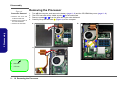
Removing the Keyboard
1. Turn off the computer, and remove the battery (page 2 - 5).
2. Press the four keyboard latches at the top of the keyboard to elevate the keyboard from its normal position (you
may need to use a small screwdriver to do this).
3. Carefully lift the keyboard up, being careful not to bend the keyboard ribbon cable (Figure b).
4. Disconnect the keyboard ribbon cable 5 from the locking collar socket 6 .
5. Carefully lift up the keyboard 7 (Figure c) off the computer.
a.
b.
1
2
3
4
2.Disassembly
5
6
Re-Inserting the Keyboard
c.
When re-inserting the
keyboard firstly align
the five keyboard tabs
at the bottom of the
keyboard with the slots
in the case.
7
7. Keyboard
2 - 16 Removing the Keyboard
7
Keyboard Tabs