1
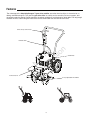
Controls
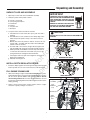
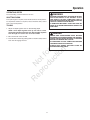
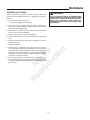
DRIVE SAFETY CONTROL LEVER
! CAUTION
Engage tines into forward, releasing returns machine to neutral.
Pulling down on drive safety control lever engages the tines. Releasing
the drive safety control lever disengages the tines to a neutral
position.
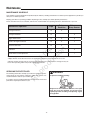
BELT TENSION ADJUSTMENT
Proper belt tension is critical to good performance. After 1/2 hour of
operation, all cables may have to be adjusted due to initial stretch.
Thereafter, check tension after every 2 hours of operation.
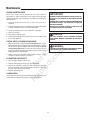
To increase belt tension:
1. Loosen upper jam nut. Turn nut up cable in 1/8” increments.
3. Check adjustment.
This procedure can be repeated until conduit adjustment bolts have
no more adjustment left. If no more adjustment can be made, belt
may have to be replaced.
! WARNING
ENGINE SHOULD BE OFF BEFORE ADJUSTING
ANY CONTROLS.
N
ep o
ro t fo
du r
ct
io
n
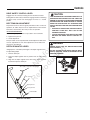
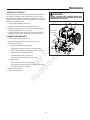
DEPTH REGULATOR LEVER
Tilling depth is controlled by the height of the depth regulator lever.
1. Remove detent pin.
s AS A SAFETY PRECAUTION, THE DRIVE SAFETY
CONTROL LEVER WILL NOT LOCK IN THE
FORWARD POSITION.
s TO STOP THE WHEELS AND TINES AT ANY TIME
RELEASE THE DRIVE SAFETY CONTROL LEVER.
2. Tighten lower jam nut.
To adjust tilling depth.
THIS INFORMATION IS PROVIDED HERE ONLY TO
INTRODUCE THE CONTROLS. DO NOT START THE
ENGINE AT THIS TIME. STARTING AND OPERATING
INSTRUCTIONS ARE GIVEN ON PAGE 10. PLEASE
READ THIS SECTION AND ALL OPERATING AND
SAFETY INSTRUCTIONS BEFORE STARTING YOUR
TILLER.
DO NOT ADJUST TILLING DEPTH UNLESS DRIVE
SAFETY CONTROL LEVER IS RELEASED TO THE
NEUTRAL POSITION.
2. Raise the depth regulator lever to position tines at chosen tilling
depth.
3. Align hole in depth regulator lever with hole in depth regulator
bracket and replace detent pin.
drive safety control lever disengaged
R
1/4” stretch
upper jam nut
lower jam nut
forward cable
Model 5521 Handlebar
9