1
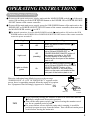
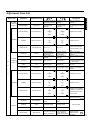
Selected
characters
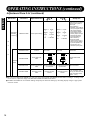
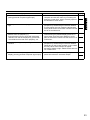
Menu item
PICTURE
if RGB is
selected
(
)
Adjustment item
CONTRAST
Contrast
BRIGHTNESS
Brightness
Setup hint
Narrows the gap between Broadens the gap
between brightness and
brightness and darkness. darkness.
Black is subdued for
Black is set off for
increasedoverall
increased overall
darkness.
brightness.
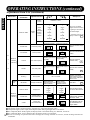
WARM
WARM
NORM
NORM
COOL
COOL
1.0
↑
2.2
↑
2.8
1.0
↓
2.2
↓
2.8
↓
COLOR SELECT
OPTIONS
Color temperature
GAMMA
Gamma correction
VIDEO LEVEL
Input signal level
CONTRAST
Contrast
BRIGHTNESS
Brightness
COLOR
Color (color density)
TINT
Tint
SHARPNESS
Sharpness
COLOR SELECT
Color temperature
PICTURE
M
(
if VIDEO is
selected
)
A
I
↓
Set to 0.7 V.
OPTIONS
GAMMA
Gamma correction
VIDEO LEVEL
Input signal level
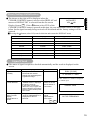
SOUND
Sound volume
BALANCE
Sound balance
TREBLE
↑
Set to 1.0 V.
WARM
WARM
NORM
NORM
COOL
COOL
1.0
↑
2.2
↑
2.8
1.0
↓
2.2
↓
2.8
NORMAL
NORMAL
+10%
+10%
+20%
+20%
↓
↑
VOLUME
↑
Normally set to NORM.
Normally set to 2.2.
Normally set to 0.7 V. If
white is found to spread
across the screen, set to
1.0 V.
Narrows the gap
Broadens the gap
Adjust for maximum
between brightness
between brightness
visibility to suit the ambient
and darkness.
and darkness.
brightness.
Black is subdued for
Black is set off for
Adjust for visibility to suit
increased overall
increased overall
the darkness of black
darkness.
brightness.
hair.
Adjust for desired density,
Lightens colors.
Darkens colors.
somewhat for lighter colors
for a natural look.
Enhances red and
Enhances green and Adjust for a nice looking
weakens green.
weakens red.
skin color.
Normally set to middle, and
Softens display images. Sharpens display images. towards - for increased
softness.
↓
N
Adjust for maximum
visibility to suit the ambient
brightness.
Adjust to prevent black
from spreading across the
screen.
ENGLISH
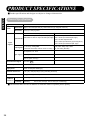
Adjustment Item List
↑
↑
↑
↓
↓
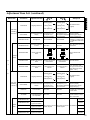
Turns down the volume. Turns up the volume.
sound.
Enhances right-side
sound.
Treble
Suppresses treble.
Enhances treble.
BASS
Bass
Suppresses bass.
Enhances bass.
MUTE LEVEL
Mute volume
Enhances left-side
Normally set to COOL.
Normally set to 2.2.
Normally set to NORMAL.
If white is found to spread
across the screen, set to
+10% or +20%.
Adjust for the
10
desired sound volume.
Adjust to taste.
Sets the sound
Turns down the sound Turns up the sound
volume for when
volume. Maximum
volume. Minimum 0. pre-mute sound volume. the MUTE button
is pressed.
11
13