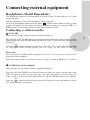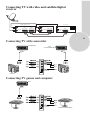
1
Connecting a decoder
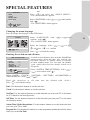
Via SCART
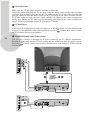
Make sure the TV and decoder are both switched off. Plug one end of the SCART lead
(not supplied) into the back of the decoder and the other end into the SCART1 on the
back of the TV. Switch on the decoder and the TV. Press the » AV « button on the remote
control to select AV1.
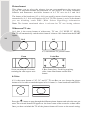
Via PHONO lead (Model Dependant)
Make sure the TV and decoder are both switched off. Plug one end of the PHONO lead
into the video and audio out sockets on the back of the decoder and plug the other end
into the video and audio in sockets on the TV.
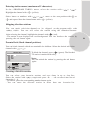
AV
30
« button repetitively and select the AV3 mode for two scart models or select
Press the »
AV4 mode for three scart models.
Please Note
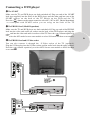
You can record from one external piece of equipment to another via the TV by connecting
the playback to SCART 1 and the recorder to SCART 2 or SCART 3 and selecting AV1.
You cannot watch the TV.
You can connect NTSC supported equipment to the TV via the SCART sockets and
adjusting the colour via the PICTURE menu.
Select TINT by using »
« button and use the adjust the colour to » « or » « buttons.
R
L
MONO
VIDEO
COAX
R
AUDIO OUT
L
AV3
AV1
AV2
VIDEO OUT
ANTENNA IN
R
EURO A V 1
TV
L
OUT
TV DIGITAL AUDIO AUDIO OUT
OUT
S-VIDEO OUT
EURO A V 2
DECODER
DECODER
110-240 V~
50/60 Hz 35 W