1
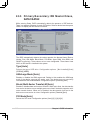
2.3.5 Primary/Secondary IDE Master/Slave,
SATA1/SATA2
While entering Setup, BIOS automatically detects the presence of IDE devices.
There is a separate sub-menu for each IDE device. Select a device item then press
<Enter> to display the IDE device information.
Primary IDE Master
Device
: Hard Disk
Vendor
: ST340014A
Size
: 40.0GB
LBA Mode : Supported
Block Mode : 16 Sectors
PIO Mode : 4
Async DMA : MultiWord DMA-2
Ultra DMA : Ultra DMA-5
SMART Monitoring: Supported
Type
LBA/Large Mode
Block (Multi-Sector Transfer) M
PIO Mode
DMA Mode
SMART Monitoring
32Bit Data Transfer
Select the type
of device connected
to the system.
←→
↑↓
+F1
F10
ESC
[Auto]
[Auto]
[Auto]
[Auto]
[Auto]
[Disabled]
[Disabled]
Select Screen
Select Item
Change Option
General Help
Save and Exit
Exit
v02.58 (C)Copyright 1985-2004, American Megatrends, Inc.
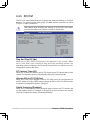
The BIOS automatically detects the values opposite the dimmed items (Device,
Vendor, Size, LBA Mode, Block Mode, PIO Mode, Async DMA, Ultra DMA, and
SMART monitoring). These values are not user-configurable. These items show
N/A if no IDE device is installed in the system.
Type [Auto]
Selects the type of IDE drive. Configuration options: [Not Installed] [Auto]
[CDROM] [ARMD]
LBA/Large Mode [Auto]
Enables or disables the LBA/Large mode. Setting to Auto enables the LBA/Large
mode if the device supports this mode, and if the device was not previously
formatted with LBA mode disabled. Configuration options: [Disabled] [Auto]
Block (Multi-Sector Transfer) M [Auto]
Enables or disables data multi-sectors transfers. When set to Auto, the data transfer
from and to the device occurs multiple sectors at a time if the device supports multisector transfer feature. When set to Disabled, the data transfer from and to the
device occurs one sector at a time. Configuration options: [Disabled] [Auto]
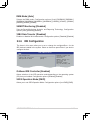
PIO Mode [Auto]
Selects the PIO mode. Configuration options: [Auto] [0] [1] [2] [3] [4]
2-12
Chapter 2: BIOS Information