1
Duracell_PP_300_PlusEP.book Page 40 Wednesday, June 13, 2007 4:02 PM
Troubleshooting Reference
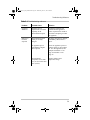
Table 5-1 Troubleshooting reference
Problem
Possible Cause
Solution
Measured AC
output voltage
is too low.
Using an average-reading
AC voltmeter to read
output voltage.
The modified sine wave output
of the Duracell® Powerpack
requires a true RMS reading
meter, such as the Fluke 87
series, for accurate
measurement.
Duracell® Powerpack
battery is almost fully
discharged.
Press Battery Level button to
verify battery status and recharge
the Duracell® Powerpack as
necessary. Battery Level LEDs
are only accurate when the unit
has been disconnected from all
appliances and all charging
sources for 15 minutes.
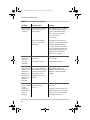
Battery Status
LED is OFF
when AC
charger is
connected
No AC power at the AC
wall outlet.
Ensure power is available at the
AC wall outlet.
AC charger is faulty.
Replace the AC charger.
Battery Status
LED is red and
Battery Level
LEDs show
the battery is
full when the
Battery Level
button is
triggered.
Battery Level lights are
only accurate when the
Duracell® Powerpack has
been disconnected from
all appliances and all
charging sources for 15
minutes.
Unplug the charging sources and
any appliances and let the
Duracell® Powerpack rest for 15
minutes to obtain an accurate
reading.
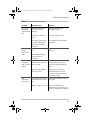
Battery Status The voltage at the AC wall
LED is red and outlet is less than
120 V AC.
has not
changed to
green after 24
hours of
charging.
Use AC wall outlet that supplies
120 V AC.
40
Continue to charge the unit for
another 12 hours; the unit will be
ready to use even if the Battery
Status light remains red.