1
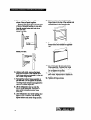
Removing
(Model
RTISDK
the meat drawer
and cover
only)
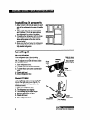
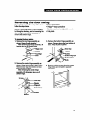
Remove the meat drawer and cover for
easier cleaning.
Lift the front, then
the back.
To remove the meat drawer:
1. Slide meat drawer out to the stop.
2. Lift the front slightly.
3. Slide meat drawer out the rest of the way.
4. Replace in reverse order.
To remove the cover:
1. Remove the meat drawer.
2. Tilt front of cover up.
3. Pull cover up and out.
To replace the cover:
1. Fit bottom notches of cover over rear and
center cross bars of shelf.
2. Lower cover into place.
3. Replace the meat drawer.
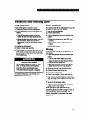
Removing
(Model
RTl8DK
the crispers
Pull out to the
stop, lift the front,
and pull again.
and crisper
cover
only)
Use your crispers to store fruit and vegetables.
To remove the crispers:
1. Slide crisper out to the stop.
2. Lift the front.
3. Slide out the rest of the way.
4. Replace in reverse order.
Lift the front, then
the back.
cover carefully.
To remove the cover:
1. Lift the front, then the back.
2. Pull cover up and out of cabinet.
To replace the cover:
1. Fit rear cover notches into nubs on rear
of refrigerator walls.
2. Lower front of cover into place.
Pull out to the stop, lift the
front, and pull again.