1
Configuring the audio output
English
All-in-one PC supports different types of audio configurations. Set up the system using stereo
speakers.
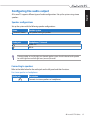
Speaker configurations
Set up the system with the following speaker configurations:
Name
2-channel (stereo)
Speaker system
Left speaker and right speaker.
Audio jack
Headphones/2-channel
Audio Out
Mic In
A stereo speaker set is a left-right, two channel speaker system. A multi-channel audio speaker
has a left-right front and left-right rear (surround) channel.
Connecting to speakers
Refer to the table below for the audio jacks on the left panel and their functions.
For stereo speakers or headphones
Audio jack
Description
Connects to stereo speakers or headphones.
All-in-one PC ET24 Series
37