1
T-18
Lesson 1 - ModelSim conceptual overview
Multiple library flow
ModelSim uses libraries in two ways: 1) as a local working library that contains the compiled version of your design; 2) as a
resource library. The contents of your working library will change as you update your design and recompile. A resource library
is typically static and serves as a parts source for your design. You can create your own resource libraries, or they may be supplied
by another design team or a third party (e.g., a silicon vendor).
You specify which resource libraries will be used when the design is compiled, and there are rules to specify in which order they
are searched. A common example of using both a working library and a resource library is one where your gate-level design and
testbench are compiled into the working library, and the design references gate-level models in a separate resource library.
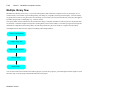
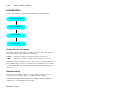
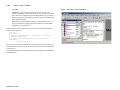
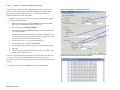
The diagram below shows the basic steps for simulating with multiple libraries.
Create a working library
Compile design files
Link to resource libraries
Run simulation
Debug results
You can also link to resource libraries from within a project. If you are using a project, you would replace the first step above with
these two steps: create the project and add the testbench to the project.
ModelSim Tutorial