1
BRÄHLER ICS
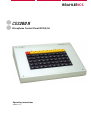
CDS200 II
Microphone Control Panel BC202/50
Operating instructions
Version 1.01
BC202/50
CDS200 II
Printed in Germany
Should you have some questions regarding this manual please contact:
Brähler ICS Konferenztechnik
International Congress Service AG
Auf der Alten Burg 6
D-53639 Königswinter, Germany
Tel.: +49 2244 930-100
E-Mail: [email protected]
You will find further information about our products on the Internet at:
www.braehler.com
© 2007
BRÄHLER ICS AG, Königswinter
All rights reserved, especially (also partly) the translation, reprint, reproduction through copying or
other similar methods.
BRÄHLER ICS reserves the right to make changes without notice.
Operating instructions CDS200 II, BGE-BC202-50.doc
Mar-08
CDS200 II
BC202/50
CAUTION
DANGER OF ELECTRIC SHOCK
DO NOT OPEN DEVICES!
Do not open housing with mains cable connected.
Maintenance operations may only be done by
qualified personnel.
Our equipment and installations have been built and tested according to the latest state of the art.
In general conditions they do not require any special maintenance.
However, please be aware of the following:
; Positioning - secure and stable position of the equipment
; Ventilation - operate equipment with proper ventilation. Avoid heat sources such as heating
radiators etc.
; Mains connection – pass all power cables so that they will not be damaged
; Cable connections - avoid trip-traps
; Liquids - avoid penetration of liquids into the housing
; Power sockets - operate equipment only with power sockets that are connected to ground
according to the relevant specifications and regulations
Warning: Never expose equipment to rain or humidity
Rough handling of the equipment, such as strong shocks or vibrations, may result in damages.
Inappropriate handling and storage, which does not conform to the operating instructions, may also
lead to equipment damages.
Copyright by Brähler ICS
3
BC202/50
4
CDS200 II
Copyright by Brähler ICS
CDS200 II
BC202/50
Content
1. about this manual....................................................................................................................6
Symbols .................................................................................................................................6
2. Important remarks...................................................................................................................7
For customers in the EU and in the USA ...............................................................................7
Safety.....................................................................................................................................7
Installation..............................................................................................................................7
Cleaning.................................................................................................................................7
Repacking ..............................................................................................................................7
General ..................................................................................................................................8
3. System description .................................................................................................................9
3.1 System functions..............................................................................................................9
3.2 Operation .......................................................................................................................10
3.2.1 Operating Control Panel .......................................................................................... 10
3.2.2 Rear side and DIP Switch-Setting ............................................................................. 12
4. Trouble shooting ...................................................................................................................13
5. Warranty.................................................................................................................................14
6. Contact addresses ................................................................................................................17
Copyright by Brähler ICS
5
BC202/50
CDS200 II
1. about this manual
Symbols
The meaning of the symbols and fonts used in this manual:
Indicates an important note, if not minded, the functionality of the unit, the security of your
data, or your health are put at risk.
Supplementary information, remarks, and tips follow this symbol.
Text which follows this symbol describes activities that must be performed in the order
shown.
Texts in bolded letters require your special attention.
6
Copyright by Brähler ICS
CDS200 II
BC202/50
2. Important remarks
For customers in the EU and in the USA
The equipment is complying with the standards of the CE regulations. These standards are
specified to provide reasonable protection against harmful interference when the equipment is
operated in a commercial environment. The equipment can radiate radio frequency energy and if
not installed and used according to the user manual it may cause harmful interference to radio
communications. Any changes or modifications which are not explicit approved in this manual
could void your authority to operate this equipment.
The equipment must be connected to ground!
Safety
Check that the operating voltage of the unit is identical with the voltage of your local power supply.
If a voltage conversion is required, consult your BRÄHLER ICS dealer or qualified staff.
Should any liquid or solid object fall into the housing, unplug the unit and let it check by qualified
staff before further operations. Unplug the unit from the power outlet or set the mains power switch
to OFF if it’s not used for several days. To disconnect the cord, pull it out holding the plug. Never
pull the cord itself.
Installation
Allow proper air circulation to prevent internal heat accumulation. Do not place the unit on a
surface that may block the ventilation holes.
Do not install the unit in a location near heat sources or in a place exposed to direct sunlight,
excessive dust, humidity, mechanical vibration or shock.
Do not install the unit when it is changed from cold outside to warm inside. In this case wait approx.
1 hour until temperature is even-tempered.
Cleaning
To keep the housing in its original condition, periodically clean it with a soft cloth. Stubborn stains
may be removed with a cloth lightly dampened with a mild detergent solution. Never use organic
solvents such as thinners or abrasive cleaners as these will damage the cabinet.
Repacking
If possible save the original shipping carton and packing material; they will become useful if you
ever have to ship the unit. In this case please keep the manual and the unit together. For maximum
protection, re-pack the unit as originally packed by the factory.
If not supplied with the equipment, a complete transport and storage box system is available from
BRÄHLER ICS. We recommend using this system for long-term protection and care.
Copyright by Brähler ICS
7
BC202/50
CDS200 II
General
Please keep this manual together with the CDS200 II equipment. If you pass on the unit to other
parties, please include this manual.
Please read the manual carefully, taking special care when you see this symbol as it
indicates important information!
The warranty will expire, if you cause defectives by inappropriate use or handling of the
unit.
Although CDS200 II is a simple and reliable system, it is recommended, that the
BRÄHLER ICS® advisory service is consulted for planning, installation and
commissioning.
8
Copyright by Brähler ICS
CDS200 II
BC202/50
3. System description
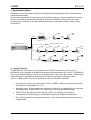
CDS200 II controls up to 800 microphones centralized (switched by technician) or decentralized
(switched by delegates)
All network components are connected in single-cable technology. Length of cabling is not critical though it is limited by the power demanded by increasing numbers of microphones. As many
microphones as desired can be connected simultaneously using pairs of cables without loss of
performance.
BC202/50
TM58
A9 cable
A9 cable
DC10
Central Control Unit
Up to 160 units in 4 rows
TM58
S8G/
48V
DPS202
DC10
TM58
Delegate Units DC10 and EDC10
EDC10
3.1 System functions
The BC202/50 is a microphone control panel for the CDS200 II system to control up to 50
microphone units. Operation is possible both with and without additional PC control. The BC202/50
can be connected anywhere in any of the microphone lines. This means that control can take place
at the technician or chairman/secretary positions. Different microphone operating modes
(AUT3…6, MAN, PRIO, VIP) can be selected for different conference situations.
•
AUT(omatic) mode (in connection with FLOAT and NEXT): Number of simultaneous active
microphones is adjustable from 1 to 6.
•
MAN(ual) mode: All microphones are switched on and off by corresponding keys. Requests
are displayed by a blinking LED (in the keys with the first request blinking faster).
•
PRIO: Priority operating from the chairman's desk. The chairman can switch all
microphones off (continuously or occasional) excluding VIP assigned microphones.
•
VIP: Priority functions for special microphones, which can be switched on at any time even
in MAN mode.
Copyright by Brähler ICS
9
CDS200 II
BC202/50
3.2 Operation
3.2.1 Operating Control Panel
1
2
3
4
5
6
7
8
9
10 11
12
BRÄHLERICS
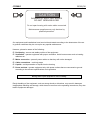
13
1
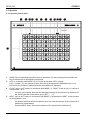
MODE: Key for switching to another mode of operation. For this purpose press and hold this
key as well as one of the following mode keys.
2
AUT: In connection with MODE (1) AUT mode is activated. LED (3) lights.
AUT + number (13): the number of same time active microphones is adjustable from 1 to 6.
AUT alone: the number of same time active microphones is indicated.
4
FLOAT (only in AUT mode): In connection with MODE (1) “FLOAT” mode is set (x = number of
microphones 1 to 6)
If x slots are occupied, then the next delegate pressing its microphone key switches off
the first microphone of the active group (AUT 1 …, 6).
5
NEXT: (only in AUT mode): In connection with MODE (1) activating the “NEXT” mode (number
of microphones 1 to 6)
If a speaker switches off his microphone, then the next microphone of the request list is
switched on automatically.
Pressing NEXT alone: the next microphone of the request list is switched on.
10
Copyright by Brähler ICS
CDS200 II
6
BC202/50
MAN (Manual): In connection with key MODE (1) the “MAN” mode is set. The microphones are
switched by means of the keys (13). Speaker requests are indicated by flashing of the
appropriate key LED.
Note: The delegate is not able to switch on the microphone by himself.
7
NoP: Activating the allocation of the chairman. All other microphones are switched off.
Pressing NoP and a number key (13) will determine the chairman.
8
PRIO: If a chair of the meeting is determined before, in connection with MODE (1) the chair of
the meeting has a priority treatment. I.e. by pressing this key all other microphones are
switched off continuously or occasionally. The VIP microphones are excluded.
9
VIP: Changing to the VIP operation mode; the LED of key 9 is on.
Pressing VIP and a number (13) will allocate this microphone as VIP.
Pressing and holding VIP alone: All assigned VIP microphones are indicated.
Note: VIPs can switch on themselves independently in both AUTx and in MAN mode, if
one of the 2 VIP slot is free, i.e. 2 VIP of microphones can be active at the same time.
11 TEST: In connection with MODE (1) changing to the test mode. Pressing TEST + the first
microphone to be tested is determined; the next pressed number key determines the last
microphone to be tested and starts automatically the test. Within the selected range the
microphones are switched off and on.
Note: Pressing again MODE (1) in connection with TEST will stop the test procedure.
12 CLEAR: In connection with MODE (1) all microphone requests are cancelled, all flashing LEDs
change to off.
CLEAR + number deletes the request of the selected microphone.
13 Microphone keys with associated LEDs (on status is shows by LED)
Copyright by Brähler ICS
11
CDS200 II
BC202/50
3.2.2 Rear side and DIP Switch-Setting
14
15
16
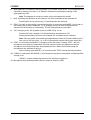
14 DIP switch for the definition of the unit ID (246 or 247) of the control console BC202/50.
Please notice: Especially in shared operation of BC202/50 and BC202/100
Unit ID 246: The range of microphone number is 1 to 50 (1 to 100 with BC202/100)
Unit ID 247: The range of microphone number is 101 to 150 (101 to 200 with
BC202/100)
15
Socket S8G-GJ: Connection to further microphones in the chain
16
Connection cable to previous microphone
12
Copyright by Brähler ICS
CDS200 II
BC202/50
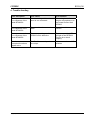
4. Trouble shooting
Error description
Error cause
Error solution
After system start there
is no response of the
panel BC202/50.
The connecting cable to the
panel is not connected.
Connecting the cable to
the prior microphone or to
the Central Control Unit
DPS202
After system start there
is no response of the
panel BC202/50.
Short circuit in the connection
cable
Check the cable to correct
function
After system start there
is no response of the
panel BC202/50.
The corresponding out of the
DPS202 unit is defective
The corresponding LED
will light at the DPS202.
The line is to check
properly.
After the system start
microphone numbers
appear twice.
The ID of the control panels are
not unique
Make a correction on DIP
switches
Copyright by Brähler ICS
13
BC202/50
CDS200 II
5. Warranty
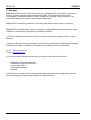
BRÄHLER ICS allows for the CDS200 II products a warranty period of 24 months, from date of
delivery, for faulty materials and/or manufacturing faults. The warranty does not include
rechargeable or disposable batteries, misuse, negligence, breakage, wrong installation, use
outside the existing rules and any unauthorised modifications.
BRÄHLER ICS rejects any guarantee, if the safety label with the serial number is removed.
BRÄHLER ICS declares itself to agree to exchange or repair defective components due to faulty
materials or manufacturing, dependent on following procedure:
1) The client declares that the fault is not due to empty, discharged, wrongly inserted, or faulty
batteries.
2) Before sending the faulty product back to the company, please obtain an RMA (Return Material
Authorisation) number. An RMA can be obtained by contacting us at the details below
Phone +49 (0) 2244 930-100
or email: [email protected]
3) You may send the defective product free of charge to (refer to the service form):
BRÄHLER ICS Konferenztechnik
International Congress Service AG
Auf der Alten Burg 6
D-53639 Königswinter
Germany
4) Should it turn out that the fault was caused through inattentiveness or inappropriate use, the
service and shipping charges will be added to the clients account.
14
Copyright by Brähler ICS
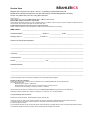
Service form
BRÄHLER ICS
Material return shipments for repair-, service-, or guaranty purposes please send to:
BRÄHLER ICS Konferenztechnik AG, Auf der Alten Burg 6, D-53639 Königswinter, Germany
Phone +49 (0)2244 930-100, Fax +49 (0)2244 930-450
Dear customer,
Please ask our sales staff for the RMA number (Return of Material Authorization).
Without RMA number a treatment is not possible!
Please always include this service form, fully completed, with any complaint or repair wish you may have. Please note that only returns
with the proper and complete paperwork can be dealt within time.
A detailed fault description will reduce costs and period of repair.
Please contact us before you return equipment in order to find the most efficient way of sending.
RMA number: _________________________________________________________________________
Article description: _____________________ Serial no.: _____________ Code: ____________________
Delivery note no.: ___________________ Invoice no.: _________________________________________
Reason for return/Fault description:
______________________________________________________________________________________
______________________________________________________________________________________
______________________________________________________________________________________
Company: _____________________________________________________________________________
Contact person: ________________________________________________________________________
Phone: __________________________________ Fax: ________________________________________
Notes/Comments:
______________________________________________________________________________________
______________________________________________________________________________________
______________________________________________________________________________________
Transport damages have to be reported immediately to the responsible forwarding agent.
Remarks for Non-EU customers:
Please add to each return a delivery note or a proforma invoice, addressed to Brähler ICS AG, Königswinter,
with following statements:
Reason for return (repair or credit note)
Exact declaration of the goods, exact no. of pieces, article no. / model, serial no.
Price which was invoiced by us, better our invoice no. with date
Return shipments from Non-EU countries have to be sent either by air freight to Cologne airport, to the attention of:
Calenberg Oversea Logistics, Mrs. Taxacher, Welser Str. 8, 51449 Köln, Tel: +49 2203 3592-838
or by the following courier services:
DHL Express, Federal Express, TNT Worldwide Express, UPS Express
Please do not use any other courier service, because only the four companies mentioned above perform return shipments.
To enable quick and cost efficient customs clearance, kindly take care that the airway bill mentions
a) 'return for repair' as well as
b) the customs tariff code number of the goods (which will be advised by us together with the return of material authorization number)
Any expenses (duties and taxes) incurred by deviant handling will be charged to the sender.
BC202/50
16
CDS200 II
Copyright by Brähler ICS
CDS200 II
BC202/50
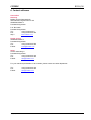
6. Contact addresses
Head office
Germany
Brähler ICS Konferenztechnik
International Congress Service AG
Wahlfelder Mühle 3
D-53639 Königswinter
P.O. Box 3264
D-53627 Königswinter
Tel.:
+49 (0) 2244 930-0
Fax:
+49 (0) 2244 930-450
http://
www.braehler.com
Rental service
Wahlfelder Mühle 3
D-53639 Königswinter
Tel.:
+49 (0) 2244 930-200
Fax:
+49 (0) 2244 930-430
E-Mail:
[email protected]
Sales
Auf der Alten Burg 6
D-53639 Königswinter
Tel.:
+49 (0) 2244 930-100
Fax:
+49 (0) 2244 930-450
E-Mail:
[email protected]
For your nearest representative in 85 countries, please contact our sales department:
Tel.:
Fax:
E-Mail:
Copyright by Brähler ICS
+49 (0) 2244 930-100
+49 (0) 2244 930-450
[email protected]
17
BRÄHLERICS
Phone: 02244 930-0
www.braehler.com
BGE-BC202-50.doc / Mar-08
04.0460