1
UM1839
3.2.4
Getting started
Using two EVALSTGAP1S boards in daisy chain configuration
If you want to drive two EVALSTGAP1S boards refer to dedicated Section 2: Connection of
two EVALSTGAP1S boards on page 6 for the board's connection and jumper's settings,
then follow the steps of Section 3.2.3: Connection to STEVAL-PCC009V2 interface board
up to point 5.
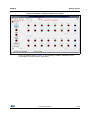
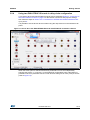
It is possible to set the driven device number using the drop down list in the software main
panel.
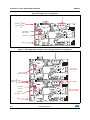
Figure 11. How to drive two EVALSTGAP1S boards with STGAP1S evaluation software
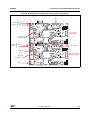
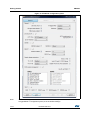
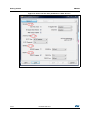
When the 'Dual' option is selected the devices parameters can be set independently
selecting the 'Device 1' or 'Device 2' in the STGAP1S configuration panel. Otherwise it is
possible to set some parameter values on both devices ticking one or more 'push-pin' boxes
(refer to Figure 12).
DocID027168 Rev 1
15/18
18